U.S. Pat. No. 7,663,045
MUSIC REPLACEMENT IN A GAMING SYSTEM
AssigneeMicrosoft Corp.
Issue DateSeptember 20, 2005
U.S. Patent No. 7,663,045: Music replacement in a gaming system
U.S. Patent No. 7,663,045: Music replacement in a gaming system
Issued February 16, 2010, to Microsoft Corp.
Priority Date September 20, 2005
Summary:
U.S. Patent No. 7,663,045 (the ‘045 Patent) describes a method for a user to replace the background music in a video game with their music. The Xbox 360 allowed users to rip music from a CD and download it to the system’s hard-drive. A benefit to having the music on the 360 hard-drive was the system allowed users to listen to their music while playing a game. The system would mute game’s background music and then insert the user’s music. If the game had a scripted moment that required preselected music, then the system would mute the user’s music until the scripted moment finished. Sound effects remained in the game, so effectively the 360 allowed users to create customized soundtracks.
Abstract:
A user of a game system can replace background music from a game with the user’s selected background music, while still hearing any other audio streams (e.g. sound effects related to gameplay). A music engine and system audio mixer allow the playback of the user’s requested replacement music. The game tags background music streams with an identifier indicating that they are background music, and such streams are muted at the music engine and system audio mixer (if the game is using the provided music engine in order to play the game’s audio streams) or by the game if the game is using a game music engine and has received information indicating that a mute request has been issued.
Illustrative Claim:
1. A system for providing audio playback from a gaming system running an application, wherein said application generates an application default audio stream, said system comprising: application programming interfaces, said application programming interfaces integrating gaming system audio playback control features into said application, wherein audio commands issued by said application are implemented by said gaming system concurrently with execution of said application; an audio input for receiving said audio commands and said application default audio stream from said application; an audio replacement indicator for indicating when replacement of said application default audio stream is requested; an audio output, operably connected to said audio input and said audio replacement indicator, wherein said audio output plays audio comprising said application default audio stream if said audio replacement indicator indicates that no audio replacement is requested, or an alternate audio stream if said audio replacement indicator indicates that audio replacement is requested.
Illustrative Figure
Abstract
A user of a game system can replace background music from a game with the user's selected background music, while still hearing any other audio streams (e.g. sound effects related to gameplay). A music engine and system audio mixer allow the playback of the user's requested replacement music. The game tags background music streams with an identifier indicating that they are background music, and such streams are muted at the music engine and system audio mixer (if the game is using the provided music engine in order to play the game's audio streams) or by the game if the game is using a game music engine and has received information indicating that a mute request has been issued.
Description
DETAILED DESCRIPTION OF ILLUSTRATIVE EMBODIMENTS The method and apparatus described herein allow the user of a gaming system the ability to replace background music in a game or a multimedia application running on the game console with their selected music. Exemplary Gaming System FIG. 1shows an exemplary gaming system100. It includes a game console102and up to four controllers, as represented by controllers104(1) and104(2). The game console102is equipped with an internal hard disk drive and a portable media drive106that supports various forms of portable storage media as represented by optical storage disc108. Examples of suitable portable storage media include DVD, CD-ROM, game discs, and so forth. The game console102has four slots110on its front face to support up to four controllers104, although the number and arrangement of slots may be modified. A power button112and an eject button114are also positioned on the front face of the game console102. The power button112switches power to the game console and the eject button114alternately opens and closes a tray of the portable media drive106to allow insertion and extraction of the optical storage disc108. Game console102connects to a television or other display (not shown) via A/V interfacing cables120. A power cable122provides power to the game console. The game console102may further be configured with broadband capabilities, as represented by the cable or modem connector124to facilitate access to a network, such as the Internet. Each controller104is coupled to the game console102via a wire or wireless interface. In the illustrated implementation, the controllers are USB (Universal Serial Bus) compatible and are connected to the console102via serial cables130. The controller102may be equipped with any of a wide variety of user interaction mechanisms. As illustrated inFIG. 1, each controller104is equipped with two thumbsticks132(1) and132(2), a D-pad134, buttons136, and two triggers138. These mechanisms are merely representative, and other known gaming mechanisms may be substituted ...
DETAILED DESCRIPTION OF ILLUSTRATIVE EMBODIMENTS
The method and apparatus described herein allow the user of a gaming system the ability to replace background music in a game or a multimedia application running on the game console with their selected music.
Exemplary Gaming System
FIG. 1shows an exemplary gaming system100. It includes a game console102and up to four controllers, as represented by controllers104(1) and104(2). The game console102is equipped with an internal hard disk drive and a portable media drive106that supports various forms of portable storage media as represented by optical storage disc108. Examples of suitable portable storage media include DVD, CD-ROM, game discs, and so forth.
The game console102has four slots110on its front face to support up to four controllers104, although the number and arrangement of slots may be modified. A power button112and an eject button114are also positioned on the front face of the game console102. The power button112switches power to the game console and the eject button114alternately opens and closes a tray of the portable media drive106to allow insertion and extraction of the optical storage disc108.
Game console102connects to a television or other display (not shown) via A/V interfacing cables120. A power cable122provides power to the game console. The game console102may further be configured with broadband capabilities, as represented by the cable or modem connector124to facilitate access to a network, such as the Internet.
Each controller104is coupled to the game console102via a wire or wireless interface. In the illustrated implementation, the controllers are USB (Universal Serial Bus) compatible and are connected to the console102via serial cables130. The controller102may be equipped with any of a wide variety of user interaction mechanisms. As illustrated inFIG. 1, each controller104is equipped with two thumbsticks132(1) and132(2), a D-pad134, buttons136, and two triggers138. These mechanisms are merely representative, and other known gaming mechanisms may be substituted for or added to those shown inFIG. 1.
A memory unit (MU)140may be inserted into the controller104to provide additional and portable storage. Portable memory units enable users to store game parameters and port them for play on other consoles. In the described implementation, each controller104is configured to accommodate two memory units140, although more or less than two units may be employed in other implementations.
The gaming system100is capable of playing, for example, games, music, and videos. With the different storage offerings, titles can be played from the hard disk drive or the portable medium108in drive106, from an online source, or from a memory unit140. A sample of what the gaming system100is capable of playing back include:1. Game titles played from CD and DVD, from the hard disk drive, or from an online source.2. Digital music played from a CD in the portable media drive106, from a file on the hard disk drive (e.g., Windows Media Audio (WMA) format), or from online streaming sources.3. Digital audio/video played from a DVD disc in the portable media drive106, from a file on the hard disk drive (e.g., Active Streaming Format), or from online streaming sources.
FIG. 2shows functional components of the gaming system100in more detail. The game console102has a central processing unit (CPU)200and a memory controller202that facilitates processor access to various types of memory, including a flash ROM (Read Only Memory)204, a RAM (Random Access Memory)206, a hard disk drive208, and the portable media drive106. The CPU200is equipped with a level1cache210and a level2cache212to temporarily store data and hence reduce the number of memory access cycles, thereby improving processing speed and throughput.
The CPU200, memory controller202, and various memory devices are interconnected via one or more buses, including serial and parallel buses, a memory bus, a peripheral bus, and a processor or local bus using any of a variety of bus architectures. By way of example, such architectures can include an Industry Standard Architecture (ISA) bus, a Micro Channel Architecture (MCA) bus, an Enhanced ISA (EISA) bus, a Video Electronics Standards Association (VESA) local bus, and a Peripheral Component Interconnects (PCI) bus, also known as a Mezzanine bus.
As one suitable implementation, the CPU200, memory controller202, ROM204, and RAM206are integrated onto a common module214. In this implementation, ROM204is configured as a flash ROM that is connected to the memory controller202via a PCI (Peripheral Component Interconnect) bus and a ROM bus (neither of which are shown). RAM206is configured as multiple DDR it SDRAM (Double Data Rate Synchronous Dynamic RAM) that are independently controlled by the memory controller202via separate buses (not shown). The hard disk drive208and portable media drive106are connected to the memory controller via the PCI bus and an ATA (AT Attachment) bus216.
A 3D graphics processing unit220and a video encoder222form a video processing pipeline for high speed and high resolution graphics processing. Data is carried from the graphics processing unit220to the video encoder222via a digital video bus (not shown). An audio processing unit224and an audio codec (coder/decoder)226form a corresponding audio processing pipeline with high fidelity and stereo processing. Audio data is carried between the audio processing unit224and the audio codec226via a communication link (not shown). The video and audio processing pipelines output data to an ANV (audio/video) port228for transmission to the television or other display. In the illustrated implementation, the video and audio processing components220-228are mounted on the module214.
Also implemented on the module214are a USB host controller230and a network interface232. The USB host controller230is coupled to the CPU200and the memory controller202via a bus (e.g., PCI bus) and serves as host for the peripheral controllers104(1)-104(4). The network interface232provides access to a network (e.g., Internet, home network, etc.) and may be any of a wide variety of various wired or wireless interface components including an Ethernet card, a modem, a Bluetooth module, a cable modem, and the like.
The game console102has two dual controller support subassemblies240(1) and240(2), with each subassembly supporting two game controllers104(1)-104(4). A front panel I/O subassembly242supports the functionality of the power button112and the eject button114, as well as any LEDs (light emitting diodes) or other indicators exposed on the outer surface of the game console. The subassemblies240(1),240(2), and242are coupled to the module214via one or more cable assemblies244.
Eight memory units140(1)-140(8) are illustrated as being connectable to the four controllers104(1)-104(4), i.e., two memory units for each controller. Each memory unit140offers additional storage on which games, game parameters, and other data may be stored. When inserted into a controller, the memory unit140can be accessed by the memory controller202.
A system power supply module250provides power to the components of the gaming system100. A fan252cools the circuitry within the game console102.
The game console102implements a uniform media portal model that provides a consistent user interface and navigation hierarchy to move users through various entertainment areas. The portal model offers a convenient way to access content from multiple different media types—game data, audio data, and video data—regardless of the media type inserted into the portable media drive106.
To implement the uniform media portal model, a console user interface (UI) application260is stored on the hard disk drive208. When the game console is powered on, various portions of the console application260are loaded into RAM206and/or caches210,212and executed on the CPU200. The console application260presents a graphical user interface that provides a consistent user experience when navigating to different media types available on the game console.
The gaming system100may be operated as a standalone system by simply connecting the system to a television or other display. In this standalone mode, the gaming system100allows one or more players to play games, watch movies, or listen to music. However, with the integration of broadband connectivity made available through the network interface232, the gaming system100may further be operated as a participant in a larger network gaming community. The network interface232may connect to a network. Such a network may be public (e.g. the Internet), private (e.g. a residential local area network (LAN)) or some combination of public and private. Such a network may introduce another memory source available to individual gaming systems100-online storage. In addition to the portable storage medium108, the hard disk drive208, and the memory unit(s)140, the gaming system100(1) can also access data files available at remote storage locations via the network.
Music in a Gaming System
While many games have highly integrated interactive music, a sizable number of other types of games simply “play tunes” for their background music. For example, many action sports games simply include background music not highly integrated into the action, e.g. a snowboarding game which plays music unrelated to the action as the user virtually heads down the slopes. In some embodiments, the gaming system allows the user to replace the background music of a game or other application being run on the gaming system with other music of their own selection. (While it is contemplated that, in general, both the audio data which a game is playing as background and the audio data the user selects to be played replacing that data are music, the use of the term “music” is not intended to be limiting in any way, and both the background to be replaced and the user-selection may be any audio data.)
In a gaming system100, audio data may be played from different sources. Audio data may be stored in memory within the gaming system100, such as a hard disk drive208or memory unit140, stored on media (e.g. portable medium108) in a media reader (e.g. drive106) in or directly attached to gaming system100, or may be available via a network. A locally connected personal computer may be a source of music, as can a connected portable personal music player device.
The user of a gaming system uses a game controller104or other user input device to the gaming system to view a music player user interface (UI). This music player UI may be a separate UI or may be part of a UI with broader utility. The music player UI allows the user to browse music stored in or accessible to the gaming system. Playlists organizing music files may be supported in the music player UI. The user uses the music player UI to start playback of one or more selected music files. When this occurs, if a game or other application with background music is running (or begins), the background music is muted.
In some embodiments, the game console102includes a music player engine in order to play the music files selected by the user via the music player UI.FIG. 3is a block diagram of the interaction between the music player engine and other parts of the game console102. As seen inFIG. 3, the music player UI300utilizes the music engine302. In addition, music engine302can be used by game or other applications running on game console102via music engine library304, which contains a set of application program interfaces (APIs) used to request services from the music engine302, such as enumeration of playlists, selection of audio files and playing of audio files. Thus information can be obtained by a game about the currently playing music and this information can be integrated into the game. For example, if a game simulates the experience of driving a car, a car stereo can be simulated which allows the user to pick stations correlated with existing playlists, or can include a display of the current title playing.
In some embodiments, music engine library304also contains APIs used by applications running on the game console102in order to allow an application to have information regarding whether the user has decided to replace the application's background music. Music engine302provides audio data to a system audio mixer310. The system audio mixer310acts as the gateway between all parts of the game console102and the audio output. While other components may act on the audio signal after it leaves the system audio mixer310(for example, Dolby encoding) the system audio mixer310functions as the audio mixer for the entire game console102and determines what audio will be output from the game console102, e.g. via audio codec224(fromFIG. 2) and A/V cables120(fromFIG. 1). With reference again toFIG. 2, in one embodiment, the system audio mixer310is audio processing unit224, and in another, audio processing unit224includes all or part of the functionality of the system audio mixer310. In another embodiment, no audio processing unit224is present, but the functionality of the audio processing unit224is performed by system audio mixer310.
The music engine302is implemented as a set of concurrent services that perform decoding and playback from various music formats, playlist enumeration, data streaming and any necessary digital rights management support. As a concurrent system service, the CPU, memory and bandwidth for the music engine302is allocated from the system application budget. Access to the music engine302is provided in the form of a set of APIs (application program interfaces) that form music engine library304. The music engine serves both the music player UI300and any games or other software running on the gaming system which requests music engine service.
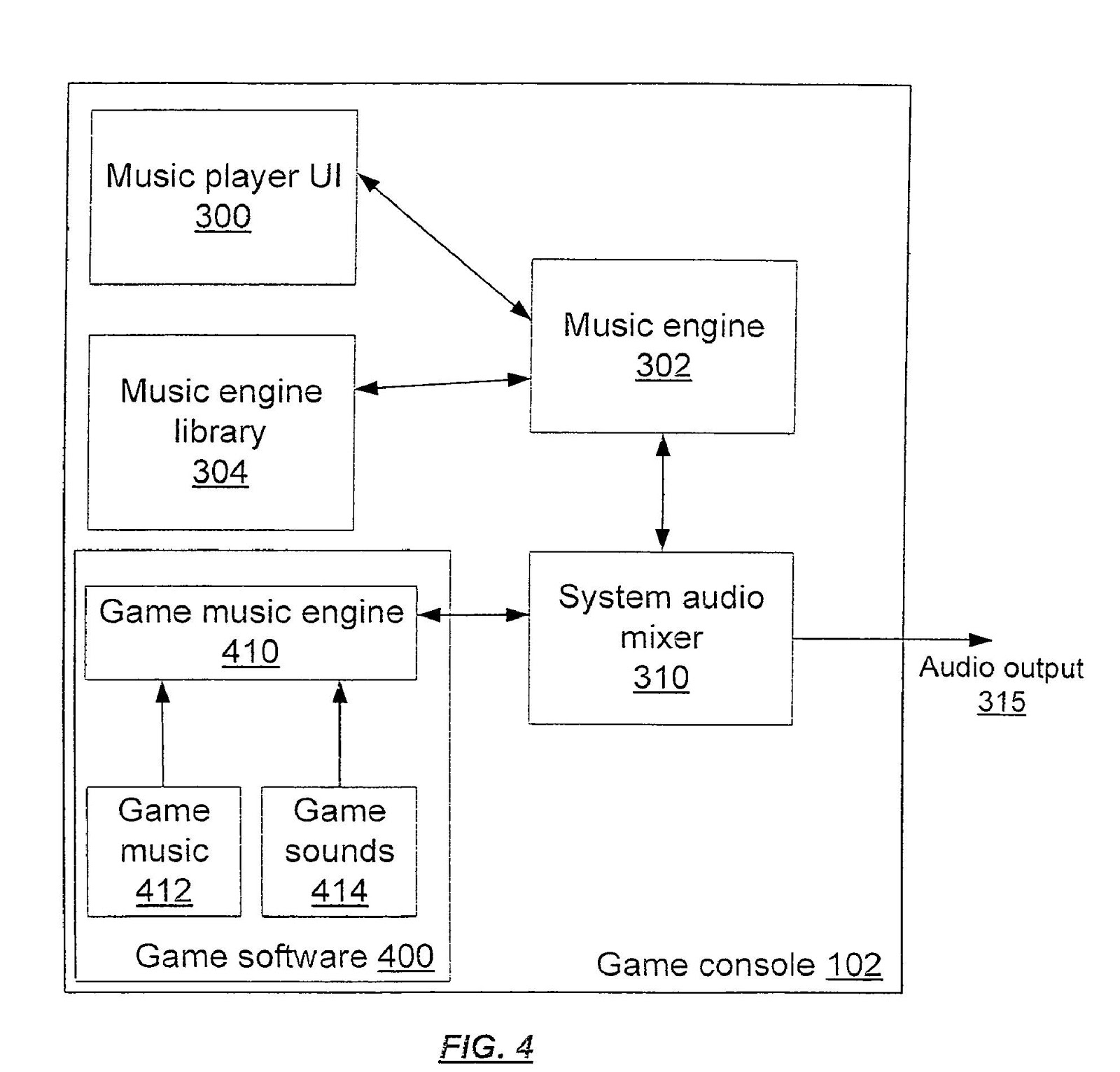
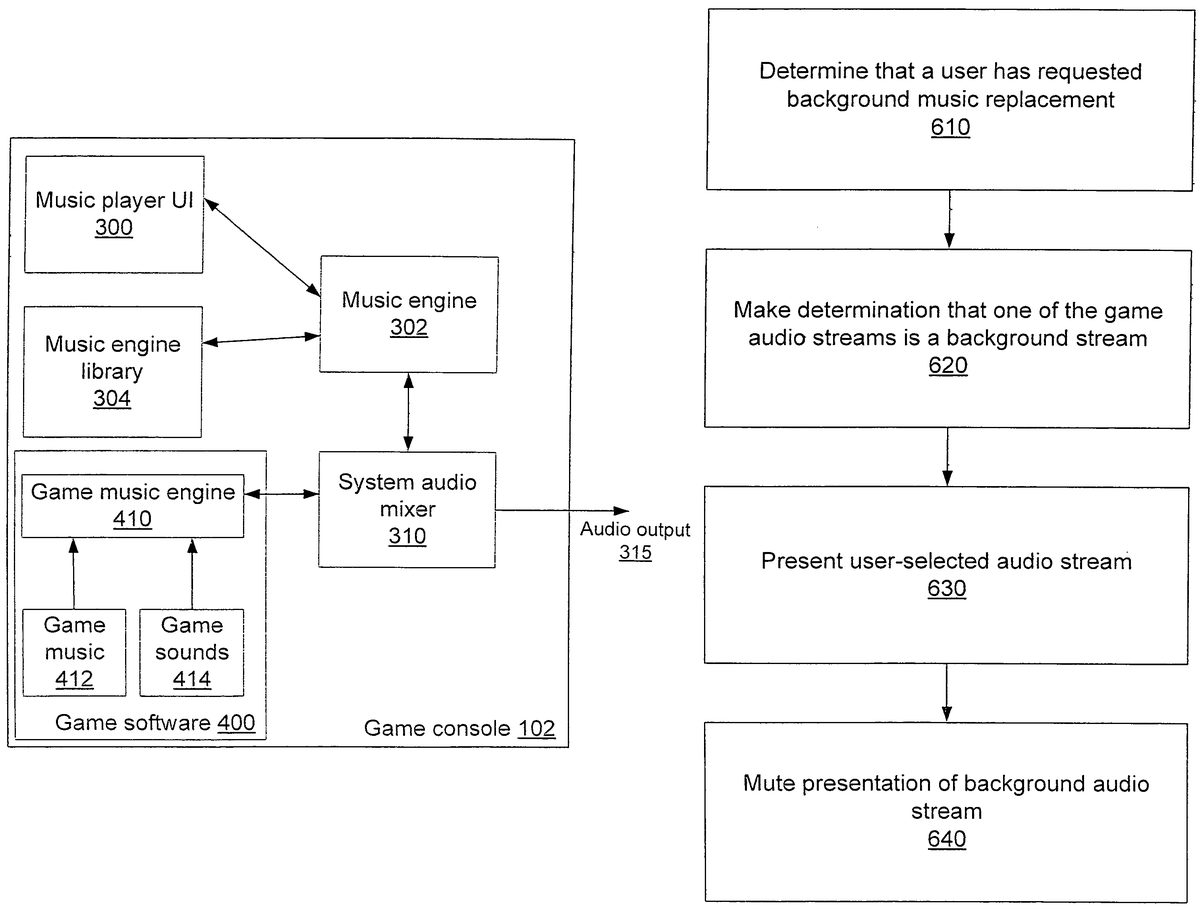
Some games do not use the music engine302in order to provide audio (background music and other audio output) to the user.FIG. 4is a block diagram of the relationship between system software in the game console102and game software separately providing a game music engine. As shown inFIG. 4, while music engine302still provides audio output to the system audio mixer310, the game software400has a game music engine410, instead of utilizing the music engine302. Game background music412and all other game sounds414are played through the game music engine410, which provides audio playback information to the system audio mixer310. In order for replacement of background music412by a user utilizing music player UI300, a mute control signal is provided by the music engine302to the game music engine410. If the mute control signal indicates that the user has requested replacement of the background music, the game music engine410does not request that system audio mixer play game background music412, but only that it play other game sounds414.
FIG. 5illustrates an exemplary graphical user interface500depicting the music player UI300. The graphical user interface500would be displayed using all or part of a display associated with gaming system100. As shown inFIG. 5, the graphical user interface includes selectable areas such as reverse area510, forward area512, pause area514, skip forward area516and skip backwards area518. These areas allow a user to pause music and to move within music tracks or to a new track. Song name area520displays the name of a song and allows the user to view all songs in a playlist and choose among them, and playlist name area530displays the name of a playlist and allows the user to view all the playlists available and choose among them. Time elapsed bar535shows how much time (relative to the total length) has elapsed in a track or a playlist. Volume slider and bar540allows the user to control the volume. Current play information area550includes information such as the current song and playlist, and timing information (such as how much more time the playlist will take to play, or how much time a song or playlist has been playing.
As previously mentioned, in many cases, the game designer will include game-specific UI for music selection. The specific UI in the case of the game simulating the experience of driving a car should have the look of an in-dash music player (e.g. car stereo console) as part of the car interior dashboard art. The user can then use the game-specific UI to change or otherwise affect the music, or can call up the music player UI300to make such changes. Any updates made in playlist, song, volume, etc, are updated in the game's own artwork. As another example, a game providing a user with a virtual reality experience may also provide a personal music player UI which allows the user to select a playlist from game-provided music tracks, as well as local and net-connected playlists. Any changes made in the game UI are reflected in the music player UI, and vice-versa. In one embodiment, when a game is being played, the music player UI300which is presented to the user contains a limited subset of the music player UI300which might otherwise be available. This allows the user to have easy access to features a user would want during game play without the complexity of displaying other features.
Replacement of Music
In this way, when a game is run by a user on the game console102, the user can decide whether to hear the game as authored, with the background music provided by the game, or to replace background music. In order to replace the background music, in one embodiment, the user activates the music player UI300and requests music to play. The music player UI300, along with other components of the gaming system100replaces the background music provided by the game with their own background music.
FIG. 6is a flow diagram showing a process of replacing game music according to one embodiment of the invention. As shown inFIG. 6, audio output for a game system running an application (such as a game) generating at least one game audio stream, is provided. First, in step610, a determination is made that the user has requested replacement of background music with a user-selected audio stream. In step620, a determination is made that at least a first game audio stream is a background stream. As describe below, this may be through tagging of the background stream by the game. In step630, the user-selected audio stream is presented, and in step640, the presentation of the background audio stream is muted. This muting may be temporarily disabled, as described below. More than one background audio stream may be detected as a background stream in step620and muted in step640.
In some embodiments, the user's choice is persisted by the game console102, so that when, in the future, the user again plays the game, the user's selected replacement music is played in place of the game background music. If the selected replacement music is unavailable, the background music is played. In alternate embodiments, if the selected replacement music is unavailable, an informational message is shown to the user to alert the user that the replacement music is unavailable. The informational message, in one embodiment, allows the user to request music player UI300.
In one embodiment, if the user is playing music via music player UI300, and has not previously requested replacement of the background music for a game, when the game is started, the game's background music is automatically replaced by the music being played. In another embodiment, the user is asked to decide whether to automatically replace the background music of the game in favor of the music being played.
Many games play a soundtrack consisting of complex interactive music and audio for a user. Such soundtracks include multiple elements, such as background streams and sound effects. Games may either use the music engine302or their own game music engine410in order to play their soundtracks. In order to mute only the background music, and not game sounds, according to one embodiment, the game must tag background music as background music (when using the music engine302) or mute background music (when using a game music engine410) in order to allow the background music to be replaced. Where the music engine302is used to play the background music, in order to provide replacement of game music, the music engine302communicates with a game's audio via private or public methods which allow the game to tag an audio stream as background music, and allow the music engine to determine if an audio stream has been tagged as background music.
Any audio stream tagged as background music can be selectively muted when the user has selected to play other music in place of the games background music. In one embodiment, the game does not receive information that this muting is happening. In another embodiment, an API allows the game to determine whether muting is occurring. If the game does not know that muting is occurring, the game will continue to use the same system resources and render its own background music, but it is not played by the music engine302(or, depending on the implementation of music engine302, it is played with a zero volume). If the game is allowed to know that muting is occurring, the game may be created in such a way that when muting is occurring the rendering of background music does not occur, to save system resources. In one embodiment, when transitioning from the game supplied background music to the user supplied background music, a smooth, quick crossfade is performed.
In one embodiment, when the replacement music becomes unavailable, the games background music is again played for the user. For example, if the user chooses to substitute the game music with music available via a network and a network outage occurs or the music otherwise becomes unavailable, the game music will be substituted.
In one embodiment, the user's preference for replacing game background music with the user's selected music is persisted. This persistence is, depending on embodiment or user selection, a preference which is persisted on a per-session, per-game, or continuous basis. The game system100can persist both the user's preference and the selection of music being played. Thus, in one example, a game system100which had previously been used to play a game, with the background music replaced by the user with specified playlists, these playlists will again be used when the game is next used. Alternately, the state of play is also persisted. The game system100begins playing the playlist (replacing the background music) from the track which was playing when the game exited, or from the point in the track which was playing.
Exceptions to Music Replacement
Many games play complex interactive music and audio for a user. Such soundtracks include multiple elements, such as background streams and sound effects. As described above, games may either use the music engine302or their own game music engine410in order to play their soundtracks. In order to mute only the background music, and not game sounds, according to one embodiment, the game must tag background music as background music (when using the music engine302) or mute background music (when using a game music engine410) in order to allow the background music to be replaced.
However, in one embodiment, even when a user has requested that the game's supplied music be swapped out in favor of other music the user selects at certain times the replacement is not made. One example is a “cut scene” video in a game. Cut scenes are presentations intended to be shown in their entirety, including audio. For example, if a game is based on a movie, a cut scene may be a scene from the movie. Such cut scenes may be rewards for reaching a certain level. If it is determined that a majority of users want to hear the cut scene without any additional music, forcing users to manually request (via UI) music that replacement of audio be halted may be problematic for user satisfaction. In order to allow the user to enjoy the full presentation of the cut scene without requiring the user to manually change the replacement options, during a cut scene music replacement is automatically halted.
Another practical reason may be present for halting music replacement during cut scenes. While a game can include multiple audio streams, including background and sound effects, a cut scene from a movie will generally have only one audio stream associated with it—the entire soundtrack is pre-mixed into a single stereo (or multichannel) file that is interleaved with the video. Since the music, sound effects, and dialog are pre-mixed, it is not possible to swap out only the background music.
Other examples of when music replacement may be halted include during title screens and other informational or advertising screens, which may have associated music which is intended to be presented without alteration.
For these reasons, among others, in one embodiment, a mechanism is provided which allows the game selectively override the user's music replacement request. In one embodiment, this is done via an override API which is called by the game when the user's music replacement selection is to be overridden.
In one embodiment, the user can choose whether the game has the ability to override the user's music replacement choice—in one game, for example, where the user does not care about cut scenes, the user can decide that the game should not be able to override the user's selection of other music to play. In another game, the same user may be more interested in the cut scene audio track, and may allow the game to decide whether the music replacement choice is to be overridden.
In order to ensure that the game does not use the override API improperly, in one embodiment of the invention, the game is subject to technical certification. A game only passes technical certification if it will correctly allow music replacement. The situations in which an override request may be issued is detailed in a requirements document.
Possible items in a requirement document include:proper tagging: correctly tagging background music with tags indicating that it is background music (and thus may be replaced);requesting an override of user-selected replacement only in specific situations;not overriding the user-selected replacement via the music engine302(and music engine library304functions)games with integrated user-selection of non-game music (e.g. a virtual car radio in a racing game which allows the user to choose music not supplied by the game) must allow the user to select music from any selected media; andin certain embodiments, using the music engine302only for background music.
APIs for Use in Music Playback
APIs can be included in the music engine library304. Control APIs can be used by the game in order to control the playing of music via music engine302. Content and enumeration APIs allow information about user playlists and songs, and creation of temporary playlists. Certain event notifications are also sent to the game when music engine library APIs are being used.
In one embodiment, the following Control APIs are provided in the music engine library304:
MethodDescriptionXMPSelectSongSelect a song within a playlistXMPSelectPlaylistSet the current playlistXMPPlayPlay a playlist or song (will mute thegame's background music)XMPStopStop playback (if the user-selected musicis stopped, the game's backgroundmusic is unmated)XMPPausePause playbackXMPNextSkip to next song in playlistXMPPreviousSkip back to previous song in playlistXMPSetPlaybackBehaviorSets playback behavior (e.g.shuffle, repeat, crossfade tracks, etc)XMPGetStatusReturns status information for musicplayback (e.g. whether a song is playing,etc.)XMPGetVolumeReturn the current volume levelXMPSetVolumeSet volume of music playback.XMPOverrideUserMusicTemporarily override the user's chosenmusic
In one embodiment, the following content and enumeration APIs are provided in the music engine library304:
MethodDescriptionXMPCreatePlaylistCreate a temporary playlist to play back musicXMPDeletePlaylistDelete a temporary playlistXMPFindFirstPlaylistEnumerate the first playlist available to musicplayerXMPFindNextPlaylistContinue enumeration of playlistsXMPGetSongInfoGet info about the song currently playingXMPAddSongAdd song to a temporary playlist for the durationXMPRemoveSongRemove song from the temporary playlistXMPGetFirstSongFind the first song in a playlistXMPGetNextSongGet the next song in a playlist
Use of the music engine library will result in the following notifications being sent.
MethodDescriptionPlayer StartNotification that a new song has started playbackPlayer PausedPlayer has been pausedPlayer StoppedPlayer has been stoppedPlaylist EndNotification that the final song in the playlist hascompletedGame ControlThe gamer has re-set the game to “use game's music”via the Xenon UIPlaylist LostThe currently playing is no longer available.
Additionally, an API may be made available which allows a request to be made that muting of background music from the game be temporarily halted. Such an API allows the game to request that all music streams originating from the game be played. Depending on the embodiment, this request is granted in all cases, or it is granted only in cases where the user has decided to allow such temporary halting of music replacement.
CONCLUSION
It is noted that the foregoing examples have been provided merely for the purpose of explanation and are in no way to be construed as limiting of the present invention. While the invention has been described with reference to various embodiments, it is understood that the words which have been used herein are words of description and illustration, rather than words of limitations. Further, although the invention has been described herein with reference to particular means, materials and embodiments, the invention is not intended to be limited to the particulars disclosed herein; rather, the invention extends to all functionally equivalent structures, methods and uses, such as are within the scope of the appended claims. Those skilled in the art, having the benefit of the teachings of this specification, may effect numerous modifications thereto and changes may be made without departing from the scope and spirit of the invention in its aspects.
Claims
- A system for providing audio playback from a gaming system running an application, wherein said application generates an application default audio stream, said system comprising: application programming interfaces, said application programming interfaces integrating gaming system audio playback control features into said application, wherein audio commands issued by said application are implemented by said gaming system concurrently with execution of said application;an audio input for receiving said audio commands and said application default audio stream from said application;an audio replacement indicator for indicating when replacement of said application default audio stream is requested;an audio output, operably connected to said audio input and said audio replacement indicator, wherein said audio output plays audio comprising said application default audio stream if said audio replacement indicator indicates that no audio replacement is requested, or an alternate audio stream if said audio replacement indicator indicates that audio replacement is requested.
- The system of claim 1 , wherein said audio replacement indicator is programmed such that its default selection state indicates that no audio replacement is requested.
- The system of claim 1 , wherein said application default audio stream comprises a background music audio stream, and wherein, if said audio replacement indicator indicates that audio replacement is requested, said audio output plays audio comprising said alternate audio stream.
- The system of claim 3 , wherein said audio output is programmed to mute said background music audio stream if said audio replacement indicator indicates that audio replacement is requested.
- The system of claim 3 , wherein said background music audio stream is tagged by said application as background.
- The system of claim 1 , wherein, if said audio replacement indicator indicates that audio replacement is requested, said audio output plays: audio comprising said alternate audio stream if said application does not indicate an override of said audio replacement indicator;and audio comprising said application default audio stream if said application does indicate an override of said audio replacement indicator.
- The system of claim 1 , wherein if said audio replacement indicator indicates that audio replacement is requested, said alternate audio stream is an audio stream specified by said user.
- The system of claim 7 , wherein said audio output is programmed to act as if said audio replacement indicator indicates that no audio replacement is requested if no audio stream is specified by said user.
- The system of claim 1 , said system further comprising: a mute signal transmitter for, if said audio replacement indicator indicates audio replacement is selected, sending a mute signal to said application.
- A method for providing audio playback from a gaming system running an application, wherein said application generates application default audio streams and controls said audio playback via application programming interfaces, said method comprising: integrating gaming system audio playback control features into said application, via said application programming interfaces;executing by said gaming system, concurrently with said running of said application, audio playback commands issued by said application via said integrated gaming system audio playback control features;determining that a user has requested replacement of background music audio with an alternate audio stream;determining that a first audio stream of said application default audio streams is a background music stream;muting playback of said first audio stream;and playing said alternate audio stream.
- The method of claim 10 , wherein a second audio stream from said application default audio streams is not a background music stream, said method further comprising: playing said second audio stream.
- The method of claim 10 , further comprising: receiving a request to override said user requested replacement of background music audio;temporarily muting playback of said alternate audio stream;and playing at least one of said application default audio streams.
- The method of claim 10 , further comprising: receiving a request to override said user requested replacement of background music audio;determining whether said user has requested that overriding of said user requested replacement of background music audio be allowed;and if said user has requested that overriding of said user requested replacement of background music audio be allowed: temporarily muting playback of said alternate audio stream;and playing all of said application default audio streams.
- The method of claim 10 , wherein said step of determining that a user has requested replacement of background music audio with an alternate audio stream comprises: providing a user interface to said user, wherein said user interface allows said user to indicate a request to replace playback of said background music audio with playback of an alternate audio stream.
- The method of claim 14 , wherein said user interface further comprises an audio stream selection user interface for allowing said user to select an audio stream for playback as said alternate audio stream.
- A computer-readable storage medium having stored thereon computer-executable instructions that when executed by a processor perform the steps of: providing audio playback;and providing application programming interface methods to an application running on a gaming system and to a user interface displayed via said gaming system, wherein said application programming interface methods comprise: integrating gaming system audio playback control features into said application;executing by said gaming system, concurrently with said running of said application, audio playback commands issued by said application via said integrated gaming system audio playback control features;providing a method for controlling said audio playback;and allowing a user to request, using said user interface, that playback of an application default audio stream originating from said application be muted, and that an alternate audio stream be played.
- The computer-readable storage medium of claim 16 , wherein said application programming interface methods farther comprise a method for requesting information regarding said audio playback.
- The computer-readable storage medium of claim 16 , wherein said application programming interface methods farther comprise methods for sending a notification regarding an event connected with said audio playback.
- The computer-readable medium of claim 16 , wherein said application programming interface methods farther comprise a method for said application to request that said muting be temporarily discontinued, and wherein, upon receiving said request for temporarily discontinuing said muting, said application default audio stream is played and playback of said alternate audio stream is muted.
- The computer-readable storage medium of claim 19 , wherein said application programming interface methods further comprise a method for said user to indicate whether said muting of said application default audio stream can be temporarily discontinued, and wherein, if said user has indicated that said muting of said application default audio stream can be temporarily discontinued, said muting of said application default audio stream is discontinued and playback of said alternate audio stream is muted.
- The system of claim 1 , wherein said alternate audio stream comprises audio stored on a portable media storage device.
- The system of claim 1 , wherein said alternate audio stream comprises audio stored on a portable media player.
- The system of claim 1 , wherein said alternate audio stream comprises audio stored on a network connected computer or storage device.
- A gaming console comprising: a memory;a processor coupled to said memory;and an application stored in said memory and executable on said processor, the application configured to: control, via control features integrated into said application by application programming interfaces, gaming console audio playback;execute by said gaming console, concurrently with execution of said application, audio playback commands issued by said application via said integrated control features;determine if a user selection has been made to replace an application default audio stream from said application;and replace said application default audio stream with an alternate audio stream when such a user selection has been made, wherein said alternate audio stream comprises audio stored remotely from said gaming console.
- A gaming console as recited in claim 24 , wherein the application is a console application.
Disclaimer: Data collected from the USPTO and may be malformed, incomplete, and/or otherwise inaccurate.