U.S. Pat. No. 8,383,923
SYSTEM AND METHOD FOR MUSICAL GAME PLAYING AND TRAINING
AssigneeIndividual
Issue DateJune 3, 2011
Illustrative Figure
Abstract
A system and method for musical training allows users to visually and aurally associate musical notes. The system allows user input to designate musical notes and instruments on which those notes are to be played. Users can spell words and phrases using the letter designations of the musical scale. The note associated with the letter designation of the musical scale is played back to the user on demand. Words and phrases are spelled with the letter designations can also be played back as musical notes associated with the letters used. The system can generate musical notes in a variety of musical instruments.
Description
DETAILED DESCRIPTION In the detailed description that follows, the term musical “note” and “tone” are used interchangeably. Further, as explained below the term “block” and “three-dimensional shape” are also used interchangeably and are not meant to be limited to any specific abstract or real object. Indeed, certain three-dimensional shapes may simply represent a geometric shape without reference to a musical instrument while other three-dimensional shapes are representative of the instrument or tone generation object desired by a specific user. Tone and pitch are auditory perceptual properties that allow the ordering of sounds on a frequency-related scale. Pitches are compared as “higher” and “lower” in the sense associated with musical melodies, which are coherent successions of pitches. Pitch is a major auditory attribute of musical tones, along with duration, loudness, and timbre. Pitch may be quantified as a frequency, but pitch is not a purely objective physical property and is a subjective perceptible acoustical attribute of sound. A musical tone is a steady periodic sound. A musical tone is characterized by its duration, pitch, intensity (or loudness), and timbre (or quality). The notes used in music can be more complex than musical tones, as they may include aperiodic aspects, such as attack transients, vibrato, and envelope modulation. A simple tone, or pure tone, has a sinusoidal waveform. A compound tone is any musical tone that is not sinusoidal, but is periodic, such that it can be described as a sum of simple tones with harmonically related frequencies. Generally, it may be difficult at first to determine and identify repeatedly certain musical tones. Only with repeated practice can a music student identify, recognize and reproduce certain tones. Generally, a music student would like to identify a musical tone using at least two different perceptible senses. For example, hearing and seeing the musical ...
DETAILED DESCRIPTION
In the detailed description that follows, the term musical “note” and “tone” are used interchangeably. Further, as explained below the term “block” and “three-dimensional shape” are also used interchangeably and are not meant to be limited to any specific abstract or real object. Indeed, certain three-dimensional shapes may simply represent a geometric shape without reference to a musical instrument while other three-dimensional shapes are representative of the instrument or tone generation object desired by a specific user. Tone and pitch are auditory perceptual properties that allow the ordering of sounds on a frequency-related scale. Pitches are compared as “higher” and “lower” in the sense associated with musical melodies, which are coherent successions of pitches. Pitch is a major auditory attribute of musical tones, along with duration, loudness, and timbre. Pitch may be quantified as a frequency, but pitch is not a purely objective physical property and is a subjective perceptible acoustical attribute of sound. A musical tone is a steady periodic sound. A musical tone is characterized by its duration, pitch, intensity (or loudness), and timbre (or quality). The notes used in music can be more complex than musical tones, as they may include aperiodic aspects, such as attack transients, vibrato, and envelope modulation.
A simple tone, or pure tone, has a sinusoidal waveform. A compound tone is any musical tone that is not sinusoidal, but is periodic, such that it can be described as a sum of simple tones with harmonically related frequencies. Generally, it may be difficult at first to determine and identify repeatedly certain musical tones. Only with repeated practice can a music student identify, recognize and reproduce certain tones. Generally, a music student would like to identify a musical tone using at least two different perceptible senses. For example, hearing and seeing the musical tone in a repeated manner may assist the student with learning. For example, seeing the musical tone in words, and hearing the specific musical tones in a key by key fashion using an instrument of the student's choice may assist the music student with learning and recognizing certain keys. Additionally, seeing and hearing tones associated with English or non-English words may also have value to the user since the user already knows these words and can make an association with the letters and tones. By hearing certain tones in succession with a commonly used word may allow a user to absorb and retain the educational subject matter.
For example, the present disclosure may include an apparatus that can allow the user to select an instrument. Then, the apparatus can display or output any one or more of (1) the hand's placement on the instrument to generate a predetermined key (for example, a finger on a piano key); (2) a musical tone of the predetermined key; and (3) an alphanumeric character representing the key; or (4) a sheet musical note of the key; or any other educational relevant parameter to teach the student. In another embodiment, video may be output for further training. In another embodiment, an audio instruction recording may be output.
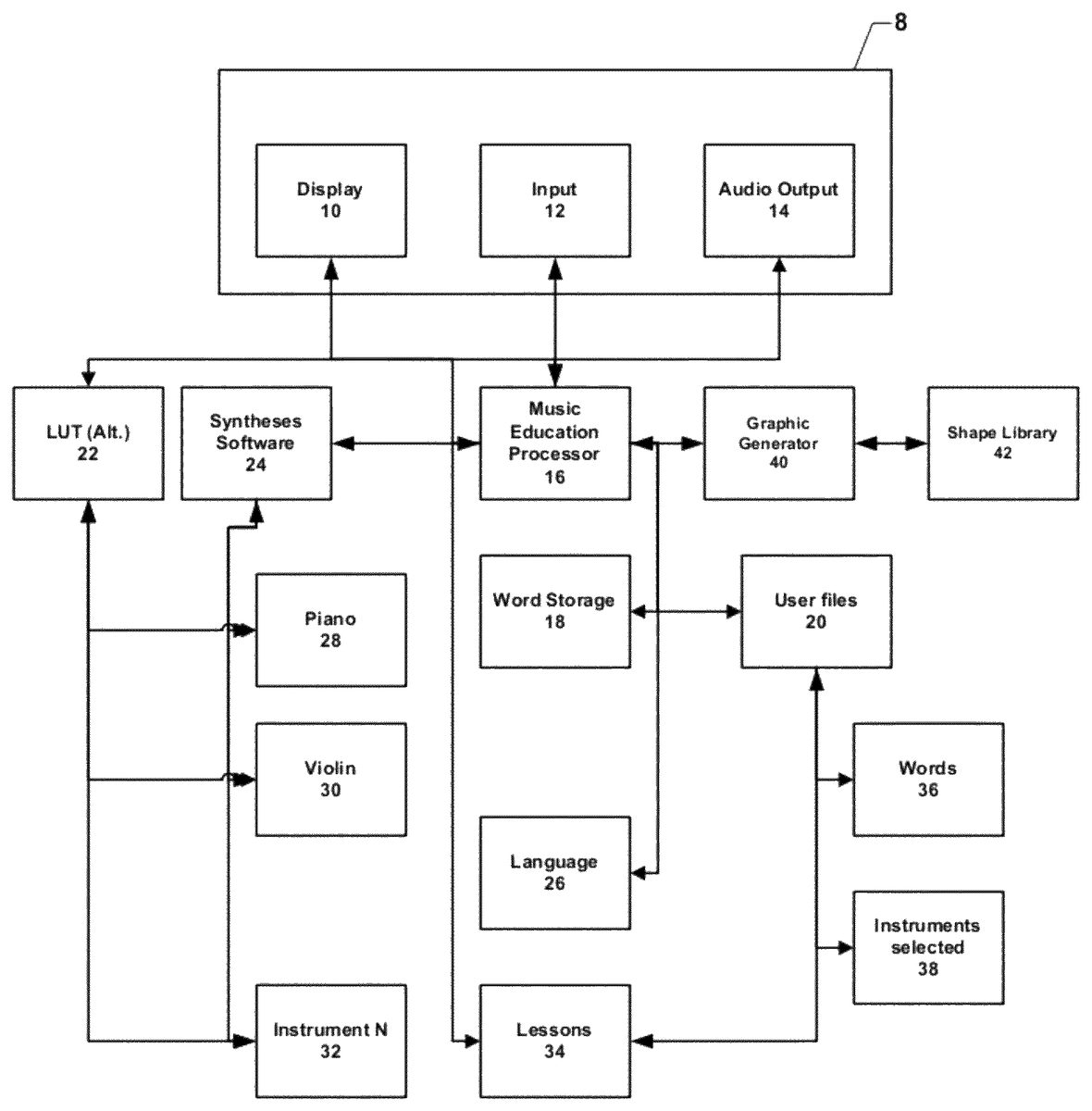
Referring now toFIG. 1an overall description of musical education is illustrated. A musical education processor16is connected over a network to a user device8. User device8comprises input means12, display10, and audio output14. Input means12, may comprise keyboard, electronic pen, touch screen, keyboard, and microphone for voice commands to name but a few input methods. In another embodiment, the user device8may include a depth camera to detect gestures of the user to formulate input commands. These methods are not meant to be limiting.
Audio output14is used to receive the audio output from the musical education processor16in the form of musical notes being played. Display10is used to display three-dimensional blocks each of which comprises various designations and attributes associated with a musical note. Each block comprises various surface areas which are interactive and which, upon designation by a user using the input means12results in an action by the musical education processor16.
Musical education processor16comprises instructions for interacting with the user device8, and various other modules of the musical education system. For example, when the musical education processor16receives instructions from user input means12to play a particular musical note, musical education processor16signals the synthesis software24to generate the particular musical note designated by the user. Processor16may be a digital signal processor.
In general, a user will designate a particular musical instrument, or if a musical instrument is not designated a default instrument may be used, the musical education processor16will receive the signal for the note desired together with the instrument of choice. That instruction would be sent to the synthesis software24which would access the appropriate instructions for generating a musical note from, for example, a piano28, a violin30, or any other musical instrument32. The synthesized musical note is then sent back to the musical education processor16for subsequent playback through the audio output14of user device8. In another embodiment, the user may designate a non-musical instrument, such as, for example, a car horn, fog horn and the designated non-musical instrument may generate the sound or acoustic effect.
As an alternative to synthesizing each musical note, musical notes may be stored in a lookup table22which has libraries of pre-recorded musical notes for piano28, violin30, or any other musical instrument32. The musical instruments noted herein are exemplary only and are not meant to be limiting. In another embodiment, the apparatus may further comprise a power source, such as, for example, a plug, a rechargeable nickel cadmium battery, a lithium ion battery, or a rechargeable solar cell.
If the user elects to spell words using musical notes, the user sends a signal to musical education processor16that this particular function is to be exercised. Thereafter, each time a user sends a signal via the user input12to the musical education processor16, the musical education processor16interacts with a word storage module18comprising all the words and phrases that can be spelled with the musical notes of the scale. When a word is spelled, musical education processor16confirms that a word that is stored in the word storage module18has been spelled correctly and signals are sent to user device8to display the word on display10and provide audio signals to the audio output14on user device8so that the word that is spelled is also sounded out in musical tones. In this fashion a user not only spells a word or series of words but hears the musical tones associated with each letter to further reinforce the learning process.
As noted above, the musical education processor16can also search for words that are spelled using the eight notes of the musical scale in a foreign language. In this case, musical education processor16interacts with a foreign language module26to further search for words in word storage18. Thus a user can send an instruction to musical education processor16to search for a word in, for example, French that is also spelled with the eight letters of the musical scale. Foreign language processor26would interact with word storage18to provide the appropriate foreign language word to musical processor16that will then be sent to user device8.
The musical education system of the various embodiments illustrated herein also comprises user files20that list a progress of the user of the system. These user files20contain the various words that have been spelled by the user36together with the instrument selected by the user38. In this fashion when a user signs on to the system, information from user files20can be retrieved and education of the user can pick up where it left off. The user files20may comprise a number of processor executable instructions.
Part of the overall musical education system is also a lesson module34that allows musical education processor16to guide a user through the musical education process via a series of graduate music lessons. Such lessons can be, without limitation, ear training, music theory and specific instructions regarding specific musical instruments. By providing a series of lessons34that are keyed to the age, education, and sophistication of the user, the musical education processor16can provide to the user device a series of lessons to assist in the education of the user. Thus, the user does not have to be self-directed or self-motivated, but rather can be assisted in the education process, regardless of age, by the musical education system is illustrated above. In this aspect, the graphic generator40and display10may output a short video program on the display10. For example, the user may select an incorrect key or note or otherwise make an error. In response to the error, the user may watch a short video program on the display10that suggests corrective action and that provides instruction to correct the error. For example, the user may incorrectly note a key on a piano and then watch a short video that instructs the user of the correct key. In another embodiment, the audio output14may also output a short audio program for instruction purposes instead of, or in addition to, the video program.
The musical education system, in yet another embodiment, comprises a graphic generator40. The graphic generator40creates a three-dimensional shape associated with a particular musical tone or a series of three-dimensional shapes associated with different musical tones and may present the same to the user interface8on the display10. Graphic generator can access a shape library42having a series of geometric shapes as well as three-dimensional representations of musical instruments and objects. Shape library42may be stored on a storage medium and may comprise a number of process executable instructions. A musical object may be a bell, a representation of an automobile horn, fog horn, an imaginary instrument, or any other shape that can produce a musical tone. Each of these three-dimensional shapes comprises a series of active regions. Each region can be displayed to the user such that clicks on the region of the three-dimensional shape result in the selected musical tone is sounded on the audio output14of the user interface8.
Referring now toFIG. 2a musical “block” of an embodiment is illustrated. For example, two or more surfaces of the “block” may include a touch screen input device12as discussed inFIG. 1. In this case a block with the musical letter A is illustrated. This block would be displayed on user device8on display10. When the user clicks on the surface of the block comprising the letter A50, this signals to the musical education processor16that the user is interested in the musical note “A.” The musical instruments noted on the block will also be in the same color or other graphical representations as the illustration of the letter “A” thereby providing yet another association between the letter and the physical location of the desired note. Thereafter, all sounds related to various selections by the user will have the tonal sound of the musical note A. If the user selects that note to be sounded as if played on a violin, the user will select the surface depicting the violin52and all sounds will be heard as if played on a violin. Alternatively, if the user selects the sound to be played on a piano, the user would select surface54depicting the piano and thereafter all sounds would be heard as if played on a piano.
As noted above it is not necessary that the musical block be in a cube form. Rather it can be in any shape so long as there is a space or surface (curved or flat) to designate a musical note and other instruments and features as noted above. The three dimensional shape can be a musical instrument, another geometric shape such as a pyramid, sphere, or any other shape providing surface area on which to designate the features of the various embodiments. Preferably, any three dimensional shape of a sufficient size having at least one planar surface can be used and is within the scope of the present disclosure. For example, the three dimensional shape may have one planar surface that is apportioned into multiple sections. Other surfaces may display functional icons as will be discussed.
Referring now toFIG. 3, a three-dimensional representation of a shape that is associated with the musical tone C is illustrated. This shape displayed to a user on the user interface12. The user can click on the letter C56which will result in a signal being sent to the music education processor16inFIG. 1to generate a musical tone associated with musical tone “C” with a musical tone being sent back to the user interface12having an audible musical note. For example, the user may click at least two times to appreciate the tone and learn the musical “C” tone. Simultaneously the note, in this case on the piano60, can be highlighted (shown in crosshatching) in the location on which the note appears on a musical staff58. For example, the user can appreciate a location where the musical note “C” can be found on the desired instrument and it should be appreciated that multiple different instruments may be illustrated to appreciate a location where the musical note “C” can be found, for example, a trumpet, a saxophone, a guitar, a violin, a harmonica, etc. The user may further toggle between different instruments to learn the placement or may display two or more instruments60as shown inFIG. 3to learn differences. The user may also render an input on the icon60to hear the musical note “C” using a first instrument and may also render an input on the icon58to hear the musical note on a different instrument. As a further enhancement, all three representations of the note “C”56,58, and60can be depicted in the same color so that the user can see the association of the note, and physical location, and a letter designation simultaneously.
For example, in another embodiment the order may be opposite, the user may depress letters on the piano keys icon60and spell words and the apparatus may correlate the depressed words on the keys60with letters56and/or with keys on a different instrument as shown by icon58. For example, the user may depress icon60and spell a word using the piano keys “A” then “C” then “E”. The apparatus may speak the word “ACE” then the letters “A”, “C”, “E”. In another embodiment, an entire song may be played, and the icon60or58may display each key as the key is played and entered on the piano key icon60or on the string icon58. For example, the piano key input may be “D”, “A”, “D”, “B”, “E”, “E”, and “F”. The user may control the apparatus to save the keys and now play the song. The apparatus may play the song with the chords in succession with a letter for each chord being displayed in succession so the user can appreciate the correlation. In another embodiment, the apparatus may be used as a game where certain letters are missing from a word and the user may input the missing letters using the piano icon or strings by playing the “missing” musical note for educational purposes. For example, the word “D_D” may be displayed. The user to solve the puzzle may render an input on the “A” piano key. Various configurations are possible and within the scope of the present disclosure.
While the musical education system has been illustrated above, those skilled in the art will understand that this process can take place on the single computer, over an intranet, or over the Internet when served from the server as illustrated inFIG. 4. For example, the processor16may access a remote network storage medium using a wireless transceiver device so the apparatus remains lightweight. For example, the processor16may control a transmitter/receiver or transceiver to receive data corresponding to different sounds and different instruments and other graphical and video data to assist with musical training and musical learning. In one embodiment, the apparatus may receive/transmit data from a cloud computer configuration.
FIG. 4shows a user workstation8and a user access device15. The user access device15is connected to a musical game processor16and that is also connected to program executable files20. A communication link is established between the user access block15and the user workstation8. Preferably, the apparatus8may be very lightweight and may include only essential components or a reduced number of components for a light weight device. In this aspect, the apparatus8may access a storage medium20that is located a distance away from the apparatus8and may download essential files in order to display education materials as discussed herein. Apparatus user workstation8may be separate from the network on which the musical game processor16exists and processor intensive tasks may be rendered and then provided to the apparatus8for display. Thus, the workstation8may include a lightweight configuration and does not need a large storage medium to store numerous video and audio files and instead a user may access files using block15and using a communications link. Once the user access function15delegates the user workstation8, then the musical game processor16may access any associated user files20. In this manner, the user can then utilize the musical game system or the user may utilize any network. This illustration is not meant to limit the number of user workstations8that may be connected to a network or to the musical game processor16. For example, two or more user workstation apparatuses8may be connected to the user access block15via the communication link. Those of skill in the art will understand and will appreciate that multiple user workstations can be connected to the musical game processor16over, for example the Internet, or some other gaming network to allow multiple users to utilize the musical game system at the same time. For example, two user work station apparatuses8may interact, collaborate and/or compete with one another to determine who is learning faster and has more accurate responses, etc. Additionally, at least two user work station apparatuses8may include a microphone and speakers to speak with one another and discuss the musical learning over a communication link.
Referring now toFIG. 5, the word spelling capability associated with the musical game system is illustrated.FIG. 5may be implemented in a computing device having a processor configured with processor-executable instructions to perform the operations of the method. In method, the processor may commence operation and the user may initially access the musical game system70when that system is either resident on an individual processor or over a network. The system will check to determine if access by the user is permitted72for example, using a password, and a user name. If not, the user is returned to the initial user access functionality70. If access is permitted72the system will retrieve any user files74. This will cause the last musical block display and the contents of the musical block to be displayed for the user76.
The user then has several options. The user can select a musical instrument78that will be used by the musical game system to create the sounds to be heard by the user for other activities. If the user elects to select any musical instrument78, a number of musical instruments are displayed for the user84to select. For example, icons pertaining to a piano, drum, harmonica, saxophone, violin, guitar, or any string instrument may be displayed and the user may select the particular instrument using an input device. The user then selects that instrument which is then displayed on the musical block for subsequent use.
The user also has the option to utilize the contents of the musical block when the user last utilizes the system76for subsequent input to the word spelling function84of the musical game system. If the user does not designate a musical instrument78the system will either display the last musical instrument used or display a default instrument such as for example a piano82for subsequent use.
The user is then asked if the user is to spell a word84. If the user desires to spell a word the user is then asked to enter letters86for the board. This is done either using a normal computer input means and using the eight letters of the musical alphabet, or the letters are selected from the appropriate note location on the musical instrument, for example the notes of a piano, or the fret location of notes for stringed instruments. These are exemplary means only and are not meant as limiting. In another embodiment, the method may utilize voice recognition to capture the word/letter/keys. The letters that are entered are then checked against a word database88to determine if the word being spelled is a valid word. If the word is not the valid word, the user is returned to the word spelling input function84.
If the word that is spelled is a valid word88, the musical notes associated with the valid spelled word are then played for the user90. In this fashion, a user can associate musical tones with words to further enhance the learning experience.
FIG. 6shows an embodiment method600for playing a computer game and for learning musical notes for a number of different instruments by using ordinary words to learn musical keys and the location of the musical keys. The embodiment method600may be implemented in a computing device having a processor configured with processor-executable instructions to perform the operations of the method. In method600, the processor may commence operation by turning on in block602.
In block604, the method600may display instruments. For example, the instruments may be displayed on a display screen associated with a housing, for example, a musical block. A flute, piano, guitar, violin, trombone, string instrument, trumpet, etc. may be displayed on a touch screen display in an arrangement in a graphical user interface. In block606, the user may select at least one instrument from the assortment displayed on the touch screen display by rendering a touch screen input over the icon and pressing the icon until a confirmation is received that the user selected at least one of the instruments. In another embodiment, two instruments may be selected to play in unison.
For example, the user may touch over the guitar icon and select the guitar for hearing the keys in the guitar's chords. In block608, the user may engage a keyboard, (or piano keys) or render inputs in cursive text on the touch screen to spell at least one word on the touch screen. For example, the user may type in “ACE” in the key pad and the letters may be displayed in the touch screen. In block610, the processor may receive the inputs and verify the word using a dictionary stored in memory. The processor will compare the word to a plurality of words stored in memory. If a match is made, the processor may process the word and in block612, the processor may generate audio correlating to each key “A”, “C”, and “E” in the selected instrument of the verified word.
If a match is not made, then the embodiment method600may await a new word or may provide an indication. In decision block614, the processor may receive an input to determine to play the audio or may automatically play the audio based on a user's preferences. If so, (i.e., decision block614=“YES”), which indicates that the user would like to play the audio; the processor16may generate an audio file and transmit the audio file to an audio output or speaker14. For example, several different audio files may have to be generated depending on the instrument or playing icon (car horn etc.) selected by the user. In block618, the processor16may play the word in an audio format in a key by key basis using the selected instrument.
For example, the guitar may play “A” for a duration, then note “C” for a duration and then note “E” for a duration so the user may appreciate the correlation between the sound and the keys of the word. In another embodiment, the guitar may play the keys faster and output a song. In block620, optionally, the processor may further generate icons of the keys in a graphical format when the key is being sounded out so the user may further appreciate the audio. In block622, the processor, optionally, may further graphically illustrate which strings and frets on the guitar are being played as the audio is being output. For example, a first string and fret illustrating “A” for a duration and with a highlighted feature or arrow pointing to the string and fret, then a second string and second fret illustrating “C” for a duration and with an arrow pointing to the second string and second fret and then a third string and fret illustrating “E” for a duration with an arrow pointing to the third string and third fret. In another example, inFIG. 3, the keys A, C, and E may be highlighted or may be pointed to with an arrow.
In block624, the processor16may further change an instrument for contrast purposes and for further learning purposes. For example, the user may select secondly a saxophone. In block626, the processor may generate the audio associated with the second instrument for each key of the verified word. In block628, the processor may control the speaker to output the audio for the newly selected instrument in a key by key fashion. For example, the sax may sound in a key of “A”, “C”, and “E” notes, or in different notes. In block632, a new word may be selected. On the other hand, if the audio is not selected to be played in block614, which indicates that the user would not like to play the audio, the processor may display the keys and a placement on an instrument thereof in block630. Optionally, the method600may further include a short video or audio file including instructions on the instruments and the keys and how the musical instrument is operated. For example, a user may be asked to confirm that the sounds are A, C, and E and a video may provide a graphical encouragement to the student user. In block632, a new word may be selected.
In yet another embodiment, the instrument may be selected from a piano, a violin, a voice avatar, a guitar, a wind instrument, a harp, and hypothetical instruments, such as, for example, a car horn, a door bell, telephone ring, a battleship horn, Morse code, rain drops, etc. For example, in one embodiment, the system may comprise an avatar icon, cartoon, or mouth icon that would sing the musical notes in the particular key. In another embodiment, the apparatus may save notes for playback later on. For example, the user may enter a word “ACE” and hit save. Then, the user may play back the musical notes that formulate the word “ACE” by a single input command.
In another embodiment, the apparatus may save placement of the notes on the instrument for playback later on. For example, the user may enter a word “ACE BEEF” and hit save. Then, the user may play back the musical notes being instructed on the selected musical instrument (for example, an arrow on the piano on the A key, then the C key etc) that formulates the word “ACE BEEF” by a single input command.
In another embodiment, the apparatus may save placement of the musical notes for playback later on in a longer song. For example, the user may enter multiple words (for example, 15 words) and input “save”. Then, the user may play back the musical notes all that form the 15 words at once in a song by a single input command and listen. In yet a further embodiment, the apparatus may be connectable to a media player to receive input of songs and the apparatus may provide an output of the musical notes that formulate the songs that are input.
FIG. 7shows an embodiment method700for playing a computer game and for learning sounds of letters and words by using ordinary English or non-English words. Method700is useful to allow a user to learn the sounds of letters, the sounds of words and how to recognize letters and words. The embodiment method700may be implemented in a computing device having a processor16configured with processor-executable instructions to perform the operations of the method. In method700, the processor may commence operation by turning on in block702.
In block704, the method700may display a number of different languages, for example, French, English, Spanish, German, Italian, Russian, Portuguese, or any other language known in the art for selection. The user may select “English” from a drop down table. In block706, the user may select a keyboard or other input device as the input device. In one embodiment, the input device may be a touch screen device.
In block708, the user may engage the keyboard, or render inputs in cursive text on the touch screen to spell at least one word on the touch screen. For example, the user may type in one English or non-English word in the key pad and the letters may be displayed in the touch screen. In block710, the processor may receive the inputs and verify the word using a dictionary stored in memory. The processor will compare the word to a plurality of words stored in memory. If a match is made, the processor may process the word and in block712, the processor may generate audio correlating to each letter in the verified word and then may speak the word itself.
If a match is not made, then the method may await a new word or may provide an indication. In decision block714, the processor may receive an input to determine to play the audio or may automatically play the audio based on a user's preferences. If so, (i.e., decision block714=“YES”), which indicates that the user would like to play the audio, the processor may generate an audio file and transmit the audio file to a speaker in block716. In block718, the processor may play the word in an audio format in a letter by letter basis for learning. For example, the word may be “CAT”. The method700may spell the word “C”, “A”, “T”. Graphically, the word and letter may be displayed. The method700may then optionally formulate the sounds for each letter “C” then “A” and then “T” for a predetermined duration. The method700may optionally request that the user repeat the words. The method700may then speak the word “CAT”. The processor may also speak the word in the native format and also may further translate the word. In an optional embodiment, the method700may further provide musical notes for a word, for example, a “C” note, and an “A” note and may omit non-musical letters. The notes can be made in a selected instrument that is desired by the user as discussed inFIG. 6. Various configurations are possible and the embodiment method700may be used to learn a new language and to also provide learning to non-English speakers.
In block720, optionally, the processor may further generate icons of the words and/or keys in a graphical format when the word and/or key are sounded out so the user may further appreciate the audio. In block722, the processor, optionally, may further graphically illustrate the letters as the audio is played. In block724, the processor may further change a language from a current language to a new language. For example, from German to Spanish. In block726, the processor may generate the audio associated with the new language of the word. In block728, the processor may control the speaker to output the audio for the newly selected language and word in a key by key fashion. In block732, a new word may be selected. On the other hand, if the audio is not selected to be played in block714that indicates that the user would not like to play the audio, the processor may display the word thereof in block730. The method700may also include a short video or audio file including instructions to further assist with learning.
The foregoing method descriptions and the process flow diagrams are provided merely as illustrative examples and are not intended to require or imply that the steps of the various embodiments must be performed in the order presented. As will be appreciated by one of skill in the art the order of steps in the foregoing embodiments may be performed in any order. Words such as “thereafter,” “then,” “next,” etc. are not intended to limit the order of the steps; these words are simply used to guide the reader through the description of the methods. Further, any reference to claim elements in the singular, for example, using the articles “a,” “an” or “the” is not to be construed as limiting the element to the singular.
The various illustrative logical blocks, modules, circuits, and algorithm steps described in connection with the embodiments disclosed herein may be implemented as electronic hardware, computer software, or combinations of both. To clearly illustrate this interchangeability of hardware and software, various illustrative components, blocks, modules, circuits, and steps have been described above generally in terms of their functionality. Whether such functionality is implemented as hardware or software depends upon the particular application and design constraints imposed on the overall system. Skilled artisans may implement the described functionality in varying ways for each particular application, but such implementation decisions should not be interpreted as causing a departure from the scope of the present invention.
The hardware used to implement the various illustrative logics, logical blocks, modules, and circuits described in connection with the embodiments disclosed herein may be implemented or performed with a general purpose processor, a digital signal processor (DSP), a DSP within a multimedia broadcast receiver chip, an application specific integrated circuit (ASIC), a field programmable gate array (FPGA) or other programmable logic device, discrete gate or transistor logic, discrete hardware components, or any combination thereof designed to perform the functions described herein. A general-purpose processor may be a microprocessor, but, in the alternative, the processor may be any conventional processor, controller, microcontroller, or state machine. A processor may also be implemented as a combination of computing devices, e.g., a combination of a DSP and a microprocessor, a plurality of microprocessors, one or more microprocessors in conjunction with a DSP core, or any other such configuration. Alternatively, some steps or methods may be performed by circuitry that is specific to a given function.
In one or more exemplary embodiments, the functions described may be implemented in hardware, software, firmware, or any combination thereof. If implemented in software, the functions may be stored on or transmitted over as one or more instructions or code on a computer-readable medium. The steps of a method or algorithm disclosed herein may be embodied in a processor-executable software module executed which may reside on a computer-readable medium. Computer-readable media includes both computer storage media and communication media including any medium that facilitates transfer of a computer program from one place to another. A storage media may be any available media that may be accessed by a computer. By way of example, and not limitation, such computer-readable media may comprise RAM, ROM, EEPROM, CD-ROM or other optical disk storage, magnetic disk storage or other magnetic storage devices, or any other medium that may be used to carry or store desired program code in the form of instructions or data structures and that may be accessed by a computer. Also, any connection is properly termed a computer-readable medium. For example, if the software is transmitted from a website, server, or other remote source using a coaxial cable, fiber optic cable, twisted pair, digital subscriber line (DSL), or wireless technologies such as infrared, radio, and microwave, then the coaxial cable, fiber optic cable, twisted pair, DSL, or wireless technologies such as infrared, radio, and microwave are included in the definition of medium. Disk and disc, as used herein, includes compact disc (CD), laser disc, optical disc, digital versatile disc (DVD), floppy disk, and blu-ray disc where disks usually reproduce data magnetically, while discs reproduce data optically with lasers. Combinations of the above should also be included within the scope of computer-readable media. Additionally, the operations of a method or algorithm may reside as one or any combination or set of codes and/or instructions on a machine readable medium and/or computer-readable medium, which may be incorporated into a computer program product.
The preceding description of the disclosed embodiments is provided to enable any person skilled in the art to make or use the present invention. Various modifications to these embodiments will be readily apparent to those skilled in the art, and the generic principles defined herein may be applied to other embodiments without departing from the spirit or scope of the invention. Thus, the present invention is not intended to be limited to the embodiments shown herein but is to be accorded the widest scope consistent with the following claims and the principles and novel features disclosed herein.
Claims
- A musical game and education system comprising: a user interface comprising: a display;an input device;and an audio output device;a music education processor (MEP) connected to the user interface via a network;a graphic generator connected to the MEP, the graphic generator comprising instructions for generating three dimensional shapes on the display of the user interface, each three dimensional shape associated with a musical tone and including at least a first surface illustrating a musical letter and a second surface illustrating a musical instrument;and a device connected to the MEP, the device configured to generate the musical tone associated with the musical letter and the musical instrument illustrated on each three dimensional shape and output the musical tone associated with the musical letter and the musical instrument illustrated on each three dimensional shape to the MEP in response to a request from the MEP, wherein the MEP comprises instructions for: receiving a selection of a three dimensional shape displayed on the display of the user interface from the input device of the user interface;sending the request to the device to generate the musical tone associated with the selected three dimensional shape;receiving a generated musical tone associated with the selected three dimensional shape from the device;and outputting the generated musical tone associated with the selected three dimensional shape via the audio output device of the user interface.
- The musical game and education system of claim 1 , wherein the input device is selected from the group consisting of a touch screen, a mouse, a trackball, a keyboard, gesture commands, and voice commands.
- The musical game and education system of claim 1 , wherein the three dimensional shapes comprise shapes selected from the group consisting of spheres, pyramids, cubes, and cylinders.
- The musical game and education system of claim 1 , wherein the three dimensional shapes comprise musical instruments.
- The musical game and education system of claim 1 , wherein each three dimensional shape further includes a third surface illustrate an aspect of the musical tone associated with the three dimensional shape taken from the group consisting of a musical note associated with the musical letter as written on a staff and the physical location of the musical tone on a musical instrument.
- The musical game and education system of claim 1 , wherein the device comprises instructions for synthesizing the requested musical tone.
- The musical game and education system of claim 6 , wherein the instructions for synthesizing the requested musical tone comprises instructions for generating the requested musical tone from at least one of a plurality of musical instruments.
- The musical game and education system of claim 1 , wherein the device comprises instructions for extracting the requested musical tone from a look up table having pre-stored musical tones.
- The musical game and education system of claim 8 , wherein the instructions for extracting the requested musical tone from a look up table having pre-stored musical tones comprises instructions for extracting the requested musical tone for the musical instrument illustrated on the second surface of the selected three dimensional shape.
- The musical game and education system of claim 1 , further comprising a storage of words spelled using the tones of the musical scale.
- The musical game and education system of claim 10 , further comprising language translation instructions for translating the words of the word storage into foreign languages.
- The musical game and education system of claim 1 , further comprising a storage of user files for storage of a particular user's interaction with the education system.
- The musical game and education system of claim 1 , further comprising a musical lesson file comprising graduated music lessons for presentation over the user interface to a specific user.
- A method for musical instruction and gaming comprising: presenting a user with a series of three dimensional shapes each associated with a musical tone from a graphics processor via a user interface, each three dimensional shape having a series of active regions and a first surface illustrating a musical letter and a second surface illustrating a musical instrument;receiving at a musical education processor a selection of a three dimensional shape associated with a musical tone from the user interface;generating the musical tone associated with the musical letter and the musical instrument illustrated on the selected three dimensional shape in response to the selection and transmitting the musical tone to an audio output at the user interface;and simultaneously generating a graphical representation associated with the selection on at least one of the active regions of the selected three dimensional shape.
- The method of music instructions and gaming of claim 14 , wherein each three dimensional shape is a three dimensional representation of a musical instrument.
- The method of music instructions and gaming of claim 14 , wherein each three dimensional shape is a three dimensional representation of an object capable of generating a musical tone.
- The method of music instructions and gaming of claim 14 , wherein each three dimensional shape is a three dimensional representation of an object not representative of an object capable of generating a musical tone.
- The method of music instructions and gaming of claim 14 further comprising: receiving a series of selected three dimensional shapes from the user interface indicative of a word spelled using the musical letters illustrated on the series of selected three dimensional shapes;generating a series of musical tones associated with the spelled word;transmitting the series of musical tones to the audio output at the user interface for playback of the musical tones to the user.
Disclaimer: Data collected from the USPTO and may be malformed, incomplete, and/or otherwise inaccurate.