U.S. Pat. No. 8,209,041
PROVIDING SECRET INFORMATION IN A MULTIPLAYER GAME
AssigneeMicrosoft Technology Licensing LLC
Issue DateNovember 14, 2007
Illustrative Figure
Abstract
A system and methods for conveying private information to a player in a multiplayer game being viewed by multiple players on a single screen. Each player is provided with a controller, which in one embodiment, includes a first input device and a second input device. The game system displays instructions on the screen prompting each player to select the first input device on the controller to ask a first question or select the second input device of the controller to ask a second question. Based on which input device each player selects, the game system displays an answer on the screen. The answers are viewable by all players. However, only each player knows what question they asked the game system to answer.
Description
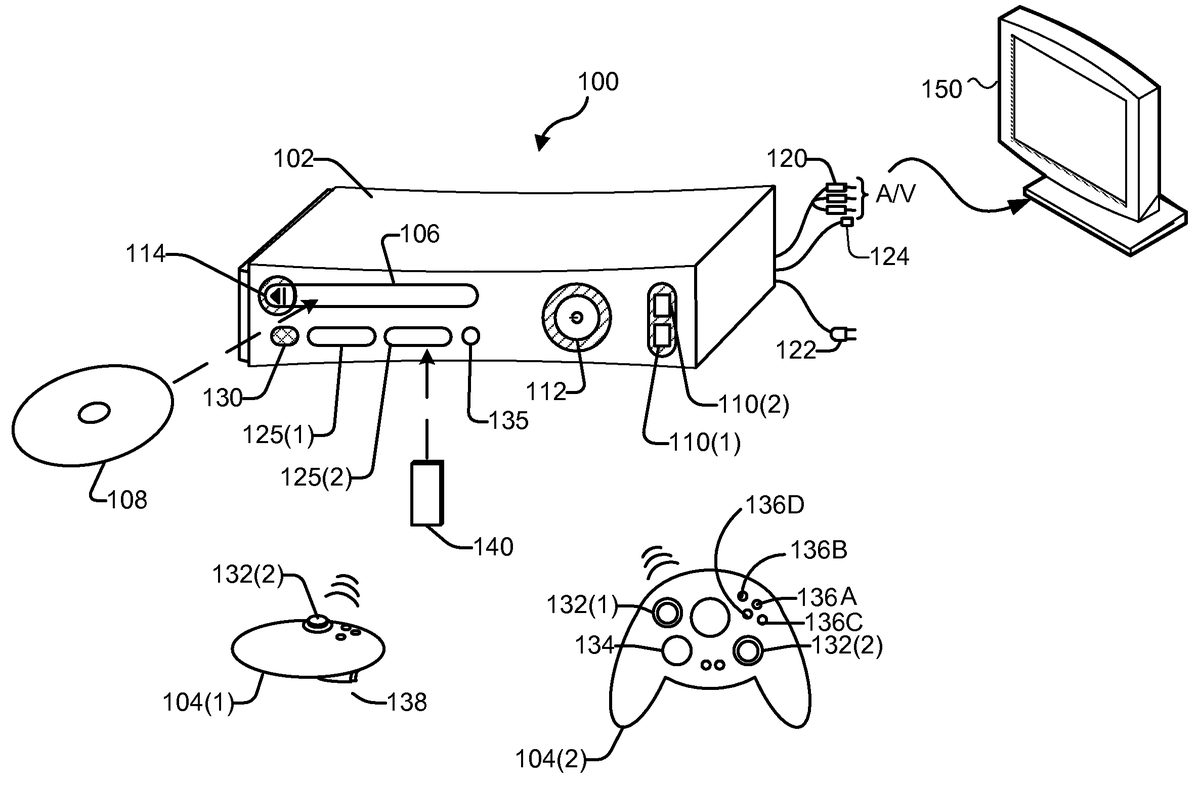
DETAILED DESCRIPTION The technology described herein provides secret information to each player of a multiplayer game being viewed on a single screen. At the beginning of the game, each player is presented with instructions to select a first input device to ask a first question and select a second input device to ask a second question. Based on the input device selected by each player, a “public” answer is displayed to each player on the screen. FIG. 1shows an exemplary gaming and media system100. The following discussion ofFIG. 1is intended to provide a brief, general description of a suitable environment in which concepts presented herein may be implemented. As shown inFIG. 1, gaming and media system100includes a game and media console (hereinafter “console”)102. In general, console102is one type of computing system, as will be further described below. Console102is configured to accommodate one or more wired or wireless controllers, as represented by controllers104(1) and104(2). Console102is equipped with an internal hard disk drive (not shown) and a portable media drive106that support various forms of portable storage media, as represented by optical storage disc108. Examples of suitable portable storage media include DVD, CD-ROM, game discs, and so forth. Console102also includes two memory unit card receptacles125(1) and125(2), for receiving removable flash-type memory units140. A command button135on console102enables and disables wireless peripheral support. As depicted inFIG. 1, console102also includes an optical port130for communicating wirelessly with one or more devices and two USB (Universal Serial Bus) ports110(1) and110(2) to support a wired connection for additional controllers, or other peripherals. In some implementations, the number and arrangement of additional ports may be modified. A power button112and an eject button114are also positioned on the front face of game console102. Power button112is selected to apply power to the game console, and can also provide access to other features and ...
DETAILED DESCRIPTION
The technology described herein provides secret information to each player of a multiplayer game being viewed on a single screen. At the beginning of the game, each player is presented with instructions to select a first input device to ask a first question and select a second input device to ask a second question. Based on the input device selected by each player, a “public” answer is displayed to each player on the screen.
FIG. 1shows an exemplary gaming and media system100. The following discussion ofFIG. 1is intended to provide a brief, general description of a suitable environment in which concepts presented herein may be implemented. As shown inFIG. 1, gaming and media system100includes a game and media console (hereinafter “console”)102. In general, console102is one type of computing system, as will be further described below. Console102is configured to accommodate one or more wired or wireless controllers, as represented by controllers104(1) and104(2). Console102is equipped with an internal hard disk drive (not shown) and a portable media drive106that support various forms of portable storage media, as represented by optical storage disc108. Examples of suitable portable storage media include DVD, CD-ROM, game discs, and so forth. Console102also includes two memory unit card receptacles125(1) and125(2), for receiving removable flash-type memory units140. A command button135on console102enables and disables wireless peripheral support.
As depicted inFIG. 1, console102also includes an optical port130for communicating wirelessly with one or more devices and two USB (Universal Serial Bus) ports110(1) and110(2) to support a wired connection for additional controllers, or other peripherals. In some implementations, the number and arrangement of additional ports may be modified. A power button112and an eject button114are also positioned on the front face of game console102. Power button112is selected to apply power to the game console, and can also provide access to other features and controls, and eject button114alternately opens and closes the tray of a portable media drive106to enable insertion and extraction of a storage disc108.
Console102connects to a television or other display (such as monitor150) via A/V interfacing cables120. In one implementation, console102is equipped with a dedicated A/V port (not shown) configured for content-secured digital communication using A/V cables120(e.g., A/V cables suitable for coupling to a High Definition Multimedia Interface “HDMI” port on a high definition monitor150or other display device). A power cable122provides power to the game console. Console102may be further configured with broadband capabilities, as represented by a cable or modem connector124to facilitate access to a network, such as the Internet. The broadband capabilities can also be provided wirelessly, through a broadband network such as a wireless fidelity (Wi-Fi) network.
Each controller104is coupled to console102via a wired or wireless interface. Console102may be equipped with any of a wide variety of user interaction mechanisms. In an example illustrated inFIG. 1, each controller104is equipped with two thumbsticks132(1) and132(2), a D-pad134, buttons136A-136D, and two triggers138. These controllers are merely representative, and other known gaming controllers may be substituted for, or added to, those shown inFIG. 1.
In one implementation, a memory unit (MU)140may also be inserted into controller104to provide additional and portable storage. Portable MUs enable users to store game parameters for use when playing on other consoles. In this implementation, each controller is configured to accommodate two MUs140, although more or less than two MUs may also be employed.
Gaming and media system100is generally configured for playing games stored on a memory medium, as well as for downloading and playing games, and reproducing pre-recorded music and videos, from both electronic and hard media sources. With the different storage offerings, titles can be played from the hard disk drive, from an optical disk media (e.g.,108), from an online source, or from MU140. Samples of the types of media that gaming and media system100is capable of playing include:Game titles played from CD and DVD discs, from the hard disk drive, or from an online source.Digital music played from a CD in portable media drive106, from a file on the hard disk drive (e.g., music in the Windows Media Audio (WMA) format), or from online streaming sources.Digital audio/video played from a DVD disc in portable media drive106, from a file on the hard disk drive (e.g., Active Streaming Format), or from online streaming sources.
During operation, console102is configured to receive input from controllers104and display information on display150. For example, console102can display a user interface on display150to allow a user to select a game using controller104and display achievement information as discussed below.
FIG. 2is a functional block diagram of gaming and media system100and shows functional components of gaming and media system100in more detail. Console102has a central processing unit (CPU)200, and a memory controller202that facilitates processor access to various types of memory, including a flash Read Only Memory (ROM)204, a Random Access Memory (RAM)206, a hard disk drive208, and portable media drive106. In one implementation, CPU200includes a level 1 cache210and a level 2 cache212, to temporarily store data and hence reduce the number of memory access cycles made to the hard drive208, thereby improving processing speed and throughput.
CPU200, memory controller202, and various memory devices are interconnected via one or more buses (not shown). The details of the bus that is used in this implementation are not particularly relevant to understanding the subject matter of interest being discussed herein. However, it will be understood that such a bus might include one or more of serial and parallel buses, a memory bus, a peripheral bus, and a processor or local bus, using any of a variety of bus architectures. By way of example, such architectures can include an Industry Standard Architecture (ISA) bus, a Micro Channel Architecture (MCA) bus, an Enhanced ISA (EISA) bus, a Video Electronics Standards Association (VESA) local bus, and a Peripheral Component Interconnects (PCI) bus also known as a Mezzanine bus.
In one implementation, CPU200, memory controller202, ROM204, and RAM206are integrated onto a common module214. In this implementation, ROM204is configured as a flash ROM that is connected to memory controller202via a PCI bus and a ROM bus (neither of which are shown). RAM206is configured as multiple Double Data Rate Synchronous Dynamic RAM (DDR SDRAM) modules that are independently controlled by memory controller202via separate buses (not shown). Hard disk drive208and portable media drive106are shown connected to the memory controller202via the PCI bus and an AT Attachment (ATA) bus216. However, in other implementations, dedicated data bus structures of different types can also be applied in the alternative.
A three-dimensional graphics processing unit220and a video encoder222form a video processing pipeline for high speed and high resolution (e.g., High Definition) graphics processing. Data are carried from graphics processing unit220to video encoder222via a digital video bus (not shown). An audio processing unit224and an audio codec (coder/decoder)226form a corresponding audio processing pipeline for multi-channel audio processing of various digital audio formats. Audio data are carried between audio processing unit224and audio codec226via a communication link (not shown). The video and audio processing pipelines output data to an A/V (audio/video) port228for transmission to a television or other display. In the illustrated implementation, video and audio processing components220-228are mounted on module214.
FIG. 2shows module214including a USB host controller230and a network interface232. USB host controller230is shown in communication with CPU200and memory controller202via a bus (e.g., PCI bus) and serves as host for peripheral controllers104(1)-104(4). Network interface232provides access to a network (e.g., Internet, home network, etc.) and may be any of a wide variety of various wire or wireless interface components including an Ethernet card, a modem, a wireless access card, a Bluetooth module, a cable modem, and the like.
In the implementation depicted inFIG. 2, console102includes a controller support subassembly240for supporting four controllers104(1)-104(4). The controller support subassembly240includes any hardware and software components needed to support wired and wireless operation with an external control device, such as for example, a media and game controller. A front panel I/O subassembly242supports the multiple functionalities of power button112, the eject button114, as well as any LEDs (light emitting diodes) or other indicators exposed on the outer surface of console102. Subassemblies240and242are in communication with module214via one or more cable assemblies244. In other implementations, console102can include additional controller subassemblies. The illustrated implementation also shows an optical I/O interface235that is configured to send and receive signals that can be communicated to module214.
MUs140(1) and140(2) are illustrated as being connectable to MU ports “A”130(1) and “B”130(2) respectively. Additional MUs (e.g., MUs140(3)-140(6)) are illustrated as being connectable to controllers104(1) and104(3), i.e., two MUs for each controller. Controllers104(2) and104(4) can also be configured to receive MUs (not shown). Each MU140offers additional storage on which games, game parameters, and other data may be stored. In some implementations, the other data can include any of a digital game component, an executable gaming application, an instruction set for expanding a gaming application, and a media file. When inserted into console102or a controller, MU140can be accessed by memory controller202. A system power supply module250provides power to the components of gaming system100. A fan252cools the circuitry within console102.
An application260comprising machine instructions is stored on hard disk drive208. When console102is powered on, various portions of application260are loaded into RAM206, and/or caches210and212, for execution on CPU200, wherein application260is one such example. Various applications can be stored on hard disk drive208for execution on CPU200.
Gaming and media system100may be operated as a standalone system by simply connecting the system to monitor150(FIG. 1), a television, a video projector, or other display device. In this standalone mode, gaming and media system100enables one or more players to play games, or enjoy digital media, e.g., by watching movies, or listening to music. However, with the integration of broadband connectivity made available through network interface232, gaming and media system100may further be operated as a participant in a larger network gaming community, as discussed below in connection withFIG. 3.
FIG. 3illustrates a flow diagram providing exemplary steps for providing private information to each player of the multiplayer game. For purposes of describing the technology herein only, suppose the multiplayer game chosen by the players is a detective game whereby the object of the game is to catch the criminal. Each player is assigned a role at the beginning of the game. Each player is either a criminal or a detective. Each player, at the beginning of the game, may find out what role they have been assigned. The technology described herein is not limited to the detective game. The technology described herein may apply to any multiplayer game that is viewed on a single screen or any multiplayer game where more than one player plays the game on a single screen. In addition, the secret information provided to each player is not limited to providing information at the beginning the game. Secret information may be provided throughout the game.
In step302, the detective game begins. In step303, the console102determines the number of players that will play the game. In one embodiment, the console102detects the number of controllers104that have connected to the console102. For purposes of describing this technology, four players will be playing the Detective game: Player A, Player B, Player C and Player D. Thus, the console102determines that four players are going to play the detective game. In an alternative embodiment, one of the players selects the number of players on the screen.
In step304, the console102designates a character role for each player. For purposes of describing the technology herein, suppose the console102designates Player A as a criminal, Player B as a detective, Player C as a detective and Player D as a detective. Each player will want to know their character role at the start of the game because it will affect how they operate within the game. For example, Player A, knowing he is the criminal, will try to avoid the other players.
The system provides instructions to the players how to determine what role they have been assigned. Before displaying instructions, however, the system must determine how the players will ask a question with their controller. In the detective game embodiment, each player may be one of two roles: either a detective or criminal. In step306, the console102maps a first question to a first input device of each controller104. For example, the console102maps the question “Am I the criminal” to button136A of each players controller104. The console102also maps a second question to a second input device of each controller104. For example, the console102maps the question “Am I a Detective” to the button136B of each of the player's controllers104. Both of these questions may be answered by a “YES” or “NO.”
In step308, the console102displays instructions on the screen150.FIG. 4illustrates exemplary instructions displayed on the screen150for the Detective game. In theFIG. 4embodiment, the console102displays instructions402on the graphical user interface (GUI)400. Here, the instructions402include two sets of instructions. Instructions404prompt each player to “Press A to find out if you are the criminal.” Instructions406prompt each player to “Press B to find out if you are the detective.” Each set of instructions allow a player to ask a yes/no answerable question about the role of their character. More details describingFIG. 4will be provided later.
In step309, each player presses either button A136A or button B136B on their controller104. By pressing button136A of the controller104, the player inquires whether they are the criminal. By pressing button B136B of the controller104, the player inquires whether they are a detective. Suppose that Player A presses button A136A of his controller104to find out if he the criminal, Player B presses button B136B of her controller104to find our if she is a detective, Player C presses button A136A of her controller104to find out if she is the criminal and Player D presses button B136B of his controller104to find out if he is a detective.
In step310, the console102receives the input from each player's controller104based on whether the player pressed button A136A or button B136B on the controller104. In the above example, console102receives input that Player A selected button A136A (asking “Am I the criminal”), Player B selected button B136B (asking “Am I a Detective”), Player C selected button A136A (asking “Am I the criminal”) and Player D selected button B136B (asking “Am I a Detective”).
In step312, the console102, for each player, compares the input received from the player (step310) to the role assigned to the player (step304). For Player A, the console102compares the input received by Player A (selected button A136A of the controller104) to the designated role of Player A (criminal). For Player B, the console102compares the input received by Player B (selected button B136B of the controller104) to the designated role of Player B (detective). For Player C, the console102compares the input received by Player C (selected button A136A of the controller104) to the designated role of Player C (detective). For Player D, the console102compares the input received by Player D (selected button B136B of the controller104) to the designated role of Player D (detective).
In step314, the console102determines whether the input received by each player matches the player's designated role. In one embodiment, the console102interprets input that button A136A has been selected as “criminal” and input that button B136B has been selected as “detective.” Thus, the console102determines the following:
Player A: input matches the role.
Player B: input matches the role.
Player C: input does not match the role.
Player D: input matches the role.
Based on whether the console102determines if the input matches the role, the console102will display either Answer #1(Step316) or Answer #2(step318). The console102displays either Answer #1or Answer #2in an answer window418in the GUI400. In the Detective game, the questions asked by each player—“Am I the criminal” or “Am I a Detective”—may be answered by a “YES” or “NO” answer. Thus, in this embodiment, Answer #1comprises “YES” and Answer #2comprises “NO.” In an alternative embodiment, the console102may display other answers such as displaying a color in each answer window418(e.g., the color green indicates “YES” and the color red indicates “NO”), a shape in each answer window418(e.g., a happy face displayed in the window indicates “YES” and a sad face in the window indicates “NO”), and so on. In step316, the console102displays “YES” if the input matches the role. Alternatively, in step318, the console102displays “NO” of the input does not match the role.
FIG. 4illustrates an exemplary GUI400that may be displayed on the screen150at the beginning of the game. The GUI400includes instructions402, player identifiers408and answer windows418. Instructions402includes a first instruction404and a second instruction406. The first instruction404prompts each player to “Press A to find out if you are the criminal.” Second instruction406prompts each player to “Press B to find out if you are the detective.”
The GUI400also includes a player identifier408for each of the player's playing the game. Because Players A, B, C and D are playing the Detective game, GUI400includes a player identifier410for Player A, a player identifier412for Player B, a player identifier414for Player C and a player identifier416for Player D. The specific player identifiers408shown inFIG. 4are for illustrative purposes only. Other player identifiers408may include a logo, an avatar, clipart, animation, and so on. The player identifiers408are also shown in a horizontal configuration. However, the player identifiers408may be displayed or configured in any number of ways.
The GUI400displays an answer window418associated with each player identifier408. Answer display window420is associated with player identifier410. Answer display window422is associated with player identifier412. Answer window422is associated with player identifier414. Answer window display window424is associated with player identifier416. Each answer window418is located below a player identifier408so that each player understands which answer to view.
The result of method300is that the GUI400displays “YES” in the answer window420for Player A, displays “YES” in the answer window422for Player B, displays “NO” in the answer window424for Player C and displays “YES” in the answer window426for Player D (seeFIG. 7). Thus, Player A knows that “YES,” he is the criminal. Player B knows that “YES,” she is a detective. Player C knows “NO,” she is not the criminal. And Player D knows that “YES,” he is a detective. Because each player may be one of only two roles in the detective game, Player C, even though she received a negative answer, understands that she is a detective. Thus, every player knows their role at the beginning of the game.
Even though each player can view the answers for the other players in the GUI400, none of the players know what question was asked by each other. For example, even though the GUI400displays “YES” in window420for Player A, Players B, C and D do not know whether Player A pressed button A136A of his controller104to ask the question “Am I the criminal” or whether Player A pressed button B136B of his controller104to ask “Am I a detective.” Similarly, Players A, C and D can view the answer “YES” displayed in window422associated with player B. However, Players A, C and D do not know whether Player B pressed button136A of her controller104to ask the question “Am I the criminal” or whether Player B pressed button136B of her controller104to ask “Am I a detective.” Players A, B and D can view the answer “NO” displayed in the window424associated with Player C in the GUI400. However, Players A, B and D do not know whether Player C pressed the button136A of her controller104to ask “Am I the criminal” or whether Player C pressed button136B of her controller to ask “Am I a detective.” Players A, B and C can view the answer “YES” in window426associated with Player D in GUI400. However, Players A, B and C do not know whether Player D pressed button136A of his controller to ask “Am I the criminal” or whether Player D pressed button136B of his controller to ask “Am I a detective.”
Players A, B, C and D are now individually and secretly informed of their role in the game, and can proceed with playing the game. The information conveyed to each player is private because the players cannot determine each others role simply by viewing the answers. Each answer can have two different meanings depending on which button the player selected on the controller. For example, inFIG. 4, answer windows418,422and426each display “YES.” However, without knowing which button a particular player selected, each player does not know the roles of the other players. In this example, the “YES” displayed in window418tells Player A the he is the criminal, the “YES” displayed in window422tells Player B the she is a detective and the “YES” displayed in the window426tells Player D the he is a detective. Player A does not, however, know whether window422indicates that “YES,” Player B is the criminal or “YES,” Player B is a detective.
FIG. 5illustrates a flow diagram providing exemplary steps demonstrating why the information provided to a player is secret even though the answer is publicly displayed on the screen150. Suppose, in this example, that the console102, in step304, has designated Player A as the criminal. After the console102displays the instructions on the screen (step308), Player A views the instructions402in the GUI400and must decide whether to press button136A of his controller104receive an answer to the question “Am I the criminal” or press button136B of his controller to receive an answer to the question “Am I the detective.” Suppose that Player A, in step502, decides to select button136A. Then, in step504, Player A selects button136A of his controller104to find out whether he is the criminal. Unless another player watched which button Player A selected, Player A's question comprises a “private” question. In step506, the console102displays “YES” in the answer window420. Thus, Player A has received his private information that YES, he is the criminal in the Detective game.
Alternatively, Player A, in step502, may decide to ask “Am I a detective.” In step508, Player A selects button136B on his controller104. In step510, the console102displays “NO” in the answer window420. Thus, Player A has received private information that “NO,” he is not the detective. Player A will find out that he is the criminal in the Detective game regardless of whether Player A presses button136A of the controller104or button136B of the controller104. And Player A receives the private information without alerting Player B, Player C or Player D to his role.
FIG. 6illustrates another flow diagram providing exemplary steps demonstrating why the information provided to a player is secret even though the answer is publicly displayed on the screen150. Suppose the console102, in step304, has designated that Player B is a detective in the Detective game.FIG. 6illustrates that Player B may discover whether he is a detective or a criminal regardless of whether Player B presses button136A or button136B on her controller104. Suppose, in step502, Player B views the instructions402displayed in the screen150and decides to select button136A of her controller104to ask “Am I a criminal.” In step504, Player B selects button136A of her controller104. In step506, the console102displays “NO” in the answer window422. Thus, Player B receives her private information that “NO,” she is not the criminal in the Detective game.
Alternatively, Player B, in step502, may decide to ask “Am I a detective.” In step508, Player B selects button136B of her controller104. In step510, the console102displays “YES” in answer window422. Thus, Player B has receives her private information that “YES,” she is a detective in the mystery game. Player B finds out that she is a detective regardless of whether Player B presses button136A of the controller104or button136B of the controller104. And Player B receives the private information without alerting Player A, Player C or Player D to her role.
The technology described herein is not limited to the Detective game example provided above. The technology described herein may also apply to a game that presents more than two questions to the players at the beginning of the game. In this example, each player would select button A136A to ask a first question, button B136B to ask a second question, button C136C to ask a third question and button D136D to ask a fourth question.
Or that the Detective game allows the players to ask questions about each other throughout the game. For example, at a certain stage of the game, the system displays instructions on the screen such as “Press A to find out if Player A is the criminal,” “Press B to find out if Player B is the criminal,” “Press C to find out if Player C is the criminal” and “Press D to find out if Player D is the criminal.” Each player may press one of the four buttons on their controller to find out information about another player. In one embodiment, if the answers to the questions are “YES” and “NO,” each player will know the answer to their question but no the answer to the other players' questions. For example, Player A presses button C136C on his controller. If the answer displayed in window418says “NO,” then Player A understands that Player C is not the criminal.
FIG. 7illustrates one example of the GUI400displaying the answers in each answer window418. In this embodiment, the public answer displayed in each answer window418is displayed beneath each player identifier408. For example, display window420is located directly beneath the Player A identifier410, answer window422is located beneath the Player B identifier412, the answer window424is located beneath the Player C identifier414and display window426is located beneath Player D identifier416. As discussed above, the answers “YES” and “NO” do not identify the role of each particular player because the answer displayed in a window418could be answering either question presented in the instructions402.
Many conventional controllers include feedback mechanisms. For example, in the Detective game embodiment, the controller, if it included a vibrate feedback mechanism, may vibrate to indicate “yes” to a question and not vibrate to indicate a “no” to the question.FIG. 8illustrates an exemplary controller600that does not contain any such feedback mechanisms. Thus, the game system provides visual answers displayed on the screen. In this embodiment, the controller600comprises a Microsoft Big Button control pad. The control pad600includes a body602, a main button604, and four auxiliary buttons: a first button606, a second button608, a third button610and a fourth button612. In this embodiment, the first button606displays the letter “A” on the button, the second button608displays the letter “B” on the button, the third button610displays the letter “X” on the button and the fourth button612displays a “Y” on the button. Players A-D, using the control pad600to play the Detective game, may ask questions using the four buttons606-612. For example, each player would select the first button606to ask the question “Am I the criminal” or select the second button608to ask “Am I the Detective.”
Although the subject matter has been described in language specific to structural features and/or methodological acts, it is to be understood that the subject matter defined in the appended claims is not necessarily limited to the specific features or acts described above. Rather, the specific features and acts described above are disclosed as example forms of implementing the claims.
Claims
- A method performed by one or more processors for conveying secret information to a player in a multiplayer game being viewed by multiple players on a single screen, wherein each player is provided with a controller having a first input device and a second input device, comprising: displaying instructions on the screen, wherein the instructions prompt each player to select the first input device on the controller to ask a first question and select the second input device of the controller to ask a second question;receiving input from each controller, wherein the input from each controller is based on whether the player selected the first input device or the second input device;displaying answers on the screen to the first question and the second question based on the input received from each controller;displaying a player identification on the screen for each player;and displaying the answers to the first question and the second question including displaying each answer to the first question and the second question proximate to each player identification displayed on the screen.
- The method as recited in claim 1 , wherein the first answer and the second answer comprise one of the following: “yes” and “no”.
- The method as recited in claim 1 , further comprising: determining the number of players.
- The method as recited in claim 3 , wherein receiving input from each controller comprises: receiving input from each of the controllers for each of a plurality of players in the game.
- The method as recited in claim 3 , wherein displaying answers on the screen comprises: displaying an answer for each of a plurality of players in the game.
- The method as recited in claim 1 , wherein displaying the instructions on the screen occurs at the beginning of the multiplayer game.
- A system for conveying private information to each player in a local multiplayer game, comprising: a plurality of controllers, wherein each of the controllers includes a first input device, a second device, a third device, and a fourth input device;a screen;a console for communicating with each of the plurality of controllers and the screen, wherein the console is configured to display instructions on the screen prompting the players to press the first input device of the controller to ask a first question, prompting the players to press the second input device of the controller to ask a second question, prompting the players to press the third input device of the controller to ask a third question, and prompting the players to press the fourth input device of the controller to ask a fourth question, wherein the console is further configured to receive transmission signals from each of the controllers and display answers on the screen based on whether a player selected the first input device, the second input device, the third input device, or the fourth input device.
- The system as recited in claim 7 , wherein the console comprises a personal computer.
- The system as recited in claim 8 , wherein: the controller comprises a gamepad having a first button and a second button;the first input device comprises the first button;and the second input device comprises the second button.
- The system as recited in claim 7 , wherein the console is further configured to display a player identifier on the screen for each player.
- The system as recited in claim 10 , wherein the player identifier includes one of the following: the player's name, an avatar, clip art, a photograph, an animation and a video clip.
- The system as recited in claim 7 , wherein the console is configured to display the instructions on the screen at the beginning of the game.
- A tangible computer-readable storage medium having computer-executable instructions for programming a processor of a gaming system to perform a method for providing private information to each player in a multiplayer game, wherein the game is viewed on a single screen and each player has a controller having a first input device and a second input device, comprising: assigning a first question to the first input device of each controller and a second question to the second input device of each controller;displaying instructions on the screen, wherein the instructions prompt each player to select the first input device on the controller to ask the first question and select the second input device of the controller to ask the second question;receiving input from each controller, wherein the input from each controller is based on whether the player selected the first input device of the controller or the second input device of the controller;and displaying the answers to the first question and the second question on the screen based on the input received from each controller, displaying the answers to the first question and the second question including displaying each answer to the first question and the second question proximate to each player identification displayed on the screen.
- The tangible computer-readable storage medium as recited in claim 13 , wherein the instructions displayed on the screen are displayed at the beginning of the game.
- The tangible computer-readable storage medium as recited in claim 13 , further comprising: starting the game after a predetermined amount of time has passed after displaying the answers to the first question and the second question.
- The tangible computer-readable storage medium as recited in claim 13 , wherein displaying the answers to the first question and the second question comprising: displaying the answers only after the input from each controller has been received by all of the controllers.
Disclaimer: Data collected from the USPTO and may be malformed, incomplete, and/or otherwise inaccurate.