U.S. Pat. No. 7,893,337
SYSTEM AND METHOD FOR LEARNING MUSIC IN A COMPUTER GAME
Issue DateJune 10, 2009
Illustrative Figure
Abstract
A system comprising means for receiving a first input from an electronic device, said first input pertaining to performance of music by a user, means for receiving a second input, said second input pertaining at least to music intended to be performed by the user; and a comparison module software executing on a computer and adapted to receive said first input and to receive said second input, wherein the comparison module compares the first input from a user to the second input to produce at least one indicia of the user's success in performing the intended music correctly, the comparison module sends to a display module associated with the user information including at least the music intended to be performed by the user and the indicia of the user's success in performing the intended music correctly, and the comparison module further sends to the display module associated with the user a timing signal suitable for indicating the speed at which the music should be shown on the display and played by the user, said timing signal computed according to one or more tempo modes selectable by the user, is disclosed.
Description
DETAILED DESCRIPTION The inventor provides, in a preferred embodiment, a system that enables a user to quickly learn to read and play musical notation that requires no prior knowledge of music theory. The invention quickly forges a connection between a player's eyes and fingers using an interactive scrolling interface. An embodiment of the invention allows the user to learn proper finger and hand placement while at the same time following a scrolling notation on a computer monitor. Feedback is supplied continuously via the scrolling mechanism and optionally other audio and visual feedback means. Variations are available such as a learning mode, performance mode, arcade mode, record mode, live mode, head to head competition mode and a dueling mode. One embodiment of the invention keeps a score to grade accuracy and quality of play. Multiple users, both on site and online, can access the invention allowing performances and competitions. The use of a MIDI-enabled keyboard is but one embodiment of the invention. Other embodiments utilize a digital signal processing device to convert sound or finger or hand movements to a digital signal that the invention can compare to the scrolling notation and judge for accuracy in order to provide continuous feedback to the user. Throughout this document, reference is made to the use of the MIDI standard for passing information about music from one device or software module to another. MIDI is ubiquitous, but it is not the only way to pass such data, and any references to MIDI should be understood to mean “MIDI or any other protocol that represents pitch and duration information, at a minimum, of musical notes”. The present invention should not be considered limited to embodiments in which MIDI is used, but since MIDI is so widespread it will be the only such protocol referenced in ...
DETAILED DESCRIPTION
The inventor provides, in a preferred embodiment, a system that enables a user to quickly learn to read and play musical notation that requires no prior knowledge of music theory. The invention quickly forges a connection between a player's eyes and fingers using an interactive scrolling interface. An embodiment of the invention allows the user to learn proper finger and hand placement while at the same time following a scrolling notation on a computer monitor. Feedback is supplied continuously via the scrolling mechanism and optionally other audio and visual feedback means. Variations are available such as a learning mode, performance mode, arcade mode, record mode, live mode, head to head competition mode and a dueling mode. One embodiment of the invention keeps a score to grade accuracy and quality of play. Multiple users, both on site and online, can access the invention allowing performances and competitions. The use of a MIDI-enabled keyboard is but one embodiment of the invention. Other embodiments utilize a digital signal processing device to convert sound or finger or hand movements to a digital signal that the invention can compare to the scrolling notation and judge for accuracy in order to provide continuous feedback to the user.
Throughout this document, reference is made to the use of the MIDI standard for passing information about music from one device or software module to another. MIDI is ubiquitous, but it is not the only way to pass such data, and any references to MIDI should be understood to mean “MIDI or any other protocol that represents pitch and duration information, at a minimum, of musical notes”. The present invention should not be considered limited to embodiments in which MIDI is used, but since MIDI is so widespread it will be the only such protocol referenced in this document.
Many of the descriptions of embodiments of the present invention make reference to software functional elements of modules. It should be well understood by one practiced in the art of software development that there are many functionally equivalent ways of packaging software code. For instance, the software elements of the present invention could be implemented in an object-oriented architecture using languages such as Java or C++, or it could be implemented in a language such as C, with code divided into numerous source files. The representations herein are functional in nature, and are intended to allow one practiced in the art to understand the present invention sufficiently that he could build it in one or more of the ways just described. Accordingly, embodiments obtained by combining or dividing “modules” described below, without changing the functional arrangements described herein, should be understood to be within the scope of the present invention.
FIG. 1is an illustration of an embodiment of the invention using a MIDI (Musical Instrument Digital Interface) equipped keyboard101. The keyboard can be a standard 88-key MIDI piano keyboard, or a smaller MIDI-enabled keyboard; many varieties of MIDI-enabled keyboards are available on the market. The keyboard101is for illustrative purposes; according to the embodiment any MIDI-enabled musical instrument can be used. The MIDI-enabled instrument101is used for input from the player, who plays music as it is displayed on a monitor102. The monitor102can be a standard computer monitor such as a 19-inch flat panel display, but it is not so limited. For example, monitor102could be a flat-panel display embedded in the casing of the MIDI-enabled instrument101.
According to a preferred embodiment of the invention, a scrolling musical score104is displayed on monitor102. In an embodiment of the invention the scrolling musical score104is based on the Klavarskribo system of notation, although the invention is not limited to this notation schema. According to the embodiment, at the top of monitor102, a keyboard image105is displayed. The keyboard image105and the score104are aligned such that the lines corresponding in Klavarskribo notation to black notes are aligned with the corresponding black notes of the keyboard image105. With this alignment, when notes in the score104move upward, they eventually reach the keyboard image105and are aligned vertically with the key represented by the note. It will be appreciated that, if another notation system other than Klavarskribo is used, the visual correlation between notes in a score104and notes on a keyboard image105will be more complex; what is important is that, according to the invention, a player is provided real-time visual feedback as they play, and is provided the ability to look ahead in the score104to see what is to be played next. MIDI-enabled instrument101is connected, via MIDI cables or USB or any other suitable connection capable of passing MIDI data from the instrument, to a personal computer, laptop, or other computing device103. Software110of the invention executes on the computer103and receives input from the MIDI-enabled musical instrument101as a player plays. Software110processes the MIDI input as will be described below, and feeds a video signal to monitor102which contains the score104, the keyboard image105, and visual feedback elements corresponding to the player's input.
According to an embodiment of the invention, a player selects a piece of music to play, whether as part of a game mechanic, for practice, or for performance. The beginning of the music's score is displayed, in Klavarskribo or other suitable notation, on the monitor102, and begins scrolling upward according to the tempo of the music. As each note104of the score reaches the top of the screen, where the keyboard is located, the player (hopefully) plays the note, holding (maintaining the note by keeping the key depressed, or as appropriate for the MIDI-enabled instrument101being played) for as a long as is indicated by the score. Visual feedback is provided for example by the keyboard image keys corresponding to notes played by the player being changed in color to (for example) green for correct notes, red for incorrect notes, and yellow for notes that should have been played but weren't. Shaded key107is an example of visual feedback, indicating that the key107was correctly played (if green) or not (if red). Choice of colors, shapes, or animations for feedback should be understood to be outside the scope of the invention as such; any set of colors, shapes, and animations that is pleasing to a designer can be used without departing from the scope of the invention. Audio feedback, such as a buzzing sound for incorrect notes, can also be provided. It will be convenient to refer to the point on the screen that signifies to the player “play here” as a trigger point106. In preferred embodiments, audio feedback in the form of music is also provided to users, who may elect to turn off musical feedback, or some parts of musical feedback or not. In some embodiments musical feedback is simply the music played by a user, which can be played back as piano music or some other musical sound (many MIDI-capable keyboards in the art are adapted to play back one of many musical instruments in response to input from users). In other embodiments, only correct notes are played when a user plays them, with wrong notes being silent or, as above, being indicated by provision of a negative audio feedback signal such as a buzzing sound. In yet other embodiments, and particularly when users are at an early stage of developing proficiency (perhaps focusing solely on playing a melodic line correctly), musical feedback in the form of harmonic or rhythmic accompaniment to a user's playing is provided. In an embodiment, a user is provided notation to play a single part from an orchestral score, and the rest of the orchestral parts are played by the system as accompaniment, allowing a player to experience (while learning how to play) the sense of “being in the orchestra”. In the embodiment just described, the trigger point106is the bottom of the keyboard image105.
FIG. 2shows another embodiment of the invention with a different layout of the visual display shown on monitor102, and a different trigger point106. In this embodiment, Klavarskribo notation210does not scroll or move, but is displayed as a stationary element. A timing bar202, which optionally can include a keyboard image, moves according to the tempo of the music, rather than the notation moving. The timing bar202also acts as the trigger point in this embodiment; as timing bar202moves over notes210, the player is supposed to play those notes (again, holding them as indicated by the score201). As above, visual feedback can be provided to the player by adding feedback elements to the timing bar202. InFIG. 2, an example of this is illustrated by the diamond-shaped error feedback203, which shows a player that an incorrect note was played (in this case, the E-flat above middle C was played instead of the E that was supposed to be played). Notes above the timing bar202are notes that are, or should have been, already played. They may be omitted if desired, or retained to facilitate a player's understanding of the musical piece as a whole. After the timing bar202passes, the appearance of notes can be altered as well, for instance by graying already-played notes out. Alternatively, the visual feedback colors could be retained so that, after playing a piece, a player or teacher can review the player's performance in detail.
The method of display shown inFIG. 2allows for the static display of music in paginated form, if desired. In embodiments using Klavarskribo notation, this may be accomplished by having a second horizontal scrolling line, which represents a divider between a current page and a “next” page. As the timing bar nears the bottom of a screen of Klavarskribo notation, a second bar could appear at the top and, above it, the next page of music, also in Klavarskribo notation, can be shown. In this way, by the time a player reaches the bottom of a page of notation, the next page will already be substantially visible and play can continue seamlessly. In another embodiment, pages of Klavarskribo notation can be displayed side-by-side on a screen (generally although not necessarily with a correspondingly reduced keyboard image105at the top; where maintenance of a full-sized keyboard image is desired, a zooming effect can be provided where, for example, as notes from the current page of notation reach the timing bar, they visually “fly” to the appropriate key on the keyboard image105). When one page of notation is finished, the right hand page can be switched to become the left hand page and a subsequent page of music can then be displayed in its place on the right; alternatively, both pages can be kept visible until completed and then replaced together when the second one is finished. In another embodiment, paginated display is used with “normal” music notation instead of Klavarskribo; in this embodiment, timing bar202would be vertical and would move to the right through the score according to the desired tempo. Again, it is emphasized that the display mechanisms described are merely exemplary in nature; there are numerous ways of arranging the display of notes that should be played and the notes that are played, along with visual feedback elements.
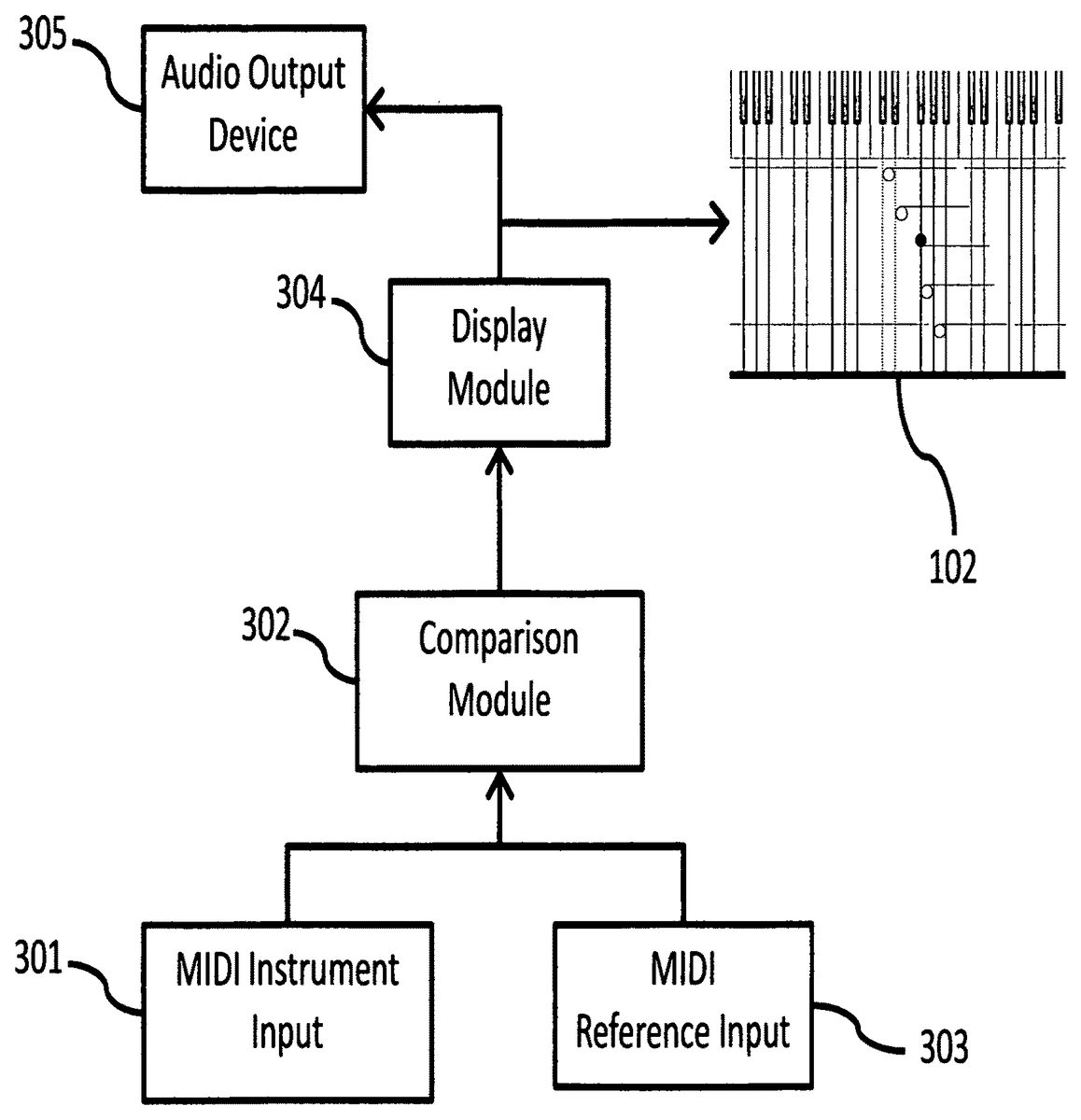
FIG. 3provides a block diagram of the logical elements of the invention, according to an embodiment. A MIDI input element302obtains input from a MIDI source, such as the keyboard101ofFIG. 1. As a player plays music, the notes played are collected by MIDI input element301and passed, in MIDI format, to comparison module302. MIDI file input303is also provided to comparison module302. In a preferred embodiment, when a player chooses to play a particular musical selection (or when it is assigned to him by game logic), the entire piece is loaded from a MIDI reference input source into comparison module302. This is not required, however. MIDI reference input303could feed MIDI data concerning a piece in real time (i.e., as notes are to be played), in blocks of data (for instance, one minute of music at a time), or alternatively many musical selections could be stored in memory in comparison module302after initial loading from MIDI reference input303. What is important is that the MIDI reference input303represents the music as it should be played; it is the reference against which the player's input (playing) will be compared, tested or scored.
In an embodiment, the MIDI reference input303data is traversed within comparison module302at a fixed “speed” or “tempo”; that is, a uniform time step (which changes only when reference tempo changes) is used and MIDI reference data is sampled each time step to determine what should be played during that time step. A common way of implementing this, but not the only way, would be to have timer events fire at a regular interval, for instance every millisecond. As each timer event fires, MIDI reference input303data is sampled and the required notes (those which should currently be “active”, or being played by the player) are determined. Each time a player plays or releases a note, a MIDI event is generated and sent from MIDI instrument input301to comparison module302, where it can be compared to the current required notes. Comparison module302sends data concerning what notes are required to display module304. Since it is important for a player to be able to look ahead to notes that are to be played in the future, as is common with printed scores (where the player can see one or two pages of music at a time), comparison module302typically will send data for a predetermined period of time or a fixed number of measures, which may vary during the course of a given piece to best accommodate ease of play (this would be done by the publisher of a particular piece of music according to an embodiment). Also, when a visualization screen is “zoomed” in or out, a corresponding increase (when zooming out) or decrease (when zooming in) of the timeframe which the screen can represent occurs, may make it desirable for comparison module302to send more or less data, accordingly. Comparison module302compares data concerning notes actually played (received from MIDI instrument301) to reference data concerning what should have been played (received from MIDI reference input303) to determine if the player played what was required. It should be clear that there are at least two key dimensions to be checked: were the correct notes played, and were they played at the right time (and held for the appropriate length of time). Comparison module will typically, but need not, use configurable variance thresholds in determining the accuracy of a player's performance. For instance, few players other than true experts play notes exactly when they should; comparison module302therefore counts any notes played within allowable time variance from the target time (the time when the applicable note crosses the trigger point) as being correctly played notes. Higher values of the timing variance threshold will allow a player to more loosely follow the timing of a piece while still being assessed as playing accurately. In another embodiment, instead of using a variance level for binary satisfactory/unsatisfactory rating of each note, a continuous variable such as a percentage “ahead” (early) or “behind” (late) measure, comparing an actual play time for a note with an expected or correct play time for the note, can be used. Such continuous measures are suitable for varying levels of “goodness” of playing, such as “GOOD”, “GREAT!”, “PERFECT!!”, or “Needs Work . . . ”. The situation is different for accuracy in the sense of playing the right key. With keyboards, there is no ambiguity about which key is pressed, especially when MIDI interfaces are used. However, it is often true that while a correct key is played, an incorrect adjacent key might also very briefly be played by an inexperienced player. It may be desirable to ignore this incorrect key in scoring or teaching if the time it is pressed is very short; thus a configurable minimum time threshold may be set and used by comparison module302. While such a threshold can be set as a fixed value within the scope of the invention, it is more advantageous to make such a threshold a fraction of the length of the intended note. For example, if a player is supposed to play an eighth-note middle C and does so, but also plays the D above middle C for a time equivalent to less than 10% (this is configurable) of the length of the middle C, then the D would be ignored. But if the D is held for a longer time, it would show up as an incorrect key played on monitor102(and the middle C would show up as correctly played).
According to an embodiment of the invention, data is passed from comparison module302to display module304as a fixed set of data at a fixed periodicity. This would typically include a list of all notes currently being played or that currently should be being played, with appropriate attributes to inform the display module304of the status of each such note (for example, middle C is active and correct, the D above it is active and incorrect, and the E above that should be active but is not). Additionally, comparison module302would pass a current position in the score that corresponds to the current notes data, and would periodically pass a buffer full of future notes to be played so that the display module would always have enough data to display a full screen even at a (configurable) maximum zoom outward. Zooming outward, which can be triggered by a user by an optional zoom button, menu option or keystroke, means to move the player's point of view out from the page, encompassing more musical time at one glance but making all details correspondingly smaller; at maximum outward zoom a maximum amount of music (and time) is shown on the monitor102, so display module304must have at least enough data from comparison module302to show this amount of music. Note that in some embodiments the size of the musical notation system, keyboard and so forth is zoomed as with any typical “zoom button”, but in other embodiments, only the time factor is zoomed, meaning each event is spaced more closely together vertically (or horizontally, if using traditional notation), while other screen elements retain their normal sizes. Normally, comparison module302only deals with what is played, and what should be played; the determination of how feedback is to be provided to a player is made by display module304, and a corresponding video signal is sent to monitor102. Optionally, audio feedback may be provided to audio output device305, which in some embodiments is a computer's internal speaker, an external speaker or set of speakers connected to a computer by USB, audio cables, Bluetooth™, or the like, or any other audio device adapted to receive data from a computer (e.g., computer110) directly or via monitor102(many monitors have audio output plugs and can pass through audio received from a computer).
Display module304, on receiving data from comparison module302concerning what notes are to be played, and concerning what notes actually have been played, performs calculation needed and sends video to monitor102and, optionally, audio output device305. Several calculations are needed in display module304. For instance, when a player changes the zoom level for display of music, via a menu option, a button in the user interface, or a keystroke (methods of passing commands to a personal computer or video game console are well-known in the art and any of them can be used without limiting the scope of the invention), display module304must calculate how many notes, at the new zoom level, must be sent to the monitor102. Similarly, the rate at which the musical score scrolls on the monitor102must be recalculated each time the tempo of a piece changes. The scroll rate is determined by the zoom level (number of beats per unit of height on the monitor102) and the tempo (how fast beats must arrive at the trigger point106). And, during complex musical passages where many notes of small duration must be displayed, display module304may determine that measures must be expanded (fewer beats per unit of height), and this will also lead to a change in scroll rate. In some embodiments, users are provided with an option to allow the system to make these adjustments automatically when deemed necessary or, optionally, to mark passages for zooming manually (ahead of time or during play). When manual zooming choices are made, in some embodiments they can be saved, either in a new music file or as a revision of the original music file; advanced players will tend to thus customize their files to suit their playback and notation preferences.
FIG. 4shows another embodiment of the invention, in which an audio input device406is used, instead of a MIDI-compatible musical instrument, to capture a player's music play for comparison to the musical score provided by MIDI reference input403. Audio input device406can be an external microphone, a built-in computer or game console microphone, or any other device capable of capturing sound and rendering it, in digital or audio phone, as an electronic signal. The audio signal is passed to an audio conversion module401, which converts the audio stream into a MIDI output. To do this, audio conversion module must detect each new played (or sung) musical note from within the audio stream, and identify its pitch and volume, and the times of its beginning and end. With these elements known, audio conversion device401can deliver MIDI events of the form (note X started at volume Y, at time Z) or (note X ended at time Z) to comparison module402. Audio conversion device406can optionally provide additional music-related information to comparison module402, for example providing pitch error data, which can be very useful for vocalists, violinists, and other musicians who need to control the pitch of their music very carefully. When this pitch error data is made available, visual feedback may be provided, in a form such as a slide bar that shows how sharp or flat a given tone is, by display module404on monitor102.
The use of an audio input device406and subsequent MIDI conversion in audio conversion module401enables any musical instrument, or a vocal part, to be practiced and trained (or to compete when treating the invention primarily as a game) according to the invention.
The tempo (or pace) of music is very important, and the present invention is adapted to train players not only on what notes to play, but also on rhythm and tempo control. The inventor envisions several tempo modes. In “normal mode”, a tempo setting is included as part of the MIDI input (this is a standard MIDI feature) and is passed by comparison module302directly to display module304to enable the display module to control the rate of scrolling of the musical score, as described above. When changes in tempo are indicated in a MIDI input, the changes are passed to display module304so it can automatically change the scroll rate when the new tempo takes effect (when the tempo change arrives at the trigger point106). In some embodiments, users are provided with a button for selecting a different tempo for a piece, or for a section of a piece. Changes can be made in qualitative terms (for example, “much faster”, “faster”, “slower”, or “really slow”), or in quantitative terms (for example, “play at 75% of the indicated tempo”, or simply “replace MIDI settings with a setting of 120 beats per minute”). Such changes can be made for a single play session, or in some embodiments they can be saved by a player, either as a new file or as a modified version of the original file.
FIG. 5shows a method for providing a “teaching mode” of tempo control. A goal of this mode is to encourage a practicing player to correct mistakes by not letting the player advance (move further into a piece of music) until she gets each note right. In step501, a note is received (in comparison module302) from either a MIDI instrument301or an audio conversion module401. In a second step, the note is checked against data from MIDI reference input303which indicates what the player should be playing. In step503, a branch is executed based on the comparison in step502. If the correct note was played, play continues in step504at the defined tempo. In this case, play continues until a new note is played by the player. If the comparison step502failed, then in step505feedback is provided to the player and the motion of the visual display is stopped. Once either step504or step505is executed, the method starts over when the next note is received from the player (step501). Since often, in keyboard music, multiple notes are required at once (i.e., chords), there are alternative ways according to the invention to manage this mode. In one embodiment, all of the notes required must be played simultaneously (again, as above, defined by “within a configurable time variance of each other”), or the check in step503fails. In another embodiment, if substantially most of the required notes are played, the test of step503succeeds. In yet another embodiment, a main melodic line is identified (and indicated visually on display102), and as long as the user plays the right note from the melodic line he is allowed to proceed regardless of whether any other notes were played properly (or at all). These three types of training mode rhythm control are exemplary in nature and the invention is not limited to them only; it can readily be appreciated that other approaches could be taken to training mode to facilitate learning, without departing from the scope of the invention.
FIG. 6illustrates a method for providing a “performance mode” that is designed to allow a player maximum freedom to perform music as desired. In performance mode, the comparison module302attempts to follow the performer, by determining the effective tempo at any given moment and feeding it to a display module304, which then makes adjustments in the scrolling speed of the score on monitor102to match the performer's current tempo. While it might seem natural to determine the performer's tempo by simply measuring the time between the playing two known notes in a musical piece, and then dividing the musical “distance”, in beats, by the elapsed time (in minutes), this will often lead to poor results because tempo so measured will tend to jump violently from one value to another as each note is played. For example, if two notes that are one beat apart are played 2 seconds apart, then the instantaneous tempo is one (beat) divided by 1/30th(minute, this is how much two seconds is), or 30 beats/minute. However, such a simplistic approach leads to extremely jerky results, in a literal sense, as the tempo changes instantaneously every time a new note is played, if there is any variation in the player's rhythm. In rapid passages with many notes of short duration, very slight measurement errors or playing errors will result in very large, and very sudden, tempo excursions.
A better approach is that shown inFIG. 6. In step601, a notification is received from a MIDI source that a player has played a note, and specifically at a certain time. In step602, the elapsed time between the last played note and this note is determined, as described above, and in step603the musical distance (in beats) is determined by identifying which note in the score was played and calculating the elapsed beat count, according to the score, from the last-played note to the just-played note. Alternatively, this process can be done not for every played note, but only for notes that correspond to a beat (as opposed to notes that are played on the off-beat or at some other time), or for a statistical sampling of beats; these approaches will reduce computational load and may reduce jerkiness by sampling at lower frequencies and therefore lowering the percentage error for any given absolute time error in play. Optionally, in step604a smoothing function can be applied to these calculations of tempo. For example, a list of the last 10 measurements (or all the measurements taken in the last 10 seconds; these are different sampling approaches but do not change the concept or limit the invention) can be averaged to obtain a moving average that will exhibit more stable behavior. Any number of variations can be envisioned, such as doing a weighted moving average in which on-beat notes are weighted more heavily than minor passing notes (which are presumably more likely to be slightly off-tempo without signifying an overall tempo changes). This kind of variation can be particularly useful if there are many ornamental notes in a piece of music. In another embodiment, the smoothing function used in step604may be chosen from a set of possible functions (those mentioned above plus others known in the art for smoothing noisy data), based on the degree to which the tempo is fluctuating. For example, the volatility of the time series that is tempo can be measured easily using techniques well-established in the study of financial markets; for a given piece if this value is higher than normal a different smoothing function can be selected and its volatility measured under the same performance conditions. If volatility is reduced, then the new selection is retained; conversely if the new selected smoothing function leads to higher volatility then the original may be reverted to, or another may optionally be selected from the set. Finally, in step605, the smoothed time lag is used to calculate the new tempo using the formula discussed above (musical distance divided by time in minutes), and passed to display module304. It is worth re-emphasizing that the purpose of these various algorithmic choices is to more accurately track a user's position in the music. The idea is that a performer (user) should not have to adjust his tempo to what he sees on the screen. The notation is simply there to remind users of the correct notes to play, as with reading any printed notation. Accordingly, tempo determination in some embodiments is only one among several possible means of determining a user's current position in the music. Examination of what notes are being played is quite relevant, as performance mode may have to correct itself. For instance, consider a series of repeating notes; even with tempo adjustment it is possible that a user could play one or more of the notes indistinctly (or not at all, or a user could play one too many of the repeated note), leading the system to lose track of which note the user is playing, but when a non-repeated note is played, the system can then re-adjust by “concluding” that the repeated set of notes is past. These (tempo and note verification) are but examples of approaches to closely tracking a user's progress through a printed piece of music in order to keep the notation “in time” with what the player is doing, so the notation assists, rather than distracts, the accomplished player.
FIG. 7illustrates an embodiment of the invention in which a player's musical performance is written to a MIDI file, rather than being compared to an existing MIDI file. As before, a MIDI instrument input701is used to collect the notes played by a user (although an audio source406and audio conversion module401can be used as well). However, instead of feeding play data into a comparison module, in the embodiment the data is fed into a conversion module702which converts the raw note data into rich MIDI data that can be written to a MIDI file703and also passed to display module704to be displayed on monitor102. Conversion module702has several tasks to perform, including principally tempo smoothing and determination. Tempo determination is performed within conversion module702using substantially the method ofFIG. 6, except that without a MIDI reference input the musical distance between any two played notes is not known in advance. This can be provided manually by allowing a user to provide a meter (that is, stating whether there will be four quarter notes to a measure, or three, or five, and so forth), and a rough tempo, and then using that as a baseline and measuring variations from that baseline. Other more sophisticated methods can be used, for example treating each keystroke as an event and looking for the dominant frequency of event arrivals using well-known spectral techniques (or looking for dominant frequency within a range of typical music tempos, say 60 to 120 beats per minute, and picking that dominant frequency as the base tempo).
FIG. 8illustrates an embodiment of the invention in which two or more players play together, either cooperatively or competitively. Two players are illustrated, although more can participate with similar arrangements, limited only by available bandwidth or computing resources. Each player plays a MIDI-enabled keyboard or other instrument (or uses the audio input and audio conversion module combination disclosed previously), and is connected to a dual/multi-play server801via a MIDI interface802a,802b. Server801comprises at least a comparison module302, a MIDI reference input303, and one or more display modules304. As with single-player embodiments, MIDI reference input303provides the notes that are to be played by one or more of the players, and these are passed from server801to display modules803aand803bexactly as before, and display modules803format the data for display on monitors102aand102b. Each player may select her favorite visualization style, for example the Klavarskribo style ofFIG. 1or ofFIG. 2, or standard musical notation style.
The inventor envisions various modes of multiplayer play. In one embodiment, two or more players take turns playing the same piece or segment of music, and strive to get the highest score. Scoring is done by measuring, in the comparison module302, one or more of how many correct notes each player played, how many incorrect were played, how consistently tempo was maintained, how many required notes were omitted, and so forth. Players can view their scores on monitors102a,102b, and so forth. Music can be used of varying difficulty levels to accommodate players of differing skills. In another embodiment, players take the lead in turns, each leader playing a segment of music of her own devising (which would be provided on screen to the other player, or in an alternate game mode would not be so the following players' memory is tested). Alternatively, a musical selection with several distinct parts is used, with each player taking each part in turn, the players competing for the highest overall score after each has cycled through all parts. It will be appreciated that there are many game variants that are possible other than those exemplary ones described herein, without departing from the scope of the invention.
Server801may be collocated with both players, for example when all components are loaded onto a single computer or gaming console capable of supporting multiple players. Alternatively, server801may be located with one of the players, and the one or more other players are connected from local or remote computers or consoles via a network such as a local area network or the Internet. When players are located at some distance from each other, or when they are connected over an unreliable network, it is possible that latency problems will hinder the competitive (or cooperative) musical play experience. Server801can optionally measure network latency by pinging the remote devices (which is well know in the art), and can do so on a regular basis to monitor network latency trends over time. Knowledge of network latency is useful in calculating scores, as each arrival time of a note from a player can be adjusted by server801based on the measured latency to that player's location.
FIG. 9illustrates an embodiment of the invention that provides feedback not only on what a player has played, but also on what a player is about to play. This is accomplished by detecting hand or finger positioning passively and using this information, via visual display on monitor102, to inform a player when his hands or fingers are correctly (or incorrectly) positioned, before notes are played. For instance, when a keyboard player needs to move her hands to a new position to hit a note that is separated from the previous note, it is often necessary (especially for less experienced players) for the player to glance down at the keyboard to ensure her hand is properly positioned. This switching from reading the score on monitor102and checking hand position on keyboard101detracts from a player's ability to stay focused. It would be clearly preferable for players to get immediate feedback on hand position or fingering in advance of playing notes, because not only does it allow for fixing positioning problems before they lead to wrong notes' being played, but it also allows a players to focus solely on displayed information on monitor102while playing.
To accomplish this passive hand or finger position feedback, proximity sensor array904is added to the system shown inFIG. 3, as shown inFIG. 9. Proximity sensor array906is an array of sensors or detectors that determine when a finger is in close to proximity to any given key. Various kinds of proximity sensors are readily available in the art, including but not limited to infrared sensors, real-time video processing software, lasers that reflect off of fingers coupled with detectors for picking up reflected laser light, or pressure sensors that can pick up contact pressure that is less than what is required to play a note but is still detectable. Alternatively, virtual reality gloves, or gloves with small RFID or other passive sensors on the fingertips, can be used to detect hand and finger location. Output from proximity sensor array906is fed to comparison module902, which performs the same functions as comparison module302inFIG. 3. While detecting proximity of a finger is useful, it is often important to know which finger is hovering above a key on a keyboard, as one of the important things an aspiring musician needs to learn is proper fingering. Since comparison module902typically receives multiple indications of finger proximity, comparison module902is adapted to interpret the spatial pattern of finger positions to determine which fingers are where with good accuracy. For example, if proximity sensor array906notifies comparison module902that fingers are close to middle C and the four notes above it, and another group of finger proximity indications is received from the G an octave and a half above middle C and the A, B-flat, and C above it, then comparison module can estimate that the fifth (pinky) finger of the left hand is on middle C and the thumb of the left hand is on the G above middle C, and that the thumb of the right hand is on the G an octave above that. Note that in this example there is some ambiguity because either the fourth or fifth finger of the right hand is likely on the C two octaves above middle C; it is helpful for even an approximate sense of where the players hands and particular fingers are to be provided as visual cues back to the player, so this ambiguity is not disabling. For instance, the player knows which of the fourth and fifth fingers of his right hand are touching the keyboard; the question is where that finger is touching, and that question is answered by the visual feedback on monitor102. It should be noted that the illustration of finger positioning on a keyboard is exemplary only; the same embodiment can be used to measure and provide visual feedback on finger positioning along a violin, a cello, or any other instrument, without departing from the scope of the invention. Moreover, it is even possible to enable meaningful music practice to be accomplished without a keyboard or other instrument at all; if a proximity sensor array can detect finger positions above a desk or table (for instance by use of lasers), and if it can also detect finger contact with the table or desk (again, using lasers, or pressure sensors), then a player can practice on a desk in a hotel room (for example) and build finger dexterity by focusing on the visual feedback provided on monitor102(which gets the signal from display module904as in other embodiments). Additionally, audio feedback can be provided via audio device905, in the form of MIDI-generated music from personal computer103(on which display module904executes) so that the player can hear the results of her practice efforts even though no keyboard is available.
FIG. 10illustrates a method by which the invention adapts to different users' learning profiles to provide an optimal learning experience. Each time a user starts a session, she is able to (or optionally is required to) log in, in step1001, thus identifying herself to the system (this works equally well in single-player mode or in multi-player modes, and can be used for competition adaptation as well as training adaptation). In step1002, a database of training (or competitive) information about the logged in user is loaded, either from a file residing on comparison module302or on server801. In step1003, training mode settings for the user are adjusted based on her history; in another embodiment, competitive settings are similarly loaded based on history. Examples of settings which could be managed in this way include how fast to migrate a user between levels of difficulty; how many repetitions are typically required to get a passage to a high level of accuracy; what is the maximum velocity this player is able to achieve (velocity meaning here speed at which the player can correctly play a run of notes of very short duration, such as a scale); what is the highest exercise the player has successfully played once, or perhaps has been able to play correctly three times in a row (often this is quite difficult for newer players to do). Upon completion of a training (or competitive) session after step1004, the user's training (or competitive) database is updated to reflect progress (good or bad) during that session.
It should be understood that all embodiments disclosed herein are exemplary in nature and should not be construed to eliminate equivalent embodiments.
Claims
- A system comprising: means for receiving a first input from an electronic device, said first input pertaining to performance of music by a user;means for receiving a second input, said second input pertaining at least to music intended to be performed by the user;and a comparison module software executing on a computer and adapted to receive said first input and to receive said second input;wherein the comparison module compares the first input from a user to the second input to produce at least one indicia of the user's success in performing the intended music correctly;and wherein the comparison module sends to a display module associated with the user information including at least the music intended to be performed by the user and the indicia of the user's success in performing the intended music correctly;and wherein the comparison module further sends to the display module associated with the user a timing signal suitable for indicating the speed at which the music should be shown on the display and played by the user, said timing signal computed according to two or more tempo modes selectable by the user, at least one of which varies continuously based at least in part based on the user's actual performance of the music being displayed.
- The system of claim 1 , wherein the comparison module provides an audio feedback signal to the display module associated with the user, the audio signal based on at least one indicia of the user's success in performing the intended music correctly.
- The system of claim 1 , wherein the second input is a MIDI data file.
- A method for conducting a musical computer game, comprising the steps of: (a) receiving a first input from an electronic device, said first input pertaining to performance of music by a user;(b) receiving a second input pertaining at least to music intended to be performed by the user;(c) comparing the first input and the second input and computing at least one indicia of the user's success in performing the intended music;(d) sending to a display module associated with the user information including at least the music intended to be performed by the user and the indicia of the user's success in performing the intended music correctly;(e) computing a timing signal suitable for indicating the speed at which the music should be shown on the display and played by the user, said timing signal computed according to two or more tempo modes selectable by the user, at least one of which varies continuously based at least in part based on the user's actual performance of the music being displayed;and (f) sending the timing signal to the display module.
Disclaimer: Data collected from the USPTO and may be malformed, incomplete, and/or otherwise inaccurate.