U.S. Pat. No. 7,311,608
ONLINE GAME INVITATIONS USING FRIENDS LIST
AssigneeMicrosoft Corporation
Issue DateOctober 31, 2003
U.S. Patent No. 7,311,608: Online game invitations using friends list

Summary:
The ‘608 patent describes a method for enabling a user to load a game and to automatically join an online game with a friend selected from his friends list. Ordinarily, when friends want to play together they must have the same game loaded. With this invention, however, a friend can join another friend on his list without having the same game loaded. If the friend wants to join a game that he does not have the disk for, the invention allows him to download the game to his hard drive where he can then play the game.
Abstract:
A user who has signed on to an online gaming service can send an invitation to a friend appearing in the user’s friends list to join in playing the game the user has loaded or may join the friend in playing the game being played by the friend, regardless of whether the game title played by the friend is the same as that loaded on the user’s game console. If the game titles are different, the party needing to load the game title to be played is prompted to do so, and then prompted to reboot the game console. Information written about the new game to be played is automatically written on the hard drive of that party’s game console and automatically accessed after the reboot for use in expediting the log-in process of the player who had to reboot.
Illustrative Claim:
1. A method for enabling a user to load a game and to automatically join an online game with a friend selected from a friends list of the user, comprising the steps of: (a) initiating a gaming session by logging a user on to an online gaming service; (b) identifying an online game associated with the online gaming service to join that is currently being played by the friend, wherein the online game is different than an online game currently loaded for play by the user; (c) causing data identifying the online game currently being played by the friend to be stored in a local non-volatile storage; (d) prompting the user to load the online game currently being played by the friend; (e) restarting the gaming session of the user with a newly loaded online game in response to user input; and (f) automatically comparing the online game being played by the friend, as indicated by the data stored in the local non-volatile storage, with the newly loaded online game, and automatically joining the online game being played by the friend by bypassing at least some login requirements and without requiring any logon or password when it is determined: (i) the newly loaded online game is actually the same as the online game currently being played by the friend; (ii) the current online game being played by the friend has an opening for the user to join; and (iii) the online game of the friend has not yet concluded.
Illustrative Figure
Abstract
A user who has signed on to an online gaming service can send an invitation to a friend appearing in the user's friends list to join in playing the game the user has loaded or may join the friend in playing the game being played by the friend, regardless of whether the game title played by the friend is the same as that loaded on the user's game console. If the game titles are different, the party needing to load the game title to be played is prompted to do so, and then prompted to reboot the game console. Information written about the new game to be played is automatically written on the hard drive of that party's game console and automatically accessed after the reboot for use in expediting the log-in process of the player who had to reboot.
Description
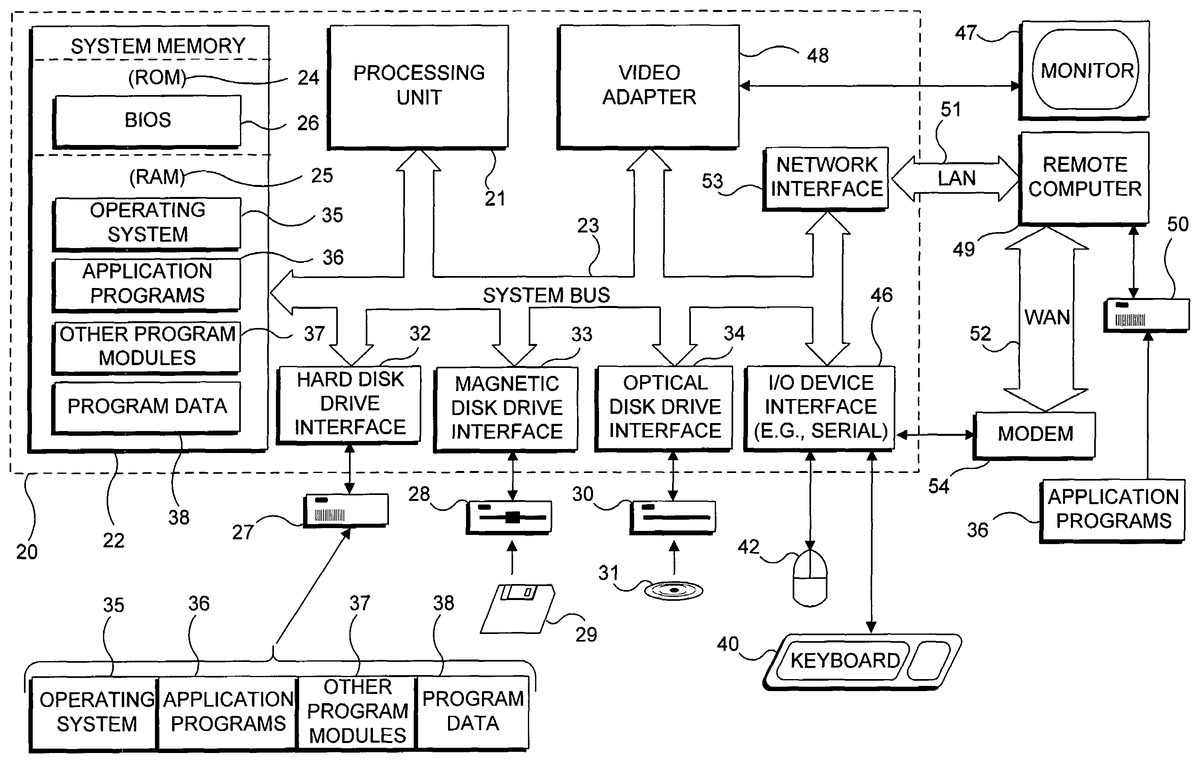
DESCRIPTION OF THE PREFERRED EMBODIMENT Exemplary System for Implementing Present Invention With reference toFIG. 1, an exemplary system suitable for implementing various portions of the present invention, including executing a Web browser such as Microsoft Corporation's INTERNET EXPLORER™ for accessing Web Pages over the Internet; this system is also useful for providing the functionality of a gaming service such as Microsoft Corporation's XBOX LIVE™. The system includes a general purpose computing device in the form of a conventional PC20, provided with a processing unit21, a system memory22, and a system bus23. The system bus couples various system components including the system memory to processing unit21and may be any of several types of bus structures, including a memory bus or memory controller, a peripheral bus, and a local bus using any of a variety of bus architectures. The system memory includes read only memory (ROM)24and random access memory (RAM)25. A basic input/output system26(BIOS), containing the basic routines that help to transfer information between elements within the PC20, such as during start up, is stored in ROM24. The PC20further includes a hard disk drive27for reading from and writing to a hard disk (not shown), a magnetic disk drive28for reading from or writing to a removable magnetic disk29, and an optical disk drive30for reading from or writing to a removable optical disk31, such as a compact disk-read only memory (CD-ROM) or other optical media. Hard disk drive27, magnetic disk drive28, and optical disk drive30are connected to system bus23by a hard disk drive interface32, a magnetic disk drive interface33, and an optical disk drive interface34, respectively. The drives and their associated computer readable media provide nonvolatile storage of computer readable machine instructions, data structures, program modules, and other data for PC20. Although the exemplary environment described herein employs a hard disk, removable magnetic disk29, ...
DESCRIPTION OF THE PREFERRED EMBODIMENT
Exemplary System for Implementing Present Invention
With reference toFIG. 1, an exemplary system suitable for implementing various portions of the present invention, including executing a Web browser such as Microsoft Corporation's INTERNET EXPLORER™ for accessing Web Pages over the Internet; this system is also useful for providing the functionality of a gaming service such as Microsoft Corporation's XBOX LIVE™. The system includes a general purpose computing device in the form of a conventional PC20, provided with a processing unit21, a system memory22, and a system bus23. The system bus couples various system components including the system memory to processing unit21and may be any of several types of bus structures, including a memory bus or memory controller, a peripheral bus, and a local bus using any of a variety of bus architectures. The system memory includes read only memory (ROM)24and random access memory (RAM)25. A basic input/output system26(BIOS), containing the basic routines that help to transfer information between elements within the PC20, such as during start up, is stored in ROM24. The PC20further includes a hard disk drive27for reading from and writing to a hard disk (not shown), a magnetic disk drive28for reading from or writing to a removable magnetic disk29, and an optical disk drive30for reading from or writing to a removable optical disk31, such as a compact disk-read only memory (CD-ROM) or other optical media. Hard disk drive27, magnetic disk drive28, and optical disk drive30are connected to system bus23by a hard disk drive interface32, a magnetic disk drive interface33, and an optical disk drive interface34, respectively. The drives and their associated computer readable media provide nonvolatile storage of computer readable machine instructions, data structures, program modules, and other data for PC20. Although the exemplary environment described herein employs a hard disk, removable magnetic disk29, and removable optical disk31, it will be appreciated by those skilled in the art that other types of computer readable media, which can store data and machine instructions that are accessible by a computer, such as magnetic cassettes, flash memory cards, digital video disks (DVDs), Bernoulli cartridges, RAMs, ROMs, and the like, may also be used in the exemplary operating environment.
A number of program modules may be stored on the hard disk, magnetic disk29, optical disk31, ROM24, or RAM25, including an operating system35, one or more application programs36, other program modules37, and program data38. A user may enter commands and information in to PC20, and provide control input through input devices such as a keyboard40and a pointing device42. Pointing device42may include a mouse, stylus, wireless remote control, or other pointer. As used hereinafter, the term “mouse” is intended to encompass virtually any pointing device that is useful for controlling the position of a cursor on the screen. Other input devices (not shown) may include a microphone, joystick, haptic joystick, yoke, foot pedals, game pad, satellite dish, scanner, or the like. These and other input/output (I/O) devices are often connected to processing unit21through an I/O interface46that is coupled to the system bus23. The term I/O interface is intended to encompass each interface specifically used for a serial port, a parallel port, a game port, a keyboard port, and/or a universal serial bus (USB). A monitor47or other type of display device is also connected to system bus23via an appropriate interface, such as a video adapter48. In addition to the monitor, PCs are often coupled to other peripheral output devices (not shown), such as speakers (through a sound card or other audio interface—not shown) and printers.
The present invention may be practiced on a single machine, however, PC20can also operate in a networked environment using logical connections to one or more remote computers, such as a remote computer49. Remote computer49may be another PC, a server (which is typically generally configured much like PC20), a router, a network PC, a peer device, or a satellite or other common network node, and typically includes many or all of the elements described above in connection with PC20, although only an external memory storage device50has been illustrated inFIG. 1. The logical connections depicted inFIG. 1include a local area network (LAN)51and a wide area network (WAN)52. Such networking environments are common in offices, enterprise wide computer networks, intranets, and the Internet.
When used in a LAN networking environment, PC20is connected to LAN51through a network interface or adapter53. When used in a WAN networking environment, PC20typically includes a modem54, or other means such as a cable modem, Digital Subscriber Line (DSL) interface, or an Integrated Service Digital Network (ISDN) interface for establishing communications over WAN52, such as the Internet. Modem54, which may be internal or external, is connected to the system bus23or coupled to the bus via I/O device interface46, i.e., through a serial port. In a networked environment, program modules depicted relative to PC20, or portions thereof, may be stored in the remote memory storage device. It will be appreciated that the network connections shown are exemplary and other means of establishing a communications link between the computers may be used, such as wireless communication and wide band network links. The servers employed to provide the gaming service functions will typically comprise computing devices much like that described above, but will likely access much larger hard drives or other non-volatile memory systems for storing data about subscribing users and for other elements of the gaming service.
Exemplary Game Console
As shown inFIG. 2, an exemplary electronic gaming system100includes a game console102and support for up to four user input devices, such as controllers104aand104b. Game console102is equipped with an internal hard disk drive (not shown in this Figure) and a portable media drive106that supports various forms of portable optical storage media, as represented by an optical storage disk108. Examples of suitable portable storage media include DVD disks and CD-ROM disks. In this gaming system, game programs are preferably distributed for use with the game console on DVD disks, but it is also contemplated that other storage media might instead be used, or that games and other programs can be downloaded from a gaming site over the Internet (or other network).
On a front face of game console102are four connectors110that are provided for electrically connecting to the controllers. It is contemplated that other types of connectors or wireless connections might alternatively be employed. A power button112and a disk tray eject button114are also positioned on the front face of game console102. Power button112controls application of electrical power to the game console, and eject button114alternately opens and closes a tray (not shown) of portable media drive106to enable insertion and extraction of storage disk108so that the digital data on it can be read and loaded in to memory or stored on the hard drive for use by the game console.
Game console102connects to a television or other display monitor or screen (not shown) via audio/visual (A/V) interface cables120. A power cable plug122conveys electrical power to the game console when connected to a conventional alternating current line source (not shown). Game console102may be further provided with a data connector124to transfer data through an Ethernet connection to a network and/or through a broadband connection to the Internet. Alternatively, it is contemplated that a modem (not shown) may be employed to transfer data to a network and/or the Internet. As yet a further alternative, the game console can be directly linked to another game console via an Ethernet crossover cable (not shown).
Each controller104aand104bis coupled to game console102via a lead (or in another contemplated embodiment, alternatively, through a wireless interface). In the illustrated implementation, the controllers are Universal Serial Bus (USB) compatible and are connected to game console102via USB cables130. Game console102may be equipped with any of a wide variety of user devices for interacting with and controlling the game software. As illustrated inFIG. 2, each controller104aand104bis equipped with two thumb sticks132aand132b, a D-pad134, buttons136, and two triggers138. These controllers are merely representative, and other gaming input and control mechanisms may be substituted for or used, in addition to those shown inFIG. 2, for controlling game console102.
Removable function units or modules can optionally be inserted in to controllers104to provide additional functionality. For example, a portable memory unit (not shown) enables users to store game parameters and port them for play on another game console by inserting the portable memory unit in to a controller on the other console. Other removable function units are available for use with the controller. In connection with the present invention, a removable function unit comprising a voice communicator module140is employed to enable a user to verbally communicate with other users locally and/or over a network. Connected to voice communicator module140is a headset142, which preferably includes a boom microphone144or other type of audio sensor that produces an input signal in response to incident sound, and a headphone146or other type of audio transducer for producing audible sound in response to an output signal from the game console. In another embodiment that is being contemplated (not shown), the voice communicator capability is included as an integral part of a controller (not shown) that is generally like controllers104aand104bin other respects. The controllers illustrated inFIG. 2are configured to accommodate two removable function units or modules, although more or fewer than two modules may instead be employed.
Gaming system100is of course capable of playing games, but can also play music, and videos on CDs and DVDs. It is contemplated that other functions can be implemented by the game controller using digital data stored on the hard disk drive or read from optical storage disk108in drive106, from an online source, or from a function unit or module.
It must be emphasized that as supplied, game console102is incapable of browsing the Internet or connecting to Web addresses that display Web Pages defined by any form of hypertext markup language (HTML). Instead, it can only connect to a dedicated gaming service that has been set up to communicate with the game console over the Internet and to facilitate multiplayer games by subscribers to the service who connect through game consoles that are registered with the gaming service. Each connection over the Internet is through a VPN tunnel, so that the communications between the game console and the gaming service are secure. The game console is not currently provided with a conventional keyboard, so that entry of text messages or other text input is possible only by selecting alphanumeric characters from a display using one of the controllers. The game consoles do not have direct communication with parties outside of the environment for playing multiplayer games that is provided by the gaming service. Similarly, anyone who is not connected with a game console in the gaming environment cannot have direct communication with those who are connected to the gaming service.
Functional Components of the Game Console
Turning now toFIG. 3, a functional block diagram illustrates, in an exemplary manner, components of the game console and components that are provided to facilitate voice or verbal communication between players during the play of electronic games on the multiplayer game console. As noted above, this embodiment of game console100can have up to four players on each console, and each player can be provided with a controller and voice communicator. Details of a voice communicator module140′ are illustrated in connection with its associated controller104a. It will be understood that controllers104b,104c, and104d(if coupled to game console100) can optionally each include a corresponding voice communication module140′ like that coupled to controller104a. In a current preferred embodiment, voice communication module140′ includes a digital signal processor (DSP)156, an analog-to-digital converter (ADC)158, a digital-to-analog converter (DAC)161, and a universal serial bus (USB) interface163. In response to sound in the environment that is incident upon it, microphone144produces an analog output signal that is input to ADC158, which converts the analog signal in to a corresponding digital signal. The digital signal from ADC158is input to DSP156for further processing, and the output of the DSP is applied to USB interface163for connection in to controller104a. In this embodiment, voice communication module140′ connects in to the functional unit or module port on controller104athrough a USB connection (not separately shown). Similarly, digital sound data coming from game console100are conveyed through controller104aand applied to USB interface163, which conveys the digital signal to DSP156and on to DAC161. DAC161converts the digital signal in to a corresponding analog signal that is used to drive headphone146.
With reference to multiplayer game console100, several key functional components are shown, although it should be understood that other functional components are also included, but not shown. Specifically, game console100includes a central processing unit (CPU)150, a memory152that includes both read only memory (ROM) and random access memory (RAM). Also provided is a DSP154. The digital signal produced by ADC158in response to the analog signal from microphone144is conveyed through controller104ato CPU150, which handles encoding of the voice stream signal for transmission to other local voice communication modules and to other game consoles over a broadband connection through an Ethernet port (not shown inFIG. 3) on the game console.
An alternative embodiment employs DSP156in voice communication module140′ to encode the digital signal produced by ADC158in response to the analog signal from microphone144. The encoded data are then conveyed through controller104ato CPU150, which again handles transmission of the encoded data to other local voice communication modules and other game consoles over the broadband connection on the game console.
Digital signals conveyed as packets over a direct or network connection are input to CPU150through the Ethernet port on game console100(or from other voice communication modules and controllers connected to the same game console), and are processed by the CPU to decode data packets to recover digital sound data that is applied to DSP154for output mixing. The signal from DSP154is conveyed to the intended voice communication module for the player who is the recipient of the voice communication for input through USB interface163. Data and verbal communications over the Internet between players participating in a multiplayer game through the gaming service are not accessible by others who are simply connected to the Internet via a PC or other type of general computing device, because these communications are conducted through the VPN tunnels that are relatively secure.
Gaming Environment
FIGS. 4A and 4Billustrate different aspects of the gaming environment. InFIG. 4A, a schematic diagram280shows that the gaming environment comprises a plurality of game consoles284a-284h, which are connected to a gaming server282. Data packets are conveyed between the gaming server and the game consoles through VPN tunnels, over Internet285. Each game console284a-284his thus connected in secure communication with gaming server282, which as shown inFIG. 4Bmay comprise a single server282a, or alternatively and more likely, will include a plurality of servers283that are coupled together to carry out specific functions required for the gaming service. Use of the VPN tunnel insures a secure communication link between each game console and the gaming service. The secure gaming environment ofFIG. 4Adoes not provide any option for connecting a game console over the Internet to any other device and only permits communication between game consoles that are connected to the gaming service, to enable the game consoles to participate in multiplayer games. Although a game console can conduct certain administrative functions such as subscribing, selecting passwords, and indicating other players with whom a person using the game console wants to participate in a multiplayer game, the game consoles are unable to communicate over the Internet outside the gaming environment defined byFIG. 4A. Thus, a game console of this type cannot connect with a Web page using an HTML Web browser, as is possible on a PC or other general computing device that has an Internet connection.
Communication with a Gaming Service by Friends
The block diagram inFIG. 5illustrates the interaction between two online players who are included in each other's friends list and the gaming service in connection with implementing the present invention. The gaming service400stores a profile402for each user subscribing to the gaming service. This profile includes the friends list that the user has created on the gaming service. When displayed, the friends list of a user indicates unique Gamertags identifying specific online players who are subscribers to the gaming service and who have been chosen by the user to be added to the user's friends list. The friends list is important in facilitating the present invention and other aspects of online game play, as will be evident from the following explanation.
A presence service404running on the gaming service maintains an awareness and stores information about each of the users currently signed on to the gaming service. The presence service is thus able to provide information regarding the status of the players in a user's friends list, such as whether the person is currently online, and if so, information concerning the game that the person is currently playing, and the time already spent playing the game in a current session, etc.
A notifications module406is responsible for notifying a player that a user has requested the player to join in playing a game with the user and also carries out other notification functions in response to events occurring in the gaming environment. The notifications module conveys a request to a friend to join in a game being played by a user and conveys a request to and a response from the player when a user initiates adding a player to the friends list of the user.
A block408relates to matchmaking. This functional block is employed, for example, when a user selects an option to search for games to join based upon specific criteria such as the skill level of the players, the title of the game, and other parameters.
A block410indicates that the gaming service maintains game information for each game being played by subscribers connected to the gaming service. So, for example, when a user invites a friend to join in playing a game, the friend is advised about the status of that game session of the user based upon data maintained by the game information function of the gaming service. The status, which is game dependent, can indicate the progress of the game in the current session, conditions in the game environment such as the time of day and weather in the virtual game environment, and other data that may be of interest to a player deciding whether to accept an invitation to join the user in playing the game.
Any person who is signing in to gaming service400must sign in through a security gateway412. Security gateway412implements a policy to confirm the identify of the person, with reference to the user identification for the party that was generated when the person originally subscribed to the gaming service, and also confirms the identification of the game console being used to sign on to the gaming service. Use of passwords and other user-specific input are applied by security gateway412to ensure that only authorized subscribers to the gaming service can sign in. Security gateway412can also limit the interaction of specific players, e.g., limit the right of a player to verbally communicate in games based upon any restrictions that may have been imposed on the subscriber due to prior actions and complaints about the subscriber that have been received from other players.
FIG. 5illustrates how the present invention facilitates communication between a first user420, who is an online player either already playing a game422aor at least signed on to the gaming service with online game422aloaded in the first user's game console, and second user440who is another online player playing a game422b. Second user440may be the host of the game422b, so that the second player has had an opportunity to select various options or parameters affecting the play of the game. For example, as the host on the current game session for game422b, the second user can optionally choose to permit only friends or a selected number of players who are on the friends list of the second user to play the game. The host of an online game session can choose other options, such as the use of verbal communications, or the location of the game environment.
In this example, it will be assumed that first user420is in the friends list of second user440, and therefore, the second user is in the friends list of the first user. If first user420invites second user440to join in playing a game and the gaming service validates the game session, the gaming service writes information to queues450to notify second user440that the game invitation has been received from the first user.
The simplest case for joining the two friends in playing a game occurs if both users are playing the same game title (i.e., if game422aand game422bare the same title). If second user440is interested in playing the game with the first user, second user440may join the game session that first user420is playing by simply accepting the invitation in a timely manner. The gaming service will then automatically join the second user in to the game session currently being played by the first user.
However, if second user440is playing a different game (i.e., if games422aand422bare different game titles), it will be necessary for the second user to boot the game console with the same game title currently being used by the first user—and in a timely fashion. If second user440is interested in playing the game currently being played by the first user and accepts the invitation, the software comprising game422bis required to store game invite data446for game422ain non-volatile memory444of second user440's game console. In the current preferred embodiment, game invite data446are stored in a predefined location on the hard drive in the game console of second user440. Second user440is then instructed by the software comprising game422bto insert a game422c, which is on a new disc and has the same game title as game422a, which was loaded by first user420, and then is directed to reboot the game console. During the rebooting process, game422cinstructs the game console to check the predefined non-volatile memory location to determine if there is any game invite data446that specifies the game title identification (ID) for game422c. Since the game invite data446indeed includes the game title ID for game422c(which is the same as that of game422a), game422cwill automatically bypass parts of the log in process to expedite logging the second user on to the gaming service. Specifically, the second user will not be required to go through the authentication and authorization process, but instead, the gaming service will presume that the second user has simply rebooted the game console with the new game loaded and need not be authenticated. The friends are thus expediently joined in playing a session of the same game title.
The game invite data are only used if the correct game422cis loaded and the boot up with the correct game occurs within a predefined time interval, which is about eight minutes in a preferred embodiment. Game invite data446contains a time stamp indicating when the game invite data were written to the non-volatile memory. If the user delays too long in loading game422cso that the boot up of the game console with game422cloaded occurs after the predefined time interval has elapsed, the game console will disregard the existence of the game invite data on the non-volatile memory for game422c, and will therefore not carry out an expedited log in process for the second user. This approach is used to prevent second user440from joining a game session with the first user that has probably already expired and minimizes the risk that a different party who has not been invited to play with the first user, but started using the game console after the second user accepted the invitation from the first user might be improperly joined in a game session with the first user. It is contemplated that in the alternative, a different predefined time interval might be used, or that the game invite data might not be caused to expire.
It must be emphasized that in this embodiment, the designers of all of the games licensed to sell games that run on the game console have agreed to respond to an accepted game invitation by writing the game invite data for the invitation to the hard drive of the user's game console, to identify a different game being played by the user issuing the invitation. Also, each game designer has agreed to initially check the predefined location on the hard drive of the game console during the boot up process to determine if the game invite data refer to the game currently being booted up, and if so, to use the (unexpired) game invite data to cause the gaming service to expedite the process so that the second user is not required to sign on to the gaming service before being joined in playing the game session with the first user. Clearly, if the user loads the wrong game before booting up, the game invite data will not include the game ID for the game being booted and will not be used for expediting the first user signing on to the gaming service. Also, if the gaming service determines that the game invite data were for a game session that has already expired, the second user will not be joined in playing the game currently being played by the first user.
Instead of inviting the second user to join in playing the game session currently being played by the first user, the first user may instead choose to join in playing the game session currently being played by the second user. In this case, the first user effectively invites himself/herself to play in the game session of the second user. The self invitation is handled in the same way as an invitation issued by the first user to the second user, except that the “invited party” is now the first user, so there is no need for the invitation to be accepted. Thus, if first user420decides to join second user440in playing game422b, and if game422ais the same game title as game422b, the first user will select the second user from the friends list of the first user and then select an option to join second user440in playing the current session of game422b. Assuming that there is an open slot for the first user in the game session of game422b, the gaming service will validate the joining of first user420in the current game session of game422b. However, if game422ais different than game422b, the first user will be advised to replace the current game disc with one for game422band then reboot the game console. Again, game invite data will be written by game422aon the non-volatile memory, or the hard drive of the first user's game console, with the game ID for game422band the indication of the game session being played by second user440.
After first user420has rebooted with the same game as game422b, the game software will check the predefined storage location on the hard drive in the first user's game console for the game invite data. If the time stamp has not expired as a result of the predefined time interval having tolled, and if the indicated game session is still active, the sign in of the first user to the gaming service will be expedited, and the first user will be automatically joined in the game session of game422b, which is being played by second user440. Again, a delay in rebooting the game console with the correct game loaded in excess of the predetermined time interval will cause the game invite data to be ignored and the sign in of the first user to the gaming service will then not be expedited.
It will be apparent that employing the friends list to enable a user to select a friend to either invite to play in a game session with the user, or alternatively, to join in playing a game session greatly facilitates the ease with which friends can be efficiently joined in playing a game. Clearly, the ability to select a friend to play a game from a friends list of online players known to be compatible with a user in skill and demeanor adds enjoyment to the experience.
Handling Friend Requests
FIG. 6illustrates, in an exemplary manner, the handling of a friend request received by an online player. As indicated in a flow chart500, a step502displays a friend's user interface screen. When a user wants to add a player participating in an online game with a user to the user's friends list, the user selects the player's gamer tag and an option to request that the selected player be added to the friends list of the user. In response, gaming service notifications module406generates a friend request504and writes the request to queues450, thereby notifying the player of the request by the other user and displaying the friend's user interface in step502. If the player receiving incoming friend request504responds to the notification, the player is presented with an accept request506decision step, a decline request510decision step, and a stop future requests514decision step. Accepting the request initiates a step508that puts the requesting user's Gamertag on the receiving player's friends list (and vice versa) and returns the player to friends screen502. If the player receiving the request declines the request, the request is removed from the list in a step512and the player is returned to the friend's user interface screen in step502.
The player receiving the request can optionally stop future requests being received from the user in a decision step514. If the player selects this option, a decision step516verifies the stop request. Verifying that all future requests from the user should be stopped causes the Gamertag of the user to be added to a list of users from whom the player never wants to receive such requests in a step518, thereby blocking subsequent friend requests from that user. The player is then returned to the friend's user interface screen in step502. Not stopping future requests or not verifying that future requests should be stopped also returns the player receiving an incoming friend request504to the friend's user interface screen in step502.
FIG. 7illustrates the steps relating to a user sending an “add friend request” to a player. As shown in a flow chart550, step502displays the friend's user interface screen to the user who wants to add a player to the user's friends list. The gaming service notifications module406generates an outgoing friend request552to notify the receiving player of the request. The user who initiated the friend request is presented with a cancel request option in a decision step554. If the user selects this option before the player receiving the request responds, a cancel request is initiated in a step556, and the Gamertag of the player sent the request is removed from friends list of the user. The logic then returns the user to the friend's user interface screen at step502, as does a decision not to cancel the request. Assuming that both the user and the player requested agree, each is added to the friends list of the other.
Handling Game Invites
FIG. 8illustrates the logic for handling an invitation to join in playing a game that is sent to a friend by a user. A flow chart570indicates that the friend's user interface screen is displayed in step502. The friend's user interface screen indicates the status of any friends in the list who are currently online when the friend's Gamertag is highlighted, identifying the game title that the friend is currently playing, how long that friend has been playing that game, and other game specific information. When a user selects one of the friends in the list and selects an option to request the friend to join the user in playing the game that the user currently has loaded on the game console of the user, gaming service notifications module406generates an outgoing game invitation in a step572to notify the selected friend and player of the invitation. The user who initiated the game invitation is presented with a decision step574in which the user can determine whether to cancel the game invitation, which can be done anytime before the player sent the invitation has responded. Canceling the invitation before the selected player acts on it initiates a step576that removes the notification to the receiving player and returns the player who sent the invitation to the friend's user interface screen in step502. A decision not to cancel the invitation also leads the user back to the friend's user interface screen at step502until the friends are joined in playing the game.
FIG. 9illustrates a flow chart590showing the steps that are carried out when a player receives a game invitation from a user who is on the player's friends list. Step502displays the friend's user interface screen to the player. Gaming service notifications module406generates the incoming game invite received from the user in a step592, and writes the invitation to queues450to notify the player that the invitation has been received. A game designer can provide an icon, a dialog box, or other form of notification to alert the player that a request has been received from a friend to join in playing a game. The form of notification is chosen so that when a player receiving an invitation is actively involved in playing a game, the invitation will cause minimal disruption of game play. A decision step594determines if the player receiving the incoming game invitation has chosen to accept. If so, a step572processes the acceptance of the game invitation, details of which have been discussed above in connection withFIG. 5. If the player does not accept the invitation, a decision step596determines if the player has specifically declined the invitation to join the user in playing the game, which leads to a step598in which the invitation notification is deleted. The player receiving the invitation may also decide, in a decision step600, to remove the user (i.e., the Gamertag for the user) who sent the invitation, from the player's friends list. Removing the user from the list is accomplished in a step602. If the player decides to remove the user from the player's friends list, the player will also automatically be removed from the user's friends list. After steps598,602, or if the player does not want to remove the user from the player's friends list, the friend's user interface screen is displayed to the player in step502.
Screen Displays
FIG. 10illustrates an exemplary friend's user interface screen690, which includes a screen title692. Also included in the friend's user interface screen is a status message694that displays information about a currently selected friend in the friends list, and an indication of the games division696. Gamertags698a-698ein user interface screen690uniquely indicates the friends in the friends list. Communicator icons700for each of the friends indicate the status of the friend's voice peripheral, while presence icons702for each of the friends indicate the online/offline status of the friend. Also included are an icon704for the “A” button on the handheld controller and its select function706on the current friend's user interface screen, and an icon708for the “B” button on the handheld controller and its back function710on the current friend's user interface screen.
FIG. 11Aillustrates an exemplary screen740, which is displayed to a user sending an invitation to a friend selected from the user's friends list to play an online game. Screen740includes a Gamertag.realm title742and displays options744a-744cfrom which the user can select to carry out an option in regard to the friend that was selected in the friends list of the user. Thus, by selecting option744a, the user can initiate sending an invitation to the friend who was selected to join the user in playing the game currently loaded on the user's game console. Of particular note is “join friend” option744b, which when selected, enables a player to effectively invite himself to join in playing a friend's game. “Remove friend” option744cis provided to enable the user to remove the selected friend from the friends list of the user, which will also remove the user from the friends list of the player who was selected by the user before screen740was displayed. Also included on screen740are an icon704for the “A” button on the handheld controller and an explanation of its “select” function706, and an icon708for the “B” button on the handheld controller and an explanation its “back” function710.
FIG. 11Billustrates an exemplary screen750that is displayed to a player receiving an invitation to join a friend in playing a game. Screen750includes a title742and displays options754a-754cfrom which the player can select in response to receiving the invitation. By selecting “accept invitation” option754a, the player will be enabled to join the user in playing the game session (if any) currently running on the user's game console. Conversely, selecting “decline invitation” option754bcauses a notification to be sent to the user that the player selected on the friends list of the user has decided not to join the user in playing the game currently loaded by the user. By selecting “remove friend” option754c, the player may decide to remove the user from the friends list of the player, which will also cause the player to be removed from the friends list of the user. Also included are an icon704for the “A” button on the handheld controller and an explanation of its function706on screen750, and an icon708for the “B” button on the handheld controller and an explanation of its function710.
Depending on an action selected by the player, an appropriate screen that lists available options will be displayed. For example, although not shown, during play of a game, an appropriate screen will be displayed for sending an add friend request to a player whose Gamertag has been selected by the user from a list of players, for responding to an add friend request, or to implement other available functions.
Presence Icons
FIG. 12illustrates an exemplary table720showing the presence icons and their meanings. A line722aindicates that if a presence icon is not included, the player is currently in the session (on the players list) but not on the user's friends list. A line722billustrates an icon indicating a player is in the game session (on the players list) and additionally on the user's friends list. A line722cillustrates an icon indicating the user has sent this player a request to add this player to the user's friends list. A line722dillustrates an icon indicating this player has requested to add the user to the player's friends list. A line722eillustrates an icon indicating the user has invited the player to join in playing a game. A line722fillustrates an icon indicating the player has sent the user an invitation to play a game. These presence icons702are displayed on the friend's user interface screen, as noted above in regard toFIG. 10.
Handling Notifications
FIG. 13illustrates a flow chart650showing the step carried out in handling notifications sent to a player. The process begins at a step652wherein the player receives a notification written to the player's queues450by gaming service notifications module406. A decision step654determines whether the player is responding to the notification of the game invitation. If the player ignores the notification, a step656indicates that the current game session play continues, which concludes the logic shown in this Figure. However, if the player responds to the notification in a step658, the player presses the “Start” button on the handheld game controller to access the in-game menu. In a step660, the user then selects the Friends option from the menu. From the resulting friends menu, the user sees a presence icon in the list next to one or more friends, in a step662. The presence icon indicates the type of notification that was received, e.g., the presence icon on line722fofFIG. 12when appearing next to the Gamertag of a friend, indicates that a request to join in playing a game has been received from that friend. In a step664, the player highlights the friend that initiated the notification and can read the description in the status line for more detailed information regarding the type of notification and related details. A step666indicates that the player can use the cursor control on the handheld controller to select one of three options and then press the “A” button on the controller to accept the selection. The options for responding to the notification are to accept, decline, or do another action.
The type of notification received by the player determines the end of the process. If the player has accepted an invitation to join a friend in playing a game for a title already loaded by the player in the game console, the player will be joined in playing a game session with the user. Otherwise, for other types of notifications or if the player does not accept a request, game play continues in a step668. For example, if the notification is an add friend request, the user will return to playing the current game session after responding to the request. If the notification was a game invitation to play a different game than is currently loaded, the user will be asked to perform other steps to initiate play in the different game, as already described above in connection withFIG. 5.
Although the present invention has been described in connection with the preferred form of practicing it, those of ordinary skill in the art will understand that many modifications can be made thereto within the scope of the claims that follow. Accordingly, it is not intended that the scope of the invention in any way be limited by the above description, but instead be determined entirely by reference to the claims that follow.
Claims
- A method for enabling a user to load a game and to automatically join an online game with a friend selected from a friends list of the user, comprising the steps of: (a) initiating a gaming session by logging a user on to an online gaming service;(b) identifying an online game associated with the online gaming service to join that is currently being played by the friend, wherein the online game is different than an online game currently loaded for play by the user;(c) causing data identifying the online game currently being played by the friend to be stored in a local non-volatile storage;(d) prompting the user to load the online game currently being played by the friend;(e) restarting the gaming session of the user with a newly loaded online game in response to user input;and (f) automatically comparing the online game being played by the friend, as indicated by the data stored in the local non-volatile storage, with the newly loaded online game, and automatically joining the online game being played by the friend by bypassing at least some login requirements and without requiring any logon or password when it is determined: (i) the newly loaded online game is actually the same as the online game currently being played by the friend;(ii) the current online game being played by the friend has an opening for the user to join;and (iii) the online game of the friend has not yet concluded.
- The method of claim 1 , wherein identifying an online game comprises the user selecting the online game being played by the friend from a friend list of the user.
- The method of claim 1 , wherein the data stored in the local non-volatile storage are disregarded when the online game currently being played by the friend is loaded by the user, if more than a predefined interval of time has elapsed since the data identifying the online game and the online game session being played by the friend were stored in the local non-volatile storage.
- The method of claim 1 , wherein identifying an online game comprises accepting an invitation from the friend to play in the online game currently being played by the friend.
- The method of claim 4 , further comprising the step of displaying the invitation from the friend to the user.
- The method of claim 2 , further comprising the steps of: (a) enabling the friend to host the online game and to determine parameters related to the play of the online game;and (b) enabling the friend to selectively determine, as one of the parameters, that one or more openings for other players to play the online game will be filled by friends included in the friends list of the friend.
- The method of claim 6 , further comprising the step of enabling the friend to send a plurality of invitations to friends included in the friends list of the friend, to play the online game currently loaded by the friend.
- The method of claim 4 , further comprising the steps of: (a) enabling the friend to host the online game and to determine parameters related to the play of the online game;and (b) enabling the friend to only allow friends to join the online game being hosted by the friend.
- The method of claim 4 , further comprising the steps of: (a) enabling the friend to host the online game and to determine parameters related to the play of the online game;and (b) enabling the friend to only allow invited friends to join the online game being hosted by the friend.
- The method of claim 1 , further comprising the step of enabling the user to selectively add an online player to the friends list of the user by: (a) sending a request to the online player to add the online player to the friends list of the user;and (b) if the online player selectively accepts the request, automatically adding the online player to the friends list of the user, and automatically adding the user to the friends list of the online player.
- The method of claim 10 , further comprising the step of enabling the user to cancel the request for the online player to be added to the friends list of the user if the online player has not yet accepted the request.
- The method of claim 2 , further comprising the step of enabling the friend to set a plurality of options that control an interaction between the user selected in the friends list and the friend during play of online games.
- The method of claim 1 , further comprising the step of displaying information related to online game play for each friend on the friends list.
- A memory medium on which are stored machine readable instructions for the method of claim 1 .
- A system for enabling a user change an online game and joint an online game with a friend selected from a friends list of the user, comprising: (a) a gaming service that couples players in communication to play online games over a network;and (b) a game playing device that includes: (i) a network interface for coupling the game playing device in communication with the gaming service and with other game playing devices;(ii) a memory for storing machine readable instructions;(iii) a user input control;(iv) a display interface that is adapted to couple to a display;and (v) a processor that is connected to the network interface, the memory, the user input control, and the display interface, said processor executing the machine instructions stored in memory to carry out a plurality of functions, including: logging on to an online gaming service;identifying an online game associated with the online gaming service to join that is currently being played by the friend, wherein the online game is different than the online game currently loaded for play by the user;causing data identifying the online game currently being played by the friend to be stored in a local non-volatile storage;prompting the user to load the online game currently being played by the friend;and restarting the gaming session of the user with a newly loaded online game in response to user input;and automatically comparing the online game being played by the friend, as indicated by the data stored in the local non-volatile storage, with the newly loaded online game, and automatically joining the online game being played by the friend by bypassing at least some login requirements and without requiring any logon or password when it is determined: (i) the newly loaded online game is actually the same as the online game currently being played by the friend;(ii) the current online game being played by the friend has an opening for the user to join;and (iii) the online game of the friend has not yet concluded.
- The system of claim 15 , wherein identifying an online game comprises the user accepting an invitation from the friend to join in playing the online game being played by the friend.
- The system of claim 15 , wherein the data stored in the memory of the game playing device of the user are disregarded when the online game currently being played by the friend is loaded in the game playing device by the user, if more than a predefined interval of time has elapsed since the data identifying the online game and the online game session being played by the friend were stored in said memory.
- The system of claim 16 , wherein the invitation received from the friend is displayed to the user.
- The system of claim 16 , wherein the gaming service automatically cancels the invitation sent to the user after a predefined period of time has elapsed without the user accepting the invitation to play in the online game currently loaded for play by the friend.
- The system of claim 16 , wherein the machine instructions further cause the processor to enable the friend to set a plurality of options that control an interaction between the friend selected in the friends list and the user, during play of online games.
- The system of claim 16 , wherein the machine instructions further cause the processor to display information related to online game play for each friend on the friends list of the user.
Disclaimer: Data collected from the USPTO and may be malformed, incomplete, and/or otherwise inaccurate.