DETAILED DESCRIPTION OF THE INVENTION
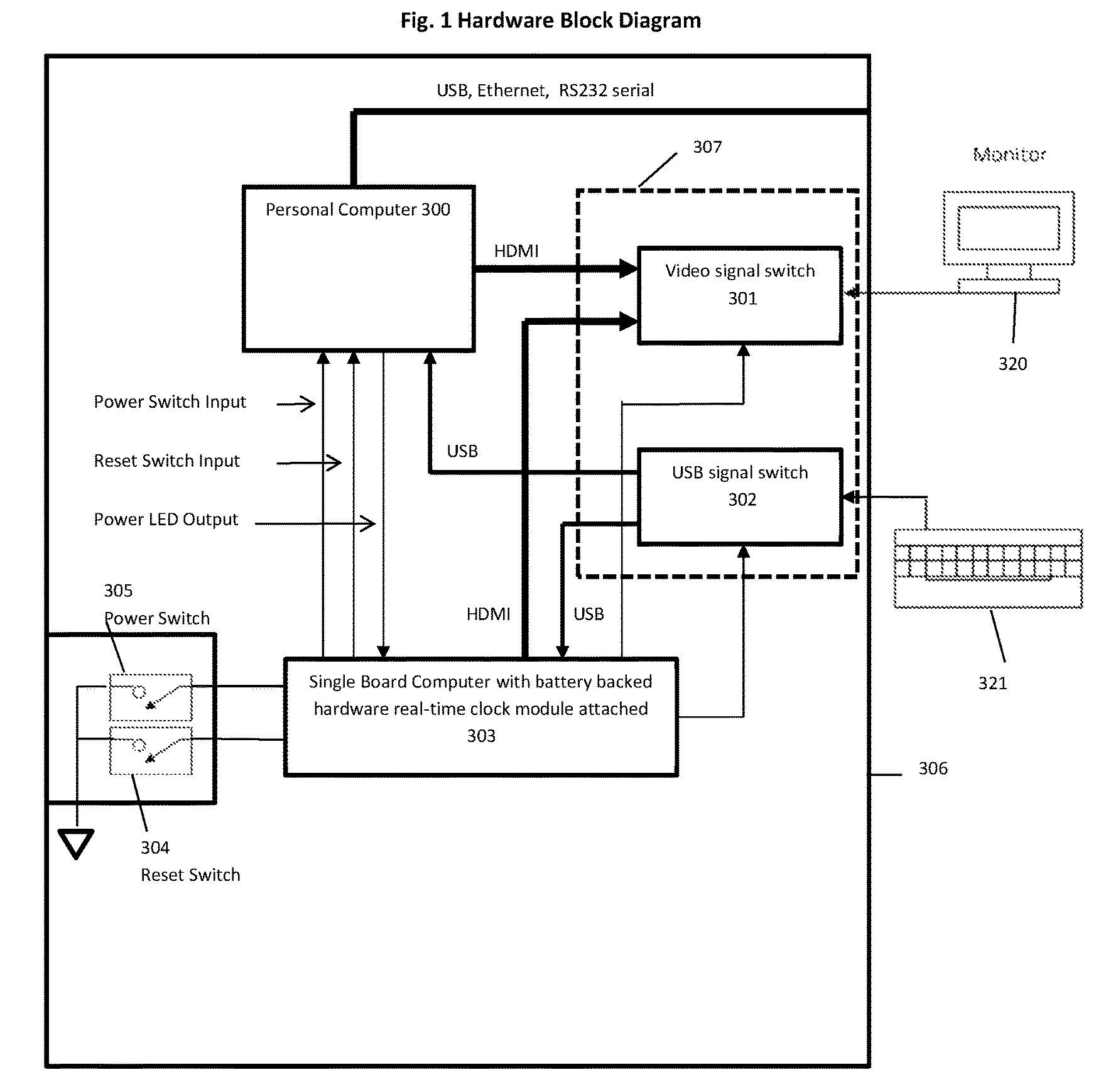
FIG. 1shows an example embodiment of video gaming system comprising the personal computer300and other components mounted inside the metal case306. Personal computer300contains a motherboard with Intel i5 Central Processing Unit (CPU), 8 GB memory, video graphics controller, peripheral device controllers, optical and hard disk drive(s) and power supply. The motherboard of personal computer300is modified with the attachment of the +5V standby cable. This +5 v standby cable is a two conductor 20 gauge wire 15″ in length with an insulated female socket connector at one end and the other end soldered, on the solder side, to the power signal named +5VSB and ground on the motherboard of personal computer300. Once soldered in place, the soldered wire connections are covered with a permanent insulating coating.
Personal computer300is running Microsoft Windows® 10 operating system which in turn runs device driver software and various applications including games. Although this embodiment includes a personal computer system using an Intel processor with a video graphic controller, the video gaming system could be constructed using a different CPU, video graphics controllers including dedicated microcontrollers, mobile processors or System On Chip (SOC) devices. It could include CPU types with integrated graphic controllers or a separate graphics controller device. Although this embodiment included the Windows 10 Operating System, those in the art are aware that any operating system capable of running software programs, including dedicated gaming operating systems could be substituted.
The video gaming system also comprises the single board computer (SBC)303. In this embodiment, SBC303is the Raspberry PI Model A+ with a hardware real time clock module connected to general purpose IO (GPIO) signal pins of SBC303.
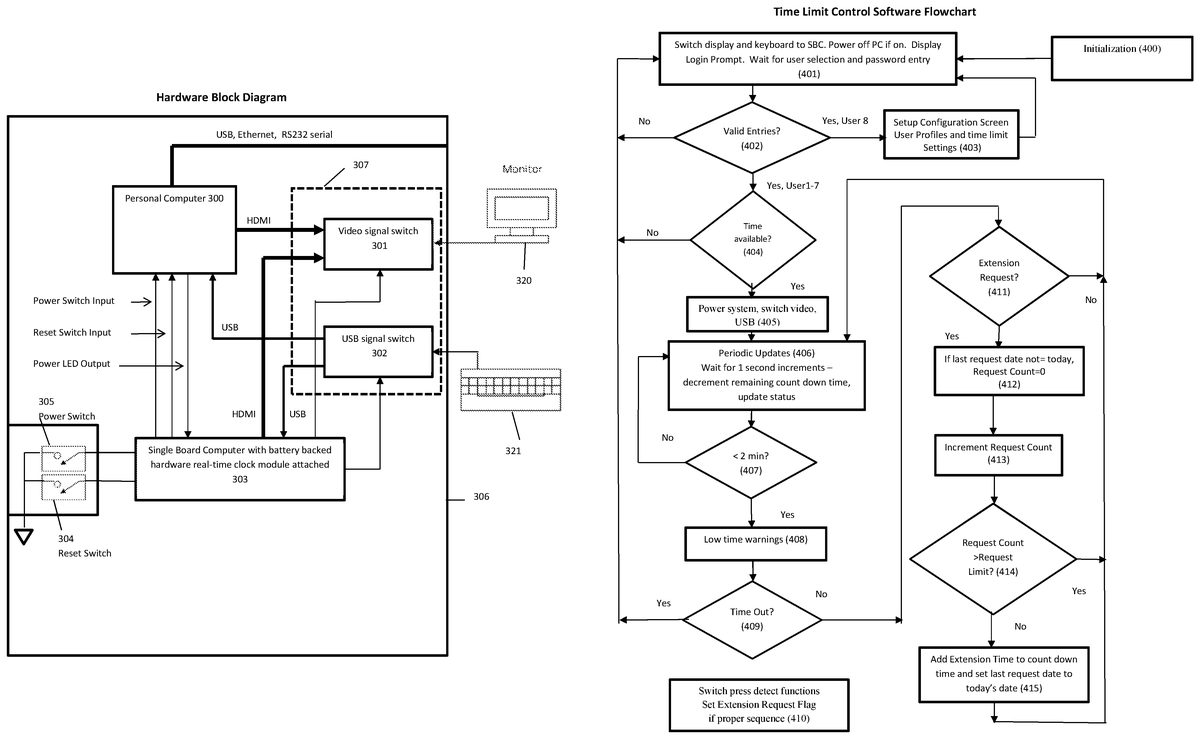
SBC303also contains a microSD card containing the Linux Debian “Raspian” operating system and programs designed to start up automatically when the computer is plugged into the AC mains. The startup programs are written in bash scripts and the time limit control program is written in Python. The flowchart for this program is provided inFIG. 2. Various program libraries and applications in support of the time limit control software are also installed on the Debian operating system.
SBC303gets 5 volt power from the +5 v standby cable attached to the motherboard of personal computer300. SBC303GPIO pins connect to the Power and Reset switch inputs on the motherboard of personal computer300. This connection allows SBC303to turn on and off and reset personal computer300as needed to assist in providing hardware enforced time limit control. The power switch305and reset switch304are mounted to the front panel of case306and connect to GPIO pins of SBC303. These switches are used for both power and reset control and to signal the time extension requests. The switch presses are detected by time limit control software routines that monitor and de-bounce the GPIO signals connected to these switches. Another GPIO pin is connected to the power LED indicator output of the motherboard of personal computer300. This is used to sense whether personal computer300is powered or off.
SBC3has HDMI and USB output that connect through cables to the switching circuit board37containing the video signal switch301, the USB signal switch302and the associated connectors for internal and external cables. Video signal switch301includes the Texas Instruments (TI) TS3DV20812, a 2-Gbps differential switch 8-Bit, 1:2 multiplexer/demultiplexer with 3-side band signals. It is an integrated circuit (IC) with high-speed switching circuits designed for switching HDMI or DVI signals. SBC303controls whether the output of video signal switch301is selecting the DVI output of personal computer300or the HDMI output of SBC303. Control of video selection is provided through a GPIO pin driving the selection input of video signal switch301. An HDMI cable connects between the HDMI output of SBC303and switching circuit board37. An HDMI cable connects between the video output of personal computer300and switching board37. An HDMI cable connects between video display monitor320and switching circuit board307with HMDI connectors open through the outside of case306of the video gaming system. Although this embodiment uses an external video display, one skilled in the art could easily see how an internal display could be used instead. This display could be LED, OLED and could also be outfitted with a touchscreen.
In this example embodiment, USB signal switch302includes the Texas Instruments SN74CBT3257, 4-bit 1-of-2 FET multiplexer/demultiplexer. USB signal switch302selection and enable inputs are driven by GPIO pins of SBC303. The video gaming system also includes the external USB keyboard321connected to the output of USB signal switch302. USB inputs to USB signal switch302are provided by a USB port of personal computer300and the USB port of SBC303. USB cables between personal computer300and switching circuit board307and another USB cable connects between SBC303and switching circuit board307. Although this design uses an external keyboard, one skilled in the art could easily see how an internal keyboard could be used instead.
Operation
This embodiment uses SBC303with dedicated hardware to enforce user authentication, time limit configuration and time limiting operations independent of the operating system running on personal computer300.
When the video gaming system is plugged into AC Mains, +5 v standby power from personal computer300powers SBC303. With power applied to SBC303, the CPU on SBC303, in this embodiment, the Broadcom BCM2835 system on a chip (SoC), begins executing standard code within its silicon. This program initializes certain on chip hardware, memory and then starts the boot loader of Linux OS located on the microSD card plugged into SBC303. The boot process includes the initialization of systemd, a suite of system management daemons, libraries, and utilities. All the necessary device drivers are initialized by systemd. Near the end of the systemd initialization process, initialization script41begins execution with systemd starting pcm.service (/etc/systemd/system/pcm.service). The following is the script for pcm.service:
[Unit]
Description=Starts PCM pi service
After=mod probe.service
[Service]
Type=simple
ExecStart=/usr/bin/PCM/PCM.sh
#Restart=always
[Install]
WantedBy=multi-user.target
When systemd processes pcm.service, PCM.sh script (/usr/bin/PCM/PCM.sh) is executed. The following is the script PCM.sh:
#!/bin/bash
sudo xinit/usr/bin/PCM/PCM4/run-python.sh-- -nocursor
sudo setterm-blank 0-powersave off-powerdown 0
sudo xset s off
PCM.sh executes the run-python.sh script inside an x window with sudo (superuser privileges) and the -nocursor (no mouse cursor) parameters (/usr/bin/PCM/PCM4/run-python.sh). The following script is run-python.sh:
#!/bin/bash
sudo setterm-blank 0-powersave off-powerdown 0
sudo xset s off
python/usr/bin/PCM/PCM4/GameSnooze.py
The run-python.sh script runs the Python interpreter and calls for the start of the time limit control program called “GameSnooze.py” (/usr/bin/PCM/PCM4/GameSnooze.py).
Refer toFIG. 2for the flow chart of the time limit control program (GameSnooze.py). The program initializes (400), setting up various functions including the GPIO switch detect function (410). This function uses interrupts to cause the routine to be called whenever a switch is pressed. Initialization function (400) loads the extension request dates and counts for each user from files stored on the microSD card of SBC303. The routine also clears the extension request flag.
The program then proceeds to the login screen function (401) that immediately switches the video and USB outputs to connect external monitor320and keyboard321respectively to SBC303. The function further detects whether personal computer300is powered by reading the state of the GPIO pin connected to the power LED indicator output of the motherboard of personal computer300. If it detects personal computer300is powered on, the time limit control software pulses the power switch inputs to the motherboard of personal computer300using the GPIO pin assigned for that purpose. The function then displays the login screen. From the login screen, a user selects their user number (1-8) and then enters their password. The entries are validated (402) and if found to not be valid, an error message is displayed and the program returns to login screen (401). If the user selected is8and the password for user8is correct, the program diverts to the setup configuration screen403. Setup configuration screen403provides the user interface to allow configuration of the allowed usage times and profile settings for authorized users of the system and the time/date settings for the hardware real time clock on SBC303. Keyboard321is used to navigate and make setting entries. The following settings are configured from this screen:
1. Allowed time ranges for each user for each day of the week.
2. Allowed daily time limits for each user for each day of the week.
3. Extension limit count—Number of time extensions allowed each day (0-10)
4. Extension time—amount of time extension allowed each extension (in minutes, 1-60)
5. User names, passwords for each user (including User8).
6. Time/date SBC303real time clock hardware
The time limit control software stores configuration settings in the time limit/usage database stored on files located on the microSD card with the Debian OS. In addition to storing these additional time limit values, a record containing the date of the most recent extensions granted for each user are also stored. Pressing the “Home” key at any time will automatically save all settings and the program will return to login screen (401).
In this example embodiment, the time limit/usage database is held in machine-readable data storage using files on the microSD card of SBC303. One in the art could see how this database could be located in other forms such as external flash memory or storage internal to dedicated hardware. Alternatively, with the addition of a WIFI or network adapter connected to SBC303, time limit settings can be configured on a database located remotely and configured using a web based application.
When a user number1-7is entered with the password, it is validated (402). If a valid password has been entered, the program checks to see if time is available for that user (404). If not, the program displays an error message indicating why no time is currently allowed. If time is allowed, the program powers on personal computer300by pulsing the power switch input of personal computer300and switches the video and USB outputs to personal computer300through GPIO signal connected to video signal switch301and USB signal switch302(405). The routine also sets the amount of time remaining allowed the user into a remaining count down time variable.
The program then waits in the function periodic updates (406). Periodic updates406, using a periodic one second timer function, decrements the amount of time (in seconds) available each second. During periodic updates (406), once each second the power switch is checked to see if the user wants to power down or if the user has shut down the system using operating system software controls. If the power button has been pressed down for more than 1 second, the program will then set the remaining count down time to zero. The program then continues on to see if time remaining is less than 2 minutes (407). If so, the program then provides a low time visual warning (408) by briefly switching the video on and off. The program then checks to see if time has completely run out (409). If time has run out the program then returns to login screen (401) which will immediately switch the display and USB keyboard and power off the system. Although brief video blanking is used to signal low time, one skilled in the art could see how other means such as audio tones, or video display overlays could be used.
If time has not run out, the program checks to see if an extension request has been made by the user (411). An extension request is initiated when the user depresses power switch305quickly followed by pressing reset switch403quickly during the last 2 minutes of remaining time available. In this case, pressing the reset switch will not cause SBC303to pulse the reset signal of personal computer300. The routines that detect the switch presses (410) set and clear a flag that is being monitored once per second (411). Although the present embodiment is designed such that time extension requests can only be made during the last 2 minutes of play, other time ranges could be chosen. Further, one skilled in the art could see how to make this value user configurable or to disable this limitation thus allowing the request to be made at any time during or before game play.
If an extension request has been made, the program checks to see if the current date is the same date as stored with the last extension granted (412). If not, then the request counter for that user is cleared. The program then increments the request counter for that user (413) and if the number of requests does not exceed the amount allowed each day (414), the program adds the extension time to the remaining user time (415) and sets the last extension granted (for that user) date to the current date. The extension request count and last extension granted date for each user are stored in files on the microSD card on SBC303to ensure persistence should the system be unplugged. Each time an extension is granted the values for that user are updated on the files on the microSD card. Regardless of whether the extension has been granted or not, the routine clears the extension request flag.
The program then returns to periodic updates (406) to wait for the next 1 second periodic timer to occur. When time again runs below 2 minutes remaining (407), the visual warning is provided (408) and the user may now again make another request. If so this is detected (410) and the date is again checked (412) and the request count incremented (413). If the request count is now greater than the allowed number of requests (414) each day, the request is denied and no extension is given and the program returns to periodic update function (406). Once the remaining time expires (409), the program returns to login screen (401) thus switching the USB and video and powering down personal computer300by pulsing the power switch signal input to personal computer300.
Description and Operation of an Alternative Embodiment
Integrate into the Operating System Parental Controls
While the first example embodiment uses dedicated hardware and software to inforce usage limits, one skilled in the art could see how the extension request features could be added to a personal computer operating system or to gaming console parental control software. For both local and remotely configured parental controls, the additional settings could be added to the parental control settings database. If the feature is enabled, the PC operating system or gaming console parental control software can allow time extensions when requested and authorized. A specific combination of keypresses, button presses, mouse clicks or even gaming controller patterns could be used to signal the request. Request for extensions could even be done using Bluetooth devices such as remote controls and smart phones running a custom app. The integration into the operating system could be accomplished by the operating system vendor or alternatively the OS vendor could provide an expanded parental control API so that third parties could easily develop the extension request feature.
Independent Parental Control Software
The previous alternate embodiment would integrate the extension request features into the operating systems or use software conforming to the operating system parental control API. One skilled in the art could envision an alternate embodiment that is completely independent of operating system or parental control APIs. A program or system service, running automatically when the operating system initialized can provide much or all of its own login authentication, user IDs, passwords and all parental control settings. The program would require users to log in before gaining access to the computer and would provide time monitoring and limiting functions independent of the operating system parental control features. This software would be designed and developed the same way independent parental control software programs are developed today.