U.S. Pat. No. 9,747,722
METHODS FOR TEACHING AND INSTRUCTING IN A VIRTUAL WORLD INCLUDING MULTIPLE VIEWS
AssigneeSmith and Nephew Inc
Issue DateMarch 25, 2015
Illustrative Figure
Abstract
Methods, systems and apparatus are provided for generating visual instruction to a user of a system, such as for exercise instruction or rehabilitation purposes. Preferably, the system includes a user imaging system with the system generating an output adapted to couple to a display device. The systems and methods serve to guide a user body motion. In one preferred embodiment, the method includes the steps of receiving first user positional information from the user imaging system, and then generating a first mirror image of the user positional information. Additionally, the method includes generating a first instructional image having the same positional orientation as the first mirror image of the user positional information. Finally, the method and system generate a composite output display including the first mirror image of the user positional information and the first instructional image.
Description
DETAILED DESCRIPTION OF THE INVENTION FIG. 1shows a display with a coach avatar20in the foreground and the mirror portion22obscured. The mirror portion is shown bounded by a frame24as an optional aid for the user to appreciate that the image shown in the mirror portion22is rendered as a mirror image of another object (e.g., the instructor and/or the user). This view minimizes environmental distraction and focuses the patient on the information being conveyed by the exercise coach. The terms instructor or coach are used interchangeably, and refer to the image intending to display the desired action or position to the user of the system. This view is used when important information is being conveyed to the patient prior to, in between or post exercise session. This view can be ‘zoomed’ in to put more focus on the coach's face as she is talking to the patient. Note that the mirror treatment may vary. For example, the mirror portion is here shown in an extreme matte format so as to avoid providing ‘reflected’ information that is distracting or not necessary or useful for the user. FIG. 2Ashows a display with the coach avatar20in the foreground, left had side of the display, and the patient and coach avatar in the mirror region22. This view helps to demonstrate to the patient the proper technique to safely perform a clinician prescribed exercise. The position and actions of the instructional avatar depict the backside of the instructional avatar in the foreground, and the frontside of the instructional avatar in the mirrored display portion22of the display. This view is primarily used for instructing exercises and during the initial repetitions of a patient exercising. Currently, when depth cameras render persons on a screen, the individual is displayed in a mirrored version of themselves28and are displayed in the mirrored ...
DETAILED DESCRIPTION OF THE INVENTION
FIG. 1shows a display with a coach avatar20in the foreground and the mirror portion22obscured. The mirror portion is shown bounded by a frame24as an optional aid for the user to appreciate that the image shown in the mirror portion22is rendered as a mirror image of another object (e.g., the instructor and/or the user). This view minimizes environmental distraction and focuses the patient on the information being conveyed by the exercise coach. The terms instructor or coach are used interchangeably, and refer to the image intending to display the desired action or position to the user of the system. This view is used when important information is being conveyed to the patient prior to, in between or post exercise session. This view can be ‘zoomed’ in to put more focus on the coach's face as she is talking to the patient. Note that the mirror treatment may vary. For example, the mirror portion is here shown in an extreme matte format so as to avoid providing ‘reflected’ information that is distracting or not necessary or useful for the user.
FIG. 2Ashows a display with the coach avatar20in the foreground, left had side of the display, and the patient and coach avatar in the mirror region22. This view helps to demonstrate to the patient the proper technique to safely perform a clinician prescribed exercise. The position and actions of the instructional avatar depict the backside of the instructional avatar in the foreground, and the frontside of the instructional avatar in the mirrored display portion22of the display. This view is primarily used for instructing exercises and during the initial repetitions of a patient exercising. Currently, when depth cameras render persons on a screen, the individual is displayed in a mirrored version of themselves28and are displayed in the mirrored section22of the display. By placing the coach avatar in the foreground and both the patient and coach avatar in the ‘mirror’, the system shows the patient the proper body areas to move (ex. arm or leg) as it relates to their actual perspective in the ‘real world’.
FIG. 2Bshows the image ofFIG. 2but including annotations. Note the connection to the coach avatar's ‘right hand’ as it would be in ‘reality’ (on the right of the body) and as it appears ‘mirrored’ in the mirror (on the left side of the body). This view helps the patient to understand that mirroring is occurring and helps to visually inform them that they should sync their movements with the avatar in the foreground such that they appear perfectly synced in the mirror. The annotations include specific identification of the avatar, identifying the ‘avatar in foreground’, ‘avatar in mirror’, and identify the corresponding had of the avatar (‘avatar right hand’). A rendering28of the user or patient (the terms are used interchangeably herein). As shown, the user positional information is used to generate a mirror image of the user, and then to provide a rendering28within the mirrored portions22of the display. The system compares the user positional information with the desired position and/or action as shown in the first instructional image. For example, if the user performs an action exactly as shown by the instructional image, the instructional image and the user positional images would show similarity of actions and positions. However, if the user does not accurately emulate the instructional image, the differences between the desired instructional image position and/or action may be displayed to the user. For example, if the instructional image is to perform a squat exercise, if the user does not move low enough as determined by comparison of the user positional information with the action deemed in sufficient compliance by the system, then the user will be instructed that their action does not qualify to count as a rep (repeat unit) of the exercise. Optionally an overlay image30, such as a box, may be used both in the foreground and then mirror image22as an aid to the user to identify the user position in space and on the display.
FIG. 3Ashows a display with a coach avatar20, but with the patient image28in a mirrored orientation. This state of the application is used once the patient has demonstrated competence in the exercise movement as it was instructed and initiated in state ofFIG. 2(see above). Again, if the user positional information corresponds to the position or range of positions or actions that are deemed compliant by the system, then the user is optionally advised of the number of reps completed. As shown inFIG. 3, “0/3” or zero of the three required reps have been performed.
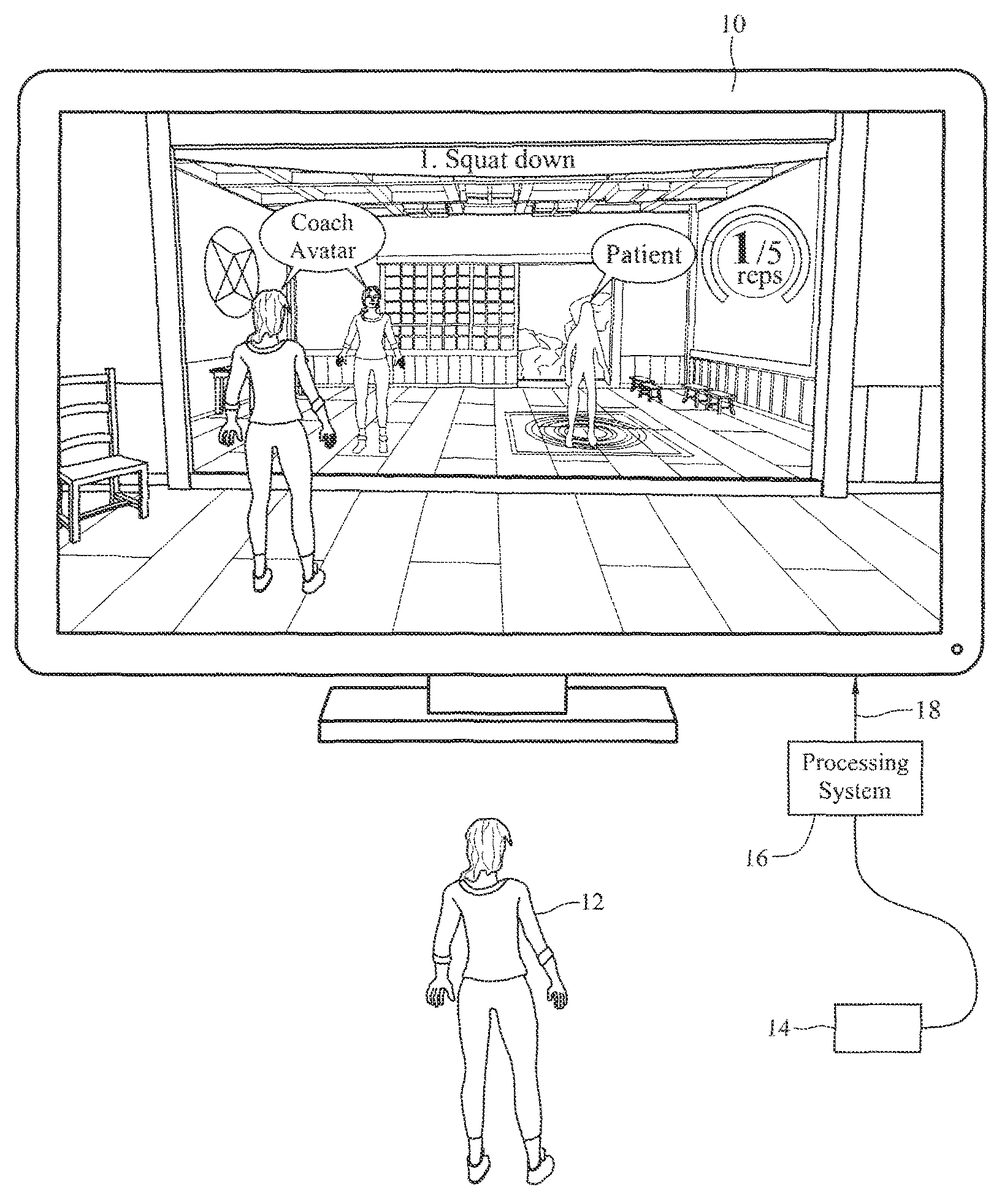
FIG. 3Bshows the display image ofFIG. 3but including annotations. The images have labeled as the ‘coach avatar’20and ‘patient’ or user28. As shown in this figure, the patient has been represented as an avatar identical to the coach avatar. The patient ‘look’ may be in any form known to those skilled in the art, ranging from photo realistic of the user, to an abstracted image, or avatar or cartoon image or the user, or of any arbitrary image, avatar or cartoon.
FIG. 4shows a display unit10showing a display image of a mirror version of the user's positional information (as shown inFIG. 4), as well as both a first instructional image having the same positional orientation as the first mirror image and a second instructional image in a mirror image orientation to the first instructional image.
FIG. 5shows a perspective view of components of the overall system. A display device10is oriented toward a user12of the system. A user imaging unit is oriented toward the user12. The user imaging system preferably is an imaging system capable of determining the spatial position of the user12in real time, preferably in color. One or more (multiple) user imaging systems may be utilized. The processing system16is coupled to the user imaging system(s)14to receive information relating to the user position and to compute the user positional information. The processing system16may be preferably comprised of computer hardware and software to perform the functions described herein. The processing system16compares the desired position as depicted by the first instructional image with the user positional information, such as to determine the differences between the two positions, such as to determine whether the user is complying with the desired action as shown by the first instructional image. The graphic to be rendered on the display device10is generated by the processing system16, and coupled to the display device10via the output18.
Although the foregoing invention has been described in some detail by way of illustration and example for purposes of clarity and understanding, it will be readily apparent to those of ordinary skill in the art in light of the teachings of this invention that certain changes and modifications may be made thereto without departing from the spirit or scope of the appended claims.
Claims
- A method for providing visual instruction to a user of a system, the system including a user imaging system and output adapted to couple to a display device to provide an output display to the user, including to guide user body motion, comprising the steps of: receiving first user positional information from the user imaging system, generating a first mirror image of the user positional information utilizing the first user positional information from the user imaging system, generating a first instructional image having the same positional orientation as the first mirror image of the user positional information, and generating a composite output display including the first mirror image of the user positional information and the first instructional image, wherein the first mirror image and first instructional image are non-overlapping and wherein the first mirror image is the sole image of the user in the output display.
- The method for providing visual instruction to a user of claim 1 further including a second instructional image in a mirror image orientation to the first instruction image.
- The method for providing visual instruction to a user of claim 2 wherein the second instruction image depicts a different view of the first instruction image.
- The method for providing visual instruction to a user of claim 3 wherein the different view comprises a back side view of the first Instructional image.
- The method for providing visual instruction to a user of claim 1 wherein the first mirror image of the user positional information comprises an animated character.
- The method for providing visual instruction to a user of claim 1 wherein the first mirror image of the user positional information comprises an avatar.
- The method for providing visual instruction to a user of claim 1 wherein the first instructional image comprises an animated character.
- The method for providing visual instruction to a user of claim 1 wherein the first instructional image comprises an avatar.
- The method for providing visual instruction to a user of claim 1 wherein the first instructional image is provided in real time.
- The method for providing visual instruction to a user of claim 1 wherein the user body motion includes limb motion.
- The method for providing visual instruction to a user of claim 1 wherein the user body motion includes whole body motion.
- The method for providing visual instruction to a user of claim 1 wherein the instruction comprises exercise instruction.
- The method for providing visual instruction to a user of claim 1 wherein the instruction comprises rehabilitation instruction.
- The method for providing visual instruction to a user of claim 1 wherein the imaging system includes a camera.
- The method for providing visual instruction to a user of claim 14 wherein the camera is a color camera.
- The method for providing visual instruction to a user of claim 14 wherein the camera is a depth camera.
- The method for providing visual instruction to a user of claim 1 wherein the output display further includes textual annotation.
- The method for providing visual instruction to a user of claim 17 wherein the textual annotation relates to the position of the instructional image.
- The method for providing visual instruction to a user of claim 1 wherein an image is subject to dynamic state change.
- The method for providing visual instruction to a user of claim 19 wherein the dynamic state change includes obscuring another image.
Disclaimer: Data collected from the USPTO and may be malformed, incomplete, and/or otherwise inaccurate.