U.S. Pat. No. 9,687,745
SYSTEMS AND METHODS THAT ENABLE CUSTOMIZABLE TEAMS FOR MULTI-PLAYER ONLINE GAMES
AssigneeRIOT GAMES, INC.
Issue DateAugust 22, 2013
Illustrative Figure
Abstract
The field of the invention relates to multi-user online gaming systems, and more particularly to systems and methods that enable customizable teams for online active games. In an embodiment, the system includes an online game session server system communicatively coupled to a network for access by a plurality of users to establish a plurality of real-time interactive games sessions, wherein each game session includes at least one team and wherein the at least one team may be established in accordance with a preferred composition defined by a user.
Description
DETAILED DESCRIPTION OF THE PREFERRED EMBODIMENTS State of the Art Systems Turning toFIG. 1a, a large multiuser online game system100over a network1050, such as the Internet, is shown. An example of such a game system100known in the art is League of Legends (www.leagueoflegends.com). League of Legends is a session-based, multiplayer online battle-arena game where rival teams compete against one another for victory on highly stylized battlefields and landscapes, also referred to as maps. Users can install a League of Legends game client on their personal computing device110to establish a game session over the network1050with the game system's100datacenter130, which provides the real-time online game interaction with at least one user110. The datacenter130includes a plurality of server systems operating on a plurality of server machines communicatively coupled to each other via the network1050and/or a secure virtual private network (not shown). The server machines each include one or more processors, memory, an operating system, an input/output interface and network interface all known in the art. According to an embodiment, the datacenter130includes, among other things, a game session server system140. Turning toFIG. 1b, an example game client110user interface120is shown. In certain online games, each user is generally represented by a personalized graphical avatar in the user interface120, also referred to as “champion,” (shown as “X” in this example), and the game client110user interface120may show the logical position of one user's avatar, X User 1, relative to another, X User 2 and X User 3 within a virtual landscape. The game client110user interface120may also show a user's avatar logical position relative to the virtual landscape. For example, a user's avatar's position may be at bottom, middle, top, hidden, and so on. Each user's avatar is further given a role, e.g., assassin, fighter, mage, carry, support, tank, and so on. Each user's avatar may further comprise ...
DETAILED DESCRIPTION OF THE PREFERRED EMBODIMENTS
State of the Art Systems
Turning toFIG. 1a, a large multiuser online game system100over a network1050, such as the Internet, is shown. An example of such a game system100known in the art is League of Legends (www.leagueoflegends.com). League of Legends is a session-based, multiplayer online battle-arena game where rival teams compete against one another for victory on highly stylized battlefields and landscapes, also referred to as maps.
Users can install a League of Legends game client on their personal computing device110to establish a game session over the network1050with the game system's100datacenter130, which provides the real-time online game interaction with at least one user110.
The datacenter130includes a plurality of server systems operating on a plurality of server machines communicatively coupled to each other via the network1050and/or a secure virtual private network (not shown). The server machines each include one or more processors, memory, an operating system, an input/output interface and network interface all known in the art. According to an embodiment, the datacenter130includes, among other things, a game session server system140.
Turning toFIG. 1b, an example game client110user interface120is shown. In certain online games, each user is generally represented by a personalized graphical avatar in the user interface120, also referred to as “champion,” (shown as “X” in this example), and the game client110user interface120may show the logical position of one user's avatar, X User 1, relative to another, X User 2 and X User 3 within a virtual landscape. The game client110user interface120may also show a user's avatar logical position relative to the virtual landscape. For example, a user's avatar's position may be at bottom, middle, top, hidden, and so on. Each user's avatar is further given a role, e.g., assassin, fighter, mage, carry, support, tank, and so on. Each user's avatar may further comprise other abilities, enhancements, and levels. For example, these abilities and enhancements include “spells,” “powers,” “runes,” and “masteries,” and so on. The game client110user interface120may also include a chat interface (“Chat Room”) that enables participating users to communicate with one another beyond interactions with the avatars (Xs).
Turning toFIG. 1c, a more detailed diagram of a game session server system140known in the art is shown. The game session server system140provides the game interaction with the users' game client110via the game client interface143, which is generally an application interface known in the art accessible over the network1050by the game client110, e.g., in a traditional client server model. A game engine142coupled to the game client interface143is included to manage the interaction between the plurality of users110and the game system100. The game session server system140further includes a chat engine144known in the art that enables the various users110participating in a particular game session to communicate with each other via text messages. Audio, pictures, and multimedia may also be exchanged with the chat engine144. Both the game engine142interactions as well as the chat messages exchanged can be recorded and stored in a game files database141. This enables, among other things, replay and history analysis by not only the users but also the administrator and other systems.
Turning toFIG. 1d, in the game system100, when a user joins a game, the user must be matched with other users to team up with and/or compete against. Options for how the user is matched up with others can be displayed, as shown in the user interface210. A user can specifically select his teammates and/or opponents, or the user can allow the system100to select teammates and/or opponents from a list of active users who have selected the same option. For example, in Ranked Pick, the system100may allow the user to select up to one additional teammate and the system100may match the user with other participants with similar experience and/or skill level. In Blind Pick, the user may select anywhere from none to all of the user's teammates and then the system100may match the user's team with random opponents. Blind Pick may also allow the user to specifically select both his teammates and the opponents. With Blind and Ranked Pick, the user may or may not know who the other participants are, and thus, the user experience may be unpredictable.
Other systems and methods for providing game system100are further described in U.S. patent application Ser. No. 13/551,338, entitled “SYSTEMS AND METHODS THAT ENABLE PLAYER MATCHING FOR MULTI-PLAYER ONLINE GAMES,” to Lin et al., filed Jul. 17, 2012, which is hereby incorporated by reference in its entirety.
Preferred Systems
Turning toFIG. 2, an online multi-user game system1000according to an embodiment of the present invention is shown. The system1000provides a team building system as will be described below. System1000includes a datacenter1300having a game session server system140as described above. The system1000also includes game clients110configured to access the data center1300over the network as described above. According to an embodiment, the system1000further includes a team building server1100, also referred to as group finder server, operatively coupled to the game session server system140, that matches a player with other active players to form a team, also referred to as a group, and find opponents for the team for a particular game session, using the systems and methods described below. In this embodiment, a team comprises a captain and one or more team members.
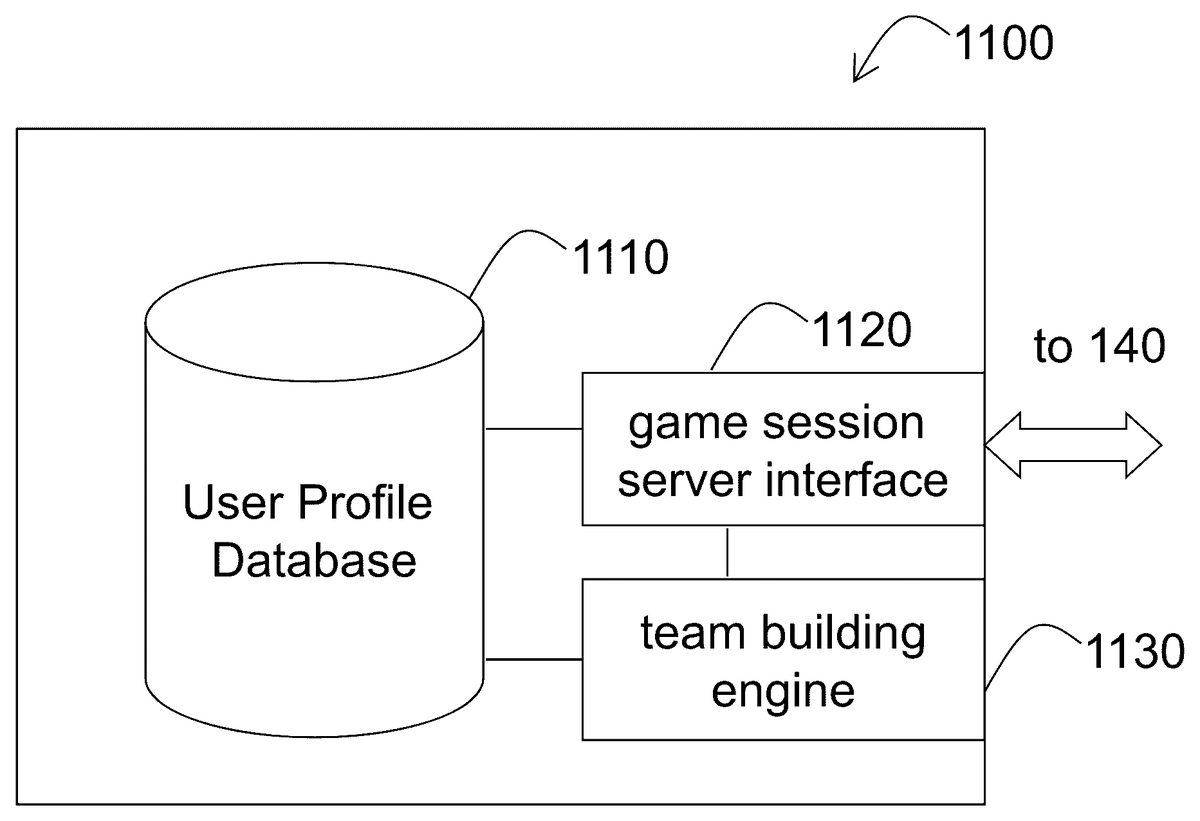
Turning toFIG. 3, a detailed diagram of a team building server1100is shown. The team building server1100includes an interface1120to the game session server140. As will be described in more detail below, the interface1120receives settings for a particular user from the game session server140to store in a user profile database1110as default data for that particular user. The database1110may be implemented with technology known in the art, such as a relational database and/or object oriented database. The team building server1100also includes a team building engine1130, also referred to as group finder engine, that matches players to form teams and opponents for a particular game session, as will be described in more detail below. The team building engine1130is coupled to the user profile database1110and the game session server interface1120.
Preferred Processes
Generally, a player may be a solo player looking for a team to join in a game session. The team building server1100then places such solo player in a solo queue. Such player may also be referred to as a “solo queuer.” Or a player may be a captain looking for other players to form a team. A captain often pre-selects some friend players before looking for other players to fill out the rest of the team. The captain and the friends are referred to as a “premade” group. A friend may be a player that is on a pre-existing list of users associated with the captain. The captain also proposes a team composition. The team building server1100then attempts to match premades with solo queuers matching the proposed composition, and then finds an opponent for this team. According to an embodiment, the team building server1100only unlocks the team building mode for a player when the player reaches a predetermined level. When a player unlocks the team building mode, the team building server1100may provide a team building tutorial to the player.
Finding a Team as a Solo Queue Player
FIG. 4athroughFIG. 4gshow the user interfaces provided by the team building server1100for a solo player, also referred to as “solo queue player,” to find a team. The user interfaces inFIG. 4bthrough 4gare also referred to as the Group Finder Lobby, or Team Building Lobby.
Turning toFIG. 4a, a user interface1200provided by the team building server1100is shown. In the user interface1200, the player may select in the PvP (“Player versus Player”) option1201how to play with other online players. The options include Game Mode option1202(e.g., Classic) and Game Map option1203(e.g., Summoner's Rift 5×5, which requires a team of 5 players). The user interface1200further provides a Group Finder button1210under Game Type option1204that a player can select to find a group (find and join and team), or create a group (build a team). When the player selects the Group Finder button1210, the team building server1100provides window1220wherein a solo player may select a Find a Group button1221to find and join a team.
Turning toFIG. 4b, a user interface1300provided by the team building server1100is shown. The user interface1300is provided when a solo player (e.g., Rayven) selects the Find a Group button1221inFIG. 4aabove. The user interface1300provides a Select a Champion button1310wherein the player may select an avatar (champion).
Turning toFIG. 4c, a user interface1400provided by the team building server1100is shown. The user interface1400is provided when the player selects the Select a Champion button1310. As a result, the user interface1400provides a window1410showing a plurality of avatars (champions) and their characteristics, and a plurality of skins (not shown) from which the player may select an avatar (e.g., Kennen) to represent the player in the game. The user interface1400further provides a Search function1420to search for a particular avatar and/or skin.
Turning toFIG. 4dtoFIG. 4g, user interfaces1500to1800provided by the team building server1100are shown. Once the player selects an avatar and skin (FIG. 4c), the player next selects a role and a position for the avatar. The user interface1500(FIG. 4d) provides a menu for the player to select a role for the avatar. Examples of roles include, but not limited to:Tank: While not the most damaging characters, tanks are durable, front-line champions that help lock down enemies and start fights. They are usually found leading the charge, choosing the right times and situations to initiate aggression. Many tanks can also protect squishier teammates by stunning or pushing around dangerous foes and limiting their damage potential.Fighter: Fighters are durable melee combatants that focus on a mix of offense and defense. While they do not have as much utility as a tank or as much damage as an assassin, fighter damage will add up over time and make them a major threat.Assassin: An assassin is an agile champion that specializes in seeking out weaker targets and killing them quickly and mercilessly. Focused around infiltration, deception, and high damage abilities, assassins are the lone wolves of the league who bring instant death upon weaker targets.Mage: Mages focus on doing high ability damage at range—sacrificing defense to do so. Bringing high damage potential, utility and area-effect, mages can lock down entire areas, quickly destroy a valuable target, or capitalize on clumped-up foes to decimate the opposing team.Support: A support is a champion who specializes in deferring some of its own power to augment the power of its allies. A support can assist its teammates by more direct means such as healing an ally or increasing that ally's damage, or can be effective by creating combat opportunities for its ally through strong control abilities. A skilled support can give its team the edge it needs to claim victory.Marksman: A marksman is a ranged attacker that sacrifices defensive power and utility to focus on dealing continuous damage upon individual targets. Typically focused on using their basic attacks more than their abilities, marksmen scale to devastating levels of damage in the late phase of any game.
FIG. 4eshows a user interface1600which provides a menu1610for the player to select a position for the avatar in the game landscape (or map, e.g., Summoner's Rift). Examples of positions include, but not limited to, bottom, jungle, middle, and top. In the example inFIG. 4f, the player selects the middle position for the avatar. As a result, the avatar is shown in a middle position (sometime referred to as “lane”) in the map1710. The user interface1700inFIG. 4ffurther provides one or more menus1720, each having at least one spell from which the player may select for the avatar.
FIG. 4gshows a user interface1800which provides a menu1810for the player to select a rune page for the avatar, and a menu1820for the player to select a mastery page for the avatar. After the player has selected the composition (champion-role-position, or champion-role-position-spells-runes-masteries, and so on) of the avatar, the team building server1100provides an estimated wait time (also referred to as “queue time”)1830for the player to find a matching team to join. The estimated wait time1830may be pre-determined. The estimated wait time1830may also be calculated based on historical data. For example, the team building server1100may calculate an estimated wait time of 3 minutes for a solo queuer having a champion with the composition of Kennen-fighter-middle and having a certain skill level. If the player changes the champion, role or position, the team building server1100will update the estimated wait time. Alternatively, the team building server1100may calculate and provide descriptive estimated wait time such as “short,” “moderate,” “long,” “extremely long,” and so on. The player may accept the estimated wait time and select the Find Group button1840. As a result, the team building server1100will place the player in the solo player queue. The player may also decide not to proceed to find a team (group) and select the Quit button1850, which will bring the player back to the user interface1200(FIG. 4a) to attempt another team finding process. The user interfaces1300to1700also each provide a similar Quit option, which also brings the player back to the user interfaces1200. As such, the player may quit the process at any time to restart the team finding process.
Turning toFIG. 4h, a user interface1900provided by the team building server1100is shown. After the player selects the Find Group button1840(FIG. 4g), the team building server1100places the player in the wait lobby1910while the team building server1100attempts to find a matching team for the player. When the team building server1100finds a matching team for the player, the player may either select the Accept button1920to accept the team, or the Decline button1930to decline the team.
Turning toFIG. 5, a user interface2000provided by the team building server1100after the player accepts the team found by the team building server1100(FIG. 4h) is shown. Generally, the user interface2000shows the team that the team building server1100found for the player. It is noted that the user interface2000may place the player back into the Group Finder Lobby described above. In the example inFIG. 5, the team building server1100has found a team with five members, including the player. The captain2010of the team may be shown at the top of the team member list2001, while the players may be shown at the bottom of the team member list2001. The champion, role, position, spells, rune, mastery, and so on, of each member player are also shown. The user interface2000also shows the Ready/Not Ready status2020of each member player. The Ready status (not shown) generally means the member player is present and ready to play. The selected position of each member player is shown in the map2030. For example, the map2030shows the team having the captain at the top position, one team member in the jungle position, two team members in the middle position, and one team member in the bottom position. The player may review the information in the user interface2000and decide whether to Quit2040, Find Another Group2050, or let the team building server1100and other team members know that the player is Ready2060to play. According to an embodiment, the Ready button2060is not available for the player to select until all members of the team have been found, and no member has selected to quit the team.
The user interface2000further provides a chat function2070for members to chat with one another. The window2080shows the chat messages as well as other activities and statuses of all members.
Turning toFIG. 5a, according to an embodiment, the system may provide and place the player in the user interface2100while the team building server1100is still attempting to find all members for the team. The user interface2100shows the team members that have been found, and the one or more open slots with the desired role-position2110that the team building server1100is still attempting to find.
Turning toFIG. 6atoFIG. 6c, as indicated above, any member of the team may select to quit the Team Builder Lobby any time before the game starts, e.g., while waiting for all members to be ready. When a member quits the team, the user interface6000provided by the team building server1100removes the champion of that member in the team member list2001, and the window2080will provide an updated message showing which member has quit. The team building server1100may provide a count-down timer6010before it starts to attempt a search for another player for the team (FIG. 6a). The team building server1100may also provide an estimated wait time to find a new player for the team. The team building server1100may indicate that a new player is being searched for (FIG. 6b). When a new player6020has been found for the team (FIG. 6c), the champion, role and position of the new player are displayed in the team member list2001. The new player's champion (avatar) is also shown in the map2030. The window2080will provide an updated message showing the new player has just entered the team (FIG. 7a).
Turning toFIG. 7aandFIG. 7b, when all team members have selected the Ready button2060, the Ready/Not Ready status2020for each team member will show as Ready (FIG. 7b). When all team members are ready, the captain of the team may initiate matchmaking (as will be described in more detail below) wherein the team building server1100will find an opposing team. When the team building server1100finds an opposing team, a counter7010will start counting down from a predetermined number of seconds, e.g., 5 seconds. After the counter7010counts down to zero, the team building server1100places the team into a game. Any team member can cancel the countdown by selecting the Not Ready7020option. The cancellation of the countdown will put all members of the team back into the Not Ready status2020.
Finding a Team as a Premade Group
It is noted that a player may be a captain. A player may opt to be a team captain or invited to be one based on the player's history or support from other players. As shown inFIG. 4a, a captain may select the Create a Group button1222to build a team. According to an embodiment, after the captain selects the Create a Group button1222, the team building server1100also provides the captain with user interfaces1300to1800, as shown inFIG. 4btoFIG. 4gabove, so that the captain may also select his avatar, role, position, spells, runes, masteries, and so on. As such, this process is similar to that of the solo queuer.
Turning toFIG. 8a, a user interface8000provided by the team building server1100is shown. According to an embodiment, after the captain has selected his avatar, role, position, spells, runes, masteries, and so on, the team building server1100may require that the captain invite at least one friend (player) to form a group of at least two players, before the captain can use the team building function of the team building server1100. The user interface8000provides the Invite button8010for the captain to invite at least one friend.
Turning toFIG. 8bandFIG. 8c, the user interfaces8100and8200are provided by the team building server1100after the captain selects to invite at least one friend. The captain may type a name in the window8110. The team building server1100will search for the friend and display the found friend in the Available Players list8020. According to an embodiment, the team building server1100retrieves and displays all the friends of the captain in the Available Players list8020. To invite a particular friend, the captain first selects the friend's name or an Add button8120, e.g., a plus sign. The team building server1100will then add the friend to the Invite List8130(FIG. 8c). When the captain has found one or more friends that the captain wants to invite, with their names shown in the Invite List8130, the captain may select the Invite Players button8210to initiate the invitation. The captain may also remove a friend from the Invite List8130by selecting the Remove button8220, e.g., an X sign.
Turning toFIG. 9, a user interface9000provided by the team building server1100is shown. After the captain initiates the invitation as shown inFIG. 8c, the team building server1100returns the captain to the user interface9000, showing the invited friends in the Invited list9030. In the example inFIG. 9, the friend “SuperDave” has accepted the invitation. A window9010shows the number of team members still needed for the team. For example, in a game session with the team size of five, and the team already has the captain and a friend, the window9010will show 3 more members are needed, e.g., “3 pending.” The captain may select the Invite More button9040to attempt inviting more friends. Alternatively, the captain may select the Find Solo Players button9020to find other players for the team.
According to an embodiment, to find other solo players for a team, the team building server1100requires that the team must already have at least two members, also referred to as a premade group, e.g., a captain and another invited friend. Once a friend accepts the invitation, the friend is required to select a role and a position. The roles and the positions of the captain and the invited friend are locked when the captain selects the Find Solo Players button9020to initiate the search for other players. A captain can remove invited friends from the Team Builder Lobby. However, if the captain removes all friends from the lobby, the team building server1100may prevent the captain from proceeding to find solo players as a solo captain. For example, the team building server1100may shut down the Team Builder Lobby. One reason for shutting down the lobby when a captain removes all friends from the lobby is because of certain toxic or negative behaviors being displayed in the chat window2080.
Turning toFIG. 10, when the captain selects the Find Solo Players button9020, the user interface10000is provided by the team building server1100for the captain to select the desired roles and positions of the missing team members. After selecting the desired roles and positions, the captain may select the Search button10010to initiate the search for solo players with the matching desired roles and positions. In one embodiment a captain only needs to select the desired role and position for one other position before initiating a search for solo players. In such an embodiment, the team building server1100will attempt to match a player with the open position without regard to role.
In an embodiment, when there are one or more open slots in the team, the team building server1100may provide a “cool-down” countdown timer (not shown), e.g., 15 seconds. When this timer reaches zero, the team building server1100will start the search for solo players matching the desired roles and positions. For each player that the captain declines, or each invited friend that the captain removes from the Team Builder Lobby, the electronic cool-down timer's start value increases by a predetermined amount, e.g., one second, up to a cap limit, e.g., 30 seconds. The cool-down timer may be global. Or there may be associated timers each associated with an open slot. The cool-down timer's start value may be reset with a new Team Building Lobby. For example, if the cool-down timer starts at 0 second, if the captain declines three players and kicks two players, the count-down timer may increase to 5 seconds. In an example, as the captain declines a player, a slot becomes open. The cool-down timer starts to count down. When it reaches zero, the team building server1100starts searching for a new player.
Turning toFIG. 11, a user interface11000is provided by the team building server1100when the team building server1100has found matching players for the team. For each matching player found, the team building server1100displays the name, role and position of the new player, and provides a counter11010for the captain to decide whether to accept or decline the new player. If the captain does not make a decision when the counter expires (counts down to zero), the team building server1100may default to decline (auto-decline), and initiate another search for a player with role and position matching those of the declined player. Alternatively, the team building server1100may default to acceptance (auto-accept) if the captain does not make a decision when the counter expires. According to an embodiment, if a predetermined number of auto-declines is reached, the team building server1100may close the Team Builder Lobby and may send the captain a message. In this situation, the team building server1100may keep records of the number of auto-declines in the captain's profile in the user profile database1110.
When a player is declined, either by auto-decline or by the captain, that player may not be aware that he is suggested to the captain and is declined, and remains in the solo queue. When a player is accepted, the team building server1100places that player in the Team Builder Lobby. The accepted player may chat with other team members via the Chat window11020. According to an embodiment, only the captain can accept or decline players. Alternatively, the team building server1100may allow one or more suggested team members to accept or decline players. For example, the team building server1100may allow for a vote by the existing team members on whether or not to admit new players. When a player is accepted, the player is slotted into the Team Builder Lobby and can begin chatting with other team members. The visual presentation of the player may change to indicate that the player has been accepted.
When a player is declined, the team building server1100may exclude that player's avatar from further suggestion to the same team. For example, if the captain is searching for a marksman-bottom, and if the team building server1100suggests a player having Ashe as avatar (champion) and marksman-bottom, but the captain declines that player, the team building server1100may not suggest anymore Ashe players to the team.
The captain declines a player by selecting the decline button11060, or accepts a player by selecting the accept button11050. Once the captain has accepted all players, the captain may select the Play Game button11030to start the game with the current team. For each player, the team building server1100saves the player's champion, role, position, spells, rune and mastery pages in the player's profile in the user profile database1110. The team building server1100may use these as default selections when a solo player enters the Team Building Lobby next time, also referred to as re-queuing. Alternatively, the team building server1100may save the information as soon as a solo player queues up. In this way, the information is saved even if the player quits the lobby before a team is found, or before the game starts.
When a captain re-queues as a captain, and wants to build another team, the team building server1100may default the captain's champion, role, position, rune page, mastery page and summoner spells to the previous selection as saved in the captain's profile. As a result, the captain may immediately start inviting friends to the Team Builder Lobby. The team building server1100may also default the invited friends' champions, roles, positions, rune pages, mastery pages and summoner spells to the previous selections as saved in the friends' profiles. However, the friends may select to change any of their default selections. As described above, the captain may now select the Find Solo Players button9020(FIG. 9), which locks in the captain's and friends' selections. The team building server1100then takes the current participants in the lobby and compare with the captain's previous lobby configuration. For example, if the previous configuration has a mage-middle, marksman-bottom, support-bottom, fighter-top, tank-jungler, and the current configuration of captain+two friends has a mage-middle, marksman-bottom and support-bottom, then the team building server1100automatically selects fighter-top and tank-jungler for the remaining slots. If the team building server1100cannot match a current champion/position combination with one of the previous configuration's options, then the captain may manually setup the slots again.
Another example is illustrated below:
Previous ConfigurationCurrent ConfigurationMage-Mid→CaptainFighter-TopMarksman-BotFriend 1Support-BotTank-JunglerFriend 2Marksman-BotFighter-TopSupport-BotTeam Builder automaticallyconfigrures the remaining slotsFinal CompositionRandom 1Mage-Mid→CaptainFighter-TopRandom 2Tank-JunglerFriend 1Support-BotFriend 2Marksman-BotRandom 1Mage-MidRandom 2Tank-Jungler
The team building server1100saves the configuration in the captain's profile after the captain selects the Find Solo Players button9020and before the system starts the search for matching solo queuers. For example, the team building server1100will not save any configuration while the captain is inviting friends, as the invited friends may quit before the team composition has been locked in. However, when the captain sets the team composition and selects the Find Solo Players button9020to start searching for solo queuers, the team building server1100will save the configuration.
According to an embodiment, if the team building server1100allows a solo player to be team captain, e.g., with a minimum number of one member, the team building server1100still saves the configuration.
Penalties.
It is noted that all user interfaces provided by the team building server1100have an option similar to the Quit option11040so that any player, including the captain, may select to leave the Team Builder Lobby at any time. However, according to an embodiment, the team building server1100may establish associated penalties when players leave a predetermined number of lobbies within a predetermined period of time, or when captains decline a predetermined number of players within a predetermined period of time. The team building server1100may also apply these penalties when a friend leaves a captain's lobby, for example, to prevent a friend (as captain) escape penalty by having another friend leave the Team Builder Lobby to restart the search process.
In an embodiment, when a lobby has had a predetermined number of players, e.g., 10, manually leave that lobby, the team building server1100“unlocks” this lobby so that other players may enter and leave this lobby without penalty. An example is when a captain has a very unorthodox or unusual team composition, the team building server1100does not penalize players for leaving such lobby. The team building server1100may provide a visual indication in one or more user interfaces herein to indicate that the lobby is unlocked.
The team building server1100may also implement Abuse penalties for all players. Each player starts with a default Group Finder Abuse (or “GFA”) score of zero. This is a global score which is stored in the player's profile, and persists across game sessions. Each time a player commits an abusive action during the team building (or Group Finder) process, that player's GFA score will increase by a predetermined amount. The amount may vary based on the type of abusive action. When a player's GFA score reaches a predetermined limit, e.g.,1000, the team building server1100may place that player in timeout mode, during which time that player may not use the team building feature. The timeout period may be a predetermined length of time, e.g., three hours. In an embodiment, the team building server1100may decrease the player's GFA score by a predetermined amount when placing that player in timeout mode.
On the other hand, each time the player performs an action which helps move along the team building process, that player's GFA score will decrease by a predetermined amount, also referred to as GFA Decay. The amount may vary based on the type of action. In an embodiment, the team building server1100may also implement GFA Decay when the player plays game sessions not via the Team Builder Lobby.
If a captain's GFA score reaches a high limit, e.g.,1000, while using the Team Builder Lobby, the team building server1100may allow the game to still proceed and finish, and apply penalties at the end of the game session.
The GFA score may become negative and is capped when it reaches a predetermined negative score. According to an embodiment, the team building server1100may not activate the GFA function, and allows a system administrator to toggle the GFA function on or off. All the predetermined amounts, limits, and hours mentioned herein may be configurable by a system administrator. Examples of these predetermined amounts and limits are, but not limited to:
GFA Adjustments
Captain PerspectiveCaptain manually “Declines” a player=GFA+1Captain away from keyboards (AFKs) and “Declines” a player=GFA+2Captain manually “Kicks” a player=GFA+3Captain manually “Accepts” a player=GFA−1Captain abandons the group and exits Team Builder=GFA+4Captain successfully completes a game via Team Builder=GFA−5Captain away from keyboard (AFKs) and players leave lobby=GFA+6
Solo PerspectiveSolo manually leaves a Team Builder lobby and exits Team Builder=GFA+3Solo manually re-queues for another group=GFA+8Solo manually declines a group that has accepted them=GFA+1Solo AFKs and “Declines” a group=GFA+2Solo successfully completes a Team Builder game=GFA−5
Friend PerspectiveFriend abandons the group and exits Team Builder=GFA+5Friend successfully completes a game via Team Builder=GFA−2
After a game session, which was started via the Team Builder Lobby, if the captain selects the Play Again button (not shown), the team building server1100will present a pop-up to the other players re-inviting them to a new Team Builder Lobby. For example, the pop-up may comprises “Would you like to play another Group Finder match with the teammates from your last game?” In the Team Builder Lobby, the players will have their configurations defaulted to the previous team composition they played. If only a subset of the players join the new Team Builder Lobby, the team building server1100sets the remaining slots according to the re-queuing as a captain logic above. According to an embodiment, the team building server1100may not allow solo players and premade friends select the Play Again button.
In addition to using the role-position composition to find matching players, the team building server1100may use other metrics, e.g., summoner level, number of wins, number of times a player has played a champion, number of times a player has played a role in Team Builder, number of times a player has played a game via Team Builder, a player's Team Builder leave score, a player's captain decline score, a player's captain kick score, player's honor score, and so on. For each team formed via Team Builder Lobby, the team building server1100may calculate the averages for these metrics to find solo teammates. Once the team is fully formed, the team building server1100may re-calculate the averages for these metrics to find the opposing team. The team building server1100will attempt to find teammates (or opposing teams) as close to the averages as possible.
When there are many groups looking for new teammates, the team building server1100may prioritize groups that are almost complete, or closer to completion. There may be certain times when the entire Team Builder queue is full of solo queue players and a shortage of captains. In such situation, the average queue time of the entire system may exceed a time limit, e.g., 10 minutes, due to a gross mismatch in the availability of captains and solo players, the team building server1100may allow solo players to become captains and create lobbies. The team building server1100presents a pop-up message asking the players whether they would like to be captain with the ability to set a team composition and recruit teammates.
The team building server1100may also keep performance metrics, or key performance indicators (KPIs). These metrics include, but are not limited to, average time to successfully build and start a game, team building failures, percentage of successes, average time to find a viable candidate, aggregated metrics of players that fail out of a team, activities and/or events that occur during team building (e.g., candidates suggested, declined, accepted, removed, etc.), average time before a team accepts a particular combination/composition (e.g., champion-role-position), number of declines/accepts/kicks per slot, number or average number of teams a player joins before settling in a team, events that compose a player's GFA score, and so on.
Turning toFIG. 12, a flowchart12000illustrating an operation of the team building server1100as described above is shown. The team building server1100monitors for a Find Solo Players request from a captain as described inFIG. 9above (Action Block12100). When the Find Solo Players request is received (Decision Block12200), the team building server1100queries the captain's profile in the user profile database1110for team composition that may have been saved from previous team building session (Action Block12300). If a saved team composition is found (Decision Block12400), the team building server1100uses the saved team composition as the default team configuration and starts the search for other players (Action Block12500). If a team composition has not been saved, the team building server1100queries the captain for the team configuration, as described inFIG. 10above (Action Block12450).
When the team building server1100has found one or more players with the matching composition for the team, the team building server1100displays the suggested players and starts the countdown counter as described inFIG. 11above (Action Block12600). If any suggested player is declined by the captain or by auto-decline (Decision Block12700), the team building server1100goes back to search for other players (Action Block12500). If all suggested players are accepted by the captain or by auto-accept, the team building server1100monitors for a Play Game request (Action Block12800).
Turning toFIG. 13, a flowchart13000illustrating an operation of the team building server1100as described above is shown. When the team building server1100receives an electronic Play Game request, the team building server1100saves each player's composition (champion, role, position, and so on) in the player's profile in the user profile database1110(Action Block13100). The team building server1100also saves the team composition in the captain's profile (Action Block13200), and saves each player's activities, behavior, and any other metrics in the player's profile (Action Block13300). Based on the player's activities and behavior, the team building server1100calculates penalties, scores, and any other metrics and save them in the user profile database (Action Block13400). After the team building server1100calculates and saves all data, the team building server1100transmits or transfers the game to the game session server140(Action Block13500).
In a system1000having millions of active players at any given time, the team building server system1100described above may involve millions of data points to calculate. Thus, according to an embodiment, when a user logs in to find or create a team, the user's activities and behavior data may immediately be cached into an in-memory system database known in the art for fast access and fast calculations to enable seamless team building.
In the foregoing specification, the invention has been described with reference to specific embodiments thereof. It will, however, be evident that various modifications and changes may be made thereto without departing from the broader spirit and scope of the invention. For example, the reader is to understand that the specific ordering and combination of process actions described herein is merely illustrative, and the invention may appropriately be performed using different or additional process actions, or a different combination or ordering of process actions. For example, this invention is particularly suited for online gaming systems; however, the invention can be used for any multi-user online system in general. Additionally and obviously, features may be added or subtracted as desired. Accordingly, the invention is not to be restricted except in light of the attached claims and their equivalents.
Claims
- A massively multiplayer online multiuser game system, comprising: an online game session server system communicatively coupled to a network for access by a plurality of users to establish a plurality of interactive game sessions, wherein each game session includes at least one team;an active user database stored on a non-transitory computer readable medium and coupled to the online game session server system;a user profile database stored on a non-transitory computer-readable medium and coupled to the online game session server system including an electronic profile associated with each of the plurality of users, wherein the electronic profile includes: data relating to at least role, position and character information of each of the plurality of users and historical data associated with each of the plurality of users that are selectively cached into the active user database by the online game session server system upon a user logging into the online game session server system;and an online team building server operatively coupled to the online game session server system, the user profile database and the active user database, wherein, during operation the online team building server is configured to: enable a first user to define a preferred composition of users for a first team based at least in part on characters selectable by users;upon receipt of an electronic request from the first user, process the electronic request to create a proposed team based at least in part on comparing a cached electronic profile of active second user from the active user database with the preferred composition for the first team;exclude the second user from the proposed team if their character has previously been declined by the first user during a proposed team review process;and calculate an estimated wait time until a team is found for display to the second user based on their character selection and historical estimated wait time data related, at least in part, to their character selection.
- The system of claim 1 , wherein the preferred composition can be defined, at least in part, by the minimum, maximum, or both the minimum and maximum number of users on the team.
- The system of claim 1 , wherein a user's profile includes behavioral data associated with the user and wherein the preferred composition can be defined, at least in part, by said behavioral data.
- The system of claim 1 , wherein said historical data further includes data related to the first user's historical interactions with a second user.
- The system of claim 1 , wherein the preferred composition can be defined, at least in part, by one or more specific user identifications.
- The system of claim 1 , wherein the proposed team review process can include the first user declining or accepting at least one user from the proposed team created by the team building server and displayed to the first user.
- The system of claim 1 , wherein the team building server is further configured to: send a displayable request to one or more users to join the proposed team in accordance with the preferred composition and receive an acceptance or rejection from a requested user.
- The system of claim 7 , wherein the team building server is further configured to send one or more requests to one or more alternative users in response to receiving a rejection from a previously requested user.
- The system of claim 1 , further comprising: a cooldown timer operable to increase the time in which an open slot in the team is filled based on the first user declining a potential teammate.
- The system of claim 1 , wherein the team building server further comprises: prioritization of nearly full potential teams for addition of solo users over teams that have additional openings.
- A massively multiplayer online server system having one or more processors communicatively coupled to a network and configured to provide access to a plurality of users to establish a plurality of interactive game sessions, wherein each game session includes at least one team of users, said system comprising: a user profile database stored on a non-transitory computer-readable medium including an electronic profile for each of the plurality of users, wherein the electronic profile for each user includes data relating to at least role, position, character information and historical data, and wherein the electronic profile can be selectively cached into an active user database stored on a non-transitory computer readable medium by the server system upon a user logging into the server system;and a non-transitory computer-readable medium storing a sequence of instructions which, when executed by the one or more processors, causes the one or more processors to execute an electronic process that: enables a first user to define a preferred composition of users for a first team using an electronic user interface, viewable on a user display, including at least role, position and character information;queries the active user database to identify electronic profiles of users in compliance with a character of the preferred composition, said compliance including omitting electronic profiles of users if their characters have previously been declined by the first user during a proposed team review process;creates a proposed team of users for a game session in compliance with the preferred composition based on results identified from querying the active user database;provides a proposed team review process that allows the first user to accept or reject users of the proposed team;and calculates an estimated wait time before a team is found for display to a second user based on a character selection made by the second user and historical estimated wait time data related, at least in part, to their character selection.
- The system of claim 11 , wherein the preferred composition can be defined, at least in part, by the minimum, maximum, or both the minimum and maximum number of users on the team.
- The system of claim 11 , wherein a user's profile includes behavioral data associated with the user, and wherein the preferred composition can be defined, at least in part, by said behavioral data.
- The system of claim 11 , wherein said historical data further includes data related to a first user's historical interactions with a second user.
- The system of claim 11 , wherein the preferred composition can be defined, at least in part, by one or more specific user identifications.
Disclaimer: Data collected from the USPTO and may be malformed, incomplete, and/or otherwise inaccurate.