U.S. Pat. No. 9,302,186
Baseball videogame having pitching meter, hero mode and user customerization features
AssigneeNintendo Co., Ltd.
Issue DateMarch 11, 2005
Illustrative Figure
Abstract
A sports videogame such as a baseball videogame allows a user to control the release time of a pitch in order to control the timing of a break on the pitched ball. Other implementations of a baseball videogame allow a user to put extra spin on a pitched ball to thereby create a greater break on the pitch or allow the user to play in a hero mode which enables the user to control a videogame character in a series of specific game play scenarios designed to allow the user to immediately control the videogame character to perform unique skills. Game play may also be customized by allowing the user to incorporate user-created images into screens of game play and/or allow the user to incorporate recorded audio messages into game play.
Description
DETAILED DESCRIPTION OF EXEMPLARY NON-LIMITING ILLUSTRATIVE IMPLEMENTATIONS Exemplary illustrative non-limiting implementations will now be described with reference to the drawings.FIG. 1shows a videogame console10that can be used to run videogames. While the NINTENDO GAMECUBE (GCN) videogame console is shown inFIG. 1, the exemplary illustrative non-limiting implementations can include any suitable game or other platform capable of running videogames such as sports videogames, including for example PC based games incorporating a game controller. The internal hardware of the GCN videogame console is described in U.S. Pat. No. 6,606,689 to Cheng et al, the content of which is incorporated herein by reference. In the videogame console10ofFIG. 1, a memory medium, such as a CD or DVD, is used to store videogame software. The software containing disk or other storage medium is placed in the console for controlling the operation thereof and enabling a desired game to be played on the console. The console preferably includes a graphics co-processor in addition to the central processing unit (CPU) in order to enable fast action games to be played and displayed in a very realistic and exciting manner. The console is typically connected to a display device, such as a television. The videogame console is also provided with a game controller20for use by the user in controlling the game by providing input to the console10through selective operation of the buttons and other control elements on the controller20. The controller20may be connected by wire22to the console10via the connection port24, although a wireless connection or any other operable connection may be used. The controller20includes several different buttons that provide various corresponding signals to the videogame console for use by the game software to control the game in accordance therewith. More particularly, the exemplary controller20ofFIG. 1includes a cluster of four digital buttons26a-26d, two analog buttons28aand28b, a joypad30, a ...
DETAILED DESCRIPTION OF EXEMPLARY NON-LIMITING ILLUSTRATIVE IMPLEMENTATIONS
Exemplary illustrative non-limiting implementations will now be described with reference to the drawings.FIG. 1shows a videogame console10that can be used to run videogames. While the NINTENDO GAMECUBE (GCN) videogame console is shown inFIG. 1, the exemplary illustrative non-limiting implementations can include any suitable game or other platform capable of running videogames such as sports videogames, including for example PC based games incorporating a game controller. The internal hardware of the GCN videogame console is described in U.S. Pat. No. 6,606,689 to Cheng et al, the content of which is incorporated herein by reference. In the videogame console10ofFIG. 1, a memory medium, such as a CD or DVD, is used to store videogame software. The software containing disk or other storage medium is placed in the console for controlling the operation thereof and enabling a desired game to be played on the console. The console preferably includes a graphics co-processor in addition to the central processing unit (CPU) in order to enable fast action games to be played and displayed in a very realistic and exciting manner. The console is typically connected to a display device, such as a television.
The videogame console is also provided with a game controller20for use by the user in controlling the game by providing input to the console10through selective operation of the buttons and other control elements on the controller20. The controller20may be connected by wire22to the console10via the connection port24, although a wireless connection or any other operable connection may be used. The controller20includes several different buttons that provide various corresponding signals to the videogame console for use by the game software to control the game in accordance therewith. More particularly, the exemplary controller20ofFIG. 1includes a cluster of four digital buttons26a-26d, two analog buttons28aand28b, a joypad30, a first analog joystick32and a second analog joystick34, as well as other control elements, such as a start/stop button. One or more of the buttons, joypad or joysticks may be operated by the user used to implement user customization features or control game play, as will be explained in detail below. The connection port24may be connectable to other devices such as a microphone to receive audio signals such as the user's voice. The connection to the microphone may be made through a wire, although a wireless communication microphone may be used.
The exemplary implementations have particular applicability to sports videogames in which several (or at least two) different actions can be taken in a given situation. Such games include but are not limited to basketball, baseball, soccer, football and hockey. The exemplary illustrative non-limiting game software implementation is programmed to respond to signals from the controller20, such that operation of one or more of the buttons or switches dictates the user's customization of the videogame. The buttons and/or switches also operate in a conventional manner to control game play as one skilled in the art will readily understand.
FIGS. 2A-2Eare a front perspective view, a rear perspective view, a top-down view, a bottom-up view and a side view, respectively, of an example portable game system GBA. The internal GBA hardware is described in U.S. Patent Application Publication 2001/0047452 to Okada et al, published Nov. 29, 2001, the content of which is incorporated herein by reference. The GBA can be used to play interactive videogames with accompanying sound. It can also be used for a variety of other applications including, but not limited to, an address book, a calculator, a date book, and an e-mail application. Video is displayed on display127aand the sound is output through speaker142. Display127amay, for example, be a reflection (non-backlit) TFT color LCD. Display127amay also, if desired, be implemented as a touch-sensitive screen. The volume is adjustable by a volume control135and headphones (not shown) may be connected to the GBA via a headphone jack137. An interface143is used for interfacing with, for example, other portable game systems; console game systems such as the GCN (seeFIG. 3) connected to televisions or other display devices; external devices such as infrared communication circuits, modems, adapters, bar code readers, wireless telephones microphones and the like.
The GBA is powered by batteries (not shown) contained in a battery compartment accessible via a removable compartment cover129. Power indicator131dims as the batteries lose power to provide a visual indication that new batteries are needed. In an alternative implementation, the GBA may also be configured for connection to an AC adapter to permit play without batteries.
To play a videogame (or use some other application), the user selects an appropriate storage medium storing the videogame (or application) he or she wants to play (or use), and inserts that storage medium into a slot240in the GBA. The storage medium may, for example, be in the form of a cartridge housing a memory that stores the game program or application. Such memory is typically semiconductor memory, although optical and magnetic memories are also usable. Alternatively, all or a portion of a videogame program may be downloaded to the GBA from a game console such as the GCN through link cable201and interface143. The GBA can be used as a controller for another game console such as the GCN. If a GBA is used as a controller to a videogame executed by the GCN, information provided on display127aof a particular GBA may be viewable only by the user operating the GBA while information displayed by the television connected to the GCN is viewable by all users.
The user operates a power switch125bto turn on the GBA and cause the GBA to begin running the videogame or application based on the program stored in the storage medium or downloaded from a game console via interface143. Of course, it is also possible to provide electrical power from the GCN if the GBA is connected to the GCN or to provide some games and/or applications in on-board memory of the GBA. Such games and applications may be accessible without inserting a storage medium into slot240.
Operating keys133a-133gare used to provide inputs to the GBA. These inputs may be transmitted to the GCN via link cable201. Operating keys133aand133bare used, for example, to cause various motions and actions of the game characters (i.e., game players) displayed on LCD127a. These motions and actions include equipment (e.g., baseball bat) use, a jump and the like. Operating key133cis used to move a game character displayed on LCD127ain four directions, e.g., upward, downward, right and left. Operating key133dis a select key that is used, for example, for game mode selection and the like. Operating key133eis a start key that is used to start playing a game or to temporarily stop the progress of a game. The GBA is also provided with left and right shoulder buttons133fand133gfor supplying operating signals. When a player holds the GBA during game play, operating keys133aand133bare accessible by the thumb of the right hand, operating key133cis accessible by the thumb of the left hand, left shoulder button133fis accessible by the index finger of the left hand and right shoulder button133gis accessible by the index finger of the right hand. In this way, a user may supply a variety of inputs to the GBA. Depending upon the particular game or application, the various operating keys133a-133gcan perform different functions at different times.
Other input devices may be used with the GBA. For example, if display127ais implemented as a touch-sensitive screen, a stylus may be used to supply inputs. Various other input devices may also be connected to the GBA via interface143or cartridge slot240. For example, an infrared communication device may be connected to interface143to permit communication with other similarly equipped devices. A modem or network interface may be connected to the GBA via interface143or via cartridge slot240to permit connection to the Internet. A digital camera may be connected to the GBA via cartridge slot240to input captured images. A microphone may be connected to the GBA via cartridge slot240or via interface143to input audio signals such as the user's voice.
When a game cartridge is inserted into cartridge slot240, the GBA automatically detects the cartridge type and switches to an appropriate operation mode. More specifically, the GBA includes a connector that, in use, is operatively connected to a portable storage media (e.g., game cartridges) storing game programs or other applications. The example GBA includes first processing circuitry for processing programs having a first program specification (e.g., an 8-bit specification) and second processing circuitry for processing programs having a second program specification (e.g., 32-bit specification). The automatic detection of cartridge type may, for example, be based on a physical characteristic of the portable storage medium (e.g., shape of cartridge housing) or may be based on data stored in the portable storage medium.
While the exemplary implementations are described with reference to a hand-held game system, many of the concepts are applicable to other computing systems such as personal digital assistants (PDAs). For example, it may be desirable to configure a PDA to be compatible with a wide range of accessories, not all of which conform to the same specifications. By using the cartridge type detection techniques described herein and/or by providing first and second processing circuitry as described herein, the number and type of accessories that may be used with the PDA may be increased.
A videogame being executed by console10may be controlled by a videogame player(s) via one or more controllers20(seeFIG. 1) and/or one or more of GBA controllers (seeFIG. 3). In accordance with an exemplary implementation, the videogame player(s) can play a baseball videogame as illustrated by the (i) method shown in the flow diagram ofFIG. 4and corresponding screen shots ofFIGS. 5-8, (ii) method shown in the flow diagram ofFIG. 9and corresponding screen shots ofFIGS. 10-11and/or (iii) method shown in flow diagram ofFIG. 12and corresponding screen shots ofFIGS. 13-16.
FIGS. 4-8describe a baseball videogame in accordance with an exemplary implementation which allows a videogame player to control the release time of a pitch thrown by a pitcher. A videogame player may activate control of the release time as a game play parameter by manipulating an appropriate button, switch and/or joystick on the controller (controller20or GBA controller). Controller output generated from the player's manipulation is received by the videogame to activate control of the pitch release time as a game play parameter prior to actual game play (step302ofFIG. 4). Alternatively, control of the pitch release time may be activated as a game play parameter by default during initial booting of the videogame.
After game play starts (step304), the videogame generates and displays the screen illustrated inFIG. 4. This screen includes a release meter350, a pitch selection menu360and a cursor370. The videogame then monitors for controller input from the videogame player controlling the pitcher. In particular, the videogame monitors for controller input indicating a selected pitch type and intended pitch location (steps306and308).
A player selects a particular type of pitch (e.g., fastball, curveball, change-up, screwball, etc.) through pitch selection menu360. For example, a fastball may be selected by a player by manipulating the controller to highlight “FB” on the pitch selection menu360and then pressing a button to select “FB”. Alternatively, each type of pitch denoted by the abbreviations shown in pitch selection menu360may be assigned to a different button and/or joystick direction of the controller. A user may select the desired pitch type by selecting the appropriate button or moving the joystick in the appropriate direction. In this manner, the type of pitch can remain hidden from the videogame player controlling the batter.
In addition to the pitch type, a player controlling the pitcher selects an intended location for the pitch. The intended pitch location may be in or out of the strike zone of the batter. A player may select an intended pitch location by moving cursor370through joystick manipulation and then selecting the appropriate controller button once the cursor is in the desired pitch location.
After the pitch location and pitch type are selected, the player initiates wind up of a pitch (step310) by pressing and holding down an appropriate button on the controller. Alternatively, the pitcher's wind up may be initiated by pressing and releasing an appropriate button on the controller or automatically upon the selection of the button designating the intended pitch location. A release meter350begins to run down at the same time that the pitcher's wind up begins.
FIG. 6illustrates game play soon after the pitcher's wind up has begun. Since some time (albeit a small amount) has passed since the wind up began, release meter350has diminished from its original position (compare release meter350shown inFIGS. 5 and 6). Release meter350thus continues to move toward release target line352which corresponds to the optimal release time of the pitch from the pitcher. During the wind up of the pitcher, the player continues to hold down the button pressed to initiate the pitcher's wind up. During the wind up, the videogame monitors for controller input (release of the pressed button) to release the pitch (step312).
A goal of the player controlling the pitcher is to release the button at the exact point in time that release meter350crosses release target line352. By releasing the button at exactly the point in time that release meter350crosses release target line352, the player will successfully direct the pitcher to release the ball at the optimal release time. If, however, the player releases the button before or after the exact point in time that release meter350crosses release target line352, the pitcher will release the ball at a non-optimal release time, thereby adversely affecting the pitch.
In real-life baseball, if a pitcher releases the ball for a pitch before its optimal release time, then any break in the pitch's ball flight will occur at a relatively early point in its flight. That is, if the pitcher releases the ball for a pitch too early, any break in the pitch's ball flight will typically occur at a position well ahead of the batter. The batter can clearly see what is happening to the ball's flight and thus more accurately judge its ultimate position when it reaches the hitting zone of the batter. The batter thus has a greater chance of hitting the ball. On the other hand, if a pitcher releases the ball for a pitch at an optimal release point, then any break in the pitch's ball flight will typically occur later in the flight and thus much closer to the batter. For example, a ball released by a pitcher at the optimal release point will break just before reaching the hitting zone of the batter. If this happens, the batter will likely not have time to correctly judge or adjust to the ball's changing flight and will thus be less likely to determine its ultimate position when reaching the hitting zone. A batter is therefore less likely to hit the ball. Accordingly, a late break is to the pitcher's advantage because the ball's change in movement occurs closer to the batter, thereby limiting the batter's opportunity to correctly judge, adjust (if necessary) and hit the ball. An early break in the ball's flight is to the batter's advantage because it allows the batter to see the break, correctly judge and adjust (if necessary) to it. If the pitcher releases the ball after the optimal release point, a mis-pitch (i.e., a wild pitch or pitch clearly outside of the batter's strike zone) usually results.
FIG. 7illustrates game play of the videogame at the time the videogame pitcher releases the ball (step316). As discussed above, the player directs the pitcher to release the ball by releasing the button depressed to begin the pitcher's windup. The time that the button is released is compared to release target line352(step314). In the example illustrated inFIG. 7, the videogame player has released the button before the release meter350has crossed the release target line352. This will direct the pitcher to release the ball before its optimal release point. If the videogame player had released the button at the same time release meter350crossed release target line352, the pitcher would have released the ball at the optimal release point.
FIG. 8illustrates game play of videogame after the pitch is released by the pitcher. The flight of the pitch is based on the (i) selected pitch type, (ii) intended location and (iii) timing of the pitch release with respect to the optimal release point (step318). Because the pitcher released the ball before the optimal release point as illustrated inFIG. 7(due to the player releasing the button initiating the pitch wind up at a time when release meter350had not yet reached release target line352), the pitch illustrated inFIG. 8has a flight path having a relatively early break. The batter, in real-life and correspondingly in the videogame simulating the batter, will therefore have a better chance of hitting the ball. If the player had released the button initiating pitch wind up at the precise time that the release meter crossed release target line352, then the pitch would have had a later break such as that illustrated in dashed line inFIG. 8. The pitch having a later break is more difficult for the batter to hit in real-life and correspondingly is more difficult for the batter in the videogame to hit. If the pitcher released the ball after the optimal release point (due to the player releasing the button initiating the pitch wind up after release meter has passed release target line352), the pitch will likely be a mis-pitch such as a wild pitch or a pitch obviously out of the batter's strike zone.
As another example, assume that the pitch type and intended location selected by a player is a low sinker. Assume also that it takes 60 frames of videogame play for a pitched ball to travel from a pitcher's hand to the batter's hitting zone. If the player controlling the pitcher releases the button initiating the pitcher's wind up too early as illustrated for example, inFIG. 7, the sinker will break relatively early, e.g., 15 frames after the pitched ball leaves the pitcher's hand. This early breaking ball will likely bounce early into the ground or be a pitch clearly outside the batter's strike zone. If, on the other hand, the player controlling the pitcher releases the button precisely at the time that release meter350crosses release target line352, the sinker will begin to drop at, for example, 45 frames after the baseball leaves the pitcher's hand. The sinker would likely undercut right in front of the batter, thus minimizing the batter's chance to adjust to the ball and his ability to hit it. If the pitcher releases the ball after the point in time at which release meter350crosses target release line352, a pitch outside of the strike zone will likely result.
Other factors such as the real-life performance statistics of the pitcher being simulated by the videogame pitcher may also affect the flight of the pitch. For example, if the real-life pitcher being simulated by the videogame pitcher possesses performance statistics indicating that he regularly releases the ball at the optimal release point or typically throws late breaking pitches, release target line352can be widened to form a target zone so that it will be easier for the videogame player to release the controller button to initiate pitch release as release meter350is within that particular target zone352. The release target line352can also be widened (or narrowed) in accordance with the type of pitch, the pitch type having the easiest optimal release point having the widest release target zone. Since the target is a relatively wider zone, rather than a target line, the videogame player will be more likely to release the button at the appropriate time, thereby enhancing the chances that the videogame pitcher simulating the real-life pitcher will release the ball at the optimal time and thus enhancing the chances of a late-breaking pitch.
The above exemplary implementation describes a method of pitching in which a player initiates pitcher wind up by pressing and holding a particular button and releasing the button to enable the pitcher to release the pitch. However, other alternatives are possible. For example, the player could alternatively initiate the pitcher's wind up by pressing and immediately releasing a particular button. This button could be, for example, the button selecting the pitch location. This operation would begin the pitcher's wind up and allow the release meter350to simultaneously run down toward the release target line352. The videogame would then monitor for the player to again press the button, with the ideal goal for the player being the selection of the button at the time that release meter350crosses target release line352to thereby initiate a pitch which is released by the videogame pitcher at the optimal release point.
FIG. 9illustrates a method performed by a baseball videogame when executed by a videogame system in accordance with another exemplary implementation.FIGS. 10-11illustrate exemplary screen shots of game play corresponding to various steps illustrated inFIG. 9. In particular,FIGS. 9-11describe a baseball videogame which allows a videogame player controlling the pitcher to place extra spin on a pitch. In addition to selecting the type of pitch and the pitch location, the player has the additional option of placing extra spin on the pitch, thereby enhancing game play by giving the player greater pitching options. A player may thus select a curve ball to be thrown by the pitcher having a “regular” amount of spin and thus having a “regular” amount of break.
The player now has the option of placing additional spin on the curveball, thereby creating a greater amount of break on the ball's path. The player is thus capable of not only directing the videogame pitcher to throw curveballs, but different types of curveballs (i.e., curveballs having different amounts of spin and thus different amounts of break on the curve). Extra spin may be placed on other pitch types.
After game play is started (step402), the videogame monitors for controller input selecting the type of pitch and the location of the pitch (steps404and406) in a manner similar to that discussed above for steps306and308, respectively. For example, a player may select a particular type of pitch via a pitch menu and select a particular location of pitch via a cursor as discussed above.
The videogame also monitors for controller input indicating that the player would like to place extra spin on the upcoming pitch (step408). If no controller input is received (“NO” in step410), the wind up and later release of the pitch can be initiated (step412) with control of the pitch's flight being based on the selected type and intended location of the pitch (step414). The pitcher's path may also be based on the release point of the pitch as discussed above in connection withFIGS. 4-8.
The player can indicate his/her desire to place additional spin on the next pitch by manipulating the controller in an appropriate manner (“YES” in step410). For example, extra spin may be assigned to the “c” joystick34of controller20or assigned to a particular button. The amount of extra spin to be placed on the forthcoming pitch may be determined by the number of times that the player manipulates the appropriate controller input. For example, if the extra spin feature is triggered by the pressing of a particular button, the user may press that button multiple times to indicate that a greater amount of extra spin should be placed on the forthcoming pitch. For the discussion below, it will be assumed that the extra spin is assigned to a particular controller button.
FIG. 10illustrates game play of a baseball videogame which allows the player controlling the pitcher to place extra spin on a forthcoming pitch. Before the pitch is thrown, the player selects the pitch type and location of pitch through pitch type selection menu360and cursor370, respectively. If the user presses the appropriate controller button assigned to the extra spin feature once, then a symbol451will be shown above cursor370indicating that the player wishes to place extra spin on the forthcoming pitch. If the player presses the same button again, the videogame generates and displays an additional symbol452indicating an even greater amount of extra spin is to be placed on the forthcoming pitch.
While the player controlling the batter may see symbols451and452indicating that extra spin is to be placed on the forthcoming pitch, the player controlling the batter might not know the pitch type. This may allow the player operating the pitcher to fool the player controlling the batter as to the type of pitch, thereby enhancing exciting game play. For example, if the player controlling the batter sees more than one symbol451displayed on the screen as illustrated inFIG. 10, the player controlling the batter may be fooled into thinking that the pitcher is about to throw a curveball in order to take advantage of the increased amount of break on the pitched ball. However, the actual selected pitch may be a fastball or another type of pitch having less spin altogether and thus less break than a curveball even with the extra spin.
The videogame processes any extra amount of spin indicated by the controller input from the player controlling the pitcher (step416) and initiates the pitch (step418). The flight of the pitch is thus based on the selected pitch type, intended location of pitch and amount of extra spin selected by the player (step420). The flight of the pitch may also be based additionally on the release point of the pitch as described in connection withFIGS. 4-8.
FIG. 11shows a curveball pitch having an extra amount of spin. As shown inFIG. 11, the extra spin placed on the curveball allows the break of the curveball to be greater than the break of a curveball having no extra spin (i.e., only a “regular” amount of spin) as illustrated by the baseball depicted in dashed lines. Placing extra spin on a particular pitch may increase the fatigue level of the pitcher.
While the above exemplary features describe in the context of a baseball videogame, the exemplary features can be implemented in any suitable sports videogame, such as, but not limited to, basketball, soccer, hockey and football. For example, it is often necessary to place extra spin on a ball kicked by a videogame soccer character to curve the ball into the goal. Extra spin may be placed on the kicked ball in a similar manner as discussed above.
In accordance with another exemplary non-limiting implementation, videogame player(s) can play a “hero” mode of a sports videogame such as a baseball videogame as illustrated by the method in the flow diagram ofFIG. 12and corresponding exemplary screen shots ofFIGS. 13-16. Each ofFIGS. 13-16shows a camera angle perspective from behind a videogame “hero” character who is capable of simulating the unique signature skills of a specific real-life baseball player when faced with certain game play scenarios. A videogame player may thus select a character corresponding to his/her favorite real-life baseball player and play the game from a perspective which closely simulates that of the real-life player. For example, since the camera angle of the display screens shown inFIGS. 13-16continually originates from a location behind the hero character, the display screens closely simulate what a real-life player might see with his/her own eyes in similar game play circumstances. Alternatively, the camera angle may continually show a first person perspective of the hero character.
Execution of the hero mode provides a series of specific game play scenarios. The entire series of game play scenarios forms a hero mode season which will be less than the number of games required for a typical season. For example, while a baseball season in a season mode of play will involve162games, the number of game play scenarios in a hero mode season will typically involve less than 162 game play scenarios. The usual lengthy baseball season is therefore shortened to place the selected hero character automatically in a “highlight” series of specific game play scenarios which will allow the videogame player to control the hero character to simulate that corresponding real-life player's signature skills. The specific game play scenarios chosen for game play in the hero mode season are therefore based on the specific traits of a particular player and will change when a different hero character is selected by the user. A videogame player may thus select a hero character corresponding to a particular real-life player to immediately be presented with a series of different game play scenarios in which the real-life player is known to perform one of his/her unique skills rather than waiting until when, if at all, the game play scenario actually occurs during regular game play. How successful the videogame player is at controlling the hero character to perform the unique skill is scored. This scoring may be accumulated with each scenario and compared to a threshold level to determine if the player has controlled the hero character in such a manner to enable him/her to become the MVP of the league. This scoring is separate from the runs scored during normal game play of the baseball game. A game within the baseball game thus results.
In each of these game play scenarios, the camera angle of the display screen will continually be positioned as if the camera were behind the hero character. Alternatively, the display screen can show the first person perspective of the hero character. The display screen will thus show what is in the field of view of the hero character and will thus simulate closely what the real-life player might see in that same set of real-life game play circumstances.
The sound generated by the videogame will also reflect the circumstances from the perspective of the hero character. The output sound will thus simulate what would be heard by the real-life player corresponding to the hero character in that specific set of circumstances and what the hero character would hear in his virtual world. For example, if the hero character is running closer toward another particular teammate such as a first base coach, the sound of those spoken instructions from the teammate will become louder as the hero character moves closer and closer to the teammate. Other sounds may include, for example, fan noise, dialog and/or taunting from opposing players, and a “skidding” sound against the ground when the hero character slides. Both the audio and visual output of the videogame will thus continually be from the perspective of the hero character. That is, the sounds output from the speakers of the output devices connected to the videogame system reflect what the hero character hears and the display screens continually show a visual perspective from behind the hero character or continually shows a first person perspective of the hero character. The videogame player may therefore realistically experience what the corresponding real-life player might experience in a similar real-life game play scenario.
Referring toFIG. 12, a user may first manipulate a controller to select game play within the hero mode (step502), and then select a particular hero character (step504) from a menu screen listing a plurality of possible hero characters. Each of these hero characters corresponds to a particular real-life baseball player having his/her own distinct set of unique skills (i.e., signature moves and/or abilities that distinguish this particular baseball player from all others). A videogame player may thus select a hero character corresponding to his/her favorite real-life baseball player and hear and view game play from a perspective which closely simulates that of the player. Since each of the hero characters possesses the characteristics of a corresponding real-life player, each hero character possesses a distinct set of unique skills. This distinct set of unique skills differs from one hero character to the next.
Upon execution, the videogame generates a series of game play scenarios forming a hero mode season. Which of the possible game play scenarios forms part of the hero mode season is based on the selected hero character. That is, each series of game play scenarios forming a hero mode season will differ from one hero character to another hero character. Again, each of the game play scenarios is designed to allow a videogame player to control a hero character to simulate a corresponding real-life player's unique skills.
Suppose for example that a particular real-life player is a short stop who is well known and highly regarded for stealing bases and turning double plays. If a hero character corresponding to this particular real-life player is selected by the videogame player, at least one game play scenario in the hero mode season will immediately place the hero character in a position where he attempts to steal a base. Another game play scenario in the series of game play scenarios forming the hero mode season will immediately place the hero character in the position of fielding a hit ball in an attempt to turn a double play. Each of these scenarios might not come up at all during normal game play of the videogame, thereby depriving the videogame player of the opportunity of controlling a character corresponding to his/her favorite real-life player to perform his/her unique skills. Other unique skill challenges prompted by specific game play scenarios may include, for example, bunts, in-field hits, hitting a home run, and hitting sacrifice fly balls.
As a result of the videogame player's selection of a particular hero character, a first specific game play scenario is automatically uploaded to provide game play to allow the user to control the hero character to simulate performance of one of the unique skills of the real-life player (step506). The game play scenario may involve circumstances other than the usual start of the sport being simulated. For example, a first baseball game play scenario does not necessarily begin within a first pitch as in a normal baseball game.
FIGS. 13-14illustrate an exemplary game play scenario. In this particular game play scenario, the hero character520is put in a set of circumstances in which he/she is a base runner on first base who would like to steal second base. The videogame player is therefore immediately provided the game play scenario to enjoy controlling the videogame character's ability to perform a unique skill (in this case, stealing second base) of the corresponding real-life player. The camera angle view shown in the display screen ofFIG. 13is from a perspective behind hero character520. Alternatively, the camera angle view can be that of a first person perspective of hero character520in which case the back of hero character520would not actually be seen in the display screen. As the hero character moves, the objects in view change. As illustrated inFIG. 14, for example, the appearance of second base and the second baseman covering second base will become larger on the screen as hero character520approaches second base. While the objects in view may change, the perspective of the camera angle remains the same. That is, the perspective shown in the display screen remains the perspective originating behind hero character520or a first person perspective of hero character520.
The sound output continually reflects what would be heard by the hero character in his virtual environment. For example, while hero character520is leading from first base as shown inFIG. 13, the speakers can output spoken instructions from the nearby first base coach (not shown inFIG. 13) and/or comments from the nearby first baseman of the opposing team.
Scoring will be assigned by the videogame to reflect how successful the videogame player was in controlling hero character520to complete a goal presented by the game play scenario. For example, if a videogame player controlling hero character520in the game play scenario ofFIGS. 13-14fails to control hero character520to successfully steal second base, the videogame player will be awarded no points. In contrast, if the videogame player controls hero character520to successfully steal second base, he/she will earn a certain number of points. Bonus points may be awarded if for example the videogame player controls hero character520to slide into the correct portion of second base (typically the portion of second base furthest from home base) or the videogame player controls hero character520to start running to second base at an optimal time. The scoring is then stored (step508). A running total of the scoring may be accumulated and maintained as the game play scenarios of the hero mode season are completed.
After the first game play scenario (in this example, a game play scenario in which the hero character attempts to steal second base as illustrated inFIGS. 13-14) and scores indicating how successful the videogame player was at satisfying the goal of the first game play scenario are stored, the videogame provides game play in a second scenario (step510).FIGS. 15-16illustrate an exemplary second game play scenario involving hero character520attempting to turn a double play. As illustrated inFIG. 15, the camera angle view shown in the display screen ofFIG. 15again originates from behind hero character520or alternatively from a first person perspective of hero character520. As hero character520moves as shown inFIG. 16, the sound and objects in view change accordingly. For example,FIG. 16shows hero character520having fielded an infield hit and moving toward second baseman522in an attempt to turn a double play to get base runners526and528out. While the objects in view change, the camera angle remains behind hero character520. Also, as hero character520moves, the sound is also continually updated to play what would be heard by hero character520. As an example, as hero character520moves toward second base, audio instructions from either second baseman522or first baseman524become louder.
As in the first game play scenario, the second game play scenario is scored to reflect how successful the videogame player was in controlling hero character520to accomplish the unique skill (in this game play scenario, turning a double play). As an example, ten points may be awarded to the videogame player if he/she controls the videogame character to successfully complete the double play. However, only five points may be awarded to the videogame player if only one of the two base runners526or528is put out. No points would be awarded to the videogame player if he/she controls hero character520so that neither of the base runners526,528is put out. The score results may be stored (step512) and added to the results from the first game play scenario.
The videogame then generates another game play scenario of the hero mode season. This game play scenario may, for example, test the videogame player to control hero character520to hit a home run, obtain a hit to drive home a winning run in the bottom of the ninth inning, bunt, or obtain an in-field hit. Points will be again awarded based upon the videogame player's ability to control hero character520to achieve the goal of the game play scenario presented. As yet another example, suppose the goal in the game play scenario is to hit a home run in the bottom of the ninth inning. If the videogame player is successful in controlling hero character520to hit a home run, the videogame player may be awarded ten points. If, however, the videogame player controls hero character520to hit only a double, the videogame character will only be awarded five points. The score will be stored and added to the scores of previous game play scenarios. This scoring is separate from runs scored during normal baseball game play. A game within the baseball game can thus be enjoyed by the videogame player.
Subsequent game play scenarios are presented to the videogame player until the last game play scenario has been completed (step514). Scoring of a videogame player may be accumulated (step516) after each game play scenario. At the conclusion of the last game play scenario, the accumulated score serves as a measure of how successfully the videogame player controlled the hero character to perform the character's unique abilities. This accumulated score can be compared to the score of other videogame players controlling the same hero character. The final accumulated score may also be compared to a threshold score level which determines whether the hero character, as controlled by the videogame player, has become the MVP of the league.
The hero mode thus provides a game within the baseball game having scoring that is not necessarily measured in runs, but reflects the videogame players ability to control hero character520to perform the character's unique skills. Rather than playing a lengthy 162 game season, the videogame player may thus enjoy the opportunity to perform the unique skills immediately. The videogame player will thus not have to wait to see, if at all, the scenarios would come up in regular game play. Moreover, since the camera angle view and audio continually reflect the perspective of the hero character, the videogame player may enjoy experiencing a simulation of what a corresponding real-life player would experience in an actual game. While the hero mode is discussed in the context of a baseball game, it will be appreciated that it may be incorporated into any other suitable sports videogame.
FIG. 17shows a videogame being executed by console10which is controlled using one or more GBA controllers to enable a user to create an image and incorporate that image into a virtual sports venue such as a virtual stadium or arena for game play in accordance with another exemplary non-limiting implementation. Slot240of one or more of the GBA controllers is receives a card reader602. Electronic card reader602such as the Nintendo e-reader unit is capable of reading cards604which may be swiped into a reading slot of card reader602. Details of an exemplary card reader can be found in U.S. Patent Application Publication US-2002-0028710-A1 to Ishihara, the content of which is hereby incorporated by reference.
A program can be downloaded to and executed by a processor housed in one of the controllers (or alternatively executed by a processor in console10). For example, a paint program may be downloaded to a controller either as a program portion of the videogame software encoded in the storage disk received by game console10or from a memory device housed in a cartridge inserted into slot240of the controller. A paint program can alternatively be downloaded to the controller by scanning appropriate cards604through card reader602. Execution of the paint program enables the user to create pixilated images which will be displayed as a part of a virtual sports venue to help define the atmosphere in which game play occurs. For example, portions of the sports venue on which the created images may be displayed include ads, billboards, signs, motion picture screens (jumbotron-type screens) and patterns on the playing field or court. Execution of the paint program thus provides a pixel art generator which the user can operate by appropriate manipulation of keys133a-133gto create unique images. Predefined images may be downloaded from the software executed by game console10or by swiping a card604through card reader602. The user can then edit or alter this downloaded image by operating keys133a-133gof the controller to create a customized image. The pixilated image, whether originally created using the paint program, downloaded from card604via reader602or created by editing preexisting images, may be previewed in a preview mode in display screen127aof the controller or the display of display device706.
The pixilated images are processed by processor(s) in the controller and/or console10. This processing includes converting the image into a texture. The texture is later imported and texture mapped onto a part of the virtual sports venue by a processor and graphics co-processor of console10so that the user created image may be shown as part of the venue in which interactive game play such as character action occurs during further execution of videogame software.
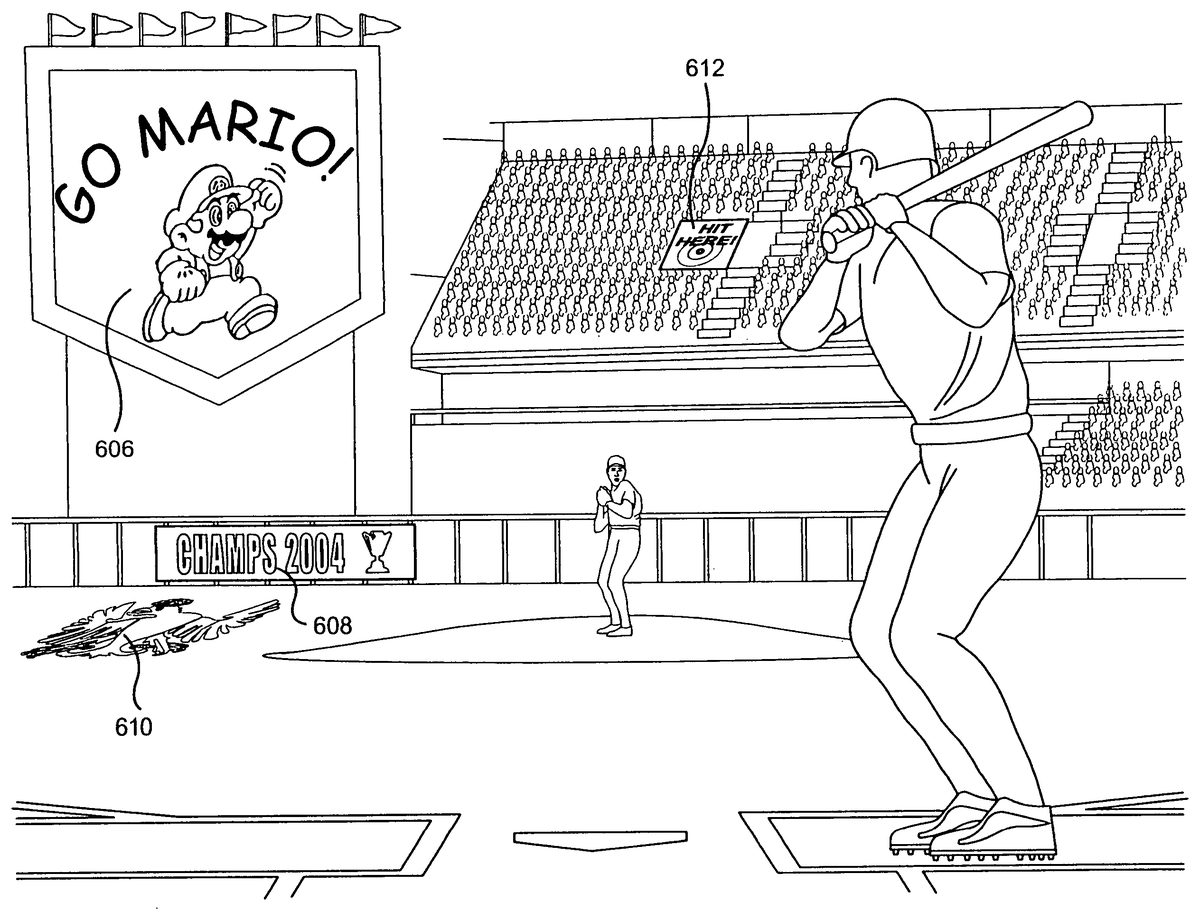
FIG. 18illustrates numerous examples of user created images that have been imported into the virtual sports venue in which interactive game play occurs. For example, user created images may be imported and texture mapped onto motion picture screen606, stadium billboards or banners608, signs612held by fans, and patterns610on the field (such as mowing patterns) or court itself. Once the images are mapped onto respective portions of the venue, the display of the images may be animated during game play. For example, images on motion picture screens606may be animated to simulate movement of the image. By allowing user generated pixel art to be imported onto the signs, billboards, banners, motion picture screens and/or playing surface, the mood of the fans and overall atmosphere of the venue in which game play occurs can be customized to the user's taste. A home-court or home-field atmosphere may thus be generated by the user. The user may also elect to change different colors such as the color of the clothing worn by the fans to create an even further customized atmosphere. By allowing the user to customize signs, banners, motion picture screens, billboards, fields and colors, greater interest in the videogame may be generated.
In accordance with another exemplary non-limiting implementation,FIG. 19shows a videogame system that executes a sports videogame which allows a user to incorporate one or more audio messages (e.g., message having the user's voice, music, sound effects, etc.) into game play of the videogame. A microphone702may be plugged into one of the connection ports24of game console10to receive audio messages. A microphone704may also be plugged into interface143or slot240of one or more of the controllers to receive audio messages. Alternatively, microphone702and/or704may communication wirelessly with the controller or console10. The user inputs an audio message such as his/her own voice through microphone702or704. The message is recorded and saved on a memory medium such as the videogame disk received by console10or other suitable storage medium for later use. Alternatively, the user may play his/her own voice or other audio messages live through the videogame via microphone702or704.
During game play, the audio message may be played back as, for example, the virtual stadium public address (PA) announcer of the videogame. The user could thus record an announcement and introduction for a particular videogame character to be played when that character enters the game or record a rendition of the national anthem with background music provided by the videogame program to be played immediately before game play begins. Alternatively, the user may provide announcements, introductions, songs or his/her own play-by-play color commentary live during game play.
FIG. 20illustrates an exemplary non-limiting implementation of incorporating a recorded audio message such as a message having the user's voice into game play of the videogame. After the user selects the incorporation of a user's audio message into the videogame as a game play option (step802), the user records his/her audio message (step804). As an example, the user may record the audio message “Going, going, gone!” The message is stored on the disk received by game console10or other suitable storage device.
The user selects a game play event which will trigger the audio message to be played, for example, over the virtual PA system of the videogame during game play (step806). The user's selection of the event may be facilitated through a menu display screen provided by the videogame which lists a plurality of different game play events which may occur in later game play. For example, assume that the user selected the game play event of hitting a home run from a menu display screen in a baseball videogame having many other possible game play events such as a bunt, double play, stolen base, etc.
The user can select a particular event from the list provided by the menu display screen, which may be shown on display device706or display127a, through appropriate manipulation of the controller. The event selected by the user, in this case a home run, will be used to trigger the recorded message of “Going, going, gone!” to be played back through speaker708of display device706or speaker142of the controller.
After game play starts (step808), the selected game play event may occur. Upon the detection of this game play event (step810) by the videogame, the recorded audio message will be automatically played during game play (step812). In the foregoing example, the videogame detects when a home run has been hit and automatically outputs the user's recorded audio message “Going, going, gone!” The user's voice can thus be incorporated into game play for a user selected event, thereby providing further user customization of game play.
While the above exemplary features describe in the context of a baseball videogame, the exemplary features can be implemented in any suitable sports videogame. While various implementations of technology are described above, it is to be understood that the invention is not to be limited to the disclosed implementations, but on the contrary, is intended to cover various modifications and equivalent arrangements included within the spirit and scope of the appended claims.
Claims
- In a videogame system including a player-operable controller, a method comprising: allowing a player to create an image using the player-operable controller during execution of a software program stored on a memory device of the videogame system, the software program executable by the videogame system to provide an interactive sports videogame configured to display one or more virtual game characters and a virtual sports venue;allowing the player to select a portion of the virtual sports venue;applying the player-created image onto the selected portion of the virtual sports venue;displaying the virtual sports venue having the applied player-created image so that the player-created image contributes to the overall atmosphere in which interactive game play of the sports videogame is provided to the player, so that the one or more virtual game characters of the sports videogame controllable by the player in playing the sports videogame are located within the virtual sports venue, and so that the applied player-created image is applied to the selected portion of the virtual sports venue at a fixed virtual location, selected by the player, via the player-operable controller, from among a plurality of predefined virtual locations within the virtual sports venue, and as a part of the virtual sports venue, regardless of how the one or more virtual game characters within the sports venue are controlled during the interactive game play;and providing interactive game play of the sports videogame within the virtual sports venue in response to input received on the player-operable controller, such that the one or more virtual game characters are separate, and separated and distinct from, the virtual sports venue in which the one or more virtual game characters play;wherein selection of the portion of the virtual sports venue is independent of any player control of the one or more virtual game characters;and wherein (a) the image is created by editing a preexisting image that is loaded into the videogame system by reading data from a card with a card reader, or (b) applying the player-created image onto the portion of the virtual sports venue includes processing the player-created image to convert the player-created image into a texture and texture mapping the texture onto the selected portion of the virtual sports venue at the fixed virtual location.
- The method of claim 1 wherein the virtual sports venue is a stadium and the selected portion of the virtual sports venue onto which the player-created image is applied is a stadium billboard.
- The method of claim 1 wherein the card reader is connected to the player-operable controller.
- The method of claim 1 further comprising allowing the player to preview the player-created image, before application onto the selected portion of the virtual sports venue, on a display screen of the player-operable controller.
- The method of claim 1 further comprising animating the selected portion of the virtual sports venue onto which the created image is applied so that a moving picture is simulated.
- The method of claim 1 wherein the execution of the software program is accomplished at least in part by a processor arranged within the player-operable controller.
- The method of claim 1 wherein the selected portion of the virtual sports venue onto which the player-created image is applied is a playing surface area on which the one or more virtual game characters are located.
- The method of claim 1 wherein the player-created image contributes to the overall atmosphere in which interactive game play of the sports videogame so that a home-court or home-field is provided.
- The method of claim 1 wherein the player-created image is applied directly to the virtual sports venue without regard to movement of the one or more virtual game characters of the sports videogame.
- The method of claim 1 further comprising: receiving audio input from the player;receiving from the player an indication of an event within the interactive game play of the sports videogame that is to trigger reproduction of the audio;reproducing the audio in response to the event occurring within the interactive game play of the sports videogame.
- A system for playing a sports videogame comprising: a player-operable controller configured to receive input from a player;and at least one processor that communicates with the player-operable controller and executes a software program, the software program providing a sports videogame configured to display one or more virtual game characters and a virtual sports venue so that at least the following can be performed: allowing a player to create an image using the player-operable controller;allowing the player to select a virtual location from among a plurality of predefined locations of the virtual sports venue;applying the player-created image onto the selected location, selected by the player via the player-operable controller, of the virtual sports venue as a part of the virtual sports venue, independent of one or more virtual game characters of the sports videogame that are player-controllable during the interactive game play;displaying the virtual sports venue having the applied player-created image so that the player-created image contributes to the overall atmosphere in which interactive game play of the sports videogame is provided to the player, so that one or more virtual game characters of the sports videogame controllable by the player in playing the sports videogame are located within the virtual sports venue;and providing the interactive game play of the sports videogame within the virtual sports venue in response to input received on the player-operable controller, such that the one or more virtual game characters are separate, and separated and distinct from, the virtual sports venue in which the one or more game characters play;wherein selection of the virtual location of the virtual sports venue is independent of any player control of the one or more game characters;and wherein (a) the image is created by editing a preexisting image that is loaded into the videogame system by reading data from a card with a card reader, or (b) applying the player-created image onto the portion of the virtual sports venue includes processing the player-created image to convert the player-created image into a texture and texture mapping the texture onto the selected virtual location of the virtual sports venue.
- The system of claim 11 wherein the virtual sports venue is a stadium and the virtual location of the virtual sports venue onto which the player-created image is applied is a stadium billboard.
- The system of claim 11 wherein execution of the software program by the processor includes downloading a program portion of the sports videogame to the player-operable controller for execution by a processor within the controller, the program portion executed by the processor within the controller allowing the player to create the image using the player-operable controller.
- The system of claim 11 wherein the card reader is connected to the controller for reading the card and providing image data which may be edited by input on the player-operable controller to allow the player to create the image using the player-operable controller.
- The system of claim 11 wherein the player-operable controller includes a display that shows a preview of the player-created image.
- The system of claim 11 wherein the player can edit the preexisting image using the player-operable controller.
- The system of claim 11 further comprising animating the virtual location of the virtual sports venue onto which the player-created image is applied so that a moving picture is simulated.
- The system of claim 11 wherein the selected virtual location of the virtual sports venue onto which the player-created image is applied is a playing surface area on which the one or more virtual game characters are located.
- The system of claim 11 wherein the player-created image contributes to the overall atmosphere in which interactive game play of the sports videogame so that a home-court or home-field is provided.
- The system of claim 11 wherein the player-created image is applied directly to the virtual sports venue without regard to movement of the one or more virtual game characters of the sports videogame.
- The system of claim 11 wherein the player-created image is applied to a fixed virtual location within the virtual sports venue.
- A non-transitory computer readable storage medium tangibly storing instructions executable by a computer to control game play in a sports videogame configured to display one or more virtual game characters and a virtual sports venue, wherein the player interactively controls the one or more virtual game characters in the virtual sports venue using a player-operable controller, the instructions carrying out functionality comprising: allowing a player to create an image using the player-operable controller;allowing the player to select a portion of the virtual sports venue;applying the player-created image onto a portion of the virtual sports venue, the portion being selected by the player, via the player-operable controller, from among a plurality of predefined locations;controlling a non-player controlled virtual game character of the sports videogame;receiving player input from the player-operable controller requesting an animated action be performed by the one or more virtual game characters;and displaying the performance of the animated action within the virtual sports venue having the applied, player-created image so that the player-created image is fixed therein as a part of the virtual sports venue and contributes to the overall atmosphere in which the animated action is performed, so that the one or more game characters are located within the virtual sports venue and are separated and distinct from the virtual sports venue;wherein selection of the portion of the virtual sports venue is independent of any player control of the game characters;and wherein (a) the image is created by editing a preexisting image that is loaded into the videogame system by reading data from a card with a card reader, or (b) applying the player-created image onto the selected portion of the virtual sports venue includes processing the player-created image to convert the player-created image into a texture and texture mapping the texture onto the selected portion of the virtual sports venue.
- The computer readable storage medium of claim 22 wherein the virtual sports venue is a stadium and the selected portion of the virtual sports venue onto which the player-created image is applied is a stadium billboard.
- The computer readable storage medium of claim 22 wherein the card reader is connected to the player-operable controller.
- The computer readable storage medium of claim 22 wherein further instructions are provided to enable the player to preview the player-generated image on a display screen housed within the player-operable controller.
- The computer readable storage medium of claim 22 wherein further instructions are provided to animate the selected portion of the virtual sports venue onto which the player-created image is applied so that a moving picture is simulated.
- The computer readable medium of claim 22 wherein the selected portion of the virtual sports venue onto which the player-created image is applied is a playing surface area on which the one or more virtual game characters are located.
- The computer readable medium of claim 22 wherein the player-created image contributes to the overall atmosphere in which interactive game play of the sports videogame so that a home-court or home-field is provided.
- The computer readable storage medium of claim 22 wherein the player-generated image is applied directly to the sports venue without regard to movement of the one or more virtual game characters of the sports videogame.
- The computer readable storage medium of claim 22 wherein the player-created image is applied to a fixed virtual location within the selected portion of the virtual sports venue.
Disclaimer: Data collected from the USPTO and may be malformed, incomplete, and/or otherwise inaccurate.