U.S. Pat. No. 9,174,132
ELECTRONIC GAME DEVICE, ELECTRONIC GAME PROCESSING METHOD, AND NON-TRANSITORY COMPUTER-READABLE STORAGE MEDIUM STORING ELECTRONIC GAME PROGRAM
AssigneeDeNA Co., Ltd.
Issue DateOctober 2, 2013
Illustrative Figure
Abstract
Image data including a plurality of consecutively arranged images each indicating an option that is selectable as an instruction specifying a next action in an electronic game is stored. An image area indicating part of the image data is displayed in a command selection area on the touch panel. A slide or a flick, input by a user, on the touch panel is detected. The image area is displayed by scrolling an image area displayed in the command selection area within the image data in response to detection of the input slide or flick.
Description
DESCRIPTION OF THE PREFERRED EMBODIMENTS An embodiment of the present invention will be described with reference to the drawings. Overall Configuration of Electronic Game System FIG. 1is a diagram illustrating a configuration of an electronic game system according to an embodiment. A server200is connected to a client202so as to be capable of exchanging information over a network (information network)204such as the Internet. The server200may be a computer, and includes a data processing unit20, a communication unit22, and a storage unit24. The data processing unit20includes a processing device such as a central processing unit (CPU), and is configured to execute a program stored in the storage unit24to perform a process such as transmitting information to the client202. The communication unit22is a unit configured to connect the server200to the network204, and includes an interface through which information is output to the network204or information is acquired from the network204. The storage unit24is a unit configured to store and hold electronic information such as an electronic game program or electronic game logic and data, and includes various storage devices such as a semiconductor memory and a hard disk. In this embodiment, the server200is configured to have a function for storing a program (logic) and data concerning an electronic game to be provided, and distributing the program (logic) and the data to the client202. Alternatively, the server200may include an input unit and a display unit so as to be capable of creating or updating a program (logic) and data. The client202may be typically a mobile terminal such as a mobile phone, a smartphone, or a tablet, or may be a personal computer (PC) or any other suitable device. The client202includes a data processing unit30, a communication unit32, a storage unit34, a display unit36, and an input unit38. The data processing unit30includes a processing device such ...
DESCRIPTION OF THE PREFERRED EMBODIMENTS
An embodiment of the present invention will be described with reference to the drawings.
Overall Configuration of Electronic Game System
FIG. 1is a diagram illustrating a configuration of an electronic game system according to an embodiment. A server200is connected to a client202so as to be capable of exchanging information over a network (information network)204such as the Internet.
The server200may be a computer, and includes a data processing unit20, a communication unit22, and a storage unit24. The data processing unit20includes a processing device such as a central processing unit (CPU), and is configured to execute a program stored in the storage unit24to perform a process such as transmitting information to the client202. The communication unit22is a unit configured to connect the server200to the network204, and includes an interface through which information is output to the network204or information is acquired from the network204. The storage unit24is a unit configured to store and hold electronic information such as an electronic game program or electronic game logic and data, and includes various storage devices such as a semiconductor memory and a hard disk.
In this embodiment, the server200is configured to have a function for storing a program (logic) and data concerning an electronic game to be provided, and distributing the program (logic) and the data to the client202. Alternatively, the server200may include an input unit and a display unit so as to be capable of creating or updating a program (logic) and data.
The client202may be typically a mobile terminal such as a mobile phone, a smartphone, or a tablet, or may be a personal computer (PC) or any other suitable device. The client202includes a data processing unit30, a communication unit32, a storage unit34, a display unit36, and an input unit38. The data processing unit30includes a processing device such as a CPU, and is configured to execute a program stored in the storage unit34to perform a process concerning an electronic game. The communication unit32is a unit configured to connect the client202to the network204, and includes an interface through which information is output to the network204or information is acquired from the network204. The storage unit34is a unit configured to store and hold electronic information such as an electronic game program or electronic game logic and data, and includes various storage devices such as a semiconductor memory and a hard disk. The display unit36is a unit configured to provide the user with image information and text information. The input unit38is a unit configured to acquire information from the user. The client202may also include an audio output unit and other devices, if necessary.
In particular, preferably, the display unit36and the input unit38constitute a touch panel through which a user is able to perform an input operation by touching a screen on which an image is to be displayed with a fingertip, a stylus, or any other suitable tool. The client202obtains a desired electronic game program (electronic game logic) and data from the server200via the network204, and executes processing activities such as game play. The client202displays ally characters, enemy characters, and so forth on the screen using the display unit36in accordance with the progress of the game, and also receives instructions from the player using the input unit38.
In this embodiment, the client202receives an electronic game program (logic) and data from the server200, and executes the electronic game program (logic), thereby functioning as an electronic game device.
In this embodiment, by way of example, the client202acquires an electronic game program or electronic game logic and data from the server200via the network204, and executes the electronic game program or electronic game logic. However, this embodiment is not limited to this example. An electronic game program or electronic game logic and data may be stored in the storage unit34of the client202in advance, and may be executed to provide an electronic game.
Electronic Game Processing Method
An electronic game processing method according to an embodiment of the present invention will be described. The electronic game processing method according to this embodiment has a feature in an input interface for options (commands), and thus in the following description, focus will be on a method for displaying an image on an input interface and an input method using the input interface.
The input interface according to this embodiment is suitable for use in input to a role-playing game and so forth. However, the input interface may also be used in other situations. The processing for an electronic game itself may be performed in accordance with an existing program, and the input interface according to this embodiment may be used when the user selects an option (command) during the play of the electronic game.
As an example, a process with the input interface when applied to a role-playing game will be described. The process is performed in accordance with a flowchart illustrated inFIG. 2.
In step S10, an electronic game program (or electronic game logic) and data are transmitted from the server200to the client202. The data processing unit20of the server200reads an electronic game program (or electronic game logic) and data (such as image data and data indicating the characteristics of characters) necessary for the processing for the electronic game, which are stored in the storage unit24, and transmits the read electronic game program (or electronic game logic) and data to the client202via the network204. The client202starts a process using the received electronic game program (or electronic game logic) and data in accordance with a command input in accordance with the electronic game program.
In step S12, the client202displays an image on the display unit36. The client202causes the data received in step S10to be displayed on the display unit36. For example, in the case where the electronic game is a role-playing game, the data includes image data of enemy characters, image data of ally characters, and so forth. The data may also include information concerning the electronic game, such as information indicating the states of the ally characters and the enemy characters (information concerning items possessed by the characters, such as a hit point (HP) indicating the physical ability of a character, a magic point (MP) indicating the limited use of a command such as a magic power, and a level (Lv) indicating how a character grows in power, etc.). In this case, image data may be generated from the information concerning the electronic game, and may be displayed.
FIG. 3illustrates an example of an image displayed on the display unit36. In the illustrated example, an image400includes an enemy character display area402including images of enemy characters40aand40b, an ally character's state display area404indicating the states of ally characters operable by a user, an input area406for entering an instruction specifying the next action of each of the ally characters, and a set area408for setting the selection of a command.
In step S14, a process for receiving the selection of a command by the user is performed. In the electronic game processing method according to this embodiment, the input area406adopts a reel-based selection method.
The reel-based selection method is a method for displaying images indicating options (commands) that are arranged in a selection window, or the input area406. The input area406has command selection areas410for the respective ally characters. In each of the command selection areas410, options (commands) for instructing the next action are displayed. A user slides or flicks his or her finger or a stylus in the direction of movement of the reel (in this embodiment, upward and downward in the drawing) while touching the command selection area410with the finger or stylus, thereby sequentially scrolling through a plurality of options (commands) consecutively arranged in the command selection area410.
A specific example process will be described using a flowchart of a sub-routine illustrated inFIG. 4. In an initial setup, as illustrated inFIG. 5A, a plurality of images450aindicating options (commands) selectable by a user are consecutively arranged to generate image data450, and the image data450is stored in the storage unit34. The images450aindicating the options (commands) included in the image data450are each registered in a command database in association with an option (command) for instructing the next action of an ally character in the electronic game.
The data processing unit30reads image data in an image area indicating part of the image data450from the storage unit34, and causes the image area indicating part of the image data450to be displayed in the command selection area410(step S14-1). This is an initial selection screen.
Then, the data processing unit30determines whether the input area406or the set area408displayed on the display unit36has been tapped (step S14-2). When a user touches the command selection area410or the set area408with his or her finger or a stylus, a signal indicating that the command selection area410or the set area408has been touched is input from the input unit38(touch panel) to the data processing unit30. If the command selection area410has been touched, the data processing unit30causes the process to proceed to step S14-3. If the set area408has been touched, the data processing unit30causes the process to proceed to step S14-5.
If the command selection area410has been touched, when the user further moves the finger or stylus upward while keeping in touch with the command selection area410with it, the input unit38(touch panel) senses the movement of the finger or stylus. Then, a signal indicating that a finger or a stylus has been slid or flicked and a signal indicating the slide or flick width is input to the data processing unit30(step S14-3). In accordance with the signal indicating the slide or flick width, as illustrated inFIGS. 5B and 5C, the data processing unit30reads image data in an image area below the image area currently being displayed in the image data450, and updates the display of the command selection area410(step S14-4). If the slide or flick is performed downward, the process opposite to the process may be performed.
The image area of image data to be read may be an image area shifted pixel by pixel in the sliding or flicking direction with respect to the image area currently being displayed. An increase in the number of pixels to be shifted per display update increases scrolling pitch, and provides quick changing of options (commands) to be displayed. A reduction in the number of pixels reduces scrolling pitch, and provides smooth scrolling of options (commands) to be displayed. For example, preferably, a larger number of pixels are shifted per display update for a higher sliding or flicking speed.
The processing of steps S14-2to S14-4is repeatedly performed, thereby displaying the image data450having a plurality of consecutively arranged options (commands) on the command selection area410so as to scroll through the image data450. Thus, the option (command) to be selected by the user may be displayed near the center of the command selection area410(inFIG. 3, a selection area412). When the option (command) to be selected is displayed in the selection area412, the user releases the finger or stylus from the display unit36, thereby stopping the scrolling of the image data450, and the option (command) in the command selection area410is selected.
If it is determined in step S14-2that the set area408has been touched, the selection of the current option (command) by the user is set. When the user selects options (commands) for the respective ally characters in the command selection areas410, the user touches (taps) the set area408with his or her finger or stylus. Upon receiving a signal indicating that the set area408has been touched from the input unit38, the data processing unit30refers to the command database stored in the storage unit34, and determines that the options (commands) associated with the images of the options (commands) being displayed in the selection area412have been selected for the respective ally characters.
For example, the set area408is touched in the state illustrated inFIG. 3. In this case, since the image of “Attack 1” is being displayed in the selection area412for ally character 1, the command database is referred to and “Attack 1” is selected as an instruction specifying the next action of ally character 1. Likewise, “Magic 2” is selected for ally character 2, and “Defense” is selected for ally character 3.
If an option (command) is set, the data processing unit30returns the process to step S16of the main routine.
Here, the data processing unit30functions as an option display unit by performing the processing of steps S14-1and S14-4. The data processing unit30functions as an input detection unit by performing the processing of steps S14-2and14-3. The data processing unit30functions as a selection setting unit by performing the processing of step S14-5.
Preferably, the command selection areas410are provided for the respective ally characters so that the user may select an option (command) for each of the ally characters. In this case, preferably, the image data450to be displayed in each of the command selection areas410is set for the corresponding one of the ally characters, and includes images indicating a plurality of available options (commands).
Furthermore, the image data450preferably includes all the options (commands) across a plurality of hierarchical sub-menus in a configuration of the related art to eliminate or reduce the necessity for selecting options (commands) across a plurality of hierarchical sub-menus, such as in the case of selecting options (commands) from a menu. For example, in a configuration of the related art in which “Magic” is selected from a main menu and one of “Magic 1”, “Magic 2”, . . . is selected from among sub-menus of “Magic”, the image data450includes options (commands) in the bottom layer, such as “Magic 1” and “Magic 2”.
The number of options (commands) to be included in the image data450is preferably, but not limited to, up to approximately 15 to 20 in terms of the time required to navigate all the options (commands) during the scrolling of them.
When the display area of the input area406reaches an end (in this embodiment, the upper end or lower end) of the image data450, the display of images in the input area406may be stopped at the end of the image data450. Alternatively, when the display area of the input area406reaches an end (for example, the upper end or lower end) of the image data450, images from the other end (for example, the lower or upper end) of the image data450may be continuously displayed in the input area406. In this case, images are displayed in the input area406in such a manner the one end of the image data450is continuous to the other end.
In addition, preferably, processing is performed so that an option (command) is not stopped at a position shifted from the selection area412in order to allow appropriate selection of the option (command). That is, as illustrated inFIG. 6A, if scroll is stopped while an area where an option (command) is displayed is shifted with respect to the selection area412, processing is performed so that images are not displayed with the two areas shifted. For example, as illustrated inFIG. 6A, of an area420aand an area420b, the area420bhaving a larger area that is being displayed in the selection area412is extracted. Then, as illustrated inFIG. 6B, the display of the command selection area410is updated so that the area420bis displayed to fit the selection area412. The update of the display may make the user feel like clicking when selecting an option (command), and may apparently present what option (command) is being selected to the user.
Inertial scrolling may also be used to display an option (command). Specifically, when a user slides his or her finger or a stylus at a certain speed or more while touching the input area406, the images of the image data450in the input area406are continuously scrolled through, without the update of the images in the input area406being abruptly stopped, even after the release of the touch from the display unit36. After that, the update speed of the images in the input area406is gradually reduced to gradually slow down scrolling motion, and the motion eventually stops. The display of the image data450in the manner described above may reduce the operational load on the user who wishes to move the image being displayed in the input area406by a large amount or wishes to view a list of options (commands) included in the image data450.
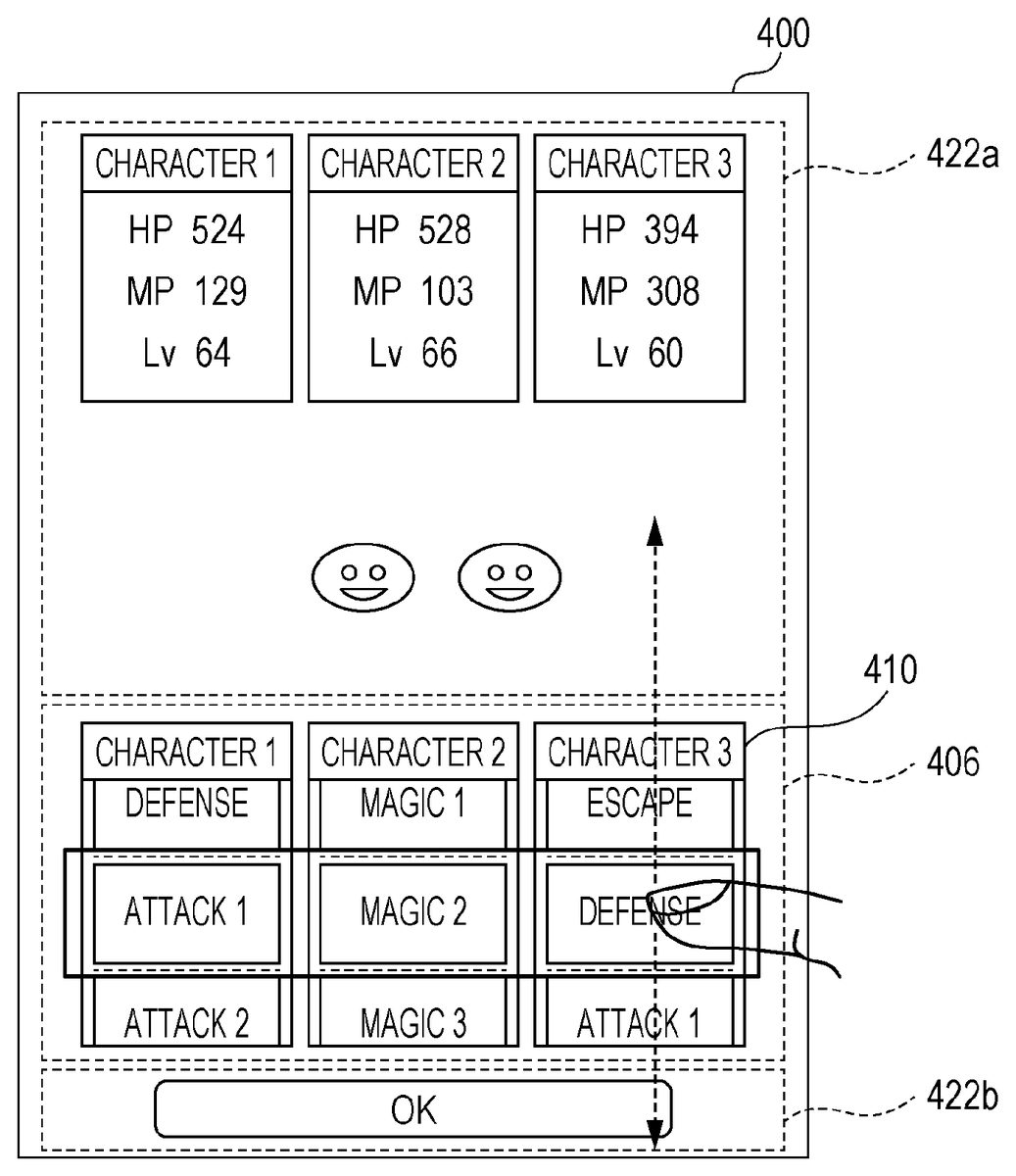
In addition, as illustrated inFIG. 7, preferably, allowance areas422aand422bare provided at ends in the scrolling direction of the input area406in the image400. After the user touches a point in the command selection areas410with his or her finger, a stylus, or any other suitable tool, once the user slides the finger or stylus into an area (allowance area422aor422b) outside the input area406with respect to the associated command selection area410as the starting point, the input unit38may detect the movement of the finger or stylus, thereby allowing continuous scrolling of the images in the command selection area410. Accordingly, even if the input area406is small, after the user touches any one of the command selection areas410, the user may use a larger area to instruct scrolling by sliding the finger or stylus. Operability is improved when a display area of options (commands) is scrolled.
In addition, as illustrated inFIG. 8, while a user scrolls through images in any one of the command selection areas410, the name of an option (command) being displayed in the selection area412or the details of the option (command) may be displayed in a description area430. The user may be able to check the information displayed in the description area430, and may thus be able to readily understand the content of the option (command) being selected.
Referring back toFIG. 2, in step S16, a process corresponding to the selected option (command) is executed. The data processing unit30executes a process corresponding to the option (command) for each ally character, which is set in step S14. This process may be performed in a manner similar to the processing for an electronic game of the related art.
For example, in a role-playing game, if “Attack 1” is selected as an instruction specifying the next action of ally character 1, a process for inflicting damage to an enemy character is performed in accordance with the routine defined as “Attack 1” in the electronic game program (logic). In this case, a process for reducing the hit point (HP) of the enemy character is performed. In a case where other options (commands) are selected, processes may be performed in a manner similar to that for an electronic game of the related art.
In this embodiment, accordingly, a reel-based selection method is adopted to select an option (command) to allow an electronic game to proceed. Therefore, even a mobile terminal including a touch panel having a display area so small that it is difficult to display a large number of options (commands) on a menu screen at one time, such as a smartphone or a tablet, may be provided with a user-friendly user interface.
First Modification
In a first modification, an initial image to be displayed in the selection area412is an image corresponding to the previously selected option (command). The data processing unit30stores in the storage unit34an option (command) that has been selected for each ally character in the preceding action. In the process for receiving an instruction specifying the next action, the data processing unit30reads the previously selected option (command) from the storage unit34, and extracts from image data450an image area in which an image450aassociated with the read option (command) is displayed in the selection area412. The extracted image area is displayed in a corresponding one of the command selection areas410.
For example, “Attack 1” has been selected for character 1 in the previous action. In this case, when an instruction specifying the next action is received, an image area is extracted from the image data450so that the image of “Attack 1” is displayed as the initial image in the selection area412for ally character 1. Then, the extracted image area is displayed in the command selection area410.
Through the process described above, the previously selected options (commands) are first displayed in the selection area412. Thus, the user may be able to readily select the same options (commands) as the preceding options (commands) for the respective ally characters merely by tapping the set area408.
In addition, the order in which options (commands) in the image data450are arranged may be set by the user. The data processing unit30stores in the storage unit34options (commands) selectable for each ally character, and presents the stored options (commands) to the user so that the user selects an option (command). Further, the data processing unit30arranges the options (commands) in order in which they were selected, and stores them in the storage unit34. The data processing unit30further combines images450acorresponding to the options (commands) in order in which they were stored in the storage unit34to generate image data450.
A reel-based selection process using the image data450allows options (commands) that match user's preferences to be arranged in order of user's preference for selection, and may improve comfortableness of the user.
Alternatively, options (commands) that are more likely to be selected may be recommended for each ally character by using the artificial intelligence (AI) function and displayed in the selection area412. The AI function may be implemented by an existing process. For example, the data processing unit30may store in the storage unit34options (commands) that have been selected in the past by the user for each ally character, and may combine images450acorresponding to the options (commands) in order of the highest selection frequency to the lowest selection frequency to generate image data450. The image450acorresponding to the option (command) with the highest selection frequency may be first displayed in the selection area412. Furthermore, the data processing unit30may store options (commands) effective for each enemy character in advance in the storage unit34in association with the enemy character, so that options (commands) that are effective and associated with the enemy character against which the current action is being taken may be first displayed in the selection area412.
With the process described above, options (commands) that are more likely to be selected are first displayed in the selection area412. The user may thus be able to readily select options (commands) for the respective ally characters merely by tapping the set area408.
Second Modification
In a second modification, a description will be given of an example in which a reel-based selection method is associated with the progress of an electronic game and an electronic game with high entertainment performance is provided.
In an example, the range of options (commands) that are selectable using a reel-based selection method is limited in accordance with the progress of an electronic game. For example, the range of options (commands) may be limited when a player is subjected to a certain attack by an enemy character in the course of electronic game play, or the range of options (commands) may be limited when an ally character is somewhat damaged.
In this case, as illustrated inFIG. 9, the data processing unit30performs setting so that only part of the image data450is included in a selectable area450b. For example, only options (commands) that are included in a certain image range from the previously selected option (command) are selectably set. Then, the data processing unit30reads image data in an image area included in the selectable area450b, and displays the read image data in a command selection area410. While the read image data is being displayed, the user touches the command selection area410with his or her finger or a stylus, and then moves the finger or stylus upward (or downward) while keeping in touch with the command selection area410. In response to the movement of the finger or stylus, the data processing unit30reads image data in an image area below (or above) the current display area within the selectable area450b, and sequentially displays the read image data in the command selection area410. Accordingly, part of the image data450that is included in an image area within the selectably set selectable area450bis scrolled in the command selection area410, and only the options (commands) included in the selectable area450bare made selectable.
Alternatively, only some of options (commands) may be selectably set. In this case, as illustrated inFIG. 10, preferably, the selectable options (commands) and the other options (commands) may be displayed in a different way. One such different way is that, for example, the selectable options (commands) and the other options (commands) are displayed in different colors. Alternatively, the selectable options (commands) may be displayed with shading, and the other options (commands) may be displayed without shading, or vice versa. Alternatively, the selectable options (commands) may be displayed, and the other options (commands) may be hidden, or vice versa. If the set area408is tapped while an option (command) that is not selectable is being displayed in the selection area412, the data processing unit30may perform a process for displaying an indication that the option (command) currently being displayed in the selection area412is not selectable on the display unit36, and prompting the user to select an option (command) again.
In this manner, the width of the selection range of options (commands) in a reel-based selection method may be increased or reduced in accordance with the progress of an electronic game, thereby increasing the entertainment of the electronic game.
Alternatively, as illustrated inFIG. 11, in place of images450aindicating options (commands) or in addition to images450aindicating options (commands), special images452may be additionally included, and additional effects achievable by, for example, a slot game may be added. For example, as illustrated inFIG. 12, a special process may be performed in an electronic game by the arrangement of special images452in command selection areas410for a plurality of ally characters. Examples of the special process include, as exemplified inFIG. 13, increasing the attack power or defense power of ally characters, and decreasing the attack power or defense power of enemy characters.
Alternatively, a special process may be performed in an electronic game by the selection of a combination of specific options (commands) for a plurality of ally characters. For example, as illustrated inFIG. 14, special processes may be set for combinations of options (commands) selectable for ally characters 1, 2, and 3, and may be stored in the storage unit34. In response to the actual selection and setting of one of the combinations of options (commands), the corresponding special process may be executed. For example, inFIG. 14, when “Attack 1”, “Magic 2”, and “Defense” are selected and set for ally characters 1, 2, and 3, respectively, a process for inflicting damage twice as large as normal damage to enemy characters is executed.
Accordingly, an input interface and an electronic game are combined to create new effects, which may entertain users.
Claims
- An electronic game device having a touch panel, comprising: storage means for storing image data comprising a plurality of consecutively arranged images for each of a plurality of characters, each of the plurality of consecutively arranged images indicative of an option that is selectable as an instruction to specify a next action for each of the plurality of characters in an electronic game, and for storing special process data comprising combinations of selected ones of the selectable options of the plurality of consecutively arranged images having an associated special process;option display means for displaying, in each of a plurality of command selection areas, an image area indicating a portion of the image data for each of the plurality of characters, wherein each of the plurality of command selection areas is respectively provided on the touch panel for each of the plurality of characters;input detecting means for detecting a slide input or a flick input by a user, on the touch panel, within the plurality of command selection areas to select the options for each of the plurality of characters;processing means for, in response to selection of the options for each of the plurality of characters, executing a game command, wherein execution of the game command comprises comparing a combination of the selected options for each of the plurality of characters to the special process data, and executing the associated special process for the combination having the associated special process;wherein the option display means scrolls and displays another image area in associated ones of the plurality of command selection areas in response to detection of the slide input or flick input by the input detecting means, the another image area associated with another portion of the image data.
- The electronic game device according to claim 1 , wherein the option display means disables selection of at least one of the options in accordance with progress of the electronic game.
- The electronic game device according to claim 2 , wherein the option display means disables selection of at least one of the options by setting only the image area indicating the portion of the image data as a selectable area in accordance with progress of the electronic game.
- The electronic game device according to claim 1 , wherein the image data is configured such that the consecutively arranged images are arranged in an order set by the user based on options selected by the user in advance.
- The electronic game device according to claim 1 , wherein the option display means displays the image area in the each command selection area as an initial image, the image area including an image from the plurality of consecutively arranged images indicative of either the option that is most frequently selected by the user in the image data or the option recommended using an Artificial Intelligence (AI) function.
- An electronic game processing method using an electronic game device having a touch panel, the electronic game processing method causing a computer to perform a process comprising: a storing step of storing image data comprising a plurality of consecutively arranged images for each of a plurality of characters, each of the plurality of consecutively arranged images indicative of an option that is selectable as an instruction to specify a next action for each of the plurality of characters in an electronic game, and for storing special process data comprising combinations of selected ones of the selectable options of the plurality of consecutively arranged images having an associated special process;an option displaying step of displaying, in each a plurality of command selection areas, an image area comprising a portion of image data for each of the plurality of characters, wherein each of the plurality of command selection areas is displayed on the touch panel for each of the plurality of characters;an input detecting step of detecting a slide input or a flick input by a user, on the touch panel, within the plurality of command selection areas to select the options for each of the plurality of characters;a processing step for, in response to selection of the options for each of the plurality of characters, executing a game command, wherein execution of the game command comprises comparing a combination of the selected options for each of the plurality of characters to special process data, and executing the associated special process for the combination having the associated special process;and a scrolling step of scrolling and displaying another image area associated ones of the plurality of command selection areas in response to detection of the slide input or flick input in the input detecting step, the another image area associated with another portion of the image data.
- A non-transitory computer readable electronic game program that uses an electronic game device having a touch panel, the electronic game program causing a computer to execute: a storing step of image data comprising a plurality of consecutively arranged images for each of a plurality of characters, each of the plurality of consecutively arranged images indicative of an option that is selectable as an instruction to specify a next action for the each of the plurality of characters in an electronic game, and for storing special process data comprising combinations of selected ones of the selectable options of the plurality of consecutively arranged images having an associated special process;an option displaying step of displaying, in each of a plurality of command selection areas, an image area indicating a portion of the image data for each of a plurality of characters, wherein each of the plurality of command selection areas is respectively provided on the touch panel for the each of the plurality of characters;a processing step for, in response to selection of the options for each of the plurality of characters, executing a game command, wherein execution of the game command comprises comparing a combination of the selected options for each of the plurality of characters to the special process data, and executing the associated special process for the combination having the associated special process;an input detecting step of detecting a slide input or a flick input by a user, on the touch panel, within the plurality of command selection areas to select the options for each of the plurality of characters;and a scrolling step of scrolling and displaying another image area in associated ones of the plurality of command selection areas in response to detection of the slide input or flick input in the input detecting step, the another image area associated with another portion of the image data.
Disclaimer: Data collected from the USPTO and may be malformed, incomplete, and/or otherwise inaccurate.