U.S. Pat. No. 8,992,327
ONLINE GAMING SYSTEM
AssigneeRational Intellectual Holdings Ltd
Issue DateFebruary 15, 2012
Illustrative Figure
Abstract
A method of controlling a game program adapted to operate a game in a device is disclosed. The method comprises accessing configuration data defining one or more states or events which can occur at the device and which are not related to the game program, and specifying for each defined state or event a game action to be performed by the game program in response to the defined state or event. The occurrence of one of the defined states or events at the device is detected, and the game action specified in the configuration data for the detected state or event is performed in response to detection of the defined state or event.
Description
OVERVIEW The online gaming system of preferred embodiments of the invention provides the user with a number of features. The user is able to configure their gaming experience to meet their needs. Once the user has set their preferences the gaming system can use any observable, such as an incoming telephone call, to initiate a gambling event, or any other such event. This allows the user to drop in and out of the mobile gaming environment without the requirement of initiating an application manually (referred to herein as the observables feature). The online gaming system also allows for multiple concurrent games to be played, such as blackjack and poker. The switching mechanism between these games may be an observable, such as a win in poker. In order to set the user preferences the user may in the first instance set them within the gaming system itself. However, the user is also provided with an online interface, that may be accessed using either a mobile device or an internet connected PC. This enables the user to configure their preferences using a more suitable interface than a small-screen mobile device (referred to herein as the over-the-air configuration feature). Using this system a user may also choose to use or copy other users' preferences; generally this will be the user's friends, but alternatively it could be any other user, including a “famous” person (referred to herein as the shadow gaming feature). Furthermore, once the gaming system is initiated, in one embodiment, the present invention allows for users to lose connection to the network and remain within the game, at least for a short period of time, while they re-instate their connection; once reconnected the user will be placed back into the game in the same position as when they lost connection (referred to ...
OVERVIEW
The online gaming system of preferred embodiments of the invention provides the user with a number of features. The user is able to configure their gaming experience to meet their needs. Once the user has set their preferences the gaming system can use any observable, such as an incoming telephone call, to initiate a gambling event, or any other such event. This allows the user to drop in and out of the mobile gaming environment without the requirement of initiating an application manually (referred to herein as the observables feature). The online gaming system also allows for multiple concurrent games to be played, such as blackjack and poker. The switching mechanism between these games may be an observable, such as a win in poker.
In order to set the user preferences the user may in the first instance set them within the gaming system itself. However, the user is also provided with an online interface, that may be accessed using either a mobile device or an internet connected PC. This enables the user to configure their preferences using a more suitable interface than a small-screen mobile device (referred to herein as the over-the-air configuration feature). Using this system a user may also choose to use or copy other users' preferences; generally this will be the user's friends, but alternatively it could be any other user, including a “famous” person (referred to herein as the shadow gaming feature).
Furthermore, once the gaming system is initiated, in one embodiment, the present invention allows for users to lose connection to the network and remain within the game, at least for a short period of time, while they re-instate their connection; once reconnected the user will be placed back into the game in the same position as when they lost connection (referred to herein as the drop-out feature). The system also operates an allocation mechanism for allocating players to games (referred to herein as the brushing feature). These features will be described in detail below.
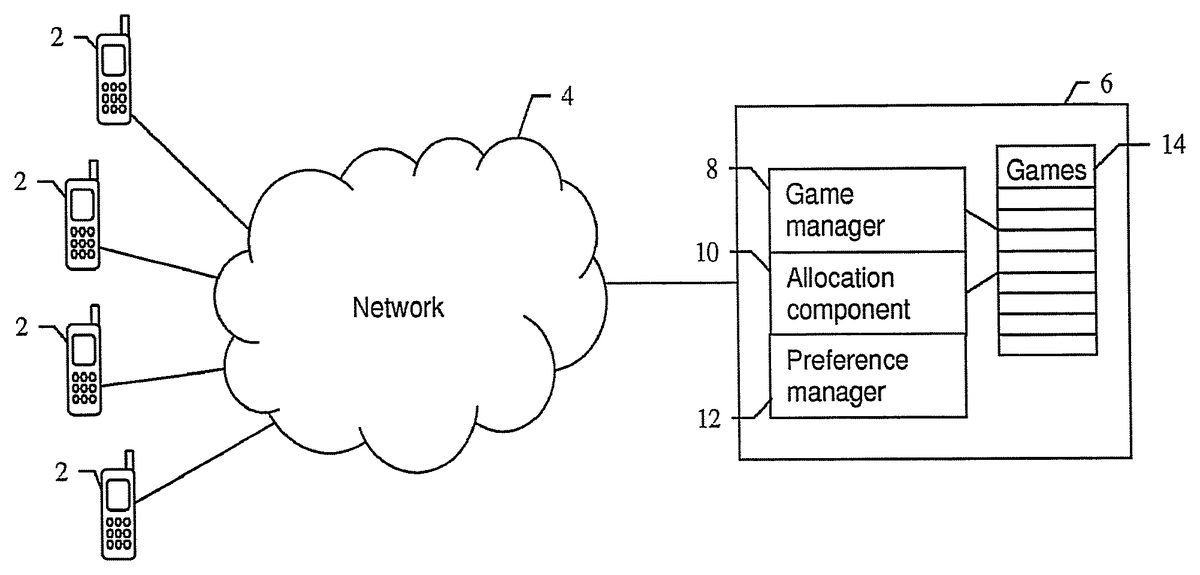
The online gaming system is shown in overview inFIG. 1.
The online gaming system comprises a gaming server6connected to a communications network4. In the present example, the network includes a mobile telecommunications network. The network may additionally include other networks, for example the Internet. A plurality of mobile devices2, for example mobile telephones, are also connected to the network4, via which they are able to communicate with gaming server6.
The gaming server6comprises various components including a game manager8for operating a plurality of concurrent multiplayer wagering games14, a player allocation component10for allocating players to games, and a preference manager12for managing player preferences.
A given player can connect to the gaming system using a mobile device2and is allocated to one of the plurality of concurrent multiplayer games14by allocation component10. Allocation occurs at least in part based on user preferences, which can be defined using the preference manager12. Preference manager12may be configured using a mobile device or an internet connected PC. Once a player has joined a given game, the game manager8manages the progress of the game and communicates with mobile device2to transmit game state updates and receive user input relating, for example, to play actions and wagers.
Though shown as a single server, the game server6may alternatively be implemented as multiple connected servers, which may be in the same location or may be geographically remote. For example, individual games or groups of games may be operated on one or more remote servers, with the game manager managing access to the remote servers by the mobile devices and initiating participation in a game by a device, but not itself controlling operation of the games. In that case, once participation in a game by a device has been initiated, communication between the device and relevant server may be via the game server6, or may be direct between the device and the server. However, for simplicity, it will be assumed here that game server6itself operates the games.
The server6also includes functionality (for example in the form of a connection management component, not shown) for managing connections to mobile devices, including setting up new connections and terminating connections. Allocation of a newly connected player to a game may be performed automatically as soon as a connection has been established. In this way, the player can connect to the system and start participating in a game in a single action, thus maximising play time and user convenience. Alternatively, a menu may be displayed, allowing the user to request to join a game as well as performing other operations, such as managing the player's preferences. Whether allocation occurs automatically on successful connection to the system, or is initiated via a menu displayed after a connection is established, may also be configurable, for example as part of the player's preferences.
The operation of the system, and in particular the allocation component10, is illustrated in more detail inFIG. 2.
The mobile device2includes operating system software24which manages the basic functionality of the mobile device, including communication with the mobile network, and a client game application26. The client game application may, for example, be downloaded by the player over the mobile communications network from the gaming server or some other source, or may be installed on the device in some other way.
The client application26is preferably a thin client, providing essentially display and user input functionality and communicating with the gaming server6. The gaming server6manages the operation of the games and transmits display instructions to the client application26, for example to provide menus and update the display with the current game state during game play. The client application receives user input typically via a mobile telephone keypad, and transmits the received input to the gaming server6.
In particular, after starting the client application26, a menu screen is displayed, which includes a menu option for joining a game. If the player selects this option, the client application transmits a request to the gaming server to join a game. The request is processed by allocation component10, which accesses user preferences16to obtain the player's game preferences for the particular variety of game they have chosen. The preferences specify the type of game the player prefers to participate in. The allocation component then accesses the available games14to select an appropriate game based on the player's preferences.
Each game18comprises a current game state20and attributes22. The game state20includes information such as the current number of players, the positions the players have been allocated to, and the current state of play. The attributes specify the type of the game, specifying, for example, where applicable, game types and variants, the maximum number of players for the game, and other game-related information such as buy-in and betting limits.
The allocation component10selects a game18having attributes matching the player's preferences, and which is not full. There will typically be several such games available, and the allocation component therefore in a second stage also evaluates the game state of any games matching the player preferences, in particular the number of players currently participating in each game and the player positions. The rules applied in selecting a game will be discussed in more detail below.
Once a suitable game has been selected, the allocation component10assigns the player to the selected game. The game manager8then initiates participation by the player in the game, by transmitting instructions to the client application to display the current game state and to start receiving input as appropriate.
If no suitable game matching the player's preferences is available, then a new game of that type is created and the player is allocated to the new game. Thus, the first player to log in to the service with a different set of preferences will be allocated to a new game, and subsequent players joining with similar preferences will automatically be joined to that game.
Instead of matching the player's preferences exactly, the allocation component could alternatively select a game of a type similar to the player's preferences where no exact match is available. Similarity could be determined based on one or more configurable rules (for example, to select a game with different betting limits). In that case, when setting user preferences, the players may also have the option of specifying which game attributes may be varied and which attributes must be exactly matched when a suitable game is selected for the player.
Once players have configured their preferences, they do not need to specify the type of game in which they wish to participate again unless their preferences change, and can quickly and easily join a game of the desired type relying on the automatic allocation mechanism when connecting to the system in the future. In this way, the player's playing time while connected to the system can be maximised.
Though the described system can be applied to any type of online game (including games provided over the Internet or other networks), the context of the present examples is that of wagering games, in particular Poker-type games, provided over a mobile telecommunications network.
More particularly, the operation of the system and the selection rules applied by the allocation component10will now be described in more detail in relation to the specific example of “Texas Hold'em” poker. To assist in the understanding of the described embodiments, the rules of “Texas Hold'em” will now be summarised briefly.
Texas Hold'em uses one deck of 52 cards. Aces are high and low. There are no jokers or wild cards. Tables consist of up to 10 players. Each player is assigned as dealer on a round-robin basis (dealing is of course automatic in the online game). The dealer position is usually represented by the “dealer button”, which is represented graphically in the online game by an appropriate icon. The player to the left of the dealer posts small-blind and the player to his left posts big-blind (usually twice the small-blind). The blinds ensure that there is always money in the pot. Two cards are then dealt face down to each player (the hole or pocket cards). This is followed by a betting round, starting with the player to the left of the big-blind. Each player must fold, call or raise the bet. The bet in the first instance is the big-blind. Bets are limited to a set amount (usually equal to the big-blind amount). The betting round continues until all bets have been called or all but one player has folded.
Next comes the “flop”. Three cards are dealt face-up in the middle of the table (the board or community cards). Another betting round ensues, starting with the player to the left of the dealer. His choice is to check or bet. As no bets have been placed (he his first to act and there are no blinds) he has the choice to check, which costs him nothing and lets him stay in the game. Once a bet has been made, there is no checking and all players must call or raise the bet. The betting round continues until all bets have been called, everybody checked or all but one player has folded.
Then comes the “turn”. One more card is dealt face-up in the middle of the table. Another betting round ensues, starting with the player to the left of the dealer. At this point the betting limits go up, usually to double the big-blind amount. His choice again is to check or bet. The betting round continues until all bets have been called, everybody checked or all but one player has folded.
The final stage is known as the “river”. One more card is dealt face-up in the middle of the table. Another betting round ensues, starting with the player to the left of the dealer. His choice again is to check or bet. The betting round continues until all bets have been called, everybody checked, or all but one player has folded.
If more than one player is left in, then a showdown commences. The player that was called must show his cards. The hand is made up of the best five cards from the players' two pocket cards and five community cards. Each remaining player must then either muck their cards (if they lost) or show them (usually if they won, but players may choose to show losing cards if they were particularly strong). The player with the best hand is declared the winner and gets the pot.
Position is a crucial factor in the game. The dealer is in late-position as he is last to act in all betting rounds. This means he gets to see how everyone else is betting before he makes his move. This is considered highly advantageous and the best position to be in. The big-blind is at a considerable disadvantage because he is committed to the pot no matter how good his hand is. There is therefore a scale of worst-to-best position from the big-blind to the dealer.
In the context of poker, the active games14are referred to as “tables”, since each game represents a virtual poker table. Each table has a number of defined player positions, mirroring the seats at a real poker table. Play proceeds in the proper order according to the player positions, following the standard rules of the game. Each table has a maximum number of players (in the described embodiment, two-player and six-player tables are provided due to the limitations of mobile telephone screens). However, at any given time, not every player position need be taken by a participating player; instead, individual positions or seats can be empty. Play nevertheless proceeds with those players present, assuming there is more than one player at the table. New players are allocated to tables with available seats by the allocation component10. Players can also choose to leave a table at any time. Again, play continues as long as at least two players remain.
When a player is participating in a game, the game state is represented graphically on screen of the player device2, as shown in the example screen ofFIG. 3. The example screen30shows details for each participating player32around a representation of a poker table, with the community cards34represented at the centre. A dealer button icon36highlights the current dealer position. The player's pocket cards and other details38are shown below the representation of the poker table, along with available actions40if it is the player's turn. Information such as the current size of the pot and the player's stacks is also displayed.
The operation of several of the features previously mentioned will now be described in more detail in turn. First, the operation of the allocation component10will be described in more detail. The allocation component10operates an allocation mechanism referred to herein as “the brush” (after the name sometimes given to an employee in a card room who is responsible for managing the seating list). The over-the-air-configuration feature will then be described in further detail with reference toFIG. 4, and the shadow gaming feature will also be described in that context. This will be followed by a detailed description of the observables feature, with reference toFIGS. 5 and 7. Finally, a more detailed description of certain aspects of the implementation of the gaming system will be provided.
The Brush
Instead of a traditional lobby interface, where the user is presented with menus and lists of games, the online gaming system of preferred embodiments of the invention employs an automatic allocation system (also referred to herein as the brush mechanism), using which players are automatically sat in available seats (brushed). In this way, much of user interface complexity of conventional systems can be avoided. The approach also fits well with the “in-and-out approach” of the mobile gaming environment, where players are expected to drop-in for a quick game and drop-out after a fairly short time period, say 20 minutes. The described approach also allows easier balancing of tables, and avoids the need for collusion detection, as it removes players' ability to choose which game to participate in.
The brush provides a way of seating players in optimal seating positions without a full lobby service.
Given limited player liquidity and the in-and-out nature of mobile poker, a full lobby with lists and lists of tables is both cumbersome to navigate and difficult to implement. Mobile communications latency means that the list of tables with open seats is likely to be out of date quite quickly, and would need to be refreshed constantly. The brush also means that the server controls on which table and in which seat the player is sat, an important factor in creating a good play experience at the tables.
Further, it is possible for two mobile players to physically stand next to each other. This invites collusion possibilities that are prevented by existing online poker rooms based on IP addresses. Colluding players may find each other in traditional lobby services by scanning the players at each table, or communicating with each other to agree the tables they are going to sit at.
Using the present brush mechanism, there is no list of tables and players cannot select to sit at any particular table. This avoids the need for a cumbersome lobby user interface, as well as the need for a collusion detection component. Furthermore, the aforementioned mobile communications latency and refresh problems can also be addressed.
The brush can also improve the poker experience for the player by simplifying access to the game and avoiding the complex lobby-style interfaces to which online poker players are accustomed. However, it should preferably still be possible for a serious player to select the type of game in which they wish to participate.
To achieve this, the preference management component12(seeFIG. 1) allows the players to define their preferred game types, by providing selections for a set of available game options. Examples of such options may include:Currencies: Play Money, British Pounds Sterling, Euros,Categories: Ring Games, Sit & Go Tournaments, Multi-table Tournaments, . . .Games: Texas Hold'em, Omaha Hi/Lo, Crazy Pineapple, 7 Card Stud, 5 Card Draw, Dealer Choice, . . .Handedness: 2-Max (heads-up), 4-Max, 6-Max, 10-Max (full handed), . . .Structures: Fixed Limit, Pot Limit, No Limit, . . .Limits: £0.20/0.40, £0.50/1.00, £1.00/2.00, £2.00/4.00, £5.00/10.00, £5+1, £10+2, £20+2, . . .Buy-In: £5=7.20, £10=14.50, £20=29.00, £30=43.57, £40=58.09, £50=72.62, . . .
The actual set of options will of course depend on the type of games being provided and on the service operator's requirements.
To enable the user to set their preferences quickly and easily, the preference management component12preferably provides a wizard-style interface which is displayed at the player device2and which takes the player through the available options. On completion of the wizard, the selected options are then transmitted from the mobile device to the preference management component12and stored in the user preference database16.
Once the player has completed the wizard and asks to join a game it is the job of the brush to sit him at an appropriate table. Specifically, the allocation component selects a table in accordance with the configured preferences and joins the user to the selected game.
In some embodiments, upon logging into the system in the future, a user can be brushed immediately into his/her preferred game without the requirement of selecting the game manually, based on the preferences previously set using the preferences wizard. Should the user wish to play a different type of game, the user has the option of leaving the automatically selected game and accessing the preference wizard to modify the stored preferences, before again invoking the allocation component by requesting to join a new game.
As illustrated inFIG. 2, each active game (or table)18comprises a set of attributes22. These correspond to the user preference options which can be selected in the preference wizard, and define the type of a given game. The allocation component10selects a game for the player by matching the game attributes to the user preferences.
There will usually be several tables of a given type (i.e. matching a given set of preferences) running, with varying numbers of players currently at each one. In addition to selecting a table matching the player's preferences, the allocation component10therefore also seeks to balance the tables, by selecting the most appropriate table as well as selecting an appropriate seat for the player at the selected table. More specifically, from the tables which match the player's preferences (and which are neither completely empty nor full), the allocation component selects an appropriate table based on a defined set of rules, as will now be described in detail. The selection process will be described in relation to six-player tables. However, the process can be adapted for any number of players.
For a six-player game, the optimal number of players at a table has been found to be 4 or more. This allows for players to drop-out without disturbing the game greatly. Obviously if there were only two players (heads-up) then the game would be over if either of them left, and dropping from 4 to 3 players has many ramifications for the other positions and makes it rather difficult to seat new players. When deciding at which table to sit the new player, the following priorities are therefore observed, in the given order:
1. Join a 2-player table, not between the blinds
2. Join a 2-player table, between the blinds
3. Join a 3-player table, not between the blinds
4. Join a 3-player table, between the blinds
5. Join a 1-player table
6. Join a 4-player table
7. Join a 5-player table
8. Join a 0-player table (i.e. start a new table)
Therefore the brush will prioritise 2-player tables as these are seen as close to inactive. 3-Player tables come next, even where it means that the new player will have to sit out a couple of hands because they will be seated between the blinds. Keeping tables at optimal numbers of 4 or more players therefore takes precedence over propping up orphaned tables and creating new tables.
This has the effect of continually building tables of 4 or more players, which is a good number of players in case anybody drops out, while not filling the table to capacity and leaving no available seats.
The selection of appropriate tables and seats at a given table is guided by the available player positions (or seats) and the current state of play in a given game, since the player position can confer an advantage or disadvantage on a player as mentioned above. In the game of “Texas Hold'em” it is usually not possible to sit between the dealer-button and the big-blind. These seats are referred to collectively as “between the blinds”. Online players can sit between the blinds, but they will not be dealt in until the dealer-button passes (they are “sat out”). Alternatively, the option may be provided for the player to post a penalty-blind in order to be dealt-in, instead of waiting for the big-blind to come around.
The brush mechanism therefore attempts not to sit players between the blinds. Instead, it attempts to sit new players in the optimal seat to the left of the current big-blind. This would then lead to a natural blind and would not penalise either the new player or the existing players. In practice however, this is rarely practicable. The following describes possible scenarios in the cases of empty, 1-player, 2-player (heads-up) and 3-player tables.
Joining an Empty Table
The brush will always attempt to join players to existing active tables with play in progress. However, where all existing tables are full, there is a need to join a player to an empty table (in other words creating a new table). The new player will be seated in the first position. If after some time another player comes along, they will be seated to the left of the existing player as in the one-player table example below. If, after some greater time no other players join the table, a prop (human player acting for the game service provider) or a bot (computer-controlled player) may be seated to-the-left-of the existing player.
Joining a 1-Player Table
A single player sitting at a table means that there is no game in-progress. Another player joining is quite natural, and leads to a normal heads-up game (where the blinds are reversed). The new player is seated to-the-left-of the dealer-button, with no seats in-between, as illustrated below:
Seat 1Seat 2SituationButtonEmptyNew 2nd player joinsButton + SmallBigNormal heads-up game, blinds reversed
Joining a 2-Player Table
In heads-up (2-player) play, the blinds are reversed, so the dealer is always small-blind. When there are 2-players at a 6-max table there are 4 open seats, but not necessarily to-the-left-of the big-blind. Where possible, the new player will be seated to-the-left-of the current big-blind. This is quite natural and leads to the transition from a heads-up game to a multiplayer game. The solution presented here means that the player on the dealer-button has the advantage of getting it a second time. This is done to avoid any player having to pay big-blind more than once and completely avoids the need for a penalty-blind.
Seat 1Seat 2Seat 3SituationButton + SmallBigEmptyNew 3rd playerButtonSmallBigDouble dealerBigButtonSmallNormal
It is necessary to sit the new player between the blinds when these are the only positions available. The actual seat is irrelevant, as the player will have to wait for one more hand in all cases. Once the next hand has passed, the above case kicks in as usual in the transition from a heads-up game to a multiplayer game. The brush will allow this to happen, as it is important to keep up the number of players at each table. The brush will not prioritise other tables, as 2-player tables would quickly die if this were the case.
Seat 1Seat 2Seat 3SituationBigButton + SmallEmptyNew 3rd playerButton + SmallBigOutNew player outButtonSmallBigDouble dealerBigButtonSmallNormal
Joining a 3-Player Table
Where there are 3-players at a 6-max table there are 3 open seats, but not necessarily to-the-left-of the big-blind. Where possible, the new player will be seated to-the-left-of the current big-blind. This will lead naturally to a big-blind on the next hand.
Seat 1Seat 2Seat 3Seat 4SituationButtonSmallBigEmptyNew 4th playerPlayerButtonSmallBigNormal
Sometimes it is necessary to sit the new player between the blinds. The player will have to wait for the dealer-button to pass before he can be dealt in, which can take one or two hands. The brush will try not to do this by prioritising tables where this is not necessary. However, where no other tables are available this can happen, in which case a penalty blind could optionally be required.
Seat 1Seat 2Seat 3Seat 4SituationButtonSmallEmptyBigNew 4th playerBigButtonOutSmallOutSmallBigInButtonNew player dealt inButtonSmallBigPlayerNormal
In addition to the allocation rules set out above (based in particular on player numbers and positions), other characteristics of games may be taken into account by the brush mechanism when selecting one of a number of tables identified as matching the player's preferences. For example, the mechanism may make a selection based on length of play at the tables. In particular the brush mechanism may select tables which are more stable, i.e. where players have played for longer, in preference to less stable ones. This may, for example, be achieved by calculating the average play time of the players at a given table and selecting tables where the average play time is highest. Alternatively, the drop-out rate could be calculated. In this way, the development of stable games can be promoted.
Leaving a Table & Position Juggling
The brush mechanism may optionally provide additional functionality to manage games appropriately when players leave tables (this functionality could alternatively be provided as part of the game manager8).
In particular, when the players on the dealer-button or either of the blinds leave the table it affects the next dealer position and both the blind positions. There are some principles that govern the movement of the button and the blinds. The brush mechanism preferably adopts the following principles, which are adhered to in this order:1. No player should ever miss a big-blind. The big-blind is a considerable disadvantage and other principles should not undermine this.2. The player on the dealer button is at a considerable advantage. Players should not be on the button more than once, unless it is to preserve the order of the big-blind.3. It is not possible to sit between the big-blind and the dealer button.4. In heads-up the blinds are reversed, so the dealer is also on small-blind. The dealer is at an advantage in playing second, and so should not also be the big-blind and heavily committed to the pot. The small-blind would need a very good hand to justify entering the pot on every hand, if this were not the case.5. The small-blind is fairly irrelevant, given the above principles, and generally the first thing to go when juggling the button and blind positions.
In the real-life game, it is usually not possible to leave a table until a full round of 10 hands has been played-out (in a full handed game). Typically, there will either be a penalty in a ring-game, or a forfeiture of chips in a tournament; so these situations do not arise.
However, in an online or mobile game it is understood that players may leave the table in-between hands. The application of the above principles to an online game leads to strange movements of the button and blinds (position juggling). There is no perfect solution, but not to apply them leads to complications in later hands that can make the game unfair, at best, and could break the game and crash the server, at worst.
The three positions that affect the game when they leave are the small-blind, big-blind and dealer-button. Each has a different effect depending on whether the game is 3-players or more than 3. In heads-up this is not important as the game is effectively over if a player leaves.
The solution introduces the concept of a dead dealer-button. This simply means that the dealer-button is put on an empty seat to indicate that it is dead. As the dealer is a virtual one, it has no meaning other than to signify the betting order.
In the following examples, leaving refers to the current player leaving, not the player that would receive the position in the next hand.
If the big-blind leaves with more than 3-Players, then the small-blind is skipped once and a dead-button is needed once:
Seat 1Seat 2Seat 3Seat 4SituationButtonSmallBigPlayerBig leavesPlayerButtonEmptyBigNo smallBigPlayerDead ButtonSmallDead buttonSmallBigEmptyButtonNormal
If the dealer leaves with more than 3-Players, then no action is necessary:
Seat 1Seat 2Seat 3Seat 4SituationButtonSmallBigPlayerDealer leavesEmptyButtonSmallBigNormal
If the small-blind leaves with more than 3-Players, then a dead-button is needed once:
Seat 1Seat 2Seat 3Seat 4SituationButtonSmallBigPlayerSmall leavesPlayerDead ButtonSmallBigDead buttonBigEmptyButtonSmallNormal
If the big-blind leaves with 3-Players, then a player is put on small-blind twice, but this is preferable to big-blind having the dealer-button:
Seat 1Seat 2Seat 3SituationButtonSmallBigBig leavesBigSmall + ButtonEmptyRepeat small
If the dealer leaves with 3-Players, then a relatively complicated situation arises. In order not to put a player on big-blind twice, instead the dealer is put on the big-blind. This satisfies principle (1) but breaks principle (2). Note that the blinds are reversed in heads-up play, so the dealer will also be the small-blind during normal play:
Seat 1Seat 2Seat 3SituationButtonSmallBigDealer leavesEmptyBig + ButtonSmallBig gets ButtonEmptySmall + ButtonBigNormal
If the small-blind leaves with 3-Players, then play continues in normal heads-up mode, since in heads-up play, the blinds are reversed anyway:
Seat 1Seat 2Seat 3SituationButtonSmallBigSmall leavesBigEmptySmall + ButtonNormal
The above examples describe the rules that are applied when a player leaves a table. Additionally, the brush mechanism may provide further functionality to dissolve tables with too few players (in particular those with only a single, “orphaned” player) and redistribute the players from the dissolved table to other tables. This is referred to as a “sweep”. Preferably, the system uses a configurable threshold specifying the minimum number of players needed for a table to remain active; tables below the threshold are dissolved. Different thresholds may be provided for tables of different sizes (for example, for six-player tables the threshold may be two, while for ten-player tables, a threshold of four could be used). The service provider may modify the thresholds at any time, for example to adjust the behaviour of the system during busier or less busy times.
Players who are removed from tables in this way are reallocated to other tables based on their defined preferences, and using the standard allocation rules, as already described above. The brushing mechanism could also apply additional rules in selecting an appropriate table. For example, the brushing mechanism could attempt to identify games with a similar style of play so as to maintain the player's game experience. Similarity could be determined based on characteristics such as the speed of play at a given table, the total volume of “chips” (i.e. real or play money) at the table; or the average percentage of players at a table to see the flop (which indicates whether the style of play at the table is high- or low-risk). Such characteristics may be determined by analysis of the game history (using logs of past play events). Alternatively, the game manager8may continuously maintain statistics and other relevant data as play progresses as part of the game state data20, allowing the allocation component simply to access the relevant pre-calculated characteristics in order to make a comparison.
The above characteristics could also be provided as additional user preference options. Thus, the user could define a preferred play style (e.g. high-risk/low risk) in the preference wizard, and the allocation component, in addition to comparing player preferences to game attributes as already described, would then also analyse play style at the tables to identify the most appropriate table for the player. The analysis may again be based on statistics maintained by the game manager8whilst running the games.
When reallocating a player from a dissolved table, the brush mechanism may also select tables based on length of play at the tables—i.e. selecting tables which are more stable—as already described above. In this way, the mechanism can avoid reallocating a player to a table which is itself likely to collapse shortly, thereby avoiding further disruption to the player.
Instead of just dissolving tables with low player numbers, the mechanism may alternatively also dissolve fuller tables (even completely full tables) and redistribute their players to several smaller tables so as to balance player numbers. This approach may be used, for example, when operating tournaments (a tournament typically begins with a set of starting players distributed across a number of tables, which are slowly reduced to a single table as players are eliminated).
In alternative embodiments, the sweep of orphaned players can be omitted, instead leaving it to the players themselves to leave a table and rejoin a new game using the normal brush mechanism.
To alleviate the problem of players dropping out of tables, a system of penalty blinds could optionally be provided. Generally speaking, the mobile gaming service is intended allow a player to participate for only a short time. In the online world, players sitting at a table often either have to wait for the big-blind to come around, which may take 10 hands, or elect to pay a penalty-blind equal to the big-blind. This is to ensure that all players contribute an equal number of blinds. Not to cover this situation means that players can sit down, see a few hands for free and leave before contributing a penny (if the cards they are dealt are not to their liking). This is in direct contrast to the principles of Texas Hold'em, where the forced blinds create the action and make the game exciting.
To this end, players who sit down and are dealt in are forced to pay a penalty-blind upon exiting, if they do so before the big-blind comes around. In this way players do not need to wait before being dealt in or suffer a penalty if they are not going to play for long, which is expected in the mobile game. On a 6-max table this means players will be dealt in on the next hand after they sit down, and will be expected to play at least 6 hands before leaving. The penalty does not kick in if they have paid big-blind once and then elected to leave, as this is up to the player if he does not wish to see free hands after the big-blind.
The allocation process used by allocation component10to allocate players to tables can be applied not just when a player who is not currently participating in a game specifically requests to join a game, but also in other situations. One example, already mentioned above, is when a table is dissolved, and the players from that table are reallocated to other tables. This can occur in order to balance tables to improve efficiency and game play experience and can also occur during tournaments or other structured gaming events where players are moved between tables by the system. Depending on the type of game, reallocation of players may also be carried out, for example, if an existing game comes to an end in accordance with the rules of the game (though this would typically not apply in poker where the only end condition is the elimination of all but one of the players), or if a game is terminated due to a technical problem or the player loses his connection to a game. More generally, the described methods may be applied in any situation where a player is to be assigned to a game or moved from one game to another.
Further features relating to player allocation which may be implemented as part of the allocation component will now be described. These may be implemented as extensions to the methods described above, or may be implemented independently thereof, using any other suitable allocation methods.
Preferably, the allocation component supports a dynamic brushing feature, whereby the user can set his/her preferences not only to include the types of games that he/she prefers to play, but also the people (his/her friends) that he/she wants to play with. When enough of the user's friends are available to play a specific type of game the game will automatically be set up and the players brushed onto that table, if appropriate removing the player from a game they are currently playing. The allocation component is preferably configured only to remove a player from a current game at the end of a round in that game or at an otherwise appropriate point; additionally, the allocation component may be configured to remove the player only from certain types of game (for example from single player games but not multiplayer games).
For example, if player A likes to play Texas Hold'em with players B, C, and D player A would set his/her preferences as such. Player A could then be playing Roulette and be alerted, and subsequently taken to the table, when players B, C, and D are available to play Texas Hold'em. In this way players can be brushed to their preferred games without the need for them to search manually for their friends.
In addition, players can be reallocated between tables based on detection of predetermined states or events, referred to herein as observables. The performance of game actions in response to such observables will be described in more detail later.
There will not necessarily always be a game available matching a given user's game preferences, e.g. when there are not enough players logged on for a certain type of game. Preferably, the user can create a hierarchy of different games (as part of their preferences) which the system will brush the player into as and when they become available; the system always attempts to place the player in the most preferable game available. For example the user could be brushed to a slots machine while waiting for a poker tournament to start. If the user has been allocated to a less preferred game, and a more preferred game becomes available (in accordance with the user's ordered preferences), the system may prompt the user or automatically move the player to the more preferred game, or may simply alert the user that a better game is available.
In a specific example of this, the brushing system can be used to keep players occupied whilst waiting, for example, for a tournament to start, and then taking them to the tournament at the appropriate time. For example, “Sit-and-Go” tournaments (SNG) are where players sit down at a table and wait for others to join (these are often single table tournaments). The rules are preset and related to the table in question. Once the required number of players have sat down at the table, the tournament begins immediately. Typically, this could be a 100+10 tournament, where each player puts $100 on the table plus also gives the house $10 as a tip (or fee) for playing. The resulting pot (the number of players times $100) is then won by the winner. Sometimes the runner-up may also get a prize. The benefit is that the player knows precisely how much many the player has put at risk ($110) and how much can be won (say $1,000 for 10 players).
For mobile phone gaming systems, Sit-and-Go tournaments can be difficult to provide because there is nothing for the player to do while waiting for the tournament to start. It would therefore be beneficial if the idle waiting time could be reduced as much as possible. This can be achieved by allowing players to drift off and then automatically get brushed to the right table when the time is right.
In certain embodiments, observables can drive gaming setup (this is described in more detail below). Preferably, a new sit-and-go tournament is started by the system with an ideal size (say 6 seats). If insufficient players register for the tournament, the size can then be reduced as a function of time to a lower number of seats to accommodate a reasonable starting time during less busy periods (this can be provided as an independent aspect of the invention). If it takes 15 minutes to fill two seats, then it may make sense to automatically reduce the table size to 4 seats to enable it to be filled in (perhaps) 30 minutes time.
A player may start a multi-player poker application and have preset preferences such as participating in a sit-and-go tournament. The player is then automatically brushed to that initial table. Given that the player probably is not the last player to join that table, the player can be brushed also to a 2nd choice (this can be cascaded), such as another sit-and-go tournament or a game of Blackjack.
When the initial table can be filled (and the tournament started) due to changes such as the availability of players or changes in the table setup (or other observables), then the player is brushed to the initial table.
The system may modify the allocation strategy for a player in response to how the player uses the game system. For example, the system may observe the number of times a user has played certain types of game and automatically adjust the brushing preferences in response—e.g. if a user starts playing a certain game type more than others, the system may in future automatically take the player to a game of that type. Alternatively, if the user starts to play a game less often the system may—prompt the user to start playing again, but in a different game. More generally, a user's playing habits may be considered “observables” and used to trigger game actions or configuration actions as described in more detail later.
The system is preferably enabled to receive requests from users to place them in games dependent on the amount of time they have available to play; for example, if the user only has 10 minutes then the allocation component would suggest a heads-up poker tournament, and if the user has 2 hours then the allocation component would suggest a multi-player poker tournament.
Instead of taking the player directly to the allocated game, the system may indicate to the player details of the game that has been selected and give the player the option of accepting or rejecting the allocation. If the user rejects the allocation, the allocation component may select an alternative game, or the user may be invited to modify their game preferences if no alternative is available.
As already mentioned, information about a player's playing style may also be used by the allocation component when allocating a player to a table (for example, allocation may occur based on a player's playing speed). In a further example, the system may additionally provide functionality for managing the orderly shut-down of games. For example, when a player is registered for a tournament starting at a future time, he may continue to play one or more other games while waiting for the tournament to start. Close to the starting time, the system may shut down any existing games for the player (and for other players playing in the tournament) in an orderly fashion. This involves, for example, waiting for a current round or hand to end, so as to avoid disruption.
The system may analyse the average time a given player takes to play a hand and use this information to determine how many hands a user can play before being taken to the tournament automatically. This check may be carried out automatically a certain time (e.g. 5 minutes) before the scheduled start of the tournament. Thus, a first player may be allowed to play four more hands of poker, while a second, slower player may only be allowed to play two more hands (or analogously, a certain number of spins of the wheel in roulette). After those hands have been played, the players are then automatically taken to the tournament (either to a tournament overview screen or directly to their allocated tournament table). In this way it can be ensured that all players are ready to start the tournament at the right time.
This shut-down and tournament set-up functionality may be provided as part of the allocation component and/or other system components. In preferred embodiments, the allocation component generally controls all player allocations to and movements between games, and, where appropriate, termination of games.
Typically, in many of the above examples, a player who is to be allocated to a game will have previously registered with the online gaming system, and the allocation component can make use of e.g. user preferences, information about past play style and the like when selecting a game for the player. The registration process itself can be lengthy and boring, as it requires the user to input various data such as name, address, credit card details, and the like. When using the limited user interface of a mobile phone, this process can be particularly cumbersome. In certain embodiments, to make the registration process more interesting and involving for the user, the system preferably allocates a new player to a game prior to the completion of registration, and displays the chosen game in the background while taking the user through the registration process.
Specifically, in the example of a poker game, when the user starts the application for the first time and/or requests registration, a table is selected by the allocation component and a seat at the table is allocated to the new player. The table selected preferably has a game in progress.
The registration process is then carried out with the registration interface superimposed on the display of the game in progress (e.g. using distinct colours, transparency effects or any other suitable technique), or with the registration interface displayed alongside the game in a separate region of the screen. For example, with a small screen, the registration process may consist of a sequence of queries displayed to the user, in response to which the user inputs various required pieces of information. On a larger screen, multiple inputs may be included on a single screen. The queries and entry fields may be shown superimposed at the centre of the screen. The registration process may commence with a text query asking whether the user would like to register now or would like to obtain more information (or perform some other available action).
In this way, the user is able to watch the game in progress whilst completing the registration process, which can help to maintain the user's interest. It can also give the user an overview of how the game works. Once the registration is complete, the user immediately becomes an active player in the displayed game.
To prevent the seat being taken by another user during registration, the allocation component preferably selects a game and allocates a seat in that game to the player at the start of the registration process and marks the game and seat as reserved. The selected seat may be marked or highlighted on the screen. However, the player does not become active (he in effect “sits out”) until registration is complete, thus allowing the game to continue unimpeded during registration.
Player allocation may be performed using any of the methods described above (except that information on player preferences and play style will typically not be available for new players), or any other suitable methods.
Drop-Out feature
In preferred embodiments the online gaming system is adapted to enable user devices to lose connection with the gaming server while maintaining the user's session, at least for a limited period of time. This enables the user to reinstate their connection and rejoin the game.
The mobile application provides a limited period of time for players to respond to requests for action, for example to fold, call or bet while playing poker, before being “timed-out”. This is required to provide the other players at the multiplayer table with an acceptable play speed. If the player fails to respond prior to being “timed-out”, generally around 25-40 seconds, and he/she has not lost connection, then he/she will be actively removed from any further participation in the game until he/she has requested to be reinstated into the game (the player is “sat out”)—this may incur penalties, such as a big blind bet if playing poker. However, if the player is “timed-out” of the game due to a loss of connection, for whatever reason (though typically this will be due to an involuntary disconnection), then an added period of time will be provided to that player in order for them to reconnect to the server. To this end, the server preferably monitors the state of the connection of each player, and if detecting a loss of connection by a player, pauses the game for an additional time period, during which the player can reconnect to the game. The remaining players at the table will be informed of the loss of connection, by displaying an indication to the other players, preferably indicating that the game is paused, the disconnected player, and the time until the game is resumed.
The player could lose connection for a number of reasons (voluntary or involuntary), for example he/she loses signal to his/her phone, or he/she receives a phone call. The system has the ability to cope with a large number of failure reasons, including battery failure in the mobile device, and more importantly, server failure. The example of server failure will be described further below.
Therefore, the player is provided with a suitably long period of time to re-establish his/her connection and re-initiate the application. To enable the player to rejoin the table as efficiently as possible, the table, environment etc, that the player was in prior to losing connection will be automatically reinstated. Provided that the player has reconnected within the added period of time he/she will rejoin the game in the same situation in which he/she left, for example while playing poker he/she will be in the same hand with the same bets. If the player does not reconnect in time he/she will be removed from the table and the game will resume without him/her.
The feature of allowing a player to rejoin a game in the same condition as when he/she lost connection is also available to single player games, such as blackjack. Therefore, this feature is available even though these types of games do not necessarily have a limited period of time to act. In this case, upon loss of connection the details of the game are saved. The details, are specifically the game state, and include, for the example of blackjack, the players cards, the dealer cards, the bet amount, and the state of the rest of the deck of cards, among other variables. This would enable the player, at any time after the loss of connection, to resume the game in the same state as when he/she lost connection.
In the mobile game it is important to provide an efficient speed of game play, mobile play tending to be slower than normal online play. To achieve this, in the example of poker-type games, all of the blinds are posted automatically, and, unlike other online poker games, a separate mechanism for players leaving the table is provided. This means that the game is not held up waiting for players to post blinds, and dealing commences immediately. However, it is necessary to deal with users becoming disconnected while blinds are posted. Therefore, the server sends out the normal “Action Requests” to post blinds. The client (gaming application) should respond automatically and immediately with a positive “Action Response”; if this is not received, then the blind is not posted, and the game is paused for a time to await reconnection as described above. In this manner, if a user has become disconnected, the player does not automatically post a blind, and the player is left out of the game; the server does not commence the deal and game-play with a disconnected player. The client may silently reconnect and post the blind, for example if there is a brief disconnection the client is able to reinstate the connection, alternatively the player may login again and the blind will be posted, automatically, putting the player in the game, albeit with a long delay.
The small and big blinds are requested simultaneously by the server in order to decrease the time taken to post blinds. However, if a user is seriously disconnected as described above, then the blind is rejected by the server on the player's behalf. This means that another request to post a blind is sent to the player in the next position. There are many scenarios in which this may result in dead positions or complex position balancing; these have been described previously with reference to “the brush”.
In the event that the player does not reconnect to the table in the given time that player is deemed to be all-in to protect the player's monetary position. Such all-ins do, however, introduce an unfair advantage to the player, who can in effect stay in a pot in which the odds are not good enough to warrant a call or a bet. Therefore all-ins due to a disconnection (called disconnection protection) are capped at 2 per game. In this case the server will automatically place the player all-in for whatever bet he has on the table.
The game continues in a side pot if there are more players left to act. If there is more than one other player in the pot with the disconnected player then betting continues as normal; the side pot being contested by all of the players, the main pot being contested by the remaining, still connected, players. In the case that there is only one player in the pot capable of making a bet the game goes immediately to showdown; bets are dragged and any remaining community cards are dealt and the showdown commences.
The drop-out feature is summarised inFIG. 7.
As shown, the server6comprises a processing component in the form of game manager8for running a game in which a plurality of user devices2are participating. Server6additionally comprises a monitoring component150for monitoring the state of the connection of each client device2to the game server6. The monitoring component150informs game manager8when a connection is lost.
Game manager8is arranged to pause the game in response to detecting the disconnection of a client device associated with a given player from the game server. The game manager is further arranged, in response to the disconnected client device reconnecting to the game server within a certain permitted time, to connect the given player to the paused game; and to resume the game with the given player.
Over-the-Air Configurable Gambling
In preferred embodiments the system may be configured to allow the user to input their preferences remotely. This may be accomplished using either a mobile device, or preferably an internet connected PC. The user is provided with an internet web page adapted to receive their preferences. This provides the user with the ability to quickly and efficiently set-up their online gaming system preferences without necessarily using small-screen mobile devices. The preferences are then downloaded from the website in order to implement them in the mobile gaming system.
In the specific embodiment concerned with wagering games a user is enabled to set preferred wagering parameters from a web site, and download their preferences by clicking a button on the website. In addition to setting preferences such as game type, betting preferences, and observable preferences (see more detailed description below), the user can utilise their already known contacts, as found in their mobile device for example, to set preferences in relation to specific contacts (friends, etc). In this case the preferences would be such that the user can define who they prefer to play particular games with and other such multiple user type preferences.
Referring now toFIG. 4, a PC50connected to the network4via the internet is utilised by a user to set preferences. Alternatively a mobile device2is utilised by the user to connect to the network4to set the preferences. Via network4, and PC50, the user inputs the preferences into the server6. Server6includes, among other components, an SMS server52which is utilised by the server6to send data to the mobile device2. The SMS message contains information regarding the new user preferences. The SMS is configured in such a way that it automatically updates the mobile device with the new preferences.
Alternatively, user preferences may be transferred from one mobile device to another. For example, one user may transmit his/her preferences to another user to configure the other user's game program or session. This can simplify configuration, especially for a new user, who can in effect copy a friend's configuration settings. The transfer may again occur via an SMS message, either via the server6as mentioned above, or more preferably directly, mobile device to mobile device. Upon receipt of the message, the recipient device updates its configuration using the configuration data in the message.
Further examples of the preferences which may be set using this feature are listed below, with further detailed description following:—BrandGame logicBetting preferencesPlace betSeating preferencesWhere at a tableAgainst which contactsOpponent preferences (automatic accepted and declined opponents) per gameFor example the user could set preferences such as: “I like playing backgammon against Jim, but not poker against Jim”Each parameter could be a function of time (e.g. different brand on Sundays)Send information about the games to a contactInvite a contact to play or compete
As mentioned above, the game includes the ability to send gambling application parameters (or user preferences) to contacts. Therefore, a complete, or partial template of a user's preferences is generated and sent to a contact where applicable. The template may include an invitation to join a certain game.
This template is then sent to the contact via SMS, in which the contact(s) are invited to play at a specific poker table, for example. The SMS in this instance is used to set-up the contact's preferences to immediately take them to the desired table where the original user is playing (using the seat allocation aspect of the brushing feature to select a seat for the player). Therefore, it is possible for a user to set-up a private poker table in which the user's contacts (friends) are invited to play.
In this way a user could set-up a “buddy list” which includes a group of contacts that the user wishes to play poker with; for example, when the user wishes to play with those contacts he/she initiates a group SMS message inviting all of the contacts on the “buddy list” to join a game, automatically configuring the contact's phone when they accept the invitation. This would be on a first-come, first-served basis, therefore once the 6-person table was full the remaining contacts would be informed that the table is no longer available.
In certain embodiments, configuration may also be carried out based on observed player behaviour. For example, the online gaming system or game server may analyse current or previous games played by a player to determine game preferences or playing habits of the player. For example, the system may determine preferred game types (e.g. Omaha, Hold'em) or typical play style (e.g. high-risk or low-risk, tight or loose etc) by observing how the user uses the gaming system.
Accordingly, once the player's play style/preferences have been analysed, the system preferably transmits configuration data to the user's device over the communications network to configure the game client at the device in accordance with the results of the analysis. For example, game preferences may be modified to change the types of games presented to the user by default. Alternatively or additionally, game preferences or configuration may be stored centrally at the game server and modified there.
The information resulting from the analysis may also be used to allocate players to games, for example to allocate players to games with players of matching or complementary play styles (as described above in relation to the allocation component or “brush”) and may be used to trigger game actions at the user's device (see description of the “observables” feature below).
Shadow Gaming Feature
In the preferred embodiment the online gaming system provides for a shadow gaming feature. The shadow gaming feature allows the user to select, using the over-the-air configuration feature or otherwise, to follow another user's gaming preferences. As a result, instead of the user's mobile device using that user's preferences it will use another user's preferences (this may correspond in some respects to the over-the-air configurable gambling features described above, in particular in relation to direct device-to-device configuration).
A player may wish to follow a given other player's habits (such as a celebrity), and thus automatically always play the most recent game with the most recent brand that the celebrity played. Referring toFIG. 1or4, this can be achieved by the celebrity's phone2automatically sending messages to the server6(over GPRS, MMS, SMS, or other) about game play containing the gambling application parameters in use. Any other user2may choose to use those preferences. This feature may be selected while configuring the preferences, thereby negating the requirement for any other preferences to be set-up. Alternatively the user may wish to only follow the other user's gaming in particular instances, for example, they may wish to use the other user's preferences and betting habits for blackjack but not for poker.
Therefore, a user could choose to gamble like a famous footballer, or a famous poker player. The user therefore becomes a “copycat” for the other user.
In a further example, a user may copy not just another player's gambling preferences, but actual gambling actions. For example, a user may choose to shadow a celebrity's bets in a roulette game—if the celebrity places a bet on, say, number 7, a bet would automatically be placed for the user on the same number. This bet may be placed with the same amount, with a multiple/fraction of the “shadowed” bet amount (e.g. half, or double) or alternatively with a predefined amount. Gambling actions could be shadowed live, as they happen, or in response to a request from a user, or when the user first connects to the system. For example, when the user connects to the system, the system may automatically place a wager for the user based on the last action performed by the selected celebrity, or based on a randomly selected action previously performed by the selected celebrity. Preferably the user can specify in their user preferences the user to shadow, which gambling actions to shadow, and/or how to respond to those gambling actions. Actions by another user may also be defined as an “observable”, as described in more detail below. Information defining gambling preferences or actions which are to be “shadowed” may be transferred directly between devices2via network4, or may be sent from one device to server6from where they are forwarded to other devices as required.
Observables
In preferred embodiments, the system may be configured to automatically perform gambling actions for the user in response to certain events occurring at the user's device, or to certain states detected by the device. These states or events are referred to herein as “observables”.
More specifically, observables in this context are defined as ‘an observable state or event within or without an application used to trigger one or a series of other events within that application’. Therefore, an observable, or a combination of one or more observables, could be used to trigger an event, such as a gambling action, in a pseudo-random manner.
Where the user device is a mobile device, such as a mobile telephone, typical classes of observable may include communications; user interactions; and sensors. Additionally, events occurring in other applications in the device, or in other games running in the game application, may also be observables. To achieve the above-mentioned pseudo-random nature, an observable used to trigger an action in a game is preferably unrelated to at least that game, and may not be related to the game application at all.
Any single observable may be used independently, or in combination with any other observable. All of the observables and the events they trigger are determined by the user by setting preferences. The user can use the over-the-air configuration feature in order to accomplish this task.
Here follows a list of examples of observable events that could initiate another event or could be used in combination to initiate a separate event in relation to a mobile phone/device:—A received communication (defined as an MMS, SMS, email, phone call, or any other form of communication with another person or machine), possibly from one or more specified persons. For example, the observable event could be a call from a specific person with whom the player associates ‘luck’.Content of a received call or message (e.g. specific words appearing in a text message, or the audio content could be analysed for specific characteristics or words)Other information about call, messaging or other communications events, e.g. sender/recipient, call length, text length, MMS picture contentThe observable event could be based on a phone's call register (missed, received, called or currently actioned call) for instance when a person has a certain number (possibly a lucky number to that individual) of missed or received calls from a contact/contacts within a set time period; or on voice mails stored at the phone or remotely (e.g. the number of unheard voice mails)The time of dayLight conditions (measured by a light sensor or standard phone camera)The ambient temperature.Phone vibration.Images observed by the camera on a phone (i.e. a certain object, such as a face)Sequences of keys pressed on the phone (i.e. whenever the sequence “007” is used when dialing a telephone number)Other user inputs, for example hyperlinks selected in web/wap browserNetwork/WAP portal used by the user, or user's MS ISDNGambling application demandsThe activation or operation of other applications (thereby creating a possible cascading effect)Voice recognitionDay of the year (i.e. birthday)Screen contentsConfiguration/status of mobile device, e.g. whether or not Bluetooth is activated; the remaining battery power; network signal strengthAvailable creditDevice's/user's current location (obtained using GPS on the mobile device or other location determining technology, for example cell-based)Motion sensor within the mobile device (i.e. the phone could be used to roll the dice in a game of craps)Camera input—the image could be analysed and an event triggered if the image matches certain criteria, e.g. as to colour/contrast; the image could also be analysed over time, with detected changes triggering eventsMicrophone input—detection of certain types of noise (loudness, pitch) or even recognising specific sounds (e.g. words)The observable event could also be an action within a gaming application (for example folding in poker could be used to trigger blackjack)
As mentioned above these observables could be used in combination, for instance:Time of day and person callingTime of day and location—if a user is at a certain place at a certain time, an event is triggeredDay of the year and number of calls received (i.e. if date within a month equals number of calls received during that month/day)Phone image and time of day
Any number of observables may be combined together to produce the desired result.
The observable events above could be used to trigger a variety of game actions relating to one or more games. For example, an observable could trigger starting or ending a game, or carrying out an action within a game, such as Poker, Casino, Bingo, and Betting, both on the phone itself and through a central server. For instance:—An observable could initiate a spin of the roulette wheel, betting preset numbers.An observable could trigger a bet on a slot machine. For example, an incoming call could trigger a slot machine game (possibly with associated sound effects), which in effect adopts the function of (and may take the place of) a ring toneReplace a default ring tone on a phone with a video poker hand.Use the green call button on a phone to accept a bet and phone callPlaying a defined amount of time on one table could trigger the award of a bonus, or cause the player to be moved to another, higher-stakes tableThe game system could use the “location” observable to present different games to the user based on location, e.g. a country-themed game could be presented when abroad, or a medieval-themed game could be presented when the user is near the Tower of London.Loss of signal could trigger an offline game, and the user could automatically be returned to an online game when the signal is reacquiredAn observable could trigger the configuring of a game (described in more detail later)Some characteristic or parameter relating to the game could be modified in response to an observable, e.g. credit may be awarded or taken away (or passed to another player), or the game difficulty could be increased or decreasedThe device status/configuration (possibly not related to the game itself) could be modified in response to the observable, e.g. the volume or screen brightness could be changedAn event could initiate an SMS message to a contact to provide information on the game being played or invite them to join the game, e.g. to join a specific poker table.
In the example of using an observable to initiate an SMS to a contact to invite them to a specific poker table the SMS could include specific configuration information. The information would automatically configure the contact's phone to take them to the specific poker table upon acceptance of the invite (see the description of the over-the-air configuration feature above). This feature is available to all community games, and is not just limited to poker. As mobile devices are generally always on, and always connected, this feature enables a group of friends to initiate a gaming session quickly and easily, with no requirement of fixed locations, as with online PC gaming.
The relationship between observable and triggered game action may be fixed, so that the same observable always triggers the action defined for that observable. Alternatively, a random element may be introduced. For example, the game action performed in response to an observable may be selected randomly, for example from a defined set of possible actions. For example, a random event could be triggered at certain times of the day. As a further alternative, the defined (or randomly selected) event may be triggered only some of the times that the corresponding observable is detected. This may be determined (pseudo-)randomly, i.e. the event is triggered in response to the observable with a certain probability.
Apart from triggering the game action, information from the observables may also be used to provide some parameter for the game action. For example, a roulette game could be triggered in response to the receipt of a message, with a bet automatically placed on a number corresponding to the time the message is received or the length of the message (or corresponding to the number of texts received during the day at that point).
In most cases (though there may be some exceptions), observables are typically unrelated to (disconnected from) at least the action that they are used to trigger; they may be unrelated to the game in relation to which an action is triggered; and they may be unrelated to the game program as a whole. They may be related or unrelated to the device (e.g. mobile phone) on which the game is being run, or unrelated to the normal operation of that device. They may be completely unrelated to the device and communications network. These varying degrees of unrelatedness between the observable on the one hand and the game action it triggers on the other hand can give rise to a random or pseudo-random effect—i.e. the triggered events may often happen unexpectedly or surprisingly. This can improve the gaming experience, in particular for wagering games.
FIG. 5provides a flow diagram of the processes involved in acting upon an observable event. An observable event,90, as described above, e.g. an incoming phone call from a particular person, is registered. This observable event is turned into data which can be processed, input91. The application on the phone, which has predefined preferences, then makes the decision, at the discrimination stage92, as to whether the input is to be acted upon, depending on those preferences. If the input is not defined to initiate an event, it is discarded,95. If the input is defined as an actionable observable then depending on the type of action required the information is either sent to the server, the server actuation stage93, or is handled internally by the mobile phone/device, the internal program actuation stage94. The appropriate action defined for the detected observable is then taken by the server/mobile client, the output stage96, for example to initiate the appropriate application, place a bet in a game, or send an SMS to a contact as in the examples above.
The observable feature may therefore be used to initiate multiple gambling events on the mobile device. In a traditional online PC gambling application the user is able to have multiple gambling games open. Due to the limitations of the mobile screen it is often not possible to have multiple games viewable at the same time. Observables may therefore be used to initiate gambling events while playing a poker-type game, for example. In this situation the user could set-up their observables preferences to initiate a blackjack application whenever they fold a hand. This feature therefore allows the user to maximise the time spent playing games on the phone during any one session. There are many other examples in which an action within a game may be used as an observable, such as when a player makes a bet or wins a large pot.
In an alternative the observable could be the action of running an application, for example a poker-type game, which then initiates a further game, such as blackjack. The user could therefore set-up their mobile device to automatically initiate the applications that they require every time they play a certain game.
In a further example the observable could trigger a cascade of events. An observable, such as the initiation of a poker-type game by one user will be an observable for another user, that will be an observable for another game for that user, that will be an observable for a further user and so on. Thus the observable mechanism could in some circumstances initiate a long cascade of events.
Due to the consequences of the use of observables, users have the ability to opt-out of any observable type actions. Using the preferences, which could be set-up on the mobile device or using over-the-air configuration, a user may select and deselect any observable that his/her device is capable of recognising. The user may also combine the observables, using Boolean operators to produce the desired effect.
The client game application provided on the mobile device preferably allows the user to participate in multiple games at the same time (either of the same game type or of different game types). Given the small screen space, however, the application preferably displays, and allows interaction with, one game at a time. The user can preferably switch between active games (for example moving up or down a defined sequence, or by explicitly selecting a given game). Additionally, as mentioned above, observables may be used to automatically switch between games. In particular, an event in one game may trigger the switch to another, already running game. For example, if the player withdraws from a round in a game (e.g. folding in Poker), the game application may automatically switch to another game. More generally, the game application may switch to another game at the start of or during a period of inactivity for the player. In this way, the waiting time between hands in the Poker game can be filled with other gaming activity, thereby maximising the player's play time. Similarly, the game application may switch to another game while the player is waiting for a scheduled tournament to start.
As mentioned above, in addition to switching between currently running games, the game application may also initiate a new game in response to an observable, and then switch the user interface to the new game. The observable may be used to trigger the brushing mechanism described previously (i.e. the allocation component10,FIG. 1) to select a suitable game for the user
As a further example, the outcome of one gaming event can be used to determine the next game played, or the next action performed. In this way, the gaming experience can be extended by automatically proceeding to the next game/action.
In the above examples, game actions are triggered directly in response to detection of a given observable (or combination of observables). In an alternative approach, observables may also be used to trigger configuration actions in relation to the game(s) provided, i.e. to modify the game set-up.
For example, default preferred game types, betting limits and the like (as specified in user preferences) could be modified in response to a communications event, the time of day, the location (or a change of location) or any other observable. If, for example, a user's preferred game type is changed in response to an observable, then the next time the user starts the game program, the allocation component will automatically allocate the player to a game of the new type.
As another example, if it is observed that a player deposits a large amount of money into their betting account, then the player's preferences could be configured so that in future he would be taken to high stakes games.
The user interface used by the player can also be an observable, and therefore drive the type of game played. For example, if the player is using a mobile device with a small screen then games that are not graphically intense will be provided. However, if the player is using a PDA type device then games that require large screens to show large amounts of in-game actions will be provided. (the type of user interface could be determined by the actual hardware, the platform, or even the firmware).
In general the gaming applications can preferably be skinned to provide different ‘looks’ to the game to appeal to different audiences. For example slot machines may be skinned; the theme of the skin may be for a charity or for a commercial sponsor, with the pictures on the slots being related to the sponsor company. In some cases the user may be able to choose a skin (via user preferences).
Alternatively, a skin may be selected based on an observable. For example, skins may be selected based on location, such as the country or city the mobile device is located in.
Instead of triggering game actions in response to non-game observables, events or conditions within a game can also be observables, for example to trigger game events in other games. For example, a particularly fortuitous event, such as four-of-a-kind in poker, could trigger a bonus game. Statistical information concerning a current game could also be used as an observable, e.g. to trigger a bonus game if a user has won or lost a certain number or proportion of hands, or to end a game/take the user to a new game in response to perceived unfavourable conditions (e.g. a lack of balance on a roulette table because of a predominance of red over black numbers).
Alternatively, a game event can trigger an event in the phone external to the game program, for example a communications event. As an example, in response to a significant win, a message (e.g. SMS, MMS) could be transmitted to one or more predefined contacts (for example any contacts stored in the phone who are also users of the game service) informing them of the win, a call could be placed automatically or an appointment could be automatically scheduled in the phone's calendar program to meet up with his/her friends to celebrate the win.
A given observable (which may be a defined state or event or a combination of states and/or events) can lead to multiple game actions or configuration actions. For example, an observable may trigger the set-up of a private table tournament.
The above description has given a large variety of examples of different types of observables that may be detected, and of different types of actions that may be performed in response to the observables. The detection and processing of observables by a device (in this example a mobile telephone) will now be described in more detail with reference toFIG. 8.
The mobile device comprises storage means100for storing software, configuration and operational data, processing means102for executing software components, and a set of hardware devices104, in particular for input/output purposes. The storage means100may be provided, for example, by volatile memory (RAM), a permanent storage device, such as FLASH ROM, a memory card reader or a hard disk drive, or a combination of different storage devices. Processing means102may be provided by a processor (CPU) or a set of cooperating processors.
The storage means100may store the game software106itself, for execution by the processor102. Additionally, the storage means preferably stores game configuration data108, game status data110, other device configuration/status data112and an observables table114.
Game configuration data108may include user preferences, for example relating to preferred game types and betting limits. Additionally, game configuration data may define operational settings, for example relating to the visual appearance of the game program's user interface (e.g. colours, fonts), default game servers and the like.
Game state data110defines the game status of one or more games in progress. In preferred embodiments, the remote game server controls the execution of the game and therefore keeps track of game status in detail (e.g. quantities bet, whose turn it is etc.), and the game state data stored at the device may be less detailed; for example it may merely identify the games the device is currently participating in. However, the game state data may nevertheless track additional game status information for the purpose of detecting observables, even if that information is not required to run the game at the device. Additionally, some games may be run locally at the device (e.g. single-player games), in which case the full game state would be recorded in game status data110.
Other device configuration or status data112may also be stored which does not relate (directly) to the game program. This may relate to configuration or status of hardware components of the device or to configuration or status of other applications/programs running in the device.
Observables table114defines the observables that are to be detected, and for each observable, the action to be carried out in response to detection of the observable. The observables table may specify additional information, such as a probability that the specified action should be taken in response to an observable being detected.
The table may link multiple alternative observables to the same action (each triggering the action) or may specify that a combination of observables must occur to trigger an action. Additionally, a single observable may be linked to multiple actions, either to indicate that each of the actions are to be carried out in response to the observable (possibly in a specified sequence), or to indicate that one of the actions is to be selected, for example randomly. In this case the table may again specify a probability for each action, an action being selected randomly in accordance with the probabilities.
The processor102may execute a number of software components. A game operating component116provides the main game functionality (typically acting as a game client and interacting with a remote game server). Other applications118may also be provided for execution on the device which are not related to the game program, for example a calendar application, calculator application, or other games.
Observables detection component120is provided to detect the relevant observables, as defined in observables table114, and instruct the game operating component116to carry out the corresponding game action in response to detection of one of the defined observables.
Observables configuration component122allows the contents of the observables table to be modified. This may occur in response to a configuration message received over the communications network (that is, the observables are configured remotely). Alternatively or additionally, the observables configuration component may provide a user interface to allow the user to configure the observables. In this way, the user can set up which actions should be triggered in response to which events, and specify any relevant action parameters, for example a wager amount for a bet which is to be placed in response to a telephone call.
The software components discussed above may run at the same time or at different times. For example, the observables detection component120is typically active at the same time as the game operating component116(both may form part of a single application), whilst the observables configuration component122may be invoked as and when needed and not necessarily at the same time that the game program is being run.
The hardware I/O devices104comprise the standard telephone user interface components124(e.g. screen, keypad, microphone, speaker), along with other external/internal sensors126(e.g. camera, GPS, temperature sensor, battery voltage sensor etc.). A communications subsystem128is also provided to manage interaction with the communications network, e.g. for the making and receiving of calls, sending/receiving of messages, Internet access and the like.
In operation, the game operating component116runs one or more games for the user by interacting with a remote game server. The observables detection component120monitors the various elements of the system to determine if an observable, that is some predefined state or event, has occurred. If an observable which is defined in the observables table114occurs then the observables detection component120determines the appropriate action from the table and instructs the game operating component to carry out the action. In some cases some other action, external to the game program, may be required, in which case the observables detection component also initiates the relevant action (e.g. to send an SMS using communications subsystem128).
The observables detected may relate to game status data110(for example when an observable in one game triggers an action in relation to another game), to other device configuration/status data112, or to another currently running application118. Alternatively, the observable may relate to input received from standard user interface devices124, other sensors126or communications subsystem128.
Though a large number of examples of possible observables have been given above, for practical purposes, the system will typically be configured to work with a defined set of observables which are detectable by the observables detection component, with observables table114specifying actions for some or all of those available observables (similarly, there may be a defined set of available actions which can be performed in response to the observables).
Detection can occur in a number of ways. The observables detection component120may regularly poll the potential sources of observables (e.g. sensors) to obtain information on their current states or inputs. In some cases, the sources of observables may be configured to alert the observables detection component120when certain conditions arise. This may correspond immediately to detection of an observable, or alternatively the detection component may first analyse data received from the source to determine whether it meets certain criteria, and/or may in some cases request further information from the relevant source.
Analysis of data received from a source may, for example, take the form of comparing a temperature received from a temperature sensor to a threshold, or analysing the image content of one or more images received from a camera to determine whether the image content meets certain criteria for example to detect certain colours or objects.
As previously mentioned, the observables configuration component122is used to specify the link between observables and actions to be triggered. This may allow arbitrary mapping between the available observables and the available game actions. Configuration can occur automatically over the network, or can be carried out manually by the user. Thus, as an example, the user may specify:that receipt of an SMS message should trigger a game actionthat the message should be received from one or more specified contactsthe game to be initiated in response to the message;the game outcome and wager amount of a bet that is to be placed in the game.
This allows the user to define a trigger such as “when Jack or Peter send me a message, start the roulette game, and bet £1 on red”. Various other specific examples have already been described above, and many more are possible.
In other embodiments, instead of using the observables table114, observable/action triggers may be hard-coded within the game program. Though less flexible, this solution may be appropriate where only a limited range of observables/action triggers are catered for, and these are not intended to be changed easily or frequently.
The following sections describe details of certain aspects of the implementation of the game system, in an exemplary embodiment.
Compatibility
In order to provide the mobile application with compatibility with multiple types of mobile devices, each with varying screen sizes and operating systems—Symbian, Windows CE or a proprietary system—each phone is catered for individually. The screen images, for example of a poker table, are individually drafted, to ensure correct scaling, for each phone requiring compatibility. As a further example, the numbers shown on the screen, current table balance for example, are also individually drafted for each device.
Furthermore, the phone's operating system is catered for by compiling the software individually for each appropriate system. A resource manager compiles all of the fonts, graphics and so on, into a compressed format so that it is small and easy to handle on the mobile device, given its limited processing capacity.
Server
The server is built on top of the gaming platform, GP. The main hook is via the Session object, which the server overrides. The components provided by the GP and its default implementation, include:
Communications & Security
Session Management
Account Management
Authentication
Cashier
In a preferred embodiment, seeFIG. 6, the games server74and the poker server76both sit on the global game platform78. The global game platform78functions as a server in which all of the individual games server sit, therefore the poker server76and any number of other games servers74, are actioned through the global game platform. The clients communicate with the server via the network (not shown). Below the global game platform78is the wallet80in which is held the user's account details; which include the user account balance etc.
Application Architecture
The preferred embodiment of the invention is run as a server/thin client arrangement. Therefore, the majority of the processing is accomplished at the server, with the instructions then sent from the server to the thin client detailing the screen update. The thin client transmits the user actions from the mobile device to the server to be dealt with. This greatly reduces the processing required in the mobile device and therefore improves game speed and allows the thin client to remain small. Preferably, all of the screen updates come from the server. Another advantage of this system is that the user can be reconnected to the game very quickly after a loss of connection.
A limited amount of information is sent between the thin client and the server, again, in order to reduce the lag between user actions and a screen update. For example, the server sends a bit pattern to the client, preferably 16 bits to update and create the interface screen.
Application Environment
The preferred embodiment utilises a mobile device; specifically a mobile phone, to connect to the server6via network4. A brief description of the communication protocols follows.
Mobile phones (“Phones”) are linked to the internet using packet communications such as GPRS.Phones use GPRS and other packet based wireless technologies to connect to “local area network”.Phones address an access point (“Access Point Name”, “APN”), which is a computer with an IP address within the operator address spaceThe APN looks at the identity of the phone (or in fact the MS-ISDN, the phone number) to deduce whether this phone is allowed to talk to the APNIf the phone is allowed to talk to the APN, then the APN can obtain a temporary IP address from the real internet for the phone, and connect the phone to the internet.
The phone communicates using a protocol with an APN. The protocol used by the phone to connect to the internet depends on the phone. For example, it might be a low level protocol based directly on TCP/IP, or higher level communication with, for instance, http over TCP/IP—or the mobile phone protocol WTP used in wap APN gateways. Low-level protocols on TCP/IP are sometimes referred to as socket based communications.
Independently thereof and at a less low level, the phone uses an operating system such as Symbian, Windows CE or a proprietary operating system by the relevant phone manufacturer.
Independently thereof and at a slightly higher level, the thin client gaming application sits on top of the mobile devices operating system, along with other application such as email, an internet browser, etc.
The mobile device may use different connection protocols for each application, for example, the device may use a TCP/IP APN as the default gateway for email, a wap WTP APN as default for browsing, and a wap WTP APN for a downloaded Java game, and a TCP/IP APN for a preinstalled Symbian calendar. In the preferred embodiment the mobile device uses a TCP/IP APN to connect to the network in order to reduce the latency times and thereby improve the playability of the gaming system.
Server Application
The server component of the gaming system is preferably implemented using an object-oriented framework, which simplifies reuse of components in other similar applications (e.g. a multiplayer blackjack application). For example, the system may be implemented in Java.
The following are examples of some classes used in an example implementation:PokerServerSessionPokerSessiongameTableDealerPlayerRingActionchipsBetPotStackContributionSplitcardsCardHandDecklobbyBrushWaitingListmodelLimitsBuyln
The PokerServer class is responsible for managing the lobby and game elements, as well as ancillary tasks such as daily reports. When it is created it initialises the server based on configuration files and database settings. It runs on its own thread and exposes management operations, such as start and stop. It is the central object that can act system-wide and provides a single place to store and retrieve core objects, making them available as necessary to other components.
A player's connection to the system is represented by a “PokerSession” class. Individual games are represented by a “table” class. As is clear from the above example, elements of the game itself, such as cards, bets, pots and the like are also represented by classes, as are game attributes such as limits and buy-in values (grouped under “model” above).
A “Lobby” class is also provided which implements the brush mechanism, which takes the place of a conventional menu/list-based lobby (though in some embodiments, the brush mechanism could be provided in addition to such a menu/list-based lobby).
It is the primary job of the lobby to implement the brush. It does this using a combination of waiting lists and a state model, containing all running tables, including details of empty seats. In a preferred implementation, many of the lists provided by the lobby are generalised into a WaitingList object. The brush runs multiple such lists. For instance, and depending on the configured limits, the brush might be running a set of lists such as the following:props:WaitingList (all props logged-in and available to play)bots:WaitingList (all bots logged-in and available to play)guests:WaitingList (all guest accounts free and available to play)Real MoneyHeads-Up20/40p:WaitingList50/100p:WaitingList6-Max20/40p:WaitingList50/100p:WaitingList100/200p:Waiting ListPlay MoneyheadsUp:WaitingListsixMax:WaitingList
The first three lists record available participants (including computer-controlled players referred to as bots), while the latter lists record participants waiting to join specific types of games. A player is added to the appropriate waiting list if no table matching the player's preferences is available when the request to join a game is received.
While the prime real-money 6-max waiting lists are not expected to contain any players for any significant amount of time, other waiting lists such as heads-up may keep players waiting for longer. Therefore a well-defined waiting list mechanism is employed and generalised for all cases.
In alternative implementations, instead of placing players on waiting lists, a new table may be created for a player when no table matching that player's requirements is available. Alternatively, new tables may be created as long as a maximum table limit (overall, or within a given game type) has not been reached. Once the maximum table limit has been reached, waiting lists are then used.
In addition to waiting lists, the Brush maintains game state information for running tables in detail. Using the waiting lists and state information, the Brush decides on which tables and in which seats to sit waiting players. As tables become full it is the job of the Brush to start new tables, and as tables become empty it also closes them. A table, as described below, exists in its own right and manages its own threads, and is not in control of starting and stopping itself.
The brush operates as previously described. The table state is represented using a data model which provides sufficient information to make efficient decisions in order to implement such operations. Referring back toFIG. 2, this preferably includes a master list14of running tables in a well-defined order that makes it simple and efficient to identify the appropriate table and seat at which to sit new players, with each table including attributes22and game state data20, including, for example:Table currency (real or play-money)Table handedness (heads-up or 6-max)Table limits (20/40, 50/100, 100/200p)Buy-inEmpty seats (according to table balancing rules)Seat positions (according to between-the-blinds rules)
As the Brush maintains the waiting lists and table state information, it can also provide operational data to an external management or reporting system, for example:Number of waiting players (and average wait time, etc.)Coverage of bots and props (and warnings when coverage is below thresholds)Running tables and betting statistics (average hands per hour, etc.)
Player Menu and Preference Interface
In one example, the lobby menu presented to the player may include the following options:Play for Real LinkPlay for Fun LinkCashier LinkProfile LinkInstructions LinkOptions LinkExit Link
The first two links initiate the brush mechanism for “real money” and “play money” games respectively. The “profile” link provides access to the user preference wizard, allowing the player to define their preferred game type. In this example, the user may separately define their preferred “real money” and “play money” game types, with games of the selected types being initiated via the “play for real” and “play for fun” links.
The available game types are dependent on constants set by the game server6at start-up of the gaming system. In order to select the player's preferred type of game and options such as buy-in, the preference wizard provided by the preference manager12takes the player through the following wizard-style options:Play for RealHeads-Up Tables:£0.20/0.40 LimitBuy-in: £2.50/£5.00/£7.50£0.50/1.00 LimitBuy-in: £5.00/£10.00/£15.006-Max Tables£0.20/0.40 LimitBuy-in: £4.00/£8.00/£12.00£0.50/1.00 LimitBuy-in: £10.00/£20.00/£30.00£1.00/2.00 LimitBuy-in: £20.00/£40.00/£60.00Play for Fun (one set of limits, automatic buy-in)Heads-Up Tables6-Max Tables
6-Max tables may not be available, depending on the connection speed, in which case this wizard step is preferably not displayed. There are likely fewer limits available on heads-up tables in order to avoid splitting liquidity. In this example, there are no limit options for play-money; all play-money users play at the same limits.
By specifying values for the various options presented by the wizard, the player can select their preferred game type.
Once the user has navigated the game selection wizard, the client submits the selection to the server in the form of a message, for example “GBP,6,50,100,2000” for a real-money, 6-max, £0.50/1.00 table with a £20 buy-in, or “PLM,2,0,0” for a play-money heads-up game where there are no defined limits and buy-in is automatic. With this mechanism it is also possible to select indeterminate games, where the server will determine what game to serve, depending on what is available. This may in particular be useful for bots and props. The preference wizard could also allow the player to leave certain parameters unspecified.
The wizard may also present other table information relevant to the selected game type. What is displayed will usually depend on the available screen real estate and may vary depending on the platform. For example, for a £0.20/0.40 table this additional information could include:Limits=£0.20/0.40Blinds=£0.10/0.20Min buy-in=£4.00 (10×the upper-limit)Max buy-in=£4.00 (30×the upper-limit)Rake=4% (max £1 per pot)Disconnection protection=2
None of this information is critical as it can be defined in the rules. It is information that is often available in online poker rooms with a full lobby service and it is information that the server usually has available. There is information that is not relevant when using the described brush mechanism which is therefore typically not displayed, primarily because the player is unable to choose particular tables, including for example:Number of playersAverage hands per hourAverage pot sizeAverage players in the flop
In the described embodiment, the player does not get to select a seat at the table. Instead, the Brush mechanism sits each player in the most effective seat, such as those not between-the-blinds, as already discussed.
Instead of or in addition to providing a wizard interface (typically accessed through a menu option on the main menu) for setting preferences, the preferences, or a subset thereof, may be displayed on the main screen/menu, allowing the user to access and modify them immediately. The preferences presented may be the most important or most commonly modified preferences. For example, the game type (Omaha, Hold'em etc.) and preferred betting limit may be part of the main menu screen. A wizard or other preference interface may then separately be provided to enable modification of all the available preferences.
A player search is preferably provided in order for users to search for other players—the search can be based on playing style, name, location etc. Players found can, for example, be added to a “buddies” list. The system may in some implementations also allow the player to choose to join a game in which a given player is currently participating, instead of using the automatic “brushing” allocation mechanism.
Poker-Type Application
The user interface for an example implementation of a poker-type application will now be described (see alsoFIG. 3).
In-Game Menu
During a game there are a number of menu items that are accessible. The menu is generally accessed with the right-hand soft-key of the mobile device. A soft-key label is displayed to indicate this. Menu items include:Leave/StayHistory ConsoleChat MessageNice HandVery Nice HandBad BeatNudgeEtc. . . .Sounds on/offVibration on/off
The left-hand soft-key may also pull down the History Console, and is labelled as such. In the history console the left-hand soft-key closes the console, and is labelled as such. The right-hand soft-key allows the user to filter messages:All messagesDealer OnlyDealer Summary
Game Screen
Various aspects of the client can be “skinned” for different appearances depending on the user's preference. The term “skinning” refers to the ability to change the look of the application without changing the function. The aspects of the application that may be “skinned” are listed below:—GraphicsSplash ScreensCard FacesCard BacksChipsTableMenusBackgroundsColoursTextSoundsLaunchCongratulations
Game Play
There are two game-play screens (in the poker-type application), one for heads-up and one for 6-max tables. Smaller devices, i.e. those with small screens, do not support 6-max tables and so the server will not serve them. In all other cases the server defines the available games by setting constants at application launch, which will be dependent on the speed of the connection.
Control Panel
A control panel is always visible at the bottom of the screen. This displays:Player pocket cardsPossible actionsCurrent rakeTimer
Pocket cards are displayed only when the current player is in. When the current player has folded they are greyed out. At all other times the space is empty, apart from a subtle outline indicating that this is a placeholder for pocket cards.
Possible actions are displayed only when it is the current players turn to act. Possible actions include:FoldCheckCall*Bet*Raise*All-In*ShowMuckSmall*Big*Reject
Actions marked with an asterisk* also have monetary values attached. Only certain combinations of the above are displayed at any one time. The complete list of possible combinations follows (all monetary values are examples only):Small £0.10RejectBig £0.20RejectCheckBet £0.20FoldCall £0.20+Raise £0.40+FoldShowMuck
All-In is a special case and may appear instead of call, bet or raise at any time. It will not appear instead of the blinds; where a player cannot meet the blind level he will be automatically removed from the table.
The current rake value is displayed on the control panel whenever rake has been taken from the pot. The values are likely to be very small, such as £0.01. The rake value is taken from the Chip Transaction message where chips are moved to the dedicated rake position.
The timer control is displayed whenever it is a players turn to act, both for the current player and any opponents. Each “Action Request” broadcast by the server contains a timeout value that is to be used to immediately start the timer animation. Times are not precise and largely subject to network latency, but the indication is more important than the accuracy. The face is segregated into five-second intervals with 12 segments in total (60 seconds). The final segment flashes rather than disappears as it is by no means accurate; anything may happen during these five seconds, including a forced action by the server; it is unlikely that the server will receive an “Action Response” during this time if the player selects his action now.
Chips
Chips are used to represent real or play money in the game. Their complete and accurate representation is usually an important factor in any betting decision made by a player. Therefore all of them are displayed, all of the time.
All chip movements are specified by Chip Transaction messages that detail precisely how many chips to move from where and to where. However, due to the constraints of the screen, chips are represented notionally, with an exact amount in figures displayed alongside. When animating chip movements, notional amounts of chips are moved from one position to one or more other positions. Sometimes the movement takes place between a position that does not display chip graphics (such as player stacks) and one that does (such as player bet positions), and vice versa. In these cases the movement may be quite abstract, with the specifics detailed below; the important information to get across is that chips moved from one place to another, and this movement flows with the action as it moves around the table.
Main Pot
The main pot, which is the game, is displayed centrally on the table. As rake is taken the amount is shown on the control panel and the main pot debited accordingly. The main pot (in fact all pots) can be split between one or more players at showdown, or in the likely event that a showdown is not reached, then a takedown ensues where the whole pot is dragged to the one remaining player. The splitting or takedown animation will display a notional amount of chips moving from the main pot to the benefiting player stacks.
Side Pots
All side pots are visible at all times. Side pots are just as important as the main pot, as the game is wholly concerned with the current side pot, where the main pot is now largely irrelevant in betting decisions. Side pots are displayed with a number indicator and they are displayed smaller than the main pot, not because they are less important but because there is not much space on the table and they are less likely to come into play than the main pot. Side pots are split or taken down in the same manner as the main pot.
Bets
Player bets are placed in front of the players pocket cards. They are a good indication of who is left in the game (a critical factor in betting decisions) and illustrate action, although the player pocket cards are the final indication of who is in and who is out, as bets do not appear in every betting round. As bets are dragged into the main pot or side pots a notional amount of chips move across the table and into the relevant positions.
Stacks
Player stacks, the amount of chips (money) a player has at the table, are not so critical in fixed limit games. Small stacks generally indicate desperation and therefore are displayed at all times as they do affect the game. In pot-limit and no-limit games the stacks become critical. As players make bets a notional amount of chips is moved from the players stack and animates around the player symbol and into the bet position.
Pocket Cards
The player pocket cards are dealt face down in a twice-around-the-table motion, starting with the player to-the-left-of the dealer. Animation emanates from the left of the community cards (of which there will be none at the time of the pocket cards being dealt). A player holding cards indicates that the player is in the game, whether or not any bets are on the table. A player folding or mucking results in the cards being animated across the table to the left of the community cards, in whatever orientation they are currently (face up or down). A flash message “dealing”, will be displayed across the screen at the time of the deal.
Community Cards
Up to five community cards can be dealt into the middle of the table. Not necessarily all of them will be dealt if the game does not go to showdown. In the case of an all-in, any remaining community cards may be dealt simultaneously. Animation emanates from the left of the community cards (of which there will be none at the time of the flop). A flash message “flop”, “turn” or “river” will be displayed across the screen as the cards are dealt. When the table is cleared at the end of a game the community cards are animated to the emanating position.
Dealer Button
The dealer button is displayed next to the dealer position and animates around the table in a round-robin fashion between games, usually skipping empty seats. It is possible that the button will not move or that it will be placed in an empty position.
Next to Act
The next player to act is clearly highlighted at all times. From the posting of the small-blind to the final call, one player's position will be highlighted. The action timer in the control panel will apply to this player. During the showdown one or more winners may be highlighted in the same manner.
Messages
There are several classes of messages during the game. Balancing the major events, such as winning hands, and the minor events, such as a fold, will remain in the control of the server at all times. The client provides the mechanisms to display messages, and the server decides which mechanism to use and the text of the message itself. All messages are delivered by the server as Write Console messages.
Action Bubbles
As a player acts the server simultaneously sends a Write Console message with a seat position and the text. The client displays this as a speech bubble above the relevant position. The bubble is either displayed for five seconds, and then removed on timeout, or the next player acts, in which case it is removed immediately. The entire text is formatted by the server and may be up to 12 characters long.
Flash Messages
Certain phases of the game and other major events may be displayed as flash messages across the screen. This may be text such as;Dealing . . .The flop . . .Smokin shows full-house, aces full of kingsSlick wins £999.99 from the main pot
These messages are sometimes critical, sometimes less so and, more often, simply confidence building. Building confidence in the service by clearly showing what just happened, particularly for the novice player and the new customer who has never used the application, or any mobile poker service.
The messages are short and to the point. They are displayed long enough for the player to read, but should not get in the way of the ongoing game. There is no natural timeout at which the message can be cleared, and so a reasonable time such as 5 seconds is used; this may be altered depending on the game type.
During a showdown these messages may come thick and fast and in concert with other events, such as winning hands to highlight and pots to split.
Congratulations Message
If the current player wins this is communicated with a “congratulations” message, part of the media, at such times as the appropriate Write Console message is sent by the server. This will only happen during a showdown.
History Console
All of the above Action Bubbles, Flash Messages and Congratulations Messages are sent as Write Console messages. The Write Console messages will also contain many lower priority messages, which may not be displayed on the game screen. All messages go to the text console, whether or not they have been written elsewhere. The console serves as a recent history of actions and events in a purely text-based format. The console can be pulled down at any time during game-play using the menu key.
Showdowns
Showdowns are a complex sequence of events that can involve many players and many pots. Defining a clear sequence and displaying appropriate and quite detailed information to the players is a difficult balance.Information that must be displayed clearly includes:The pot in-play must be indicatedThe winning players must be highlightedThe winning amounts must be displayedThe winning hand must be highlighted, every cardThe winning hand strength must be displayed “Pair of Deuces, Ace Kicker”
This can happen for every pot.
As the final call is made on the fourth betting round, so the showdown commences. Usually this entails a round of showing and mucking. In this game the showing and mucking of cards is automatic, based on whether the hand beat the previous show or not. This is still a round though. The server evaluates all hands in-turn, and then sends appropriate Sprite Transactions to reveal all the hands that would have been revealed in a live showdown. Sprite Transactions between the server and the thin client initiate screen updates, and include information relating to the portions of the screen that require updating, the view of the cards in this example. Pocket cards are revealed face-up in the positions of the current face-down pocket cards. These are bigger than the face-down cards and will cover some of the player information, such as bet (which will be empty) and possibly stack and nickname. Where the current player reveals cards these will also be shown face-up on the table, in the current player position, as well as the current face-up representation in the control panel. The representation must be clear and potentially all pocket cards may be revealed on the table at the same time, so there is a lot of information on the table. During a showdown it is the pocket cards, community cards and pots that are important, and therefore other information may be obscured; this will depend on the screen size.
Once all cards have been revealed the server will send a Sprite Transaction that indicates to the client which five cards make up the winning hand. The client must highlight the winning hand from the pocket cards and community cards. There may be more than one winner in the case of a split pot, in which case the server will indicate multiple pocket cards to reveal. To emphasise the winners, Action Bubbles are used with text such as “WIN 99.99”. And if the current player is the winner, a congratulations message is displayed, along with sound and vibration (subject to optional settings).
At the same time as the winning hand is revealed a Flash Message is delivered. This will contain the absolute hand strength, including relevant kickers. Rather than simply saying “Two Pair”, the message will read “Two Pair, Aces and Kings”. If kickers came into play then the message will get longer, for example “Two Pair, Aces and Kings, Queen Kicker”. At no point should the user be left wondering why he was beat. The Flash Message is displayed across the middle of the screen for some seconds. There is no natural timeout, and therefore the suggested time of 5 seconds should provide enough time for players to read it and ascertain its accuracy from the winning cards, as presently highlighted on the table.
The server sends a Chip Transaction straight after the Flash Message. The client should make the chip movements as the Flash Message is removed after its timeout. The current pot can be split between more than one player. The movements should be clear so as to indicate how the pot was split and to whom.
The online gaming system described herein in various embodiments typically comprises one or more user devices, typically mobile telephones or the like, communicating with a game server.
The user device has been described above with reference toFIG. 8. In accordance with preferred embodiments, the user device is adapted to enable participation in multiple concurrent games as will now be briefly described.
Referring toFIG. 8, the mobile device is connectable to the online gaming system via the mobile telecommunications network. Specifically, the mobile device comprises means, in the form of communications subsystem128, for communicating with the online gaming system to participate in a plurality of concurrent games. The device additionally comprises interface means, for example in the form of standard UI components124(e.g. keypad, screen) for providing a game interface to a user of the program relating to a current one of the plurality of games.
The game program116also provides means for switching the interface to a different one of the plurality of games, for example in response to a user input received from the keypad, or in response to some event in the game (as described in more detail above in relation to the observables feature). When switching from one game to another, the user interface for the first game presented via UI components124is replaced with a user interface for the second game, showing the game state of the second game. This information is preferably obtained from game status data110(alternatively, the required information may be obtained from the remote game server, though this may make switching less responsive). In this way, the user can participate in multiple concurrent games, despite the limited user interface capabilities (in particular screen space) typically available in such devices.
The game server is illustrated in more detail inFIG. 9. The server6typically comprises (amongst other components) permanent storage160(e.g. a hard disk drive) for storing game software and player information and preferences. CPU164controls execution of the game software to operate the plurality of games provided by the gaming system. RAM162stores game software during execution, along with game data (e.g. game data14shown inFIG. 2). The game software typically operates in the context of a server operating system (not shown). A communications interface166is provided to enable communication with devices connected to mobile communications network4. Communication may occur via a gateway168, which provides access to the mobile communications network4from other networks, e.g. a LAN or the Internet.
It will be understood that the present invention has been described above purely by way of example, and modification of detail can be made within the scope of the invention.
Each feature disclosed in the description, and (where appropriate) the claims and drawings may be provided independently or in any appropriate combination.
Claims
- An online gaming system adapted to provide access to a plurality of concurrent multiplayer games, comprising: a non-transitory computer readable storage medium storing player preference data defining one or more game preferences for each player, and game play history information representative of one more past play events in a respective game of the plurality of games;and a processor configured to: receive a request from a player to join a game;access stored preference data defining one or more game preferences for the player;identify two or more of the plurality of games matching the preference data;access stored game play history information of the identified two or more of the plurality of games;select one of identified two more of the plurality of games for the player in dependence on the information;and allocate the player to the selected game.
- The online gaming system of claim 1 , wherein the request to join a game corresponds to at least one or more of: an end of an existing game in which the player was participating;disconnection of the player from an existing game in which the player is participating;and the current number of players of an existing game in which the player is participating falling below a defined threshold.
- The online gaming system of claim 1 , wherein the stored game history information includes a characteristic of the game.
- The online gaming system of claim 3 , wherein the characteristic includes one or more of: speed of play in the game, wagers placed in the game, a percentage of players to reach a defined stage in the game or in individual rounds of the game, or in a poker-style game, a percentage of players to see the flop.
- The online gaming system of claim 1 , wherein the processor further configured to: analyze data representative of one or more past play events of a given game to determine a characteristic of the game;and store the characteristic in the stored game history information.
- The online gaming system of claim 1 , wherein the processor further configured to: identify a current game which meets a predetermined termination criterion;for each player currently participating in the identified game, select another of plurality of games and allocate the player to the selected game;and terminate the identified game.
- The online gaming system of claim 1 , wherein the player communicates with the online game system via a client device over a telecommunication network, and wherein the processor further configured to: monitor a connection state for the client device to the online gaming system;in response to detecting a disconnection of the client device from the online gaming system, pause the game;and in response to the disconnected client device reconnecting to the online gaming system, join the player to the paused game and resuming the game.
- A computer-implemented method to provide access to a plurality of concurrent multiplayer games, the method comprising: receiving a request from a player to join a game;based on stored preference data defining one or more game preferences for the player, identifying two or more of the plurality of games matching the preference data;based on stored game play history information of the identified two or more of the plurality of games, selecting one of identified two more of the plurality of games for the player;and allocating the player to the selected game.
- The method of claim 8 , wherein the request to join a game corresponds to at least one or more of: an end of an existing game in which the player was participating;disconnection of the player from an existing game in which the player is participating;and the current number of players of an existing game in which the player is participating falling below a defined threshold.
- The method of claim 8 , wherein the stored game history information includes a characteristic of the game.
- The method of claim 10 , wherein the characteristic includes one or more of: speed of play in the game, wagers placed in the game, a percentage of players to reach a defined stage in the game or in individual rounds of the game, or in a poker-style game, a percentage of players to see the flop.
- The method of claim 8 , further comprising: analyzing data representative of one or more past play events of a given game to determine a characteristic of the game;and storing the characteristic in the stored game history information.
- The method of claim 8 , further comprising: identifying a current game which meets a predetermined termination criterion;for each player currently participating in the identified game, selecting another of plurality of games and allocate the player to the selected game;and terminating the identified game.
- The method of claim 8 , wherein the player communicates with the online game system via a client device over a telecommunication network, and the method further comprising: monitoring a connection state for the client device to the online gaming system;in response to detecting a disconnection of the client device from the online gaming system, pausing the game;and in response to the disconnected client device reconnecting to the online gaming system, joining the player to the paused game and resuming the game.
- A non-transitory computer-readable storage medium including instructions that, when executed by a processor, perform the steps of: receiving a request from a player to join a game;based on stored preference data defining one or more game preferences for the player, identifying two or more of the plurality of games matching the preference data;based on stored game play history information of the identified two or more of the plurality of games, selecting one of identified two more of the plurality of games for the player;and allocating the player to the selected game.
- The computer-readable storage medium of claim 15 , wherein the request to join a game corresponds to at least one or more of: an end of an existing game in which the player was participating;disconnection of the player from an existing game in which the player is participating;and the current number of players of an existing game in which the player is participating falling below a defined threshold.
- The computer-readable storage medium of claim 15 , wherein the stored game history information includes a characteristic of the game.
- The computer-readable storage medium of claim 17 , wherein the characteristic includes one or more of: speed of play in the game, wagers placed in the game, a percentage of players to reach a defined stage in the game or in individual rounds of the game, or in a poker-style game, a percentage of players to see the flop.
- The computer-readable storage medium of claim 15 , further comprising: analyzing data representative of one or more past play events of a given game to determine a characteristic of the game;and storing the characteristic in the stored game history information.
- The computer-readable storage medium of claim 15 , further comprising: identifying a current game which meets a predetermined termination criterion;for each player currently participating in the identified game, selecting another of plurality of games and allocate the player to the selected game;and terminating the identified game.
- The computer-readable storage medium of claim 15 , wherein the player communicates with the online game system via a client device over a telecommunication network, and the method further comprising: monitoring a connection state for the client device to the online gaming system;in response to detecting a disconnection of the client device from the online gaming system, pausing the game;and in response to the disconnected client device reconnecting to the online gaming system, joining the player to the paused game and resuming the game.
Disclaimer: Data collected from the USPTO and may be malformed, incomplete, and/or otherwise inaccurate.