U.S. Pat. No. 8,667,473
ANALYZING VIDEO GAME PERFORMANCE USING NON-INTRUSIVE CAPTURE AND STORAGE OF RUN-TIME GAME DATA
AssigneeMicrosoft Corporation
Issue DateOctober 31, 2007
Illustrative Figure
Abstract
The performance of a video game is analyzed using non-intrusive capture and storage of game data. A non-linear capture format is used for capturing run-time game data. The run-time game data includes run-time parameters associated with execution of an application code as well as run-time parameters associated with hardware of a game platform upon which the application code is being executed. The captured data is stored in a storage medium using a non-contiguous storage format.
Description
DETAILED DESCRIPTION OF ILLUSTRATIVE EMBODIMENTS It is to be understood that certain terms have been used herein merely for purposes of convenience and such usage should be interpreted broadly as would be apparent to a person of ordinary skill in the art. For example, the terms “software” and “code” as used below, should be interpreted as being applicable to software, firmware, or a combination of software and firmware. Similarly, the term “game data” should be interpreted as being applicable to a wide variety of information pertaining to a game, some of which may be captured and stored in hardware, and some of which may be merely visual observations made by a developer or a game player. The following description generally provides details of systems and methods for analyzing the performance of a video game by non-intrusively capturing and storing run-time game data during execution of gaming application code. Run-time game data can include any combination of audio data, video data, GPU data, CPU data, or the like. The non-intrusive nature of the data capture permits operation of the video game without extrinsically contributing to the problem or significantly affecting game performance. Typically, the run-time game data is captured using a circular data logging process whereby data is captured on a continuous basis and can be accessed at a later instant for analyzing game performance or for troubleshooting purposes. In one exemplary application, the captured game data is used for rectifying an intermittent problem that occurs during operation of the video game. To describe this exemplary application in more detail, a developer notices an abnormality (such as a slower-than-normal frame refresh rate or a suspicious spike in a particular video frame) when the video game is in progress. In the background, without any active intervention by the developer, the data capture ...
DETAILED DESCRIPTION OF ILLUSTRATIVE EMBODIMENTS
It is to be understood that certain terms have been used herein merely for purposes of convenience and such usage should be interpreted broadly as would be apparent to a person of ordinary skill in the art. For example, the terms “software” and “code” as used below, should be interpreted as being applicable to software, firmware, or a combination of software and firmware. Similarly, the term “game data” should be interpreted as being applicable to a wide variety of information pertaining to a game, some of which may be captured and stored in hardware, and some of which may be merely visual observations made by a developer or a game player.
The following description generally provides details of systems and methods for analyzing the performance of a video game by non-intrusively capturing and storing run-time game data during execution of gaming application code. Run-time game data can include any combination of audio data, video data, GPU data, CPU data, or the like. The non-intrusive nature of the data capture permits operation of the video game without extrinsically contributing to the problem or significantly affecting game performance. Typically, the run-time game data is captured using a circular data logging process whereby data is captured on a continuous basis and can be accessed at a later instant for analyzing game performance or for troubleshooting purposes.
In one exemplary application, the captured game data is used for rectifying an intermittent problem that occurs during operation of the video game. To describe this exemplary application in more detail, a developer notices an abnormality (such as a slower-than-normal frame refresh rate or a suspicious spike in a particular video frame) when the video game is in progress. In the background, without any active intervention by the developer, the data capture system has been continuously capturing run-time game data. Upon noticing the abnormality, the developer stops/pauses the game and retrieves the captured run-time game data for examining the status of various parameters at the moment in time when the abnormality occurred. This allows the developer to pinpoint the cause, if any is present, in the gaming application code. The captured run-time data additionally provides information that may be used to identify a problem as being located in the video game hardware rather than in the gaming application code. In certain cases, the root cause of the observed abnormality may be traced to a combination of software and hardware. Further details of this aspect as well as other aspects are provided below.
FIG. 1shows an exemplary system100for analyzing the performance of a video game using non-intrusive capture and storage of run-time game data. System100includes a game platform115that constitutes the hardware upon which the video game is executed. One example, among many, of such a game platform is the Microsoft Xbox 360®. Typically, game platform115contains a central processing unit (CPU) that is used for executing game code. An additional processor referred to as a graphics processor unit (GPU) is generally coupled to the CPU. The GPU is typically dedicated for running processor-intensive graphics code for displaying game-related images on a display (not shown) of game platform115. In many cases, the CPU and the GPU use different clocks, which, consequently accommodates asynchronous, parallel operation of the two processors. As a result, at certain times, the GPU may be too busy to comply with a request from the CPU, thereby leading to an execution wait time.
Application code105is software/firmware that is executed for running the video game on game platform115. Application code105may utilize a number of pre-packaged software modules that are stored in one or more system libraries such as system library110. This process is carried out using a first communication link135that couples application code105to system library110, and communication link140that couples system library110to game platform115.
Debugger software module120is communicatively coupled to application code105, system library110, and game platform115(via links130,145and155respectively). The coupling is configured for non-intrusively capturing run-time game data. In one exemplary embodiment, debugger software module120is implemented using Microsoft Xbox Debugging Module (XBDM®). The captured run-time game data is stored in storage medium121.
Debugger software module120is also coupled to a performance monitor125via a communications link150. Performance monitor125is configured for providing control signals for controlling debugger software module120as well as for accessing run-time game data stored in storage medium121. The accessed run-time data may be displayed in various formats that are suitable for analyzing gaming performance. Typically, performance monitor125obtains “lightweight” data that is a part of the run-time game data stored in storage medium121. Lightweight data is so called because it enables performance monitor125to generate viewable information that provides a holistic, high-level view of video game performance without cluttering up this holistic view with details that can be obtained as and when needed.
It will be understood that performance monitor125may be implemented in various alternative ways. However, in one exemplary application, performance monitor125is implemented using tools such as Microsoft PIX® or Microsoft Dr. PIX®.
Storage medium121may be implemented in various alternative ways as well. In a first exemplary embodiment, a first-in-first-out (FIFO) memory device of a suitable size may be used for storage of run-time game data. The FIFO may be further configured as a circular buffer in certain applications. In an example embodiment, this can be carried out by routing the output data from the FIFO back into the input of the FIFO thereby permitting circular logging of the run-time game data. In an example configuration the circular buffer is a contiguous region of hard drive space and space is reclaimed when enough data has been recorded to wrap the buffer. In a second embodiment, storage medium121is a storage buffer such as a random access memory (RAM) device, configured for short-term storage of run-time game data. The data stored in this short-term storage buffer may be transferred regularly or intermittently, from the short-term storage buffer into a long-term storage buffer such as a larger capacity hard disk. Alternatively, new run-time game data may be written into the RAM in selected locations that may be empty or may contain old data that is no longer needed.
Operation of system100will now be described. When application code105is executed, certain system calls are made to system library110, which in turn provides instructions for running the video game on game platform115. A few non-exhaustive examples of the contents of system library110include: code for displaying graphics in a display window (not shown) of game platform115, code for generating audio in an audio transducer (not shown) of game platform115, and code for coupling game platform115to a network (not shown) such as the Internet.
Concurrent to the process described above, debugger software module120is configured for capturing run-time game data from each of the application code105, system library110, and game platform115. Specifically, run-time parameters run-time measurements (e.g., measured time to perform an action) associated with hardware of game platform115is transported from game platform115to debugger software module120, which then stores this data in storage medium121. A non-exhaustive list of run-time parameters associated with hardware of game platform115includes: execution wait-time, GPU activity status, CPU activity status, CPU memory usage, GPU memory usage, bus activity, bus contention, and interrupt-related activity.
Run-time parameters/measurements associated with execution of application code105are transported from application code105via link130, as well as from system library110via link145, to debugger software module120, which then stores these run-time parameters/measurements in storage medium121. In an example configuration, there is no physical link to the debugger software module, rather a section of code on the development kit is utilized rather than a separate piece of hardware. A non-exhaustive list of run-time parameters/measurements associated with execution of application code105includes: frame rendering information, stack information, application programming interface (API) calls, thread switches, artificial intelligence (AI) routines, and GPU related activity.
Capturing of run-time game data is carried out in a non-linear capture format that is designed to have minimal impact upon game performance. This minimization is desirable because the capture process is typically configured to run continuously in the background while the video game is in progress. A few examples will be used to illustrate the non-linear capture format. In a first example, a run-time parameter associated with hardware of game platform115may be captured only when the GPU is executing a low-priority task or is in an idle state. Similarly, a parameter pertaining to the CPU may be captured only when the CPU is in an idle state or in a wait state. In a second example, a run-time parameter associated with hardware of game platform115is captured through a hardware device such as a data buffer that can continuously couple data out of a data bus without affecting data throughput to other hardware devices coupled to the data bus.
Capture of run-time parameters/measurements associated with execution of application code105is also carried out using the non-linear capture format. In one example, the capture is carried out upon malfunctioning code such as those associated with halted threads, unfulfilled interrupt requests, and abnormal frame rendering. Capturing such items that are not currently active, avoids impacting game performance, which can continue to run without interruption. However, the capture is not limited to such items, because pertinent information is also desirable from currently running processes. For example, in one typical capture process, debugger software module120tracks each instrumented API call and stores information pertaining to the API call as well as time stamps associated with the API call. In other capture processes, debugger software module120captures and stores run-time game data associated with call stacks, timing of events, and user data.
In addition to the capture of the run-time game data described above, in another exemplary embodiment, debugger software module120captures and stores video image information in the form of one or more video images that are displayed in the display (not shown) of game platform115. This image information is useful in certain cases for troubleshooting purposes. For example, if a particular video image contains a black square area, a developer can use this information to examine frame rendering game data at the time of occurrence of the video image to look for anomalies in the execution of a certain portion of application code105.
In various exemplary embodiments, run-time game data whether in the form of run-time parameters/measurements associated with execution of application code105or in the form of run-time parameters/measurements associated with hardware of game platform115is captured using a frame format, so as to allow performance monitor125to display performance data in a frame-by-frame format. Consequently, a developer can selectively view one or more frames where a performance glitch occurred some time earlier for carrying out performance analysis on a frame-by-frame basis. The developer can alternatively view the performance data in a timing mode that accommodates performance analysis on a time-related basis. Viewing of performance data will be described below in further detail using other figures.
FIG. 2shows the system100incorporating an alternative implementation of storage medium121. In this exemplary implementation, storage medium121is an external storage medium, such as, for example, a hard disk of a personal computer (PC). Unlike the implementation shown inFIG. 1, in this case, storage medium121is located external to debugger software module120. Irrespective of the location of storage medium121, the storage of run-time game data is carried out using a non-contiguous storage format. In accordance with the non-contiguous storage format, the same type of type of run-time game data is not required to be stored contiguously. For example, a block of video data can be stored next to a block of audio data, which can be stored next to a block of GPU data, etc. Thus, run-time data is not required to be stored contiguously accordance to type. This format may be described with an example, wherein run-time parameters/measurements associated with the GPU in game platform115is stored in storage medium121. Over a certain period of time (say, between t1and t2) debugger software module120captures a first set of GPU parameters and stores this first set of GPU parameters in a first memory segment of storage medium121. Debugger software module120then spends the next period of time (say, between t2and t3) in capturing some run-time parameters/measurements associated with an element other than the GPU (say an API call, for example), which is then stored in a second memory segment of storage medium121. The second memory segment is located adjacent to the first memory segment. Debugger software module120then spends the next period of time (say, between t3and t4) in once again capturing a second set of GPU parameters. The second set of GPU parameters is stored in a third memory segment located adjacent to the second memory segment of storage medium121.
As can be understood the first and second set of GPU parameters are now stored in segments one and three that are not located adjacent to one another. This method of non-contiguous storage enables debugger software module120to capture run-time game data in accordance with a capture sequence that is non-linear and most suitable for having the least impact upon game performance. At a later instance in time, when a developer desires to review GPU performance, performance monitor125accesses the first and the third memory segments of storage medium121and suitably concatenates the GPU data for review by the developer.
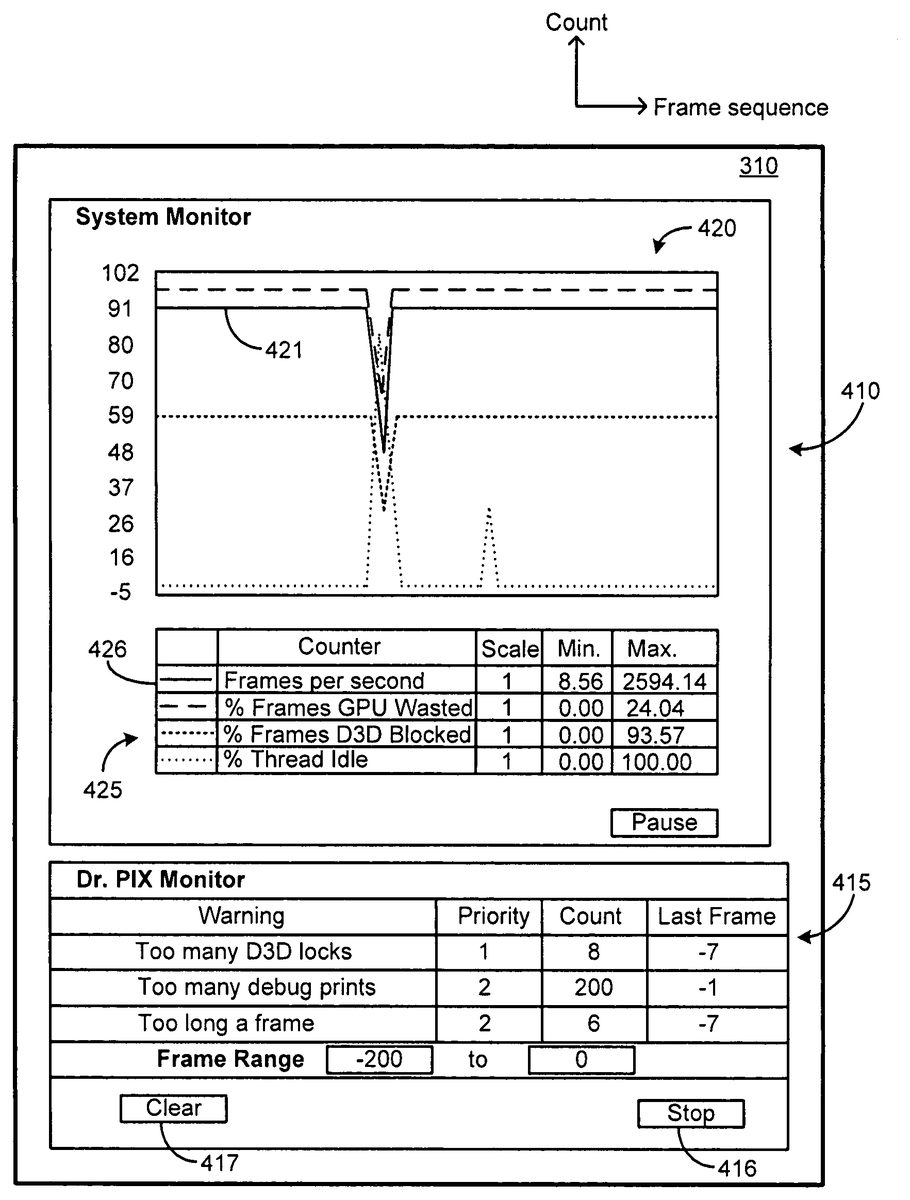
FIG. 3shows some exemplary components of performance monitor125. Performance data capture305is configured for obtaining lightweight data that is a part of the run-time game data stored in storage medium121. Display screen310is used to display the lightweight data in a suitable display format. A few examples of such display formats are described below using other figures.
FIG. 4shows a first exemplary view of a display on display screen310. The display may be configured in a variety of different formats. For example, in one implementation, display screen310uses a windows format in accordance with Microsoft Windows®. However, in other implementations, other types of displays and display formats may be used. The exemplary display screen310ofFIG. 4shows a system monitor display window410and a diagnostics display window415(labeled as Dr. PIX Monitor).
System monitor display window410, hereinafter referred to as system monitor410, provides a graphical display420of run-time parameters/measurements in terms of data statistics captured over a sequence of video gaming frames. In one example, the data statistics is a count value pertaining to the number of occurrences of a monitored gaming parameter such as, for example, D3D locks. A D3D lock is a lock used to guard data shared by CPU and GPU devices. Consequently, the number of D3D locks occurring on a real-time frame-by-frame basis can be seen in system monitor410. It will be understood that various run-time parameters/measurements can be selected for monitoring, together with selectable priority levels and other performance metrics. A few non-exhaustive examples of viewable run-time parameters/measurements include: redundant states, number of thread switches in a kernel, sleep time, ratio of bytes read to number of requests.
Below the graphics display420of monitor display window410, is a tabular display425that provides numerical information pertaining to the various graphs displayed in graphical display420. The first column of tabular display425identifies a particular graph. In the illustration ofFIG. 4, the graphs have been identified by various types of lines such as solid, dashed and dotted lines. However, this format has been utilized merely for ease of description. In a practical set-up, each of the graphs may be identified by a unique color and each of the colors is identified in the first column of tabular display425. For example, graph421(which is identified inFIG. 4using a solid line), may be identified by a red color and cell426of the first column of tabular display425would be shaded red correspondingly. Other identification means may be similarly used for identifying the individual graphs.
The second column of tabular display425provides list of performance metrics associated with various run-time parameters/measurements. In this exemplary embodiment, the entries in the second column correspond to various counters that are used to obtain count values of certain performance metrics that are used to analyze the performance of the video game. The counters may be provided to correspond to a set of pre-determined performance metrics that are selected by a manufacturer of performance analyzer system400. Alternatively, performance analyzer system400may be configured to permit a developer or other individual to define one or more counters for various performance metrics that are of particular interest to the developer.
The third column of tabular display425lists the scaling factors for each of the graphs of graphics display420, while the fourth and fifth columns provide minimum and maximum values of the corresponding monitored run-time parameters/measurements.
Diagnostics display window415(Dr. PIX Monitor) provides data statistics pertaining to the run-time parameters/measurements, and specifically provides data related to one or more monitored parameters that fall outside a pre-determined threshold. In the exemplary view shown inFIG. 4, a first column of diagnostics display window415lists warnings related to the monitored parameters. The first warning indicates “too many D3D locks,” while the second warning indicates “too many debug prints.” The second column of diagnostics display window415lists the priority level of each of the warnings of column 1. The priority levels may be pre-determined by a manufacturer of performance monitor125, or may be selectably set by a game developer or other user of performance monitor125. The third column of diagnostics display window415lists the count value for each of the warnings of column 1, while the fourth column provides frame information of where the warning occurred in the sequence of frames displayed in graphical display420.
Diagnostics display window415, as well as system monitor410may include soft-keys for carrying out various operations such as, for example, Pause, Stop, Print, Store, Ignore, Hide, Edit, and Clear. While the functionality of some of these soft-keys is self-evident, it may be pertinent to point out certain features in some others. The Save key (not shown) is used to save the warnings in a database or file; the Ignore key (not shown) is used to selectively ignore certain warnings; the Hide key (not shown) is used to hide diagnostics display window415; the Edit key (not shown) to edit the warning conditions so as to make them visible or invisible; and the Clear key (soft-key417) is used to clear the contents of diagnostics display window415. The Stop key (soft-key416) is used to freeze the display so that a developer can examine and analyze displayed parameters.
Furthermore, each of the cells in tabular display425and/or diagnostics display window415may be configured in various ways. For example, a cell may be configured as a soft-key, which when activated, leads to a further operation such as providing an additional display. A cell may be further configured to be editable, whereby for example, the text content may be modified or a numerical parameter set to a desired value.
FIG. 5shows a second exemplary view on display screen310, which is a part of performance monitor125. In this second exemplary view, the display shows a system monitor display window410as described above. However, in place of a diagnostics display window415, a video image510is displayed. Video image510corresponds to one or more images that were projected upon a display (not shown) of game platform115for viewing by a game player. In this example, system monitor display window410has been configured to display frame data that coincides with a certain period of time during which video image510was viewable by the game player. A developer can examine video image510in conjunction with frame-related information obtained from system monitor display window410to analyze video game performance. For example, video image510contains an image aberration that is visible as a black square area515. A developer can correlate this image aberration to a spike seen in graph421(for example), and use this correlation to identify and troubleshoot a certain portion of application code105.
FIG. 6is a diagram of an exemplary processor68for implementing a system, or portions thereof of a system for carrying out non-intrusive capture and storage of run-time game data, and/or for analyzing the performance of a video game. The processor68comprises a processing portion70, a memory portion72, and an input/output portion74. The processing portion70, memory portion72, and input/output portion74are coupled together (coupling not shown inFIG. 5) to allow communications therebetween. The input/output portion74is capable of providing and/or receiving components utilized to perform non-intrusive capture and storage of run-time game data, and/or for analyzing the performance of the video game as described above. For example, when exemplary processor68is used for performing the functionality of debugger software module120and/or performance monitor125, the input/output portion74is capable of interfacing with one or more of application code105, system library110and game platform115described above.
The processing portion70is capable of implementing various functions of the system such as those provided by debugger software module120, performance monitor125, application code105, system library110and game platform115.
The processor68can be implemented as a client processor and/or a server processor. In a basic configuration, the processor68can include at least one processing portion70and memory portion72. The memory portion72can store any information utilized in conjunction with non-intrusive capture and storage of run-time game data, and/or for analyzing the performance of the video game. Depending upon the exact configuration and type of processor, the memory portion72can be volatile (such as RAM)76, non-volatile (such as ROM, flash memory, etc.)78, or a combination thereof. The processor68can have additional features/functionality. For example, the processor68can include additional storage (removable storage80and/or non-removable storage82) including, but not limited to, magnetic or optical disks, tape, flash, smart cards or a combination thereof. Computer storage media, such as memory portion72,76,78,80, and82, include volatile and nonvolatile, removable and non-removable media implemented in any method or technology for storage of information such as computer readable instructions, data structures, program modules, or other data. Computer storage media include, but are not limited to, RAM, ROM, EEPROM, flash memory or other memory technology, CD-ROM, digital versatile disks (DVD) or other optical storage, magnetic cassettes, magnetic tape, magnetic disk storage or other magnetic storage devices, universal serial bus (USB) compatible memory, smart cards, or any other medium which can be used to store the desired information and which can be accessed by the processor68. Any such computer storage media can be part of the processor68.
The processor68can also contain communications connection(s)88that allow the processor68to communicate with other devices, such as other devices, for example. Communications connection(s)88is an example of communication media. Communication media typically embody computer readable instructions, data structures, program modules or other data in a modulated data signal such as a carrier wave or other transport mechanism and includes any information delivery media. The term “modulated data signal” means a signal that has one or more of its characteristics set or changed in such a manner as to encode information in the signal. By way of example, and not limitation, communication media includes wired media such as a wired network or direct-wired connection, and wireless media such as acoustic, RF, infrared and other wireless media. The term computer readable media as used herein includes both storage media and communication media. The processor68also can have input device(s)86such as keyboard, mouse, pen, voice input device, touch input device, etc. Output device(s)84such as a display, speakers, printer, etc. also can be included.
FIG. 7and the following discussion provide a brief general description of a suitable computing environment in which non-intrusive capture and storage of run-time game data and/or analysis of the performance of a video game can be implemented. Although not required, various aspects of non-intrusive capture and storage of run-time game data and/or analysis of the performance of a video game can be described in the general context of computer executable instructions, such as program modules, being executed by a computer, such as a client workstation or a server. Generally, program modules include routines, programs, objects, components, data structures and the like that perform particular tasks or implement particular abstract data types. Moreover, implementation of non-intrusive capture and storage of run-time game data and/or analysis of the performance of a video game can be practiced with other computer system configurations, including hand held devices, multi processor systems, microprocessor based or programmable consumer electronics, network PCs, minicomputers, mainframe computers, and the like. Further, non-intrusive capture and storage of run-time game data and/or analysis of the performance of a video game also can be practiced in distributed computing environments where tasks are performed by remote processing devices that are linked through a communications network. In a distributed computing environment, program modules can be located in both local and remote memory storage devices.
A computer system can be roughly divided into three component groups: the hardware component, the hardware/software interface system component, and the applications programs component (also referred to as the “user component” or “software component”). In various embodiments of a computer system the hardware component may comprise the central processing unit (CPU)721, the memory (both ROM764and RAM725), the basic input/output system (BIOS)766, and various input/output (I/O) devices such as a keyboard740, a mouse762, a monitor747, and/or a printer (not shown), among other things. The hardware component comprises the basic physical infrastructure for the computer system.
The applications programs component comprises various software programs including but not limited to compilers, database systems, word processors, business programs, videogames, and so forth. Application programs provide the means by which computer resources are utilized to solve problems, provide solutions, and process data for various users (machines, other computer systems, and/or end-users). In an example embodiment, application programs perform the functions associated with debugger software module120, performance monitor125, application code105, system library110and/or game platform115.
The hardware/software interface system component comprises (and, in some embodiments, may solely consist of) an operating system that itself comprises, in most cases, a shell and a kernel. An “operating system” (OS) is a special program that acts as an intermediary between application programs and computer hardware. The hardware/software interface system component may also comprise a virtual machine manager (VMM), a Common Language Runtime (CLR) or its functional equivalent, a Java Virtual Machine (JVM) or its functional equivalent, or other such software components in the place of or in addition to the operating system in a computer system. A purpose of a hardware/software interface system is to provide an environment in which a user can execute application programs.
The hardware/software interface system is generally loaded into a computer system at startup and thereafter manages all of the application programs in the computer system. The application programs interact with the hardware/software interface system by requesting services via an application program interface (API). Some application programs enable end-users to interact with the hardware/software interface system via a user interface such as a command language or a graphical user interface (GUI).
A hardware/software interface system traditionally performs a variety of services for applications. In a multitasking hardware/software interface system where multiple programs may be running at the same time, the hardware/software interface system determines which applications should run in what order and how much time should be allowed for each application before switching to another application for a turn. The hardware/software interface system also manages the sharing of internal memory among multiple applications, and handles input and output to and from attached hardware devices such as hard disks, printers, and dial-up ports. The hardware/software interface system also sends messages to each application (and, in certain case, to the end-user) regarding the status of operations and any errors that may have occurred. The hardware/software interface system can also offload the management of batch jobs (e.g., printing) so that the initiating application is freed from this work and can resume other processing and/or operations. On computers that can provide parallel processing, a hardware/software interface system also manages dividing a program so that it runs on more than one processor at a time.
A hardware/software interface system shell (referred to as a “shell”) is an interactive end-user interface to a hardware/software interface system. (A shell may also be referred to as a “command interpreter” or, in an operating system, as an “operating system shell”). A shell is the outer layer of a hardware/software interface system that is directly accessible by application programs and/or end-users. In contrast to a shell, a kernel is a hardware/software interface system's innermost layer that interacts directly with the hardware components.
As shown inFIG. 7, an exemplary general purpose computing system includes a conventional computing device760or the like, including a processing unit721, a system memory762, and a system bus723that couples various system components including the system memory to the processing unit721. The system bus723may be any of several types of bus structures including a memory bus or memory controller, a peripheral bus, and a local bus using any of a variety of bus architectures. The system memory includes read only memory (ROM)764and random access memory (RAM)725. A basic input/output system766(BIOS), containing basic routines that help to transfer information between elements within the computing device760, such as during start up, is stored in ROM764. The computing device760may further include a hard disk drive727for reading from and writing to a hard disk (hard disk not shown), a magnetic disk drive728(e.g., floppy drive) for reading from or writing to a removable magnetic disk729(e.g., floppy disk, removal storage), and an optical disk drive730for reading from or writing to a removable optical disk731such as a CD ROM or other optical media. The hard disk drive727, magnetic disk drive728, and optical disk drive730are connected to the system bus723by a hard disk drive interface732, a magnetic disk drive interface733, and an optical drive interface734, respectively. The drives and their associated computer readable media provide non volatile storage of computer readable instructions, data structures, program modules and other data for the computing device760. Although the exemplary environment described herein employs a hard disk, a removable magnetic disk729, and a removable optical disk731, it should be appreciated by those skilled in the art that other types of computer readable media which can store data that is accessible by a computer, such as magnetic cassettes, flash memory cards, digital video disks, Bernoulli cartridges, random access memories (RAMs), read only memories (ROMs), and the like may also be used in the exemplary operating environment. Likewise, the exemplary environment may also include many types of monitoring devices such as heat sensors and security or fire alarm systems, and other sources of information.
A number of program modules can be stored on the hard disk, magnetic disk729, optical disk731, ROM764, or RAM725, including an operating system735, one or more application programs736, other program modules737, and program data738. A user may enter commands and information into the computing device760through input devices such as a keyboard740and pointing device762(e.g., mouse). Other input devices (not shown) may include a microphone, joystick, game pad, satellite disk, scanner, or the like. These and other input devices are often connected to the processing unit721through a serial port interface746that is coupled to the system bus, but may be connected by other interfaces, such as a parallel port, game port, or universal serial bus (USB). A monitor747or other type of display device is also connected to the system bus723via an interface, such as a video adapter748. In addition to the monitor747, computing devices typically include other peripheral output devices (not shown), such as speakers and printers. The exemplary environment ofFIG. 6also includes a host adapter755, Small Computer System Interface (SCSI) bus756, and an external storage device762connected to the SCSI bus756.
The computing device760may operate in a networked environment using logical connections to one or more remote computers, such as a remote computer749. The remote computer749may be another computing device (e.g., personal computer), a server, a router, a network PC, a peer device, or other common network node, and typically includes many or all of the elements described above relative to the computing device760, although only a memory storage device750(floppy drive) has been illustrated inFIG. 6. The logical connections depicted inFIG. 6include a local area network (LAN)751and a wide area network (WAN)752. Such networking environments are commonplace in offices, enterprise wide computer networks, intranets and the Internet.
When used in a LAN networking environment, the computing device760is connected to the LAN751through a network interface or adapter753. When used in a WAN networking environment, the computing device760can include a modem754or other means for establishing communications over the wide area network752, such as the Internet. The modem754, which may be internal or external, is connected to the system bus723via the serial port interface746. In a networked environment, program modules depicted relative to the computing device760, or portions thereof, may be stored in the remote memory storage device. It will be appreciated that the network connections shown are exemplary and other means of establishing a communications link between the computers may be used.
While it is envisioned that numerous embodiments of non-intrusive capture and storage of run-time game data and/or analysis of the performance of a video game are particularly well-suited for computerized systems, nothing in this document is intended to limit the invention to such embodiments. On the contrary, as used herein the term “computer system” is intended to encompass any and all devices capable of storing and processing information and/or capable of using the stored information to control the behavior or execution of the device itself, regardless of whether such devices are electronic, mechanical, logical, or virtual in nature.
The various techniques described herein can be implemented in connection with hardware or software or, where appropriate, with a combination of both. Thus, the methods and apparatuses for non-intrusive capture and storage of run-time game data and/or analysis of the performance of a video game, or certain aspects or portions thereof, can take the form of program code (i.e., instructions) embodied in tangible media, such as floppy diskettes, CD-ROMs, hard drives, or any other machine-readable storage medium, wherein, when the program code is loaded into and executed by a machine, such as a computer, the machine becomes an apparatus for implementing non-intrusive capture and storage of run-time game data and/or analysis of the performance of a video game.
The program(s) can be implemented in assembly or machine language, if desired. In any case, the language can be a compiled or interpreted language, and combined with hardware implementations. The methods and apparatuses for implementing non-intrusive capture and storage of run-time game data and/or analysis of the performance of a video game also can be practiced via communications embodied in the form of program code that is transmitted over some transmission medium, such as over electrical wiring or cabling, through fiber optics, or via any other form of transmission, wherein, when the program code is received and loaded into and executed by a machine, such as an EPROM, a gate array, a programmable logic device (PLD), a client computer, or the like. When implemented on a general-purpose processor, the program code combines with the processor to provide a unique apparatus that operates to invoke the functionality of non-intrusive capture and storage of run-time game data and/or analysis of the performance of a video game. Additionally, any storage techniques used in connection with non-intrusive capture and storage of run-time game data and/or analysis of the performance of a video game can invariably be a combination of hardware and software.
While non-intrusive capture and storage of run-time game data for analyzing the performance of a video game has been described above using exemplary embodiments and figures, it is to be understood that other similar embodiments can be used or modifications and additions can be made to the described embodiments for performing the same functions without deviating therefrom. Therefore, non-intrusive capture and storage of run-time game data and/or analysis of the performance of a video game as described herein should not be limited to any single embodiment, but rather should be construed in breadth and scope in accordance with the appended claims.
Claims
- A method for analyzing performance of a video game, the method comprising: capturing, using a frame format, run-time game data responsive to hardware of a game platform being in a minimal impact state, wherein the run-time game data comprises run-time parameters associated with execution of application code of the video game and run-time parameters associated with the hardware of the game platform upon which the application code of the video game is being executed;storing the run-time parameters associated with the hardware of the game platform using a non-contiguous storage format in accordance with a capture sequence that is non-linear, wherein the hardware of the game platform is a graphics processor unit (GPU);responsive to a request to review performance of the hardware of the game platform, concatenating the stored run-time parameters associated with the hardware of the game platform in accordance with the capture sequence that was non-linear;and displaying performance data in a frame-by-frame format, based on the run-time game data captured using the frame format.
- The method of claim 1 , further comprising: capturing a video image when the application code of the video game is being executed;and storing the video image along with the run-time game data.
- The method of claim 2 , further comprising: identifying a performance glitch during execution of the application code of the video game;providing a performance monitor display;and displaying in the performance monitor display, at least one of the stored video image or a portion of the stored run-time game data corresponding to a time of occurrence of the performance glitch.
- The method of claim 3 , wherein identifying the performance glitch comprises identifying an abnormal execution time for a portion of the application code of the video game.
- The method of claim 3 , wherein identifying the performance glitch comprises visually observing a display screen of the video game during execution of the application code of the video game.
- The method of claim 1 , wherein the minimal impact state is at least one of: the hardware of the game platform executing a low priority task;or the hardware of the game platform being in an idle state.
- The method of claim 1 , wherein the hardware of the game platform comprises at least one of a central processing unit (CPU) or a data buffer.
- The method of claim 1 , wherein the hardware of the game platform comprises a central processing unit (CPU) coupled to the graphics processor unit (GPU), and wherein the coupling is configured to permit asynchronous, parallel operation of the CPU and the GPU.
- The method of claim 8 , further comprising: identifying a performance glitch during execution of the application code of the video game;providing a performance monitor display;retrieving from storage, run-time game data of the CPU relative to the GPU;and displaying in the performance monitor display, at least one of the run-time parameters and run-time measurements of the CPU relative to the GPU.
- The method of claim 9 , further comprising: retrieving from storage, at least one run-time parameter associated with execution of the application code of the video game;and displaying in the performance monitor display, the at least one run-time parameter associated with execution of the application code of the video game along with at least one run-time parameter of the CPU relative to the GPU.
- A system for analyzing performance of a video game, the system comprising: a game platform configured to run the video game;a debugger software module coupled to the game platform, wherein the debugger software module is configured to: capture, using a frame format, run-time game data responsive to hardware of the game platform being in a minimal impact state, wherein the run-time game data comprises run-time parameters associated with execution of application code of the video game and run-time parameters associated with the hardware of the game platform upon which the application code of the video game is being executed, store the run-time parameters associated with the hardware of the game platform using a non-contiguous storage format in accordance with a capture sequence that is non-linear, wherein the hardware of the game platform is a graphics processor unit (GPU), and responsive to a request to review performance of the hardware of the game platform, concatenate the stored run-time parameters associated with the hardware of the game platform in accordance with the capture sequence that was non-linear;and a performance monitor configured to display performance data in a frame-by-frame format, based on the run-time game data captured using the frame format.
- The system of claim 11 , further comprising: a storage buffer configured to perform circular logging of the run-time game data.
- The system of claim 11 , further comprising: a short-term storage buffer coupled to a long-term storage buffer, wherein the short-term storage buffer is configured to store the run-time game data for a first amount of time, and wherein the long-term storage buffer is configured to store the run-time game data for a second amount of time.
- The system of claim 11 , wherein the performance monitor is further configured to display at least a portion of stored run-time game data over a user-selected period of time.
- The system of claim 11 , wherein the hardware of the game platform comprises a central processing unit (CPU) coupled to the graphics processor unit (GPU), wherein the coupling is configured to permit asynchronous, parallel operation of the CPU and the GPU, and wherein the performance monitor is further configured to display run-time parameters of the CPU relative to the GPU.
- A computer-readable storage medium that is not a transitory signal, the computer-readable storage medium having stored thereon computer-readable instructions for performing the steps of: capturing, using a frame format, run-time game data responsive to hardware of a game platform being in a minimal impact state, wherein the run-time game data comprises run-time parameters associated with execution of application code of a video game and run-time parameters associated with the hardware of the game platform upon which the application code of the video game is being executed;storing the run-time parameters associated with the hardware of the game platform using a non-contiguous storage format in accordance with a capture sequence that is non-linear, wherein the hardware of the game platform is a graphics processor unit (GPU);responsive to a request to review performance of the hardware of the game platform, concatenating the stored run-time parameters associated with the hardware of the game platform in accordance with the capture sequence that was non-linear;and displaying performance data in a frame-by-frame format, based on the run-time game data captured using the frame format.
- The computer-readable storage medium of claim 16 , having further stored thereon computer-readable instructions for performing the step of: storing the run-time game data using a storage buffer configured to perform circular logging of the run-time game data.
- The computer-readable storage medium of claim 16 , having further stored thereon computer-readable instructions for performing the steps of: capturing a video image when the application code of the video game is being executed;and storing the video image along with the run-time game data.
- The computer-readable storage medium of claim 18 , having further stored thereon computer-readable instructions for performing the steps of: providing a performance monitor display;and displaying in the performance monitor display, at least one of the stored video image or a portion of the stored run-time game data corresponding to a time of occurrence of a performance glitch.
- The computer-readable storage medium of claim 18 , having further stored thereon computer-readable instructions for performing the step of: capturing run-time parameters of a central processing unit (CPU) coupled to the graphics processor unit (GPU), wherein the CPU and the GPU are components of the game platform.
Disclaimer: Data collected from the USPTO and may be malformed, incomplete, and/or otherwise inaccurate.