U.S. Pat. No. 8,622,831
Responsive Cutscenes in Video Games
AssigneeMicrosoft Corporation
Issue DateJune 21, 2007
Illustrative Figure
Abstract
A determination is made that a player's avatar has performed an action while an audio signal representing a narrative of a non-player character is being produced. The action is mapped to an impression, which is mapped to a response. The audio signal is stopped before it is completed and the response is played by providing audio for the non-player character and/or animating the non-player character. After the response is played, steps ensure that critical information in the narrative has been provided to the player.
Description
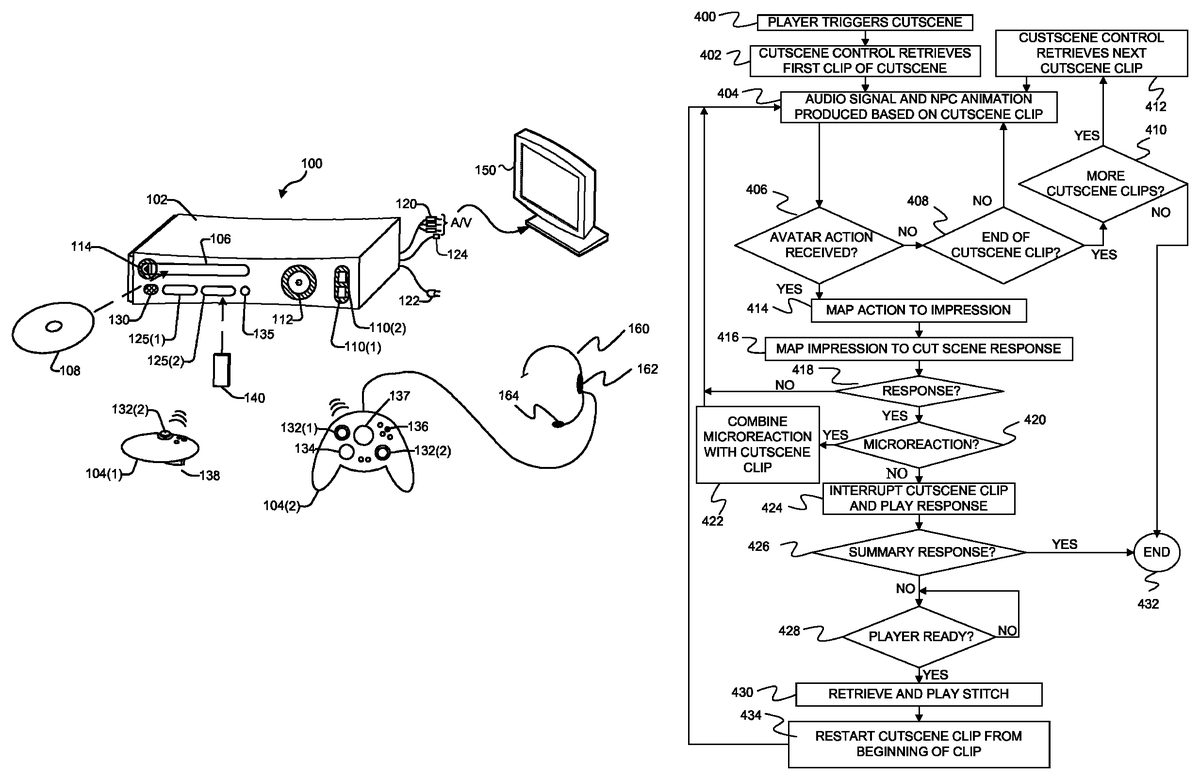
DETAILED DESCRIPTION FIG. 1shows an exemplary gaming and media system100. The following discussion of this Figure is intended to provide a brief, general description of a suitable environment in which certain methods may be implemented. As shown inFIG. 1, gaming and media system100includes a game and media console (hereinafter “console”)102. Console102is configured to accommodate one or more wireless controllers, as represented by controllers104(1) and104(2). A command button135on console102is used create a new wireless connection between on of the controllers and the console102. Console102is equipped with an internal hard disk drive (not shown) and a media drive106that supports various forms of portable storage media, as represented by optical storage disc108. Examples of suitable portable storage media include DVD, CD-ROM, game discs, and so forth. Console102also includes two memory unit card receptacles125(1) and125(2), for receiving removable flash-type memory units140. Console102also includes an optical port130for communicating wirelessly with one or more devices and two USB (Universal Serial Bus) ports110(1) and110(2) to support a wired connection for additional controllers, or other peripherals. In some implementations, the number and arrangement of additional ports may be modified. A power button112and an eject button114are also positioned on the front face of game console102. Power button112is selected to apply power to the game console, and can also provide access to other features and controls, and eject button114alternately opens and closes the tray of a portable media drive106to enable insertion and extraction of a storage disc108. Console102connects to a television or other display (not shown) via A/V interfacing cables120. In one implementation, console102is equipped with a dedicated A/V port (not shown) configured for content-secured digital communication using A/V cables120(e.g., A/V cables suitable for coupling to a High Definition Multimedia Interface “HDMI” port on a high definition monitor150or other display device). A power cable122provides power to the game console. Console102may ...
DETAILED DESCRIPTION
FIG. 1shows an exemplary gaming and media system100. The following discussion of this Figure is intended to provide a brief, general description of a suitable environment in which certain methods may be implemented.
As shown inFIG. 1, gaming and media system100includes a game and media console (hereinafter “console”)102. Console102is configured to accommodate one or more wireless controllers, as represented by controllers104(1) and104(2). A command button135on console102is used create a new wireless connection between on of the controllers and the console102. Console102is equipped with an internal hard disk drive (not shown) and a media drive106that supports various forms of portable storage media, as represented by optical storage disc108. Examples of suitable portable storage media include DVD, CD-ROM, game discs, and so forth. Console102also includes two memory unit card receptacles125(1) and125(2), for receiving removable flash-type memory units140.
Console102also includes an optical port130for communicating wirelessly with one or more devices and two USB (Universal Serial Bus) ports110(1) and110(2) to support a wired connection for additional controllers, or other peripherals. In some implementations, the number and arrangement of additional ports may be modified. A power button112and an eject button114are also positioned on the front face of game console102. Power button112is selected to apply power to the game console, and can also provide access to other features and controls, and eject button114alternately opens and closes the tray of a portable media drive106to enable insertion and extraction of a storage disc108.
Console102connects to a television or other display (not shown) via A/V interfacing cables120. In one implementation, console102is equipped with a dedicated A/V port (not shown) configured for content-secured digital communication using A/V cables120(e.g., A/V cables suitable for coupling to a High Definition Multimedia Interface “HDMI” port on a high definition monitor150or other display device). A power cable122provides power to the game console. Console102may be further configured with broadband capabilities, as represented by a cable or modem connector124to facilitate access to a network, such as the Internet.
Each controller104is coupled to console102via a wired or wireless interface. In the illustrated implementation, the controllers are USB-compatible and are coupled to console102via a wireless or USB port110. Console102may be equipped with any of a wide variety of user interaction mechanisms. In an example illustrated inFIG. 1, each controller104is equipped with two thumbsticks132(1) and132(2), a D-pad134, buttons136, User Guide button137and two triggers138. By pressing and holding User Guide button137, a user is able to power-up or power-down console102. By pressing and releasing User Guide button137, a user is able to cause a User Guide Heads Up Display (HUD) user interface to appear over the current graphics displayed on monitor150. The controllers described above are merely representative, and other known gaming controllers may be substituted for, or added to, those shown inFIG. 1.
Controllers104each provide a socket for a plug of a headset160. Audio data is sent through the controller to a speaker162in headset160to allow sound to be played for a specific player wearing headset160. Headset162also includes a microphone164that detects speech from the player and conveys an electrical signal to the controller representative of the speech. Controller104then transmits a digital signal representative of the speech to console102. Audio signals may also be provided to a speaker in monitor150or to separate speakers connected to console102.
In one implementation (not shown), a memory unit (MU)140may also be inserted into one of controllers104(1) and104(2) to provide additional and portable storage. Portable MUs enable users to store game parameters and entire games for use when playing on other consoles. In this implementation, each console is configured to accommodate two MUs140, although more or less than two MUs may also be employed.
Gaming and media system100is generally configured for playing games stored on a memory medium, as well as for downloading and playing games, and reproducing pre-recorded music and videos, from both electronic and hard media sources. With the different storage offerings, titles can be played from the hard disk drive, from optical disk media (e.g.,108), from an online source, from a peripheral storage device connected to USB connections110or from MU140.
FIG. 2is a functional block diagram of gaming and media system100and shows functional components of gaming and media system100in more detail. Console102has a central processing unit (CPU)200, and a memory controller202that facilitates processor access to various types of memory, including a flash Read Only Memory (ROM)204, a Random Access Memory (RAM)206, a hard disk drive208, and media drive106. In one implementation, CPU200includes a level 1 cache210, and a level 2 cache212to temporarily store data and hence reduce the number of memory access cycles made to the hard drive, thereby improving processing speed and throughput.
CPU200, memory controller202, and various memory devices are interconnected via one or more buses (not shown). The details of the bus that is used in this implementation are not particularly relevant to understanding the subject matter of interest being discussed herein. However, it will be understood that such a bus might include one or more of serial and parallel buses, a memory bus, a peripheral bus, and a processor or local bus, using any of a variety of bus architectures. By way of example, such architectures can include an Industry Standard Architecture (ISA) bus, a Micro Channel Architecture (MCA) bus, an Enhanced ISA (EISA) bus, a Video Electronics Standards Association (VESA) local bus, and a Peripheral Component Interconnects (PCI) bus also known as a Mezzanine bus.
In one implementation, CPU200, memory controller202, ROM204, and RAM206are integrated onto a common module214. In this implementation, ROM204is configured as a flash ROM that is connected to memory controller202via a Peripheral Component Interconnect (PCI) bus and a ROM bus (neither of which are shown). RAM206is configured as multiple Double Data Rate Synchronous Dynamic RAM (DDR SDRAM) modules that are independently controlled by memory controller202via separate buses (not shown). Hard disk drive208and media drive106are shown connected to the memory controller via the PCI bus and an AT Attachment (ATA) bus216. However, in other implementations, dedicated data bus structures of different types can also be applied in the alternative.
In some embodiments, ROM204contains an operating system kernel that controls the basic operations of the console and that exposes a collection of Application Programming Interfaces that can be called by games and other applications to perform certain functions and to obtain certain data.
A three-dimensional graphics processing unit220and a video encoder222form a video processing pipeline for high speed and high resolution (e.g., High Definition) graphics processing. Data are carried from graphics processing unit220to video encoder222via a digital video bus (not shown). An audio processing unit224and an audio codec (coder/decoder)226form a corresponding audio processing pipeline for multi-channel audio processing of various digital audio formats. Audio data are carried between audio processing unit224and audio codec226via a communication link (not shown). The video and audio processing pipelines output data to an A/V (audio/video) port228for transmission to a television or other display containing one or more speakers. Some audio data formed by audio processing unit224and audio codec226is also directed to one or more headsets through controllers104. In the illustrated implementation, video and audio processing components220-228are mounted on module214.
FIG. 2shows module214including a USB host controller230and a network interface232. USB host controller230is shown in communication with CPU200and memory controller202via a bus (e.g., PCI bus) and serves as host for peripheral controllers104(1)-104(4). Network interface232provides access to a network (e.g., Internet, home network, etc.) and may be any of a wide variety of various wire or wireless interface components including an Ethernet card, a modem, a Bluetooth module, a cable modem, and the like.
In the implementation depicted inFIG. 2, console102includes a controller support subassembly240, for supporting up to four controllers104(1)-104(4). The controller support subassembly240includes any hardware and software components needed to support wired and wireless operation with an external control device, such as for example, a media and game controller. A front panel I/O subassembly242supports the multiple functionalities of power button112, the eject button114, as well as any LEDs (light emitting diodes) or other indicators exposed on the outer surface of console102. Subassemblies240and242are in communication with module214via one or more cable assemblies244. In other implementations, console102can include additional controller subassemblies. The illustrated implementation also shows an optical I/O interface235that is configured to send and receive signals that can be communicated to module214.
MUs140(1) and140(2) are illustrated as being connectable to MU ports “A”130(1) and “B”130(2) respectively. Additional MUs (e.g., MUs140(3)-140(4)) are illustrated as being connectable to controller104(1), i.e., two MUs for each controller. Each MU140offers additional storage on which games, game parameters, and other data may be stored. In some implementations, the other data can include any of a digital game component, an executable gaming application, an instruction set for expanding a gaming application, and a media file. When inserted into console102or a controller, MU140can be accessed by memory controller202.
Headset160is shown connected to controller104(3). Each controller104may be connected to a separate headset160.
A system power supply module250provides power to the components of gaming system100. A fan252cools the circuitry within console102.
Under some embodiments, an application260comprising machine instructions is stored on hard disk drive208. Application260provides a collection of user interfaces that are associated with console102instead of with an individual game. The user interfaces allow the user to select system settings for console102, access media attached to console102, view information about games, and utilize services provided by a server that is connected to console102through a network connection. When console102is powered on, various portions of application260are loaded into RAM206, and/or caches210and212, for execution on CPU200. Although application260is shown as being stored on hard disk drive208, in alternative embodiments, application260is stored in ROM204with the operating system kernel.
Gaming system100may be operated as a standalone system by simply connecting the system to monitor, a television150(FIG. 1), a video projector, or other display device. In this standalone mode, gaming system100enables one or more players to play games, or enjoy digital media, e.g., by watching movies, or listening to music. However, with the integration of broadband connectivity made available through network interface232, gaming system100may further be operated as a participant in a larger network gaming community allowing, among other things, multi-player gaming.
The console described inFIGS. 1 and 2is just one example of a gaming machine that can be used with various embodiments described herein. Other gaming machines such as personal computers may be used instead of the gaming console ofFIGS. 1 and 2.
FIG. 3provides a block diagram of elements used in a method shown inFIG. 4for producing responsive cutscenes that respond to actions by a player's avatar while still conveying critical information of a narrative.
At step400ofFIG. 4, a player triggers the cutscene. As shown in the top perspective view of a gaming environment inFIG. 5, a player can trigger a cutscene under some embodiments by placing their avatar within a circumference502of a non-player character504. In other embodiments, the player can trigger the cutscene by placing the player's avatar600within a same room602as a non-player character604as shown in the top perspective view of a gaming environment inFIG. 6. Other techniques for triggering a cutscene include a player completing one or more tasks or selecting to initiate a cutscene using one or more control buttons.
After the player triggers the cutscene, cutscene control300ofFIG. 3is started and retrieves a first clip of the cutscene at step402ofFIG. 4.
Under one embodiment, each cutscene is divided into a plurality of clips. Each clip includes an audio signal representing speech from a non-player character as well as animation descriptors that describe how the non-player character should be animated during the playing of the clip. Under one embodiment, each clip is a WAV file with a header that describes the animation for the non-player character.
InFIG. 3, a plurality of cutscenes is shown including cutscene302and cutscene304. Each of the cutscenes includes a plurality of clips. For example, cutscene302includes clips306,308and310and cutscene304includes clips312,314and316. In addition, each cutscene includes a summary clip such as summary clip318of cutscene302and summary clip320of cutscene304. These summary clips are described further below.
As noted below, dividing each cutscene into clips allows the cutscene to be broken into natural breakpoints where the cutscene can be restarted if a cutscene clip is interrupted by an action by the player's avatar. By restarting the cutscene at the beginning of the clip that was interrupted, a more natural restart of the cutscene is provided and helps to make the non-player character appear more realistic.
At step404ofFIG. 4, an audio signal and non-player character animation are produced based on the selected cutscene clip. Under one embodiment, to produce the animation, cut scene control300provides the animation information for the non-player character to a vertex data generation unit323. Vertex data generation unit323uses the animation information and a graphical model322of the non-player character to generate a set of vertices that describe polygons. The vertices are provided to 3D graphics processing unit220, which uses the vertices to render polygons representing the non-player character in the graphical three-dimensional gaming environment. The rendered polygons are transmitted through video encoder222and A/V port228ofFIG. 2, to be displayed on an attached display screen. The audio signal for the non-player character is provided to audio processing unit224, which then generates an audio signal through audio code226and A/V port228ofFIG. 2.
FIG. 7provides a screen shot showing a non-player character700that is providing a cut scene narrative during step404.
At step406, cutscene control300examines player state data324to determine if the player's avatar has performed an action. Examples of actions include attacking the non-player character, moving a threshold distance away from the non-player character, or performing other actions supported by the game. Under one embodiment, these other actions include things such as belching, performing a silly dance, flexing an arm, performing a rude hand gesture, and faking an attack on the non-player character. Such actions are referred to herein as expressions.
Under one embodiment, a player may select an action from a list of actions listed in a menu.FIG. 8provides an example of a screen shot showing a possible menu800of actions that the player's avatar may perform. The player causes the menu to be displayed by either selecting an icon on the display or using one or more controls on the controller. Once the menu has been displayed, the player may select one of the actions from the menu using the controller. In other embodiments, actions may be mapped to one or more controls on the controller so that the player does not have to access the menu.
Under some embodiments, the action may include the player's avatar moving more than a threshold distance away from the non-player character. For example, inFIG. 5, the player's avatar may move outside of circumference506and inFIG. 6, the player's avatar may move outside of room602. In both situations, such movement will be interpreted as an action by cut scene control300.
If cut scene control determines that the player's avatar has not performed an action at step406, it determines if the end of the current cutscene clip has been reached at step408. If the end of the current cutscene clip has not been reached, cutscene control300continues producing the audio signal and non-player character animation by returning to step404. Steps404,406and408continue in a loop until an avatar action is received at step406or the end of a cutscene clip is received at step408. If the end of the cut scene clip is reached at step408, the process continues at step410where cutscene control300determines if there is another clip for the cutscene. If there is another clip for the cutscene, the next clip is retrieved at step412, and the audio signal and non-player character animation found in the clip is used to animate the non-player character and produce an audio signal for the non-player character.
If cut scene control300determines that the player's avatar has performed an action at step406, it maps the action to an impression at step414using an action-to-impression mapping326in an action-to-response database328. An impression is the way that a non-player character will interpret the action. For example, a non-player character may interpret an action as being scary, insulting, impolite, funny, friendly, aggressive, inattentive, or impatient, each of which would be a possible impression. At step416, cutscene control300maps the impression to a response using impression-to-response mapping330of action-to-response database328. By performing two mapping functions, one from an action to an impression, and another from an impression to a response, embodiments described herein allow cutscene responses to be designed without needing to know all possible actions that may be performed. Instead, a limited number of impressions can be specified and cutscene responses can be produced for those impressions. This also allows actions to be added later without affecting the currently produced responses. Multiple actions may be mapped to a single impression in action-to-impression mapping326and multiple impressions may be mapped to a single response in impression-to-response mapping330.
At step418, cutscene control300determines if a response has been identified through the impression-to-response mapping in step416. Under some embodiments, an impression may map to no response so that the non-player character will ignore the action taken by the player's avatar. If no response is to be provided at step418, the process returns to step404where the audio signal and non-player character animation continues for the cutscene clip. Note that although steps406,414,416and418appear to occur after step404in the flow diagram ofFIG. 4, during steps406,414,416and418, the audio signal and animation of the current cutscene clip continues to be output by cutscene control300. Thus, there is no interruption in the cutscene while these steps are being performed.
If the mapping of step416identifies a response, the response is retrieved from a set of stored responses332, which include cut scene responses334,336, and338, for example. The cut scene responses include animation information for movement of the non-player character and/or an audio signal containing dialog that represent the non-player characters response to the action of the player's avatar. In some embodiments, the cut scene responses also include “scripting hooks” that indicate directorial types of information such as directions to the non-player character to move to a particular location, movement of the camera, lighting effects, background music and sounds, and the like.
At step420, the response is examined to determine if the response is a microreaction. Such information can be stored in a header of the response or can be stored in action-to-response database328. A microreaction is a small animation or small change in tone of the audio signal that does not interrupt the audio signal and non-player character animation of the cutscene clip, but instead slightly modifies it as it continues. If the response is a microreaction at step420, the microreaction is combined or integrated with the cut scene clip at step422. This can involve changing the tone of the audio signal of the cut scene by either raising or lowering the pitch or by adding additional animation features to the cutscene animation. If an animation is added, the audio signal of the cut scene continues without interruption as the microreaction animation is integrated with the cut scene animation.
For example, inFIG. 9, the cutscene clip includes an animation in which the non-player character points to his left using his left arm900. Normally, during this animation, the non-player character's eyebrows would remain unchanged. However, based on a microreaction response to an avatar action, the right eyebrow of the non-player character is raised relative to the left eyebrow to convey that the non-player character has detected the action taken by the avatar and that the impression left with the non-player character is that the avatar is doing something slightly insulting.
If the response found during mapping step416is more than a microreaction at step420, cutscene control300interrupts the cut scene clip and plays the cut scene response. Under one embodiment, the cut scene response is played by providing the animation information to vertex data generation unit323, which uses the animation information and NPC graphics model322to generate sets of vertices representing the movement of the non-player character. Each set of vertices is provided to 3D graphics processing unit220, which uses the vertices to render an animated image of the non-player character. The audio data associated with the response is provided to audio processing unit224.
FIG. 10provides an example of a cutscene response in which the non-player character is animated to indicate that the impression of the avatar's action was highly insulting to the non-player character and made the non-player character angry.FIG. 11shows a cutscene response in which the non-player character smiles to indicate that the impression of the avatar's action is that it was funny to the non-player character and inFIG. 12, the cutscene response indicates that the impression of the non-player character is that the avatar's action was scary. Not all responses require both audio and animation. In some embodiments, the non-player character will be silent during the cutscene response and simply be animated to reflect the impression of the avatar's action. In other embodiments, the visual appearance of the non-player character will not change during the response other than to synchronize the non-player character's mouth to the audio response.
Under some embodiments, a player is able to activate a summary clip of the cut scene by taking an action that conveys an impression of impatience. For example, the player may select an action in which their avatar requests “just the facts”, and this action will be mapped to an impatience impression. The impression-to-response mapping330will in turn map the impatience impression to a summary response. Under one embodiment, such summary clips are stored together with the other clips of the cut scene. In other embodiments, the summary clips may be stored with the cut scene responses332. The summary clip contains audio data and animation information that causes the non-player character to summarize the critical information that was to be conveyed by the cutscene. In general, cutscenes contain both critical information and stylistic information wherein the critical information is required for the player to advance through the game and the stylistic information is provided to convey an emotional or stylistic attribute to the game. Under one embodiment, the summary clip strips out most of the stylistic information to provide just the critical information.
Since playing the summary clip ensures that the player has been given all of the critical information of the cut scene narrative, once the summary clip has been played, there is no need to continue with the cut scene.
As such, at step426, cut scene control300determines if the response is a summary response and ends the cutscene procedure at step432if the response was a summary response.
If the response was not a summary response, cut scene control300examines player state324to determine if the player is ready to continue with the cut scene clip at step428. For example, if the player's avatar has not returned to the non-player character after moving away from the non-player character, cut scene control300will determine that the player is not ready to continue with the cut scene clip. Under one embodiment, cut scene control300will set a timer if the player is not ready to continue with the cut scene. Cut scene control will then loop at step428until the player is ready to continue with the cut scene or until the timer expires. If the timer expires, cut scene control will unload the current cut scene such that the player will have to trigger the cut scene from the beginning again.
When the avatar is ready to continue with the cut scene clip, for example by coming back to the non-player character, cut scene control300retrieves and plays an audio stitch from a collection of audio stitches340at step430. Audio stitches340include a collection of audio stitch files such as audio stitch files342,344and346. Each audio stitch file includes audio and animation data for the non-player character that provides an audio and visual segue between the response and restarting the cut scene clip that was interrupted at step424. Examples of audio stitches include “as I was saying”, “if you are finished”, and “now then”. Such audio stitches provide a smooth transition between a response and the resumption of the cut scene clip.
At step434, the cut scene clip that was interrupted at step424is restarted from the beginning of the cut scene clip. By restarting the cut scene clip, cut scene control300ensures that the critical information of the cut scene narrative is provided to the player. In most cases, restarting the cut scene clip will involve reproducing the audio signal and animations that were played when the cut scene clip was initially started. The process then returns to step404to continue playing of the cutscene clip and to await further avatar actions.
In other embodiments, instead of playing an audio stitch file and restarting the cut scene clip that was interrupted, cut scene control300will select an alternate cut scene clip to play instead of the interrupted cut scene clip. After playing the alternate cut scene clip, the process continues at step412by selecting a next cut scene clip of the cut scene to play. In such embodiments, the alternate cut scene clip and the next cut scene clip are selected to insure that the critical information of the cut scene is still provided to the player.
The process ofFIG. 4continues until a summary response is played, there are no more cutscene clips at step410, or a timeout occurs during step428.
In the discussion above, the detection of an avatar action was shown as only occurring at step406. However, in other embodiments, cutscene control300is event driven such that at any point in the flow diagram ofFIG. 4, cut scene control300may receive an indication from player state324that the avatar has taken an action. Based on that action, cutscene control300may map the action to an impression, map the impression to a cutscene response as shown at steps414and416and produce an animation and audio signal based on the new response. Thus, in the process of playing one response, cutscene control300may interrupt that response to play a different response based on a new avatar action.
Although the subject matter has been described in language specific to structural features and/or methodological acts, it is to be understood that the subject matter defined in the appended claims is not necessarily limited to the specific features or acts described above. Rather, the specific features and acts described above are disclosed as example forms of implementing the claims.
Claims
- A method comprising: retrieving a cutscene clip file comprising dialog for a non-player character in a game, the dialog forming at least part of a cutscene that provides a complete narrative comprising critical information and stylistic information to be conveyed to a player;producing an audio signal representing speech from the non-player character based on the dialog in the retrieved cutscene clip file;determining that the player's avatar has performed an action while the audio signal is being produced;mapping the action to an impression the non-player character has of the action, wherein the impression of the action is that the player's avatar is impatient;mapping the impression that the player's avatar is impatient to a summary response;stopping the audio signal for the retrieved cutscene clip file before all of the dialog in the retrieved file has been produced as an audio signal;playing the summary response to produce an audio signal representing speech from the non-player character that is a summarized version of the complete narrative and that comprises all critical information found in the complete narrative with less stylistic information than is found in the complete narrative, thereby ensuring that the critical information of the narrative is provided to the player;and after playing the summary response, ending the cutscene without completing the audio signal for the retrieved cutscene clip file.
- The method of claim 1 wherein multiple actions are mapped to a single impression.
- The method of claim 1 wherein the retrieved file comprises one of a plurality of files that together form the complete narrative.
- A computer-readable medium having computer-executable instructions for performing steps comprising: determining that a player of a game has triggered a cutscene containing critical information required for the player to advance through the game and stylistic information to convey a stylistic attribute to the game;accessing a cutscene clip file containing data representing an audio signal and animated movements for a non-player character in a game, the audio signal and the animated movements corresponding to the non-player character speaking to a player's avatar;playing part of the cutscene clip file;determining that the player's avatar in the game has performed an action;mapping the action to an impression;mapping the impression to a summary response;retrieving the summary response from a set of stored responses;stopping the cutscene clip file before all of the dialog in the cutscene clip file has been produced as an audio signal;playing the summary response to produce an audio signal representing speech from the non-player character, the summary response comprising all the critical information of the cutscene but less stylistic information than the cutscene, thereby ensuring that the critical information of the cutscene is provided to the player;and after playing the summary response, immediately ending the cutscene at the end of the summary response.
- The computer-readable medium of claim 4 wherein mapping an action to an impression comprises mapping the action to an impression that is not limited to being mapped to by only one action.
- The computer-readable medium of claim 4 wherein the impression is the way a non-player interprets the action.
- The computer-readable medium of claim 6 wherein the non-player character interprets the action as being impatient.
- The computer-readable medium of claim 4 wherein the steps further comprise examining a header of the response to determine if it is a microreaction, wherein a microreaction combines animated movement in the cutscene clip file with animated movement of a response to form modified animations for the non-player character.
- A method comprising: a player triggering a cutscene;a cutscene control retrieving one of a plurality of cutscene clips that together constitute the cutscene, each cutscene clip having a start and an end;producing an audio signal and an animation for a non-player character from the retrieved cutscene clip;determining that a player's avatar has performed an action;determining that the non-player character should respond to the action;stopping the cutscene clip before reaching the end of the cutscene clip;having the non-player character respond to the action by summarizing critical information that is in the plurality of cutscene clips while stripping out most stylistic information in the plurality of cutscene clips;upon completing the response, immediately ending the cutscene.
- The method of claim 9 wherein determining that a non-player character should respond to an action comprises mapping the action to an impression and mapping the impression to a response.
- The method of claim 9 wherein the action comprises the player's avatar asking for just the facts.
Disclaimer: Data collected from the USPTO and may be malformed, incomplete, and/or otherwise inaccurate.