U.S. Pat. No. 8,444,485
SEAMLESS USER NAVIGATION BETWEEN HIGH-DEFINITION MOVIE AND VIDEO GAME IN DIGITAL MEDIUM
AssigneeWarner Bros. Entertainment Inc.
Issue DateAugust 5, 2009
Illustrative Figure
Abstract
Seamless navigation is provided between high-definition audio-video content configured for use with a media player application, and an executable video game packaged with the audio-video content on a digital medium. An API module is distributed to player/consoles. An application provided with the high-definition audio-video content detects the presence of the API module on the player device. In response to detecting the API module, the application provides an interactive feature that uses the API module to load and execute the executable video game in response to user input.
Description
In the figures and in the detailed description, like element numerals are used to indicate like elements appearing in the figures. DETAILED DESCRIPTION FIG. 1shows a system100for providing frame-based audio-video content and an executable video game encoded together in a single medium103, configured so as to permit seamless transitions between viewing the audio-video content and executing the video game. The audio-video content may be played using a first application executing in a processor of a media player device102. The application processes the audio-video data to provide an audio-video signal for a display device104, and may perform other functions such as navigating to different locations or files, fast-forward, pause, reverse, and so forth, in response to signals from a user input device106. The user input device may be operated by a user108. In the alternative, or in addition, the audio-video content and video game application may be transmitted to a set-top box110, or to a client computer116, from a source112via any suitable communications network114. The set-top box110or client116may store the audio-video content and video game application together on any suitable storage medium. FIG. 2shows an example of a media player102and some illustrative components. The media player102may comprise, for example, a central processing unit (CPU)204in communication with a graphics processing unit (GPU)206. CPU204may be connected to memory205and GPU206to video memory207. The GPU206may be configured to process a data signal from CPU204to provide a graphics output as used in video game applications. Graphics output may be further processed by a video processor (not shown) to provide a video signal to a display device208. The CPU204may communicate with various peripheral devices via a data bus210, for example, with a digital medium reader212configured to read an article214encoded with data as described herein, with an internal data storage device216, and with a wireless interface device218. The ...
In the figures and in the detailed description, like element numerals are used to indicate like elements appearing in the figures.
DETAILED DESCRIPTION
FIG. 1shows a system100for providing frame-based audio-video content and an executable video game encoded together in a single medium103, configured so as to permit seamless transitions between viewing the audio-video content and executing the video game. The audio-video content may be played using a first application executing in a processor of a media player device102. The application processes the audio-video data to provide an audio-video signal for a display device104, and may perform other functions such as navigating to different locations or files, fast-forward, pause, reverse, and so forth, in response to signals from a user input device106. The user input device may be operated by a user108. In the alternative, or in addition, the audio-video content and video game application may be transmitted to a set-top box110, or to a client computer116, from a source112via any suitable communications network114. The set-top box110or client116may store the audio-video content and video game application together on any suitable storage medium.
FIG. 2shows an example of a media player102and some illustrative components. The media player102may comprise, for example, a central processing unit (CPU)204in communication with a graphics processing unit (GPU)206. CPU204may be connected to memory205and GPU206to video memory207. The GPU206may be configured to process a data signal from CPU204to provide a graphics output as used in video game applications. Graphics output may be further processed by a video processor (not shown) to provide a video signal to a display device208. The CPU204may communicate with various peripheral devices via a data bus210, for example, with a digital medium reader212configured to read an article214encoded with data as described herein, with an internal data storage device216, and with a wireless interface device218. The wireless interface device218may receive a wireless signal from a user input device218, for example, a remote control or game controller operated by user220.
CPU204may execute software and applications stored in storage device216by loading into memory205. Applications may also be loaded from an inserted medium214, for example, an optical disc. Media reader212may comprise a disc reader configured for reading Blu-ray® media. A familiar example of a game console generally consistent with depicted player102may be found in the PlayStation 3® game console, which can play Blu-ray® and DVD media discs as well as video games configured to operate on the PlayStation® platform.
FIG. 3diagrams an integrated dataset300for encoding on a medium such as a media disc214for use in a device such as media player/console102to enable seamless transitioning as described herein. The dataset300comprises different data and executable elements including frame-based audio-video content302and an executable video game and data304encoded together on an integrated medium to enable seamless transitions between viewing the audio-video content and executing the video game. A third portion306of the dataset may consist of an application program interface (API) for installing on the media player device. In the alternative, the API306may be provided to the media player via a separate medium or transmission path. For example, the high-definition movie and video game may be contained within a virtual package that is not encoded on an optical disc. For further example, the movie and video game may be stored as encoded data on a magnetic memory, non-volatile computer memory (e.g., flash memory) or by an electronic memory device. In another embodiment the movie may include an application (for example, a BD-J application in a Blu-ray® movie) that downloads the video game data from a server and stores the video game into persistent storage or removable storage on the media player device.
It should be appreciated that the dividing lines shown inFIG. 3are purely conceptual and do not represent an actual appearance of encoded data. Instead, data on the medium is delimited according to the applicable protocol (e.g., Blu-ray, DVD, or other data standard), such as by using a file system.
Frame-based audio-video content302may comprise one or more video sequences, for example, a main feature308and ancillary features310,312. Each of these may comprise separate features that may be selected off of a menu displayed by the player device, or otherwise navigated to in response to user input or by internal logic defined for the frame-based video content. In addition, content302for generating a movie or the like may include static graphical objects314such as menus, graphical icons, or photographs used to support presentation and playback of the primary video content. Tying all these elements together may be an application or executable logic316configured to control presentation and use of the primary video content, which is configured to be loaded by the media reader according to the applicable standard.
The executable game and data304may comprise one or more executable applications318defining the interactive operation of a video game, and numerous graphical or audio files320(e.g., static graphical objects, data models of environments and objects, viewpoint and camera data, audio clips, or video clips). These data files may provide the data enabling presentation of the game environment and game action according to the logic embedded in the game engine318. The game engine318is therefore configured to operate on graphical and mathematical model data in response to user inputs to generate an indeterminate video output responsive to user input. In contrast, video data files308,310and312fully define high-definition predetermined video output and merely need to be decompressed and converted to a useful video signal for a display device.
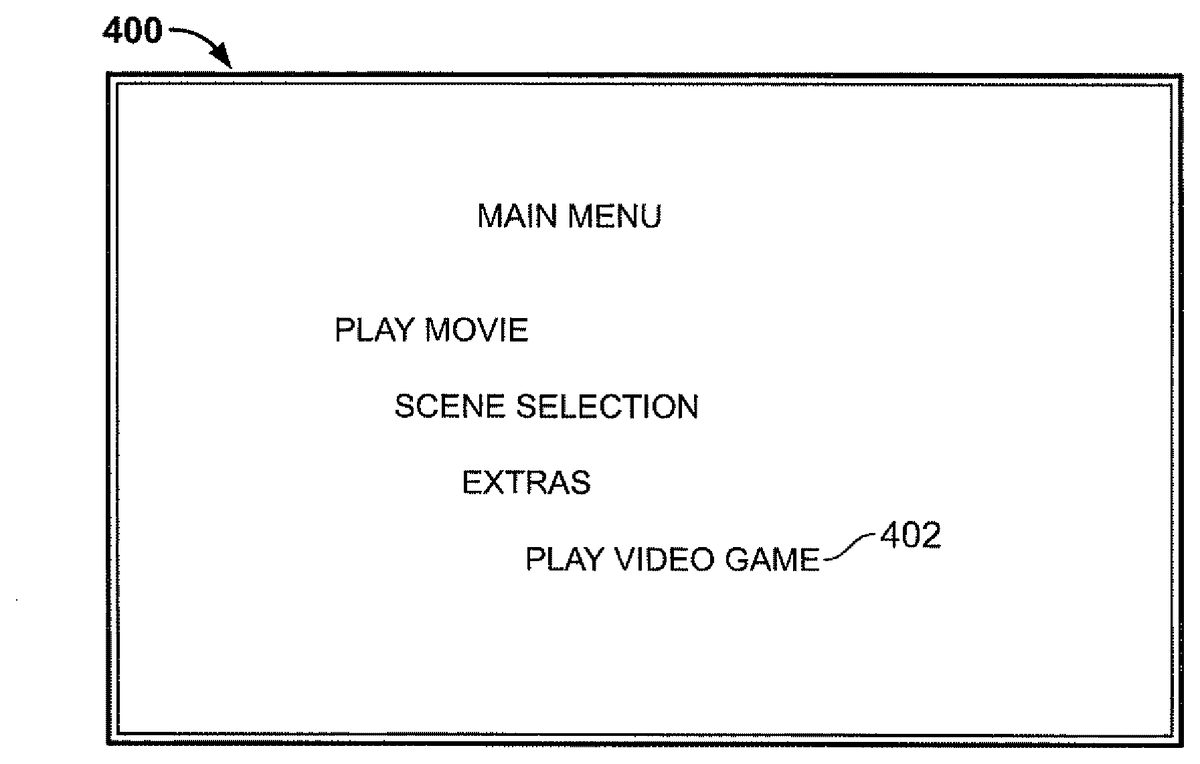
To enable seamless transitions between play of frame-based video data by a media player and executable video game, an application programming interface (API) may be defined that can be utilized during the movie authoring process, for example, during authoring of a Blu-ray® movie for encoding on a disc medium. A link to the API306may be integrated into the Blu-ray® Java (BD-J) application316that resides in the Blu-ray® movie data such that the relevant function of the API is called and executed when the user activates a graphical button that appears on the display screen, for example, a menu button402configured to indicate “Play Video Game” in a menu400(FIG. 4). When the menu button402is selected by the user, the game console will recognize the API, for example, SWITCH_TO_GM_CON( ) and subsequently switch playback from the Blu-ray® movie to the video game. API306may be loaded into firmware for the media player using an update process, or accessed from the medium holding dataset300. For further example, a graphical icon502as shown inFIG. 5may be programmed in the BD-J application to appear during one or more scenes of the frame-based video content500. In response to user input indicating selection of the icon, the BD-J application may call the SWITCH_TO_GM_CON( ) API function. Any desired user input may be configured to trigger a call to the SWITCH_TO_GM_CON( ) API function, at any desired time during play of the frame-based video content302.
Since the API SWITCH_TO_GM_CON( ) is newly defined, some existing playback devices may not recognize the API and therefore may return an exception, i.e. an error, or perhaps a null value when the API is executed. As a result the playback may not be switched from the Blu-ray® movie to the video game, depending on whether or not the API is recognized by the player. To eliminate this problem a device type field, DEVICE_TYPE, may be defined and stored into the internal memory of the game console and/or Blu-ray® movie player. An additional API function, GET_DEVICE_TYPE( ) may be defined such that the Blu-ray® movie BD-J application may query the device it is in to determine if it is a game console or not. It is important to note that the BD-J application can query the device type prior to presenting the “Switch to Video Game” menu button to the user.
Newer game consoles and Blu-ray® movie players will include the DEVICE_TYPE field such that when the BD-J application executes the GET_DEVICE_TYPE( ) API it will return a value of GAME_CONSOLE if the device is a game console or BD_MOVIE_PLAYER if the device is a conventional Blu-ray® movie player. If the return value is GAME_CONSOLE the BD-J application will present a “Switch to Video Game” or similar menu button to the user, whereas if the return value is BD_MOVIE_PLAYER the BD-J application will not present the “Switch to Video Game” menu button to the user, thereby avoiding the problem described above.
Legacy game consoles and Blu-ray® movie players may not contain the DEVICE_TYPE field at all, therefore when the BD-J application executes the GET_DEVICE_TYPE( ) API it will return an exception, i.e. an error, or a null value. In this instance the BD-J application may assume the device type is BD_MOVIE_PLAYER and therefore not present the “Switch to Video Game” menu button to the user. It is important to note that many legacy game consoles and Blu-ray® movie players may update internal firmware to include the DEVICE_TYPE field.
As mentioned earlier in the case where the DEVICE_TYPE=GAME_CONSOLE the BD-J application may present the “Switch to Video Game” menu button to the user, and in response to user activation of the described menu button, execute the SWITCH_TO_GM( ) API. However, in addition to just switching from the Blu-ray® movie to the beginning of the video game, additional control information, for example API command arguments, may be utilized to indicate the logical location within the video game to jump to, for example, to a particular game level and/or the difficulty setting within the game. For example, the API SWITCH_TO_GM(GAME_LEVEL, DIFFICULTY) includes two arguments such that SWITCH_TO_GM(4, 2) directs the game console to jump to level4within the game with a difficulty setting of 2. Other arguments not mentioned here may also be defined in the SWITCH_TO_GM( ) API, the described arguments merely providing an example. In the alternative, or in addition, a SWITCH_TO_GM( ) API may include a pointer to a metadata file already stored in the game console's memory. The metadata file may include information about previous game sessions, e.g. where the user left off, current score, or a pointer to existing saved game data.
Conversely, to enable seamless transitions from within the executable video game to the frame-based video content, the API may be defined to include a function, for example one labeled SWITCH_TO_PLYR( ) to handle such transitions. A link to the API may be integrated into the video game application318such that the relevant function of the API is called and executed when the user activates the user interface device to provide the input proscribed for calling the API function. For example, the video game application may be configured to output a graphical button that appears on the video screen, for example, a graphical icon602or other link appearing in a video game menu or other display output screen600, as shown inFIG. 6. When the icon602is selected by the user, and in response to user input indicating selection of the icon, the video game application may call the SWITCH_TO_PLYR( ) API function. Any desired user input may be configured to trigger a call to the SWITCH_TO_PLYR( ) API function, at any desired time during play of the video game application304.
The video game application and SWITCH_TO_PLYR( ) API function may also be configured to enable the passing of data arguments to the SWITCH_TO_PLYR( ) API function for initiating play at a desired point, in a desired file, and for a desired duration. For example, the SWITCH_TO_PLYR( ) function may be configured to receive the arguments FILE, START TIME and DURATION, where FILE identifies the particular frame-based video content file to play, START TIME indicates the point at which to begin play, and DURATION a length of time to play the video content before returning to the video game application. The SWITCH_TO_PLYR( ) function may also operate to save the video game status when the transition is initiated as data arguments in a system memory, so that if or when play of the video game is resumed, it can resume in the condition and at the place where game play was left off.
In accordance with the foregoing,FIG. 7diagrams an example of a method700for media player operation, enabling seamless transitions between execution of a video game and playing of frame-based audio-video content. Delivery and receipt of a data package by the media player702may initiate the method. The data package may be as described in connection withFIG. 3above, or one of the alternatives described in connection withFIG. 3. Essentially the data package should include the frame-based audio-video content, the video game application, and the API as described above.
Optionally, the API may be copied to a system memory704, for example to firmware, of the media player device. This may occur at any time prior to receiving the audio-video content and game application702. As noted above, provisions should be made to handle media players in which the required API is not properly installed. Accordingly, the data package should be provided with an application for detecting whether or not the API is properly installed on the media player device. Prior to beginning play of the received audio-video content or video game, the media player may call the detection function706as directed by an initialization function, which queries system memory to determine708whether or not the API is available on the media player. Optionally, the function may attempt to install the API from a fixed media (e.g., an inserted optical data disc holding data as described in connection withFIG. 3) or network source if the API is not detected. In response to detecting that no API is installed or can be installed, the media player may play the audio-video content710or video game without enabling seamless navigation capabilities in the video logic or game application.
In response to detecting that the required API for seamless navigation is installed or can be installed, the media player may play the audio-video content710or video game with seamless navigation enabled. According to the present example, this may be accomplished by loading an interface application or function712, which is configured to respond to input from a user input device to call the API when desired. The interface application or function may be loaded or otherwise enabled prior to or during initialization of the audio-video content player, for example, by setting one or more state variables to a value that causes enablement of functions for indicating availability of seamless navigation and responding to user input to call API functions performing seamless navigation.
With seamless navigation enabled, the media player may play the audio-video content714until input is received from a user input device indicating that execution of the video game application is desired. In response to detecting the input requesting execution of the video game716using the interface function, the media player calls the designated switch function of the API722to terminate play of the audio-video content and initiate play of the game executable. Conversely, if no input requesting execution of the video game is detected, the media player continues play718until the audio-video content terminated normally720or such input is detected716.
The switch function of the API may handle a switchover process via pointers, variables, or other data transfer means to the respective video content player applications and game executable. The actual transition may occur in innumerable way according to the desired result. For example, the API function called at722may push data to a memory location that causes the video player application to pause and display a message indicating that transition to the video game is in process. Then, the API switch function may store data indicating the file and timeline point at which the audio-video content is paused, for future reference724; in the alternative, or in addition, this may be accomplished continuously during play of the audio-video content by the content-playing application operating on the media player. In addition, the API function may retrieve stored data recording variables or pointers for passing to the executable video game726. The API function may then cause the video content application to terminate, and immediately initialize the video game executable, using the stored variables or pointers728.
Once initialized, the video game application may operate normally to provide video game play. The video game application may include a built-in function operative on the media player/console to detect user input indicative of a request to seamlessly navigate to playing of the audio-video content, as previously described. In response to detecting such user input730, the media player may call an API function for seamlessly navigating to play of the audio-video content734. If not such user input is received730, the video game application may continue operation until terminated normally740or until a seamless navigation request is detected730.
The API function for seamlessly navigating to play of the audio-video content, once called, may pause play of the game and display a message indicating that a transition to a specific audio-video content is underway, e.g., “Playing of The Dark Knight will resume in a moment.” In addition, the API function may execute on the media player to store any variables, pointers, or other data736indicating a state of the video game application at which play was interrupted by the request to navigate to play of the movie or other audio-video content. This stored data may be as retrieved in the converse operation726. In the alternative, or in addition, such data may be stored by the video game application continuously during normal play.
At738, the API function may retrieve variables, pointers or other data738for initiating play of the desired audio-video content at the indicated point. The data retrieved at738may be as stored in the converse operation724. The API function may then cause the game application to terminate and initiate play of the audio-video content using the media player application provided with specified initialization data, if any. Play of the audio-video content may then continue714as previously described.
An article with encoded data, for example an optical disc medium, thumb drive, or other memory device, may be configured to operate as described above.FIG. 8shows an example of a method800for producing a medium in which digital audio-video content and an executable video game are encoded together so as to permit seamless transitions between viewing the audio-video content and executing the video game. Audio-video content, for example, a feature movie presentation and its ancillary content and functions may be received802using any suitable computing device. The audio-video content may be packaged with a specific media player application, or merely designed for play by a pre-existing application. It may also include logic, for example, BD-J applications for providing desired interactive features within a media player application.
Separately, a video game executable and ancillary data are received804by the computing device. The game executable may be received in source code form, or as a binary executable. The audio-video content is formatted to a defined and accessible standard, for example, Blu-ray®. The executable game and audio-video content may be received from different sources with no built in links yet provided.
At808, executable code defining an API is compiled and integrated with the audio-video content and game executable, using one or more computers. The API is coded to operate with a particular operating system for the intended player/console devices, for example game players, set-top boxes, personal computers, or portable media devices. Program development and coding specifics may be appropriately selected by one of ordinary skill to comply with applicable specifications for the targeted devices or operating systems. Integration may include coordinating variables, pointers, and other data for passing to and from the game executable, media player application, and respective API functions as described above. Integration may further include providing interface modules to operate with or within the respective media player application and video game executable to call the API functions in response to input from one or more user input devices.
At810, the one or more computers are used to prepare a data set suitable for encoded on the desired data medium. For example, a data set may comprise a collection of files arranged according to a file system, as described in connection withFIG. 3above. In one embodiment, the data set complies with Blu-ray® specifications for encoding on a Blu-ray® medium. At812, the data set is encoded on the desired medium, for example, on an optical disc medium, magnetic medium, or memory device, using any suitable method as known in the art. The encoded medium may then be provided to the targeted player/console devices for operation as described herein.
Having thus described a preferred embodiment of a system and method for enabling seamless navigation between high-definition audio-video content and an executable video game encoded together on a digital medium, it should be apparent to those skilled in the art that certain advantages of the within system have been achieved. It should also be appreciated that various modifications, adaptations, and alternative embodiments thereof may be made without departing from the scope and spirit of the present technology. For example, a Blu-ray® disc medium has been described, but it should be apparent that the novel concepts described above may be applied by one of ordinary skill to other forms of digital content packages to realize the benefits described herein.
Claims
- A method comprising: preparing, using at least one computer, a digital dataset for encoding on a single digital medium having both frame-based audio-video content and an executable video game encoded thereon, wherein the digital dataset comprises at least one frame-based audio-video content file configured for playing by a media player to produce motion picture output, and an interactive video game application comprising an executable file and graphic data files separate from the at least one frame-based audio-video content file and from the media player;integrating an application program interface (API) in the digital dataset using the at least one computer, wherein the API includes a first function configured to terminate play of the at least one audio-video content file during play thereof and immediately initiate execution of the interactive video game application without any intervening user interface;and integrating a programmed function in the digital dataset using the at least one computer, wherein the programmed function is configured to call the first function of the API in response to input from a user interface device during play of the at least one frame-based audio-video content file indicating that execution of the video game application should be initiated.
- The method of claim 1 , wherein the API further includes a second function configured to detect a device type of the media player, prior to calling the first function of the API.
- The method of claim 2 , wherein the programmed function is further configured to call the second function of the API prior to calling the first function of the API.
- The method of claim 2 , wherein the programmed function is further configured to call the first function of the API contingent upon confirming that the media player is of a designated suitable type.
- The method of claim 1 , wherein the first function of the API is further configured to receive arguments indicating a particular logical location within the video game application at which to initiate execution thereof.
- The method of claim 1 , wherein the API further includes a second function configured to terminate execution of the interactive video game application and initiate play of the at least one frame-based audio-video content file.
- The method of claim 6 , wherein the video game application is configured to call the second function of the API in response to input from a user interface device indicating that play of the at least one frame-based audio-video content file should be initiated.
- The method of claim 6 , wherein the second function of the API is further configured to store arguments in a memory of the media player, the arguments indicating a particular logical location within the video game application at which to resume play.
- The method of claim 6 , wherein the first function of the API is further configured to store position data in a memory of the media player, the position data indicating a particular position in the at least one frame-based audio-video content file at which to resume play.
- The method of claim 9 , wherein the second function of the API is further configured to receive the position data and resume play of the at least one frame-based audio-video content file at the particular position indicated by the position data.
- A method comprising: reading a single digital medium, having both frame-based audio-video content and an executable video game encoded thereon, using a game console, the digital medium containing encoded data comprising at least one frame-based audio-video content file configured for producing audio video output when played by a media player application and an interactive video game application comprising an executable file and graphic data files separate from the at least one frame-based audio-video content file and from the media player application;installing an application program interface (API) in a system memory of the game console including a first function configured for initiating execution of the interactive video qame application, prior to playing the at least one frame-based audio-video content file by the media player application;calling the first function of the API during play of the at least one frame-based audio-video content file by the media player application on the game console in response to input from a user interface device;and immediately initiating execution of the interactive video game application via the API, without any intervening use of a user interface of the game console.
- The method of claim 11 , further comprising detecting a device type of the game console by calling a second function of the API, prior to calling the first function of the API.
- The method of claim 11 , further comprising calling the first function of the API in response to input from a user input device during play of the at least one frame-based audio-video content file by the media player application, the input indicating that execution of the video game application should be initiated.
- The method of claim 12 , wherein calling the first function of the API is contingent upon confirming that the game console is of a designated suitable type.
- The method of claim 11 , further comprising supplying the first function of the API with arguments indicating a particular logical location within the video game application at which to initiate execution thereof.
- The method of claim 11 , further comprising calling a third function of the API to terminate execution of the interactive video game application and initiate play of the at least one frame-based audio-video content file.
- The method of claim 16 , further comprising calling the third function of the API in response to input from a user input device during operation of the video game application, the input indicating that play of the at least one frame-based audio-video content file should be initiated.
- The method of claim 16 , further comprising storing data in a memory of the media player in response to calling the third function of the API, the data indicating a particular logical location within the video game application at which to resume play.
- The method of claim 16 , further comprising storing position data in a memory of the media player in response to calling the first function of the API, the position data indicating a particular position in the at least one frame-based audio-video content file at which to resume play.
- The method of claim 19 , further comprising, in response to calling the third function of the API, retrieving the position data and resuming play of the at least one frame-based audio-video content file at the particular position indicated by the position data.
- A non-transitory computer-readable medium encoded with instructions, that when executed by a computer processor, cause a computing device to: play a frame-based audio-video file encoded on the non-transitory computer-readable medium to produce audio video output conveying a motion picture or portion thereof in a media player interface, wherein the non-transitory computer-readable medium comprises an interactive video game application encoded in a file separate from the frame-based audio-video file;prior to playing the frame-based audio-video file in the media player interface, load an application program interface (API) into system memory including a function configured for initiating execution of the interactive video game application;while playing the frame-based audio-video file in the media player interface, call the function of the API, in response to user input;and immediately initiate execution of the interactive video game application encoded on the computer-readable medium from the media player interface, via the API, without any intervening use of a separate user interface of the computing device.
Disclaimer: Data collected from the USPTO and may be malformed, incomplete, and/or otherwise inaccurate.