U.S. Pat. No. 8,246,454
SYSTEM FOR CONVERTING TELEVISION COMMERCIALS INTO INTERACTIVE NETWORKED VIDEO GAMES
AssigneeSony Computer Entertainment America LLC
Issue DateOctober 23, 2009
Illustrative Figure
Abstract
Methods, systems, and computer programs for converting television commercials into interactive network video games are presented. In one method, a broadcast or streamed commercial is accompanied by an interactive segment. A media player coupled to the broadcast or streaming media source identifies the existence of the interactive segment and presents the user with an enhanced and interactive mini-game commercial that can be played with other “viewers” in a common or disperse demographic. Multiple methods for content delivery are provided, including a model where television commercial is inserted within consecutive frames of the television program, and a model where the commercial is overlaid on frames of the television program allowing the user to play the game while the television program is displayed. In a preferred embodiment, the termination of the interactive mini-game commercial is set within a fixed time period commensurate with traditional spot television advertising.
Description
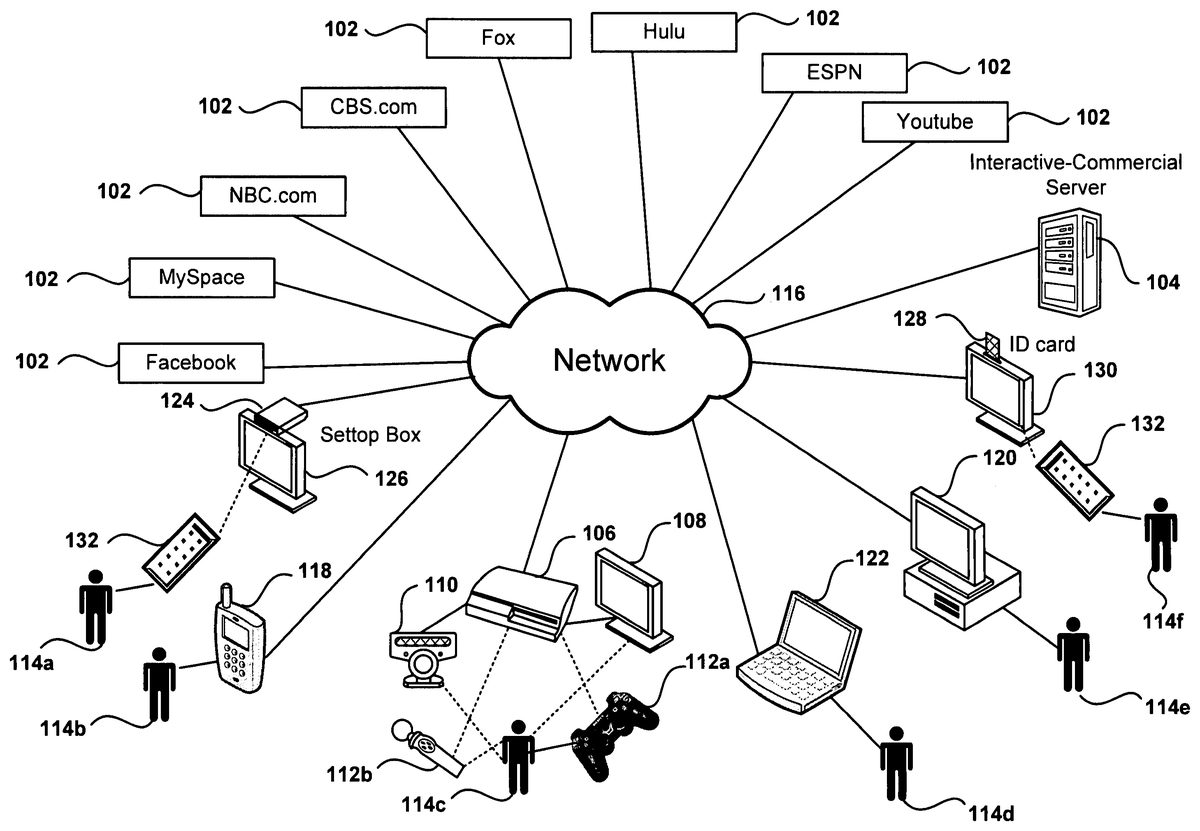
DETAILED DESCRIPTION The following embodiments describe a method and apparatus for delivering interactive multimedia content. It will be obvious, however, to one skilled in the art, that the present invention may be practiced without some or all of these specific details. In other instances, well known process operations have not been described in detail in order not to unnecessarily obscure the present invention. FIG. 1shows a schematic diagram of a networked environment for delivery of multimedia content, according to one embodiment. Media102, distributed through network116, can be of several types, such as internet streamed media, broadcast media, on-demand media supplied by a cable company, photos posted on a social network, etc. A unique piece of downloaded media indented to be shown in its entirety to a user as a single unit is referred to herein as a media segment. Different client devices are available for receiving the media content and displaying the media to users114a-f. The client devices include set-top box124connected to a TV display, mobile phone118, game console106, laptop122, Personal Computer120, TV130configured with an ID card128, etc. Additionally, users114a-finteract with the different client devices in many ways, such as with remote control132, voice commands, mobile-phone keys, camera110to capture user images in order to perform motion detection, game controllers112a-b, keyboard, etc. Interactive-Commercial (IC) Server104is in communication with the client devices to provide interactive content (IC) to the client devices. It should be noted that although some embodiments are described in reference to interactive advertising, the principles are also applicable to any form of user interaction inserted in a media segment. For example, the interaction can be used while viewing a movie to have the viewer participate in a war scene without the need to include advertising content. Further, the interactive content can be inserted between frames in the media segment, ...
DETAILED DESCRIPTION
The following embodiments describe a method and apparatus for delivering interactive multimedia content. It will be obvious, however, to one skilled in the art, that the present invention may be practiced without some or all of these specific details. In other instances, well known process operations have not been described in detail in order not to unnecessarily obscure the present invention.
FIG. 1shows a schematic diagram of a networked environment for delivery of multimedia content, according to one embodiment. Media102, distributed through network116, can be of several types, such as internet streamed media, broadcast media, on-demand media supplied by a cable company, photos posted on a social network, etc. A unique piece of downloaded media indented to be shown in its entirety to a user as a single unit is referred to herein as a media segment.
Different client devices are available for receiving the media content and displaying the media to users114a-f. The client devices include set-top box124connected to a TV display, mobile phone118, game console106, laptop122, Personal Computer120, TV130configured with an ID card128, etc. Additionally, users114a-finteract with the different client devices in many ways, such as with remote control132, voice commands, mobile-phone keys, camera110to capture user images in order to perform motion detection, game controllers112a-b, keyboard, etc.
Interactive-Commercial (IC) Server104is in communication with the client devices to provide interactive content (IC) to the client devices. It should be noted that although some embodiments are described in reference to interactive advertising, the principles are also applicable to any form of user interaction inserted in a media segment. For example, the interaction can be used while viewing a movie to have the viewer participate in a war scene without the need to include advertising content. Further, the interactive content can be inserted between frames in the media segment, overlaid on top the media segment, or a combination of both. The interactive time can include a portion of the media segment, or can include the whole media segment. In fact, the media segment may already include interactive elements and other interactive elements may as well be added to those already existing in the media segment. The person skilled in the art in possession of this application will readily be able to apply the principles of the invention in a variety of scenarios, as long as the principles of the invention are followed. Additionally, interactive advertising can also be referred to herein as interactive commercials, interactive ads, interactive content, supplemental content, supplemental games, etc. Some of the objects inserted while displaying interactive advertising will be of a static nature, such as a text banner, while other contents may be dynamic, such as the display of a football game score, and yet other objects will be interactive and respond to user actions, such as a shooting target.
In one embodiment, the interactive content is inserted at the media source102or an intermediate server, and in another embodiment, the content is inserted at the client device interfacing with the user. Still yet, in another embodiment, some interactive content is included at the source while additional interactive content is added by the client device. For example, the interactive content can be a video commercial, a game, a computer program, a song, a photo, a document, a presentation, a billboard, a coupon, a video conference, etc. Additionally, the IC can be inserted between consecutive frames of the media stream, that is, the media stream viewing is temporarily halted while the user access the IC. The IC can also be displayed together with the media stream, such as a banner inside the viewing area, or a banner shown outside the display area of the video stream. In one embodiment, content provider102coordinates activities with IC server104for the placement of the interactive content, such as providing metadata for the placement of interactive commercials.
FIG. 2illustrates the flow of content delivered in a network environment according to one embodiment of the invention. Media providers102transfer content to PlayStation106which is then shown to user114con display108. Home network140interconnects the difference devices within the home and includes a connection to the internet for communication with outside media providers102. In one embodiment, devices in the home network support DLNA (Digital Living Network Alliance), which is a standard used by manufacturers of consumer electronics to allow entertainment devices within the home to share their content with each other across a home network without a complicated configuration process. Thus, home computer142, which supports DLNA, downloads content from media providers102and makes the content available to PlayStation106via DLNA. Using DLNA's terms, home computer142acts as a Digital Media Server for PlayStation106, which is the Digital Media Player. In another embodiment, Media providers102transfer content directly to PlayStation106via the network. Thus, user114cwith PlayStation106can view downloaded content without the need of a media streaming computer or other download device, such as a cable or satellite box.
A similar DLNA implementation currently available in the market is offered as a software package named PlayOn™, which runs on a PC and converts the PC into a Digital Media Server. A partial description for the implementation of PlayOn can be found in U.S. patent application Ser. No. 10/753,612, which is incorporated herein by reference.
Advertiser150coordinates activities with media providers102and Interactive Commercial Server (ICS)104for adding interactive content to the media provided by the media providers102, to the IC provided by ICS104, or to both. The client device, such as PlayStation106, receives the media content and the IC, combines both, and then presents the combination to user114con display108. The information sent from ICS104to the client device is sometimes referred to as an interactive packet. The interactive packet can include video clip, audio clip, object definition, insertion instructions (scheduling, duration, location on screen, insertion between media frames or overlay on top of media, demographics, number of insertion, frequency, etc.), programming instructions, input types, input processing, responses to inputs, random elements, communication information with other players in multi-player games, results server identification, instructions to download additional objects, etc. The object definition includes object shape, movement, size, interface with the object, inputs for controlling the object, object responses, relation with other objects, effect on game score, number of instances allowed in a single device, etc.
It should be appreciated that the embodiment illustrated inFIG. 2is an exemplary addition of interactive commercial content. Other embodiments may utilize different types of interactive content which can be provided by other types of entities, such as news organizations, search engines, etc. The embodiments illustrated inFIG. 2should therefore not be interpreted to be exclusive or limiting, but rather exemplary or illustrative.
FIG. 3depicts the Interactive Commercial Server (ICS) architecture, according to one embodiment. ICS302includes different databases, such as user database304, commercial database306, media metadata database308, and partner database310. User database304includes information about users associated with ICS302. Some of the users have registered with ICS302and have a login and password that uniquely define the user within ICS302. Other users have not registered with ICS302, yet ICS may still contain information related to these users that has been collected over time. In one embodiment, ICS302indexes users in the database by a unique identifier associated with the client device, such as a serial number (S/N) of a game console or a PC. ICS302monitors activities or communications of each user to collect user information, such as the Internet Protocol address (IP), type of content downloaded, schedule, longevity in the system, etc. User database304is managed by user manager module312that receives information requests and provides information responses related to the users in user database304.
Commercial database306holds information regarding interactive content and is managed by Commercial Manager314. Media metadata database308holds information regarding media available for download to users in the system. For example, a sample media metadata for a TV episode can include title, description, actors, date first-time aired, location of commercials, locations of possible spots for IC placement, media content providers for the episode, etc.
Partner database310holds information about partners. This information includes partner id, partner category (such as media provider, advertiser, etc.), revenue sharing arrangements, IC provided, desired number of impressions for each piece of IC, etc. Partner database310is managed by Partner manager318that coordinates the collection and distribution of partner information.
Commercial Serving Module (CSM)320communicates with and transfers advertising to system users. For example, CSM320interfaces with the client device to download an interactive commercial to the client. The interactive commercial can be downloaded while the media content is being displayed, or can be downloaded in advance so the client is able to start showing the commercial without any delay. Commercial Loader Module322uploads IC from the network to place it in commercial database306and makes the IC available to users. For example, Commercial Loader Module322uploads games to commercial database306.
Metadata collector324gets metadata information for media metadata database308. Partner interface326interacts with partners for the coordination of retrieval of partner information, IC content provided by partners, accounting, reporting, etc. Further, Commercial Delivery Administrator328coordinates the activities related to IC within ICS server302and interfaces with other modules inside CSM320. More details for Commercial Delivery Administrator328are shown inFIG. 4, including a description of the information flow between the different entities.
FIG. 4illustrates the architecture of the Commercial Delivery Administrator in accordance to one embodiment. When user410requests a media segment for display in the client system, the client sends an IC request to Commercial Delivery Administrator402. In another embodiment, the client can receive IC independently from the client request for media, that is, the client system requests periodical updates to existing IC stored in the client system in order to download IC to the client to be readily available for presentation to the user.
The ad request may reach Commercial Delivery Administrator402via different communication channels, such as the Internet, a telephone modem connection, a satellite connection, a mobile phone network, a private network, etc. The request can be formatted using different protocols, such as html, XML, etc., or it can be formatted using a private protocol established between the client and the IC Server. The request includes information used by Commercial Delivery Administrator402to decide which IC to send to the client and the instructions for placement of the IC. The information in the request may include the user id, the client device id, the media content being downloaded, the media server providing the media content, the server downloading the content, the client device platform (PC, PlayStation™ 2, mobile phone, etc.), etc.
Scheduler412module inside Commercial Delivery Administrator402determines which IC to download and the instructions for placement of the IC. Scheduler412can be implemented in software, in hardware or in a combination of software and hardware. Further, Scheduler412can be distributed over several modules working in parallel or over multiple distributed servers that process requests from the multitude of users in the system.
The instructions for placement of the IC can include the desired time period for displaying the IC, the placement of the IC in the media segment being displayed, the type of IC being displayed, whether a response is expected from the client, etc. The instructions can be received in the form of formatted plain text, in a file, as a downloadable program (such as a Java applet) to be executed at the client, etc.
To determine which IC to serve, Scheduler412uses information from schedule criteria module414. Schedule criteria414can be implemented as a shared data structure, a database, a lookup table, a hardware module, as a program running in the IC server, or as a combination thereof. Scheduler412communicates with the IC Server databases, such as user database404, Commercial database406, media metadata database408, etc. User database404provides information about the user attached to the client device, such as age, geography, usage history, preferences, hobbies, purchasing history, IC interaction history, etc. In one embodiment, user database404keeps track of the ICs already delivered to the user in order to avoid sending IC already delivered to the user or to enable the user to recall a previously viewed IC. For example, a user may decide that she wants to take advantage today of a pizza coupon offered yesterday while watching a movie. User information in the user database may also be used to determine which IC is selected, such as selecting travel commercials for delivery to a travel enthusiast.
Commercial database406stores the IC and can be implemented within a file system in the server, as a distributed database spread out across multiple servers, as part of a Storage Area Network (SAN), etc. Commercial database406is configured to hold different types of content, such as video files, music files, program files, sound files, interactive object definitions, photos, etc. In one embodiment, commercial database406includes a cache for holding commercials being delivered to a large number of users in order to speed up delivery for commercials with high delivery requirements. Commercial database406can also have access to external content allowing the downloading of IC from external sources, such as the server of an advertiser that desires the flexibility of changing IC often for quick dissemination to users.
Media Metadata database408includes information, also referred to as metadata, about the media available for viewing by the users. The metadata may include sources for the media segments, media format, length of the media segment, type of content, interactive object definition, etc. The metadata provided by Media Metadata database408can be used by the scheduler to determine the instructions for the IC placement. For example, the metadata may indicate ten appropriate places for placing IC within the media segment, and Scheduler412may select two of the ten places for insertion of IC based on the length of the media segment. The metadata can also be used to define objects in the media in order to add interactive objects that coexist with the existing objects in the media. See for example the descriptions forFIGS. 10 and 11below describing the inclusion of interactive objects in the media.
In one embodiment, Commercial Delivery Administrator402downloads some of the media metadata to remote clients in the background in order to allow remote clients to hold information about media available and information on how to access it. In yet another embodiment, Commercial Delivery Administrator402allows a remote user to browse the media database for finding media.
Once Scheduler412determines the IC to be downloaded, Scheduler412sends a command to Commercial Serving Module420to deliver the IC and instructions to the user. Commercial Serving Module420can be implemented within the same system as Commercial Delivery Administrator402or can be implemented as a group of distributed servers. This way, Scheduler412may select a Commercial Serving Module that is geographically close to the user, resulting in lower download latency.
In some cases, the delivery of IC at the client device generates results that are sent back to User Result Collection Module418within Commercial Delivery Administrator402. Examples of results collected include voting for a particular event, score obtained after playing an IC game, tags indicating the location of commercials within the downloaded media, etc. The collected results can be stored in user database404when the results relate back to the user (such as number of points collected in a game), or can be saved in a results database (not shown) that can be accessed by administrators, advertisers, etc., for data analysis.
Administrator interface module416provides a user interface to enable the administrator to manage the scheduler. The administrator can enter priorities for the IC, updates to Schedule Criteria414, instructions to upload new IC or delete old IC, etc.
FIG. 5illustrates the architecture for an embodiment of a client configured to deliver interactive advertisement. Content Manager510determines how to retrieve content for the user. In one embodiment, the content can be obtained from an internal media library506, or from the Internet via Content Loader612. Content loader512downloads multimedia content via network520, which is buffered by content buffer518. Content Loader512can retrieve content for storage in the Media Library506for later retrieval by the user, offering DVR (Digital Video Recorder) capabilities. One advantage of using the Media Library together with Commercial Content Manager504is that the IC is added to the media at the time that the media is viewed by the user. Existing DVRs that record a TV program display ‘old’ commercials when the media is played. For example, if a TV show, including a commercial for another TV show on Tuesday, is recorded on Monday and later viewed on Thursday, the commercial displayed would be obsolete, as the Tuesday TV show being sponsored has already been shown when the user watches the ad on Thursday. However, by adding IC at the client at the time that the show is viewed, the IC system architecture allows for the replacement of old commercials (‘stale’) with ‘fresh’ relevant commercials, thus improving the effectiveness of commercials on viewers. Display Manager514receives the media from the Media Library and the IC from Commercial Content Manager504and combines them before placing the resulting combination in Display Buffer516, which drives display522. In another embodiment, the content in the library already includes IC, which has been inserted by the media publisher before download. In this case, display manager514may not add a new interactive commercial, although in some cases display manager514adds interactive content to supplement the IC delivered by the publisher.
User Interface Manager508receives input from user524which can come from a variety of devices, such as single-handed controller528, or other devices such as a two-hand controller, a mobile phone, a remote control, a keyboard, etc. The user input is communicated to the display manager for further processing and updating of the video sent to display buffer516. The user input may also be communicated to Result Delivery module526for transmission to a remote result collection module via network520.
FIG. 6depicts an embodiment of a user interface for displaying an interactive commercial. The user interface ofFIG. 6includes a multimedia display area652for displaying video, filler video for music, a game display, email, a browser, etc. Video game playing area652includes embedded section664for displaying commercial advertisement or any types of supplemental content. Embedded section664can be a predefined section of the video game playing area652, a rolling banner, a moving area within the display, etc.
Additional information is made available to the user by the client device outside video game playing area652such as commercial advertisement section654, game information section658, game score656, news and scores660, etc. Further, display information bar662provides details about the progress of the multimedia display, control buttons (pause, etc.), location of IC insertions, etc. During an interactive game the user has the option of playing for the minimum amount of time allotted for the display of the interactive commercial, or the option of continuing to play the game until the user makes an input to command the end of the game and the return to the multimedia display.
It should be appreciated that the embodiment illustrated inFIG. 6is an exemplary layout for displaying media. Other embodiments may utilize different layouts, or may add other related fields. The embodiment illustrated inFIG. 6should therefore not be interpreted to be exclusive or limiting, but rather exemplary or illustrative.
FIG. 7illustrates how interactive content is inserted at the client, in accordance with one embodiment. IC Manager782in client device780downloads content, such as a television program, from a content provider and IC B, such as a network video game, from the IC Server. In one embodiment, IC Manager782adds IC B to the media downloaded from the content provider before showing it to the user in display784. In another embodiment, interactive content A is already included with the downloaded media. Client device780detects IC A and manages interactions with the user during the display of IC A. In yet another embodiment, the complete content downloaded is interactive and client device780interacts with the user during the complete display of the downloaded media.
FIG. 8illustrates the interaction of a user with a television commercial in accordance with one embodiment. Instructions are shown to the user at the beginning of the interactive television commercial. In the embodiment ofFIG. 8, the instructions are “Throw the pickle to speed up commercial.” The user, which is holding a one-handed controller with motion detection, swings his arm to simulate the act of throwing a pickle. As a result, the flying interactive pickle is placed in the burger, and the commercial message “Make it your way” is displayed briefly before the commercial ends and the user returns to watching the streaming media. In another embodiment, the user may use other inputs such as a hand motion which is captured by a camera, a clap of the hands to generate a sound input, a contact on a button of the controller, etc. In another embodiment, multiple input methods are available to the user for the same interaction and the user selects which one to use for participation. For example, the user chooses one of the options including pressing a button on a controller or remote control, clicking a mouse, entering text on a keyboard, speaking to a blue-tooth device in communication with the client device, waving a hand, etc.
FIG. 9illustrates a user interacting verbally with a commercial, according to one embodiment. In first capture1502of the sequence, a user is watching movie1510. Progress pointer1520in progress bar1512shows that content1522display corresponds to a movie and that break1524is approaching. On second capture1504, progress pointer1520shows that the movie has progressed to break1524for placing IC1514. IC1514is interactive and instructions1526from the display ask the user to ‘Say “McDonalds” to end commercial.’ On third capture1506, the user is saying “McDonalds!” The client device includes a microphone that captures the user's words and voice recognition on the device determines that the user has responded. The system then proceeds to skip the rest of the commercial, as shown on fourth capture1508, where the user goes back to watch the movie. In one embodiment, the user gets rewarded with some points or a coupon from the sponsor. The rewards can be collected by the user in a variety of ways, such as receiving a coupon on the mail or via email, getting a text message in a mobile phone with the coupon, collecting points toward collecting prices in a web site, etc.
FIG. 10shows interactive objects embedded in the media stream detected by the client device, according to one embodiment. A media segment, being displayed to user1018, includes frames1002,1004,1006, and1008. Not all frames are shown for brevity of description with only a few sample frames shown. In one embodiment, the media segment is not interrupted to insert video frames and interactive objects are added or overlaid on top of the video frames. In another embodiment, game console24adds the interactive objects, such as flying birds1010in frame1002, to the streamed video. Game console1024inserts the interactive objects upon instructions received from the interactive commercial server. The instructions can vary and can include from simple instructions to insert static objects, to more complex instructions including the location and movement of the interactive objects, the location of objects in the streamed media (allowing the interactive objects to be placed in front or behind movie objects), 3-D properties of the interactive objects, relative scaling of the objects, sounds, possible user inputs, object reactions to user inputs, etc.
In another embodiment, the interactive objects are already included in the video stream and game console1024receives instructions on how to detect these objects in the video frames. Some of the possible characteristics of detectable objects include color, shape, size, location on the screen, etc. For example, an interactive target may be detected by finding objects at a specific shade of gray, or a certain combination of colors in the pixelation of the object. In another example, the target is a black target located at a fixed location with specific horizontal and vertical coordinates.
In the embodiment shown inFIG. 10, interactive objects1010have been inserted by the interactive commercial server around actress1012in the video frame. Interactive objects1010are black and game console1024makes any black area in the screen over a certain minimum threshold size a target. Frame1016shows the target detected on frame1006by game console1024. User1018holds a single handed controller with wireless communication to game console1024. Additionally, video camera1022is used to detect the movement of the controller when user1018aims to the screen. At the push of a button, user1018fires onto the targets on the screen. If the firing hits a target, game console1024momentarily changes the color of interactive object1014to show a hit, or make the interactive object disappear or change location. A miss may also be indicated on the video screen by a distinctive mark such as a circle. A score (not shown) can be displayed to the user during the interactive commercial or at the end of the commercial to give the user feedback on his performance.
In another embodiment, the user is given a signal to indicate when the video display is interactive mode. The signal can include a banner on the screen (“shoot the birds now!”), a sound (“beep”), a LED lit on game console1024, a LED or other type of light lit on controller1020, a vibration of controller1020, etc. In the embodiment ofFIG. 10the single handed controller has a spherical end that can be programmed to light up in different colors. In this case, controller1020glows with a white light when the video becomes interactive and then goes back to a non-illuminated state after the end of the interactive segment. In one embodiment, the spherical end flashes red every time the user hits a target on the screen.
FIG. 11illustrates the insertion of interactive objects at the client based on received object metadata, in accordance with one embodiment. Movie1150includes interactive commercial1152, which includes a sequence of frames. Metadata1162is sent to the game console with information regarding interactivity objects to be overlaid on top the frames in movie1150. Metadata1162also includes information about objects that are part of the movie, such as actors tables, glasses, the moon, the sun, light sources, direction of gravity, relative scaling of objects, camera angles, etc. With metadata information1162and the proper computer code for processing interactive objects, the game console places interactive objects on the screen to deliver a game to the user. In one embodiment, the movie objects can also become interactive. For example, a user can score points for shooting a warrior, or opening a door, or finding certain object on the screen, etc. In another embodiment, the movie object can even by manipulated by the game console to react to user input, such as making it disappear, changing its size or location, changing its color, etc.
In the embodiment shown inFIG. 11, movie1150is showing a scene at a bar where a man and a woman are talking and a table sits behind the actors. While the movie is showing, the client device places can1154on top of the table that becomes a shooting target. The player “hits” can1156in the second frame, that causes the can to fly away, as seen in can position1158of the third frame. In the last frame, can1160is falling to the ground. The client device reduces the size of can1160according to the perspective of the scene to show that the can has travelled away from the table after the impact. Further, the client device will place the can on the ground (not shown) according to the geometry of the room received in metadata1162, which includes the floor plane as well as other objects that the can may hit as if flies away after the shot. Additionally, the characteristics of the can may change according to the game, such as adding a bullet hole every time the can is hit, adding additional point if the can is hit again in the air, etc.
In another embodiment, image recognition, as described in reference toFIG. 10, can be combined with metadata to provide interactivity to the game. For example, the movie may already include interactive objects when it is received by the client device, and the metadata indicates the frames in which gaming objects are embedded as well as the characteristics of the object, such as color, shape, etc. The client device scans the image for those characteristics in the metadata and then determines the location of the received embedded interactive objects.
FIG. 12shows an interactive television commercial with the option to purchase an item, according to one embodiment. In frame1202, a frame at the beginning of the commercial, a commercial offer is presented to the player, in this case the purchase of a pizza for home delivery. In subsequent frame1204, the player selects Buy button1210to request the purchase of the item. Upon receipt of the purchase request, the system retrieves the player address from a player information database, such as user database304ofFIG. 3.
In frame1206, the user is presented with the delivery address and the television commercial requests purchase confirmation from the player. At this time, the player selects button1212to confirm the purchase order. The system bills the player in a prearranged matter, such as charging it to a credit card or adding it to the user's cable TV bill. In another embodiment, the user is presented additional frames for entering payment information or delivery address information. In frame1208, the user is presented with a confirmation of the order and a thank you for the purchase.
Since the purchase process may take more time than the one allocated for the commercial without a purchase, the user may not see some of the content following the commercial, such as when viewing a live broadcast. In one embodiment, the content is recorded in a DVR or similar device so the player does not miss content. After the purchase, the player resumes viewing at the next commercial, at the current commercial being shown, or at the continuation of the movie.
FIG. 13illustrates a voting sequence according to one embodiment. A player is presented with several options for voting, such as selecting from a group of contestants or answering a trivia question. In frame1302the voting sequence starts. Clock1314indicates the amount of time that the player has for voting, which is 30 seconds in the example shown inFIG. 13. The name of the options, which in this example corresponds to contestants, are shown next to the button that will perform a vote for the corresponding contestant. In subsequent frame1304, downward counting clock1314indicates that 15 seconds are left for voting and that a number of votes have already been casted. Histogram1312shows the distribution of votes up to that point in time. In another embodiment, histogram1312does not show the partial results until the end of the voting period to avoid influencing the votes of viewers.
The player viewing the interactive commercial has selected contestant Alan by pressing the X button in the two-handed game controller. Frame1308shows that the time for voting has expired with clock1314showing no time left for voting. Histogram1312shows the final results in bar form, as well as in numeric percentages for each option. In another embodiment, the voting period is large, such as 24 hours, and a single TV channel is dedicated to voting. Viewers that wish to vote can tune to the voting channel and cast their vote anytime within the voting period. In another embodiment, the voting channel may be a dedicated channel for voting. Viewers are giving options for entering one of many voting processes. For example, one of the options can be entering the intention of vote in a democratic election, thus creating voting forecasts for candidates. Once the user enters a selection, the corresponding voting process is started and the viewer can enter a vote as previously described.
It should be appreciated that the embodiment illustrated inFIG. 13is an exemplary method for interactive voting. Other embodiments may utilize different fields, options, input methods, times allowed for voting, time to count the results, display of results, etc. The embodiment illustrated inFIG. 13should therefore not be interpreted to be exclusive or limiting, but rather exemplary or illustrative.
FIG. 14illustrates the selection of different interactive content based on user input, according to one embodiment. Movie452is being watched by viewers464and466at different locations. Commercial A458is inserted in movie458to allow the viewer to select the type of commercial he or she would like to watch. In the embodiment shown inFIG. 14, the viewer is asked whether she prefers Romance or Action. Microphone462connected to console460allows the user to enter a voice command to perform the selection. In this case, viewer464says “Action” resulting in viewer464seeing commercial B2, and viewer466says “Romance” resulting in viewer466seeing commercial B1. Typically, commercials B1sand B2will have the same length, but in other embodiments the length of the commercials are independent and can be different.
If the viewer does not enter a selection, the system will select the commercial to show, which can be B1, B2or a different commercial B3(not shown). The viewer can be offered many types of different choices, such as Coke or Pepsi, car or detergent, finance or eating or travel, etc. In one embodiment, a viewer that enters a choice is rewarded for participating, and the reward can be a shorter commercial, fewer commercials, bonus points, etc.
FIG. 15depicts teams competing in an interactive broadcast game, in accordance with one embodiment of the invention. Media segment552includes 4 interactive commercials embedded IC1-IC4. In the embodiment ofFIG. 15, the first three interactive commercials are three chapters of a game. IC4is used to display the aggregated results.
The players are organized in teams to compete against each other. In the embodiment ofFIG. 15, team A576is playing against team B578. The teams can be organized by subscription (players choose a team to join), by characteristics of the players, at random, etc. The characteristics of the player can vary across a multitude of dimensions, such as age group, city of residence, state, university, sex, marital status, national origin, ethnicity, etc. In some cases the game can be played “mano a mano,” that is, one team against another team. In other cases, multiple teams play simultaneously against the rest of the teams, and the final scores are tabulated to display the winning order.
The interactive commercials IC1-IC4form a playing sequence. In one embodiment playing sequence forms a continuous game that is played in several phases. That is, each interactive game starts exactly where the previous interactive game stopped. In other cases, the interactive commercials are almost independent from each other. For example, each interactive commercial corresponds to a different circuit in a car race or to a different event in a triathlon.
The team scores can be calculated using a variety of methods. In one embodiment, the team score corresponds to the sum of all the individual scores of players in the team. In other embodiments, the team score can be an average team score, the average of the best top-ten scores, the median team score, etc. Interactive server554manages the distribution of interactive commercials and collects individual results to compute the complete results. The team scores can be shown during play, or can be shown only at the end of the individual play.
Further, the interactive commercials can be played exactly at the same time, such as in the case of a TV broadcast, or can be played at different times by each of the players. In this latter case, the team scores are not computed until the period allowed for playing the interactive games ends.
In one embodiment, players can be added to a team that are computer simulated players556, or that are based on a previously played game that has been recorded by the system, such as player562. In another embodiment, when a player whishes to compete against another player, but no competitor is available, the player can compete against computer simulated player556, or against simulated player562. To avoid competitor monotonous behavior, simulated player562can be chosen at random or based on skill level from a database of previously played and recorded games.
As seen inFIG. 15, the interactive commercials are designed to support multiple computing devices and input methods. For example, players can use TV remote control558, game console570, personal computer572, mobile phone574, etc. In one embodiment, system554may adjust the complexity and scoring of the interactive commercials according to the user computing platform because some platforms are less responsive than others and the input devices may adapt better for game playing. For example in a racing game, it is easier to steer a car with a dedicated gaming steering wheel than with arrow keys in a keyboard or remote control.
FIG. 16depicts an embodiment for introducing interactive advertising based on demographics. Two different users are downloading content simultaneously, a 6-year old girl, and a 35-year old male. The content may be identical or may be different, may be from the same source or from a different source. The Supplemental Content Manager inserts IC B6and B8for the girl, and B7and B8for the male. IC Manager uses a dynamic algorithm for ad delivery scheduling to determine which IC to deliver. In this case, B8is suitable for all ages, while B6is targeted to children and B7is targeted to males over 30.
FIG. 17illustrates hardware and user interfaces that may be used to determine controller location, in accordance with one embodiment of the present invention.FIG. 17schematically illustrates the overall system architecture of the Sony® Playstation 3® entertainment device, a console that may be compatible for interfacing a control device with a computer program executing at a base computing device in accordance with embodiments of the present invention. A system unit1400is provided, with various peripheral devices connectable to the system unit1400. The system unit1400comprises: a Cell processor1428; a Rambus® dynamic random access memory (XDRAM) unit1426; a Reality Synthesizer graphics unit1430with a dedicated video random access memory (VRAM) unit1432; and an I/O bridge1434. The system unit1400also comprises a Blu Ray® Disk BD-ROM® optical disk reader1440for reading from a disk1440aand a removable slot-in hard disk drive (HDD)1436, accessible through the I/O bridge1434. Optionally the system unit1400also comprises a memory card reader1438for reading compact flash memory cards, Memory Stick® memory cards and the like, which is similarly accessible through the I/O bridge1434.
The I/O bridge1434also connects to six Universal Serial Bus (USB) 2.0 ports1424; a gigabit Ethernet port1422; an IEEE 802.11b/g wireless network (Wi-Fi) port1420; and a Bluetooth® wireless link port1418capable of supporting of up to seven Bluetooth connections.
In operation, the I/O bridge1434handles all wireless, USB and Ethernet data, including data from one or more game controllers1402-1403. For example when a user is playing a game, the I/O bridge1434receives data from the game controller1402-1403via a Bluetooth link and directs it to the Cell processor1428, which updates the current state of the game accordingly.
The wireless, USB and Ethernet ports also provide connectivity for other peripheral devices in addition to game controllers1402-1403, such as: a remote control1404; a keyboard1406; a mouse1408; a portable entertainment device1410such as a Sony Playstation Portable® entertainment device; a video camera such as an EyeToy® video camera1412; a microphone headset1414; and a microphone1415. Such peripheral devices may therefore in principle be connected to the system unit1400wirelessly; for example the portable entertainment device1410may communicate via a Wi-Fi ad-hoc connection, whilst the microphone headset1414may communicate via a Bluetooth link.
The provision of these interfaces means that the Playstation 3 device is also potentially compatible with other peripheral devices such as digital video recorders (DVRs), set-top boxes, digital cameras, portable media players, Voice over IP telephones, mobile telephones, printers and scanners.
In addition, a legacy memory card reader1416may be connected to the system unit via a USB port1424, enabling the reading of memory cards1448of the kind used by the Playstation® or Playstation 2® devices.
The game controllers1402-1403are operable to communicate wirelessly with the system unit1400via the Bluetooth link, or to be connected to a USB port, thereby also providing power by which to charge the battery of the game controllers1402-1403. Game controllers1402-1403can also include memory, a processor, a memory card reader, permanent memory such as flash memory, light emitters such as an illuminated spherical section, LEDs, or infrared lights, microphone and speaker for ultrasound communications, an acoustic chamber, a digital camera, an internal clock, a recognizable shape such as the spherical section facing the game console, and wireless communications using protocols such as Bluetooth®, WiFi™, etc.
Game controller1402is a controller designed to be used with two hands, and game controller1403is a single-hand controller with a ball attachment. In addition to one or more analog joysticks and conventional control buttons, the game controller is susceptible to three-dimensional location determination. Consequently gestures and movements by the user of the game controller may be translated as inputs to a game in addition to or instead of conventional button or joystick commands. Optionally, other wirelessly enabled peripheral devices such as the Playstation™ Portable device may be used as a controller. In the case of the Playstation™ Portable device, additional game or control information (for example, control instructions or number of lives) may be provided on the screen of the device. Other alternative or supplementary control devices may also be used, such as a dance mat (not shown), a light gun (not shown), a steering wheel and pedals (not shown) or bespoke controllers, such as a single or several large buttons for a rapid-response quiz game (also not shown).
The remote control1404is also operable to communicate wirelessly with the system unit1400via a Bluetooth link. The remote control1404comprises controls suitable for the operation of the Blu Ray Disk BD-ROM reader1440and for the navigation of disk content.
The Blu Ray™ Disk BD-ROM reader1440is operable to read CD-ROMs compatible with the Playstation and PlayStation 2 devices, in addition to conventional pre-recorded and recordable CDs, and so-called Super Audio CDs. The reader1440is also operable to read DVD-ROMs compatible with the Playstation 2 and PlayStation 3 devices, in addition to conventional pre-recorded and recordable DVDs. The reader1440is further operable to read BD-ROMs compatible with the Playstation 3 device, as well as conventional pre-recorded and recordable Blu-Ray Disks.
The system unit1400is operable to supply audio and video, either generated or decoded by the Playstation 3 device via the Reality Synthesizer graphics unit1430, through audio and video connectors to a display and sound output device1442such as a monitor or television set having a display1444and one or more loudspeakers1446. The audio connectors1450may include conventional analogue and digital outputs whilst the video connectors1452may variously include component video, S-video, composite video and one or more High Definition Multimedia Interface (HDMI) outputs. Consequently, video output may be in formats such as PAL or NTSC, or in 720p, 1080i or 1080p high definition.
Audio processing (generation, decoding and so on) is performed by the Cell processor1428. The Playstation 3 device's operating system supports Dolby® 5.1 surround sound, Dolby® Theatre Surround (DTS), and the decoding of 7.1 surround sound from Blu-Ray® disks.
In the present embodiment, the video camera1412comprises a single charge coupled device (CCD), an LED indicator, and hardware-based real-time data compression and encoding apparatus so that compressed video data may be transmitted in an appropriate format such as an intra-image based MPEG (motion picture expert group) standard for decoding by the system unit1400. The camera LED indicator is arranged to illuminate in response to appropriate control data from the system unit1400, for example to signify adverse lighting conditions. Embodiments of the video camera1412may variously connect to the system unit1400via a USB, Bluetooth or Wi-Fi communication port. Embodiments of the video camera may include one or more associated microphones and also be capable of transmitting audio data. In embodiments of the video camera, the CCD may have a resolution suitable for high-definition video capture. In use, images captured by the video camera may for example be incorporated within a game or interpreted as game control inputs. In another embodiment the camera is an infrared camera suitable for detecting infrared light.
In general, in order for successful data communication to occur with a peripheral device such as a video camera or remote control via one of the communication ports of the system unit1400, an appropriate piece of software such as a device driver should be provided. Device driver technology is well-known and will not be described in detail here, except to say that the skilled man will be aware that a device driver or similar software interface may be required in the present embodiment described.
FIG. 18illustrates additional hardware that may be used to process instructions, in accordance with one embodiment of the present invention. Cell processor1428has an architecture comprising four basic components: external input and output structures comprising a memory controller1560and a dual bus interface controller1570A, B; a main processor referred to as the Power Processing Element1550; eight co-processors referred to as Synergistic Processing Elements (SPEs)1510A-H; and a circular data bus connecting the above components referred to as the Element Interconnect Bus1580. The total floating point performance of the Cell processor is 218 GFLOPS, compared with the 6.2 GFLOPs of the Playstation 2 device's Emotion Engine.
The Power Processing Element (PPE)1550is based upon a two-way simultaneous multithreading Power1470compliant PowerPC core (PPU)1555running with an internal clock of 3.2 GHz. It comprises a 512 kB level 2 (L2) cache and a 32 kB level 1 (L1) cache. The PPE1550is capable of eight single position operations per clock cycle, translating to 25.6 GFLOPs at 3.2 GHz. The primary role of the PPE1550is to act as a controller for the Synergistic Processing Elements1510A-H, which handle most of the computational workload. In operation the PPE1550maintains a job queue, scheduling jobs for the Synergistic Processing Elements1510A-H and monitoring their progress. Consequently each Synergistic Processing Element1510A-H runs a kernel whose role is to fetch a job, execute it and synchronized with the PPE1550.
Each Synergistic Processing Element (SPE)1510A-H comprises a respective Synergistic Processing Unit (SPU)1520A-H, and a respective Memory Flow Controller (MFC)1540A-H comprising in turn a respective Dynamic Memory Access Controller (DMAC)1542A-H, a respective Memory Management Unit (MMU)1544A-H and a bus interface (not shown). Each SPU1520A-H is a RIIC processor clocked at 3.2 GHz and comprising 256 kB local RAM1530A-H, expandable in principle to 4 GB. Each SPE gives a theoretical 25.6 GFLOPS of single precision performance. An SPU can operate on 4 single precision floating point members, 4 32-bit numbers, 8 16-bit integers, or 16 8-bit integers in a single clock cycle. In the same clock cycle it can also perform a memory operation. The SPU1520A-H does not directly access the system memory XDRAM1426; the 64-bit addresses formed by the SPU1520A-H are passed to the MFC1540A-H which instructs its DMA controller1542A-H to access memory via the Element Interconnect Bus1580and the memory controller1560.
The Element Interconnect Bus (EIB)1580is a logically circular communication bus internal to the Cell processor1428which connects the above processor elements, namely the PPE1550, the memory controller1560, the dual bus interface1570A,B and the 8 SPEs1510A-H, totaling 12 participants. Participants can simultaneously read and write to the bus at a rate of 8 bytes per clock cycle. As noted previously, each SPE1510A-H comprises a DMAC1542A-H for scheduling longer read or write sequences. The EIB comprises four channels, two each in clockwise and anti-clockwise directions. Consequently for twelve participants, the longest step-wise data-flow between any two participants is six steps in the appropriate direction. The theoretical peak instantaneous EIB bandwidth for 12 slots is therefore 96 B per clock, in the event of full utilization through arbitration between participants. This equates to a theoretical peak bandwidth of 307.2 GB/s (gigabytes per second) at a clock rate of 3.2 GHz.
The memory controller1560comprises an XDRAM interface1562, developed by Rambus Incorporated. The memory controller interfaces with the Rambus XDRAM1426with a theoretical peak bandwidth of 25.6 GB/s.
The dual bus interface1570A,B comprises a Rambus FlexIO® system interface1572A,B. The interface is organized into 12 channels each being 8 bits wide, with five paths being inbound and seven outbound. This provides a theoretical peak bandwidth of 62.4 GB/s (36.4 GB/s outbound, 26 GB/s inbound) between the Cell processor and the I/O Bridge700via controller170A and the Reality Simulator graphics unit200via controller170B.
Data sent by the Cell processor1428to the Reality Simulator graphics unit1430will typically comprise display lists, being a sequence of commands to draw vertices, apply textures to polygons, specify lighting conditions, and so on.
FIG. 19is an exemplary illustration of scene A through scene E with respective user A through user E interacting with game clients1102that are connected to server processing via the internet, in accordance with one embodiment of the present invention. A game client is a device that allows users to connect to server applications and processing via the internet. The game client allows users to access and playback online entertainment content such as but not limited to games, movies, music and photos. Additionally, the game client can provide access to online communications applications such as VOIP, text chat protocols, and email.
A user interacts with the game client via controller. In some embodiments the controller is a game client specific controller while in other embodiments, the controller can be a keyboard and mouse combination. In one embodiment, the game client is a standalone device capable of outputting audio and video signals to create a multimedia environment through a monitor/television and associated audio equipment. For example, the game client can be, but is not limited to a thin client, an internal PCI-express card, an external PCI-express device, an ExpressCard device, an internal, external, or wireless USB device, or a Firewire device, etc. In other embodiments, the game client is integrated with a television or other multimedia device such as a DVR, Blu-Ray player, DVD player or multi-channel receiver.
Within scene A ofFIG. 19, user A interacts with a client application displayed on a monitor106using a controller100paired with game client1102A. Similarly, within scene B, user B interacts with another client application that is displayed on monitor106using a controller100paired with game client1102B. Scene C illustrates a view from behind user C as he looks at a monitor displaying a game and buddy list from the game client1102C. WhileFIG. 19shows a single server processing module, in one embodiment, there are multiple server processing modules throughout the world. Each server processing module includes sub-modules for user session control, sharing/communication logic, user geo-location, and load balance processing service. Furthermore, a server processing module includes network processing and distributed storage.
When a game client1102connects to a server processing module, user session control may be used to authenticate the user. An authenticated user can have associated virtualized distributed storage and virtualized network processing. Examples items that can be stored as part of a user's virtualized distributed storage include purchased media such as, but not limited to games, videos and music etc. Additionally, distributed storage can be used to save game status for multiple games, customized settings for individual games, and general settings for the game client. In one embodiment, the user geo-location module of the server processing is used to determine the geographic location of a user and their respective game client. The user's geographic location can be used by both the sharing/communication logic and the load balance processing service to optimize performance based on geographic location and processing demands of multiple server processing modules. Virtualizing either or both network processing and network storage would allow processing tasks from game clients to be dynamically shifted to underutilized server processing module(s). Thus, load balancing can be used to minimize latency associated with both recall from storage and with data transmission between server processing modules and game clients.
As shown inFIG. 19, the server processing module has instances of server application A and server application B. The server processing module is able to support multiple server applications as indicated by server application X1and server application X2. In one embodiment, server processing is based on cluster computing architecture that allows multiple processors within a cluster to process server applications. In another embodiment, a different type of multi-computer processing scheme is applied to process the server applications. This allows the server processing to be scaled in order to accommodate a larger number of game clients executing multiple client applications and corresponding server applications. Alternatively, server processing can be scaled to accommodate increased computing demands necessitated by more demanding graphics processing or game, video compression, or application complexity. In one embodiment, the server processing module performs the majority of the processing via the server application. This allows relatively expensive components such as graphics processors, RAM, and general processors to be centrally located and reduces to the cost of the game client. Processed server application data is sent back to the corresponding game client via the internet to be displayed on a monitor.
Scene C illustrates an exemplary application that can be executed by the game client and server processing module. For example, in one embodiment game client1102C allows user C to create and view a buddy list1120that includes user A, user B, user D and user E. As shown, in scene C, user C is able to see either real time images or avatars of the respective user on monitor106C. Server processing executes the respective applications of game client1102C and with the respective game clients1102of users A, user B, user D and user E. Because the server processing is aware of the applications being executed by game client B, the buddy list for user A can indicate which game user B is playing. Further still, in one embodiment, user A can view actual in game video directly from user B. This is enabled by merely sending processed server application data for user B to game client A in addition to game client B.
In addition to being able to view video from buddies, the communication application can allow real-time communications between buddies. As applied to the previous example, this allows user A to provide encouragement or hints while watching real-time video of user B. In one embodiment two-way real time voice communication is established through a client/server application. In another embodiment, a client/server application enables text chat. In still another embodiment, a client/server application converts speech to text for display on a buddy's screen.
Scene D and scene E illustrate respective user D and user E interacting with game consoles1110D and1110E respectively. Each game console1110D and1110E are connected to the server processing module and illustrate a network where the server processing modules coordinates game play for both game consoles and game clients.
FIG. 20illustrates an embodiment of an Information Service Provider architecture. Information Service Providers (ISP)250delivers a multitude of information services to users262geographically dispersed and connected via network266. An ISP can deliver just one type of service, such as stock price updates, or a variety of services such as broadcast media, news, sports, gaming, etc. Additionally, the services offered by each ISP are dynamic, that is, services can be added or taken away at any point in time. Thus, the ISP providing a particular type of service to a particular individual can change over time. For example, a user may be served by an ISP in near proximity to the user while the user is in her home town, and the user may be served by a different ISP when the user travels to a different city. The home-town ISP will transfer the required information and data to the new ISP, such that the user information “follows” the user to the new city making the data closer to the user and easier to access. In another embodiment, a master-server relationship may be established between a master ISP, which manages the information for the user, and a server ISP that interfaces directly with the user under control from the master ISP. In other embodiment, the data is transferred from one ISP to another ISP as the client moves around the world to make the ISP in better position to service the user be the one that delivers these services.
ISP250includes Application Service Provider (ASP)252, which provides computer-based services to customers over a network. Software offered using an ASP model is also sometimes called on-demand software or software as a service (SaaS). A simple form of providing access to a particular application program (such as customer relationship management) is by using a standard protocol such as HTTP. The application software resides on the vendor's system and is accessed by users through a web browser using HTML, by special purpose client software provided by the vendor, or other remote interface such as a thin client.
Services delivered over a wide geographical area often use cloud computing. Cloud computing is a style of computing in which dynamically scalable and often virtualized resources are provided as a service over the Internet. Users do not need to be an expert in the technology infrastructure in the “cloud” that supports them. Cloud computing can be divided in different services, such as Infrastructure as a Service (IaaS), Platform as a Service (PaaS), and Software as a Service (SaaS). Cloud computing services often provide common business applications online that are accessed from a web browser, while the software and data are stored on the servers. The term cloud is used as a metaphor for the Internet, based on how the Internet is depicted in computer network diagrams and is an abstraction for the complex infrastructure it conceals.
Further, ISP250includes a Game Processing Server (GPS)254which is used by game clients to play single and multiplayer video games. Most video games played over the Internet operate via a connection to a game server. Typically, games use a dedicated server application that collects data from players and distributes it to other players. This is more efficient and effective than a peer-to-peer arrangement, but it requires a separate server to host the server application. In another embodiment, the GPS establishes communication between the players and their respective game-playing devices exchange information without relying on the centralized GPS.
Dedicated GPSs are servers which run independently of the client. Such servers are usually run on dedicated hardware located in data centers, providing more bandwidth and dedicated processing power. Dedicated servers are the preferred method of hosting game servers for most PC-based multiplayer games. Massively multiplayer online games run on dedicated servers usually hosted by the software company that owns the game title, allowing them to control and update content.
Broadcast Processing Server (BPS)256distributes audio or video signals to an audience. Broadcasting to a very narrow range of audience is sometimes called narrowcasting. The final leg of broadcast distribution is how the signal gets to the listener or viewer, and it may come over the air as with a radio station or TV station to an antenna and receiver, or may come through cable TV or cable radio (or “wireless cable”) via the station or directly from a network. The Internet may also bring either radio or TV to the recipient, especially with multicasting allowing the signal and bandwidth to be shared. Historically, broadcasts have been delimited by a geographic region, such as national broadcasts or regional broadcast. However, with the proliferation of fast internet, broadcasts are not defined by geographies as the content can reach almost any country in the world.
Storage Service Provider (SSP)258provides computer storage space and related management services. SSPs also offer periodic backup and archiving. By offering storage as a service, users can order more storage as required. Another major advantage is that SSPs include backup services and users will not lose all their data if their computers' hard drives fail. Further, a plurality of SSPs can have total or partial copies of the user data, allowing users to access data in an efficient way independently of where the user is located or the device being used to access the data. For example, a user can access personal files in the home computer, as well as in a mobile phone while the user is on the move.
Communications Provider260provides connectivity to the users. One kind of Communications Provider is an Internet Service Provider (ISP) which offers access to the Internet. The ISP connects its customers using a data transmission technology appropriate for delivering Internet Protocol datagrams, such as dial-up, DSL, cable modem, wireless or dedicated high-speed interconnects. The Communications Provider can also provide messaging services, such as e-mail, instant messaging, and SMS texting. Another type of Communications Provider is the Network Service provider (NSP) which sells bandwidth or network access by providing direct backbone access to the Internet. Network service providers may consist of telecommunications companies, data carriers, wireless communications providers, Internet service providers, cable television operators offering high-speed Internet access, etc.
Data Exchange268interconnects the several modules inside ISP253and connects these modules to users262via network266. Data Exchange268can cover a small area where all the modules of ISP250are in close proximity, or can cover a large geographic area when the different modules are geographically dispersed. For example, Data Exchange268can include a fast Gigabit Ethernet (or faster) within a cabinet of a data center, or an intercontinental virtual area network (VLAN).
Users262access the remote services with client device264, which includes at least a CPU, a display and I/O. The client device can be a PC, a mobile phone, a netbook, a PDA, etc. In one embodiment, ISP250recognizes the type of device used by the client and adjusts the communication method employed. In other cases, client devices use a standard communications method, such as html, to access ISP250.
It should be appreciated that the embodiment illustrated inFIG. 20is an exemplary ISP architecture. Other embodiments may utilize different modules, or may arrange the modules in varying manners. The embodiment illustrated inFIG. 20should therefore not be interpreted to be exclusive or limiting, but rather exemplary or illustrative.
Embodiments of the present invention may be practiced with various computer system configurations including hand-held devices, microprocessor systems, microprocessor-based or programmable consumer electronics, minicomputers, mainframe computers and the like. The invention can also be practiced in distributed computing environments where tasks are performed by remote processing devices that are linked through a network.
With the above embodiments in mind, it should be understood that the invention can employ various computer-implemented operations involving data stored in computer systems. These operations are those requiring physical manipulation of physical quantities. Any of the operations described herein that form part of the invention are useful machine operations. The invention also relates to a device or an apparatus for performing these operations. The apparatus may be specially constructed for the required purpose, such as a special purpose computer. When defined as a special purpose computer, the computer can also perform other processing, program execution or routines that are not part of the special purpose, while still being capable of operating for the special purpose. Alternatively, the operations may be processed by a general purpose computer selectively activated or configured by one or more computer programs stored in the computer memory, cache, or obtained over a network. When data is obtained over a network the data maybe processed by other computers on the network, e.g., a cloud of computing resources.
The embodiments of the present invention can also be defined as a machine that transforms data from one state to another state. The transformed data can be saved to storage and then manipulated by a processor. The processor thus transforms the data from one thing to another. Still further, the methods can be processed by one or more machines or processors that can be connected over a network. Each machine can transform data from one state or thing to another, and can also process data, save data to storage, transmit data over a network, display the result, or communicate the result to another machine.
The invention can also be embodied as computer readable code on a computer readable medium. The computer readable medium is any data storage device that can store data, which can be thereafter be read by a computer system. Examples of the computer readable medium include hard drives, network attached storage (NAS), read-only memory, random-access memory, CD-ROMs, CD-Rs, CD-RWs, magnetic tapes and other optical and non-optical data storage devices. The computer readable medium can include computer readable tangible medium distributed over a network-coupled computer system so that the computer readable code is stored and executed in a distributed fashion.
Although the method operations were described in a specific order, it should be understood that other housekeeping operations may be performed in between operations, or operations may be adjusted so that they occur at slightly different times, or may be distributed in a system which allows the occurrence of the processing operations at various intervals associated with the processing, as long as the processing of the overlay operations are performed in the desired way.
Although the foregoing invention has been described in some detail for purposes of clarity of understanding, it will be apparent that certain changes and modifications can be practiced within the scope of the appended claims. Accordingly, the present embodiments are to be considered as illustrative and not restrictive, and the invention is not to be limited to the details given herein, but may be modified within the scope and equivalents of the appended claims.
Claims
- A method executed by a processor for delivering interactive multimedia content, the method comprising: obtaining a media segment lacking interactive capabilities, the media segment being defined for presentation at a display;obtaining an interactive package containing interactivity instructions for adding interactive functions to the media segment, the interactivity instructions including player input processing instructions, instructions for adding additional display elements to the media segment, and information regarding native objects in the media segment lacking interactive capabilities, wherein the native objects are not defined for interactive play in the media segment and the interactivity instructions enable the interactive play with the native objects;combining the media segment with the interactive package to obtain an interactive segment which responds to player input;displaying the interactive segment while checking for the player input;and dynamically updating the interactive segment being displayed in response to the player input, wherein operations of the method are executed through the processor.
- The method as recited in claim 1 , wherein combining the media segment further includes: inserting an interactive game between at least two video frames of the media segment.
- The method as recited in claim 1 , wherein the interactive package includes one or more of a video clip, an audio clip, an object definition, insertion instructions, programming instructions, input types, input processing, input responses, random elements, inter-player communication, and server identification.
- The method as recited in claim 1 , wherein combining the media segment further includes: adding game objects to video frames of the media segment, the game objects being defined for interaction with the player.
- The method as recited in claim 1 , wherein the interactive segment includes a game selected from a group consisting of a target shooting game, a ball throwing game, a ball hitting game, a fighting game, or a racing game.
- The method as recited in claim 1 , wherein the interactive segment includes choosing an action, the action selected from a group consisting of buying an item, voting on the media segment, voting on the interactive segment, or selecting an option from a multiple-choice question.
- The method as recited in claim 1 , wherein the interactivity instructions include: information regarding a location of the native objects in the media segment;and information regarding interactive objects absent from the media segment to be displayed together with the native objects, wherein the native objects and the interactive objects are responsive to the player input.
- The method as recited in claim 1 , wherein the interactivity instructions include information regarding a location of the native objects in the media segment.
- The method as recited in claim 1 , wherein dynamically updating the interactive segment further includes: selecting a segment of interactive media from a plurality of segments based on the player input, wherein displaying the interactive segment includes displaying the selected segment.
- The method as recited in claim 9 , where the plurality of segments include a segment that enables a player to enter input to end display of a commercial early before an end of the commercial.
- The method as recited in claim 1 , further including: assigning a reward to the player based on player interaction with the interactive segment.
- The method as recited in claim 11 , further including: transmitting the reward to a mobile device.
- The method as recited in claim 11 , wherein the reward includes skipping a future commercial during the displaying of the interactive segment.
- The method as recited in claim 1 , wherein combining the media segment further includes: taking a picture of the player;and adding an image of the player based on the picture to the media segment.
- A client device for delivery of interactive multimedia content, the client device comprising: a commercial content manager that receives an interactive package from an interactive content server, the interactive package containing interactivity instructions for adding interactive functions to a media segment, the interactivity instructions including player input processing instructions and instructions for adding additional display elements to the media segment;a content manager that receives the media segment without interactive capabilities, wherein the content manager combines the media segment with the interactive package to obtain an interactive segment responsive to player input;and a display manager that shows the interactive segment while checking for the player input, wherein the content manager dynamically updates the interactive segment being displayed in response to the player input, wherein the interactive segment is a multiplayer game where players play each other.
- The client device of claim 15 , further including: a user interface manager that receives input from the player via one peripheral selected from a group consisting of a game controller, a camera, an infrared remote control, a blue tooth device, a microphone, a mouse, a keyboard, or a floor pad.
- The client device of claim 16 , wherein the user interface manager receives voice commands from the player.
- The client device of claim 16 , further including: a controller with light emitting capabilities, wherein the user interface manager communicates with the controller, wherein the controller emits a predetermined light color to indicate that the client is in interactive mode.
- An interactive content server for delivery of interactive multimedia content, the interactive content server comprising: a user manager that receives a request from a client device for an interactive package that contains interactivity instructions for adding interactive functions to a media segment lacking interactive capabilities, the interactivity instructions including player input processing instructions and instructions for adding additional display elements to the media segment;a commercial manager that selects an interactive package to be sent to the user;and a commercial delivery administrator that sends the selected interactive package to the user, wherein the commercial manager coordinates the display of the interactive package contemporaneously at additional client devices, wherein the client device and the additional client devices facilitate an interactive multiplayer game where players play each other.
- The interactive content server of claim 19 , wherein the interactive multiplayer game is a team game where two or more teams compete, wherein the user manager compiles team scores which are sent to the client device and the additional client devices.
- The interactive content server of claim 19 , wherein at least one player is simulated by the user manager based on previously played games.
- The interactive content server of claim 19 , wherein the interactive package is customized according to demographic characteristics of a player sending the request.
- The interactive content server of claim 19 , wherein the commercial manager selects additional interactive packages to create a plurality of interactive passages that are combined with the media segment to be displayed at different times at the client device.
- The interactive content server of claim 23 , wherein the additional interactive packages form a sequence for playing a game.
- A computer program embedded in a non-transitory computer-readable storage medium, when executed by one or more processors, for delivering interactive multimedia content, the computer program comprising: program instructions for obtaining a media segment lacking interactive capabilities, the media segment being defined for presentation at a display;program instructions for obtaining an interactive package containing interactivity instructions for adding interactive functions to the media segment, the interactivity instructions including player input processing instructions and instructions for adding additional display elements to the media segment;program instructions for combining the media segment with the interactive package to obtain an interactive segment which responds to player input, wherein the interactive segment is a multiplayer game where players play each other;program instructions for displaying the interactive segment while checking for the player input;and program instructions for dynamically updating the interactive segment being displayed in response to the player input.
- The computer program as recited in claim 25 , wherein at least one player in the multiplayer game is simulated.
- The computer program as recited in claim 26 , wherein the simulated game corresponds to a previously played game.
- A method executed by a processor for converting television commercials into interactive network video games, the method comprising: obtaining a television program lacking interactive capabilities;obtaining a television commercial which includes an interactive network video game;obtaining instructions for adding the television commercial to the television program;combining the television program with the television commercial according to the instructions to obtain an interactive segment responsive to player input;and displaying the interactive segment to enable a user to play the interactive network video game, wherein the interactive segment is operable to receive user input to end display of the interactive segment early before an end of the interactive segment when the user input is not received, wherein operations of the method are executed through the processor.
- The method as recited in claim 28 , wherein the instructions cause the television commercial to be inserted between two consecutive frames in the television program.
- The method as recited in claim 28 , wherein the instructions cause the combining to overlay the interactive network video game on top of a plurality of consecutive frames of the television program.
- The method as recited in claim 28 , wherein the instructions include: metadata information regarding a location of native objects in the television program;and metadata information regarding interactive objects to be displayed together with the native objects, wherein the interactive objects are responsive to the player input.
- The method as recited in claim 28 , wherein the interactive network video game is played in several game segments, wherein each of the several segments is inserted in a different place within the television program.
Disclaimer: Data collected from the USPTO and may be malformed, incomplete, and/or otherwise inaccurate.