U.S. Pat. No. 8,187,095
UNIVERSAL GAME CONSOLE CONTROLLER
AssigneeSony Corporation; Sony Electronics Inc.
Issue DateAugust 12, 2008
Illustrative Figure
Abstract
A universal game console controller that has an LCD presenting, depending on what type of game console a user has input, a controller key layout for a first type of game console or a controller key layout for a second type of game console.
Description
DETAILED DESCRIPTION OF THE PREFERRED EMBODIMENT This document describes an adaptable or universal game controller which can be used to emulate the controllers of popular game consoles, such as, without limitation, the PlayStation™ made by Sony, a controller made by Nintendo, X-box™ game controllers made by Microsoft, Amiga CD-32™ controllers, Atari Jaguar™ controllers, Gravis Gamepad™ controllers, Sega controllers, and Turbographics controllers, one or more of which terms may be subject to trademark protection. For ease of exposition trademark symbols will not be further used herein. FIG. 1shows a game controller10with hand-held, typically plastic housing12that is shaped to resemble a typical game controller for better and more familiar feel of a game controller. A thin plastic so-called “game controller skin” may surround the housing12. The housing12may contain a controller processor14and a tanigible computer readable medium16readable by the processor14and bearing instructions to enable the processor14to present two or more game control key layouts on a touch sensitive display18such as a touch sensitive liquid crystal display (LCD). With greater specificity, the display18can present a first control key layout at a first time (e.g., when a user selects a first type of game console), and at least a second control key layout at a second time (e.g., when a user selects a second type of game console). The medium16may be, without limitation, disk-based or solid state storage and the processor14may be a digital microprocessor, it being understood that the same general description applies to the other processors and media described herein. If desired, L1and L2keys and R1and R2keys may be provided as shown on the top left and right edges, respectively, of the housing12, implemented either by mechanical keys or by touch sensitive display keys. In the example non-limiting implementation shown inFIG. 1, the controller10may be used with at least two game consoles20,22, each ...
DETAILED DESCRIPTION OF THE PREFERRED EMBODIMENT
This document describes an adaptable or universal game controller which can be used to emulate the controllers of popular game consoles, such as, without limitation, the PlayStation™ made by Sony, a controller made by Nintendo, X-box™ game controllers made by Microsoft, Amiga CD-32™ controllers, Atari Jaguar™ controllers, Gravis Gamepad™ controllers, Sega controllers, and Turbographics controllers, one or more of which terms may be subject to trademark protection. For ease of exposition trademark symbols will not be further used herein.
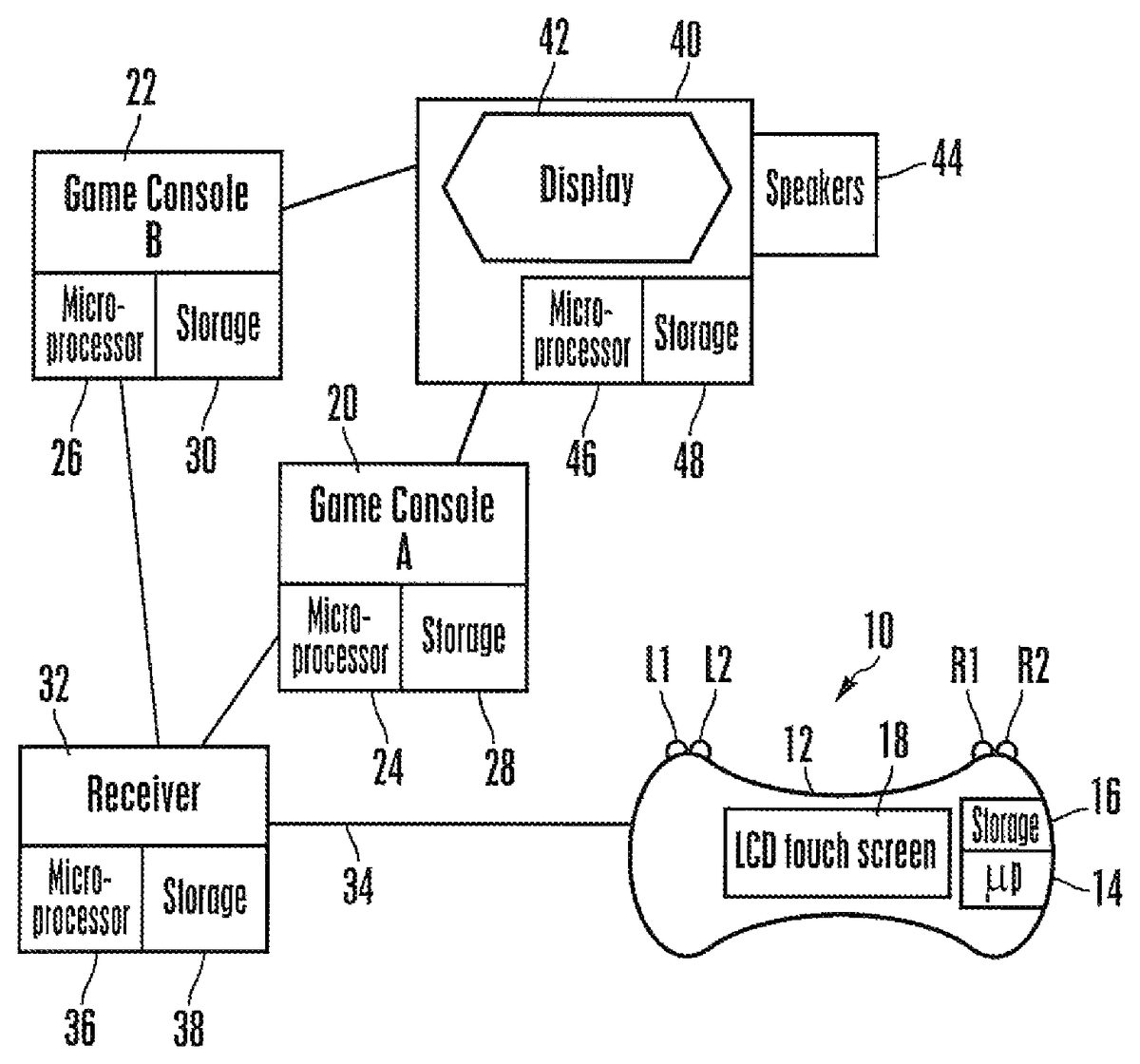
FIG. 1shows a game controller10with hand-held, typically plastic housing12that is shaped to resemble a typical game controller for better and more familiar feel of a game controller. A thin plastic so-called “game controller skin” may surround the housing12.
The housing12may contain a controller processor14and a tanigible computer readable medium16readable by the processor14and bearing instructions to enable the processor14to present two or more game control key layouts on a touch sensitive display18such as a touch sensitive liquid crystal display (LCD). With greater specificity, the display18can present a first control key layout at a first time (e.g., when a user selects a first type of game console), and at least a second control key layout at a second time (e.g., when a user selects a second type of game console).
The medium16may be, without limitation, disk-based or solid state storage and the processor14may be a digital microprocessor, it being understood that the same general description applies to the other processors and media described herein. If desired, L1and L2keys and R1and R2keys may be provided as shown on the top left and right edges, respectively, of the housing12, implemented either by mechanical keys or by touch sensitive display keys.
In the example non-limiting implementation shown inFIG. 1, the controller10may be used with at least two game consoles20,22, each of which may include its own respective processor24,26and computer readable medium28,30. It is to be understood that the controller10may be used with more than two game consoles.
A receiver32may communicate directly with the controller10over a wired or wireless link34, and with the game console(s)20,22over a wired or wireless link. The receiver32may have its own processor36and computer readable medium38and in a non-limiting embodiment, the controller10is responsible for control key display and user input only, while the receiver32is responsible for storing the various control key layouts the game consoles20,22. In other words, in one implementation the receiver processor36instructs the controller processor14which layout to present on the controller display18. In addition, the receiver32can also store software drivers as well as hardware device compatibility such as compatible game console wires to connect the receiver32to the game console inputs with the game consoles20,22. In essence, the receiver32is responsible for transmitting and processing the signals from the universal game controller10and pass the signals on to the corresponding game console20,22. However, in other implementations present principles may be embodied by any of the processors described herein, and furthermore the receiver32may be integrated with one or more of the game console(s)20,22.
The game console(s)20,22communicate with an audio-video appliance40such as a television that may include a video monitor42and one or more audio speakers44. The appliance40may also include its own appliance processor46and computer readable medium48. The appliance40can present images and sounds of computer games as the games are embodied in signals received from a game console20,22under control input by means of the controller10and relayed to the game console by the receiver32. While both game consoles20,22are shown simultaneously communicating with the receiver32and appliance40, it is to be understood that only a single console20,22at a time typically will be in use and/or connected to the other components shown.
The universal game controller10can be battery operated (to allow mobility) or powered by the receiver32or through an electrical socket. Furthermore, the universal game controller10may be equipped with dual shock (tactile signal generators) and/or in-built speakers for greater entertainment value.
A user may select which game console20,22control key layout to emulate on the controller display18. The selection may be done by device discovery, i.e., when a user connects the game console20to the receiver32, the receiver32detects the type of game console it is and instructs the controller10to display the key layout corresponding to the game console. Or, an initial presentation as shown inFIG. 2may be presented on the display18and may include console type keys50, each indicating the name of a particular console that is supported by the receiver32. The user may then select the desired console type by touching the corresponding type key50.
Once the console type has been established, the control key layout for that console type is presented on the controller display18.FIGS. 3-5show non-limiting example control key layouts that respectively correspond to a Sony Playstation layout, a Nintendo game console layout, and an xBox control layout.
Accordingly, as shown inFIG. 3a control key layout may include navigation keys and action keys that can assume different functions depending on the particular game being played. For example and referring toFIG. 3, a navigation symbol52may be presented that is cruciform in shape to emulate a five-pole rocker-type navigation button. The navigation symbol52includes an tip key54, a down key56, a left key58, and a right key60, that may be respectively touched to cause a cursor on the appliance display42to move up, down, left, and right. While the navigation symbol52may be implemented as shown on the touch sensitive display18, certain controls, potentially the navigation control keys, that are ubiquitous to most if not all game consoles may be implemented separately apart from the controller display18by, e.g., mechanical buttons.
Also, in some embodiments a user may be permitted to slide a finger on a navigation symbol to emulate a joystick-type cursor navigation device, causing the screen cursor to move in accordance with the direction and, if desired, speed of finger sliding.
The example non-limiting layout shown inFIG. 3may also include, to the right of the navigation symbol52in a horizontal row, a select key62and a start key64. Below the select and start keys62,64, L3and R3symbols may be presented. To the right of the select key62and start key64, action keys66,68,70,72may be presented and may be arranged in a diamond configuration shown, respectively shaped as a square, an “x”, a circle, and a triangle.
Without limitation and only by way of illustrative example, action keys including the keys66-72as well as the L1, L2, L3, R1, R2, R3keys may be used to represent a desire on the part of the user to cause a game character to shoot a weapon, select a weapon, throw an object or a punch, dive, block, climb, kick, disarm, roll over, crouch, call, spin, dash, jump, show status, etc.
FIG. 4shows a second control layout in which a navigation key74may be presented on the left pair of the display18followed in a row by a select key76and start key78. Action keys X, Y, A, and B may be presented as shown on the right part of the display18. The action keys and navigation keys inFIG. 4may have similar functions to those described above in relation toFIG. 3.
FIG. 5shows a third control layout in which a navigation key80may be presented on the lower left part of the display18. Above and slightly to the left of the navigation key80, a “move” key82may be displayed followed in a row from left to right by a “previous menu” key84, an “exit” key86, and a start key88. Action keys X, Y, A, and B may be presented as shown in a box-like or cruciform-like arrangement on the right part of the display18. The action keys and navigation keys inFIG. 5may have similar functions to those described above in relation toFIG. 3.
It may now be appreciated that among other advantages, the controller provides for backward compatibility so that it may be programmed to emulate the key layout of an older controller that may no longer be available, so that an owner of an older game console can still use the console. Further, in addition to action and navigation symbols the display can present an image of a keyboard that can be manipulated to input alpha-numeric characters.
While the particular UNIVERSAL GAME CONSOLE CONTROLLER is herein shown and described in detail, it is to be understood that the subject matter which is encompassed by the present invention is limited only by the claims.
Claims
- A game console controller comprising: a hand-holdable housing;at least one liquid crystal display (LCD) on the housing, the LCD caused to present, depending on what type of game console a user has selected, a first controller key layout for a first type of game console or a second controller key layout for a second type of game console, a key layout including plural keys selectable by a user to input commands to a game console, wherein the first controller key layout includes a navigation symbol that is cruciform in shape and that includes an up key, a down key, a left key, and a right key, the navigation symbol containing the up key, down key, left key, and right key within a closed cross-shaped border, wherein the first layout includes in a horizontal row a select key and a start key and below the select and start keys, L 3 and R 3 symbols, the first layout also including to the right of the select key and start key action keys arranged in a diamond configuration and respectively shaped as a square, an “x”, a circle, and a triangle and the second controller key layout includes at least a select key.
- The controller of claim 1 , wherein the LCD is caused to present a controller key layout for a third type of game console.
- The controller of claim 1 , wherein a controller key layout for one and only one game console is presented at one time on the display.
- The controller of claim 1 , wherein the controller includes a controller processor controlling the display, the controller processor receiving layout signals from a receiver and in response causing the display to present either the first or the second layout.
- The controller of claim 1 , wherein the first layout includes navigation keys and action keys.
- The controller of claim 1 , wherein the second layout further includes a start key, action X, Y, A, and B being presented on a right part of the display.
- The controller of claim 1 , wherein the second layout includes, in a row from left to right, a “previous menu” key, an “exit” key, and a start key, keys X, Y, A, and B being presented in a box-like or cruciform-like arrangement on a right part of the display.
- Apparatus, comprising: at least one processor;and at least one touch screen display responsive to signals from the processor to display a first game console key layout at a first time and a second game console key layout at a second time, wherein the first layout includes in a horizontal row a select key and a start key and below the select and start keys, L 3 and R 3 symbols, the first layout also including to the right of the select key and start key action keys arranged in a diamond configuration and respectively shaped as a square, an “x”, a circle, and a triangle, wherein the first game console key layout is selected responsive to a first game counsel being in communication with the processor at the first time and the second game console key layout is selected responsive to a second game counsel being in communication with the processor at the second time and wherein the second controller key layout includes at least a select key.
- The apparatus of claim 8 , wherein the first layout includes navigation keys and action keys.
- The apparatus of claim 9 , wherein the first layout includes a navigation symbol that is cruciform in shape and that includes an up key, a down key, a left key, and a right key.
- The apparatus of claim 8 , wherein the second layout further includes a start key, action X, Y, A, and B being presented on a right part of the display.
- The apparatus of claim 8 , wherein the second layout includes, in a row from left to right, a “previous menu” key, an “exit” key, and a start key, keys X, Y, A, and B being presented in a box-like or cruciform-like arrangement on a right part of the display.
- Method comprising: receiving input indicating which one from among at least first and second predetermined game console types is selected;based on the input, causing a touch sensitive display to present a game console key layout associated with game console type indicated by the input, wherein a second layout is associated with the second predetermined game console type and includes a select key and a start key, action X, Y, A, and B being presented on a right part of the display, wherein the input indicates the first predetermined game console type at a first time and a first key layout is displayed in response, and wherein the input indicates the second predetermined game console type at a second time and a second key layout is displayed in response, a game console communicating with the display through a receiver and the first layout includes at least a select key.
- The method of claim 13 , wherein the first layout includes in a horizontal row the select key and a start key arid below the select and start keys, L 3 and R 3 symbols, the first layout also including to the right of the select key and start key action keys arranged in a diamond configuration and respectively shaped as a square, an “x”, a circle, and a triangle.
- The method of claim 13 , wherein the second layout includes, in a row from left to right, a “previous menu” key, an “exit” key, and the second key, keys X, Y, A, and B being presented in a box-like or cruciform-like arrangement on a right part of the display.
Disclaimer: Data collected from the USPTO and may be malformed, incomplete, and/or otherwise inaccurate.