U.S. Pat. No. 8,145,998
SYSTEM AND METHOD FOR ENABLING USERS TO INTERACT IN A VIRTUAL SPACE
AssigneeWorlds Inc
Issue DateMarch 19, 2009
Illustrative Figure
Abstract
The present invention provides a highly scalable architecture for a three-dimensional graphical, multi-user, interactive virtual world system. In a preferred embodiment a plurality of users interact in the three-dimensional, computer-generated graphical space where each user executes a client process to view a virtual world from the perspective of that user. The virtual world shows avatars representing the other users who are neighbors of the user viewing the virtual word. In order that the view can be updated to reflect the motion of the remote user's avatars, motion information is transmitted to a central server process which provides positions updates to client processes for neighbors of the user at that client process. The client process also uses an environment database to determine which background objects to render as well as to limit the movement of the user's avatar.
Description
DESCRIPTION OP THE PREFERRED EMBODIMENT Although the preferred embodiment of the present invention can be used in a variety of applications, as will be apparent after reading the below description, the preferred embodiment is described herein using the example of a client-server architecture for use in a virtual world “chat” system. In this chat system, a user at each client system interacts with one or more other users at other client systems by inputting messages and sounds and by performing actions, where these messages and actions are seen and acted upon by other clients.FIG. 1is an example of what such a client might display. Each user interacts with a client system and the client system is networked to a virtual world server. The client system are desktop computers, terminals, dedicated game controllers, workstations, or similar devices which have graphical displays and user input devices. The term “client” generally refers to a client machine, system and/or process, but is also used to refer to the client and the user controlling the client. FIG. 1is an illustration of a client screen display10seen by one user in the chat system. Screen display10is shown with several stationary objects (wall, floor, ceiling and clickable object13) and two “avatars”18. Each avatar18is a three dimensional figure chosen by a user to represent the user in the virtual world. Each avatar18optionally includes a label chosen by the user. In this example, two users are shown: “Paula” and “Ken”, who have chosen the “robot” avatar and the penguin avatar, respectively. Each user interacts with a client machine (not shown) which produces a display similar to screen display10, but from the perspective of the avatar for that client/user. Screen display10is the view from the perspective of a third user, D, whose avatar is not shown since D's avatar is not ...
DESCRIPTION OP THE PREFERRED EMBODIMENT
Although the preferred embodiment of the present invention can be used in a variety of applications, as will be apparent after reading the below description, the preferred embodiment is described herein using the example of a client-server architecture for use in a virtual world “chat” system. In this chat system, a user at each client system interacts with one or more other users at other client systems by inputting messages and sounds and by performing actions, where these messages and actions are seen and acted upon by other clients.FIG. 1is an example of what such a client might display.
Each user interacts with a client system and the client system is networked to a virtual world server. The client system are desktop computers, terminals, dedicated game controllers, workstations, or similar devices which have graphical displays and user input devices. The term “client” generally refers to a client machine, system and/or process, but is also used to refer to the client and the user controlling the client.
FIG. 1is an illustration of a client screen display10seen by one user in the chat system. Screen display10is shown with several stationary objects (wall, floor, ceiling and clickable object13) and two “avatars”18. Each avatar18is a three dimensional figure chosen by a user to represent the user in the virtual world. Each avatar18optionally includes a label chosen by the user. In this example, two users are shown: “Paula” and “Ken”, who have chosen the “robot” avatar and the penguin avatar, respectively. Each user interacts with a client machine (not shown) which produces a display similar to screen display10, but from the perspective of the avatar for that client/user. Screen display10is the view from the perspective of a third user, D, whose avatar is not shown since D's avatar is not within D's own view. Typically, a user cannot see his or her own avatar unless the chat system allows “our of body” viewing or the avatar's image is reflected in a mirrored object in the virtual world.
Each user is free to move his or her avatar around in the virtual world. In order that each user see the correct location of each of the other avatars, each client machine sends its current location, or changes in its current location, to the server and receives updated position information of the other clients.
WhileFIG. 1shows two avatars (and implies a third), typically many more avatars will be present. A typical virtual world will also be more complex than a single room. The virtual world view shown inFIG. 1is part of a virtual world of several rooms and connecting hallways as indicated in a world map panel19, and may include hundreds or users and their avatars. So that the virtual world is scalable to a large number of clients, the virtual world server must be much more discriminating as to what data is provided to each clients. In the example ofFIG. 1, although a status panel17indicates that six other avatars are present, many other avatars are in the room, but are filtered out for crowd control.
FIG. 2is a simplified block diagram of the physical architecture of the virtual world chat system. Several clients20are shown which correspond with the users controlling avatars18shown in screen display10. These clients20interact with the virtual world server22as well as the other clients20over a network24which, in the specific embodiment discussed here, is a TCP/IP network such as the Internet. Typically, the link from the client is narrowband, such as 14.4 kbps (kilobits/second).
Typically, but not always, each client20is implemented as a separate computer and one or more computer systems are used to implement virtual world server22. As used here, the computer system could be a desktop computer as are well known in the art, which use CPU's available from Intel Corporation, Motorola, SUN Microsystems, Inc., International Business Machines (IBM), or the like and are controlled by operation systems such as the Windows® program which runs under the MS-DOS operating system available from Microsoft Corporation, the Macintosh® O/S from Apple Computer, or the Unix® operating system available from a variety of vendors. Other suitable computer systems include notebook computers, palmtop computers, hand-held programmable computing devices, special purpose graphical game machines (e.g., those sold by Sony, SEGA, Nintendo, etc.), workstations, terminals, and the like.
The virtual world chat system is described below with reference to at least two hypothetical users, A and B. Generally, the actions of the system are described with reference to the perspective of user A. It is to be understood that, where appropriate, what is said about user A applies to user B, and vice versa, and that the description below also holds for a system with more than two users (by having multiple users A and/or B). Therefore, where an interaction between user A and user B is described, implied therein is that the interaction could take place just as well with users A and B having their roles reversed and could take place in the same manner between user A and user C, user D, etc. The architecture is described with reference to a system where each user is associated with their own client computer system separate from the network and servers, however a person of ordinary skill in the art of network configuration would understand, after reading this description, how to vary the architecture to fit other physical arrangements, such as multiple users per computer system or a system using more complex network routing structures than those shown here. A person of ordinary skill in the art of computer programming will also understand that where a process is described with reference to a client or server, that process could be a program executed by a CPU in that client or server system and the program could be stored in a permanent memory, such as a hard drive or read-only memory (ROM), or in temporary memory, such as random access memory (RAM). A person of ordinary skill in the art of computer programming will also understand how to store, modify and access data structures which are shown to be accessible by a client or server.
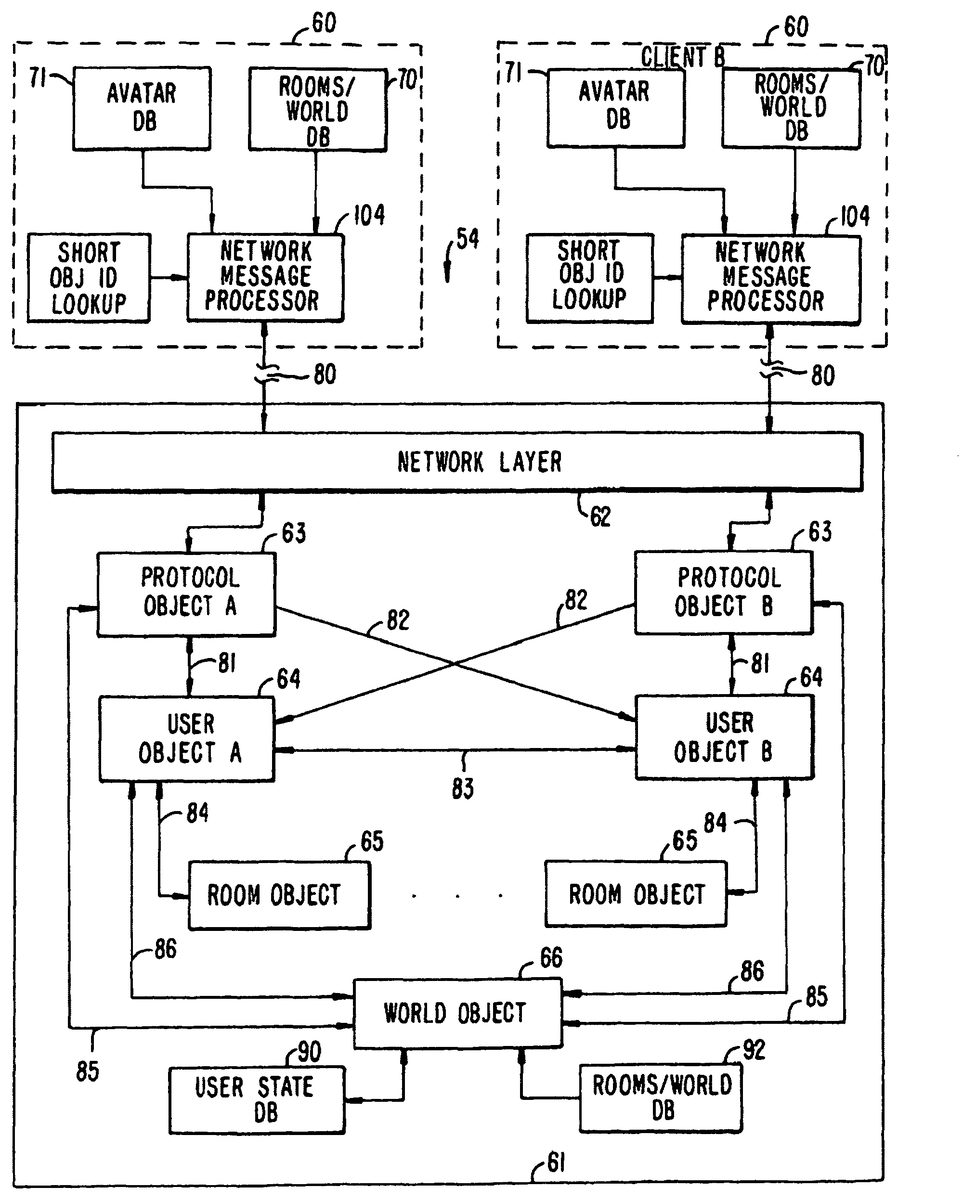
Referring now toFIG. 3, a block diagram is shown of a world system54in which a user A, at a first client system60(client A), interacts with a user B at a second client system60(client B) via a server61. Client system60includes several databases, some of which are fixed and some of which are modifiable. Client system60also includes storage for program routines. Mechanisms for storing, reading and modifying data on computers such as client system60are well known in the art, as are methods and means for executing programs and displaying graphical results thereof. One such program executed by client system60is a graphical rendering engine which generates the user's view of the virtual world.
Referring now toFIG. 4, a detailed block diagram of client60used by a user, A is shown. The other clients used by other users are similar to client60.
The various components of client60are controlled by CPU100. A network packet processor102sends and receives packets over network connection80. Incoming packets are passed to a network message processor104which routes the message, as appropriate to, a chat processor106, a custom avatar images database108, a short object ID lookup table110, or a remote avatar position table112. Outgoing packets are passed to network packet processor102by network message processor in response to messages received from chat processor106, short object ID lookup table110or a current avatar position register114.
Chat processor106receives messages which contain conversation (text and/or audio) or other data received from other users and sends out conversation or other data directed to other users. The particular outgoing conversation is provided to chat processor106by input devices116, which might include a keyboard, microphones, digital video cameras, and the like. The routing of the conversation message depends on a selection by user A. User A can select to send a text message to everyone whose client is currently on line (“broadcast”), to only those users whose avatars are “in range” of A's avatar (“talk”), or to only a specific user (“whispering”). The conversation received by chat processor106is typically received with an indication of the distribution of the conversation. For example, a text message might have a “whisper” label prepended to it. If the received conversation is audio, chat processor106routes it to an audio output device118. Audio output device118is a speaker coupled to a sound card, or the like, as is well known in the art of personal computer audio systems. If the received conversation is textual, it is routed to a rendering engine120where the text is integrated into a graphical display122. Alternatively, the text might be displayed in a region of display122distinct from a graphically rendered region.
Current avatar position register114contains the current position and orientation of A's avatar in the virtual world. This position is communicated to other clients via network message processor104. The position stored in register114is updated in response to input from input devices116. For example, a mouse movement might be interpreted as a change in the current position of A's avatar. Register114also provides the current position to rendering. engine120, to inform rendering engine120of the correct view point for rendering.
Remote avatar position table112contains the current positions of the “in range” avatars near A's avatar. Whether another avatar is in range is determined a “crowd control” function, which is needed in some cases to ensure that neither client60nor user A get overwhelmed by the crowds of avatars likely to occur in a popular virtual world.
Server61maintains a variable, N, which sets the maximum number of other avatars A will see. Client60also maintains a variable, N′, which might be less than N, which indicates the maximum number of avatars client60wants to see and/or hear. The value of N′ can be sent by client0to server61. One reason for setting N′ less than N is where client60is executed by a computer with less computing power than an average machine and tracking N avatars would make processing and rendering of the virtual world too slow. Once the number of avatars to be shown is determined, server61determines which N avatars are closest to A's avatar, based on which room of the world A's avatar is in and the coordinates of the avatars. This process is explained in further detail below. If there are less than N avatars in a room which does not have open doors or transparent walls and client60has not limited the view to less than N avatars, A will see all the avatars in the room. Those avatars are thus “neighboring” which means that client60will display them.
Generally, the limit set by server61of N avatars and the limit set by client60of N′ avatars control how many avatars A sees. If server61sets a very high value for N, then the limit set by client60is the only controlling factor. In some cases, the definition of “neighboring” might be controlled by other factors besides proximity. For example, the virtual world might have a video telephone object where A can speak with and see a remote avatar. Also, where N or more unfriendly avatars are in close proximity to A's avatar and they persist in following A's avatar, A will not be able to see or communicate with other, friendly avatars. To prevent this problem, user A might have a way to filter out avatars on other variables in addition to proximity, such as user ID.
In any case, remote avatar position table112contains an entry for each neighboring avatar. That entry indicates where the remote avatar is (its position), its orientation, a pointer to an avatar image, and possible other data about the avatar such as its user's ID and name. The position of the avatar is needed for rendering the avatar in the correct place. Where N′ is less than N, the client also uses position data to select N′ avatars from the N avatars provided by the server. The orientation is needed for rendering because the avatar images are three-dimensional and look different (in most cases) from different angles. The pointer to an avatar image is an index into a table of preselected avatar images, fixed avatar image database71, or custom avatar images database108. In a simple embodiment, each avatar image comprises M panels (where M is greater than two with eight being a suitable number) and the i-th panel is the view of the avatar at an angle of 360*i/M degrees. Custom avatar images are created by individual users and sent out over network connection80to other clients60which are neighbors of the custom avatar user.
Short object ID lookup table110is used to make communications over network connection80more efficient. Instead of fully specifying an object, such as a particular panel in a particular room of a world avatar, a message is sent from server61associating an object's full identification with a short code. These associations are stored in short object ID lookup table110. In addition to specifying avatars, the short object ID's can be used to identify other objects, such as a panel in a particular room.
Short object ID lookup table110might also store purely local associations. Although not shown inFIG. 4, it is to be understood that connections are present between elements shown and CPU100as needed to perform the operations described herein. For example, an unshown connection would exist between CPU100and short object ID lookup table110to add, modify and delete local short object ID associations. Similarly, CPU100has unshown connections to rendering engine120, current avatar position register114and the like.
Client60includes a rooms database70, which describes the rooms in the virtual world and the interconnecting passageways. A room need not be an actual room with four walls, a floor and a ceiling, but might be simply a logical open space with constraints on where a user can move his or her avatar. CPU100, or a specific motion control process, limits the motion of an avatar, notwithstanding commands from input devices116to do so, to obey the constraints indicated in rooms database70. A user may direct his or her avatar through a doorway between two rooms, and if provided in the virtual world, may teleport from one room to another.
Client60also includes an audio compressor/decompressor124and a graphics compressor/decompressor126. These allow for efficient transport of audio and graphics data over network connection80.
In operation, client60starts a virtual world session with user A selecting an avatar from fixed avatar image database71or generating a custom avatar image. In practice, custom avatar image database108might be combined with fixed avatar image database71into a modifiable avatar image database. In either case, user A selects an avatar image and a pointer to the selected image is stored in current avatar position register114. The pointer is also communicated to server61via network connection80. Client60also sends server61the current position and orientation of A's avatar, which is typically fixed during the initialization of register114to be the same position and orientation each time.
Rooms database70in a fixed virtual world is provided to the user with the software required to instantiate the client. Rooms database70specifies a list of rooms, including walls, doors and other connecting passageways. Client60uses the locations of walls and other objects to determine how A's avatar's position is constrained. Rooms database70also contains the texture maps used to texture the walls and other objects. Avatar database71specifies the bitmaps used to render various predefined avatars provided with the client system. Using rooms database70and the locations, tags and images of all the neighboring avatars, then a view of objects and other avatars in the virtual world can be rendered using the room primitives database and the avatar primitives database.
Instead of storing all the information needed for rendering each room separately, a primitives database can be incorporated as part of rooms database70. The entries in this primitives database describe how to render an object (e.g., wall, hill, tree, light, door, window, mirror, sign, floor, road). With the mirrored primitive, the world is not actually mirrored, just the avatar is. This is done by mapping the avatar to another location on the other side of the mirrored surface and making the mirror transparent. This will be particularly useful where custom avatars are created, or where interaction with the environment changes the look of the avatar (shark bites off arm, etc.).
The typical object is inactive, in that its only effect is being viewed. Some objects cause an action to occur when the user clicks on the object, while some objects just take an action when their activating condition occurs. An example of the former is the clickable objects13shown inFIG. 1which brings up a help screen. An example of the latter is the escalator object. When a user's avatar enters the escalator's zone of control, the avatar's location is changed by the escalator object automatically (like a real escalator).
The avatars in fixed avatar image database71or custom avatar images database108contain entries which are used to render the avatars. A typical entry in the database comprises N two-dimensional panels, where the i-th panel is the view of the avatar from an angle of 360*i/N degrees. Each entry includes a tag used to specify the avatar.
In rendering a view, client60requests the locations, orientations and avatar image pointers of neighboring remote avatars from server61and the server's responses are stored in remote avatar position table112. Server61might also respond with entries for short object ID lookup table110. Alternatively, the updates can be done asynchronously, with server61sending periodic updates in response to a client request or automatically without request.
Rendering engine120then reads register114, remote avatar position table112, rooms database70and avatar image databases as required, and rendering engine120renders a view of the virtual world from the view point (position and orientation) of A's avatar. As input devices116indicate motion, the contents of register114are updated and rendering engine120re-renders the view. Rendering engine120might periodically update the view, or it may only update the view upon movement of either A's avatar or remote avatars.
Chat processor106accepts chat instructions from user A via input devices116and sends conversation messages to server61for distribution to the appropriate remote clients. If chat processor106receives chat messages, it either routes them to audio output device118or to rendering engine120for display.
Input devices116supply various inputs from the user to signal motion. To make movement easier and more natural, client60performs several unique operations. One such operation is “squared forward movement” which makes it easier for the user to move straight. Unlike ordinary mouse movements, where one mouse tick forward results in an avatar movement forward one unit and one mouse tick to the left or right results in side movement of one unit, squared forward movement squares the forward/backward ticks or takes the square root of the sideways ticks or divides by the number of forward/backward ticks. For example, if the user moves the mouse F mouse ticks forward, the avatar moves F screen units forward, whereas if the user moves the mouse F mouse units forward and L mouse units to the left, the avatar moves F units forward and L/F screen units to the left. For covering non-linear distances, (F,L) mouse units (i.e., F forward, L to the side) might translate to (F2,L) screen units.
As mentioned above, user input could also be used to signal a desire for interaction with the environment (e.g. clicking on a clickable object). User input could also be used to signal for a viewpoint change (e.g. head rotation without the avatar moving, chat inputs and login/logout inputs.
In summary, client60provides an efficient way to display a virtual, graphical, three-dimensional world in which a user interacts with other users by manipulating the positions of his or her avatar and sends chat messages to other users.
Network connection80will now be further described. Commonly, network connection80is a TCP/IP network connection between client60and server61. This connection stays open as long as client60is logged in. This connection might be over a dedicated line from client60, or might be a SLIP/PPP connection as is well known in the art of network connection.
The network messages which pass over network connection80between client60and server61are described immediately below briefly, with a more detailed description in Appendix A. Three main protocols exist for messaging between client60and server61: 1) A control protocol, 2) a document protocol, and 3) a stream protocol. The control protocol is used to pass position updates and state changes back and forth between client60and server61. The control protocol works with a very low bandwidth connection.
The document protocol is used between client60and server61to download documents (text, graphics, sound, etc.) based on Uniform Resource Locators (URLs). This protocol is a subset of the well-known HTTP (Hyper-Text Transport Protocol). This protocol is used relatively sparingly, and thus bandwidth is not as much of a concern as it is with the control protocol. In the document protocol, client60sends a document request specifying the document's URL and server61returns a copy of the specified document or returns an error (the URL was malformed, the requested URL was not found, etc.).
The stream protocol is used to transfer real-time video and audio data between client60and server61. Bandwidth is not as much a concern here as it is with the control protocol.
Each room, object, and user in a virtual world is uniquely identified by a string name and/or numerical identifier. For efficient communications, string names are not passed with each message between client60and server61, but are sent once, if needed, and stored in short object ID lookup table110. Thereafter, each message referring to an object or a user need only refer to the short object ID which, for 256 or less objects, is only an 8-bit value. Rooms are identified by a unique numerical value contained in two bytes (16 bits).
The control protocol is used by client60to report the location and state information, such a “on” and “off” states for a light object or other properties, for user A to server61and is used by server61to send updates to client60for remote avatar position table112and updates of characteristics of other objects in the virtual world environment. Server61also uses the control protocol to update client61on which avatars are in range of A's avatar. To allow for piecemeal upgrading of a virtual world system, client60will not err upon receipt of a message it does not understand, but will ignore such as message, as it is likely to be a message for a later version of client60.
Each message is formed into a control packet and control packets assume a very brief form so that many packets can be communicated quickly over a narrowband channel. These control packets are not to be confused with TCP/IP or UDP packets, although a control packet might be communicated in one or more TCP/IP or UDP packets or more than one control packet might be communicated in one TCP/IP packet. The format of a control packet is shown in Table 1.
TABLE 1FIELDSIZEDESCRIPTIONPktSizeUInt8Number of bytes in the controlpacket (including Pktsize byte)ObjIDUInt8 (ShortObjID)Identifies the object to whichOstring (LongObjID)the command is directedCommandUInt8 + argumentsDescribes what to do with theobject“UInt8” is an 8-bit unsigned integer. “0string” is a byte containing zero (indicating that a long object identifier is to follow) followed, by a string (which is defined to be a byte containing the size of the string followed by the characters of the string). Each control packet contains one command or one set of combined commands. The ObjID field is one of two formats: either a ShortObjID (0 to 255) or a LongObjID (a string). The ObjID field determines which object in the client's world will handle the command. Several ShortObjID values are preassigned as shown in Table 2.
TABLE 2ShortObjIDObject0A short ObjID of 0 indicatesthat a Long ObjID follows1The Client's Avatar254CO—Combine Object255PO—Protocol Object
The other ShortObjID values are assigned by server61to represent objects in the virtual world. These assignments are communicated to client60in a control packet as explained below. The assignments are stored by client60in short object ID lookup table110. The ShortObjID references are shorthand for an object which can also be referenced by a LongObjID.
When commands are directed at the CO object (ShortObjID=254), those commands are interpreted as a set of more than one command. When commands are directed at the PO object, the command applies to the communications process itself. For example, the REGOBJIDCMD command, which registers an association between a ShortObjID and a LongObjID, is directed at the PO object. Upon receipt of this command, client60registers the association in the short object ID lookup table.
A command takes the form of a command type, which is a number between 0 and 255, followed by a string of arguments as needed by the particular command.
The CO object is the recipient of sets of commands. One use of a set of commands is to update the positions of several avatars without requiring a separate control packet for each avatar, thus further saving network bandwidth. The form of the command is exemplified by the following command to move objects 2 and 4 (objects 2 and 4 are remote avatars):S>C CO SHORTLOCCMD [2 −10 −20 −90] [4 0 0 90]
In the above control packet, “S>C” indicates the direction of the packet (from server to client), CO is the object, SHORTLOCCMD is the command type, and the command type is followed by three abbreviated commands. The above control packet requires only fifteen bytes: one for packet size (not shown), one for the CO object ID, one for the command type and twelve for the three abbreviated commands. Note that the “S>C” indicator is not part of the control packet. The position of the boundaries between commands (indicated above with brackets, which are not actually communicated) is inferred from the fact that the SHORTLOCCMD command type requires four byte-wide arguments. Each abbreviated command in a command set is the same size, for easy parsing of the commands by the CO. Examples of abbreviated commands for which a CO command is useful are the Teleport, Appear, Disappear, and ShortLocation commands. These commands, and other commands, are described in more detail in Appendix A. Appendix A also shows the one byte representation of SHORTLOCCMD as well as the one byte representations of other command types. The contents of control packets described herein are shown in a readable form, however when transmitted over network connection80, the control packets are compacted using the values shown in Appendix A.
The following examples show various uses of control packets. In the following sequences, a line beginning with “S>C” denotes a control packet sent from server61to client60, which operates user A's avatar and interacts with user A. Similarly, a line beginning with “C>S” denotes a control packet sent from client60to server61. Note that all of the lines shown below omit the packet size, which is assumed to be present at the start of the control packet, and that all of the lines are shown in readable format, not the compact, efficient format discussed above and shown in Appendix A.
The following is a control packet for associating ShortObjIDs with Long Object names:S>C PO REGOBJIDCMD “Maclen” 5Server61determines what short object ID (ShortObjID) to use for a given object. With four pre-allocated Short ObjID values, server61can set up 252 other ID values. In the above command, the object whose long name is “Maclen” is assigned the ShortObjID of 5. This association is stored by client60in short object ID lookup table110. The first two fields of the above command line, “PO” and “REGOBJIDCMD” indicate that the protocol object (PO) is to handle the command and indicate the command type (REGOBJIDCMD). The actual binary for the command is, in hexadecimal (except for the string):S>C FF 0D 06 Maclen 05
The following is a control packet containing a chat message:C>S CLIENT TEXTCMD “ ” “Kyle, How is the weather?”The ObjID field is set to CLIENT. The field following the command type (TEXCMD) is unused in a text command from client to server. Server61will indicate the proper ObjID of user A's avatar when sending this message back out to the remote clients who will receive this chat message. Thus, server61might respond to the above command by sending out the following control packet to the remote clients (assuming user A is named “Judy”):S>C CLIENT TEXTCMD “Judy” “Kyle, How is the weather?”Of course, the text “Judy” need not be sent. If a short object identifier has been registered with the client for Judy's avatar, only the ShortObjID for “Judy” need be sent. User A may also whisper a command to a single user who may or may not be in the same room, or even in the same virtual world. For example:C>S CLIENT WHISPERCMD “Kyle” “Kyle, How are you?.”Server61will route this message directly to the recipient user. On the recipient client, the control packet for the message will arrive with the ObjID of the sender (just like a TEXTCMD), however, that client will know that it is a private message because of the command type. The remote client receives the following control packet from server61:S>C CLIENT WHISPERCMD. “Judy” “Kyle, How are you?”Other examples of control packets, such as those for entering and exiting sessions and applications, are shown in Appendix B. For state and property changes, objects have two kinds of attribute variables. The first kind of attribute values are “states” which represent boolean values. The second kind of attribute values are called “properties” and may contain any kind of information. Client60reports local attribute changes to server61as needed and server61reports to client60the attribute changes which might affect client60. A different command is used for each kind of attribute, as shown in Appendix B.
From user A's point of view, avatars will appear and disappear from A's view in a number of circumstances. For example, avatars enter and leave rooms and move in and out of visual range (as handled by crowd control rules described below). Avatars also teleport from room to room, which is different than moving in and out of rooms. Client60will send server61the following location and/or room change commands under the circumstances indicated:LOCATIONCMD: normal movement of A's avatarROOMCHGCMD: changing rooms by walkingTELEPORTCMD: changing rooms and/or location by teleportingTELEPORTCMD, ExitType=0: entering the applicationTELEPORTCMD, EntryType=0: exiting the application.When other, remote clients take such actions, server61sends control packets to client60, such as:TELEPORTCMD: remote avatar teleported (EntryType or ExitType may be 0 if the exit or entry was not visible to user A)DISAPPEARACTORCMD: remote avatar was previously visible (in range), but is now invisible (out of range) due to normal (non-teleport) movement including having walked out of the roomAPPEARACTORCMD: remote avatar was not visible, and is now visible (command includes the remote avatar's Location and Room)SHORTLOCCMD or LONGLOCCMD: remote avatar was visible before, and is still now, but has moved.
Two methods exist for updating the position of an actor (avatar). The LONGLOCCMD method uses full absolute position (X, Y, and Z) and orientation. The SHORTLOCCMD only updates the X and Y coordinates and the orientation. In addition, the short method limits the change in position to plus or minus 127 in the X and/or Y coordinates and/or +/−127 in the orientation. Client60sends a LONGLOCCMD to server61to update the client's position. Whenever possible, server61uses the combined SHORTLOCCMD to update all of the visible avatars at once. If an avatar has moved too great a distance, or has moved in the Z direction, server61then uses a LONGLOCCMD for that avatar.
The following is an example of a control packet sent from client60to server61to update user A's location:C>S CLIENT LONGLOCCMD 2134 287 7199 14003In the binary (given in hex), this is:C>S 01 01 0856 011F 1C1F 36B3Note that bytes are two digits and shorts (16 bits) are four digits. They are separated by spaces here for clarity. The actual packet would contain no spaces.
The Server often uses the combined short location update command. This command concatenates several ShortLocationCommands. Rather than sending a command to each of the objects in question, a single combined command is sent to the combine object (CO). This object takes the command and applies it to a list of truncated commands. The truncated commands contain a ShortObjID reference to the object to be moved and a change in the X and Y positions and orientation. If server61wants to update the positions of objects56,42and193, it would send the following:S>C CO SHORTLOCCMD 56 −4 6 −10 42 21 3 −50 193 −3 −21 10This command can contain a variable number of subcommands. Each subcommand is of fixed length so that the CO can find the length of it from a table check or other quick lookup method. The binary form of this command is:S>C FE 04 38 FC 06 F6 2A 15 03 CD C1 FD EB 10
When user A changes rooms by walking through a door, a RoomChangeCommand control packet is sent by client60to server61to inform server61that the room change occurred.The command specifies the new room and location for user A's avatar as follows:C>S CLIENT ROOMCHNGCMD 01 25 1200 150 180
The first argument is the ObjID of the avatar that is leaving the room, the second argument is the command type (room change), and the third argument is the room that the avatar is entering. The next three arguments are the X, Y and Z positions at which to place the avatar in the room. The last argument is the direction the actor is facing (orientation). Note that the first argument is always the ObjID for the local avatar, CLIENT=1.
When user A teleports from one room to another, the is TeleportCommand is sent by client60to server61to inform server61that the teleport occurred. The method of leaving the room and entering the new one is sent to server61. This allows server61to inform other clients to display explosions or clouds, smoke or other indications of the teleportation appearance/disappearance of the avatar. The teleport command is as follows:C>S CLIENT TELEPORTCMD 01 02 02 25 1200 150 180The first argument is the ObjID of the avatar that is teleporting, the second argument is the command type (teleport), and the third argument is the room that the avatar is entering. The next two arguments are the leaving method and the entering method respectively. The next three arguments are the X, Y and Z positions at which to place the actor in the room. The last argument is the direction the actor is facing (orientation). Note that the first argument is always the ObjID for the local avatar, CLIENT=1.
Client60is responsible for implementing some sort of caching mechanism for actors. When client60receives a TeleportCommand or AppearCommand for an avatar that is appearing, it must first determine if it currently has information for the specified object cached. If not, client60can issue a request for any needed information pertaining to the object. Suppose client60receives the following command specifying that “Mitra” has arrived at room15:S>C “Mitra” TELEPORTCMD 15 3 3 0 0 0 0If client60does not have an entry cached for this object (“Mitra”), or if the entry is dated, a request may be made for pertinent information (here, the long object ID is used since client60does not have the short object Id association for this object):C>S “Mitra” PROPREQCMD VAR_BITMAPServer61will respond with a PropertyCommand as necessary to communicate the required information. An example of pertinent information above is a request for the avatar bitmap to use to represent mitra.
Crowd control is one of the tougher problems solved by the present system. Crowd control is handled using a number of commands. In a typical situation, the number of avatars in a room is too large to be handled by client60and displayed on display122. The maximum number of avatars, N, is determined by server61, but might also be determined for each client.
Server61addresses this problem by maintaining, for each user, a list of the N avatars nearest to the location of that user's avatar. This list may be managed by the server in any of a number of ways. When an avatar (B, for example) is removed from another user's (C, for example) list because avatar B can no longer be seen by C (i.e., B is no longer one of the N nearest avatars), Server61sends a DISAPPEARACTORCMD to the object for avatar B on client C. This occurs as a consequence of client B changing rooms with a ROOMCHANGECMD or TELEPORTCMD, or due to crowd control.
Client60does not necessarily delete an entry from remote avatar lookup table112or short object ID lookup table110if a remote avatar disappears, but just marks it as being non-visible. In some cases, a user can see another user's avatar, but that other user cannot see the first user's avatar. In other words, visibility is not symmetric. However, chat exchange is symmetric, i.e., a user can only talk to those who can talk to the user.
When A's avatar is to be added to user B's lists when A becomes visible to B by reason of movement, room change, crowd control, or the like, server61(more precisely the protocol object PO on server61) sends a REGOBJIDCMD control packet to the PO of B's client60and B's client60will add the association of Ads avatar with a short object ID to short object ID lookup table110. Server61also sends an APPEARACTORCMD control packet to A's client giving the room and location of B. If A's client60does not have the appropriate information cached for B, A's client60sends a PropertyRequestCommand control packet to server61asking for the properties of B, such as the bitmap to use to display B's avatar. Server61will return the requested information, which it might need to obtain from B's client60. For example, the control packet:PROPREQCMD VAR_BITMAPmight be used. Whenever possible, location updates from server61will be sent as SHORTLOCCMD control packets addressed to the remote avatar using its ShortObjId and the DisappearActorCommands, AppearActorCommands, and TeleportCommands used to update client60on the status of visible remote avatars will be combined as described for the ShortLocationCommands.
The server61shown inFIG. 3will now be described. Server61comprises generally a network layer62, protocol objects63, user objects64, room objects65. In an object oriented software embodiment of the invention, each of these objects and layers are implemented as objects with their specific methods, data structures and interfaces. Where server61is implemented on a hardware running the Unix operating system, these objects might be objects in a single process or multiple processes. Where server61is implemented on hardware running the Windows(tm) operating system alone or in combination with the MS-DOS operating system or the like, the layers and objects might be implemented as OLE (Object Linking and Embedding) objects.
One protocol object63and one user object64are instantiated for each user who logs into server61. Network layers62accepts TCP/IP connections from clients60. A socket is opened and command buffers are allocated for each client60. Network layer62is responsible for instantiating a protocol object63for each TCP/IP socket established. This layer handles the sending and receiving of packets, such as control packets, document packets and stream packets, over the network. All sockets are examined by server61on a periodic basis; completed control packets received from a client60are processed by server61, and outgoing control packets to a client60which are pending are sent.
Protocol object63handles translation of internal messages to and from the cryptic and compressed form of the control packets which are sent over network connection80, as explained in Appendices A and B. Protocol object63handles all session initialization and authentication for its client60, and is responsible for instantiating a user object64for authenticated users.
User object64tracks the location of its user's avatar, which includes at least the room in which the user is located, the user's coordinates in the room and the user's orientation in that room. User object64also maintains a list of the N nearest neighboring remote avatars (i.e., avatars other than the avatar for the user object's client/user) in the room. This list is used to notify the user object's client60regarding changes in the N closest remote avatars and their locations in the room. The list is also used in disseminating text typed by the user to only those users nearest him or her in the room. This process of notifying client60of only the N nearest neighbors is handled as part of crowd control.
One room object65is instantiated for each room in rooms database70and the instantiation is done when server61is initialized. Alternatively, room objects can be instantiated as they are needed. As explained above, the term “room” is not limited to a visualization of a typical room, but covers any region of the virtual world which could be grouped together, such as the underwater portion of a lake, a valley, or a collection of streets. The room object for a specific room maintains a list of the users currently located in that room. Room object65periodically analyzes the positions of all users in the room using a cell-based algorithm, and sends a message to each user object64corresponding to those users in the room, where the message notifies the user object of its user's N nearest neighbors.
Periodically, the locations of the users in each room are examined and a square two-dimensional bounding box is placed around the users' current locations in the room. This square bounding box is then subdivided into a set of square cells. Each user is placed in exactly one square. Then, for each user, the cells are scanned in an outwardly expanding wave beginning with the cell containing the current user of interest, until at least N neighbors of that user are found. If more than N are found, the list of neighbors is sorted, and the closest N are taken.
One or more world object66may be instantiated at the time server61is started. The world object maintains a list of all the users currently in the world and communicates with their user objects64. The world object also maintains a list of all the rooms in the world and communicates with the room objects65for those rooms. The world object periodically initiates the analysis of user positions in each room and subsequent updating of avatar information to clients (60). In addition, the world object periodically initiates the collection of statistics on usage (for billing, study of which rooms are most popular, security logs, etc.) which are logged to a file.
Server61also has a rooms/world database92which is similar to the rooms/world database70in client60. Server61does not need the primitives databases because there is no display needed at the server. Server61does, however, include a user state database90, which maintains state information on each user, such as address, log-in time, accounting information, etc.
Several interconnections are shown inFIG. 3. Path81between a protocol object63and a user object64carries messages between a client60and the user object64representing that client (before or after having been translated by a protocol object63). Typical messages from the client to the user object include:Move my avatar to (x, y, z, orientation)Send a text message to all neighboring remote avatars
Typical messages from the user object to the client are:User X teleported into your view at (x, y, z, orient.)User Z has just left your viewUser W has moved to (x, y, z, orientation)Here is text from user YHere is private text (whispered) from user A
The path82between a client60and a user object64other than its own user object64is used to send whispers from user to user. Path83is used for internal messages sent directly between user objects64. Messages taking this path typically go from a given user to those users who are among its N nearest neighbors. Typical messages include:Here is text I have typedI have just teleported to a given room and locationI have changed my state (logged in, logged out, etc.)I have changed one or more of my properties
Path84is used for messages between a user object64and a room object65. User objects64communicate their location to the room65they are currently in. Periodically, the room object will notify the user object of the identities and locations of the users' N nearest neighbors. Messages from the user object to the room include:I have just teleported either into or out of this roomI have just entered this roomI have just left this roomMy new location in this room is (x, y, z, orientation)
The only message that passes from the room object to a user object is the one that notifies the user of its N nearest neighbors. Path85is used for communications between protocol objects and world object66. Protocol object63can query world object66regarding the memory address (or functional call handle) of the user object64representing a given user in the system. This is the method that is used to send a whisper message directly from the protocol object to the recipient user object. Path86is used for communications between user object64and world object66to query the world object regarding the memory address or function call handle of the room object65representing a given room in the world. This is required when a user is changing rooms.FIG. 5is an illustration of the penguin avatar rotated to various angles.
The above description is illustrative and not restrictive. Many variations of the invention will become apparent to those of skill in the art upon review of this disclosure. The scope of the invention should, therefore, be determined not with reference to the above description, but instead should be determined with reference to the appended claims along with their full scope of equivalents.
APPENDIX AClient/Server Control Protocol Commands (in BNF)Valid CommandTypes are integers between 0 and 255. Several ofthese are shown below as part of the BNF (Backus-Nauer Format)description of the command structures. Per convention, words startingwith uppercase characters are non-terminals while those in quotes or inlowercase are terminal literals.Basicsa | b= Either a or b.“abc”= The exact string of characters a, b and c in the order shown.a+= One or more occurrences of a.a*= Zero or more occurrences of a.10= A number 10. In the ASCII protocol, this is the ASCIIstring “10”, in the binary, form, it is a byte with a value of10.N..M= A numerical range from N to M.Equivalent to: N | N+1 | N+2 | ... | M−1 | MCommand StructuresPacket= PktSize MessagePktSize= UInt8 (size includes PktSize field)Message= ObjID CommandObjID= LongObjID | ShortObjIDLongObjID= 0StringShortObjID= UInt8Command= CommandType CommandDataCommandType= UInt8[Other commands might be added to these:]Command= LongLocationCommand| ShortLocationCommand| StateCommand| PropertyCommand| PropertyRequestCommand| CombinedCommand| RoomChangeCommand| SessionInitCommand| SessionExitCommand| ApplicationInitCommand| ApplicationExitCommand| DisappearActorCommand| AppearActorCommand| RegisterObjIdCommand| TeleportCommand| TextCommand| ObjectInfoCommand| LaunchAppCommand| UnknownCommand| WhisperCommand| StateRequestCommandTeleportCommand= TELEPORTCMD NewRoom ExitTypeLocationEntryTypeRoomChangeCommand= ROOMCHNGCMD NewRoom LocationLongLocationCommand= LONGLOCCMD LocationDisappearActorCommand= DISAPPEARACTORCMDAppearActorCommand= APPEARACTORCMD NewRoomLocationLocation= X Y Z DirectionX, Y, Z, Direction= SInt16StateCommand= STATECMD SetFlags ClearFlagsSetFlags, ClearFlags= UInt32PropertyCommand= PROPCMD Property+PropertyRequestCommand= PROPREQCMD VariableID*StateRequestCommand= STATEREQCMDProperty= VariableID VariableValueVariableID= ShortVariableId | LongVariableIdShortVariableId= UInt8LongVariableId= 0StringVariableValue= StringShortLocationCommand= SHORTLOCCMD DeltaX DeltaYDeltaODeltaX, DeltaY= SByteDeltaO= SByte (plus 128 to −128 degrees)CombinedCommand= CombinedLocationCommand| CombinedAppearCommand| CombinedTeleportCommand| CombinedDisappearCommand| UnknownCombinedCommandCombinedLocationCommand= SHORTLOCCMDAbbrevLocCommand+AbbrevLocCommand= ShortObjID DeltaX DeltaY DeltaOCombinedAppearCommand= APPEARACTORCMDAbbrevAppearCommand+AbbrevAppearCommand= ShortObjID NewRoom LocationCombinedDisappearCommand= DISAPPEARACTORCMDAbbrevDisappearCommand+AbbrevDisappearCommand= ShortObjIDCombinedTeleportCommand= TELEPORTCMDAbbrevTeleportCommand+AbbrevTeleportCommand= ShortObjID NewRoom ExitTypeEntryType Location[for now:]UnknownCombinedCommand= 0..3, 5..10, 13..17, 19..255NewRoom= UInt16ExitType, EntryType= UInt8SessionInitCommand= SESSIONINITCMD Property+SessionExitCommand= SESSIONEXITCMD Property+ApplicationInitCommand= APPINITCMD Property+ApplicationExitCommand= APPEXITCMD Property+RegisterObjIdCommand= REGOBJIDCMD String ShortObjIDTextCommand= TEXTCMD ObjID StringWhisperCommand= WHISPERCMD ObjID StringLaunchAppCommand= LAUNCHAPPCMD String[for now:]UnknownCommand= 0, 15, 20..255String= StringSize Char*StringSize= UInt8 (size of string EXCLUDINGStringSize field)Char= C datatype charUInt32= 0..4294967299 (32-bit unsigned)SInt32= −2147483650..2147483649(32-bit signed value)UInt16= 0..65535 (16-bit unsigned value)SInt16= −32768..32767 (16-bit signed value)UInt8= 0..255 (8-bit unsigned value)SByte= −128..127 (8-bit signed value)LONGLOCCMD= 1STATECMD= 2PROPCMD= 3SHORTLOCCMD= 4ROOMCHNGCMD= 5SESSIONINITCMD= 6SESSIONEXITCMD= 7APPINITCMD= 8APPEXITCMD= 9PROPREQCMD= 10DISAPPEARACTORCMD= 11APPEARACTORCMD= 12REGOBJIDCMD= 13TEXTCMD= 14LAUNCHAPPCMD= 16WHISPERCMD= 17TELEPORTCMD= 18STATEREQCMD= 19CLIENT= 1CO= 254PO= 255
APPENDIX BAdditional Control packet ExamplesB.1. State and Property ChangesState changes change a string of boolean values. Either theClient or the Server can send these. Each object can have up to 32different state values. These are represented as bits in a bit string.If the Client wants to set bit 3 of the state variable of an object, 137,it sends the following:C>S 137 STATECMD 4 0In binary (given as hexadecimal) this is:C>S 89 02 00000004 00000000Properties take more possible values than states. Similar tostate variables, properties are referenced in order. Variables may berepresented as a predefined ID (counting from 1) or by an arbitrarystring.Assuming that the Client has changed its local copy of avariable (with the tag 6) in object 23. It would send a command to theServer as follows:C>S 23 PROPCMD 6 “a new value”The variable ID is a predefined shorthand name for a variablename. These names are predefined and hardcoded into the Client. Theygenerally can't be changed without changing the Client executable. An oldClient that sees a variable ID it does not know must ignore the command.Some variables will always be defined, “bitmap” for example.These are defined in a fixed manner at the Client level. The Client willsimply send these variable IDs to the Server which will transparently passthem on to other Clients.The currently defined variable IDs are:VAR_APPNAME= 1 // Name of Application to runVAR_USERNAME= 2 // User's id.VAR_PROTOCOL= 3 // Version of protocol used by client (int)VAR_ERROR= 4 // Used in error returns to give error typeVAR_BITMAP= 5 // Filename of BitmapVAR_PASSWORD= 6 // User's passwordVAR_ACTORS= 7 // Suggested # of actors to show client (N)VAR_UPDATETIME= 8 // Suggested update interval (* 1/10 sec.)VAR_CLIENT= 9 // Version of the client software (int)The client can request the values for one or more properties with thePROPREQCMD:C>S “Fred” PROPREQCMD VAR_BITMAPS>C “Fred” PROPCMD VAR_BITMAP “skull.bmp”A PROPREQCMD with no parameters will result in a PROPCMD beingreturned containing all the properties of the object the request was sent to.If a PROPREQCMD is made with a request for a property that doesn't exist,an empty PROPCMD will be returned.A STATEREQCMD requests the Server to respond with the current state.B.2. Beginning and Exiting SessionsTo begin a session, the Client requests a connection from the Server.After the connection has been established, the Client sends aSessionInitCommand.The SeasionInitCommand should contain the User's textual name(preferably, this textual name is unique across all applications) and theversion of the protocol to be used. For example, the User named “Bo” hasestablished a connection and would now like to initiate a session.C>S CLIENT SESSIONINITCMD VAR_USERNAME “Bo”VAR_PROTOCOL “11”Currently defined variables for the SessionInitCmd are:VAR_USERNAMEThe account name of the userVAR_PASSWORDUser password (preferably a plain text string)VAR_PROTOCOLThe protocol version (int)VAR_CLIENT Version of the client software being used (int)Note that the protocol defines the value as a string, but the (int)comment is a constraint on the values that may be in the string.The Server will send an ack/nak indicating the success of the request. Anack will take the form:S>C CLIENT SESSIONINITCMD VAR_ERROR 0A nak will take the form:S>C CLIENT SESSIONINITCMD VAR_ERROR 1where the value of VAR_ERROR indicates the nature of the problem.Currently defined naks include:* ACK0It's OK* NAK_BAD_USER1User name already in use* NAK_MAX_ORDINARY2Too many ordinary users* NAK_MAX_PRIORITY3Too many priority users* NAK_BAD_WORLD4World doesn't exist* NAK_FATAL5Fatal error (e.g. can't instantiateuser)* NAK_BAD_PROTOCOL6Client running old or wrong protocol* NAK_BAD_CLIENTSW7Client running old, or wrong version* NAK_BAD_PASSWD8Wrong password for this user* NAK_CALL_BILLING9Access denied, call billing* NAK_TRY_SERVER10Try different serverB.3. Beginning and Exiting ApplicationTo begin an application, the Client must have alreadyestablished a session via the SessionInitcommand. To begin anapplication, the Client sends an ApplicationInitCommand specifying thedesired application:C>S CLIENT APPINITCMD VAR_APPNAME “StarBright”The Server will respond with an ack/nak to this command using the sametechnique discussed under session initialization.B.4. Launching an Outside ApplicationThe Server may tell the Client to launch an outsideapplication by sending the LaunchAppCommand to the Protocol Object. Forexample:S>C PO LAUNCHAPPCMD “Proshare”
Claims
- A method for displaying interactions of a local user avatar of a local user and a plurality of remote user avatars of remote users interacting in a virtual environment, the method comprising: receiving, at a client processor associated with the local user, positions associated with less than all of the remote user avatars in one or more interaction rooms of the virtual environment, wherein the client processor does not receive position information associated with at least some of the remote user avatars in the one or more rooms of the virtual environment, each avatar of the at least some of the remote user avatars failing to satisfy a condition imposed on displaying remote avatars to the local user;generating, on a graphic display associated with the client processor, a rendering showing position of at least one remote user avatar;and switching between a rendering on the graphic display that shows at least a portion of the virtual environment to the local user from a perspective of one of the remote user avatars and a rendering that allows the local user to view the local user avatar in the virtual environment.
- A system for displaying interactions in a virtual world among a local user avatar of a local user and a plurality of remote user avatars of remote users, comprising: a database storing information associated with one or more avatars, each user being associated with a three dimensional avatar;a memory storing instructions;and a first processor programmed using the instructions to: receive position information associated with less than all of the remote user avatars in one or more interaction rooms of the virtual world, wherein the processor does not receive position information associated with at least some of the remote user avatars in the virtual world, each avatar of the at least some of the remote user avatars failing to satisfy a condition, receive orientation information associated with less than all of the remote user avatars, wherein the processor does not receive orientation information associated with at least some of the remote user avatars in the virtual world, generate on a graphic display a rendering showing the position and orientation of at least one remote user avatar, and switch between a rendering on the graphic display that shows the virtual world to the local user from a third user perspective and a rendering that allows the local user to view the local user avatar in the virtual world.
- The system according to claim 2 , wherein the local user is associated with a custom avatar created based on input from the local user.
- The system according to claim 2 , wherein the local user is associated with an avatar selected from a fixed avatar image database.
- The system according to claim 2 , wherein the orientation information is further associated with a plurality of views of an avatar at different angles.
- The system according to claim 5 , wherein the plurality of views comprises a plurality of image panels.
- The system according to claim 2 , further comprising an audio processor coupled to the first processor for generating and routing messages associated with audio signals received from a remote user to an audio device.
- The system according to claim 2 , further comprising a primitives database storing information describing how to render an object.
- The system according to claim 2 , wherein the first processor is further programmed to receive input from the local user associated with movement of the local user avatar and determine the movement of the local user avatar relative to objects in the virtual world based on a non-linear model.
- The system according to claim 9 , wherein the non-linear model comprises model based on squared forward movement.
- The system according to claim 2 , wherein the first processor is further programmed to limit the number of remote user avatars shown on the graphic display based on the proximity of the remote user avatars relative to the local user avatar.
- The system according to claim 2 , wherein the first processor is further programmed to limit the number of remote user avatars shown on the graphic display based on the orientation of the remote user avatars relative to the local user avatar.
- The system according to claim 2 , wherein the first processor is further programmed to limit the number of remote user avatars shown on the graphic display based on computing resources available to the local user graphic display.
- The system according to claim 2 , wherein the first processor is further programmed to limit the number of remote user avatars shown on the graphic display based on a selection made by the local user.
- The system according to claim 14 , wherein the selection is independent of the relative position of the local avatar and the remote user avatars not shown on the graphic display.
- The system according to claim 2 , further comprising a rooms database containing information describing a plurality of rooms associated with the virtual world.
- The system according to claim 16 , wherein the first processor is further programmed to allow an avatar to teleport between the rooms associated with the virtual world.
- A system for displaying interactions in a virtual world among a local user and a plurality of remote users, comprising: a database storing information associated with one or more avatars, each user being associated with a three dimensional avatar;a memory storing instructions;and a processor programmed using the instructions to: receive position information associated with less than all of the remote user avatars in one or more interaction rooms of the virtual world, wherein the processor does not receive position information associated with at least some of the remote user avatars in the virtual world, each avatar of the at least some of the remote user avatars failing to satisfy a condition, receive orientation information associated with less than all of the remote user avatars, wherein the processor does not receive orientation information associated with at least some of the remote user avatars in the virtual world, generate on a graphic display a rendering of a perspective view of the virtual world in three dimensions which includes three dimensional renderings of the less than all of the remote user avatars based on the received orientation and position information, and change in three dimensions the perspective view of the rendering on the graphic display of the virtual world in response to user input.
- A system for displaying interactions in a virtual world among a local user and a plurality of remote users, the system comprising: a database storing information associated with one or more avatars, each user being associated with a three dimensional avatar;a memory storing instructions;and a processor programmed using the instructions to: receive position information associated with less than all of the remote user avatars in one or more rooms of the virtual world where user interactions take place, wherein the processor does not receive position information associated with at least some of the remote user avatars in the virtual world, receive orientation information associated with less than all of the remote user avatars in the one or more rooms of the virtual world where user interactions take place, wherein the processor does not receive orientation information associated with at least some of the remote user avatars in the virtual world, generate on a graphic display a rendering showing the position and orientation of at least one remote user avatar, and switch between a rendering in which all of a perspective view of a local user avatar of the local user is displayed and a rendering in which less than all of the perspective view is displayed.
- The method according to claim 1 , further comprising: displaying the plurality of avatars on a display device associated with the client processor.
- The method according to claim 20 , wherein the packet is a TCP/IP packet or a UDP packet.
Disclaimer: Data collected from the USPTO and may be malformed, incomplete, and/or otherwise inaccurate.