U.S. Pat. No. 8,029,367
AUTOMATIC DELIVERY OF GAME CONTENT TO A GAME CONSOLE
AssigneeMicrosoft Corporation
Issue DateJanuary 15, 2007
Illustrative Figure
Abstract
Automatic downloading of game content to a game console is provided. A user enables automatic downloading, and thereafter, game content available from a game server is periodically checked to determine if any content matches criteria specified for downloading. If a match is found, and the user has not previously downloaded the content, or a previous version of the content, then the game content is added to a download queue. The content specified in the download queue is transferred to the game console.
Description
DETAILED DESCRIPTION FIG. 1illustrates an example of a gaming and media system100that may be part of an environment in which embodiments can be implemented. System100is but one example of a suitable computing system and is not intended to suggest any limitation as to the scope of use or functionality of the claimed subject matter. Neither should system100be interpreted as having any dependency or requirement relating to any one or combination of illustrated components. Gaming and media system100includes a game and media console (hereinafter simply “console” or “game console”)102. Console102is configured to accommodate one or more wireless controllers, as represented by controllers104(1) and104(2). Further, console102is equipped with an internal hard disk drive (not shown), and a portable media drive106that supports various forms of portable storage media, as represented by optical storage disc108. Examples of suitable portable storage media include DVD, CD-ROM, game discs, and so forth. Console102also includes two memory unit card receptacles125(1) and125(2), for receiving removable flash-type memory units140. A command button135on console102enables and disables wireless peripheral support. As depicted inFIG. 1, console102also includes an optical port130for communicating wirelessly with one or more devices and two Universal Serial Bus (USB) ports110(1) and110(2) to support a wired connection for additional controllers, or other peripherals. In some implementations, the number-and arrangement of additional ports may be modified. A power button112and an eject button114are also positioned on the front face of game console102. Power button112is selected to apply power to the game console, and can also provide access to other features and controls. An eject button114alternately opens and closes the tray of portable media drive106to enable insertion and extraction of a storage disc108. Console102connects to a television or other display via A/V interfacing cables120. In one implementation, console102is equipped with a dedicated A/V port (not shown) configured for content-secured digital communication using A/V ...
DETAILED DESCRIPTION
FIG. 1illustrates an example of a gaming and media system100that may be part of an environment in which embodiments can be implemented. System100is but one example of a suitable computing system and is not intended to suggest any limitation as to the scope of use or functionality of the claimed subject matter. Neither should system100be interpreted as having any dependency or requirement relating to any one or combination of illustrated components.
Gaming and media system100includes a game and media console (hereinafter simply “console” or “game console”)102. Console102is configured to accommodate one or more wireless controllers, as represented by controllers104(1) and104(2). Further, console102is equipped with an internal hard disk drive (not shown), and a portable media drive106that supports various forms of portable storage media, as represented by optical storage disc108. Examples of suitable portable storage media include DVD, CD-ROM, game discs, and so forth. Console102also includes two memory unit card receptacles125(1) and125(2), for receiving removable flash-type memory units140. A command button135on console102enables and disables wireless peripheral support.
As depicted inFIG. 1, console102also includes an optical port130for communicating wirelessly with one or more devices and two Universal Serial Bus (USB) ports110(1) and110(2) to support a wired connection for additional controllers, or other peripherals. In some implementations, the number-and arrangement of additional ports may be modified. A power button112and an eject button114are also positioned on the front face of game console102. Power button112is selected to apply power to the game console, and can also provide access to other features and controls. An eject button114alternately opens and closes the tray of portable media drive106to enable insertion and extraction of a storage disc108.
Console102connects to a television or other display via A/V interfacing cables120. In one implementation, console102is equipped with a dedicated A/V port (not shown) configured for content-secured digital communication using A/V cables120(e.g., A/V cables suitable for coupling to a High Definition Multimedia Interface “HDMI” port on a high definition monitor150or other display device). A power cable122provides power to the game console. Console102may be further configured with broadband capabilities, as represented by a cable or modem connector124to facilitate access to a network, such as the Internet.
Each controller104is coupled to console102via a wired or wireless interface. In the illustrated implementation, the controllers are USB-compatible and are coupled to console102via a wireless interface or USB port110. Console102may be equipped with any of a wide variety of user interaction mechanisms. In the example illustrated inFIG. 1, each controller104is equipped with two thumbsticks132(1) and132(2), a D-pad134, buttons136, and two triggers138. These controllers are merely representative, and other known gaming controllers may be substituted for, or added to, those shown inFIG. 1.
Gaming and media system100is generally configured for interacting with games and other digital content stored on a memory medium (internal and/or portable), shopping for and purchasing products such as electronic media including game and game component downloads, and reproducing pre-recorded music and videos, from both electronic and hard media sources. With the different storage offerings, titles can be played from the hard disk drive, from optical disk media (e.g.,108), from an online source, or from a memory unit140connected to one of the receptacles125. A sample, certainly not by limitation, of some of the types of media that gaming and media system100is capable of playing include 1) game titles played from CD and DVD discs, from the hard disk drive, or from an online source; 2) Digital music played from a CD in portable media drive106, from a file on the hard disk drive, or from online streaming sources; and 3) Digital audio/video played from a DVD disc in portable media drive106, from a file on the hard disk drive, or from online streaming sources.
FIG. 2is a functional block diagram of gaming and media system100and shows functional components in more detail. Console102has a central processing unit (CPU)200, and a memory controller202that facilitates processor access to various types of memory, including a flash Read Only Memory (ROM)204, a Random Access Memory (RAM)206, a hard disk drive208, and portable media drive106. In one implementation, CPU200includes a level 1 cache210, and a level 2 cache212to temporarily store data and hence reduce the number of memory access cycles made to the hard drive, thereby improving processing speed and throughput.
CPU200, memory controller202, and various memory devices are interconnected via one or more buses (not shown). The details of the bus that is used in this implementation are not particularly relevant to understanding the subject matter of interest being discussed herein. However, it will be understood that such a bus might include one or more of serial and parallel buses, a memory bus, a peripheral bus, and a processor or local bus, using any of a variety of bus architectures. By way of example, such architectures can include an Industry Standard Architecture (ISA) bus, a Micro Channel Architecture (MCA) bus, an Enhanced ISA (EISA) bus, a Video Electronics Standards Association (VESA) local bus, and a Peripheral Component Interconnects (PCI) bus also known as a Mezzanine bus.
In one implementation, CPU200, memory controller202, ROM204, and RAM206are integrated onto a common module214. In this implementation, ROM204is configured as a flash ROM that is connected to memory controller202via a Peripheral Component Interconnect (PCI) bus and a ROM bus (neither of which are shown). RAM206is configured as multiple Double Data Rate Synchronous Dynamic RAM (DDR SDRAM) modules that are independently controlled by memory controller202via separate buses (not shown). Hard disk drive208and portable media drive106are shown connected to the memory controller via the PCI bus and an AT Attachment (ATA) bus216. However, in other implementations, dedicated data bus structures of different types can also be applied in the alternative.
A three-dimensional graphics processing unit220and a video encoder222form a video processing pipeline for high speed and high resolution (e.g., High Definition) graphics processing. Data are carried from graphics processing unit220to video encoder222via a digital video bus (not shown). An audio processing unit224and an audio codec (coder/decoder)226form a corresponding audio processing pipeline for multi-channel audio processing of various digital audio formats. Audio data are carried between audio processing unit224and audio codec226via a communication link (not shown). The video and audio processing pipelines output data to an A/V (audio/video) port228for transmission to a television or other display. In the illustrated implementation, video and audio processing components220-228are mounted on module214.
FIG. 2shows module214including a USB host controller230and a network interface232. USB host controller230is shown in communication with CPU200and memory controller202via a bus (e.g., PCI bus) and serves as host for peripheral controllers104. Network interface232provides access to a network (e.g., Internet, home network, etc.) and may be any of a wide variety of various wire or wireless interface components including an Ethernet card or interface module, a modem, a Bluetooth module, a cable modem, and the like.
In the implementation depicted inFIG. 2, console102includes a controller support subassembly240, for supporting four controllers104(1)-104(4). The controller support subassembly240includes any hardware and software components needed to support wired and/or wireless operation with an external control device, such as for example, a media and game controller. A front panel I/O subassembly242supports the multiple functionalities of power button112, the eject button114, as well as any LEDs (light emitting diodes) or other indicators exposed on the outer surface of console102. Subassemblies240and242are in communication with module214via one or more cable assemblies244. In other implementations, console102can include additional controller subassemblies. The illustrated implementation also shows an optical I/O interface235that is configured to send and receive signals that can be communicated to module214.
Memory units (MUs)140(1) and140(2) are illustrated as being connectable to MU ports “A”130(1) and “B”130(2), respectively. Each MU140offers additional storage on which games, game parameters, and other data may be stored. In some implementations, the other data can include one or more of a digital game component, an executable gaming application, an instruction set for expanding a gaming application, and a media file. When inserted into console102, MU140can be accessed by memory controller202.
A system power supply module250provides power to the components of gaming system100. A fan252cools the circuitry within console102.
An application260comprising machine instructions is stored on hard disk drive208. When console102is powered on, various portions of application260are loaded into RAM206, and/or caches210and212, for execution on CPU200. In general, application260can include one or more program modules for performing various display functions, such as controlling dialog screens for presentation on a display (e.g., high definition monitor150), controlling transactions based on user inputs and controlling data transmission and reception between the console100and externally connected devices.
Gaming system100may be operated as a standalone system by simply connecting the system to high definition monitor150(FIG. 1), a television, a video projector, or other display device. In this standalone mode, gaming system100enables one or more players to play games, or enjoy digital media, e.g., by watching movies, or listening to music. However, with the integration of broadband connectivity made available through network interface232, gaming system100may further be operated as a participating component in a larger network gaming community or system.
FIG. 3provides a block diagram of multiple consoles300and302networked with one or more servers304through a network connection306. In one embodiment, network connection306comprises the Internet. Servers304provide a collection of services that applications running on console300may invoke and utilize. For example, consoles300and302may invoke user login services308which are used to authenticate users on consoles300and302by obtaining a Gamer Tag and a password from each user. User login services308access user records312in a database322, which may be located on the same server as user login services308or may be distributed on a different server or a collection of different servers. User records312include the Gamer Tag and password that allow a user to be authenticated by user login services308. User records312also include additional information about the user including games that have been downloaded by the user, and licensing packages that have been issued for those downloaded games, including the permissions associated with each licensing package. In addition, user records312can include financial information about the user including a credit card number associated with the user account and an account balance stored for the user in terms of points instead of dollars to allow for micro-payments. For example, $20 may purchase 1600 points. These points may be purchased through the credit card or redeeming gift cards through consoles300and302. The points may be redeemed to purchase one or more games310stored on database322through a download purchase service316. In addition to full games310, points may be redeemed to purchase content for games previously downloaded to a console300,302. This content can include additional levels, maps, characters, equipment and other items that may be used to expand play on a game on consoles300,302.
When a game or content is purchased, a licensing service318is used to generate licensing packets that provide permissions allowing the game or content to be played on the console. Under one embodiment, licensing service318generates a user license package and a machine license package with each download. The user license package allows a user logged into servers304to use the content or game regardless of the console that the user is playing on. The machine license allows any user on the console the content or game is downloaded to, to use the game or content. In several embodiments, licensing service318includes cryptography elements that allow it to encrypt the licensing packages to prevent access to the licensing package except by the console that the licensing package is downloaded to, which uses a key to decrypt the licensing package and except permissions for the user and the console based on the licensing packages. Typically, the licensing package forms part of the downloaded content or game so that when the content or game is copied onto a memory unit such as memory unit320the licensing package accompanies the gaming content. Portable memory unit320may be moved between console300and302so that content stored on memory unit320from console300may be read by console302.
FIG. 4provides an example of a games blade user interface that is illustratively presented to a user of a console as described. InFIG. 4, games blade400is shown to contain a title402, a gamer card404, a banner area406, a banner area408and a menu listing410consisting of achievements412, played games414, arcade games416, demos418and trailers420. Elements in listing410may be highlighted using an associated game controller. When an element is highlighted, icons and text relative to the highlighted element appear in area422. For example, inFIG. 4, the achievements element412is highlighted resulting in icons being displayed in area422that represent different games and the achievements that the user has acquired for those games.
Gamer card404includes information about the current user. This information includes the current user's Gamer tag424, their reputation426, their Gamerscore428and their preferred zone of play430.
The user interface ofFIG. 4also provides tabs432,434and436, which can be used to bring up an XBOX LIVE® blade, a media blade and a system blade, respectively. The XBOX LIVE® blade432is an interface dedicated primarily to enabling access to network-based system resources. The media blade434allows the user to interact with different forms of media that may be attached to the console or stored on the hard disc drive of the console. System tab436allows the user to bring up a system blade that provides options for the console.
From games blade400, the user can open an arcade page by selecting arcade element416in list410. An example of the arcade page is shown onFIG. 5. InFIG. 5, the arcade page500is shown on the games blade and includes a banner area502, a “my arcade games” menu item504, a download games menu item506, a recent game menu item508, and an automatic downloads menu item510. The menu items504,506,508and510may be highlighted using the game controller. When a menu item is highlighted, a description of the item is shown in description area512. Banner502can contain advertisements for games that can be downloaded, including free demos of games as is indicated inFIG. 5where the game “Car Hop” is advertised for download. Area512may also contain advertisements in certain states.
Menu item504, when selected, brings up a “My Arcade Games” page, which lists the trial version games and full version games that the user has downloaded to their machine. When menu item506is selected, a page of arcade games that can be downloaded to the user's machine is presented to the user. Thus, the user is provided with access to multiple separate menu items, one that allows the user to see all of the games that have already been downloaded to their machine, and the other providing a list of games that the user can download to their machine. It should be noted that, in one embodiment, the arcade page ofFIG. 5is not stored on an optical disc, but instead is stored in the flash memory of the gaming console. As a result, the user does not have to enter a disc in order to see the games stored on their machine or to view games that they could download to their machine.
As has been alluded to, a user can illustratively try a game on a limited basis. Subsequently, if desired, the user can purchase access to the game with the limitation or limitations removed. The trial is likely to be either free or available for a price less than the price of the version without the limitations. Traditionally, users have been required to periodically check for new game content (either trial or otherwise) that they have not downloaded. However, as indicated inFIG. 5, embodiments described herein generally allow a user to selectively engage automatic downloading of content to the game console.FIG. 5depicts menu item510showing the automatic downloads feature currently set to the “off” setting. As a user highlights menu item510, additional information regarding automatic downloads is presented to the user in banner area512. Upon selecting menu item510, the user is presented with a new blade interface relative to the automatic downloads feature.
FIG. 6provides an example of an automatic downloads blade user interface that is illustratively presented to a user of a console as described. Blade600is relatively simple in that it only provides user interface elements602,604corresponding, respectively, to automatic downloads settings of “on” and “off.” In such embodiment, setting automatic downloads to on will cause console102to periodically, or in response to a message from server(s)304, check to see if any new games are available on server(s)304that have not been previously downloaded by the user. If such games exist, they are added to a download queue. Console102downloads content specified in the download queue automatically. Such automatic downloading preferably occurs as a background operation for console102. Thus, a user can still play other games, or otherwise utilize console102, even as new content is being automatically downloaded.
FIG. 7provides an example of an alternate automatic downloads blade user interface that is illustratively presented to a user of a console as described. Blade interface700not only allows a user to change the setting of automatic downloads between on (702) and off (704) states, but also provides the user with the ability to customize download behavior. For example, the user can select specify particular aspects of each game for which he/she would like to obtain an automatic download. For example, a user can select user interface elements706or708corresponding, respectively, to parameters “Free” and “Trial.” Additionally, certain genres of games, such as Action, Role-playing, et cetera can be selected by selection of user interface elements710,712, and714. In essence, any suitable game parameters can be presented to a user, who may then select which criteria should be satisfied before game content is automatically downloaded to the user's console(s).
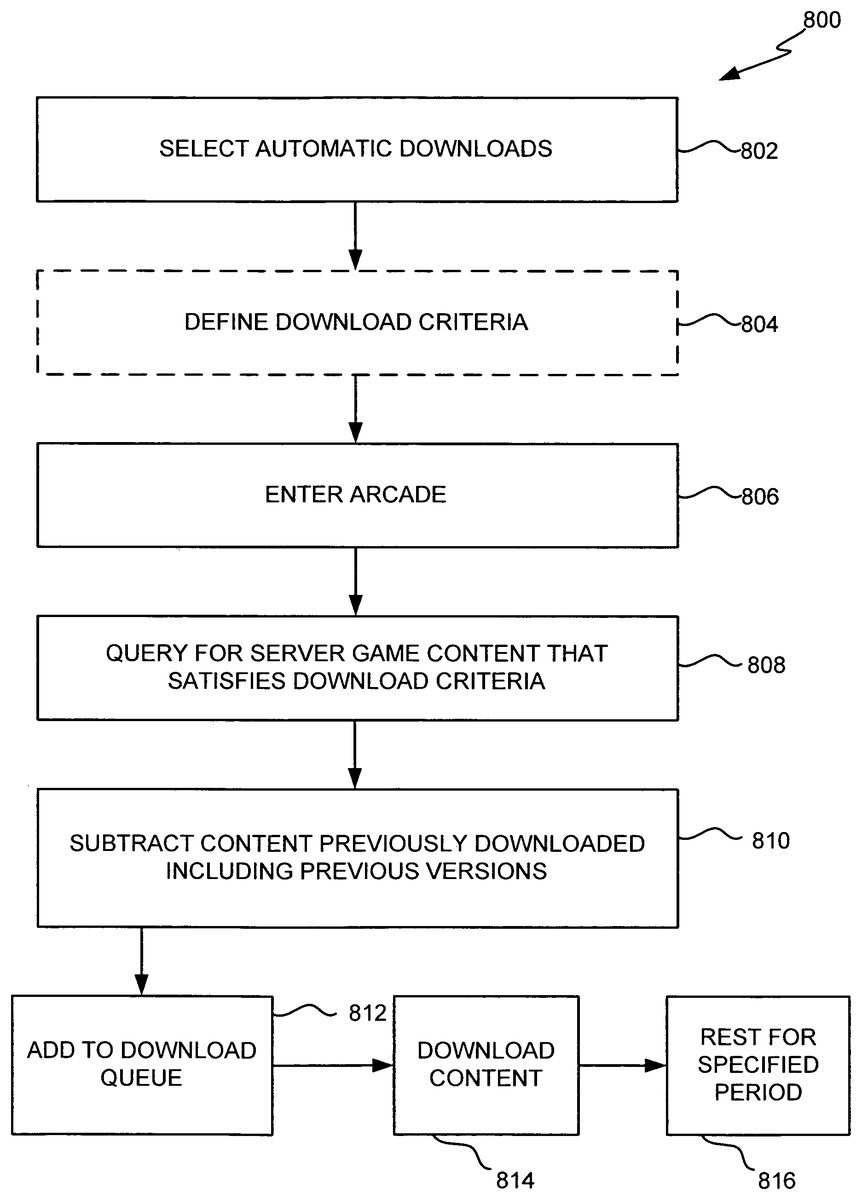
FIG. 8is a flow diagram of a method of automatically downloading game content to a game console in accordance with an embodiment. Method800begins at block802where a user enables automatic downloading of content. This enablement can be in the form of selecting a check box marked “on” in the Automatic Downloads blade user interface, or it can be done in any suitable manner. Optionally, block804can allow a user to specify download criteria for the automatic downloading feature. Such criteria can include any data or parameters relative to game content including, but not limited to, whether, and/or to what extent the game content is new, whether the game content is free, whether the game content is trial content, the size of the game content to download, the genre of the game content, the rating of the game content, or any other suitable parameters. At block806, the user accesses the arcade server. Included in such access is preferably a successful authentication via the user's provision of a GamerTag and password. At blocks808,810queries are performed to determine what content is available on the server that satisfies the download criteria (e.g. is new) and to determine the user's download history, respectively. These queries can be generated from the user's console, by the server itself upon recognizing the user's entry into arcade at block806, or any combination of the two. At block812, any content that satisfies the user's download criteria and has not been previously downloaded is added to the console's download queue. Preferably the download queue executes in the background thereby allowing the user to otherwise use the console during the download. Preferably, if game content is available, but the user has previously downloaded a different version of the content, then the new content will not be downloaded. For example, if ExampleGame 1.1 has been previously downloaded and ExampleGame 1.9 is subsequently made available, it will not be automatically downloaded. However, this is simply a preference, and can also be a parameter over which the user can exercise control in block802. At block814, content listed in the download queue is downloaded from the arcade server to the user's console. Once the download is complete, the new content will automatically show up, or otherwise be displayed, in the user's game collection. Preferably, such content will show up as “New” content, or bear some other suitable label.
Finally, at block816, the automatic download process rests for a specified period of time, before returning to block808. The specified period of time can be another variable or parameter that can be set by the user at block802. Thus, a user may be able to select an interval within which the process loops. However, other method for setting the specified period can also be used. For example, when new game content is released, hundreds of thousands of users' consoles may recognize the new content and start downloading the new content. The result of such an automatic inrush of download requests, and accompanied downloads may slow server response. To address this situation, each console may delay its request for downloadable content until server response time meets a certain threshold, or the server otherwise indicates that it is ready to accommodate download requests.
FIG. 9is a flow diagram of a method of automatically downloading game content to a game console in accordance with another embodiment. The embodiment illustrated with respect toFIG. 9differs from that ofFIG. 8primarily in the degree to which the embodiment relies upon server(s)304. For simplicity, the embodiment illustrated with respect toFIG. 9can be considered more server-centric, while that ofFIG. 8can be considered more console-centric. However, each embodiment relies, at least to some degree, on both the console and the server.
Method900begins at block902where a user enables automatic downloading of content to the user's game console. While the enablement set forth in block902may take the same form as that set forth above with respect to block802, enablement can also be selected by a user's access to server(s)304via an alternate connection, such as using a browser to access HTML content at server(s)304. Thus, block902can take the form of a user directing a browser to a URL of server304, being presented with a login screen or dialog, and providing the user's Gamertag and password. Once authenticated, the user would have access to their profile settings, including the setting of whether automatic downloads are selected and/or specified. At optional904, the user can enter information to define criteria which must be satisfied by server game content before such content is eligible for automatic downloading to the user's console. The content set forth can be any of that set forth above with respect to block804. At block906the user enters arcade. This block906requires that the user's console makes an authenticated access to the arcade server. During such access, a session token or other suitable data can be stored on the console, such that server(s)304can later determine whether the console has been authenticated in server(s)304which to initiate interactions with the console. However, a single authenticated access by the console to the server may allow secure server-to-console transfers for a selectable amount of time, such as a day. At block908, server(s)304performs a query using the download criteria from block904, or suitable default criteria, such as “new” content, to identify game content stored thereon that satisfies the criteria. The query can be run periodically, or in response to an event on the server(s), such as new content being added. From the query results, content that has been previously been downloaded by the user is excluded, as indicated at block910. Server304can examine its download history records for the user in order to determine previously downloaded content. The remaining content is added to the user's download queue for all of the user's authorized consoles, as indicated at block912. Next, at block914, server(s)304initiate contact with the user's console(s) and transfer the queued content to the user's console(s). Method900, by virtue of its ability to focus upon server events, can obviate automatic periodic checking, and the associated bandwidth of thousands of consoles. However, when new content is made available, there may still be thousands of consoles that should have the content transferred thereto. However, since the transfers are initiated by the server, provisioning software or modules can easily control the rate at which transfers are effected such that overall server performance is not unduly affected.
Although the subject matter has been described in language specific to structural features and/or methodological acts, it is to be understood that the subject matter defined in the appended claims is not necessarily limited to the specific features or acts described above. Rather, the specific features and acts described above are disclosed as example forms of implementing the claims.
Claims
- A computer-implemented method for automatically downloading game content to a game console, the method comprising: obtaining an indication relative to a user's enablement of automatic downloading of game content relative to the console;performing a query of game content on a game server to generate a download queue of game content that satisfies at least one criterion;excluding, from the download queue, game content that has been previously downloaded to the game console;excluding, from the download queue, any updated version of game content stored on the game console;and automatically downloading contents of the download queue to the game console, automatically downloading including: determining a response time of the game server;when the response time satisfies a threshold condition, downloading contents of the download queue to the console;and when the response time does not satisfy the threshold condition, delaying downloading contents of the download queue to the console.
- The method of claim 1 , wherein the at least one criterion includes whether the game content is newly available for downloading to the game console from the game server.
- The method of claim 1 , and further comprising receiving a user's specification of criteria for game content that is eligible for automatic downloading.
- The method of claim 3 , wherein the criteria includes whether the game content is newly available for downloading to the game console from the game server.
- The method of claim 3 , wherein the criteria includes whether the game content is trial content.
- The method of claim 3 , wherein the criteria includes at least one genre of game content.
- The method of claim 3 , wherein the criteria includes a storage capacity required for the game content.
- The method of claim 3 , wherein the criteria includes a rating of the game content.
- The method of claim 1 , wherein the steps of performing a query of game content, excluding game content that has been previously downloaded to the game console, and automatically downloading contents of the download queue to the game console occur periodically while the user's console is coupled to the server.
- The method of claim 1 , wherein obtaining an indication relative to a user's enablement of automatic downloading relative to the console is accomplished by providing the user with a user interface generated by the console, that allows the user to select a user interface element associated with an enabled state.
- The method of claim 1 , wherein obtaining an indication relative to a user's enablement of automatic downloading relative to the console is accomplished by a user's authenticated access to the server using a browser, wherein the user's interaction with the server is via a web page generated by the server.
- The method of claim 1 , wherein automatically downloading the game content of the download queue includes the server initiating a transfer of the game content onto the console.
- The method of claim 1 , wherein the method is executed in response to a server event.
- The method of claim 13 , wherein the server event is the addition of game content, the game content being newly available for downloading to the game console from the game server.
- A computer-implemented method for automatically transferring game content to a game console, the method comprising;selectively querying game content on a game server to generate a download queue of game content;excluding, from the download queue, any newer version of game content stored on the game console;and automatically transferring game content listed in the download queue to the game console, automatically transferring including: determining a response time of the game server;when the response time satisfies a threshold condition, transferring game content listed in the listing to the console;and when the response time does not satisfy the threshold condition, delaying transferring game content listed in the listing to the console.
- The method of claim 15 , wherein selectively querying game content is performed in accordance with enablement of automatic downloading of game content to the game console.
- The method of claim 15 , wherein the game content is transferred from the game server to the game console.
- The method of claim 15 , wherein excluding, from the download queue, any newer version of game content includes identifying a version number of a game content item stored on the game console and excluding any version of the game content item having a higher version number than the version number of the game content item stored on the game console from the download queue.
- A computer-implemented method for automatically downloading game content to a game console, the method comprising: obtaining an indication of a user's enablement of automatic downloading of game content to the game console;performing a query of game content on a game server to generate a download queue of game content that satisfies at least one criterion;excluding, from the download queue, game content that has been previously downloaded to the game console;excluding, from the download queue, any newer version of game content stored on the game console;and downloading game content in the download queue from the game server to the game console.
- The method of claim 19 , wherein excluding, from the download queue, any newer version of game content includes identifying a version number of a game content item stored on the game console and excluding any version of the game content item having a higher version number than the version number of the game content item stored on the game console from the download queue.
Disclaimer: Data collected from the USPTO and may be malformed, incomplete, and/or otherwise inaccurate.