U.S. Pat. No. 7,657,477
GAMING SYSTEM PROVIDING SIMULATED SECURITIES TRADING
AssigneeSummaLP Applications, Inc.
Issue DateOctober 21, 2004
U.S. Patent No. 7,657,477: Gaming system providing simulated securities trading

Summary:
The ‘477 patent may be interesting to anyone who took a business course in college. The invention describes a game where the user can trade virtual stocks based on real-world market prices. Players have the option of either opening or closing a long position in the stock or opening or closing a short position in the stock. Based upon the decisions the user makes, a financial report is continuously updated and can be printed off and viewed at any time. This invention allows a series of users (a class, for example) to join together and enter into the financial game competing against each other. The teacher, at the end of the year, can tally all the financial information to see who made the most profitable decisions.
Abstract:
A trading game allows players to engage in trading based on real-world prices of real-world securities. Simulated positions of real-world securities in player portfolios may be opened and closed in accordance with instructions provided by each player. The performance of each player may be tracked relative to an index. A tradescreen may be generated for displaying current financial information of a portfolio of a player and for entering hypothetical data to produce revised financial information. The hypothetical data may be submitted to update the portfolio of the player.
Illustrative Claim:
1. A method for operating a gaming system on a computer system having a server and at least one computer, the method comprising: opening and closing simulated positions of real world securities in simulated securities portfolios for a plurality of players in accordance with instructions provided by each of the plurality of players; tracking by the server or the at least one computer performances of the simulated securities portfolio of each of the plurality of players relative to one of 1) performances of the simulated securities portfolios of the other players, and 2) one or more of a securities index; maintaining a portfolio database in the server for the simulated securities portfolios for each of the plurality of players, wherein each simulated securities portfolio has current financial information associated with the respective simulated securities portfolio; receiving a request for a tradescreen from a requesting player of the plurality of players; and generating the tradescreen based on the portfolio database of the server for the requesting player for display on a computer of the requesting player, the tradescreen for displaying the current financial information for the simulated securities portfolio of the requesting player and for calculating and displaying revised financial information for the simulated securities portfolio of the requesting player, the tradescreen for entering proposed data comprising one of a proposed trade and a proposed transfer of the simulated positions of real world securities, the tradescreen for allowing the requesting player to determine if the proposed data entered into the tradescreen would produce one of a first type of result and a second type of result; providing an interface on the tradescreen for enabling the requesting player to submit the transaction corresponding to the proposed data entered into the tradescreen to update the portfolio database in the server with the revised financial information for the simulated securities portfolio of the requesting player in an event the requesting player determines that the proposed data would produce the first type of result; and updating the portfolio database in the server with the revised financial information for the simulated securities portfolio of the requesting player upon the requesting player submitting the transaction; wherein the revised financial information for the simulated securities portfolio of the requesting player is based on the proposed data entered into the tradescreen and the current financial information for the simulated securities portfolio of the requesting player.
Illustrative Figure
Abstract
A trading game allows players to engage in trading based on real-world prices of real-world securities. Simulated positions of real-world securities in player portfolios may be opened and closed in accordance with instructions provided by each player. The performance of each player may be tracked relative to an index. A tradescreen may be generated for displaying current financial information of a portfolio of a player and for entering hypothetical data to produce revised financial information. The hypothetical data may be submitted to update the portfolio of the player.
Description
DETAILED DESCRIPTION Definitions The following meanings are intended for the following terms in this disclosure: FINANCIAL INSTRUMENT: a tradable interest in a title to, or a license, contract or right relating to, a tangible or intangible asset, such as a stock or option. POSITION: an interest in a financial instrument. Positions include long positions, covered short positions, and uncovered short positions. The creation of a position is referred to as “opening” the position, and the termination of a position is referred to as “closing” the position. LONG POSITION: a position involving ownership of a financial instrument. SHORT POSITION: a position involving the sale of a financial instrument owned by another in exchange for an interest payment on the value of the financial instrument and the obligation to return the same financial instrument to the other at a later date. COVERED SHORT POSITION: a short position in which the position holder possesses another financial instrument of the same type as the one for which the short position has been assumed, such that the currently owned financial instrument may be provided to the owner of the shorted financial instrument if necessary. UNCOVERED SHORT POSITION: a short position entered without possessing another financial instrument of the same type as the instrument being shorted. SECURITY: a share of a company (stock), mutual fund or investment trust, index, or commodity, including any related derivative financial instrument. OPTION: a contract giving the right to buy or sell a stock, index, or commodity, including any related derivative financial instrument at a given “strike price”. An option has a contract price and an expiration date. A position in an option may be closed through an offsetting transaction, through exercise of the option, or through expiration of the option. PUT: an option giving the right to sell a stock, ...
DETAILED DESCRIPTION
Definitions
The following meanings are intended for the following terms in this disclosure:
FINANCIAL INSTRUMENT: a tradable interest in a title to, or a license, contract or right relating to, a tangible or intangible asset, such as a stock or option.
POSITION: an interest in a financial instrument. Positions include long positions, covered short positions, and uncovered short positions. The creation of a position is referred to as “opening” the position, and the termination of a position is referred to as “closing” the position.
LONG POSITION: a position involving ownership of a financial instrument.
SHORT POSITION: a position involving the sale of a financial instrument owned by another in exchange for an interest payment on the value of the financial instrument and the obligation to return the same financial instrument to the other at a later date.
COVERED SHORT POSITION: a short position in which the position holder possesses another financial instrument of the same type as the one for which the short position has been assumed, such that the currently owned financial instrument may be provided to the owner of the shorted financial instrument if necessary.
UNCOVERED SHORT POSITION: a short position entered without possessing another financial instrument of the same type as the instrument being shorted.
SECURITY: a share of a company (stock), mutual fund or investment trust, index, or commodity, including any related derivative financial instrument.
OPTION: a contract giving the right to buy or sell a stock, index, or commodity, including any related derivative financial instrument at a given “strike price”. An option has a contract price and an expiration date. A position in an option may be closed through an offsetting transaction, through exercise of the option, or through expiration of the option.
PUT: an option giving the right to sell a stock, index, or commodity, including any related derivative financial instrument at a given strike price.
CALL: an option giving the right to buy a stock, index, or commodity, including any related derivative financial instrument at a given strike price.
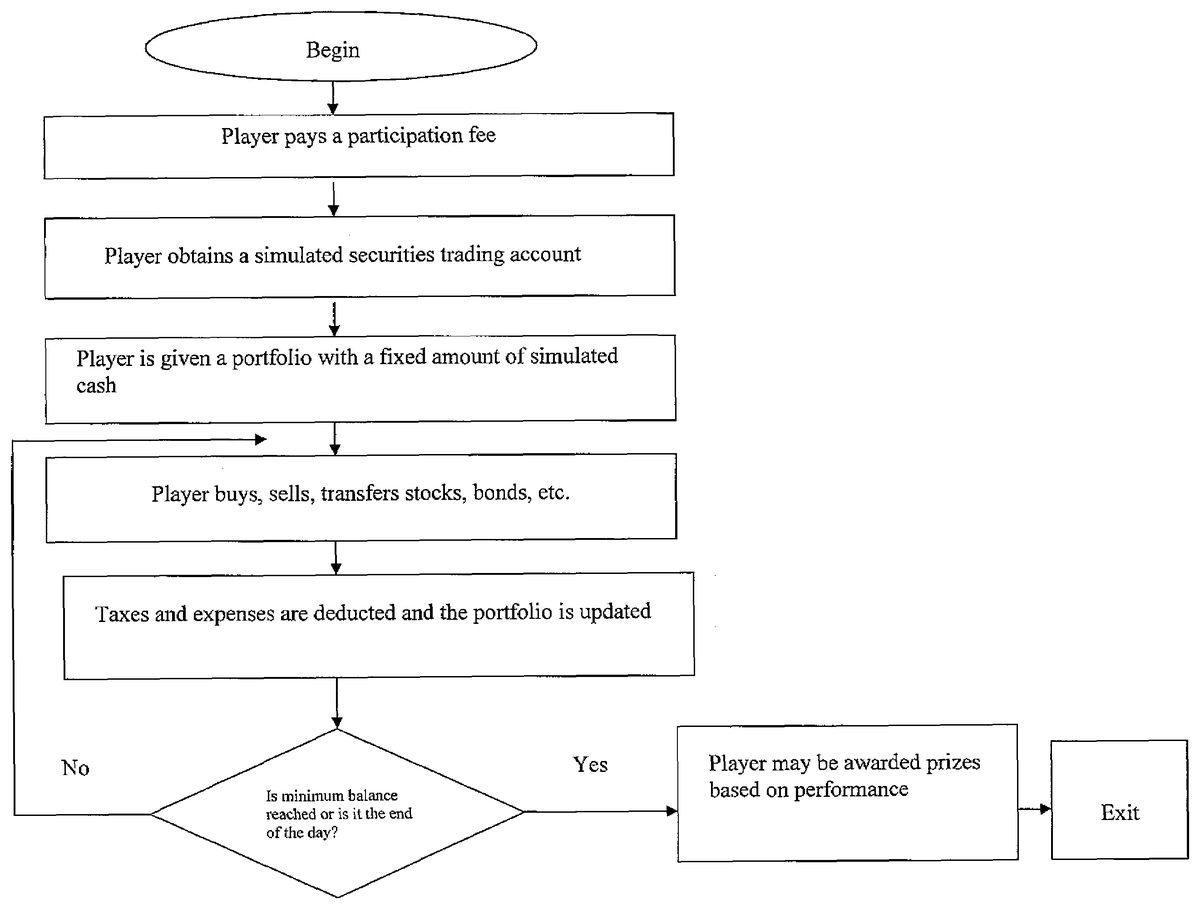
An embodiment of the invention is a system that provide players with simulated securities trading accounts and tools that enable the players to engage in simulated transactions in stocks, options, mutual funds, bonds, commodities, currencies, futures and other financial instruments. The player pays a participation fee to play. A set of high-level steps associated with the operation of an embodiment of the present invention, is shown inFIG. 1. The following is a more detailed description. The player begins with a fixed amount of simulated cash in the portfolio, and engages in transactions of their choosing. Prizes may be awarded at the conclusion of the game based on the net worth of the player's portfolio, and special prizes may be awarded for individual achievements such as best investment. Interim prizes may also be awarded. For example, daily prizes may be awarded for the end of day net worth leader, the day's biggest net worth gainer, or the best single investment performance of the day. The interim prizes may be awarded as cash or as an addition of simulated cash to the trading portfolio. Interim prizes may also be awarded for poor performance such as for the day's biggest net worth loser or the worst single investment of the day.
In the currently preferred embodiment, players may compete against each other in open tournament style play or in private games, or may play against “the house,” which may be represented, for example, by an index such as the S&P 500 or some other objective performance measure (SeeFIG. 2).
The system imposes financial regulations and restrictions on the behavior of the players that simulate the regulations and restrictions that exist in real-world securities trading, such as the regulations of the SEC, FRB, IRS and NYSE. These include charging commissions and other costs for each transaction, paying interest on simulated cash held in the account, charging interest on amounts borrowed on margin, imposing initial and maintenance margin requirements, and tracking and assessing short term and long term capital gains taxes. Thus the skill of the players in profiting from opening and closing positions in securities is tested under real-world conditions.
Tax expenses and margin interest expenses are deducted from the account as they are realized, and unrealized tax expenses and margin interest expenses are deducted from portfolio assets to determine the net worth of the portfolio. A player may be disqualified if the portfolio moves into a margin call status.
FIG. 3shows features of a main user interface that is presented to a player. The interface includes a central trading desktop area that provides screens for conducting transactions and screens for reviewing the portfolio, details of which are described below. The left side of the interface includes a watch list where the current status of specified securities is monitored, and an instant messaging window where communication with other players is displayed. At the right side of the interface is a standings column showing the present net worth of each player, and a game status area showing the prizes to be awarded. The interface may also include information showing the time and date at which the competition concludes or the time remaining in the competition, and may present additional information about players such as the day's and tournament's biggest gainers and losers, or best and worst investments.
The main user interface also includes a set of navigation tools for accessing reports including financial reports, portfolio reports, summary reports, a full list of all available reports, and help materials. Beneath these buttons are a set of tools including a games selection tool for changing between multiple games, a securities selection tool for accessing a list of current holdings with links to screens reports for each current holding and providing links to screens for opening and closing positions, a symbol to action tool for accessing screens showing current holdings of a security and providing links to screens for opening and closing positions, and a securities type selection tool for selecting either stocks, option, mutual funds, bonds, commodities, currencies, futures.
The main user interface also includes a row of tools for accessing additional information, labeled as My Account, Games, System, Administration and Help.FIG. 4shows the contents of the pull down menus accessed using the tools ofFIG. 3.
The gaming system described herein employs a portfolio tracking system as described in commonly-owned U.S. Pat. No. 7,165,044 B1, the entirety of which is incorporated herein by reference. This system processes transaction data to generate a net worth report for the portfolio that is presented in the form of a balance sheet representing the assets, liabilities and equity (net worth) of the investment portfolio. The balances are calculated based on current asset prices and account for realized and unrealized commissions, fees, interest, and taxes. The balances in the balance sheet are linked to supporting reports for each balance. A variety of additional reports are also provided. This system provides players with a detailed understanding of the true net worth of their portfolios when all costs and liabilities are considered.FIGS. 5-35show the organization of these reports and images of reports generated by the implementation of this system that is produced by SummaLP Applications, Inc. Because the descriptions of these reports are similar to those presented in U.S. Pat. No. 7,165,044 B1, they are omitted herein. However, note thatFIG. 5shows the main flow chart of an embodiment of the present invention, whileFIGS. 6-35show the details of the modules of the structure illustrated inFIG. 5. These screens are made available to players in the embodiment of the gaming system described herein.
The gaming system described herein also uses a system for generating screens for opening and closing positions in securities as described in commonly owned U.S. patent application Ser. No. 10/150,990. This system generates screens for opening and closing positions in securities that present data showing the effects of a proposed opening/closing transaction on the portfolio's assets, liabilities and equity. The screens allow the user to enter the parameters of a proposed hypothetical transaction and view the consequences of that hypothetical transaction prior to actually executing the transaction. As a result, the user can make better informed decisions about issues such as transaction parameters, timing, and funding.FIGS. 36-89show the organization of these screens and diagrams of open and close screens generated by the implementation of this system that is produced by SummaLP Applications, Inc. These screens are made available to players in the embodiment of the gaming system described herein.
The following is additional information in reference toFIGS. 36-89, which also provide details for executable trade screens and hypothetical trades and transfers.
FIG. 36provides a generic illustration of a user interface and related navigation options in accordance with the preferred embodiment. The user interface comprises a tools frame2-2, a navigation frame2-4, and a display frame2-6. The tools frame2-2provides tools that may be operated by the user including a symbol to action tool2-8for displaying a symbol to action screen that in turn enables the user to request a tradescreen for a selected financial instrument, a select portfolio tool2-10for selecting a particular portfolio for which tradescreens or reports are to be generated, and a select individual holding tool2-12for selecting a financial instrument for which a summary report is to be generated.
The symbol to action tool2-8of the preferred embodiment includes a symbol box2-9in which the user may enter the stock ticker of a selected financial instrument for which a symbol to action screen is desired.FIG. 37illustrates details of a symbol to action screen3-2for the stock AOL that is provided in response to operation of the symbol to action tool2-8. The symbol to action screen includes a market data section3-4that provides current market data for the selected financial instrument. The symbol to action screen3-2further includes several tools, presented in the user interface as buttons, for requesting tradescreens for opening various types of positions in the selected financial instrument. The tools include a buy long open tool3-6, a sell short open tool3-8, a put tool3-10, a call tool3-12, and an option combination tool3-14for various combinations of options transactions such as straddles, spreads and strangles (“S/S/S”). The symbol to action screen3-2further includes reports itemizing any positions held in the selected financial instrument and its derivatives, including a stock report3-16, a put report3-18, and a call report3-20. Each position itemized in each report has associated therewith a close tool3-22that may be used to request a tradescreen for closing the position, as described in detail below.
Returning to the user interface ofFIG. 36, the select holding tool2-12of the tools frame2-2includes a symbol box2-13in which the user may enter the stock ticker of a financial instrument for which a summary report is desired.FIGS. 38-40show three sections of a summary reports that are generated in response to operation of the select holding tool2-12. An open positions section of the summary report is shown inFIG. 38. The open positions section includes tools presented as buttons for navigating among the sections of the summary report, including open positions tool4-2, a closed positions tool4-4, and a corporate actions tool4-6. Each of the sections of the report presents these tools to facilitate navigation. The open positions section includes a holding and performance section4-8providing holding and performance information. A stock section4-10describes individual holdings in the selected stock, and provides tools4-12,4-14for requesting tradescreens for opening additional positions in the stock. A puts section4-16describes individual holdings in puts of the selected stock, and provides tools4-18,4-20,4-22for requesting tradescreens for opening additional positions in the puts. A calls section4-24describes individual holdings in calls of the selected stock, and provides tools4-26,4-28,4-30for requesting tradescreens for opening additional positions in the calls. Each position in each of the sections4-10,4-16,4-24has associated therewith a close tool4-32for requesting a tradescreen for closing the corresponding position.
FIG. 39shows the closed position section of the summary report. The closed position section includes navigation tools4-2,4-4,4-6and a history and performance section4-8. The closed position section further includes a stock section4-34describing individual closed positions in the selected stock, a puts section4-36describing individual closed positions in puts of the selected stock, and a calls section4-38describing individual closed positions in calls of the selected stock.
FIG. 40shows the corporate action section of the summary report. The corporate action section includes a dividends report4-40showing dividends declared for the selected security, a stock split report4-42describing stock splits for the selected security, and a mergers report4-44describing mergers affecting the selected security. The corporate action section also includes tools that enable the user to enter information regarding particular corporate actions, including a stock dividend editor4-46, a cash dividend editor4-48, a stock split editor4-50, and a merger editor4-52.
Returning again to the user interface ofFIG. 36, the navigation frame2-4of the user interface provides navigation tools that control the content displayed in the display frame2-6. A financials tool2-14initiates the generation of a financial reports screen2-16. The financial reports screen2-16includes a financial positions report2-18that provides information concerning the assets, liabilities and net worth of the selected portfolio, and a financial performance report2-20that provides information concerning the profit/loss activity to date of the selected portfolio.
The navigation frame2-4also includes a portfolio tool2-22that initiates the display of a portfolio screen2-24. The portfolio screen includes a portfolio report2-26that provides descriptive and performance information concerning each individual holding in the selected portfolio.
The navigation frame2-4further includes a summary tool2-28that initiates the display of a summary screen2-30providing a portfolio summary report2-32for the selected portfolio, showing information such as net worth, portfolio value, buying power, tax liabilities, and gains and losses.
The navigation frame2-4also includes a reports tool2-34that initiates the display of a reports menu2-36. The reports menu2-36provides links to a wide variety of detailed reports for the selected portfolio. The available reports include financial reports2-38including a portfolio summary, financial statements, cash balance activity, investment portfolio, margin payable activity, taxes payable, cash invested activity, gains/losses, dividend/interest, commissions fees and costs, margin interest, and tax expenses. Also available are performance reports2-40including a portfolio summary, gains/losses, performance details, return on securities, return on cash invested, and commission analysis. The available reports further include equity reports2-42such as a portfolio summary, short cash restricted/margin requirements, long margin available margin requirements, and equity maintenance and buying power. The available reports also include tax reports2-44such as a portfolio summary taxes payable, tax expenses, wash sales warnings, wash sales status, and a Schedule D report. Examples of these reports are described further in U.S. Pat. No. 7,165,044, entitled Investment Portfolio Tracking System and Method, the entirety of which is incorporated herein by references for its teachings regarding report generation and types of reports.
The navigation frame2-4further includes a cash transactions tool2-46that initiates the display of a cash transactions screen2-48. The cash transactions screen2-48includes a transactions editor2-50that enables the user to enter information concerning a wide variety of portfolio related cash transactions including cash deposit, cash withdrawal, cash withdrawal for federal taxes, cash withdrawal for state taxes, cash interest earned, margin interest borrowed, margin interest paid, margin borrowed, margin paid, and management fees. The transactions screen further includes a transactions report2-52detailing all transactions recorded for the selected portfolio.
The navigation frame2-4further includes an administration tool2-54that initiates display of an administration menu2-56. The administration menu2-56include a member information administration tool2-58that initiates a member information editor, a portfolio information administration tool2-60that initiates a portfolio information editor, and an add portfolio tool2-62.
The system of the preferred embodiment enables the user to request and receive tradescreens for calculating the effects of hypothetical opening transactions and for initiating hypothetical opening transactions through the symbol to action screen illustrated inFIG. 37. In particular, the symbol to action screen links the user to tradescreens for opening long or short positions in the selected security, as well as links to put and call options screens for the selected security. The put and call options screens in turn provide links to tradescreens for opening long, short, and covered short positions in puts or calls for the selected security. The security summary screen ofFIG. 38also links the user to a tradescreens for opening long and short positions in the selected security.
The organization of opening transaction tradescreens is illustrated inFIGS. 41 and 42.FIG. 41shows ways of requesting tradescreens for opening positions from the symbol to action screen. As shown inFIG. 41, the symbol to action screen6-2for a given security includes a link6-4to a screen6-6including a tradescreen for a hypothetical purchase of the security to open a long position in the security. Operation of the link issues a request to the server for a dynamically configured tradescreen for opening a long position in the selected security for the selected portfolio. The symbol to action screen also includes a link6-8to a screen6-10including a tradescreen for a hypothetical short sale of the security to open a short position in the security. Operation of the link issues a request to the server for a dynamically configured tradescreen for opening a short position in the selected security for the selected portfolio.
The symbol to action screen also includes links to further screens for options in the selected security. A put link6-12provides a link to a put option quotes screen6-14that provides a put options chain report6-16for the security, and links6-18,6-20,6-22that issue requests for screens including tradescreens for opening long6-24, short6-26, and covered short6-28positions in a selected option from the put option chain. Similarly, a call link6-30provides a link to a call option quotes screen6-32that provides a call options chain report6-34for the security, and links6-36,6-38,6-40that issue requests for screens including tradescreens for opening long6-42, short6-44, and covered short6-46positions in a selected option from the call option chain.
FIG. 42shows ways of requesting tradescreens for opening positions from the security summary report. As shown inFIG. 42, a stock section6-50of the security summary report6-48includes a buy long tool6-52that issues a request for a stock long buy to open tradescreen6-54, and a sell short tool6-56that issues a request for stock short sell to open tradescreen6-58. A puts section6-60of the security summary report includes a buy long tool6-62that issues a request for a put long buy to open tradescreen6-64, a sell short covered tool6-66that issues a request for put covered short sell to open tradescreen6-68, and a sell short uncovered tool6-70that issues a request for put covered short sell to open tradescreen6-72. A calls section6-74of the security summary report includes a buy long tool6-76that issues a request for a call long buy to open tradescreen6-78, a sell short covered tool6-80that issues a request for call covered short sell to open tradescreen6-82, and a sell short uncovered tool6-84that issues a request for call covered short sell to open tradescreen6-86.
The system of the preferred embodiment also enables the user to request and receive tradescreens for closing transactions through several mechanisms. The open positions report in the symbol to action screen lists all positions held in the selected portfolio and provides a close link for with each position that requests a tradescreen for closing the position. Similarly, by operating the select holding tool of the user interface tools frame, the user is presented with an open positions screen that lists all individual positions held in the selected security. A close link associated with each position requests a tradescreen for closing the position. In addition, by operating the summary tool in the navigation frame of the user interface, the user is presented with a portfolio summary screen including a portfolio holdings report. A close link associated with each position listed in the holding report links to a screen including a tradescreen for an appropriate closing transaction for that position.
The organization of closing transaction tradescreens is illustrated inFIGS. 43 and 44.FIG. 43shows the symbol to action screen7-2and the security summary screen7-4that may be accessed by operating tools of the tools frame. Each of these screens includes one or more reports7-6showing open positions, and each position included each report7-6has associated with it a close link7-8. The close links7-8issue requests for a screen7-10containing an appropriate tradescreen for a trade or transfer to close the position. Similarly, as shown inFIG. 44, a user may access a portfolio summary screen7-12for a selected portfolio through operation of the summary tool in the navigation frame of the user interface. The portfolio summary screen includes a portfolio holdings report7-14that includes descriptions of each position held in the portfolio. Each position has associated with it a close link7-8that issues a request for a screen7-10containing an appropriate tradescreen for a closing transaction for the position.
In the case of a long or short position in a security, a single close link is associated with that position since there is only one manner of closing those types of positions. In the case of options in the selected security, three distinct close links may be provided for closing the position through an appropriate offsetting transaction (i.e. a purchase or sale), through exercising the option, and through expiration of the option.
FIG. 45shows a generic model for tradescreens in accordance with the preferred embodiment. The generic layout of information display and entry fields shown inFIG. 45approximates the actual layout of specific display and entry fields in the actual tradescreens of the preferred embodiment discussed below. The information content of each tradescreen depends on the type of financial instrument and the action to be taken.
The tradescreen8-2includes current position information8-4reflecting the current positions (if any) in a selected security or option that are held in a selected portfolio. This information is dynamically generated by the server using data from the portfolio database for the selected portfolio. The tradescreen further includes fields8-6into which the user is enabled to enter data characterizing the parameters of a hypothetical trade or transfer, such as a number of shares. Using the entered data, the current position information, and other information previously set up for the portfolio, routines embedded in the tradescreen calculate additional trade or transfer information8-8, such as cash invested. The tradescreen also calculates revised position information8-10that shows revised values for the quantities displayed in the current position information that reflect changes that will occur if the trade or transfer is executed. The typical user will find this information very useful because it quickly provides an analysis of the effects of a trade or transfer on the overall holdings of the security or option before the trade or transfer is submitted for execution.
The tradescreen also includes current portfolio information8-12reflecting the overall financial position of the portfolio as a whole. This information is dynamically generated by the server using data from the general ledger for the selected portfolio. Examples of current portfolio information are current buying power and cash available. Using the current portfolio information8-12, the data8-6entered by the user, and other information previously set up for the portfolio, the routines embedded in the tradescreen calculate revised portfolio information8-14that shows revised values for the quantities displayed in the current portfolio information reflecting changes that will occur if the hypothetical trade or transfer is executed. The typical user will find this information very useful because it quickly provides an analysis of the effects of a trade or transfer on the portfolio as a whole before the trade or transfer is executed.
The generic tradescreen8-2also contains several user operated tools. A calculate tool8-16causes all calculable quantities in the tradescreen to be recalculated based on currently entered transaction data. A cancel tool8-18cancels the current tradescreen. A reset tool8-20resets all entered values in the tradescreen. A submit tool8-22submits the trade or transfer for execution based on the quantities currently entered in the tradescreen.
A transfer tool8-24is also provided. The transfer tool8-24is used to indicate whether the action to be taken is a trade or a transfer into or out of the portfolio. When the transfer tool8-24has been used to indicate a transfer, the operation of the submit tool8-22causes the general ledger and portfolio database for the selected portfolio to be updated in the server, but no trade is submitted for execution.
A tradescreen provided to a user for opening a long position in a security is illustrated inFIG. 46. The gray boxes ofFIG. 46are fields in which data may be entered by the user. An Excel implementation of the routines embedded in the tradescreen ofFIG. 46is illustrated inFIG. 9b. The fields of the tradescreen ofFIG. 46are provided with cell references for purposes of correlation withFIG. 9b. General ledger debit and credit entries for the trade illustrated inFIG. 46and for a transfer using the same numbers are shown inFIG. 9c. A version of the tradescreen for a transfer using the same numbers is illustrated inFIG. 47.
The tradescreen ofFIG. 46presents current position information for the selected security in the column headed “Open Positions.” This information is dynamically generated by the server using data stored in the portfolio database for the selected portfolio. The current position information includes the date (or date range) of the opening of existing positions in the selected security (G7), price per share (G9), number of shares (G11), commissions paid (G13), other costs (G15), bought settlement (G17), margin borrowed (G19), and margin borrowed % (G21). The tradescreen also presents current information for the portfolio as a whole under the heading “Before.” This information includes current buying power (G29), cash available (G31), equity utilized (G33), margin available (G35) and margin payable (G37).
The tradescreen also includes fields for entering data characterizing a trade. The fields for entering trade data are provided under the heading “Buy.” They include fields for the trade date (I7), price per share (I9), number of shares (I11), commissions paid (I13), other costs (I15), margin borrowed (I19). The tradescreen also includes a margin available % field (D3) for entering a maximum percentage eligible to be paid for on margin. In accordance with current federal regulations, this amount cannot exceed 50%. A maintenance requirement may be entered in the “Maintenance Requirement %” field (H3). Currently, regulations require this amount to be in the range of 25 to 100.
Using the information entered in the aforementioned fields, the tradescreen calculates revised portfolio information and revised holdings information reflecting changes that will occur if the hypothetical trade is executed. Information representing the final state of the trade is included under the “Buy” column, including margin borrowed % (I19), cash disbursed/invested (I23), and cash required (I25). Revised information representing the state of the portfolio after the hypothetical trade is presented under the heading “After” and includes current buying power (I29), cash available (I31), equity utilized (I33), margin available (I35) and margin payable (I37). Revised information representing the state of the user's holdings in the selected security after the hypothetical trade is presented under the heading “Average/Total” and includes average price per share (K9), number of shares (K11), total commissions paid (K13), total other costs (K15), and total bought settlement (K17).
In the preferred embodiment, the quantities calculated by the tradescreen are calculated automatically upon entering data into the “Buy” fields I7, I9, I11, I13and then tabbing out of field I15. The quantities are recalculated upon entering a value into and tabbing out of the margin borrowed field I19. In addition, a calculate tool is provided at the bottom of the tradescreen (C39) to enable the user to recalculate the tradescreen upon changing of any of the entered data. The tradescreen also includes a cancel tool (G39) for canceling the tradescreen and a reset tool (I39) for resetting all of the data fields.
The tradescreen ofFIG. 46further includes a submit tool (K39) that submits a trade request for execution in accordance with the entered data. Thus the user may vary the trade data entered into the tradescreen and view the effects on the portfolio and positions held in the security, and then submit a trade request once appropriate parameters for the trade have been determined.
The tradescreen also includes a transfer in field (L3) for indicating that the entered data reflects parameters of a transfer in rather than a trade. A version of the tradescreen that is produced for transfer in is shown inFIG. 47. As seen inFIG. 47, the rows19and21(margin borrowed and margin borrowed %) are eliminated from the tradescreen, the “Buy” column is captioned as “Transfer In,” and operation of the submit tool (K39) causes the data entered into the tradescreen to be transmitted to the server for entry in the general ledger and the portfolio database, but does not initiate a trade.
A tradescreen provided to a user for closing a long position in a security is illustrated inFIG. 48. The gray boxes ofFIG. 48are fields in which data may be entered by the user. A version of the tradescreen for the case where the position is being transferred out is shown inFIG. 49.
The tradescreen ofFIG. 48presents current position information for the selected security in the column headed “Bought.” This information is dynamically generated by the server using data stored in the portfolio database for the selected portfolio. The current position information includes the date (or date range) of the opening of existing positions in the selected security (H7), price per share (H9), number of shares (H11), commissions paid (H13), other costs (H15), and bought settlement (H17). The tradescreen also presents current portfolio information under the heading “Before.” This information includes current buying power (H35), cash available (H37), equity utilized (H39), margin available (H41) and margin payable (H43).
The tradescreen also includes fields for entering trade data characterizing a trade. The fields for entering trade data characterizing a trade are provided under the heading “Sell.” They include fields for the trade date (J7), price per share (J9), number of shares (J11), commissions paid (J13), and other costs (J15).
Using the information entered in the aforementioned fields, the tradescreen calculates revised portfolio information and revised position information reflecting changes that will occur if a trade represented by the entered data is effected. This information is included under the “Before Taxes” and “After Taxes” columns, including net gain/(loss) (J21), (L21), net gain/(loss) percentage (J23), (L23), and net annualized return (CAGR) (J25), (L25). The “Before Taxes” column also presents net sold receipts (J27) and cash deposited (J31). The tradescreen also calculates bought settlement. Revised information representing the state of the portfolio after the hypothetical transaction is presented under the heading “After” and includes current buying power (J35), cash available (J37), equity utilized (J39), margin available (J41) and margin payable (J43). Revised information representing the state of the user's holdings in the selected security after the hypothetical trade is presented under the heading “Difference/Total” and includes days held (L7), difference in price per share (L9), difference in number of shares (L11), total commissions paid (L13), total other costs (L15), and difference in bought settlement (L17).
In the preferred embodiment, the quantities calculated by the tradescreen are calculated automatically upon entering data into the “Sell” fields J7, J9, J11, J13and J15and then tabbing out of field J15. The quantities are recalculated upon entering a value into and tabbing out of the margin paid field J29. In addition, a calculate tool is provided at the bottom of the tradescreen (D45) to enable the user to recalculate the tradescreen upon changing of any of the entered data. The tradescreen also includes a cancel tool (H45) for canceling the tradescreen and a reset tool (J45) for resetting all of the transaction data fields.
The tradescreen ofFIG. 48further includes a submit tool (L45) that submits the hypothetical trade for execution using the entered data. Thus the user may vary the trade data entered into the tradescreen and view the effects on the portfolio and positions held in the security, and then submit enter a trade once the appropriate parameters for the trade have been determined.
The tradescreen also includes a transfer out field (M3) for indicating that the entered information reflects a transfer out rather than a transaction. A version of the tradescreen that is produced for transfer out is shown inFIG. 49. When this field is marked, the rows21,23and25(net gain/(loss), net gain/(loss) %, and net annualized return) are eliminated from the tradescreen, the “Sell” column is captioned as “Transfer Out,” and operation of the submit tool (L45) causes the data entered into the tradescreen to be transmitted to the server for entry in the general ledger and portfolio database to execute the transfer, but does not submit a trade for execution.
A tradescreen provided to a user for opening a short position in a security is illustrated inFIG. 50. The gray boxes ofFIG. 50are fields in which data may be entered by the user. A version of the tradescreen for the case where the position is being transferred in is shown inFIG. 51.
The tradescreen ofFIG. 50presents current open position information for the selected security in the column headed “Open Positions.” This information is dynamically generated by the server using data stored in the portfolio database for the selected portfolio. The open position information includes the date (or date range) of the opening of existing positions in the selected security (G7), price per share (G9), number of shares (G11), commissions paid (G13), other costs (G15), gross sold receipts (G17), cash disbursed (G19), and net sold receipts (G21). The tradescreen also presents current information for the portfolio as a whole under the heading “Before.” This information includes current buying power (G27), cash available (G29), equity utilized (G31), margin available (G33) and margin payable (G35).
The tradescreen also includes fields for entering data characterizing a hypothetical trade. Based on the entered information, the tradescreen calculates the effects of the hypothetical trade on the overall holdings of the security, and on the portfolio as a whole. The fields for entering trade data are provided under the heading “Sell.” They include fields for the trade date (I7), price per share (I9), number of shares (I11), commissions paid (I13), and other costs (I15). The tradescreen also includes an equity utilized % field (D3) for entering the initial equity maintenance requirement percentage. In accordance with federal regulations, this amount cannot be less than 50%. A maintenance requirement may be entered in the “Maintenance %” field (H3). Current regulations require this amount be in the range of 30 to 100.
Using the information entered in the aforementioned fields, the tradescreen calculates revised portfolio information and revised holdings information reflecting changes that will occur if the trade is executed. Information representing the final state of the trade is included under the “Sell” column, including gross sold receipts (I17), cash disbursed (I19), and net sold receipts (I21), cash restricted (I21), and equity utilized/required (I23). Revised information representing the state of the portfolio after the trade is presented under the heading “After” and includes current buying power (I27), cash available (I29), equity utilized (I31), margin available (I33) and margin payable (I35). Revised information representing the state of the user's holdings in the selected security after the trade is presented under the heading “Average/Total” and includes average price per share (K9), total number of shares (K11), total commissions paid (K13), total other costs (K15), total gross sold receipts (K17), total cash disbursed (K19), and total net sold receipts (K21).
In the preferred embodiment, the quantities calculated by the tradescreen are calculated automatically upon entering data into the “Sell” fields I7, I9, I11, I13and I15and tabbing out of field I15. In addition, a calculate tool is provided at the bottom of the tradescreen (C37) to enable the user to recalculate the tradescreen upon changing of any of the entered data. The tradescreen also includes a cancel tool (G37) for canceling the tradescreen and a reset tool (I37) for resetting all of the fields.
The tradescreen ofFIG. 50further includes a submit tool (K37) that submits the hypothetical trade for execution in accordance with the entered data. Thus the user may vary the trade data entered into the tradescreen and view the effects on the portfolio and positions held in the security, and then submit a trade once the appropriate parameters for the trade have been determined.
The tradescreen also includes a transfer in field (L3) for indicating that the transaction data reflect parameters of a transfer in rather than a trade. A version of the tradescreen that is produced for transfer is shown inFIG. 51. When this field is marked, the “Sell” column is captioned as “Transfer In,” and operation of the submit tool (K37) causes the data entered into the tradescreen to be transmitted to the server for entry in the general ledger and the portfolio database, but does not initiate a trade.
A tradescreen provided to a user for closing a short position in a security is illustrated inFIG. 52. The gray boxes ofFIG. 52are fields in which data may be entered by the user. A version of the tradescreen for the case where the position is being transferred out is shown inFIG. 53.
The tradescreen ofFIG. 52presents current sold security information for the selected security in the column headed “Sold.” This information is dynamically generated by the server using data stored in the portfolio database for the selected portfolio. The sold security information includes the date (or date range) of the opening of existing positions in the selected security (H7), price per share (H9), number of shares (H11), commissions paid (H13), other costs (H15), and net sold receipts (H17). The tradescreen also presents current information for the portfolio as a whole under the heading “Before.” This information includes current buying power (H39), cash available (H41), equity utilized (H43), margin available (H45) and margin payable (H47). The tradescreen also includes fields for entering trade data characterizing a hypothetical trade. Based on the entered information, the tradescreen calculates the effects of the hypothetical trade on the overall holdings of the security and on the portfolio as a whole. The fields for entering trade data are provided under the heading “Buy.” They include fields for the trade date (J7), price per share (J9), number of shares (J11), commissions paid (J13), other costs (J15), and margin borrowed (J33). Using the information entered in the aforementioned fields, the tradescreen calculates revised portfolio information and revised holdings information reflecting changes that will occur if the hypothetical trade is executed. Information representing the final state of the trade is included under the “Before Taxes” and “After Taxes” columns, including net gain/(loss) (J21), (L21), net gain/(loss) percentage (J23), (L23), net annualized return (CAGR) (J25), (L25). The “Before Taxes” column also presents bought settlement (J27) and cash disbursed (J35). Revised information representing the state of the portfolio after the hypothetical trade is presented under the heading “After” and includes current buying power (J39), cash available (J41), equity utilized (J43), margin available (J45) and margin payable (J47). Revised information representing the state of the user's holdings in the selected security after the hypothetical trade is presented under the heading “Difference/Total” and includes days held (L7), difference in price per share (L9), difference in number of shares (L11), total commissions paid (L13), total other costs (L15), and net allocated basis (L17). The routines for calculating these quantities are shown in corresponding fields inFIG. 12b. In the preferred embodiment, the quantities calculated by the tradescreen are calculated automatically upon entering data into the “Buy” fields J7, J9, J11, J13and J15and then tabbing out of field J15. The quantities are recalculated upon entering a value into and tabbing out of the margin borrowed field (J33). In addition, a calculate tool is provided at the bottom of the tradescreen (C49) to enable the user to recalculate the tradescreen upon changing of any of the entered data. The tradescreen also includes a cancel tool (H49) for canceling the tradescreen and a reset tool (J49) for resetting all of the fields.
The tradescreen ofFIG. 52further includes a submit tool (L49) that submits the hypothetical trade for execution in accordance with the entered data. Thus the user may vary the trade data entered into the tradescreen and view the effects on the portfolio and positions held in the security, and then submit the trade once the appropriate parameters for the trade have been determined.
The tradescreen also includes a transfer out field (M3) for indicating that the entered information reflects a transfer out rather than a trade. A version of the tradescreen that is produced for transfer out is shown inFIG. 53. When this field is marked, the rows19,21,23,25,27,29and31(before taxes/after taxes, net gain/(loss), net gain/(loss) %, net annualized return, bought settlement, cash restricted/released, cash available and margin borrowed) are eliminated from the tradescreen, the “Buy” column is captioned as “Transfer Out,” and operation of the submit tool (L49) causes the data entered into the tradescreen to be transmitted to the server for entry in the general ledger and portfolio database, but does not initiate a trade. A tradescreen provided to a user for opening a long position in a put option is illustrated inFIG. 54. The gray boxes ofFIG. 54are fields in which data may be entered by the user. A version of the tradescreen for the case where the position is being transferred in is shown inFIG. 55. The tradescreen ofFIG. 54presents current open position information for the selected put option in the column headed “Open Positions.” This information is dynamically generated by the server using data stored in the portfolio database for the selected portfolio. The open position information includes the date (or date range) of the opening of existing positions in the selected put (G9), price per contract (G11), number of contracts (G13), commissions paid (G15), other costs (G17), and bought settlement (G19). The tradescreen also presents current information for the portfolio as a whole under the heading “Before.” This information includes current buying power (G31), cash available (G33), equity utilized (G35), margin available (G37) and margin payable (G39).
The tradescreen also includes fields for entering data characterizing a hypothetical trade. Based on the entered information, the tradescreen calculates the effects of the hypothetical trade on the overall holdings of the put, and on the portfolio as a whole. The fields for entering trade data are provided under the heading “Buy.” They include fields for the trade date (I9), price per contract (I11), number of contracts (I13), commissions paid (I15), other costs (I17), and margin borrowed (I21). The tradescreen also includes a strike price field (E5) for entering the strike price of the put, and an expiration month field (H5).
Using the information entered in the aforementioned fields, the tradescreen calculates revised portfolio information and revised holdings information reflecting changes that will occur if the hypothetical trade is executed. Information representing the final state of the trade is included under the “Buy” column, including bought settlement (I19), margin borrowed % (I21), cash disbursed/invested (I25), and cash required (I27). The tradescreen also calculates days to expiration of the put (L5). Revised information representing the state of the portfolio after execution of the hypothetical trade is presented under the heading “After” and includes current buying power (I31), cash available (I33), equity utilized (I35), margin available (I37) and margin payable (I39). Revised information representing the state of the user's holdings in the selected put after execution of the hypothetical trade is presented under the heading “Average/Total” and includes average price per contract (K11), number of contracts (K13), total commissions paid (K15), total other costs (K17), and total bought settlement (K19). The routines for calculating these quantities are shown in corresponding fields inFIG. 13b.
In the preferred embodiment, the quantities calculated by the tradescreen are calculated automatically upon entering data into the “Buy” fields I9, I11, I13, I15and I17and then tabbing out of field I17. The quantities are recalculated upon entering a value into and tabbing out of the margin borrowed field I21. In addition, a calculate tool is provided at the bottom of the tradescreen (C41) to enable the user to recalculate the tradescreen upon changing of any of the entered data. The tradescreen also includes a cancel tool (G41) for canceling the tradescreen and a reset tool (I41) for resetting all of the data fields.
The tradescreen ofFIG. 54further includes a submit tool (K41) that submits the hypothetical trade for execution using the entered trade data. Thus the user may vary the trade data entered into the tradescreen and view the effects on the portfolio and positions held in the security, and then submit a trade once the appropriate parameters for the trade have been determined.
The tradescreen also includes a transfer in field (L3) for indicating that the entered data reflect parameters of a transfer in rather than a trade. A version of the tradescreen that is produced for transfer in is shown inFIG. 55. When this field is marked, the rows21and23(margin borrowed and margin borrowed %) are eliminated from the tradescreen, the “Buy” column is captioned as “Transfer In,” and operation of the submit tool (K41) causes the data entered into the tradescreen to be transmitted to the server for entry in the general ledger and the portfolio database, but does not initiate a trade.
Positions in options may be closed by making an offsetting transaction, by exercising the option, or by expiration of the option. The preferred embodiment of the invention provides tradescreens for each of these alternatives. A tradescreen provided to a user for closing a long position in a put through an offsetting transaction is illustrated inFIG. 56. The gray boxes ofFIG. 56are fields in which data may be entered by the user. A version of the tradescreen for the case where the position is being transferred out is shown inFIG. 57. The tradescreen ofFIG. 56presents current information for previously bought puts of the selected type in the column headed “Bought.” This information is dynamically generated by the server using data stored in the portfolio database for the selected portfolio. The bought security information includes the date (or date range) of the opening of existing positions in the selected put (H9), price per contract (H11), number of contracts (H13), commissions paid (H15), other costs (H17), and bought settlement (H19). The tradescreen also presents current information for the portfolio as a whole under the heading “Before.” This information includes current buying power (H37), cash available (H39), equity utilized (H41), margin available (H43) and margin payable (H45). The tradescreen also displays the strike price (E5) and expiration month (H5) of the put and calculates days until expiration (L5). The tradescreen also includes fields for entering data characterizing a hypothetical trade. Based on the entered information, the tradescreen calculates the effects of execution of the hypothetical trade on the overall holdings of the security and on the portfolio as a whole. The fields for entering data characterizing a hypothetical trade are provided under the heading “Sell.” They include fields for the trade date (J9), price per contract (J11), number of contracts (J13), commissions paid (J15), and other costs (J17).
Using the information entered in the aforementioned fields, the tradescreen calculates revised portfolio information and revised holdings information reflecting changes that will occur if the hypothetical trade is executed. Information representing the final state of the trade is included under the “Before Taxes” and “After Taxes” columns, including net gain/(loss) (J23), (L23), net gain/(loss) percentage (J25), (L25), and net annualized return (CAGR) (J27), (L27). The “Before Taxes” column also presents sold net receipts (J29), and cash deposited (J33). Revised information representing the state of the portfolio after execution of the hypothetical trade is presented under the heading “After” and includes current buying power (J37), cash available (J39), equity utilized (J41), margin available (J43) and margin payable (J45). Revised information representing the state of the user's holdings in the selected security after execution of the hypothetical trade is presented under the heading “Difference/Total” and includes days held (L9), difference in price per contract (L11), difference in number of contracts (L13), total commissions paid (L15), total other costs (L17), and difference in bought settlement (L19). In the preferred embodiment, the quantities calculated by the tradescreen are calculated automatically upon entering data into the “Sell” fields J9, J11, J13, J15and J17and then tabbing out of field J17. The quantities are recalculated upon entering a value into and tabbing out of the margin paid field J31. In addition, a calculate tool is at the bottom of the tradescreen (D47) to enable the user to recalculate the tradescreen upon changing any of the entered data. The tradescreen also includes a cancel tool (H47) for canceling the tradescreen and a reset tool (J47) for resetting all of the data fields.
The tradescreen ofFIG. 56further includes a submit tool (L47) that submits the hypothetical trade for execution using the entered trade data. Thus the user may vary the trade data entered into the tradescreen and view the effects on the portfolio and positions held in the security, and then submit a trade once the appropriate parameters for the trade have been determined.
The tradescreen also includes a transfer out field (M3) for indicating that the entered information reflects a transfer out rather than a trade. A version of the tradescreen that is produced for transfer out is shown inFIG. 57. When this field is marked, the rows21,23,25,27,29,31and33(before taxes/after taxes, net gain/(loss), net gain/(loss) %, net annualized return, sold net receipts, margin paid, and cash deposited) are eliminated from the tradescreen, the “Sell” column is captioned as “Transfer Out,” and operation of the submit tool (L47) causes the data entered into the tradescreen to be transmitted to the server for entry in the general ledger and portfolio database, but does not initiate a trade.
FIG. 58shows a tradescreen for closing a long position in a put by exercising the put.
There are a number of notable differences between the exercise tradescreen ofFIG. 58and the offsetting transaction tradescreen ofFIG. 56. Rather than showing the bought and sold price for the contract, the tradescreen ofFIG. 58shows the current price per share (H11) and the strike price of the put (J11). Similarly, rather than showing contracts bought and entering contracts sold, the tradescreen shows contracts open (H13) and has a field for entering contracts to be exercised (J13). The tradescreen also shows the number of shares represented by the open contracts (H15) and calculates the number of shares represented by the contracts to be exercised (J15). The tradescreen also calculates a net gain/loss on the option (J23) and a net gain/loss on the underlying security (J25).
FIG. 59shows a tradescreen for closing a long position in a put through expiration of the put.
There are a number of notable differences between the expiration tradescreen ofFIG. 59and the offsetting transaction tradescreen ofFIG. 56. Most notably, the expiration tradescreen does not have fields for entering information, since the fact of the expiration is the only new information needed to determine the effect of this occurrence using information previously recorded when the position was entered or transferred in to the portfolio. Also, the expiration tradescreen does not calculate quantities for sold net receipts, margin paid, or cash deposited. A tradescreen provided to a user for opening a long position in a call option is illustrated inFIG. 60. A version of the tradescreen for the case where the position is being transferred in is shown inFIG. 61. The operation of the tradescreens ofFIGS. 60 and 61is very similar to that of the tradescreens ofFIGS. 54 and 55for opening long positions in put options and may be understood by reference to the corresponding descriptions. A tradescreen provided to a user for closing a long position in a call through an offsetting transaction is illustrated inFIG. 62. The gray boxes ofFIG. 62are fields in which data may be entered by the user. A version of the tradescreen for the case where the position is being transferred out is shown inFIG. 63. The operation of the tradescreens ofFIGS. 62 and 63is very similar to that of the tradescreens ofFIGS. 56 and 57for closing long positions in put options by an offsetting transaction and may be understood by reference to the corresponding descriptions.
FIG. 64shows a tradescreen for a hypothetical transaction for closing a long position in a call by exercising the call. The operation of the tradescreen ofFIG. 64is very similar to that of the tradescreen ofFIG. 58for closing long positions in call options by exercising the option and may be understood by reference to the corresponding description.
FIG. 65shows a tradescreen for a hypothetical transaction for closing a long position in a call through expiration of the call. The operation of the tradescreen ofFIG. 65is very similar to that of the tradescreen ofFIG. 59for closing long positions in put options by expiration of the option and may be understood by reference to the corresponding description.
A tradescreen provided to a user for opening a covered short position in a put option is illustrated inFIG. 66. A version of the tradescreen for the case where the position is being transferred in is shown inFIG. 67. The tradescreen ofFIG. 66presents current open position information for the selected covered short put in the column headed “Open Positions.” This information is dynamically generated by the server using data stored in the portfolio database for the selected portfolio. The open position information includes the date (or date range) of the opening of existing positions in the selected security (G9), price per contract (G11), number of contracts (G13), short shares available (G15), short shares utilized (G17), commissions paid (G19), other costs (G21), gross sold receipts (G23), cash disbursed (G25), and net sold receipts (G27). The tradescreen also presents current information for the portfolio as a whole under the heading “Before.” This information includes current buying power (G33), cash available (G35), equity utilized (G37), margin available (G39) and margin payable (G41). The tradescreen also includes fields for entering data characterizing a hypothetical trade. Based on the entered information, the tradescreen calculates the effects of execution of the hypothetical trade on the overall holdings of the security, and on the portfolio as a whole. The fields for entering data characterizing the hypothetical trade are provided under the heading “Sell.” They include fields for the trade date (I9), price per contract (I11), number of contracts (I13), commissions paid (I19), and other costs (I21). The tradescreen also includes fields for entering the strike price (D5) and expiration month (G5) of the selected put.
Using the information entered in the aforementioned fields, the tradescreen calculates revised information that represents the final state of the transaction, the state of the user's portfolio, and the state of the user's holdings in the selected put, in the event that the hypothetical trade is executed. Revised information representing the final state of the trade is included under the “Sell” column, including short shares available (I15), short shares utilized (I17), gross sold receipts (I23), cash disbursed (I25), and net sold receipts (I27). Revised information representing the state of the portfolio after execution of the hypothetical trade is presented under the heading “After” and includes current buying power (I33), cash available (I35), equity utilized (I37), margin available (I39) and margin payable (I41). Revised information representing the state of the user's holdings in the selected put after execution of the hypothetical trade is presented under the heading “Average/Total” and includes average price per contract (K11), total number of contracts (K13), short shares available (K15), short shares utilized (K17), total commissions paid (K19), total other costs (K21), total gross sold receipts (K23), total cash disbursed (K25), and total net sold receipts (K27). The routines for calculating these quantities are shown in corresponding fields inFIG. 21b.
In the preferred embodiment, the quantities calculated by the tradescreen are calculated automatically upon entering data into the “Sell” fields I9, I11, I13, I19and I21and then tabbing out of field I21. In addition, a calculate tool is provided at the bottom of the tradescreen (C43) to enable the user to recalculate the tradescreen upon changing of any of the entered data. The tradescreen also includes a cancel tool (G43) for canceling the tradescreen and a reset tool (143) for resetting all of the data fields. The tradescreen ofFIG. 66further includes a submit tool (K43) that submits the hypothetical trade for execution in accordance with the entered data. Thus the user may vary the trade data entered into the tradescreen and view the effects on the portfolio and individual put, and then submit a trade once the appropriate parameters for the trade have been determined.
The tradescreen also includes a transfer in field (J5) for indicating that the entered data reflect parameters of a transfer in rather than a trade. A version of the tradescreen that is produced for transfer in is shown inFIG. 67. When this field is marked, the “Sell” column is captioned as “Transfer In,” and operation of the submit tool (K43) causes the data entered into the tradescreen to be transmitted to the server for entry in the general ledger and portfolio database, but does not initiate a trade. Like long positions in options, short positions in options may be closed by making an offsetting transaction, by exercising the option, or by expiration of the option. The preferred embodiment of the invention provides tradescreens for each of these alternatives.
A first tradescreen provided to a user for closing a covered short position in a put by purchasing the put is illustrated inFIG. 68. The gray boxes ofFIG. 68are fields in which data may be entered by the user. A version of the tradescreen for the case where the position is being transferred out is shown inFIG. 69.
The tradescreen ofFIG. 68presents current sold security information for the selected short put in the column headed “Sold.” This information is dynamically generated by the server using data stored in the portfolio database for the selected portfolio. The sold security information includes the date (or date range) of the opening of existing positions in the selected security (H7), price per contract (H9), number of contracts (H11), short shares utilized (H13), commissions (H15), other costs (H17), and net sold receipts (H19). The tradescreen also presents current information for the portfolio as a whole under the heading “Before.” This information includes current buying power (H37), cash available (H39), equity utilized (H41), margin available (H43) and margin payable (H45).
The tradescreen also includes fields for entering transaction data characterizing a hypothetical trade. Based on the entered information, the tradescreen calculates the effects of execution of the hypothetical trade on the overall holdings of the security and on the portfolio as a whole. The fields for entering data characterizing the hypothetical trade are provided under the heading “Buy.” They include fields for the transaction date (J7), price per contract (J9), number of contracts (J11), commissions paid (J15), other costs (J17), and margin borrowed (J31).
Using the information entered in the aforementioned fields, the tradescreen calculates revised portfolio information and revised holdings information reflecting changes that will occur if the hypothetical trade is executed. Revised information representing the final state of the trade is included under the “Before Taxes” and “After Taxes” columns, including net gain/(loss) (J23), (L23), net gain/(loss) percentage (J25), (L25), net annualized return (CAGR) (J27), (L27). The “Before Taxes” column also presents bought settlement (J29) and cash disbursed (J33). The tradescreen also calculates short shares released (J13) and net allocated basis (J19). Revised information representing the state of the portfolio after execution of the hypothetical trade is presented under the heading “After” and includes current buying power (J37), cash available (J39), equity utilized (J41), margin available (J43) and margin payable (J45). Revised information representing the state of the user's holdings in the selected short put after execution of the hypothetical trade is presented under the heading “Difference/Total” and includes days held (L7), difference in price per contract (L9), difference in number of contracts (L11), total commissions paid (L15), total other costs (L17), and net allocated basis (L19). The tradescreen also calculates days until expiration (F5). T
In the preferred embodiment, the quantities calculated by the tradescreen are calculated automatically upon entering data into the “Buy” fields J7, J9, J11, J15and J17and then tabbing out of field J17. The quantities are recalculated upon entering a value into and tabbing out of the margin borrowed field (J31). In addition, a calculate tool is provided at the bottom of the tradescreen (D47) to enable the user to recalculate the tradescreen upon changing of any of the entered data. The tradescreen also includes a cancel tool (H47) for canceling the tradescreen and a reset tool (J47) for resetting all of the data fields.
The tradescreen ofFIG. 68further includes a submit tool (L47) that submits the hypothetical trade for execution in accordance with the entered data. Thus the user may vary the trade data entered into the tradescreen and view the effects on the portfolio and positions held in the security, and then submit a trade once the appropriate parameters for the trade have been determined.
The tradescreen also includes a transfer out field (K3) for indicating that the entered information reflects a transfer out rather than a transaction. A version of the tradescreen that is produced for transfer out is shown inFIG. 69. When this field is marked, the rows21,23,25,27,29and31(before taxes/after taxes, net gain/(loss), net gain/(loss) %, net annualized return, bought settlement, margin borrowed) are eliminated from the tradescreen, the “Buy” column is captioned as “Transfer Out,” and operation of the submit tool (L47) causes the data entered into the tradescreen to be transmitted to the server for entry in the general ledger and portfolio database, but does not initiate a trade.
FIG. 70shows a tradescreen for closing a covered short position in a put by exercising the put.
There are a number of notable differences between the exercise tradescreen ofFIG. 70and the offsetting transaction tradescreen ofFIG. 68. Rather than displaying the sold price of the contract and entering the bought price of the contract, the tradescreen ofFIG. 70shows the sold price per share (H9) and the strike (exercise) price of the put (J20). Similarly, rather than showing contracts bought and entering contracts sold, the tradescreen shows contracts open (H20) and has a field for entering contracts to be exercised (J9). The tradescreen also shows the number of shares represented by the open contracts (H13) and calculates the number of shares represented by the contracts to be exercised (J13). The tradescreen also calculates a net gain/loss on the option (J21) and a net gain/loss on the underlying security (J23).
FIG. 71shows a tradescreen for closing a long position in a put through expiration of the put.FIG. 24bshows an Excel implementation of routines embedded in the tradescreen ofFIG. 71andFIG. 24cshows general ledger debit and credit entries for the expiration illustrated inFIG. 71.
There are a number of notable differences between the expiration tradescreen ofFIG. 71and the offsetting transaction tradescreen ofFIG. 68. Most notably, the expiration tradescreen does not have fields for entering information, since the fact of the expiration is the only new information needed to determine the effect of this occurrence using information previously recorded when the position was entered or transferred in to the portfolio. Also, the expiration tradescreen does not calculate quantities for bought settlement, margin borrowed, or cash disbursed.
A tradescreen provided to a user for opening an uncovered short position in a put option is illustrated inFIG. 72. The gray boxes ofFIG. 72are fields in which data may be entered by the user. A version of the tradescreen for the case where the position is being transferred in is shown inFIG. 73.
The tradescreen ofFIG. 72for an uncovered short put is similar to the tradescreen ofFIG. 66for a covered short put, but with several notable differences. Unlike the tradescreen for the covered short put, the tradescreen ofFIG. 72includes fields for entering a cash minimum requirement (D5), an in the money maintenance % (G5), and an out of the money maintenance % (K5). In addition, the tradescreen ofFIG. 72calculates equity utilized by the hypothetical trade (I25). The tradescreen ofFIG. 72does not calculate short shares available or utilized since the short position is uncovered.
The tradescreen also includes a transfer in field (J3) for indicating that the transaction data reflect parameters of a transfer in rather than an actual transaction. A version of the tradescreen that is produced for transfer in is shown inFIG. 73. When this field is marked, the “Sell” column is captioned as “Transfer In,” and operation of the submit tool (K41) causes the data entered into the tradescreen to be transmitted to the server for entry in the general ledger and portfolio database, but does not initiate a trade.
Like covered short positions in puts, uncovered short positions in puts may be closed by making an offsetting transaction, by exercising the option, or by expiration of the option. The preferred embodiment of the invention provides tradescreens for each of these alternatives.
A first tradescreen provided to a user for closing an uncovered short position in a put by an offsetting transaction is illustrated inFIG. 74. The gray boxes ofFIG. 74are fields in which data may be entered by the user. A version of the tradescreen for the case where the position is being transferred out is shown inFIG. 75.
The tradescreen ofFIG. 74for closing an uncovered short put by an offsetting transaction is similar to the tradescreen ofFIG. 68for closing a covered short put, but with several notable differences. Unlike the tradescreen for the covered short put, the tradescreen ofFIG. 74includes fields for entering a cash minimum requirement (E5), an in the money maintenance % (H5), and an out of the money maintenance % (L5). The tradescreen ofFIG. 74does not calculate short shares utilized or released since the short position is uncovered.
FIG. 76shows a tradescreen for closing a covered short position in a put by exercising the put.
There are a number of notable differences between the exercise tradescreen ofFIG. 76and the offsetting transaction tradescreen ofFIG. 74. Rather than displaying the sold price of the contract and entering the bought price of the contract, the tradescreen ofFIG. 76shows the average price per share for shares long in the account (H20) and the strike (exercise) price of the put (J11). Similarly, rather than showing contracts sold and entering contracts bought in an offsetting transaction, the tradescreen shows contracts open (H13) and calculates contracts exercised (J13), and also shows the number of shares long in the account (H15) and calculates the number of shares represented by the exercised contracts (J15). The tradescreen ofFIG. 76also has a field for entering a stock equity utilized % (L3). The tradescreen ofFIG. 76does not calculate net sold receipts, net gain/(loss), net gain/(loss) %, or net annualized return. The tradescreen ofFIG. 76also calculates net cash disbursed (J25) as a result of the trade.
FIG. 77shows a tradescreen for closing an uncovered short position in a put through expiration of the put.
There are a number of notable differences between the expiration tradescreen ofFIG. 77and the offsetting transaction tradescreen ofFIG. 74. Most notably, the expiration tradescreen does not have fields for entering information, since the fact of the expiration is the only new information needed to determine the effect of this occurrence using information previously recorded when the position was entered or transferred in to the portfolio. Also, the expiration tradescreen does not calculate quantities for bought settlement, margin borrowed, or cash disbursed.
A tradescreen provided to a user for opening a covered short position in a call option is illustrated inFIG. 78. The gray boxes ofFIG. 78are fields in which data may be entered by the user. A version of the tradescreen for the case where the position is being transferred in is shown inFIG. 79.
The operation of the tradescreens ofFIGS. 78 and 79is very similar to that of the tradescreens ofFIGS. 66 and 67for opening covered short positions in puts and may be understood by reference to the corresponding description.
A tradescreen provided to a user for closing a covered short position in a call through an offsetting transaction is illustrated inFIG. 80. The gray boxes ofFIG. 80are fields in which data may be entered by the user. A version of the tradescreen for the case where the position is being transferred out is shown inFIG. 81.
The operation of the tradescreens ofFIGS. 80 and 81is very similar to that of the tradescreens ofFIGS. 68 and 69for closing covered short positions in puts by an offsetting transaction and may be understood by reference to the corresponding description.
FIG. 82shows a tradescreen for closing a covered short position in a call by exercising the call. The operation of the tradescreen ofFIG. 82is very similar to that of the tradescreen ofFIG. 70for closing covered short positions in puts by exercising the puts and may be understood by reference to the corresponding description.
FIG. 83shows a tradescreen for closing a covered short position in a call through expiration of the call. The operation of the tradescreen ofFIG. 83is very similar to that of the tradescreen ofFIG. 71for closing uncovered short positions in puts by expiration of the puts and may be understood by reference to the corresponding description.
A tradescreen provided to a user for opening an uncovered short position in a call option is illustrated inFIG. 84. The gray boxes ofFIG. 84are fields in which data may be entered by the user. A version of the tradescreen for the case where the position is being transferred in is shown inFIG. 85.
The operation of the tradescreens ofFIGS. 84 and 85is very similar to that of the tradescreens ofFIGS. 72 and 73for opening uncovered short positions in puts and may be understood by reference to the corresponding description.
A tradescreen provided to a user for closing an uncovered short position in a call through an offsetting transaction is illustrated inFIG. 86. The gray boxes ofFIG. 86are fields in which data may be entered by the user. A version of the tradescreen for the case where the position is being transferred out is shown inFIG. 87.
The operation of the tradescreens ofFIGS. 86 and 87is very similar to that of the tradescreens ofFIGS. 74 and 75for closing uncovered short positions in puts by an offsetting transaction and may be understood by reference to the corresponding description.
FIG. 88shows a tradescreen for closing an uncovered short position in a call by exercising the call. The operation of the tradescreen ofFIG. 88is very similar to that of the tradescreen ofFIG. 76for closing uncovered short positions in puts by exercising the puts and may be understood by reference to the corresponding description.
FIG. 89shows a tradescreen for closing an uncovered short position in a call through expiration of the call. The operation of the tradescreen ofFIG. 89is very similar to that of the tradescreen ofFIG. 77for closing covered short positions in puts by expiration of the puts and may be understood by reference to the corresponding description.
The functionalities as described above or as shown in the drawings are implemented in a programmable computing system comprised of elements such as a programmable server device and a programmable client device. Programming code stored in computer readable media associated with these devices is used to cause the devices to operate in a manner that provides these functionalities.
While the preferred embodiment described herein focus on securities and options transactions, alternative embodiments need not be limited to portfolios of these types of assets, but may be modified to encompass transactions in any other kind of tradable asset such as commodity and currency futures, debt instruments, commercial paper, or real property.
Claims
- A method for operating a gaming system on a computer system having a server and at least one computer, the method comprising: opening and closing simulated positions of real world securities in simulated securities portfolios for a plurality of players in accordance with instructions provided by each of the plurality of players;tracking by the server or the at least one computer performances of the simulated securities portfolio of each of the plurality of players relative to one of 1) performances of the simulated securities portfolios of the other players, and 2) one or more of a securities index;maintaining a portfolio database in the server for the simulated securities portfolios for each of the plurality of players, wherein each simulated securities portfolio has current financial information associated with the respective simulated securities portfolio;receiving a request for a tradescreen from a requesting player of the plurality of players;and generating the tradescreen based on the portfolio database of the server for the requesting player for display on a computer of the requesting player, the tradescreen for displaying the current financial information for the simulated securities portfolio of the requesting player and for calculating and displaying revised financial information for the simulated securities portfolio of the requesting player, the tradescreen for entering proposed data comprising one of a proposed trade and a proposed transfer of the simulated positions of real world securities, the tradescreen for allowing the requesting player to determine if the proposed data entered into the tradescreen would produce one of a first type of result and a second type of result;providing an interface on the tradescreen for enabling the requesting player to submit the transaction corresponding to the proposed data entered into the tradescreen to update the portfolio database in the server with the revised financial information for the simulated securities portfolio of the requesting player in an event the requesting player determines that the proposed data would produce the first type of result;and updating the portfolio database in the server with the revised financial information for the simulated securities portfolio of the requesting player upon the requesting player submitting the transaction;wherein the revised financial information for the simulated securities portfolio of the requesting player is based on the proposed data entered into the tradescreen and the current financial information for the simulated securities portfolio of the requesting player.
- The method claimed in claim 1 , further comprising: transmitting the tradescreen to the requesting player.
- The method claimed in claim 2 , further comprising: executing the tradescreen to calculate the revised financial information for the simulated securities portfolios of the requesting player based on the proposed data entered into the tradescreen.
- The method claimed in claim 1 , further comprising: providing the tradescreen with financial information representing a current state of the simulated securities portfolio;financial information representing a current state of any holdings within the simulated securities portfolio of a selected financial instrument;fields for entry of data;routines for calculating the revised financial information representing a revised state of the simulated securities portfolio reflecting changes that will occur if the proposed data is submitted;and routines for calculating the revised financial information representing a revised state of the holdings within the simulated securities portfolio of the selected financial instrument reflecting changes that will occur if the proposed data is submitted.
- The method of claim 1 , further comprising: receiving a request for a financial position report for the simulated securities portfolio of the requesting player;calculating current asset, liability, and equity balances for the simulated securities portfolios of the requesting player as a whole using current prices for securities held in the simulated securities portfolios, wherein the liability balances include balances that reflect obligations that would result if all securities held in the simulated securities portfolios were liquidated at said current prices;generating a financial position report for the simulated securities portfolio that presents the asset, liability, and equity balances of the simulated securities portfolio in a double entry format;and transmitting the financial position report to the requesting player.
- The method claimed in claim 5 , further comprising: associating the asset, liability, and equity balances displayed in the financial position report with hyperlinks to corresponding reports supporting the respective balances.
- The method claimed in claim 5 , further comprising: calculating revenue and expense balances for the simulated securities portfolio as a whole during a given period of time, wherein the sum of the revenue balances less the sum of the expense balances equals the net worth after taxes of the simulated securities portfolio as a whole during said period of time;wherein said financial position report further comprises a profit and loss section presenting said revenue and expense balances and said net worth after taxes for said period of time.
- The method claimed in claim 7 , further comprising: associating the revenue and expense balances of the profit and loss section with hyperlinks to corresponding reports supporting the respective balances.
- The method claimed in claim 5 , further comprising: saving the financial position report for later display.
- The method claimed in claim 1 , wherein the current financial information for the simulated securities portfolio for each of the plurality of players is retrieved from the portfolio database.
- The method claimed in claim 10 , wherein the revised financial information for the simulated securities portfolio of the requesting player replaces the current financial information for the simulated securities portfolio of the requesting player in the portfolio database when the requesting player submits the proposed data.
- The method claimed in claim 1 , wherein the tradescreen is customized to a selected financial instrument and a type of action to be taken.
- The method claimed in claim 12 , wherein the selected financial instrument is a stock;and wherein the type of action to be taken is one of opening a long position in the stock, closing a long position in the stock, opening a short position in the stock, and closing a short position in the stock.
- The method claimed in claim 12 , wherein the selected financial instrument is an option;and wherein the type of action to be taken is one of opening a long position in the option, closing a long position in the option by an offsetting transaction, opening a short position in the option by exercising the option, closing a short position in the option by expiration of the option, opening a covered short position in the option, closing a covered short position in the option by an offsetting transaction, closing a covered short position in the option by exercising the option, and closing a covered short position in the option by expiration of the option.
- The method of claim 1 , wherein providing an interface on the tradescreen comprises enabling the requesting player to not submit the transaction corresponding to the proposed data entered into the tradescreen in an event the requesting player determines that the proposed data would produce the second type of result.
- The method of claim 1 , wherein the first type of result comprises a result that is deemed appropriate by the requesting player;and wherein the second type of result comprises a result that is deemed inappropriate by the requesting player.
- An apparatus for operating a gaming system comprising: a programmable device configured to 1) open and close simulated positions of real world securities in simulated securities portfolios for a plurality of players in accordance with instructions provided by each of the plurality of players, and 2) track performances of the simulated securities portfolio of each of the plurality of players relative to one of (i) performances of the simulated securities portfolios of the other players, and (ii) one or more of a securities index;a portfolio database for the simulated securities portfolios for each of the plurality of players, wherein each simulated securities portfolio has current financial information associated with the respective simulated securities portfolio;and a tradescreen generated based on the portfolio database in response to a request of a requesting player of the plurality of players, the tradescreen for displaying the current financial information for the simulated securities portfolio of the requesting player, and for calculating and displaying revised financial information for the simulated securities portfolio of the requesting player, the tradescreen for entering proposed data comprising one of a proposed trade and a proposed transfer, the tradescreen for allowing the requesting player to determine if the proposed data entered into the tradescreen would produce one of a first type of result and a second type of result, the tradescreen having an interface for enabling the requesting player to submit the transaction corresponding to the proposed data entered into the tradescreen to update the portfolio database with the revised financial information for the simulated securities portfolio of the requesting player in an event the requesting player determines that the proposed data would produce the first type of result;wherein the portfolio database is updated with the revised financial information for the simulated securities portfolio of the requesting player upon the requesting player submitting the transaction;and wherein the revised financial information for the simulated securities portfolio of the requesting player is based on the proposed data entered into the tradescreen and the current financial information for the simulated securities portfolio of the requesting player.
- The apparatus claimed in claim 17 , further comprising: a transmission device for transmitting the tradescreen to the requesting player.
- The apparatus claimed in claim 18 , the programmable device further configured to execute the tradescreen to calculate the revised financial information for the simulated securities portfolios of the requesting player based on proposed data entered into the tradescreen.
- The apparatus claimed in claim 17 , wherein the tradescreen comprises: financial information representing a current state of the simulated securities portfolio;financial information representing a current state of any holdings within the simulated securities portfolio of a selected financial instrument;fields for entry of data;routines for calculating the revised financial information representing a revised state of the simulated securities portfolio reflecting changes that will occur if the proposed data is submitted;and routines for calculating the revised financial information representing a revised state of the holdings within the simulated securities portfolio of the selected financial instrument reflecting changes that will occur if the proposed data is submitted.
- The apparatus of claim 17 , further comprising: a receiving device for receiving a request for a financial position report for the simulated securities portfolio of the requesting player, the programmable device further configured to 1) calculate current asset, liability, and equity balances for the simulated securities portfolios of the requesting player as a whole using current prices for securities held in the simulated securities portfolio, wherein the liability balances include balances that reflect obligations that would result if all securities held in the simulated securities portfolio were liquidated at said current prices, 2) generate a financial position report for the simulated securities portfolio that presents the asset, liability, and equity balances of the simulated securities portfolio in a double entry format;and a transmission device for transmitting the financial position report to the requesting player.
- The apparatus claimed in claim 21 , wherein the programmable device is further configured to save the financial position report for later display.
- The apparatus claimed in claim 21 , wherein asset, liability, and equity balances displayed in the financial position report are associated with hyperlinks to corresponding reports supporting the respective balances.
- The apparatus claimed in claim 21 , the programmable device is further configured to calculate revenue and expense balances for the simulated securities portfolio as a whole during a given period of time;wherein the sum of the revenue balances less the sum of the expense balances equals the net worth after taxes of the simulated securities portfolio as a whole during said period of time;and wherein said financial position report further comprises a profit and loss section presenting said revenue and expense balances and said net worth after taxes for said period of time.
- The apparatus claimed in claim 24 , wherein revenue and expense balances of the profit and loss section are associated with hyperlinks to corresponding reports supporting the respective balances.
- The apparatus claimed in claim 17 , wherein the current financial information for the simulated securities portfolio for each of the plurality of players is retrieved from the portfolio database.
- The apparatus claimed in claim 26 , wherein the revised financial information for the simulated securities portfolio of the requesting player replaces the current financial information for the simulated securities portfolio of the requesting player in the portfolio database when the requesting player submits the proposed data.
Disclaimer: Data collected from the USPTO and may be malformed, incomplete, and/or otherwise inaccurate.