U.S. Pat. No. 7,594,847
SQUAD COMMAND INTERFACE FOR CONSOLE-BASED VIDEO GAME
AssigneeMicrosoft Corporation
Issue DateOctober 11, 2002
U.S. Patent No. 7,594,847: Squad command interface for console-based video game

Summary:
The ‘847 patent provides for a squad-based game whereby the player can select characters and give commands which the computer characters will obey. The user interface contains character profiles of one or more of the multiple characters and icons associated with the character profiles that represent the current commands. The player uses the D-pad on his Xbox controller to pull up the command menu, and can then select a command which will be directed at the rest of the squad.
Abstract:
A squad command interface for a squad-based shooter video game maps character selection and command selection to actuators on a game controller. Players can select squad characters and issue a single order to multiple characters with few controller actuations.
Illustrative Claim:
1. A user interface for a squad-based shooter video game system executable by one or more processors of the video game system and displayable on a screen associated with the video game system, the user interface comprising: an indication, displayable on the screen, of current commands that are issued to individual characters of a squad of multiple characters; and an interface displayable on the screen, to enable a player to issue simultaneously a common command to a plurality of characters of the squad by actuating one or more actuators on a game controller pertaining to the video game system, wherein the plurality of characters is less than all of the multiple squad characters, and wherein the squad-based shooter video game is configured to enable the player to concurrently, with a single actuation of an individual actuator of the game controller, select the plurality of squad characters, the plurality being an integer greater than one and less than all of the multiple squad characters, and invoke a command change user interface displayable on the screen, and wherein at least a portion of the user interface is persistently visible on the screen during play of the game, and wherein said single actuation initiates display of the command change user interface on the screen in which at least a portion of the video game is viewable through the command change user interface, wherein the interface comprises: a first graphical user interface to enable player selection of the multiple squad characters; and a second graphical user interface comprising the command change user interface, wherein the second graphical user interface contains command icons of possible commands that can be issued by actuating at least one of the actuators, the command icons being arranged to map visually and spatially onto the at least one actuator.
Illustrative Figure
Abstract
A squad command interface for a squad-based shooter video game maps character selection and command selection to actuators on a game controller. Players can select squad characters and issue a single order to multiple characters with few controller actuations.
Description
The same numbers are used throughout the disclosure and figures to reference like components and features. DETAILED DESCRIPTION The following disclosure describes a user interface for a squad-based, third person shooter video game. The user interface allows a player to issue commands to one or more squad members and hence, is referred to as the squad command interface. The squad command interface maps character selection and command selection to actuators on a handheld game controller to facilitate efficient and intuitive operation. Through the interface, a player can simultaneously issue the same command to multiple squad characters. For discussion purposes, the squad command interface is described in the context of a third-person shooter video game for a console-based gaming system. The gaming system will be described first, followed by a discussion of the squad command interface. Gaming System FIG. 1shows an exemplary gaming system100. It includes a game console102and up to four controllers, as represented by controllers104(1) and104(2). The game console102is equipped with an internal hard disk drive and a portable media drive106. The portable media drive106supports various forms of portable storage media as represented by optical storage disc108. Examples of suitable portable storage media include DVD, CD-ROM, game discs, game cartridges, and so forth. The game console102has four slots110on its front face to support up to four controllers, although the number and arrangement of slots may be modified. A power button112and an eject button114are also positioned on the front face of the game console102. The power button112switches power to the game console and the eject button114alternately opens and closes a tray of the portable media drive106to allow insertion and extraction of the storage disc108. The game console102connects to a television or other display (not shown) via A/V interfacing cables120. A power cable122provides power to the game console. The game console102may ...
The same numbers are used throughout the disclosure and figures to reference like components and features.
DETAILED DESCRIPTION
The following disclosure describes a user interface for a squad-based, third person shooter video game. The user interface allows a player to issue commands to one or more squad members and hence, is referred to as the squad command interface. The squad command interface maps character selection and command selection to actuators on a handheld game controller to facilitate efficient and intuitive operation. Through the interface, a player can simultaneously issue the same command to multiple squad characters.
For discussion purposes, the squad command interface is described in the context of a third-person shooter video game for a console-based gaming system. The gaming system will be described first, followed by a discussion of the squad command interface.
Gaming System
FIG. 1shows an exemplary gaming system100. It includes a game console102and up to four controllers, as represented by controllers104(1) and104(2). The game console102is equipped with an internal hard disk drive and a portable media drive106. The portable media drive106supports various forms of portable storage media as represented by optical storage disc108. Examples of suitable portable storage media include DVD, CD-ROM, game discs, game cartridges, and so forth.
The game console102has four slots110on its front face to support up to four controllers, although the number and arrangement of slots may be modified. A power button112and an eject button114are also positioned on the front face of the game console102. The power button112switches power to the game console and the eject button114alternately opens and closes a tray of the portable media drive106to allow insertion and extraction of the storage disc108.
The game console102connects to a television or other display (not shown) via A/V interfacing cables120. A power cable122provides power to the game console. The game console102may further be equipped with internal or externally added network capabilities, as represented by the cable or modem connector124to facilitate access to a network, such as a local area network (LAN) or the Internet.
Each controller104is coupled to the game console102via a wire or wireless interface. In the illustrated implementation, the controllers are USB (Universal Serial Bus) compatible and are connected to the console102via serial cables130. The controller102may be equipped with any of a wide variety of user interaction mechanisms. As illustrated inFIG. 1, each controller104is equipped with two thumbsticks132(1) and132(2), a directional or D-pad134, surface buttons136, and two triggers138. These mechanisms are merely representative, and other known gaming mechanisms may be substituted for or added to those shown inFIG. 1.
A memory unit (MU)140may be inserted into the controller104to provide additional and portable storage. Portable memory units enable users to store game parameters and transport them for play on other consoles. In the described implementation, each controller is configured to accommodate two memory units140, although more or less than two units may be employed in other implementations.
The gaming system100is capable of playing, for example, games, music, and videos. With the different storage offerings, titles can be played from the hard disk drive or the portable medium108in drive106, from an online source, or from a memory unit140. A sample of what the gaming system100is capable of playing back includes:1. Game titles played from CD and DVD discs, from the hard disk drive, or from an online source.2. Digital music played from a CD in the portable media drive106, from a compressed file on the hard disk drive (e.g., Windows Media Audio (WMA) format), or from online streaming sources.3. Digital audio/video played from a DVD disc in the portable media drive106, from a file on the hard disk drive (e.g., Windows Media Video (WMV) format), or from online streaming sources.
FIG. 2shows functional components of the gaming system100in more detail. The game console102has a central processing unit (CPU)200and a memory controller202that facilitates processor access to various types of memory, including a flash ROM (Read Only Memory)204, a RAM (Random Access Memory)206, a hard disk drive208, and the portable media drive106. The CPU200is equipped with a level 1 cache210and a level 2 cache212to temporarily store data and hence reduce the number of memory access cycles, thereby improving processing speed and throughput.
The CPU200, memory controller202, and various memory devices are interconnected via one or more buses, including serial and parallel buses, a memory bus, a peripheral bus, and a processor or local bus using any of a variety of bus architectures. By way of example, such architectures can include an Industry Standard Architecture (ISA) bus, a Micro Channel Architecture (MCA) bus, an Enhanced ISA (EISA) bus, a Video Electronics Standards Association (VESA) local bus, and a Peripheral Component Interconnect (PCI) bus.
As one suitable implementation, the CPU200, memory controller202, ROM204, and RAM206are integrated onto a common module214. In this implementation, ROM204is configured as a flash ROM that is connected to the memory controller202via a PCI (Peripheral Component Interconnect) bus and a ROM bus (neither of which are shown). RAM206is configured as multiple DDR SDRAM (Double Data Rate Synchronous Dynamic RAM) modules that are independently controlled by the memory controller202via separate buses (not shown). The hard disk drive208and portable media drive106are connected to the memory controller via the PCI bus and an ATA (AT Attachment) bus216.
A 3D graphics processing unit220and a video encoder222form a video processing pipeline for high speed and high resolution graphics processing. Data is carried from the graphics processing unit220to the video encoder222via a digital video bus (not shown). An audio processing unit224and an audio codec (coder/decoder)226form a corresponding audio processing pipeline with high fidelity and stereo processing. Audio data is carried between the audio processing unit224and the audio codec226via a communication link (not shown). The video and audio processing pipelines output data to an A/V (audio/video) port228for transmission to the television or other display. In the illustrated implementation, the video and audio processing components220-228are mounted on the module214.
Also implemented on the module214are a USB host controller230and a network interface232. The USB host controller230is coupled to the CPU200and the memory controller202via a bus (e.g., PCI bus) and serves as host for the peripheral controllers104(1)-104(4). The network interface232provides access to a network (e.g., LAN, Internet, etc.) and may be any of a wide variety of various wired or wireless interface components including an Ethernet card, a modem, a Bluetooth module, a cable modem, and the like.
The game console102has two dual controller support subassemblies240(1) and240(2), with each subassembly supporting two game controllers104(l)-104(4). A front panel I/O subassembly242supports the functionality of the power button112and the eject button114, as well as any LEDs (light emitting diodes) or other indicators exposed on the outer surface of the game console. The subassemblies240(1),240(2), and242are coupled to the module214via one or more cable assemblies244.
Eight memory units140(1)-140(8) are illustrated as being connectable to the four controllers104(1)-104(4), i.e., two memory units for each controller. Each memory unit140offers additional storage on which games, game parameters, and other data may be stored. When inserted into a controller, the memory unit140can be accessed by the memory controller202.
A system power supply module250provides power to the components of the gaming system100. A fan252cools the circuitry within the game console102.
A console user interface (UI) application260is stored on the hard disk drive208. When the game console is powered on, various portions of the console application260are loaded into RAM206and/or caches210,212and executed on the CPU200. The console application260presents a graphical user interface that provides a consistent user experience when navigating to different media types available on the game console.
The game console102implements a cryptography engine to perform common cryptographic functions, such as encryption, decryption, authentication, digital signing, hashing, and the like. The cryptography engine may be implemented as part of the CPU200, or in software stored in memory (e.g., ROM204, hard disk drive208) that executes on the CPU, so that the CPU is configured to perform the cryptographic functions.
The gaming system100may be operated as a standalone system by simply connecting the system to a television or other display. In this standalone mode, the gaming system100allows one or more players to play games, watch movies, or listen to music. However, with the integration of network connectivity made available through the network interface232, the gaming system100may further be operated as a participant in a larger network gaming community.
Video games may be stored on various storage media for play on the game console. For instance, a video game may be stored on the portable storage disc108, which is read by drive106. Alternatively, the video game may be stored in hard disk drive208, being transferred from a portable storage medium or downloaded from a network. During play, portions of the game are temporarily loaded into RAM memory206, caches210and212, and executed by the CPU200. One particular video game of the shooter genre is described next.
Squad Command Interface
In a squad-based shooter video game, a game player issues commands to various squad characters. The commands instruct the characters on where to move and how to function in combat. The video game supports a squad command interface to facilitate player interaction with the characters. The squad command interface includes a squad status display and a command change user interface (UI). The squad status display is persistently depicted during game play to inform the player of the current commands being carried out by the characters. If the player wishes to issues a new command to one or characters, the player invokes the command change user interface that presents various command options from which to choose. These two components of the squad command interface are described separately below.
Squad Status Display
FIG. 3shows an exemplary scene300from a squad-based shooter video game. This particular scene300is from a video game title, Brute Force, which is developed for Microsoft's Xbox® gaming system. In scene300, a squad of four characters is illustrated, including a first character302named “Tex”, a second character304named “Hawk”, a third character306named “Brutus”, and a fourth character308named “Flint”. As is common in third person games, the player's viewpoint is taken at a position removed from each character. In this scene, a camera is positioned behind the characters and proximal to the Brutus character306.
The squad command interface includes a squad status display310positioned in the lower left-hand portion of the scene300. The squad status display310is persistently visible during combat action and is located in a non-focal region of the screen, such as the lower left-hand corner as shown. The status display310is integrated with a radar display312that indicates where various characters of the squad are located relative to one another. In the illustrated example, the squad status display310encircles the radar display312and depicts profile images of the four squad characters. The profiles include a first character profile314for the Tex character302, a second character profile316for the Hawk character304, a third character profile318for the Brutus character306, and a fourth character profile320for the Flint character308.
The squad status display310indicates which character is currently selected. InFIG. 3, the Brutus character306is selected as represented by a highlighted boundary around the Brutus character profile318. When the Brutus character is selected, the camera viewpoint resides proximal to, and behind, the Brutus character306in the scene300.
The four character profiles314-320on the squad status display310are mapped visually and spatially to a first actuator on the controller104. In one implementation, the first actuator is the D-pad134. A player can select a different character and change the camera viewpoint by actuating the D-pad134at distinct pad coordinates (i.e., north, west, south, east) that correspond to the four character profiles of Tex314, Hawk316, Brutus318, and Flint320. A double tap of the D-pad134allows the player to select a new character and simultaneously change the camera viewpoint in the scene. It is noted that the game may be configured to support selection of the characters using other actuators on the controller. For instance, in one implementation, a player can depress a button or trigger to cycle through the character profiles of the squad status display310in clockwise or counter-clockwise rotation.
The squad status display310has a health bar322associated with each character profile314-320to inform the player of the character's health as the battle mission progresses. In the illustrated implementation, the health bar322begins as a solid color bar, which represents a character that is healthy and unharmed. As the character is hit or injured during the mission, the health bar shrinks.
FIG. 4shows the squad status display310in which the character health bar322(1) for the Hawk character304and the character health bar322(2) for the Flint character308are diminished. More particularly, Hawk's health bar322(1) has shrunk from full health point402to partial health point404. Flint's health bar322(2) has experienced similar change. Each character's health bar322may eventually disappear if that character sustains enough hits or combat injuries. If the health bar is exhausted, the character may be deemed out of commission for the remainder of the mission or “respawned” with a new life to continue play in the current mission.
With reference again toFIG. 3, the squad status display310also informs the player as to the current orders being carried out by the squad members. Each character has an associated current order icon324. In this illustration, all four characters have the same order; namely, the “stand ground” command as represented by the three vertical bars in the current order icon324. There are other commands in addition to the “stand ground” command, and each character may be assigned the same or different commands.
FIG. 5shows the squad status display310in which each character has a different command. In the described implementation, the video game supports four different commands: “stand ground”, “move to”, “fire at will”, and “cover me”. The Tex character profile314has an associated current order icon324(1) depicting a “move to” command. The “move to” command allows the player to reposition the Tex character302to another location in the scene. The “move to” command is graphically illustrated as a direction arrow. The Hawk character profile316has an associated current order icon324(2) depicting a “cover me” command, which instructs the Hawk character304to provide protective gunfire and/or backup while another character is moving positions. The “cover me” command is illustrated as a pair of bent arrows. The Brutus character profile318has an associated current order icon324(3) depicting a “fire at will” command, which instructs the Brutus character306to shoot whenever he deems it appropriate. The “fire at will” command is graphically represented by a circle of arrowheads inwardly trained on a center point. The Flint character profile320has an associated current order icon324(4) depicting a “stand ground” command, which instructs the Flint character308to stay where she is located and not to advance without further instructions. The “stand ground” command is depicted as three vertical bars.
It is noted that this is just one representative configuration of a squad status display. The number of characters, their arrangement, and their mapping to the D-pad134may be modified in other implementation. For instance, in a different implementation, the status display may be configured with profiles of more than four characters and they might be selected by means other than the D-pad134.
Command Change UI
FIG. 6shows another exemplary scene600from the squad-based shooter video game title Brute Force. In scene600, the Tex character302and the Brutus character306are illustrated. The Hawk and Flint characters are not shown in this scene. As illustrated by the squad status display, all four characters of the squad are currently executing the “stand ground” command as indicated by the current order icon324.
With the squad command interface, a player is able to issue new commands to one or more characters on the squad. To change commands, the player actuates the D-pad134on controller104to bring up the command change UI. More particularly, the player single taps the D-pad134to concurrently select a character and invoke the command change UI. To issue a command to Brutus306, for example, the player presses once at the bottom or south portion of the D-pad134corresponding to the Brutus character profile318on the squad status display310.
FIG. 7shows the command change UI700that is presented when the player actuates the D-pad134. The command change UI700is a partially transparent graphical user interface that overlays on the current scene. The command change UI700has an enlarged squad status display310, with the radar display interior, positioned at center screen and adjacent to a command options menu702that contains various command options available to the player.
In the illustrated implementation, the command options menu702identifies four possible command options: a “stand ground” command option710, a “move to” command option712, a “cover me” command option714, and a “fire at will” command option716. The command options further depict the symbols associated with the commands that are depicted in the current order icon324of the status display310, as described above with respect toFIGS. 3 and 5.
The command options710-716are arranged geometrically in a diamond orientation and are color coordinated to map visually and spatially to similarly arranged and colored surface buttons136on the game controller104. More specifically, the “stand ground” option710is positioned atop the diamond-shaped options menu702and is colored in a first color (e.g., yellow) to map to an uppermost button720. The “move to” option712resides to the left of the diamond-shaped options menu702and is colored in a second color (e.g., blue) to map to a leftmost button722. The “cover me” option714is at the bottom of the options menu702and is colored in a third color (e.g., green) to map to a bottommost button724. The “fire at will” option716resides to the right of the options menu702and is colored in a fourth color (e.g., red) to map to a rightmost button726.
Once in the command change UI700, the player can select one or more characters by single tapping the D-pad134. In the illustrated example, the player has selected the Tex and the Hawk characters by tapping the north and west points on the D-pad134. It is noted, however, that other actuators on the controller may be used to select the characters. In one implementation, the UI can be configured to cycle through the character profiles of the squad status display310upon actuation of a trigger, a thumbstick, or another button separate from the command buttons136.
Once the character(s) are selected, the player can issue a command to all selected character(s) by pressing one of the surface buttons136that corresponds to the desired command. For instance, suppose the player wants to order the Tex and Hawk characters to “fire at will”. While these characters are selected, the player simply presses the corresponding surface button726on the controller104to issue the command. In this manner, one button press enables a player to issue a common order to multiple characters.
When the command change UI700is invoked, the game can be optionally configured to pause action and give the player time to select character(s) and issue a command. This allows novice players more time to view and select the characters and commands without any penalty for being slow or unfamiliar with the game. Expert players who move skillfully and quickly in and out of the command change UI700will experience essentially continuous action with no noticeable pause.
FIG. 8shows the command change UI700immediately after selection of the “fire at will” command716. Notice that the current order icons324(1) and324(2) associated with Tex and Hawk, respectively, has been changed from “stand ground” to “fire at will”, as represented by the “fire at will” symbol.
When the player issues the “fire at will”, “stand ground”, or “cover me” command, the command change UI700automatically closes after the command is issued. The player is returned to the scene and the squad status display is returned to the lower left-hand corner. This is essentially shown inFIG. 6, with the exception that the current order icons for the Tex and Hawk character profiles314and316would now exhibit the “fire at will” command.
A special case arises when the “move to” command is issued. In this case, a destination locator is depicted on the screen to identify the location to where the one or more characters are to move. The player can move the destination locator to a desired location using the thumbsticks on the controller104and then select that location by pressing one of the surface buttons on the controller104. In one implementation, the destination locator is shaped as an inverted pyramid, although other shapes, icons, or indicia may be used. Once the player chooses a location, the command change UI700is closed and the player is returned to the action. The selected characters that were given the “move to” command begin moving to the chosen location.
The squad command interface thus provides an effective and efficient mechanism for facilitating player interaction with the character. One or more characters can be easily selected with corresponding taps on the D-pad and then a command can be issued with a single press of a surface button. This allows the player to give a common order simultaneously to multiple characters with one button press.
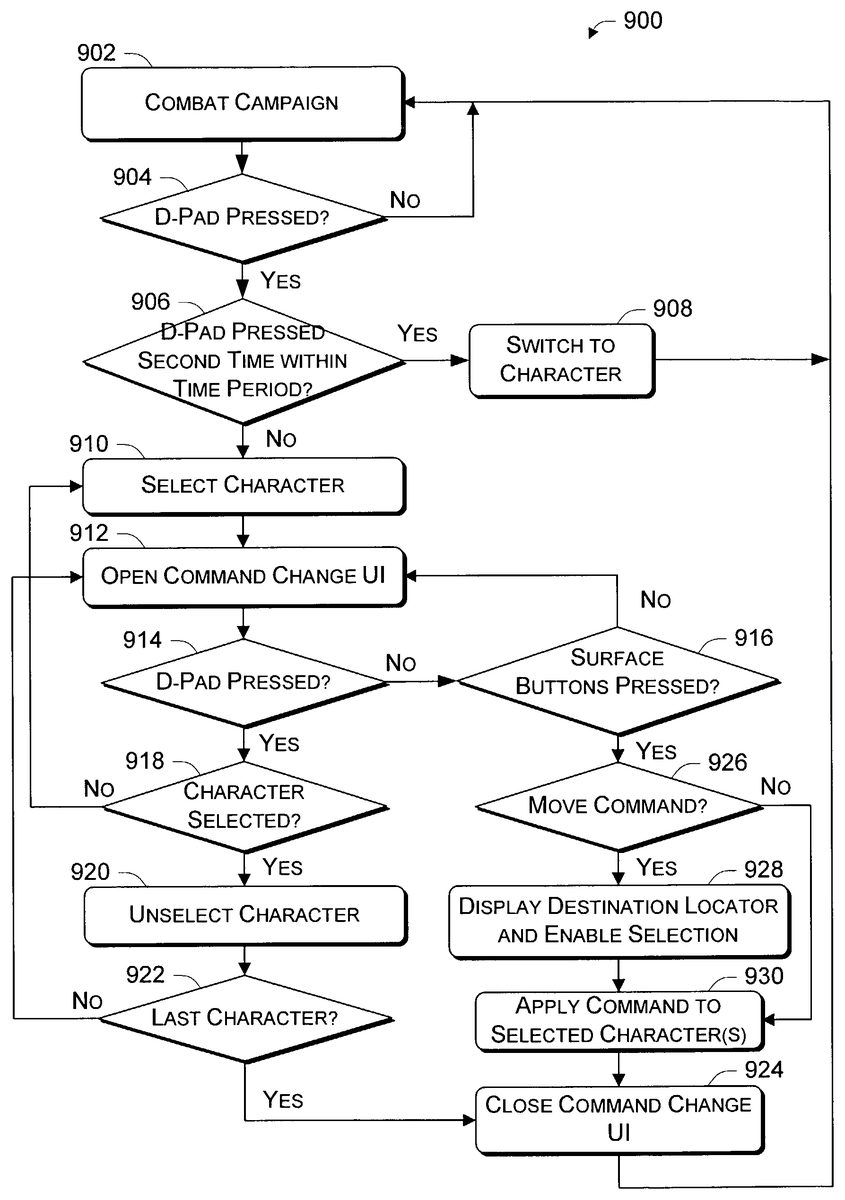
FIG. 9shows a process900for issuing commands to one or more characters. The process900is illustrated as a series of blocks that represent individual operations or acts performed by the gaming system in response to executing the video game. The process900may be implemented in any suitable hardware, software, firmware, or combination thereof. In the case of software and firmware, process900represents a set of operations implemented as computer-executable instructions stored in memory and executable by one or more processors.
At block902, the video game supports an ongoing combat campaign. Depending on the game configuration, the player is orchestrating a squad of characters through one or more missions. When the player wishes to issue a command to one or more characters in the squad, the player depresses the D-pad134on the controller104. Accordingly, at block904, the process detects whether the D-pad is pressed. If no actuation is detected (i.e., the “No” branch from block904), the game continues with the ongoing campaign.
If the D-pad is pressed (i.e., the “Yes” branch from block904), the process determines whether a second tap of the D-pad is received within a brief time period (block906). The duration of the time period is configurable, but suitable time periods range from a one tenth to one quarter of a second. If a second press is detected before the time period expires (i.e., the “Yes” branch from block906), the process interprets the players action as wanting to switch characters and camera viewpoints. Hence, at block908, the game switches to the new character selected by the player and the camera viewpoint changes.
If no second tap is received within the time period (i.e., the “No” branch from block906), the character associated with the tapped point on the D-pad is selected (block910) and the command change UI is instantly opened (block912). This is shown, for example, in transition fromFIG. 6toFIG. 7where the player taps the D-pad once to select a character (e.g., Hawk) and bring up the command change UI700inFIG. 7.
Once the command change UI700is opened, the game awaits input from the player via the D-pad134or one of the surface buttons136. The player can select one or more characters using the D-pad134and/or issue a command to the selected character(s) using the surface buttons136. Accordingly, at blocks914and916, the game determines whether the D-pad or the surface buttons have been pressed. The command change UI remains upon until either the D-pad or one of the surface buttons is pressed (i.e., the loop formed by the “No” branches from blocks914and916).
Depression of the D-pad134alternately selects or unselects characters on the squad. Accordingly, upon depression of the D-pad (i.e., the “Yes” branch from block914), it is determined whether the character corresponding to the tapped location of the D-pad134is already selected (block918). If not (i.e., the “No” branch from block918), the character is selected (block910) and the command change UI is updated to depict a second character as being selected (block912). Conversely, if the character is already selected (i.e., the “Yes” branch from block918), the character is unselected (block920). At block922, a determination is made as to whether that character is the last of the selected characters, leaving all characters unselected. If it was not the last character unselected (i.e., the “No” branch from block922), the command change UI is updated to show the character unselected. If it was the last character (i.e., the “Yes” branch from block922), the command change UI is closed (block924) and the player is returned to the combat campaign (block902).
Upon depression of a surface button (i.e., the “Yes” branch from block916), it is initially determined whether the “move to” command was issued (block926). This is accomplished by sensing whether the surface button722corresponding to the “move to” command option712(seeFIG. 7) is depressed. If it is (i.e., the “Yes” branch from block926), a destination locator is depicted and the player is enabled to move and confirm placement of the destination locator (block928). If a command other than the “move to” command is issued (i.e., the “No” branch from block926) or after the player places the destination locator (block928), the command issued to the one or more selected characters are applied (block930). At block924, the command change UI is closed and the player is returned to the combat campaign (block902).
Thereafter, the squad status display is once again returned to the lower left-hand corner of the scene. The action continues with the squad characters carrying out their associated commands, as represented by the current command icon in the squad status display.
Character Status Icons
Another feature supported by the squad command interface is a set of character status icons that appear when characters enter certain modes of operation. In the described implementation, there are three modes and hence, there are three corresponding status icons that are individually and selectively depicted as part of the squad status display310. The three status icons include a sniping icon to represent a sniper mode, a special ability icon to represent when a character has a special ability, and a talking icon to represent a talking mode. These status icons are merely representative, and more or less status icons for different character modes may be employed in other implementations.
FIG. 10shows an example screen display1000when a character is in sniper mode. In this example, the Hawk and Brutus characters are operating in sniper mode, as indicated by a sniping icon1002illuminated next to the Hawk character profile316and the Brutus character profile318in the squad status display310. The sniping icon1002is illustrated as a cross-hair sight. When a selected character is in sniper mode, the main viewing area is changed visually to exhibit an appearance of viewing through a weapon-mounted scope. A scope window1004appears on the screen. Objects within the scope window1004are rendered sharply and clearly, while objects outside the scope window1004are slightly blurred.
FIG. 11shows an example screen display1100when a character has a special ability. Each character has its own special ability. In this example, the Tex character's special ability is to hold and fire more than one weapon. The Tex character302is shown holding two weapons1104and1106. The Brutus character's special ability allows him to see living things more clearly, regenerate health, be resistant to damage, and kill his enemies in a supercharged attack. Hence, the screen display1100, which is taken from the perspective of the Brutus character306, shows the living members in a different manner, as if looking through Brutus' eyes. The characters are rendered in an infernal coloring (i.e., a mixture of orange, red, and yellow) against a gray background. The squad status display310indicates that the Tex and Brutus characters are utilizing their respective special abilities by depicting a special ability icon1102next to the Tex character profile314and the Brutus character profile318. The special ability icon1102is illustrated as an exclamation point “!”.
FIG. 12shows an example screen display1200when a character is in a talking mode. In this example, the Tex character is talking, as indicated by a talking icon1202illuminated next to the Tex character profile314in the squad status display310. The talking icon1202is illustrated as a cartoon-like speaking bubble. When a selected character is in talking mode, the game facilitates communication between the player and the character. When a character is talking, a communication dialog (not shown) is depicted on the screen.
Multiplayer Split Screen
The squad-based shooter game supports multiple players. In the standalone setting, a gaming system equipped four controllers can support up to four players. When multiple players participate, the screen is split to accommodate the different game views for the various players. When the screen is split, the amount of viewing space available for each player is significantly diminished. The squad command UI is therefore slightly modified to accommodate this smaller viewing space.
FIG. 13shows a split-screen display1300when two players are playing. The display1300has an upper panel1302for a first player using controller104(1) and a lower panel1304for a second player using controller104(2). This association of panels with controllers is merely representative for discussion purposes. A player need not use controllers in any particular order. For example, a player using a controller inserted in the fourth slot on the game console could play alone, or be joined later in the game by a player using a controller inserted into the first slot. In one implementation, the screen panels are related to the controller slot positions. So, in the case above, the player who joined later by attaching the game controller to the first slot would be given the upper panel1302, whereas the first player using the fourth slot would be given the lower panel1302. In multi-player operation, the squad status display is not persistently displayed in order to conserve space. This is illustrated by the upper panel1302, where the squad status display is not shown, leaving only the radar display312. However, as represented in lower panel1304, when the second player wants to switch characters or issue a new command, the second player taps on the D-pad134(2) to invoke a reduced-size squad status display1310.
The reduced-size squad status display1310is a reduced or minimized version of the squad status display310ofFIG. 3. It includes the character profiles arranged to map onto the D-pad actuator, the current command icons, and the character health bars. In the same was as described above, the player can select a new character using the D-pad134(2) or tap a second time on a selected character to invoke the command change UI.
FIG. 14shows the split-screen display1300in which a reduced-size command change UI1400is opened in the lower panel1304. It is similar in layout to the full-size command change UI700. The reduced-size command change UI1400has the reduced-size squad status display1310disposed adjacent to the command options menu702. At this point, the second player can select another character by depressing the D-pad134(2) or issue a command by pressing one of the surface buttons136(2).
FIG. 14shows another example of a split-screen display1500when three players are playing. Split-screen display1500has an upper panel1502for a first player using controller104(1), a lower right-hand panel1504for a second player using controller104(2), and a lower left-hand panel1506for a third player using controller104(3).
In this example illustration, the third player has invoked the reduced-size command change UI1400, which is opened on the lower left-hand panel1506. The reduced-size command change UI1400positions the reduced-size squad status display1310along side of the command options menu702.
Conclusion
The squad command interface allows game players to issue commands to a squad of characters in an efficient and intuitive manner. Players can switch among squad members, issue individual commands to individual characters, or provide a single order to multiple characters with few controller actuations and without use of cumbersome pull down menus. This allows the player to remain focused on the action rather than being distracted during order issuing processes.
Although the invention has been described in language specific to structural features and/or methodological acts, it is to be understood that the invention defined in the appended claims is not necessarily limited to the specific features or acts described. Rather, the specific features and acts are disclosed as exemplary forms of implementing the claimed invention.
Claims
- A user interface for a squad-based shooter video game system executable by one or more processors of the video game system and displayable on a screen associated with the video game system, the user interface comprising: an indication, displayable on the screen, of current commands that are issued to individual characters of a squad of multiple characters;and an interface displayable on the screen, to enable a player to issue simultaneously a common command to a plurality of characters of the squad by actuating one or more actuators on a game controller pertaining to the video game system, wherein the plurality of characters is less than all of the multiple squad characters, and wherein the squad-based shooter video game is configured to enable the player to concurrently, with a single actuation of an individual actuator of the game controller, select the plurality of squad characters, the plurality being an integer greater than one and less than all of the multiple squad characters, and invoke a command change user interface displayable on the screen, and wherein at least a portion of the user interface is persistently visible on the screen during play of the game, and wherein said single actuation initiates display of the command change user interface on the screen in which at least a portion of the video game is viewable through the command change user interface, wherein the interface comprises: a first graphical user interface to enable player selection of the multiple squad characters;and a second graphical user interface comprising the command change user interface, wherein the second graphical user interface contains command icons of possible commands that can be issued by actuating at least one of the actuators, the command icons being arranged to map visually and spatially onto the at least one actuator.
- A user interface as recited in claim 1 , wherein the indication comprises character profiles of one or more of the multiple characters and icons associated with the character profiles that represent the current commands.
- A user interface as recited in claim 1 , wherein the second graphical user interface is juxtaposed to the first graphical user interface to enable issuance of the common command.
- A user interface as recited in claim 1 , wherein the first graphical user interface contains profile images of one or more of the multiple squad characters that are arranged to map visually onto one or both of the at least one actuator or at least one other of the actuators.
- A console-based video game system, comprising: a game console having memory and a processor;a game controller associated with the game console;and a shooter video game executable by the processor and displayable on a screen associated with the shooter video game, to facilitate squad-based combat during which a player issues commands to a squad of characters by actuating one or more actuators on the game controller, wherein the shooter video game supports a squad command interface displayable on the screen that maps character selection and command selection to at least one of the actuators, wherein the shooter video game is configured to enable the player to concurrently, with a single actuation of an individual actuator of the game controller, select a plurality of squad characters, the plurality being an integer greater than one and less than all of the multiple squad characters, and invoke a command change user interface displayable on the screen, and wherein said single actuation initiates display of the command change user interface on the screen in which at least a portion of the video game is viewable through the command change user interface, and wherein the command change user interface contains one or more command icons of possible commands that can be issued, the one or more command icons being arranged to map visually and spatially onto one or both of the at least actuator or at least one other of the actuators.
- A console-based video game system as recited in claim 5 , wherein: the game controller has a D-pad and a set of surface buttons;and the squad command interface maps the character selection to the D-pad and the command selection to the surface buttons.
- A console-based video game system as recited in claim 5 , wherein the squad command interface enables assignment of one command to multiple characters with an individual single actuation of one or both of the at least actuator or the at least one other actuator.
- A console-based video game system, comprising: a game console having memory and a processor;a game controller associated with the game console;and a shooter video game executable by the processor on the game console and displayable on a screen pertaining to the game console to facilitate squad-based combat during which commands are issuable to a squad of multiple characters by actuating one or more actuators on the game controller, wherein the shooter video game supports a squad command interface displayable on the screen that includes a persistently visible squad status display and a command change user interface that enables a player to issue simultaneously a single command to a plurality of characters which is less than all of the multiple characters, and wherein the shooter video game is configured to enable the player to concurrently, with a single actuation of an individual actuator of the game controller, select the plurality of squad characters, the plurality being an integer greater than one and less than all of the multiple squad characters, and invoke the squad command interface on the screen, and wherein the command change user interface is partially transparent and overlays a current scene in the video game, and wherein the command change user interface contains command icons of possible commands issuable by actuating at least one of the actuators, the command icons being arranged to map visually and spatially onto at least one actuator of the game controller.
- In a squad-based video game, a computer-implemented method comprising: presenting on a screen pertaining to a game console, utilizing at least one processor of the game console, a squad command interface;and enabling, utilizing the at least one processor of the game console, a player to issue simultaneously a common command to multiple characters of a squad by actuating one or more actuators of a game controller associated with the game console, wherein the common command can be issued to a plurality of characters which is less than all of the multiple characters of the squad, and wherein the squad-based video game is configured to enable the player to concurrently, with a single actuation of an individual actuator of the game controller, select the plurality of squad characters, the plurality being an integer greater than one and less than all of the multiple squad characters, and invoke a partially transparent command change user interface, wherein the presenting comprises: presenting a first graphical user interface on the screen to enable character selection;and presenting a second graphical user interface on the screen, the second graphical user interface comprising the partially transparent command change user interface, wherein the second graphical user interface contains command icons of one or more possible issuable commands, the command icons being arranged to map visually and spatially onto at least one of the actuators.
- A method as recited in claim 9 , wherein the second graphical user interface is juxtaposed to the first graphical user interface to enable issuance of a command to selected characters.
- One or more computer-readable media comprising computer-executable instructions that, when executed by one or more processors of a game console, perform a method comprising: in a squad-based video game, presenting on a screen pertaining to the game console, utilizing at least one processor of the game console, a squad command interface;and enabling, utilizing the one or more processors of the game console, a player to issue simultaneously a common command to multiple characters of a squad by actuating one or more actuators of a game controller associated with the game console, wherein the common command can be issued to a plurality of characters which is less than all of the multiple characters of the squad, and wherein the squad-based video game is configured to enable the player to concurrently, with a single actuation of an individual actuator of the game controller, select the plurality of squad characters, the plurality being an integer greater than one and less than all of the multiple squad characters, and invoke a partially transparent command change user interface, wherein the presenting comprises: presenting a first graphical user interface on the screen to enable character selection;and presenting a second graphical user interface on the screen, the second graphical user interface comprising the partially transparent command change user interface, wherein the second graphical user interface contains command icons of one or more possible issuable commands, the command icons being arranged to map visually and spatially onto at least one of the actuators.
- A user interface for a squad-based shooter video game executable by one or more processors of a game console, the user interface comprising: an indication, displayable on a screen pertaining to the game console, of current commands that are issued to individual characters of a squad of multiple characters;and an interface, displayable on the screen, to enable a player to issue simultaneously a common command to a plurality of characters of the squad by actuating one or more game controller actuators associated with the game console, wherein the squad-based shooter video game is configured to enable the player to concurrently, with a single actuation of an individual game controller actuator, select the plurality of squad characters, the plurality being an integer greater than one and less than all of the multiple squad characters, and invoke a command change user interface displayable on the screen, and wherein the interface comprises: a first graphical user interface to enable player selection of the multiple squad characters, the first graphical user interface containing profile images of squad characters that are arranged to map visually onto one or both of the at least one game controller actuator or at least one other game controller actuator;and a second graphical user comprising the command change user interface, wherein the second graphical user contains command icons of possible commands that can be issued by the player, the command icons being arranged to map visually and spatially onto at least one of the at least one game controller or the at least one other game controller actuator.
- A user interface as recited in claim 12 , wherein the indication comprises character profiles of one or more of the multiple characters and icons associated with the character profiles that represent the current commands.
- A user interface as recited in claim 12 , wherein the second graphical user interface is juxtaposed to the first graphical user interface to enable issuance of the common command.
- A user interface for a squad-based shooter video game executable by one or more processors of a game console, the user interface comprising: an indication, displayable on a screen pertaining to the game console, of current commands that are issued to individual characters of a squad of multiple characters;and an interface, displayable on the screen, to enable a player to issue simultaneously, with a single actuation of an individual actuator of a game controller associated with the game console, a common command to a plurality of characters of the squad, the plurality of squad characters being an integer greater than one and less than all of the multiple squad characters, and invoke a command change user interface displayable on the screen, wherein the interface comprises: a first graphical user interface to enable player selection of the multiple squad characters, wherein the first graphical user interface contains profile images of squad characters that are arranged to map visually onto at least one actuator of the game controller;and a second graphical user interface juxtaposed to the first graphical user interface to enable issuance of the common command to the multiple characters, wherein the second graphical user interface comprises the command change user interface, and wherein the second graphical user interface contains command icons of possible commands that can be issued by the player, the command icons being arranged to map visually and spatially onto one or both of the at least one actuator or at least one other actuator of the game controller.
- A user interface as recited in claim 15 , wherein the indication comprises character profiles of the individual characters and icons associated with the character profiles that represent the current commands.
Disclaimer: Data collected from the USPTO and may be malformed, incomplete, and/or otherwise inaccurate.