U.S. Pat. No. 7,565,063
MEDIA FORMATTING AND SYSTEM FOR INTERACTIVE GAME PROGRAMMING
AssigneeHasbro Inc
Issue DateSeptember 30, 2005
Illustrative Figure
Abstract
A video game system including a compact disc programmed with video and audio data and designed to continuously update a player device with informational data to facilitate dynamic sequencing of video tracks during video game play. A unique uncomplicated development methodology is disclosed for the format information on the disc and the programming of the player device providing advantages of achieving strategic video gaming and fast action gaming, exclusively from the manipulation of a user's input during play via six operable navigational buttons. The navigational buttons thus affect the player device selection of video tracks through format information added to image frames of the disc. Numerous benefits are provided including the use of high quality video images and DVD style gaming applications in a low cost system which utilizes inexpensive standard disc media, such game discs are developed at substantially reduced programming cost relative to other game programming technologies.
Description
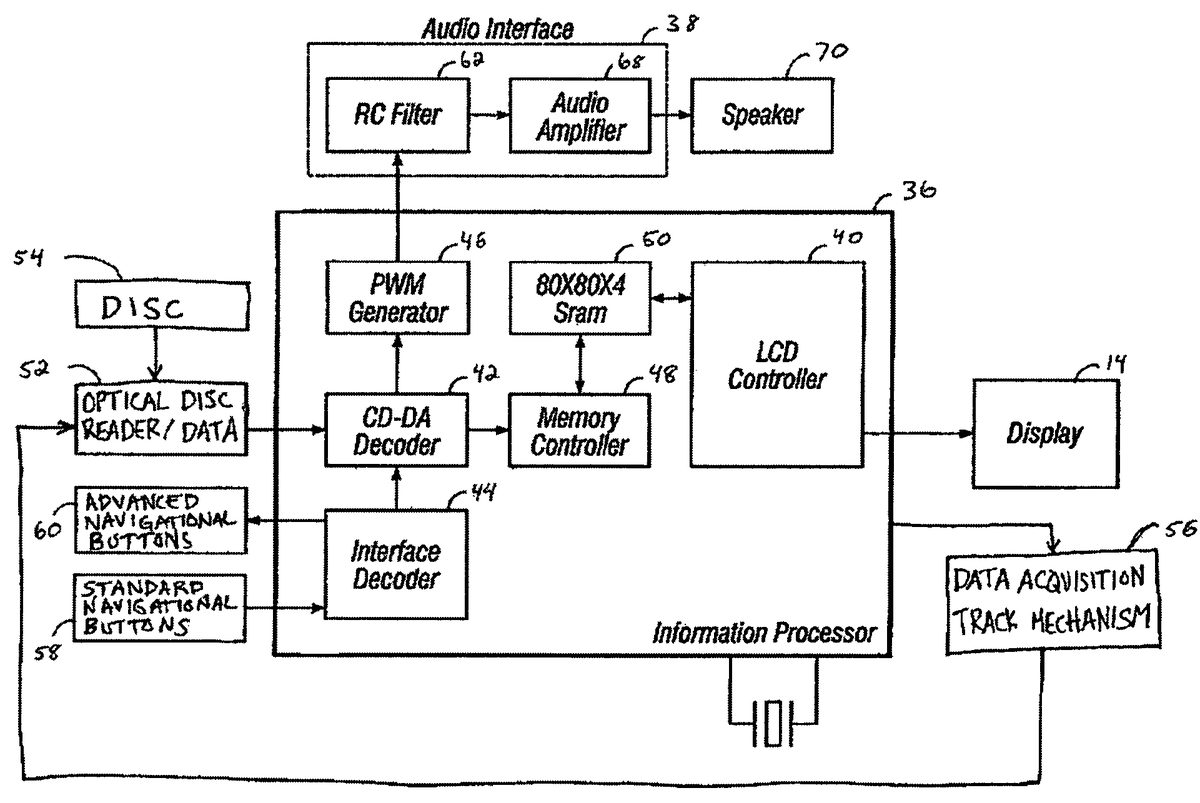
DETAILED DESCRIPTION OF THE PREFERRED EMBODIMENTS A disc player10, as shown inFIG. 1A, for interactive video display uses compact discs encoded with content information and format information combining “DVD style” gaming applications with high quality video images. The disc player10includes a housing12for receiving a disc, a display window14for viewing images, and standard and advanced navigational buttons for user input. The display window also includes a transparent portion for viewing a video display located adjacent the window14as described below. In some embodiments and as seen inFIG. 1A, user input buttons may include a Play/Pause button16, Stop button18, Next button/FF20, and Previous button/FR22(collectively named standard navigational buttons58, as seen inFIG. 2). Additionally, user input buttons may also include an UP button24, RIGHT button26, DOWN button28, LEFT button30, A button32, and B button34(collectively named advanced navigational buttons60, as seen inFIG. 2). Functions associated with these user input buttons are described in subsequent paragraphs. An information processor36is illustrated inFIG. 2with an audio interface38, and a video interface40. The information processor36may also include a data decoder42, an interface decoder44, a pulse width modulation (“PWM”) generator46, a memory controller48, and data storage device or memory50. Preprocessing such as filtering and amplification may be applied to the information before it is received by the data decoder42. The data decoder42accepts the information decodes the video, audio and format information. The audio information may be decoded having 8-bit quantization. The memory controller48is coupled to the decoder42and accepts the decoded video information. The memory controller48routes the information to the memory50at a rate corresponding to a desired frame rate. The memory50is illustrated as being random access memory (“RAM”), however, other types of volatile and non-volatile memory may be implemented for use with the device10. The memory50receives the video information, or signal, and stores the information for output to the video interface40. ...
DETAILED DESCRIPTION OF THE PREFERRED EMBODIMENTS
A disc player10, as shown inFIG. 1A, for interactive video display uses compact discs encoded with content information and format information combining “DVD style” gaming applications with high quality video images. The disc player10includes a housing12for receiving a disc, a display window14for viewing images, and standard and advanced navigational buttons for user input. The display window also includes a transparent portion for viewing a video display located adjacent the window14as described below. In some embodiments and as seen inFIG. 1A, user input buttons may include a Play/Pause button16, Stop button18, Next button/FF20, and Previous button/FR22(collectively named standard navigational buttons58, as seen inFIG. 2). Additionally, user input buttons may also include an UP button24, RIGHT button26, DOWN button28, LEFT button30, A button32, and B button34(collectively named advanced navigational buttons60, as seen inFIG. 2). Functions associated with these user input buttons are described in subsequent paragraphs.
An information processor36is illustrated inFIG. 2with an audio interface38, and a video interface40. The information processor36may also include a data decoder42, an interface decoder44, a pulse width modulation (“PWM”) generator46, a memory controller48, and data storage device or memory50. Preprocessing such as filtering and amplification may be applied to the information before it is received by the data decoder42. The data decoder42accepts the information decodes the video, audio and format information. The audio information may be decoded having 8-bit quantization. The memory controller48is coupled to the decoder42and accepts the decoded video information. The memory controller48routes the information to the memory50at a rate corresponding to a desired frame rate. The memory50is illustrated as being random access memory (“RAM”), however, other types of volatile and non-volatile memory may be implemented for use with the device10. The memory50receives the video information, or signal, and stores the information for output to the video interface40. The video interface40accesses the information stored in the memory50and outputs the data to the display unit14.
In one embodiment, an optical disc reader52extracts information from a recordable medium, seen as a disc54inFIG. 2, for processing by the information processor36. The optical disc reader52extracts both content and format information from the disc54. The information processor36is operable with the display14for generating images on the display, and is also operable with a data acquisition track mechanism56capable of positioning the optical disc reader52at a selected track on the disc54, and processing the signal from the optical disc reader52. In some embodiments, the Play/Pause button16is operable to cause the optical disc reader52to play or pause the reproduction of audio and video information, and the Stop button18is operable to cause the optical disc reader52to stop operation. The Next/FF button20and Previous/FR button22are operable to cause the optical disc reader52to fast-forward, or skip, to the next stored content and fast-reverse to the previously stored content, respectively. In some embodiments, some or all of the advanced navigational buttons60are operable to cause the data acquisition track mechanism56to position the optical disc reader52at a selected track on the disc54, and will be discussed in detail below.
The compact discs54of the present invention utilized by the disc player10, are standard digital audio CDs (“CD-DA”) encoded with frame data structures containing content information and format information on a plurality of tracks on the disc. The content information is configured to contain both video and audio data, rather than only audio data common on standard digital audio CD's. The track structure of the compact disc is the same as standard audio CDs comprising one extended spiral of data divided into up to ninety-nine tracks. Unlike most streaming media, audio and video are not stored as separate streams, so audio and video cannot get out of sync during playback. Audio and video are then mixed together in a single stream and this mixing happens at a very fine level. There are many samples of audio for every frame of video in the combined stream.
In some embodiments, the audio information is sampled as a 44.1 kHz, 8-bit, monaural signal. The PWM generator46is operable to convert the 8-bit audio information into a PWM signal. This PWM signal may then be output to the audio interface38. In the exemplary illustration, the audio interface38includes a filter62and an amplifier68, although may include more or fewer components including transistors. The audio interface38is operable to receive the audio information, or signal, from the information processor36and provide additional filtering and signal amplification. In another embodiment, the audio interface is optional and the audio signal is output to a speaker70directly from the PWM generator46. In one embodiment, the volume control is coupled to the audio interface38and operable to cause a variance in the amount of signal amplification. The signal output from the audio interface38may be received by either or both the speaker70and another device, such as headphones, coupled to the audio jack.
As discussed above, the compact discs54are encoded with frame data structures containing format information as well as content information on a plurality of tracks on the disc. In some embodiments, every frame data structure of every track on the disc may contain format information which comprises technical data, some of which is used to manipulate tracks on the disc by the disc player10in accordance with user input. Selected portions of the format information from at least one frame data structure of at least one track on the disc comprises a table containing address information associating at least one of the plurality of advanced navigational buttons60with a track on the disc. The address information includes a series of addresses which may provide a jump chain defined by the table. The series of addresses repeatedly update a series of registers located on the disc player10as the disc is played. Encoding two or more frame data structures, instead of only one from each track, with identical address information can ensure the accuracy of the updating of the registers of the disc player. In some embodiments, the series of addresses which are uploaded to the series of registers can be unique to each one of the plurality of tracks on the disc and can be pre-determined to provide jump chains associated with the multiple advanced navigational buttons60for interactive game play. Depending on how a game is to be played, some or all six advanced navigational buttons60, as shown inFIG. 1, can be associated with a track on the disc, even linking together two or more selected tracks to the multiple advanced navigational buttons60.
In an embodiment, the table may be programmed either by a serial bus connection or by the data decoder42that decodes the table stored on the disc. A gamma correction table may be included to augment image scale parameters associated with the data, and further include data structures exemplified in table and register format TABLES 1-6 below. A method of formatting information on a disc for playback responsive to user navigational inputs includes the steps of encoding frame data structures on a plurality of tracks on the disc, and providing content and format information in the frame data structures. The content information in the frame data structures is for the display of images associated with at least one of the plurality of tracks on the disc. The format information in the frame data structures define jump chains associated with at least one of the user navigational inputs to select at least one of the plurality of track on the disc. The format information includes tables containing a series of addresses associating two or more navigational inputs with a track on the disc. The address information is repeatedly updated to a series of registers on the disc player during playback of the disc.
Additionally, security features may include reading the TOC (Table of Contents) and storing a gamma correction table for the disc in the SOF (Start of Frame) section to determine, e.g., the content for the disc and duration of play in minutes, disc size such as distinguishing between 80 mm, 85 mm, 108 mm, 120 mm discs. Accordingly, there may be a dummy track included at the end of the disc that is ignored by navigation and is not played, but can be used to pad the disc, e.g., to be more than 30 minutes. The disc player10would then be programmed to disallow the playback of any disc that is less than 30 minutes long.
Various other types of technical data may be included in the format information of the frame data structures of various tracks on the disc, including track type flag data and time window data. Track type flags allow special behaviors, such as a “correct answer” flag which causes the score to a game to increase when the track is played and a “pause” flag which directs the disc player to play the current track and then pause on the last frame of the track until the user activates a navigational button. Time window data, as explained further below, provides for a jump chain that can change as a current track plays and requires time-limited input from the user to signal a jump to a designated track. It is also contemplated that other types of technical data can be included in the format information of some or every frame data structures of the tracks of the disc.
In operation, the optical disc reader52of the disc player10is operable to read the time-synchronized interleaved audio and video information recorded on the CD-DA, and the data acquisition track mechanism56is operable to process a signal representative thereof to the information processor36. The processor extracts the audio and video information from the interleaved stereo audio channels and provides an audio signal and video signal to respective audio and video interfaces for reproduction by a speaker and a display14. The user may operate the disc player10by pivoting open a media cover portion72, inserting a CD-DA formatted as described above, closing the media cover portion72, and initiating one or more of the control means on the device, such as standard navigational buttons58and advanced navigational buttons60. In some embodiments, the Advanced navigational buttons24,26,28, &30can be included as a cluster of four separate buttons as seen inFIG. 1A, or alternatively as a D-pad, indicating UP, RIGHT, DOWN, and LEFT.
As the disc is played, the track order selection begins at track1of the CD-DA and plays through in order to the end-of-disc track, or until user input alters the order in which the tracks are played. For example, a typical track order of a CD-DA includes the following:
EXAMPLE 1
Tracks1Through11
1. Logo track
2. Thumbnail1track
3. Thumbnail2track
4. Episode1track
5. Episode2track
6. Episode3track
7. Episode4track
8. Promo1track
9. Promo2track
10. End-of-disc track
11. Dummy track
After the Logo track is played, the information processor36, as seen inFIG. 2, directs the data acquisition track mechanism56to move the optical disc reader52to the next sequential track, called track2(Thumbnail1track) which is then played and a corresponding image is generated on the display14. Additionally, when track2is played, selected portions of its format information from two or more frame data structures in a row update the disc player's registers with an identical series of addresses associating some or all of the multiple advanced navigational buttons60with a track on the disc. Upon activation of one of the associated navigational buttons60, the information processor36directs the data acquisition track mechanism56to navigate the optical disc reader52to the track, or series of tracks on the disc, associated with the activated navigational button60. As describe above, the disc player can easily and quickly jump from a current track to another designated track, or series of tracks on the disc, upon input from the user via activation of a navigational button.
In some embodiments, tracks of the disc are segregated into different types, as seen in TABLE 1 below, with frame data structures identifying it type such as “Pause” track type2, “Jump to score” track type3, “correct” and “wrong answer” tracks types4&5, etc., which are each programmed to play and operate in various ways. “Gaming” tracks are defined as all the tracks between “End of Disc” track and the “Dummy” track. During playback of a “gaming” track, standard navigational buttons58should not be functional, and the TRACK_END_JUMP functionality works only for gaming tracks and not other track types, as seen in TABLE 1 below. This information in the table is generally used to instruct the player on which track of the CD-DA to play or jump to after the end of a previous track, or after input from the user via the advanced navigational buttons60, achieving “DVD style gaming” applications even including some basic fast-action gaming, using just two methods, jump chains and time windows. The gaming of the present embodiment is described as DVD style gaming, rather than “twitch game” style because the games are essentially interactive movies relying on strategy and timing to effect the outcome of the game, and not relying on quick sequential reactions and the speed at which a user presses the buttons or moves the mouse as in “twitch games”.
The registers used by the information processor can be defined and described as follows:
TABLE 1REGISTER NAMEDESCRIPTIONFRAME_NUM_0The least significant byte of the current frame number.The frame number starts at 00, not 01.FRAME_NUM_1The most significant byte of the current frame number.The two-byte frame count can hold up to 65536 frames, or60 minutes at 18 fps.TRACK_TYPE0 = first generation format1 = second generation format2 = second generation format, go into PAUSE mode onlast frame3 = second generation format, “Jump-To-Score” track4 = second generation format, “Correct Answer” track.Add 1 to SCORE.5 = second generation format, “Wrong Answer” track.Subtract 1 fromSCORE.6 = second generation format, “Reset Score” track. Setscore back to 100.(these track types are explained further in theexamples below)END_OF_DISCThis register is only valid for track #2 (the first track thatis played after the logo track). This register contains thetrack number of the “End-of-disc” track. This tells theplayer in the very beginning where the “End-of-disc”track is, so that it knows which tracks to avoid when usingthe Standard (FF & FR) buttons. For all other tracksbesides track #2, this register needs to be set to 0.FRAME_CNT_0The least significant byte of the number of frames in thistrack.FRAME_CNT_1The most significant byte of the number of frames in thistrack. The two-byte frame count can hold up to 65536frames, or 60 minutes at 18 fps. The frame count is usedby the ASIC to pause on the last frame of the track if theTRACK_TYPE is type 2.All of the registers from here down are the “Navigational Registers” andcontain track numbers on the disc.The track number is represented in hex, and the valid range is from 2-63 (2-99decimal).Track 1 is invalid because it's the logo track.Any track number equal to or larger than the dummy track is also invalid.Any invalid track number in these registers should be treated like a 0.TRACK_END_JUMPIf the track is played all the way to the end, the playershould jump to the track indicated by this register. If theTRACK_TYPE is 2, the player ignores this register, andgoes into PAUSE mode. Also, if the current track is partof a Jump Chain, then this register is ignored until theplayer is playing the last track in the Jump Chain. Also, ifthis register is set to 0, then the player will simply play thenext track in the track order. This TRACK_END_JUMPregister is ignored unless the track is a Gaming Track (seeGaming Track section below).UP_0If the UP navigational button is pressed anytime duringthe playback of this track, the player will navigate to thetrack number in this register. If this register is 0 (orinvalid), then the player can ignore the UP button press(just continue playing the current track). It can alsoignore the UP_1, UP_2, and UP_3, registers. If UP_0 is avalid non-zero track number, the player will immediatelyjump to the beginning of this UP_0 track and play all theway to the end.UP_1Once the player is done playing the UP_0 track, it willthen play this UP_1 track. If this UP_1 register is 0, thenthe player will simply continue playing the next track inthe Track Order (usually UP_0 + 1 - see Track Ordersection). If this UP_1 register is 0 (or invalid), then theplayer can ignore the UP_2 and UP_3 registers.UP_2Once the player is done playing the UP_1 track, it willthen play this UP_2 track. If this UP_2 register is 0, thenthe player will simply continue playing the next track inthe Track Order (usually UP_1 + 1 - see Track Ordersection). If this UP_2 register is 0 (or invalid), then theplayer can ignore the UP_3 register.UP_3Once the player is done playing the UP_2 track, it willthen play this UP_3 track. If this UP_3 register is 0, thenthe player will simply continue playing the next track inthe Track Order (usually UP_2 + 1 - see Track Ordersection).RIGHT_0Same as UP_0, but for the RIGHT button.RIGHT_1Same as UP_1, but for the RIGHT button.RIGHT_2Same as UP_2, but for the RIGHT button.RIGHT_3Same as UP_3, but for the RIGHT button.::::TRACK_NUMThe track number of this track on the disc. The logo trackis track 01, and goes up sequentially from there.
The four registers UP—0, UP—1, UP—2, and UP—3are an example of a “jump chain”. The jump chain includes the four registers in this order: XXX—0→XXX—1→XXX—2→XXX—3, wherein XXX corresponds to any one of the navigational buttons including UP, RIGHT, DOWN, LEFT, and A or B buttons. The jump chain can be anywhere from 0 to 4 tracks, and a value of ‘0’ in the jump chain signifies the end of the jump chain. Jump chain Tables 2 and 3 are seen below:
TABLE 2Jump Chain of 0 tracks:REGISTERVALUEUP_00UP_10UP_20UP_30
TABLE 3Jump Chain of 3 tracks:REGISTERVALUEUP_04UP_16UP_27UP_30
In jump chain Table 2, the four registers assigned to the UP navigational button have all been updated with a zero address value, and the UP navigational button has been made non-functional. This means that during playback of the current track, no tracks are associated with this UP navigational button and the current track will play uninterrupted by activation of the UP navigational button. On the other hand, in jump chain Table 3, three of the four registers assigned to the UP navigational button have non-zero valid address values. This means that during playback of the current track, activation of the UP navigational button will jump playback from the current track to the series of tracks4,6, &7in that order. Referring to Example 1 which corresponds to the sample track order, it can be seen that activation of the UP navigational button as in example 4, will jump playback from the current track2to the series of episode tracks4,6&7in that order.
Another example, utilizing the track order as defined in Example 1 above, illustrates Thumbnail tracks and how they can be simply defined to operate like a menu on a DVD player. The advanced navigational buttons use only single jumps, indicated by the XXX—1, XXX—2, XXX—3registers always set to 0, so the jump chain includes only one track. For example, track2(Thumbnail1track) is played after track1(logo track) and an image is generated on the display as seen inFIG. 3A. While track2(Thumbnail1track) is played, the following series of address values would update the disc player's registers as seen in TABLE 4 below:
TABLE 4REGISTERVALUEFRAME_NUM_00FRAME_NUM_10TRACK_TYPE2END_OF_DISC10FRAME_CNT_056FRAME_CNT_10TRACK_END_JUMP3UP_04UP_10UP_20UP_30RIGHT_05RIGHT_10RIGHT_20RIGHT_30DOWN_06DOWN_10DOWN_20DOWN_30LEFT_07LEFT_10LEFT_20LEFT_30A_00A_10A_20A_30B_03B_10B_20B_30TRACK_NUM2
FRAME_NUM—0has a value of 0 indicating that this is the very first frame of the track. The TRACK_TYPE value of 2 indicates that this is a second generation format track, and that the player goes into PAUSE mode on the last frame of the track and waits for user input via either the Standard Navigational buttons or the Advanced Navigational buttons. This programming technique saves space on the disc, allowing pausing without taking up space on the disc with null frames, thus allowing the disc player to respond as if the user has pressed the PAUSE button after the last frame on the track. The END_OF_DISC value is 10 telling the player that the “End-of-disc” track is track #10. Since this track is track #2on the disc, it needs to have this END_OF_DISC register set. The FRAME_CNT—1value is 0 and FRAME_CNT—0value is 56 indicating that there are 56 frames in this track. The TRACK_END_JUMP register is indicating the next track #3(Thumbnail2) but it will be ignored since the TRACK_TYPE is 2, and the player goes into PAUSE mode at the end of the current track. The TRACK_NUM value is 2 indicating that this is track 2 on the disc.
The remaining registers and address values correspond to the six advanced navigational buttons associating some of the buttons with a track on the disc, and designating other navigational buttons as non-functional. The UP—0value is 4 and UP—1value is 0 indicates that whenever the UP button is pressed during the playback of this track or when it's in PAUSE mode on the last frame, the disc player will simply jump directly to track #4(Episode1as seen inFIG. 3A). The RIGHT—0, DOWN—0, LEFT—0values are 5, 6 & 7 respectfully, indicating that whenever the RIGHT, DOWN, or LEFT buttons are pressed during playback of this current track or when this current track is in PAUSE mode on the last frame, the disc player will jump directly to track numbers5,6&7(Episodes2,3&4as seen inFIG. 3A) respectfully. The A—0value of 0 means that the A button is non-functional or ignored during this track. The B—0value of 3 and B—1value of 0 indicates that whenever the B button is pressed during the playback of this track or when it's in PAUSE mode on the last frame, the disc player will jump to track3(Thumbnail2as seen inFIG. 3A).
In order to be able to direct the player to jump to additional tracks in the same menu style, namely remaining tracks number8(Promo1track, as seen inFIG. 3B) and number9(Promo2track, as seen inFIG. 3B) a Thumbnail2track is employed which is defined to operate similarly to Thumbnail1track, and is seen inFIG. 3B. Track3(Thumbnail2track) would have navigational register address settings mostly set to zero, like Thumbnail1track, except UP—0value set to 8, and RIGHT—0value set to 9 indicating that whenever these buttons are pressed during playback or PAUSE mode of track number3, the disc player will jump to tracks8&9respectfully. Additionally, the A—0value is set to 2, directing the disc player back to track2(Thumbnail1track, as seen inFIG. 3B) during playback or PAUSE mode of track3.
A wide variety of game designs are possible employing the same and similar mechanisms as described above. DVD style gaming applications can also be employed through these mechanisms providing a gaming feature which makes use of multiple jumps utilizing some or all of the six navigational buttons and their corresponding registers. The game designs can be divided up into two major categories, namely turn-based games and action games. Examples of both types are shown below. For example, a turn based game, or trivia style game can be chosen on a DVD style menu, with such a menu operating like the menu described above, and a question-and-answer game would follow. A question-and-answer game as seen in EXAMPLE 2 below, comprising just three questions in the game and adding five new tracks, namely Question tracks1-3, Correct Answer track, and Wrong Answer track, to those outlined in EXAMPLE 1 above.
EXAMPLE 2
1. Logo track
2. Thumbnail1track
3. Thumbnail2track
4. Episode1track
5. Episode2track
6. Episode3track
7. Episode4track
8. Promo1track
9. Promo2track
10. End-of-disc track
11. Question1track
12. Question2track
13. Question3track
14. Correct Answer track
15. Wrong Answer track
16. Dummy track
As the game begins, track11(Question1track) is played sequentially after track10and an image is generated on the display as seen inFIG. 4. Track11has TRACK_TYPE2address designation which is updated to the player's registers directing the disc player to go into PAUSE mode on the last frame of the track as seen inFIG. 4. This last frame has all of the answer options and waits for user input via one of four advanced navigational buttons. While track11is played, the following series of address values would update the disc player's registers as seen in TABLE 5 below:
TABLE 5REGISTERVALUEFRAME_NUM_00FRAME_NUM_10TRACK_TYPE2END_OF_DISC0FRAME_CNT_023FRAME_CNT_10TRACK_END_JUMP0UP_015UP_112UP_20UP_30RIGHT_015RIGHT_112RIGHT_20RIGHT_30DOWN_014DOWN_112DOWN_20DOWN_30LEFT_015LEFT_112LEFT_20LEFT_30A_02A_10A_20A_30B_00B_10B_20B_30TRACK_NUM11
Additionally, as track11(Question1track) video plays, the audio in the track asks a question, and the last frame of the track pauses for an answer as seen inFIG. 4. The user has the option to select “Answer1,2,3or4, by pressing the UP, RIGHT, DOWN, or LEFT navigational buttons respectively, as seen inFIG. 4. If the user selects “Answer1,2or4, corresponding to UP, RIGHT, and LEFT navigational buttons, the disc player will jump to playback of track15(Wrong Answer track) and immediately jump to playback of track12(Question2track). As seen in Example 7, as track11plays the UP—0, RIGHT—0, and LEFT—0, registers are all updated with an address value of 15 (indicating track15) and the UP—1, RIGHT—1, and LEFT—1registers are all updated with an address value of 12 (indicating track12). As is also seen in TABLE 5, when the XXX—0and XXX—1registers are non-zero, the disc player performs a multiple Jump demonstrating a “DVD style gaming” application.
Likewise, to get to the correct answer in the game, the user must press the DOWN navigational button, which jumps playback to track14(Correct Answer track) followed immediately by track12(Question2track). As is also seen in the TABLE 5, as track11plays the DOWN—0register is updated with an address value of 14 (indicating track14) and the DOWN—1register is updated with an address value of 12 (indicating track12). It is important to note that during playback of a jump chain with multiple jumps, as described, the advanced navigational buttons (UP, RIGHT, DOWN, LEFT, A, or B) as well as the standard navigational buttons (FF and FR) are not functional and are ignored by the player until the last frame of the last valid track in the jump chain is played. Additionally as seen in TABLE 5, during playback of track11(Question1track) if the A button is pressed, the disc player jumps to track2(Thumbnail1track) and the B button is ignored, since the B—0register is set to 0.
As seen inFIG. 5, a trivia game can feature questions custom written from a video clip on the disc. For example, if the show was about a character named Bertie Bird, one trivia question might be “Who Was Bertie Bird mad at?” If the user then chooses the correct character, they are rewarded by seeing the video clip from the episode. If the user answers incorrectly, then it will play a short, canned INCORRECT video clip and sound effect, and then go back to the same question. This goes on until the user answers all questions, or selects to leave the gaming section. Although this game is specific to the episode played in the video clip, most of the video art is reusable in multiple games, changing only the question text, voiceovers, and the jump chains. This keeps game development costs reasonable while providing different games on each disc.
As seen inFIG. 6, a simple guessing game that is good for younger users is shown. This game includes a series of scenes and each scene is a guessing game. Winning each guessing game gives one component of the goal the user is trying to complete, such as “collect all the pieces of the Lost Idol”. Each guessing game includes simply choosing a place to look with the user simply guessing each location. When the wrong answer is given, the user is simply told “nice try, try again!” and returned to the screen. Once all the games are won, a reward animation plays “Great job! You've assembled the Lost Idol!”
Additionally, as seen inFIG. 7, simple entertainment games for preschool age users is shown. This game requires the user to select the cards in the correct sequence to put them in order, teaching 123's, and ABC's, etc.
A fast paced “DVD style gaming” application can also be achieved through the same mechanisms as defined above, facilitating more animated game play, whereby the jump chains can change dynamically during playback of a track on the disc. It is possible to provide a game wherein the jump chains can change every frame of a track however a user cannot react that quickly to so many changes and there may be a greater possibility of errors during game play. More practically, changes occurring as much as every three frames, corresponding to a maximum of six changes per second for 18 fps speed discs or three changes per second for 9 fps speed discs, would allow for more optimal dynamic game play with, e.g., as much as every three frame data structures of the track dynamically from frame to frame.
As seen in the present invention, at least one track of the disc comprises frame data structures with tables containing a series of addresses which change as much as every three frame data structures of the track creating time windows which occur as much as about every 1/9th of a second as the track is played. A time window is simply a jump chain which is not fixed for the entire track and requires time-limited input from the user during playback of the track. For example, in a “duck hunt” game all the frame data structures of the track have jump chains associated with the “misses track” except when a duck is in the crosshairs, then those frame data structures suddenly associate with the “got it!” reward track. The user is only rewarded when they push the right button at the right time during playback of the track.
As seen in the “Shooting Gallery” screen ofFIG. 8, the user waits for targets to pass in front of the crosshairs. The targets don't scroll smoothly; instead they hop along, step by step. Each hop takes about ⅓ of a second. If they push the button when the target hops in front of their crosshairs, they hear a gunshot and the target explodes. If they don't push the right button in time, the game stops and they see a “you lose” animation, and asked if they want to play again.
There are nearly an infinite number of stylistic variations on the shooting gallery game, with the simplest level having a single row of targets (not shown) and the user only having to push one button to play. The next level, as shown inFIG. 8has two rows of targets with a separate button controlling the shots fired in each row. The user has to watch two rows of targets pass by at once, and this can be very difficult.
Scoring games as they are played can be achieved with a “jump to score” type of track which is another track type with it's own unique TRACK_TYPE register setting entered into frame data structures of the track. This track type is a branching track similar to the tracks described above, however, the branching does not depend on user input as seen with Thumbnail (menu) and gaming track types as described above. During playback of a “jump to score” track all navigational buttons (FF, FR, UP, DOWN, RIGHT, LEFT, A, and B) are ignored, and the next track played at the end of the “jump to score” track, depends on the SCORE register in RAM.
The SCORE register is a working register in RAM that keeps track of how many questions were answered properly. The information processor keeps track of the number of correct and wrong answers based on the number of times the “CORRECT ANSWER” and “WRONG ANSWER” tracks are played. Each of the “CORRECT ANSWER” and “WRONG ANSWER” tracks have a unique TRACK_TYPE register address value encoded in frame data structures of each track, alerting the information processor as to each time either track is played. For accuracy, every time a new disc is inserted, the SCORE register should be initialized to 100 (0×64), and the score should never be allowed to be decremented lower than 0 (0×00) or incremented over 255 (0×FF). In other words, if the score is already at 255 and the user gets one more question right, the score will still stay at 255.
The game can be structured so that the user is returned to the same question every time a wrong answer is given, by encoding both CORRECT ANSWER and WRONG ANSWER tracks. This way, the information processor keeps track of how many times the user got the wrong answer before moving onto the next question. Alternatively, the game can be structured so that the user moves onto the next question whether he/she answers the question right or wrong, and then only the CORRECT ANSWER tracks should be coded using the TRACK_TYPE register. There would still be a WRONG ANSWER track but it would be a TRACK_TYPE1instead of TRACK_TYPE5, so that the score would not be subtracted when you got to this track. Using this method, the information processor keeps track of how many correct answers you had for the fixed number of questions.
EXAMPLE 3 below includes a “Jump-To-Score” type of track, adding four more tracks to EXAMPLE 2, namely Summary, High Score, Med Score, and Low Score tracks as seen below:
EXAMPLE 3
1. Logo track
2. Thumbnail1track
3. Thumbnail2track
4. Episode1track
5. Episode2track
6. Episode3track
7. Episode4track
8. Promo1track
9. Promo2track
10. Question1track
11. Question2track
12. Question3track
13. End-of-disc track
14. Correct Answer track
15. Wrong Answer track
16. Summary track
17. High Score track
18. Med Score track
19. Low Score track
20. Dummy track
During play of EXAMPLE 3, the disc player would take the user through the three questions and then jump to the Summary track. The Summary track (track16) has a TRACK_TYPE register address value of 3 (see TABLE 6 below) designating it as a “Jump-to-Score” type of track.
In this example, the audio in the Summary track might say something like “OK, let's add up your score!” and the disc player would jump to either the High Score, Med Score, or the Low Score track depending on the current value of the SCORE register, as well as the Navigational Register settings for this “Jump-to-Score” type track.
TABLE 6REGISTERALT FUNCTIONVALUEFRAME_NUM_0None0FRAME_NUM_1None0TRACK_TYPENone3END_OF_DISCNone0FRAME_CNT_0None21FRAME_CNT_1None0TRACK_END_JUMPNone0UP_0SCORE_THRESH_A103UP_1SCORE_A017UP_2SCORE_A12UP_3SCORE_A20RIGHT_0SCORE_THRESH_B102RIGHT_1SCORE_B018RIGHT_2SCORE_B12RIGHT_3SCORE_B20DOWN_0SCORE_THRESH_C0DOWN_1SCORE_C019DOWN_2SCORE_C12DOWN_3SCORE_C20LEFT_0SCORE_THRESH_D0LEFT_1SCORE_D00LEFT_2SCORE_D10LEFT_3SCORE_D20A_0SCORE_THRESH_E0A_1SCORE_E00A_2SCORE_E10A_3SCORE_E20B_0SCORE_THRESH_F0B_1SCORE_F00B_2SCORE_F10B_3SCORE_F20TRACK_NUMNone16
The TRACK_TYPE3(“Jump-to-Score” track) utilizes the Navigational Registers differently than any other TRACK_TYPE. TRACK_TYPE3includes an Alternate Function (ALT FUNCTION column above).
During playback of a TRACK_TYPE3(“Jump-to-Score”) track, the information processor compares the SCORE register value in RAM to the various Score Threshold registers to determine which track to jump to. First, it compares the SCORE register to SCORE_THRESH_A. If SCORE is equal to or bigger than SCORE_THRESH_A, the player will execute the Jump Chain includes: SCORE_A0→SCORE_A1→SCORE_A2.
If the SCORE was less than SCORE_THRESH_A, then it moves down to SCORE_THRESH_B, and so on. Because of this sequencing, the thresholds should be placed in the order of largest to smallest. For example, if all six score thresholds (A-E) are used, the following must be true: SCORE_THRESH_A>SCORE_THRESH_B>SCORE_THRESH_C>SCORE_THRESH D>SCORE_THRESH E. Additionally, the last threshold used should be equal to 0, so as to cover all score possibilities. In EXAMPLE 3 above the three score thresholds are102,101, and0.
Since there are 3 Question tracks in EXAMPLE 3, and the score starts at 100, the possible values for the SCORE register after those 3 Questions (assuming WRONG ANSWER is TRACK_TYPE1and not TRACK_TYPE5), are 100, 101, 102 or 103. Assuming the user's SCORE is 101, when the player gets to the TRACK_TYPE 3 Summary track, it would first compare the SCORE of 101 with the SCORE_THRESH_A value of 103. Since SCORE is smaller, it moves onto SCORE_THRESH_B. The SCORE of 101 is also smaller than SCORE_THRESH_B of 102, so it moves onto SCORE_THRESH_C. Since the SCORE is larger than the SCORE_THRESH_C value of 0, it will then execute the Jump Chain includes:
SCORE—C0→SCORE—C1→SCORE—C2
As a result, the disc player plays the multiple jump chain includes first the Low Score track (19) and then jumps to the Thumbnail 1 track (2).
It should be appreciated that a wide range of changes and modifications may be made to the embodiments of the invention as described herein. Thus, it is intended that the foregoing detailed description be regarded as illustrative rather than limiting and that the following claims, including all equivalents, are intended to define the scope of the invention.
Claims
- A disc player for interactive image display, comprising: a housing for receiving a disc;a plurality of navigational buttons on the housing;an optical disc reader for reading content information and format information from frame data structures encoded on a plurality of tracks on the disc;a display;an information processor operable with the display and the optical disc reader for using the content information for generating an image on the display;a data acquisition track mechanism for positioning the optical disc reader at a selected one of the plurality of tracks on the disc;and a series of registers used by the information processor to store selected portions of the format information from the frame data structures to provide jump chains associated with at least one of the plurality of navigational buttons, the series of registers being used by the information processor to position the data acquisition track mechanism at the selected one of the plurality of tracks.
- The disc player as recited in claim 1 , wherein said selected portions of the format information from at least one of the frame data structures comprises a table containing address information associating at least one of the plurality of navigational buttons to a track on the disc.
- The disc player as recited in claim 2 , wherein said series of registers are located on the disc player and are dynamically updated with table addresses as the disc is played, creating time windows.
- The disc player as recited in claim 2 , wherein said disc player comprises multiple navigational buttons associated with the table.
- The disc player as recited in claim 3 , wherein at least one track of the disc comprises two or more frame data structures having identical address information to ensure the accuracy of the updating of the registers of the disc player.
- The disc player as recited in claim 2 , wherein said address information comprises a series of addresses to provide a jump chain defined by the table.
- The disc player as recited in claim 2 , wherein at least one track of the disc comprises frame data structures with tables containing a series of addresses which change with multiple frame data structures of the track.
- The disc player as recited in claim 1 , further comprising a table contained in the selected portions of the format information from the frame data structures of the tracks on the disc, wherein said table is unique to one of the plurality of tracks on the disc and is stored on the series of registers as said one of the plurality of tracks is read by the optical disc reader.
- The disc player as recited in claim 8 , wherein said table contains a series of addresses which provide jump chains associated with two or more of the multiple navigational buttons linking together two or more selected tracks to each of said two or more multiple navigational buttons.
- A method of formatting information on a disc for playback responsive to user navigational inputs, the method of formatting comprising: encoding frame data structures on a plurality of tracks on the disc;providing content information in the frame data structures for the display of images associated with at least one of the plurality of tracks on the disc;providing format information in the frame data structures defining jump chains associated with at least one of the user navigational inputs to select at least one of the plurality of tracks on the disc, wherein said format information comprises tables containing address information associating at least one of the user navigational inputs with a track on the disc, and wherein said tables associate two or more of said user navigational inputs with a track on the disc.
- A method of formatting information on a disc for playback responsive to user navigational inputs, the method of formatting comprising: encoding frame data structures on a plurality of tracks on the disc;providing content information in the frame data structures for the display of images associated with at least one of the plurality of tracks on the disc;providing format information in the frame data structures defining jump chains associated with at least one of the user navigational inputs to select at least one of the plurality of tracks on the disc, wherein said format information comprises tables containing address information associating at least one of the user navigational inputs with a track on the disc, and wherein said address information comprises a series of addresses to provide jump chains defined by the tables.
- The method as recited in claim 10 , wherein said tables comprise a series of addresses which provide jump chains associated with two or more of the user navigational inputs linking together two or more selected tracks to each of said two or more user navigational inputs.
- The method as recited in claim 10 , wherein said address information is repeatedly updated to a series of registers located on a disc player during playback of the disc.
- The method as recited in claim 13 , wherein at least one track of the disc comprises two or more frame data structures having identical address information to ensure the accuracy of the updating of the registers.
- The method as recited in claim 10 , wherein at least one of the plurality of tracks comprises at least one frame data structure providing address information which changes dynamically from frame to frame, creating time windows.
- The method as recited in claim 10 , wherein said format information of the plurality of tracks comprises a table containing a series of addresses unique to one or more of the plurality of tracks on the disc.
- A disc playing method for selecting one of a plurality of tracks from the disc for displaying images on the disc player, the method comprising: providing a plurality of navigational buttons on the disc player;encoding frame data structures on a plurality of tracks on the disc;providing content information and format information in the frame data structures for the display of images associated with the content information;storing the format information from the frame data structures on the disc player in a series of registers used to provide jump chains associated with at least one of the plurality of navigational buttons to select the track from the disc;and generating images from the content information of the frame data structures associated with the selected one of the plurality of tracks from the disc.
- The method as recited in claim 17 , wherein said format information further comprises tables containing address information used to repeatedly update the series of registers.
- The method as recited in claim 18 , wherein said address information comprises a series of addresses associating at least one of the plurality of navigational buttons with a track on the disc.
- The method as recited in claim 19 , wherein said series of addresses associate at least one of the plurality of navigational buttons with two or more selected tracks on the disc.
- The method as recited in claim 18 , wherein said address information comprises a series of address to provide at least one jump chain defined by the table.
- The method as recited in claim 17 , wherein at least one track of the disc comprises frame data structures with tables containing a series of address which change dynamically from frame to frame, creating time windows.
- The method as recited in claim 11 , wherein said address information is repeatedly updated to a series of registers located on a disc player during playback of the disc.
- The method as recited in claim 11 , wherein said format information of the plurality of tracks comprises a table containing a series of addresses unique to one or more of the plurality of tracks on the disc.
Disclaimer: Data collected from the USPTO and may be malformed, incomplete, and/or otherwise inaccurate.