U.S. Pat. No. 7,468,728
APPARATUS FOR CONTROLLING A VIRTUAL ENVIRONMENT
AssigneeAntics Technologies Limited
Issue DateJanuary 20, 2006
U.S. Patent No. 7,468,728: Apparatus for controlling a virtual environment

Summary:
The ‘728 patent describes an apparatus for controlling an interactive virtual environment. Objects in the environment may be attached or detached from other objects. Whenever a character attaches itself to an object, the character will react to things in the environment along with the object. The character and the object will attach themselves together and all animations will reflect this. The game has set animations depending on what the character is holding. Thus, animations will be differently if a player holds an object than it would if he is empty handed.
Abstract:
An apparatus for controlling an interactive virtual environment is disclosed. The apparatus comprises means for defining a virtual environment populated by objects, the objects comprising at least avatars and props, objects within the virtual environment may be dynamically attached to and detached from other objects under user control. A prop has associated with it an animation for use when an avatar interacts with the prop, and when the prop is attached to another object the animation remains associated with the prop. When an object is attached to another object, it may inherit the movement of the object to which it is attached.
Illustrative Claim:
1. Apparatus for controlling an interactive virtual environment, the apparatus comprising a unit which defines a virtual environment populated by objects, the objects comprising avatars and props, wherein objects within the virtual environment may be dynamically attached to and detached from other objects, characterized in that one or more of the props has associated with it information defining one or more animations which may be performed by an avatar when said avatar interacts with the prop, the avatar being operable to query the prop for the information defining the animation that the avatar is to perform when the avatar interacts with the prop, and wherein when the prop is dynamically attached to another object, the information defining the animation(s) to be performed by one or more of the avatars during an interaction with the prop, remains associated with the prop.
Illustrative Figure
Abstract
An apparatus for controlling an interactive virtual environment is disclosed. The apparatus comprises means for defining a virtual environment populated by objects, the objects comprising at least avatars and props, objects within the virtual environment may be dynamically attached to and detached from other objects under user control. A prop has associated with it an animation for use when an avatar interacts with the prop, and when the prop is attached to another object the animation remains associated with the prop. When an object is attached to another object, it may inherit the movement of the object to which it is attached.
Description
DETAILED DESCRIPTION OF THE INVENTION Overview of an Editing Apparatus FIG. 1of the accompanying drawings shows an editing apparatus1according to an embodiment of the present invention. In this embodiment the editing apparatus is implemented using a suitably programmed general purpose computer. Referring toFIG. 1, computer10comprises central processing unit (CPU)12, solid state memory14, hard disk16, interface18and bus20. The memory14stores an authoring tool program24for execution by the CPU12and data representing a virtual environment25. The hard disk16stores four different types of files, namely binary files26, floor plan files28, virtual world files30and behaviour files32. The computer10is connected to an external display22and an input device23such as a keyboard and/or mouse. The computer10is also connected to linear animation system34. The binary files26are files which contain low level geometric and animated data, arid the floor plan files28are files which represent the floor plan of the virtual environment. In the present embodiment, the binary files26and the floor plan files28are created by the linear animation system34and exported to the editing apparatus1. The binary files26and the floor plan files28are then used as building blocks by the editing apparatus to create an interactive virtual environment. The virtual world files30are text files which are created by the editing apparatus1and which define the virtual world. The behaviour files32are also created by the editing apparatus1, and are text files that script the behaviour of the virtual world. Linear animation system34may be, for example, 3D Studio Max (trademark) which is supplied by the company Discreet of the United States, or any other suitable system for producing geometric and animated data. Such linear animation systems are known in the art and accordingly a detailed description thereof is omitted. While inFIG. 1the linear animation system34is shown as being external to the computer10, it may be implemented as a program which is run on the computer10. In that ...
DETAILED DESCRIPTION OF THE INVENTION
Overview of an Editing Apparatus
FIG. 1of the accompanying drawings shows an editing apparatus1according to an embodiment of the present invention. In this embodiment the editing apparatus is implemented using a suitably programmed general purpose computer. Referring toFIG. 1, computer10comprises central processing unit (CPU)12, solid state memory14, hard disk16, interface18and bus20. The memory14stores an authoring tool program24for execution by the CPU12and data representing a virtual environment25. The hard disk16stores four different types of files, namely binary files26, floor plan files28, virtual world files30and behaviour files32. The computer10is connected to an external display22and an input device23such as a keyboard and/or mouse. The computer10is also connected to linear animation system34.
The binary files26are files which contain low level geometric and animated data, arid the floor plan files28are files which represent the floor plan of the virtual environment. In the present embodiment, the binary files26and the floor plan files28are created by the linear animation system34and exported to the editing apparatus1. The binary files26and the floor plan files28are then used as building blocks by the editing apparatus to create an interactive virtual environment. The virtual world files30are text files which are created by the editing apparatus1and which define the virtual world. The behaviour files32are also created by the editing apparatus1, and are text files that script the behaviour of the virtual world.
Linear animation system34may be, for example, 3D Studio Max (trademark) which is supplied by the company Discreet of the United States, or any other suitable system for producing geometric and animated data. Such linear animation systems are known in the art and accordingly a detailed description thereof is omitted. While inFIG. 1the linear animation system34is shown as being external to the computer10, it may be implemented as a program which is run on the computer10. In that case the linear animation system34can save the binary files26and the floor plan files28directly to the hard disk16.
It will be appreciated that the arrangement ofFIG. 1is given as an example only and that other arrangements may be used to carry out the present invention. For example, some or all of the files26to32may be stored in memory14, and some or all of the program24may be stored in the hard disk16. Other types of storage media such as optical storage media may be used as well as or instead of hard disk16. WhileFIG. 1shows a general purpose computer configured as an editing apparatus, embodiments of the present invention may be implemented using a dedicated editing apparatus.
Creating a Virtual Environment
FIG. 2shows an example of the steps which may be taken in order to create a virtual environment. In step50, binary files26and floor plan files28are created by linear animation system34. The binary files50may contain various types of data, such as:rigid geometryrigid morph geometryskinned geometryskinned morph geometrykeyframeanimationvertex animationmorph animation
The floor plan files are text files which represent the floor plan of a room.
In step52the binary files and floor plan files are exported to the editing apparatus1. As a result of this step, binary files26and floor plan files28are stored on hard disk16.
In step54the editing apparatus1loads and edits scenic data which defines the appearance of the virtual environment. This is done by loading the required floor plan files28and/or binary files26from the hard disk16and storing them in memory14. The scene defined by the scenic data is displayed on the display22, and the user can modify the scene as required through input device23.
In step56objects are created which populate the virtual world defined by the scenic data. The objects may be avatars, props, sounds, camera, lights or any other objects. The objects are created by loading the required binary files26from the hard disk16and storing them in memory14. As the objects are created, the relationship between the various objects (if any) is also defined. The relationship of all objects to each other is known as the scene hierarchy, and this scene hierarchy is also stored in memory14.
Once steps50to56have been completed, a virtual environment populated by objects such as avatars and props has been created. In step58this virtual environment is saved as a set of virtual world files30on the hard disk16.
While steps50to56are shown as taking place sequentially inFIG. 2, in practice the process of building up a virtual world is likely to involve several iterations of at least some of the steps inFIG. 2.
FIG. 3shows an example of the various components that may make up a virtual environment. In this example, the virtual environment60comprises scenic data61, two avatars62,63, three props64,65,66, two lights67,68, two sounds69,70, two cameras71,72and scene hierarchy data73. The files which make up the virtual environment60are usually stored in memory14, which allows those files to be accessed as quickly as possible. However memory14may instead contain pointers to the relevant files in hard disk16. This may be done, for example, for files which are rarely used, or if there is insufficient space in memory14.
FIG. 4shows an example of how an avatar, such as one of the avatars62,63inFIG. 3, is constructed. Referring toFIG. 4, avatar100is made up of geometry file102, rest file104, walks file106, directed walks file108, idle bank110and animation bank112. Each of these files is loaded from the hard disk16in response to an instruction from the user, or else a pointer to the appropriate file on the hard disk is created.
The geometry file102is a binary file which defines the geometry of the avatar. More than one geometry file can be defined should it be required to change the geometry of the avatar. The rest file104is a keyframe of the avatar in the rest state, and is also a binary file. The walks file106is a binary file containing animations of the avatar walking. The directed walks file108contains animations which can be used to allow a user to control the movement of the avatar, for example by means of the cursor control keys on the keyboard. The idle bank110is a set of animations which the avatar can use when in the rest state, for example, a set of animations which are appropriate for the avatar when it is standing still. The animation bank112is a set of animations which the avatar uses to perform various actions.
FIG. 5shows an example of how a prop, such as one of the props64,65,66inFIG. 3, is constructed. Referring toFIG. 5, prop120comprises geometry file122, state machine124, grasping file126, containers file128, speed file130and expand file132.
The geometry file122is a binary file which defines the geometry of the prop. The state machine124defines how the prop interacts with avatars. The grasping file126is one or more keyframe consisting of an avatar attached to the prop, frozen at the instant in time when the avatar is picking up the prop. The speed file130specifies the speed with which the prop may move over the floor plan. The expand file132defines the expansion or contraction of the projection of the prop on the floor plan. The cyclic animation file134contains animations which may be used to animate the prop as it moves.
The containers file128specifies the ways in which a prop may contain other props. This file holds a list of floor plan files. Each floor plan file represents a surface on the prop that an avatar uses to position other props. The prop keeps track of what it contains and what it can contain and instructs the avatar accordingly.
Sounds, lights, cameras and other objects can be created by the editing tool1in a similar way.
All objects can be copied and pasted. Wherever appropriate copied objects share geometry and animations (i.e instances of the objects are created). When copying and pasting multiple objects the relationships between those objects are also cloned. For example, a single house may be built into an apartment block, and if an avatar can navigate itself around the house then it will automatically be able to navigate about the apartment block.
In the editing apparatus1ofFIG. 1, different avatars of different sizes and different topologies all share a common pool of animations. An animation for one particular avatar can be retargeted to a different avatar. For example, a plurality of different avatars going up a set of stairs can all share the same animation associated with the stairs.
When an avatar plays an animation, that animation is retargeted to fit the avatar in question. This is done by extrapolating the animation so that the nodes of the avatar sweep out movements corresponding to those of the original animation, but increased or decreased in magnitude so as to fit the size of the avatar. This technique is known as motion retargeting. If motion retargeting was not used, it would be necessary to provide a separate animation for each avatar.
Controlling a Virtual Environment
The virtual environment which is created in the way described above is an interactive virtual environment which can be controlled by a user. This is done by displaying a graphical user interface on the display22ofFIG. 1, via which commands can be entered by means of input device23. An example of such a graphical user interface is shown inFIG. 6.
In the example shown inFIG. 6, four windows are displayed, namely a file list window140, a character window142, a scene window144and a behaviour console146. The file list window140lists files stored in one or more directories on the hard disk16. The character window142shows a view of the avatar that is being controlled. The scene window144shows a scene which is being edited and which may contain the avatar shown in the character window142. The behaviour console146is used to input commands via input device23. It will be appreciated that other windows may also be present, and that windows may be opened or closed as required.
The editing apparatus1uses a scripting language which gives the user high-level control over objects within a scene. When creating the behaviour of the virtual world, the user types in commands through the behaviour console. For example, commands may be typed in which:direct objects in the sceneadd or remove objectsattach or detach objects to or from other objectshide or unhide objectsquery the scene for information.
All of the commands in the scripting language are dynamic, and can be invoked at any time during a simulation.
Once the user is satisfied with the results, behaviours are encapsulated by grouping commands into behaviour files32which are stored on hard disk16. With the exception of query commands, any commands which can be input through the behaviour console can also be put into a behaviour file. These behaviour files are also known as scripts.
Behaviour files can be created either by typing in a list of commands though a behaviour script window, or else by recording the action which takes place in a scene. Action in a scene can be recorded through the use of a record button which is part of the graphical user interface displayed on display22. Action can be recorded either through the scene's view window, or else through a camera's view window. While record button is activated all action that takes place in the virtual environment is automatically saved to disk. The thus recorded action can be converted into an animation file such as an AVI file either immediately or at a later stage.
Complex behaviours can be achieved by running many behaviour files concurrently. Behaviour files can be nested. Behaviour files can also control when other behaviour files get invoked or discarded (so-called meta-behaviours).
Complex motion can be built up along the timeline by concatenating animation clips from separate sources and blending between them (“motion chaining”).
Dynamic Hierarchy Switching
Objects which make up the virtual environment have a scene hierarchy. If an object is the child of another object then it inherits that object's motion. For example, if a prop is being carried by an avatar, then the prop inherits the motion of the avatar.
Dynamic hierarchy switching occurs when an object changes its parent from one object to another. For example, if a prop is given by one avatar to another, then the prop changes its parent from the first avatar to the second.
FIGS. 7A to 7Cshow examples of scene hierarchies. In these figures the scene is populated by one avatar and three props. The avatar is a character and the three props are a table, a chair and a glass.
InFIG. 7Ait is assumed that the character, the table and the chair are all located independently of each other. These objects thus have only the environment as their parent, and so their movement is not dependent on the movement of any other object. It is also assumed that the glass is located on the table.FIG. 7Atherefore shows the glass with the table as its parent. Because of this parent/child relationship, when the table moves, the glass will move with it.
FIG. 7Bshows the scene hierarchy which may occur if the character sits on the chair. This action may be carried out, for example, in response to a “sit” command which is issued by the user through the behaviour console. InFIG. 7Bthe character is now the child of the chair, which means that if the chair should move then the character will move with it.
FIG. 7Cshows the scene hierarchy which may occur if the character picks up the glass from the table. In moving fromFIG. 7BtoFIG. 7C, the glass dynamically switches its hierarchy so that it is now the child of the character, which is itself the child of the chair. The glass will therefore move in dependence on the movement of the character, which movement may itself depend on the movement of the chair.
Dynamic hierarchy switching allows complex movements to be built up in which objects interact with each other in a way which appears natural. Without dynamic attachment it would be necessary to provide separate animations for all anticipated situations where the movement of one object was dependent on that of another object.
An avatar is made up of a series of nodes which are linked in a node hierarchy to form a skeleton. In a simple case an avatar may have a node hierarchy consisting of two hands, two feet and a head node; in more complex cases the node hierarchy may include nodes for shoulders, elbows, fingers, knees, hips, eyes, eyelids, etc.
When an avatar picks up a prop, the prop becomes attached to one of the nodes in the avatar's node hierarchy. For example, if an avatar grasps a bottle in its right hand, then the bottle becomes attached to the right hand node. However, since the avatar will usually occupy a certain volume around its nodes, the prop is not attached directly to the node, but rather, a certain distance is defined from the node to the prop corresponding to the volume occupied by the avatar at the point of attachment. In addition the orientation of the prop relative to the node is defined. The distance and orientation of the prop relative to the node are then stored.
Once a prop has become attached to an avatar, the prop inherits movements of the node to which it is attached. For example, if the avatar plays out an animation, then the movements of each of the nodes will be defined by the animation. The movement of the prop can then be determined, taking into account the distance of the prop from the node and its orientation.
A prop can be attached to any one or more of an avatar's nodes; for example an article of clothing may be attached to several nodes. In addition props which define the avatar's appearance can be attached to the avatar; for example eyes, ears or a nose can be attached to the avatar in this way.
Other objects can be attached to each other in a similar way.
Intelligent Props
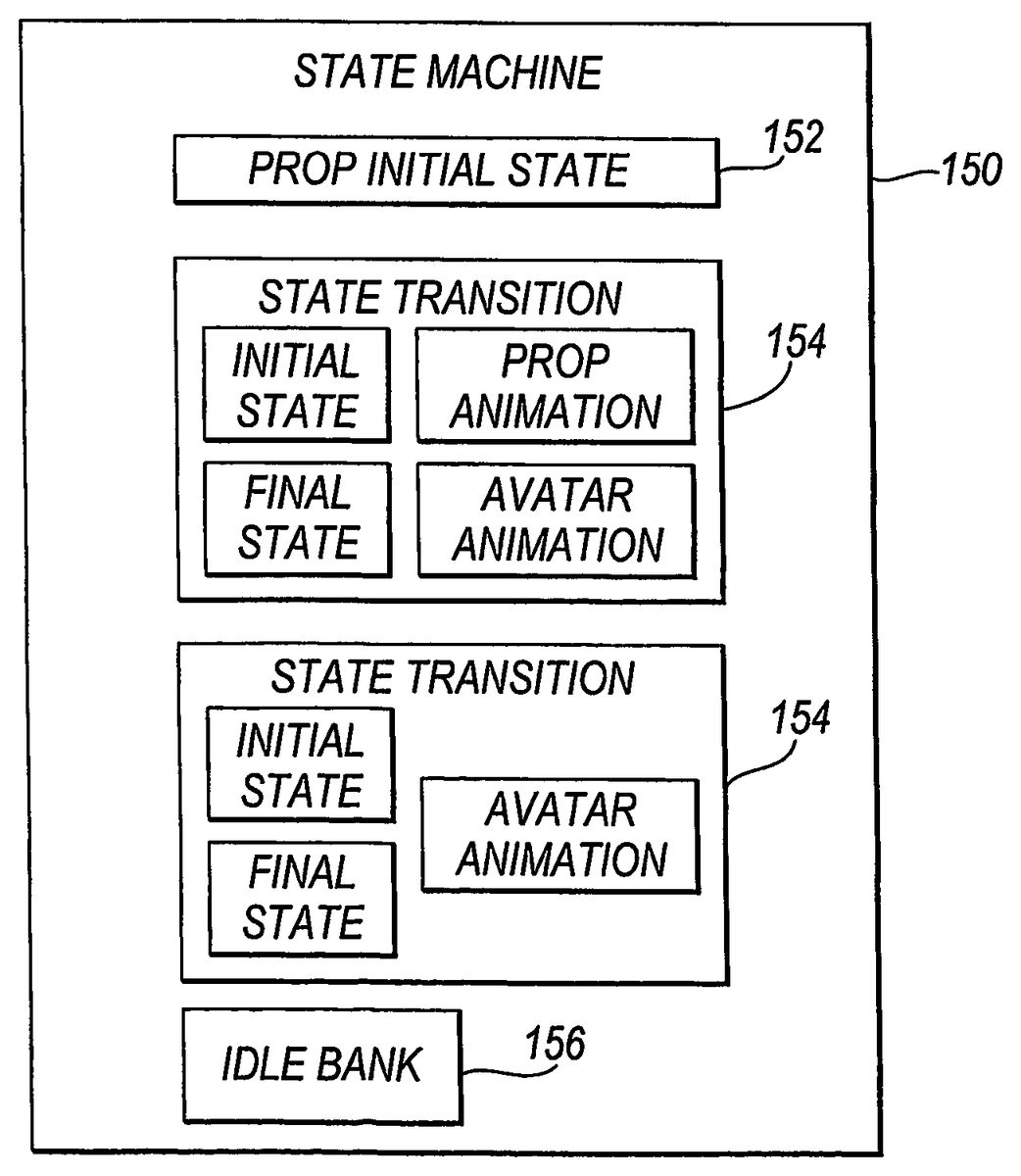
In the editing apparatus1ofFIG. 1, the way in which an avatar interacts with a prop is defined by a state machine which is associated with the prop. The state machine contains one or more animations which are used to take the avatar and the prop from one state to another. When an avatar interacts with a prop, the avatar queries the prop for the animations that the avatar is to perform.
FIG. 8shows an example of a state machine which is attached to a prop. InFIG. 8, state machine150comprises prop initial state152, state transitions154,156and idle bank158. The prop initial state152defines the initial state of the prop, and all animations in the state machine are imported relative to the prop in this initial state. This is done to ensure that all animations are compatible with the environment.
Each of the state transitions154,156defines the way in which a prop and an avatar are taken from one state to another when they interact. In general, a state transition specifies an initial state and a final state, and contains an avatar animation and a prop animation which take the avatar and the prop from the initial state to the final state. However, where either the prop or the avatar does not move during an interaction, one of the animations may be omitted. In the most simple case an avatar interacts with a prop in the same way every time and leaves the prop exactly as it finds it. In this case the prop has only one state and there is no state transition as such.
The idle bank158defines animations which can be carried out by an avatar when the avatar is interacting with the prop and is in an idle state.
When an avatar interacts with a prop it queries the prop for the avatar animation. The avatar is then animated with the avatar animation while the prop is animated with the prop animation.
The state machine150is associated kinematically with the prop. This means that the state machine is attached to the prop and as the prop moves so does the state machine. Associating the state machine with the prop in this way decentralizes control of the animation and leads to a very open architecture. For example a user may introduce his own prop into the environment and, as long as the state machine for the prop is correctly set up, that prop will be able to interact with the rest of the environment.
When the prop's hierarchy changes, that is, when the prop switches its parent from one object to another, the state machine associated with that prop also changes its hierarchy in the same way. Changing the state machine's hierarchy together with the prop's helps to maintain the integrity of the virtual environment. This is because the necessary animations for an interaction between an avatar and the prop will always be available, and those animations will always depend on the relationship of the prop to other objects.
Props with state machines can have preconditions applied to states. If an avatar is given a command that will result in a prop transitioning to a certain state and this state has preconditions specified, then the avatar will attempt to satisfy the preconditions before executing the command. In this way relatively complex behaviours can be generated by combining a few props and their state machines.
For example, a precondition might be that an avatar cannot put a bottle into a fridge unless the fridge door is open. In this case, if the avatar is asked to perform the action of putting the bottle into the fridge, it will first attempt to open the fridge door.
A state machine may have an idle state. State machines with idle states are used when there is a transition required to start the interaction, whereupon the prop goes into the idle state, and a transition to end the interaction, which takes the prop out of its idle state. If an avatar is given a command but is already in the idle state with respect to another prop then the system will attempt to take this prop out of its idle state before executing the command.
For example, if an interaction involves an avatar going to bed, then an animation may be played that starts with the avatar standing by the bed and ends with it lying on the bed. The state of the avatar lying on the bed may be specified as an idle state. In this state the idle bank for the avatar may contain animations, for example, corresponding to different sleeping movements. If the avatar is then instructed to interact with another object elsewhere, it must first get out of bed. This will happen automatically if there is a transition corresponding to it getting out of bed whose initial state is set to the idle state.
Deferred Message Passing
Avatars can communicate with other avatars and affect each other's behaviours thorough message passing. Before an avatar can communicate with another avatar, it must connect itself to the avatar with which it wishes to communicate. This is done through a specified message, which can be named in any way. The connection is viewed as a tag inside the software
When an avatar emits a message, all avatars listen to the message, but only those avatars which are connected to the avatar emitting the message will receive the message and process it.
Objects in the environment are made to move by building and linking together chains of animations that get played out by each object individually. These animation chains can be cut and spliced together.
Instructions can be placed between the joined chains, which instructions can fire messages to other objects in the system. These messages only get fired after the animations that precede them get played out. This is referred to as deferred message passing. Deferred message passing can force a dynamic switch in the scene hierarchy.
Claims
- Apparatus for controlling an interactive virtual environment, the apparatus comprising a unit which defines a virtual environment populated by objects, the objects comprising avatars and props, wherein objects within the virtual environment may be dynamically attached to and detached from other objects, characterized in that one or more of the props has associated with it information defining one or more animations which may be performed by an avatar when said avatar interacts with the prop, the avatar being operable to query the prop for the information defining the animation that the avatar is to perform when the avatar interacts with the prop, and wherein when the prop is dynamically attached to another object, the information defining the animation(s) to be performed by one or more of the avatars during an interaction with the prop, remains associated with the prop.
- Apparatus according to claim 1 wherein when an object is attached to another object, it inherits the movement of the object to which it is attached.
- Apparatus according to claim 1 , further comprising a unit which stores an animation sequence for subsequent replay or editing.
- Apparatus according to claim 3 , further comprising: a unit which allows a user to control the virtual environment to create an animation sequence.
- Apparatus according to claim 3 , wherein an animation sequence is stored as a script comprising a list of commands.
- Apparatus according to claim 5 wherein the commands are the same commands as may be entered by a user in order to control the virtual environment.
- Apparatus according to claim 5 , wherein a script contains an instruction which is to be passed to an object in the virtual environment.
- Apparatus according to claim 7 wherein the instruction is only passed to the object once an animation which precedes it in the script has been played out.
- Apparatus according to claim 1 , being an apparatus for playing a computer game.
- Apparatus according to claim 1 , wherein the animation or animations are defined as part of a state machine which is associated with the prop.
- Apparatus according to claim 10 wherein the state machine comprises a state transition which defines an initial state, a final state, and at least one of a prop animation which takes the prop from the initial state to the final state, and an avatar animation which takes the avatar from the initial state to the final state, and optionally back to the initial state.
- Apparatus according to claim 11 wherein precondition is associated with one of the states.
- Apparatus according to claim 10 , wherein the state machine has an idle state.
- Apparatus according to claim 1 , wherein an avatar comprises at least a file defining its appearance, and an animation defining its movements.
- Apparatus according to claim 1 , wherein a plurality of avatars share a common animation.
- Apparatus according to claim 15 wherein the common animation is retargeted to fit the size of the avatar in question.
- Apparatus according to claim 1 , wherein a prop includes a file which specifies a way in which the prop may contain other props.
- A computer readable storage medium having stored thereon a computer program which, when run on a computer, causes the computer to become the apparatus according to claim 1 .
- A method of controlling an interactive virtual environment, the method comprising defining a virtual environment populated by objects, the objects comprising avatars and props, wherein: objects within the virtual environment may be dynamically attached to and detached from other objects, characterised in that one or more of the props has associated with it information defining one or more animations which may be performed by an avatar when said avatar interacts with the prop, the avatar being operable to query the prop for the information defining the animation that the avatar is to perform when the avatar interacts with the prop, and wherein when the prop is dynamically attached to another object, the information defining the animation(s) to be performed by one or more of the avatars during an interaction with the prop, remains associated with the prop.
- A method of controlling an interactive virtual environment according to claim 19 , the method comprising the further steps of: allowing a user to control the virtual environment to create an animation sequence;and storing an animation sequence for subsequent replay or editing.
- A computer readable storage medium having stored thereon a computer program which, when run on a computer, causes the computer to carry out the method of claim 19 .
- Apparatus for controlling an interactive virtual environment, the apparatus comprising means for defining a virtual environment populated by objects, the objects comprising avatars and props, wherein objects within the virtual environment may be dynamically attached to and detached from other objects, characterized in that one or more of the props has associated with it information defining one or more animations which may be performed by an avatar when said avatar interacts with the pump, the avatar being operable to query the prop for the information defining the animation that the avatar is to perform when the avatar interacts with the prop and wherein when the prop is dynamically attached to another object, the information defining the animation(s) to be performed by one or more of the avatars during an interaction with the prop, remains associated with the prop.
Disclaimer: Data collected from the USPTO and may be malformed, incomplete, and/or otherwise inaccurate.