U.S. Pat. No. 7,240,093
Use of online messaging to facilitate selection of participants in game play
AssigneeMicrosoft Corporation
U.S. Patent No. 7,240,093: Use of online messaging to facilitate selection of participants in game play

Summary:
The ‘093 describes a system for selecting participants in multiplayer online games. The invention provides an efficient way for players to host and join new multiplayer games. Players can look at a list of friends and see who is online. From there they can send invitations either through a voice or text message to the friend inviting them to play. Players who receive an invitation can either accept or decline. If the player accepts they will immediately be placed either into the game the host is playing or into a lobby with the host while waiting on other friends to join. All players can communicate to each other if they have a separate headset.
Abstract:
A method and system facilitating selection of participants in multiplayer online electronic games. The method provides an efficient procedure for players to host and join new instances of multiplayer online electronic games, as well as providing a scheme that enables players to join multiplayer online electronic games that are already in progress. The method is implemented through a gaming utility that runs on each player’s electronic device (e.g. PC) and interacts behind the scenes with an online messaging service. Player hosts are enabled to select players from a list of contacts provided by the online messaging service who they want to invite to join a chat session. A selected multiplayer online electronic game is selectively launched on all of the player’s computers through a single command issued by the host. Additionally, the gaming utility provides players with a list of existing chat sessions being hosted by other players so as to enable the players to join multiplayer online electronic games that are already in progress. The system includes a plurality of electronic devices linked in communication across a communications network, such as a LAN or the Internet. Each electronic device is operatively coupled to a headset having a pair of headphones and a microphone. The headset is worn by a player, enabling the players to verbally communicate with others in a verbal chat session.
Illustrative Claim:
1. A method for enabling a host player to select one or more other participants to join in playing a multi player online electronic game, comprising the steps of: (a) enabling the host player to create a list of contacts comprising one or more other persons who may be interested in participating in playing the multiplayer online electronic game; (b) enabling the host player to select one or more of the other persons from among the list of contacts to participate in playing the multi player online electronic game; (c) automatically sending an electronic invitation to each of the one or more other persons selected by the host player, to join in playing the multiplayer online electronic game, wherein the electronic invitation comprises a verbal message; (d) enabling each of the one or more other persons who receive the electronic invitation that was automatically sent, to selectively join the multi player online electronic game as a participant; and (e)
Illustrative Figure
Abstract
No abstract is available for this record.
Description
DESCRIPTION OF THE PREFERRED EMBODIMENT An exemplary configuration of an online gaming environment that is suitable for application of the present invention is shown inFIG. 1. Online gaming environments enable a plurality of players to participate in an online game over a communications network such as Internet10. Each participant operates a respective one of PCs12,13,14,15,16, and17that executes software code for performing game functions and which is connected to Internet10. In the exemplary configuration, these participants include players identified by the fictitious names Adam, Burt, Chuck, Don, Evan, and Fred, each of whom is operating a different one of the PCs. For convenience, each of PCs12–17is labeled with a respective participant's name. Each of PCs12,13,14,15,16, and17are connected to a different corresponding channel control device18,19,20,21,22and23, further details of which are shown inFIGS. 2–4and discussed below. Each of the channel control devices is further connected to a corresponding different headset26, which includes a microphone28and headphones29, worn by each of the players, to enable them to communicate with one another during a chat session. Each of PCs12,13,14,15,16, and17is also linked in communication with Internet10, and executes machine instructions that implement the functions of one or more multiplayer online computer games. In addition, each of the PCs is executing (or is able to execute) a gaming/chat utility application30(hereinafter referred to simply as a “gaming utility30”) that is used to control gaming and voice chat functions in accord with the present invention. Preferably, each of the players will initiate a gaming or chat session in the following manner. The player will connect to Internet10(if not already connected thereto), and will log onto the MICROSOFT NETWORK (MSN) Messenger Service™ (hereinafter referred to as “MSN messenger”), an online instant message service provided by the Microsoft Corporation. Preferably, each of the players will have built a contact list through ...
DESCRIPTION OF THE PREFERRED EMBODIMENT
An exemplary configuration of an online gaming environment that is suitable for application of the present invention is shown inFIG. 1. Online gaming environments enable a plurality of players to participate in an online game over a communications network such as Internet10. Each participant operates a respective one of PCs12,13,14,15,16, and17that executes software code for performing game functions and which is connected to Internet10. In the exemplary configuration, these participants include players identified by the fictitious names Adam, Burt, Chuck, Don, Evan, and Fred, each of whom is operating a different one of the PCs. For convenience, each of PCs12–17is labeled with a respective participant's name. Each of PCs12,13,14,15,16, and17are connected to a different corresponding channel control device18,19,20,21,22and23, further details of which are shown inFIGS. 2–4and discussed below. Each of the channel control devices is further connected to a corresponding different headset26, which includes a microphone28and headphones29, worn by each of the players, to enable them to communicate with one another during a chat session.
Each of PCs12,13,14,15,16, and17is also linked in communication with Internet10, and executes machine instructions that implement the functions of one or more multiplayer online computer games. In addition, each of the PCs is executing (or is able to execute) a gaming/chat utility application30(hereinafter referred to simply as a “gaming utility30”) that is used to control gaming and voice chat functions in accord with the present invention.
Preferably, each of the players will initiate a gaming or chat session in the following manner. The player will connect to Internet10(if not already connected thereto), and will log onto the MICROSOFT NETWORK (MSN) Messenger Service™ (hereinafter referred to as “MSN messenger”), an online instant message service provided by the Microsoft Corporation. Preferably, each of the players will have built a contact list through functions providing by MSN messenger comprising a list of persons with whom the player prefers to chat and who also use MSN messenger. As typically implemented, this contact list enables a user of MSN messenger to perform text chat sessions with one or more persons listed in the user's contact list.
After logging onto MSN messenger, the player will launch an instance of gaming utility30. Optionally, as an alternative to first connecting to MSN messenger, upon launching gaming utility30, the user may be automatically connected to Internet10(or prompted to do so), if not already connected, and/or to MSN messenger by internal functions provided by gaming utility30. As shown inFIG. 5, the initial user interface (UI) of gaming utility30comprises an expandable UI Frame32, which is shown in a collapsed form in this Figure. In its collapsed form, UI Frame32includes a left VU meter34, which graphically displays a relative volume level of an audio signal used to drive headphones29of the headset26worn by the player, and a right VU meter36, which graphically displays a relative volume level of audio signals picked up by microphone28on the player's headset26, during a voice chat session. Additionally, UI Frame32includes an availability status pull-down control38that enables each player to provide an MSN messenger availability status to other players who are logged onto MSN messenger, and a game command set pull-down control40that enables each player to select a desired game command set from a list of game command sets defined in a gaming profile for the player. UI Frame32additionally includes a system menu that is activated by clicking on a system menu icon41.
Initially, the MSN messenger availability status of a given player will be “online” if the player has logged on MSN messenger prior to launching gaming utility30, or offline if the player has not yet logged on MSN messenger. Additionally, the default game command set listed on game command set pull-down control40will correspond to the game command set the player last used (or is currently using), while a pull-down list (not shown) that is displayed in response to activation of game command set pull-down control40will include the list of game command sets defined by the user's gaming profile.
Typically, a player will want to initiate or join a game or a voice chat session. Accordingly, the player will activate an expansion control42, which will cause UI Frame32to expand to its expanded configuration, as shown inFIG. 6. In the expanded configuration, UI Frame32includes a primary pane comprising a chat pane44or a command and control pane46; either of these two panes can be activated and displayed (one at a time) by clicking on the pane's corresponding tab (i.e., by clicking on the “chat” or “command” tab) at the top of each pane. Chat pane44is the default pane that is displayed when gaming utility30is initially installed and launched, and provides information to each player concerning existing chat sessions the player may join and the availability status of persons in the player's MSN messenger contact list. After the initial launch, the primary pane that will be displayed is the last pane that was displayed before the gaming utility was closed.
At a top portion of chat pane44, a list of presently active chat sessions that are being conducted over the network or networks into which the player is connected will be displayed, such as a chat session48hosted by a Jonathan Hayes and a chat session49hosted by a Sue Bee, as shown inFIG. 6. In general, the list of presently active chat sessions will include chat sessions that: (a) are hosted by a person in the player's chat contact list; (b) active over the same network or networks to which the player is connected; and (c) either an open chat session (i.e., a chat session that anyone may join) or chat sessions the player has been invited to join. For instance, if the player is logged onto a local area network (LAN), the displayed chat sessions will include all of the chat sessions hosted by persons in the player's contact list who are presently hosting a chat session on the LAN that include either an open invitation to all other players, or an invite-only list that includes the player. Similarly, if the player is logged onto Internet10, the displayed chat sessions will include all of the chat sessions hosted by persons in the player's contact list who are presently hosting a chat session on Internet10that includes either an open invitation to all other players or an invite-only list that includes the player. Furthermore, the foregoing holds true for players that are simultaneously connected to a LAN and the Internet or other networks—i.e., the list of chat sessions will include appropriate contacts who are hosting chat sessions on both the Internet and the LAN and/or other networks.
A player can join one of the listed chat sessions by simply clicking on it. For example, clicking anywhere on the line corresponding to chat session48will enable the player to join the chat session hosted by Jonathan Hayes. Accordingly, only open chat sessions and chat sessions to which the player has been invited are displayed. Upon joining a chat session, the player will be automatically assigned to a chat channel as described below.
In addition to being able to join listed chat sessions, the player may join a chat session known to the player, but hosted by a person who is not logged onto MSN messenger, by activating a “Find a chat” hyperlink50, which will launch a dialog in which the player may enter an IP (Internet Protocol) address of the known chat session. The player will be joined to any chat session that is being hosted on a computer at the entered IP address.
A list of MSN messenger contacts for the player will be displayed in a lower portion of chat pane44. A respective MSN messenger status51will be listed to the right of each contract, while a respective gaming utility status icon52will be displayed to the left of each contract. MSN messenger maintains a contact status for each member of its messaging service, which is accessed behind the scenes by gaming utility30to generate the MSN messenger statuses in the list, as follows. The gaming utility implements a light weight (almost stateless) protocol on top of MSN messenger's text transport protocol. A set of messages exists such that the gaming utility can discover which of the player's contacts are logged onto the computer network, logged into MSN messenger, and running the gaming utility on their own computers. Each contact is perceived to be in one of the following states.Offline: Contact is not online with MSN messenger; indicated by a lightened name, a lightened “offline” MSN messenger status, and a gaming status comprising lightened base icon with an adjacent “X,” as shown by an icon53.Messenger Online: Contact is online with MSN messenger, but is not running the gaming utility; contact's MSN messenger status is listed as online (or with contact's manually selected status—see below), and the gaming utility status is displayed as a darkened base icon, as shown by an icon54.Game/Chat Online: Contact is online with MSN messenger and is running the gaming utility; contact's MSN messenger status is listed as online (or as contact's manually selected status), and the gaming utility status is displayed as a darkened base icon with headset, as shown by an icon55.In-Chat: Contact has joined a voice chat session with the gaming utility; contact's MSN messenger status is listed as online (or as contact's manually selected status), and the gaming utility status is displayed as a darkened base icon with headset and chat balloon, as shown by an icon56.Hosting: Contact is hosting a voice chat session with the gaming utility; contact's MSN messenger status is listed as online (or as contact's manually selected status), and the gaming utility status is displayed as a darkened base icon with headset and chat balloon (i.e., as icon56).Hosting/Locked: Contact is hosting a private session with the gaming utility; status indications are the same as for Hosting.
As indicated above, the MSN messenger status for a given contact will be either the automatically determined status of the player, either online or offline, or a status that is manually set by the contact, which overrides the automatically determined status. Manually selected statuses include “online,” “busy,” “be right back,” “away,” “on the phone,” “out to lunch,” and “appear offline.” As the last entry listed implies, if a contact has selected the status of “appear offline,” that person will appear to be offline to other players, even though the player is logged onto MSN messenger.
As discussed above, when the gaming utility is launched, it will log the player onto MSN messenger if the player has not already done so. Next, the gaming utility will acquire the player's contact list from MSN messenger. The messenger component of the gaming utility will then initiate status queries to each online contact. The contact list in UI Frame32will then become populated as the status of each player is determined.
In the following discussion, it is assumed that Adam is going to be a host player of a multiplayer online computer game and will be soliciting other players to participate in that game. As shown inFIG. 6, an exemplary set of contacts corresponding to player Adam's contact list is displayed on chat pane44. These contacts include players Burt57, Don58, Evan59, Fred60, Gary61, Jonathan62, Susan B.63, Chuck64, and Harold65. The names in a contact list will be the MSN messenger user names (i.e., aliases) for those contacts. Typically, these names will comprise “handles,” shortened name forms, or nicknames rather than full actual names, although the latter may be used if so chosen by the contact. If the contact list exceeds the available display area, additional contacts (and their corresponding statuses) may be viewed by dragging the slider on a scroll bar66or activating a scroll-down control67.
As discussed above, the availability status for each contact is determined as a function of the state perceived by MSN messenger, including those statuses that are manually set by the contact. In addition to being able to manually select an availability status with MSN messenger, a player can manually change the availability status by activating availability status control38, as shown inFIG. 7, enabling the player to select an availability status from a pull-down list68, which includes a “busy” status69.
Preferably, the contact list will be sorted in the following manner. First, contacts who are logged on and are running an instance of gaming utility30will be listed first in alphabetical order, based on their MSN messenger user name. Next, contacts who are logged on but have yet to activate (or do not have) the gaming utility will be listed alphabetically by user name. Finally, contacts who are presently not logged on are listed at the bottom of the list, alphabetically by user name.
A player may desire to add a new contact to the list of contacts. To do so, the player activates an “add a contact” hyperlink70, which automatically opens MSN messenger's “add contact” wizard. After adding a new contact, the contact list will be updated to include the new contact and the new contact's present availability status.
Initiation of a chat session can be accomplished in one of two ways. According to a first method, a new chat session is initiated when a user activates a “start a chat” hyperlink71, which causes a chat room pane72to be displayed adjacent to UI FRAME32, as shown inFIG. 8. A default chat name appears in a title box73, comprising either the last chat name used by the player or “—Chat.” This default chat name may be edited by the player by activating a “Chat Options” control74and selecting a “Rename Chat” menu option78.
Whenever a chat room pane is opened, a list of players presently participating in the chat session (the player viewing the chat room pane is never shown, since that player is an implied participant) will be displayed in a “Player:” column76, along with a channel assignment or invite status under a “Channel:” column77. If the player viewing the chat room pane is the host of a chat session, the player will be able to see a list of all of the present participants and players that have been invited to join that chat session. If the player is not hosting the chat session, that player will only see the names of the present participants. Initially, the list of chat participants for a new chat session will be blank, since no contacts have been invited to join the new chat session at this point.
In order to host a chat session that enables the session participants to communicate with one another via the voice chat capabilities provided by gaming utility30, it is necessary to select one or more players in the contact list who the host would like to have participate in the chat session. For example, suppose a player (e.g., Adam) would like to host a chat session that is to initially include Burt57, Don58, and Chuck64. This process can be accomplished in one of three ways. Adam can: (a) double click on each contact he would like to invite to the chat session; (b) drag the desired contacts onto chat pane72, such as shown in the Figure; or (c) select one or more contacts, activate chat pane44's context menu, and selecting an appropriate option to invite the contact or contacts. When using a mouse, activation of chat pane44's context menu can be performed by the mouse cursor over a contact name and activating the left or right mouse button or pressing the space bar on the PC's keyboard, bringing up a context menu45, as shown inFIG. 9, from which the player can select to invite the player to join the chat session by choosing a “Invite player to chat” option75. Note that this approach represents an alternative way to initiate a chat session—i.e., if a chat session has not been started, selecting a player to invite to a chat session in this manner will automatically open a new chat session.
When a player is initially invited to the chat session, the player's contact name will be displayed in chat pane72, along with the gaming utility status icon of the player and an “invited” channel assignment status. If the invited contact has yet to log on, the contact's name and the word “invited” are lightened.
If an invited contact has a current MSN messenger status of “online” and is running an instance of gaming utility30, the contact will receive an invitation message causing a modal dialog to appear on the contact's screen inviting the contact to join the initiator's chat session. In addition, the contact will receive a verbal invitation over the speakers of his headset. For example, of the three players (Burt, Don, and Chuck) invited by Adam in the foregoing example, Burt is the only contact that has an MSN messenger availability status of “online,” and a gaming utility availability status icon55indicating that Burt is running an instance of gaming utility30. This status icon means that Burt is presently logged on to Internet10and MSN messenger, is running the gaming utility, and has not selected an availability status that indicates he is unavailable. Accordingly, a modal dialog (not shown) will pop up on Burt's PC13displaying an invitation message reading “Adam invites you to join Adam's chat,” with accept and decline button options. In addition, Burt will receive an audio message conveying the same invitation message over headphones29of Burt's headset26, followed by “accept?” This function is made possible through a text-to-speech (TTS) capability of the command and control features provided by the gaming utility and hardware functions implemented in Burt's channel controller device19. In response to receiving the invitation, Burt may select to join or decline the chat session by clicking on a corresponding button in the dialog box. Optionally, a recipient can accept or decline an invitation by toggling his channel controller device to a command and control mode and speaking “Yes” or “No” into the his microphone. Further details of how these functions are handled are disclosed in co-pending application Ser. No. 09/515,559, entitled “ENABLING SEPARATE CHAT AND SELECTIVE ENABLEMENT OF MICROPHONE,” filed on Feb. 29, 2000, the disclosure and drawings of which are hereby specifically incorporated herein by reference.
All chat sessions are initially “open” chat sessions by default. An open chat session enables anyone to join the session, including both invited contacts and other players who are made aware of the existence of the session. For example, open chat sessions hosted by contacts in a player's contact list will be displayed in an upper portion of chat pane44, as discussed above. In many instances, a chat session host may wish to limit the chat session to only include the contacts the host has invited to join the session. The host can select this option by activating “Chat Options” control74, and selecting a “Make Chat Invite Only” control79to toggle a checkmark disposed adjacent to the option on, converting the chat session to an invite-only session. In accordance with the host selecting the invite-only option, each player will hear, “ made chat room invite only” in their invitation announcements.
In some instances, it may be desired to invite people to join a chat session who do not use MSN messenger. This action can be accomplished by informing them of the IP (Internet Protocol) address from which the chat session is hosted (typically by an e-mail or telephone invitation). Such an address is displayed as an IP address47. As discussed below, this address will only appear in the chat room pane of the host, and will not appear in the chat room panes of the other chat participants. Upon joining a chat session in this manner, each participant will be assigned an automatically determined user name.
As each player joins a chat session, the player is automatically assigned to a next available chat channel. Optionally, a host may pre-assign chat channels to invited contacts. Additionally, each player may reassign his own chat channel assignments. In order to better understand the purpose for assigning channels, and how such channel assignments can be used to a player's advantage, a discussion of the channel controller device's construction and use is now presented.
With reference toFIGS. 2–4, channel controller device18(identical to channel controller devices19–23) enables a player to communicate with one or more other players by selectively activating a plurality of chat channels that have been assigned to those players. Each chat channel is an independent or private voice data channel that enables voice communication between the player and the other player or players that are selectively assigned to that chat channel. For example, players often form teams to participate in online multi-player games, wherein all the players on a team may wish to discuss strategies by talking on a “team channel.” Alternatively, individual players on a team may wish to communicate with one another on individual channels so that their communications are not overheard by other players not assigned to those channels. Accordingly, channel controller device18includes a plurality of buttons disposed within a housing80that is coupled to a base81. The buttons, which are pressed to selectively activate respective chat channels, include a first channel button82, a second channel button83, a third channel button84, a fourth channel button85, a “team” button86, and an “all” button87.
As shown inFIG. 3, each channel button comprises a key88that is disposed over a corresponding membrane switch dome89formed in a membrane switch sheet90that is fabricated from a silicone polymer. Each of membrane switch domes89includes a pair of conductor disks101(only shown for one switch dome) that are disposed adjacent to the base of the dome. Membrane switch sheet90is disposed above a circuit board92that includes a plurality of membrane switch conductor pads93, which are disposed opposite corresponding conductor disks101when assembled. Each membrane switch conductor pad93comprises a pair of conductor traces that form an incomplete electrical circuit, i.e., an open switch. As a player presses down a key88to select or deselect a particular chat channel, a corresponding membrane switch dome89is caused to flex, causing one or both of conductor disks101for the membrane switch dome to contact adjacent switch conductor pads93, thereby completing one or both of the electrical circuit (i.e., closing the switch) corresponding to the switch conductor pad(s)93that is (are) contacted by the conductor disks. This switch closure is sensed by an application specific integrated circuit (ASIC)91disposed on the underside of circuit board92. The ASIC toggles the channel between an active and inactive state in response to sensing the switch closure.
When a channel is on (i.e., activated), a corresponding light emitting diode (LED)95mounted to circuit board92and disposed within a membrane switch dome89corresponding to the channel is energized to indicate the channel has been selected by the player. In this manner, a plurality of channel activation indicators are provided, including a first channel indicator95, a second channel indicator96, a third channel indicator97, a fourth channel indicator98, a team channel indicator99, and an “all” channel indicator100, each of which is enunciated by a different one of the LEDs94.
A lead106from headphones29on headset26is electrically connected to an audio output jack104, while a lead108from microphone28on the headset is connected to an audio input jack102on each channel controller device, at the back of housing80. Audio input jack102and audio output jack104are mounted on circuit board92. It should be noted that a single multi-terminal jack can alternatively be employed for input and output audio data on the channel controller device, if desired. The headphones thus receive audio chat data (voice messages) from other players, while the verbal chat messages spoken by the player wearing the headset are picked up by the microphone on the headset and conveyed to the other one or more players selected by the player, as determined by the one or more keys88on the channel controller device the player has activated.
As shown inFIG. 4, the primary functional components of circuit board92include ASIC91, a headset speaker amplification circuit110, a volume control112, a USB connector114, a USB-powered supply circuit116, a microphone pre-amplification circuit118, a plurality of input switches120, a plurality of yellow channel indicator LEDs94corresponding to individual channels1–4and the “team” and “all” channels, a red mute LED121, and a green command and control LED122.
ASIC91includes audio processing circuitry that comprises appropriate signal conversion and CODEC (encoding/decoding) components for processing a pre-amplified microphone input signal124and a pre-amplified headset speaker output signals126. Microphone28produces an analog signal having a frequency and an amplitude corresponding to the sound incident on the microphone and thus indicative of a verbal chat message spoken by a player into the microphone. Accordingly, circuitry is provided for converting the analog signal into a digital format (e.g., an analog-to-digital converter), and encoding the signal so it can be more efficiently transmitted over a communications link. A preferred communications link comprises a Universal Serial Bus (USB) interface128that connects channel controller device18to a player's PC, e.g., Adam's PC12. The PC converts the USB formatted signal into packets appropriate for transmission over the network. Circuitry for performing the reverse function is also provided to enable another player's voice to be replicated by headphones29. In this instance, packets conveying an encoded audio signal are transmitted from one of the other player's PCs to PC12over Internet10. The encoded audio signal is then transmitted via USB interface128to the channel controller device and the decoder/converter portion of ASIC91first decodes the encoded signal and then converts the decoded signal from a digital format into an audio signal that is output as pre-amplified headphone signal126, which is then amplified by headphone amplifier110to drive headphones29.
Channel controller device18further includes a command and control button130that actuates a toggle switch132mounted to base81, a mute button134operatively coupled to a mute toggle switch (not shown), and a volume control knob136, that is coupled to volume control112. Actuation of command and control button130toggles the player between a voice chat mode and a command and control mode, thereby enabling the player to direct the verbal data for chat purposes or for game control purposes. When used for game control purposes, a speech recognition module included in gaming utility30is employed to convert spoken commands into defined control actions that implement secondary control functions in the game. When in a command and control mode, a translucent voice chat indicator panel138is lighted by green command and control LED122, which is disposed beneath the indicator panel. When in a voice chat mode (for voice communication over one of the chat channels), voice chat indicator panel138is not lighted. Activation of mute button134mutes microphone28so as to enable a player to talk to other persons in the same room as the player or connected through a different communication link such as a telephone, without transmitting any of the voice data acquired by microphone28to the other players, or to avoid having the voice data interpreted as voice commands (when the channel controller device is in the command and control mode). While microphone28is muted, a mute indicator140is lighted by red LED121, which is mounted on circuit board92and disposed beneath mute indicator140. Additionally, rotation of volume control knob136, which is coupled to volume control112, enables the player to control the level of the sound produced at headphones29.
The various voice chat channels may be assigned in one of several ways, including: (a) pre-assignment through the gaming utility UI; (b) automatic assignment; and (c) manual reassignment through the gaming utility UI. Generally, players will choose to have their voice chat channels automatically assigned, as follows.
In general, as each contact joins a chat session, the new contact is assigned to the next available channel, beginning with channel1for the first contact to join the host in a chat session. As discussed below, new contacts will be added to the “all” channel when individual channels1–4have already been assigned, and that each contact that is assigned to one of channels1–4is assigned to the “all” channel at the same time. Also, each player will be verbally notified by a computerized voice over the player's headset speakers29of the channel assignments for that user as each player is added to the chat session, and corresponding channel indicators will be enunciated on each player's channel controller device.
If upon receiving the invitation to join Adam's chat session, Burt decides to accept the invitation, Burt is automatically assigned to the first channel of Adam's channel controller device18, while Adam is automatically assigned to the first channel of Burt's channel controller device19, as shown inFIG. 10. Additionally, Adam will hear the message, “Burt connected on one”, while Burt will hear the message, “Adam connected on one” on the headphones of their respective headsets26. In addition to assigning the first channel on both of Adam and Burt's channel controller devices18and19in this manner, the first channel indicators95on each of the channel controller devices will become lighted. (Note that in this and the following Figures, cross-hatching of a channel indicator is used to indicate that the channel indicator is lighted.) A lighted channel indicator means the corresponding channel is active for sending voice data to the contact or contacts assigned to that channel.
The chat room pane for each player will also be changed in response to the addition of each new player to a chat session. With reference toFIG. 11, upon joining Adam's chat session, a pull-down channel assignment control142with a current value indicating an assignment of channel1will be disposed adjacent to Burt's name in a chat room pane144on Adam's PC12so as to indicate to Adam that Burt is assigned to channel1on Adam's channel controller device18. Similarly, a pull-down channel assignment control146with a current value indicating an assignment of channel1will be disposed adjacent to Adams's name in a chat room pane148on Burt's PC13so as to indicate to Adam that Burt is assigned to channel1on Adam's channel controller device19, as shown inFIG. 12. Also, a gaming utility status icon56will be displayed adjacent each of Burt's and Adam's names in respective chat room panes144and148, indicating that Adam and Burt are presently participating in the chat session.
Note the differences between chat room panes144and148. In a chat room pane that is displayed on a chat session host's computer, both the contacts who are presently in the chat session and invited contacts are shown, with corresponding chat channel assignments or “invited” statuses also being displayed. For example, since Adam is the chat session host, both Burt, who has joined Adam's chat session, and Don and Chuck, who have been invited to the chat session, but are yet to join, are displayed in Adam's chat room pane144. In contrast, a chat participant who is not the host of the chat session will only see players other than themselves who are participating in the chat session. Thus, only Adam is shown in Burt's chat room pane148. Additionally, note that IP address47is present on Adam's chat room pane144(i.e., the chat session host's chat room pane), but is not present on Burt's chat room pane148(i.e., not on the chat room pane of a chat session participant who is not hosting the session). The reason that the IP address is not shown in the chat room pane of those participants who are not acting as the host is to enable the host to control who may join a chat session (in the case of invite-only chat sessions).
With reference toFIG. 8, recall that when Don and Chuck were initially invited to join the chat session, neither had an MSN messenger availability status indicating that they were immediately available to participate in the session. More specifically, Chuck's MSN messenger availability status was “offline,” indicating that he was presently not logged into MSN messenger, while Don's MSN messenger availability status was “busy,” an availability status that was manually selected by Don at some earlier point in time.
Gaming utility30enables invitations to be stored and automatically forwarded so that an invited player can be immediately notified of such an invitation upon logging onto MSN messenger. For instance, if shortly after Adam sends out the original invitation to have Burt, Don, and Chuck to join the chat session, Chuck logs onto Internet10and MSN messenger, and opens an instance of gaming utility30. Upon these events occurring, Chuck will receive an invitation to join Adam's chat session, comprising the modeless dialog and audio invitation that were received earlier by Burt, as discussed above. It is noted that if Chuck is already logged into MSN messenger and has yet to launch gaming utility30, Chuck will be notified of the invitation upon launching gaming utility30. Optionally, if Chuck launches gaming utility30before logging into MSN messenger, he will be prompted to do so and will receive the invitation message when he logs into MSN messenger. Now suppose that Chuck accepts the invitation. At this point, Chuck will be assigned to the second channel on each of Adam and Burt's channel controller devices18,19, as shown inFIG. 13. At the same time, Adam and Burt are respectively assigned to the first and second channels of Chuck's channel controller device20. Furthermore, each of channels2is automatically enunciated on Adam's, Burt's, and Chuck's respective channel controller devices. Note that at this point, first channel indicators94may (as shown in the Figure) or may not be lighted, depending on whether either of Adam or Burt has toggled their respective first channel buttons82to an active or inactive condition.
In addition to providing visual indicia concerning the new channel assignments, each of Adam, Burt and Chuck will receive a verbal announcement corresponding to their respective channel assignments over their headsets, as follows. Both Adam and Burt will hear, “Chuck connected on two,” while Chuck will hear, “Adam connected on one, Burt connected on two.”
As discussed above, Don had an MSN messenger status of “busy” when Adam sent out the original invitations to Burt, Chuck, and Don. Suppose that Don selected this status because he needed to perform an online check of his stock portfolio, but didn't want to be bothered while he was doing so and didn't want to log off of MSN messenger. Upon completing this task, assume further that Don decides to change his availability status back to “online” by activating status pull-down control38and selecting the “online” option from pull-down list68. In response to this selection, since Don is now available to join Adam's chat session and will automatically be forwarded the invitation (both modal dialog and verbal message) via MSN messenger and gaming utility30. Upon electing to join Adam's chat session, the channel assignments for each of Adam, Burt, Chuck, and Don will correspond to the diagram shown inFIG. 14. As was the prior case, since Don is the newcomer, Don will be assigned to the third channel of each of Adam's, Burt's, and Chuck's respective channel controller devices18,19,20, and third channel indicator97on each of these devices will be lighted. With respect to Don's channel controller device21, Adam, Burt, and Chuck will be assigned to channels1,2, and3, respectively. Additionally, each of the chat participants will be verbally apprised of their respective chat channel assignments, e.g., Adam, Burt, and Chuck will hear, “Don connected on three,” while Don will hear, “Adam connected on one, Burt connected on two, Chuck connected on three.”
As discussed above, in addition to enabling contacts to join a chat session via invitation, contacts may join any open chat session that appears in their chat panes. Suppose that Evan and Fred are friends of Adam, Burt, Chuck, and Don, and frequently play multi-player games with them. Both Evan and Fred are online, and logged into MSN messenger; Evan is running an instance of gaming utility30, while Fred is not; Evan has selected his availability status to be “be right back,” while Fred has selected his availability status to be “out to lunch.” Further, suppose that Evan has finished his present task, and would like to join a chat session. Upon expanding his gaming utility30UI Frame32(or returning to a UI Frame that has already been expanded), Evan will see a chat pane150that includes Adam's Chat entry151, as shown inFIG. 15. Evan immediately recognizes that his friend Adam is hosting an open chat, decides that he would like to join, and does so by clicking on Adam's Chat entry151.
Upon joining Adam's chat session, Evan will be assigned to channel4, the next available channel on each of Adam's, Burt's, Chuck's, and Don's channel controller devices18,19,20,21, respectively, as shown inFIG. 16. Evan's chat room pane will appear like a chat room pane152shown inFIG. 15. In addition, Adam, Burt, Chuck, and Don have been respectively assigned to channels1,2,3, and4of Evan's channel controller device22, and each of Adam, Burt, Chuck, and Don receive a verbal announcement that states, “Evan connected on four, while Evan will hear a verbal announcement: “Adam connected on one, Burt connected on two, Chuck connected on three, Don connected on four.”
Now suppose that Fred starts an instance of gaming utility30and sees that Adam is hosting an open chat (Fred's chat pane would appear like chat pane150, except that Fred would not appear in the list of contacts, and Evan would). As was the case with Evan, above, Fred would join Adam's chat session by clicking on Adam's Chat entry152. Upon doing so, Fred would join the chat session, but would not be assigned to a new channel, since there are no unassigned channels presently available. As a result, the channel assignments for each of Adam, Burt, Chuck, Don, and Evan remains the same as they were before Fred joined, as shown inFIG. 17. Accordingly, in this initial assignment of chat channels, the only way for Adam, Burt, Chuck, Don, and Evan to chat with Fred is to use “team” button86or “all” button87. Additionally, “all” channel indicator100on Fred's channel controller device23is lighted to indicate that the all channel is Fred's presently active channel. In summary, if a contact joins a chat session after all of the individual channels have been assigned, that person will have his “all” button activated, and individual buttons will be assigned to prior chat session participants based on the order in which they joined the chat session until all of the available individual chat channels are assigned.
The verbal channel announcements are also changed when all of the individual channels have been assigned and a new chat participant joins the chat session. In the foregoing case, Adam, Burt, Chuck, Don, and Evan will all hear, “Fred joined chat but not assigned to channel,” while Fred will hear, “Adam assigned to one, Burt assigned to two, Chuck assigned to three, Don assigned to four, Evan was not assigned.”
In addition to the automatic assignment of contacts to channels, individual players can reassign contacts to channels as they wish. For example, several contacts may be assigned to a single channel, or no channels at all. Furthermore, selected players may be assigned to the “team” channel. Note that none of the players can be assigned to the “all” channel, as when the “all” channel is the active channel on a player's channel controller device, all of the chat session participants receive voice chat data picked up by that player's microphone28.
Another option available to the host (but not to any of the other players) is the ability to “eject” players from the chat session. Recall that even though Evan and Fred were not invited by Adam to join Adam's chat session, they were both able to join the chat session because “Adam's Chat” appeared in the list of ongoing chat sessions listed in their chat panes. Suppose that Evan is a pleasant person when participating in a chat session, but tends to be disruptive when participating in multiplayer games. Accordingly, Adam decides that he doesn't want Evan to join an impending game, so he decides to eject Evan from the current chat session. A host can select to eject a player by selecting the player from the list of chat session participants on chat room pane72, activating a channel assignment pull-down control154adjacent to the player, and selecting an “Eject Contact” option156in a pull-down option list158, such as shown inFIG. 18. By choosing this option, Adam will eject Evan from the chat session. Since the chat session is open, the ejected player may attempt to rejoin the chat session. The host can prevent this by changing the chat session to an invite-only session, as described above.
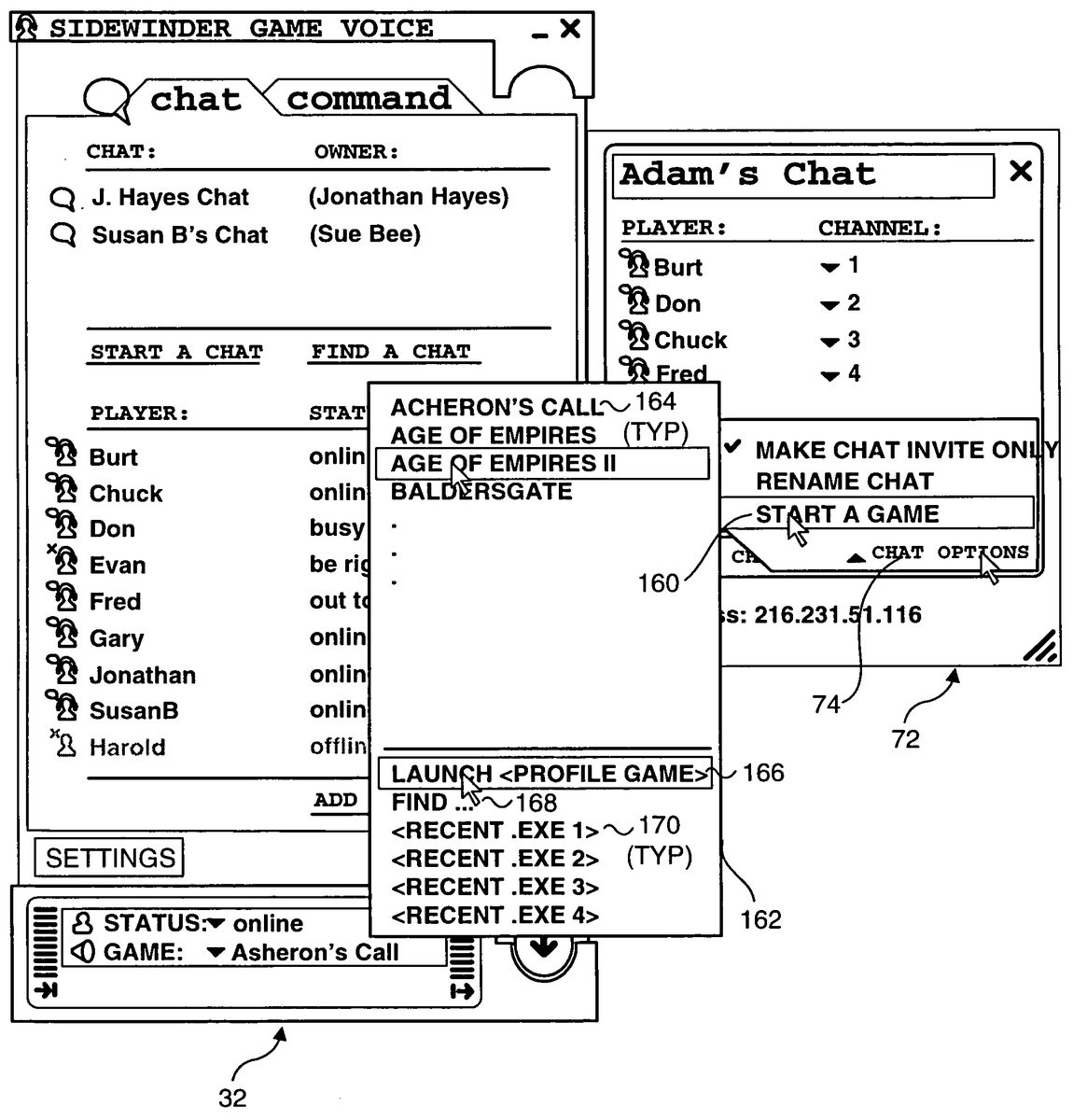
With reference toFIG. 19, when all of the players the host desires to have participate in a multiplayer online computer game have joined the host in the chat session, the host can launch an instance of a DIRECTPLAY™ Lobby Game on each of the chat session participants' computers by activating “Chat Options” control74, and selecting a “Start a Game” option160. This will cause a cascaded game selection menu162to be displayed, enabling the host to select one of a plurality of DIRECTPLAY™ Lobby Games164listed in an upper portion of a the menu, whereupon the selected DIRECTPLAY™ Lobby Game will be automatically launched on all of the chat participants' computers that have the DIRECTPLAY™ Lobby Game installed. Optionally, if the game corresponding to the current game command set is a DIRECTPLAY™ Lobby Game, this game can also be launched on all of the chat participants' computers that have the game installed by selecting a “Launch ” option166. Preferably, the DIRECTPLAY™ Lobby Games listed in game selection menu162will include a predefined list of DIRECTPLAY™ Lobby Games and any other DIRECTPLAY™ Lobby Games that are registered on a player's computer.
There will be instances where the game participants will want to play a multiplayer online computer game that is not a DIRECTPLAY™ Lobby Game. In these instances, the players in the chat session will have to agree upon a game to play (or be informed by the host of a game selected by the host that the host will be launching or has already launched), and each player will have to manually start an instance of the agreed-upon or host-selected game. Accordingly, game selection menu162further includes a “FIND . . . ” option168that is used to search a player's computer for any executable (i.e., .EXE) files installed on the player's computer, whereby the player can selectively launch one of the .EXE files in a corresponding set of search results. Although any .EXE file may be chosen to be launched from the search results set, the players preferably will select the executable for the agreed-upon or host-selected game. As an option to searching for a game executable each time a non-DIRECTPLAY™ Lobby Game is to be played, a list of the four most recently launched .EXE files170(which preferably will correspond to game executables) will be displayed toward the bottom of game selection menu162.FIG. 20and the following discussion are intended to provide a brief, general description of a suitable computing environment for use in connection with implementing the present invention. Although not required, certain aspects of the present invention are described in the general context of computer executable instructions, such as program modules, that are executed by a PC or workstation. Generally, program modules include routines, programs, objects, components, data structures, etc. that perform particular tasks. Moreover, those skilled in the art will appreciate that this invention may well be practiced with other computer system configurations, including hand-held devices, multiprocessor systems, microprocessor based or programmable consumer electronic devices, network personal computers, minicomputers, mainframe computers, and the like.
With reference toFIG. 20, an exemplary system for implementing the present invention includes a general purpose computing device in the form of a conventional PC system210, provided with a processing unit221, a system memory222, and a system bus223. The system bus couples various system components including the system memory to processing unit221and may be any of several types of bus structures, including a memory bus or memory controller, a peripheral bus, and a local bus using any of a variety of bus architectures. The system memory includes read only memory (ROM)224and random access memory (RAM)225. A basic input/output system (BIOS)226, containing the basic routines that help to transfer information between elements within PC system210, such as during start-up, is stored in ROM224. PC system210further may include a hard disk drive228for reading from and writing to a hard disk, not shown, and may include a magnetic disk drive212for reading from or writing to a removable magnetic disk229, and an optical disk drive230for reading from or writing to a removable optical disk231, such as a compact disk-ROM (CD-ROM), DVD, or other optical media. Hard disk drive228, magnetic disk drive232, and optical disk drive230are connected to system bus223by a hard disk drive interface232, a magnetic disk drive interface233, and an optical disk drive interface234, respectively. The drives and their associated computer-readable media provide nonvolatile storage of computer readable machine instructions, data structures, program modules and other data for PC system210. Although the exemplary environment described herein employs a hard disk, removable magnetic disk229, and removable optical disk231, it will be appreciated by those skilled in the art that other types of computer readable media, which can store data that are accessible by a computer, such as magnetic cassettes, flash memory cards, digital video disks, Bernoulli cartridges, RAM cards, ROM, and the like, may also be used in the exemplary operating environment.
A number of program modules may be stored on the hard disk, magnetic disk229, optical disk231, ROM224or RAM225, including an operating system235, one or more application programs236(such as a multiplayer game), other program modules237, and program data238. A user may enter commands and information into PC system210through input devices such as a keyboard240, microphone28discussed above (but not shown in this Figure), and a pointing device242. Other input devices (not shown) include a joystick, game pad, satellite dish, scanner, or the like. These and other input devices are often connected to processing unit221through an input/output (I/O) interface246that is coupled to the system bus. The term I/O interface is intended to encompass each interface specifically used for a serial port, a parallel port, a game port, a keyboard port, and/or (USB) port, as appropriate for the external devices that are thus coupled to the PC system. A monitor214or other type of display device is also connected to system bus223via an appropriate interface, such as a video adapter248. In addition to the monitor, PCs are often coupled to other peripheral output devices (not shown), such as printers. Additionally, a soundcard256is used to supply a drive signal to a pair of speakers (not shown) to produce game sounds.
PC system210may operate in a networked environment using logical connections to one or more remote computers, such as a remote computer249. Remote computer249may be another PC, a server, a router, a network PC, a peer device, or other common network node, and typically includes many or all of the elements described above in connection with PC system210, although only an external memory storage device250has been illustrated inFIG. 20. The logical connections depicted inFIG. 20include a local area network (LAN)251and a wide area network (WAN)252. Such networking environments are common in offices, enterprise-wide computer networks, intranets and the Internet.
When used in a LAN networking environment, PC system210is connected to LAN251through a network interface or adapter253. If used in a WAN networking environment, PC system210typically includes a modem254, or other means for establishing communications over WAN252, such as the Internet. Modem254, which may be internal or external, is connected to the system bus223, or coupled to the bus via I/O device interface246, i.e., through a serial port. In a networked environment, program modules depicted relative to PC system210, or portions thereof, may be stored in the remote memory storage device. It will be appreciated that the network connections shown are exemplary and other means of establishing a communications link between the computers may be used.
In the foregoing description of a preferred form of practicing the invention, MSN messenger was disclosed to provide behind the scenes online messaging service for supporting gaming utility30. This exemplary disclosure is not meant to be limiting, as it will be understood by those skilled in the art that other online messaging services can alternatively be used, including America Online Corporation's instant messaging service, and ICQ™ messaging service. Furthermore, in the exemplary configuration discussed above, a plurality of PCs are connected to each other across a communications network. It is envisioned that other electronic devices may be used as well, such as then consumer terminals, mobile phones, Pocket PCs, TV attached boxes (set top, gaming, video management), home servers, small business server appliances, and various focused enterprise devices.
Although the present invention has been described in connection with a preferred form of practicing it and modifications thereto, those of ordinary skill in the art will understand that many other modifications can be made to the invention within the scope of the claims that follow. Accordingly, it is not intended that the scope of the invention in any way be limited by the above description, but instead be determined entirely by reference to the claims that follow.
Claims
- A method for enabling a host player to select one or more other participants to join in playing a multi player online electronic game, comprising the steps of: (a) enabling the host player to create a list of contacts comprising one or more other persons who may be interested in participating in playing the multiplayer online electronic game;(b) enabling the host player to select one or more of the other persons from among the list of contacts to participate in playing the multi player online electronic game;(c) automatically sending an electronic invitation to each of the one or more other persons selected by the host player, to join in playing the multiplayer online electronic game, wherein the electronic invitation comprises a verbal message;(d) enabling each of the one or more other persons who receive the electronic invitation that was automatically sent, to selectively join the multi player online electronic game as a participant;and (e) providing an availability status for each person in the list of contacts so as to enable the host player to identify persons in the list of contacts who are currently available for playing the multiplayer online electronic game.
- The method of claim 1 , further comprising the step of providing an availability status for each person in the list of contacts so as to enable the host player to identify persons in the list of contacts who are currently available to participate in playing the multiplayer online electronic game.
- The method of claim 2 , further comprising the step of enabling each person in the list of contacts to select the availability status indicating the person's availability for participating in playing the multiplayer online electronic game.
- The method of claim 1 , wherein the host player is enabled to build a list of chat contacts through use of an online messaging service, said list of chat contacts automatically being parsed to create the list of contacts.
- The method of claim 4 , wherein at least one person in the list of contacts is not currently logged into the online messaging service and has been invited to join the multiplayer online electronic game, further comprising the step of automatically forwarding the electronic invitation to join the multiplayer online electronic game to said at least one person when said at least one person logs into the online messaging service.
- The method of claim 4 , wherein selection of game participants and voice chat communications before and during game play is facilitated by a gaming utility that runs on an electronic device operated by each game participant and at least one person in the list of contacts has been invited to join the multi player online electronic game and has not started an instance of the gaming utility on the electronic device(s) operated by said at least one person, further comprising the step of automatically forwarding the electronic invitation to join the multi player online electronic game to said at least one person when said at least one person launches an instance of the gaming utility on the electronic device(s) operated by said at least one person.
- The method of claim 1 , further comprising the step of enabling the electronic invitation to be accepted by a person invited to join the game through a verbal response spoken by said person.
- The method of claim 1 , further comprising the steps of providing a list of multiplayer online electronic games to the host player;and enabling the host player to select the multi player online electronic game from said list of multi player online electronic games.
- The method of claim 1 , further comprising the steps of: (a) providing a user interface including a first display area on which the list of contacts is displayed and a second display area corresponding to a voice chat session;and (b) enabling the host to select the one or more contacts to invite to join the voice chat session by selecting one or more contacts from among the list of contacts displayed in the first display area and dragging and dropping them onto the second display area.
- The method of claim 9 , wherein a plurality of contacts can be selected and dragged and dropped onto the second display area at one time.
- A computer readable medium having computer executable instructions for performing the steps recited in claim 1 .
- A method for enabling a host player to select one or more other players to participate in a multiplayer online electronic game played using a plurality of electronic devices linked in communication over a communications network, each of said plurality of electronic devices being operated by a different player, the method comprising the steps of: (a) enabling the host player to initiate a chat session;(b) enabling the host player to invite one or more other players to join the chat session, and sending an electronic invitation to join the chat session to each of the one or more players invited by the host player to join the chat session;(c) enabling any of the players who were invited by the host, to be a participant in the chat session;(d) enabling the host player to forward a network address corresponding to an electronic device being operated by the host to any other player participating in the chat session;(e) automatically launching an instance of the multiplayer online electronic game on each electronic device being operated by any player participating in the chat session, said step of automatically launching being in response to a game initiating action performed by the host player so that any player participating in the chat session automatically becomes a participant in the multiplayer online electronic game;and (f) enabling each player to transmit voice chat data to all of the other players who have joined the chat session.
- The method of claim 12 , further comprising the step of providing a network address of the electronic device the host player is using and operating so as to enable the host player to invite one or more other players to join in playing the multi player online electronic game, by referencing said network address.
- The method of claim 12 , wherein the host player is a member of an online messaging service that enables the host player to build a player contact list comprising a list of one or more players with whom the host prefers to chat and/or play multi player online electronic games, further comprising the steps of: (a) displaying the player contact list to the host player;and (b) enabling the host player to select one or more other players to participate in playing the multiplayer online electronic game from the player contact list.
- The method of claim 14 , further comprising the step of providing an availability status for each player in the player contact list.
- The method of claim 14 , further comprising the step of enabling each player to select an availability status indicating the player's availability to join a chat session.
- The method of claim 14 , further comprising the steps of: (a) providing a user interface including a first display area on which the list of contacts is displayed and a second display area corresponding to a voice chat session;and (b) enabling the host to select the one or more contacts to invite to join the voice chat session by selecting one or more contacts from among the list of contacts displayed in the first display area and dragging and dropping them onto the second display area.
- The method of claim 17 , wherein a plurality of contacts can be selected and dragged and dropped onto the second display area at one time.
- The method of claim 12 , wherein the electronic invitation includes an audible announcement apprising any player receiving the electronic invitation that the host player has invited the player to join the chat session.
- The method of claim 19 , further comprising the step of enabling the electronic invitation to join the chat session to be accepted by a recipient through a verbal response spoken by the recipient, whereupon said recipient becomes a participant in the chat session.
- The method of claim 12 , wherein each player is a member of an online messaging service that enables the player to build a player contact list comprising a list of one or more players with whom the player prefers to chat and/or play multiplayer online computer games, further comprising the step of: (a) providing a list of chat sessions that are being hosted by at least one other player contact in a player contact list built by the player;and (b) enabling the player to join a chat session appearing in the list of chat sessions.
- The method of claim 12 , further comprising the step of providing a headset operatively coupled in communication with each of said plurality of electronic devices, each headset comprising at least one sound transducer and a microphone employed by each player to participate in a voice chat session.
- The method of claim 12 , further comprising the steps of providing a list of multiplayer online electronic games;and enabling the host player to select the multi player online electronic game that will be played.
- A computer readable medium having computer executable instructions for performing the steps recited in claim 12 .
- A method for enabling a host player, who is a member of an online messaging service that enables the host player to build a player contact list of one or more players with whom the host prefers to chat and/or play multiplayer online computer games, to select one or more other players to participate in a multiplayer online electronic game played using a plurality of electronic devices linked in communication over a communications network, each of said plurality of electronic devices being operated by a different player, the method comprising the steps of: (a) enabling the host player to initiate a voice chat session;(b) enabling the host player to invite one or more other players to join the voice chat session;(c) enabling any of the players who were invited by the host, to be a participant in the voice chat session;(d) enabling the host player to forward a network address corresponding to an electronic device being operated by the host to any other player participating in the voice chat session;and (e) providing a player contact list to the host player and enabling the host player to select one or more players to participate in the multi player online electronic game from the player contact list by transmitting a voice chat message from the host player to any other player participating in the voice chat session, said voice chat message identifying a multiplayer online electronic game that the host player will be launching or has already launched on the electronic device operated by the host player so that any other player participating in the voice chat session can selectively launch an instance of the multiplayer online electronic game on the electronic device operated by the player, so that any player participating in the chat session who selectively launches the multiplayer online electronic game becomes a participant in the multiplayer online electronic game.
- The method of claim 25 , further comprising the step of providing an availability status for each player in the player contact list.
- A computer readable medium having computer executable instructions for performing the steps recited in claim 25 .
- A system for enabling a host player to select one or more other players to participate in playing a multiplayer online electronic game played using a plurality of electronic devices linked in communication over a communications network, each of said plurality of electronic devices being operated by a different player and including: (a) a display on which a user interface is implemented;(b) a memory in which a plurality of machine instructions are stored;(c) a microphone operatively coupled to the electronic device and which produces audio signals in response to words spoken by a user into the microphone;(d) a sound transducer operatively coupled to the electronic device so as to replicate sounds corresponding to an audio data signal received over the communications network by the electronic device to which said at least one sound transducer is operatively coupled;and (e) a processor coupled to the memory for executing said plurality of machine instructions, said processor implementing a plurality of functions when executing the machine instructions, including: (i) enabling the host player to initiate a chat session;(ii) enabling the host player to invite one or more other players to join the chat session;(iii) enabling any of the players who were invited by the host, to be a participant in the chat session;(iv) automatically launching an instance of the multiplayer online electronic game on each electronic device being operated by any player participating in the chat session, said step of automatically launching being in response to a game initiating action performed by the host player so that any player participating in the chat session automatically becomes a participant in the multi player online electronic game;(v) employing the microphone, the sound transducer, and the electronic device to enable each player to transmit voice chat data to all other players participating in the chat session;(vi) sending an electronic invitation to a player being invited by the host player to join the chat session;(vii) producing an audible announcement with said at least one sound transducer apprising a recipient of the electronic invitation that the host player has invited the recipient to join the chat session;and (viii) enabling the electronic invitation to be accepted by the recipient through use of a verbal response spoken into the microphone by the recipient.
- The system of claim 28 , wherein the host player is a member of an online messaging service that enables the host player to build a player contact list of one or more players with whom the host may desire to play multiplayer online computer games, and wherein execution of the plurality of machine instructions further implements the functions of: (a) obtaining the player contact list from the online messaging service;(b) displaying the player contact list to the host player;and (c) enabling the host player to select one or more players to participate in the multiplayer online electronic game from the player contact list.
Disclaimer: Data collected from the USPTO and may be malformed, incomplete, and/or otherwise inaccurate.