U.S. Pat. No. 7,235,012
VIDEO GAME CONTROLLER WITH SIDE OR QUICK LOOK FEATURE
AssigneeBrain Box Concepts, Inc.
Issue DateAugust 19, 2005
Illustrative Figure
Abstract
A video game includes a controller, a processor and display. The controller includes a special quick look button 28 that, when activated, allows a player to causes a looking movement of a character that simulates the lateral rotation of the head or upper body of a person looking sideways while walking forward.
Description
DETAILED DESCRIPTION OF THE INVENTION The present invention is described in conjunction with video controllers used to play first and third person shooting and other similar types of action games, but may be incorporated in other types of games as well. The video game controllers shown in the drawings incorporate several improvements, including an analog quick look button28and, optionally, an analog tracking button10. As described in more detail below the quick look button28is preferably a slide-type control device. The analog track button10is a device that relies on its resistive nature to add precision to the game-play. Like all the other control components on a game controller100, these components are also programmable by game developers, meaning that the response of a game to the activation and movement of these buttons is determined by software. However, preferably, they are programmed to create a new kind of movement for game characters, as described in more detail below, which enables game developers to greatly improve the new game-play experiences of players. A further change is that the locations of two known digital shoulder buttons (32L &32R) have also been changed to increase their accessibility and their prolonged use level of comfort. More specifically,FIGS. 1–3show a game controller100constructed in accordance with this invention. The controller100has a casing24with a top surface102and a bottom surface104. Disposed on these surfaces there are a plurality of devices that are used by a player to generate commands for an electronic game106including a processor106A, a memory106B holding software and firmware, and being associated with a screen or other visual display means108. The controller100is connected to the electronic game106either with a physical cable or connector26or by wireless means, including BLUETOOTH, WIFI or other similar channels. The electronic game106may be a PlayStation®, an Xbox®, and other dedicated gaming devices or even a general ...
DETAILED DESCRIPTION OF THE INVENTION
The present invention is described in conjunction with video controllers used to play first and third person shooting and other similar types of action games, but may be incorporated in other types of games as well. The video game controllers shown in the drawings incorporate several improvements, including an analog quick look button28and, optionally, an analog tracking button10. As described in more detail below the quick look button28is preferably a slide-type control device. The analog track button10is a device that relies on its resistive nature to add precision to the game-play. Like all the other control components on a game controller100, these components are also programmable by game developers, meaning that the response of a game to the activation and movement of these buttons is determined by software. However, preferably, they are programmed to create a new kind of movement for game characters, as described in more detail below, which enables game developers to greatly improve the new game-play experiences of players.
A further change is that the locations of two known digital shoulder buttons (32L &32R) have also been changed to increase their accessibility and their prolonged use level of comfort.
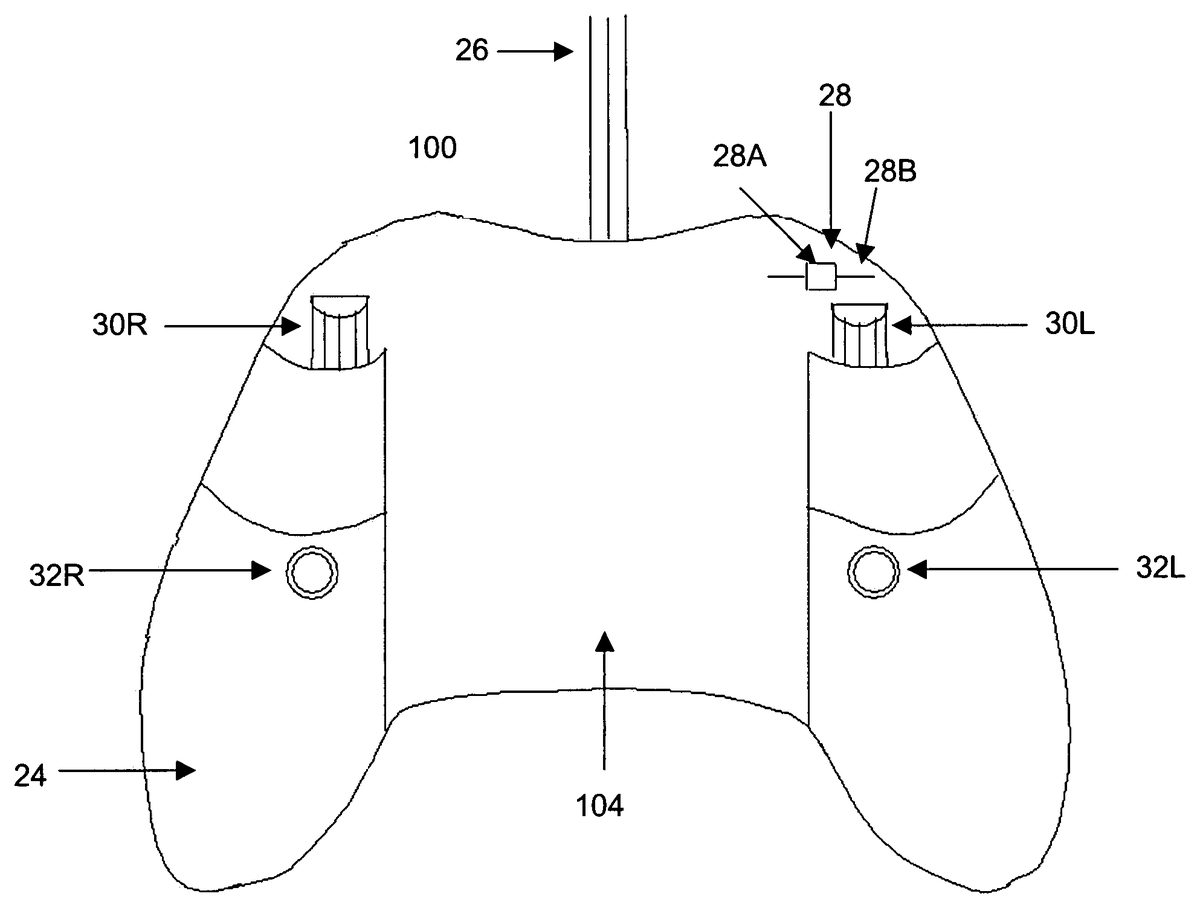
More specifically,FIGS. 1–3show a game controller100constructed in accordance with this invention. The controller100has a casing24with a top surface102and a bottom surface104. Disposed on these surfaces there are a plurality of devices that are used by a player to generate commands for an electronic game106including a processor106A, a memory106B holding software and firmware, and being associated with a screen or other visual display means108. The controller100is connected to the electronic game106either with a physical cable or connector26or by wireless means, including BLUETOOTH, WIFI or other similar channels. The electronic game106may be a PlayStation®, an Xbox®, and other dedicated gaming devices or even a general purpose computer.
The various devices provide a player the ability to perform certain maneuvers with game characters on screen108. For example, a left analog stick14L allows the video game character to walk/run forward and back, and strafe (side step) to the left and to the right. A right analog stick14R allows the video game character to turn his entire body, from his head to his feet, to the left or the right. Stick14R also facilitates the game character with other look/aim functions in a full horizontal and vertical three-dimensional 360 degree radius. The walking movement is controlled by the left analog stick14L. Combined with the entire body turning movement of the right analog stick14R, it enables a player to cause a video game character to turn his entire body and then walk or run in a new direction. This is essential to the video game character's ability to move through the game environment. The other buttons12A–D,16,18,22etc. all provide various functions well known to players.
The various elements of the controller100are listed below for the sake of completeness:
24housing10novel optional analog trackingbutton12A, 12B, 12C, 12Ddigital face buttons14R, 14Lright and left analog sticks16start button18select button20D-pad22logo26electric connector28novel quick look button30R, 30Lanalog triggers32R, 32Ldigital shoulder buttons34slot for memory card
A critically important facet of natural human movement has been missing from video games, especially since they entered the realm of 3D environments. That is, a game character can only look, shoot, and move in the same direction. So, for example, if a character is walking down a corridor he can only look straight ahead and shoot straight ahead. If he wants to look right or left he must first turn his whole body, which will initiate the game player to do one of two things; completely alter the direction of the game character's movement or force the game charter to come to a full stop and then look to the left or to the right.
The reason for this unnatural behavior is illustrated inFIG. 4. As shown in the top panel200, the stick14R is tilted to the left and maintained in that position. In response, as shown in panels202,204, and206; character C positioned initially to face forward, and then his whole body is turned to the left. This action is maintained, that is the body is kept turning until the stick14R is returned to its normal or neutral position. This motion can be combined with other actions, such as causing the character to step forward or backward, raising his arm, firing a gun, etc. However, throughout all these actions, the body and the head are always turned in the same direction. Problems with using the right analog stick14R exclusively for look/aim function include:
forcing a game character to unnaturally turn its entire body, from its feet to its head, left and right, at all times, to view the game world (even when the game player has no intention to cause the game character to walk in either of those directions);
leaving a game character vulnerable to attack by restricting it to turning its entire body left or right to view their surroundings when a quick glance in either of those directions would be more appropriate; and
reducing the character's mobility because once he has turned his body right or left, he must turn his body back again if he is to move forward.
There are innumerable game situations where it is desirable to have the character “look” in a given direction, by naturally turning its head or upper body with speed and efficiency, to scout an area for potential danger (as a human soldier would do in real life). However, it is slow and illogical for the game character to turn its entire body during this time because it leaves its back exposed to enemy fire, in every direction it wants to scan but not traverse.FIG. 7Bdepicts an example of the advantage independent upper body rotation, facilitated by button28, affords the player in real-time game-play situations. Plate500shows the character C walking forward down the hallway260. As he approaches the hallway on his right262, while continuing his forward motion, he slides the quick look button28to the right and holds it there (depicted in plate502); this rotates his upper body (torso) in the corresponding direction and allows the character C to keep his forward movement while passing and looking down the hallway262on the right. In plate504, the game character C has passed the hallway on the right262yet before he reaches the hallway on the left264, while continuously walking forward, the player quickly slides button28from its furthest right position on its defined track28B to its furthest left position. Doing so enables the player to keep his forward direction while quickly turning his full view (torso) to the left in preparation of confronting possible danger (in the form of object266) down the hallway on the left264. In contrast, if a player attempted to approach the same situation with today's model for game character movement the following would occur: As depicted in plate506, a player using a standard game controller without the analog quick look button28would have to first rotate the character's C entire body (feet to head) from a forward facing position to the right. At this point the character C will have to begin to strafe or side step to the left to continuously move down the main hallway260. As a result, before the player can turn a full 180 degrees to the left, the player will expose his back to potential enemy fire266coming from the hallway on the left264; this illustrates the impossibility of the player to keep his forward movement down the main hallway260while safely looking in the adjacent hallways on his right262and his left264.
This problem is resolved in the present invention by the provision of a sliding spring loaded button28which is referred to herein as a quick look button. As shown somewhat diagrammatically inFIG. 2, button28consists of a knob28A moving in a track or groove28B. The knob28A is biased by springs (not shown) to the center position shown inFIG. 2. The player can then shift or slide the switch laterally either to the left or the right.
The quick look button28endows a video game character with the ability to turn its head and (optionally) the upper body (from its waist up) independently of its lower body (from its hips to its feet), which enables the video game character to move in a forward direction, yet look simultaneously to the left or the right, among many other new combinations of movements and look abilities.
As shown inFIG. 2, preferably button28is positioned above and to the left of the analog trigger30L. In one embodiment, this action enables video game players to turn the head of the video game character, independently of the upper or lower body, thereby simulating the natural way humans look left or right while walking in a straight line. Preferably, the angular position of the head and the speed at which the head is turned tracks the position of the quick look button28. In this manner, the head of a game character can be turned to an anatomically correct angle, typically, about 90 degrees, in either direction. As mentioned above, the quick look button28is biased by springs to its center position. As a result, when the button28is released, it automatically returns to its center or neutral position, shown inFIG. 2. In response, unless other action is taken by the player, the head of the character returns to the forward position at the same time.
This concept is aptly illustrated inFIG. 5. In panel210a player slides the quick look button28to the left. In response, the character C turns his head to the left. If the button28is released, C's head returns so that the character is “looking” again straight forward. This sequence is referred to herein as a quick look movement and it simulates the natural movement of a person whose body is facing a forward direction and the person looks laterally or sideways for a short time period. Preferably the movement of the head is proportional to the movement of the quick look button28. The limits of the movement correspond to the limits of movement of a natural body, i.e. about 90 degrees in each direction.
The quick look button28can also be depressed at any position of knob28A along track28B. In one embodiment, if the button28is depressed or “clicked in” and the character is not moving, the relative angle between the head and the rest of the body of the person is “locked in” and remains unchanged even if the quick look button28is moved to another position, or is released so that it returns to its central or neutral position. In this embodiment, if the character is stationary, the head is “released” by depressing or clicking the quick look button28again. If at this time, the quick look button28is in its neutral position, the head returns to the forward position. If the quick look button28is at different position along track28B when it is clicked, the game character's head quickly turns to a new angle corresponding to the position of the button28along the track28B when it is clicked a second time to unlock the head. Conversely, if the character is moving while their upper body is turned to the left or right, with or without a locked view, and they click in button28their lower body (hips to feet) will always turn to face the direction of their upper body (waist to head).
The analog quick look button28is designed so that it can work in conjunction with the other components of the video controller100and not replace them. For example, operating quick look button28together with right analog stick14R can cause the turning of the character's body and head at the same time.
In another embodiment of the invention, the analog quick look button28is used to control the position of the upper body. In this embodiment, when the player slides button28left or right, he causes the whole upper body of the game character to pivot with respect to the lower body. This embodiment is effective, for example, in a shooter game where the game character can shoot to the right or left while still facing or walking forward. In one embodiment, clicking button28while the character is not moving can cause the angle of the upper body to be locked until released, as discussed above.
Clicking the quick look button28while the character is moving causes the lower body (or hips) to be turned quickly in alignment with the upper body (or head). This operation may be combined with various other effects, such as walking, running, etc. In other words, while the character is walking, sliding the analog quick look button28left or right by some amount causes the head to turn by a corresponding angle. Clicking the quick look button28while the head is turned causes the rest of the body to turn and come into alignment with the head whereby the whole body is now facing in a new direction. The same operation takes place if the character's whole torso is turned by button28instead of just its head.
Whether just the video game character's head or its entire upper body (torso) may be a programmable parameter that is constant for the whole game. Alternatively, the parameter may be context sensitive. More specifically, the parameter may change as the game is played, dependent upon various factors, including the context of the video game at the specific time at which the look control is invoked. For example, the video game designer may design the game such that only the head is turned if the character is unarmed, but the entire upper body is turned when the character is armed. In one embodiment, the video game character's entire upper body is turned, so that the character may e.g., employ a simulated weapon supported by its hand and arm or hands and arms. For better realistic effects, a game may be programmed so that even non-controlled characters (e.g., characters not controlled by a player) can turn their heads or their upper body.
FIGS. 6,7A,7B present a relatively simple scenario for a game and illustrate some of the features and advantages of the quick look button28.FIG. 6shows a plan view of playing field consisting of a main corridor260and two side corridors262,264branching off from the main corridor.FIG. 7Adescribes the action of a player using the controller100to move a character through the corridor. The action starts in step300. In step302the character C is shown on display108facing forward and walking down corridor260until point P1—the branch off point for corridor262. At this point, the player stops the character C (step304) and the player slides the button28to the right (step306). This action causes the character to move its head to the right and the player is shown the scene seen by the character, i.e., corridor262(step308). The player then clicks in the quick look button28, releases it and starts the character C walking again up along corridor260(step310). The character C keeps its head turned to the right (locked) as it walks straight and the player is shown the remaining part of corridor262(step312). Once the character is past the corridor262, the player stops walking and clicks in button28at its center or neutral position; the character's head returns to the central or neutral position to gaze straight ahead until point P2(step314).
Next, at point P2, the player continues walking the character C while at the same time he slides the analog quick look button28to the left (step316). The character C walks straight, but turns its head left. The player is then shown corridor264with object266(step318). The player sees the object and clicks the quick look button28while moving forward (step320). This causes the character C to turn its whole body immediately (so that it is now facing to the left), and start walking down the corridor264toward object266(step322). At this point, because the character was moving and not stationary when the analog quick look button28was clicked in, the player must release button28to its neutral position to reset its standard functionality for use again.
This sequence illustrates how various commands on the video controller triggers corresponding actions of the character.
In another embodiment, the video controller and its software are adapted to provide a response to the activation of the analog quick look button28that is dependent on other factors within the video game. In this embodiment, actions of the game character are used to invoke a special function. For example, the video game environment may include at certain times or at certain places or locations within the game an icon that indicates that the quick look button28may perform a special function within that context. In just one example of many possible special quick look button28context-sensitive features, the icon may indicate that if the game player moves the quick look button28while near a certain portion of the currently-displayed game environment, the game character may peer around a corner with analog precision, by leaning its upper body to one side or the other until the head reaches past the corner. In this example, illustrated inFIG. 8, in plate400the character is walking down a corridor. In plate402, the character reaches a corner and the game designer pre-labeled some portions of the game environment with icons, such as404that indicates to the game player that he has option to exercise the special function of the quick look button28or not, for example by closely approaching a game environment feature like a corner or not. In one embodiment, the icon404may graphically represent the associated special function of the quick look button28. For example, the icon may depict a leaning game character to indicate that the quick look button28will allow the game player to cause the game character to lean at an appropriate point in the game environment with analog precision; whereas, in today's games the character is forced to digitally lean out which either over or under exposes his position and thereby places him in danger or limits his view. In one embodiment, the icon's location on the video screen108may be uncorrelated with the part of the game environment at which the game player may exercise the special function. For example, the location within the game environment at which the special function can be invoked may be clear from the context of the game at that time.
Alternatively, the icon may be located upon or close to the part of the video game environment at which the special function may be invoked—for example an icon may be placed upon a corner wall where leaning around that corner wall is possible. As another alternative, the icon may only represent a general indication that a special function of the quick look button28may be invoked within that environment, for example, to make the game more challenging by requiring the game character to explore the environment to discover precisely where the special function may be exercised. To complete the explanation, in plate406the character has leaned forward so that he can pear around the corner, as seen plate408thereby exposing only a small portion of his body.
In another embodiment, the analog quick look button28can also be moved to the left or right at any time to realize various extended functions with different or enhanced results. For example, in most instances, the character is able to rotate his head by up to 90 degrees in each direction (left or right from a forward facing position) for a total field view of 180 degrees (from the far left to the far right or vice versa). However, in some instances, a more extended view is required. For this purpose, when the special extended option is enabled by pressing and holding in one of the many action buttons on the controller100first, the character can move his head so that he can change his view by up to 180 degrees. This feature may be useful when a player wants to look behind the character without turning the character or otherwise change his direction of movement. One realistic way of implementing this special feature is to rotate the upper torso by 90 degrees and the head by an additional 90 degrees to obtain a total rotation of up to preset limit, such as 180 degrees (this extended function of the analog quick look button28will only occur when a designated action button is pressed in first or simultaneously). This feature is illustrated inFIG. 9. The analog sliding or quick look button28will always return to its centered position when it is released, even after it has been clicked in, while the video game character's view will remain locked in the game world (stationary click) until the analog sliding button28is clicked in once more. The game character's view will return, from looking to the left or right (in a locked position) with only its head and torso to a forward-facing position. Note that the game character can move with a locked view at an angle as discussed before. In one embodiment, the game character's view will only lock if the clicking function is initiated when the character is stationary (as opposed to clicking the quick look button28when the character is moving, which will bring the game character's lower body to face the direction of his upper body—the analog quick look button28needs to be reset by releasing it to its neutral position only when it's been clicked in while the game character is moving). Put simply, a new function of the quick look button28may be invoked by the game player when he manipulates another button on the controller before manipulating the quick look button28. For example, the game player may hold down the A button of a standard video controller and then use the quick look button28to cause the video game character to look over its shoulder, possibly even after using the quick look button28to rotate the game character's upper body or entire body.
Another improvement presented herein is the analog tracking button10. Preferably this button is placed above and to the left of two of the digital face buttons12A and12B of a standard video game controller, as shown inFIG. 1. Functionally, the analog tracking button10is similar to and can be used to perform all the actions of the right analog stick14R. The main difference is mechanical. Instead of a joy stick, the button10can be implemented as smooth ball rotating in a socket (not shown) and optical sensors trained on the ball. Thus button10has the same structure as a track ball that has replaced the mouse as a pointing device. However, the video game player's control over the 360 degree look function, in all horizontal and vertical directions in a 3D environment, will be executed with much greater precision with the analog tracking button10by comparison to the accuracy of the right analog stick14R.
The advantage of the tracking button10resides in its resistive nature, its non tilting nature, and its barely discernable sliding movement, in all directions, only on the horizontal plane. The game character's vertical look function comes from the video game player pushing the tracking button10forward or back (for the right analog stick14R it would be tilting forward or back) while the game character's left and right look function comes from the video game player pushing the tracking button10to the left or the right (for the right analog stick14R it would be tilting to the left or the right) which in turn rotates the game character's entire body from head to toe; thereby, enabling the game character to walk, using the left analog stick14L, in any direction.
The tracking button10dramatically improves the analog precision movement over the look function because the speed of the game player's viewing movement will be dependent upon how hard the player pushes against or tries to slide the analog tracking button10(in any direction on the horizontal plane) and not on how far the player tilts the right analog stick14R, which is where accuracy in the look movement is lost to over or under tilting, using standard video game controllers. Also, the analog tracking button10will sit slightly higher than the four main face buttons12A, B, C, and D in an effort not to interfere with them when the tracking button10is in use by the video game player's right thumb.
Preferred locations for buttons10and28are shown inFIGS. 1–3. However, other locations may be desirable as well. Moreover, while the invention was described primarily in association with the Xbox®FIG. 10Aand PlayStation®FIG. 10Bvideo game controllers, one or both types of devices could be incorporated into other types of pointer devices as well. For example,FIG. 14shows the analog quick look button28in the Xbox 360® controller whileFIG. 10Cshows a PC mouse with an analog quick look button28.
A further improvement presented herein is the position of digital buttons32L,32R. As shown inFIGS. 2 & 3, preferably, the left digital button32L and the right digital button32R are disposed in a recessed position below the left trigger30L and the right trigger30R to make them more ergonomic and accessible to the middle fingers of gamers during extended game-play sessions. Conventionally, digital buttons32L and32R are located directly under the left and right analog triggers30L and30R on the same vertical plane. This required the video game player to elevate or lift his middle fingers to press the32L and32R digital buttons. When holding a standard video game controller the game player's middle fingers naturally lay in the same recessed position that the digital buttons32L and32R were moved to; herein is no longer a need to reach for these buttons during game-play.
Turning now to the figures,FIG. 1is a top view of the video game controller, with a standard button configuration, except for the addition of my analog tracking button10.
The plastic casing24is in the form of a standard video game controller with an estimated length of 4.6″ and a width of 6.0″. The length and width can vary depending on how large or small the manufacturer wants the video game controller to be. The analog tracking button10of the invention is slightly concave and made of a rubber type material. The tracking button10is very resistive to sliding (or any movement) in all directions on the horizontal plane and is preferably used for the look function. The amount of sliding movement, for the analog tracking button10, in all directions on the horizontal plane is barely discernable to the video game player; it features a complete lack of tilting motion coupled with a limited movement/resistive design. The four main plastic digital face buttons of a standard video game controller, used to provide more game character actions, are12A, B, C, and D.
My improved video game controller achieves its result as follows: the microchip inside the game controller receives signals from the analog quick look button28when it is moved to the left or the right. The game controller then communicates with the video game console via the electrical cord26thereby enabling the left and right head or upper body movement independently from the lower body movement of the game character to be displayed on the display108. The resistive nature of the tracking button10will enable console video game players to experience precision control over the look function previously only available to PC video game players using the mouse. The process of signals being sent and received for the tracking button10will function in a similar manner to the aforementioned analog quick look button28. The new location of the left and right digital buttons32L and32R will prevent fatigue for the game player and will afford them instant accessibility to the pressing of the four main face buttons12A, B, C, and D.
There are many alternative ways to implement and place my tracking button10, my analog quick look button28, and the positioning of the left and right digital buttons32L and32R. In one embodiment, a switch mechanism on the game controller is used to change the existing right analog stick14R from a tilting component to a resistive sliding component similar to the tracking button10. The player can switch the right analog stick14R back to a tilting component at any time.
In another embodiment, a track ball with analog properties, slightly bigger in size than one of the four digital face buttons, can be used in place of the tracking button10to achieve the same level of precision over the look function.
In yet another embodiment, the analog quick look button28could also be placed above the right analog trigger14R instead of the left analog trigger14L.
In still another embodiment, a small (relative to the size of the left and right analog sticks14L and14R) tilting analog control stick can be used in place of the analog sliding button28below the four main digital face buttons12A, B, C, and D to perform the same head or upper body rotation (looking to the left or the right). The small analog control stick need only tilt left and right to perform its function.
The novel buttons and associated concepts have been described in conjunction with specific games in which a character progresses along a path or a maze. Of course, they are also useful for many other types of games, such as sports related games (including simulated football, baseball, soccer, boxing, wresting, and so on). In each of these games, the inventive buttons can be used to allow a participant to turn an upper body portion and look sideways.
In another embodiment, the left and right digital buttons32L and32R could be placed ¾ of an inch down and ½ an inch towards the medial aspect of the game controller so the tips of the game player's middle fingers can press the buttons in their natural position when holding the controller. In contrast, the game player can use the middle phalange section of their middle fingers to press the left and right digital buttons32L and32R with my button configuration.
Moreover, there are many alternative ways to design and implement an effective quick look button28. An alternate analog quick look button128may be provided that slides on a quarter circle path from its neutral position to the left & right and returns, unassisted, to its point of origin upon release, as shown inFIG. 11. In other words, the button128moves along a crescent or C-shaped track128T. The full range of the alternate analog quick look button128circular path is 180 degrees (half circle) from its farthest left position to its farthest right position and vice versa. When the analog quick look button128is in its neutral center position it has a moveable range of 90 degrees (quarter circle) to the left or right; this correlates to the natural upper body movement of the video game character (as opposed to the straight line path to the left & right that's used in the primary filing).
In another embodiment, shown inFIG. 12two buttons28L,28R are provided, each sliding along a straight path. The two quick look buttons (28L &28R) are normally biased in a back-to-back configuration in their neutral starting positions. The left quick look button28L moves to the left and back to its starting point when released while the right quick look button28R would only move to the right and back its starting point when released, causing the character to move its head (or torso) to the left, and back, or right and back, respectively.
In another embodiment, a relatively small button28S is provided as inFIG. 13. The button28S could be a tilting analog control stick. Tilting button28S left or right causes the character to move his head (or torso) left or right.
All of the alternatively designed quick look buttons could be used in the original location where I placed the quick look button28, in front of, above, and on a perpendicular angle to the left analog trigger30L or below the four main digital face buttons12A, B, C, & D to perform the same video game character upper body rotation (looking to the left or the right). Further still, the analog quick look button28can be placed anywhere on the controller where it will be “instantly accessible” to the player.
FIG. 14shows the location of a quick look button28on a video game controller for an XBOX 360®.
It is clear from the above description that the concept of having a character move its head laterally in an action-type game is best implemented using a video controller with a button dedicated (or at least temporarily assigned during a game) to this purpose, i.e., the analog quick look button28. However, some users may want to be able to have this ability or functionality even if they do not have the appropriate video controller. An alternative way to obtain the functionality of the analog quick look button28in this case, for example, on a standard video game controller is to configure the game and the video controller into a mode in which right and left quick look commands are accepted. That is, the game is configured to accept quick look right or quick look left when controls on the video controllers are used that are normally dedicated to other functions, or if two or more controls are activated simultaneously in a manner that has not been used previously. For example, pressing down one of the many digital action buttons32L on a video game controller100could signal the right analog stick14R to behave like the analog quick look button28when it's tilted left or right. When one specific action button32L is pressed the right analog stick14R will only rotate the upper body of the game character left and right while losing its typical functionality of turning the entire body of the game character left and right. The button still allows the game character to look up and down. Of course, other buttons, controls or combination thereof maybe used on an existing controller to implement the quick look function.
None of the aforementioned examples should be construed as limiting the general principle of the invention that includes special functioning of the analog quick look button28dependent on the current game environment and/or the actions of the game character within that environment.
Claims
- A video game apparatus comprising: a processor executing a sequence of steps in accordance with a program for a game, said sequence including simulating the movement of a virtual character having an upper and a lower body portion;a screen displaying scenes of the game, including scenes presented from the viewing field of the virtual character;a controller operated by a player, said controller including a selector device having at least a side position and a neutral position, said selector device being activated by a user to move it from said neutral position to said side position and being adapted to return automatically to said neutral position after it has been released by the user;wherein said processor and said controller cooperate to define a scene change function in which said display shows lateral scenes in a manner that imitates relative rotation between the upper and lower body portions of the video character in response to the activation of said selector from said neutral position and said side position;and wherein said processor and said controller further define a locked position in which said display shows said lateral scenes after said selector device returns to said neutral position.
- The apparatus of claim 1 wherein said virtual character is adapted to face a predetermined direction, with said screen showing a front scene as viewed by said virtual character and wherein, in response to said activation said screen changes to said lateral screen simulating a movement of the head of said character.
- The apparatus of claim 2 wherein the upper body portion rotates to simulate head movement.
- The apparatus of claim 1 wherein said device is a sliding-type device.
- The apparatus of claim 1 further comprising an unlock device for unlocking said locked position wherein when said device is unlocked, the screen is returned to show a front scene.
- The apparatus of claim 1 wherein said selector device is dedicated to the scene change function.
- The apparatus of claim 1 further comprising a release member activated by the user to release said locked position.
- The apparatus of claim 1 wherein said processor and controller cooperate to simulate walking of said virtual character forward while he is looking laterally.
- The apparatus of claim 8 wherein said processor and controller cooperate to shift the position of the virtual character to a new position corresponding in which said lateral view becomes the forward view.
- The apparatus of claim 9 further comprising a position control device responsive to a new command by the user, said position control device rotating said virtual character to said new position in response to said new command.
- A gaming apparatus comprising: a screen displaying scenes from a game;a processor responsive to commands and performing steps for a game in accordance with a software program, including generating data for said screen to show a first scene in a predetermined direction;a controller operated by a player to generate said commands, said controller cooperating with said processor to change said data to selectively show a second scene laterally of said first scene to simulate a look movement including a lateral look by a character of the game without moving the whole body of the character;and a scene control device operated by a user and having a neutral position and a side position, said scene control device being biased to said neutral position so that when said scene control device is activated by placing it from said neutral to said side position, said scene control device automatically returning to said neutral position when the user releases said scene control device from said side position;said scene control device, said controller and said processor cooperating to show said first scene when said scene control device is originally in said neutral position and said second scene when said scene control device is placed in said side position, said scene control device and said processor cooperating to continue to show said second scene after said scene control device automatically returns to said neutral position.
- The apparatus of claim 11 wherein said controller includes a button selectively activated by the player to initiate said look movement.
- The apparatus of claim 12 wherein said button includes a knob sliding in a track.
- The apparatus of claim 13 wherein said button cooperates with said processor to simulate the rotational movement of an upper body of the character as said knob is sliding in said track.
- A method of operating a video gaming apparatus having a screen for displaying game scenes, a processor operating in accordance with software and a controller having a neutral position and a side position, said controller being activated by a user to move it from said neutral to said side position and being adapted to automatically return from said side position to said neutral position when released by said user, said method comprising: generating and displaying a sequence of frontal scenes associated with the movement of a game character in a first direction;receiving a command from the user when said user activates said controller to move it to said side position;responsive to said command shifting said sequence to show lateral scenes simulating a quick look movement of said character;and continuing showing said lateral scenes after said controller is released.
- The method of claim 15 wherein said character is moving in said first direction and looking in a second direction during said quick look movement.
- The method of claim 16 wherein said quick look movement simulates an upper body rotation toward said second direction.
- The method of claim 16 wherein said quick look movement simulates a head rotation toward said second direction.
- The method of claim 18 further comprising unlocking said lateral scenes, wherein said display returns to showing frontal scenes.
- The method of claim 15 further comprising moving said character in said second direction after said quick look movement.
- A software product for a first person or third person game to be played on a gaming device associated with a controller having a quick look feature, said controller being movable by a user between a neutral position and a side position, said controller being biased to return to said neutral position after it is released by a user from said side position, comprising: a module simulating walking of a character in a first direction;and simulating looking of said character in a second direction in response to an activation of said quick look feature while the body of said character is still turned in said first direction, wherein said simulation of looking of said character in said second direction is continued after said controller is released by the user and returns to said neutral position.
- The software product of claim 21 wherein said simulated looking consists of turning one of a head and a torso of the character by an amount defined by the quick look feature.
Disclaimer: Data collected from the USPTO and may be malformed, incomplete, and/or otherwise inaccurate.