U.S. Pat. No. 6,996,744
GENERATING A PASSCODE FOR RESETTING A GAME CONSOLE
AssigneeMicrosoft Corporation
Issue DateApril 4, 2002
Illustrative Figure
Abstract
A device includes a processor and a hard disk drive coupled to the processor. The hard disk drive stores various data associated with the device and includes a first partition and a second partition. Data stored in the first partition is cleared during a system reset operation. Data stored in the second partition is not cleared during the system reset operation. The first partition stores saved application data, device configuration information, and the like. The second partition stores a console application that implements a user interface to the device. The second partition also stores a reset application that implements a system reset operation.
Description
DETAILED DESCRIPTION Although particular examples discussed herein refer to gaming systems, the methods and apparatus of the present invention may be applied to any device having a hard disk drive or other storage mechanism that can be reset to a factory default state. The hard disk drive or other storage mechanism is partitioned into a bootable region that is protected as read-only (i.e., not erased during a reset operation) and a second partition that has read and write capabilities and is erased during a reset operation. FIG. 1shows an exemplary gaming system100. The gaming system100includes a game console102and up to four controllers, as represented by controllers104(1) and104(2). The game console102is equipped with an internal hard disk drive and a portable media drive106that supports various forms of portable storage media as represented by optical storage disc108. Examples of suitable portable storage media include DVD, CD-ROM, game discs, and so forth. The game console102has four slots110on its front face to support up to four controllers, although the number and arrangement of slots may be modified. A power button112and an eject button114are also positioned on the front face of the game console102. The power button112switches power to the game console and the eject button114alternately opens and closes a tray of the portable media drive106to allow insertion and extraction of the storage disc108. The game console102connects to a television or other display (not shown) via A/V interfacing cables120. A power cable122provides power to the game console. The game console102may further be configured with broadband capabilities, as represented by the cable or modem connector124to facilitate access to a network, such as the Internet. Each controller104is coupled to the game console102via a wire or wireless interface. In the illustrated implementation, the controllers are USB (Universal Serial Bus) compatible and are connected to the console102via serial cables130. ...
DETAILED DESCRIPTION
Although particular examples discussed herein refer to gaming systems, the methods and apparatus of the present invention may be applied to any device having a hard disk drive or other storage mechanism that can be reset to a factory default state. The hard disk drive or other storage mechanism is partitioned into a bootable region that is protected as read-only (i.e., not erased during a reset operation) and a second partition that has read and write capabilities and is erased during a reset operation.
FIG. 1shows an exemplary gaming system100. The gaming system100includes a game console102and up to four controllers, as represented by controllers104(1) and104(2). The game console102is equipped with an internal hard disk drive and a portable media drive106that supports various forms of portable storage media as represented by optical storage disc108. Examples of suitable portable storage media include DVD, CD-ROM, game discs, and so forth.
The game console102has four slots110on its front face to support up to four controllers, although the number and arrangement of slots may be modified. A power button112and an eject button114are also positioned on the front face of the game console102. The power button112switches power to the game console and the eject button114alternately opens and closes a tray of the portable media drive106to allow insertion and extraction of the storage disc108.
The game console102connects to a television or other display (not shown) via A/V interfacing cables120. A power cable122provides power to the game console. The game console102may further be configured with broadband capabilities, as represented by the cable or modem connector124to facilitate access to a network, such as the Internet.
Each controller104is coupled to the game console102via a wire or wireless interface. In the illustrated implementation, the controllers are USB (Universal Serial Bus) compatible and are connected to the console102via serial cables130. The controller102may be equipped with any of a wide variety of user interaction mechanisms. As illustrated inFIG. 1, each controller104is equipped with two thumbsticks132(1) and132(2), a D-pad134, buttons136, and two triggers138. These mechanisms are merely representative, and other known gaming mechanisms may be substituted for or added to those shown inFIG. 1.
A memory unit (MU)140may be inserted into the controller104or the game console102to provide additional and portable storage. Memory units140enable users to store game parameters and port them for play on other consoles. For example, a user can save a game to a memory unit140using a particular game console then use that saved game data with a game executed on a different game console. In the described implementation, each controller is configured to accommodate two memory units140, although more or less than two units may be employed in other implementations. A particular game console102may be configured to accommodate any number of memory units140.
The gaming system100is capable of playing, for example, games, music, and videos. With the different storage offerings, titles can be played from the hard disk drive or the portable medium108in drive106, from an online source, or from a memory unit140. A sample of what the gaming system100is capable of playing back include:1. Game titles played from CD and DVD discs, from the hard disk drive, or from an online source.2. Digital music played from a CD in the portable media drive106, from a file on the hard disk drive (e.g., Windows Media Audio (WMA) format), or from online streaming sources.3. Digital audio/video played from a DVD disc in the portable media drive106, from a file on the hard disk drive (e.g., Active Streaming Format), or from online streaming sources.
FIG. 2shows functional components of the gaming system100in more detail. The game console102has a central processing unit (CPU)200and a memory controller202that facilitates processor access to various types of memory, including a flash ROM (Read Only Memory)204, a RAM (Random Access Memory)206, a hard disk drive208, and the portable media drive106. The CPU200is equipped with a level 1 cache210and a level 2 cache212to temporarily store data and hence reduce the number of memory access cycles, thereby improving processing speed and throughput.
The CPU200, memory controller202, and various memory devices are interconnected via one or more buses, including serial and parallel buses, a memory bus, a peripheral bus, and a processor or local bus using any of a variety of bus architectures. By way of example, such architectures can include an Industry Standard Architecture (ISA) bus, a Micro Channel Architecture (MCA) bus, an Enhanced ISA (EISA) bus, a Video Electronics Standards Association (VESA) local bus, and a Peripheral Component Interconnects (PCI) bus, also known as a Mezzanine bus.
As one suitable implementation, the CPU200, memory controller202, ROM204, and RAM206are integrated onto a common module214. In this implementation, ROM204is configured as a flash ROM that is connected to the memory controller202via a PCI (Peripheral Component Interconnect) bus and a ROM bus (neither of which are shown). RAM206is configured as multiple DDR SDRAM (Double Data Rate Synchronous Dynamic RAM) that are independently controlled by the memory controller202via separate buses (not shown). The hard disk drive208and portable media drive106are connected to the memory controller via the PCI bus and an ATA (AT Attachment) bus216.
A 3D graphics processing unit220and a video encoder222form a video processing pipeline for high speed and high resolution graphics processing. Data is carried from the graphics processing unit220to the video encoder222via a digital video bus (not shown). An audio processing unit224and an audio codec (coder/decoder)226form a corresponding audio processing pipeline with high fidelity and stereo processing. Audio data is carried between the audio processing unit224and the audio codec226via a communication link (not shown). The video and audio processing pipelines output data to an A/V (audio/video) port228for transmission to the television or other display. In the illustrated implementation, the video and audio processing components220–228are mounted on the module214.
Also implemented on the module214are a USB host controller230and a network interface232. The USB host controller230is coupled to the CPU200and the memory controller202via a bus (e.g., PCI bus) and serves as host for the peripheral controllers104(1)–104(4). The network interface232provides access to a network (e.g., the Internet, home network, etc.) and may be any of a wide variety of various wired or wireless interface components including an Ethernet card, a modem, a Bluetooth module, a cable modem, and the like.
The game console102has two dual controller support subassemblies240(1) and240(2), with each subassembly supporting two game controllers104(1)–104(4). A front panel I/O subassembly242supports the functionality of the power button112and the eject button114, as well as any LEDs (light emitting diodes) or other indicators exposed on the outer surface of the game console. The subassemblies240(1),240(2), and242are coupled to the module214via one or more cable assemblies244.
Eight memory units140(1)–140(8) are illustrated as being connectable to the four controllers104(1)–104(4), i.e., two memory units for each controller. Each memory unit140offers additional storage on which games, game parameters, and other data may be stored. When inserted into a controller, the memory unit140can be accessed by the memory controller202. Additionally, one or more memory units140may be inserted into game console102and accessed by the memory controller202.
A system power supply module250provides power to the components of the gaming system100. A fan252cools the circuitry within the game console102.
The game console102implements a uniform media portal model that provides a consistent user interface and navigation hierarchy to move users through various entertainment areas. The portal model offers a convenient way to access content from multiple different media types—game data, audio data, and video data—regardless of the media type inserted into the portable media drive106.
To implement the uniform media portal model, a console user interface (UI) application262is stored on the hard disk drive208. When the game console is powered on, various portions of the console application260are loaded into RAM206and/or caches210,212and executed on the CPU200. The console application260presents a graphical user interface that provides a consistent user experience when navigating to different media types available on the game console. Thus, the hard disk drive208(and the data stored thereon) is an important part of the initialization process. If the hard disk drive208is not functioning properly, the gaming system100may not boot successfully. Hard disk drive208also contains a system reset application260, which is capable of resetting the hard disk drive to a known state (e.g., the same state as when the game console102left the factory).
The gaming system100may be operated as a standalone system by simply connecting the system to a television or other display. In this standalone mode, the gaming system100allows one or more players to play games, watch movies, or listen to music. However, with the integration of broadband connectivity made available through the network interface232, the gaming system100may further be operated as a participant in a larger network gaming community.
FIG. 3shows an exemplary network gaming environment300that interconnects multiple gaming systems100(1), . . . ,100(g) via a network302. The network302represents any of a wide variety of data communications networks. It may include public portions (e.g., the Internet) as well as private portions (e.g., a residential Local Area Network (LAN)), as well as combinations of public and private portions. Network302may be implemented using any one or more of a wide variety of conventional communications media including both wired and wireless media. Any of a wide variety of communications protocols can be used to communicate data via network302, including both public and proprietary protocols. Examples of such protocols include TCP/IP, IPX/SPX, NetBEUI, etc.
In addition to gaming systems100, one or more online services304(1), . . . ,304(s) may be accessible via the network302to provide various services for the participants, such as hosting online games, serving downloadable music or video files, hosting gaming competitions, serving streaming audio/video files, and the like. The network gaming environment300may further involve a key distribution center306that plays a role in authenticating individual players and/or gaming systems100to one another as well as online services304. The distribution center306distributes keys and service tickets to valid participants that may then be used to form games amongst multiple players or to purchase services from the online services304.
The network gaming environment300may also include one or more technical support centers and/or systems310. The technical support centers310may provide one or more customer support agents to answer questions and diagnose problems encountered by gaming system users. The technical support centers310may access one or more databases312containing information about individual game consoles (e.g., serial numbers and related information) or common problems with game consoles and recommended solutions. Database312may be coupled directly to a technical support server or may be coupled to network302for access by other devices coupled to the network.
The network gaming environment300introduces another memory source available to individual gaming systems100—online storage. In addition to the portable storage medium108, the hard disk drive208, and the memory unit(s)140, the gaming system100(1) can also access data files available at remote storage locations via the network302, as exemplified by remote storage308at online service304(s).
FIG. 4illustrates an exemplary hard disk drive400containing two separate partitions (referred to as a “saved data partition”402and a “console partition”404). As discussed in greater detail below, each partition402,404stores a particular type of data and has specific data access policies that, for example, prevent data in the console partition from being modified or deleted. The partitions shown inFIG. 4are provided as an example. In alternate implementations, a hard disk drive may contain any number of partitions.
The saved data partition402contains, for example, saved game data406and408, system settings data410, a system utility412, and a system data file414. Saved game data406and408may include high scores, previously saved games, and additional game levels or features downloaded or otherwise installed on the hard disk drive400. System settings data410includes current date, current time, preferred language, and other settings associated with the gaming system in which the hard disk drive400is installed. System utility412may be downloaded or otherwise installed on the hard disk drive400by the user of the gaming system or may be copied from the console partition404to the saved data partition402. System data file414may be generated by system utility412or another system utility or system application. For example, regularly used system data files414may be copied from console partition404to saved data partition402such that the data is primarily accessed from the saved data partition402.
The console partition404contains, for example, a console application416, one or more system utilities418, a reset application420, and one or more system data files422. Console application416is executed by the gaming system in addition to other applications (such as games, music applications, and movie applications). The console application performs various functions necessary to operate the gaming system, such as implementing a user interface, performing configuration operations, and performing various management functions. System utilities418perform various functions in the gaming system, such as managing disk space usage and memory space usage. Reset application420resets the gaming system to a factory default setting, which includes deleting all information and data stored in the saved data partition402. Additional details regarding the operation of the reset application420are provided below. System data files422are used by one or more applications, such as console application416, during operation of the gaming system.
FIG. 5is a flow diagram of a process500that assigns a hidden code to a gaming system having a serial number. During the manufacturing of the gaming system, a serial number is assigned to the game console (block502). Typically, the serial number assigned to each game console is unique. A hidden code is stored in the game console (block504). This hidden code is not generally accessible to the user of the game console and is stored in a non-volatile memory, such as the console partition of the hard disk drive or other non-volatile memory device. As discussed below, the hidden code is used to generate a passcode that resets the game console hard disk drive to a factory default state. The hidden code is not necessarily unique. The hidden code is not generally accessible to the user of the game console, thus preventing the user from resetting the game console without first contacting a technical support agent. By hiding this code, a malicious user is prevented from resetting another user's game console, which would result in the deletion of numerous saved games, high scores, etc.
The game console serial number and the associated hidden code are stored in a database (or other data storage mechanism) maintained by the manufacturer (block506) or another entity. For example, the game console serial number and associated hidden code may be stored in database312(FIG. 3). This database can be accessed, for example, by a technical support agent to identify the hidden code associated with a particular game console. A passcode is generated by applying a passcode algorithm to the hidden code (block508). The passcode represents a series of button presses or other control inputs to a controller coupled to the game console. The passcode may contain any number of button presses or other control inputs, although a typical passcode contains a sequence of 3–8 button presses or other control inputs. In alternative embodiments, the passcode may represent a series of button presses or other control inputs to the game console itself. The following are exemplary passcodes:
Button B-Left Trigger-Up D-pad-Button Y
Left Thumbstick-Button A-Up Thumbstick-Down Thumbstick
Up D-pad-Right Thumbstick-Left Trigger-Button X-Right Trigger
Various types of algorithms may be used to convert a hidden code into a passcode. For example, each character in the hidden code may be converted into a particular control input.
The passcode is stored in the database along with the serial number and the associated hidden code (block510). The database may also contain information regarding the algorithm used to generate the passcode, particularly if more than one algorithm is used to generate passcodes. The gaming system is then shipped to a distributor or otherwise made available for distribution to an end user (block512).
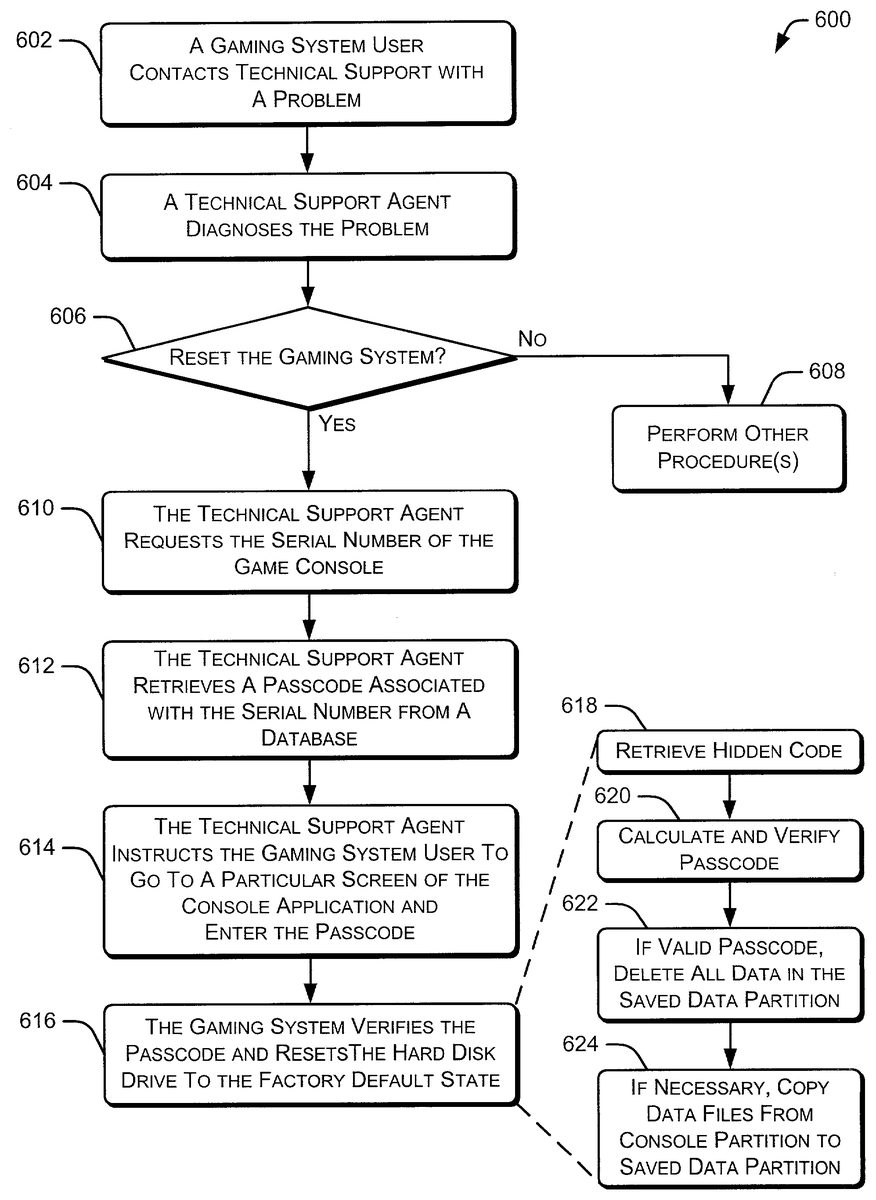
FIG. 6is a flow diagram of a process600that resets a hard disk drive to a factory default state. Initially, a gaming system user contacts a technical support department after experiencing a problem with the gaming system (block602). Problems may include an inability to turn on the device, inconsistent operation, improper operation, “freezing” while an application is executing, etc. A technical support agent obtains information from the user of the gaming system regarding the problem and diagnoses the problem (block604). If the solution to the diagnosed problem does not include resetting the gaming system, the user of the gaming system is asked to perform various procedures or operations (block608).
If the solution to the diagnosed problem includes resetting the gaming system, the technical support agent requests the serial number of the user's game console (block610). Alternatively, the serial number of the user's game console may be obtained by the technical support agent prior to diagnosing the problem. The technical support agent then retrieves a passcode associated with the serial number from a database (block612), such as the database discussed above with respect toFIG. 5. The technical support agent then instructs the gaming system user to go to a particular screen of the console application and enter the passcode provided to the user by the technical support agent (block614). The particular screen that accepts the passcode may be a typical system configuration screen (or any other screen) that does not necessarily indicate that a passcode can be entered. At block616, the gaming system verifies that the proper passcode has been entered and, if the passcode is correct, resets the hard disk drive in the game console to the factory default state.
As shown inFIG. 6, block616represents four separate blocks, labeled618–624. Specifically, the process600retrieves the hidden code stored in a non-volatile memory of the game console (block618). The process then calculates a passcode using the hidden code and the same algorithm discussed above with respect toFIG. 5and verifies the passcode against the series of button presses or other control inputs entered by the user of the gaming system (block620). If the user entered the proper passcode, all data in the saved data partition of the hard disk drive is deleted (block622). However, data in the console partition of the hard disk drive is not deleted. The deleting of data in the saved data partition may be performed by executing the reset application420stored in the console partition of the hard disk drive. If necessary, data files and/or system utilities are copied from the console partition to the saved data partition after the old data is deleted from the saved data partition of the hard disk drive (block624). At this point, the game console can be rebooted and will function in a manner similar to a factory fresh game console.
Although the invention has been described in language specific to structural features and/or methodological acts, it is to be understood that the invention defined in the appended claims is not necessarily limited to the specific features or acts described. Rather, the specific features and acts are disclosed as exemplary forms of implementing the claimed invention.
Claims
- A method comprising: assigning a serial number to a game console;storing a hidden code in a storage device contained in the game console;storing the serial number and the associated hidden code in a database for later reference, wherein the database is maintained by a manufacturer of the game console;and generating a passcode by applying a passcode algorithm to the hidden code, wherein the passcode identifies a series of control inputs required to reset the game console.
- A method as recited in claim 1 further comprising storing the passcode in the database with the associated serial number.
- A method as recited in claim 1 wherein the series of control inputs are applied to the game console using a controller coupled to the game console.
- A method as recited in claim 1 wherein the same passcode is generated by the game console by applying the same passcode algorithm to the hidden code stored in the game console.
- One or more computer-readable media comprising computer-executable instructions that, when executed, perform the method as recited in claim 1 .
Disclaimer: Data collected from the USPTO and may be malformed, incomplete, and/or otherwise inaccurate.