U.S. Pat. No. 12,208,332
VIDEO GAME WITH AUTO OBJECT PLACEMENT MODE
AssigneeNINTENDO CO., LTD.
Issue DateMarch 7, 2022
Illustrative Figure
Abstract
An automatic placement mode is switched between ON and OFF in accordance with a setting parameter value set by a user. The setting parameter value and at least one in-game object is stored in association with each other. When the automatic placement mode is switched to be ON, the in-game object owned by the user, among the in-game objects associated with the setting parameter value, is automatically placed in a virtual space. Then, while the automatic placement mode is ON, if the user newly acquires the in-game object associated with the setting parameter value, this in-game object is automatically placed in the virtual space.
Description
DETAILED DESCRIPTION OF NON-LIMITING EXAMPLE EMBODIMENTS Hereinafter, one exemplary embodiment will be described. It is to be understood that, as used herein, elements and the like written in the singular form with the word “a” or “an” attached before them do not exclude those in the plural form.FIG.1is a schematic diagram showing the entire structure of an information processing system according to the exemplary embodiment. The information processing system100according to the exemplary embodiment includes a server101and a plurality of information processing apparatuses102. Each information processing apparatus102is, for example, a smartphone, a stationary or hand-held game apparatus, a tablet terminal, a mobile phone, a personal computer, a wearable terminal, or the like. The server101and the information processing apparatuses102are configured to be able to communicate with each other via the internet103. In the exemplary embodiment, information processing is executed with such a configuration, and game processing will be described as an example of the information processing below. Specifically, a game program is installed on the information processing apparatuses102, and game processing is executed while communication is being performed with the server101as appropriate. Hardware Configuration of Server Next, the hardware configuration of the server101will be described.FIG.2is a functional block diagram of the server101. The server101includes at least a processor121, a memory123, and a communication section124. The processor121executes various programs for controlling the server101. In the memory123, various programs to be executed by the processor121and various kinds of data to be used by the processor121are stored. The communication section124connects to a network by means of wired or wireless communication and transmits/receives predetermined data to/from the information processing apparatuses102or another server (not shown). Hardware Configurations of Information Processing Apparatuses Next, the hardware configuration of each information processing apparatus102will be described.FIG.3is a functional block diagram of the information processing apparatus102. InFIG.3, the information processing apparatus102includes a ...
DETAILED DESCRIPTION OF NON-LIMITING EXAMPLE EMBODIMENTS
Hereinafter, one exemplary embodiment will be described. It is to be understood that, as used herein, elements and the like written in the singular form with the word “a” or “an” attached before them do not exclude those in the plural form.FIG.1is a schematic diagram showing the entire structure of an information processing system according to the exemplary embodiment. The information processing system100according to the exemplary embodiment includes a server101and a plurality of information processing apparatuses102. Each information processing apparatus102is, for example, a smartphone, a stationary or hand-held game apparatus, a tablet terminal, a mobile phone, a personal computer, a wearable terminal, or the like. The server101and the information processing apparatuses102are configured to be able to communicate with each other via the internet103.
In the exemplary embodiment, information processing is executed with such a configuration, and game processing will be described as an example of the information processing below. Specifically, a game program is installed on the information processing apparatuses102, and game processing is executed while communication is being performed with the server101as appropriate.
Hardware Configuration of Server
Next, the hardware configuration of the server101will be described.FIG.2is a functional block diagram of the server101. The server101includes at least a processor121, a memory123, and a communication section124. The processor121executes various programs for controlling the server101. In the memory123, various programs to be executed by the processor121and various kinds of data to be used by the processor121are stored. The communication section124connects to a network by means of wired or wireless communication and transmits/receives predetermined data to/from the information processing apparatuses102or another server (not shown).
Hardware Configurations of Information Processing Apparatuses
Next, the hardware configuration of each information processing apparatus102will be described.FIG.3is a functional block diagram of the information processing apparatus102. InFIG.3, the information processing apparatus102includes a processor111, a memory113, a communication section114, an operation section115, and a display section116. The processor111executes later-described information processing or executes a system program (not shown) for controlling overall operation of the information processing apparatus102, thereby controlling operation of the information processing apparatus102. The processor111may include a single processor or a plurality of processors. In the memory113, various programs to be executed by the processor111and various kinds of data to be used in the programs are stored. The memory113is, for example, a flash EEPROM or a hard disk device. The communication section114connects to the network by means of wired or wireless communication and transmits/receives predetermined data to/from the server101. The operation section115is an input device for accepting an operation from a user. The display section116displays an image generated by the information processing executed by the processor111. The display section116may be a display device (for example, a liquid crystal display device) integrally provided with the information processing apparatus102, or may be a display device separate from the information processing apparatus102. The exemplary embodiment will be described with a liquid crystal display device integrally provided with the information processing apparatus102, as an example of the display section116, and with a touch panel integrated with a liquid crystal screen, as an example of the operation section115.
Outline of Processing in Exemplary Embodiment
Next, the outline of game processing executed by the information processing system according to the exemplary embodiment will be described. As the game processing, game processing in which a placement item which is a kind of in-game object and which is acquired by the user in the game is placed within a predetermined area in a virtual space, is executed. The predetermined area is, for example, a player character's own room or the like. The placement item is a virtual object for the interior or decoration of the predetermined area. More specifically, the placement item is a virtual object representing a furniture article, a home appliance, an interior decoration, a fence, a partition, or the like. Then, a game in which the user enjoys decoration (customization) of the room or the like by acquiring these items in the game and placing the items within the predetermined area in the virtual space, is executed.
The outline of the game assumed in the exemplary embodiment will be more specifically described. The game assumed in the exemplary embodiment is a game in which a user virtually lives as a player character in a virtual game world in which various virtual characters live. The virtual game space includes a plurality of areas. In each area, character objects (hereinafter, NPCs) other than the player character are placed, and the player character can interact with these NPCs by moving to each area. In this game, a predetermined map screen (not shown) is used for movement between each area. Each area is displayed on the map screen, and by designating a destination area, the user can move to that area.
The user can acquire the above placement item by satisfying a predetermined acquisition condition. For example, the user can acquire a predetermined placement item by satisfying an acquisition condition of creating a placement item in the game. Specifically, in each area, materials for creating the placement item are placed. The user can move to each area and acquire the materials. In addition, it is also possible to acquire the materials by interacting with the above NPCs. Then, the user can acquire the placement item by creating the placement item using these acquired materials.
As another acquisition condition, the user can also acquire a placement item by being selected as a result of a predetermined random selection process. By executing a predetermined random selection process in the game, it is also possible for the user to acquire a placement item (finished product) as a prize for the random selection.
Here, in the exemplary embodiment, the plurality of areas include two types of areas, a placement target area and a non-placement target area. The placement target area is an area in which the placement item can be placed. The non-placement target area is an area other than the placement target area. In addition, as each of the placement target area and the non-placement target area, there can be a plurality of areas. In the exemplary embodiment, a campsite area and a cottage area are assumed as examples of the placement target area. Furthermore, the cottage area includes a 1st floor area and a 2nd floor area. Therefore, in the exemplary embodiment, a description will be given with an example in which there are three areas, a campsite area, a cottage 1st floor area, and a cottage 2nd floor area, as placement target areas.
Next, a method for placing the placement item will be described. In the exemplary embodiment, a dedicated screen (alteration screen described later) for placing placement items is prepared. By performing a predetermined operation on this screen, the user can place a placement item owned by the user, in a predetermined posture (orientation) at a predetermined position within a placement area. Hereinafter, such a placement method based on an operation of the user is referred to as “manual placement”.
Furthermore, in the exemplary embodiment, in addition to the above manual placement, it is possible to automatically place a placement item owned by the user, within a placement target area by satisfying a predetermined condition. Hereinafter, such a placement method is referred to as “automatic placement”. Describing the automatic placement more specifically, first, in the exemplary embodiment, data that defines a placement content of each placement item is prepared in advance. When the automatic placement is executed, this data is referred to, and the placement item is automatically placed at a predetermined position on the basis of the content defined therein. In other words, this data is data having a meaning of a placement drawing of placement items or a completed drawing. In the exemplary embodiment, such data is referred to as a “recipe” (in another exemplary embodiment, such data may be referred to as a design drawing, a placement completion drawing, etc.). The recipe is created by a game administrator (in some cases, the content thereof is changed). In addition, as for the recipe, there may be a plurality of kinds of recipes. In each recipe, at least information that designates one of the above three placement target areas, information that specifies placement items to be placed therein, and information about the placement position and placement posture of each placement item are defined. The user can “set (enable)” any one recipe for each of the above three placement target areas. When the user performs an operation for setting a recipe, automatic placement of a placement item owned by the user at the time at which the recipe is set, among the placement items specified by this recipe, is performed (if the player character is not present in the placement target area when the recipe is set, the automatic placement is performed when the screen transitions to the placement target area). Moreover, while the recipe is currently set, if the user acquires later a placement item (included in the recipe) that is not owned by the user at the time at which the recipe is set, this placement item acquired later is automatically placed at a predetermined position on the basis of this recipe. For example, it is assumed that there is a “recipe A” for the campsite area, and the recipe A includes an item A and an item B. Then, it is assumed that the user sets the recipe A with respect to the campsite area in a state where the user owns only the item A. In this case, at the time at which an operation for setting the recipe A is performed, automatic placement based on the owned state at that time is performed. Then, after the recipe A is set, if the user acquires the item B later, the item B is automatically placed at a predetermined position in the campsite area on the basis of the recipe A. As for the timing when an automatic placement process is performed, in the exemplary embodiment, an example in which the automatic placement process is executed at a timing of screen transition (from another screen) to the placement target area will be described. By such automatic placement, the user can place the item B without performing any special operation for placing the item B (while the recipe A is set) as soon as the user acquires the item B, so that the convenience of the user can be enhanced. In the following description, the recipe setting state is sometimes indicated by ON/OFF of an “automatic placement mode”. Specifically, it is assumed that in a state where a recipe is currently set, the automatic placement mode is ON, and in a state where no recipe is set, the automatic placement mode is OFF.
Here, supplementary description will be given regarding the recipe. First, a method for acquiring the recipe will be described. In the exemplary embodiment, it is assumed that the recipe is distributed to all users of the game of the exemplary embodiment. The recipe is created at a predetermined timing (by the game administrator or the like). Then, the created recipe is registered in the server101, and distribution of the recipe to each user (information processing apparatus102) is started at a predetermined timing. In addition, the recipe has a valid period. For example, the case where an event in which a predetermined distribution item group is available is held for a limited time, is assumed. In this case, the game administrator may create a recipe using the predetermined distribution item group, and may set a valid period according to the holding period of the event. Then, the game administrator may start distributing the recipe to all users at the start timing of the event. Accordingly, it is possible to enhance the feeling of the event to raise the mood of the user or to promote the user to take part in the event. When the valid period has passed, the setting of the recipe that is currently set is automatically canceled. That is, the automatic placement mode is automatically switched from ON to OFF.
As for the cancellation of the recipe setting, in addition to automatic cancellation due to the end of the valid period set for the recipe as described above, the recipe setting can also be cancelled in the following cases. First, in a detailed setting screen described later, when the user performs an operation for canceling a recipe that is currently set, the recipe setting is cancelled. In addition, when the user manually changes the placement layout at that time in a placement target area for which a recipe is currently set (the automatic placement mode is ON) (then when this change is confirmed), the setting of the recipe that has been set for the placement target area is automatically cancelled. This is intended to prioritize and respect the placement layout changed by the intention of the user.
Furthermore, in the exemplary embodiment, the timing when it is possible to use a function of setting the above-described recipe is limited. Specifically, in this game, a “user level” which increases according to the progress status of the game of each user is set. Then, when the user level is equal to or higher than a predetermined level, it is possible to use the function of setting the above-described recipe. That is, a user who has just started the game cannot use the function of automatic placement by recipe setting as described above. This is intended to increase the motivation of the user for the game by setting, as a kind of a goal to be achieved, “making it possible to use the automatic placement function”, while making the user get accustomed to the game through a manual placement operation for a certain period after the game starts. When the user performs an operation to use the recipe setting function when the user level is insufficient, it may be notified that the level is insufficient and the recipe setting function cannot be used.
Screen Examples of Game
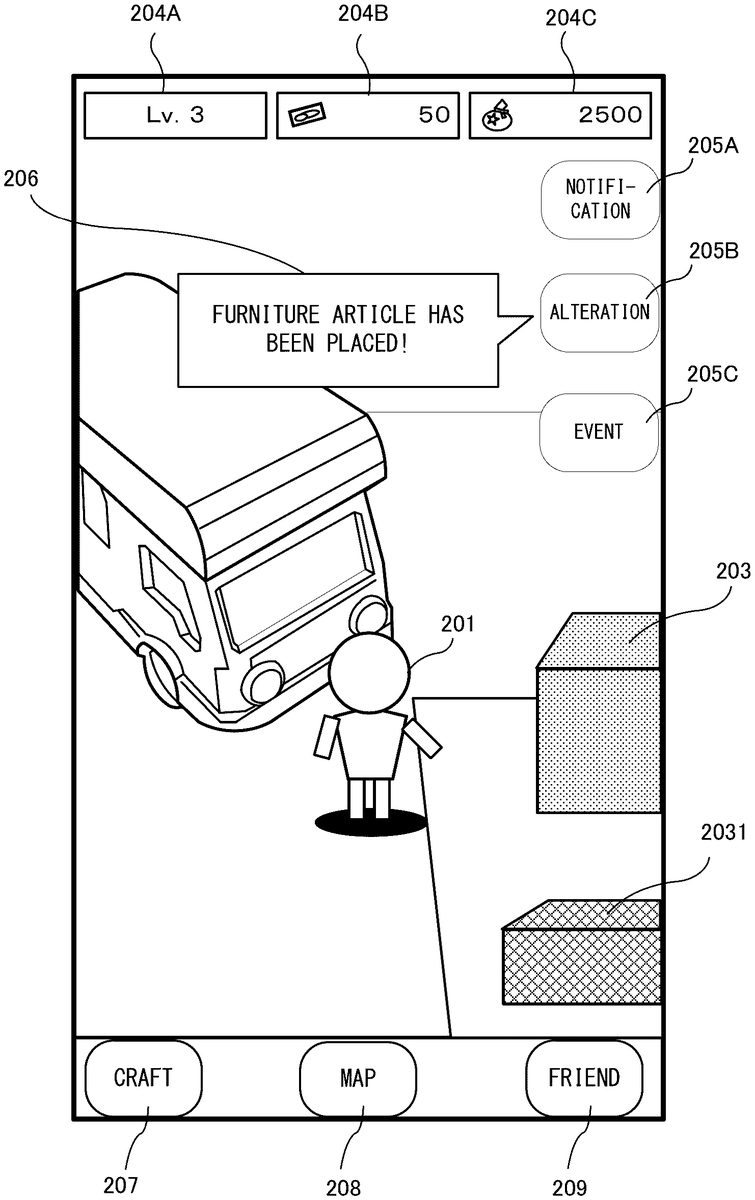
Next, an example of screens and operations related to placement of the placement item in the exemplary embodiment will be described with reference toFIG.4toFIG.17.FIG.4illustrates a game screen example in the case where a player character201which is a virtual object to be operated by the user moves to the campsite area. Hereinafter, a screen in which the player character201is present in a predetermined area is referred to as an “area screen”. The area screen (of the campsite area) shown inFIG.4shows a state where the player character201and a placement item203exist in the virtual game space. In addition, status displays204A to204C are displayed at an upper part of the area screen. These status displays204A to204C indicate the user level and the numbers of owned in-game virtual currencies (2 types). Moreover, icons205A to205C are displayed at a right part of the area screen. By performing a tap operation on the icon205A, the user can display a notification (notification from the administrator) or the like for the game. In addition, by performing a tap operation on the icon205C, the user can display information about an event that is held at that time, or can transition to a predetermined event screen. As for the icon205B, the user can transition to an “alteration screen” described later, by performing a tap operation on the icon205B. In addition, as for the icon205B, a balloon type notification206is displayed in a manner in which the relationship with the icon205B can be recognized. Moreover, a craft button207for transitioning to a screen in which a placement item can be created, a map button208for transitioning to the map screen for moving to another area, and a friend button209for transitioning to a screen regarding a so-called “friend” function are also displayed at a lower part of the area screen.
Here, the content notified by the above balloon type notification206will be described. In the balloon type notification206, information about a recipe is mainly notified. For example, the following contents are notified.(1) When the user level reaches a level at which it is possible to use a recipe, it is notified that it becomes possible to use a recipe. This is intended to inform the user of the existence the automatic placement function as described above and to promote the user to use the automatic placement function.(2) When a newly distributed recipe is received from the server101, it is notified that the new recipe has been added. The balloon type notification206shown inFIG.4is an example of this case. The content of the notification in this case includes, in addition to a text indicating the above, a thumbnail image indicating the content of the recipe.(3) While a recipe is currently set, when a placement item is automatically placed, it is notified that the placement item has been automatically placed. If there is no such notification, there is a risk of giving the user a misunderstanding that a distribution item that should have been acquired disappears without the user being aware of the disappearance. Therefore, such a notification is given.
Next, an “alteration screen” to which transition can be made by the user performing a tap operation on the icon205B will be described.FIG.5is an example of the alteration screen. In the alteration screen, an edit region211, an end button212, and an owned item button213are displayed. In the edit region211, a screen obtained by looking down upon the placement target area (in this case, the campsite area) from above at a slight angle is displayed. In addition, a plurality of placement items203already placed within the placement target area are also displayed. In the example ofFIG.5, five placement items203are shown. Moreover, a “suggested recipe” button214and an “alteration set” button215are displayed at a lower right part in the edit region211.
The placement position of each placement item203displayed in the edit region211can be changed by the user performing, for example, a drag operation thereon. In addition, as for placement items that have not been placed, a list (not shown) of placement items owned by the user at that time is displayed by the user performing a tap operation on the owned item button213. The user can designate a placement item203that the user desires to place, from the list, and place the designated placement item203at a desired position. In the exemplary embodiment, a grid-like guide display is also displayed in a region (ground portion) where a placement item203can be actually placed within the placement target area. The user can place a predetermined placement item203at a desired position while referring to this guide display.
By the user performing a tap operation on the end button212, the placement content at that time can be stored, and (processing related to) the alteration screen can be terminated.
Meanwhile, in the exemplary embodiment, information (hereinafter, referred to as placement layout) about the placement position and the posture of the placed placement items203can be registered in an “alteration set” which is data that can include a plurality of the placement layouts, and a predetermined placement layout can be opened as needed. The “alteration set” button215is a button for transitioning to a predetermined screen (not shown) for registering (storing) in or reading from such an alteration set. The user can register a placement layout in the alteration set, or can read a placement layout from the alteration set, by performing a predetermined operation on this screen.
The “suggested recipe” button214is a button for transitioning to a “recipe setting screen” for selecting and setting the recipe as described above. Here, the recipe-related notification216is also displayed so as to be superimposed on the upper side of the “suggested recipe” button214. Before the recipe setting screen is described, the recipe-related notification216will be described. In the recipe-related notification216, information about the recipe is notified.FIG.6toFIG.8are each a diagram showing an example of the content notified by the recipe-related notification216. In the exemplary embodiment, first, a notification indicating whether or not a predetermined recipe is currently set for the placement target area (the campsite area in this example) in which the player character201is currently located, is displayed in the recipe-related notification216. Specifically, when a recipe has not been set, a text “not set” is displayed in the recipe-related notification216as shown inFIG.6. On the other hand, when a predetermined recipe is set, a text “currently set” is displayed in the recipe-related notification216as shown inFIG.7. While a recipe is set, by notifying that the recipe is set as described above, the user is allowed to recognize whether or not any recipe is currently set. In particular, when an event for a limited time and a recipe are associated with each other, it is possible to make the user recognize that the recipe is currently set and to promote the user to more actively take part in the event.
Furthermore, in the exemplary embodiment, a predetermined recipe is selected as a “recommended recipe” and displayed in the recipe-related notification216. Specifically, as shown inFIG.8, the recipe-related notification216is made into a balloon shape, and a preview image which is a completed form of the recommended recipe is displayed. At this time, for example, a text “Why don't you use this recipe?” or the like may also be displayed together. The recommended recipe is displayed when there is a recipe that newly satisfies a recommendation condition. In addition, after the start of display of the recommended recipe, the recommended recipe is automatically hidden when 2 seconds elapse (then, the display form is changed to the display form as shown inFIG.6orFIG.7). In addition, the number of times of the display is only one, and if the recommended recipe is displayed once in this screen and then hidden, the recommended recipe is not displayed again thereafter.
Next, conditions for being set as the recommended recipe will be described. In the exemplary embodiment, the following three conditions are defined, and one of these conditions is set as a recommendation condition for each recipe.(Condition A) When a predetermined number or more of placement items specified by the recipe become owned, a recommendation is made. For example, the number of placement items specified by the recipe is 15, and when seven or more of these placement items become owned (regardless of the contents thereof), a recommendation is made.(Condition B) When a predetermined proportion or more of placement items in the total number of placement items specified by the recipe become owned, a recommendation is made. For example, when 50% or more of placement items in the total number of placement items specified by the recipe become owned, a recommendation is made.(Condition C) When an item designated as the condition C, among the placement items specified by the recipe, becomes owned, a recommendation is made. For example, for a certain recipe, a “placement item A” is designated as a “key item”. Then, when the user acquires the “placement item A”, this recipe is recommended.
The recommended recipe may be notified only when the automatic placement mode is OFF, or may be notified regardless of the state of the automatic placement mode. In particular, in the former case, it is possible to promote the user to try using the recipe itself and to provide motivation to actually use the recipe. Separately from this, it may be possible to set the notification function itself to be ON or OFF.
Next, the above-described recipe setting screen will be described. When the user performs a tap operation on the “suggested recipe” button214inFIG.5, a recipe setting screen is displayed as shown inFIG.9. In the recipe setting screen, a preview image221, a recipe name display222, a recipe setting button223, a return button224, and a detailed setting button225are displayed. The recipe name display222is an image showing the name of a predetermined recipe, and the preview image221is a preview image showing the state of the placement target area when the placement items specified by the recipe are actually placed. Here, as for the preview image, not only one image is prepared for one recipe, but a plurality of images are prepared for one recipe. These images are switched and displayed in the order in which a placement layout is completed stepwise. For example, the case where the number of placement items specified by a certain recipe is 10 (in other words, the specified 10 placement items are required to complete the placement layout of this recipe) is assumed. In this case, as the preview image221, for example, three images shown inFIG.10toFIG.12are prepared in advance.FIG.10illustrates a first image showing a state where only three of the 10 placement items are placed.FIG.11illustrates a second image showing a state where six of the 10 placement items are placed.FIG.12illustrates a third image showing a state where all the 10 placement items are placed. Then, as for the display content of the preview image221, display control is performed such that the three images are switched in the order of the first image, the second image, and the third image. That is, display control is performed such that the number of placement items in the preview image221gradually increases. In this regard, only the completed form may be displayed as the preview image221, but by presenting to the user how the layout gradually approaches the completed form using the plurality of images as in the exemplary embodiment, the user is allowed to have a more specific image for completion. By having a more specific image as described above, for example, a user who owns a small number of placement items that are specified by the recipe can be expected to be more motivated to complete the layout.
Referring back toFIG.9, by the user performing a right/left slide operation on the display region of the preview image221, it is possible to switch the displayed recipe to another recipe (if there are a plurality of recipes that can be used at that time). In addition, when the user performs a tap operation on the return button224, the recipe setting screen can be closed, and a return can be made to the alteration screen.
Also, in a state where a recipe that is not currently set is displayed, when a tap operation is performed on the recipe setting button223, it is possible to set the currently displayed recipe as a recipe for the current placement target area. If the currently set recipe is displayed, the display form of the recipe setting button223is changed. Specifically, the text content of the recipe setting button223is changed to a text “currently set”. Furthermore, control is performed such that the recipe setting button223is grayed out and, while the currently set recipe is displayed, a tap operation is not accepted.
Next, a screen example and an operation example in the case where a tap operation is performed on the recipe setting button223in a state where a recipe that is not currently set is displayed, will be described. In this case, first, a registration confirmation dialog231is displayed as shown inFIG.13. This registration confirmation dialog231is for inquiring whether to register the current placement layout in the above “alteration set”. InFIG.13, the registration confirmation dialog231includes a text inquiring whether or not to register in the alteration set, a “register” button232, a “do not register” button233, and a “return” button234. When a tap operation is performed on the “return” button234, the registration confirmation dialog231is closed, and a return is made to the recipe setting screen. When a tap operation is performed on the “register” button232, a predetermined screen (not shown) for registering the current placement layout in the alteration set is displayed. Furthermore, the current placement layout is registered in the alteration set according to an operation of the user. Accordingly, if the user does not like the placement layout based on the recipe, it is possible to quickly return to the original state by reading the registered placement layout.
When the processing related to registration is terminated on the basis of an operation on the “register” button232, the screen further transitions to a setting confirmation screen shown inFIG.14. In the setting confirmation screen shown inFIG.14, a setting confirmation dialog241including a text requesting confirmation of discarding the current placement, a “cancel” button242, and a “set” button243is displayed. This text indicates that the current placement layout is to be discarded before setting a recipe (the currently placed placement items are cleared away once). When a recipe is set, a predetermined placement item is (automatically) placed on the basis of this recipe, but if the previous placement layout is left at that time, there is a possibility that the predetermined placement item cannot be placed due to interference of the placement position thereof. From this point of view, this text notifies the user that the current placement layout is to be discarded before setting a recipe. When the user performs a tap operation on the “cancel” button242in response to the setting confirmation dialog241, a return is made to the recipe setting screen shown inFIG.9.
On the other hand, when the user performs a tap operation on the “set” button243, a setting completion dialog251is displayed as shown inFIG.15. In the setting completion dialog251, a predetermined text indicating that the setting of the recipe is completed, and an OK button252are displayed. In the following description, this set recipe is referred to as “currently set recipe”. In the setting completion dialog251, when the user performs a tap operation on the OK button252, the screen transitions to the area screen (the campsite area in this example) shown inFIG.4. At this time, the placement layout in this area is changed to a placement layout based on the currently set recipe that is set this time. That is, among the placement items specified by the currently set recipe, a placement item owned by the user at this time is placed as appropriate at a predetermined position on the basis of the placement position and the placement posture specified by the currently set recipe. In other words, an area screen in which the content of the set recipe is reflected is displayed.
On the other hand, in the registration confirmation dialog231shown inFIG.13, when the user performs a tap operation on the “do not register” button233, the screen transitions to the setting confirmation screen shown inFIG.14, and the same processing is performed as described above. That is, in this case, the processing related to the registration confirmation dialog231described above with reference toFIG.13is skipped.
Next, a screen example and an operation example in the case where a tap operation is performed on the detailed setting button225in the recipe setting screen shown inFIG.9, will be described. When a tap operation is performed on the detailed setting button225, a detailed setting dialog261is displayed as shown inFIG.16. In the detailed setting dialog261, a first toggle switch262and a second toggle switch263are displayed as items for notification setting. In addition, a cancellation button264for canceling the setting of the currently set recipe is also displayed below these toggle switches. Furthermore, a return button265and an OK button266are displayed below the cancellation button264.
The first toggle switch262is a switch for setting whether or not to perform notification of a recommended recipe as described above with reference toFIG.8. If the first toggle switch262is set to be ON, notification of a recommended recipe using the recipe-related notification216is performed. The second toggle switch263is a switch for setting whether or not to perform notification by the balloon type notification206in the area screen when a placement item is automatically placed. If the second toggle switch263is set to be ON, when automatic placement is performed, it is notified using the balloon type notification206that the automatic placement has been performed.
Also, in a state where a predetermined recipe is currently set, when a tap operation is performed on the cancellation button264, “no recipe is set” or the like is displayed as a text in the cancellation button264, and the cancellation button264is changed to a state where the cancellation button264does not accept a tap operation. At this time, the content of the change has not been finalized yet, and when the OK button266described later is tapped, the change can be finalized, the recipe setting can be canceled, and a state where no recipe is set can be obtained. In a state where no recipe is set, the above “no recipe is set” is initially displayed in the cancellation button264.
The return button265is a button for returning to the recipe setting screen with the state before change being kept without reflecting changes of the first toggle switch262, the second toggle switch263, and the cancellation button264. The OK button266is a button for returning to the recipe setting screen with changes made to the first toggle switch262, the second toggle switch263, and the cancellation button264being reflected. At this time, a message “setting has been changed” or the like may be displayed. In another exemplary embodiment, as soon as the first toggle switch262, the second toggle switch263, or the cancellation button264is operated, the change thereof may be reflected immediately. In this case, the OK button266serves as a button for simply closing the detailed setting dialog261.
As described above, in the exemplary embodiment, by the user performing a predetermined operation using the recipe setting screen as described above, the predetermined recipe can be set for each placement target area. Then, in a state where a recipe is currently set, when a placement item that is not owned at the time at which the recipe is set, among the placement items specified by the currently set recipe, is acquired later, this placement item is placed at a predetermined position on the basis of the recipe without the user performing any special placement operation.FIG.17shows a screen example in the case where a predetermined placement item is automatically placed in the campsite area.FIG.17illustrates an example in which a placement item2031which is acquired after a predetermined recipe is set is automatically placed, and a notification indicating that the automatic placement has been performed is displayed in the balloon type notification206. The convenience of the user can be enhanced by such automatic placement based on the recipe.
Details of Game Processing of Exemplary Embodiment
Next, the game processing of the exemplary embodiment will be described in more detail with reference toFIG.18toFIG.34.
Data to be Used
First, various kinds of data to be used in the game processing will be described.FIG.18illustrates an example of programs and data stored in the memory123of the server101. In the memory123, a server-side program301, a user database302, update data305, etc., are stored.
The server-side program301is a program for causing the server101to execute various functions that the server side is responsible for in the game processing according to the exemplary embodiment.
The user database302is a database that stores information about each user of the game according to the exemplary embodiment, and includes a plurality of user data sets303. As for each user data set303, when a process of logging in to the game is performed in the information processing apparatus102, the user data set303corresponding to a login account is transmitted from the server101to the information processing apparatus102.
FIG.19illustrates an example of the data structure of the user data set303. The user data set303includes profile data311, owned item data312, owned virtual currency data313, player character data314, current layout data315, set recipe data316, balloon type notification setting data317, recipe-related notification setting data318, alteration set data319, recommended recipe data320, etc.
The profile data311includes information about the user. The profile data311includes, for example, a user ID which is information for uniquely identifying a predetermined user, account information required for a log-in process, a user name indicating a user name in the game, a user level as described above, etc.
The owned item data312is data indicating the placement items owned by the user related to the user data set303and the number of these placement items. The owned item data312includes, for example, item IDs421in an item master402described later and the number of these item IDs421, etc.
The owned virtual currency data313is data indicating the in-game virtual currency owned by the user related to the user data set303.
The player character data314is data about the player character201to be displayed in a game screen. The player character data314includes, for example, information indicating the appearance of the player character201, information indicating the current position of the player character201in the virtual space, etc.
The current layout data315is data indicating the content of the current placement layout of each of the above placement target areas. In the exemplary embodiment, the current layout data315includes the current placement layout of each of the three areas, i.e., the campsite area, the cottage 1st floor area, and the cottage 2nd floor area.FIG.20illustrates an example of the data structure of the current layout data315. As shown inFIG.20, the current layout data315is data in a table format in which an area name331which identifies a placement target area and a placement layout content332which is information indicating a specific placement layout are associated with each other. The placement layout content332includes information indicating the position, the posture, etc., of each placement item placed in the placement target area.
Referring back toFIG.19, the set recipe data316is data for indicating whether or not a recipe is set for each placement target area, and for, when a recipe is set, specifying this recipe.FIG.21illustrates an example of the data structure of the set recipe data316. The set recipe data316is data in a table format in which an area name341which identifies a placement target area and a set recipe ID342for specifying a recipe that is set in this area are associated with each other. Here, in the exemplary embodiment, as a specific example of the value of the set recipe ID342, “000” is set when no recipe is set, and a value of “001” or more is set when a recipe is set. The value of “001” or more corresponds to a recipe ID431in recipe data405described later.
Referring back toFIG.19, the balloon type notification setting data317is data to be used for control for notifying that a placement item has been automatically placed on the basis of the currently set recipe, by using the balloon type notification206. Specifically, the balloon type notification setting data317includes setting information about whether or not to perform notification when a placement item is automatically placed as described above.
The recipe-related notification setting data318is data to be used for control for notification of a recommended recipe using the recipe-related notification216as shown inFIG.6toFIG.8. Specifically, the recipe-related notification setting data318includes setting information about whether or not to perform notification of a recommended recipe.
The alteration set data319is data of one or more placement layouts stored as the above-described “alteration set”.
The recommended recipe data320is data for indicating a recipe already displayed as a recommended recipe in the recipe-related notification216. Specifically, a recipe ID431corresponding to a recipe that has already been recommended is registered in the recommended recipe data320.
In addition, although not shown, the user data set303also includes data, of the user, indicating the progress status of a quest or an event, etc.
Referring back toFIG.18, the update data305is data for updating a part of data stored in the information processing apparatus102described later. Here, in the exemplary embodiment, when a new recipe is created, this recipe is included in the update data305, and the update data305is distributed to each information processing apparatus102. In addition, for example, when a distribution item is added, additional data is distributed in the form of the update data305.
Next, the data stored in the information processing apparatus102will be described.FIG.22illustrates an example of programs and data stored in the memory113of the information processing apparatus102. In the memory113, a game application program401, the item master402, area data403, object data404, the recipe data405, the user data set303, operation data406, temporary change data407, etc., are stored.
The game application program401is a program for causing the information processing apparatus102to execute various functions that the information processing apparatus102is responsible for in the game processing according to the exemplary embodiment.
The item master402is a database about placement items that appear in the game.FIG.23illustrates an example of the data structure of the item master402. The item master402is data in a table format including at least items such as the item ID421and appearance data422. The item ID421is an ID for uniquely identifying and specifying a placement item. The appearance data422is image data indicating the appearance of the placement item. In addition, although not shown, information indicating the genre of each placement item, information indicating material items required for creating each placement item, etc., are also defined in the item master402.
Referring back toFIG.22, the area data403is data that defines each of the above areas in the exemplary embodiment. The area data403includes the name of each area and various kinds of data for forming each area such as data of the appearance and terrain of each area.
The object data404is data that defines images, shapes, and the like of various objects (NPCs, etc.) that appear in the game world.
The recipe data405is data that defines the content of the recipe.FIG.24illustrates an example of the data structure of the recipe data405. The recipe data405is a database having items such as the recipe ID431, a target area432, used item data433, preview image data434, valid period data435, and recommendation condition data436.
The recipe ID431is an ID for uniquely identifying each recipe. The target area432is data indicating a placement target area to which the recipe is applied. In the exemplary embodiment, any of the campsite area, the cottage 1st floor area, and the cottage 2nd floor area is designated. The used item data433is data about each placement item associated with the recipe. Specifically, the used item data433includes the item ID421of each placement item used in the recipe and information indicating the number of placement items (the case where a plurality of placement items that are the same are used) and the placement position, the placement posture, etc., of the placement items. The preview image data434is data of images to be displayed in the above-described preview images221, etc. The valid period data435is data that defines the valid period of the recipe. For example, the start date and time and the end date and time of the validity period are defined for each recipe. The recommendation condition data436is data that defines a condition for the recipe to be notified as the recommended recipe. As described above, three kinds of conditions are defined in the exemplary embodiment, and one of these conditions is set as the recommendation condition data436for each recipe.
The contents of the item master402, the area data403, the object data404, and the recipe data405are added or updated as appropriate on the basis of the update data305received from the server101.
Referring back toFIG.22, as for the user data set303, when a process of logging in to the game is performed, the user data set303corresponding to a login account is acquired from the server101and stored (the data structure thereof has been described above, and thus the description thereof is omitted). In addition, in the game processing in the information processing apparatus102, the content of the user data set303is updated as appropriate, and transmitted to the server101at a predetermined timing. For example, at a predetermined timing such as a timing when screen transition in the game occurs and a timing when an increase or decrease in the number of items occurs, the user data set303in which the result of the game processing in the information processing apparatus102is reflected (in other words, which has been saved) is transmitted to the server101. Then, on the server101side, the user data set303is updated on the basis of the transmitted data.
The operation data406is data indicating the contents of various operations performed on the operation section115. In the exemplary embodiment, the operation data406includes the presence/absence of an input to the touch panel as the operation section115, data indicating a touch coordinate or the like of the input, data indicating pressed states of various buttons that are not shown, and the like. The contents of the operation data406are updated in predetermined cycles on the basis of a signal from the operation section115.
The temporary change data407is data of a placement layout in a state of being changed (before the change is finalized) which is temporarily stored when the user manually changes the placement in the alteration screen.
In addition, although not shown, various kinds of data required for the game processing such as data about events and quests in the game and audio data are also stored in the memory113.
Details of Game Processing Example
Next, the game processing according to the exemplary embodiment will be described in detail with reference to flowcharts. Here, processing related to placement of the placement item as described above will be mainly described, and the description of other game processing is omitted.
First, processing in the server101will be briefly described. Although not shown, in the server101, a log-in process, a process of transmitting the update data305, a process of transmitting or receiving the user data set303, etc., are performed as appropriate in response to various requests from the information processing apparatus102such as a log-in process request based on a game start operation of the user on the information processing apparatus102.
Next, processing in the information processing apparatus102will be described in detail.FIG.25andFIG.26are each a flowchart showing the details of the game processing in the information processing apparatus102. The processing is started, for example, when the user performs an operation for starting the game processing according to the exemplary embodiment.
InFIG.25, first, in step S1, the processor111executes a log-in process and a preparation process for starting the game. Specifically, the processor111executes a log-in process related to the game with the server101. If the log-in is successful, the processor111receives the user data set303transmitted from the server101. In addition, the processor111also receives the update data305from the server101as necessary, and updates the item master402, the recipe data405, etc., as appropriate. In particular, when a new recipe as described above is created on the server101side, the new recipe is distributed from the server101to the information processing apparatus102by such a process. In addition, as the preparation process for starting the game, the processor111initializes various kinds of data to be used in the game processing, such as the temporary change data407. Furthermore, the processor111places the player character201at a predetermined position within the campsite area in an initial screen after the game starts. Moreover, the processor111places placement items within the campsite area on the basis of the current layout data315corresponding to the campsite area. Then, the processor111takes an image of the campsite area with a virtual camera. Furthermore, the processor111combines images such as the icons205A to205C with the taken image to generate an area screen as shown inFIG.4, and displays the generated area screen on the display section116. Thereafter, the processor111waits for an operation from the user.
Processing Related to Area Screen
Next, in step S2, the processor111acquires the operation data406, and determines whether the operation content indicated by the operation data406is an instruction to move to another area. As a result of the determination, if the operation content is an instruction to move to another area (YES in step S2), in step S3, the processor111moves the player character201to the other area. Next, in step S4, the processor111determines whether this movement is movement to the placement target area. As a result of the determination, if this movement is not movement to the placement target area (NO in step S4), in step S5, the processor111generates an area image related to the non-placement target area which is the movement destination at this time, on the basis of the area data403. This image is an image taken at a position and an angle of the virtual camera such that the player character201is included in the field of view of the virtual camera (substantially in the center thereof). Thereafter, the processor111advances the processing to step S9described later.
Automatic Placement Process
On the other hand, as a result of the determination in step S4, if this movement is movement to the placement target area (YES in step S4), in step S6, the processor111executes an automatic placement process. This process is a process for performing automatic placement as described above, on the basis of the currently set recipe and the items owned by the user.FIG.27is a flowchart showing the details of the automatic placement process. InFIG.27, first, in step S31, the processor111refers to the set recipe data316and determines whether a predetermined recipe has been set for the placement target area in which the player character201is currently located. That is, the processor111determines whether the automatic placement mode is ON or OFF. Specifically, if the value of the set recipe ID342is “000”, the processor111determines that no recipe is set (the automatic placement mode is OFF). On the other hand, if a value other than “000” has been set, the processor111determines that a recipe corresponding to this value (that is, the recipe ID431) has been set (the automatic placement mode is ON). As a result of the determination, if a predetermined recipe has been set (YES in step S31), in step S32, the processor111specifies the currently set recipe on the basis of the set recipe ID342and the recipe data405. Next, in step S33, the processor111updates the content of the current layout data315related to the placement target area in which the player character201is currently located, on the basis of the specified recipe and the owned item data312. Specifically, the processor111determines the difference between the placement items currently used in the current layout data315and the placement items specified by the recipe. That is, the processor111determines any placement item that has not been placed at that time. Next, the processor111determines whether any placement item related to this difference is included in the owned item data312. If such a placement item is included in the owned item data312, it is considered that the placement item is not owned at the time at which the recipe is set, and is a placement item acquired later. Therefore, the processor111places the placement item related to this difference, in a predetermined posture at a predetermined position based on the recipe data405. Then, the processor111updates the placement layout after this placement, as the current layout data315. Thereafter, the automatic placement process ends. In addition, if there is no difference between the placement items currently used in the current layout data315and the placement items specified by the recipe, update of the current layout data315is not performed, and the automatic placement process ends.
As for the process in step S33, in the exemplary embodiment, the method for determining the difference between the owned item data312at that time and the placed placement items is used, but the process method is not limited thereto. In another exemplary embodiment, for example, the following method may be used for placement. First, the processor111refers to the owned item data312and extracts any placement item specified by the recipe, from the placement items owned by the user. Next, the processor111places the extracted placement item at a predetermined position in a predetermined posture on the basis of the definition of the recipe. That is, while the recipe is currently set, a process in which the placement items that are specified by the recipe and that are the placement items owned by the user at that time are placed again each time the screen transitions to the placement target area, may be performed.
On the other hand, as a result of the determination in step S31, if no recipe is set for the placement target area in which the player character201is currently located (NO in step S31), the processor111does not perform the processes in steps S32and S33and ends the automatic placement process. That is, the processor111does not change the content of the current layout data315, and ends the automatic placement process while maintaining the current content of the current layout data315.
Referring back toFIG.25, in step S7next to the process in step S6, the processor111generates an area image related to the placement target area in which the player character201is currently located. Specifically, the processor111creates a placement target area on the basis of the current layout data315and the area data403, and places the player character201at a predetermined position. Then, the processor111generates an area image by taking an image of the placement target area with the virtual camera.
Next, in step S8, the processor111executes a balloon type notification control process. This process is a process for setting the display content of the balloon type notification206.FIG.28is a flowchart showing the details of the balloon type notification control process. First, in step S41, the processor111determines whether there is any unnotified new recipe. The method for determining the presence or absence of a new recipe may be any method, but for example, this determination may be performed on the basis of whether update of the recipe data405based on the update data305from the server101has been performed at the time of the log-in process. Then, if the recipe data405has been updated, the processor111may determine that there is an unnotified new recipe. As a result of the determination, if there is any unnotified new recipe (YES in step S41), in step S42, the processor111performs setting for displaying a notification indicating that the new recipe has been added, in the balloon type notification206. In the exemplary embodiment, the processor111performs display setting such that a predetermined text indicating that the new recipe has been added and the preview image included in the recipe data405are displayed as the balloon type notification206as shown inFIG.4. In addition, the processor111also performs setting in which a display time of the notification is set to 2 seconds (the notification is automatically deleted after 2 seconds elapse). Furthermore, the processor111also performs a predetermined setting process such that this recipe is treated as notified after the end of the display of the notification.
On the other hand, as a result of the determination in step S41, if there is no unnotified new recipe (NO in step S41), the process in step S42is skipped, and the processor111proceeds to the next process step.
Next, in step S43, the processor111determines whether automatic placement has been performed for the area in which the player character201is currently located. That is, the processor111determines whether, when the currently displayed area is a placement target area and transition to the area screen thereof is performed, automatic placement of a placement item acquired later as described above has been performed. The method of this determination may be any method, but for example, when automatic placement of a placement item acquired later is performed in the automatic placement process, the processor111may set a flag for indicating that automatic placement has been performed, to be ON. Then, the processor111may determine whether or not automatic placement has occurred, on the basis of the flag, and may perform a process of setting the flag to be OFF after notification.
As a result of the determination, if automatic placement has not been performed (NO in step S43), the processor111ends the balloon type notification control process. On the other hand, if automatic placement has been performed (YES in step S43), in step S44, the processor111determines whether the notification setting for automatic placement has been set to be ON, on the basis of the balloon type notification setting data317. As a result of the determination, if the notification setting is not ON (NO in step S44), the processor111ends the balloon type notification control process. On the other hand, if the notification setting is ON (YES in step S44), in step S45, the processor111performs display setting such that a notification indicating that automatic placement of the placement item has been performed is displayed as the balloon type notification206. The display time of the notification is also assumed to be 2 seconds similar to the above. In addition, when also performing display of a notification of the new recipe, the display of the notification of the new recipe is prioritized. After the display of the notification of the new recipe ends, a notification related to the automatic placement is displayed. Thereafter, the processor111ends the balloon type notification control process.
Referring back toFIG.25, next, in step S9, the processor111generates and displays an area screen. Specifically, the processor111combines the generated area image, images such as the various icons205and the status displays204in which the display setting by the balloon type notification control process is reflected, etc., to generate, for example, an area screen as shown inFIG.4, and displays the generated area screen. Thereafter, the processor111returns to step S2and repeats the process.
Next, processing in the case where, as result of the determination in step S2, the operation content is not an instruction to move to another area, will be described. In this case (NO in step S2), in step S10inFIG.26, the processor111determines whether the operation content is a tap operation on the icon205B (icon for transitioning to the alteration screen). As a result of the determination, if the operation content is a tap operation on the icon205B (YES in step S10), next, in step S11, the processor111determines whether the area in which the player character201is currently located is a placement target area. As a result of the determination, if the area in which the player character201is currently located is not a placement target area (NO in step S11), a process for promoting the user to move to any one of the placement target areas is performed. Specifically, in step S12, the processor111displays a list dialog (not shown) of the placement target areas and waits for an operation of the user. Next, in step S13, the processor111determines whether an instruction operation for designating a movement destination has been performed. As a result of the determination, if such a movement instruction operation has been performed (YES in step S13), in step S14, the processor111moves the player character201to the designated placement target area, and generates and displays an area screen of the placement target area. Thereafter, the processor111advances the processing to step S17described later.
On the other hand, as a result of the determination in step S13, if an instruction operation for designating a movement destination has not been performed (NO in step S13), in step S15, the processor111determines whether an operation for canceling the list dialog has been performed. As a result, if such a canceling operation has not been performed (NO in step S15), the processor111returns to step S12and repeats the process. On the other hand, if such a canceling operation has been performed (YES in step S15), in step S16, the processor111deletes the list dialog. Thereafter, the processor111advances the processing to step S19described later.
On the other hand, as a result of the determination in step S11, if the area in which the player character201is currently located is a placement target area (YES in step S11), the processes in steps S12to S16are skipped, and the processor111advances the processing to step S17.
Processing Related to Alteration Screen
Next, in step S17, the processor111executes an alteration screen process. This process is a process related to the alteration screen as shown inFIG.5.FIG.29toFIG.32are each a flowchart showing the details of the alteration screen process. InFIG.29, first, in step S51, the processor111acquires the current layout data315related to the placement target area in which the player character201is currently located.
Next, in step S52, the processor111executes a recipe-related notification control process. This process is mainly a process for controlling the display content of the recipe-related notification216.FIG.33is a flowchart showing the details of the recipe-related notification control process. InFIG.33, first, in step S91, the processor111determines whether there is any recipe that satisfies a recommendation condition. Specifically, the processor111refers to the recommended recipe data320and the recipe data405and extracts any recipe that has not been recommended yet and that is within a valid period. Then, the processor111determines whether there is any recipe that satisfies the recommendation condition as described above, among the extracted recipes, on the basis of the recommendation condition data436of each recipe. As a result of the determination, if there is any recipe that satisfies the recommendation condition (YES in step S91), in step S92, the processor111determines whether recommendation notification setting has been set to be ON, on the basis of the recipe-related notification setting data318. As a result of the determination, if the notification setting is not ON (NO in step S92), the processor111advances the processing to step S96described later. On the other hand, if the notification setting is ON (YES in step S92), in step S93, the processor111performs display setting such that (a preview image of) the recipe that satisfies the recommendation condition is displayed as a recommended recipe in the recipe-related notification216. If there are a plurality of recommended recipes, preview images of these recommended recipes may be displayed simultaneously, or may be switched and displayed one by one in a predetermined order.
Next, in step S94, the processor111determines whether 2 seconds have elapsed after the display of the notification of the recommended recipe is started. As a result of the determination, if 2 seconds have not elapsed (NO in step S94), the processor111ends the recipe-related notification control process. Accordingly, the display of the notification of the recommended recipe continues for 2 seconds. On the other hand, if 2 seconds have elapsed (YES in step S94), in step S95, the processor111deletes the display of the recommended recipe notification. Furthermore, the processor111registers the recipe ID431of the recommended recipe in the recommended recipe data320. Accordingly, the recipe is not notified as a recommended recipe thereafter.
On the other hand, as a result of the determination in step S91, if there is no recipe that satisfies the recommendation condition (NO in step S91), the processes in steps S92to S95are skipped, and the processor111advances the processing to the next step S96.
Next, in step S96, the processor111determines whether a recipe has been set for the placement target area in which the player character201is currently located, on the basis of the set recipe data316. As a result of the determination, if a recipe is currently set (YES in step S96), in step S97, the processor111performs setting such that a notification indicating that the recipe is currently set (seeFIG.7) is displayed in the recipe-related notification216. On the other hand, if no recipe is set (NO in step S96), in step S98, the processor111performs setting such that a notification indicating that no recipe is set (seeFIG.6) is displayed in the recipe-related notification216. Thereafter, the processor111ends the recipe-related notification control process.
Referring back toFIG.29, next, in step S53, the processor111generates an alteration screen as shown inFIG.5, on the basis of the current layout data315and the processing result of the recipe-related notification control process, and displays the generated alteration screen on the display section116. Then, the processor111waits for an operation from the user.
Next, in step S54, the processor111determines whether an operation for changing the placement layout has been performed, on the basis of the operation data406. This determination is performed, for example, on the basis of whether a drag operation has been performed on a predetermined placement item. As a result of the determination, if an operation for changing the placement layout has been performed (YES in step S54), in step S55, the processor111changes the placement position of the placement item on the basis of the content of the changing operation. Furthermore, the processor111stores the changed placement layout in the temporary change data407.
Next, in step S56, the processor111generates an alteration screen on the basis of the temporary change data407, and displays the generated alteration screen on the display section116. Thereafter, the processor111returns to step S54and repeats the process. That is, until the placement layout is manually changed and the change is finalized, an alteration screen based on the temporary change data407is generated.
Processing Related to Recipe Setting Screen
Next, the case where, as a result of the determination in step S54, the operation content is not an operation for changing the placement layout, will be described In this case (NO in step S54), in step S57, the processor111determines whether a tap operation has been performed on the “suggested recipe” button214. As a result of the determination, if a tap operation has been performed on the “suggested recipe” button214(YES in step S57), the processor111executes processing related to the recipe setting screen as described above. First, in step S59inFIG.30, the processor111extracts a recipe that is targeted for the placement target area in which the player character201is currently located and that is currently valid, from the recipe data405.
Next, in step S60, the processor111refers to the set recipe data316and determines whether or not there is a currently set recipe. Then, if there is a currently set recipe, the processor111specifies this recipe.
Next, in step S61, the processor111generates a recipe setting screen as shown inFIG.9, on the basis of the extracted currently valid recipe and the currently set recipe, and displays the generated recipe setting screen on the display section116. In the exemplary embodiment, if there is a currently set recipe, the processor111generates a recipe setting screen in which the recipe name display222and the preview image221related to the currently set recipe are displayed as initial values. If there is no currently set recipe, the processor111generates, for example, a recipe setting screen in which the recipe name display222and the preview image221of a newest distributed recipe are initially displayed. As for the preview image, display setting is performed such that a plurality of the preview images221are sequentially switched and displayed as described above with reference toFIG.10toFIG.12.
Next, in step S62, the processor111determines whether a recipe switching operation has been performed, on the basis of the operation data406. For example, the processor111determines whether a slide operation in the right-left direction has been performed on the display region of the preview image221. As a result of the determination, if a recipe switching operation has been performed (YES in step S62), in step S63, the processor111switches the displayed recipe (the preview image221and the recipe name display222) in accordance with the operation content. In addition, at this time, the processor111also changes the display form (text content, etc.) of the recipe setting button223as described above, in accordance with whether the displayed recipe is a “currently set” recipe. Thereafter, the processor111returns to step S61and repeats the process.
On the other hand, as a result of the determination in step S62, if a recipe switching operation has not been performed (NO in step S62), in the next step S64, the processor111determines whether a recipe setting operation has been performed, specifically, a tap operation has been performed on the recipe setting button223. As a result of the determination, if a tap operation has been performed on the recipe setting button223(YES in step S64), the processor111executes various confirmation processes associated with the recipe setting. Specifically, first, in step S68inFIG.31, the processor111displays the registration confirmation dialog231as shown inFIG.13and waits for an operation of the user. Next, in step S69, the processor111determines whether a tap operation has been performed on the “return” button234in response to the registration confirmation dialog231, on the basis of the operation data406. If a tap operation has been performed on the “return” button234(YES in step S69), the registration confirmation dialog231is deleted, and the processor111returns to step S61and repeats the process. On the other hand, if a tap operation has not been performed on the “return” button234(NO in step S69), in step S70, the processor111determines whether a registration instruction operation has been performed, specifically, a tap operation has been performed on the “register” button232. As a result of the determination, if a registration instruction operation has been performed (YES in step S70), in step S72, the processor111registers information indicating the current placement layout, in the alteration set data319. Thereafter, the processor111advances the processing to step S73described later.
On the other hand, as a result of the determination in step S70, if a registration instruction operation has not been performed (NO in step S70), in step S71, the processor111determines whether an operation for an instruction not to register has been performed, specifically, a tap operation has been performed on the “do not register” button233. As a result of the determination, if an operation for an instruction not to register has been performed (YES in step S71), the processor111advances the processing to step S73described later. On the other hand, if an operation for an instruction not to register has also not been performed (NO in step S71), the processor111returns to step S68and repeats the process.
After the processing related to the registration confirmation dialog231ends, next in step S73, the processor111displays the setting confirmation dialog241as shown inFIG.14and waits for an operation of the user. Subsequently, in step S74, on the basis of the operation data406, the processor111determines whether a recipe setting operation has been performed, specifically, a tap operation has been performed on the “set” button243. As a result of the determination, if a recipe setting operation has been performed (YES in step S74), in step S76, the processor111updates the set recipe data316. That is, the processor111sets the recipe ID431of the recipe that is instructed to be set this time, as the set recipe ID342for the current placement target area. Furthermore, the processor111clears the current layout data315once, and then sets the placement layout based on the recipe data of the recipe that is instructed to be set this time, in the current layout data315. Thereafter, the processor111advances the processing to step S77.
On the other hand, as a result of the determination in step S74, if a recipe setting operation has not been performed (NO in step S74), in step S75, the processor111determines whether a canceling operation for the setting confirmation dialog241has been performed, specifically, a tap operation has been performed on the “cancel” button242. As a result of the determination, if a canceling operation has not been performed (NO in step S75), the processor111returns to step S73and repeats the process. If a canceling operation has been performed (YES in step S75), the setting confirmation dialog241is deleted, and the processor111returns to step S61and repeats the process.
Next, in step S77, the processor111displays the setting completion dialog251as shown inFIG.15and waits for an operation from the user. Subsequently, in step S78, the processor111determines whether a tap operation has been performed on the OK button252of the setting completion dialog251, on the basis of the operation data406. If such an operation has not been performed (NO in step S78), the processor111returns to step S77and repeats the process. If such an operation has been performed (YES in step S78), in step S79, the processor111clears the temporary change data407. Thereafter, the processor111ends the alteration screen process.
Processing of Detailed Setting Screen in Recipe Setting Screen
Referring back toFIG.30, next, processing in the case where it is determined in step S64that a recipe setting operation has not been performed, will be described. In this case (NO in step S64), in step S65, the processor111determines whether a tap operation has been performed on the detailed setting button225. As a result, if the detailed setting button225has been tapped (YES in step S65), in step S66, the processor111executes a detailed setting process. This process is a process related to the detailed setting dialog261shown inFIG.16.FIG.34is a flowchart showing the details of the detailed setting process. InFIG.34, first, in step S101, the processor111displays the detailed setting dialog261as shown inFIG.16and waits for an operation of the user. At this time, the display content thereof is determined on the basis of the set recipe data316, the balloon type notification setting data317, and the recipe-related notification setting data318. In particular, the cancellation button264is set such that when no recipe is set, the text “no recipe is set” is displayed and an operation on the cancellation button264is not accepted.
Next, in step S102, the processor111determines whether a switching operation for the set content in the first toggle switch262or the second toggle switch263has been performed, on the basis of the operation data406. As a result of the determination, if a switching operation has been performed (YES in step S102), in step S103, the processor111changes the display content of the first toggle switch262or the second toggle switch263(changes the ON/OFF display) in accordance with the operation content. Thereafter, the processor111returns to step S101and repeats the process.
On the other hand, if such a switching operation has not been performed (NO in step S102), next, in step S104, the processor111determines whether a tap operation has been performed on the cancellation button264. As a result, if a tap operation has been performed on the cancellation button264(YES in step S104), in step S103, the processor111changes the display content of the cancellation button264in accordance with the operation content. Specifically, the processor111changes the text of the cancellation button264from “cancel recipe” to “no recipe is set”. Furthermore, the processor111performs setting such that the cancellation button264does not accept a tap operation.
On the other hand as a result of the determination in step S104, if a tap operation has not been performed on the cancellation button264(NO in step S104), in step S105, the processor111determines whether a tap operation has been performed on the OK button266of the detailed setting dialog261. If a tap operation has been performed on the OK button266(YES in step S105), in step S106, the processor111reflects the current setting contents of the first toggle switch262, the second toggle switch263, and the cancellation button264in the balloon type notification setting data317, the recipe-related notification setting data318, and the set recipe data316, respectively. Thereafter, the processor111deletes the detailed setting dialog261and ends the detailed setting process.
On the other hand, as a result of the determination in step S105, if a tap operation has not been performed on the OK button266(NO in step S105), in step S107, the processor111determines whether a tap operation has been performed on the return button265. If a tap operation has also not been performed on the return button265(NO in step S107), the processor111returns to step S101and repeats the process. If a tap operation has been performed on the return button265(YES in step S107), the processor111deletes the detailed setting dialog261and ends the detailed setting process. In this case, the change content in the detailed setting dialog261is discarded. Therefore, at this time, a confirmation message indicating that the display content is to be discarded, or the like may be displayed.
Referring back toFIG.30, after the detailed setting process in step S66ends, the processor111returns to step S61and repeats the process.
On the other hand, as a result of the determination in step S65, if a tap operation has not been performed on the detailed setting button225(NO in step S65), in step S67, the processor111determines whether a tap operation has been performed on the return button224in the recipe setting screen. As a result, if a tap operation has not been performed on the return button224(NO in step S67), the processor111returns to step S61and repeats the process. On the other hand, if a tap operation has been performed on the return button224(YES in step S67), the processor111returns to step S54and repeats the process.
Referring back toFIG.29, next, the case where, as a result of the determination in step S57, a tap operation has not been performed on the “suggested recipe” button214, will be described. In this case (NO in step S57), in step S58, the processor111determines whether a tap operation has been performed on the end button212, on the basis of the operation data406. As a result of the determination, if a tap operation has not been performed on the end button212(NO in step S58), the processor111returns to step S54and repeats the process. If a tap operation has been performed on the end button212(YES in step S58), a process related to manually storing the layout change content is executed. Specifically, first, in step S80inFIG.32, the processor111determines whether placement layout change has occurred. This determination is performed, for example, on the basis of whether a certain placement layout has been stored in the temporary change data407. As a result of the determination, if placement layout change has not occurred (NO in step S80), the processor111ends the alteration screen process. On the other hand, if placement layout change has occurred (YES in step S80), in step S81, the processor111displays a dialog for inquiring whether to store the changed layout and waits for an operation of the user. Although not shown, for example, a “store and end” button for a change storing instruction, a “return and end” button for a change discarding instruction, and a “return” button for returning to the previous screen are displayed in this dialog.
Next, in step S82, the processor111determines whether a change storing instruction has been made for the dialog for inquiring about storing, on the basis of the operation data406. If a change storing instruction has been made (YES in step S82), in step S83, the processor111updates the current layout data315with the content of the temporary change data407. Furthermore, the processor111clears the temporary change data407. Here, if manual placement has been performed and the change has been stored in a state where a recipe is currently set (the automatic placement mode is ON), the processor111sets the automatic placement mode to be OFF. That is, in such a case, the processor111sets “000” to the set recipe ID342of the set recipe data316. For example, it is assumed that in a state where the recipe A is currently set for the campsite area, the placement layout based on the recipe A is completed up to 80%. In this case, when the user performs a manual placement operation for the layout to further change the layout and stores the change, the setting of the recipe A is canceled. As examples of such changes, the case where a placed placement item is slightly changed, the case where some placement items are replaced with other placement items (not specified by the recipe), and the case where a new placement item is additionally placed, are conceivable. When the above process ends, the processor111ends the alteration screen process.
On the other hand, if a change storing instruction has not been performed (NO in step S82), in step S84, the processor111determines whether a change discarding instruction has been made. If a change discarding instruction has been made (YES in step S84), in step S85, the processor111clears the temporary change data407. Then, the processor111ends the alteration screen process.
On the other hand, as a result of the determination in step S84, if a change discarding instruction has not been made (NO in step S84), in step S86, the processor111determines whether an instruction to “return” to the previous screen has been made. As a result, if an instruction to “return” to the previous screen has been made (YES in step S86), the processor111returns to step S54and repeats the process. On the other hand, if an instruction to “return” to the previous screen has not been made (NO in step S86), the processor111returns to step S82and repeats the process.
This is the end of the description of the alteration screen process.
Referring back toFIG.26, after the alteration screen process ends, next, in step S18, the processor111executes an automatic placement process. That is, when the screen transitions from the alteration screen to the area screen, the automatic placement process is executed. This process is the same as the process in step S6, and thus the description thereof is omitted. For example, in a state where a predetermined recipe is currently set, if the alteration screen process is executed but the alteration screen process is terminated without making any changes, and a new placement item is given at a timing when the alteration screen is opened, the new placement item can be automatically placed by the automatic placement process when the alteration screen is closed and the screen transitions to the area screen.
Next, in step S19, the processor111generates an area image related to the area in which the player character201is currently located. In addition, if this area is a placement target area, an area image based on the current layout data315corresponding to this area is generated. At this time, if a recipe has newly been set in the alteration screen process, since the placement layout based on this recipe has been set in the current layout data315, an area image of the placement layout based on this recipe is generated. Thereafter, the processor111advances the processing to step S9.
Next, processing in the case where, as a result of the determination in step S10inFIG.26, the icon205B has not been tapped, will be described. In this case (NO in step S10), in step S20, the processor111executes various kinds of game processing other than the above-described processing on the basis of the operation content indicated by the operation data406. Then, the processor111generates a game image in which the result of the game processing is reflected, and displays the generated game image on the display section116. Thereafter, the processor111returns to step S2and repeats the process. If an operation for ending the game has been performed in step S20, the game processing according to the exemplary embodiment is terminated.
This is the end of the detailed description of the game processing of the exemplary embodiment.
As described above, in the exemplary embodiment, if a recipe is set in advance, when the user merely acquires a distribution item specified by the recipe, this item is automatically placed on the basis of the recipe without performing a placement operation. Accordingly, the convenience of the user can be improved.
Moreover, if a recipe is created so as to be associated with a predetermined event, it is possible to increase the motivation of the user to take part in the event. For example, the case where an event in which a predetermined placement item group is available is held for a limited time, is assumed. In this case, the valid period of a recipe using the predetermined placement item group may be set to be the same as the event holding period. Then, if the user “sets” the recipe in advance, when the user merely acquires a placement item for the event during the event period, automatic placement of the placement item is performed. Accordingly, the time and effort of the user for performing a placement operation each time the user newly acquires a placement item can be omitted. The omission of such time and effort also makes it possible to increase the motivation of the user to actively take part in the event. In addition, it is also possible to prevent an acquired placement item from being left unplaced. In the exemplary embodiment, while merely concentrating on playing the game related to the event, the user can acquire a predetermined placement item, and the placement layout of the campsite area or the like is automatically completed. Therefore, it is possible to increase the motivation of the user to acquire a predetermined distribution item through the event, and eventually to increase the motivation of the user to take part in the event.
Modifications
In the above embodiment, when setting a recipe, the existing placement layout is discarded once. In this regard, in another exemplary embodiment, if there is no interference (overlap) of placement positions between the placement layout based on the recipe and the existing placement layout, both placement layouts may be made to coexist without discarding the existing placement layout. In addition, even if there is interference of placement positions, control in which only the placement item related to the interfering position is removed from the existing layout may be performed.
In the above embodiment, as for the timing to execute the automatic placement process, the example in which the automatic placement process is executed when the screen transitions to the placement target area has been described. The timing is not limited thereto, and in another exemplary embodiment, the automatic placement process may be executed at another timing. For example, the automatic placement process (corresponding process) may be executed immediately at the timing when a predetermined recipe is set in the recipe setting screen.
As for the recipe recommendation notification, in another exemplary embodiment, when the number of recipes that can be set becomes equal to or larger than a predetermined number, notification for promoting the user to use any of the recipes may be performed. For example, the case where the number of recipes that can be set becomes equal to or larger than a predetermined number at a certain timing, for example, due to overlap of the holding period of an event based on a seasonal factor (for example, Halloween, Christmas, etc.) and the holding period of a so-called “collaboration” event, is also conceivable. In such a case, for example, if the user has not set any recipe yet, a recipe selected at random or according to a predetermined condition may be presented to the user along with a notification message such as “Why don't you use a recipe?”. Accordingly, it is possible to provide an opportunity for the user to use the automatic placement function as described above.
In the above embodiment, in the alteration screen, whether or not a recipe is currently set is notified to the user by using the recipe-related notification216. In another exemplary embodiment, a content equivalent to this notification may be notified in the area screen.
In the above embodiment, as for the recipes, the example in which the same content is distributed from the server101to all the users has been described. Therefore, the recipes that can be used at a predetermined timing are the same (common) among all the users. The present disclosure is not limited thereto, and in another exemplary embodiment, different contents may be able to be acquired by each user as an achievement reward or a performance reward of a predetermined condition or the like in the game. In this case, there may be differences in the recipes that can be used at a predetermined timing between the users.
In the above embodiment, the game system in which the server101and each information processing apparatus102communicate with each other has been described as an example. However, in another exemplary embodiment, the above game processing may be performed only by the information processing apparatus102. That is, various kinds of data stored in the above-described server101may be stored in the information processing apparatus102, and the game processing may be performed in a so-called stand-alone format in which the above-described processing is completed only by the information processing apparatus102.
While the exemplary embodiments have been described in detail, the foregoing description is in all aspects illustrative and not restrictive. It is to be understood that numerous other modifications and variations can be devised without departing from the scope of the exemplary embodiments.
Claims
- A processor-readable non-transitory storage medium having stored therein an information processing program to be executed by a processor of an information processing apparatus, the information processing program comprising instructions configured to cause the processor to: update, based on a user satisfying a predetermined acquisition condition, a state of a placement object capable of being placed in a placement target area to a state where the placement object is acquired by the user;select, based on an input operation performed by the user, a placement pattern that is associated with an object type, which includes the placement object, the placement pattern defining at least a target position within in the placement target area of a virtual space;set, based on selection of the placement pattern, an automatic placement mode to an ON state;based on the automatic placement mode being set into the ON state, remove the placement object from the placement target area;and while the automatic placement mode is in the ON state, determine that the placement object has been placed in the placement target area through a manual placement operation performed by the user, wherein the manual placement operation includes selection, based on input provided by the user, of the placement object to be placed in the placement target area and placement of the selected placement object at a position, which is designated by the user, within the placement target area;set the automatic placement mode to an OFF state based on the determination that the placement object has been placed into the placement target area through the manual placement operation;and while the automatic placement mode is set to the ON state, automatically place, using the placement pattern that is associated type of the placement object, the placement object at the target position within the placement target area without relying upon the manual placement operation being performed by the user.
- The storage medium according to claim 1, wherein the placement pattern is one of a plurality of placement patterns that are selectable, wherein the instructions further are configured to cause the processor to: switch the automatic placement mode between ON and OFF in accordance with selection of any one of the plurality of placement patterns.
- The storage medium according to claim 1, wherein the instructions further are configured to cause the processor to: store a predetermined valid period for each of a plurality of plurality of placement patterns.
- The storage medium according to claim 1, wherein the instructions further are configured to cause the processor to: perform a first notification on the basis of a new placement pattern becoming selectable by the user.
- The storage medium according to claim 1, wherein setting of the automatic placement mode to the ON state is further based on a level attribute associated with the user, wherein the level attribute increases in accordance with progress of a game.
- The storage medium according to claim 1, wherein the instructions further are configured to cause the processor to: store a type and a placement position of an in-game object that has been removed in association with the user.
- The storage medium according to claim 1, wherein the instructions further are configured to cause the processor to: based on automatic placement mode being in the ON state, perform a second notification indicating to the user that the automatic placement mode is in the ON state.
- The storage medium according to claim 1, wherein the instructions further are configured to cause the processor: based on the automatic placement mode being in the OFF state and the number of in-game objects that have not been placed being greater than a threshold, generate a recommendation prompting the user to select the placement pattern.
- The storage medium according to claim 1, wherein the instructions further are configured to cause the processor to: based on the automatic placement mode being in the OFF state and determination that greater than a threshold percentage amount of in-game objects associated with the user have not been placed, generate a recommendation prompting the user to select the placement pattern.
- The storage medium according to claim 1, wherein the instructions further are configured to cause the processor to: based on the automatic placement mode being in the OFF state and determination that a specific in-game object has been acquired by the user, generate a recommendation prompting the user to select a placement pattern that is associated with the specific in-game object.
- The storage medium according to claim 1, wherein the virtual space includes at least a first area and a second area, and the instructions further are configured to cause the processor to: place an in-game object at a position in the first area or the second area, said position being designated on the basis of a first instruction input of the user.
- The storage medium according to claim 11, wherein the placement target area is the second area.
- The storage medium according to claim 12, wherein the instructions further are configured to cause the processor to: switch an area in the game on the basis of a third instruction input of the user;and when switching to the second area, automatically place the in-game object at a position in the area.
- The storage medium according to claim 11, wherein the instructions further are configured to cause the processor to: based on the in-game object being automatically placed in the virtual space, generate a third notification indicating that the in-game object has been automatically placed.
- The storage medium according to claim 11, wherein the instructions further are configured to cause the processor to: display at least a part of a plurality of the in-game objects associated with a placement pattern and any one of a plurality of preview images indicating a placement position thereof;and switch the preview image to another preview image that is different from the preview image and in which the number of the in-game objects shown is at least larger than that in the preview image.
- The storage medium according to claim 1, wherein the instructions further are configured to cause the processor to: make a connection with a game server;and acquire, from the game server, a new placement pattern and information about an in-game object associated with the new placement pattern;and the game server limits a period in which it is possible for the processor to acquire the information, to a predetermined period.
- The storage medium according to claim 1, wherein the instructions further are configured to cause the processor to, based on the automatic placement mode being in the OFF state, perform a fourth recommendation promoting the user to set the placement pattern causing the automatic placement mode to be ON.
- An information processing system comprising a processor, the processor being configured to: update, based on a user satisfying a predetermined acquisition condition, a state of a placement object capable of being placed in a placement target area to a state where the placement object is acquired by the user;select, based on an input operation performed by the user, a placement pattern that is associated with an object type, which includes the placement object, the placement pattern defining at least a target position within the placement target area;set, based on selection of the placement pattern, an automatic placement mode to an ON state;based on the automatic placement mode being set into the ON state, remove the placement object from the placement target rea;while the automatic placement mode is in the ON state, determine that the placement object has been placed in the placement target rea through a manual placement operation performed by the user, wherein the manual placement operation includes selection, based on input provided by the user, of the placement object to be placed in the placement target area and placement of the selected object at a position, which is designated by the user, within the placement target area;set the automatic placement mode to an OFF state based on the determination that the placement object has been placed into the placement target area through the manual placement operation;and while the automatic placement mode is set to the ON state, automatically place, using the placement pattern that associated with the type of the placement object, the placement object at the target position within placement target area without relying upon the manual placement operation being performed by the user.
- An information processing apparatus comprising: a processor that is coupled to electronic memory, the processor being configured to perform operations comprising: updating, based on a user satisfying a predetermined acquisition condition, a state of a placement object capable of being placed in a placement target area to a state where the placement object is acquired by the user;selecting, based on an input operation performed by the user, a placement pattern that is associated with an object type, which includes the placement object the placement pattern defining at least a tang at position within in the placement area;setting, based on selection of the placement pattern, an automatic placement mode to an ON state;based on the automatic placement mode being set into the ON state, removing the placement object from the placement target area;while the automatic placement mode is in the ON state, determining that the placement object has been placed in the placement target area through a manual placement operation performed by the user, wherein the manual placement operation includes selection, based on input provided by the user, of the placement object to be placed in the placement target area and placement of the selected placement object at a position, which is designated by the user, within the placement target area;setting the automatic placement mode to an OFF state based on the determination that the placement object has been placed into the placement target area through the manual placement operation;and while the automatic placement mode is set to the ON state, automatically placing, using the placement pattern that is associated with the type of the placement object, the placement object at the target position within the placement target area without relying upon the manual placement operation being performed by the user.
- An information processing method executed by a processor of an information processing apparatus, the method comprising: updating, based on a user satisfying a predetermined acquisition condition, a state of a placement object capable of being placed in a placement target area to a state where the placement object is acquired by the user;selecting, based on an input operation performed by the user, a placement pattern that is associated with an object type, which includes the placement object, the placement pattern defining at least a target position within in the placement target area;setting, based on selection of the placement pattern, an automatic placement mode to an ON state;based on the automatic placement mode being set into the ON state, removing the placement object from the placement target area;while the automatic placement mode is in the ON state, determining that the placement object has been placed in the placement target area through a manual placement operation performed by the user, where manual placement operation includes selection, based on input provided by the user, of the placement object to be placed in the placement target area and placement of the selected placement object at a position, which is designated by the user, within the placement target area;setting the automatic placement mode to an OFF state based on the determination that the placement object has been placed into the placement target area through the manual placement operation;and while the automatic placer mode is set to the ON state, automatically placing, using the placement pattern that is associated with the type of the placement object, the placement object at the target position within the placement target area without relying upon the manual placement operation being performed by the user.
Disclaimer: Data collected from the USPTO and may be malformed, incomplete, and/or otherwise inaccurate.