U.S. Pat. No. 12,011,660
AUGMENTING VIDEO GAMES WITH ADD-ONS
AssigneeSony Interactive Entertainment LLC
Issue DateMarch 7, 2023
Illustrative Figure
Abstract
A computing system is configured to execute a computer program on a server and to provide a video stream of the program output to a geographically remote client over a communication network. An add-on manager is provided to facilitate the use of add-ons to extend the functionality of the computer program. The add-on manager is responsive to commands received from the client and is configured to associate individual add-ons and add-on data with specific user accounts. The add-ons can be located on the server or some other location remote from the client.
Description
DETAILED DESCRIPTION Systems in which a computer program is executed on a server and a video stream output of the computer program is provided to a geographically remote client are disclosed in the commonly owned patent applications cited above. Various embodiments of the invention provide an ability to use add-ons in these systems. The add-ons are installed, executed, supported and otherwise managed by an add-on manager that can be located at the server, the client or some other location. For example, the add-on manager may be used to install an add-on within an appropriate environment of the server such that it can be accessed through an API of the computer program. Add-on data generated by the add-on and the add-on itself are typically associated with a specific, client, user account, avatar, and/or the like. In other embodiments of the invention the computer program but not the add-on is installed on the client. FIG.1illustrates a Game System100configured to execute a computer program augmented by one or more add-ons, according to various embodiments of the invention. Game System100is configured to provide a video stream to one or more Clients110via a Network115. Game System100typically includes a Video Server System120and an optional Game Server125. Video Server System120is configured to provide the video stream to the one or more Clients110with a minimal quality of service. For example, Video Server System120may receive a game command that changes the state of, or a point of view within, a video game, and provide Clients110with an updated video stream reflecting this change in state with minimal latency. The Video Server System120may be configured to provide the video stream in a wide variety of alternative video formats, including formats yet to be defined. Further, the video stream may include video frames configured for presentation to a user at a wide ...
DETAILED DESCRIPTION
Systems in which a computer program is executed on a server and a video stream output of the computer program is provided to a geographically remote client are disclosed in the commonly owned patent applications cited above. Various embodiments of the invention provide an ability to use add-ons in these systems. The add-ons are installed, executed, supported and otherwise managed by an add-on manager that can be located at the server, the client or some other location. For example, the add-on manager may be used to install an add-on within an appropriate environment of the server such that it can be accessed through an API of the computer program. Add-on data generated by the add-on and the add-on itself are typically associated with a specific, client, user account, avatar, and/or the like. In other embodiments of the invention the computer program but not the add-on is installed on the client.
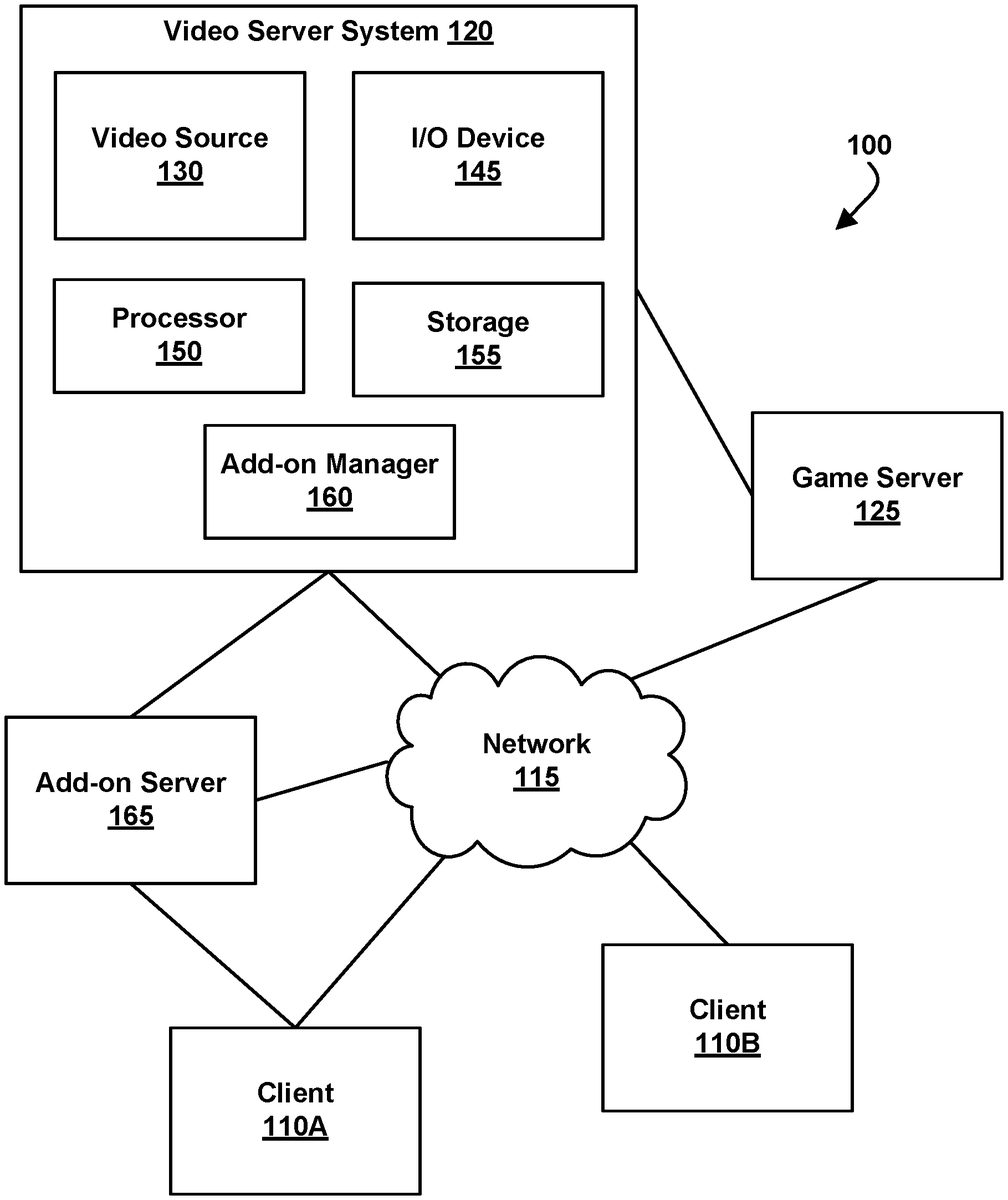
FIG.1illustrates a Game System100configured to execute a computer program augmented by one or more add-ons, according to various embodiments of the invention. Game System100is configured to provide a video stream to one or more Clients110via a Network115. Game System100typically includes a Video Server System120and an optional Game Server125. Video Server System120is configured to provide the video stream to the one or more Clients110with a minimal quality of service. For example, Video Server System120may receive a game command that changes the state of, or a point of view within, a video game, and provide Clients110with an updated video stream reflecting this change in state with minimal latency. The Video Server System120may be configured to provide the video stream in a wide variety of alternative video formats, including formats yet to be defined. Further, the video stream may include video frames configured for presentation to a user at a wide variety of frame rates. Typical frame rates are 30 frames per second, 60 frames per second, and 120 frames per second, although higher or lower frame rates are included in alternative embodiments of the invention. In some embodiments, Video Server System120is configured to provide three dimensional video data. E.g. matched video streams rendered from points of view separated by the distance between a person's eyes.
Clients110, referred to herein individually as110A,110B, etc., may include terminals, personal computers, game consoles, tablet computers, telephones, televisions, set top boxes, kiosks, wireless devices, digital pads, stand-alone devices, handheld game playing devices, and/or the like. Typically, Clients110are configured to receive encoded video streams, decode the video streams, and present the resulting video to a user, e.g., a player of a game. The processes of receiving encoded video streams and/or decoding the video streams optionally includes storing individual video frames in a receive buffer of the client. The video streams may be presented to the user on a display integral to Client110or on a separate device such as a monitor or television. Clients110are optionally configured to support more than one game player. For example, a game console may be configured to support two, three, four or more simultaneous players. Each of these players may receive a separate video stream, or a single video stream may include regions of a frame generated specifically for each player, e.g., generated based on each player's point of view. Clients110are optionally geographically dispersed. The number of clients included in Game System100may vary widely from one or two to thousands, tens of thousands, or more. As used herein, the term “game player” is used to refer to a person that plays a game and the term “game playing device” is used to refer to a device used to play a game.
Clients110are configured to receive video streams via Network115. Network115may be any type of communication network between computing devices including, a telephone network, the Internet, wireless networks, powerline networks, local area networks, wide area networks, private networks, and/or the like. Network115explicitly does not include communication channels completely within a computing device, such as a motherboard bus. In typical embodiments, the video streams are communicated via standard protocols, such as TCP/IP or UDP/IP. Alternatively, the video streams are communicated via proprietary standards.
A typical example of Clients110is a personal computer comprising a processor, non-volatile memory, a display, decoding logic, network communication capabilities, and input devices. The decoding logic may include hardware, firmware, and/or software stored on a computer readable medium. Systems for decoding (and encoding) video streams are well known in the art and vary depending on the particular encoding scheme used.
Clients110may, but are not required to, further include systems configured for modifying received video. For example, a client may be configured to perform further rendering, to overlay one video image on another video image, to crop a video image, and/or the like. Clients110may be configured to receive various types of video frames, such as I-frames, P-frames and B-frames, and to process these frames into images for display to a user. In some embodiments, a member of Clients110is configured to perform further rendering, shading, conversion to 3-D, or like operations on the video stream. A member of Clients110is optionally configured to receive more than one audio or video stream. Input devices of Clients110may include, for example, a keyboard, a joystick, a pointing device, a force feedback device, a motion and/or location sensing device, a mouse, a touch screen, a neural interface, a camera, input devices yet to be developed, and/or the like.
The video stream (and optionally audio stream) received by Clients110is generated and provided by Video Server System120. As is described further elsewhere herein, this video stream includes video frames (and the audio stream includes audio frames). The video frames are configured (e.g., they include pixel information in an appropriate data structure) to contribute meaningfully to the images displayed to the user. A meaningful contribution is a contribution that is readily observable by a game player. As used herein, the term “video frames” is used to refer to frames including predominantly information that is configured to contribute to, e.g. to effect, the images shown to the user. Most of the teachings herein with regard to “video frames” can also be applied to “audio frames.” Clients110may be configured to receive more than one video stream at the same time. For example, Client110B may be configured to receive a matched pair of video streams configured to form a three dimensional image when one of the streams is presented to one eye and the other stream is presented to the other eye.
Clients110are typically configured to receive inputs from a user. These inputs may include game commands configured to change the state of the video game or otherwise affect game play. The game commands can be received using input devices and/or may be automatically generated by computing instructions executing on Clients110. The received game commands are communicated from Clients110via Network115to Video Server System120and/or Game Server125. For example, in some embodiments, the game commands are communicated to Game Server125via Video Server System120. In some embodiments, separate copies of the game commands are communicated from Clients110to Game Server125and Video Server System120. The communication of game commands is optionally dependent on the identity of the command. Game commands are optionally communicated from Client110A through a different route or communication channel that that used to provide audio or video streams to Client110A.
In various embodiments, Clients110are configured to communicate add-on data between each of Client100and Video Server System120, or between different members of Clients110. For example, an add-on that enables voice communication directly between clients can include the communication of audio data between clients. Add-on data that augments the functionality of a server side computer program may be stored on one of Clients110for use by a server side add-on or for use by a client side add-on. Add-on data may also be stored on Video Server System120or on Add-on Server165, and be used by add-ons located on one of Clients110, Video Server System120or Add-on Server165.
Game Server125is optionally operated by a different entity than Video Server System120. For example, Game Server125may be operated by the publisher of a multiplayer game. In this example, Video Server System120is optionally viewed as a client by Game Server125and optionally configured to appear from the point of view of Game Server125to be a prior art client executing a prior art game engine. Communication between Video Server System120and Game Server125can occur via Network115. As such, Game Server125can be a prior art multiplayer game server that sends game state information to multiple clients, one of which is Video Server System120. Video Server System120may be configured to communicate with multiple instances of Game Server125at the same time. For example, Video Server System120can be configured to provide a plurality of different video games to different users. Each of these different video games may be supported by a different Game Server125and/or published by different entities. In some embodiments, several geographically distributed instances of Video Server System120are configured to provide game video to a plurality of different users. Each of these instances of Video Server System120may be in communication with the same instance of Game Server125. Communication between Video Server System120and one or more Game Server125optionally occurs via a dedicated communication channel. For example, Video Server System120may be connected to Game Server125via a high bandwidth channel that is dedicated to communication between these two systems.
Video Server System120comprises at least a Video Source130, an I/O Device145, a Processor150, and non-transitory Storage155. Video Server System120may consist of one computing device or be distributed among a plurality of computing devices. These computing devices are optionally connected via a communications system such as a local area network.
Video Source130is configured to provide a video stream, e.g., streaming video or a series of video frames that form a moving picture. In some embodiments Video Source130is also configured to provide an audio stream. In some embodiments, Video Source130includes a video game engine and rendering logic. The video game engine is configured to receive game commands from a player and to maintain a copy of the state of the video game based on the received commands. This game state includes the position of objects in a game environment, as well as typically a point of view. The game state may also include properties, images, colors and/or textures of objects. The game state is typically maintained based on game rules, as well as game commands such as move, turn, attack, set focus to, interact, use, and/or the like. Part of the game engine is optionally disposed within Game Server125. Game Server125may maintain a copy of the state of the game based on game commands received from multiple players using geographically disperse clients. In these cases, the game state is provided by Game Server125to Video Source130, wherein a copy of the game state is stored and rendering is performed. Game Server125may receive game commands directly from Clients110via Network115, and/or may receive game commands via Video Server System120.
Video Source130typically includes rendering logic, e.g., hardware, firmware, and/or software stored on a computer readable medium such as Storage155. This rendering logic is configured to create video frames of the video stream based on the game state. All or part of the rendering logic is optionally disposed within a graphics processing unit (GPU). Rendering logic typically includes processing stages configured for determining the three-dimensional spatial relationships between objects and/or for applying appropriate textures, etc., based on the game state and viewpoint. The rendering logic produces raw video that is then usually encoded prior to communication to Clients110. For example, the raw video may be encoded according to an Adobe Flash® standard, .wav, H.264, H.263, On2, VP6, VC-1, WMA, Huffyuv, Lagarith, MPG-x. Xvid. FFmpeg, x264, VP6-8, realvideo, mp3, or the like. The encoding process produces a video stream that is optionally packaged for delivery to a decoder on a remote device. The video stream is characterized by a frame size and a frame rate. Typical frame sizes include 800.times.600, 1280.times.720 (e.g., 720p), 1024.times.768, although any other frame sizes may be used. The frame rate is the number of video frames per second. A video stream may include different types of video frames. For example, the H.264 standard includes a “P” frame and an “I” frame. I-frames include information to refresh all macro blocks/pixels on a display device, while P-frames include information to refresh a subset thereof. P-frames are typically smaller in data size than are I-frames. As used herein the term “frame size” is meant to refer to a number of pixels within a frame. The term “frame data size” is used to refer to a number of bytes required to store the frame.
In alternative embodiments Video Source130includes a video recording device such as a camera. This camera may be used to generate delayed or live video that can be included in the video stream of a computer game. The resulting video stream, optionally includes both rendered images and images recorded using a still or video camera. Video Source130may also include storage devices configured to store previously recorded video to be included in a video stream. Video Source130may also include motion or positioning sensing devices configured to detect motion or position of an object, e.g., person, and logic configured to determine a game state or produce video-based on the detected motion and/or position.
Video Source130is optionally configured to provide overlays configured to be placed on other video. For example, these overlays may include a command interface, login instructions, video frames rendered from another game player's point of view, messages to a game player, images of other game players, video feeds of other game players (e.g., webcam video). In embodiments of Client110A that include a touch screen interface, the overlay may include a virtual keyboard, joystick, touch pad, and/or the like. In one example of an overlay a player's voice is overlaid on an audio stream. Video Source130optionally further includes one or more audio sources.
In embodiments wherein Video Server System120is configured to maintain the game state based on input from more than one player, each player may have a different point of view comprising a position and direction of view. Video Source130is optionally configured to provide a separate video stream for each player based on their point of view. Further, Video Source130may be configured to provide a different frame size, frame data size, and/or encoding to each of Client110. Video Source130is optionally configured to provide 3-D video.
I/O Device145is configured for Video Server System120to send and/or receive information such as video, commands, add-ons, add-on data, requests for information, a game state, client identities, player identities, game commands, security information, audio data, and/or the like. I/O Device145typically includes communication hardware such as a network card or modem. I/O Device145is configured to communicate with Game Server125, Network115, and/or Clients110. I/O Device145is configured to receive the information from more than one of Clients110. I/O Device145is optionally configured to receive the information as packets using a standard such as TCP or UDP.
Processor150is configured to execute logic, e.g. software, included within the various components of Video Server System120discussed herein. For example, Processor150may be programmed with software instructions in order to perform the functions of Video Source130, Game Server125, and/or an Add-on Manager160. Video Server System120optionally includes more than one instance of Processor150. Processor150may also be programmed with software instructions in order to execute commands received by Video Server System120, or to coordinate the operation of the various elements of Game System100discussed herein. Processor150may include one or more hardware device. Processor150is an electronic processor.
Storage155includes non-transitory analog and/or digital storage devices. For example, Storage155may include an analog storage device configured to store video frames. Storage155may include a computer readable digital storage, e.g. a hard drive, an optical drive, or solid state storage. Storage115is configured (e.g. by way of an appropriate data structure or file system) to store video frames, artificial frames, a video stream including both video frames and artificial frames, audio frame, an audio stream, add-ons, add-on data, and/or the like. Storage155is optionally distributed among a plurality of devices. In some embodiments, Storage155is configured to store the software components of Video Source130discussed elsewhere herein. These components may be stored in a format ready to be provisioned when needed.
Video Server System120optionally further comprises Add-on Manager160. Add-on Manager160is configured to facilitate the use of add-ons to augment computer programs on Video Server System120and/or Clients110. For example, in some embodiments, Add-on Manager160is configured to augment a game program within Video Source130. In some embodiments, Add-on Manager160is configured to augment a game program within Clients110.
Tasks that may be performed by Add-on Manager160include, but are not limited to, installing an add-on, updating an add-on, executing an add-on, storing add-on data, and communicating add-on data. In some embodiments, Add-on Manager160includes computing instructions configured for redirecting communications between an add-on and the associated computer program. Add-on Manager160may redirect messages from the computer program, originally directed toward a specific location relative to the computer program, to an alternative location. For example, if the computer program included within Video Source130is configured to access add-ons and/or add-on data in a specific directory relative to the computer program, Add-on Manager160may be configured to redirect that access to a different location within Video Server System120, to one of Clients110, or to a separate Add-on Server165. The specific directory in which the computer program is configured to access add-ons may be a subdirectory of a directory in which the computer program is executed. The location to which access is redirected is optionally a virtual environment. Alternatively, if the computer program is within Client110B and is configured to access add-ons within a specific directory of Client110B, then Add-on manager may be configured to redirect this access to a location within Video Server System120and/or Add-on Server165. As such, an add-on on Client110B can be used to augment a computer program on Video Server System120, or vice versa. Likewise, an add-on on Add-on Server165can be used to augment a computer program on either Clients110or Video Server System120. A virtual environment is an environment in which some location or physical device, such as a storage location or path, is simulated using software.
Add-on Manager160includes hardware, firmware, and/or software stored on a computer readable medium. All or part of Add-on Manager160is optionally disposed on a computing device separate from one or more other elements of Video Server System120. For example, all or part of Add-on Manager160is optionally disposed on Clients110, Add-on Server165, or at some other location within Game System100. Further details of Add-on Manager160are discussed elsewhere herein.
Optional Add-on Server165is a system configured for storage and/or execution of one or more add-ons. Add-on Server165may also be used to store add-on data. Communications between Add-on Server165and Video Server System120and/or Clients110can occur directly or through Network115. Add-on Server165is optionally managed by the publisher or developer of an add-on. In some embodiments, communications from a computer program are redirected to a location of Add-on Server165, from a location proximate to the computer program. For example, access to add-on data or an add-on executable may be redirected from Client110B or Video Server System120to Add-on Server165. Game System100may include more than one Video Server System120and/or more than one Add-on Server165.
Add-on Server165includes hardware, firmware, and/or software stored on a computer readable medium. For example, in some embodiments Add-on Server165includes a computing device, digital storage, an electronic processor and I/O devices. The digital storage can include add-on executable code, add-on data, images, all or part of Add-on Manager160, computing instructions configured to manage add-on's communication with other elements of Game System100, and/or the like.
FIG.2is a block diagram of embodiments of Video Source130configured to serve multiple video games augmented by add-ons, according to various embodiments of the invention. The multiple video games can include multiple instances of the same video game and/or instances of different video games. The video games are optionally multiplayer games. For example, a game state of one or more of the video games may be maintained by one or more instances of Game Server125each based on inputs received from multiple clients. The elements of Video Source130illustrated inFIG.2are optionally executed using Processor150.
The video games are executed using different instances of Game Logic210, individually labeled210A,210B,210C, etc. Game Logic210is configured to use a game state to determine a game environment that can be rendered to a video stream configured to be presented to a game player. The game environment is a two or three dimensional virtual environment including in-game objects, avatars, locations of objects, their shapes, textures, and spatial relationships there between, and the like. A game environment can include vertex data, transformation data and texture data, and/or the like.
The rendering of the game environment is typically based on one or more points of view associated with a specific game player. These points of view can be drastically different, such as an overhead view and a forward view. Or, the points of view can be from positions differing by approximately the distance between a person's pupils, and configured to create a 3D image. Video Source130may include more than 1, 2, 3, 5, 7, 15, or 31 instances of Game Logic210. Game Logic210is optionally a client of Game Server125and may be configured to communicate with Game Server125via Network115.
Game Logic210is configured to receive game commands from one or more of Clients110and to process the received commands according to a set of game rules. These rules cover, for example, how avatars interact with other avatars or in game objects, avatar movement, game instance management, and/or the like. Game Logic210is optionally also configured to generate audio data based on events within the game. This audio data may represent a gunshot, a splash, an engine, voice, flying, rain, music, or any other sound that could occur in a game. For example, an event such as one object hitting another may result in audio data representing a related sound. Game Logic210includes hardware, firmware, and/or software stored on a computer readable medium.
Each instance of Game Logic210can be disposed on a separate computing device or several instances of Game Logic210could be disposed on the same computing device or a single instance of Game Logic210could be disposed across multiple computing devices. Instances of Game Logic210can dynamically change the number and/or identify of computing devices used depending on the requirements of the game environment the user is currently experiencing. Instances of Game Logic210disposed on the same computing device are optionally executed within separate virtual machines or virtual I/O shells. In some embodiments, different instances of Game Logic210are configured to communicate game commands and/or game state information directly to each other, e.g., without necessarily communication through Game Server125.
Game Logic210typically executes on top of an Operating System (OS)215. Operating System215may include Windows™, Linux, Unix, Mac OS™, Solaris™, and/or the like. A virtual machine platform may operate between Operating System215and Game Logics210. The virtual machine platform can include commercial systems such as ESX, Hyper-V, and/or the like. In these embodiments, one or more of Game Logic210can be executed within a virtual machine. Multiple instances of Game Logic210may execute on the same instance of Operating System215. For example,FIG.2illustrates Game Logic210A and Game Logic210B both executing on the same Operating System215. Instances of Game Logic210executing on the same Operation System215may, or may not, be configured for playing the same video game. For example, Game Logic210A,210B and210C may all be World of Warcraft® clients, or may be clients of World of Warcraft®, Eve® and Call to Arms® respectively.
In some embodiments, the game environments determined by Game Logic210are passed to an optional Virtual 3D Video Driver220. Virtual 3D Video Driver220is configured to appear, from the point of view of Game Logic210, as a non-virtual 3D video driver controlling a graphics processing unit. Each instance of Game Logic210may be associated with its own instance of Virtual 3D Video Driver220, or Virtual 3D Video Driver220may be shared by two or more instances of Game Logic210. In some embodiments, game audio determined by each Game Logic210is passed to an optional Virtual Audio Driver285. Game audio includes sound data configured to be presented to a game player as part of an audio stream. The game audio can result from rules of the game, e.g., shooting a gun should result in a popping sound, or may be received from other sources such as music tracks, members of Clients110, a microphone, and/or the like.
In alternative embodiments, Game Logic210is configured to include the functionality, as discussed herein, of Virtual 3D Video Driver220and/or Virtual Audio Driver285. In these embodiments, Virtual 3D Video Driver220and/or Virtual Audio Driver285are not required.
Virtual 3D Video Driver220is further configured to pass the received game environments to a (non-virtual) 3D Driver230. Optionally the delivery of game environments to 3D Driver230is coordinated by the various instances of Virtual 3D Video Driver220. For example, delivery can be coordinated such that 3D Driver230receives game environments from only one or a minimum number of Virtual 3D Video Driver220at a time. In typical embodiments, each of Virtual 3D Video Driver220is configured such that they appear to be a separate process and a separate source of video data to 3D Driver230. As such, 3D Driver230is configured to keep track of which video data results in which video frames after rendering.
The video data received by 3D Driver230are passed to Graphics Processing Unit (GPU)235for rendering into raw video frames. Graphics Processing Unit235is optionally used to render more than one video stream in parallel. For example, Graphics Processing Unit235may generate a first video stream based on video data received from Game Logic210A, generate a second video stream based on video data received from Game Logic210B, generate a third video stream based on video data received from Game Logic210C, etc. in parallel. The parallel production of video streams includes the generation of these streams at the same time. However, parallel production of video streams may, but does not necessarily, include the processing of individual frames at the same time within Graphics Processing Unit235. For example, in some embodiments 3D Driver230alternatively passes the video data generated by the various members Game Logic210to Graphics Processing Unit235. Data generated by Game Logic210A is used to make a video frame, and subsequently data generated by Game Logic210B is used to make a video frame, etc. In this case, the video streams are produced in parallel while individual frames are produced in series. Alternatively, more than one video frame may be generated within Graphics Processing Unit235at the same time. In this case a first part of Graphics Processing Unit235is used to generate one frame while a second part of Graphics Processing Unit235is used to generate a second frame, the first and second frames arising from video data produced by different Game Logic210. In some embodiments, one set of graphical computation cores is used to generate the first frame while a second set of graphical computation cores is used to generate the second frame, at the same time. The resulting video frames are passed back to the control of 3D Driver230.
Virtual 3D Video Drivers220are optionally configured to manage the transfer of raw rendered video frames from 3D Driver230. For example, Virtual 3D Drivers220may be used to coordinate the transfer of video frames from the control of 3D Driver230to a Shared Memory240. (Following rendering, the video frames are in a memory of Graphics Processing Unit235or a memory managed by 3D Driver230. In either case they are under the control of 3D Driver230.) As Virtual 3D Video Drivers220manages the communication of video data and frames to and from 3D Driver230, in some embodiments, they are capable of placing the video frames within parts of Shared Memory240associated with specific Video Dynamic Encoding Pipelines (DEPs)245. The Video DEPs245are individually identified as Video DEP245A, Video DEP245B, Video DEP245C, etc. In these embodiments, each Video DEP245is assigned specific memory locations within Shared Memory240, and is configured to retrieve video data from those locations.
In other embodiments, Virtual 3D Drivers220are configured to manage the transfer of video data to Shared Memory240based on timing. In these embodiments, the transfers managed by each of Virtual 3D Drivers220are synchronized and the Virtual 3D Drivers220notify each Video DEP245when data for them is in Shared Memory240. Once this data is retrieved by the notified member of Video DEPs245, data for another member of DEPs is transferred from 3D Driver230to Shared Memory240under the control of Virtual 3D Video Drivers220. In these cases pixels read back from the local GPU memory to Shared Memory240can be based on a schedule. As used herein the terms “in sync” and “synchronized” are meant to mean that the two events are related in time by a schedule, by a timing signal, by a time delay, or that one event does not start until the other event has satisfied a condition, e.g., has completed. For example, Virtual 3D Drivers220may operate in sync such that a game environment is provided to 3D Driver230from a first of Virtual 3D Drivers220once Graphics Processing Unit235has completed rendering of a game environment from a second of Virtual 3D Drivers220. The timing of this synchronization is optionally selected to make optimum use of Graphics Processing Unit235.
As a result of the management by Virtual 3D Video Drivers220, the multiple video streams can be stored in Shared Memory240without confusing which frames belong to which video stream. Shared Memory240is optionally configured to store audio as well as video data. This audio data may be stored and/or managed in ways similar to that discussed with respect to video data.
Virtual Audio Drivers285are optionally part of a virtual I/O shell between Game Logic210and OS215. They are configured to appear from the point of view of Game Logic210as an audio driver and to pass any audio data they receive from Game Logic210to one of Audio DEP270. For example, in some embodiments, the Virtual Audio Driver285associated with Game Logic210A is configured to send audio data to Audio DEP270A, and the Virtual Audio Driver285associated with Game Logic210B is configured to send audio data to Audio DEP270B, etc.
One or more of Game Logic210are optionally each associated with an Add-on Environment287. Add-on Environments287include hardware, firmware and/or software stored on a computer readable medium and are configured for the associated Game Logic210to access add-ons and/or add-on data. For example, in some embodiments Add-on Environment287includes a directory structure configured to store add-ons and/or add-on data. The specific directory structure can depend on the identity of Game Logic210A or210B. For example, if the Game Logic210A is configured to look for add-ons in a subdirectory called “add-ons” and to look for add-on data in subdirectories of the add-ons directory, then the Add-on Environment287can include these subdirectories or virtual representations of these subdirectories. Typically, Add-on Environments287are configured such that Game Logic210A can operate as if the add-on were installed locally to Game Logic210A, e.g., within the same directory structure or in the same local file system as Game Logic210A. This allows the use of instances of Game Logic210A and add-ons that are configured for installation together on the same computing device, even when Game Logic210and the associated add-ons are installed on separate computing devices coupled by an embodiment of Network115such as the internet.
In some embodiments Add-on Environments287include computing instructions configured to redirect communications between Game Logic210and add-ons (and add-on data) stored at one of Clients110, Add-on Server165, and/or other locations within Video Server System120. For example, Add-on Environments287can include computing instructions to send and receive messages via an API of Game Logic210and to redirect these messages. Add-on Environments287optionally include a filter configured to identify which messages from the API should be redirected and to redirect particular messages to different locations as needed. A similar filter can be included local to the Add-on. This filter can also be considered part of Add-on Environments287and is configured to receive messages (e.g., data or commands) from the add-on and direct these messages to the associated member of Game Logic210. For example, when an add-on responds to a request or command from Game Logic210A the response to the request or command is redirected back to Game Logic210A. The redirection that occurs in either direction can include communication of data packets via network115. Add-on Environments287are typically generated by or include parts of Add-on Manager160.
Shared Memory240includes random access memory (RAM) or a similar memory configured for efficient reading and writing of video data. Shared Memory240is configured to store video data for a plurality of different Video DEP245. Video data for different Video DEPs245is optionally stored at the same time in Shared Memory240. Shared Memory240may consist of a single hardware device or may include multiple devices.
Video DEPs245are dynamically allocated encoding pipelines that are each configured to encode video data rendered using Graphics Processing Unit235. Each member of Video DEPs245is configured to encode to video formats specified at the time the Video DEP245is provisioned. This format specification is typically based on the needs of one of Clients110and/or the capabilities of the communication path between Video Server System120and the Client110. Video DEPs245are optionally provisioned dynamically in response from a request from one of Clients110. For example, when Client110A connects to Video Server System120and sends a request for a video stream, Video DEP245can be provisioned to include elements, such as an encoder, selected specifically to meet needs of Client110A. As is discussed elsewhere herein, a member of Video DEPs245is optionally configured to use more than one encoding scheme.
Video DEPs245each include a Grabber247configured to grab video data from Shared Memory240and transfer this video data to a memory of the Video DEP245. The Grabber247is optionally under the control of a member of Virtual 3D Video Drivers220. For example, in various embodiments, Grabber247is controlled by a member of Virtual 3D Drivers220to grab the video data from a specific location within Shared Memory240and/or at a specific time in synchronization with the transfer of video data to other members of Video DEPs245.
Video DEP245each optionally include an Overlay Logic290configured to overlay one or more video images on the video data, e.g., frames, generated by Graphics Processing Unit235. An overlay is a first image to be placed on a second image, or a sound added to another sound. Overlays may be applied with varying levels of transparency. For example, the first image can be opaque and, thus, completely hide covered parts of the second image, or the first image can be partially transparent in which case the second image can still be somewhat visible under the first image. An overlay may cover all or part(s) of the underlying image. For example, an overlay may be configured to cover certain pixels within a larger area. In this case the overlay is mapped to pixels on a display of one of Clients110or mapped to pixels within an image generated by Graphic Processing Unit235. The mapping can be accomplished in various ways. For example, a lower left pixel of the overlay may be assigned to a specific pixel on a video frame generated by Graphics Processing Unit235. In some embodiments, Overlay Logic290is configured to resize an overlay prior to applying the overlay. Overlay Logic290is optionally located in other positions within Video DEP245A. For example, after Preprocessor250.
The overlays can include a wide variety of pixel/video images. For example, an overlay can include a real-time or static image of a game player received via the internet, a real-time or static image of a sporting (or other) event, an image of a input control (e.g., “a,” “b,” “TAB,” “Return,” “Space Bar,” “Function Key,” “Arrow,” and/or other keys or input devices), a map, text, and/or the like. Overlays can vary widely in size and shape. In some cases the overlay is the result of rendering a 3D game environment. More than one overlay can be placed on an image. These overlays can be overlapping or separate. Overlays are optionally received in an encoded format and decoded prior to being applied.
The presence and content of overlays are optionally responsive to received game commands, identity of one or more game players, an account type, identity of a game being played, video captured from a prior or real-time sporting event or real-world game, game rules, and/or the content of video generated by Game Logic210. For example, an overlay may include a menu resulting from receipt of a game command. An overlay may include content responsive to a pixel pattern, e.g., image, included within video generated by Game Logic210. Overlay Logic290is optionally configured to apply multiple overlays to a single video frame and these overlays may be from different sources.
Overlay Logic290is optionally configured to apply an overlay after a video frame has been preprocessed using Preprocessor250and/or after encoding using one of Encoders255. In some embodiments the overlay includes an image received at an input of Video Source130(e.g., I/O device145) via the internet and Overlay Logic290includes video processing logic configured to generate the overlay from the image. The received image is optionally received from an image source such as a camera or a file storage.
Video DEPs245each optionally also include a Preprocessor (PRE)250. Preprocessor250is configured to perform a color space conversion such as RGB to YUV and/or a scaling operation to increase or decrease the resolution of the video frame. Preprocessor250is optional in embodiments wherein the output of Graphics Processing Unit235is in the YUV color space or some other desired color space. Multiple Preprocessors250may be included in a Video DEP245configured to produce multiple video streams having video frames of different sizes.
Video DEPs245each include at least one Encoder (ENC)255. Encoders255are individually identified as Encoder255A, Encoder255B, etc. Each of Encoders225is configured to encode the video data according to a specific codec, and optionally a specific color depth and/or frame size. For example, Encoders225may be configured to encode video data to Adobe Flash® standard, .flv, .wav, .avi, .mpg, H.264, H.263, On2, VP6, VC-1, WMA, and/or other codecs discussed herein.
A member of Video DEPs245may include one, two or more Encoders255. These encoders may be configured to encode to different codecs and/or the different formats of the same codec. For example. Encoder255A may be configured to encode according to a Flash standard at a first frame size and color depth while Encoder255is configured to encode to the same Flash standard at a second frame size and color depth. The identity of Encoders255within each member of Video DEPs245is typically determined at the time the Video DEP245is provisioned. For example, a single command or command set may be used to create (provision) Video DEP245A and specify which components the created Video DEP245A should include. The creation of Video DEP245A is discussed further elsewhere herein. A member of Video DEPs245including two or more Encoders255is alternatively viewed as two or more separate Video DEPs245having some but not all components in common. For example, Video DEP245A and Video DEP245B may have the same Preprocessor250but different Encoders255.
In one example, Encoder255A is configured to use a codec for H.264 while Encoder255B is configured to use a codec for H.263. Having two or more different encoders available enables Video DEP245A to change encoding during delivery of a video stream. The change in encoding can be from one type of encoding to another, or merely a change in characteristics of a specific type of coding. For example, the characteristics may change in terms of color depth, number of frames per second, encoding options, number of pixels, and/or the like. In some embodiments, Video DEP245A is optionally configured to switch between Encoder255A and255B in response to a change in the characteristics of Client110A or the communication channel between Client110A and Video Source130.
In practice, when a different codec other than that being used is required a new Video DEP245is spawned and executed in parallel with the current Video DEP245for a short period of time. The new Video DEP245is optionally a branch of the original Video DEP245. For example, some components of the original Video DEP245may be used in the new Video DEP245. These two Video DEP245may have components logically arranged in a tree structure.
In some embodiments, Video DEP245are configured to use two or more different encoders to generate two or more different video streams at the same time. These video streams are based on the same game environment rendered by Graphics Processing Unit255and, thus, include essentially the same materials (with the possible exception of overlays) and can be sent to different places. For example, one of the video streams can be sent to Client110A while the other is sent to Client110B. Alternatively, one of the video streams can be sent to Client110A and the other to a website where third parties can watch the video. This website is optionally part of a social networking site or a game player's site. The two different video streams may be different in the frame rate, encoding type, frame size, color depth, etc. For example a video stream delivered to a social networking website can be of much lower quality than the video stream delivered to a game player who is playing a game using Client110A. The second video stream may be directed to a game player who is playing the game or to people who are merely observing the game play. A video stream is optionally directed to more than one place.
Video DEP245A optionally includes one or more Post Processors (Post)260. Individual examples of Post Processors260are labeled260A and260B. Post Processors260are configured to package an encoded video frame in a container in a format appropriate for communication over a network according to a public or proprietary network protocol. For example, some protocols such as Adobe RTMP require post processing while other video standards such as H.264 Annex B do not require post processing. Each of Post Processors260may be associated with a specific member of Encoders255, or several Post Processors260may be configured to receive encoded video frames from one member of Encoders255.
The output of Post Processors260is directed to I/O Device145for delivery to one or more of Clients110. The Elements of Video DEPs245discussed herein include hardware, firmware and/or software stored on a computer readable medium. For example, each of Video DEPs245may represent a set of software loaded into memory and executing using an electronic processor.
Audio DEPs270are configured to receive audio data generated by members of Game Logic210and encode this audio data to audio packets. The encoded data packets are then sent to Clients110using I/O Device145and Network115. Audio DEPs270are also optionally configured to place an audio overlay on the audio data received from Game Logic210. Different Audio DEPs270are individually labeled270A,270B,270C, etc.
As with Video DEPs245, Audio DEPs270are typically allocated as needed and assigned to process audio data from a specific member of Game Logic210. This audio data may be based on events within a video game. For example, actions taken by one or more players of the video game may result in audio data according to game rules (e.g., falling in water makes a splashing sound). Allocation of Audio DEP270A is typically responsive to the same factors and performed in the same manner as allocation of Video DEP245A. For example, the elements included in Audio DEP270A may be responsive to needs of one of Clients110. Audio DEP270may receive audio data from Shared Memory240and/or directly from one of Virtual Audio Drivers285.
Audio DEP270A optionally includes a Grabber275configured to receive audio data from one of Virtual Audio Drivers285, to receive audio data from one or more sources external to Video Server System120, and/or to get audio data from Shared Memory240. For example, in some embodiments Grabber275is configured to retrieve data received from sources external to Video Source130, such as one or more of Clients110, over the internet. The audio received, from any of these sources, can include voice audio, music, sound effects, sound tracks, alerts, and/or the like. For example, the voice of a game player using Client110A may be received from Client110A, or the game player may provide music to be heard by a game player using another of Clients110. Audio data may be received, as audio streams, from more than one game player in parallel.
Audio DEP270A optionally further includes Overlay Logic295. Overlay Logic295is configured to place one or more audio overlays on audio data generated by a member of Game Logic210. The audio overlays can include audio, music, sound effects, sound tracks, alerts, and/or the like. For example, in some embodiments, an audio overlay includes voice data received as data packets from one or more game players over the internet. These data packets are optionally decoded by Overlay Logic295prior to being included in the overlay. Placement of overlays on the audio data generated by a member of Game Logic210optionally includes addition of this data to the generated audio data. All or part of an audio overlay can be received from a source external to Audio Source130. For example, in some embodiments the overlay includes audio data received at I/O Device145via the internet and Overlay Logic290includes audio processing logic configured to generate an audio overlay from this audio data. When referring to audio overlays, the identities of which data is the overlay and which is the data on which the overlay is being applied may be arbitrary as, in some embodiments, audio data does not have a sense of layering order that can be possible in video data.
Audio DEP270A further includes an Audio Encoder280A. Audio Encoder280A is configured to encode the audio data generated by a member of Game Logic210and the audio overlay into an audio packet according to an audio codec. The encoding is typically performed after the audio overlay(s) have been applied to the audio data.
Grabber275, Audio Encoder280A and Overlay Logic295include hardware, firmware, and/or software stored on a computer readable medium. Audio DEP270B and Audio DEP270C are alternative embodiments of Audio DEP270A.
The operation of Video Source130is typically managed by a Controller265. Controller265includes hardware, firmware and/or software stored on a computer readable medium. For example Controller265may include software stored in memory and executed using a microprocessor.
In some embodiments, Controller265is configured to provision instances of Game Logic210A, Virtual Audio Driver285and Virtual 3D Video Driver220in response to a request to play a game. For example, if a request for a specific video game is received from Client110A, Controller265may retrieve Game Logic210A, Virtual Audio Driver285and Virtual 3D Video Driver220from Storage155and place these in working memory. Game Logic210A may be placed in communication with both Client110A and Game Server125. Game Logic210A is then executed using Processor150in order to play the video game.
In some embodiments, Controller265is configured to allocate instances of Video DEP245and/or Virtual Audio Driver285in response to a request to play a game. For example, Controller265may be configured to first determine or receive the requirements for Video DEP245A and Audio DEP270A and then provision computing instructions that satisfy those requirements. Video DEP245A and Audio DEP270A are then associated with one of Game Logic210and one of Virtual 3D Driver220. The provisioned Video DEP245A is optionally configured to retrieve raw video data from a specific area within Shared Memory240.
In some embodiments the requirements for Video DEP245A and/or Audio DEP270A are determined by querying a user of Client110A. For example, Controller265may be configured to cause text messages to appear on Client110A, the messages requesting that a user of Client110A enter characteristics of a video stream desired by a user. These characteristics can include a connection type, a frame size, an encoding scheme, a frame rate, a color depth, and/or the like. The entered characteristics are conveyed back to Controller265, which then used these characteristics to select elements to include in Video DEP245A and/or Audio DEP270A when they are provisioned. For example, if the user requests a specific encoding scheme, then an Encoder255configured to use the requested encoding scheme is selected and included in Video DEP245A.
In some embodiments the requirements for Video DEP245A and/or Audio DEP270A are determined automatically. For example, information gathered using a client qualifier can be used to determine the requirements for Video DEP245A. In this example, if Client110A includes only a Microsoft Silverlight® decoder and an Adobe Flash® decoder, then at least one of the corresponding encoder configurations or variants thereof is required in Video DEP245A. Characteristics of the video stream to be generated using Video DEP245A, such as frame size, color depth and frame rate, can also be determined by Controller265in this way.
The determination of requirements for Video DEP245A and/or Audio DEP270may include both the use of characteristics provided by a user and characteristics automatically determined. In some embodiments, the possible characteristics are limited by a user's account type, payment and/or subscription. For example, a user may pay to receive a higher quality video stream.
Controller265may also manage sharing of Shared Memory240. For example, Controller265may configure Video DEP245A and/or Audio DEP285A to use specific memory locations within Shared Memory240and/or Controller265may be configured to configured Video DEP245A and/or Audio DEP285A to access Shared Memory240in response to certain timing signals. The timing signals being timed for synchronization of access to Shared Memory240by different Video DEPs245.
FIG.3illustrates further details of Add-on Manager160, according to various embodiments of the invention. In general Add-on Manager160is configured to enable remote selection and installation of add-ons, to facilitate execution of add-ons using add-on environments, to manage add-on data, to associate add-ons and add-on data with specific user (game player) accounts or avatars, and/or the like. Add-on Manager160typically includes software stored on a computer readable medium, but may also include firmware or hardware. Add-on Manager160can be disposed on a single computing device or distributed among more than one computing device. For example, in various embodiments, components of Add-on Manager160are disposed on Video Server System120, Add-on Server165and/or Client110B.
Add-on Manager160includes an Add-on Installer310configured for installing add-ons in association with a computer program. As used herein, the association of an add-on and computer program is meant to indicate that the add-on is configured to augment or otherwise extend the functionality of the computer program. Typically, the add-on is configured for association with a specific computer program. The installation is optionally performed remotely, e.g., an installation at Video Server System120can be performed in response to commands received from Client110B via Network115. These commands are received and processed by Add-on Manager160.
The installation performed by Add-on Installer310can include creation of an Add-on Environment287having characteristics compatible with execution of the add-on. As discussed elsewhere herein, an Add-on Environment287can include a directory structure, computing instructions configured to redirect communications, etc. For example, the installation can include the creation of directories, subdirectories, or other elements of a directory structure, relative to Game Logic210. In some embodiments, the installation includes the addition of computing instructions configured to redirect messages to other devices. The installation of these computing instructions can be at locations of Game Logic210and/or of the add-on.
Installation can be commenced and controlled via an Add-on Interface320. Add-on Interface320includes a user interface configured for presentation to users of Clients110, computing instructions configured to generate and communicate this user interface via Network115, and/or computing instructions configured to receive commands entered by the user via the interface. In various embodiments, the user interface is configured for a user to select add-ons to be installed, pay for add-on or add-on data storage space, select which add-ons should be activated for particular avatars, turn on and off add-ons, update add-ons, to managed an approved add-on list, and/or de-install add-ons. Selections and the entry of commands is typically accomplished by clicking or entering text, etc., in that part of Add-on Interface320that is presented by a user. The results of these actions are communicated to other parts of Add-on Interface320for processing. Part of Add-on Interface320is optionally included in a video stream communicated to Clients110as an overlay.
Using Add-on Interface320a user can install one or more add-ons remotely on Video Server System120or Add-on Server165, and/or install appropriate computing instructions for redirection at locations of add-ons and Game Logic210remote from Clients110. For example, a user may select one or more add-ons from a list of approved add-ons. This list of approved add-ons is optionally stored in Storage155or Add-on Server165. Approved add-ons are add-ons that have been qualified for use with Game Logic210by a game publisher, a manager of Video Server System120, or other authority. Using Add-on Interface320the user can optionally also select which account, avatar and/or game the add-ons should be associated with and where the add-on should be stored, e.g., at one of Clients110, at Video Server System120, and/or at Add-on Server165. For example, the user may specify that an add-on should only be used with one or more specific avatar but not with another avatar.
In some embodiments of the invention a user is limited in the number of add-ons and/or amount of add-on data storage the user has available. This limit is managed by Add-on Manager160and may be increased by purchasing additional space. For example, in one embodiment, a user receives three virtual “slots” in which add-ons can be placed and can purchase additional slots by paying money or performing some action such as bringing in additional players.
Add-on Manager160is optionally configured for a user to turn on and off installed add-ons. For example, a user may wish to use an add-on only when engaging in certain in-game activities such as player versus player encounters. Turning off an add-on does not necessarily mean that it is de-installed. In some embodiments, add-ons that are off do not require an add-on slot. In these embodiments, a user can have more add-ons installed than available slots. Alternatively, each installed add-on, whether or not active, may require a slot.
In some embodiments Add-on Manager160is configured to update add-ons. These updates can be manual and/or automatic. Manual updates include, for example, a user providing Add-on Manager160with a web address of an add-on publisher or with add-on code. The add-on can be retrieved by the Add-on Manager160from the publisher or from one of Clients110. Automatic add-on update includes automatic retrieval of an add-on from an add-on publisher or other source. For example, when an add-on is detected as being out of date, Add-on Manager160is optionally configured to automatically request an update from a publisher or other source of that add-on and automatically install the update if available. This process can be transparent to the game player. In some instances, Add-on Manager160will wait until an add-on is available from the source and then perform the update.
With either manual or automatic add-on updates, Add-on Manager160is optionally automatically configured to detect when an add-on is out of date and notify the user. Add-on Manager160may also be configured to receive a notice from an add-on publisher that a new version of an add-on is available.
Add-on Manager160is optionally configured for a user of Clients110to manage add-ons via Add-on Interface320. This management performed via Add-on Interface320can include, for example, updating add-ons, purchasing add-ons, configuring add-ons, moving add-ons, viewing installed add-ons, activating and inactivating add-ons, installing add-ons, de-installing add-ons, and/or the like. In some embodiments, Add-on Interface320is configured to perform any add-on management function that could be performed on a client side add-on. The de-installation optionally includes the removal of computing instructions configured for the redirection of messages between an add-on and Game Logic210, and/or the removal of an Add-on Environment287. As discussed elsewhere herein, in some embodiments Add-on Manager160is configured to automatically update add-ons. The update mode is optionally managed using Add-on Interface320.
Add-on Manager160optionally further includes an Account Manager325configured to manage the association of add-ons and/or add-on data with a user of Client110B or other Clients110. When an add-on is installed by a user (game player), Account Manager325associates the add-on with a specific video game, user, account of the user, and/or avatar. Typically this association is stored as part of a list of add-ons installed by each user. When a user starts a video game, Account Manager325reads this list and identifies add-ons associated with the user. These add-ons and the appropriate add-on environments are then provisioned along with the provisioning of Game Logic210, Video DEP245A and/or Audio DEP270A. Add-ons are optionally further provisioned or de-provisioned as the user switches between avatars or activates and de-actives add-ons.
Account Manager325manages storage of add-on data in association with a user when the user is not playing a video game. The add-on data may be stored at Storage155, Add-on Server165and/or Client110. When game play is started this data is typically copied to the appropriate Add-on Environment287for use by one or more provisioned add-on. When game play is completed the copy of the add-on data in the Add-on Environment287is used to update the stored copy. The add-on data is stored in a database, file structure or the like and includes identifying information, such as a record index or a file name, configured to identify the add-on data as belonging to a specific user (i.e., game player). In some embodiments Account Manager325maintains an index configured to indicate which files of add-on data belong to a specific user and/or are associated with a specific account or avatar.
In various embodiments, Account Manager325is configured to manage the number of add-on slots and/or storage accessible to each user, to charge the user for extra slots and/or storage, and/or to offer the user extra slots or storage for purchase. For example, if a user attempts to activate more add-ons than there are slots available, Account Manager may use Add-on Interface320to offer the user an opportunity to purchase more slots.
Add-on Manager160optionally further includes an Add-on Updater330, configured to update add-ons. Updates can occur when a new version of an add-on is available or in response to new versions of Game Logic210. For example, when a new version of Game Logic210is released by a game publisher third party add-ons for that game will typically need to be tested and/or updated. Add-on Updater330is configured to monitor for such events, e.g., release of new versions of add-ons and Game Logic210, and to perform updates in response. In some embodiments, the process includes receiving information that indicates that a new version of Game Logic210is available, notifying add-on publishers that an updated version of an add-on is required, receiving the updated add-on, and replacing the out of date add-on with the updated add-on. Any or all of these steps can be performed automatically or can involve input from a user of Client110B. In some embodiments, Add-on Updater330is configured to automatically retrieve add-ons from a third party location, such as an ftp server or website.
Add-on Manager160further includes an Add-on Storage335. Add-on Storage335includes at least one electronic storage device configured to store data, images, and/or executable computing instructions. For example, Add-on Storage335can include volatile or non-volatile memory, a hard drive, and optional drive, static or dynamic random access memory, and/or the like. Add-on Storage335is optionally distributed among a plurality of devices including Video Server System120, Add-on Server165and Clients110.
Add-on Storage335optionally includes Add-ons340. Add-ons340comprise data, images, executable code, scripts, or other game content configured to be used to extend the functionality of Game Logic210. Add-ons340may be installed as add-ons on Video Server System120, Add-on Server165, Clients110, or elsewhere. Add-ons340are optional in embodiments where add-ons are retrieved for execution directly from third party sources. Add-on Storage355optionally further includes an Approval List345of approved Add-ons340. The computing instructions within Add-ons340are optionally shared by more than one game player. For example, a single add-on, when provisioned, can be associated with both Game Logic210A and Game Logic210B, different computing threads independently accessing the computing instructions.
Add-on Storage355optionally includes API Filters350. API Filters350comprise the computing instructions configured to redirect communications between one of Add-ons340and Game Logic210, as discussed elsewhere herein. Such computing instructions may be configured such that an add-on on Add-on Server165or one of Clients110can be used to extend functionality of Game Logic210on Video Server System120. Alternatively, using API Filter350an add-on on Video Server System120or on Add-on Server165may be used to extend the functionality of Game Logic210installed on one of Clients110. When API Filters350are installed in proper locations, an add-on can be used to extend functionality of a computer program even when the add-on and computer program are separated by Network115.
Add-on Storage355optionally includes Add-on Data355included with, generated or organized by an add-on. Add-on Data355may include data generated by more than one add-on. Typically, this data is copied to the appropriate Add-on Environment287, when game play is initiated or an Add-on340is activated. When game play is completed the add-on data in the Add-on Environment287is used to update the copy of the add-on data stored in Add-on Storage355.
FIG.4illustrates further details of a client, according to various embodiments of the invention. I/O405includes an input/output device configured for Client110to send and/or receive information such as video, commands, add-ons, add-on data, requests for information, a game state, client identities, player identities, game commands, security information, audio data, and/or the like. In some embodiments, I/O includes a modem or Ethernet port.
Client-side Storage410includes non-transitory analog and/or digital storage devices. For example, Client-side Storage410may include an analog storage device configured to store video frames. Client-side Storage410may include a computer readable digital storage, e.g. a hard drive, an optical drive, or solid state storage. Client-side Storage410is configured (e.g. by way of an appropriate data structure or file system) to store video frames, artificial frames, a video stream including both video frames and artificial frames, audio frame, an audio stream, add-ons, add-on data, and/or the like. Some of these add-ons can be associated with the instance of Game Logic210on Client110B, while the same Game Logic210is also associated with add-ons installed on a device geographically remote form Client110B.
API Filter350is part of an Add-on Environment287configured to redirect communications as discussed elsewhere herein. Processor420includes both a central processing unit (CPU) and at least one graphics processing unit (GPU). Display430is configured to display a video stream generated local to Client110B and/or generated by Video Server System120.
User Input440includes, for example, a keyboard, a joystick, a pointing device, a telephone, a force feedback device, a motion and/or location sensing device, a mouse, a touch screen, a neural interface, a camera, input devices yet to be developed, and/or the like.
FIG.5illustrates methods of installing and/or using an add-on, according to various embodiments of the invention. These methods may be applied in embodiments in which the add-on is installed on Add-on Server165, Video Server System120, or one of Clients110, and embodiments in which Game Logic210is installed on one of Clients110or Video Server System120. Common to all these embodiments is that at least one of an add-on and the associated Game Logic210are installed and used at a location other than one of Clients110and separated from the one of Clients110by Network115. For example, if Game Logic210is installed on Client110B then at least one associated add-on is installed and used on a different member of Clients110, Add-on Server165, Video Server System120, or a third party location. If Game Logic210is installed in a location other than Client110B then add-ons can be installed on Client110B, or any of the other locations discussed herein. Those steps ofFIG.5involving installation of add-ons are optionally performed separately from those steps involving using the installed add-ons. Both installation and execution of an add-on may be initiated by a game player using one of Clients110, or may be specified as part of a default configuration for Game Logic210. Some embodiments include installing more than one add-on.
Considering first those embodiments in which Game Logic210is installed on Video Server System120, the installation process can begin with a Select Add-on Step510. In this step the add-on to be installed is selected, typically by a game player using one of Clients110. The selection can be from a list of add-ons presented to the game player using Add-on Interface320, or may include the game player selecting an add-on from a storage location or a third party source.
In some embodiments only approved add-ons can be selected. In these embodiments a Confirm Add-on Step515is optionally used to confirm that the selected Add-on340is included in an approved list of add-ons. This check can include looking for a name (or other identifier) of the add-ons in the approved list or comparing a checksum, URL, or other signature of an approved add-on with a corresponding characteristic of the selected add-on.
In an Establish Environment Step520Add-on Manager160is used to establish an instance of Add-on Environment287for executing the selected add-on. In various embodiments, the Add-on Environment287is established on Video Server System120, Add-on Server165, or one of Clients110. For example, on Video Source130establishing the Add-on Environment287may include creating an appropriate directory structure such that the add-on can be installed in a location expected by the associated Game Logic210. In a more specific example, if Game Logic210is configured to look in a subdirectory called “add-ons,” relative to a directory of Game Logic210, then Establish Environment Step520may include creating this subdirectory in the proper location.
Establishing Add-on Environment287on Add-on Server165or one of Clients110typically includes placing computing instructions configured to redirect communications between Game Logic210and the add-on, at appropriate locations. For example, a first API Filter350may be installed at an API of Game Logic210and a second API Filter350may be installed at a location at which the add-on will be executed. These API Filters350are configured to redirect messages to each other such that the add-on and the associated Game Logic210, which are configured to operate together on the same computing device, can instead operate by communicating with each other over Network115. Establishing Add-on Environment287optionally includes configuring each of the API Filters350such that can communicate with each other, regardless of where they are installed. For example, each of API Filters350may be configured with an IP address or universal resource locator of the corresponding API Filter350.
In a Receive Add-on Step525the add-on to be installed is received from Storage155, Add-on Storage335, one of Clients110or a third party location. The add-on is optionally received via Network115. The add-on is received at the location it is to be executed, e.g. the Add-on Environment287established in Establish Environment Step520. Some embodiments of Receive Add-on Step525include communicating the add-on from, Add-on Storage335, Client110B or a third party location to Video Server System120. Some embodiments of Receive Add-on Step525include communicating the add-on from Add-on Storage335, Storage155, or a third party location to Client110B.
In a Place Step530the received add-on is installed/placed in the Add-on Environment287established in Establish Environment Step520. This installation can occur within a directory structure of Video Source130, or at the locations of API Filters350installed on Add-on Server165, video Source130, and/or Clients110. Installation can include provisioning of computing instructions of the add-on and optionally provisioning of default add-on data. Establish Environment Step520is optionally performed after or at the same time as Place Step530. For example, API Filters350can be installed after the add-on is installed. Place Step520optionally includes provisioning of add-on data along with the add-on. The add-on data may or may not be from the same location as the add-on. For example, the add-on may be received from Add-on Server165while the add-on data is received from Client110B. The received add-on data can be default add-on data or add-on data that has been modified by actions of a game player.
In an optional Associate Step535the add-on installed in Place Step530, and optionally the provisioned add-on data, are associated with a one of Clients110or a user of one of Clients110, i.e. a game player. This association can involve inclusion of an identifier of the add-on in a list of add-ons assigned to the user or copying of the add-on into a directory assigned to the user. The association with the user can be specific to an account of the user, a user, a particular video game, one or more particular avatars, and/or the like. Associate Step530may be optional when the add-on is installed on one of Clients110or in a location that is already associated with an account, a user, etc. In such cases the association with a location, device, address, etc. may serve in place of or in addition to an association with a particular user.
Once an add-on is associated with an account, a user, or location, etc. it can be provisioned and/or used every time the user requests execution of Game Logic210. For example, one or more add-ons associated with a user can be provisioned at approximately the same time as Game Logic210A and Video DEP245A. The provisioning process can include variation of Steps510through530as described herein. For example, when an add-on is provisioned after previously being installed Select Add-on Step510can merely include parsing a list of add-ons previously associated with a user or location, etc. Receive Add-on Step525can merely include retrieving the add-on and associated add-on data from one or more storage locations such as Storage155, Add-on Storage335, or Client Side Storage410.
Once an add-on and any associated add-on data are provisioned, use of the add-on can begin with an Execute Game Step540. In this step Game Logic210is executed, typically in response to a request received from one of Clients110. The execution optionally includes communications between Video Server System120and Game Server125such that a state of a multiplayer video game is maintained at Video Server System120.
In a Receive Command Step545a game command is received by one of Game Logic210from one of Clients110. This typically occurs via Network115. The game command can be a command configured for control of or use by an add-on. For example, the game command can be configured to cause the add-on to display certain information, to perform certain functions or can include data to be processed by the add-on.
In a Forward Command Step550the game command received in Receive Command Step550is identified as a command for the add-on and forwarded to the add-on. In embodiments in which the add-on is installed on the same computing device as Game Logic210that received the command, the command can be passed directly from the API of this Game Logic210to an API of the add-on. For example, the game command can be passed by the Game Logic210A API to a memory location of the Add-on API.
In embodiments in which the add-on is installed on a different computing device than the executed Game Logic210, API Filters350are used to communicate the received command between the Game Logic210and the add-on. For example, the command may be first communicated from Game Logic210A to a first API Filter350on Video Source130. This first API Filter350is configured to appear as the Add-on API from the point of view of the Game Logic210A API. Thus the communication from Game Logic210A to the first API Filter350can be accomplished by providing the command, or a pointer to the command, to a memory location of the first API Filter350. The first API filter350is configured to communicate the command to a second API Filter350at the location of the add-on, e.g., at one of Clients1108or Add-on Server165. This communication can occur over Network115using TCP/IP, UDP/IP, or some other communication standard. Upon receipt of the command, the second API Filter350is configured to forward the command to the add-on. The second API Filter350is configured to appear as the Game Logic API from the point of view of the add-on. Thus, communication from the second API Filter350to the add-on can be accomplished by providing the command, or a pointer to the command, to a memory location of the add-on.
In a Process Command Step555the command is processed using the add-on. Processing can include the generation of add-on data. For example, the command may include data provided by a user or by Game Logic210A. The command may cause the add-on to record or detect events in the game and generate add-on data based on these events. The command may cause the add-on to provide audio or image data for inclusion in an audio or video stream generated by Video Server System120to one of Clients210. The command may cause an image to be converted between formats. For example, be converted to a pdf file. This audio or image data, or any other data resulting from Process Command Step555, is optionally communicated to Video Server System120or one of Clients110, for example, via Network115. The command may cause any other result known in currently existing add-on technology.
In an Optional Store Step560add-on data generated in Process Command Step550is stored. This storage may be proximate to the add-on, or alternatively at a location in communication with the add-on via Network115. For example, regardless of where the add-on is located the data may be stored on Video Server System120, Add-on Server165, and/or one of Clients110. Storage may occur in real-time or after a delay. For example, in some embodiments a working copy of the add-on data local to the add-on is used during a specific execution of Game Logic210A, and when this execution is completed the add-on data is stored elsewhere.
In an optional Generate Step565video data is generated as a result of the add-on processing the game command. For example, the game command may represent a request to have add-on data, locations, maps, text, notices, items, and/or the like displayed to a game player (or a sound presented to the game player). The video data may include two dimensional or three dimensional images. For example, to indicate a location of a resource a two dimensional image/symbol may be read from storage and converted to video data by being applied as an overlay. The use of overlays is discussed further in U.S. patent application Ser. No. 12/826,130 filed Jun. 29, 2010 and entitled “Video Game Overlay.” The disclosure of this patent application is hereby incorporated herein by reference. Alternatively, the video data may be the result of the add-on adding a two or three dimensional object to a game environment which is then rendered to video data using GPU235.
In an optional Provide Step570, the video data generated in Generate Step560is provided to one or more of Clients110as part of a video stream. Typically, these Clients110include the member of Clients110from which the game command was received in Receive Command Step545, and the video stream is provided via Network115. For example, if the game command is received from Client110B the video may be provided to Client110A and a third destination, as well as Client110B. The third destination can be a storage place, a website, a social networking site, a television, a phone, and/or the like.
Now considering those embodiments in which Game Logic210is installed on Client110B and at least one add-on is external to Client110B during use. In these embodiments Video Server System120is optional as the game environment can be generated based on a game state, the game environment can be rendered to video, and the video can be displayed, all on Client110B. The game state can be based on state information received from Game Server125, received from another member of Clients110, and/or based solely on information within Client110B. The steps illustrated inFIG.5may be varied as follows:
In Establish Environment Step520the Game Logic210and the add-on are necessarily on different computing devices. This is because, in the embodiments being discussed, Game Logic210is on Client110B and at least one of Game Logic210and an add-on are on different computing devices separated by Network115. Establish Environment step520, therefore includes provisioning API Filters350at both the location of Game Logic210and the location of the add-on. In some embodiments, one Game Logic210and one add-on are both on Client110B while at least one other add-on is on a different computing device, e.g. Add-on Server165and/or Video Server System120. In these embodiments, Establish Environment step520is directed toward creating an Add-on Environment287for the add-on(s) on the different computing devices.
In Receive Add-on Step525the add-on is received at Add-on Server165, Video Server system120, a different Client110, or a third party location, such as a web server, file server, or the like controlled by a developer of the add-on. In Place Step530the add-on is installed at a location other than the Client110on which the instance of Game Logic210to be augmented by the add-on is installed. For example, if Game Logic210is disposed on Client210B, the add-on can be installed on Client210C, Add-on Sever165, Video Server System120, or a third party location. Place Step530optionally includes communicating add-on data from Client210B, Add-on Server165, or Video Server System120to the location at which the add-on is installed.
In Associate Add-on Step535the list of add-ons used to save add-on associations is optionally stored on Client210B. Execute Game Step540and Receive Command Step545are optionally confined to Client110B. For example, Receive Command Step545may include communicating a command from User Input440to Processor420, rather than communicating the command via Network115. In Forward Command Step550the command received in Receive Command Step544is forwarded from Client110B to the location of the add-on. Any data resulting from Process Step555is optionally communicated back to Client210B.
In optional Store Step560data generated in Process Command Step550is stored on Client110B, the location of the add-on, and/or elsewhere. Provide Step570can include merely providing the video data generated in Generate Step560from Processor420to Display430. Although, is some embodiments, this video data can be also provided to other members of Clients110or to third party locations discussed herein.
Returning now to the more general case in which Game Logic210can be disposed on either Clients110or Video Server System120.FIG.6illustrates methods of automatically updating an add-on, according to various embodiments of the invention. The add-on is typically updated in response to receipt of an updated version of Game Logic210. Any combination of the steps illustrated inFIG.6can be performed automatically. It is possible that a request for an updated add-on is made before a request is received to execute the updated version of Game Logic210. The methods illustrated inFIG.6are optionally used to update more than one add-on in response to receiving one updated Game Logic210.
In a Receive Game Logic Update Step610a new version of Game Logic210is received at Video Source130or Client210B. This new version is typically received from a publisher of the associated video game or an intermediary thereof. The new version is optionally received via Network115. The new version of Game Logic210is configured to replace a previous version. Receive Game Logic Update Step610optionally includes disabling any out of date add-ons.
In a Determine Add-on Usage Step615it is determined whether an add-on has been used to augment the functionality of the previous version of Game Logic210. Determine Add-on Usage Step615can include, for example, examining a list of add-ons associated with specific Game Logic210, video game, users, user accounts, Clients110, etc. This list may be maintained by Account Manager325. Alternatively, Determine Add-on Usage Step615can include examining storage locations configured to store add-ons and looking for add-ons configured to augment Game Logic210.
In a Send Request Step620a request for an updated add-on made. This request is typically made to a third party, such as a publisher of the add-on or intermediary thereof. The request includes an address to which the update should be provided, and optionally an identity of the add-on and new version of Game Logic210with which the add-on should be compatible. For example, the request may indicate that a new version of “Deadly Boss Mods” for the “World of Warcraft version 6.542” Game Logic210be sent to an address of Video Server120, Add-on Server165or Client110B. The request is optionally sent via Network115. Send Request Step620can be performed between a time the updated version of Game Logic210is received in Receive Game Logic Update Step610and a first time a request to execute the updated version of Game Logic210is received. Send Request Step620can be performed automatically in response to receiving the new version of Game Logic210in Receive Game Logic Update Step610. Send Request Step620is optionally repeated until an updated add-on is received. For example, the request can initially be sent every 10 minutes and later sent every hour.
In a Receive Add-on Update Step625the updated add-on is received at the address provided in Send Request Step620. The updated add-on is configured to augment the new version of Game Logic210received in Receive Game Logic Update Step610and can be received via Network115. Receive Add-on Update Step625is optionally performed between the time the updated version of Game Logic210is received in Receive Game Logic Update Step610and a time a first request to execute the updated version of Game Logic210is received.
In an Install Step630the updated add-on received in Receive Add-on Update Step625is installed. This installation may be in an add-on on storage such as Add-on Storage335or Client-side Storage410. Alternatively, the installation may be in an Add-on Environment287where it can be used without further provisioning. The installation process is optionally similar to Place Step530as discussed with respect toFIG.5. Install Step630is optionally performed automatically, e.g., without need for a game player to order the installation.
In a Receive Execution Request Step635a request to execute the new version of Game Logic210, received in Receive Game Logic Updates Step610, is received. This request is received from a game player via one of Clients110, and is optionally received at Video Source130via Network115. Receive Execution Request Step635may occur before or after any of Send Request Step620, Receive Add-on Update Step625and Install Step630.
In an optional Request Donation Step640a request to donate to a publisher of the add-on is presented to a game player. Typically this is the game player that made the request for execution in Receive Execution Request Step635. The request to donate is optionally presented as an overlay on the video stream generated using Video Server System120.
In an optional Notify User Step645the game player that made the request for execution in Receive Execution Request Step635is notified that an new version of the add-on has been received. The notice is optionally presented as an overlay on the video stream generated using Video Server System120.
Several embodiments are specifically illustrated and/or described herein. However, it will be appreciated that modifications and variations are covered by the above teachings and within the scope of the appended claims without departing from the spirit and intended scope thereof. For example, while the example presented herein are directed at computer games, in other embodiments the systems and methods taught are applied to other types of computer programs. These other types of computer programs can include graphics programs, spreadsheets, word processors, database programs, accounting programs, project management programs, video editing programs, image editing programs, website development programs, inventory programs, e-mail programs, file management programs, document management/viewing programs, drawing/computer aided design programs, presentation programs, and/or the like. Further, while many of the examples discussed herein refer to a single add-on. The systems and methods disclosed can be applied to groups of add-ons. These groups can be handled as an add-on package.
The embodiments discussed herein are illustrative of the present invention. As these embodiments of the present invention are described with reference to illustrations, various modifications or adaptations of the methods and or specific structures described may become apparent to those skilled in the art. All such modifications, adaptations, or variations that rely upon the teachings of the present invention, and through which these teachings have advanced the art, are considered to be within the spirit and scope of the present invention. Hence, these descriptions and drawings should not be considered in a limiting sense, as it is understood that the present invention is in no way limited to only the embodiments illustrated.
Computing systems referred to herein can comprise an integrated circuit, a microprocessor, a personal computer, a server, a distributed computing system, a communication device, a network device, or the like, and various combinations of the same. A computing system may also comprise volatile and/or non-volatile memory such as random access memory (RAM), dynamic random access memory (DRAM), static random access memory (SRAM), magnetic media, optical media, nano-media, a hard drive, a compact disk, a digital versatile disc (DVD), and/or other devices configured for storing analog or digital information, such as in a database. The various examples of logic noted above can comprise hardware, firmware, or software stored on a computer-readable medium, or combinations thereof. A computer-readable medium, as used herein, expressly excludes paper. Computer-implemented steps of the methods noted herein can comprise a set of instructions stored on a computer-readable medium that when executed cause the computing system to perform the steps. A computing system programmed to perform particular functions pursuant to instructions from program software is a special purpose computing system for performing those particular functions. Data that is manipulated by a special purpose computing system while performing those particular functions is at least electronically saved in buffers of the computing system, physically changing the special purpose computing system from one state to the next with each change to the stored data.
Claims
- A method, comprising: executing at a server game logic of a video game to generate video data including one or more rendered video frames, wherein the game logic is executed responsive to a plurality of input commands received over a network from a client device of a player;sending over the network at least one command from the server to the client device for execution by an add-on program, wherein the execution of the at least one command generates add-on data;receiving over the network the add-on data at the server from the client device;overlaying the add-on data at the server to the one or more rendered video frames;encoding at the server the one or more rendered video frames overlaid with the add-on data to produce an encoded video stream;and streaming the encoded video stream over the network from the server to the client device.
- The method of claim 1, wherein the add-on data is new video data.
- The method of claim 1, further comprising: executing the add-on program to enable communications with another player, wherein the add-on data is audio data.
- The method of claim 1, further comprising: determining by the game logic that the at least one command is directed to the add-on program, wherein the at least one command is taken from the plurality of input commands;and wherein the sending over the network includes redirecting the at least one command to the client device for execution by the add-on program.
- The method of claim 1, further comprising: establishing an instance of an add-on environment on the game logic;and creating a file directory for the add-on program in a directory structure of the game logic, wherein the instance of the add-on environment is configured to redirect the at least one command to the add-on program located at the client device based on the file directory for the add-on program, wherein the instance of the add-on environment emulates the add-on program at the game logic.
- The method of claim 1, wherein the add-on program includes a set of instructions used to augment functionality of the video game.
- The method of claim 1, wherein the add-on program is another video game.
- A non-transitory computer-readable medium storing a computer program for executing a method for executing an add-on program, the computer-readable medium comprising: program instructions for executing at a server game logic of a video game to generate video data including one or more rendered video frames, wherein the game logic is executed responsive to a plurality of input commands received over a network from a client device of a player;program instructions for sending over the network at least one command from the server to the client device for execution by an add-on program, wherein the execution of the at least one command generates add-on data;program instructions for receiving over the network the add-on data at the server from the client device;program instructions for overlaying the add-on data at the server to the one or more rendered video frames;program instructions for encoding at the server the one or more rendered video frames overlaid with the add-on data to produce an encoded video stream;and program instructions for streaming the encoded video stream over the network from the server to the client device.
- The non-transitory computer-readable medium of claim 8, wherein in the method the add-on data is new video data.
- The non-transitory computer-readable medium of claim 8, further comprising: program instructions for executing the add-on program to enable communications with another player, wherein the add-on data is audio data.
- The non-transitory computer-readable medium of claim 8, further comprising: program instructions for determining by the game logic that the at least one command is directed to the add-on program, wherein the at least one command is taken from the plurality of input commands;and wherein the program instructions for sending over the network includes program instructions for redirecting the at least one command to the client device for execution by the add-on program.
- The non-transitory computer-readable medium of claim 8, further comprising: program instructions for establishing an instance of an add-on environment on the game logic;and program instructions for creating a file directory for the add-on program in a directory structure of the game logic, wherein the instance of the add-on environment is configured to redirect the at least one command to the add-on program located at the client device based on the file directory for the add-on program, wherein the instance of the add-on environment emulates the add-on program at the game logic.
- The non-transitory computer-readable medium of claim 8, wherein in the method the add-on program includes a set of instructions used to augment functionality of the video game.
- The non-transitory computer-readable medium of claim 8, wherein in the method the add-on program is another video game.
- A computer system comprising: a processor;and memory coupled to the processor and having stored therein instructions that, if executed by the computer system, cause the computer system to execute a method for executing an add-on program comprising: executing at a server game logic of a video game to generate video data including one or more rendered video frames, wherein the game logic is executed responsive to a plurality of input commands received over a network from a client device of a player;sending over the network at least one command from the server to the client device for execution by an add-on program, wherein the execution of the at least one command generates add-on data;receiving over the network the add-on data at the server from the client device;overlaying the add-on data at the server to the one or more rendered video frames;encoding at the server the one or more rendered video frames overlaid with the add-on data to produce an encoded video stream;and streaming the encoded video stream over the network from the server to the client device.
- The computer system of claim 15, wherein in the method the add-on data is new video data.
- The computer system of claim 15, the method further includes: executing the add-on program to enable communications with another player, wherein the add-on data is audio data.
- The computer system of claim 15, wherein the method further includes: determining by the game logic that the at least one command is directed to the add-on program, wherein the at least one command is taken from the plurality of input commands;and wherein the sending over the network includes redirecting the at least one command to the client device for execution by the add-on program.
- The computer system of claim 15, the method further including: establishing an instance of an add-on environment on the game logic;creating a file directory for the add-on program in a directory structure of the game logic, wherein the instance of the add-on environment is configured to redirect the at least one command to the add-on program located at the client device based on the file directory for the add-on program, wherein the instance of the add-on environment emulates the add-on program at the game logic.
- The computer system of claim 15, wherein in the method the add-on program is another video game.
Disclaimer: Data collected from the USPTO and may be malformed, incomplete, and/or otherwise inaccurate.