U.S. Pat. No. 11,986,730
NON-TRANSITORY COMPUTER READABLE MEDIUM, INFORMATION PROCESSING METHOD, INFORMATION PROCESSING DEVICE, AND INFORMATION PROCESSING SYSTEM FOR OMITTING PORTIONS OF A COMPUTER GAME BASED ON PLAYER OPERATIONS
AssigneeCYGAMES, INC.
Issue DateMarch 25, 2022
Illustrative Figure
Abstract
Provided is an information processing program for causing a computer to function as: a game executing unit that executes a predetermined game on the basis of an operation of a player; a skip-game executing unit that executes the game while omitting at least a portion of functions of the game; a reward assigning unit that assigns a predetermined reward when the game is cleared; and a display control unit that displays a plurality of the games of each of which at least a portion of the functions can be omitted, wherein the skip-game executing unit collectively executes games selected from among the plurality of displayed games.
Description
DESCRIPTION OF EMBODIMENTS One aspect of an embodiment of the present invention will be described in detail below with reference to the accompanying drawings. The dimensions, materials, other specific values, etc. given in this embodiment are merely examples for facilitating understanding, and do not limit the present invention unless otherwise specifically mentioned. Note that, in this specification and the drawings, duplication of description will be omitted by assigning identical reference signs to elements that have substantially the same functions and configurations, and elements that are not directly related to the present invention are not shown. (Overall Configuration of Information Processing System S) FIG.1is an explanatory view showing, in outline, the configuration of an information processing system S. The information processing system S is a so-called client/server system that includes player terminals1, a server100, and a communication network200having communication base stations200a. Each of the player terminals (information processing devices)1can establish communication with the server100via the communication network200. The player terminals1widely include electronic appliances that can be communicatively connected to the server100by wire or wirelessly. Examples of the player terminals1include smartphones, mobile phones, tablet devices, personal computers, game machines, or the like. In this embodiment, a description will be given of a case in which smartphones are used as the player terminals1. The server100is communicatively connected to a plurality of player terminals1. The server100accumulates various kinds of information (player information) for each player ID used to identify a player who plays a game. The communication base stations200aare connected to the communication network200and send information to and receive information from the player terminals1wirelessly. The communication network200is configured of a mobile-phone network, the Internet, a local area network (LAN), a dedicated line, or the like, to realize wireless or wired communication connection between the player terminals1and the server100. In the information processing system S ...
DESCRIPTION OF EMBODIMENTS
One aspect of an embodiment of the present invention will be described in detail below with reference to the accompanying drawings. The dimensions, materials, other specific values, etc. given in this embodiment are merely examples for facilitating understanding, and do not limit the present invention unless otherwise specifically mentioned. Note that, in this specification and the drawings, duplication of description will be omitted by assigning identical reference signs to elements that have substantially the same functions and configurations, and elements that are not directly related to the present invention are not shown.
(Overall Configuration of Information Processing System S)
FIG.1is an explanatory view showing, in outline, the configuration of an information processing system S. The information processing system S is a so-called client/server system that includes player terminals1, a server100, and a communication network200having communication base stations200a.
Each of the player terminals (information processing devices)1can establish communication with the server100via the communication network200. The player terminals1widely include electronic appliances that can be communicatively connected to the server100by wire or wirelessly. Examples of the player terminals1include smartphones, mobile phones, tablet devices, personal computers, game machines, or the like. In this embodiment, a description will be given of a case in which smartphones are used as the player terminals1.
The server100is communicatively connected to a plurality of player terminals1. The server100accumulates various kinds of information (player information) for each player ID used to identify a player who plays a game.
The communication base stations200aare connected to the communication network200and send information to and receive information from the player terminals1wirelessly. The communication network200is configured of a mobile-phone network, the Internet, a local area network (LAN), a dedicated line, or the like, to realize wireless or wired communication connection between the player terminals1and the server100.
In the information processing system S according to this embodiment, each player terminal1and the server100function as game devices G. The player terminal1and the server100respectively play roles for controlling the proceeding of a game, whereby it is possible to proceed with the game through cooperation between the player terminal1and the server100.
(Hardware Configuration of Player Terminal1and Server100)
FIG.2Ais a diagram for explaining the hardware configuration of the player terminal1. Furthermore,FIG.2Bis a diagram for explaining the hardware configuration of the server100. As shown inFIG.2A, the player terminal1is configured to include a central processing unit (CPU)10, a memory12, a bus14, an input/output interface16, a storage unit18, a communication unit20, an input unit22, and an output unit24.
Furthermore, as shown inFIG.2B, the server100is configured to include a CPU110, a memory112, a bus114, an input/output interface116, a storage unit118, a communication unit120, an input unit122, and an output unit124.
Note that the configurations and the functions of the CPU110, the memory112, the bus114, the input/output interface116, the storage unit118, the communication unit120, the input unit122, and the output unit124of the server100are substantially the same as those of the CPU10, the memory12, the bus14, the input/output interface16, the storage unit18, the communication unit20, the input unit22, and the output unit24of the player terminal1, respectively. Therefore, the hardware configuration of the player terminal1will be described below, and a description of the hardware configuration of the server100will be omitted.
The CPU10runs a program stored in the memory12to control the proceeding of the game. The memory12is configured of a read only memory (ROM) or a random access memory (RAN) and stores programs and various kinds of data needed for controlling the proceeding of the game. The memory12is connected to the CPU10via the bus14.
The input/output interface16is connected to the bus14. The storage unit18, the communication unit20, the input unit22, and the output unit24are connected to the input/output interface16.
The storage unit18is configured of a semiconductor memory, such as a dynamic random access memory (DRAM), and stores various kinds of programs and data. At the player terminal1, the programs and data stored in the storage unit18are loaded into the memory12(RAM) by the CPU10.
The communication unit20is communicatively connected to the communication base station200awirelessly, and sends information to and receives information from the server100via the communication network200, such as various kinds of data and programs. At the player terminal1, the programs etc. received from the server100are stored in the memory12or the storage unit18.
The input unit22is configured of, for example, a touchscreen, buttons, a keyboard, a mouse, a cross key, or an analog controller with which player operations are input (operations are accepted). Alternatively, the input unit22may be a special controller provided in the player terminal1or connected (externally attached) to the player terminal1. Alternatively, the input unit22may be configured of an acceleration sensor that detects tilting or movement of the player terminal1or a microphone that detects speech of the player. That is, the input unit22may widely include devices that enable the player to input his or her intents in distinguishable manners.
The output unit24is configured to include a display device and a speaker. Note that the output unit24may be a device connected (externally attached) to the player terminal1. In this embodiment, the player terminal1includes a display26as the output unit24and includes, as the input unit22, a touchscreen provided in the display26so as to be overlaid thereon.
(Game Content)
Next, an example of the content of a game provided by the information processing system S (game device G) of this embodiment will be described. In this embodiment, so-called battle games in which ally characters battle with enemy characters are provided. Specifically, in the games of this embodiment, a plurality of ally characters are provided. The player selects some (here, five) ally characters from among the provided ally characters to organize a party. Furthermore, the player can play a plurality of kinds of battle games that have different enemy characters and different levels of difficulty. The object of a battle game is that the ally characters organized into the party defeat enemy characters (clear the game) to obtain rewards.
FIG.3Ais a view for explaining an example of a home screen.FIG.3Bis a view for explaining an example of an ally-character confirmation screen.FIG.3Cis a view for explaining an example of an ally-character detail screen.FIG.4Ais a view for explaining an example of an acquisition-method pop-up38.FIG.4Bis a view for explaining an example of an acquisition-place pop-up40.FIG.4Cis a view for explaining an example of the ally-character detail screen. Game screens are displayed on the display26of the player terminal1. In this embodiment, the game screens are roughly divided into normal screens and a battle screen.
The normal screens are screens mainly used when the player performs various settings and confirmation of information. On the other hand, the battle screen is a screen displayed on the display26from the start to the end of a battle game. Here, all screens except the battle screen are the normal screens. As the normal screens, a plurality of screens are provided, such as the home screen, which is shown inFIG.3A, the ally-character confirmation screen, which is shown inFIG.3B, a quest screen (seeFIG.5A), a shop screen (seeFIG.8A), a guild screen (not shown), a gacha screen (not shown), and a menu screen (not shown).
In the normal screens, a menu bar30is displayed in a lower section of the display26. In the menu bar30, a plurality of operation sections that can be operated (tapped) by the player are provided. In the menu bar30, a home-screen selection operation section30a, in which “home” is written, an ally-character confirmation-screen selection operation section30b, in which “character” is written, a quest-screen selection operation section30c, in which “quest” is written, a gacha-screen selection operation section30d, in which “gacha” is written, and a menu-screen selection operation section30e, in which “menu” is written, are provided.
When the home-screen selection operation section30ais tapped, the home screen, which is shown inFIG.3A, is displayed on the display26. Furthermore, when the ally-character confirmation-screen selection operation section30bis tapped, the ally-character confirmation screen, which is shown inFIG.3B, is displayed on the display26. Similarly, when the quest-screen selection operation section30cis tapped, the quest screen shown inFIG.5Ais displayed on the display26. Furthermore, when the gacha-screen selection operation section30dis tapped, the gacha screen is displayed on the display26. Furthermore, when the menu-screen selection operation section30eis tapped, the menu screen is displayed on the display26. Note that, although a detailed description will be omitted, in the gacha screen, it is possible to perform a gacha lottery in which an ally character can be obtained by lottery. Furthermore, in the menu screen, it is possible to perform game settings and confirmation of various kinds of information.
In order for the player to be able to identify the screen currently displayed on the display26, the operation section corresponding the screen is displayed in a highlighted manner in the menu bar30.
The home screen, which is shown inFIG.3A, corresponds to an initial screen, and a header display area31is provided at an upper section. In the header display area31, a level information31aindicating a player level associated with the player ID, a stamina display bar31bindicating stamina of the player associated with the player ID, and the possession amounts of a first currency and a second currency associated with the player ID are displayed.
Note that the stamina is a parameter needed to play battle games. In this embodiment, a plurality of kinds of battle games are provided, and a stamina consumption value needed for playing, the number of challenges per day, etc., are set for each of the battle games. In the case where a battle game for which a stamina consumption value needed for playing has been set is played, the player consumes the corresponding stamina to play the battle game; thus, if the stamina is insufficient, the player cannot play the battle game.
Although a detailed description will be omitted, when the player clears a battle game, the player can obtain a predetermined number of points as player experience points. Then, every time the player experience points reach a fixed point, the player level is raised. Upper limit points of the stamina are set for the player level, and the upper limit points of the stamina are increased as the player level is raised. The stamina is restored by a predetermined number of points (for example, 1 point) every fixed period of time (for example, five minutes) within the range defined by the upper limit points. The current remaining amount of the stamina with respect to the upper limit points of the stamina is displayed at the stamina display bar31bso as to be visually ascertainable.
The first currency and the second currency are currencies available only in the games. For example, when a battle game is cleared, it is possible to obtain a predetermined amount of the first currency in accordance with the cleared battle game. The second currency can be obtained for free or for a fee. Note that, although the first currency and the second currency can be obtained by various methods, a detailed description thereof will be omitted.
Furthermore, a notification-selection operation section32may be displayed at a right end of the home screen. Although a detailed description will be omitted, in the case where a guild battle is being held, the notification-selection operation section32, in which “guild battle” is written, is displayed.
Furthermore, a home menu33is displayed between the menu bar30and the notification-selection operation section32in the home screen. A shop-screen selection operation section33a, in which “shop” is written, a guild-screen selection operation section33b, in which “guild” is written, a notification-screen selection operation section33c, in which “notification” is written, and a present-screen selection operation section33d, in which “present” is written, are provided in the home menu33.
When the shop-screen selection operation section33ais tapped, a shop screen (seeFIG.8A) on which items are available to be purchased is displayed. Furthermore, when the guild-screen selection operation section33bis operated (tapped), a guild screen (not shown) is displayed on the display26. Furthermore, when the notification-screen selection operation section33cis operated (tapped), a notification screen (not shown) for displaying update information, maintenance information, etc., is displayed on the display26. Furthermore, when the present-screen selection operation section33dis operated (tapped), a present screen (not shown) for displaying an item distributed by an administrator, for example, is displayed on the display26.
In the ally-character confirmation screen, which is shown inFIG.3B, images of ally characters corresponding to ally-character IDs associated with the player ID are all displayed. That is, all ally characters owned by the player are displayed in the ally-character confirmation screen. Note that ally-character IDs are used to identify ally characters, and different IDs are assigned to the individual ally characters. Then, when a player obtains a new ally character, for example, by a gacha lottery etc., the ally character ID of the obtained ally character is associated with the player ID of the player.
A party-screen-selection operation section34, in which “party” is written, is displayed at a right end of the ally-character confirmation screen. When the party-screen-selection operation section34is tapped, a party organizing screen (not shown) is displayed on the display26, and it is possible to organize and store a party that is organized by at most five ally characters.
The number of stars (rank), experience points, and a level are stored in correspondence with an ally character. The experience points are raised in the case where a battle game, to be described later, is won, or in the case where a predetermined item is used. The level is set in accordance with the experience points, and the level is raised each time the experience points reach a predetermined number of points. Note that an upper limit value of the level is set for each ally character, and the level is raised only within the range defined by the upper limit value.
Furthermore, base values of battle abilities, such as life points, an attacking power, and a defensing power, are set for an ally character on the basis of the number of stars and the level. The player can proceed with the battle game more advantageously as the battle abilities of ally characters become higher. Furthermore, the individual base values set for an ally character are raised as the number of stars thereof is increased, furthermore, as the level thereof becomes higher.
Furthermore, it is possible to equip the ally characters with equipment such as weapons and protective gear (set such equipment for the ally characters). Additional values for the attacking power, the defensing power, etc., are set for each of the items of equipment. When the ally characters are equipped with such equipment, the additional values of the individual items of equipment are added to the above-mentioned base values, thus making it possible to enhance the battle abilities of the ally characters.
Specifically, when the image of an ally character displayed in the ally-character confirmation screen is operated, the ally-character detail screen, which is shown inFIG.3C, is displayed on the display26. In the ally-character detail screen, an ally-character-enhancement selection operation section35, an enhancement-item display area36, and an enhancement-detail display area37are displayed. In the ally-character-enhancement selection operation section35, an equipment selection operation section35a, an Lv-enhancement selection operation section35b, and a star-enhancement selection operation section35care provided. In the ally-character-enhancement selection operation section35, either one of the operation sections is selected, and the selected operation section is highlighted.
When the equipment selection operation section35aof the ally-character-enhancement selection operation section35is selected (operated), six items of equipment are displayed around the image of the ally character in the enhancement-item display area36. Here, among the six items of equipment, items of equipment with which the ally character is not equipped are displayed in gray, as indicated by hatching in the figure, and items of equipment with which the ally character is equipped are displayed in colors.
Furthermore, as in the upper right item of equipment in the figure, among the items of equipment with which the ally character is not equipped (among the upper right item of equipment and the lower right item of equipment in the figure), a mark indicated by “+” is displayed for an item of equipment that has already been owned (including an item of equipment that can be created). On the other hand, as in the lower right item of equipment in the figure, among those items of equipment, “available” is displayed for an item of equipment that has not been owned (including an item of equipment that cannot be created). Note that, as in the upper left item of equipment in the figure, an item of equipment that has not yet been implemented in games is indicated by “?”.
Furthermore, when either one of the items of equipment in the enhancement-item display area36is operated (tapped), the status of the operated item of equipment is displayed in the enhancement-detail display area37. Furthermore, an acquisition-method operation section37afor displaying how to get the item of equipment and an equipment operation section37bfor causing the ally character to be equipped with the item of equipment are provided in the enhancement-detail display area37.
Then, when the acquisition-method operation section37ais operated, the acquisition-method pop-up38, which is shown inFIG.4A, is displayed on the display26. In the acquisition-method pop-up38, an item required to create the item of equipment is displayed, and the number of items owned by the player with respect to the number of items required to create the item of equipment (required number of items), for example, 15/30, is displayed. Furthermore, in the acquisition-method pop-up38, a cancel operation section39, in which “cancel” is written, for cancelling the processing corresponding to the currently displayed screen, and a creation operation section38afor creating the equipment are displayed. Note that, in the case where the number of items owned by the player does not meet the required number, the equipment operation section37band the creation operation section38aare displayed in gray, as indicated by hatching in the figures, so as not to accept an operation from the player.
Then, when the item displayed in the acquisition-method pop-up38is operated (tapped), the acquisition-place pop-up40, which is shown inFIG.4B, is displayed on the display26. As described in detail later, for each battle game, items that can be obtained when the game is cleared are set in advance. Then, in the acquisition-place pop-up40, battle games from which the item operated in the acquisition-method pop-up38can be obtained are displayed.
Furthermore, the cancel operation section39and the creation operation section38aare displayed in the acquisition-place pop-up40. After that, when a battle game displayed in the acquisition-place pop-up40is operated (tapped), a quest selection screen (seeFIG.5B), to be described later, is displayed on the display26.
Then, in the case where the number of items owned by the player meets the required number, the creation operation section38a, which is shown inFIGS.4A and4B, is enabled, and, when the creation operation section38ais operated, the corresponding equipment is created. Furthermore, in the case where the number of items owned by the player meets the required number, the equipment operation section37b, which is shown inFIG.3C, is enabled, and, when the equipment operation section37bis operated (tapped), the ally character is equipped with that item of equipment.
Furthermore, although a detailed description will be omitted, when the Lv-enhancement selection operation section35bin the ally-character detail screen, which is shown inFIG.3C, is operated (tapped), the level of the ally character is displayed in the enhancement-item display area36, and an item for raising the level is displayed in the enhancement-detail display area37. Then, the item is operated (tapped), whereby the tapped item is used, and the experience points (level) of the ally character are then raised.
Furthermore, when the star-enhancement selection operation section35cin the ally-character detail screen, which is shown inFIG.3C, is operated (tapped), the current number of stars (rank) of the ally character is displayed in the enhancement-item display area36, and an item for increasing the number of stars is displayed in the enhancement-detail display area37, as shown inFIG.4C. In the enhancement-detail display area37, an item required for increasing the number of stars is displayed, and the number of items owned by the player with respect to the number of items (required number) required for increasing the number of stars, for example, 50/100, is displayed.
Furthermore, the acquisition-method operation section37afor displaying how to get the item and a blooming operation section37cfor increasing the number of stars are provided in the enhancement-detail display area37. In the case where the acquisition-method operation section37ais operated, the acquisition-method pop-up38, which is shown inFIG.4A, is displayed. Furthermore, when the number of items owned by the player meets the required number, and the blooming operation section37cis operated, the number of stars of the ally character is increased by one. Note that, in the case where the number of items for increasing the number of stars does not meet the required number, the blooming operation section37cis displayed in gray, as indicated by hatching inFIG.4C, so as not to accept an operation from the player.
FIG.5Ais a view for explaining an example of a quest screen for a normal quest.FIG.5Bis a view for explaining an example of a quest selection screen for the normal quest.FIG.5Cis a view for explaining an example of a party selection screen.
When the quest-screen selection operation section30cis operated (tapped) in the home screen, which is shown inFIG.3A, the quest screen shown inFIG.5Ais displayed on the display26. Note that, in this embodiment, although a description will be given of an example case in which there are two classifications, i.e., a normal quest and a hard quest, to which battle games belong, battle games belonging to another classification (guild battle or the like) may also be provided.
Note that an opening condition may be set depending on the classification of battle games. The opening condition can be, for example, a condition that the player level is equal to or greater than a predetermined value, a condition that another predetermined battle game is cleared, etc. Furthermore, a plurality of battle games (hierarchy) belong to each battle-game classification. The opening condition is also set for these individual battle games. Then, when the opening condition is satisfied, game opening information included in the player information is updated.
In the quest screen, a normal-quest selection operation section41afor selecting the normal quest and a hard-quest selection operation section41bfor selecting the hard quest are provided. In the quest screen, either the normal-quest selection operation section41aor the hard-quest selection operation section41bis always selected, and the normal-quest selection operation section41ais selected in the initial state.
In the case where the normal-quest selection operation section41ais selected, a quest operation section42for selecting any one of a plurality of battle games (hierarchy) that belong to the normal quest is displayed in the quest screen. Furthermore, a quest list operation section43for skipping one or a plurality of battle games collectively is displayed in the quest screen. Note that details of screen transition and processing when the quest list operation section43is operated (tapped) will be described later.
In the quest operation section42, clear information for each of the battle games is also displayed. The clear information is indicated by three stars, for example. In a battle game, if the battle game is cleared, the corresponding number of stars is obtained in accordance with the number of ally characters whose life points are 0 when the battle game is cleared. For example, three stars are obtained in the case where there is no ally character whose life points are 0, two stars are obtained in the case where there is one ally character whose life points are 0, and one star is obtained in the case where there are two or more ally characters whose life points are 0.
In the example shown inFIG.5A, three stars have been obtained in a battle game “21-1”, two stars have been obtained in a battle game “21-2”, and two stars have been obtained in a battle game “21-3”. Furthermore, no star is obtained in a battle game “21-4”, which indicates that this battle game has not been cleared.
Note that an opening condition that the previous battle game is cleared is set in the quests (the normal quest and the hard quest). For example, in the example shown inFIG.5A, the battle games up to “21-3” have been cleared, so that the battle game “21-4” is opened, but battle games thereafter (a battle game “21-5” and the subsequent battle games, not shown) are unopened.
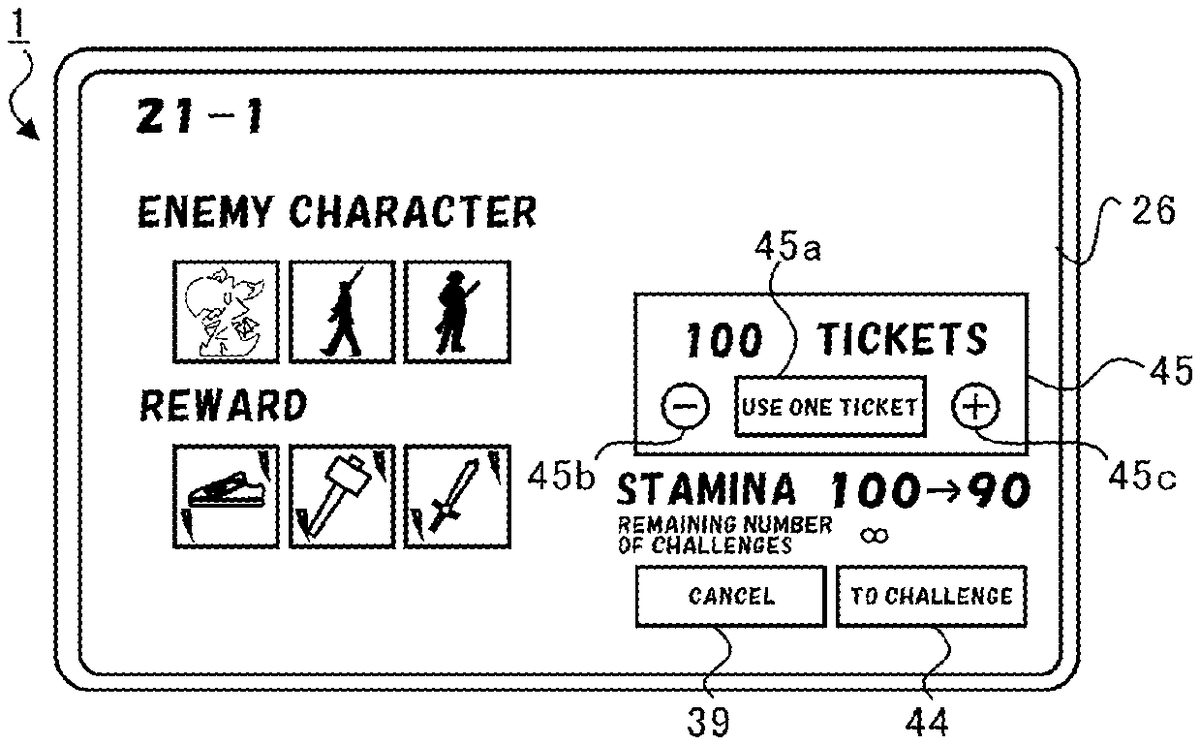
When the quest operation section42for the battle game “21-1”, for example, is operated (tapped) in the quest screen, the quest selection screen shown inFIG.5Bis displayed on the display26. In the quest selection screen, enemy characters that appear in the battle game and items (rewards) that can be obtained from the battle game are displayed. Furthermore, the stamina before and after execution of the battle game and the remaining number of challenges are displayed in the quest selection screen. Note that the remaining number of challenges indicates the number of challengeable times in a day and is set to be infinite for battle games of the normal quest. Furthermore, in this embodiment, the stamina to be consumed in a battle game of the normal quest is set to 10. However, the stamina to be consumed in a battle game of the normal quest may also be different for each battle game.
Furthermore, in the quest selection screen, the cancel operation section39and a challenge operation section44, in which “to challenge” is written, for challenging the battle game are displayed.
When the cancel operation section39is operated (tapped), the quest screen shown inFIG.5Ais displayed on the display26, and challenge to the selected battle game “21-1” is cancelled.
On the other hand, when the challenge operation section44is operated (tapped), the party selection screen shown inFIG.5Cis displayed on the display26. In the party selection screen, all ally characters owned by the player are displayed, and a selected-ally-character display area46for displaying selected ally characters is displayed below.
Furthermore, the cancel operation section39and a battle-start operation section47, in which “battle start” is written, are displayed in the party selection screen.
When the player operates (taps) some of the ally characters displayed in the party selection screen, the operated ally characters are displayed in the selected-ally-character display area46. That is, here, from among the plurality of ally character IDs associated with the player ID, ally character IDs to be used in the battle game (for determining a party) are selected.
Then, when the ally characters (the ally character IDs) are selected, and the battle-start operation section47is operated (tapped), the battle game is started.
FIG.6Ais a view for explaining an example of a battle screen.FIG.6Bis a view for explaining an example of a result screen.FIG.6Cis a view for explaining an example of a report screen. When the battle-start operation section47is operated (tapped) in the party selection screen, which is shown inFIG.5C, the battle game is started.
During the battle game, the battle screen is displayed as shown inFIG.6A. In the battle screen, the ally characters and the enemy characters are displayed on the display26. The ally characters act under computer control, give damage to the enemy characters, and receive damage from the enemy characters. Furthermore, the enemy characters act under computer control, give damage to the ally characters, and receive damage from the ally characters.
When damage points are assigned to any of the enemy characters, the damage points are subtracted from the life points of the enemy character. Similarly, when damage points are assigned to any of the ally characters, the damage points are subtracted from the life points of the ally character. The player wins (clears) when the life points of all the enemy characters become 0, and the player loses when the life points of all the ally characters become 0 (lose).
Here, as shown inFIG.6A, an ally-character display area48is provided in a lower section of the battle screen. In the ally-character display area48, life points48aand a deathblow gauge48bfor each of the ally characters are displayed. The deathblow gauge48bis raised when the ally character receives damage from an enemy character or gives damage to an enemy character. Then, when the deathblow gauge48breaches a predetermined maximum value, the ally character becomes able to use the deathblow. With the deathblow, damage points assigned to an enemy character are greater than with a normal attack, the life points of the ally character are restored, and a special effect is assigned to the enemy character.
Here, two methods to use the deathblow are provided: in one method, the player operates (taps) the ally character that is displayed in the ally-character display area48and of which the deathblow gauge48breaches the maximum value; and, in another method, when the deathblow gauge48breaches the maximum value in an automatic state, the corresponding ally character uses the deathblow under computer control. Note that an automatic selection operation section49is displayed in the battle screen, and it is possible to switch between the automatic state and a manual state in accordance with an operation on the automatic selection operation section49. When the automatic selection operation section49is operated in the manual state, the automatic state, in which the deathblow is automatically used, is selected. Furthermore, when the automatic selection operation section49is operated in the automatic state, the manual state, in which the deathblow is manually used, is selected. Note that, even in the automatic state, in a state in which the deathblow gauge48bhas reached the maximum value and in which the deathblow has not been used under computer control, when the player operates (taps) the corresponding ally character, the deathblow can be used.
Then, when the battle game ends normally (normal end), a result screen is displayed on the display26, as shown inFIG.6B.FIG.6Bshows an example of the result screen displayed when the battle game is cleared.
In the result screen, at least part of game result information for the battle game is displayed, and a report display operation section50, in which “report” is written, and an end operation section51, in which “to close” is written, are displayed.
Note that the game result information includes the ally character IDs (party) of the ally characters, the enemy character IDs of the enemy characters, the remaining states of the ally characters and the enemy characters when the battle ends (whether the life points become 0 when the battle game ends), the damage points given (total value), whether the manual state or the automatic state is selected, the battle log ID, the classification of the battle game (the normal quest, the hard quest, or the like), information associated with each battle-game classification (clear information, hierarchy of the battle game, etc.), assigned-item information, the first currency assigned, etc. Furthermore, the battle log ID is uniquely assigned to each battle game. Furthermore, information associated with each battle-game classification has content different for each battle-game classification. Furthermore, in the case where the battle game is cleared, the server100determines by lottery, for each item preset for the cleared battle game, whether the item is assigned to the player. Then, an item to be assigned to the player is assigned to the game result information and is displayed in the result screen.
When the end operation section51is operated (tapped) in the result screen, the display on the display26is switched from the battle screen to a normal screen. That is, the result screen is part of the battle screen. Note that the normal screen switched from the result screen may be the screen that was displayed immediately before being switched to the battle screen or may be a predetermined screen such as the home screen. In this way, the battle game ends at the end of display of the result screen.
When the report display operation section50is operated (tapped) in the result screen, the report screen, which is shown inFIG.6C, is displayed on the display26. In the report screen, the damage points (total values) given by the ally characters and the enemy characters are displayed, and the end operation section51is displayed.
When the end operation section51is operated (tapped), the result screen, which is shown inFIG.6B, is displayed on the display26.
Furthermore, in the quest selection screen shown inFIG.5B, a ticket display area45is provided. In the ticket display area45, the number of tickets owned by the player (the number of tickets associated with the player ID) is displayed, and a ticket-use challenge operation section45a, a minus operation section45b, and a plus operation section45care provided. The ticket-use challenge operation section45a, the minus operation section45b, and the plus operation section45care enabled only for a battle game in which three stars have been obtained as the clear information and cannot be operated for a battle game in which three stars have not been obtained as the clear information.
In the case where the ticket-use challenge operation section45a, the minus operation section45b, and the plus operation section45care enabled, every time the plus operation section45cis operated (tapped), the text written in the ticket-use challenge operation section45ais changed such that the number of tickets to be used is incremented by one, as in “use two tickets” and “use three tickets”. Furthermore, every time the minus operation section45bis operated (tapped), the text written in the ticket-use challenge operation section45ais changed such that the number of tickets to be used is decremented by one, as in “use two tickets” and “use one ticket”.
Then, for example, in the case where the text written in the ticket-use challenge operation section45aindicates “use five tickets”, when the ticket-use challenge operation section45ais operated (tapped), five tickets and a stamina of 50 are consumed, and formation of a party in the party selection screen, which is shown inFIG.5C, and execution of the battle game in the battle screen, which is shown inFIG.6A, are omitted (skipped), whereby the battle game is treated as being cleared all (five) times, and the result screen, which is shown inFIG.6B, is displayed. In this result screen, items obtained from five rounds of the battle game are collectively displayed.
In this way, a battle game in which three stars have been obtained as the clear information is omitted by consuming a ticket, whereby the battle game is treated as being cleared. Accordingly, the player can collect items while saving time.
Next, the hard quest will be described below.FIG.7Ais a view for explaining an example of a quest screen for the hard quest.FIG.7Bis a view for explaining an example of a quest selection screen for the hard quest. Note that a description of the same sections as those in the normal quest will be omitted. As shown inFIG.7A, in the case where the hard-quest selection operation section41bis selected, the quest operation section42for selecting any one of a plurality of battle games (hierarchy) that belong to the hard quest is displayed in the quest screen. Furthermore, the quest list operation section43for skipping one or a plurality of battle games collectively is displayed in the quest screen. Note that details of screen transition and processing when the quest list operation section43is operated (tapped) will be described later.
In the quest operation section42, clear information for each of the battle games is also displayed. In the example shown inFIG.7A, three stars have been obtained in the battle game “21-1”, three stars have been obtained in the battle game “21-2”, and two stars have been obtained in the battle game “21-3”.
When the quest operation section42for the battle game “21-1”, for example, is operated (tapped) in the quest screen, the quest selection screen shown inFIG.7Bis displayed on the display26. Unlike the normal quest, the number of challenges in a day is set to 3 in the hard quest. Therefore, when the battle game is challenged by using a ticket, in the case where the text written in the ticket-use challenge operation section45aindicates “use three tickets”, even if the plus operation section45cis further operated (tapped), the text is not changed.
Then, in the case where one battle game has been challenged three times, the remaining number of challenges in that day becomes 0 (0/3). However, the remaining number of challenges can be restored to 3 by consuming the second currency, only once in a day. That is, one battle game of the hard quest can be challenged up to six times in a day.
Furthermore, in this embodiment, the stamina to be consumed in a battle game of the hard quest is set to 20. However, the stamina to be consumed in a battle game of the hard quest may be different for each battle game or may be set to 10, which is the same as in the normal quest.
Furthermore, in the case where a battle game of the hard quest is cleared, an item for increasing the number of stars of the ally character can be obtained. On the other hand, even when a battle game of the normal quest is cleared, an item for increasing the number of stars of the ally character cannot be obtained.
Next, shop screens will be described below.FIG.8Ais a view for explaining an example of a shop screen for a normal shop.FIG.8Bis a view for explaining an example of a limited-shop appearance pop-up.FIG.8Cis a view for explaining an example of a shop screen for a limited shop.FIG.9is a view for explaining a limited-shop lottery table.
When the shop-screen selection operation section33ais operated (tapped) in the home screen, which is shown inFIG.3A, the shop screen for the normal shop, which is shown inFIG.8A, is displayed on the display26. In the shop screen for the normal shop, a normal selection operation section52a, in which “normal” is written, is selected and displayed, and a plurality of item purchase display areas52bare displayed as the normal shop. In each of the item purchase display areas52b, an item that can be purchased, the first currency required to purchase the item, and a purchase operation section52cfor purchase are provided. When the purchase operation section52cis operated (tapped), it is possible to purchase the item displayed in the item purchase display area52bwhere the operated purchase operation section52cis provided. Note that, in each item purchase display area52bdisplayed in the normal shop screen, the content of an item is replaced or can be purchased again, in a predetermined cycle (for example, twice a day).
Furthermore, when the above-described battle games are cleared, the server100determines by lottery whether a limited shop is made to appear. Furthermore, in the case where it is determined that the limited shop is made to appear, the server100determines a termination condition (in this embodiment, elapse of 10 minutes) for the limited shop and items that can be purchased in the limited shop. Then, in the case where it is determined at the server100that the limited shop is made to appear, a limited-shop appearance pop-up53shown inFIG.8Bis displayed on the display26so as to be overlaid on the result screen, which is shown inFIG.6B.
In the limited-shop appearance pop-up53, a message indicating that the limited shop has appeared and the period of time left until the limited shop is terminated (here, 9 minutes and 53 seconds) are displayed, and a limited-shop operation section53afor transition to the limited shop is displayed.
When the limited-shop operation section53ais operated (tapped), a shop screen for the limited shop shown inFIG.8Cis displayed. In the shop screen for the limited shop, the normal selection operation section52aand a limited selection operation section52d, in which “limited” is written, are displayed. Note that either the normal selection operation section52aor the limited selection operation section52dis always selected, and the limited selection operation section52dis selected in the case shown inFIG.8C. Furthermore, the period of time left until the limited shop is terminated (here, 9 minutes and 50 seconds) is displayed near the limited selection operation section52d.
The plurality of item purchase display areas52bare displayed also in the shop screen for the limited shop. However, in the shop screen for the limited shop, different items from those in the shop screen for the normal shop can be purchased.
Furthermore, in the shop screen for the limited shop, an immediate-close operation section52e, in which “to close immediately” is written, is provided, and, even if the termination condition is not established (even if 10 minutes have not yet elapsed), when the immediate-close operation section52eis operated, the shop screen for the limited shop is hidden.
When a battle game is cleared, the server100refers to the limited-shop lottery table, which is shown inFIG.9, to determine by lottery whether the limited shop is made to appear (whether the content is opened). When a battle game is cleared once, the server100performs a lottery to determine whether the limited shop is made to appear, at a winning probability of 10%. Furthermore, in the case where the first lottery is not won, when a battle game is cleared next (at the second time), the server100performs a lottery to determine whether the limited shop is made to appear, at a winning probability of 20%. In this way, the server100performs a lottery to determine whether the limited shop is made to appear, such that the winning probability is increased every time a battle game is cleared. Note that it is configured such that the limited shop is made to appear at least once when battle game(s) is/are cleared ten times.
Then, after the limited shop appears, when a battle game is again cleared once, whether the limited shop is made to appear is determined by lottery at a winning probability of 10%. Note that the number of times to open the limited shop is set to five at most in a day as an upper limit value. However, the upper limit value of the number of times to open may not be set.
FIG.10Ais a first view for explaining an example of a quest list pop-up54.FIG.10Bis a second view for explaining an example of the quest list pop-up54.FIG.10Cis a third view for explaining an example of the quest list pop-up54.FIG.11Ais a fourth view for explaining an example of the quest list pop-up54.FIG.11Bis a fifth view for explaining an example of the quest list pop-up54.FIG.11Cis a view for explaining an example of a skip result pop-up55.
As described above, in the normal quest and the hard quest, by consuming a ticket for a battle game in which three stars have been obtained as the clear information, at least part of the battle game is omitted, whereby the battle game is treated as being cleared. Accordingly, the player can obtain a desired item early and easily.
However, the player used to take time and effort on the work for selecting one battle game to which a desired reward could be assigned and for obtaining the item by consuming a ticket for the selected battle game.
Thus, in this embodiment, tickets are collectively consumed for a plurality of battle games, to treat the plurality of battle games as being collectively cleared, thereby making it possible to collectively obtain items that can be obtained from the plurality of battle games. Specifically, when the quest list operation section43is operated (tapped) in the quest screens, which are shown inFIG.5AandFIG.7A, the quest list pop-up54shown inFIG.10Ais displayed on the display26.
In the quest list pop-up54, three item selection fields54a, a search operation section54b, and a display switch operation section54care displayed at an upper region. Furthermore, one or a plurality of battle-game display areas54dare displayed at a center region in the quest list pop-up54. Furthermore, the total stamina, the number of consumed tickets, and the current stamina are displayed below the battle-game display areas54din the quest list pop-up54. Note that an icon (operation section) for displaying, on the display26, a pop-up for restoring the stamina is provided at the right side of the current stamina. The player operates (taps) the icon and consumes the second currency, for example, according to an indication in the pop-up displayed on the display26, thereby making it possible to restore the stamina by a predetermined amount. At this time, the stamina can be restored beyond an upper limit value thereof.
Furthermore, in the quest list pop-up54, a number-of-tickets display field54e, a minus operation section54f, a plus operation section54g, the cancel operation section39, and a collective skip operation section54hare displayed. Furthermore, a tab-name display field54iis displayed in the quest list pop-up54at the right side of the display switch operation section54c. Note that, although a detailed description will be omitted, when the tab-name display field54iis operated, one tab name can be selected from among a plurality of tab names.
The item selection fields54aare blank in the initial state, i.e., no items are selected. In this state, in the battle-game display areas54d, battle games in which three stars have been obtained as the clear information are displayed from above in order of difficulty from high difficulty toward low difficulty. Furthermore, in each of the battle-game display areas54d, the remaining number of challenges for the battle game and items that can be obtained from the battle game are displayed, and a check-mark input field54jis provided.
When the player operates (taps) the check-mark input field54j, a check mark can be input therein, as shown inFIG.10B. Note that, when the check-mark input field54jin which a check mark has been input is operated (tapped) again, the check mark can be removed.
In a state in which a check mark is input in one or a plurality of check-mark input fields54j, when the display switch operation section54cis operated (tapped), only the battle-game display areas54dof battle games for which a check mark has been input in the check-mark input fields54jare displayed in the quest list pop-up54, as shown inFIG.10C. Note that, when the display switch operation section54cis operated (tapped) again, the battle-game display area54dof a battle game for which a check mark has not been input in the check-mark input field54jis also displayed in the quest list pop-up54.
As shown inFIGS.10B and10C, when a check mark is input in one or a plurality of check-mark input fields54j, the stamina required to execute the battle game(s) for which a check mark has been input is displayed as the total stamina. Furthermore, the number of tickets required to execute the battle game(s) for which a check mark has been input is displayed as the number of consumed tickets.
Then, for example, in a state in which the quest list pop-up54shown inFIG.10Cis displayed, when the plus operation section54gis operated once, as shown inFIG.11A, “use two tickets” is displayed in the number-of-tickets display field54e. Furthermore, the stamina required to execute, two times, each of the battle games for which a check mark has been input is displayed as the total stamina, and the number of tickets required to execute, two times, each of the battle games for which a check mark has been input is displayed as the number of consumed tickets. Then, every time the plus operation section54gis operated, the number of tickets displayed in the number-of-tickets display field54eis incremented by one and displayed, and the total stamina and the number of consumed tickets are increased and displayed.
However, in the case where the remaining number of challenges for the hard quest is less than the number of tickets displayed in the number-of-tickets display field54e, only the amount of stamina corresponding to the remaining number of challenges is added to the total stamina, and the number of tickets corresponding to the remaining number of challenges is added to the number of consumed tickets, for the battle game of the hard quest. For example, as shown inFIG.11B, in the case where “use four tickets” is displayed in the number-of-tickets display field54e, the stamina and the number of consumed tickets (a stamina of 40, and a number of consumed tickets of 4) corresponding to four rounds of the battle game “21-1” of the normal quest and the stamina and the number of consumed tickets (a stamina of 60, and a number of consumed tickets of 3) corresponding to three rounds of the battle game “21-2” of the hard quest are summed, whereby the total stamina (100) and the number of consumed tickets (7) are displayed.
Furthermore, every time the minus operation section54fis operated, the number of tickets displayed in the number-of-tickets display field54eis decremented by one and displayed, and the total stamina and the number of consumed tickets are decreased and displayed.
After that, for example, in a state in which the quest list pop-up54shown inFIG.11Ais displayed, when the collective skip operation section54his operated (tapped), the battle game “21-2” of the hard quest and the battle game “21-1” of the normal quest are each treated as being cleared two times, and the skip result pop-up55, which is shown inFIG.11C, is displayed on the display26. In the skip result pop-up55, items obtained from the two rounds of the battle game “21-2” of the hard quest and the two rounds of the battle game “21-1” of the normal quest are collectively displayed. Note that processing for collectively skipping a plurality of battle games in this way is referred to as collective skip processing.
Here, at the player terminal1, in the case where the collective skip operation section54his operated, the current stamina and the number of tickets owned by the player are referred to, for each of the battle games for which a check mark has been input, and it is determined sequentially from the top whether the battle game can be executed the number of times corresponding to the number of tickets to be consumed. Specifically, in the example case shown inFIG.11A, although a stamina of 40 and two tickets are consumed to execute the battle game “21-2” of the hard quest two times, if it is assumed that the current stamina is 100 and the player owns 100 tickets, it is determined that the battle game “21-2” of the hard quest can be executed two times. Then, it is determined whether the next battle game “21-1” of the normal quest can be executed two times. Although a stamina of 20 and two tickets are consumed to execute the battle game “21-1” of the normal quest two times, because the remaining stamina is 40 (100−60), and the player owns 98 (100−2) tickets, it is determined that the battle game “21-1” of the normal quest can be executed two times.
FIG.12Ais a sixth view for explaining an example of the quest list pop-up54.FIG.12Bis a view for explaining an example of a skip confirmation pop-up56.FIG.12Cis a seventh view for explaining an example of the quest list pop-up54.
As shown inFIG.12A, it is assumed that a check mark has been input in the check-mark input fields54jfor the battle game “21-2” of the hard quest, the battle game “21-1” of the hard quest, and the battle game “21-1” of the normal quest in the battle-game display areas54d, and “use three tickets” is displayed in the number-of-tickets display field54e. In the case where the collective skip operation section54his operated (tapped) in this state, although a stamina of 60 and three tickets are consumed to execute the battle game “21-2” of the hard quest three times, if it is assumed that the current stamina is 100 and the player owns 100 tickets, it is determined, at the player terminal1, that the battle game “21-2” of the hard quest can be executed three times. Next, at the player terminal1, it is determined whether the battle game “21-1” of the hard quest can be executed three times. Although a stamina of 60 and three tickets are consumed to execute the battle game “21-1” of the hard quest three times, because the remaining stamina becomes 40 (100−60), it is determined, at the player terminal1, that the battle game “21-1” of the hard quest cannot be executed three times. In this way, executability is determined for each battle game for which a check mark has been input, sequentially from the top, and, in the case where there is a battle game that is determined to be non-executable, executability is not determined for battle games displayed below this battle game, and those battle games are all set to be non-executable.
Therefore, in this example case, it is determined that only the battle game “21-2” of the hard quest is executable, and the battle game “21-1” of the hard quest and the battle game “21-1” of the normal quest are non-executable.
In this way, in the case where there are battle games that are determined to be non-executable, the skip confirmation pop-up56, which is shown inFIG.12B, is displayed on the display26. In the skip confirmation pop-up56, the battle games (“21-1” of the hard quest and “21-1” of the normal quest) that are determined to be non-executable are displayed.
Furthermore, in the skip confirmation pop-up56, a confirmation operation section56a, in which “OK” is written, and the cancel operation section39are displayed. When the confirmation operation section56ais operated (tapped), only the battle game that is determined to be executable is treated as being cleared (“21-2” of the hard quest is treated as being cleared three times), the skip result pop-up55such as that shown inFIG.11Cis displayed on the display26. Furthermore, after the skip result pop-up55is hidden, a skipped display bar57indicating “skipped up to here”, for example, is displayed in the quest list pop-up54between the battle-game display area54dof the battle game that has been skipped and the battle-game display areas54dof the battle games that have not been skipped, as shown inFIG.12C.
In this way, the battle game that has been skipped and the battle games that have not been skipped are displayed so as to be identifiable by using the skipped display bar57, whereby the player can instantly confirm which battle game has been skipped.
Furthermore, when the stamina is restored, and the collective skip operation section54his operated again, the collective skip processing is performed on the battle games in the battle-game display areas54ddisplayed below the skipped display bar57.
FIG.13Ais an eighth view for explaining an example of the quest list pop-up54.FIG.13Bis a view for explaining an example of a number-of-challenges restoration pop-up58.
As shown inFIG.13A, in the quest list pop-up54, it is assumed that the remaining number of challenges for the battle game “21-2” of the hard quest is 0, for example. Furthermore, it is assumed that the remaining number of challenges for the battle game “21-2” of the hard quest has not been restored. Furthermore, it is assumed that a check mark has been input in the check-mark input fields54jof the battle game “21-2” of the hard quest and the battle game “21-1” of the normal quest.
In this case, when the collective skip operation section54his operated, the number-of-challenges restoration pop-up58, which is shown inFIG.13B, is displayed on the display26.
In the number-of-challenges restoration pop-up58, a message indicating whether the remaining number of challenges for the battle game of the hard quest is restored by using the second currency is displayed, and the cancel operation section39, a no-restoration skip operation section58a, and a second-currency-use operation section58bare provided.
Then, when the no-restoration skip operation section58ais operated, the collective skip processing is performed on the battle game “21-1” of the normal quest without restoring the remaining number of challenges for the battle game “21-2” of the hard quest.
On the other hand, when the second-currency-use operation section58bis operated, the remaining number of challenges for the battle game “21-2” of the hard quest is restored by consuming the second currency, and the collective skip processing is performed on the battle game “21-2” of the hard quest and the battle game “21-1” of the normal quest.
Note that, in the quest list pop-up54, a check mark cannot be input in the check-mark input field54jof a battle game for which the remaining number of challenges has already been restored once and for which the remaining number of challenges is 0.
Next, the item selection fields54aand the search operation section54bwill be described below.FIG.14Ais a view for explaining an example of an item selection pop-up59.FIG.14Bis a ninth view for explaining an example of the quest list pop-up54.
In a state in which the quest list pop-up54shown inFIG.10Ais displayed on the display26, for example, when any of the item selection fields54ais operated (tapped), the item selection pop-up59, which is shown inFIG.14A, is displayed on the display26. In the item selection pop-up59, an equipment-item selection operation section59aand a star-enhancement-item selection operation section59bare provided. Furthermore, an item display area59cfor displaying items is provided in the item selection pop-up59. Furthermore, the cancel operation section39and a selection completion operation section59dare provided in the item selection pop-up59.
Either the equipment-item selection operation section59aor the star-enhancement-item selection operation section59bis in a state of being selected. In the case where the equipment-item selection operation section59ais selected, items that can be obtained from battle games in which three stars have been obtained and that are required to create equipment are displayed in a list in the item display area59c. Furthermore, in the case where the star-enhancement-item selection operation section59bis selected, items that can be obtained from battle games in which three stars have been obtained and that are required to enhance the number of stars are displayed in a list in the item display area59c.
The player can select up to three items by operating (tapping) some of the items displayed in the item display area59c. When the selection completion operation section59dis operated in a state in which some of the items displayed in the item display area59chave been selected, these items selected in the item display area59care displayed in the item selection fields54a, as shown inFIG.14B. Then, when the search operation section54bis operated (tapped) with these items being displayed in the item selection fields54a, the battle-game display areas54dof the battle games from which these items displayed in the item selection fields54acan be obtained are displayed.
In this way, the player merely selects desired items and operates (taps) the search operation section54b, whereby the battle games from which these items desired by the player can be obtained are displayed in a list in the battle-game display areas54d. Then, a check mark is input in the check-mark input field(s)54jof the battle game(s) to be skipped, and the number of times of execution of the battle game(s) is selected, whereby it is possible to skip the selected number of times of execution of the one or a plurality of battle games for each of which a check mark has been input. Accordingly, it is possible to easily collect items and to save time and effort of the player.
FIG.15Ais a view for explaining an example of a limited-shop appearance pop-up60.FIG.15Bis a view for explaining an example of a reset confirmation pop-up61. Even in the case where the collective skip processing is performed, the server100performs a lottery to determine whether the limited shop is made to appear. Here, in the case where the collective skip processing is performed, because the battle game(s) is/are treated as being cleared a plurality of times, the server100performs a lottery to determine whether the limited shop is made to appear, the corresponding number of times. For example, in the case where the collective skip processing is performed for 30 rounds of execution of battle game(s), the server100performs a lottery to determine whether the limited shop is made to appear, up to 30 times. Specifically, when a lottery is won until the number of times to open the limited shop reaches five (upper limit value), the server100refers to the limited-shop lottery table, which is shown inFIG.9, and performs a lottery sequentially from a winning probability of 10% again. Then, when the number of times to open has reached five, the server100does not perform the subsequent lottery. Note that, in the case where a battle game is treated as being cleared by consuming a plurality of tickets in the quest detail screens, which are shown inFIG.5BandFIG.7B, it is also possible to perform a lottery to determine whether the limited shop is made to appear, until the number of times to open reaches five, as in the case of the collective skip processing.
Then, the server100performs a lottery while referring to the limited-shop lottery table, which is shown inFIG.9, and, when the lottery is won, the server100performs a lottery again the remaining number of times while referring to the limited-shop lottery table. Therefore, in the case where the collective skip function is used, a plurality of lotteries are won in some cases.
In this case, at the player terminal1, the limited-shop appearance pop-up60, which is shown inFIG.15A, is displayed on the display26. In the limited-shop appearance pop-up60, the results of a plurality of lotteries are collectively displayed. Specifically, in the limited-shop appearance pop-up60, the fact that the limited shop has appeared (has been opened) and the number of times to open the limited shop (the number of wins, here, three) are displayed. Note that, in the limited-shop appearance pop-up60, it is also possible to display only the fact that the limited shop has been opened and not to display the number of times to open the limited shop (the number of wins).
Then, when the limited-shop operation section53ais operated, the limited shop screen shown inFIG.8Cis displayed. After that, when the immediate-close operation section52eis operated, the reset confirmation pop-up61, which is shown inFIG.15B, is displayed on the display26. Then, when a confirmation operation section61ain the reset confirmation pop-up61is operated, the shop screen for the next limited shop is displayed on the display26.
Note that, when 10 minutes have elapsed while the immediate-close operation section52ehas not been operated, the next limited shop appears. In such a case, the shop-screen operation section33ais operated from the home screen, which is shown inFIG.3A, thereby making it possible to display the shop screen for the limited shop.
In this way, in the case where multiple rounds of the battle game(s) are collectively skipped, a lottery for determining whether the limited shop is made to appear is performed the corresponding number of times, and the result thereof is displayed, thereby avoiding a situation in which, in the case where multiple rounds of the battle game(s) are collectively skipped, the limited shop does not appear multiple times and preventing the player from having a sense of losing out.
Next, basic configurations and communication processing of the player terminal1and the server100for executing the collective skip processing will be described below. Note that an example of basic communication processing for proceeding with a game and an example of main communication processing related to the collective skip processing will be described here, and a description of the other processing will be omitted.
(Functional Configuration of Player Terminal1)
FIG.16is a diagram for explaining the configuration of the memory12at the player terminal1and the function of the player terminal1serving as a computer. In the memory12, a program storage area12aand a data storage area12bare provided. When a game is started, the CPU10stores terminal-side game control programs (modules) in the program storage area12a.
The terminal-side game control programs include a game-execution control program80, a battle-game executing program81, a skip-game executing program82, a collective-skip control program83, and a display control program84. Note that the programs listed inFIG.16are merely examples, and a large number of other programs are also provided as the terminal-side game control programs.
In the data storage area12b, a game-information storage section90, a player-information storage section91, a shop-information storage section92, and a collective-skip-information storage section93are provided as storage sections for storing data. Note that the above-mentioned storage sections are merely examples, and a large number of other storage sections are also provided in the data storage area12b.
The CPU10runs the individual programs stored in the program storage area12aand updates data in the individual storage sections of the data storage area12b. Then, the CPU10runs the individual programs stored in the program storage area12a, thereby causing the player terminal1(computer) to function as a terminal-side game control unit1A. The terminal-side game control unit1A includes a game-execution control unit80a, a battle-game executing unit81a, a skip-game executing unit82a, a collective-skip control unit83a, and a display control unit84a.
Specifically, the CPU10runs the game-execution control program80, thereby causing the computer to function as the game-execution control unit80a. Similarly, the CPU10runs the battle-game executing program81, the skip-game executing program82, the collective-skip control program83, and the display control program84, thereby causing the computer to function as the battle-game executing unit81a, the skip-game executing unit82a, the collective-skip control unit83a, and the display control unit84a, respectively.
The game-execution control unit80acontrols the proceeding of the entire game. The game-execution control unit80asends login information to the server100at the time of logging in, for example. Furthermore, the game-execution control unit80aperforms control related to transition of the normal screens. Furthermore, in the case where game information about the whole game is updated, the game-execution control unit80areceives the game information from the server100and stores the game information in the game-information storage section90.
The battle-game executing unit81atakes charge of control of the execution of battle games. For example, the battle-game executing unit81aupdates the battle screen, controls actions of ally characters and enemy characters, and derives damage points, on the basis of operations input to the player terminal1.
The skip-game executing unit82atakes charge of control when a battle game is skipped by consuming a ticket.
The collective-skip control unit83astores information related to the collective skip processing in the collective-skip-information storage section93and takes charge of control related to the collective skip processing.
The display control unit84agenerates a screen to be displayed on the display26and displays the generated screen on the display26.
(Functional Configuration of Server100)
FIG.17is a diagram for explaining the configuration of the memory112at the server100and the function of the server100serving as a computer. In the memory112, a program storage area112aand a data storage area112bare provided. When a game is started, the CPU110stores server-side game control programs (modules) in the program storage area112a.
The server-side game control programs include a game-execution control program180, a battle-game executing program181, a reward assigning program182, and a shop control program183. Note that the programs listed inFIG.17are merely examples, and a large number of other programs are also provided as the server-side game control programs.
In the data storage area112b, a game-information storage section190, a player-information storage section191, and a shop-information storage section192are provided as storage sections for storing data. Note that the above-mentioned storage sections are merely examples, and a large number of other storage sections are also provided in the data storage area112b.
The CPU110runs the individual programs stored in the program storage area112aand updates data in the individual storage sections of the data storage area112b. Then, the CPU110runs the individual programs stored in the program storage area112a, thereby causing the server100to function as a server-side game control unit100A. The server-side game control unit100A includes a game-execution control unit180a, a battle-game executing unit181a, a reward assigning unit182a, and a shop control unit183a.
Specifically, the CPU110runs the game-execution control program180, thereby causing the computer to function as the game-execution control unit180a. Similarly, the CPU110runs the battle-game executing program181, the reward assigning program182, and the shop control program183, thereby causing the computer to function as the battle-game executing unit181a, the reward assigning unit182a, and the shop control unit183a, respectively.
The game-execution control unit180acontrols the proceeding of the entire game. When login information, for example, is received from the player terminal1, the game-execution control unit180asends player information stored in the player-information storage section191to the player terminal1. Furthermore, in the case where game information about the whole game is updated, the game-execution control unit180areads the updated game information from the game-information storage section190and sends the game information to the player terminal1.
The battle-game executing unit181atakes charge of control of the execution of battle games.
The reward assigning unit182aassigns rewards to the player. The reward assigning unit182aassigns, to the player who has cleared a battle game, items corresponding to the cleared battle game. More specifically, the reward assigning unit182aadds items to be assigned, to the player information corresponding to the player ID of the player who has cleared a battle game, and stores the items in the player-information storage section191.
The shop control unit183adetermines the content of the normal shop and stores the determined content in the shop-information storage section192. Furthermore, in the case where a battle game is cleared, the shop control unit183adetermines by lottery whether the limited shop is made to appear and, in the case where the lottery is won, stores the number of times to open the limited shop, the content thereof, and the termination condition in the shop-information storage section192.
(Communication Processing Between Player Terminal1and Server100)
FIG.18is a sequence diagram for explaining basic processing at the player terminal1and the server100. Note that, in the following description, processing at the player terminal1is indicated by Pn (n is an arbitrary integer). Furthermore, processing at the server100is indicated by Sn (n is an arbitrary integer). At the player terminal1, when the player activates a game application (P1), the game-execution control unit80asends login information to the server100. When the login information is received, the game-execution control unit180aof the server100identifies the player ID associated with the login information to perform login processing (S1). Here, the game-execution control unit180areads player information corresponding to the identified player ID from the player-information storage section191and sends the player information to the player terminal1.
Furthermore, it is assumed that a battle-game start operation is performed at the player terminal1(P2). In this case, start information is sent from the player terminal1to the server100. Note that the start information includes party information selected by the player, battle-game classification information, etc. At the server100, upon reception of the start information, battle-game start information needed to start a battle game is sent to the player terminal1(S2). Then, when the battle-game start information is received, the battle-game executing unit81aof the player terminal1performs battle-game start processing for starting the battle game (P3). Here, for example, an area of the memory12for proceeding with the battle game is allocated, and a predetermined program is loaded from the storage unit18into the memory12.
After that, the battle-game executing unit81aof the player terminal1performs battle-game control processing for controlling the battle game (P4). In the battle-game control processing, update processing for updating various kinds of information is repeatedly executed on a per-frame basis. Note that the number of frames is not particularly limited; for example, the number of frames per second is 30 to 60. Thus, during the battle game, information is updated at intervals of about 16 milliseconds (ms) to 33 ms at the player terminal1.
Then, when a termination condition for the battle game is established, the battle-game executing unit81aof the player terminal1performs battle-game termination processing for terminating the battle game (P5). In the battle-game termination processing, for example, game result information (termination information) is sent to the server100. When the game result information is obtained, the battle-game executing unit181aof the server100updates the player information (S3). Note that, in the case where a battle game is started by using a ticket, the skip-game executing unit82askips the battle-game start processing (P3) and the battle-game control processing (P4) and executes the battle-game termination processing (P5) while treating the battle game as being cleared.
Furthermore, in the case where the battle game is cleared, the reward assigning unit182adetermines items corresponding to the cleared battle game on the basis of the game result information and assigns the items (S4). Then, the reward assigning unit182asends, to the player terminal1, information about the assigned items as reward information. The display control unit84aof the player terminal1displays a result screen on the display26on the basis of the reward information (P6).
The shop control unit183adetermines by lottery whether the limited shop is made to appear (S5). Furthermore, in the case where it is determined that the limited shop is made to appear, the shop control unit183adetermines the content of the limited shop and the termination condition therefor and stores the number of times to open the limited shop, the content, and the termination condition in the shop-information storage section192. Furthermore, the shop control unit183asends shop information indicating the number of times to open the limited shop, the content, and the termination condition to the player terminal1. When the shop information is received, the game-execution control unit80aof the player terminal1stores the number of times to open the limited shop, the content, and the termination condition, which are indicated in the shop information, in the shop-information storage section92. Furthermore, the display control unit84adisplays the limited-shop appearance pop-up53on the display26(P7).
Furthermore, when the quest list operation section43is operated in the quest display screens, which are shown inFIG.5AandFIG.7A, the collective-skip control unit83aexecutes collective skip processing (P8).
FIG.19is a flowchart for explaining the collective skip processing. As shown inFIG.19, when the tab-name display field54iis operated (YES in P8-1), the collective-skip control unit83areads information corresponding to the operated tab name from the collective-skip-information storage section93(P8-2). The display control unit84adisplays the quest list pop-up54on the display26in accordance with a read collective skip list (P8-3).
Furthermore, when any of the item selection fields54ais operated (tapped) (YES in P8-4), the display control unit84adisplays the item selection pop-up59, which is shown inFIG.14A, on the display26(P8-5). Then, in the state in which some of the items displayed in the item display area59care selected, when the selection completion operation section59dis operated (YES in P8-6), the display control unit84adisplays the items selected in the item display area59c, in the item selection fields54a(P8-7). Furthermore, the collective-skip control unit83astores the selected items in the collective-skip-information storage section93in correspondence with the tab name.
After that, when the search operation section54bis operated (tapped) (YES in P8-8), the collective-skip control unit83asearches for battle games from which the items displayed in the item selection fields54acan be obtained (P8-9), and the display control unit84adisplays the battle-game display areas54dof the found battle games (P8-10).
Furthermore, when the check-mark input fields54jof the battle-game display areas54dare operated (YES in P8-11), the display control unit84adisplays check marks in the operated check-mark input fields54j(P8-12). Furthermore, the collective-skip control unit83astores the battle games for which a check mark has been input, in the collective-skip-information storage section93in correspondence with the tab name and sends this information to the server100.
Furthermore, when the minus operation section54for the plus operation section54gis operated (YES in P8-13), the display control unit84achanges the indication of the number-of-tickets display field54ein accordance with the operation (P8-14). Furthermore, the display control unit84achanges and displays the total stamina and the number of consumed tickets in accordance with the operation (P8-15). Furthermore, the collective-skip control unit83astores the changed number of tickets in the collective-skip-information storage section93in correspondence with the tab name and sends this information to the server100.
When the collective skip operation section54his operated (YES in P8-16), the collective-skip control unit83adetermines sequentially from above whether the battle games for which a check mark has been input in the check-mark input fields54jare executable (P8-17).
In the case where all the battle games for which a check mark has been input in the check-mark input fields54jare executable (YES in P8-18), and, when there is no battle game for which the remaining number of challenges is 0 (NO in P8-19), the collective-skip control unit83asends collective skip information that indicates the hierarchies of all those battle games and the number of times of execution thereof, to the server100(P8-20).
On the other hand, when there is a battle game for which the remaining number of challenges is 0 (YES in P8-19), the display control unit84adisplays the number-of-challenges restoration pop-up58, which is shown inFIG.13B, on the display26(P8-21). Then, when the no-restoration skip operation section58ais operated (YES in P8-22), the collective-skip control unit83adoes not restore the remaining number of challenges for the battle game and sends collective skip information that indicates the hierarchies of the battle games for which the remaining number of challenges is other than 0 and the number of times of execution thereof, to the server100(P8-23).
Furthermore, when the second-currency-use operation section58bis operated (YES in P8-24), the collective-skip control unit83arestores the remaining number of challenges for the battle game and sends collective skip information that indicates the hierarchies of all those battle games and the number of times of execution thereof, to the server100(P8-25).
Furthermore, in the case where all the battle games for which a check mark has been input in the check-mark input fields54jare not executable (NO in P8-18), the display control unit84adisplays, on the display26, the skip confirmation pop-up56, which is shown inFIG.12B, for the battle game that is not executable (P8-26).
Then, when the confirmation operation section56ais operated (YES in P8-27), collective skip information that indicates the hierarchies of the battle games that are determined to be executable and the number of times of execution thereof is sent to the server100(P8-28). Furthermore, the display control unit84adisplays the skipped display bar57, which indicates “skipped up to here”, for example, between the battle-game display area54dof the battle game that has been skipped and the battle-game display area54dof the battle game that has not been skipped (P8-29).
Returning toFIG.18, when the collective skip information is received, the reward assigning unit182adetermines and assigns items corresponding to the number of times of execution of all those battle games, on the basis of the collective skip information (S6). Then, the reward assigning unit182asends, as reward information, information about the assigned items to the player terminal1. The display control unit84aof the player terminal1displays the result screen on the display26on the basis of the reward information (P9).
The shop control unit183adetermines by lottery whether the limited shop is made to appear, on the basis of the collective skip information (S7).
FIG.20is a flowchart for explaining limited-shop lottery processing. The shop control unit183aconfirms the number of times of execution of the battle game(s) on the basis of the collective skip information (S7-1). Then, the shop control unit183arefers to the limited-shop lottery table, which is shown inFIG.9, and performs a lottery the confirmed number of times of execution (S7-2).
After that, in the case of winning in the lottery (YES in S7-3), the shop control unit183adetermines the content of the limited shop and the termination condition, for the number of times of winning in the lottery (S7-4). Then, the shop control unit183asends shop information that indicates the content of the limited shop and the termination condition to the player terminal1(S7-5).
Returning toFIG.18, when the shop information is received, the display control unit84aperforms limited-shop display processing (P10).
FIG.21is a flowchart showing the limited-shop display processing. When the shop information is received, the display control unit84adisplays the limited-shop appearance pop-up60, which is shown inFIG.15A, on the display26(P10-1).
Then, before the termination condition is established (NO in P10-2), when the immediate-close operation section52eis operated (YES in P10-3), the display control unit84adisplays the reset confirmation pop-up61, which is shown inFIG.15B, on the display26(P10-4).
Furthermore, when the termination condition is established (YES in P10-2) or when the confirmation operation section61ais operated (YES in P10-5), if there is a next limited shop (YES in P10-6), the display control unit84adisplays the shop screen for the next limited shop on the display26(P10-7).
As described above, the player terminal1has the game-execution control program80, the battle-game executing program81, the skip-game executing program82, the collective-skip control program83, and the display control program84provided therein. Furthermore, the player terminal1includes the game-execution control unit80a, the battle-game executing unit81a, the skip-game executing unit82a, the collective-skip control unit83a, and the display control unit84a. However, a portion or the entirety of these programs and functional units may be provided at the server100.
Furthermore, the server100has the game-execution control program180, the battle-game executing program181, the reward assigning program182, and the shop control program183provided therein. Furthermore, the server100includes the game-execution control unit180a, the battle-game executing unit181a, the reward assigning unit182a, and the shop control unit183a. However, a portion or the entirety of these programs and functional units may be provided at the player terminal1.
Furthermore, in the above-described embodiment, the shop control unit183a, which serves as a lottery unit, determines by lottery whether the limited shop is made to appear when a battle game is cleared. However, the lottery unit may open predetermined content when a battle game is cleared. Here, the predetermined content may be, for example, another battle game, or may be a period of time that becomes advantageous to the player, such as a period of time during which at least one of experience points and an item that can be obtained is doubled.
Furthermore, in the above-described embodiment, the shop control unit183a, which serves as the lottery unit, determines by lottery whether the limited shop is made to appear (whether the content is opened) when a battle game is cleared. However, the lottery unit may determine by lottery whether an item for opening the content is assigned, for example, when a battle game is cleared. That is, the lottery unit may perform a lottery regarding the opening of predetermined content.
Furthermore, in the above-described embodiment, although a battle game using a ticket is omitted in its entirety, it is just necessary to omit at least a portion of the function of a game, and, for example, it is also possible to automatically execute a battle game without the player performing an operation, to reduce the number of enemy characters, or to make enemy characters weak.
Furthermore, the programs in the above-described embodiment may be stored in a computer-readable recording medium and provided in the form of the recording medium. Alternatively, the programs in the above-described embodiment may be provided in the form of a player terminal or an information processing system that includes this recording medium. Furthermore, the above-described embodiment may be an information processing method for realizing the individual functions and the steps shown in the flowcharts.
Although an aspect of the embodiment has been described above with reference to the accompanying drawings, it goes without saying that the present invention is not limited to the embodiment described above. It would be obvious that a person skilled in the art could conceive of various modifications and amendments within the scope recited in the claims, and it will be understood that those modifications and amendments obviously belong to the technical scope of the present invention.
Claims
- A non-transitory computer readable medium storing a program causing a computer to execute a method comprising: executing a first computer game among a plurality of computer games based on an operation of a player, wherein the plurality of computer games are executed using a player terminal communicating with a server over a communication network;assigning a first reward among a plurality of rewards to the player in response to the first computer game being cleared;displaying, using a display device, a first game screen comprising an item selection pop-up in which the player selects one or more rewards among a plurality of assigned rewards including the first reward after the first reward is assigned to the player in response to clearing the first computer game;obtaining, from a touchscreen connected to the player terminal, a selection of rewards including the one or more rewards selected by the player in the first game screen;searching a first portion of the plurality of computer games based on the selection, wherein each computer game among the first portion of the plurality of computer games comprises at least one of the one or more rewards selected by the player in the first game screen, and wherein each computer game among the first portion of the plurality of computer games comprises a skip function that can omit at least a part of a plurality of game functions;displaying, using the display device, a second game screen comprising a quest list pop-up, wherein the second game screen shows the first portion of the plurality of computer games that have been searched and in which the player can select a second portion of the plurality of computer games that are among the first portion of plurality of computer games;and collectively executing, using the player terminal and the server, a plurality of skip functions of the second portion of the plurality of computer games selected by the player in the second game screen.
- The non-transitory computer readable medium according to claim 1, wherein a plurality of stamina values are required for executing and are set for the plurality of computer games, and wherein the plurality of skip functions are collectively executed so that a sum of the plurality of stamina values of the second portion of plurality of computer games does not exceed a stamina value that the player has.
- The non-transitory computer readable medium according to claim 2, wherein the method further comprises: distinguishably displaying, in response to a part of the plurality of skip functions has not been executed, at least one computer game of which a skip function has been executed and at least one computer game of which a skip function has not been executed, among the second portion of the plurality of computer games.
- An information processing method comprising steps of: executing a first computer game among a plurality of computer games based on an operation of a player, wherein the plurality of computer games are executed using a player terminal communicating with a server over a communication network;assigning a first reward among a plurality of rewards to the player in response to the first computer game being cleared;displaying, using a display device, a first game screen comprising an item selection pop-up in which the player selects one or more rewards among a plurality of assigned rewards including the first reward after the first reward is assigned to the player in response to clearing the first computer game;obtaining, from a touchscreen connected to the player terminal, a selection of rewards including the one or more rewards selected by the player in the first game screen;searching a first portion of the plurality of computer games based on the selection, wherein each computer game among the first portion of the plurality of computer games comprises at least one of the one or more rewards selected by the player in the first game screen, and wherein each computer game among the first portion of the plurality of computer games comprises a skip function that can omit at least a part of a plurality of game functions;displaying, using the display device, a second game screen comprising a quest list pop-up, wherein the second game screen shows the first portion of the plurality of computer games that have been searched and in which the player can select a second portion of the plurality of computer games that are among the first portion of plurality of computer games;and collectively executing, using the player terminal and the server, a plurality of skip functions of the second portion of the plurality of computer games selected by the player in the second game screen.
- An information processing device comprising a computer configured to execute a method comprising: executing a first computer game among a plurality of computer games based on an operation of a player, wherein the plurality of computer games are executed using a player terminal communicating with a server over a communication network;assigning a first reward among a plurality of rewards to the player in response to the first computer game being cleared;displaying, using a display device, a first game screen comprising an item selection pop-up in which the player selects one or more rewards among a plurality of assigned rewards including the first reward after the first reward is assigned to the player in response to clearing the first computer game;obtaining, from a touchscreen connected to the player terminal, a selection of rewards including the one or more rewards selected by the player in the first game screen;searching a first portion of the plurality of computer games based on the selection, wherein each computer game among the first portion of the plurality of computer games comprises at least one of the one or more rewards selected by the player in the first game screen, and wherein each computer game among the first portion of the plurality of computer games comprises a skip function that can omit at least a part of a plurality of game functions;displaying, using the display device, a second game screen comprising a quest list pop-up, wherein the second game screen shows the first portion of the plurality of computer games that have been searched and in which the player can select a second portion of the plurality of computer games that are among the first portion of plurality of computer games;and collectively executing, using the player terminal and the server, a plurality of skip functions of the second portion of the plurality of computer games selected by the player in the second game screen.
- An information processing system comprising a player terminal and a server configured to collaboratively execute a method comprising: executing a first computer game among a plurality of computer games based on an operation of a player, wherein the plurality of computer games are executed using the player terminal communicating with the server over a communication network;assigning a first reward among a plurality of rewards to the player in response to the first computer game being cleared;displaying, using a display device, a first game screen comprising an item selection pop-up in which the player selects one or more rewards among a plurality of assigned rewards including the first reward after the first reward is assigned to the player in response to clearing the first computer game;obtaining, from a touchscreen connected to the player terminal, a selection of rewards including the one or more rewards selected by the player in the first game screen;searching a first portion of the plurality of computer games based on the selection, wherein each computer game among the first portion of the plurality of computer games comprises at least one of the one or more rewards selected by the player in the first game screen, and wherein each computer game among the first portion of the plurality of computer games comprises a skip function that can omit at least a part of a plurality of game functions;displaying, using the display device, a second game screen comprising a quest list pop-up, wherein the second game screen shows the first portion of the plurality of computer games that have been searched and in which the player can select a second portion of the plurality of computer games that are among the first portion of plurality of computer games;and collectively executing, using the player terminal and the server, a plurality of skip functions of the second portion of the plurality of computer games selected by the player in the second game screen.
- A non-transitory computer readable medium storing a program causing a computer to execute a method comprising: executing a first computer game among a plurality of computer games based on an operation of a player, wherein the plurality of computer games are executed using a player terminal communicating with a server over a communication network;assigning a first reward among a plurality of rewards to the player in response to the first computer game being cleared;displaying, using a display device, a first game screen that shows a first portion of the plurality of computer games, wherein each computer game among the first portion of the plurality of computer games comprises a skip function that can omit at least a part of a plurality of game functions;and collectively executing, using the player terminal and the server, a plurality of skip functions of a second portion of the plurality of computer games among the first portion of the plurality of computer games shown in the first game screen, wherein a first plurality of stamina values required for execution is set for the plurality of computer games, wherein the plurality of skip functions of the second portion of the plurality of computer games are collectively executed so that a sum of the first plurality of stamina values of the second portion of the plurality of computer games does not exceed a stamina value that the player has, and wherein the method further comprises: distinguishably displaying, when a part of the plurality of skip functions of the second portion of the plurality of computer games has not been executed, at least one computer game of which a skip function has been executed and at least one game of which a skip function has not been executed, among the second portion of the plurality of computer games.
- A non-transitory computer readable medium storing a program causing a computer to execute a method comprising: executing a first computer game among a plurality of computer games based on an operation of a player, wherein the plurality of computer games are executed using a player terminal communicating with a server over a communication network;assigning a first reward among a plurality of rewards to the player in response to the first computer game being cleared;displaying, using a display device, a first game screen that shows a first portion of the plurality of computer games, wherein each computer game among the first portion of the plurality of computer games comprises a skip function that can omit at least a part of a plurality of game functions;and collectively executing, using the player terminal and the server, a plurality of skip functions of a second portion of the plurality of computer games among the first portion of the plurality of computer games shown in the first game screen, wherein a first plurality of stamina values required for execution is set for the plurality of computer games, wherein the plurality of skip functions of the second portion of the plurality of computer games are collectively executed so that a sum of the first plurality of stamina values of the second portion of the plurality of computer games does not exceed a stamina value that the player has, and wherein the method further comprises: collectively executing, when a part of the plurality of skip functions of the second portion of the plurality of computer games has not been executed and the plurality of skip functions of the second portion of the plurality of computer games are collectively executed next time, the plurality of skip functions of the second portion of the plurality of computer games so that a sum of a second plurality of stamina values of at least one computer game of which a skip function has not been executed among the second portion of the plurality of computer games does not exceed the stamina value that the player has.
Disclaimer: Data collected from the USPTO and may be malformed, incomplete, and/or otherwise inaccurate.