U.S. Pat. No. 11,623,137
GAME CONTROLLER OPERABLE IN BLUETOOTH LOW ENERGY (BLE) MODE
AssigneeValve Corporation
Issue DateApril 21, 2021
Illustrative Figure
Abstract
A handheld video game controller is operable in Bluetooth Low Energy (BLE) mode to allow for sending controller input data to a target BLE device in a manner that bypasses any operating system (OS) restrictions that might otherwise be imposed on game controller input. When operating in the BLE mode, the handheld video game controller pairs (establishes a radio link) with a BLE device executing a client application used for video game streaming. During gameplay, the video game executes on a host computer and the player provides user input to the game controller to control an aspect of the video game. In response to such user input, the game controller sends controller input data to the BLE device via a radio of the game controller. The player may switch between operating the game controller in BLE mode and receiver mode using input gestures on the game controller.
Description
DETAILED DESCRIPTION Described herein are, among other things, techniques, devices, and systems, for streaming video game data to Bluetooth Low Energy (BLE) devices and for enabling players to use a BLE game controller to play video games on such BLE devices. Specifically, a handheld video game controller is operable in BLE mode, among other modes, to allow for sending controller input data to a target BLE device in a manner that bypasses any operating system (OS) restrictions that might otherwise be imposed on game controller input. Because BLE radios are ubiquitous in today's wireless consumer electronic devices, the ability to provide controller input data to a BLE device—using BLE protocol as a means of bypassing known OS restrictions on game controller input—expands the ecosystem of devices and platforms used for video game streaming. That is, BLE devices—that heretofore were not usable as target devices for video game streaming because of their OS-imposed restrictions on game controller input—are now usable as target devices for video game streaming with BLE game controllers. A handheld video game controller, according to embodiments disclosed herein, includes a wireless radio, and logic to operate in different modes. The different modes of operation include at least a BLE mode and a receiver mode. When operating in the BLE mode, the handheld video game controller establishes a wireless connection with a BLE device executing a client application used for video game streaming. During gameplay, the video game executes on a host computer and the player provides user input to the game controller to control an aspect of the video game. In response to such user input, the game controller sends controller input data to the BLE device via the radio. In this manner, a BLE interface is usable as a side-band communication path between the BLE-capable game controller ...
DETAILED DESCRIPTION
Described herein are, among other things, techniques, devices, and systems, for streaming video game data to Bluetooth Low Energy (BLE) devices and for enabling players to use a BLE game controller to play video games on such BLE devices. Specifically, a handheld video game controller is operable in BLE mode, among other modes, to allow for sending controller input data to a target BLE device in a manner that bypasses any operating system (OS) restrictions that might otherwise be imposed on game controller input. Because BLE radios are ubiquitous in today's wireless consumer electronic devices, the ability to provide controller input data to a BLE device—using BLE protocol as a means of bypassing known OS restrictions on game controller input—expands the ecosystem of devices and platforms used for video game streaming. That is, BLE devices—that heretofore were not usable as target devices for video game streaming because of their OS-imposed restrictions on game controller input—are now usable as target devices for video game streaming with BLE game controllers.
A handheld video game controller, according to embodiments disclosed herein, includes a wireless radio, and logic to operate in different modes. The different modes of operation include at least a BLE mode and a receiver mode. When operating in the BLE mode, the handheld video game controller establishes a wireless connection with a BLE device executing a client application used for video game streaming. During gameplay, the video game executes on a host computer and the player provides user input to the game controller to control an aspect of the video game. In response to such user input, the game controller sends controller input data to the BLE device via the radio. In this manner, a BLE interface is usable as a side-band communication path between the BLE-capable game controller and the host computer to enable video game streaming (e.g., over a home network). The side-band communication path effectively bypasses any OS restrictions that the BLE device's OS would otherwise impose on video game controller peripherals and their corresponding controller input data.
When operating in the receiver mode, the handheld video game controller uses the radio of the game controller to establish a wireless connection with a wireless receiver that utilizes a non-BLE protocol. During gameplay, in response to user input to control an aspect of the video game, the game controller may send controller input data to the wireless receiver via the radio. This wireless receiver can be connected to, or embedded in, any target device on which the player desires to play the video game. If the wireless receiver is connected to, or embedded in, a device different from the aforementioned BLE device, switching modes on the game controller allows the player to switch between target devices so that the video game can be played at different locations within an environment (e.g., different rooms of a house). In some embodiments, the wireless receiver may be connected to, or embedded in, the same BLE device that is usable as a target device when the game controller is in BLE mode. In this latter scenario, the player can play a video game on a single BLE device, but may switch between using the game controller in BLE mode and using the game controller in the receiver mode for performance reasons or otherwise. For example, because streaming data over BLE is known to be less performant that certain other non-BLE wireless protocols, such as a low-latency WiFi protocol usable in the receiver mode, a player may switch to operating the game controller in the receiver mode to take advantage of performance gains using the receiver mode (e.g., in order to connect more game controllers to the same wireless receiver without experiencing input latency, or in order to play a more latency-dependent video game where the player must react quickly in order to perform well, etc.). Meanwhile, the player may wish to revert to operating the game controller in BLE mode if, for example, the player wants to use a different (e.g., more portable/mobile) device, such as a tablet or a smartphone, to play the video game. Switching between modes may be enabled through gestural input to the handheld video game controller (e.g., using a multi-button gesture involving a particular combination of buttons).
Also disclosed herein is a client application (sometimes referred to herein as a “client app”) that may be downloaded to a BLE device and executed thereon to enable video game streaming from a host computer to the BLE device, and to enable passing of controller input data from the handheld video game controller to the host computer via the BLE device. That is, the client application supports the use of a handheld video game controller in BLE mode to provide full access to the game controller's features. This setup does not require the use of a dongle or another external wireless receiver, which may provide benefits, such as not requiring the player to carry a dongle around with them, which can be easily lost or damaged. The client app that is executable on a BLE device may include custom BLE characteristics that configure the BLE device to receive controller input data over a radio from a handheld video game controller operating in BLE mode. A user can connect the BLE device to a local area network (LAN) so that the BLE device can forward controller input data it receives from the game controller to a host computer that is executing the video game.
The host computer executing the video game may be collocated in an environment with the BLE device and the handheld video game controller, or the host computer may be remotely located at a geographically remote location (e.g., a server computer located “in the cloud”). When the host computer is local to the environment where the BLE device and the game controller are located, the host computer may be connected to the same LAN to which the BLE device is connected. The host computer may use a video game client to execute the video game during a video game session. During gameplay, the host computer receives controller input data from an intermediary device (e.g., from the BLE device connected to the game controller operating in BLE mode), and the video game client of the host computer may convert the controller input data into video game input data that is subsequently processed by the video game executing on the host computer. The video game client may hook the input library specific to the video game it is executing in order to convert the controller input data to something usable by the video game. Upon rendering each frame during gameplay, the video game client captures video game data (e.g., audio and video data), and the host computer sends the video game data to the target device, such as the BLE device, over the LAN. The BLE device outputs the audio and video data (e.g., via speakers and a display) for consumption by the player during gameplay.
The techniques and systems disclosed herein allow a player to utilize a BLE device as a target device for video game streaming, regardless of the type of OS running on the BLE device. This is more flexible and versatile than having to use an OS-authorized gamepad with a BLE device, which limits the compatible game controllers to a much smaller set of game controllers. Because the disclosed techniques and systems allow for using virtually any type of BLE-capable game controller to play a video game that is streamed to a connected BLE device, a player of the video game can enjoy using a favorite game controller, so long as the game controller includes a BLE-capable radio and the logic described herein for sending controller input data to a connected BLE device over a BLE interface. Furthermore, the ability of the player to switch between operating the handheld video game controller in different modes—namely, between a BLE mode and a receiver mode—allows the user to play a video game on any desired target device within an environment, and to switch between these devices, even during a single game session. This opens the door to streaming games on BLE devices that does not have a USB port to receive a dongle, which increases the flexibility and convenience of video game streaming. The retained ability to operate the handheld video game controller in receiver mode (e.g., by sending controller input data over the radio to a wireless receiver that utilizes a non-BLE protocol) provides players with lower-latency connection options, as compared to a less-performant BLE connection, so that players can, for instance, connect more game controllers or play an input latency-dependent video game.
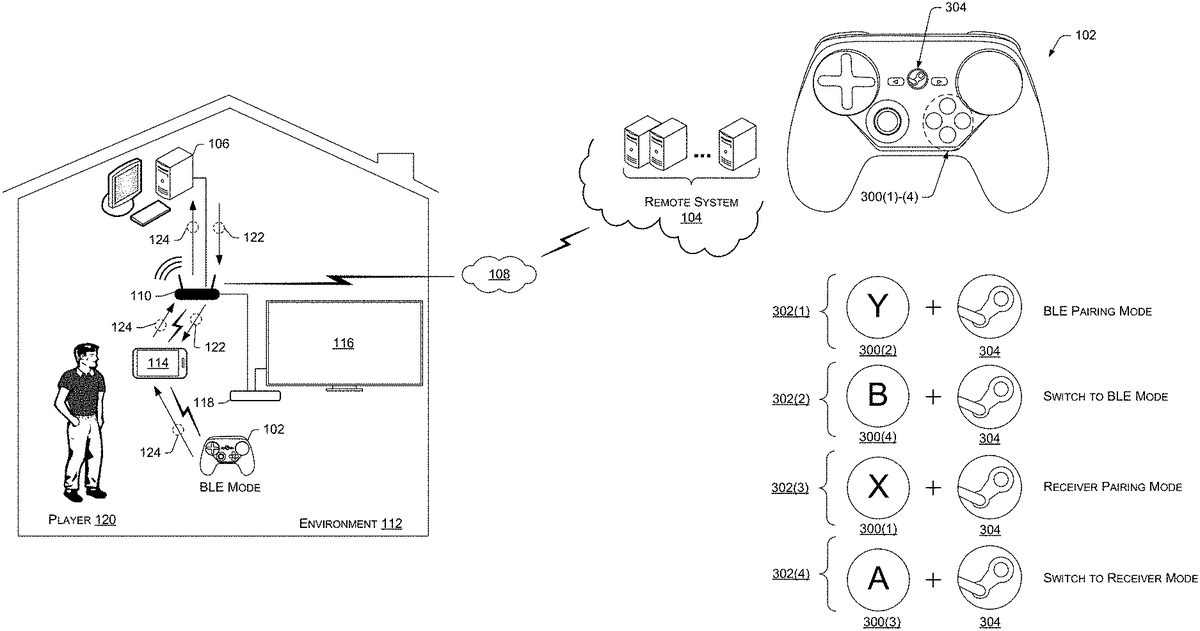
FIG.1Ais a schematic diagram illustrating an example technique of streaming a video game to a first target device when operating a game controller in Bluetooth Low Energy (BLE) mode.FIG.1Bis a schematic diagram illustrating an example technique of streaming a video game to a second target device when operating a game controller in a receiver mode. Thus,FIGS.1A and1Bare illustrated to contrast the different operating modes of a handheld video game controller102.FIGS.1A and1Binclude a remote system104(sometimes referred to as a “remote computing system”104). The remote system104may act as, or have access to, a platform to distribute (e.g., download) programs (and content) to client machines, such as the client machine106shown inFIGS.1A and1B. These programs (and content) may include video games (or video game programs). The client machine106may communicate with the remote system104over a computer network108via a communications interface(s) of the client machine106. The computer network108may represent and/or include, without limitation, the Internet, other types of data and/or voice networks, a wired infrastructure (e.g., coaxial cable, fiber optic cable, etc.), a wireless infrastructure (e.g., radio frequencies (RF), cellular, satellite, etc.), and/or other connection technologies. As such, the client machine106send/receive data to/from the remote system104via a wireless access point (WAP)110that is part of a local area network (LAN) using any suitable communications protocol. The remote system104may, in some instances be part of a network-accessible computing platform that is maintained and accessible via the computer network108. Network-accessible computing platforms such as this may be referred to using terms such as “on-demand computing”, “software as a service (SaaS)”, “platform computing”, “network-accessible platform”, “cloud services”, “data centers”, and so forth.
The client machine106may represent a personal computer (PC), although the client machine is not limited to a configuration of a PC. That is, the client machine106can be implemented as any suitable type of computing device configured to execute a video game, including, without limitation, a PC, a desktop computer, a laptop computer, a mobile phone (e.g., a smart phone), a tablet computer, a portable digital assistant (PDA), a wearable computer (e.g., virtual reality (VR) headset, augmented reality (AR) headset, smart glasses, etc.), an in-vehicle (e.g., in-car) computer, a television (smart television), a set-top-box (STB), a game console, and/or any similar computing device. The client machine106may be located within an environment112along with one or more additional devices. The environment112in which the client machine106is located may be a home or other premises, an automobile, or any similar environment. Such an environment may include, for example, the aforementioned handheld video game controller102(sometimes referred to herein as a “game controller”102, or “handheld controller”102), the WAP110, a BLE device114, a television116, and a wireless receiver118, among other possible devices, such as Internet of Things (IoT) devices, other consumer electronic devices, etc.
In general, the client machine106shown inFIGS.1A and1Bmay represent a computing device that can be utilized by a player120to execute programs (e.g., video games) and other software thereon as a “host computer.” That is, a “host computer,” as used herein, means a computer that is executing a video game, whether the player120is playing the video game on the host computer, or whether the host computer is streaming video game data to a target device. The terms “user120,” “player120,” and/or “gamer120” may be used interchangeably herein to denote a user who is using a computing device(s) to play a video game. Referring briefly toFIG.2, the client machine106includes, among other components, one or more processors200—such as a central processing unit(s) (CPU(s)) and a graphics processing unit(s) (GPU(s)), a display(s)202, memory204(or non-transitory computer-readable media204), and a communications interface(s)206. Although the example client machine106ofFIG.2suggests that the client machine106includes a display202, the client machine106may in fact omit a display, and/or may be coupled to a peripheral display.
The memory204(or non-transitory computer-readable media204) may include volatile and nonvolatile memory, removable and non-removable media implemented in any method or technology for storage of information, such as computer-readable instructions, data structures, program modules, or other data. Such memory includes, but is not limited to, RAM, ROM, EEPROM, flash memory or other memory technology, CD-ROM, digital versatile disks (DVD) or other optical storage, magnetic cassettes, magnetic tape, magnetic disk storage or other magnetic storage devices, RAID storage systems, or any other medium which can be used to store the desired information and which can be accessed by a computing device. The computer-readable media204may be implemented as computer-readable storage media (“CRSM”), which may be any available physical media accessible by the processor(s)200to execute instructions stored on the memory204. In one basic implementation, CRSM may include random access memory (“RAM”) and Flash memory. In other implementations, CRSM may include, but is not limited to, read-only memory (“ROM”), electrically erasable programmable read-only memory (“EEPROM”), or any other tangible medium which can be used to store the desired information and which can be accessed by the processor(s)200.
The memory204may include an operating system module208configured to manage hardware within and coupled to the client machine106for the benefit of other modules. The client machine106may also have a video game client210installed in the memory204. The video game client210may represent an executable client application that is configured to launch and execute programs, such as video games (or video game programs). In other words, the video game client210may include gaming software that is usable to play video games on the client machine106. With the video game client210installed, the client machine106may then have the ability to receive (e.g., download, stream, etc.) video games from the remote system104over the computer network108, and to execute the video games via the video game client210. Any type of content-distribution model can be utilized for this purpose, such as a direct purchase model where video games are individually purchasable for download and execution on a client machine106, a subscription-based model, a content-distribution model where video games are rented or leased for a period of time, and so on. Accordingly, the client machine106may include one or more video games, such as the video game212, within a video game library214. These video games may be retrieved and executed by loading the video game client210. In an example, the player120may choose to play one of multiple video games they have purchased and downloaded to the video game library214by loading the video game client210and selecting a video game212to start execution of the video game212. The video game client210may allow users, such as the player120, to login to a video game service using credentials (e.g., a user account, password, etc.).
The video game client210is also shown as including a streaming component216configured to stream video games to target devices, and to receive and process controller input data generated by game controllers, such as the game controller102. This may occur when the player120is playing a video game212streamed from the client machine106acting as a host computer to any target device in the environment112. In some embodiments, a user, such as the player120, provides user input to the client machine106to invoke the streaming component216when the player120wants to play a video game212on a target device other than the client machine106. It is to be appreciated that the same or similar components as shown with respect to the client machine106(and their associated functionality) can be implemented at (or by) the remote system104to enable streaming of video game data from the remote system104directly to a networked device in the environment112, without executing a video game locally with respect to the environment112. That is, the remote system104, in some embodiments, can act as a host computer that is executing the video game and streaming video game data to a target device over the computer network108.
The game controller102, as shown inFIG.2, may one or more input/output (I/O) devices218, such as the controls (e.g., joysticks, trackpads, triggers, depressible buttons, etc.), potentially any other type of input or output devices. For example, the I/O devices218may include one or more microphones to receive audio input, such as user voice input. In some implementations, one or more cameras or other types of sensors may function as input devices to receive gestural input, such as motion of the handheld controller102. In some embodiments, additional input devices may be provided in the form of a keyboard, keypad, mouse, touch screen, joystick, control buttons and the like. The input device(s) may further include control mechanisms, such as basic volume control button(s) for increasing/decreasing volume, as well as power and reset buttons.
The output devices, meanwhile, may include a display, a light element (e.g., LED), a vibrator to create haptic sensations, a speaker(s) (e.g., headphones), and/or the like. There may also be a simple light element (e.g., LED) to indicate a state such as, for example, when power is on. While a few examples have been provided, the handheld controller102may additionally or alternatively comprise any other type of output device. In some instances, output by the one or more output devices may be based on input received by one or more of the input devices. For example, actuation of a control may result in the output of a haptic response by a vibrator located adjacent (e.g., underneath) the control or at any other location.
In addition, the handheld controller102may include one or more communication interfaces220to facilitate a wireless connection to a network and/or to another device. The communication interface(s)220may implement multiple types of wireless or radio technologies to support operation of the game controller102in different modes. For example, the communication interface(s)220may implement a radio that is configured to operate in the BLE mode or the receiver mode, as described herein, and to switch between the two modes of operation. That is, a single radio may execute code that causes the radio to operate in the BLE mode or in the receiver mode, as described herein. It is to be appreciated, however, that the communication interface(s)220may implement multiple radios, such as a Wi-Fi radio, BLE radio, a cellular radio, and so on. In some embodiments, separate radios may be utilized to operate in the respective modes, such as utilizing a WiFi radio to operate in the receiver mode, and utilizing a BLE radio to operate in the BLE mode. It is to be appreciated that the handheld controller102may further include physical ports to facilitate a wired connection to a network, a connected peripheral device, or a plug-in network device that communicates with other wireless networks.
In the illustrated implementation, the handheld controller further includes one or more processors222and memory224(or computer-readable media224). In some implementations, the processors(s)222may include a central processing unit (CPU), a graphics processing unit (GPU), both CPU and GPU, a microprocessor, a digital signal processor or other processing units or components known in the art. Alternatively, or in addition, the functionally described herein can be performed, at least in part, by one or more hardware logic components. For example, and without limitation, illustrative types of hardware logic components that can be used include field-programmable gate arrays (FPGAs), application-specific integrated circuits (ASICs), application-specific standard products (ASSPs), system-on-a-chip systems (SOCs), complex programmable logic devices (CPLDs), etc. Additionally, each of the processor(s)222may possess its own local memory, which also may store program modules, program data, and/or one or more operating systems.
The memory224may include volatile and nonvolatile memory, removable and non-removable media implemented in any method or technology for storage of information, such as computer-readable instructions, data structures, program modules, or other data. Such memory includes, but is not limited to, RAM, ROM, EEPROM, flash memory or other memory technology, CD-ROM, digital versatile disks (DVD) or other optical storage, magnetic cassettes, magnetic tape, magnetic disk storage or other magnetic storage devices, RAID storage systems, or any other medium which can be used to store the desired information and which can be accessed by a computing device. The memory224may be implemented as computer-readable storage media (“CRSM”), which may be any available physical media accessible by the processor(s)222to execute instructions stored on the memory224. In one basic implementation, CRSM may include random access memory (“RAM”) and Flash memory. In other implementations, CRSM may include, but is not limited to, read-only memory (“ROM”), electrically erasable programmable read-only memory (“EEPROM”), or any other tangible medium which can be used to store the desired information and which can be accessed by the processor(s)222.
Several modules such as instruction, datastores, and so forth may be stored within the memory224and configured to execute on the processor(s)222. A few example functional modules are shown as stored in the memory224and executed on the processor(s)222, although the same functionality may alternatively be implemented in hardware, firmware, or as a system on a chip (SOC).
An operating system module226may be configured to manage hardware within and coupled to the handheld controller102for the benefit of other modules. In addition, the memory224may store a network-communications module228that enables the handheld controller102to communicate, via the communication interfaces220, with one or more other devices, such as the BLE device114or the wireless receiver118introduced inFIGS.1A and1B, a game console, etc. The memory224may further include a game-session database230to store data associated with a game (or other application) executing on the handheld controller or on a computing device to which the handheld controller102couples. The memory224may also include a device-record database232that stores data associated with devices to which the handheld controller102couples. This device-record database232may retain a history of previously connected devices ordered by recency of the connection so that the game controller102can determine a last known device to which the game controller102was last connected, at any given instance. The memory224may further store game-control instructions234that configure the handheld controller102to function as a gaming controller by sending controller input data to another device that is game-related, and universal-control instructions236that configure the handheld controller102to function as a controller of other, non-gaming devices.
The memory224may further store an operating mode component238configured to determine and implement the operating mode of the game controller102based on user input (e.g., based on gestures provided by the player120). For example, as will be described in more detail below, the player120may provide a first gesture, such as by pressing a first combination of multiple buttons, to place the handheld controller102into BLE mode, and may provide a second gesture, such as by pressing a second combination of multiple buttons, to place the handheld controller102into receiver mode. The operating mode component238may also store, in local memory224of the game controller102, the last mode that was used. In this manner, upon startup of the game controller102, if a particular mode is not invoked by the player120via a gesture, the operating mode component238may determine the last mode in which the game controller102operated, and may operate in that mode at startup.
The game controller102may further include one or more sensors240including, without limitation, a touch sensor(s) (e.g., a capacitive touch sensor(s), a resistive touch sensor(s), an infrared touch sensor(s), a touch sensor(s) that utilizes acoustic soundwaves to detect a proximity of a finger, etc.), a force sensing resistor(s) (FSRs), a motion sensor(s) (e.g., an inertial measurement unit(s) (IMUs) including one or more gyroscopes, and/or accelerometers, and/or magnetometers, and/or compasses, a camera(s) or3D sensor(s) configured used for feature tracking, etc.).
The BLE device114, as shown inFIG.2, may include similar components to the client machine106, such as a processor(s)242, a display(s)244, memory246, and a communications interface(s)248, which may be similar to the processor(s)200, display(s)202, memory204, and communications interface(s)206described with reference to the client machine206. The communications interface(s)248of the BLE device114(as its name implies) includes a radio to receive controller input data from the game controller102over a BLE interface. The radio may also be configured to send/receive data to/from the WAP110in the environment over WiFi, and/or the communications interface(s)248may include a dedicated WiFi radio to send/receive data to/from the WAP110in the environment.
The memory246of the BLE device114may include an operating system250configured to manage hardware within and coupled to the BLE device114for the benefit of other modules. The BLE device114may have also downloaded a client application252(or “client app”252) and stored the client app252in the memory246. The client app252includes a streaming component254that configures the BLE device114to function as a target device for video game streaming. In this manner, the BLE device114receives video game data streamed from a host computer (e.g., the client machine106) that is executing a video game212and outputs the audio and video data via an output device(s) (e.g., display(s)244and speaker(s)) of the BLE device114. The BLE device114, using the client app252, also functions as a receiver of controller input data sent by the game controller102during gameplay over a radio. The client app252may further maintain a device-record database256that stores data associated with devices to which the BLE device114couples. This may allow the BLE device114to retain security and/or authentication credentials to pair with previously connected devices, such as the game controller102.
To illustrate how the game controller102may operate in BLE mode to enable video game streaming to the BLE device114, reference is again made toFIG.1A. Initially, the player120connects the client machine106and the BLE device114to a home network (e.g., by connecting these devices to the WAP110). The player120also pairs the game controller102with the BLE device114executing the client app252. This pairing operation may be accomplished by the player120providing user input to the game controller102that puts the game controller102into BLE pairing mode. The client app252executing on the BLE device114may include custom BLE characteristics that configure the BLE device114to receive controller input data over a radio from the game controller102operating in BLE mode. Data used by profiles and services in BLE are referred to as “characteristics.” Profiles and applications thus interface with a generic attribute profile (GATT) layer in the BLE protocol stack for communication of characteristics. A BLE “profile” is a specification regarding an aspect of Bluetooth communication. A profile defines configurations and functions that enable a service provided using wireless communication. In some embodiments, the client app252may provide a notification in response to the game controller102entering BLE pairing mode, indicating to the player120that a game controller102wants to connect to the BLE device114. The player120may provide user input to the BLE device accepting this connection request to pair the two devices over a BLE interface.
The game controller102, via the operating mode component238, may operate in BLE mode by default in response to the player120pairing the game controller102over BLE with a BLE device114. Alternatively, the player120may provide user input to the game controller102that corresponds to a command to operate the game controller102in BLE mode. In any case, the game controller102may establish a radio link with the BLE device114executing the client app252using a radio of the game controller102.
The player120may have also started a video game session for a video game212executing on the video game client210of the client machine106. In a case where there are multiple client machines running the video game client210, the client app252may provide an additional notification to the player120asking the player120which client machine he/she wants to connect to as a host computer for streaming the video game212. The player120may select a particular client machine, such as the client machine106, and the streaming connections are setup at this point. Establishing connections in this manner may include authentication or authorization procedures (e.g., digital handshaking, credential verification, etc.).
During gameplay, for each frame, the video game client210executing on the client machine106(the host computer) captures video game data122and sends the video game data over the LAN (e.g., via the WAN110) to the BLE device114. This may involve the video game client210of the host computer capturing the state of the video game212window, encoding the video and audio data into bits, transmitting the encoded bits to the BLE device114, and the client app252executing on the BLE device114decodes the bits to render the video game content of the frame and output the audio via its speakers (or via headphones connected to the BLE device114). The encoding of video data may include H.264 video encoding, and sending the encoded data using a low-latency network protocol. In an example, the client machine106may be connected to the WAP110via a wired (e.g., Ethernet) connection for low latency, and the WAP110may send the encoded data wirelessly to the BLE device114such that the BLE device114receives the encoded data via its radio using WiFi protocol. Streaming resolution and bitrate may be configurable by the player120. Over a 5 gigahertz (GHz) network, for example, a resolution of 1080p or higher (e.g., 4K) at a frame rate of 60 frames per second (FPS) may be utilized.
The player120consumes the video game content on the BLE device114acting as a target device. Notably, the BLE device114is not executing the video game212; the host computer—in this case, the client machine106—is the device executing the video game212. The BLE device114effectively acts as a thin client that merely receives video game data122(e.g., audio and video data) that is processed (e.g., decoded) and output via the appropriate output devices of the BLE device114for consumption by the player120. During gameplay, the player120uses the game controller102(which is connected to the BLE device114when the game controller is operating in BLE mode) to provide video game input. Accordingly, in response to user input detected by the game controller102for controlling an aspect of the video game212, the game controller102sends controller input data124to the BLE device114via the radio of the game controller102. The client app252executing on the BLE device114receives the controller input data124and causes the BLE device114to forward the controller input data124to the host computer (e.g., the client machine106) over the LAN (e.g., via the WAP110). The manner in which the controller input data124is routed over BLE to the client app252executing on the BLE device114effectively bypasses any OS restrictions on game controller input so that these OS restrictions do not inhibit the ability of the player120to stream the video game212on the BLE device114and/or to use the game controller102as the gamepad for playing the video game212.
In response to receiving the controller input data124, the video game client210executing on the client machine106may determine, based on the video game212that is currently executing, and based on the player's120preferences, how to convert the received controller input data124into video game input that the video game212(i.e., the video game code) is able to process. By default, the game controller102(and/or its controller input data) may “show up” as a mouse and keyboard regardless of its current mode of operation. Considering that the client machine106, in a typical case, utilizes a mouse and keyboard as input devices, this may be the most straightforward way of providing controller input data to the host computer (e.g., the client machine106) executing the video game212. In some embodiments, the game controller102may send the raw state of the game controller102to the client machine106via the BLE device114and the LAN, and the video game client210may interpret the raw state of the game controller102and remap it into appropriate video game input that can be injected into the video game212code. In some embodiments, video game developers may utilize an application programming interface (API) that allows them to specify game controller configurations that remap (or otherwise convert) controller input data124from various types of controllers into suitable video game input for their video game. The video game client210may also translate between different types of game controllers, such as controllers on the market from various game controller makers. In some embodiments, a series of abstractions are used to take controller input data124and transparently convert that data124into packets that are sent over the LAN as if those packets were received from a mouse and keyboard of the client machine106. In this manner, the remote nature of the game controller102with respect to the host computer that is executing the video game212is kept transparent. In some embodiments, the video game client210may hook the input library (or input libraries) of the video game212that is executing on the host computer to determine how to convert controller input data124into data that is usable by the video game212. This allows the video game client210to intercept function calls from the video game212code to read the game controller state, and to return a controller state that the video game212is expecting to see, which may involve remapping the state of the game controller102to a different type of game controller state.
After converting the controller input data124into video game input, the video game input is injected into the video game212code to control an aspect of the video game212, which causes the next frame to incorporate the controlled aspect of the video game, and this is again, captured and streamed to the target device, which, in this case, is the BLE device114. In this manner, video game streaming continues by passing video game data122downstream to the BLE device114, and passing controller input data124upstream to the client machine106, as described herein.
At any time, the player120may decide to switch operating modes of the game controller102. This may be done for various reasons including, without limitation, to play the video game212on a different target device, such as the television116, or to enable a different wireless protocol that may be lower latency than BLE.FIG.1Billustrates the scenario where the user has switched to operating the game controller102in the receiver mode (sometimes referred to as “non-BLE mode”, “WiFi mode”, or “dongle mode”). In the example ofFIG.1B, when the game controller102operates in the receiver mode, a wireless receiver118is used as the conduit through which the controller input data124is passed upstream to the host computer, and through which the video game data122is passed downstream to the target device. Thus, the wireless receiver118may, in some embodiments, act more like a hub that serves as a place of convergence where data arrives from one or more devices, and from which data is sent to one or more devices.
If the wireless receiver118has not previously been connected to the game controller102, the player120may initiate a pairing operation to pair the game controller102with the wireless receiver118. The player120may provide user input to the game controller102to place it in wireless receiver pairing mode, and the player120may be prompted to enter a validation code to complete the connection between the game controller102and the wireless receiver118. For example, if the wireless receiver118is connected to the television116over an audio/video interface, when the television116is toggled to the appropriate input, the wireless receiver118may present a notification on the screen of the television116with a validation code to complete the setup.
The game controller102, via the operating mode component238, may operate in receiver mode by default in response to the player120pairing the game controller102over the radio with the wireless receiver118that utilizes a non-BLE protocol (e.g., WiFi). Alternatively, the player120may provide user input to the game controller102that corresponds to a command to operate the game controller102in receiver mode. In the case of switching between operating modes when the respective devices are already known to the game controller102, additional pairing operations need not occur. Instead, when user input corresponding to a command to operate the game controller102in the receiver mode is detected, the game controller102may consult its device-record database232to determine the last known wireless receiver to which the game controller102was last connected before receiving the user input to place the controller into receiver mode. This works similarly in the opposite direction as well (e.g., consulting the device-record database232to determine the last known BLE device when switching into BLE mode). In any case, as shown inFIG.1B, the game controller102may establish a radio link with the wireless receiver118using the radio of the game controller102(e.g., over WiFi), and the passing of data is similar to the example of operating the game controller in BLE mode, except that the controller input data124is passed to the host computer via the wireless receiver118instead of the BLE device114. As mentioned, the receiver mode may utilize a different wireless communication protocol to pass the controller input data124from the game controller102to the wireless receiver118, as compared to operating the game controller102in the BLE mode. This non-BLE communication protocol may, in some embodiments, represent an Enhanced ShockBurst (ESB)-based protocol that operates in the 2.4 GHz spectrum.
Thus, as depicted inFIGS.1A and1B, the disclosed handheld video game controller102is configured to operate in multiple different modes that utilize respective wireless protocols that are different from each other. BLE mode may be the mode that is less performant, but that provides greater flexibility in terms of the types of devices that can be used as target devices for streaming a video game212from a host computer, such as the client machine106. This is at least partly due to the fact that the receiver mode may not be usable with some BLE devices due to OS restrictions on game controller input and/or the fact that these devices do not support a connection with a peripheral wireless receiver, such as the wireless receiver118. The ability of the game controller102to switch into the receiver mode is useful in situations where the more performant wireless protocol used in the receiver mode allows the player120to connect more game controllers102to the wireless receiver118, as compared to a number of game controllers that can connect to the BLE device114without introducing noticeable input latency. For instance, in BLE mode, the operating system208of the client machine106may utilize an update rate (an interval for reading controller input data124) of 10 milliseconds for the game controller102, and, if the player120tries to connect a second game controller to the BLE device114to play with a friend, the operating system208may allocate an update rate of 22 milliseconds for the additional game controller because it does not have enough radio bandwidth in BLE mode to accommodate the additional game controller at an update rate that is any faster. This might cause a situation where one of two players competing in a video game experiences input latency, inhibiting that players gameplay performance. To address this inherent limitation of the BLE protocol, the players may switch their game controllers to the receiver mode to stream the video game via the wireless receiver118, which may offer a lower latency connection with suitable bandwidth to accommodate the multiple game controllers.
As noted elsewhere herein, the wireless receiver118may be implemented as a dongle (e.g., a USB dongle) that plugs into a corresponding port on a target device. In some cases, the BLE device114may include such a port, which means that the player120(or multiple players) can switch between wireless protocols while playing the video game on the same target device; namely, the BLE device114. That is, the player120may start playing the video game on the BLE device114while operating the game controller102in BLE mode, and then switch to operating the game controller102in receiver mode. Upon switching modes, if a wireless receiver is connected to, or embedded in, the BLE device114, the video game data122continues to be streamed from the host computer to the BLE device114, but the controller input data124is received over a non-BLE protocol (e.g., WiFi) via the wireless receiver118connected to, or embedded in, the BLE device114, instead of the controller input data124being received over a BLE protocol via the radio of the BLE device114.
FIG.3is a diagram illustrating example gestures that can be provided by a user of a game controller to operate the game controller in different modes including at least a BLE mode and a receiver mode. The example game controller102may include depressible buttons300(1)-(4) on a front side of the game controller102, including an X button300(1), a Y button300(2), an A button300(3), and a B button300(4). The player120may provide user input comprising gestures302(1)-(4), or different gestures. The gestures302(1)-(4) represent multi-button gestures involving particular combinations of multiple ones of the depressible buttons300and a guide button304(sometimes referred to as the “Steam® button”304or “menu button”304). For example, the player120may provide a first gesture302(1) (a first multi-button gesture302(1)) by pressing a first combination of multiple buttons (e.g., the Y button300(2) and the guide button304) to place the handheld controller102into BLE pairing mode. The player120may provide this first gesture302(1) if the game controller102has not already been paired with the BLE device114and if he/she wants to stream a video game212to the BLE device114and operate the game controller102in BLE mode to play the video game212.
The player120may provide a second gesture302(2) (a second multi-button gesture302(2)) by pressing a second combination of multiple buttons (e.g., the B button300(4) and the guide button304) to place the handheld controller102into BLE mode. The player120may provide this second gesture302(2) at the start of a game session if the game controller102had, at an earlier time, been paired with a BLE device, such as the BLE device114. In a different scenario, such as when the player120is playing a video game in receiver mode, the player120may provide the second gesture302(2) to switch from operating the game controller102in receiver mode to operating the game controller102in BLE mode, perhaps in the middle of a game session. In yet a different scenario, such as when the player120is playing a video game in BLE mode, the player120may provide the second gesture302(2) to switch from a first BLE device (e.g., the BLE device114) to a second BLE device in the environment112. For example, the device-record database232of the game controller102may be used to lookup a different BLE device known to the game controller102to which the game controller102has connected in the past. In some embodiments, particular gestures can be used to invoke different BLE devices in the device-record database232. In this case, the player120may provide one gesture (e.g., the B button300(4) and the guide button304) to connect to the most recently used BLE device in the device-record database232, and another gesture (e.g., a start button and the guide button304) to connect to a next recently used BLE device in the device-record database232. The player120may have to recall these gestures in order to avoid having to toggle through devices to get to the desired BLE device.
The player120may provide a third gesture302(3) (a third multi-button gesture302(3)) by pressing a third combination of multiple buttons (e.g., the X button300(1) and the guide button304) to place the handheld controller102into receiver pairing mode. The player120may provide this third gesture302(3) if the game controller102has not already been paired with the wireless receiver118and if he/she wants to stream a video game212to the wireless receiver118that is connected to a target device in the environment112, and to operate the game controller102in receiver mode to play the video game212.
The player120may provide a fourth gesture302(4) (a fourth multi-button gesture302(4)) by pressing a fourth combination of multiple buttons (e.g., the A button300(3) and the guide button304) to place the handheld controller102into receiver mode. The player120may provide this fourth gesture302(4) at the start of a game session if the game controller102had, at an earlier time, been paired with a wireless receiver, such as the wireless receiver118. In a different scenario, such as when the player120is playing a video game in BLE mode, the player120may provide the fourth gesture302(4) to switch from operating the game controller102in BLE mode to operating the game controller102in receiver mode, perhaps in the middle of a game session. In yet a different scenario, such as when the player120is playing a video game in receiver mode, the player120may provide the fourth gesture302(4) to switch from a first wireless receiver (e.g., the wireless receiver118) to a second wireless receiver in the environment112. For example, the device-record database232of the game controller102may be used to lookup a different wireless receiver known to the game controller102to which the game controller102has connected in the past. In some embodiments, particular gestures can be used to invoke different wireless receivers in the device-record database232. In this case, the player120may provide one gesture (e.g., the A button300(3) and the guide button304) to connect to the most recently used wireless receiver in the device-record database232, and another gesture (e.g., a back button and the guide button304) to connect to a next recently used wireless receiver in the device-record database232. The player120may have to recall these gestures in order to avoid having to toggle through devices to get to the desired wireless receiver.
In some embodiments, the player120may set preferences to connect to preferred devices (e.g., preferred BLE devices and/or preferred wireless receivers) at start up, and the player120may toggle between devices using the gestures302(2) or302(4), depending on the current mode of operation (i.e., BLE mode or receiver mode). Additionally, or alternatively, as mentioned previously, the device-record database232may be used to determine a last known device (e.g., a last known BLE device and/or last known wireless receiver) to which the game controller102was last connected before a gesture302was received. At startup, the device-record database232may keep a history of connected devices in persistent (non-volatile) memory to connect to the last known device at startup. The device-record database232may maintain an address of the previously connected devices, as well as security and/or authentication information (e.g., keys, passcodes, credentials, etc.) that are used to establish a radio link with these devices after previously disconnecting therefrom. Additionally, or alternatively, the game controller's102operating mode component238may persist, in local memory224, the last operating mode (e.g., BLE mode or receiver mode) that was used, and may revert to the last used operating mode at startup when the player120does not provide one of the gestures302. In some embodiments, whenever the player120downloads the client app252to a new BLE device, the player120may be notified (e.g., via the client app252) of the availability to connect their game controller102to the BLE device (e.g., by providing the first gesture302(1) to the game controller102). Likewise, whenever the player120connects a wireless receiver118to a BLE device running the client app252, the player120may be notified (e.g., via the client app252) of the availability to connect their game controller102to the wireless receiver (e.g., by providing the third gesture302(3) to the game controller102).
Although particular multi-button gestures302are shown inFIG.3, these are merely example gestures, and other gestures can be implemented to provide similar functionality. For example, touch sensors associated with particular controls, such as top bumper controls, may detect swipe gestures. In this manner, a swipe in one direction (e.g., left-to-right) or on a first control (e.g., the left bumper) may correspond to a command to operate the game controller102in BLE mode, while a swipe in an opposite direction (e.g., right-to-left) or on a second control (e.g., the right bumper) may correspond to a command to operate the game controller102in receiver mode. Other gestures are contemplated as possibilities for this type of functionality, including voice gestures detected by a microphone of the game controller102. For example, the player120may utter “BLE mode” to place the game controller102in BLE mode, or the player120may utter “receiver mode” to place the game controller102in receiver mode.
The processes described herein are illustrated as a collection of blocks in a logical flow graph, which represent a sequence of operations that can be implemented in hardware, software, firmware, or a combination thereof (referred to herein as “logic”). In the context of software, the blocks represent computer-executable instructions that, when executed by one or more processors, perform the recited operations. Generally, computer-executable instructions include routines, programs, objects, components, data structures, and the like that perform particular functions or implement particular abstract data types. The order in which the operations are described is not intended to be construed as a limitation, and any number of the described blocks can be combined in any order and/or in parallel to implement the processes.
FIG.4is a flow diagram of an example process400for operating a handheld video game controller102in one of multiple modes of operation. For discussion purposes, the process400is described with reference to the previous figures.
At402, the game controller102may startup by transitioning from a power off state to a power on state. In the power on state, power is supplied from a power source (e.g., one or more batteries) to one or more electrical components of the game controller102. Starting up the game controller102at block402may be based on (e.g., responsive to) the game controller102receiving first user input. For example, a power button, such as the guide button304shown inFIG.3, may be pressed to start up (power on or boot up) the game controller102.
At404, logic of the game controller102may determine whether the first user input received at block402comprises a gesture, such as a predefined gesture stored in memory224of the game controller102. If, at block404, it is determined that the first user input received at block402does not comprise a gesture (e.g., the player120may have merely pressed a power button, such as the guide button304, to power on the game controller102), the process400may follow the “NO” route from block404to block406.
At406, the logic of the game controller102may determine to operate the game controller102in a particular mode of operation, among multiple modes of operation, in which the game controller102was last operated. For example, the multiple modes of operation may include a BLE mode and a receiver mode, as described herein. At block406, the logic of the game controller102may consult the data maintained by the operating mode component238to determine which of these modes was last (most recently) used to operate the game controller102before receiving the first user input at block402to startup the game controller102. If the BLE mode is identified as the last mode in which the game controller102operated, the BLE mode is selected at block406. If the receiver mode is identified as the last mode in which the game controller102operated, the receiver mode is selected at block406.
At408, the logic of the game controller102may determine a device (e.g., a BLE device or a wireless receiver) to which the game controller102has previously connected. Specifically, at block408, the logic may identify, based at least in part on data stored in memory224(e.g., from the device-record database232) of the game controller102, a device to which the handheld video game controller was last connected before receiving the first user input at block402to startup the game controller102. These devices stored in memory224of the game controller102may be associated with a particular mode of operation (e.g., at least one of the BLE mode or the wireless receiver mode). This may be used as a filtering criterion for selecting a device at block408. That is, if the BLE mode was selected as the last mode used at block406, a most recently connected BLE device114may be identified and selected at block408. If, on the other hand, the receiver mode was selected as the last mode used at block406, a most recently connected wireless receiver118may be identified and selected at block408.
At410, with the mode of operation and the device selected, the game controller102may establish a wireless connection with the selected device via a radio of the game controller102using an appropriate protocol. For example, if operating in the BLE mode, the game controller102may establish the wireless connection with a BLE device114executing a client application252via the radio of the game controller102using BLE protocol. If operating in the receiver mode, however, the game controller102may establish the wireless connection with a wireless receiver118via the radio of the game controller102using a non-BLE protocol (e.g., WiFi). Establishing a wireless connection may comprise establishing a radio link (e.g., authenticating, handshaking, etc.) over which data can be sent. This may involve identifying a radio signal (and possibly a strength of the radio signal) of the device.
At412, the game controller102may receive second user input to control an aspect of a video game executing on a host computer (e.g., the client machine106) different from the device with which the game controller102connected at block410, such as a BLE device114or a wireless receiver118. For example, the client machine106may be executing a video game212, streaming video game data122to a target device. If operating in the BLE mode, the target device may be the BLE device114with which the game controller102connected at block410. If operating in the receiver mode, the target device may be a device (e.g., the television116) connected to the wireless receiver118with which the game controller102connected at block410. The player120may be playing the video game by providing user input to the game controller102(e.g., operating the controls on the game controller102, moving the game controller102, as detected by motion sensors, etc.).
At414, the game controller102may send controller input data124to the device with which the game controller102connected at block410. Again, depending on the mode of operation, the receiving device of the controller input data124may be a BLE device114or a wireless receiver118. In the case of operating in the BLE mode, the controller input data124may be sent to the BLE device114via the radio of the game controller102using BLE protocol. In the case of operating in the receiver mode, the controller input data124may be sent to the wireless receiver118via the radio of the game controller102using a non-BLE protocol (e.g., WiFi). The controller input data124may be based on the user input received at block412, and may be packaged in any suitable format.
In some embodiments, when operating in BLE mode, the logic of the game controller102may use custom BLE characteristics to generate the controller input data124so that it may be received by the client application252executing on the BLE device114. This may involve a BLE profile interfacing with a GATT layer in the BLE protocol stack for communicating characteristics in the controller input data124.
Returning with reference to block404, if it is determined that the first user input received at block402comprise a gesture (e.g., a multi-button gesture, as described with reference toFIG.3), the process400may follow the “YES” route from block404to block416.
At416, the logic of the game controller102may determine the type of gesture detected. For example, the memory224of the game controller102may store a plurality of predefined gestures, such as the gestures302(1)-(4) described with reference toFIG.3. These example gestures302can be categorized into pairing gestures (e.g., gestures302(1) and302(3) are pairing gestures) and mode selection gestures (E.g., gestures302(2) and302(4) are mode selection gestures). If, at block416, the gesture is determined as a pairing gesture, the process400may proceed from block416to block418where the logic of the game controller102determines to operate the game controller102in a particular mode associated with the pairing gesture. For example, if the gesture is the pairing gesture302(1) ofFIG.3, the logic may determine to operate in BLE mode, whereas, if the gesture is the pairing gesture302(3) ofFIG.3, the logic may determine to operate in receiver mode.
At420, based on the mode of operation that is selected at block418, the logic of the game controller102may determine a new device for that mode with which the game controller has not yet connected (i.e., a new device). For the BLE mode, this may be a new BLE device114that is put into BLE pairing mode through the client app252executing on the BLE device114. For the receiver mode, this may be a new wireless receiver118that is put into a receiver pairing mode, as described herein.
With a new device identified and selected at block420, the blocks410-414may be performed, as described above, but with respect to the newly identified device. That is, the game controller102may establish a wireless connection with the new device (block410), receive (second) user input to control an aspect of a video game executing on a host computer (block412), and send controller input data124to the connected device over the radio using an appropriate protocol based on the (second) user input (block414).
Returning with reference to block416, if the gesture is determined as a mode selection gesture, the process400may proceed from block416to block422where the logic of the game controller102determines to operate the game controller102in a particular mode associated with the mode selection gesture. For example, if the gesture is the mode selection gesture302(2) ofFIG.3, the logic may determine to operate in BLE mode, whereas, if the gesture is the mode selection gesture302(4) ofFIG.3, the logic may determine to operate in receiver mode.
At424, the logic of the game controller102may determine whether the gesture is associated with a particular device among multiple devices to which the game controller102has previously connected. For example, data stored in memory224of the game controller102(e.g., the device-record database232) may maintain a list of devices to which the game controller102has previously connected. These devices may be filtered based on the mode of operation selected at block422. If the gesture is specific to one of the devices associated with the selected mode of operation, the process400may follow the “YES” route from block424to block426, where the device associated with the gesture may be selected. For example, the player120may provide one gesture (e.g., the B button300(4) and the guide button304) to connect to the most recently used BLE device in the device-record database232, and another gesture (e.g., a start button and the guide button304) to connect to a next recently used BLE device in the device-record database232. Depending on which one of these gestures is detected, the device associated with that gesture may be selected as the identified device at block426. Similar logic applies to the receiver mode, as described herein.
At block424, if the gesture is not device-specific (e.g., the gesture is not specific to one of the devices associated with the selected mode of operation), the process400may follow the “NO” route from block424to block428, where the logic selects the device to which the game controller102was last connected before receiving the first user input at block402to startup the game controller102. That is, the most recently connected device may be selected at block428if the gesture is not otherwise a device-specific gesture. In BLE mode, this device is the BLE device114to which the game controller102was last connected before receiving the first user input at block402to startup the game controller102. In receiver mode, this device is the wireless receiver118to which the game controller102was last connected before receiving the first user input at block402to startup the game controller102.
Following either block428or block426, the blocks410-414may be performed, as described above, but with respect to the device identified ant selected at block428or block426. That is, the game controller102may establish a wireless connection with the selected device (block410), receive (second) user input to control an aspect of a video game executing on a host computer (block412), and send controller input data124to the connected device over the radio using an appropriate protocol based on the (second) user input (block414).
FIG.5is a flow diagram of an example process500for operating a BLE device114to stream a video game executing on a host computer and to receive controller input data over BLE from a game controller102. For discussion purposes, the process500is described with reference to the previous figures.
At502, the BLE device114(which is connected to a LAN of an environment112) may execute a client app252. This client app252may configure the BLE device114to function as a target device for video game streaming, and also to function as a hub device for controller input data provided by a connected game controller102(e.g., connected over BLE).
At504, during execution of a video game212on a host computer (e.g., the client machine106collocated in the environment112with the BLE device114), the BLE device114may receive video game data122streamed from a host computer (e.g., the client machine106) over a LAN (e.g., via the WAP110).
At506, the BLE device114may outputs audio and video data (e.g., the video game data122comprising the audio and video data) via an output device(s) (e.g., display(s)244and speaker(s)) of the BLE device114.
At508, the BLE device114—functioning as a hub device—may receive controller input data124from a connected game controller102over a radio of the BLE device114using BLE protocol. The custom BLE characteristics available via the client app252may allow for receiving the controller input data in a manner that bypasses any OS restrictions on game controller input.
At510, the BLE device114may send the controller input data124it received from the game controller102to the host computer (e.g., the client machine106) executing the video game212. The controller input data124may be sent from the BLE device114over the LAN (e.g., via the WAP110) to the host computer.
FIG.6is a flow diagram of an example process600for operating a host computer to stream a video game executing thereon to a target device while receiving controller input data from a game controller that is separate from the host computer. For discussion purposes, the process600is described with reference to the previous figures.
At602, a host computer (e.g., the client machine106, the remote system104, etc.) may execute a video game212using a video game client210. The video game client210may be configured to allow a player120to play the video game on the host computer itself, and/or allow for streaming of the video game212to a target device (e.g., via the streaming component216).
At604, the video game client210may hook the input library (or input libraries) of the video game212that is executing on the host computer to determine how to convert controller input data124into data that is usable by the video game212. This allows the video game client210to intercept function calls from the video game212code to read game controller state, and to return a controller state that the video game212is expecting to see, which may involve remapping the state of a connected game controller102to a different type of game controller state.
At606, the host computer may send video game data122captured by the video game client210over a LAN to a target device. Depending on the mode of operation of the game controller102, as described herein, this may involve sending the video game data122to a BLE device114while in BLE mode, or to a wireless receiver118while in receiver mode (the wireless receiver118connected to, or embedded in, a target device. The video game data122may include audio and video data, and this data may be encoded for transmission over the LAN, as described herein.
At608, the host computer may receive controller input data124over the LAN from a sending device. Again, depending on the mode of operation of the game controller102, the sending device of the controller input data124may be a BLE device114while in BLE mode, or a wireless receiver118while in receiver mode.
At610, the video game client210may convert the controller input data124into video game input that the video game212code can understand/process. This conversion at block610may be based at least in part on the hooked input library for the video game. The conversion at block610may be based on other factors as well, such as the player's120preferences known to the video game client210regarding how the player120would prefer controller input data124to be converted. In some embodiments, the conversion at block610may involve remapping the controller input data124into appropriate video game input that can be injected into the video game212code. In some embodiments, video game developers may utilize API that allows them to specify game controller configurations that remap (or otherwise convert) controller input data124from various types of controllers into suitable video game input for their video game. Thus, the video game client210may utilize such game controller configurations for remapping at block610. The video game client210may also translate between different types of game controllers, such as controllers on the market from various game controller makers, and possibly between mouse and keyboard input.
At612, the video game client210may “inject” the video game input (converted from the controller input data124) into the video game212code to control an aspect of the video game212executing on the host computer. For example, video game input causing a player-controlled character to jump may cause the player-controlled character to jump over the course of the next several frames that are streamed to the target device.
Although the subject matter has been described in language specific to structural features, it is to be understood that the subject matter defined in the appended claims is not necessarily limited to the specific features described. Rather, the specific features are disclosed as illustrative forms of implementing the claims.
Claims
- A handheld controller comprising: a processor;a radio;and memory storing computer-executable instructions that, when executed by the processor, cause the handheld controller to: determine that first user input received by the handheld controller comprises a gesture;determine whether the gesture is a pairing gesture or a mode selection gesture;based at least in part on determining that the gesture is the mode selection gesture, determine whether to operate in a Bluetooth Low Energy (BLE) mode or a receiver mode;based at least in part on determining to operate in the BLE mode, determine a BLE device to which the handheld controller has previously connected;establish, via the radio, a wireless connection with the BLE device executing a client application;receive second user input to control an aspect of a video game executing on a host computer different from the BLE device;and send, using the radio, controller input data to the host computer via the BLE device, the controller input data based at least in part on the second user input.
- The handheld controller of claim 1, wherein: the computer-executable instructions, when executed by the processor, further cause the handheld controller to determine that the gesture is a device-specific gesture;and determining the BLE device comprises determining that the BLE device is associated with the device-specific gesture.
- The handheld controller of claim 1, wherein determining the BLE device comprises identifying the BLE device as a BLE device to which the handheld controller was last connected before receiving the first user input.
- The handheld controller of claim 1, wherein the gesture comprises a multi-button gesture detected by the handheld controller as a press of a combination of multiple buttons including a first button and a second button of the handheld controller.
- The handheld controller of claim 1, wherein determining to operate in the BLE mode comprises determining that the gesture is associated with the BLE mode.
- The handheld controller of claim 1, wherein: the handheld controller is in a power off state before receiving the first user input;and the computer-executable instructions, when executed by the processor, further cause the handheld controller to transition to a power on state based at least in part on the receiving of the first user input.
- The handheld controller of claim 1, wherein the computer-executable instructions, when executed by the processor, further cause the handheld controller to: determine that third user input received by the handheld controller comprises a second gesture;determine whether the second gesture is the pairing gesture or the mode selection gesture;based at least in part on determining that the second gesture (i) is the mode selection gesture and (ii) is associated with the receiver mode, determine to operate in the receiver mode;based at least in part on determining to operate in the receiver mode, determine a wireless receiver to which the handheld controller has previously connected, the wireless receiver different from the BLE device;establish, via the radio, a second wireless connection with the wireless receiver using a non-BLE protocol;receive fourth user input to control an additional aspect of the video game executing on the host computer;and send, using the radio, additional controller input data to the host computer via the wireless receiver, the additional controller input data based at least in part on the fourth user input.
- A method comprising: determining, by a handheld controller, that first user input received by the handheld controller comprises a gesture;determining, by the handheld controller, that the gesture is a mode selection gesture associated with a Bluetooth Low Energy (BLE) mode;based at least in part on the determining that the gesture is the mode selection gesture associated with the BLE mode, determining, by the handheld controller, a BLE device to which the handheld controller has previously connected;establishing, by the handheld controller via a radio of the handheld controller, a wireless connection with the BLE device executing a client application;receiving, by the handheld controller, second user input to control an aspect of an application executing on a host computer different from the BLE device;and sending, by the handheld controller and using the radio, controller input data to the host computer via the BLE device, the controller input data based at least in part on the second user input.
- The method of claim 8, further comprising determining, by the handheld controller, that the gesture is a device-specific gesture, wherein the determining the BLE device comprises determining that the BLE device is associated with the device-specific gesture.
- The method of claim 8, wherein the determining the BLE device comprises identifying the BLE device as a BLE device to which the handheld controller was last connected before receiving the first user input.
- The method of claim 8, wherein the gesture comprises a multi-button gesture detected by the handheld controller as a press of a combination of multiple buttons including a first button and a second button of the handheld controller.
- The method of claim 8, wherein the handheld controller is in a power off state before receiving the first user input, the method further comprising transitioning the handheld controller to a power on state based at least in part on the receiving of the first user input.
- The method of claim 8, further comprising: determining, by the handheld controller, that third user input received by the handheld controller comprises a second gesture;determining, by the handheld controller, that the second gesture is the mode selection gesture associated with a receiver mode;based at least in part on the determining that the second gesture is the mode selection gesture associated with the receiver mode, determining, by the handheld controller, a wireless receiver to which the handheld controller has previously connected, the wireless receiver different from the BLE device;establishing, by the handheld controller via the radio, a second wireless connection with the wireless receiver using a non-BLE protocol;receiving, by the handheld controller, fourth user input to control an additional aspect of the application executing on the host computer;and sending, by the handheld controller and using the radio, additional controller input data to the host computer via the wireless receiver, the additional controller input data based at least in part on the fourth user input.
- The method of claim 8, wherein the application is a video game.
- A method comprising: determining, by a handheld controller, that first user input received by the handheld controller comprises a gesture;determining, by the handheld controller, whether the gesture is a pairing gesture or a mode selection gesture;based at least in part on the determining that the gesture is the pairing gesture, determining, by the handheld controller, whether to operate in a Bluetooth Low Energy (BLE) mode or a receiver mode;based at least in part on the determining to operate in the BLE mode, performing, by the handheld controller, one or more pairing operations to pair the handheld controller with a BLE device;establishing, by the handheld controller via a radio of the handheld controller, a wireless connection with the BLE device executing a client application;receiving, by the handheld controller, second user input to control an aspect of an application executing on a host computer different from the BLE device;and sending, by the handheld controller and using the radio, controller input data to the host computer via the BLE device, the controller input data based at least in part on the second user input.
- The method of claim 15, wherein the gesture comprises a multi-button gesture detected by the handheld controller as a press of a combination of multiple buttons including a first button and a second button of the handheld controller.
- The method of claim 15, wherein the handheld controller is in a power off state before receiving the first user input, the method further comprising transitioning the handheld controller to a power on state based at least in part on the receiving of the first user input.
- The method of claim 15, further comprising: determining, by the handheld controller, that third user input received by the handheld controller comprises a second gesture;determining, by the handheld controller, that the second gesture is the mode selection gesture associated with the receiver mode;based at least in part on the determining that the second gesture is the mode selection gesture associated with the receiver mode, determining, by the handheld controller, a wireless receiver to which the handheld controller has previously connected, the wireless receiver different from the BLE device;establishing, by the handheld controller via the radio, a second wireless connection with the wireless receiver using a non-BLE protocol;receiving, by the handheld controller, fourth user input to control an additional aspect of the application executing on the host computer;and sending, by the handheld controller and using the radio, additional controller input data to the host computer via the wireless receiver, the additional controller input data based at least in part on the fourth user input.
- The method of claim 18, further comprising determining, by the handheld controller, that the second gesture is a device-specific gesture, wherein the determining the wireless receiver comprises determining that the wireless receiver is associated with the device-specific gesture.
- The method of claim 15, wherein the application is a video game.
Disclaimer: Data collected from the USPTO and may be malformed, incomplete, and/or otherwise inaccurate.