U.S. Pat. No. 11,413,542
Systems And Methods For Measuring And Optimizing The Visual Quality Of A Video Game Application
AssigneeDell Products L.P.
Issue DateApril 29, 2020
Illustrative Figure
Abstract
Systems and methods are disclosed herein that allow an information handling system (IHS) to determine the best visual quality for a video game application. In one embodiment, the disclosed systems and methods may determine optimal in-game settings for a video game application by assigning numerical values to the in-game settings, running a benchmark test using a first set of in-game settings having a first set of numerical values, monitoring the FPS generated during the benchmark test, combining the first set of numerical values and the monitored FPS into a game variable score, and incrementally changing the in-game settings and rerunning the benchmark test to generate new game variable scores. Once the monitored FPS reaches a target FPS, the set of in-game settings with the highest game variable score may be selected as the optimal in-game settings for the video game application.
Description
While the present disclosure is susceptible to various modifications and alternative forms, specific embodiments thereof are shown by way of example in the drawings and will herein be described in detail. It should be understood, however, that the drawings and detailed description thereto are not intended to limit the disclosure to the particular form disclosed, but on the contrary, the present disclosure is to cover all modifications, equivalents and alternatives falling within the spirit and scope of the present disclosure as defined by the appended claims. DESCRIPTION OF ILLUSTRATIVE EMBODIMENTS Information handling systems (IHSs) and methods are provided herein for determining and optimizing the visual quality of a video game application (otherwise referred to as a “video game” or simply a “game”). The methods described herein may be implemented on a wide variety of information handling systems including, but not limited to, desktop computers, laptop computers, tablet computers, smart phones, dedicated gaming consoles, servers, etc. In some embodiments, the methods disclose herein may be implemented as computer program instructions, which are executed locally on an IHS on which a video game application is executed or run. In other embodiments, computer program instructions corresponding to the disclosed methods may be executed by another IHS, which is remotely coupled to the IHS running the video game application. In one embodiment, the systems and methods disclosed herein may determine and optimize the visual quality of a video game application by monitoring the frames per second (FPS) generated during execution of the video game application, comparing the monitored FPS to a target FPS, and adjusting one or more in-game settings of the video game application, if the monitored FPS is less than the target FPS. In some embodiments, optimal in-game settings for a particular video game application and a particular IHS may be determined ...
While the present disclosure is susceptible to various modifications and alternative forms, specific embodiments thereof are shown by way of example in the drawings and will herein be described in detail. It should be understood, however, that the drawings and detailed description thereto are not intended to limit the disclosure to the particular form disclosed, but on the contrary, the present disclosure is to cover all modifications, equivalents and alternatives falling within the spirit and scope of the present disclosure as defined by the appended claims.
DESCRIPTION OF ILLUSTRATIVE EMBODIMENTS
Information handling systems (IHSs) and methods are provided herein for determining and optimizing the visual quality of a video game application (otherwise referred to as a “video game” or simply a “game”). The methods described herein may be implemented on a wide variety of information handling systems including, but not limited to, desktop computers, laptop computers, tablet computers, smart phones, dedicated gaming consoles, servers, etc. In some embodiments, the methods disclose herein may be implemented as computer program instructions, which are executed locally on an IHS on which a video game application is executed or run. In other embodiments, computer program instructions corresponding to the disclosed methods may be executed by another IHS, which is remotely coupled to the IHS running the video game application.
In one embodiment, the systems and methods disclosed herein may determine and optimize the visual quality of a video game application by monitoring the frames per second (FPS) generated during execution of the video game application, comparing the monitored FPS to a target FPS, and adjusting one or more in-game settings of the video game application, if the monitored FPS is less than the target FPS. In some embodiments, optimal in-game settings for a particular video game application and a particular IHS may be determined before, during or after a video game user (or simply “user”) begins a gaming session with the video game application.
In some embodiments, optimal in-game settings may be determined by assigning numerical values to the in-game settings, running a benchmark test using a first set of in-game settings having a first set of numerical values, monitoring the FPS generated during the benchmark test, combining the first set of numerical values and the monitored FPS into a game variable score, and incrementally changing the in-game settings and rerunning the benchmark test to generate new game variable scores. Once the monitored FPS reaches a target FPS, the set of in-game settings with the highest game variable score may be selected as the optimal in-game settings. By determining a relationship between individual in-game settings and FPS, the systems and methods disclosed herein provide a quantitative and systematic means to measure the visual quality of a video game application and optimize in-game settings. Unlike conventional methods, the determination of visual quality and optimization of in-game settings is not based on the subjective perceptions of the video game user or limited to “auto settings,” which detect the CPU and GPU included within a system and attempt to match the detected CPU/GPU to a best guess group of in-game settings.
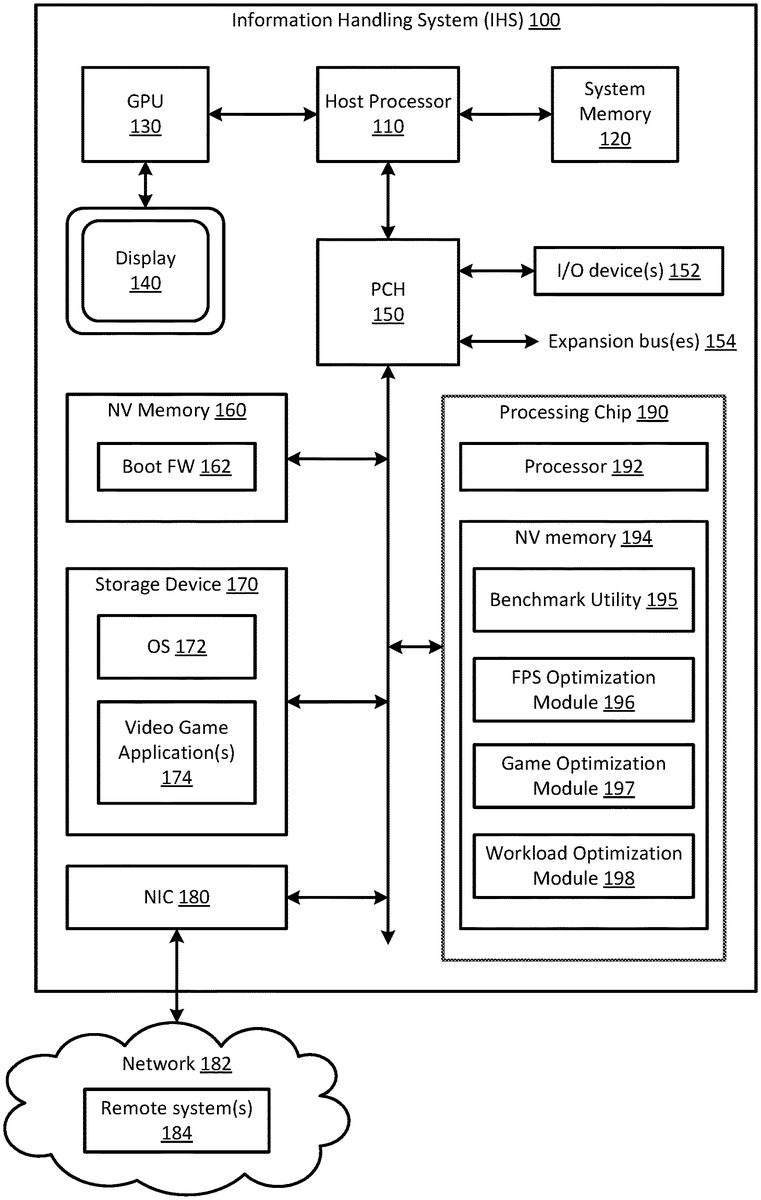
FIG. 1is a block diagram of an information handling system100(e.g., a desktop computer, laptop computer, tablet computer, smart phone, dedicated gaming console, server, etc.) as it may be configured according to one embodiment of the present disclosure. As shown inFIG. 1, IHS100may generally include at least one processing device (e.g., a host processor)110, a system memory120, a graphics processor unit (GPU)130, a display device140, a platform controller hub (PCH)150, input/output (I/O) devices152, expansion bus(es)154, a computer readable non-volatile (NV) memory160, a computer readable storage device170, and a network interface card (NIC)180. In some embodiments, IHS100may further include a dedicated processing chip190, which may be used to perform the functionality described herein. In other embodiments, the dedicated processing chip190shown inFIG. 1may be omitted, and the disclosed functionality may be performed by other system components (e.g., host processor110, system memory120, GPU130, NV memory160and/or storage device170), or by a remote system coupled to IHS100.
It is expressly noted that the IHS configuration shown inFIG. 1is exemplary only, and that the methods disclosed herein may be implemented on any type and/or configuration of information handling system having one or more processing devices, computer readable memory, and/or a computer readable storage device. It will be further understood that while certain components of the information handling system are shown inFIG. 1for illustrating embodiments of the present disclosure, the information handling system disclosed herein is not restricted to including only those components shown inFIG. 1and described below.
Host processor110may include various types of programmable integrated circuits (e.g., a processor such as a controller, microcontroller, microprocessor, ASIC, etc.) and programmable logic devices (such as a field programmable gate array “FPGA”, complex programmable logic device “CPLD”, etc.). According to one embodiment, host processor110may include at least one central processing unit (CPU) having one or more processing cores. The CPU may include any type of processing device, such as an Intel Pentium series processor, an Advanced Micro Devices (AMD) processor or another processing device.
System memory120is coupled to host processor110and generally configured to store program instructions (or computer program code), which are executable by host processor110. System memory120may be implemented using any suitable memory technology, including but not limited to, random access memory (RAM), static RAM (SRAM), dynamic RAM (DRAM), synchronous dynamic RAM (SDRAM), non-volatile RAM (NVRAM), erasable programmable ROM (EPROM), electrically erasable programmable ROM (EEPROM), Flash memory, or any other type of volatile memory.
Graphics processor unit (GPU)130is coupled to host processor110and configured to coordinate communication between the host processor and one or more display components of the IHS. In the embodiment shown inFIG. 1, GPU130is coupled to display device140and configured to provide visual images (e.g., images, messages, user prompts and/or graphical user interfaces associated with a video game application) to a user. Although GPU130is shown as a separate processing device in the embodiment ofFIG. 1, GPU130may be omitted in other embodiments, when the functionality provided thereby is integrated within host processor110in a system-on-chip (SoC) design. In some embodiments, GPU130may be a graphics-derivative processor, such as a physics/gaming processor. In some embodiments, IHS100may include other types of processing devices, such as a digital signal processor (DSP), an integrated graphics processing unit (iGPU), an Electronic Lighting Control Chip (ELC), etc.
Platform controller hub (PCH)150is coupled to host processor110and configured to handle I/O operations for the IHS. As such, PCH150may include a variety of communication interfaces and ports for communicating with various system components, such as input/output (I/O) devices152, expansion bus(es)154, computer readable NV memory160, computer readable storage device170, NIC180and dedicated processing chip190. Examples of communication interfaces and ports that may be included within PCH150include, but are not limited to, a Peripheral Component Interconnect (PCI) interface, a PCI-Express (PCIe) interface, a Serial Peripheral Interface (SPI), an Enhanced SPI (eSPI), a Serial AT Attachment (SATA) interface, a Low Pin Count (LPC) interface, a Small Computer Serial Interface (SCSI), an Industry Standard Architecture (ISA) interface, an Inter-Integrated Circuit (I2C) interface, a Universal Serial Bus (USB) interface and a Thunderbolt™ interface. Examples of expansion bus(es)154that may be coupled to PCH150include, but are not limited to, a PCI bus, a PCIe bus, a SATA bus, a USB bus, etc.
I/O devices152enable the user to interact with IHS100and software/firmware executing thereon. In some embodiments, one or more I/O devices152may be provided within IHS100. In other embodiments, I/O device(s)152may be separate from the IHS and may interact with the IHS through a wired or wireless connection. Examples of I/O devices152include, but are not limited to, keyboards, keypads, joysticks and other video game controllers, touch screens, mice, scanning devices, voice or optical recognition devices, and any other devices suitable for entering or retrieving data. In some embodiments, a video game user may utilize an I/O device152to select a target FPS for a particular video game application and/or to run a benchmark test to determine optimal in-game settings for a particular video game application.
Computer readable memory160may include any type of non-volatile (NV) memory including, but not limited to, Flash memory (e.g., SPI Flash memory) and non-volatile random-access memory (NVRAM), and may be generally configured to store software and/or firmware modules, which may be executed by host processor110to instruct components of IHS100to perform various tasks and functions for the information handling system. In the embodiment shown inFIG. 1, computer readable NV memory160stores boot firmware (FW)162in addition to other firmware modules (not shown). Boot firmware162may be implemented as a Basic Input/Output System (BIOS) and/or a Unified Extensible Firmware Interface (UEFI). As known in the art, boot firmware162includes software and/or firmware modules for specifying hardware configuration settings, system date/time, boot sequence, etc.
Computer readable storage device170may include any type of persistent, non-transitory computer readable storage device, such as one or more hard disk drives (HDDs) or solid-state drives (SSDs), and may be generally configured to store software and/or data. For example, computer readable storage device170may be configured to store an operating system (OS)172for the IHS, in addition to other software and/or firmware modules and user data. As known in the art, OS172may contain program instructions (or computer program code), which may be executed by host processor110to perform various tasks and functions for the information handling system and/or for the user. In some embodiments, one or more video game applications174may also be stored within computer readable storage device170, as shown inFIG. 1. In other embodiments, video game application(s) may be stored remotely (e.g., on a remote system184) and accessed via a network182, such as the Internet. In other embodiments, video game application(s) may be stored on a disc, which may be read by an optical disc drive (not shown) included within the IHS100.
Regardless of where a video game application is stored, program instructions (or computer program code) associated with the video game application may be executed by host processor110and GPU130. As noted above, the host processor (or CPU)110may send instructions from the video game application to the GPU130, which processes the instructions, renders the images, and sends the rendered images to the display device140. The frame rate (or FPS) at which the rendered images are sent to the display device140may depend on the capabilities of the host processor110and GPU130, the video game application program code, and the in-game settings specified for the video game application. As noted above, the frame rate (or FPS) of a video game application may be used as a benchmark to measure the visual quality of the video game application, and often changes over the course of a gaming session.
NIC180enables IHS100to communicate with one or more remotely located systems and/or services184via an external network182using one or more communication protocols. Network182may be a local area network (LAN), wide area network (WAN), personal area network (PAN), or the like, and the connection to and/or between IHS100and network182may be wired, wireless or a combination thereof. For purposes of this discussion, network182is indicated as a single collective component for simplicity. However, it is appreciated that network182may comprise one or more direct connections to other remote systems and/or services, as well as a more complex set of interconnections as can exist within a wide area network, such as the Internet. NIC180may communicate data and signals to/from IHS100using any known communication protocol.
In some embodiments, IHS100may utilize NIC180to access a remotely located system184(e.g., a network connected server, or server cloud). In some embodiments, the remotely located system184may store video game application(s), which can be executed by the host processor110and GPU130of IHS100. In other embodiments, the remotely located system184may store software and/or firmware modules, which may be executed by the remotely located system to measure and/or track the visual quality of a video game application executed by IHS100.
In some embodiments, IHS100may include a dedicated processing chip190to measure and optimize the visual quality of a video game application executed by the IHS. In the embodiment shown inFIG. 1, for example, dedicated processing chip190includes a processor192and a computer readable NV memory194containing software and/or firmware modules (e.g., benchmark utility195, FPS optimization module196, game optimization module197and workload optimization module198), which may be executed by the processor192to measure and optimize the visual quality of a video game application.
When included within IHS100, dedicated processing chip190may have direct pathways to host processor110, system memory120, GPU130, NV memory160, storage device170and/or NIC180, and may offload processing of benchmark data and optimizations from the host processor to the chip. In some embodiments, dedicated processing chip190may access one or more additional processors (e.g., an iGPU or ELE), when needed, for extra processing power. In other embodiments, dedicated processing chip190may collect and send benchmark data to a remotely located system184, instead of processing the benchmark data locally. In some embodiments, the remotely located system184may process the benchmark data received from IHS100for a particular video game application, and may compare the benchmark data received from the IHS100to benchmark data received from other information handling systems. In other embodiments, dedicated processing chip190may be omitted from IHS100. In such embodiments, the functionality described herein for the dedicated processing chip190may, instead, be performed locally by host processor110or remotely by a remotely located system184.
Each video game application has its own in-game settings (e.g., lighting/shadows, textures, resolution, antialiasing (AA), anisotropic filtering (AF), field of view, foliage, etc.), its own engine, and its own application program interface (API). In addition, each video game application has its own set of system optimization settings for different central processing units (CPUs), graphics processing units (GPUs), and internal calls. When optimization settings for a particular IHS are paired with in-game settings, the number of possible permutations of settings (i.e., system optimization settings and in-game settings) that affect the visual quality of a video game application can easily reach into the trillions. This makes it extremely difficult, if not impossible, for a video game user to determine the optimal in-game settings to use for each video game application run on their system.
To overcome this problem, the present disclosure provides a benchmark utility195and a plurality of optimization modules (e.g., FPS optimization module196, game optimization module197and workload optimization module198), which can be used to quantitatively and systematically measure the visual quality of a video game application executed by an IHS, and to determine the optimal in-game settings (i.e., the in-game settings that provide the best visual quality and FPS performance) for that video game application on that machine.
Benchmark utility195may generally contain program instructions (or computer program code), which may be executed by a processing device (e.g., processor192, host processor110or another local or remotely located processing device) to measure the visual quality of a video game application executed by an IHS, and to determine the optimal in-game settings for the video game application. The benchmark utility195may be run before or after a video game user begins a gaming session to measure visual quality and determine the optimal in-game settings for a particular video game application and a particular IHS. One manner in which the benchmark utility195may be used to measure visual quality and determine optimal in-game settings is shown inFIGS. 3A and 3Band described in more detail below.
As discussed in more detail below, benchmark utility195may determine optimal in-game settings for a particular video game application and a particular IHS by assigning numerical values to the in-game settings, running a benchmark test using a first set of in-game settings having a first set of numerical values, monitoring the FPS generated during the benchmark test, combining the first set of numerical values and the monitored FPS into a game variable score, incrementally changing the in-game settings and rerunning the benchmark test to generate a new game variable score. Once the monitored FPS reaches a target FPS, the set of in-game settings with the highest game variable score may be selected as the optimal in-game settings for the particular video game application and the particular IHS. By determining a relationship between individual in-game settings and FPS, benchmark utility195provides a quantitative and systematic method to measure the visual quality of a video game application and to optimize the in-game settings used for that video game application run on that IHS.
FPS optimization module196may generally contain program instructions (or computer program code), which may be executed by a processing device (e.g., processor192, host processor110or another local or remotely located processing device) to set the target FPS for a video game application, and to monitor and optimize the FPS generated during execution of the video game application. The FPS optimization module196may be run before, during and/or after a video game user begins a gaming session with a particular video game application. One manner in which the FPS optimization module196may be used to set the target FPS and monitor and optimize the generated FPS is shown inFIG. 2and described in more detail below.
Game optimization module197may generally contain program instructions (or computer program code), which may be executed by a processing device (e.g., processor192, host processor110or another local or remotely located processing device) to optimize the visual quality of a video game application during a gaming session. When a video game user begins a gaming session with a particular video game application, the game optimization module197applies the optimal in-game settings, which were previously determined by benchmark utility195for that video game application and that IHS. Over the course of the gaming session, the game optimization module197adjusts the applied in-game settings as changes occur in the system workload and/or the monitored FPS. One manner in which the game optimization module197may be used to adjust in-game settings over the course of a gaming session is shown inFIG. 4and described in more detail below.
Workload optimization module198may generally contain program instructions (or computer program code), which may be executed by a processing device (e.g., processor192, host processor110or another local or remotely located processing device) to monitor system workload and optimize system components to achieve a maximum FPS for a video game application at the current system workload. The workload optimization module198may be run before, during and/or after a video game user begins a gaming session with a particular video game application. In some embodiments, the system workload monitored by the workload optimization module198may be provided to benchmark utility195and recorded along with the applied in-game settings, the game variable score, and the monitored FPS in a local database. In some embodiments, the game optimization module197may utilize the workload optimization module198to further improve the visual quality of a video game application. For example, the game optimization module197may use the workload optimization module198to dynamically adjust operating characteristics of one or more system components (e.g., the CPU, GPU, monitor, RAM, network, power, fans, skin temperature, etc.) during a gaming session, so as to achieve a maximum FPS for the video game application at the current system workload.
The systems and methods disclosed herein allow an information handling system (IHS) to measure and optimize the visual quality of a video game application. More specifically, the disclosed systems and methods can be used to quantitatively and systematically measure the visual quality of a video game application executed by an IHS, and to determine the optimal in-game settings (i.e., the in-game settings that provide the best visual quality and FPS performance) for that video game application on that machine. Because the system creates a repeatable process, it can be used to create a large pool of benchmark data, which can be obtained from multiple systems for multiple video game applications and multiple in-game settings. By collecting a large pool of benchmark data, the system is able to understand small variances between different IHS configurations and compare those variances against in-game settings. In some embodiments, the disclosed system may use this large pool of benchmark data to approximate the visual quality of video game applications it has not yet measured.
By tying FPS and in-game settings into one value (i.e., a game variable score), the system is capable of understanding the relationship between individual in-game settings and FPS. This enables the system to approximate how a person (e.g., a video game user) would interpret the visual quality of the video game application. By providing a quantitative, systematic approach to determining and selecting optimal in-game settings, the system is capable of out-performance tuning a person.
FIGS. 2-4illustrate example embodiments of methods in accordance with the present disclosure, which may be used to measure the visual quality of a video game application executed or run by an IHS, and to determine the optimal in-game settings (i.e., the in-game settings that provide the best visual quality and FPS performance) for that video game application on that machine. For example,FIG. 2illustrates one embodiment of a method200that may be used to set a target FPS for a video game application, and to monitor and optimize the FPS generated during execution of the video game application.FIGS. 3A and 3Billustrate one embodiment of a method300that may be used to determine optimal in-game settings for a video game application.FIG. 4illustrates one embodiment of a method400that may be used to optimize the visual quality of a video game application during a gaming session.
The methods200,300and400shown inFIGS. 2-4are computer implemented methods performed, at least in part, by a processing device (e.g., processor192, host processor110or another local or remotely located processing device) of an information handling system (e.g., IHS100or a remotely located system184) by executing program instructions (e.g., program instructions contained within benchmark utility195, FPS optimization module196, game optimization module197and/or workload optimization module198) stored within a computer readable medium (e.g., NV memory194, computer readable storage device170, etc.). Unlike conventional methods for optimizing the visual quality of a video game application (e.g., “auto setting” features and user trial-and-error), the computer implemented methods200,300and400shown inFIGS. 2-4improve the way in which an information handling system (such as IHS100) functions by providing a quantitative and systematic approach to measure the visual quality of a video game application and determine the optimal in-game settings for a given video game application run on a given information handling system.
FIG. 2illustrates one embodiment of a method200that may be used to set a target FPS for a video game application, and to monitor and optimize the FPS generated during execution of the video game application. Although not strictly limited to such, the method200shown inFIG. 2may be performed, in one embodiment, by a processing device executing program instructions contained within the FPS optimization module196shown, for example, inFIG. 1.
In one embodiment, method200may begin by detecting a target FPS set for a video game application (in step210). In some embodiments, the target FPS may be set by a video game user by selecting the target FPS (e.g., 30, 60, 100, 144, etc.) from an in-game settings menu provided by the video game application. The target FPS selected by the video game user may be dependent on the video game application, as well as the capabilities of various hardware components (e.g., the CPU, GPU, monitor, etc.) included within the video game user's system. In other embodiments, a default target FPS may be set by the video game application based on hardware components (e.g., the CPU, GPU, monitor, etc.) detected by the video game application.
In steps220and230, method200monitors the FPS generated during execution of the video game application until the monitored FPS drops below the target FPS. If the generated FPS is less than the target FPS (YES branch of step230), method200displays a notification to the video game user, requesting the user to run a benchmark utility (e.g., benchmark utility195ofFIG. 1) to obtain new in-game settings (in step240). One embodiment of method steps associated with running the benchmark utility and obtaining new in-game settings is shown inFIGS. 3A and 3Band discussed in more detail below. After new in-game settings are obtained, the new in-game settings are applied when the video game application is re-executed (in step250).
FIGS. 3A and 3Billustrate one embodiment of a method300that may be used to determine optimal in-game settings for a video game application. Although not strictly limited to such, the method300shown inFIGS. 3A and 3Bmay be performed, in one embodiment, by a processing device executing program instructions contained within the benchmark utility195and (optionally) the workload optimization module198shown, for example, inFIG. 1.
In one embodiment, method300may begin by starting a benchmark utility used to obtain optimal in-game settings for a video game application (in step305) and detecting a target FPS selected for the video game application (in step310). As noted above, the target FPS may be selected by a video game user (or the video game application) based on the video game application and/or the capabilities of various hardware components (e.g., the CPU, GPU, monitor, etc.) included within the video game user's system.
In step315, method300determines the in-game settings associated with the video game application detected in step305. As noted above, common in-game settings include, but are not limited to, lighting/shadows, textures, resolution, antialiasing (AA), anisotropic filtering (AF), field of view, foliage, etc. However, each video game application has its own in-game settings, its own engine, and its own application program interface (API). As such, it is important to determine the in-game settings used for a particular video game application. Each in-game setting comprises a range of in-game setting values over which a particular setting may be adjusted. For example, a resolution setting may be adjusted over a plurality of resolution values ranging from low resolution to high resolution. Other in-game settings may be similarly adjusted over a plurality of in-game setting values ranging from low to high.
For each in-game setting determined in step315, method300divides the range of in-game setting values into a plurality of subsets ranging from a lowest subset to a highest subset, and beginning with the lowest subset, assigns an increasingly greater numerical value to each subsequent subset (in step320). In one example, the plurality of resolution values associated with the resolution setting may be divided into five subsets corresponding to very low resolution (e.g., 1280×1024), low resolution (e.g., 1366×768), medium resolution (e.g., 1920×1080), high resolution (e.g., 2560×1440) and very high resolution (e.g., 3840×2160). Other in-game settings may be similarly divided into a plurality of subsets. Although five subsets are discussed herein as an example, the in-game setting values may be divided into a fewer or greater number of subsets in other embodiments.
Once in-game setting values are divided into a plurality of subsets, an increasingly greater numerical value may be assigned to each subsequent subset (in step320). In one embodiment, increasingly greater numerical values ranging between about 1 and 10 may be applied to each of the plurality of subsets. Continuing the resolution setting example discussed above, for example, ‘1’ may be assigned to the very low resolution subset, ‘3’ may be assigned to the low resolution subset, ‘5’ may be assigned to the medium resolution subset, ‘7’ may be assigned to the high resolution subset and ‘9’ may be assigned to the very high resolution subset (in step320). Although odd values ranging from1to10are provided herein as an example, other numerical values (e.g., even values or numerical values within a substantially different range) may be applied to each of the plurality of subsets in other embodiments.
In step325, method300runs a benchmark test for the video game application to determine the optimal in-game settings for the video game application detected in step305and the target FPS detected in step310. One embodiment of method steps associated with running the benchmark test and obtaining the optimal in-game settings is shown inFIG. 3Band discussed in more detail below. After the optimal in-game settings are obtained, the optimal in-game settings may be applied to the video game application (in step330).
As shown inFIG. 3B, the benchmark test run in step325may generally begin by applying one subset of each of the in-game settings to the video game application (in step335). In one embodiment, the median (or medium) subset of each in-game setting may be initially applied in step335. In the example provided above, the median (or medium) subset of each in-game setting may be assigned a numerical value of ‘5’. Other numerical values may be assigned to the median subset in other embodiments. In step340, method300monitors the system workload and the FPS generated during execution of the video game application.
In step345, method300calculates a game variable score for the applied in-game settings (in this case, the median or medium subset of each in-game setting) by multiplying the generated FPS with a summation of the numerical values assigned to each subset of the applied in-game settings. For example, if six in-game settings are applied in step335and the generated FPS monitored in step340is 65 FPS, the game variable score calculated in step345would be: 65 x (5+5+5+5+5+5)=1950. Although a particular game variable score is provided as an example, other game variable scores may be calculated in step345depending on the number of in-game settings applied in step335, the generated FPS monitored in step340, and the numerical value assigned to each subset of the applied in-game settings in step345.
In step350, method300stores the in-game settings applied in step335, the system workload and the generated FPS monitored in step340, and the game variable score calculated in step345in a local database. In steps355and360, method300compares the generated FPS to the target FPS. If the generated FPS is greater than the target FPS (YES branch of step355), method300adjusts the applied in-game settings incrementally, one at a time, by increasing one in-game setting to the subset having the next highest numerical value (in step365). In one example, the applied in-game settings may be adjusted in step365by increasing the resolution setting from the medium resolution subset (which is assigned a numerical value of ‘5’) to the high resolution subset (which is assigned a numerical value of ‘7’). Although the resolution setting is provided herein as an example, another in-game setting (e.g., lighting/shadows, textures, antialiasing (AA), anisotropic filtering (AF), field of view, foliage, etc.) may alternatively be increased in step365. Once an in-game setting is increased to the subset having the next highest numerical value (in step365), method300continues to execute the video game application using the adjusted in-game settings (in step370) to determine the effect, if any, the new in-game settings have on the visual quality of the game and the generated FPS.
If the generated FPS is less than the target FPS (NO branch of step355and YES branch of step360), method300adjusts the applied in-game settings incrementally, one at a time, by decreasing one in-game setting to the subset having the next lowest numerical value (in step375). In one example, the applied in-game settings may be adjusted in step375by decreasing the resolution setting from the medium resolution subset (which is assigned a numerical value of ‘5’) to the low resolution subset (which is assigned a numerical value of ‘3’). Although the resolution setting is provided herein as an example, another in-game setting (e.g., lighting/shadows, textures, antialiasing (AA), anisotropic filtering (AF), field of view, foliage, etc.) may alternatively be decreased in step375. Once an in-game setting is decreased to the subset having the next lowest numerical value (in step375), method300continues to execute the video game application using the adjusted in-game settings (in step370) to determine the effect, if any, the new in-game settings have on the visual quality of the game and the generated FPS.
After the applied in-game settings are adjusted (in step365or step375) and the video game application is executed using the adjusted in-game settings (in step370), method300returns to step340to run the benchmark test again using the adjusted in-game settings. More specifically, method300iteratively repeats steps340,345,350,355,360,365,370and375, adjusting one in-game setting at a time (either up to the next highest subset or down to the next lowest subset), until the generated FPS equals the target FPS (NO branch of step355and NO branch of step360). Each time the benchmark test is run with a new set of in-game settings, a new game variable score is calculated (in step345) and stored in the local database (in step350) along with the applied in-game settings and the system workload and FPS generated when the in-game settings were applied. As a result of this iterative process, a plurality of game variable scores is stored in the local database, wherein each game variable score is associated with a particular set of in-game settings, and the system workload and FPS generated when that particular set of in-game settings was applied.
Once the generated FPS equals the target FPS, method300determines the optimal in-game settings for the video game application and the target FPS by selecting, from the local database, the in-game settings having the highest game variable score (in step380). Once the optimal in-game settings are determined (in step380), the optimal in-game settings are applied to the video game application (in step330), as discussed above with reference toFIG. 3A.
FIG. 4illustrates one embodiment of a method400that may be used to optimize the visual quality of a video game application during a gaming session. Although not strictly limited to such, the method400shown inFIG. 4may be performed, in one embodiment, by a processing device executing program instructions contained within the game optimization module197and (optionally) the workload optimization module198shown, for example, inFIG. 1.
In one embodiment, method400may begin upon detecting the beginning of a gaming session for a video game application (in step405) and detecting a target FPS selected for the video game application (in step410). As noted above, the target FPS may be selected by a video game user (or the video game application) based on the video game application and/or the capabilities of various hardware components (e.g., the CPU, GPU, monitor, etc.) included within the video game user's system.
In step415, method400reads a local database to determine optimal in-game settings for the video game application and the target FPS. As described above with respect toFIG. 3B, the local database may store a plurality of game variable scores along with corresponding in-game settings, and the system workload and FPS generated when the in-game settings were applied. To determine the optimal in-game settings (in step415), method400may select the in-game settings associated with the highest game variable score stored within the local database.
In some embodiments, method400may monitor the system workload and may optimize one or more system components to achieve a maximum FPS at the current system workload (in optional step425). In one embodiment, the workload optimization module198shown inFIG. 1may be utilized in step425. As noted above, the workload optimization module198may be used to dynamically adjust operating characteristics of one or more system components (e.g., the CPU, GPU, monitor, RAM, network, power, fans, skin temperature, etc.) during a gaming session, if needed, to achieve a maximum FPS for the video game application at the current system workload. In other embodiments, step425may be omitted and method400may continue on to step430.
Method400monitors the FPS generated during the gaming session (in step430) and compares the generated FPS to the target FPS (in step435). If the generated FPS is less than the target FPS (YES branch of step435), method400adjusts each setting of the applied in-game settings, one setting at a time, until the generated FPS equals the target FPS (in step440). In step445, method400stores the new in-game settings in the local database and applies the new in-game settings to the video game application. In step450, method400determines whether or not a gaming session for the video game application has ended. If the gaming session has not yet ended (NO branch of step450), method400repeats steps430,435,440,445and450until the gaming session ends (YES branch of step450). Once the gaming session ends, method400ends.
As noted above,FIGS. 2-4provide various embodiments of methods for monitoring and optimizing the FPS generated during execution of the video game application (FIG. 2), determining optimal in-game settings for a video game application (FIGS. 3A-3B), and optimizing the visual quality of a video game application during a gaming session (FIG. 4). It will be recognized that the methods200,300and400shown inFIGS. 2-4are merely exemplary and additional methods may utilize the techniques described herein. For example, although the methods shown and described herein are applied to video game applications, similar methods may be used to determining optimal settings and optimizing the visual quality of any graphical application. In is further recognized that additional steps may be added to the methods shown inFIGS. 2-4, as the steps described are not intended to be exclusive. Moreover, the order of the steps is not limited to the order shown in theFIGS. 2-4, as different orders may occur and/or various steps may be performed in combination or at the same time.
As noted above, the methods shown inFIGS. 2-4are computer implemented methods. As such, it will be understood that one or more of the tasks, functions, or methodologies described herein (e.g., including those described herein for components174,195,196,197,198,200,300and400, etc.) may be implemented by a computer program of instructions (e.g., computer readable code such as application code, firmware code or software code) embodied in a non-transitory tangible computer readable medium (e.g., optical disk, magnetic disk, non-volatile memory device, non-volatile storage device, etc.), in which the computer program comprising instructions is configured when executed on a processing device in the form of a programmable integrated circuit (e.g., processor such as CPU, controller, microcontroller, microprocessor, ASIC, etc. or programmable logic device “PLD” such as FPGA, complex programmable logic device “CPLD”, etc.) to perform one or more steps of the methodologies disclosed herein. In one embodiment, a group of such processing devices may be selected from the group consisting of a CPU, controller, microcontroller, microprocessor, FPGA, CPLD and ASIC. The computer program of instructions may include an ordered listing of executable instructions for implementing logical functions in an information handling system or component thereof. The executable instructions may include a plurality of code segments operable to instruct components of an information handling system to perform the methodologies disclosed herein.
It will also be understood that one or more steps of the present methodologies may be employed in one or more code segments of the computer program. For example, a code segment executed by the information handling system may include one or more steps of the disclosed methodologies. It will be understood that a processing device may be configured to execute or otherwise be programmed with software, firmware, logic, and/or other program instructions stored in one or more non-transitory tangible computer-readable mediums (e.g., data storage devices, flash memories, random access memories, read only memories, programmable memory devices, reprogrammable storage devices, hard drives, floppy disks, DVDs, CD-ROMs, and/or any other tangible data storage mediums) to perform the operations, tasks, functions, or actions described herein for the disclosed embodiments.
For purposes of this disclosure, an information handling system may include any instrumentality or aggregate of instrumentalities operable to compute, calculate, determine, classify, process, transmit, receive, retrieve, originate, switch, store, display, communicate, manifest, detect, record, reproduce, handle, or utilize any form of information, intelligence, or data for business, scientific, control, or other purposes. For example, an information handling system may be a personal computer (e.g., desktop or laptop), tablet computer, mobile device (e.g., personal digital assistant (PDA) or smart phone), server (e.g., blade server or rack server), a dedicated gaming console, a network storage device, or any other suitable device and may vary in size, shape, performance, functionality, and price. The information handling system may include random access memory (RAM), one or more processing resources such as a central processing unit (CPU) or hardware or software control logic, ROM, and/or other types of nonvolatile memory. Additional components of the information handling system may include one or more disk drives, one or more network ports for communicating with external devices as well as various input and output (I/O) devices, such as a keyboard, a mouse, touch screen and/or a video display. The information handling system may also include one or more buses operable to transmit communications between the various hardware components.
While the invention may be adaptable to various modifications and alternative forms, specific embodiments have been shown by way of example and described herein. However, it should be understood that the invention is not intended to be limited to the particular forms disclosed. Rather, the invention is to cover all modifications, equivalents, and alternatives falling within the spirit and scope of the invention as defined by the appended claims. Moreover, the different aspects of the disclosed systems and methods may be utilized in various combinations and/or independently. Thus, the invention is not limited to only those combinations shown herein, but rather may include other combinations.
Claims
- A computer-implemented method performed by a processing device of an information handling system (IHS) to determine optimal in-game settings for a video game application executed by the IHS or another IHS remotely coupled to the IHS, the computer-implemented method comprising: detecting a target frames-per-second (FPS) selected for the video game application;determining in-game settings associated with the video game application, wherein each in-game setting comprises a range of in-game setting values, and wherein for each in-game setting, the computer-implemented method further comprises: dividing the range of in-game setting values into a plurality of subsets ranging from a lowest subset to a highest subset;and beginning with the lowest subset, assigning an increasingly greater numerical value to each subsequent subset;and determining the optimal in-game settings for the video game application and the target FPS.
- The computer-implemented method of claim 1, further comprising applying the optimal in-game settings to the video game application.
- The computer-implemented method of claim 1, wherein determining the optimal in-game settings for the video game application and the target FPS comprises: applying one subset of each of the in-game settings to the video game application;monitoring the frames-per-second (FPS) generated during execution of the video game application;and combining the generated FPS and the numerical values assigned to the applied subsets of n-game settings into a game variable score for the applied subsets of in-game settings.
- The computer-implemented method of claim 3, wherein a median subset of each of the in-game settings is initially applied to the video game application in said applying.
- The computer-implemented method of claim 3, wherein combining the generated FPS and the numerical values assigned to the applied subsets of in-game settings into a game variable score comprises: calculating the game variable score by multiplying the generated FPS with a summation of the numerical values assigned to the applied subsets of the in-game settings.
- The computer-implemented method of claim 3, wherein determining the optimal in-game settings for the video game application and the target FPS further comprises: storing the applied subsets of in-game settings, the generated FPS and the game variable score in a local database.
- The computer-implemented method of claim 6, wherein determining the optimal in-game settings for the video game application and the target FPS further comprises: comparing the generated FPS to the target FPS;adjusting the applied subsets of in-game settings by increasing one in-game setting to the subset having the next highest numerical value, if the generated FPS is greater than the target FPS;and adjusting the applied subsets of in-game settings by decreasing one in-game setting to the subset having the next lowest numerical value, if the generated FPS is less than the target FPS.
- The computer-implemented method of claim 7, wherein determining the optimal in-game settings for the video game application and the target FPS further comprises: applying the adjusted subsets of the in-game settings to the video game application;and repeating the steps of monitoring, combining, storing and comparing until the generated FPS equals the target FPS.
- The computer-implemented method of claim 8, wherein determining the optimal in-game settings for the video game application and the target FPS further comprises: determining the optimal in-game settings for the video game application and the target FPS by selecting, from the local database, the in-game settings associated with the highest game variable score.
- A computer-implemented method performed by a processing device of an information handling system (IHS) to optimize the visual quality of a video game application during a gaming session, the computer-implemented method comprising: detecting the beginning of a gaming session for the video game application;detecting a target frames-per-second (FPS) selected for the video game application;determining optimal in-game settings for the video game application and the target FPS;applying the optimal in-game settings to the video game application;monitoring the FPS generated during the gaming session;and comparing the generated FPS to the target FPS, wherein if the generated FPS is less than the target FPS, the computer-implemented method further comprises: adjusting each setting of the applied in-game settings, one setting at a time, until the generated FPS equals the target FPS to optimize the visual quality of the video game application during the gaming session.
- The computer-implemented method of claim 10, wherein determining optimal in-game settings for the video game application and the target FPS comprises: accessing a local database storing a plurality of game variable scores, wherein each game variable score is associated with a different set of in-game settings and the FPS generated when the different set of in-game settings was previously applied to the video game application;and selecting, from the local database, the set of in-game settings associated with the highest game variable score.
- The computer-implemented method of claim 10, wherein after adjusting each setting of the applied in-game settings, the computer-implemented method further comprises: storing the adjusted in-game settings in a local database;applying the adjusted in-game settings to the video game application;and repeating the steps of monitoring and comparing until the gaming session ends.
- An information handling system (IHS), comprising: a computer readable medium configured to store a first set of program instructions executable to determine optimal in-game settings for a video game application executed by the IHS, or another IHS remotely coupled to the IHS;and a processing device coupled to the computer readable medium and configured to execute the first set of program instructions to: detect a target frames-per-second (FPS) selected for the video game application;determine in-game settings associated with the video game application, wherein each in-game setting comprises a range of in-game setting values;for each in-game setting, divide the range of in-game setting values into a plurality of subsets ranging from a lowest subset to a highest subset, and beginning with the lowest subset, assign an increasingly greater numerical value to each subsequent subset;and determine the optimal in-game settings for the video game application and the target FPS.
- The information handling system of claim 13, wherein to determine the optimal in-game settings for the video game application and the target FPS, the processing device is configured to execute the first set of program instructions to: apply one subset of each of the in-game settings to the video game application;monitor the frames-per-second (FPS) generated during execution of the video game application;combine the generated FPS and the numerical values assigned to the applied subsets of in-game settings into a game variable score for the applied subsets of in-game settings;and store the applied subsets of in-game settings, the generated FPS and the game variable score in a local database.
- The information handling system of claim 14, wherein to determine the optimal in-game settings for the video game application and the target FPS, the processing device is configured to execute the first set of program instructions to: compare the generated FPS to the target FPS;adjust the applied subsets of in-game settings by increasing one in-game setting to the subset having the next highest numerical value, if the generated FPS is greater than the target FPS;and adjust the applied subsets of in-game settings by decreasing one in-game setting to the subset having the next lowest numerical value, if the generated FPS is less than the target FPS.
- The information handling system of claim 15, wherein to determine the optimal in-game settings for the video game application and the target FPS, the processing device is configured to execute the first set of program instructions to: apply the adjusted subsets of the in-game settings to the video game application;and repeat said monitoring, combining, storing and comparing until the generated FPS equals the target FPS.
- The information handling system of claim 16, wherein to determine the optimal in-game settings for the video game application and the target FPS, the processing device is configured to execute the first set of program instructions to: determine the optimal in-game settings for the video game application and the target FPS by selecting, from the local database, the in-game settings associated with the highest game variable score.
- The information handling system of claim 13, wherein the first set of program instructions are executed by the processing device before, during or after a video game user begins a gaming session with the video game application.
- The information handling system of claim 13, wherein: the computer readable medium is configured to store a second set of program instructions executable to optimize the visual quality of the video game application during a gaming session;and the processing device is configured to execute the second set of program instructions to: detect the beginning of a gaming session for the video game application;detect the target FPS selected for the video game application;determine the optimal in-game settings for the video game application and the target FPS;apply the optimal in-game settings to the video game application;monitor the FPS generated during the gaming session;and compare the generated FPS to the target FPS, wherein if the generated FPS is less than the target FPS, the processing device is configured to execute the second set of program instructions to: adjust each setting of the applied in-game settings, one setting at a time, until the generated FPS equals the target FPS to optimize the visual quality of the video game application during the gaming session.
- The information handling system of claim 19, wherein to determine the optimal in-game settings for the video game application and the target FPS, the processing device is configured to execute the second set of program instructions to: access a local database storing a plurality of game variable scores, wherein each game variable score is associated with a different set of in-game settings and the FPS generated when the different set of in-game settings was previously applied to the video game application;and select, from the local database, the set of in-game settings associated with the highest game variable score.
- The information handling system of claim 19, wherein after adjusting each setting of the applied in-game settings, the processing device is configured to execute the second set of program instructions to: store the adjusted in-game settings in a local database;apply the adjusted in-game settings to the video game application;and repeat said monitoring and comparing until the gaming session ends.
Disclaimer: Data collected from the USPTO and may be malformed, incomplete, and/or otherwise inaccurate.