U.S. Pat. No. 11,325,041
CODELESS VIDEO GAME CREATION PLATFORM
Issue DateSeptember 21, 2020
Illustrative Figure
Abstract
A codeless video game method may include receiving an arbitrary game image previously unknown to the computer system and containing object images, each object image corresponding to a game element of the video game, each game element associated with at least one property, and associating automatically each object image with a respective game element that corresponds thereto by identifying automatically, in the game image, each object image. Then a program of instructions is generated that is executable by the computer system, which defines behavior of game elements in the video game according to the at least one property associated with the game elements. During a playing of the video game, the program of instructions causes each game element to be represented in the display by the object image, which may be substantially identical to the game object images that were input as part of the overall game image.
Description
DETAILED DESCRIPTION A game engine that implements the method and comprises the system may comprise four major blocks: configuration, identification, consolidation, and consumer. A user may enter an image that he or she has drawn or otherwise created or obtained into the system, for example, by capturing a photograph of the image or drawing it, and transmitting it to the system. While described as residing on a server and accessed via the internet, it will be understood that a game engine90according to the present disclosure as illustrated inFIG. 9, or one or more components thereof, may reside on a local area network, wide area or ad hoc network, or may be downloaded onto a local device of the computer, such as to a desktop computer or mobile device of the user. A flow diagram for the system as a whole is shown inFIG. 3. Identification In what is sometimes referred to herein as the identification step performed by image identifier95illustrated as part of the game engine91shown inFIG. 9, the system provides a mechanism for accepting the input by converting it to named “layers.” A layer may be an area of the input image that contains a figure of a character, such as an avatar, sprite, or a figure of another game object, such as an obstacle, or a portion thereof. Such layer identification in the image may include: Color extraction: Given an arbitrary input image and a list of colors, match the colors to the image and convert each connected object of a single color to a layer prefixed with the color name. For example, one green circle would be named Green1, a green box would be named Green2, and so on. Photoshop: Photoshop is already in image file format that is based on layers. We digest a Photoshop document ...
DETAILED DESCRIPTION
A game engine that implements the method and comprises the system may comprise four major blocks: configuration, identification, consolidation, and consumer.
A user may enter an image that he or she has drawn or otherwise created or obtained into the system, for example, by capturing a photograph of the image or drawing it, and transmitting it to the system. While described as residing on a server and accessed via the internet, it will be understood that a game engine90according to the present disclosure as illustrated inFIG. 9, or one or more components thereof, may reside on a local area network, wide area or ad hoc network, or may be downloaded onto a local device of the computer, such as to a desktop computer or mobile device of the user. A flow diagram for the system as a whole is shown inFIG. 3.
Identification
In what is sometimes referred to herein as the identification step performed by image identifier95illustrated as part of the game engine91shown inFIG. 9, the system provides a mechanism for accepting the input by converting it to named “layers.” A layer may be an area of the input image that contains a figure of a character, such as an avatar, sprite, or a figure of another game object, such as an obstacle, or a portion thereof. Such layer identification in the image may include:
Color extraction: Given an arbitrary input image and a list of colors, match the colors to the image and convert each connected object of a single color to a layer prefixed with the color name. For example, one green circle would be named Green1, a green box would be named Green2, and so on.
Photoshop: Photoshop is already in image file format that is based on layers. We digest a Photoshop document and split each layer apart
Image extraction: Given an arbitrary input image, detect sub images within it. For example, images of a cat would be extracted into individual layers prefixed as “cat1”, “cat2”, etc.
An overview of the identification, according to an aspect of the present disclosure is as follows, however, it will be understood that this is just an example. An overall goal may be to determine how to map the input, typically an image, including its components and regions, to a set of names corresponding to define game objects. The specific implementation may be done in many ways.
Input to the image identifier95may be user image data.
An output of image identifier95may be:1) An option available to the End User to select a configuration for the game in the Consumer processor93illustrated that is part of the game engine91shown inFIG. 9. 2) Documentation specifying what the expected input image should look like, and the names it maps to.3) Data readable by the Consolidation step provided by consolidator96illustrated as part of game engine91in system diagram ofFIG. 9. The consolidator96may expect the data in a particular predefined format. This data contains the name mapping the seed data based on data derived from regions in the input image to the templates.
Examples:1) This identification maps regions of solid colors to the representative color. It labels the regions as Green# or Blue# depending on which color the region is closest to.2) This identification finds all cats and dogs in the input image and labels them as Cat# or Dog#3) This identification find all Hershey kisses and Hershey peanut butter cups, and labels them as HersheyKiss# or PeanutButterCup#
Thus, part of the identification step performed by the image identifier95may be performing a mechanism for extracting spatial data out of image data. Most games and interactive software require a polygonal representation of an object, however, the representation may instead or in addition include a circle, an oval, a squiggly line etc. Such extraction may entail the following:
Run a “Connected component labelling” algorithm to find the individual components of the image;
For each component, identify all of the pixel locations for the boundary of the object;
Simplify the polygon identified using a simplification algorithm such as visvalingam's algorithm;
Other approaches include finding the image's bounding box, bounding radius or convex hull.
As outlined above, another aspect of this identification step performed by the image identifier95may be a mechanism for sending the extracted layer names along with their image and spatial data to a system of “templates” that have been defined in the system. According to the present example, the data may be sent as a ternary that may be called “seed data,” that includes:
Layer name
Representative image
Representative polygon
Each seed data may be mapped according to its layer name to a template. For example the system of templates may include:
Hazard: something which kills the avatar
Goal: something an avatar must collect
Ground: something an avatar may walk on
Avatar: something a player may control.
Configuration
Such a system of mappable units of work may include:
Triggers—Initiate an event when something occurs. For example, an object being touched may be a trigger.
Actions—Perform an action upon an event. For example, an action might destroy an object.
Behaviors—Attribute or underlying way an object behaves in the universe. For example, if an object is affected by gravity.
Type: a concept which combines actions, events and behaviors together in a meaningful way.
Super type: basically the same concept as a type but the difference is a type may contain raw elements only (behavior, action and trigger). the super type may contain raw elements and other types.
Object: an individual component of the screen, game or application which is running.
To further illustrate these concepts, the following example may be helpful. A person walked into a room. Someone asked him to tell a joke. He told the joke. Everyone in the room laughed. Some clapped their hands.
Trigger: Request to tell a joke.
Event: A joke was told
Action: There are 3 actions:1) A person tells a joke2) A person laughs3) A person claps
Behavior: There are 3 behaviors in this example.1) The people in the room may hear2) The people in the room may understand English3) The people in the room have a sense of humor
Type: This example may have multiple types in it:
Type 1: Human
1) Behavior to allow the person to hear
2) Behavior to allow the person to understand English
Type 2: Human with a sense of humor
1) Behavior to give the person to have a sense of humor
2) Action to laugh
3) Listen to event “a joke was told”
Type 3: Enthusiastic
4) Action to clap whenever they laugh
Super Type: This example has 3 primary super types:
Super Type 1: Comedian1) Contains type “Human”2) Contains action “tell a joke”3) Listens to trigger “request to tell a joke”4) Emits event “a joke was told”
Super Type 2: Audience Member1) Contains type “Human”2) Contains type “Human with a sense of humor”3) Contains type “Enthusiastic”
Super Type 3: Curious Person1) Contains type “Human”2) Initiates trigger “request to tell a joke”
Object: There are multiple objects:The person that initiated the request to tell the joke;The comedian;The various audience members in the room.
A mechanism for combining the mappable units of work in a meaningful way may call these groups of work a “Type”.
In our example we group together multiple actions, triggers and behaviors into one single concept called a “Type”. For example, a single “Type” might be called “Destroy on click”, as illustrated inFIG. 6, showing conceptual relationship, andFIG. 8, providing an example of pseudocode implementation. Such a type may contain:
Behavior: clickable—makes the object recognize clicks
Trigger: on click—fires an event upon click
Action: destroy—triggered by the click event
A mechanism for combining multiple “Types” together is illustrated inFIG. 7. For example, with the combination of types below an object would damage an avatar when they collide, but could be destroyed and play an explosion animation when a player clicks on it.
“Type” 1: “destroy on click” as mentioned above.
“Type” 2: “Damage avatar upon collision”—a “Type” which causes the object to detect collisions with another avatar and increase a damage counter when detected
“Type” 3: “death animation”—A “Type” which causes an animation to play when the object is destroyed.
A mechanism for pre-defining groups of “types” based on an arbitrary input name may also be provided. For example, wildcards and regex's for name matching may be used:Player*: contains types “player controls” and “collect coins”Hazard*: contains types “damage avatar” and “destroy on click”Coin*: contains types “collide with avatar” and “increase avatar value”
As a result, any layers in the input whose prefix is Hazard would acquire the types “damage avatar” and “destroy on click”. Image identifier may employ a variety of off-the-shelf software as part of its processing, including Photoshop, Illustrator, and Gimp. A behavior of a game element may include one or more of a position of a game element as displayed during playing of the video game, changing a position of a game element, scaling a game element, rotating a game element, and removing a game element. Customizing a template by a user may result in changing one or more of selecting a position of a game element when the video game is played, changing a position of a game element, scaling a game element, rotating a game element, and removing a game element.
An illustrative screen shot for customizing the templates for customizing game object behavior is shown inFIG. 10. This may be done by a more advanced user.
A combination of Types and Super Types along with the layer name mapping defines a Template. The user may also enter a system Template to a Configuration processor94of game engine91shown inFIG. 9. As an option, the end user may select a game template, or may enter a template through a user interface, to control a game object.
For example, one game template may be a shooting game in which the user accrues points by using an avatar or sprite controlled by the user during the playing of the video game to hit targets; another template may a chase game in which an avatar controlled by the user during play is chased by threats and has to avoid hazards, which may also move, and obstacles, which may be stationary but deadly to the avatar on contact. Another template may be chase game in which the user's avatar chases other game elements to accrue points, or both chases some game elements and is chased other game elements displayed during the video game. In yet another game template, the user controls an avatar that has to “hit” back a “ball” to another character, controlled by a second user in the same location as the first user or playing from a remote location in real time, for example, by also connecting to the server and also displayed the video game in real time. It will be understood that a second player may also participate in many other game configurations, and that the second player may be implemented by the video game engine91instead of by a human.
Consolidation
Internal to the system may be a consolidation step performed by consolidator96of game engine91illustrated by system diagram ofFIG. 9. This may be an internal step whose goal is to combine the “Template” and the “Seed Data”. The output may take many forms but it would be a program of instructions that provides/controls the video game.
Inputs of consolidator96at time of development of the system may include:
Template data format
Seed Data format
Inputs at runtime of the consolidator96may include:
A selected template (which may be selected in the Consumer processor93and input by it to the consolidator96)
Seed Data (which may be output from Identification step by image identifier95to consolidator96)
An output of consolidator96shown in the game engine91illustrated inFIG. 9may the following:
A “Program of instructions” that may contain the interpreted data. This may contain the following for each distinct region identified in the Seed Data:
An output image that is the digital game board on which the game elements are moved around in the video game;
Shape and Positioning
An optional prompt to an End User to select via Consumer processor93a configuration, as discussed above, to control a game objective.
Documentation specifying the name mapping and provided as the “Template”.
Data readable by the Consolidation step by consolidator96to be used for the templates to generate the program code that is executed to provide the video game.
Examples:
Green*=>Your Avatar, may move left, right, jump double jump
Blue*=>Goals your avatar must collect to win the game
Cat*=>An avatar you may control
Dog*=>A hazard, chases the closest Cat* it finds
HersheyKiss*=>Moves to the Left conveyor belt
PeanutButterCup*=>Moves to the Right conveyor belt
Behavior definition of the region.
Examples:
Program contains Green and Red regions (images), the shapes associated with those images, and the data which describes to the Consumer how the regions behave.
Program contains Hershey Kiss and Peanut Butter Cups regions (images), the shapes associated with those images, and the data which describes to the Consumer how the regions behave.
Consumer Processor
Consumer processor93illustrated inFIG. 9may be used by end user to interact via user interface92with game engine91. Consumer processor93may prompt the user to enter the image, warn the user in case the image may not be read or in case of other errors, prompt the user to enter a game configuration, and provide other input and output functionality. The end user may be provided with the ability to select which template will be used for the game, input their data (typically an image) and view the end result. The consumer may be implemented in many ways and the following is provided only as an example.
Inputs at runtime of consumer processor may include:
Available configurations
Input image
Its output may include:
End user is allowed to select an available configuration so end user may upload or select an input image, such as a drawing or photograph.
End user may then utilize the Program of instructions generated by the game engine91as the end result of the user's input image and selected system configuration
Examples:
End user draws an image. End user selects the “Get the goal” configuration. End user uploads a picture. End user plays the game generated by their picture.
End user selects the “Animals” configuration. End user uploads a picture of animals. End user views the simulation watching dogs chase cats.
End user selects the “Hershey” configuration. Robot uploads picture of current conveyor belt. Final program instructs robot on how to sort the pieces on the conveyor belt.
In the configuration block, the system specifies fundamental functionality available to a developer using the system to create the game for the player to play. In the identification block, the system receives the developer's identification of tools the developer is using to create the game for the player to play. In the consolidation block, the system receives the developer's tools and prepares the game for display to the player and for play by the player. For example, providing comprises downloading the playable game, using the consumer, to the player. In the consumer block, the system presents the game to the player using the system's game display for the player to play. The player reads the consolidation data, which in turn leverages a combination of the configuration and identification blocks. As shown in detail inFIGS. 2A-2S, by drawing a blue dot and a green dot in the maze, the developer may turn that maze into a digital game.
As discussed, the configuration processor94illustrated inFIG. 9, the system specifies fundamental functionality available to the developer using the system to create the game for the player to play.
The system may perform the configuration in many ways, for example, using one or more of a spreadsheet program such as Excel and a custom web-based application.
The developer publishes a system for name mapping in the configuration block with a description of what the names do, available identification processes, and options for the consumer block. For example, publishing comprises publishing a system for mapping a name of a layer to a function of the layer, wherein a layer is defined as a single component of an image. For example, the configuration block publishes the system for mapping the name of the layer to the function of the layer. For example, publishing comprises providing the developer with an opportunity to select a consumer to perform the providing step using the consumer block.
The system publishes the configuration, from which the developer understands the requirements, creates his or her drawing, and uploads and views the drawing in digital form. For example, the developer learns the requirements by reading an instruction sheet or viewing a video file. For example, the developer creates the drawing by tearing a page from a coloring book and adding a few dots. For example, the developer uploads the drawing by taking a picture with an external device. For example, the picture comprises a color picture. For example, the external device comprises one or more of a computer, a tablet, a laptop, a notebook, a mobile phone, and a standalone camera.
As discussed, image identifier95illustrated inFIG. 9receives the developer's identification of tools the developer is using to create the game for the player to play. A layer may be defined as a single component of an image. For example, an image comprising a driveway, grass, a house, the sky and the sun, comprises five separate layers named driveway, grass, house, sky, and sun.
The developer need not know the details of the configuration beyond layer naming requirements and descriptions.
For example, identifying may entail converting the user's input to named layers usable in creating the game. The identification block may perform one or more of color extraction and digesting an illustration program using a layer naming convention. For example, the layer naming convention may be predetermined by the system. For example, the identification block may use an Application Programming Interface (API).
The system detects sub-images within the input image. For example, the system may extract images of a cat into individual layers prefixed as “cat1,” “cat2,” and so on.
The system may define a mechanism for extracting spatial data from image data. For example, the system may use a polygonal representation of an object. For example, the color extraction comprises extracting the spatial data from the image data. For example, the system performs the color extraction using the polygonal representation of the object.
The system may define a mechanism for sending the extracted layer names along with their image and spatial data into a template. Once created, the template may be reused by the system for any number of applications with arbitrary inputs.
For the embodiments that use color extraction in the identification block, the system may receive an input image and matches colors in the input image to a list of colors. Using the matches, the system converts an object of a given color to a layer comprising a name of the color. For example, the layer comprises a prefix that in turn comprises the name of the color. For example, the system categorizes a green circle using a label “Green1.” For example the system categorizes a green box using a label “Green2.”
Illustration Program: For example, the illustration program may comprise one or more of Photoshop, Illustrator, Gimp, and another illustration program. Taking Photoshop as an example, the system digests a Photoshop document and splits apart each layer in the Photoshop image file format, which is based on layers.
For example, the layer naming convention used in the API monkey is named “Player,” the spikes are named “Hazard1” and “Hazard2”. Goals in the form of berries are named “Goal1”, “Goal2” and “Goal3”. Bricks used as boundaries are named “Ground1”, “Ground2”, “Ground3”, “Ground4”. Since these names match the configuration, the system may process this illustration program document and use it to create the game. The resulting document comprises layers called “Goal*”, “Ground*”, “Hazard*”, “Player” and “Images*”. With the exception of “Images”, these layer names correspond to the naming convention specified in the configuration block.
The arbitrary layer names permitted by use of the illustration program documents allow the developer to leverage the configuration block in different ways. For example, the configuration API could specify the following layer names and add-on functionality:
Add-ons:“pulse”=makes the layer shrink and grow“hidden”=makes the layer invisible“moveRight(X)”=makes the layer move in a rightward direction at a speed of X
A developer that named the layers “PlayButton pulse,” “Hazard1 hidden,” and “Hazard2 moveRight(20) pulse” could thereby create further customizations by using a combination of the layer naming, and the add-on features.
Consolidator96receives the developer's tools and prepares the game for display to the player and for play by the player. The below steps define a mechanism for combining the template and the input developer data to generate a meaningful game program. For example, consolidating comprises applying a pre-defined attribute to the input. For example, consolidation is performed using Java Script Object Notation (JSON). For example, the consolidation block consolidates the tools using JSON.
Consumer processor93of game engine91shown inFIG. 9implements functions for interacting with the user. Consumer processor may present the game to the player using the system's game display for the player to play using the program of instructions generated by consolidator96.
The consumer may be implemented in such a way that it is agnostic to the source of the data but considers only the program of instructions.
Game engine91may reside on one or more of computer, a tablet, a laptop, a notebook, a mobile phone, and another device, and the video game provided to the user may be played by the user on the same device as the device on which game engine resides or one or more remote devices.
The player may employ custom settings that modify the game. The custom settings will result in an injection of different configuration options. For example, after the consolidation step is done, the player may implement a mechanism to inject data into the data for an object. As an example, the player may define its own behavior called “Rotate” and may inject the “Rotate” behavior onto the avatar, causing the avatar to rotate.
Two developers may wish to share games they are creating with each other. Alternatively, or additionally, a developer may wish to share a game that developer is creating with one or more of another developer and a player. For example, the user may wish to share the game that the developer is creating with a second developer. Embodiments of the invention allow the developer wishing to share the game to create a virtual room that both the sharing developer and the developer receiving the shared game may join.
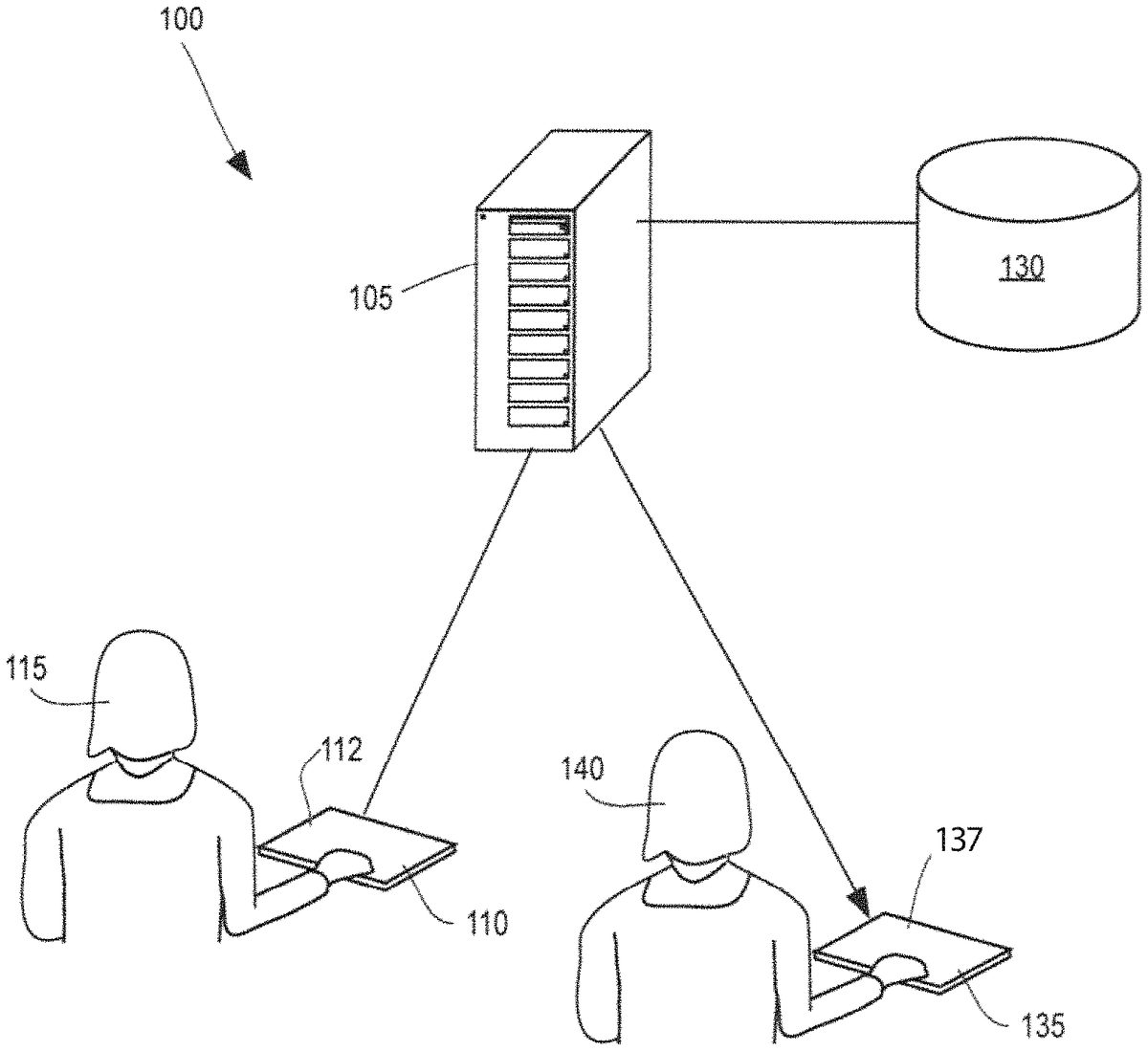
FIG. 1is a system diagram for a system100for codeless video game creation. The system100comprises a game creation server105. For example, the game creation server105comprises one or more of a database, a processor, a computer, a tablet, and a mobile phone. The system100further comprises a developer interface110. The developer interface comprises a developer interface screen112. The developer interface110is configured to receive from a developer115game development input (not shown) configured to develop and create a game. For example, the developer interface110comprises one or more of a database, a processor, a computer, a tablet, and a mobile phone. The developer interface110is operably connected to the game creation server105via a network120, including a wired or wireless connection. The game creation server105is operably connected to storage130.
An external device135may also be provided and may comprise an external device screen137to receive from a user input configured to create a game. For example, the external device135is configured to upload to the server105game creation data (not shown) received by the external device135. The server105is configured to then upload the game creation data to the storage130. Alternatively, or additionally, the external device135may be operably connected to the game creation server105via one or more of the second network (not shown) and a third network (not shown).
FIGS. 2A-2Sdepict an example200of the codeless video game creation platform being used by a developer to create a maze traversal game using a maze provided from the developer.
InFIG. 2A, user selects a printed maze201from a game book or similar resource. The developer115then draws on the printed maze201. For example, the developer115then draws on the printed maze201using colored markers. Using the developer interface110, the developer115uploads the printed maze201to the server (not shown in this figure) using the network (not shown in this figure). For example, the developer interface110comprises one or more of a database, a processor, a computer, a tablet, and a mobile phone.
InFIG. 2B, using the external device screen137, the external device135displays a maze201A pursuant to the uploaded specifications of the developer115(not shown in this figure). Using the external device screen137, the external device135draws in a green color an avatar203that the player140controls. For example, the avatar203comprises a happy face. Using the external device screen137, the external device135, draws a maze end204using a blue color. For example, the maze end204comprises a five-pointed star.
InFIG. 2C, using the external device screen137, the external device135may present the player140with a home screen205of the codeless video game creation platform. The home screen205comprises a “Game Room” button206A. The “Game Room” button206A comprises a “Join” button206B that when a player140selects it, results in the player140being offered the opportunity to join a room with a set of pre-made games. The “Game Room” button206A further comprises a “New” button206C that when the player140selects it, results in the player140being offered the opportunity to create a new room into which the player140's games may be stored.
The home screen205may further comprise a “Welcome Guest” text207that shows the current player140's name. The home screen205further comprises a “Create” button208that when the player140selects it, results in the player140being able to create a new game using the codeless video game creation platform. The home screen205further comprises a “Play” button209that when the player140selects it, results in the player140being able to play a game that already exists using the codeless video game creation platform. For example, the player140plays a game that the player140created previously. For example, the player140plays a game created by another player140.
The home screen205may further comprise a “Redeem Code” button210. When the player140selects the “Redeem Code” button210, a camera (not shown) pops up that is configured to take a photograph of a player140's QR code (not shown). For example, the player140purchases the QR code as part of a game package. The home screen205further comprises a player140level button211. The player140level button211is configured to display a level of the player140in the game currently being played. As depicted, the level of the player140in the current game is 5. As depicted, the player140level button211comprises the legend, “Your Fun Level.” The player140selects the “Create” button208.
InFIG. 2D, using the external device screen137, in response to the player140's selection of the “Create” button208inFIG. 2C, the external device135next may present the player140with a first game screen212. The first game screen212as depicted comprises three different game creation options, a first game creation option213, a second game creation option214, and a third game creation option215, each of them corresponding to a different configuration. As depicted in this example, each of the first game creation option213, the second game creation option214, and the third game creation option215comprises a respective “Create” button which, when the player140selects it, initiates creation of the selected game by the player140using the codeless video game creation platform. The first game creation option213comprises a game titled, “Get to the Goal.” The second game creation option214allows the player140to create a game titled, “Super Slingshot.” The third game creation option215allows the player140to create a game titled, “Touch to Win.” The system provides the game creation options213-215from which developers select the game type they are creating.
Other possible game creation options213-215available to a player140to create from a drawing using the codeless video game creation platform may include one or more of pinball, pachinko, marble run, and air hockey. For example, the air hockey option comprises multi-player air hockey.
As depicted, each of the first game creation option213, the second game creation option214, and the third game creation option215may also include a respective icon illustrating the respective game associated with the particular game creation option213-215. The first game screen212further comprises a “Games Remaining” indicator216. The “Games Remaining” indicator216comprises a number illustrating a number of games the player140has remaining under the player140's current plan. As depicted, the player140currently has984games remaining.
The first game screen212further comprises the “Game Room” button206A, which again in turn comprises the “Join” button206B and the “New” button206C. The first game screen212further comprises the “Welcome Guest” button207. The player140selects the first game creation option213, thereby selecting to create a “Get to the Goal” game.
InFIG. 2E, using the external device screen137, the external device135in response to the player140's selection of the first game creation option213, meaning that the player140will be creating the “Get to the Goal” game, may present the player140with a popup game parameters screen217.
The game parameters screen217comprises a configuration panel218for the “Get to the Goal” game. As depicted, the configuration panel218comprises five types: an avatar219controlled by the player140in the game, a hazard220presenting possible danger to the avatar, a movable object221presenting an obstacle to the avatar's movement that may be movable by the avatar219, a goal222whose achievement relates to the avatar219winning the game, and a boundary223limiting movement of the avatar219and (unlike the movable object221) not movable by the avatar. For example, the avatar219wins the game if the avatar achieves any of the goals222. For example, the avatar219wins the game if the avatar achieves all of the goals222. For example, the avatar219wins the game if the avatar achieves one or more of a predetermined percentage and a predetermined number of the goals222.
The game parameters screen217further comprises an example panel224. As depicted, “Example 1” comprises a drawing showing a single character playing the game with gravity present, with a hazard visible, and with a goal visible inside a movable object221. The game parameters screen217again comprises the first game creation option213, which, after being pressed by the player140, initiates the “Get to the Goal” game. The player140again selects the first game creation option213.
The avatar219according to this example may be controlled by the player140and may be able to do one or more of move to the left, move to the right, move up, move down, perform a single jump, and perform a double jump. The single jump and the double jump are only available when gravity is turned on in the game. Moving forward and moving backward are only available when gravity is turned off in the game. For example, the system associates a green color with the avatar219.
The hazard220kills the avatar219if the avatar219contacts the hazard220. For example, the system associates a red color with the hazard220. The movable object221comprises an object that may be moved by the player140. For example, the system associates a purple color with the movable object221. The goal222comprises one of the items the avatar must collect. The avatar219must collect all the goals222to win the game. Alternatively, or additionally, instead of a goal222comprising an item that the avatar must collect to win the game, the goal222may instead be a destination to which the avatar must travel to win the game. Alternatively, or additionally, instead of a goal222comprising an item that the avatar must collect to win the game, a set of goals222is provided and the avatar must collect a subset of them to win the game. Alternatively, or additionally, the avatar must collect five of seven total goals222to win the game. For example, the system associates a blue color with the goal222. In this example, the goal222comprises the maze end204(not shown in this figure).
Continuing with this illustrative example, and in no way limiting the scope the invention, boundary223may comprise one or more of a floor, a wall, and ground. For example, the system associates a black color with the boundary223. InFIG. 2F, in response to the player140's selection of the first game creation option213, using the external device screen137, the external device135presents the player140with an identification screen225. The system activates a camera226that is configured to assist with the identification process. For example, the camera226is comprised in one or more of a computer, a notebook, a laptop, a mobile phone, a tablet, and another device. For example, the camera226comprises a standalone camera226. To further assist with the identification process, the system displays a photograph frame227usable by the player140to align the picture to be taken by the camera226. As depicted, the frame227outlines a photographable region bounded by a left boundary marker228, a right boundary marker229, a top boundary marker230, and a bottom boundary marker231. The player140aligns the original printed maze201fromFIG. 2Awith the frame227and then takes a picture with the camera226.
The system receives the original printed maze201and processes it using a color extraction method that comprises labeling a region of the picture201using a predominant color of the region. For example, the system labels regions as one or more of red, green, blue, black, and purple.
InFIG. 2G, after the picture is taken, using the external device screen137, the external device135presents the player140with a consolidation screen233. For example, consolidation is done using Java Script Object Notation (JSON). The consolidation screen233comprises a plurality of game icons234A-234L. The system generates at least one game icon234A-234L by receiving a photograph from a player140in a process similar to the process depicted inFIG. 2Fin this example. Preferably, but not necessarily, the system generates each game icon234A-234L by receiving a photograph from a player140in a process similar to the process depicted inFIG. 2Fin this example. Thus, images of game elements may be uploaded or selected by a user independently and in addition to the overall game image uploaded by the user.
The consolidation screen233may further comprise the “Game Room” button206A, which again in turn comprises the “Join” button206B and the “New” button206C. The consolidation screen233further comprises the “Welcome Guest” button207.
The player140selects a game icon234A-234L for the player140's next game. The player140selects game icon234A, which is the game icon234A corresponding to the original printed maze201the player140submitted inFIG. 2F.
InFIG. 2H, after the player140selects the game icon234A inFIG. 2G, using the external device screen137, the external device135takes the player140to a first consumer page235. The first consumer page235comprises a first screenshot235of the “Get the Goal” game in progress. The first consumer page235further comprises the maze201, the entrance line202, the avatar203, and the maze end204.
The first consumer page235may further comprise, according to the example illustrated, a left arrow236, which, if the player140selects it, moves the avatar203to the left. The first consumer page235further comprises a right arrow237, which, if the player140selects it, moves the avatar203to the right. The first consumer page235further comprises a jump button238, which, if the player140selects it, causes the avatar203to jump upwards. The first consumer page235further comprises a pause button238A, which, if the player140selects it, causes the game to pause until the player140selects the pause button238A again. The pause button238A operates as a toggle switch. The player140selects the left arrow236in order to move the avatar203to the left along the top of the maze201.
InFIG. 2I, after the first consumer page235, using the external device screen137, the external device135takes the player140to a second consumer page239. The second consumer page239comprises a second screenshot239of the “Get the Goal” game in progress. The second consumer page239further comprises the maze201, the entrance line202, the avatar203, and the maze end204. The only element that has changed position sinceFIG. 2Hand the first consumer page235is the avatar203. By selecting the left arrow236, the player140has moved the avatar203to the left along the top of the maze201.
The second consumer page239again further comprises the left arrow236, which, if the player140selects it, moves the avatar203to the left. The second consumer page239again further comprises the right arrow237, which, if the player140selects it, moves the avatar203to the right. The second consumer page239again further comprises the jump button238, which, if the player140selects it, causes the avatar203to jump upwards. The second consumer page239again further comprises the pause button238A.
InFIG. 2J, after the second consumer page239, using the external device screen137, the external device135takes the player140to a third consumer page240. The third consumer page240comprises a third screenshot240of the “Get the Goal” game in progress. The first consumer page235further comprises the maze201, the entrance line202, the avatar203, and the maze end204. The only element that has changed position sinceFIG. 2Hand the first consumer page235is the avatar203. By strategically selecting one or more of the left arrow236, the right arrow237, and the jump button238, the player140has moved the avatar203to the middle of the maze201, within sight of the maze end204.
The third consumer page240again further comprises the left arrow236, which, if the player140selects it, moves the avatar203to the left. The third consumer page240again further comprises the right arrow237, which, if the player140selects it, moves the avatar203to the right. The third consumer page240further comprises the jump button238, which, if the player140selects it, causes the avatar203to jump upwards. The third consumer page240again further comprises the pause button238A.
InFIG. 2K, after the player140brings the avatar203to the maze end204, using the external device screen137, the external device135takes the player140to a first game completion page241. The first game completion page241comprises a game completion legend242. As depicted, the game completion legend242comprises the words, “Game Over. You Won! Game Name.” The game completion page241further comprises a game completion options panel243. The game completion options panel243comprises a home button244configured to send the player140to a home screen if the player140selects it, a report error button245configured to report an error from the player140to the system if the player140selects it, a replay button246configured to replay the same game if the player140selects it, a powerups button247configured to present the player140with different options to change the game if the player140selects it, a next button248configured to take the player140to the next game if the player140selects it, a retake picture button249configured to retake a photograph if the player140selects it, and a “share” button250configured to share the player140's game results if the player140selects it. In this example, the player140selects the powerups button247.
InFIG. 2L, after the player140selects the powerups button247inFIG. 2K, using the external device screen137, the external device135takes the player140to a powerups page251. The powerups page251comprises a popup consumer menu252. The popup consumer menu252comprises a position button253, a movement button254, a hazard button255, a skin button256, an effects button257, and a settings button258. The position button253allows the player140to do one or more of select a position of a game element and change a position of a game element. The movement button254allows the player140to do one or more of select a movement of a game element and change a movement of a game element. The hazard button255allows the player140to do one or more of select a hazard and change a hazard. The skin button256allows the player140to change an appearance of a selected object. For example, the player140may select a gold skin that is configured to display a game object as a gold color. For example, instead of using a blue color for a goal, the gold color could be used. For example, instead of using a red color for a hazard, the gold color could be used. The option for the player140to use a skin to change a color associated with a class of objects is powerful for education purposes.
The effects button257allows the player140to do one or more of select an effect of the game and change an effect of the game. The powerups page251further comprises the maycel button232. The settings button258allows the player140to do one or more of select a setting and change a setting, as shown in more detail inFIG. 2M.
The player140interested in doing one or more of selecting and changing a position of a game element hovers the cursor over the position button253, thereby generating a popup position menu259. The position menu259comprises a move button260, a scale/rotate button261, and a remove button262. The player140uses the move button260to move the game element. The player140uses the scale/rotate button261to do one or more of scale the game element and move the game element. The player140uses the remove button262to remove the game element from the game.
InFIG. 2M, after the player140selects the settings button258inFIG. 2L, using the external device screen137, the external device135takes the player140to a settings page263. The settings page263comprises a popup settings menu264. The settings menu264comprises a gravity checkbox265. As depicted, the gravity checkbox265is a toggle switch. When the gravity checkbox265is checked, gravity operates in the game and items fall downward as with gravity on Earth in real life. When the gravity checkbox265is unchecked, there is no gravity and items and avatars in the game will “float” without falling as in outer space. Currently, as depicted, the gravity checkbox265is checked and gravity is operating in the game. The settings page263may further comprise button232, the position button253, the movement button254, the hazard button255, the skin button256, the effects button257, and the settings button258.
InFIG. 2N, after the player140unchecks the gravity checkbox265, gravity is no longer operating in the game and using the external device screen137, the external device135takes the player140to an updated settings page233. The settings page263again may comprises button232, the position button253, the movement button254, the hazard button255, the skin button256, the effects button257, and the settings button258, the popup settings menu264, and the gravity checkbox265. Because the player140has unchecked the gravity checkbox265, there is no gravity and items and avatars in the game will “float” without falling as in outer space.
InFIG. 2O, after the player140selects the maycel button232to leave the settings page233(depicted inFIG. 2N), using the external device screen137, the external device135takes the player140to the modified game on a fourth consumer page266. The fourth consumer page266comprises a first screenshot266of the revised “Get the Goal” game in progress. The fourth consumer page266again comprises the maze201, the entrance line202, the avatar203, the maze end204, the left arrow236, the right arrow237, and the pause button238A.
When there is no gravity in the game, the configuration specifies the presence of one or more of an up arrow267and a down arrow268instead of the option when gravity is present of the avatar203jumping using a jump button238(as inFIG. 2J). When there is no gravity in the game, the configuration further specifies a “slower” button269, which, when the player140selects it, causes the avatar203to move more slowly than previously. As depicted, the “slower” button269comprises a snail icon.
InFIG. 2P, after the fourth consumer page266, using the external device screen137, the external device135takes the player140to a fifth consumer page270. The fifth consumer page270comprises a second screenshot270of the revised “Get the Goal” game in progress. The fifth consumer page270again comprises the maze201, the entrance line202, the avatar203, the maze end204, the left arrow236, the right arrow237, and the pause button238A.
InFIG. 2P, the only element that has changed position sinceFIG. 2Oand the fourth consumer page266is the avatar203. By strategically selecting one or more of the left arrow236and the down arrow268, the player140moves the avatar203to the left along the top of the maze201.
InFIG. 2Q, after the fifth consumer page270, using the external device screen137, the external device135takes the player140to a sixth consumer page271. The sixth consumer page271comprises a third screenshot271of the revised “Get the Goal” game in progress. The sixth consumer page271again comprises the maze201, the entrance line202, the avatar203, the maze end204, the left arrow236, the right arrow237, and the pause button238A.
InFIG. 2Q, the only element that has changed position sinceFIG. 2Pand the fifth consumer page270is the avatar203. By strategically selecting one or more of the left arrow236, the right arrow237, the up arrow267, and the down arrow268, the player140has moved the avatar203to a position near a center of the maze201.
InFIG. 2R, after the sixth consumer page271, after the sixth consumer page271, using the external device screen137, the external device135takes the player140to a seventh consumer page272. The seventh consumer page272comprises a fourth screenshot272of the revised “Get the Goal” game in progress. The seventh consumer page272again comprises the maze201, the entrance line202, the avatar203, the maze end204, the left arrow236, the right arrow237, and the pause button238A.
InFIG. 2R, the only element that has changed position sinceFIG. 2Qand the sixth consumer page271is the avatar203. By strategically selecting one or more of the left arrow236and the down arrow268, the player140has moved the avatar203to a position near the maze end204of the maze201.
FIG. 2Scontinues the illustrations of this example. After the player140brings the avatar203to the maze end204, using the external device screen137, the player140is taken to a second game completion page273. The second game completion page273again comprises the game completion legend242. As depicted, the game completion legend242again comprises the words, “Game Over. You Won! Game Name.” The second game completion page273again further comprises the game completion options panel243. The game completion options panel243again comprises the home button244configured to send the player140to a home screen if the player140selects it, the report error button245configured to report an error from the player140to the system if the player140selects it, the replay button246configured to replay the same game if the player140selects it, the powerups button247configured to present the player140with different options to change the game if the player140selects it, the next button248configured to take the player140to the next game if the player140selects it, the retake picture button249configured to retake a photograph if the player140selects it, and the “share” button250configured to share the player140's game results if the player140selects it. In this example, the player140selects the home button244.
The system receives the original printed maze201and processes it using a color identification algorithm configured to label regions according to their predominant color. For example, the system labels regions as one or more of red, green, blue, black, and purple.
FIG. 3is a flow chart of a method300for codeless video game creation.
The order of the steps in the method300is not constrained to that shown inFIG. 3or described in other flow diagrams and the following discussion herein. Several of the steps could occur in a different order without affecting the final result.
In step310, a codeless video game creation server publishes to a developer configuration information specifying fundamental functionality available to the developer for codeless video game creation Block310then transfers control to block320.
In step320, the server receives from the developer input comprising the developer's configuration choices. Block320then transfers control to block330.
In step330, the server identifies object images of the input game image received from the user.
In step340, the server consolidates the tools into a digital final product, a program of instructions that when executed provides and controls the game, and processes game inputs received in real time from the user for controlling the avatar or other game elements.
In step350, consumer processor94provides to a player the playable game for play by the player. Flow controller97of game engine91may then terminate the process.
One or more components of the system may be provided as a web-based application on the Internet, in an application on an iPhone, in an application on an Android iPhone, and in another application. An advantage of embodiments of the invention is providing a system where the core functionality needs to be implemented only once and is then playable on a variety of devices. A yet additional advantage of embodiments of the invention is that the same uploaded developer data may be combined with different templates to achieve different results with minimal effort. According to an aspect of the invention, the input game image may be arbitrary and totally unknown to the system prior to its upload to the system by a user. A freeform drawing by a child may be uploaded and the system would identify game object images on the overall game image uploaded, map them to templates predefined, and generate a program of instructions that provides the video game playable by the user. The output image displayed as the digital board to the video game may be substantially identical to the input image. The output image may not be totally identical, in the sense that the output image is a digital two dimensional representation of the input game image, the output image may be sized to fit the user's monitor or screen, some smudges or other irrelevant minor elements may be cleaned up in the processing, and background white or grey of the input image may be homogenized, standardized, cleaned up or eliminated. Off-the-shelf illustration programs such as Photoshop may be used to extract data from the input game image.
It will be further understood by those of skill in the art that the number of variations of the method and device are virtually limitless. For example, instead of a goal comprising an item that the avatar must collect to win the game, the goal may instead be a destination to which the avatar must travel to win the game. For example, instead of a goal comprising an item that the avatar must collect to win the game, a set of goals is provided and the avatar must collect a subset of them to win the game. For example, the avatar must collect five of seven total goals to win the game.
For example, configuration may output one or more of buttons and grids and labels. For example, a browser may comprise the consumer, creating a game playable by the player using one or more of a web browser and a web application. For example, instead of uploading a two-dimensional game, the system may create a three-dimensional game using input from the developer. The game engine may output sounds, music snippets, and other audio during the playing of the game in response to various actions by the user in controlling an avatar or in response to other events.
It is intended that the subject matter in the above description shall be interpreted as illustrative and shall not be interpreted in a limiting sense. While the above representative embodiments have been described with certain components in exemplary configurations, it will be understood by one of ordinary skill in the art that other representative embodiments may be implemented using different configurations and/or different components. For example, it will be understood by one of ordinary skill in the art that the order of certain steps and certain components may be altered without substantially impairing the functioning of the invention.
The representative embodiments and disclosed subject matter, which have been described in detail herein, have been presented by way of example and illustration and not by way of limitation. It will be understood by those skilled in the art that various changes may be made in the form, order and details of the described embodiments resulting in equivalent embodiments that remain within the scope of the invention. Some components of the game engine91described herein may be substituted by one or more off-the-shelf components or components available elsewhere. It is intended, therefore, that the subject matter in the above description shall be interpreted as illustrative and shall not be interpreted in a limiting sense.
Claims
- A method of creating a video game by a computer system based on a game image input by a user, the method comprising: receiving, by a user interface of the computer system, the game image, the game image previously unknown to the computer system and containing a plurality of object images previously unknown the computer system, the plurality of object images including an avatar, each object image corresponding to a game element of the video game, each game element associated with at least one property;associating automatically each object image with a respective game element that corresponds thereto by identifying automatically, in the game image, each object image;generating automatically a program of instructions executable by the computer system, the program of instructions defining positioning of game elements in the video game according to the at least one property associated with the game elements;executing the program of instructions to generate a display of a video game playable by the user, such that during the playing of the game, an output game image is displayed as a virtual game board with the object images moved on the output game image, wherein the output game image is substantially identical to the game image input by the user, wherein during a playing of the video game, the program of instructions causes each game element to be represented in the display by a respective object image of the plurality of object images.
- The method of claim 1 , wherein the method further comprises: prompting the user to enter a game configuration for the video game before the generating of the program of instructions, wherein the game configuration comprises a game object during a playing of the video game.
- The method of claim 2 , wherein the method further comprises: providing automatically, by the user interface, a plurality of predefined game configurations;and receiving, as the entry of the game configuration by the user, a selection of the user from among the predefined game configurations.
- The method of claim 1 , wherein the method further comprises: before the associating, receiving from the user, via the user interface, a customization of the at least one property;and the associating comprises associating the game element with the at least one customized property, wherein the program of instructions is generated according to the customized at least one property.
- The method of claim 1 , wherein at least one of the game elements comprises the avatar configured to be controlled by the user during the playing of the video game.
- The method of claim 1 , wherein at least one of game elements comprises an obstacle configured to be movable by the computer system during a playing of the video game in response to an input of the user during the playing of the video game that controls a first game element.
- The method of claim 1 , wherein a first object image of the plurality of object images comprises a color;and the associating comprises associating the first object image with a respective game element according to the color.
- The method of claim 1 , wherein the object image of the plurality of object images comprises a shape;and the associating comprises associating the first object image with a respective game element according to the shape.
- The method of claim 1 , wherein the at least one property of the game element comprises an attribute that controls a behavior of the game element during the playing of the video game.
- The method of claim 1 , wherein the method further comprises: receiving from the user a game configuration for the video game before the generating of the program of instructions, wherein the game configuration corresponds to a game objective during a playing of the video game, and the at least one property of the game element comprises an attribute that controls a behavior of the game element during a playing of the video game, wherein the behavior automatically controls the game element during the playing of the video game according to the game objective.
- The method of claim 1 , wherein the method comprises: controlling the positioning of a first game element of the plurality of game elements in the video game based on input received from the user during the playing of the video game, wherein the generating of the program of instructions comprises instruction defining a behavior during the playing of the video game of a second game element of the plurality of game elements, wherein the behavior is based on the positioning of the first game element.
- The method of claim 1 , wherein the method comprises: identifying a position of a color segment in the image;and the generating of the program of instructions comprises instructions positioning the game elements bound by the position identified, wherein during the playing of the video game the computer system causes display of the color segment at the position identified.
- The method of claim 1 , further comprising, before the receiving, reporting to the user the plurality of object images and the game elements they represent, wherein the game elements are stored by the computer system prior to the reporting.
- The method of claim 1 , further comprising: before the displaying of the output game image, performing image background processing on the game image input by the user.
- The method of claim 1 , wherein during the playing of the video game, a size of a first object image of the plurality of object images in relation to the size of the output game image is substantially unchanged in comparison with the size of the first object image in relation to the size of the game image input by the user.
- The method of claim 1 , wherein the game image input by the user is free of a grid.
- A computer system comprising a video game engine configured to perform the method of claim 1 .
Disclaimer: Data collected from the USPTO and may be malformed, incomplete, and/or otherwise inaccurate.