U.S. Pat. No. 11,097,189
CONTEXTUALLY AWARE COMMUNICATIONS SYSTEM IN VIDEO GAMES
AssigneeELECTRONIC ARTS INC.
Issue DateJuly 30, 2019
Illustrative Figure
Abstract
In response to receiving user input command for sending a contextually aware communication, a computer system is configured to use game state data to determine a target location that a player is focusing on in a virtual environment in a video game, identify a unit that the player likely wants to communicate about based on at least priorities of unit types and proximities of units to the target location, and select a communication action for performance. Different communication actions can be performed in response to the same user input command when the game state data indicates different game states.
Description
DETAILED DESCRIPTION Introduction Multiplayer video games have suffered from a long felt but unsolved need for improved player to player communications. Players of many multiplayer video games stand to benefit from improved coordination to improve team play experiences. There are various communication systems that can be implemented in a video game. For example, some systems allow for textual communications. The typing speeds of players, which can vary and be slow for many players, can limit the speed of textual communications and require players to divert their hands from providing other input to the video game. Some systems can allow players to press a dedicated button for each type of communication action to issue, such as a first button to issue first pre-determined message and a different button to issue a different communication message. Such systems can be limited by the numbers of spare buttons available for dedicating to different communication actions, and players can have difficulty remembering which buttons are mapped to which communication actions. Some systems require players to provide a sequence of inputs, such as pressing and/or holding a first button to open a first page of a communications menu, select a category of communication messages presented in the first page, and then selecting a particular message to issue from among the messages in the selected category. However, navigating the menu takes a sequence of multiple inputs, players take time to read and navigate through the options in the communication menu, the menu can obscure action in the video game, and users may be prevented from making other interactions in the video game while the menu is open. Some systems support voice communications. Voice communications use additional network bandwidth for audio transmission, require players to have a microphone or other voice input hardware that players may not have, ...
DETAILED DESCRIPTION
Introduction
Multiplayer video games have suffered from a long felt but unsolved need for improved player to player communications. Players of many multiplayer video games stand to benefit from improved coordination to improve team play experiences. There are various communication systems that can be implemented in a video game. For example, some systems allow for textual communications. The typing speeds of players, which can vary and be slow for many players, can limit the speed of textual communications and require players to divert their hands from providing other input to the video game. Some systems can allow players to press a dedicated button for each type of communication action to issue, such as a first button to issue first pre-determined message and a different button to issue a different communication message. Such systems can be limited by the numbers of spare buttons available for dedicating to different communication actions, and players can have difficulty remembering which buttons are mapped to which communication actions. Some systems require players to provide a sequence of inputs, such as pressing and/or holding a first button to open a first page of a communications menu, select a category of communication messages presented in the first page, and then selecting a particular message to issue from among the messages in the selected category. However, navigating the menu takes a sequence of multiple inputs, players take time to read and navigate through the options in the communication menu, the menu can obscure action in the video game, and users may be prevented from making other interactions in the video game while the menu is open. Some systems support voice communications. Voice communications use additional network bandwidth for audio transmission, require players to have a microphone or other voice input hardware that players may not have, allow the possibility for players to speak abusive and offensive language, may pick up undesired background noise, and introduce additional sensitivity and volume variables. Ping systems can create a set ping indicator indication at a pinged location. The set ping indicator can sometimes be insufficient for fully conveying a desired message. For example, if the set ping indicator is created at a pinged location, other players might not be able to determine if the pinging player wants to move to the pinged location or beware of danger at the pinged location. Some ping systems may create different visual markers (such as a green marker for “go here” and a red marker for “danger”) in response to additional selections sequences made by a pinging player. For example, a player may press and hold a button to open up a menu of options and make a selection from the menu of the type of ping marker to create. The added ability to specify the particular ping marker also adds the complexity discussed above for general menus. Various communication systems herein can feature one, some, or any combination of the above communication systems described above.
Additionally, a communication system can feature a contextually aware communication system, sometimes referred to as a “smart ping” system. The communication system can be configured to receive input from a player indicating a desire to communicate, determine a context in the video game, select a communication action from among a plurality of possible communication actions based on the context, and cause performance of the selected communication action to other players. Whereas other systems may use different user inputs and/or different sequences of user inputs to perform respective, different communication actions, the smart ping communication system disclosed herein can counter-intuitively use the same user input to the perform different communication actions instead of or in addition to using different user inputs. In some examples, the user input can be an interaction with a button, such as pressing a single button for communicating. In some examples, the player can make the same interaction with the same, single button to send one of a variety of different communication actions to other players based on a present, recent, and/or real time context in the video game. The context can include any aspect of a particular game state. For example, in a first context, if a player's character is looking at or near the location of an enemy in the video game, then the player can press a communication button to cause text or audio along the lines of, “Enemy spotted, let's attack here,” to be communicated to other players on the team and for a first type of visual marker to be created at the enemy location to indicate danger. In a second context, if the player's character is looking at an in-game item that can be collected by characters of the player's teammates, then the player can press the same communication button to cause text or audio along the lines of, “There is an item here for you to collect,” and for a second type of visual marker to be created at the item location to indicate the type of item available for pickup.
Depending on particular implementations, various contextually aware communication systems disclosed herein can have one, all, or any combination of the following features. A player can press one button to issue a variety of different communication actions. The player can do so quickly in real time without the added delay of reading or navigating through a menu of available communication actions. The player can do so quickly in real time without the added delay or distraction of typing. The player can do so using a single button without first memorizing which of a plurality of different buttons are mapped to which communication actions. Audio, video, graphics, and/or other sizable data for a plurality of communication actions can be cached or stored at local network locations, such as a game console or computer device of each player, such that a smaller amount of data can be transmitted over a network to select one of the plurality of communication actions, thereby saving network bandwidth in comparison to transmitting the audio, video, graphics, and/or other larger data. The available communication actions can include a sufficient variety of communications that players communicate in various contexts of the game such that players can improve their coordination and team play experience. Players can make use of the wide variety of communication actions without first purchasing a microphone or other audio input hardware. Players can quickly issue a number of different communication actions, the number exceeding the limited quantity of spare buttons available on input devices such as console controllers. Players can do so without a menu popping up to obscure the video game and without the delay of navigating through the menu. Players can do so without having input (such as directional movements, presses of buttons, and the like) directed away from in-game actions to apply to menus. The available communication actions can be limited and reviewed by developers to prevent offensive or abusive messages. Communication can involve playback of clear lines recorded as audio data such that clear words can be consistently understood by the players.
A limited description of the communication system is provided here in the introduction. Additional details and examples of a contextually aware communication system are disclosed below and with respect to the drawings.
Definitions
“Player” refers to real-world users (e.g., people) playing a video game as opposed to characters that fictitiously exist in the video game.
“Character” refers to an entity fictitiously existing in a video game as opposed to real-world users, people, or players.
Overview of Multiplayer Video Game Computing Environment
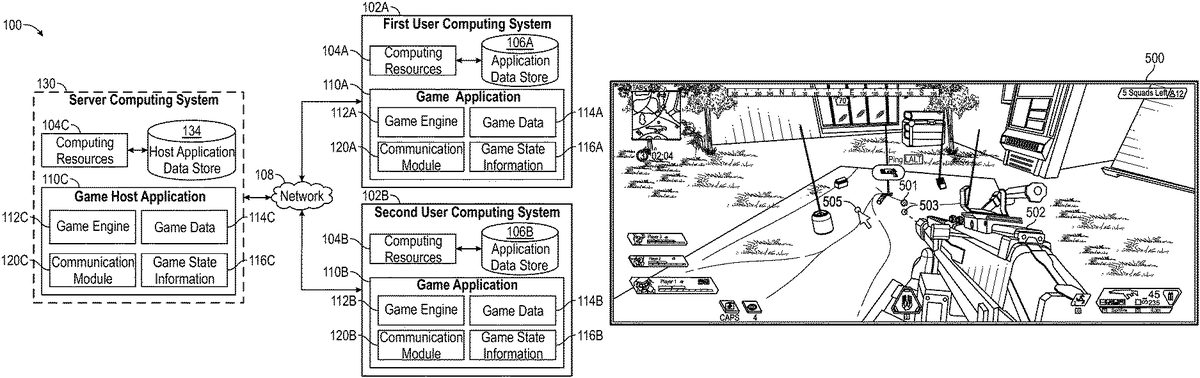
FIG. 1illustrates an example of a multiplayer video game computing environment100for sending contextually aware communications. The environment100includes a network108, a plurality of user computing systems102A,102B, and a server computing system130. The user computing systems102A,102B respectively have computing resources104A,104B and application data stores106A,106B. The server computing system130has computing resources104C and host application data store134. The user computing systems102A,102B may communicate via a network108with each other and additionally or alternatively with the interactive computing system130.
FIG. 1includes two user computing systems102A,102B and one server computing system130. However, the technology disclosed herein can be used with any other greater quantity of user computing systems. The technology disclosed herein can also be implemented using any greater quantity of server computing systems. In some examples, one or more of the user computing systems102A,102B can perform the server functions and directly communicate with each other, and the server computing system130can be optionally omitted. In some examples, computer functions can be distributed between the server130and the user computing systems102A,102B. Although only one network108is illustrated, multiple distinct and/or distributed networks108may exist.
Computing Systems
The computing systems102A,102B include respective computing resources104A,104B and application data stores106A,106B. The user computing systems102A,102B may have varied local computing resources104A,104B such as central processing units and architectures, memory, mass storage, graphics processing units, communication network availability and bandwidth, and so forth. The application data stores106A,106B can store non-transitory, computer-readable instructions for the local computing resources104A,104B to execute. Further, the user computing systems102A,102B may include any type of computing system, such as a desktop, laptop, video game platform/console, television set-top box, television (for example, Internet TVs), network-enabled kiosk, car-console device, computerized appliance, wearable device (for example, smart watches and glasses with computing functionality), and wireless mobile devices (for example, smart phones, PDAs, tablets, or the like), to name a few.
The user computing systems102A,102B can use the computing resources104A,104B to execute the game applications110A,110B. The user computing systems102A,102B receive user inputs from respective players to be executed by the game applications110A,110B and/or the server computer system130, and the user computing systems102A,102B generate video outputs displaying the responses and progression of the video game. A more detailed description of an example of a computing system is described below with respect toFIG. 18.
The server computing system130includes computing resources104C and host application data store134. The server computing system130may have varied local computing resources104C, such as central processing units and architectures, memory, mass storage, graphics processing units, communication network availability and bandwidth, and so forth. The host application data store134can store non-transitory, computer-readable instructions for the computing resources104C to execute. Further, the server computing system130may include any type of computing system.
The server computing system130can use the computing resources104C to execute the game host application110C, which can be the same as or different from the game applications110A,110B. In some examples, the game host application110C can be executed by one or more computing devices, such as servers and databases that may host and/or execute portions of one or more instances of the game applications110A,110B. A more detailed description of an example of a computing system is described below with respect toFIG. 18.
Unless otherwise specified, “one or more data stores” can refer to any one of the data stores106A,106B,134or any combination of the data stores106A,106B,134from user computing systems and/or server computing systems. Unless otherwise specified, “one or more processors” can refer to one or more processors from any one of the computing resources104A,104B,104C or any combination of the computing resources104A,104B,104C from user computing systems and/or server computing systems.
Game Host Application
The server computing system130may enable multiple users or computing systems to access a portion of the game host application110C executed or hosted by the server computing system130. The server computing system130can include a communication module120C. In some examples, the game host application110C may execute a hosting system for executing various aspects of a game environment. For example, the game host application110C can record the location of characters and other units within the game environment. The game host application110C may be a multiplayer game in which the server computing system130provides additional functionality when connected to the instance of the game applications110A,110B. For example, the server computing system130can facilitate the selection of a communication action based on a context in the game and facilitate the execution of the selected communication action from one player to another player. In some examples, the game host system110C can provide a dedicated hosting service for hosting multiplayer game instances or facilitate the creation of game instances hosted by user computing devices102A,102B. In some examples, the game host application110C can provide a lobby or other environment for users to virtually interact with one another.
Game Application
The user computing systems102A,102B can execute respective game applications110A,110B based on software code stored at least in part in the application data stores106A,106B. The game applications110A,110B may also be referred to as a videogame, a game, game code and/or a game program. A game application110A,110B should be understood to include software code that a computing device102A,102B can use to provide a game for a user to play. A game application110may comprise software code that informs computing resources104A,104B of processor instructions to execute, but may also include data used in the playing of the game, such as data relating to images, game state data, audio data, and other data structures. In the illustrated example, the game application110A,110B include game engines112A,112B, game data114A,114B, game state information116A,116B, and a communication module120A,120B.
The server computing system130can execute a game host application110C based on software code stored at least in part in the host application data stores134. The game host application110C can perform services for the game applications110A,110B of the user computing systems102A,102B. A game host application110C should be understood to include software code that a server computing system130can use to perform hosting services for a video game for a user to play. A game host application110C may comprise software code that informs computing resources104C of processor instructions to execute, but may also include data used in the servicing of the game, such as data relating to images, game state data, audio data, and other data structures. In the illustrated example, the game host application110C includes game engine112C, game data114C, game state information116C, and a communication module120C.
The users computing systems102A,102B are capable of executing the game applications110A,110B, which may be stored and/or executed in a distributed environment. For example, the first user computing system102A may execute a portion of a game, and a network-based computing system such as the server computing system130or the second user computing system102B may execute another portion of the game. For instance, the game may be a massively multiplayer online role-playing game (MMORPG), first person shooter (FPS) game, multiplayer online battle arena (MOBA) game, real time strategy game (RTS), strategy game, adventure game, tactics game, board game, card game, action game, battle royale game, side scrolling game, puzzle game, sports game, fighting game, casual game, city building game, or other game type that includes a client portion executed by the user computing systems102A,102B and a server portion executed by one or more server computing systems130.
Game Engine
The game engines112A,112B can be configured to execute aspects of the operation of the game applications110A,110B within the respective user computing devices102A,102B. The game engine112C can be configured to execute aspects of the operation of the game host application110C. Execution of aspects of gameplay within a game application can be based, at least in part, on the user input received, the game data114A,114B,114C and game state information116A,116B,116C. The game data114A,114B,114C can include game rules, environmental settings, constraints, models, audio, visuals, units, databases, and/or other game application information.
One or any combination of the game engines112A,112B,112C can execute gameplay within the game according to the game rules. Examples of game rules can include rules for scoring, possible inputs, actions/events, movement in response to inputs, and the like. Other components can control what inputs are accepted and how the game progresses, and other aspects of gameplay. The game engines112A,112B,112C can receive and/or process the user inputs and determine in-game events, such as actions, jumps, runs, throws, attacks and other events appropriate for the game applications110A,110B,110C. During runtime operation, the game engines112A,112B,112C can read in game data114A,114B,114C and game state information116A,116B,116C to determine the appropriate in-game events.
After one or more of the game engines112A,112B,112C determine character events, the character events can be conveyed to a movement engine that can determine the appropriate motions the characters should make in response to the events and passes those motions on to a physics engine. The physics engine can determine new poses for the characters and provide the new poses to a skinning and rendering engine. The skinning and rendering engine, in turn, can provide character images to an object combiner in order to combine animate, inanimate, and background objects into a full scene. The full scene can be conveyed to a renderer, which generates a new frame for display to the user. The process can repeated for rendering each frame during execution of the game application. Though the process has been described in the context of a character, the process can be applied to any process for processing events and rendering the output for display to a user.
Game Data
The game data114A,114B,114C can include game rules, prerecorded motion capture poses/paths, environmental settings, environmental objects, constraints, skeleton models, audio, visuals, databases, and/or other game application information. At least a portion of the game data114A,114B,114C can be stored in respective application data stores106A,106B,106C. In some examples, a portion of the game data114A,114B,114C may be received and/or stored remotely and be received through the network108during runtime of the game application. As further described with respect toFIG. 3AandFIG. 3B, the game data can include priorities of unit types and associated communication actions.
Game State Information
During runtime, the game applications110A,110B,110C can store game state information116A,116B,116C, which can include a game state, character states, environment states, scene object storage, and/or other information associated with a runtime state of the video game. For example, the game state information116A,116B,116C can separately or collectively identify the state of the game applications110A,110B,110C at a specific point in time, such as a character position, character orientation, character action, game level attributes, unit locations, item locations, and other information contributing to a state of the game. The game state information can include dynamic state information that continually changes, such as character movement positions, and static state information, such as the identification of a game level within the game.
Communication Module
The communication modules120A,120B,120C can perform various functions to send contextually aware communications within the game application110A,110B,110C and can operate during runtime of the game application110. The communication modules120A,120B,120C can use any combination of game data114A,114B,114C and game state data116A,116B,116C to perform various communication functions. In some examples, the communication module120A may receive user input from a first player playing a video game on the first user computing system102A during runtime. In response, the communication module120A can use the context of the game to dynamically determine what communication the first player may want to send to a second player playing the video game on the second user communication system102B. The communication modules120A, optionally facilitated by communication module120C, can transmit the communication actions over the network108for the communication module120B to perform for the second player. The communication module120B can then execute the contextually determined communication action. In various implementations, the communication functions can be implemented by any one or combination of communication modules120A,120B,120C. Various aspects of the operation of the communication modules120A,120B,120C are described in further detail below.
The contextually determined communication actions and/or an identification of the contextually determined communication actions can be transmitted over the network108to the other players. If an identification of the contextually determined communication actions is transmitted from the first user computing system102A and/or server computing system130to a second user computing system102B, then the second user computing system102B can access and communicate any locally stored audio or visual content to the second player identified by the transmission. If the audio and/or video data of the contextually determined communication actions are transmitted over the network108from the first user computing system102A and/or server computing system130to a second user computing system102B, then the second user computing system102B can receive and communicate the audio and/or video data to the second player.
Network
The network108can include any type of communication network. For example, the network108can include one or more of a wide area network (WAN), a local area network (LAN), a cellular network, an ad hoc network, a satellite network, a wired network, a wireless network, and so forth. In some examples, the network108can include the Internet.
Example Process
FIG. 2shows an example flowchart of a process200for selecting, sending, and performing contextually aware communication actions. A communication action can be determined based at least in part on the priority of types of in-game units proximate to the target location that a player is focusing on. The process200can be performed in real time, and a communication action can be performed as though the players were communicating naturally in person.
At block201, user input can be received from a first player indicating the user's desire to send a contextually aware communication. For example, the user can press a button on a controller, a key on a keyboard, a button on a mouse, a tap on a part of a touch screen, and the like whenever the user wants to send a contextually aware communication. In response to the user input, the system can, as a real time response, determine and perform a contextually aware communication action to other players based on a present context of the game as described with respect to blocks203-239. The same user input (e.g., pressing the same button or key) can be subsequently received again by the first player to determine and perform subsequent communication actions that can vary based on subsequent contexts in the game.
At block202, game state data can be obtained. A context derived from the game state data can be used to infer, determine, or select a communication action that the first player likely wants to perform. Game state data can include: a target location205that the first player is focusing on205, units near the target location207, types of the units near the target location209, distances between the units and the target location211, the character controlled by the first player to perform a communication action213, recent events in the game215, distances between characters and the target location217, previous communication actions219, and/or any other game state data useful for inferring a desired communication action221.
At block203, game data can be obtained. The game data can include instructions for how to use game state data to determine which communication actions to perform. The game data can include priorities of unit types223, communication actions associated with various unit types225, and any other game data useful for inferring communication a desired communication action227.
At block230, the game state data and game data can be used to determine an in-game unit or location to communicate about. For example, the game state data can be used to determine a location that a player is focusing on and which units are near that location. The unit of highest priority can be selected as the unit to communicate about. Further examples and details are discussed with respect toFIG. 4,FIG. 5A, andFIG. 5B.
At block231, a database of communication actions can be accessed. The database includes associations between unit types and communication actions that the first player will likely want to perform, such as sending audio or visual communications to other players. An example database showing communication actions, both visual and audial, associated with unit types is further discussed with respect toFIG. 3AandFIG. 3B. Although a database is used to illustrate the relationships in this application to facilitate understanding, the relationships can be indicated using any type of data, such as in code, key-value pairs, objects and properties, and the like.
At block233, one or more communication actions associated with the type of the unit that will be communicated about is selected according to the associations indicated in the database. The communication actions can include displaying visuals such as images, icons, markers, animations, text, colors, representative symbols, and the like. The communication actions can also include playing audio.
For example, if an enemy unit type209is near the target location205, then a crosshair or other marker can be shown at the target location and a message, “Enemy spotted” can be announced to other players as further described with respect toFIG. 7. As another example, if an item unit type209is near the target location205, then an icon can be displayed over the item and the discovery of the item can be audibly announced to other players such as further described with respect toFIG. 5A,FIG. 5B,FIG. 9,FIG. 10,FIG. 13A,FIG. 13B,FIG. 14A, andFIG. 14B. As another example, if no units are near the target location, then the target location itself can be marked as a destination and audibly suggested for the other players to go towards as further described with respect toFIG. 11A,FIG. 11B,FIG. 12A, andFIG. 12B.
In some variations, the process200can be modified such that a game engine begins by continuously performing blocks230-233to determine contextual communication actions for a player to perform as a game state dynamically progresses during gameplay. Whenever user input for sending a contextual communication is received, block233can progress onward and the selected communication action can be customized and performed as further described with respect to blocks235-239.
At block235, the communication actions can optionally be further customized more specifically based on the game state data203. For example, certain audio may be selected to reflect the different voice and different word choices of the character217who will be speaking. As another example, the communication actions can be customized based on recent events in the game215, such as to indicate how recently an event occurred as shown inFIG. 8or to indicate the occurrence of the recent event. Other examples of recent events include doors opening, using items, recent interactions between characters and the environment, recently using certain abilities or performing certain tasks, recent neutral or environment changes, shooting, running, winning, losing, activity by opponents, and the like. As another example, a distance between the characters and the target location221can be visually indicated and/or vocally commented about, such as by announcing, “Let's hurry here, it's pretty far off,” if the target location is far away instead of announcing, “Let's go here,” if the target location is closer. A character's line might change to a reply based on a previous sequence of communication actions219, such as to cancel or reply to a previous communication action. Other game state data221can be used to customize the communication actions in a variety of ways. In some implementations, the selection in block233and the customization in block235can be merged and performed together as part of the selection process233.
At block237, the first player's computing system and/or a server computing system can transmit data to other computing systems to cause the communication action(s) to be communicated to other players. For example, a second player's computing system can display the text, “Player1suggested to go here,” display a marker at the target location, and read aloud the words, “Let's go here,” in the voice of the first player's character. The transmitted data can identify locally stored audio and/or visual data on computing systems of the other players to be communicated to the other players. The transmitted data can additionally or alternatively include the actual audio and/or visual data to be communicated.
At block239, a version of the communication action can be indicated to the first player. For example, a textual notification can indicate to the first player that the first player performed a certain communication action to other players. As another example, the text, “You suggested to go here” be displayed to the first player and a visual marker can indicate the target location suggested by the first player.
The process200for selecting, sending, and performing contextually aware communication actions can be subsequently initiated again when the first player provides the user input indicating the user's desire to send a subsequent contextually aware communication. The same user input, such as a press of the same button, can be the user input that is received. In response, a subsequent communication action that is different from the previous communication action can be determined based on the subsequent state of the game, which can be different from the previous state of the game. The subsequent communication action can then be communicated to the other players.
Example Communication Actions for Unit Types
FIG. 3AandFIG. 3Bshow an example table300and continued table350illustrating priority tiers of units and associated communication actions. The associations can be set in code, a database, properties of objects, or any other type of structure. The tables300,350include a priority tier301, a description303about which unit types are included in each priority tier, examples of unit types305included in each priority tier, communication actions307including visuals309and audio311associated with each unit type, a threshold distance from target location313associated with each unit type, visual customizations315, and audio customizations. The associations shown inFIG. 3AandFIG. 3Bcan be used, for example, to perform block230, block231, block233, and block235ofFIG. 2.
Priority
The priority tiers301range from 1 to 6, with 1 being the highest priority and 6 being the lowest or default priority. Other priority systems can be used with more or fewer tiers. The priority tiers301rank what a player is most likely to want to communicate about. If a player is focusing on a target location that includes a plurality of units of different tiers nearby, then it can be inferred that a player will want to communicate about the type of unit in the highest priority tier. The communication actions307can include at least one of a visual action309or audio action311.
The priority descriptions303indicate, for example, that a player will most likely want to prioritize spotting dangerous units for the team over communicating about other units in the game, so dangerous units are assigned to priority tier 1. Dangerous units can include enemy characters, explosives, traps, and the like. Recent activity, such as footprints, bullet shells, downed characters, blood, and other evidence of battles can have the next priority 2. Visual markers communicated by the players, such as any of the visuals described in column309, can be responded to and have the next priority 3. Neutral, interactive units such as doors, portals, ladders, transportation, item containers, non-player characters (NPC's), and the like have the next priority 4. Items for pickup such as weapons, ammo, health, shields, energy, armor, and upgrades have the next priority 5. The last or default priority includes open containers, locations on terrain, and uses of character skills.
The example priority tiers301and descriptions303are not intended to be exhaustive or limiting. In other implementations, the priority tiers of the unit types can be different. In some implementations, other unit types can include recent units, mobile units, stationary units, interactive units, inactive units, structures, various classes of items and objects, and the like.
Visual Communication Actions
The game data can indicate one or more visual communication actions309for each type of unit305that can be communicated about. If a first type of unit is selected to be communicated about, then a first type of visual communication action can be performed. If a second type of unit is selected to be communicated about, then a second type of visual communication action can be performed.
For example, a marker or icon can be displayed at the location of the unit to be communicated about. In some cases, the icon can be customized to differentiate the type of unit, such as displaying a crosshair icon for an enemy, an explosion icon for an explosive, a trap icon for traps, and other icons to symbolize other units to be communicated about. For some units, such as doors, ladders, and item containers, the visual action can include outlining and/or highlighting the unit. For items, a representative icon of particular sizes or colors can be displayed at the location of the item based on the type, quantity, and quality of the item.
Some visual actions can include showing a standard marker or icon at a location. Some visual actions can include showing a distance between each character and the unit or location to be communicated about, and the distance seen or heard by each character can be specific to the distance between each respective character and the unit or location. For example, if a first player a target location for the team to go to, then a first marker can be displayed to a first player indicating the target location in the virtual environment and a first distance from the first player's character to the target location, a second marker can be displayed to a second player indicating the target location in the virtual environment and a second distance from the second player's character to the target location, and so on.
If no particular unit is near an area being focused on by a player, then a marker for a terrain location at the target location in the virtual environment can be displayed. The marker can be displayed over the unit to be communicated about both as seen in the virtual environment and additionally or alternatively on a map such as a mini-map or other alternative representation of the virtual environment. The database300or other structure can include a plurality of visual indicators309to display for respective types of target units305.
The visuals can optionally be further customized based on the game state. Visuals can be customized by changing sizes, colors, or icons to indicate unit types, quantities, qualities, recent actions, and the like. For example, a marker made for an enemy character can optionally be statically placed at the target location being focused on by a player, statically placed at an enemy character's location near the target location, or dynamically move with an enemy character's location as the enemy character moves through the virtual environment. The icons can dynamically change with the state of the game, for example, by fading or counting down to indicate how recently something happened in the game. Examples of fading and changing icons are illustrated with respect toFIG. 8. Another example includes showing different icons for opened and closed doors. Another example includes outlining an unopened container, not marking item containers opened by a character on the player's team, and marking item containers opened by characters not on the player's team. Another example includes showing an icon marking the player or character who made the communication. Another example includes showing a location icon that also includes a team leader if the communication was made by a team leader during certain parts of gameplay. Another example includes showing different icons when characters are flying instead of walking. The visual icons can be saved as image data in the game data of players' computing systems and retrieved for playback when the communication action is to be displayed.
Another example of customization includes using different visuals to indicate urgency, such as in response to the player's character or an nearby enemy character recently performing attacks. Another example includes using different visuals to indicate distances, such as a dynamically changing distance between a player's character and a marked location. Another example includes using different visuals if a communication is made repeatedly, such as increasing the size or animating the visual to indicate greater urgency.
The visuals309can be customized based previous communication actions, such as by changing when repeated or responded to. For example, when communicating about a target location a first time, a marker of a first size and color can be displayed at the target location to other players, and when the same character communicates about the target location a second time shortly thereafter, the marker can animate to increase in size and change color. As another example, a first player's visual location marker can be updated to animate a flash and list the names of other players who made an acknowledgement communication.
The database300can include a plurality of visual customization options315for types of target units305. AlthoughFIG. 3AandFIG. 3Billustrate a limited quantity of visual examples, in other examples, any quantity of visuals having any type of customization based on the game state can be used to communicate about any type of in-game unit with any order of priority tiers.
Implementation of Visual Units
A visual marker or icon displayed to other players can be created in a video game as an interface unit. Such interface units can have unique properties and operate differently from other types of in-game units.
For example, interface units can be visible to players on a certain team who make or receive a communication without appearing to players on other teams. The interface units can be configured to simultaneously appear as facing each player looking at the interface unit, such as further described with respect toFIG. 10. The interface units can have no clipping or collisions with other units.
The interface units can be created with a timed lifespan, after which the interface unit can disappear. In some implementations, the timed lifespan can be extended in response to one or more players sending an acknowledgement or confirmation communication action. Some interface units can be subject to removal based on a first-in-first-out queue, such as further described with respect toFIG. 9. Some interface units can be canceled by the player making a communication using the interface unit. Some interface units, such as a marker suggesting a location, can be canceled in response to the player who created the location marker subsequently suggesting an alternative location. Some interface units, such as a location marker, can be configured to disappear for a player once the player's in-game character reaches the location. Some interface units can be visually modified based on responsive communications by other players.
The interface units can be visually exposed over intervening opaque objects as seen from players' points of view, such as illustrated inFIG. 15. The interface unit can be configured to disappear based on a state of an underlying, marked unit. For example, a visual icon marking an item can disappear when the item is picked up, and a visual icon marking an enemy can disappear if the enemy is defeated. The interface unit can be configured to change in appearance, such as in size or detail, based on a position of the interface unit relative to an area focused on by the player, such as further described with respect toFIG. 14AandFIG. 14B.
Audio Communication Actions
The game data can indicate one or more audio communication actions311for each type of unit305that can be communicated about. The audio can include a “ping” sound, various noises, spoken lines, sound effects, music, and the like. If a first type of unit is selected to be communicated about, then a first audio communication action can be performed. If a second type of unit is selected to be communicated about, then a second type of audio communication action can be performed. The audio lines311can be spoken or announced by an in-game character based on what is being focused on when a player wants to perform a communication action.
For example, if an enemy character is within the first auto aim distance of or otherwise near a target location when a player wants to make a communication, then the in-game character can announce to a team, “Enemy here,” “Enemy spotted,” “Watch out for this enemy,” or other similar statement, which can vary from character to character.
For some communications, the specific name or type of unit being communicated about can be announced. For example, if a player's character is looking at a shotgun when the player wants to make a communication, then the player's character can say, “Shotgun here.” For example, if a player's character is looking at a machine gun when the player wants to make a communication, then the player's character can say, “Machine gun here.” If a player's character is looking at a basic body armor when the player wants to make a communication, then the player's character can say, “Body armor here—level 1.” If a player's character is looking at an upgraded body armor when the player wants to make a communication, then the player's character can say, “Body armor here—level 3.” By default, if a player's unit is not focusing on a target location near any unit that can be commented about, the player's character can say, “Let's go here.”
The database can indicate any number of audio communication actions to perform when the player wants to communicate about what the player is focusing on. The example wordings are not limiting, and any other wordings can be used to communicate similar messages. The audio can be saved as data in the game data of players' local computing systems and retrieved for playback when the communication action is to be spoken.
The audio can be customized in various ways based on the game state. The voice reading the audio line can depend on the in-game character that will speak. The words to be spoken can vary based on each in-game character's speaking style. The spoken audio can identify a name or property of a unit that is being focused on. Some characters may provide or more less detail. For example, a first character may say extra details about guns, such as which guns are better or harder to find, in comparison to a second character speaking about the same guns. The second character may specialize in armor and announce more details about armors instead.
The audio can change by sounding more urgent, speaking faster, changing pitch, changing emphasis, and/or using different words under certain situations, such as if speaking about an enemy, if the speaking player's character recently engaged an enemy unit or was under attack, or if low on health. For example, a player's character might say, “Enemy here,” if the player is focusing on the enemy, but if the player recently was attacked by the enemy, then the player might announce, “Taking fire from this enemy!”
A character may change what they would otherwise say about a suggested destination by saying, “Let's hurry here—we need to move!” or making some other variation of “Let's go here,” if the suggested destination is farther than a threshold distance from one or more or all characters on a team or when sending a contextually aware communication during a part of the game where there is a limited time to reach the location. As another example, a character may change what they would otherwise say about an enemy by saying, “Enemy spotted in the distance,” or some other variation of “Enemy spotted,” if an enemy is near a target location that is farther than a threshold distance from one or more or all characters on a team.
The database300can include a plurality of audio customization options for types of target units305. AlthoughFIG. 3AandFIG. 3Billustrate a limited quantity of audio examples, in other implementations any quantity of visuals having any type of customization based on the game state can be used to communicate about any type of in-game unit with any order of priority tiers. For example, audio communication actions can include identifying a target unit, announcing a name of the target unit, announcing a distance to the unit, announce an action to perform with respect to the target unit, announcing what the target unit just did, announcing a state or property of the target unit, announcing what the unit is used or designed for, and the like.
Other Communication Action Details
Although not separately illustrated inFIG. 3AorFIG. 3B, different text notifications can additionally or alternatively be visually displayed to other players when a first player is focusing on the respective unit types and wants to communicate. The text communications can be the same as or similar to the audio communications, except displayed as text instead of being played aloud. For example, if a first player is focusing on a distant location and presses a button to communicate, then a marker can be displayed on the screens of the first and second player, a first character controlled by the first player can announce, “Let's go here,” to the first and second player, and a text message can appear on the screens of the first and second player stating, “Player1suggested a location.”
Although not separately illustrated in the static drawing ofFIG. 3AorFIG. 3B, the visual communications can also include different dynamic animations for different unit types. The communication actions307can be based on previous communication actions, such as by changing when repeated. For example, when communicating about a target location a first time, a character might say, “Let's go here,” and when the same character communicates about the target location a second time shortly thereafter, the character might say more urgently, “Let's move here, NOW!” As another example, when communicating about an enemy a first time, a character might say, “Enemy spotted,” and when the same character communicates about the target location a second time shortly thereafter, the character might yell, “Fire on the enemy!”
Different communication actions may be available to different characters in a game. In an example game, a player can only see and communicate about footprints if the player has selected particular characters that have target tracking abilities, and players playing as other characters may not see or be able to communicate about the footprints. Some players can unlock or customize different voice lines. For example, a player may be able to change the voice line from, “Let's go here,” to “Move here,” by selecting an option through an in-game menu. Similarly, players can unlock or customize different visual communication actions.
Threshold Distances
FIG. 3Aalso illustrates associations between threshold distances to a target location and unit types. As further described with respect toFIG. 2,FIG. 4,FIG. 5A, andFIG. 5B, the target location, priority tiers, and threshold distances can be used to determine which unit a player is focusing on and likely wants to communicate about. The threshold distance column313indicates different threshold distances for the various types of units305. If a unit is beyond the threshold distance313from the target location, then a player can be determined to be uninterested in communicating about the unit. From among units within the threshold distance from the target location for each unit type, a player can be determined to want to communicate about the highest priority unit that is closest to the target location. The threshold distance can be any measurement unit, such as meters, pixels, any distance unit used in a virtual environment, 2D tiles, 3D blocks, and the like.
The threshold distances313can vary for different unit types. For example, units of a first unit type may be considered for communication if those units are within a first threshold distance from a target location that a player is focusing on, and second units of a second unit type may be considered for communication if those second units are within a second threshold distance from the target location that a player is focusing on. Some distances for some unit types can be zero. For example, the player can be determined to want to communicate about the location zero units of distance away from the target location that the player is focusing on if no other units are within their respective threshold distances. A player can be determined to want to communicate about certain types of units whose hitboxes overlap a target location that the player is focusing on. In some implementations, fewer quantities of threshold distances can be used and a single threshold distance can be used for all types of units.
Some threshold distances can be set to an auto aim distance. For example, a video game may have an auto aim function that automatically aims or improve the aim of a weapon or projectile if a target is or was recently within a threshold distance from manually aimed location. In some games, the auto aim distance can dynamically change during gameplay, such as when a character changes weapons. As an example distance threshold for communications, a player can be determined to want to communicate about an enemy unit that is being auto-aimed at.
The examples shown inFIG. 3AandFIG. 3Bare exemplary only and not intended to be complete or limiting. Any quantity or order of priority tiers, unit types, visuals, audio, customizations, and/or threshold distances can be implemented in video games. In some implementations, threshold distances to active or moving units can be larger than threshold distances to inactive or stationary units. In some implementations, the threshold distance to enemies, mobile units, and/or dangerous units can be relatively larger. In some implementations, immobile items and/or terrain locations can have shorter threshold distances and/or require that the target location hit the item's hitbox or a terrain location.
Determining the Unit to Communicate About
FIG. 4shows an example flowchart of a process400for determining a unit to communicate about. The process400inFIG. 4can be used, for example, during the block230described with respect toFIG. 2. The process400generally identifies where a player is focusing, identifies any items within the area of focus, and identifies a highest priority item as the item to be communicated about.
At block401, a starting point can be received. The starting point can be, for example, a cursor, a center of a player's field of view in a screen, a weapon or item being aimed by a player's character, and the like. Some examples are further described with respect toFIG. 5A.
At block403, a trace or projectile can be created from the starting point through the virtual environment. For example, a trace can be projected straight forward from the center of a player's field of view to determine where the player is focusing. As another example, a trace can be projected from the barrel of a weapon to determine an aimed location that the player is focusing on. Alternatively, a projectile path can be calculated, such as from the barrel of a weapon or where an item will be thrown. The projectile path can be nonlinear and account for simulated effects of gravity, wind, and the like.
At block405, a target location can be set at the end of the trace or projectile path. The target location can be any location in the virtual environment where the player is focusing and includes units nearby that the player may want to communicate about.
In some cases, block407can optionally be used to set the starting point as the target location instead of blocks403and405, especially when used with a 2D interface. For example, as further described with respect toFIG. 17, the cursor can both act as the starting point and indicate the target location without any trace or projectile.
At block408, it can be determined whether the target location hits a unit. Block408can optionally determine whether the target location hits a unit of at least a threshold priority level or a unit associated with a hitbox threshold distance or zero threshold distance. For example, at block408, it can be determined whether the target location hits a unit having a priority level of 1-5. If so, then block408can proceed to block409, otherwise block408can proceed to block410. Block411can be used as an optional alternative to block410.
At block409, the unit at the target location can be set as the unit to communicate about.
At block410, items within a 3D threshold distance from the target location can be identified. Different types of items and/or items of different priorities can be identified if they are within respectively assigned threshold distances, such as those illustrated in column313ofFIG. 3A. For example, items of a first type may be identified for consideration if they are within a first threshold distance of the target location, and items of a second type may be identified for consideration of they are within a second threshold distance of the target location.
At block415, from among the units within the respective threshold distances, units of the highest priority can be determined. The priorities of different units can be assigned inherently or explicitly, such as illustrated inFIG. 3A.
Blocks410and415can be combined and implemented in a variety of ways and sometimes together or in reverse order. In some implementations, blocks410and415can be combined. For example, a first search can be performed for any highest priority units within their respective threshold distances from the target location, and if none are found, then subsequent searches can be performed for items of subsequent priority tiers within their respective threshold distances from the target location until at least one item is found. In an alternative implementation, all items are first identified within one or more respective threshold distances. Then, among the identified items, a second search can be performed to determine which of those items are of the highest priority.
If one unit is identified as having a higher priority tier than other units within their respective threshold distances from the target location, then the one unit can be set as the unit to communicate about.
One or more tiebreakers can be performed at block417if a plurality of units are identified and none of those units have a uniquely highest priority tier. One example of a tiebreaker includes determining which of the units are the closest to the target location. Another example of a tiebreaker includes determining if any of the units has been most recently interacted with or performed an action. Another example of a tiebreaker includes determining which of the target units are closer to the player's character. Other tiebreakers and/or any combination of tiebreakers can be performed at block417.
As an alternative to block410, blocks411and blocks413can optionally be performed for 2D implementations. At block411, a 2D view of the virtual environment can be created. Some menus (such as the menus shown inFIG. 17) are already displayed in 2D and well suited for an implementation according to block411. Some games are played in a 2D view that can also be reused in block411.
At block413, units within respective 2D threshold distances from the target location can be identified.
If no units are identified at the target location at blocks410or blocks413, then a default unit type or location on a terrain of the virtual environment can be used as the unit to communicate about.
Example Target Location and Threshold Distances
FIG. 5Ashows an example illustrated screenshot500of a player's field of view in which target locations can be determined. The illustration500shows a first-person perspective of a virtual 3D environment in the game as displayed to the player. The illustration500has a center501and shows a weapon502pointing at location503and a cursor tip location505.
The center501, weapon502, cursor505, or any other reference can be used as the starting point discussed with respect to block401ofFIG. 4. The target location can be any part of the virtual environment at the end of a trace or projectile originating from the starting point. For example, the target location can be set as the location501on the canvass in the 3D environment hit by a linear trace projected straight forward from the center of the screen. As another example, the target location can be set as the location503on the canvass being aimed at by the weapon502. The aimed location can be traced or calculated as a non-linear projectile path, such as to account for gravity causing bullet drop, wind, or other effects. As another example, the target location can be set as the location505on the canvass at the end of the cursor505. Any of these target locations can be used for determining units or locations that a player may want to communicate about. A player can control the mouse505and move the in-game character within the 3D environment of the game as the player focuses on different targets within the game. The player can also aim the weapon502as the player focuses on different targets within the game, and the target location can optionally account for recoil of the weapon502and/or non-linear projectile paths extending from the weapon502.
Other examples can include setting a target location based on where an in-game character is looking, where a projectile (including arcing projectiles paths launched from weapons) will land, an objective recently highlighted on a user interface, and the like. In some examples, the trace or projectile can be extended in other directions. For example, a trace or projectile can be extended sideways in 2D side scrolling shooters or in 3D games. In some cases, the end of the cursor can be used as the target location, such as in video games played over a flat interface or even in 3D games.
FIG. 5Bshows example illustrations550,560of the gameplay from the player's perspective from the video game in which target locations can be determined. The illustration550includes target location501, a pistol511, a pistol icon513, a first ammo box515, a second ammo box517, an energy cell519, 3D distances R1, R2, R3, and R4measured from the target location501according to an axis. The illustration560shows alternative 2D distances D1, D2, D3, and D4measured from the target location501according to an axis.
The distance R1is a 3D distance in the 3D environment between the target location501and the pistol511. The distance R2is a 3D distance in the 3D environment between the target location501and the first ammo box515. The distance R3is a 3D distance in the 3D world between the target location501and the second ammo box517. The distance R3is a 3D distance in the 3D world between the target location501and the energy cell519.
In some games, the 2D distances D1-D4can be used instead of the 3D distances. In some cases, calculating 2D distances can be more efficient, such as if a game environment takes place in a 2D virtual world or units are already tracked using a 2D coordinate system.
A communication module of a computer system can determine that a player is considering items within respective threshold distances as potential items for communicating about. According to the example database300inFIG. 3A, the pistol and ammo boxes are considered as potential units to communicate about if the distances R1, R2, and R3are less than the fifth threshold distance, and the energy cell519is considered to be a potential item to communicate about if the distance R4is less than the sixth threshold distance.
If more than one candidate item is within its respective threshold distance and none of the items have a higher priority, then the item that is the closest to the target location501and/or more recently interacted with can be selected as the item to communicate about. Other tiebreakers can additionally or alternatively be used. In the illustrated example inFIG. 5B, the pistol511is the closest to the target location501. Accordingly, during gameplay, the icon513is shown above the pistol511to inform the player that pressing the communication button will cause a visual or audible message to be communicated to other players regarding the pistol511. The icon513can be accompanied by the text “Ping LALT” to let the player know to press the left alt button on the keyboard to provide the user input for sending a contextually aware communication to other players about the pistol511.
The icon513can dynamically change as the player interacts and focuses on different parts of the virtual environment. For example, in response to receiving user movement input, if the player's character turns slightly to the right such that the target location501is moved to be closer to the ammo box515than the other items, then the distances R1-R4can be recomputed, and an icon can appear over the ammo box515instead of over the pistol511to let the player know that pressing the communication button will cause a visual or audible message to be communicated to other players about the ammo box515. Accordingly, a game engine can repeatedly determine the target location, calculate and compare distances of nearby units to respective threshold distances, and update the item to communicate about in accordance with the comparison results and priorities in real time as the game progresses in response to receiving user inputs that change where a user is focusing on.
Example Container and Items
FIG. 6shows two example illustrated screenshots600,620of a player's fields of view demonstrating dynamically changing selections of an item to communicate about. In the top illustration600, a first player is approaching an unopened item container603. In the bottom illustration620, the player has approached and opened the item container603.
In the top illustration600, the first player approaches the item container603while the center of the screen is used to trace a projection to target location601. The trace hits the unopened item container603. According to the example database300inFIG. 3A, if the first player were to provide the user input button to send a contextually aware communication, then the item container would be outlined for other players on the team, and the first player's character would announce to other players, “Looking for items here,” based at least in part on the target location hitting the hitbox of the unopened item container.
In the bottom illustration620, the player has approached and opened the item container603while still maintaining the position of the center of the screen. An ammo box611, backpack609, thermite grenade605, and upgrade item607are inside the item container603. A trace projects to target location601hitting the opened container. The thermite grenade605is a distance R1away from the target location601, and the upgrade item607is a second distance R2away from the target location601.
According to the example database300inFIG. 3A, the open item container603has the lowest or default priority. Before defaulting to setting the opened item container as the item to be communicated about, a computer system can first determine if any other unit types of higher priority tiers are within respective threshold distances. According to the example database300inFIG. 3A, the items for pickup have priority tier 5. Among the items605,607,509, and611, only the thermite grenade605and the upgrade item607are within the respective threshold distances to be considered as the item to be communicated about. If distance R1is smaller than distance R2, then the thermite grenade can be identified as the item to be communicated about if the player were to provide the user input for sending a contextually aware communication. Although the target location601hits the hitbox of the open item container603, the open item container is not selected as the item to communicate about because it has a lower priority than the items inside.
An informational box613can be created as a unit during gameplay providing details about the thermite grenade605. An icon for the thermite grenade605is shown to inform the player that pressing the communication button will cause a visual or audial message to be communicated to other players regarding the thermite grenade605. The icon can be accompanied by the text “Ping LALT” to let the player know to press the left alt button on the keyboard to ping other players about the thermite grenade.
Example Marker at Target Location
FIG. 7shows an example illustrated screenshot700of a player's field of view when making a contextual “enemy spotted” communication. In the illustration700, a player is focusing the center of the screen near an enemy unit705and provides a user input indicating a desire to send a contextually aware communication. The computer system determine that the enemy unit705is beside and within a threshold distance from the target location701that is at the end of a trace from the center of the screen.
As a real time response to the player providing the user input to send the contextually aware communication, a marker703is displayed at the target location701for other teammates to see. Additionally or alternatively, the player's character can announce to his teammates, “Enemy spotted,” or a similar line. Additionally or alternatively, text707at the top right of the screen can be displayed to the player, “You spotted an enemy,” and text can additionally or alternatively be displayed to the player's teammates indicating that the player has spotted an enemy.
In some examples, the marker703can be statically displayed at the target location701. In some examples, the marker703can be statically displayed at the location of the corresponding enemy unit705. In some examples, the marker703can dynamically move with the enemy unit703as the enemy unit703moves throughout the environment for a threshold time duration and optionally while the enemy unit remains within a line of sight703.
Example Time Variant Markers
FIG. 8shows example illustrated screenshots800,820of a player's fields of view with time variant units that can be communicated about. The screenshots show a target location801hit by a trace projected forward from the center of the screen, first markers of recent enemy movement803A,803B, second markers of recent enemy movement805A,805B, and a third marker of empty shells807A,807B. The top screenshot takes place first, and the bottom screenshot takes place after the player provides a user input for making a contextually aware communication.
In the top screenshot, the markers803A and805A indicates that an enemy recently jumped at the respectively marked locations. The markers803A and805A can be created as a user interface unit. In some cases, only certain characters in the game can see the markers803A,805A, and807.
The markers803A,805A, and807A can change as time progresses to indicate that the marked events occurred longer ago. For example, the icon at803A has a more complete border than the icon at805A to indicate that an enemy unit jumped at the location803A more recently than at the location805A. The border of805A can also change to the border of805B and fade to a lighter color as time elapses. The marker for empty shells807can include a timer indicating how long ago the shells were dropped on the ground.
Any of the markers803A,805A, and807A can be identified as a unit to be communicated about. The markers803A,805A, and807A can have a priority and threshold distance. The threshold distance of the ammo shells807can be taken between the target location801and the ammo shells or taken between the target location801and the any part of the interface unit attached to the ammo shells807, such as to the icon, text, or lead line.
In the illustrated example, the marker803A is the closest unit to the target location801. In response to a player providing the user input to send a contextually aware communication, a new marker803B is displayed to other players to indicate the original location of803A. The player's character can also announce, “Someone jumped down here seconds ago,” to other players. A text message of similar effect can also be displayed to the other players. In some examples, a time variant icon similar to803A can be displayed to the other players as part of sending a contextually aware communication.
Example Ping Icons on Items
FIG. 9shows an example illustrated screenshot900of a player's field of view with ping icons indicating the locations of various items.FIG. 9includes a target location901at a projection from the center of the screen, a tier 2 body shield903, an informational box905, a tier 1 body shield907, an icon909for the tier 1 body shield, an icon913marking the location of a box of heavy ammo911, an icon917marking the location of a box of light ammo915, a diminishing icon921that was marking the location of a box of shotgun ammo919, an icon925marking the location of a knockdown shield923, a sniper stock927, and a grenade929. A text box931logs a limited quantity of recent history of communications. A minimap933shows a layout of the virtual environment in which the video game takes place.
The various items903,907,911,915,919,923,927, and929can be focused on by the player and communicated about by providing the user input for sending contextually aware communications. In the illustrated example ofFIG. 9, the player has sent contextually aware communications about or “pinged,” in sequence: the shotgun shells919, the heavy ammo913, and the light ammo917. The respective icons921,915, and917are displayed to the player's teammates. The player is now pinging the body shield903.
The video game engine can be configured to track the pings of each player using a first-in-first-out (“FIFO”) queue that has a limit on a maximum quantity of outstanding pings that a player can make at one time, such as three, four, or any other quantity. In the illustrated example, the FIFO queue allows for three pings, so as the player pings the body shield903as the fourth item, the icon921for the shotgun shells shrinks and disappears. In some examples, markers can also appear and disappear at items' respective locations on in the mini-map933when a contextually aware communication is made.
The visual markers of pinged items, such as icons at the item locations, can disappear under multiple conditions. Some markers can disappear after a timeout duration. Some markers can disappear when the underlying unit disappears. For example, a visual icon marking an item can disappear when the item is picked up, and a visual icon marking an enemy can disappear if the enemy is defeated. Some markers placed by a first player can disappear when acknowledged by a second player, canceled by the first player, or when an alternative is suggested by the first player. Configuring markers to expire in various ways helps to avoid obscuring players' fields of view.
Other teammates have pinged the tier 1 body shield907and the knockdown shield923. Accordingly, the respective icons909and925are visible to the player. The other teammates have also pinged a unit outside of the screen towards the right. As a result, a marker935is displayed on the right side of the player's screen indicating the direction of the pinged unit towards the right and the dynamically customized distance 173 meters away.
Player Facing Icons
FIG. 10shows two illustrated screenshots1001,1003of a body shield as simultaneously seen from perspectives of two different players. In the first screenshot1001, a first player sees the body shield1005A from a first perspective. In the second screenshot1003, a second player sees the body shield1005B from a second perspective. The body shield is shown to the first and the second player based on their respective 3D positions relative to the body shield in the virtual environment of the video game.
A third teammate had pinged the location of the body shield, causing an icon1007to appear at the location of the body shield for both the first player and the second player to see. The icon1007can continuously face the players regardless of which angle the first and second players observe the icon from. Accordingly, the icon1007can behave similarly to an overlay or interface display element that continuously faces the players.
Responsive and Dynamic Icons
FIG. 11AandFIG. 11Bshow example illustrated screenshots1100,1120of gameplay from the perspective of player2in a video game.FIGS. 12A and 12Bshow example illustrated screenshots1200,1220of the same gameplay from the perspective of player1in the video game. In the illustrated screenshots1100ofFIG. 11A and 1200ofFIG. 12A, the players' characters are gliding through the air, and markers at target locations1103,1107have been suggested by player2and player3(whose character is off-screen), respectively, for the team to approach. Player1sends a contextually aware response communication to acknowledge the target location1103suggested by Player2.FIG. 11B and 12Bshow the resulting screenshots1120,1220after player1has sent the contextually aware response communication.
InFIG. 11AandFIG. 11B, player2's screen is centered on position1101. A first visual icon1103marks a target location previously communicated by player2. A second visual icon1107marks a target location previously communicated by player3and includes the label “Player3” to identify the player who suggested the location1107. Icons1109A and1109B identify the team leader.
InFIG. 12AandFIG. 12B, player1's screen is centered on position1201. A first visual icon1103marks the target location previously communicated by player2. A second visual icon1107marks the target location previously communicated by player3and includes the label “Player3” to identify the player who suggested the location1107. Icons1109A and1109B identify the team leader.
Before Acknowledgement Communication
FIG. 11Ashows an example of how the process200described with respect toFIG. 2and the process400described with respect toFIG. 4can be used to determine a contextually aware communication action for player2based on previous communication actions219discussed with respect toFIG. 2. InFIG. 11A, the distance between the target location1101and the visual marker at target location1103that player2previously communicated to the rest of the team are used in a determination to present player2with a contextually aware communication action to send a cancellation communication action to player2's teammates by pressing the left alt button. The determination to present a cancelation option for target location1103is made partially in response to the same player previously communicating to go to target location1103.
The cancellation communication action can include one or more of: making corresponding communication markers (such as communication marker1103shown inFIG. 12AandFIG. 12B) disappear from the views of other players, sending text to other players indicating that the suggested target location1103is canceled, or audibly announcing to other players that the suggested target location1103is canceled.
If player2were to suggest a second location (not shown), then a new marker can be created at the second location and the original location1103communicated by the second player can disappear and player2's character can say, “Let's go here instead,” or words of similar effect. Accordingly, the communication action for player2would be based partially on the previous communication action of player2.
As shown inFIG. 11Aand further described with respect toFIG. 14AandFIG. 14B, the contextually aware communication system can be configured to change and display different visual markers to a player based at least in part on the proximity of the visual marker to what the player is focusing on. For example,FIG. 11Ashows that in comparison to target location1107, additional detail1105is displayed to the second player regarding the target location1103based at least in part on player2focusing on location1103by positioning the center of the screen1101closer to target location1103. The additional detail1105includes an extension line and text. The text is positioned away from the center of the screen1101to avoid obscuring other visual information around that area. The extension line visually indicates that the text is related to the target location1103.
FIG. 11Ashows an example of how the process200described with respect toFIG. 2and the process400described with respect toFIG. 4can be used to determine a contextually aware communication action based on recent events in the game215and/or other game state data221discussed with respect toFIG. 2. In the part of the game illustrated inFIG. 11A, the players' characters are gliding through the air as a group and led by the team leader player2as indicated by the icon1107. The visual communication action of player2to display a marker1103to player1as shown inFIG. 12Ais customized to additionally include the icon1109B. When game state data indicates other stages of the game where the players are not moving as a group led by a group leader, visual communication actions of player2will not cause the marker1109B to be displayed to other players. In other examples, any type of customization can be made to communication actions based on any other game state.
FIG. 12Ashows an example of how the process200described with respect toFIG. 2and the process400described with respect toFIG. 4can be used to determine a contextually aware communication action for player1based on previous communication actions219discussed with respect toFIG. 2. InFIG. 12A, the distance between the target location1201and the visual marker at target location1103that player2previously communicated to the rest of the team are used in a determination to present player1with a contextually aware communication action to send an “OK” type acknowledgment to the player1's teammates by pressing the left alt button. The determination to present an acknowledgement option for target location1103is made in partially response to the different teammate previously communicating to go to target location1103.
The acknowledgement communication action can include animating or changing the corresponding communication markers (such as communication marker1103shown inFIG. 11AandFIG. 11B) by changing color or adding text to indicate the acknowledgment as seen by other players, sending text to other players indicating that player1acknowledges player2's suggested target location1103, or audibly announcing to other players that the suggested target location1103is canceled.
After Acknowledgement Communication
FIG. 11Bshows the effects, as perceived by player2, of player1's acknowledgment of player2's suggested target location1103. In response to player1sending an acknowledgment, the additional details1105associated with the target location1103can be updated to list “Player1” as a teammate who acknowledged player1's suggestion to travel to target location1103. The diamond icon at target location1103can additionally or alternatively animate, change in size, change in color, change in shape, or have other visual effects. The text1111B can additionally or alternatively indicate that Player1agreed to go to the suggested target location1103. Sound can additionally or alternatively be played by player2's computing system with the audio line, “Roger that,” or other words of similar effect spoken in the voice of player1's character. Other sounds, such as a ring, chime, or other effect, can additionally or alternatively be played by player2's computing system.
FIG. 12Bshows the effects, as perceived by player1, of player1's acknowledgment of player2's suggested target location1103. In response to player1sending an acknowledgment, the diamond icon at target location1103can additionally or alternatively animate, change in size, change in color, change in shape, or have other visual effects. The text1211B can additionally or alternatively indicate that Player1agreed to go to the suggested target location1103. Sound can additionally or alternatively be played by player1's computing system with the audio line, “Roger that,” or other words of similar effect spoken in the voice of player1's character. Other sounds, such as a ring, chime, or other effect, can additionally or alternatively be played by player1's computing system. The option to make an “OK” type acknowledgment can be removed and be replaced with a “never mind” type response option or be replaced with an option to send some other type of communication.
The effects of player1—s acknowledgment shown to player1can optionally be different from the effects shown to player2. For example, the text1211B can indicate to player1, “You—OK,” whereas the text1111B can indicate to player2, “Player1—OK.” The additional details1205can optionally be different from the additional details1105, for example, by identifying player1in the additional details1105for player2to recognize. However, player1, aware of his or her own acknowledgment actions, may not need such an explicit listing in the details1205.
In some alternative implementations, when player1acknowledges player2's suggested location, the visual marker1103can disappear from the player1's field of view such that the visual marker1103does not obscure player1's vision.
Other Example Communication Sequences
As described with respect to block219ofFIG. 2and with respect toFIG. 11A,FIG. 11B,FIG. 12A, andFIG. 12B, a contextually aware communication can be determined based at least in part on previous communication actions.
Some sequences of contextually aware communications can be performed by one player. For example, a first player can send an audio communication, “Let's go here,” followed by a second audio communication, “Cancel that.” As another example, a first player can send an audio communication, “Let's go here,” followed by a second audio communication, “Let's go here instead.” As another example, a first player can send an audio communication, “Enemy spotted,” followed by “Enemy spotted” at increasing louder volumes for each successive communication.
A first player can perform a first contextually aware communication action regarding a target location to teammates. The first player, by subsequently focusing near the target location within a threshold period of time, can be presented with the contextually aware option to send a second contextually aware communication canceling the first contextually aware communication action. As another example, a first player may send a first contextually aware communication action about a first target location to inform the player's teammates, “Let's go here,” and create a first visual marker at the first target location. The first player can subsequently send a second contextual action within a threshold period of time about a second target location to inform the player's teammates, “Let's go here instead,” create a second visual marker at the second location, and cause a visual marker at the first target location to disappear.
Some sequences of contextually aware communications can be performed by two or more players. For example, a first player may perform a first contextually aware communication action regarding a target location to teammates and cause a visual marker to be displayed at the target location. A second player, by subsequently focusing near the target location within a threshold period of time, can be presented with a contextually aware response option, such as agreeing to the communicated action, acknowledging the communicated action, calling “dibs” on items at the location, and the like. An acknowledgment or response by the second player can cause a timeout period of the visual marker to extend and cause the visual marker to change by indicating the second player's response or acknowledgement.
Character Distance Invariance
FIGS. 13A and 13Bshow example illustrated screenshots1300,1320of a first player's field of view. A second player has sent a contextually aware communication about the position of a spitfire weapon item to the first player. As part of the contextually aware communication, an icon1303is displayed to the first player, and a text message1307notifies the first player that the second player has pinged the particular type of weapon. InFIG. 13A, the first player's screen is centered at spot1301. InFIG. 13B, the first player's character has moved closer to the spitfire weapon item and the first player's screen is centered on spot1311.
In the illustrated example, the size of the icon1303displayed to the first player as part of the second player's contextually aware communication action is invariant with respect to the distance between the pinged item (the spitfire weapon) and the first player's character. Even though the first player's character is closer to the item inFIG. 13B, the size of the icon1303remains constant. In other examples, the icon size can vary with the distance of the player's character to a pinged location.
In the illustrated example,FIG. 13Ashows that the icon1303is visible to the first player even though the weapon item is behind a wall and inside of a room. The visual icons displayed as part of contextually aware communications can be visible over walls and other opaque objects that would otherwise block the player's line of sight. In some implementations, the item that is communicated about can additionally or alternatively be seen through walls. In some implementations, the icons can be obscured by objects blocking line of sight.
InFIG. 13A, in response to the player focusing the center of the screen1301on the icon, additional details1305can be displayed. The additional details can include a lead line extending away from the center of the screen1301to avoid obscuring other visuals that the player is focusing on. At a distance away from the lead line, the details1305include text stating the type of weapon item, the distance between the player's character and the item's in-game location, and the type of contextually aware communication that the player can make by providing the user input for making a contextually aware communication action, which is pressing the left alt button in the illustrated example. The illustrated example contextually aware communication action is to call “dibs” on the item to let other teammates know that the player wants to lay claim to and pick up the marked item.
The contextually aware communication action of calling “dibs” on the spitfire weapon item can be determined, for example, using the process200described with respect toFIG. 2and the process400described with respect toFIG. 4in view of the player focusing on a visual marker previously placed by a teammate regarding an item.
In response to pressing the button to make a contextually aware communication, the player's character can audibly call, “Dibs,” to other teammates playing the game. The icon1303can additionally or alternatively be animated, change in size or color, list the first player as calling dibs, and the like. The text1307can additionally or alternatively indicate that the first player has called dibs in response to the second player's ping. InFIG. 13B, the text1307is updated to additionally display, “You: Dibs,” to the first player, and can be updated to display, “Player1called dibs,” or a similar message to other players on the team.
Example Marker Variance
FIG. 14Ashows three illustrated screenshots1400A,1400B, and1400C showing various ways that a marker can change based on where a player is focusing and a character's position relative to the marker. In the illustrations1400A,1400B, and1400C, a player's character is approaching and looking near a weapon attachment. The marker1403can optionally be displayed with visuals1405or1409based at least in part on a target location (e.g., as determined with reference to the center of the screens) and additionally or alternatively on a distance between the marked item and the player's character.
In the illustration1400A, the player's screen is centered at1401A, which is offset from the item by at least a first threshold distance. The marker icon1403is displayed to the player in response to previous contextually aware communication by a teammate. The player's character is at least a second threshold distance away from the upgrade item.
In the illustration1400B, the player's screen is centered at1401B, which is over the item and within the minimum threshold distance. The marker icon1405is displayed to the player and now includes additional details1407at the end of a lead line. The player's character remains at least the second threshold distance away from the upgrade item.
Based at least in part on the position of the player's screen and the character's distance from the item, additional details about the upgrade item can be displayed away from the center of the screen to avoid obscuring other visuals where the player is looking. The additional details1407include a contextually aware communication action that the player can perform (e.g., calling “dibs”), identify the name and quantity of the upgrade item (e.g., 1× digital threat scope), and indicates the distance between the upgrade item and the player's character (e.g., 3 meters).
In the illustration1400C, the player's screen is centered at1401C, which is still over the item and within the minimum threshold distance. The player's character has also approached the upgrade item and is now within the second threshold distance of the marker item. Based at least in part on the distance, the marker icon1409is displayed to the player and now includes a larger detail box1409. The larger details box1409provides even more details about the upgrade item, such as what base items can be upgraded or used with the upgrade item, what the upgrade item does, which keys to press to use the upgrade item, and the like. The additional details1407include a contextually aware communication action that the player can perform (e.g., calling “dibs”), identify the name and quantity of the upgrade item (e.g., 1× digital threat scope), and indicates the distance between the upgrade item and the player's character (e.g., 3 meters).
FIG. 14Bshows example illustrated screenshots1420A and1420B where a marker icon changes based on its distance from where a player is focusing. In screenshot1420A, a player's screen is centered on spot1421A, which is a distance R1away from marker icons1423A displayed as part of a contextually aware communication from a second player. In screenshot1420B, the player's field of view has rotated left such that the center of the screen1421B is distance R2away from the marker icons1423B.
Based at least in part on a distance between marker icons and an area being focused on by a player (such as described with respect to process400ofFIG. 4, markers displayed to players can change. InFIG. 1420A, based at least in part on the distance R1being greater than a threshold distance, the icons1423A can be made larger and include more details such that the markers are more visible to the player when in the player's periphery. InFIG. 1420B, based at least in part on the distance R2being within the threshold distance, the icons1423B can be made smaller and include fewer details to avoid obscuring other visuals near the center of the player's focus.
The marker1423A can be configured to decrease in size as the center1421A of a player's field of view moves toward the marker1423A. The marker1423B can be configured to increase in size as the center1421B of the player's field of view moves away from the marker1423B.
Example Outline Visibility
FIG. 15shows an example illustrated screenshot1500with a marked1503door1505displayed over an opaque intervening object. The player's screen is centered at location1501, and the player has previously made a contextually aware communication to other players about the location of the door. As part of making the contextually aware communication, the marker1503can be displayed to both the player and the player's teammates. Additionally or alternatively, the door1505can be outlined as part of making the contextually aware communication. Additionally or alternatively, the door1505and/or the marker1503can be exposed to the player and the players' teammates over an intervening opaque wall that would otherwise obscure the door from the line of sight.
Contextually Aware Communication Menus
FIG. 16shows an example of contextually aware communication menus1600and1620. Different contextually aware communication menus can be displayed based on different game states and/or based on a player focusing on different items.
In the illustrated example, a first contextually aware menu1600can be displayed in response to user input that is different from sending a contextually aware communication. For example, the contextually aware menu1600can be displayed by pressing and holding a button for making a contextually aware communication instead of pressing and releasing the button. In other examples, a separate key can be used to distinguish sending contextually aware communications and opening a contextually aware communication menu.
In the illustrated examples, the first contextually aware menu1600is displayed in response to the player pressing and holding a button for making a contextually aware communication during a game state in which the player's character is capable of performing a variety of actions. The second contextually aware menu1620is displayed in response to the player pressing and holding the button for making a contextually aware communication during a second game state in which the player's character is incapable of performing the original variety of actions, such as if the player's character has been injured or knocked down during a fight.
The first menu1600can be opened to display a plurality of options that can be selected through a second user input, such as moving a direction of a mouse in the direction of an icon representing a desired communication action and/or releasing the button for making a contextually aware communication. The first menu1600includes a first icon1601for sending a contextually aware communication action such as described with respect toFIG. 2, a second icon1602for sending an “Enemy spotted” type communication action, a third icon1603for sending a “Looting here” type of communication action, a fourth icon1604for sending an “Attacking here” type of communication action, a fifth icon1605for sending a “Going here” type of communication action, a sixth icon1607for sending a “Defending here” type of communication action, a seventh icon1608for sending a “Watching here” type of communication action, and an eighth icon1609for sending a “Someone's been here” type of communication action. Other examples can include more, fewer, and/or other types of communication actions in the first menu1600. The communication actions can be executed by creating a visual indicator at a target location being focused on by the player for other teammates to see and/or causing a corresponding sound to be played for other players.
The second menu1620can be opened to display a second plurality of options that can be selected through a second user input, such as moving a direction of a mouse in the direction of an icon representing a desired communication action and/or releasing the button for making a contextually aware communication. The second menu1620includes a first icon1621for sending a “Help me” type communication action, a second icon1601for sending a contextually aware communication action such as described with respect toFIG. 2, and a third icon1602for sending an “Enemy spotted” type communication action. Other examples can include more, fewer, and/or other types of communication actions in the second menu1620. The communication actions can be executed by creating a visual indicator at a target location being focused on by the player for other teammates to see and/or causing a corresponding sound to be played for other players. For example, the “Help me” communication action can cause the player's character to call out, “I need help” for the player's teammates to hear and to display the location of the player's character for the player's teammates to see.
Key Bindings
Players can customize their user input bindings for sending contextually aware communications. For example, on a console controller, a player can bind pressing and quickly releasing a first button, such as “A,” or “X” or a right bumper to be the user input command for sending a contextually aware communication. A player on a personal computer can bind any a press and quick release of any keyboard button, mouse button, or other input from other input devices.
A different user input can be used for bringing up the contextually aware communication menu, such as the menus1600,1620shown inFIG. 16. For example, on a console controller, a player can bind pressing holding the first button to be the user input command for displaying the contextually aware communication menu, or the player can bind a press and quick release of a separate button, such as “B” or “Y” or a left bumper button for displaying the contextually aware communication menu. A player can bind pressing holding the first button to be the user input command for displaying the contextually aware communication menu, or the player can bind a press and quick release of a separate button such as a mouse wheel for displaying the contextually aware communication menu.
Other user inputs can be bound to particular communication actions. For example, quickly double tapping the user input for sending a contextually aware communication can cause the “Enemy spotted” marker and audio communication to be performed. Unique user inputs can be assigned to any of the other types of communication actions disclosed herein.
Example Pinging in a Menu
FIG. 17shows an example inventory menu1700in a video game. The inventory menu1700shows a plurality of inventory icons. A cursor1701is positioned over the inventory icon1703representing energy ammo, causing an information box1705to be displayed. In accordance with the process200described with respect toFIG. 2, a contextually aware communication action can be made available to the player to ask teammates for more energy ammo. The cursor1701can be used as a reference point to identify the unit that the player is focusing on instead of using the center of the screen. The informational box1705can indicate that the user input for contextually aware communications (e.g., the left alt button) can be activated to “Request Ammo.” In response, the player's character can say, “I need energy ammo,” to player's teammates.
If the player's cursor were moved over a different icon such as the icon for a grenade, then in response to the player providing the user input for contextually aware communications (e.g., the left alt button), the character can say, “I need more grenades.” If the player's cursor were positioned over the icon for a body shield, then in response to the player providing the user input for contextually aware communications (e.g., the left alt button), the character can say, “I need better body armor.” Various contextual voice lines can be spoken by character according to which icon a player is focusing on when the player provides the user input for contextually aware communications. Additionally or alternatively to the voice lines, a marker can be visually shown at the location of the player's character making the request.
Other Aspects
In some video games, a player's ability to perform and/or receive certain communication actions, visuals, and/or sounds can be restricted to a subset of communication actions, visuals, and/or sounds based at least in part on a character that the player selects to play in the video game. For example, certain characters may be able to make certain communication actions that are not available when playing as other characters.
In some video games, a contextually aware communication action can be automatically be performed by one or more characters on a team in response to certain characters performing certain actions in a game, such as using a skill. For example, a character with an ability to create portals between locations can announce to the team, “Creating a portal,” and cause a marker to be displayed at the location of the portal whenever that character creates a portal.
In some video games, a contextually aware communication action can be automatically be performed by one or more characters on a team in response to certain events occurring in the game. For example, in response to new supply items dropping into a virtual environment, at least one player can announce, “New items dropping over there” and cause a marker to be displayed at the location of the drop.
Overview of Computing Device
FIG. 18illustrates an example of a computing system1800according to the present disclosure. Other variations of the computing system1800may be substituted for the examples explicitly presented herein, such as removing or adding components to the computing device100. The computing system1800may include a game device, a smart phone, a tablet, a personal computer, a laptop, a smart television, a car console display, a server, and the like. As shown, the computing system1800includes a processing unit20that interacts with other components of the computing system1800and also external components to computing system1800. A media reader22is included that communicates with media12. The media reader22may be an optical disc reader capable of reading optical discs, such as CD-ROM or DVDs, or any other type of reader that can receive and read data from game media12. One or more of the computing devices may be used to implement one or more of the systems disclosed herein.
Computing system1800may include a separate graphics processor24. In some cases, the graphics processor24may be built into the processing unit20. In some such cases, the graphics processor24may share Random Access Memory (RAM) with the processing unit20. Alternatively, or in addition, the computing system1800may include a discrete graphics processor24that is separate from the processing unit20. In some such cases, the graphics processor24may have separate RAM from the processing unit20. Computing system1800might be a handheld video game device, a dedicated game console computing system, a general-purpose laptop or desktop computer, a smart phone, a tablet, a car console, or other suitable system.
Computing system1800also includes various components for enabling input/output, such as an I/O32, a user I/O34, a display I/O36, and a network I/O38. I/O32interacts with storage element40and, through a device42, removable storage media44in order to provide storage for computing system1800. Processing unit20can communicate through I/O32to store data, such as game state data and any shared data files. In addition to storage40and removable storage media44, computing system1800is also shown including ROM (Read-Only Memory)46and RAM48. RAM48may be used for data that is accessed frequently, such as when a game is being played or the fraud detection is performed.
User I/O34is used to send and receive commands between processing unit20and user devices, such as game controllers. In some examples, the user I/O can include a touchscreen inputs. The touchscreen can be capacitive touchscreen, a resistive touchscreen, or other type of touchscreen technology that is configured to receive user input through tactile inputs from the user. Display I/O36provides input/output functions that are used to display images from the game being played. Network I/O38is used for input/output functions for a network. Network I/O38may be used during execution of a game, such as when a game is being played online or being accessed online and/or application of fraud detection, and/or generation of a fraud detection model.
Display output signals produced by display I/O36comprising signals for displaying visual content produced by computing system1800on a display device, such as graphics, user interfaces, video, and/or other visual content. Computing system1800may comprise one or more integrated displays configured to receive display output signals produced by display I/O36. According to some examples, display output signals produced by display I/O36may also be output to one or more display devices external to computing system1800, such a display16.
The computing system1800can also include other features that may be used with a game, such as a clock50, flash memory52, and other components. An audio/video player56might also be used to play a video sequence, such as a movie. It should be understood that other components may be provided in computing system1800and that a person skilled in the art will appreciate other variations of computing system1800.
Program code can be stored in ROM46, RAM48or storage40(which might comprise hard disk, other magnetic storage, optical storage, other non-volatile storage or a combination or variation of these). Part of the program code can be stored in ROM that is programmable (ROM, PROM, EPROM, EEPROM, and so forth), part of the program code can be stored in storage40, and/or on removable media such as game media12(which can be a CD-ROM, cartridge, memory chip or the like, or obtained over a network or other electronic channel as needed). In general, program code can be found embodied in a tangible non-transitory signal-bearing medium.
Random access memory (RAM)48(and possibly other storage) is usable to store variables and other game and processor data as needed. RAM is used and holds data that is generated during the execution of an application and portions thereof might also be reserved for frame buffers, application state information, and/or other data needed or usable for interpreting user input and generating display outputs. Generally, RAM48is volatile storage and data stored within RAM48may be lost when the computing system1800is turned off or loses power.
As computing system1800reads media12and provides an application, information may be read from game media12and stored in a memory device, such as RAM48. Additionally, data from storage40, ROM46, servers accessed via a network (not shown), or removable storage media46may be read and loaded into RAM48. Although data is described as being found in RAM48, it will be understood that data does not have to be stored in RAM48and may be stored in other memory accessible to processing unit20or distributed among several media, such as media12and storage40.
It is to be understood that not necessarily all objects or advantages may be achieved in accordance with any particular example described herein. Thus, for example, those skilled in the art will recognize that certain examples may be configured to operate in a manner that achieves or optimizes one advantage or group of advantages as taught herein without necessarily achieving other objects or advantages as may be taught or suggested herein.
All of the processes described herein may be embodied in, and fully automated via, software code modules executed by a computing system that includes one or more computers or processors. The code modules may be stored in any type of non-transitory computer-readable medium or other computer storage device. Some or all the methods may be embodied in specialized computer hardware.
Many other variations than those described herein will be apparent from this disclosure. For example, depending on the example, certain acts, events, or functions of any of the algorithms described herein can be performed in a different sequence, can be added, merged, or left out altogether (for example, not all described acts or events are necessary for the practice of the algorithms). Moreover, in certain examples, acts or events can be performed concurrently, for example, through multi-threaded processing, interrupt processing, or multiple processors or processor cores or on other parallel architectures, rather than sequentially. In addition, different tasks or processes can be performed by different machines and/or computing systems that can function together.
The various illustrative logical blocks and modules described in connection with the examples disclosed herein can be implemented or performed by a machine, such as a processing unit or processor, a digital signal processor (DSP), an application specific integrated circuit (ASIC), a field programmable gate array (FPGA) or other programmable logic device, discrete gate or transistor logic, discrete hardware components, or any combination thereof designed to perform the functions described herein. A processor can be a microprocessor, but in the alternative, the processor can be a controller, microcontroller, or state machine, combinations of the same, or the like. A processor can include electrical circuitry configured to process computer-executable instructions. In another example, a processor includes an FPGA or other programmable device that performs logic operations without processing computer-executable instructions. A processor can also be implemented as a combination of computing devices, for example, a combination of a DSP and a microprocessor, a plurality of microprocessors, one or more microprocessors in conjunction with a DSP core, or any other such configuration. Although described herein primarily with respect to digital technology, a processor may also include primarily analog components. For example, some or all of the signal processing algorithms described herein may be implemented in analog circuitry or mixed analog and digital circuitry. A computing environment can include any type of computer system, including, but not limited to, a computer system based on a microprocessor, a mainframe computer, a digital signal processor, a portable computing device, a device controller, or a computational engine within an appliance, to name a few.
Conditional language such as, among others, “can,” “could,” “might” or “may,” unless specifically stated otherwise, are otherwise understood within the context as used in general to convey that certain examples include, while other examples do not include, certain features, elements and/or steps. Thus, such conditional language is not generally intended to imply that features, elements and/or steps are in any way required for one or more examples or that one or more examples necessarily include logic for deciding, with or without user input or prompting, whether these features, elements and/or steps are included or are to be performed in any particular example.
Disjunctive language such as the phrase “at least one of X, Y, or Z,” unless specifically stated otherwise, is otherwise understood with the context as used in general to present that an item, term, etc., may be either X, Y, or Z, or any combination thereof (for example, X, Y, and/or Z). Thus, such disjunctive language is not generally intended to, and should not, imply that certain examples require at least one of X, at least one of Y, or at least one of Z to each be present.
Any process descriptions, elements or blocks in the flow diagrams described herein and/or depicted in the attached figures should be understood as potentially representing modules, segments, or portions of code which include one or more executable instructions for implementing specific logical functions or elements in the process. Alternate implementations are included within the scope of the examples described herein in which elements or functions may be deleted, executed out of order from that shown, or discussed, including substantially concurrently or in reverse order, depending on the functionality involved as would be understood by those skilled in the art.
Unless otherwise explicitly stated, articles such as “a” or “an” should generally be interpreted to include one or more described items. Accordingly, phrases such as “a device configured to” are intended to include one or more recited devices. Such one or more recited devices can also be collectively configured to carry out the stated recitations. For example, “a processor configured to carry out recitations A, B and C” can include a first processor configured to carry out recitation A working in conjunction with a second processor configured to carry out recitations B and C.
It should be emphasized that many variations and modifications may be made to the above-described examples, the elements of which are to be understood as being among other acceptable examples. All such modifications and variations are intended to be included herein within the scope of this disclosure.
Other Example Aspects
Other aspects include:
1. A computer system for sending smart communications by inferring intentions, the computer system comprising:one or more data stores storing:computer-readable instructions; anddata indicating a first association between a first unit type in a virtual environment, a first communication action to be communicated to one or more other users, and a first threshold distance;one or more processors configured to execute the computer-readable instructions to cause the computer system to:obtain a first target location in the virtual environment indicated by the first user as a real-time response to the first user making the first interaction with the button;detect that a first unit of the first unit type is in the virtual environment within the first threshold distance from the first target location; andin response to the detection and in response to a first interaction by a first user with a button for sending communications, transmit data configured to cause communication of the first communication action to a second user.
2. The computer system of Aspect 1, wherein:the data further indicates a second association between a second unit type, a second communication action, and a second threshold distance; andthe one or more processors are further configured to execute the computer-readable instructions to cause the computer system to:obtain a second first target location in the virtual environment indicated by the first user as a real-time response to the first user making the second interaction;determine that no units of the first unit type are in the virtual environment within the first threshold distance from the second target location;detect that a second unit of the second unit type is in the virtual environment within the first threshold distance from the second target location; andin response to the detection that the second unit of the second unit type is in the virtual environment within the first threshold distance from the second target location and in response to in response to a second interaction by the first user with the button, transmit instructions configured to cause the second communication action to the second user.
3. The computer system of Aspect 1, wherein the first unit type is one of: an item type or terrain.
4. The computer system of Aspect 1, whereinthe virtual environment is simulated in three directional dimensions;the first target location is at a three dimensional position located at an end of a trace through the virtual environment, the trace starting from a reticle, target, cursor, marker, or direction positioned by the first user; anddetecting that the first unit of the first unit type is in the virtual environment within the first threshold distance from the first target location by includes calculating a three-dimensional distance from the three dimensional position to the first unit.
5. The computer system of Aspect 1, wherein:the virtual environment is simulated in three directional dimensions;the first target location is at a two dimensional position on a two dimensional projection of the virtual environment as seen by the first user; anddetecting that the first unit of the first unit type is in the virtual environment within the first threshold distance from the first target location by includes calculating a two-dimensional distance between the two dimensional position and the first unit.
6. The computer system of Aspect 1, wherein the communication action includes at least one of:playing audio;visually displaying text; orgenerating a visual marker as a unit.
7. The computer system of Aspect 1, wherein:the communication action includes at least generating a visual marker as an interface unit;the data further indicates a second association between the visual marker, a second communication action including a reply to the first communication action, and a second threshold distance; andthe one or more processors are further configured to execute the computer-readable instructions to cause the computer system to:obtain a second first target location in the virtual environment indicated by the second user as a real-time response to the second user making the second interaction;detect that the visual marker is in the virtual environment within the second threshold distance from the second target location; andin response to the detection that the visual marker is in the virtual environment within the second threshold distance from the second target location and in response to in response to a second interaction by the second user with a second button, transmit instructions configured to cause the second reply communication action to the first user.
8. The computer system of Aspect 7, wherein:the visual marker is configured to be displayed for an initial length of time; andthe length of time is configured to be changed in response to the detection that the visual marker is in the virtual environment within the second threshold distance from the second target location.
9. A computer-implemented method for sending contextually aware communications in a video game, the method comprising:obtaining a first target location based at least in part on inputs provided by a first user;detecting a first in-game unit of a first unit type within a first threshold distance from the first target location;selecting a first communication action based at least in part on:detecting the first in-game unit of the first unit type within a first threshold distance from the first target location; anda first priority associated with the first unit type and associated with the first communication action; andin response to the first user providing a first user input for sending a contextually aware communication first time, transmitting data to cause the first communication action to be communicated to a second user.
10. The computer-implemented method of Aspect 9, further comprising:obtaining a second target location based at least in part on subsequent inputs provided by the first user;detecting a second in-game unit of a second unit type within a second threshold distance from the second target location, the second type of in-game unit being different from the first type of in-game unit;selecting a second communication action based on at least in part on:detecting the second in-game unit of the second unit type within the second threshold distance from the second target location; anda second priority associated with the second type of in-game unit and associated with the second communication action; andin response to the first user providing the first user input a second time, transmitting data to cause the second communication action to a second user, wherein the second communication action is different from the first communication action.
11. The computer-implemented method of Aspect 11, wherein:when the first user provides the first user input the second time, the first type of in-game unit is within the first threshold distance of the second target location; andthe second priority is prioritized over the first priority.
12. The computer-implemented method of Aspect 9, wherein the first target location is a location in a virtual environment determined based at least in part on one or more of:a cursor or pointer position controlled by the first user;a reticle, crosshair, aim, projectile path, or line of sight controlled by the first user;a screen position or field of view controlled by the first user; ora character position or orientation controlled by the first user.
13. The computer-implemented method of Aspect 9, wherein the first target location is determined based at least in part on one or more of:a trace or line of sight through a virtual environment originating from a starting point controlled by the first user; ora projectile path through the virtual environment originating from the starting point controlled by the first user.
14. The computer-implemented method of Aspect 9, wherein:a virtual environment in which the video game takes place has three spatial dimensions;the first target location is a three dimensional position; andthe first threshold distance is measured through the three spatial dimensions.
15. The computer-implemented method of Aspect 9, wherein:a virtual environment in which the video game takes place has three spatial dimensions;the first target location is a two dimensional position seen through a two spatial dimensional field of view; andthe first threshold distance is measured through two spatial dimensions.
16. The computer-implemented method of Aspect 9, wherein the first threshold distance is based at least in part on a second threshold distance used by an aim-assist or auto-aim module in the video game.
17. The computer-implemented method of Aspect 9, wherein selecting the first communication action is further based at least in part on:determining that a first distance between the first in-game unit and the target location is shorter than a second distance between a second in-game unit and the target location, wherein the second in-game unit is of the first unit type and is within the first threshold distance from the first target location; andwherein the first communication action includes visually marking a position of the first unit.
18. The computer-implemented method of Aspect 9, further comprising:dynamically customizing the first communication action based at least in part on a first position of the first unit.
19. The computer-implemented method of Aspect 9, wherein:the first communication action includes visually marking a position of the first unit with a first visual marker that is different from at least one other visual marker used for at least one other communication action.
20. The computer-implemented method of Aspect 19, further comprising:creating the first visual marker as a unit in a virtual environment in which the video game takes place.
21. The computer-implemented method of Aspect 19, further comprising:creating the first visual marker as a unit, interface unit, or overlay in a virtual environment in which the video game takes place, wherein a size of the first visual marker as displayed to the second user is independent of a distance between the first position of the first unit and a second position from which the second user sees the virtual environment.
22. The computer-implemented method of Aspect 19, further comprising:creating the first visual marker as a unit, interface unit, or overlay in a virtual environment in which the video game takes place; andwhile the first visual marker is within a field of view of the second user:reducing a size of the first visual marker as seen by the second user in response to the field of view of the second user centering on the first visual marker; andincreasing the size of the first visual marker as seen by the second user in response to the first visual marker moving toward the periphery of the second user.
23. The computer-implemented method of Aspect 19, further comprising:transmitting data to cause the first communication action to teammates of the first user, wherein the teammates include the second user and a third user; andwherein the first visual marker is displayed to the second user as facing the second user; andwherein the first visual marker is displayed to the third user as facing the third user.
24. The computer-implemented method of Aspect 19, further comprising:creating the first visual marker as a collision-free unit in a virtual environment in which the video game takes place.
25. The computer-implemented method of Aspect 19, further comprising:in response to the second user pressing a second user input:obtaining a second target location based at least in part on inputs provided by the second user;detecting the visual marker within a second threshold distance from the second target location;selecting a second communication action based on at least in part on:detecting the visual marker within the second threshold distance from the second target location; anda priority of visual markers; andtransmitting data to cause the second communication action to the first user, wherein the second communication action includes an reply to the first communication action.
26. The computer-implemented method of Aspect 25, wherein:the first visual marker is created to be shown to the second user with a timed lifespan; andthe timed lifespan is extended based at least in part on:detecting the visual marker within the second threshold distance from the second target location; andthe priority of visual markers.
27. The computer-implemented method of Aspect 19, wherein:the first visual marker is created to be shown to the second user with a timed lifespan; andthe first visual marker is configured to disappear in response to the first unit being interacted with or disappearing.
28. The computer-implemented method of Aspect 19, wherein:the first visual marker is created to be shown to the second user with a timed lifespan; andthe first visual marker is configured to disappear in response to the first unit being interacted with or disappearing.
29. The computer-implemented method of Aspect 19, further comprising:creating the first visual marker as a unit, interface unit, or overlay in a virtual environment in which the video game takes place, wherein visual marker is displayed to the second user even if the first unit is outside of a field of view presented to the second user.
30. The computer-implemented method of Aspect 19, further comprising:creating the first visual marker;creating a plurality of subsequent visual markers in response to the first user pressing the user input a plurality of times;removing the first visual marker based at least in part in response according to a first-in-first-out queue limit for visual markers of the first user.
31. The computer-implemented method of Aspect 19, further comprising:creating the first visual marker;creating a plurality of subsequent visual markers in response to the first user pressing the user input a plurality of times;removing the first visual marker according to a first-in-first-out queue for visual markers of the first user.
32. The computer-implemented method of Aspect 19, further comprising:creating the first visual marker;based at least in part in response to the first user pressing the user input a second time, transmitting data to cause the first communication action to the second user, wherein the first communication action includes replacing the first visual marker with a second visual marker at a second position.
33. The computer-implemented method of Aspect 19, wherein:the first visual marker indicates a distance between an in-game character of the second user and the first target location.
34. The computer-implemented method of Aspect 9, further comprising:dynamically customizing the first communication action based at least in part on the first unit type or name of the first unit.
35. The computer-implemented method of Aspect 9, wherein:the first communication action includes playing audio that is different from other sounds used for other communication actions.
36. The computer-implemented method of Aspect 35, wherein:the audio is selected or modified to have a voice of an in-game character controlled by the first user.
37. The computer-implemented method of Aspect 35, wherein:the audio is selected or modified based at least in part whether or not certain events have occurred in the video game within a threshold amount of recent time.
38. The computer-implemented method of Aspect 37, wherein:the audio is selected or modified to be more urgent based at least in part combat events occurring in the video game within the threshold amount of recent time.
Claims
- A computer-implemented method for sending contextually aware communications in a video game, the method comprising: obtaining a first target location in a virtual environment based at least in part on inputs provided by a first user;detecting a first in-game unit of a first unit type within a first threshold distance from the first target location;selecting a first communication action based at least in part on: detecting the first in-game unit of the first unit type within a first threshold distance from the first target location;and a first priority associated with the first unit type and associated with the first communication action;modifying an output of the first communication action based on game state data in the video game;and in response to the first user providing a first user input for sending a contextually aware communication, transmitting data to cause the output of the first communication action to be communicated to a second user.
- The computer-implemented method of claim 1 , further comprising: obtaining a second target location based at least in part on subsequent inputs provided by the first user;detecting a second in-game unit of a second unit type within a second threshold distance from the second target location, the second type of in-game unit being different from the first type of in-game unit;selecting a second communication action based on at least in part on: detecting the second in-game unit of the second unit type within the second threshold distance from the second target location;and a second priority associated with the second type of in-game unit and associated with the second communication action;and in response to the first user providing a second user input, transmitting data to cause the second communication action to a second user, wherein the second communication action is different from the first communication action.
- The computer-implemented method of claim 1 , wherein the first target location is determined based at least in part on one or more of: a trace or line of sight through a virtual environment originating from a starting point controlled by the first user;or a projectile path through the virtual environment originating from the starting point controlled by the first user.
- The computer-implemented method of claim 1 , wherein the first threshold distance is based at least in part on a second threshold distance used by an aim-assist or auto-aim module in the video game.
- The computer-implemented method of claim 1 , wherein selecting the first communication action is further based at least in part on: determining that a first distance between the first in-game unit and the first target location is shorter than a second distance between a second in-game unit and the first target location, wherein the second in-game unit is of the first unit type and is within the first threshold distance from the first target location;and wherein the first communication action includes visually marking a position of the first unit.
- The computer-implemented method of claim 1 , wherein: the first communication action includes creating a first visual marker as a unit in a virtual environment in which the video game takes place, the first visual marker indicating a position of the first unit in the virtual environment.
- The computer-implemented method of claim 6 , wherein: a size of the first visual marker as displayed to the second user is independent of a distance between the first position of the first unit and a second position of a character controlled by the first user.
- The computer-implemented method of claim 6 , further comprising, while the first visual marker is within a field of view of the second user: reducing a size of the first visual marker as seen by the second user in response to the field of view of the second user centering on the first visual marker;and increasing the size of the first visual marker as seen by the second user in response to the first visual marker moving toward a periphery of the field of view of the second user.
- The computer-implemented method of claim 6 , further comprising: obtaining a second target location based at least in part on inputs provided by the second user;detecting the first visual marker within a second threshold distance from the second target location;selecting a second communication action based on at least in part on: detecting the first visual marker within the second threshold distance from the second target location;and a priority of visual markers;and in response to a second user pressing a second user input, transmitting data to cause the second communication action to the first user, wherein the second communication action includes a reply to the first communication action.
- The computer-implemented method of claim 9 , wherein: the first visual marker is configured to be shown to the second user with a timed lifespan;and the timed lifespan is extended based at least in part on the second communication action.
- A computer system for sending contextually aware communications in a video game, the computer system comprising: one or more data stores storing computer-executable instructions;and one or more processors configured to execute the computer executable instructions in order to perform operations comprising: obtaining a first target location in a virtual environment based at least in part on inputs provided by a first user;detecting a first in-game unit of a first unit type within a first threshold distance from the first target location;selecting a first communication action based at least in part on: detecting the first in-game unit of the first unit type within a first threshold distance from the first target location;and a first priority associated with the first unit type and associated with the first communication action;modifying an output of the first communication action based on game state data in the video game;and in response to the first user providing a first user input for sending a contextually aware communication, transmitting data to cause the output of the first communication action to be communicated to a second user.
- The computer system of claim 11 , the operations further comprising: obtaining a second target location based at least in part on subsequent inputs provided by the first user;detecting a second in-game unit of a second unit type within a second threshold distance from the second target location, the second type of in-game unit being different from the first type of in-game unit;selecting a second communication action based on at least in part on: detecting the second in-game unit of the second unit type within the second threshold distance from the second target location;and a second priority associated with the second type of in-game unit and associated with the second communication action;and in response to the first user providing a second user input, transmitting data to cause the second communication action to a second user, wherein the second communication action is different from the first communication action.
- The computer system of claim 11 , wherein the first target location is determined based at least in part on one or more of: a trace or line of sight through the virtual environment originating from a starting point controlled by the first user;or a projectile path through the virtual environment originating from the starting point controlled by the first user.
- The computer system of claim 11 , wherein the first threshold distance is based at least in part on a second threshold distance used by an aim-assist or auto-aim module in the video game.
- The computer system of claim 11 , wherein selecting the first communication action is further based at least in part on: determining that a first distance between the first in-game unit and the first target location is shorter than a second distance between a second in-game unit and the first target location, wherein the second in-game unit is of the first unit type and is within the first threshold distance from the first target location;and wherein the first communication action includes visually marking a position of the first unit.
- The computer system of claim 11 , wherein: the first communication action includes creating a first visual marker as a unit in a virtual environment in which the video game takes place, the first visual marker indicating a first position of the first unit in the virtual environment.
- The computer system of claim 16 , wherein: a size of the first visual marker as displayed to the second user is independent of a distance between the first position of the first unit and a second position of a character controlled by the first user.
- The computer system of claim 16 , wherein the operations further include, while the first visual marker is within a field of view of the second user: reducing a size of the first visual marker as seen by the second user in response to the field of view of the second user centering on the first visual marker;and increasing the size of the first visual marker as seen by the second user in response to the first visual marker moving toward a periphery of the field of view of the second user.
- The computer system of claim 16 , wherein the operations further include: obtaining a second target location based at least in part on inputs provided by the second user;detecting the first visual marker within a second threshold distance from the second target location;selecting a second communication action based on at least in part on: detecting the first visual marker within the second threshold distance from the second target location;and a priority of visual markers;and in response to a second user pressing a second user input, transmitting data to cause the second communication action to the first user, wherein the second communication action includes a reply to the first communication action.
- The computer system of claim 19 , wherein: the first visual marker is configured to be shown to the second user with a timed lifespan;and the timed lifespan is extended based at least in part on the second communication action.
Disclaimer: Data collected from the USPTO and may be malformed, incomplete, and/or otherwise inaccurate.