U.S. Pat. No. 11,083,971
SYSTEMS, METHODS AND TECHNIQUES FOR SAFELY AND EFFECTIVELY COORDINATING VIDEO GAME PLAY AND OTHER ACTIVITIES AMONG MULTIPLE REMOTE NETWORKED FRIENDS AND RIVALS
AssigneeNintendo Co., Ltd.
Issue DateMarch 12, 2018
Illustrative Figure
Abstract
Real time interactive networked gaming is provided with two different classes of bookmarked online game players: “Friends” and “Rivals.” “Friends” are game players that are known personally. “Rivals” are game players who are not known personally but whom one has played against in the past in an online gaming scenario. Game software may allow chatting or other direct communication with “Friends” but not with “Rivals.” Rivals may be tracked to a limited degree so that for example it is possible to play against the Rival when he or she is online. Rivals may for example be players who you wish to track or keep track of, but in a manner that is safe for both you and the “rival.” When a player goes online again, he or she can see whether his or her Rivals are online and invite them to play another game. Inviting Rivals to play may be selectable, so an online player can invite Friends, Rivals or both to play.
Description
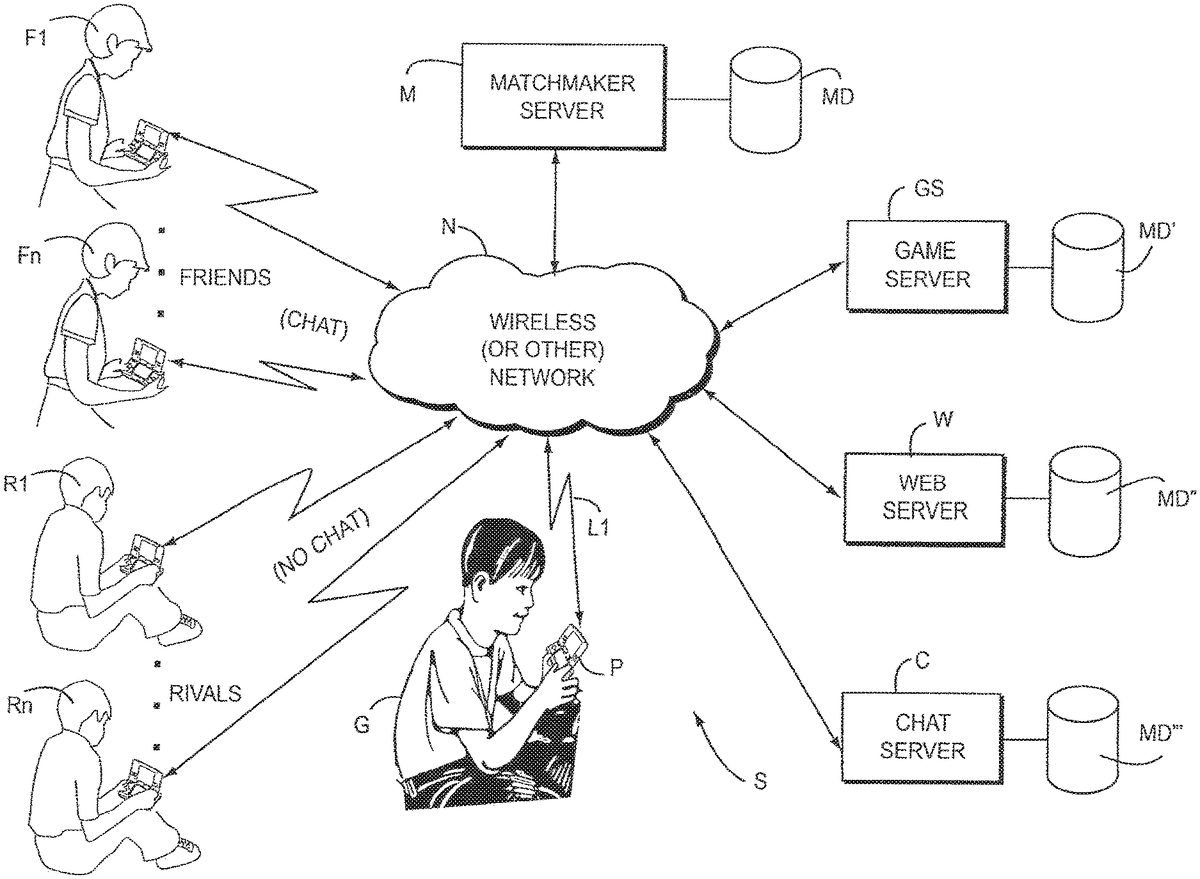
DETAILED DESCRIPTION FIG. 1shows an exemplary illustrative non-limiting implementation of a networked gaming system S. In the exemplary illustrative non-limiting system S, a gamer G plays a video game or runs another networked application on a networked gaming or other platform P. Platform P can be for example a Nintendo DS portable handheld wireless gaming platform, the Nintendo Revolution platform, or any other gaming or other networked platform capable of playing a game or providing other application(s). Gaming platform P connects via a wireless or wired link L1to a network N. Network N can be for example the Internet, an 802.11 wireless “WI-FI” network in the ad hoc or infrastructure mode, a cellular telephone network, a local area network, a wide area network, or any other network capable of communicating information between devices. Platform P uses the network to allow gamer G to play multi-player games against other gamers F1. . . FN, R1. . . RN who may be remotely located. These other gamers can be located across the room, across town or across the world. As further shown inFIG. 1, servers such as a matchmaker server M, a game server GS, a web server W and a chat server C are coupled directly or indirectly to network N. Gaming platforms P, F1. . . FN, R1. . . RN can communicate with these various servers M, GS and W via network N. In the exemplary illustrative implementation, each of servers includes a mass storage device MD for securely storing information concerning the identities and other information about users of gaming platforms P, F1. . . FN, R1. . . RN. Matchmaker server M (which may be a conventional server and associated software provided by Game Spy) matches up video game players based on skill level, previous game statistics, ...
DETAILED DESCRIPTION
FIG. 1shows an exemplary illustrative non-limiting implementation of a networked gaming system S. In the exemplary illustrative non-limiting system S, a gamer G plays a video game or runs another networked application on a networked gaming or other platform P. Platform P can be for example a Nintendo DS portable handheld wireless gaming platform, the Nintendo Revolution platform, or any other gaming or other networked platform capable of playing a game or providing other application(s).
Gaming platform P connects via a wireless or wired link L1to a network N. Network N can be for example the Internet, an 802.11 wireless “WI-FI” network in the ad hoc or infrastructure mode, a cellular telephone network, a local area network, a wide area network, or any other network capable of communicating information between devices. Platform P uses the network to allow gamer G to play multi-player games against other gamers F1. . . FN, R1. . . RN who may be remotely located. These other gamers can be located across the room, across town or across the world.
As further shown inFIG. 1, servers such as a matchmaker server M, a game server GS, a web server W and a chat server C are coupled directly or indirectly to network N. Gaming platforms P, F1. . . FN, R1. . . RN can communicate with these various servers M, GS and W via network N. In the exemplary illustrative implementation, each of servers includes a mass storage device MD for securely storing information concerning the identities and other information about users of gaming platforms P, F1. . . FN, R1. . . RN.
Matchmaker server M (which may be a conventional server and associated software provided by Game Spy) matches up video game players based on skill level, previous game statistics, geographical location, or any of a variety of other characteristics, and may keep track of player status information such as which players are online and which ones are not, which online players are already engaged in playing a game and which ones are waiting to play, which “ready room” each player inhabits waiting to play a game with others in the same virtual “ready room”, and other functionality.
Web server W (which may be coupled to matchmaker server M) can allow gamers to access certain types of status information about other players via a conventional web browser launched on gaming platforms P or other appliances having embedded or other web browser functionality.
Game Server GS may provide game downloads or other information downloads.
Chat server C may provide facilities to allow certain gamers to “chat” (communicate) via text messaging, voice messaging, video messaging, or other messaging.
In the exemplary illustrative non-limiting system S shown, the gamer G operating gaming platform P can play a multiplayer game over network N with (at least) two different categories of other gamers: “Friends”F1. . . FN or “Rivals” R1. . . RN. In the exemplary illustrative non-limiting example, a “Friend” is someone the gamer G knows personally. A “Rival” is someone the gamer G does not know personally but perhaps has “met” online (e.g., by being matched up by matchmaker server M with that person to play a game previously) and which the gamer G wants to keep track of for future game play.
In the exemplary illustrative non-limiting implementation, system S maintains different lists or rosters for Friends and Rivals, and handles each of those lists or rosters differently while allowing gamer G to selectively play games against Friends, Rivals or both. Additional or different categories of opponents can be provided if desired.
Exemplary Illustrative Non-Limiting Screen Displays
FIG. 1Ashows an illustrative non-limiting example of a list (roster) of Friends and Rivals. As shown inFIG. 1A, you can view all your friends and rivals you have gotten, as well as delete those you don't want and add more friends through the “Friend Code” system. In the exemplary illustrative non-limiting implementation, this list is offline so you don't need to go online to view it. Your Friends are people you have experience with either through playing a multiplayer networked local game once with them (local players will automatically be added as “Friends” since you met them in person) or through exchanging a “Friend Code”. Rivals are added when you play unknown players over the remote network connection, and you both agree to be each other's Rival. Rivals can also be found using “Rival Radar.”
FIG. 1Bshows an illustrative non-limiting example of a list (roster) of Friends and Rivals ONLINE. You access this screen from the Friends and Rival mode of Wi-Fi Connections on exemplary games. You can toggle between this screen and the Available Games Screen.
FIG. 1Cshows an illustrative non-limiting example of a list of Available Games ONLINE. This is the first screen you will see in the exemplary illustrative non-limiting implementation when you access the Friends and Rival mode of Wi-Fi Connections. You can toggle between this screen and the Friends and Rival ONLINE.
FIG. 1Dshows an illustrative non-limiting example of a screen display that appears when you select FIND GAME mode in Wi-Fi Connections. It allows you to filter the games you want to play online. Most of the players you will play against here will be unknown players online. Once the game is over, you will have an opportunity to make them your Rival.
FIG. 1Eshows an illustrative non-limiting example of a screen display that appears when you connect to enough players in FIND GAME mode in Wi-Fi Connections and then select your characters. In the exemplary illustrative non-limiting implementation, all online players can vote to decide what level to play on and the game will select the level.
FIG. 1Fshows an illustrative non-limiting example of a screen display that appears when you want to add a new “Friend” to your “Friends Roster” through exchange of a “Friend Code” (seeFIG. 1A). Your Friend Code will appear. You need to tell your friend your code, and you'll need to enter your friend's code. Only then, can you both be “friends.”
FIG. 1Gshows an illustrative non-limiting example of a screen display that appears after you use Rival Radar, establish a connection and find another player using Rival Radar at a party, in the school yard or out on the streets. You both will be added to each other's Rival Roster. You can later find your Rival (and she can find you) online through Friends and Rival Mode.
FIG. 1Hshows an illustrative non-limiting example of a Character Selection Screen during a Friends and Rival networked game. This is the HOST version of the screen (in the exemplary illustrative non-limiting implementation, only the HOST can start a game). If a game has at least 2 Friends in the game, then these Friends can voice/text chat with each other. Therefore, the Voice Chat and Text Chat icons are shown. In one exemplary illustrative non-limiting implementation, only Friends can voice/text chat with one another. If this game has only Rivals then these voice/text chat icons will not appear.
FIG. 1Iis an illustrative non-limiting example of a Result Screen display. If you played an unknown player, you have the opportunity to “check off” them as a Rival. If they also agree, then you both will become each other's Rival and be added to each other's Rival Roster.
Exemplary Illustrative Non-Limiting Gaming Platform
Referring toFIG. 2A, a game device P of one exemplary illustrative non-limiting implementation includes a first liquid crystal display (LCD)12and a second LCD14. The LCD12and the LCD14are provided on a housing16so as to be arranged in a predetermined position. In this implementation, the housing16consists of an upper housing16aand a lower housing16b, and the LCD12is provided on the upper housing16awhile the LCD14is provided on the lower housing16b. Accordingly, the LCD12and the LCD14are closely arranged so as to be longitudinally (vertically) parallel with each other.
It is noted that although the LCD is used as a display in this implementation, an EL (Electro-Luminescence) display or a plasma display may be used in place of the LCD. Alternatively, a CRT display may be used for game consoles, arcade video game machines, etc.
As can be understood fromFIG. 2A, the upper housing16ahas a planar shape a little larger than a planar shape of the LCD12, and has an opening formed so as to expose a display surface of the LCD12from one main surface thereof. The lower housing16bhas a planar shape horizontally longer than the upper housing16a, and has an opening formed so as to expose a display surface of the LCD14at an approximately center of the horizontal direction. Furthermore, the lower housing16bis provided with a sound hole18and an operating switch20(20a,20b,20c,20d,20e,20L and20R).
The upper housing16aand the lower housing16bare rotatably connected at a lower side (lower edge) of the upper housing16aand a part of an upper side (upper edge) of the lower housing16b. Accordingly, in a case of not playing a game, for example, if the upper housing16ais rotatably folded such that the display surface of the LCD12and the display surface of the LCD14are face to face with each other, it is possible to prevent the display surface of the LCD12and the display surface of the LCD14from being damaged. The upper housing16aand the lower housing16bare not necessarily rotatably connected with each other, and may alternatively be provided integrally (fixedly) to form the housing16.
The operating switch20includes a direction instructing switch (cross switch)20a, a start switch20b, a select switch20c, an action switch (A button)20d, an action switch (B button)20e, an action switch (L button)20L, and an action switch (R button)20R. The switches20a,20band20care placed at the left of the LCD14on the one main surface of the lower housing16b. The switches20dand20eare placed at the right of the LCD14on the one main surface of the lower housing16b. Switches20L and20R are placed in a part of an upper edge (top surface) of the lower housing16band lie on each side of the connected portion with the upper housing16a.
The direction instructing switch20afunctions as a digital joystick, and is used for instructing a moving direction of a player character (or player object) to be operated by a player, instructing a moving direction of a cursor, and so forth by operating any one of four depression portions. The start switch20bis formed by a push button, and is used for starting (restarting) a game, temporarily stopping (pausing) a game, and so forth. The select switch20cis formed by the push button, and used for a game mode selection, etc.
The action switch20d(that is, the A button) is formed by the push button, and allows the player character to perform an action that is game specific. For example, it may be used for instructing character movement direction, such as hitting (punching), throwing, holding (obtaining), riding, jumping, etc. For example, in an action game, it is possible to apply an instruction of jumping, punching, moving arms, etc. In a role-playing game (RPG) or a simulation RPG, it is possible to apply an instruction of obtaining an item, selecting and determining acts or commands, etc. The action switch20e(that is, the B button) is provided by a push button, and is used for changing a game mode selected by the select switch20c, canceling an action determined by the A button20d, and so forth.
The action switch (left depression button)20L and the action switch (right depression button)20R are formed by a push button. The left depression button (L button)20L and the right depression button (R button)20R can perform the same operation as the A button20dand the B button20e, and also function as a subsidiary of the A button20dand the B button20e.
A touch panel22is provided on a top surface of the LCD14. As the touch panel22, any type of a resistance film system, an optical system (infrared rays system) or an electrostatic capacitive coupling system, for example, can be used. In response to an operation of depressing, stroking or touching with a stick24, a pen (stylus pen), or a finger (hereinafter, referred to as “stick24, etc.”) on a top surface (detection surface) of the touch panel22, the touch panel22detects coordinates of operating position of the stick24, etc. and outputs coordinate data corresponding to the detected coordinates.
According to this implementation, the exemplary non-limiting resolution of the display surface of the LCD14is 256 dots×192 dots, and a detection accuracy of a detection surface of the touch panel22is also rendered 256 dots×192 dots in correspondence to the resolution of the display surface (this is the same or approximately the same as for the LCD12). Detection accuracy of the detection surface of the touch panel22, however, may be lower than the resolution of the display surface of the LCD14, or higher than it. In the detected coordinates of the touch panel22, a point of origin (0,0) is on an upper left corner, a right horizontal direction is an X-axis normal direction and a downward vertical direction is a Y-axis normal direction (the same applies to the coordinate system of the LCD14(12)). A three-dimensional game space often has X and Y coordinates on the horizontal plane and a Z axis in a vertical direction.
It is possible to display different game images (game screens) on the LCD12and the LCD14. This allows the player to point at (specify) or make active (move) character images displayed on the screen of the LCD14, such as player characters, enemy characters, item characters, text information and icons, or select a command, by operating the touch panel22with the stick24, etc. This also makes it possible to change an orientation of a virtual camera (viewpoint) provided in the three-dimensional game space or scroll through a game screen (the screen is displayed in a state of being gradually moved).
As stated above, the game device10has the LCD12and the LCD14as a display portion of two screens, and by providing the touch panel22on an upper surface of any one of them (LCD14in the first embodiment), the game device10has the two screens (LCD12,14) and the two operating portions (20,22).
Additionally, in this implementation, the stick24can be inserted into a housing portion (housing slot)26provided in proximity to a side surface (right side surface) of the upper housing16a, for example, and taken out therefrom as necessary. In a case of providing no stick24, it is not necessary to provide the housing portion26.
The game device10further includes a memory card (or game cartridge)28. The memory card28is detachable, and inserted into a loading slot30provided on a rear surface or a lower edge (bottom surface) of the lower housing16b. Although omitted inFIG. 2A, a connector46(seeFIG. 2B) is provided at a depth portion of the loading slot30for connecting a connector (not shown) provided at an end portion of the memory card28in the loading direction. When the memory card28is loaded into the loading slot30, the connectors are connected with each other, and therefore, the memory card28is accessible by a CPU core42(seeFIG. 2B) of the game device10.
A speaker32(seeFIG. 2B) is provided at a position corresponding to the sound hole18inside the lower housing16b. A battery accommodating box is provided on a rear surface of the lower housing16b, and a power switch, a volume switch, an external expansion connector, an earphone jack, etc. are provided on a bottom surface of the lower housing16b.
FIG. 2Bis a block diagram showing an exemplary illustrative non-limiting electric configuration of the game device10. Referring toFIG. 2B, the game device10includes an electronic circuit board40, and on the electronic circuit board40, a circuit component such as a CPU core42, etc. is mounted. The CPU core42is connected to the connector46via a bus44, and is connected with a RAM48, a first graphics processing unit (GPU)50, a second GPU52, an input-output interface circuit (hereinafter, referred to as “I/F circuit”)54, and an LCD controller60.
The connector46is detachably connected with the memory card28as described above. The memory card28includes a ROM28aand a RAM28b. The ROM28aand the RAM28bare connected with each other via a bus and also connected with a connector (not shown) to be connected with the connector46. Accordingly, the CPU core42gains access to the ROM28aand the RAM28bas described above.
The ROM28astores in advance a game program for a virtual game to be executed by the game device10. ROM28amay also store image data (character image, background image, item image, icon (button) image, message image, etc.), data representing sounds or music used to accompany the game (sound data), etc. The RAM (backup RAM)28bstores (saves) proceeding data and result data of the game.
The RAM48is used as a buffer memory or a working memory. The CPU core42loads the game program, the image data, the sound data, etc. stored in the ROM28aof the memory card28into the RAM48, and executes the loaded game program. The CPU core42executes a game process while storing in the RAM48data (game data and flag data) temporarily generated in correspondence with progress of the game.
The game program, the image data, the sound data, etc. are loaded from the ROM28aentirely at a time, or partially and sequentially so as to be stored (loaded) into the RAM48.
Each of the GPU50and the GPU52forms a part of a rendering means. They may be provided by, for example, a single chip ASIC. GPU50,52receive graphics commands from the CPU core42to generate game image data according to the graphics command. The CPU core42provides each of the GPU50and the GPU52with an image generating program (included in the game program) used to generate the game image data in addition to the graphics command.
GPU50is connected with a first video RAM (hereinafter, referred to as “VRAM”)56. GPU52is connected with a second VRAM58. The GPU50and the GPU52obtain data required for the GPU50and the GPU52to execute the graphics command (image data: character data, texture data, etc.) by access to a first VRAM56and a second VRAM58, respectively. The CPU core42writes the image data required for graphics drawing into the first VRAM56and the second VRAM58via the GPU50and the GPU52. The GPU50accesses the VRAM56to generate the game image data for graphics drawing. GPU52accesses the VRAM58to generate the game image data for graphics drawing.
The VRAM56and the VRAM58are connected to the LCD controller60. The LCD controller60includes a register62. Register62consists of, for example, one bit. Register62stores a value of “0” or “1” (data value) according to an instruction of the CPU core42. When the data value of the register62is “0”, the LCD controller60outputs the game image data generated by the GPU50to the LCD12, and outputs the game image data generated by the GPU52to the LCD14. When the data value of the register62is “1”, the LCD controller60outputs the game image data generated by the GPU50to the LCD14, and outputs the game image data generated by the GPU52to the LCD12.
The LCD controller60reads out game image data directly from the VRAM56and the VRAM58, and reads out game image data from the VRAM56and the VRAM58via the GPU50and the GPU52.
The I/F circuit54is connected with the operating switch20, the touch panel22and the speaker32. Operating switch20is the above-described switches20a,20b,20c,20d,20e,20L and20R. In response to an operation of the operating switch20, a corresponding operation signal (operation data) is input to the CPU core42via the I/F circuit54. The coordinates position data from the touch panel22is input to the CPU core42via the I/F circuit54. The CPU core42reads-out the sound data necessary for the game such as a game music (BGM), a sound effect or voices of a game character (onomatopoeic sound), etc. from the RAM48, and outputs it from the speaker32via the I/F circuit54.
FIG. 2Bfurther shows a “Wi-Fi” wireless adapter33and associated antenna35. Wi-Fi wireless adapter33comprises a transceiver (transmitter and receiver) that allows gaming platform P to communicate wirelessly via network N. Wi-Fi wireless adapter33may comprise for example a baseband system, modulator and amplifiers compliant with the conventional 802.11 standard. Wi-Fi wireless adapter33wirelessly receives information transmitted over RF from other devices, and wirelessly sends information to other devices. Other wired or wireless technology (e.g., Ethernet, WAN, Bluetooth, etc.) could be substituted. Wireless adapter33allows gaming platform P to communicate with other gaming platforms or other devices in the same room or vicinity and/or with more remote devices. Network N could be a very localized network such as a 20-meter range WI-FI ad hoc connection, or it could be a worldwide network such as the Internet, or any other wired or wireless network you can think of.
Exemplary Illustrative Non-limiting Software Controlled Operation—Internet Connection
In an exemplary non-limiting implementation, a player using gaming platform P will select an option, such as “Internet” or “Wi-Fi” from a menu (not shown) to connect to a network. This selection may cause a program to run a main menu routine, an exemplary flow for which is shown inFIG. 3. According to this exemplary, illustrative non-limiting implementation, the program may determine (at block103) if this is the first time the player is connecting to the selected network. If the player is connecting for the first time, the program will search105for available networks. For example, if a wireless connection is desired, the program may display107a list of available access points. The program may also display information109about available access points or “hot spots.” This information may include, among other things, information about whether or not the access point is secured111and signal strength of the access point113. If more than one access point is available, the player may be able to select a preferred access point, or, alternatively the program may automatically select an appropriate access point.
If a secured access point is selected125, the program may request127that the player input an access key such as a WEP (“Wireless Encryption Privacy”) key. After entry of the appropriate security key, the program may save (block129) the settings for that access point. If an unsecured access point is selected, the program will bypass any security key requests and also save (at block129) the settings for that access point. The program then may proceed to notify the player that it is attempting to connect to the selected network (block123).
If a player has previously connected to the selected network, the program may skip the searching step and proceed to a connect/configure screen115. This screen may provide the player with one or more options, such as connect117, configure119, and any other suitable options. If the player selects “configure”119, the program may proceed to search (block105) for available networks and continue as if the player had not previously connected to a network. If the player selects “connect”117, the program may use the existing network settings and notify (at block123) the player that the program is connecting to the desired network.
If connection is successful, the program may then display a welcome screen131with one or more game play options, such as tournament mode133, buddy mode135, and any other desired options. Depending on which option the player selects, the game will proceed to an appropriate state. If an error occurs in the connection process, the program may notify (at block121) the player that there was an error in connection, and return to a main menu.
If tournament mode is available, then the exemplary illustrative non-limiting implementation may run a tournament mode routine. An exemplary flow of such a routine is shown inFIG. 4. The routine may first display a tournament mode menu screen141. This screen may display one or more options for the selected tournament, such as a number of matches143, a game mode145, an opponent level147, an option to select buddies/rivals149, and any other suitable options. Once the player has selected the desired settings, the player may then select an option151to find an appropriate match.
After the player has selected the option151to find a match, the program may display a “please wait” screen (block153). While the player waits, the program sets up (at block155) a tournament based on the selected criteria. Once the program creates the tournament, the program may then display (at block157) a tournament created screen. Additionally, the program may display (at block159) a screen allowing the player to select a specific avatar or character to use within the game. The program then waits (at block161) for other players. While the program waits (block161), it may display information about the upcoming tournament, such as the game mode and level to be played, a listing of the players in the upcoming match, what, if any, matches those players are currently involved in, and any other suitable information.
Once all of the players are ready, the program may then proceed to in game action (block169), allowing the players to play their tournament. At the end of the tournament, the program may display (at block165) a result screen. Among other things, this screen can have information such as a particular player's personal results, the tournament standing of all the players involved, and the individual results of all of the players from the previous game.
After displaying (at block165) the appropriate information about the previous game, the program checks (at block167) to see if any games are remaining in the tournament. If there are games remaining, the program may decide (at block163) whether or not to allow the player to select a new avatar or character for the next game. If a new character can be selected, the program may display (at block159) a character selection screen. Otherwise, the program may wait (at block161) for other players to be ready for the next game.
If the program determines (at block167) that the tournament is over, it may then display (at block171) a final results screen. This screen may contain a listing of all the players in the tournament along with information for each player, such as score and ranking. This screen may also make it possible for the player to select (at block173) a particular opponent and provide the player with an option (at block177) to make that opponent a rival.
If instead of tournament mode, the player selected buddy mode, then according to this exemplary illustrative non-limiting implementation the program may run an opponent selection routine, an exemplary flow for which is shown inFIG. 5. The program then displays a buddy mode menu screen181. This screen181may display buddy information, such as buddy names185, buddy rankings183, the current status187of a buddy, and any other appropriate information. The status187of a buddy can be “offline” if the buddy is not connected, “online” if the buddy is connected, “busy” if the buddy is currently playing a game, “ready room” if the buddy is currently in a virtual “ready room” waiting for a game to start, or any other suitable status.
In addition to buddy information, the program may give the player a list of options for game play. In this exemplary illustrative non-limiting implementation, the list contains four options: “start ready room”189, “join ready room”191, “buddy cards”193, and “rivals list”195. Other suitable options may be included.
If the player selects “start ready room”189in the exemplary illustrative non-limiting implementation, the program may then display a “ready room” menu screen205. This screen205may contain, among other things, a list of buddy names209, chat bubbles207for each buddy name, a chat typing window211and a virtual keypad213for chatting. If the player wants to chat with a buddy who is a friend and is known to the player, the player can type a message into the chat typing window211using the virtual keypad213. The player will see any responses to the message appear in one or more of the chat bubbles207corresponding to the buddies209in the ready room. In one exemplary, illustrative non-limiting implementation, chat is limited to between friends. All players in the ready room may have the option214to instruct the game to start, and the game begins when one of the players selects this option214. At that point the program may display a message215that the game is starting. In order to give everyone time to prepare, this message215may include a timer217that counts down to game play. According to this exemplary illustrative non-limiting implementation, the player to select the start game option214will be the host for that game.
If, from the buddy mode screen, the player elects to join a ready room191, the game may display a list196of buddies198who are currently in ready rooms. The player may then select one of the buddies198and join the same room as that buddy is currently in. If the buddy is in a room that is full, the game may not allow the player to join that room. Alternatively, the game may not even display the names of buddies who are in rooms that are currently full. Once the player elects to join a room, the program may display a ready room menu screen205.
If the player instead selects from the buddy mode screen “rivals list”195, the program may display a list197of rivals199who are currently in ready rooms. The player can select a rival and try to join the ready room that the rival is in. After the player attempts to join, the player's machine may wait201to see if that player is accepted. If the player is accepted, then the game may display a message215that the game is starting. In the exemplary illustrative non-limiting implementation, players are not able to chat with rivals because rivals are other players whom that player does not know in real life and therefore contact is restricted for safety and privacy reasons.
Once a player has elected to begin game play and any counter has expired, the program may then begin a game sequence flow, an example of which is shown inFIG. 6. The program may provide221the host player with a list of selectable settings. The program may also provide223the host player with a list of levels. The program may further provide225all players with a choice of avatar or character for the game. After each player has selected a character, the program may instruct the player to wait for the other players to finish making their selections. The game then proceeds229, and at the end of the game the program may display231a result screen. This screen may give the host the option to play a rematch of the previous game, in which case the game would begin again, or this screen may provide an option to quit to the ready room. Other suitable options may also be provided.
If a player wishes to add a new buddy to his buddy list, the player may select an appropriate option, such as the “buddy cards” option193. This may then cause a buddy card menu241, an exemplary flow for which is shown inFIG. 7a, to appear. The player may select any buddy255, and scroll through the list of available buddies using arrows259. The menu may also display the ranking257of each buddy255.
Once a player selects a particular buddy255, the menu may also display various data about the selected buddy. In one exemplary illustrative non-limiting implementation, the menu displays the name of the buddy243, the ranking of the buddy245, the favorite character or avatar used by the buddy247, the location of the buddy249, the win/loss ratio of the buddy251, and the number of kills made by the buddy253. Any suitable information may further be displayed.
The player may also elect to add a buddy. This can be accomplished through several different methods. If a player plays a local area network (LAN) game with another player, then the two players can simply add each other as buddies, since they have to be in close proximity, and thus know each other, to play a LAN game.
If the players cannot meet to exchange cards, but would still like to be buddies, the players can use the add buddy feature260that may be included with the buddy list menu241. Selection of this feature will launch an add buddy menu, such as the menus shown inFIGS. 7band7c.
FIG. 7bshows one illustrative exemplary non-limiting implementation of an add buddy menu261. The menu may include a set of instructions263. In this exemplary implementation, both buddies use a password that they have mutually agreed on. The buddies must both know the password, and so must agree on it by use of some other medium, such as in person, by phone, by email, by instant messenger, etc. Once the buddies have determined a password, the buddies then both go online. Both buddies then enter the agreed upon password265. Once both have entered the password, an accept/decline option273may pop up. The buddies can then choose if they actually want to add each other to their respective buddy lists. Alternatively, the players may simply be added to each other's buddy lists once the codes are entered, without the additional accept/decline option.
FIG. 7cshows a different illustrative exemplary non-limiting implementation of an add buddy menu267. According to this exemplary implementation, each player is assigned a unique ID code268. If a player_1wants to add a player_2to his buddy list, then player_1must know player_2's ID code268. Because mutuality of acceptance is required, player_2must also know player_1's ID code. Both players enter the other player's ID code, and then an accept/decline option273may pop up. Alternatively, the players may simply be added to each other's buddy lists once the codes are entered, without the additional accept/decline option.
Exemplary Illustrative Non-Limiting Software Controlled Operation—Internet Connection
According to a further exemplary illustrative non-limiting implementation, a player may choose to enter a multi-player wireless (Wi-Fi) mode.FIG. 8shows an exemplary flow for this mode. Upon selecting multiplayer from a main menu, the player may be presented with a multi-player menu281. This menu281can include single card283, multi-card285, Wi-Fi287, hunter's licenses289, and Wi-Fi setup291. Additional options may be included if desired by the programmer and listed options may not all be needed or added.
According to this exemplary implementation, if the player selects Wi-Fi287, the program may then ask293if the player wants to connect to an available Wi-Fi connection. If the player chooses no, the program will return to the menu281. If the player selects yes, an wait-for-connection message297may be displayed as the game device connects to an available Wi-Fi connection. If the device is unable to connect, an error message295may be displayed, and the program then returns to the menu281. Otherwise, if the device is able to connect, it may then proceed to a Wi-Fi menu311, an exemplary flow for which is shown inFIG. 9. Before displaying the menu311, however, the program may populate a list or roster of the other players currently connected to the same Wi-Fi connection. When populating the list, it may gather and add299the hunter's license information for all online players to the selecting player's device. While this procedure is processing, the program may prompt301the player to remove unwanted licenses to make room for new licenses.
The program may then provide the player with a Wi-Fi menu. The menu may display information about the player's own hunter's license, such as the player's rank313, the player's information317, and an icon315for the player. Other suitable information may also be displayed. The player may also be given one or more options for match-type selection, such as random mode321and friends/rivals mode319. If the player elects to go back to the multi-player main menu, a prompt312may appear asking the player if he wishes to disconnect. If the player does wish to disconnect, a message314may appear while disconnecting, and then another message316may appear, letting the player know the disconnect was successful.
If a player selects random mode321, the program may display a random match setup menu331, the exemplary flow for which is shown inFIG. 10. This menu331may include a variety of options for match set-up, including game modes333, rules335and enemy rank337. Other suitable options may be included as desired by a programmer or designer. Once a player has appropriately adjusted the available options, he can select an option339to find opponents looking to play a similarly configured match.
Once the player has elected to search for possible opponents, a searching menu341may be displayed. The searching menu may display information342on which selections were made in the random match set-up menu331, and it may also display a list of found opponents345and opponents347for whom it is still searching. Once at least one opponent is found, the program may present the player with an option351to begin the match. The program may initially display this option351as a grayed-out option353, and only make the option available355when at least one opponent is found. If either the player or any of his opponents selects the begin option355, then the option becomes a flickering/flashing option357on the devices of the other players/opponents who did not select the option. Once all players have selected the begin option355, the option may change to display359a countdown to game inception. If for some reason the game cannot create the desired match, it may display an error message361, and return to the random match set-up menu331.
Once all players have selected the begin option355and the game has begun, the program may give the players the option to select characters372and, if desired, teams374. The program then proceeds to a level selection screen371. An exemplary flow of a level selection routine is shown inFIG. 11. The players may each select a level of choice or “random” from a list of levels377, and the level that gets the most votes is the level played. After a level has been chose by this or any other suitable method, the program proceeds to game play378. At the end of the first match, if a player does not have at least one of his opponent's hunter's licenses stored as a rival, the program may display a first result screen383. This screen383may show the results385of the match, and may give the players the option387to exchange licenses and become rivals. Alternatively, if the players have already become rivals with each other in the past, the program proceeds to a second result screen389. This screen may also display the results385of the match, and may additionally give the players the options to play again389, quit the match391, or any other suitable options. This screen389is also displayed after the exchange decisions have been made from the first result screen383.
If a player selects play again, the game then waits379to see if at least a second player selects play again. If at least two players select play again, the game returns to the level selection screen menu371. If all players or all but one player select quit match, then the game may inform393the players that the match is over, display395a message while quitting the match, and return to the Wi-Fi menu.
If, from the Wi-Fi menu311, a player selects friends/rivals mode319, then according to a further exemplary illustrative non-limiting implementation, the program proceeds to a friends/rivals mode. An exemplary flow for this mode is shown inFIG. 12. A friends/rivals mode is a mode wherein the player will only be playing against other players previously demarked or “bookmarked” as buddies or rivals. The program may display a friends/rivals menu401. This menu may contain a list of the players currently in the ready room in which the player currently resides, and a list405of ready rooms available for the player to join.
The list405of ready rooms may also show how many players408are currently in an available ready room. If the maximum number of players are already present, then the join button406is grayed out and a new player cannot join that room.
The player may also be presented with the options404,402to find out who else is online and to create a new ready room.
If the player selects the option404to see who is online, the program may display an online status menu413. This menu may display a tabbed listing418of all friends/rivals currently online. The player can use the tabs417to sort the list into all friends/rivals, friends, or rivals. The player can also select an individual opponent419and see an information display415about that particular opponent.
If the player selects the option404to create a new ready room, the program may give the player a set of choices407as to how he would like to set-up the ready room. These option may include an option407to select types of invitees, such as friends, friends and rivals, or rivals. Another possible option411could be a selection of the maximum number of players. Any other suitable options may also be added. When the player has chosen the desired options, he can then select an option412to create the ready room.
Once the player has elected to create a ready room, the program may display a ready room menu421, an exemplary flow for which is shown inFIG. 13. This menu may display information423on the players currently in the ready room. Players may also have the ability to chat with other buddies currently in the ready room, if those players are buddies with each other. According to one exemplary illustrative non-limiting implementation, only the host player is provided with the option426to start the game. All the other players are simply provided with the chat capability425to chat with other buddies in the rival room.
Since players cannot chat with people who are their rivals, anyone who is a rival of the player who created the ready room will be shown a modified ready room menu421. This menu will not have chat bubbles, but will have a listing427of the players currently in the ready room. Instead of a chat capability425, the rival player will just see an instructional message428in the exemplary illustrative non-limiting implementation.
Once the host player has selected the option426to start the game, players may see a message429giving them the option430to leave the ready room429or select ready432. Any player selecting the option430leave ready room429may see a prompt435informing him that he is leaving the ready room. If the host selects the option430to leave ready room429, the program may display a different prompt433, informing the host player that this choice will disconnect all players from this ready room. These prompts435,433may also be displayed if a player hits a button corresponding to back/undo, such as a “b” button in this exemplary implementation. If all non-host players select “leave ready room”429, then the host player is returned to the ready room menu421. If at least the host and one other player select ready432, then the program proceeds to the friends/rivals in-game mode.
FIG. 14shows an exemplary illustrative non-limiting implementation of a friends/rivals in-game mode flow. According to this exemplary implementation, a host is able to select a mode457and rules459for an upcoming match. While the host is selecting the mode457and rules459, other players may use a special menu467to suggest which modes/rules they would like to see used. All participating players can also select a character461and, if necessary, form teams463. If, during these selection periods, the host presses the back button on his controller, the host may be given a disconnect warning455. If the host elects to disconnect, all players are given a back to ready room message465and sent back to the ready room menu421. Otherwise, after all players have selected a character, and team if necessary, the program displays a level select menu441.
From the level select menu441, each player can choose a level from a list442of levels. The menu441may also display443which levels were selected by each player.
After all players have selected a level, the program decides which level will be played based on the majority vote of the players, indicated by level selection. If there is a tie, then the program randomly chooses between the tied selections. The in-game action453then occurs.
Once the game has finished, the program displays a result menu444. This menu may show the results446of the game, and give the players the options445to play again or return to the ready room. If at least two players select play again, their machines will return to the level select menu441. Once one player has selected play again, his machine may display a please wait message447. If no other players select play again, all players may see a back to ready room message449,451. The program then returns to the ready room menu421.
FIG. 15shows an exemplary illustrative non-limiting implementation of a hunter's licenses mode flow. This is reached if the player selects hunter's licenses from the multiplayer main menu281. According to this exemplary implementation, the program displays a hunter's license menu471. This menu471may contain information473about the player's own hunter's license, as well as a list of options475that the player can choose. These options may include view hunter's licenses476, view own hunters info478, add hunter license480, and gathering mode482. Other suitable options may be included or some of these options may be omitted as the game designer desires.
If the player selects gathering mode482, an information message477explaining what gathering mode is may pop up. If the player elects to continue with gathering mode, the player will see a second information message479, informing him that he does not need to use his device while the mode is processing. Once the gathering mode is complete, the player may be shown a message481telling him that he can view the hunter's licenses that he gathered. Electing to view these licenses takes the player to the same view as if he had selected view hunter's licenses476from the hunters license menu471. If the player does not choose to view the hunter's licenses, he is returned to the hunters license menu471.
FIG. 16shows an exemplary illustrative non-limiting implementation of a view hunter's licenses mode flow. If the player selected view hunter's licenses476from the hunter's license menu471, or if the player elected to view hunter's licenses after gathering licenses, he will arrive at the view hunter's licenses menu491. The player may receive a warning message503if his space for storing hunter's licenses is getting low.
The view hunter's licenses menu491displays a sortable list495of all hunter's licenses collected by the player. The player can choose to view all licenses, friends' licenses, or rivals' licenses through the use of the tabs497above the list495. If a player selects an individual opponent496, the menu491displays information493relating to that opponent's hunter's license. The player also has the option498to erase a selected hunter's license.
If the player opts to erase a license, the player will be prompted499to ensure he wants to erase the license. If he selects no, he will be returned to the view hunter's licenses menu491. If he selects yes, the selected hunter's license will be erased from his machine, and a message501informing him of such will be displayed.
If the player elects to view his own hunter's info478, he may be directed to a view own license menu511. An exemplary illustrative non-limiting implementation of a view own license mode flow is shown inFIG. 17.
The view own license menu511shows the player his currently selected information513. The player can also choose to edit his name524and his icon522from this menu.
If the player chooses to edit his icon, he will be directed to an edit icon menu512. This menu shows the old icon515that was previously selected, along with a list520of available icons. The player can choose from this list and update his icon.
If the player chooses to change his nickname, he will be directed to an edit name menu514. This menu instructs516the player to change his name, and provides a virtual keypad518allowing the player to select a new name. Once the name has been selected, the program may ask517the player if the name is correct. If the player agrees with the name change, the program may then show a message519informing the player that his name has been changed.
If the player wishes to add a buddy's hunter's license, he will select “add hunter license”480from the hunter's license menu471. This will direct him to an “add license” menu, an exemplary flow for which is shown inFIG. 18. The add license menu521shows the player's hunter's license information523. It also provides an option525to enter the hunter's code of another hunter.
The player can then enter the hunter's code of another hunter and, if the code is correct, the player will be directed to the name license menu531. If the player enters an invalid hunter's code, an error message532may appear. The name license menu531prompts533the player to enter a temporary name for this hunter, which will remain until the server registers the license. The license is registered once the selected hunter also enters the player's proper hunter's code. The player is provided with a virtual keypad535with which to enter a temporary name.
Once the player has entered the name, he is prompted527to ensure the name is correct. If the name is accurate, the player is informed529that the hunter's code has been registered for the selected hunter.
While the technology herein has been described in connection with exemplary illustrative non-limiting implementations, the invention is not to be limited by the disclosure. For example, while exemplary illustrative non-limiting implementations have been described in connection with portable wireless video game platforms, any sort of appliance capable of being connected to a wired and/or wireless network may be used. Although exemplary illustrative non-limiting implementations have been described in connection with the use of “Friends” and “Rivals” categories of potential game players, other categories based on other characteristics (e.g., gender, age, geographical area, local or remote connection, IP address, name, school grade, digital signature, ability to authenticate identity, nationality, or any other characteristic) could be used instead. While exemplary illustrative non-limiting implementations distinguish between different categories of potential players by permitting chat with some but not with others, other types of operational or mode differences (e.g., selective filtering or recording of chat content, selective game play or game level access, etc.) could be provided instead. The invention is intended to be defined by the claims and to cover all corresponding and equivalent arrangements whether or not specifically disclosed herein.
Claims
- A handheld device comprising: a processor;a touch screen operatively connected to the processor;a wireless transceiver operatively connected to the processor;and a non-transitory memory operatively connected to the processor, the non-transitory memory storing instructions that, when executed by the processor, control or configure the processor to: enable a user of the handheld device to specify search criteria and a geographical region for use in searching online user profiles of other users;gather matching user profiles in the specified geographical region based on the specified search criteria, said gathered matching user profiles each including at least a user identity and an image;enable the user to view the gathered matching user profiles on the touch screen;and in response to a user-inputted manipulation performed on the touch screen in connection with a displayed one of the gathered matching user profiles, electronically mediating subsequent wireless interactions between the user of the handheld device and another user having the displayed one of the gathered matching user profiles, each of the electronically mediated subsequent wireless interactions being a permissible type of communication, wherein the electronic mediation enables different possible communication types as permissible based at least in part on an adjustable identified association as between the user of the handheld device and the other user having the displayed one of the gathered matching user profiles, wherein the adjustable identified association as between the user of the handheld device and the other user comprises (a) a friend association or (b) an identified association different from the friend association, the friend association between the user and the other user enabling an open chat communication type between the user of the handheld device and the other user using freeform messages, the identified association different from the friend association enabling a closed chat communication type between the user of the handheld device and the other user using predetermined messages but not an open chat using freeform messages.
- The handheld device of claim 1 wherein the adjustable identified association comprises accepting the displayed user profile as a friend.
- The handheld device of claim 1 wherein a permissible type of communication comprises a private chat.
- The handheld device of claim 1 wherein a permissible type of communication comprises a private text chat.
- The handheld device of claim 1 wherein a permissible type of communication comprises a private voice chat.
- The handheld device of claim 1 wherein the search criteria include rank.
- The handheld device of claim 1 wherein the gathering comprises finding additional user profiles by transporting the handheld device to new geospatial positions.
- The handheld device of claim 1 wherein the handheld device contacts a matching server that looks for a match to the search criteria among gathered user profiles of nearby handheld devices.
- The handheld device of claim 1 wherein the handheld device wirelessly contacts a matching server that searches for other users based on the search criteria.
- The handheld device of claim 1 wherein the touch screen displays indications that user profiles are friends.
- The handheld device of claim 1 wherein the user profiles indicate favorites.
- The handheld device of claim 1 wherein the processor enables the user to erase gathered user profiles by manipulating the touch screen.
- The handheld device of claim 1 wherein the memory stores further instructions enabling the user to create a user profile by manipulating the touch screen, the created user profile including at least an image and a nickname.
- The handheld device of claim 1 wherein the adjustable identified association comprises the user inputting a code of a friend.
- The handheld device of claim 1 wherein the search criteria includes gender and age.
- The handheld device of claim 1 further including initiating online game play.
- The handheld device of claim 1 wherein the identified association different from the friend association indicates the user of the handheld device does not personally know the other user but has in the past interacted online with the other user.
- A handheld device comprising: a processor;a touch screen operatively connected to the processor;a wireless transceiver operatively connected to the processor;and a non-transitory memory operatively connected to the processor, the non-transitory memory storing instructions that, when executed by the processor, control or configure the processor to: enable a user of the handheld device to specify search criteria and a geographical region for use in searching online user profiles of other users;gather matching user profiles in the specified geographical region based on the specified search criteria, said gathered matching user profiles each including at least a user identity and an image;enable the user to view the gathered matching user profiles on the touch screen;and in response to a user-inputted manipulation performed on the touch screen in connection with a displayed one of the gathered matching user profiles, electronically mediating subsequent wireless interactions between the user of the handheld device and another user having the displayed one of the gathered matching user profiles, each of the electronically mediated subsequent wireless interactions being a permissible type of communication, wherein the electronic mediation enables different possible communication types as permissible based at least in part on an adjustable identified association as between the user of the handheld device and the other user having the displayed one of the gathered matching user profiles, wherein gathering user profiles of nearby handheld devices comprises establishing direct wireless point-to-point contact with each nearby handheld device, receiving a user profile over the direct wireless point-to-point contact with each nearby handheld device, and storing, in the non-transitory memory, the received user profile of each nearby handheld device, and wherein the different possible communication types the electronic mediation enables as permissible based at least in part on an adjustable identified association as between the user of the handheld device and the other user comprise (a) a closed chat communication type between the user of the handheld device and the other user using predetermined messages, and (b) an open chat communication type between the user of the handheld device and the other user using freeform messages.
Disclaimer: Data collected from the USPTO and may be malformed, incomplete, and/or otherwise inaccurate.