U.S. Pat. No. 10,965,964
SYSTEM AND METHODS FOR INTEGRATED MULTISTREAMING OF MEDIA WITH GRAPHICAL OVERLAYS
AssigneeLogitech Europe S.A.
Issue DateFebruary 20, 2018
U.S. Patent No. 10,965,964: System and methods for integrated multistreaming of media with graphical overlays
U.S. Patent No. 10,965,964: System and methods for integrated multistreaming of media with graphical overlays
Issued March 3, 2021, to Logitech Europe SA
Filed/Priority to February 20, 2018
Overview:
U.S. Patent No. 10,965,964 (the ‘964 patent) regards livestreaming to multiple streaming services at once with custom graphical overlays. The ‘924 patent details a system which receives content from a client computing platform, connects with several streaming services, and assigns custom overlays based on where each stream is being output. This would allow a client to stream to multiple streaming services, the base content being the same but allowing the client to have overlays coordinated with where the content is being viewed.
Abstract:
This present disclosure describes a system and methods for integrated multistreaming of media with graphical overlays. At least one method includes a multistream service and graphical overlays hosted by a server infrastructure; a user configuring both the multistream service and graphical overlays on the server infrastructure; a user playing video games on a computer, using broadcasting software to authenticate with the server infrastructure; the broadcasting software capturing video of the user’s computer session; the software retrieving the user’s custom graphical overlay from the server infrastructure, encoding the video signal and graphical overlay; the software using the same aforementioned authentication to upload the encoded video to a multistream service, and the multistream service streaming the user’s encoded video simultaneously to multiple streaming services.
Illustrative Claim:
- A system comprising: one or more processors; and one or more machine-readable, non-transitory storage mediums that include instructions configured to cause the one or more processors to: establish communication with a plurality of streaming services that are configured to receive and transmit information; receive, from a client computing platform, video content defined by an image and/or audio captured from the client computing platform associated with a user; receive, from a first streaming service of the plurality of streaming services, a first set of viewer input information associated with a first user’s interaction with the first streaming service of the plurality of streaming services; receive, from a second streaming service of the plurality of streaming services, a second set of viewer input information associated with a second user’s interaction with the second streaming service of the plurality of streaming services, wherein the second streaming service is different from the first streaming service; responsive to the reception of the first set and the second set of viewer input information, apply a first video overlay to the video content, wherein the first video overlay is based on the first set of viewer input information, and apply a second video overlay to the video content, wherein the second video overlay is based on the second set of viewer input information; and provide the plurality of streaming services with the video content, wherein the video content for the first streaming service includes the first video overlay and the video content with the first video overlay is only distributed to users associated with the first streaming service, and wherein the video content for the second streaming service includes the second video overlay and the video content with the second video overlay is only distributed to users associated with the second streaming service.
Illustrative Figure
Abstract
This present disclosure describes a system and methods for integrated multistreaming of media with graphical overlays. At least one method includes a multistream service and graphical overlays hosted by a server infrastructure; a user configuring both the multistream service and graphical overlays on the server infrastructure; a user playing video games on a computer, using broadcasting software to authenticate with the server infrastructure; the broadcasting software capturing video of the user's computer session; the software retrieving the user's custom graphical overlay from the server infrastructure, encoding the video signal and graphical overlay; the software using the same aforementioned authentication to upload the encoded video to a multistream service, and the multistream service streaming the user's encoded video simultaneously to multiple streaming services.
Description
It should be understood that the drawings and corresponding detailed description do not limit the disclosure, but on the contrary, they provide the foundation for understanding all modifications, equivalents, and alternatives falling within the scope of the appended claims. DETAILED DESCRIPTION Introduction The disclosed embodiments relate to multistreaming media with graphical overlays for use with video games, movies, entertainment media and/or other non-entertainment media. More specifically, the disclosed embodiments relate to interconnected systems executing software related to local software sending an encoded user signal and dynamically-generated, web-hosted graphical overlay to a service configured to upload videos to one or more streaming services. The disclosed embodiments rely on a live video streaming architecture, where part of the stream includes inserting a graphical overlay prior to encoding the video for distribution. The user in these embodiments (e.g. the “streamer”) configures the graphics that will be generated into a video overlay in real time based on data received from API data sources. The user then connects one or more third-party streaming service to their account, which is stored in the server infrastructure and accessed via the multistream service. The user then authenticates to the server infrastructure through their local broadcast software, which allows the local broadcast software to access services hosted by the server infrastructure, such as the user's generated overlay image and the aforementioned multistream service. The user then configures local broadcast software to combine two or more separate data sources into an encoded video: a specific application or video game signal; the internet-hosted video overlay, which is generated by the server infrastructure at regular intervals to give the appearance that it is animated and synchronized to current events in the application or video game signal; and optionally the user's local camera feed, which, when included, may allow viewers to see the ...
It should be understood that the drawings and corresponding detailed description do not limit the disclosure, but on the contrary, they provide the foundation for understanding all modifications, equivalents, and alternatives falling within the scope of the appended claims.
DETAILED DESCRIPTION
Introduction
The disclosed embodiments relate to multistreaming media with graphical overlays for use with video games, movies, entertainment media and/or other non-entertainment media. More specifically, the disclosed embodiments relate to interconnected systems executing software related to local software sending an encoded user signal and dynamically-generated, web-hosted graphical overlay to a service configured to upload videos to one or more streaming services.
The disclosed embodiments rely on a live video streaming architecture, where part of the stream includes inserting a graphical overlay prior to encoding the video for distribution. The user in these embodiments (e.g. the “streamer”) configures the graphics that will be generated into a video overlay in real time based on data received from API data sources. The user then connects one or more third-party streaming service to their account, which is stored in the server infrastructure and accessed via the multistream service. The user then authenticates to the server infrastructure through their local broadcast software, which allows the local broadcast software to access services hosted by the server infrastructure, such as the user's generated overlay image and the aforementioned multistream service. The user then configures local broadcast software to combine two or more separate data sources into an encoded video: a specific application or video game signal; the internet-hosted video overlay, which is generated by the server infrastructure at regular intervals to give the appearance that it is animated and synchronized to current events in the application or video game signal; and optionally the user's local camera feed, which, when included, may allow viewers to see the user as they are using their application or playing a video game. The aforementioned signals are then encoded by the local broadcast software for upload to the multistream service; (because the user has already authenticated to the server infrastructure, which contains the multistream service, the local broadcast software already has access to the user's connections in the multistream service) the multistream service then uploads the encoded video to one or more third-party streaming websites, such as Twitch, YouTube Gaming, Mixer, or Facebook Live, based on the user's previously defined connections to said streaming services.
Given that multistream systems and graphical overlays are integral to the monetization of a streamer's channel, and given that streamers typically only receive donations and subscriptions while they are streaming, it is in their best interest to minimize the time they spend managing and customizing the disparate systems required to produce a successful live stream.
In contrast to prior systems, a system for integrated multistreaming of media with graphics makes it seamless for streamers to configure and manage the critical services that comprise their live streams. While an API key allows a multistream service to associate a video with the correct user account, it is not a complete form of authentication, thus does usually not provide sufficient account security to permit the transfer of stored user preferences between a multistream service and a local broadcast software. Fully authenticating with the server infrastructure, often via a username and password, instead of simply sending an API key provides for tighter integration between the server infrastructure and the local broadcast software. This tighter integration allows the server infrastructure to provide the local broadcast software with access to data user preferences, such as the graphical overlay and multistream service configurations; it also allows the local broadcast software to display details from the user's account that would typically only be accessible within the server infrastructure, such as information received by the third-party streaming service data APIs related to the user's connection accounts.
Additionally, by allowing a user to fully authenticate their local broadcast software to a server infrastructure that provides access to both the multistream service and the user's graphical overlays, the disclosed embodiments provide a simple setup experience that is currently unrivaled in the consumer broadcasting market. Not unlike Amazon's one-click checkout invention, this consolidated setup provides a significant competitive advantage to the company that provides the service and the streamers who utilize it.
The paragraphs that follow describe in detail various examples of the above-described embodiments. An example of an illustrative Web infrastructure utilizing dynamic data and multi-streaming infrastructure. The individual use-cases that complete the system (i.e., an individual establishing connections to third-party streaming services and using images to configure an overlay) are then described through software flowcharts. A non-limiting illustrative example of a configured overlay is then provided. Finally two illustrative embodiments are described, wherein the graphical overlay is encoded by the local broadcast software then sent to the multistream service, and the graphical overlay is added to the video after it is received by the multistream service.
Web Infrastructure with Multiple Data Sources and Multistream Infrastructure
FIGS. 1A and 1Bshows an overview of an illustrative embodiment of a web infrastructure with multiple data sources and multistream infrastructure that includes the Server Infrastructure100, an Internet120infrastructure, a Local Computer230operating Local Broadcast Software240, a Multistream Service250, a Streaming Service150, Viewers170, a method for collecting Viewer Interactions160, and one or more Streaming Service API(s)130. The Server Infrastructure100contains a method for persistent storage, such as a database, as well as a method for initiating and responding to internet requests, such as a web server. The Server Infrastructure100stores and makes various user settings available for retrieval, including the user's Overlay Configuration110and the user's Graphical Overlay200. This embodiment potentially includes Alternative API Data Sources270, which are data sources unrelated to the Streaming Service API(s)130that are used in the creation of the Graphical Overlay200. This embodiment of the Server Infrastructure100contains the Multistream Service250, which stores and maintains the user's connections to third-party Streaming Services150. This embodiment of the Server Infrastructure100also contains an API Data Collector260, which is responsible for aggregating data from one or more Streaming Service API(s)130and Alternative API Data Sources270. Data gathered by the API Data Collector260is then used in combination with the user's Overlay Configuration110to populate the Graphical Overlay200. While not depicted in this embodiment, the Alternative API Data Sources270may also be generated by a local program executing on the user's computer.
The Local Computer230may be a traditional desktop computer, a laptop, a mobile phone, a virtual or augmented reality computing device, or any related personal computing device. The Streaming Service API(s)130and the Alternative API Data Sources270connection(s) may be unidirectional or bilateral. The Streaming Service API(s)130and the Alternative API Data Sources270may also be a RESTful service, a persistent websockets connection, or any other method of regularly publishing and sharing information between disparate internet systems. The Game Signal220includes, but is not limited to, an audio/video signal from a videogame, a specific application unrelated to a videogame, or the user's operating system environment including some or all applications the user has executed. Multiple Game Signals220and User Signals210may also be combined to create the Game Signal220or User Signal210.
In the embodiment shown, the Server Infrastructure100responds to requests from the Local Broadcast Software240executing on the Local Computer230, and further retrieves the Overlay Configuration110as needed. The Local Software may be stored on a non-volatile information medium, or it may be downloaded onto the Local Computer230via, e.g., the Internet120.
The core functionalities of the Server Infrastructure100include, but are not limited to:
1. Responding to requests from the Local Broadcast Software240, Local Computer230, or Streaming Service API130;
2. Hosting a web page that allows users to edit their Overlay Configuration110;
3. Executing the API Data Collector260, which may perform, but is not limited to, the following actions:a. Maintains persistent connections with the Streaming Service API(s)230;b. Receives data from Alternative API Data Sources270;c. Stores metadata about the data received from the Streaming Service API(s)230and Alternative API Data Sources270;d. Stores data aggregated from one or more source related to the user in the user's account;
4. Generating the Graphical Overlay200based on the user's Overlay Configuration110at set intervals, based on specific data events as they are received in real time by the API Data Collector260, upon request, or otherwise as needed;
5. Maintaining user account information;
6. Hosting the Multistream Service250; and
7. Hosting and web sites required to support the disclosed system.
The core functionalities of the Local Broadcast Software240include, but are not limited to:
1. Receiving a Game Signal220and, optionally, a User Signal210from the Local Computer230;
2. Using the Internet120to retrieve the Graphical Overlay200from the Server Infrastructure100;
3. Using the Video Encoder190to produce a video file from the Game Signal220, the optional User Signal210, and the Graphical Overlay200;
4. Sending authentication information to the Streaming Service150to identify the user uploading the video file;
5. Uploading the video file to a Multistream Service250using Streaming Protocols180;
6. Storing user settings related to, but not limited to:a. Streaming Services150the user may broadcast their encoded video file;b. Encoding settings used to configure and optimize the Video Encoder190; andc. Streaming settings used to configure and optimize the Streaming Protocols180used to upload the video file to Streaming Service150.
The core functionalities of the Multistream Service250include, but are not limited to:
1. Storing user configuration settings to control which Streaming Service(s)150an uploaded video file should be redistributed to;
2. Optionally receiving authentication information from the Local Broadcast Software240;
3. If authentication information is received, forwarding said authentication information to one or more Streaming Services150;
4. Receiving the uploaded video file from the Local Broadcast Service240via a Streaming Protocol180;
5. Optionally decoding the video file, then re-encoding the file to optimize it for individual Streaming Service(s)150; or
6. Uploading the video file to one or more Streaming Service150using a Streaming Protocol180.
The core functionalities of each of the Streaming Service(s)150include, but are not limited to:
1. Storing account details for the user;
2. Receiving authentication information from the Local Broadcast Software240and/or the Multistream Service250;
3. Using the authentication information to identify the user uploading the video file;
4. Receiving the uploaded video file from the Multistream Service250via a Streaming Protocol180;
5. Decoding the video file;
6. Playing the decoded video file for Viewers170to consume on the user's channel;
7. Gathering metadata about Viewer Interactions160including, but not limited to:a. The type of interaction;b. The time of the interaction;c. The Viewer's170account details; and
8. Storing Viewer Interactions160for retrieval by the Streaming Service API(s)140.
The core functionalities of the Streaming Service API(s)130include, but are not limited to:
1. Retrieving Viewer Interactions160for processing;
2. Processing Viewer Interactions160into Stream Events140formatted for use in the Streaming Service API(s)130;
3. Sending the Stream Events140to the API Data Collector260via the Streaming Service API(s)130.
The primary implementations of the Alternative API Data Sources270include, but are not limited to:
1. Data received directly from the videogame;
2. Data received from a computer vision and/or an artificial intelligence engine analysis of the game;
3. Data received from third-party APIs related to the user's game, the user, or the Viewers170.
Configuring an Overlay
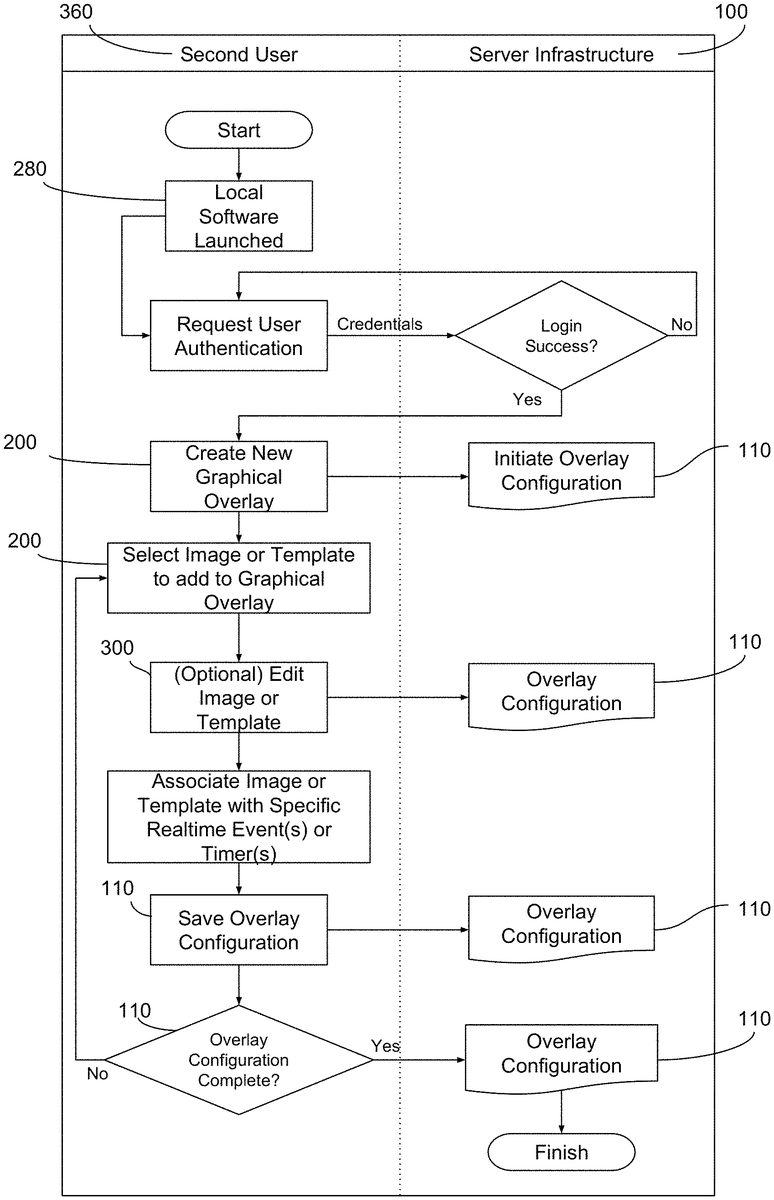
FIG. 2shows an illustrative process view of a user configuring their Graphical Overlay200.
A User350launches the Local Software280. The Local Software280may be executed by any type of a Local Computer230, and it may be presented as a web page or a local application. The User350then uses the Local Software280to authenticate with the Server Infrastructure100. Credentials are then passed from the Local Software280to the Server Infrastructure100, which validates the authentication attempt.
Once authenticated, the User350then uses the Local Software280to create a new Graphical Overlay200, which saves a new copy of the Overlay Configuration110in the Server Infrastructure100. The User350then selects Images300or a Templates290to add the Graphical Overlay200. The User350then has the option to edit the Image300or Template290, which updates the Overlay Configuration110in their account.
In some embodiments, the User350then associates the Image300or Template290with specific real-time event(s). In another embodiment, the User350then associates the Image300or Template290with timer(s). In another embodiment, the User350has already associated the Image300or Template290with specific real-time event(s), so the User350either verifies or modifies the existing associations. In yet another embodiment, the User350associates different real-time event(s) from different Streaming Services150with different Images300or Templates290, which are then saved to Overlay Configuration(s)110that correspond to one or more Streaming Service150. Once the User350makes any of the aforementioned modifications, the Overlay Configurations110is updated in their account.
The User350determines whether the Graphical Overlay200is complete. If not, the User350repeats the process of adding Images300or Templates290to the Graphical Overlay200. If so, the final Overlay Configuration110is saved to the user's account for later retrieval.
Graphical Overlay
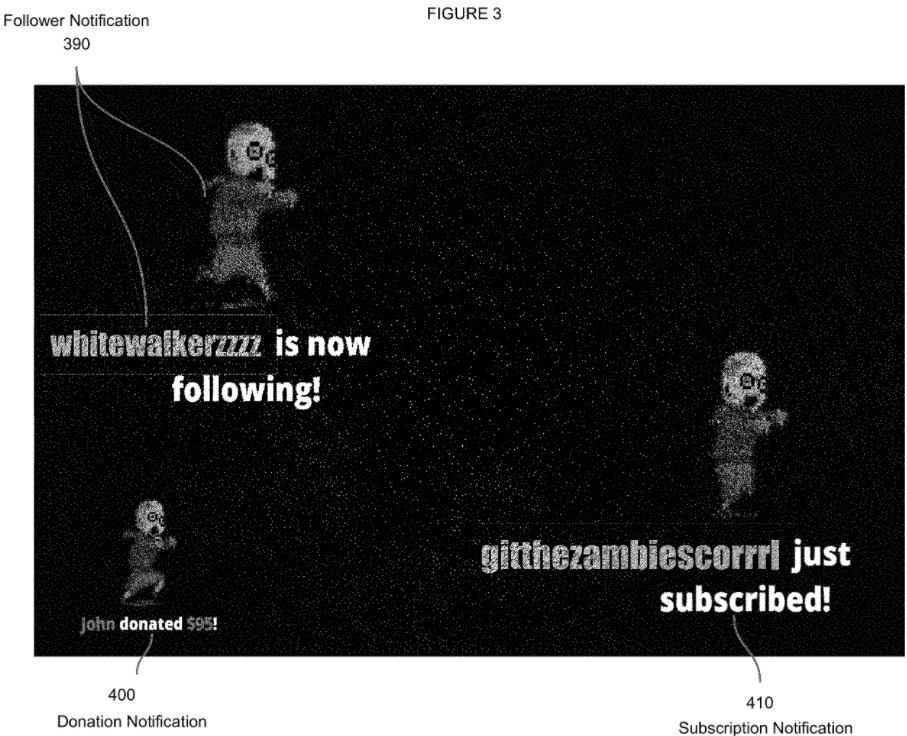
FIG. 3is a non-limiting example of a configured graphical overlay, according to some embodiments. In some embodiments, Images300and Templates290within the Graphical Overlay200are configured to appear when the Streaming Service API(s)130report specific events including. The notifications can include, but are not limited to:
1. A Viewer170has followed the User350, meaning they will receive notifications from the Streaming Service when the User's350broadcast is active.
2. A Viewer170has subscribed to the User's350channel. When a Viewer170subscribes to a streamer's channel, they pay a monthly subscription fee in exchange for subscriber-only privileges, such as access to subscriber-only interactions with the User350and their channel, or access to the User's350private chat servers or newsletters. The benefits are configured by the User350, therefore are not limited to nor required to include the aforementioned benefits.
3. A Viewer170has donated money to the User350. While Streaming Services150provide the infrastructure for Viewers170to subscribe or follow the User350, monetary donations are usually facilitated by third-party services, such as Streamlabs.
In the non-limiting example illustrated inFIG. 3, a Follower Notification390comprises a predetermined animation and text conveying that a Viewer170, in this case “whitewalkerzzzz”, has followed the User350. The Donation Notification400also comprises a predetermined animation and text conveying that a Viewer170, in this case “John”, has donated, in this case, $95 to the User350. The Subscription Notification410also comprises a predetermined animation and text conveying that a Viewer170, in this case “gitthezambiescorrrl”, has subscribed to the User's350channel.
The aforementioned are non-limiting examples of Images300being written to a Graphical Overlay200image file in response to specific Streaming Service API130data points. Said Graphical Overlay200image file will be subsequently retrieved by the User's350Local Broadcast Software240, where, per the example provided inFIG. 1A,FIG. 1B, andFIG. 2, it will be combined with the Game Signal220and optionally the User Signal210by the Video Encoder190to produce an encoded video file. In the non-limiting example illustrated inFIG. 3, the black background represents a transparent layer, and the Graphical Overlay200will appear as if it is “on top” of the video signals provided by the Game Signal220and the User Signal210.
In some embodiments, one or more of the aforementioned examples might include text without an associated Image300. In other embodiments, one or more of the aforementioned examples might include an Image300without text. In other embodiments, one or more Overlay Configuration110might correspond to one or more specific Streaming Service150. Furthermore, while editing the Graphical Overlay200the User350may assign the position at which each notification appears. In some embodiments, the program automatically recommends the position for the User350, which the User350can adjust. The User350may also change the font, the font colors, the animation included, the duration, transitions, and a wide range of additional configuration options to personalize their Graphical Overlay200.
Connecting Streaming Services to the User's Account
FIG. 4shows an illustrative process view of a user connecting their account to one or more streaming services.
A User350launches the Local Software280. The Local Software280may be executed by any type of a Local Computer230, and it may be presented as a web page or a local application. The User350then uses the Local Software280to authenticate with the Server Infrastructure100. Credentials are then passed from the Local Software280to the Server Infrastructure100, which validates the authentication attempt.
Once authenticated, the User350chooses to establish a new connection to a Streaming Service150using the Local Software280. The Server Infrastructure100provides an interface for connecting the new Streaming Service. Credentials are then passed from the User350to the third-party Streaming Service150via the Server Infrastructure100. Once authenticated, the Server Infrastructure100stores and associates the Streaming Service Connection430with the User's350account within the Server Infrastructure100.
After the Streaming Service Connection430has been saved, the User350decides whether they are finished connecting Streaming Services150to their account. If not, they repeat the process of connecting a new Streaming Service150to their account. Otherwise, the process is complete.
First Illustrative Embodiment
FIGS. 5A and 5Bshows a beginning-to-end illustrative process view of the disclosed methods, wherein the streaming architecture uses a Multistream Service250and the Graphical Overlay200is encoded by the Local Broadcast Software240.
A User350launches the Local Software280. The Local Software280may be executed by any type of a Local Computer230, and it may be presented as a web page or a local application. The User350then uses the Local Software280to authenticate with the Server Infrastructure100. Credentials are then passed from the Local Software280to the Server Infrastructure100, which validates the authentication attempt.
Once authenticated, the User350uses the Local Software280to connect one or more Streaming Service150to the Server Infrastructure100. The Streaming Service150connection(s) are then stored in the User's350account for later access via the Multistream Service250.
The User350then launches the Local Broadcast Software240. The User350uses the Local Broadcast Software to authenticate with the Server Infrastructure100. Credentials are then passed from the Local Broadcast Software240to the Server Infrastructure100, which validates the authentication attempt.
Once authenticated, the User350initiates connection(s) with the Streaming Service(s)150. The User's350credentials or API tokens are passed to the Streaming Server(s)380via the Multistream Service250, and the Streaming Server(s)380return an active connection to the Multistream Service250. Once the connection(s) are returned, the Server Infrastructure100initiates the API Data Collector260, which initiates and maintains connections with the Streaming Service API(s)130. The API Data Collector260then begins reading data related to the User's350channel(s) for each of the Streaming Service(s)150to which the User350has active connections. The Streaming Service API(s)130then reject the API Data Collector's260connection attempts or confirm that the connection(s) are valid. If the connections are rejected, the API Data Collector260attempts to initiate the connection to the Streaming Service API(s)130again. If the connections are valid, the API Data Collector260begins receiving real-time data events from the Streaming Service API(s)130.
The Server Infrastructure100then retrieves the User's350Overlay Configuration110, which contains one or more Image(s)300or Template(s)290. The Server Infrastructure100then uses the Overlay Configuration110and data from the API Data Collector260to begin generating the Graphical Overlay200image file. Variations in the generated Graphical Overlay200typically consist of animations, Images300or Templates290that are configured to appear when the Server Infrastructure receives specific data events from the API Data Collector260. Variations can also consist of Images300that remain static until manually changed by the User350. The Graphical Overlay200is then generated at regular intervals for as long as the User's350streaming session is active.
The Local Broadcast Software240then collects the user's Game Signal220, User Signal210, and retrieves the generated Graphical Overlay200from the Server Infrastructure100. The sources are then encoded by the Video Encoder190and uploaded to the Multistream Service250using a Streaming Protocol180, including but not limited to HLS, FLV, RTMP, RTSP, and DASH. The Multistream Service250then uploads the file using a Streaming Protocol180to each of the active Streaming Service Connections430in the User's350account. Once uploaded to each of the Streaming Service(s)150, the encoded video file is decoded and played for Viewers170to consume.
In other embodiments, the Multistream Service250decodes the video file, then uses a Video Encoder190to re-encode a copy of the video file in a manner that is optimized for each of the Streaming Service(s)150prior to uploading it to the Streaming Service(s)150using a Streaming Protocol180.
As Viewers270interact with the User's350channel(s) on the various Streaming Service(s), the Streaming Service API(s)130record the interactions and convert them into a data format that can be easily shared with the API Data Collector260. Interactions include but are not limited to: chat, subscriptions, follows, donations, minigames, and miscellaneous purchases.
In some embodiments, Alternative API Data Sources270, data from sources other than the Streaming Service API(s)130, may send data to the API Data Collector260for use in creating Graphical Overlays200.
The aforementioned process of encoding the sources to playback repeats until the User350decides to stop the broadcast. When the broadcast is stopped, the Local Broadcast Software240stops generating and uploading the encoded video file; it then sends a signal to end the broadcast, the Server Infrastructure100stops generating the Graphical Overlay200, the Multistream Service250stops operation and notifies the Streaming Service(s)150to mark the User's350stream(s) as inactive, the Streaming Service API(s)130stop generating data based on Viewer170actions, and the API Data Collector260stops receiving data.
Second Illustrative Embodiment
FIGS. 6A and 6Bshows a beginning-to-end illustrative process view of the disclosed methods, wherein the streaming architecture uses a Multistream Service250and one or more Graphical Overlays200are added and encoded by the Multistream Service250, which uploads a copy of the video to the Streaming Services150corresponding to each copy of the Graphical Overlay200.
A User350launches the Local Software280. The Local Software280may be executed by any type of a Local Computer230, and it may be presented as a web page or a local application. The User350then uses the Local Software280to authenticate with the Server Infrastructure100. Credentials are then passed from the Local Software280to the Server Infrastructure100, which validates the authentication attempt.
Once authenticated, the User350uses the Local Software280to connect one or more Streaming Service150to the Server Infrastructure100. The Streaming Service150connection(s) are then stored in the User's350account for later access via the Multistream Service250.
The User350then launches the Local Broadcast Software240. The User350uses the Local Broadcast Software to authenticate with the Server Infrastructure100. Credentials are then passed from the Local Broadcast Software240to the Server Infrastructure100, which validates the authentication attempt.
Once authenticated, the User350initiates connection(s) with the Streaming Service(s)150. The User's350credentials or API tokens are passed to the Streaming Server(s)380via the Multistream Service250, and the Streaming Server(s)380return an active connection to the Multistream Service250. Once the connection(s) are returned, the Server Infrastructure100initiates the API Data Collector260, which initiates and maintains connections with the Streaming Service API(s)130. The API Data Collector260then begins reading data related to the User's350channel(s) for each of the Streaming Service(s)150to which the User350has active connections. The Streaming Service API(s)130then reject the API Data Collector's260connection attempts or confirm that the connection(s) are valid. If the connections are rejected, the API Data Collector260attempts to initiate the connection to the Streaming Service API(s)130again. If the connections are valid, the API Data Collector260begins receiving real-time data events from the Streaming Service API(s)130.
The Server Infrastructure100then retrieves the User's350Overlay Configuration(s)110, which contains one or more Image(s)300or Template(s)290and correspond to one or more Streaming Service(s)150. The Server Infrastructure100uses the Overlay Configuration(s)110and data from the API Data Collector260specific to each Streaming Service150to begin generating one or more Graphical Overlay200image file(s) based on data received from and corresponding to each of the Streaming Service(s)150. The result is a Graphical Overlay200that contains Images300generated in response to data specifically related to the associated Streaming Service150, as opposed to a one Graphical Overlay200that generates images based on data received from all of the Streaming Services150.
Variations in the generated Graphical Overlay200typically consist of animations, Images300or Templates290that are configured to appear when the Server Infrastructure receives specific data events from the API Data Collector260. Variations can also consist of Images300that remain static until manually changed by the User350. The Graphical Overlay200is then generated at regular intervals for as long as the User's350streaming session is active.
The Local Broadcast Software240then collects the user's Game Signal220and User Signal210. The sources are then encoded by the Video Encoder190and uploaded to the Multistream Service250using a Streaming Protocol180, including but not limited to HLS, FLV, RTMP, RTSP, and DASH. The Multistream Service250then retrieves the Graphical Overlay200image file(s), decodes the encoded stream for the video file, makes one copy of the decoded video file for each Graphical Overlay200image file, and re-encodes (i.e. transcodes) the original video file to include the Graphical Overlay200image file. The Multistream Service250uploads each video file using a Streaming Protocol180to each of the active and corresponding Streaming Service Connections430in the User's350account. Once uploaded to each of the Streaming Service(s)150, the encoded video file is decoded and played for Viewers170to consume.
In other embodiments, the Multistream Service250decodes the video file, duplicates the video file, inserts the Graphical Overlay200image file, then uses a Video Encoder190to re-encode a copy of the video file in a manner that is optimized for each of the Streaming Service(s)150prior to uploading it to the Streaming Service(s)150using a Streaming Protocol180.
In other embodiments, the Multistream Service250duplicates the video file prior to decoding.
In other embodiments, the Multistream Service250optimizes the video file based on meta-data related to the video file.
As Viewers270interact with the User's350channel(s) on the various Streaming Service(s), the Streaming Service API(s)130record the interactions and convert them into a data format that can be easily shared with the API Data Collector260. Interactions include but are not limited to: chat, subscriptions, follows, donations, minigames, and miscellaneous purchases.
In some embodiments, Alternative API Data Sources270, data from sources other than the Streaming Service API(s)130, may send data to the API Data Collector260for use in creating Graphical Overlays200.
The aforementioned process of encoding the sources to playback repeats until the User350decides to stop the broadcast. When the broadcast is stopped, the Local Broadcast Software240stops generating and uploading the encoded video file; it then sends a signal to end the broadcast, the Server Infrastructure100stops generating the Graphical Overlay200, the Multistream Service250stops operation and notifies the Streaming Service(s)150to mark the User's350stream(s) as inactive, the Streaming Service API(s)130stop generating data based on Viewer170actions, and the API Data Collector260stops receiving data.
Claims
- A system comprising: one or more processors;and one or more machine-readable, non-transitory storage mediums that include instructions configured to cause the one or more processors to: establish communication with a plurality of streaming services that are configured to receive and transmit information;receive, from a client computing platform, video content defined by an image and/or audio captured from the client computing platform associated with a user;receive, from a first streaming service of the plurality of streaming services, a first set of viewer input information associated with a first user's interaction with the first streaming service of the plurality of streaming services;receive, from a second streaming service of the plurality of streaming services, a second set of viewer input information associated with a second user's interaction with the second streaming service of the plurality of streaming services, wherein the second streaming service is different from the first streaming service;responsive to the reception of the first set and the second set of viewer input information, apply a first video overlay to the video content, wherein the first video overlay is based on the first set of viewer input information, and apply a second video overlay to the video content, wherein the second video overlay is based on the second set of viewer input information;and provide the plurality of streaming services with the video content, wherein the video content for the first streaming service includes the first video overlay and the video content with the first video overlay is only distributed to users associated with the first streaming service, and wherein the video content for the second streaming service includes the second video overlay and the video content with the second video overlay is only distributed to users associated with the second streaming service.
- The system of claim 1 , wherein instructions are further configured to cause the one or more processors to: receive, from the client computing platform, a user account information associated with a user, wherein the user account information includes information associating the user account information of the user with the different streaming services.
- The system of claim 1 , wherein the one or more processors are further configured by machine-readable instructions to obtain the video overlays, wherein the video overlays are obtained from non-transitory storage media configured to store overlay content information and overlay configuration information corresponding to video overlays.
- The system of claim 3 , wherein the overlay content information for the given video overlay that defines an image and/or audio of the given video overlay and overlay configuration information for the given video overlay specifies values for one or more settings that define application of the image and/or audio of the given video overlay to the video content.
- The system of claim 4 , wherein the one or more settings that define the application of the image and/or audio of the given video overlay to the video content includes one or more of one or more setting that specify positions of the image of the given video overlay applied to the video content, one or more setting that specify a duration of the image and/or audio of the given video overlay applied to the video content, and/or one or more setting that specify a real-time event trigger defining when the image and/or audio of the given video overlay is applied to the video content.
- The system of claim 5 , wherein the video content includes an image of the user's face, wherein the image of the given video overlay is positioned relative to the user's face based on the one or more settings that define the application of the image and/or audio of the given video overlay to the video content.
- The system of claim 1 , wherein the plurality of streaming services are each hosted on different servers.
- A method comprising: establishing communication with a plurality of streaming services that are configured to receive and transmit information;receiving, from a client computing platform, video content defined by an image and/or audio captured from the client computing platform associated with a user;receiving, from a first streaming service of the plurality of streaming services, a first set of viewer input information associated with a first user's interaction with the first streaming service of the plurality of streaming services;receiving, from a second streaming service of the plurality of streaming services, a second set of viewer input information associated with a second user's interaction with the second streaming service of the plurality of streaming services, wherein the second streaming service is different from the first streaming service;responsive to the reception of the first set and the second set of viewer input information: applying a first video overlay to the video content, wherein the first video overlay is based on the first set of viewer input information;and applying a second video overlay to the video content, wherein the second video overlay is based on the second set of viewer information;and providing the plurality of streaming services with the video content, wherein the video content for the first streaming service includes the first video overlay and the video content with the first video overlay is only distributed to users associated with the first streaming service including the first user, and wherein the video content for the second streaming service includes the second video overlay and the video content with the second video overlay is only distributed to users associated with the second streaming service including the second user.
- The method of claim 8 , further comprising: receiving, from the client computing platform, a user account information associated with a user, wherein the user account information includes information associating the user account information of the user with the different streaming services.
- The method of claim 8 , wherein the method further includes obtaining the video overlays, wherein the video overlays are obtained from non-transitory storage media configured to store overlay content information and overlay configuration information corresponding to video overlays.
- The method of claim 10 , wherein the overlay content information for the given video overlay that defines an image and/or audio of the given video overlay and overlay configuration information for the given video overlay specifies values for one or more settings that define application of the image and/or audio of the given video overlay to the video content.
- The method of claim 11 , wherein the one or more settings that define the application of the image and/or audio of the given video overlay to the video content includes one or more of one or more setting that specify positions of the image of the given video overlay applied to the video content, one or more setting that specify a duration of the image and/or audio of the given video overlay applied to the video content, and/or one or more setting that specify a real-time event trigger defining when the image and/or audio of the given video overlay is applied to the video content.
- The method of claim 12 , wherein the video content includes an image of the user's face, wherein the image of the given video overlay is positioned relative to the user's face based on the one or more settings that define the application of the image and/or audio of the given video overlay to the video content.
- The method of claim 8 , wherein the streaming services are each hosted on different servers.
Disclaimer: Data collected from the USPTO and may be malformed, incomplete, and/or otherwise inaccurate.