U.S. Pat. No. 10,898,812
METHODS, DEVICES, AND SYSTEMS FOR INTERACTIVE CLOUD GAMING
AssigneeGoogle LLC
Issue DateApril 2, 2019
Illustrative Figure
Abstract
The various implementations described herein include methods, devices, and systems for interactive cloud gaming. In one aspect, an interface device with processors and memory storing an application program is used for cloud gaming. The interface device includes a communication module for receiving and/or transmitting messages and media streams between the interface device, a game controller, and a remote gaming server. The interface device further includes an output module configured to provide output of the application to an input of a display device coupled to or integrated with the interface device. The application is configured to implement a first mode in which the interface device processes and displays outputs associated with substantially all messages transmitted by the game controller, and a second mode in which the interface device processes and displays a predefined subset of messages from the game controller and displays gaming media streams from the gaming server.
Description
Like reference numerals refer to corresponding parts throughout the several views of the drawings. DESCRIPTION OF IMPLEMENTATIONS Reference will now be made in detail to implementations, examples of which are illustrated in the accompanying drawings. In the following detailed description, numerous specific details are set forth in order to provide a thorough understanding of the various described implementations. However, it will be apparent to one of ordinary skill in the art that the various described implementations may be practiced without these specific details. In other instances, well-known methods, procedures, components, and networks have not been described in detail so as not to unnecessarily obscure aspects of the implementations. Display interface devices (referred to herein as “interface devices,” “streaming devices,” or “casting devices”), such as Google's CHROMECAST device, can be used to stream media content to a coupled display from a local or remote media source (such as an Internet-connected media service or a local digital video recorder (DVR)). Interface devices can display on a coupled display user interfaces cast from an application running on a user device that is communicatively coupled to the interface device (e.g., a mobile device user can cast a YOUTUBE video playing on the mobile device to a large display via a coupled CHROMECAST device, or a laptop user can cast via a CHROMECAST device a CHROME browser window to the large display). The functionality of these interface devices can be further expanded to stream cloud gaming content from gaming servers. The interface devices can further be combined with cloud-enabled game controllers that store user and network credentials, to create efficient and portable gaming experiences. For example, Julia's home includes two interface devices that are coupled, respectively, to the living room TV and the bedroom TV. Julia plays her favorite online game on the living room ...
Like reference numerals refer to corresponding parts throughout the several views of the drawings.
DESCRIPTION OF IMPLEMENTATIONS
Reference will now be made in detail to implementations, examples of which are illustrated in the accompanying drawings. In the following detailed description, numerous specific details are set forth in order to provide a thorough understanding of the various described implementations. However, it will be apparent to one of ordinary skill in the art that the various described implementations may be practiced without these specific details. In other instances, well-known methods, procedures, components, and networks have not been described in detail so as not to unnecessarily obscure aspects of the implementations.
Display interface devices (referred to herein as “interface devices,” “streaming devices,” or “casting devices”), such as Google's CHROMECAST device, can be used to stream media content to a coupled display from a local or remote media source (such as an Internet-connected media service or a local digital video recorder (DVR)). Interface devices can display on a coupled display user interfaces cast from an application running on a user device that is communicatively coupled to the interface device (e.g., a mobile device user can cast a YOUTUBE video playing on the mobile device to a large display via a coupled CHROMECAST device, or a laptop user can cast via a CHROMECAST device a CHROME browser window to the large display). The functionality of these interface devices can be further expanded to stream cloud gaming content from gaming servers. The interface devices can further be combined with cloud-enabled game controllers that store user and network credentials, to create efficient and portable gaming experiences.
For example, Julia's home includes two interface devices that are coupled, respectively, to the living room TV and the bedroom TV. Julia plays her favorite online game on the living room TV using her cloud-enabled game controller. During her gaming session, her mother's friends visit and they will like to watch a football game on the living room TV. Julia pauses her game session and takes her game controller with her into the bedroom. The interface device in the bedroom detects the presence of Julia and the game controller in the bedroom (e.g., using audio and/or other cues) and switches on the bedroom TV, which displays a screen showing the paused state of the game that Julia had left. Julia un-pauses the screen and resumes her game session. Julia visits her friend Brandon, taking along with her the game controller. At Brandon's house, Brandon gives Julia the credentials to his home Wifi. Julia connects her game controller to Brandon's network and pairs her game controller with Brandon's interface device. Brandon joins Julia's game session, and they both play the game using their respective game controllers. The next time Julia visits Brandon, her game controller automatically connects to Brandon's network.
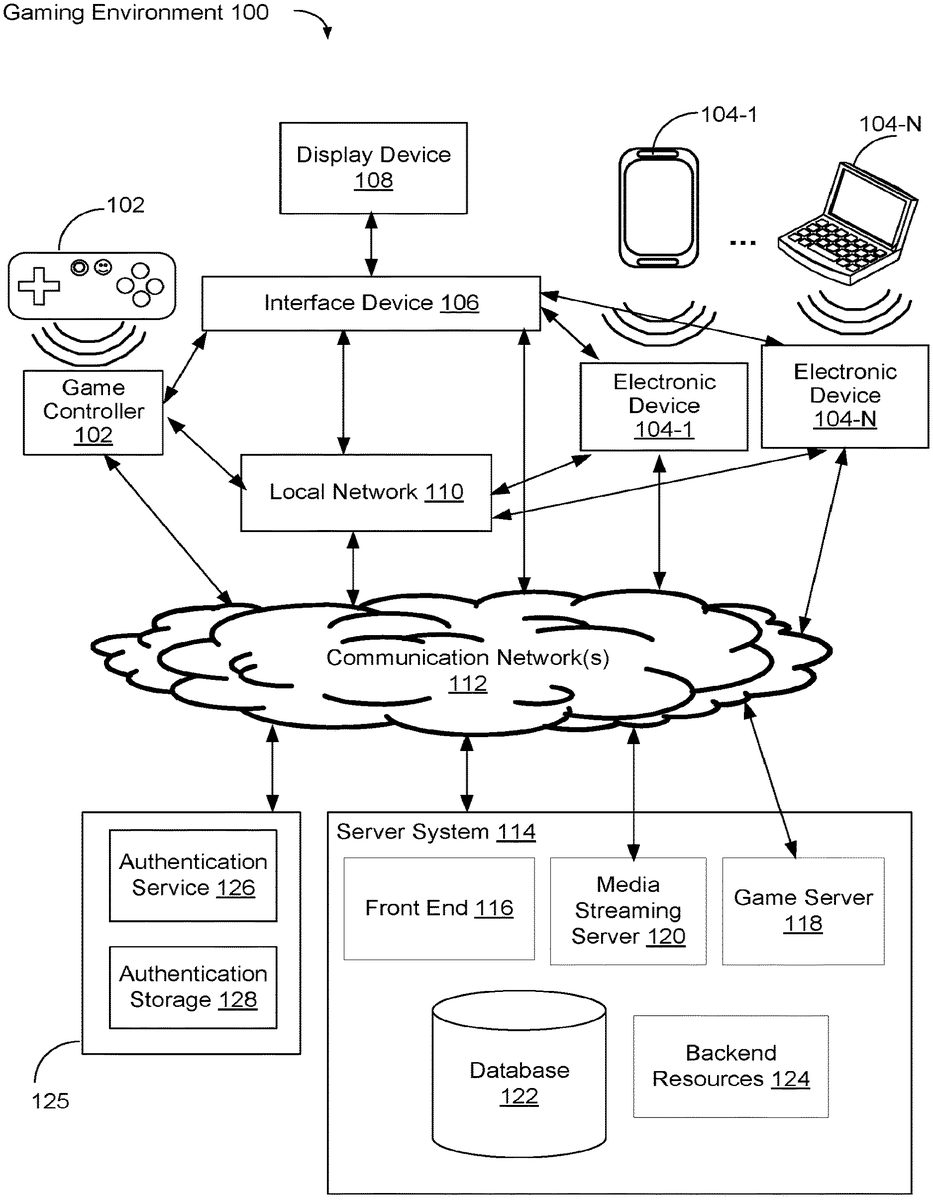
FIG. 1Ais an example gaming environment100, in accordance with some implementations. The gaming environment100includes a game controller102, one or more electronic devices104, and an interface device106that is coupled to a display device108, on a local network110. In some implementations, the local network110networks one or more devices using wired (e.g., Ethernet) and/or wireless (e.g., Wi-Fi) communications. For example, the local network110includes a router device that networks one or more devices into the local network110. The local network110is communicatively coupled to communication networks112(e.g., wide-area networks, the Internet).
The game controller102and the interface device106are communicatively coupled. The game controller102and the interface device106may communicate with each other through the local network110and/or directly (e.g., via Bluetooth or other wireless communications). In some implementations, the game controller102and the interface device106are local to each other (e.g., in the same room, in the same house, etc.). The interface device106is coupled to one or more display devices108that can output visual and/or audio content (e.g., the display device108includes a television, a display monitor, a tablet, a computer/laptop with a display screen, a sound system, speakers, etc.). The interface device106is configured to output content to the display device(s)108.
The game controller102includes, and can run, one or more applications. In some implementations, the game controller102includes one or more applications that are configured to operate in conjunction with the interface device106. In some implementations, the applications include an interface device application and a gaming application. The interface device application is used for pairing the game controller102with the interface device106and for configuring the interface device106.
In some implementations, the applications include a gaming application that is used for cloud gaming. The gaming application is used for transmitting messages (e.g., gaming setup commands) from the game controller102to the interface device106and for transmitting gaming inputs (e.g., gameplay commands) from the game controller102to a gaming server (e.g., server system114) during a gaming session. In some implementations, the setup and gameplay commands are transmitted to a gaming application of the interface device106and/or to the server system114using a combination of buttons, directional pad(s), and/or joystick(s) of the game controller102. In some implementations, the setup and gameplay commands are voice commands that are issued by a user (also known as a “gamer”) of the game controller102, and transmitted to the interface device106and/or the server system114.
In some implementations, a user can initiate gaming by pressing a button (e.g., a “start” or a “home” button) on the game controller102, which sends a signal to the interface device106to launch a gaming portal user interface (UI) that is displayed on the display device108. Then, the user can select a game on the gaming portal UI to initiate a game launch (e.g., by pressing another button). The processes of launching the gaming portal UI and initiating the gaming session are described further detail inFIG. 2.
The gaming environment100includes one or more electronic devices104(e.g.,104-1and/or104-2). The electronic device104and the interface device106are communicatively coupled. The electronic device104and the interface device106may communicate with each other through the local network110and/or directly (e.g., via Bluetooth or other wireless communications). In some implementations, the electronic device104and the interface device106are local to each other (e.g., in the same room, in the same house, etc.).
The electronic device104is a device that include, and can run, one or more applications. In some implementations, the electronic devices104is be a smartphone, tablet device, a laptop or notebook computer, a desktop computer, or a multimedia device.
In some implementations, the electronic device104includes one or more applications that are configured to operate in conjunction with the interface device106. In some implementations, the applications include an interface device application (e.g., interface device application344,FIG. 3) for pairing the electronic device104with the interface device106and configuring the interface device106. The applications also include one or more applications that can cast associated content to the interface device106. In some implementations, an application casts data and/or content to the interface device106by sending the data/content directly to the interface device106(e.g., via the local network110) and/or by directing the interface device106to a remote location (e.g., a Universal Resource Locator (“URL”) or other link to a location at a server system) from which the interface device106can stream or otherwise receive data/content. The interface device106receives data/content from the application and/or the remote location and outputs visual and/or audio content corresponding to the received data/content to the display device108.
In some implementations, the applications include a gaming application (e.g., gaming application346,FIG. 3) for transmitting messages (e.g., gaming setup commands) to the interface device106and for transmitting gaming inputs (e.g., gameplay commands) from the electronic device104to the gaming server (e.g., the server system114) during a gaming session. In some implementations, the setup and gameplay commands are sent to the interface device106and/or the server system114using input devices that are integrated with the electronic device104(e.g., a keyboard and/or mouse of the laptop computer104-2).
In some implementations, the applications further include a controller application for implementing one or more standardized game controller configurations, templates, or the like, on the electronic device104. Each of the standardized controller configurations configures the input devices and/or sensors on the electronic device104in some way to implement a virtual controller. Which standardized controller configuration is used may vary by the game and/or by the type of electronic device104. For example, if the electronic device104is a mobile device (e.g.,104-1) with a touch screen, a standardized controller configuration that implements a virtual controller pad displayed on, and utilizing the touch screen, is used. The virtual controller pad may include virtual buttons, a virtual directional pad, and/or a virtual joystick. As another example, if the electronic device104is a laptop or desktop computer (e.g.,104-2) with a physical keyboard, a standardized controller configuration that maps keys of the physical keyboard to controller functions may be used. As a further example, on an electronic device104that includes sensors (e.g., an accelerometer) and for games that use motion of the electronic device104as an input, a standardized controller configuration that turns the electronic device104into a motion controller with optionally one or more virtual buttons displayed on the touch screen is used.
The interface device106is communicatively connected to the game controller102and/or the electronic device104, and to a display device108. The interface device106includes, and can run, one or more applications. In some implementations, the interface device106includes one or more applications that are configured to operate in conjunction with the game controller102and/or the electronic device104.
In some implementations, the one or more applications includes a gaming application for receiving and processing messages (e.g., setup commands) from the game controller102and/or the electronic device104, and displaying outputs associated with the commands on the display device108. In some implementations, the gaming application further receives, in real time, gaming media streams transmitted by the gaming server (e.g., the server system114), and decodes and outputs to the display device108. In some implementations, the interface device106includes one or more modules for processing the setup commands and the gaming media streams, as will be described inFIG. 4.
In some implementations, the interface device106is a casting device (e.g., CHROMECAST by Google Inc.), a hardware dongle, a streaming device, or a device that otherwise includes streaming and/or casting functionalities.
In some implementations, the output of the interface device106is connected to an input (e.g., a HDMI port, a USB port etc.) of the display device108.
In the gaming environment100, the game controller102, the interface device106, and the electronic device104are communicatively coupled through communication network(s)112to a server system114and an authentication system125. In some implementations, at least some of the devices (e.g., the game controller102, the electronic devices104, the interface device106, and the display device108) are communicatively coupled to the local network110, which is communicatively coupled to the communication network(s)112. In some implementations, the devices (e.g., the game controller102, the electronic devices104, the interface device106, and the display device108) are communicatively coupled to one another (e.g., without going through the local network110or the communication network(s)112). In some implementations, the authentication system125is part of the server system114.
In some implementations, the functionality of the interface device106is combined with (i.e., contained within or included in) the display device108(See alsoFIG. 1D). For example, in accordance with some implementations, the display device108is a television display or a computer monitor with a processing module hosts the one or more applications including the gaming application. In another example, the display108is associated with a computing device with an integral display, such as a laptop or tablet, whose processor hosts the one or more applications, including the gaming application. In some implementations, the display device108hosts one or more functionalities, including functionalities that enable online gaming. In some implementations, the functionality of the interface device106is divided (e.g., split) between the game controller102and the display device108.
In some implementations, the server system114is an interactive cloud gaming platform and provides gaming content and processing capabilities. In some implementations, the server system114serves hundreds of thousands of users (“garners”) at any given point in time.
The server system114hosts an online interactive gaming platform to support client devices (In this application, the game controllers102, the electronic devices104, and the interface devices106are collectively referred to as “client devices” of the server system114) to play the one or more gaming applications. Specifically, the server system114includes a plurality of user accounts associated with the client devices, and authenticates the users of the client devices in association with each of the one or more gaming applications. The server system114renders and refreshes a scene of the online interactive game on the client devices102that join corresponding gaming sessions associated with the scene. In some implementations, the server system114may assess the capabilities of the client devices and/or a quality of the communicative connection between the server system114and each of the client devices, and adaptively generates synchronous data streams for the gaming sessions associated with the client devices. By these means, the server system114is configured to facilitate synchronous gaming sessions of an online interactive game on two or more client devices simultaneously and with substantially low latencies.
In some implementations, the server system114includes a front end116that interfaces directly with the game controller102, the interface device106, and the electronic device104via the communication network(s)112. The front end116receives requests (e.g., a request to start a gaming session) and transmits information in response to the requests (e.g., sends game content). In some implementations, the front end116is configured to send data (e.g., database updates) to the client devices.
In some implementations, the front end116forwards a subset of the received requests to backend resources124, which obtains the requested data and/or performs the requested service. In some implementations, the backend resources124may store and/or access data (e.g., game state data) in accordance with the requests.
The server system114includes a game server118that communicates directly with a media streaming server120. The game server118provides gaming content and other functionalities (e.g., processing capabilities) that allow for seamless gameplay.
In some implementations, the game server118dynamically allocates cloud gaming hardware resources (e.g., GPU and encoder resources) and monitors and utilizes network bandwidth available to individual end users to provide optimal cloud gaming experience. In some implementations, the game server118provides multiple performance tiers, including a tier that supports high performance, real time gaming sessions with high definition video/media streams.
In some implementations, the game server118dynamically generates a number of frames in response to a user command from a user who plays an online gaming session. In accordance with a type of the user command (e.g., jumping, shooting a gun), the game server118determines an expected response latency, actual communication and processing latencies, and an actual transmission latency. The number of frames is calculated based on the actual transmission latency and a predefined frame rate. As a result, the command is executed in the online gaming session by generating a set of frames reflecting an effect of the command. The set of frames when transmitted at a predefined frame rate occupy a transmission time corresponding to the actual transmission latency, and can be received at a client device (e.g., the interface device106) within a time corresponding to the expected response latency.
In accordance with some implementations, the game server118renders gameplay outputs in response to the gameplay inputs. In some implementations, to minimize latency perceived by the user during gameplay, the game controller102and the electronic device104each communicates directly with the game server118. For example, the game server118receives gameplay commands directly from the game controller102and renders a respective frame of content of the game in accordance with the received commands. The game server118sends information about the rendered frames to the media streaming server120, which then transmits to the interface device106, in real time, the gaming media streams including the respective rendered frame, for display on the display device.
In some implementations, the game server118supports different subscription models and/or is configured to provide one or more concurrent real time gameplay and/or review media streams that correspond with little or no latency to one or more actual gaming streams (e.g., a video stream output to a client device of a user participating in an online/cloud gaming session via either a mobile app or a browser-based program). In accordance with some implementations, the game server118is configured to generate concurrent media streams for gameplay and review videos, and the media streaming server120is provided with review videos for concurrent gameplay. Such review videos are provided with little or no latency via a media streaming site, such as YouTube, to one or more users. In some implementations, the media streaming server120further manages one or more media streaming sites.
In some implementations, the server system114regularly communicates with the interface device106to check if the player is still online. In some implementations, when the game server does not receive a response (e.g., from the interface device106and/or the game controller102), the server system114issues commands to set the game character associated with the player to a standby mode, or “kicks” the character from the game.
In some implementations, the server system114includes a database122for storing users and sessions data. The database122stores at least user information associated with user accounts of each of one or more gaming applications (e.g., gaming application348,FIG. 3) that are hosted on the server system114. Examples of the user information126include, but are not limited to, user account information (e.g., identification and passwords), membership type, preference, and activity history. In some implementations, the server system114stores session data associated with the online gaming sessions that are played using the game controllers102. Examples of the session data for each online gaming session include, but are not limited to, a frame rate, a rendering specification, a normal latency requirement, information of GPU allocation, information of encoder allocation, identifications of related sessions, and latest status information. The session data is accessed more frequently than the user information. In some implementations, memory storing the user information and the session data is made of a flash memory and random access memory (RAM), respectively.
In some implementations, the server system114supports a live online community associated with a game application. Users (e.g., subscribers of a service) participate in live events, tournaments or activities on the corresponding gaming API platform throughout the day. Examples of the live events, tournaments or activities include spectating live gaming sessions played by other users, posting your accomplishments to a public domain (e.g., YouTube), and getting live tips and coaching videos. For example, in response to a user action, the game server118provides two or more live streams. While keeping a first gaming stream on a first gaming session of the first client device for a game player, the server system114also broadcasts a second live review stream (e.g., YOUTUBE streams) to one or more other client devices (e.g., of subscribers). The second live review stream allows the user to share gaming experience with audience. Optionally, the second live stream is a reproduction of a screen of the first client device of the player (e.g., the display device108). The server system114may obtain an audio stream in which the player explains the first gaming session, or a video stream of the player playing and explaining the first gaming session. The audio stream is optionally played for the audience while the second live review stream is played for the audience. The video stream is optionally played in an embedded window in the second live review stream.
The gaming environment100further comprises an authentication system125that includes an authentication service126and an authentication storage128. The authentication service126is a standalone service that serves as a proxy and handles first- and third-party authentication related operations. The authentication storage128stores device identification of each and every game controller102and information about linked users that are associated with each and every game controller102.
In accordance with some implementations, the game controller102is identified by a (e.g., unique) device identification and a client certificate that is used by the game controller to make authenticated requests to a remote server (e.g., to the server system114and/or the authentication system125). Further, in some implementations, the game controller102stores credentials for every user of the game controller102. As an example, the game controller102may be used by various members of a household for gaming. Accordingly, the game controller102stores credentials (e.g., usernames, login credentials, password, authentication challenges and responses) for each household member that uses it. Thus, the game controller102can be linked to (associated with) its device identification, client certificate, users and their credentials. In some implementations, in response to a request to start a gaming session, the game controller sends information about the device identification, client certificate and/or user credentials for verification by the authentication service126against information stored in the authentication storage128.
In some implementations, as part of the process of linking a gaming session, the server system114accesses a quality of the communicative connection between the server114system and each of the client devices.
In some implementations, the server system114measures network latency between the client devices and the server system114. If the measured latency is above a threshold and a lower-latency connection is available, the server114can suggest that the player client104change to the lower latency connection, or invite the player user of the player client104to change the player client104to the lower latency connection. For example, if the client device is an electronic device104(e.g., a mobile phone) on a cellular wireless connection (not shown) the local network110is available, the server system114can suggest that the electronic device104should connect through the local network110. In some implementations, the latency threshold requirements differ between games. For example, some games (e.g., action games) are best experienced on lower latency connections, and some other games (e.g., online board games or card games) are not as demanding with respect to latency, and the server system114may make connection recommendations in view of these different requirements.
In some implementations, as part of the electronic device104starting a gaming session, the server system114communicates with the electronic device104to set up a virtual controller (e.g., using the controller application) on the electronic device104. In some implementations, this includes the server system114assessing whether the electronic device104has the needed resources for the controller, including whether the electronic device104has an application needed to implement the virtual controller and/or whether the communicative connection between the electronic device104and the server114has a latency that is appropriate for the game session (e.g., as part of the capabilities and connection quality assessment described above). Depending on the available resources at the electronic device104, the connection quality, and the requirements for the game, the controller may be implemented differently at the electronic device104.
FIG. 1Billustrates another example gaming environment130in accordance with some implementations. In many aspects, the gaming environment130is similar to the gaming environment100. The main difference between the gaming environment130and the gaming environment100is that the gaming environment130comprises the game controller102and two interface devices106-1and106-2, which are coupled, respectively, to display devices108-1and108-2. The game controller102is communicatively coupled to (e.g., pairs with) each of the interface devices106-1and106-2.
In some implementations, the game controller102, the interface devices106-1and106-2, and the display devices108-1and108-2reside in a local environment (e.g., a home environment, a dormitory, an office environment etc.) that includes the local network110. In some implementations, the interface device106-1and the interface device106-2are located in different areas (e.g., in different rooms) of the local environment.
In accordance with some implementations of this application, the server system114enables cloud features that allow a user of the game controller102to move around, e.g., pausing/suspending a first game stream of a first gaming session executed on a first interface device106-1, and restarting the first game stream on a second interface device106-2to continue the first gaming session. The server system114also supports multiple players on a massive scale, and provides richer more persistent cloud-based worlds. The server system114uses a cloud-based system to store, in the database122, session data related to different gaming sessions of the same user, or different gaming sessions of different users. Accordingly, by applying this example in the context of the home environment, the user of the game controller102is able to start gameplay using the first interface device106-1(e.g., in the bedroom), pause the gaming session, take the game controller102to a location that includes the second interface device106-2(e.g., the living room), and resume gameplay in the living room.
In some implementations, the game controller102stores an identifier of each of the interface devices106-1and106-2that it has been paired with. In some implementations, the game controller102sets one of the interface devices106as its default pairing device.
In some implementations, the gaming environment130can be expanded to include three or more interface devices106, each of which is communicatively coupled with the game controller102.
In some implementations, the gaming environment130includes two or more game controllers102(e.g.,102-1and102-2), each of which is communicatively coupled to each of the interface devices106.
FIG. 1Cillustrates yet another example gaming environment160, in accordance with some implementations. In many aspects, the gaming environment160is similar to the gaming environments100and130. The main difference between the gaming environment160and the gaming environments100and130is that the gaming environment160comprises two game controllers and two interface devices, including a first game controller102-1and a first interface device106-3on a first local network140, and a second game controller102-2and a second interface device106-4on a second local network140. Each of the interface devices106-3and106-4is coupled to respective display devices108-3and108-4that output visual and/or audio content. It will be apparent to one of ordinary skill in the art that the gaming environment160can be expanded to include three or more sets of game controllers102and interface devices106, wherein each of the sets is on a respective local network.
In the gaming environment160, the game controller102-1(and the interface device106-3) is remote from the game controller102-2. In other words, a user of the game controller102-1is not located in the same area (e.g., in the same room or even structure) as a user of the game controller102-1.
In some implementations, gaming sessions of the game controllers102are synchronized to play the same game scene, optionally with distinct perspectives corresponding to their respective users.
In accordance with some implementations, even though the game controller102-1(the interface device106-1) and the game controller102-21(the interface device106-2) are remote from each other, a game may be started by launching a gaming application for execution at each game controller102(interface device106). In some implementations, for each game controller102(interface device106), the gaming application establishes an online gaming session with the server system114independently. The online gaming sessions of two or more game controllers102(interface devices106) are related to each other (e.g., because they are played in the same game domain of the gaming application), and therefore, share a game scene in the gaming application. The related online gaming sessions are synchronized with each other, and each online gaming session optionally shows the same game scene with a unique player perspective corresponding to the respective game controller102(interface device106). A user of each game controller102(interface device106) can therefore play the game on the respective game controller102(interface device106) and influence the output from the online gaming sessions on the other game controller(s)102(interface device(s)106).
Alternatively, in some other implementations, after the gaming application of a first game controller102-1establishes an online gaming session, one or more second game controllers102-2are invited to join the online gaming session by an invitation message, and for example, a message with the link (e.g., a URL address) to join the online gaming session is sent to each of the second interface devices106-2. In accordance with some implementations, when the second game controllers102-2join a gaming session, the server system114creates a separate gaming session for each individual second game controllers102-2. Each separate gaming session of the respective second client second game controllers102-2is synchronized with and shares the same scene with the gaming session of the first second game controllers102-1, but can have a unique player perspective corresponding to the respective second client second game controllers102-2. After each second game controllers102-2has joined the gaming session (more accurately, started its related gaming session), a user can play the game on the respective second game controllers102-2and influence the output of the gaming sessions running on the other game controllers102.
FIG. 1Dillustrates yet another example gaming environment180, in accordance with some implementations, in which one or more game controllers102-1are coupled to a display device108-3via an interface device106-3, and in which one or more game controllers102-3are coupled to a display device108-5—either directly or via a local area network170—without need for an interface device106. In some implementations, at least a subset of the functionality of the interface device is contained within (i.e., included in) the display device108-5. For example, as illustrated inFIG. 1D, the display device108-5is configured to interact directly with the game controller102-3, and directly with the server system114and the authentication system125via the communication network(s)112. In some implementations, the display device108is a television display or a computer monitor with a processing module hosts one or more applications, including a gaming application and one or more applications that provide at least a subset or a superset of the functionality of an interface device106, that enable a user of one or more of the controllers102-3to participate in an online gaming session. In another example, the display108-5is associated with a computing device with an integral display, such as a laptop or tablet, whose processor hosts the one or more applications, including the gaming applications and one or more applications that provide at least a subset or a superset of the functionality of an interface device106.
In some implementations, communication between the display device108-5and the game controller102-3is via the local network170. In some implementations, the display device108-5and the game controller102-3are communicatively coupled to each other directly (e.g., without going through the local network or the communication network(s)112). For example, the game controller102-3can communicate directly with the display device108-5via a wired connection or a wireless connection (e.g., a Bluetooth, cellular, direct WiFi, or IEEE 802.15.4 connection). In some implementations, the local network140and local network170are the same local network. This allows two or more players to connect from a same location (e.g., house or public location) to a gaming server114to play the same or different gaming titles whose respective outputs are displayed on a respective display device108-3,108-5, with or without an interface device106-3.
Process Flow
Having described the various gaming environments, we now discuss various process flows.
In accordance with some implementations of this application, a game controller is communicatively connected to (e.g., paired with) an interface device106and powered on. A user can initiate gaming by pressing a button (e.g., a “start” or a “home” button) on the game controller102, which sends a signal to the interface device106to launch a gaming portal user interface (UI) that is displayed on the display device108. Then, the user can select a game on the gaming portal UI to initiate a game launch (e.g., by pressing another button).
FIG. 2Aillustrates an example operation sequence200to launch the gaming portal user interface (UI). In some implementations, the elements and steps described in the operation200may pertain to elements and flows shown inFIG. 1. Other implementations are possible.
In some implementations, the gaming portal UI is hosted on the interface device106(e.g., gaming portal UI module437,FIG. 4) and is launched when starting the gaming application on the interface device106. The gaming portal UI enables access to a user's profile, purchased games, and other entitlements, game catalog, friends, messaging etc.
As illustrated byFIG. 2A, launching of the gaming user interface (UI) portal includes communication between the game controller102, the interface device106, the server system114, and the authentication system125. The sequence200(or message flows) may be executed in a gaming environment (e.g., the gaming environment(s)100,130, and/or160), in which the environment is asynchronous and non-blocking.
The user presses a button (e.g., a “start” button or a “home” button) on the game controller102to start the gaming application on the interface device106(not shown). The game controller102sends (202) a “start cast session” request to the gaming application on the interface device106using the default interface device identifier that it retrieves from its internal storage. If successful, a cast (game pairing) session is established between the game controller102and the interface device106, and the gaming application is launched on the interface device106.
In some implementations, the interface device106determines a state of the display device108(e.g., on or off) that it is connected to, and attempts to switch on the display device108if it is off. In some implementations, the interface device106attempts to switch on the display device108is in accordance with a determination that Consumer Electronics Control (CEC) is enabled on the display device108.
The game controller102sends (204) an authentication token to the interface device106. In some implementations, the authentication token is self-contained and transmits information between parties in a secure manner. In some implementations, upon pairing with the interface device106, the game controller102retrieves a token (e.g., a JSON Web token (JWT)). The game controller102parses it to extract the signed JWT, client certificate and intermediate certificate chain, and sends the signed JWT, its expiry period, client certificate and intermediate certificate chain to the gaming application on the interface device106.
The user launches (206) the gaming portal UI by pressing a second button (which may be the same button, or a different button) on the game controller102, which transmits a launch command to the interface device106.
The interface device106receives the launch command and requests (208) user verification from the authentication system125.
In accordance with some implementations, the launch command is received by the gaming application of the interface device106(e.g., gaming application436,FIG. 4), and relayed to an interface control module (e.g., interface control module438,FIG. 4). The interface control module sends a request to the authentication service126together with the received authentication token (step204), to request access to gaming (i.e., server) resources. The authentication system125verifies the identification of the game controller102and its linked user (e.g., by matching the identification with information stored in the authentication storage128).
If the verification is successful, the authentication system125retrieves (210) an access token (e.g., an OAUTH token) for the linked user. The interface device106launches (212) the gaming portal UI providing the access token and its expiry.
The interface device106requests (214), from the front end116of the server system114, user specific content for the portal landing page (e.g., the user's Avatar, purchased games, friends, messaging etc.) and requests (214), from, the backend resources124, optimized images for display on the display device108. In some implementations, the requesting step (step216) are performed by a gaming portal module (e.g., gaming portal module437,FIG. 4).
The interface device106receives (216) the requested content, and displays (218) the requested content.
In some implementations, when the gaming portal UI is launched for the first time, or is restarted, the interface device106operates in a default first mode (e.g., a “menu” mode) in which all inputs from the game controller102are sent to the gaming portal UI through the gaming application of the interface device106over the local wired or Wifi network that the game controller102and the interface device106are connected to.
In some implementations, if a headset is connected to (e.g., plugged into) the game controller102, the game controller sends a “headset connected” message to the interface device106. The interface device106tracks the game controller102device identification to the headset connection. The gaming portal UI sends back an audio message to the game controller102on any other user event (or other feedback) which is then decoded and played back on the game controller102.
FIG. 2Billustrates an example operation sequence220to launch a game session, in accordance with some implementations. In some implementations, the elements and steps described in the operation220may pertain to elements and flows shown inFIGS. 1 and 2A. Other implementations are possible.
As shown inFIG. 2B, launching a game session involves communication between the game controller102, the interface device106, and the server system114. The sequence220(or message flows) may be executed in a gaming environment (e.g., the gaming environment(s)100,130, and/or160), in which the environment is asynchronous and non-blocking. The sequence220assumes that the gaming portal UI has been launched (e.g., using the process ofFIG. 2A).
The user selects (222) a game on the gaming portal UI using the game controller102, and initiates a game launch request.
The interface device106locates (224) content identification of the selected game and issues (226) a request to start a gaming session, in response to the game launch request.
In some implementations, the game launch request (e.g., command) is received by the gaming application of the interface device106(e.g., the gaming application436,FIG. 4), and relayed to the interface control module (e.g., the interface control module438,FIG. 4), which then forwards it to the gaming portal UI module (e.g., the gaming UI module437,FIG. 4). The gaming UI module processes the command to locate a “content identification” of the selected game, and sends back the content identification of the selected game to the gaming portal UI. The gaming portal UI module invokes a callback on the interface control module, which then issues the request to start the gaming session. In some implementations, communications within the interface device106are performed using a standardized communications protocol (e.g., Web Socket).
The interface device106requests (228) game content from the server system114using the content identification of the selected game (e.g., using the interface control module438,FIG. 4).
The server system114checks (230A) for proper authorization, assigns (230B) a gaming session, and loads (230C) the game.
In some implementations, the interface device106communicates requests to the game server114using a server interface module (e.g., server interface module440,FIG. 4). The server interface module requests the game content from the front end116of the server system114. The front end116checks for proper authorization and coordinates with the backend resources124, which communicates with the game server118. The game server118assigns the gaming session and initiates game launch.
The server system114sends (232) gaming session information (e.g., session id, game server provisioning IP address, port etc.) to the interface device106. In some implementations, the server system114sends the gaming session information to the server interface module (e.g., server interface module440,FIG. 4) of the interface device106, which invokes a callback on the interface control module438providing this information.
In response to the gaming session information, the interface device106initiates (234) a session pairing request with the server system114. The server system114starts (236) the game streaming and game processes (e.g., on the game server118and the streaming server120), and immediately responds (238) with a session pairing response.
Once the game is done loading, the server system114issues (240A) a “game ready” message to the interface device106, which in turn relays (240B) the game ready message to the game controller102.
In some implementations, the game loading is performed by the game server118. Once the game is done loading, the game server118informs the streaming server120to get ready to accept a client connection, and issues the game ready message (In this instance, the “client” refers to both the game controller102and the interface device106).
In accordance with some implementations in this application, the game ready message issued by the server system114in steps240A and240B includes a “handshake” offer for direct communication between the streaming server120and the client (i.e., between the streaming server120and the interface device106, and between the streaming server120and the game controller102). In some implementations, the handshake offer is in a datagram transport layer security (DTLS) protocol message format. In some implementations, the handshake offer includes a value (e.g., a hash value of an authentication certificate) necessary for the handshake between the streaming server120and the client.
Using the handshake offer, the interface device106establishes (242A) a direct link with the server system114(e.g., with the game server118and the streaming server120). Similarly, the game controller102establishes (242B) a direct link with the server system114(i.e., with the game server118and the streaming server120).
The streaming server120of the server system114transmits (244) gaming audio/video streams to the interface device106, for display on the display device108.
The game controller102sends (246) gaming inputs to the game server118, which renders the frame based on the gaming inputs and sends it to the streaming server118, which transmits the gaming media streams to the interface device106for display on the display device108. Additionally, the game controller102sends (248A) other messages to the interface device106, which processes the messages and sends (248B) a subset of the messages to the game server114.
In some implementations, the streaming server120includes two streams, one for sending audio/video and the other for receiving input and send back rumble and other information. In some implementations, the streaming server120receives a new initialization message from its streaming clients (e.g., the interface device106) that indicates whether audio should be sent on a particular connection channel, with the current audio/video connection defaulting to true.
In some implementations, if the game controller102detects a headset before it connects to the streaming server102(in step242B), the game controller102will convey this message immediately after its connection to the streaming server120is established. Otherwise, the game controller102will send this message as soon as it detects a headset that is plugged in.
In some implementations, in accordance with receiving headset connection message on a particular connection channel, the streaming server120starts sending audio on the particular connection channel and stops audio on the other connection.
In some implementations, if the headset is unplugged from the game controller102, the game controller102, will send a “stop audio” message to the streaming server120, causing the streaming server120to switch back to sending audio over the audio/video connection.
In some implementations, the game controller102includes a “quick access” button that allows the user to access key functionality regardless of whether the user is in the gaming portal UI or playing a game.
In some implementations, the interface device106(and corresponding, the game controller102) operates in two modes, namely: (1) a first mode (e.g., “menu” mode) in which all game controller inputs are sent to the interface device106over the local network; and (2) a second mode (e.g., a “game” mode) in which a subset of controller commands is sent by the game controller102to the interface device106and everything else is sent to the remote game (e.g., to the server system114). In some implementations, the subset of controller commands comprises commands (or functionality) accessed by the “quick access” button.
In some implementations, the interface device106is always in the first mode when the gaming portal UI is launched for the first time.
Architecture
We now discuss exemplary architecture of the game controller102, the interface device106, and the server system114. In some implementations, the elements described in the architecture pertain to elements and flows inFIGS. 1 and 2.
FIG. 3is a block diagram illustrating the game controller102of the gaming environments100,130, and160, and in the operation sequences200and220, in accordance with some implementations. The game controller102, typically, includes one or more processor(s) (CPUs)302, one or more communication interface(s)304, memory306, and one or more communication buses308for interconnecting these components (sometimes called a chipset). The game controller102includes one or more input device(s)310that facilitate user input, such microphones312(or a voice-command input unit), buttons314, directional pad(s)315, and joystick(s)316. In some implementations the game controller102further includes gesture recognition features. In some implementations, the processing capabilities of the game controller102are integrated into a standalone hardware component that can be interfaced with the input device(s)310.
The game controller102also includes one or more output device(s)318that facilitate audio output and/or visual output, including speaker(s)320, LED(s)322, and/or optionally, a display324. The game controller102includes a location detection unit334, such as a GPS (global positioning satellite) or other geo-location receiver, for determining the location of the game controller102. The game controller102further include a proximity detection unit332, e.g., an IR sensor, for determining a proximity of an interface device106and/or of other game controllers102and/or electronic devices104. The game controller102may also include one or more sensor(s)328(e.g., accelerometer, gyroscope, etc.) for sensing motion, orientation, and other parameters of the game controller102, which may be used as input. In some implementations, the processing capabilities of the game controller102are integrated into a standalone hardware component that can be interfaced with the output device(s)318.
In some implementations, the game controller includes an optional headset326which plays back audio messages and/or gaming audio streams.
In some implementations, the game controller102includes radios330that enable one or more communication networks and allow the game controller102to communicate with other devices (e.g., with the interface device106). In some implementations, the radios330are capable of data communications using any of a variety of custom or standard wireless protocols (e.g., IEEE 802.15.4, Wifi, ZigBee, 6LoWPAN, Thread, Z-Wave, Bluetooth Smart, ISA100.5A, WirelessHART, MiWi Whispernet, Bluetooth low energy etc.), custom or standard wired protocols (e.g., Ethernet, HomePlug etc.), and/or other suitable communication protocol, including communication protocols not yet developed as of the filing date of this document.
The memory306includes high-speed random access memory, such as DRAM, SRAM, DDR RAM, or other random access solid state memory devices; and, optionally, includes non-volatile memory, such as one or more magnetic disk storage devices, one or more optical disk storage devices, one or more flash memory devices, or one or more other non-volatile solid state storage devices. The memory306, optionally, includes one or more storage devices remotely located from one or more processing units202. The memory306, or alternatively the non-volatile memory within the memory306, includes a non-transitory computer readable storage medium. In some implementations, the memory306, or the non-transitory computer readable storage medium of the memory306, stores the following programs, modules, and data structures, or a subset or superset thereof:Operating system336including procedures for handling various basic system services and for performing hardware dependent tasks;Network communication module338for connecting the game controller102to other devices (e.g., the server system114, the interface device106, and the electronic devices104) via one or more communication interfaces)304(wired or wireless) and the local networks110,140and/or150, and one or more networks112, such as the Internet, other wide area networks, local area networks, metropolitan area networks, and so on;User interface module340for enabling presentation of information (e.g., audio and/or video content, and optionally a graphical user interface for presenting applications, widgets, text, etc.) at the game controller102via one or more output devices318(e.g., speakers, LED(s) etc.);Input processing module342for detecting one or more user inputs or interactions from one of the one or more input device(s)310and interpreting the detected input or interaction;Interface device application344for interacting with an interface device106, including logging into a user account associated with the interface device106, controlling the interface device106if associated with the user account, and editing and reviewing settings and data associated with the interface device106;Gaming application346for cloud gaming functions that is configured to implement modules for various modes;Commands module348for transmitting messages (e.g., setup commands) between the game controller102and the interface device106in a menu mode; andStreaming module349for transmitting gameplay commands between the game controller102and the server system114(e.g., to the streaming server120) in the gameplay mode;Controller module350for providing a gameplay input interface to the gaming application346;Communication module351for receiving and/or transmitting messages and media streams between the game controller102and an interface device (e.g., the interface device108), and between the game controller102and a gaming server (e.g., the server system114);Data download module352for downloading data (e.g., user accounts, user credentials, updates to modules and applications and data in the memory306) from the server system114and/or relayed from the interface device106and other content hosts and providers; andDevice data354storing at least data associated with the gaming application346and other applications/modules, including:Client device settings356for storing information associated with the game controller102itself, including common device settings (e.g., service tier, device model, storage capacity, processing capabilities, communication capabilities, etc.);Interface device settings358for storing information associated with user accounts of the interface device application344, including one or more of account access information, and information for interface device settings (e.g., service tier, device model, storage capacity, processing capabilities, communication capabilities, etc.);Gaming application settings360for storing configured menus and/or shortcuts for the user to interact with the gaming Portal UI module437ofFIG. 4;Game controller configuration(s)362for storing information associated with configurations of the controller module350for the gaming application346; andLocation/proximity data164including information associated with the presence, proximity or location of any of the game controller102, the interface device106, other game controllers102and/or electronic devices104; andDevice/user data366for storing the game controller identification and client certificate, identifications and client certificates of respective paired interface devices, one or more local network credentials (e.g., Wifi credentials), and information associated with one or more users linked to the game controller102, including login information, user credentials, authentication information, and optionally, storing user preferences, gameplay history data, and information on other players;Security module368for presenting one or more authentication options and receiving inputs to the authentication options when activated; andVoice assistance module370for processing audio inputs/commands received by the microphones312.
In some implementations, the communication module351can be one or more of a radio transmission module, a communication bus, such as the one or more communication buses308, and a wired connection.
In some implementations, the controller module350is a part (e.g., a sub-module) of the interface device application334or another application in the memory306. In some other implementations, the controller module350is a part of the operating system336. In some further implementations, the controller module350is a distinct module or application.
Each of the above identified elements may be stored in one or more of the previously mentioned memory devices, and corresponds to a set of instructions for performing a function described above. The above identified modules or programs (i.e., sets of instructions) need not be implemented as separate software programs, procedures, modules or data structures, and thus various subsets of these modules may be combined or otherwise re-arranged in various implementations. In some implementations, memory306, optionally, stores a subset of the modules and data structures identified above. Furthermore, memory306, optionally, stores additional modules and data structures not described above.
FIG. 4is a block diagram illustrating an example interface device106of the gaming environments100,130, and160, and in the operation sequences200and220, in accordance with some implementations. The interface device106, typically, includes one or more processor(s) (CPUs)402, one or more communication interface(s)404, memory406, and one or more communication buses408for interconnecting these components (sometimes called a chipset). Further, the interface device106includes a proximity/location detection unit410, such as an IR sensor, for determining the proximity of a game controller102, and/or an electronic device104, and/or other interface devices.
Further, in some implementations, the interface device106includes radios411that enable one or more communication networks and allow the interface device106to communicate with other devices (e.g., with the game controller102). In some implementations, the radios411are capable of data communications using any of a variety of custom or standard wireless protocols (e.g., IEEE 802.15.4, Wifi, ZigBee, 6LoWPAN, Thread, Z-Wave, Bluetooth Smart, ISA100.5A, WirelessHART, MiWi, Whispernet, Bluetooth low energy etc.), custom or standard wired protocols (e.g., Ethernet, HomePlug etc.), and/or other suitable communication protocol, including communication protocols not yet developed as of the filing date of this document.
Additionally, the interface device106also includes one or more input device(s)412including microphones414to detect proximity of a user, and one or more output device(s)416(e.g., display device(s)108) that are coupled to or integrated with the interface device106.
The memory406includes high-speed random access memory, such as DRAM, SRAM, DDR RAM, or other random access solid state memory devices; and, optionally, includes non-volatile memory, such as one or more magnetic disk storage devices, one or more optical disk storage devices, one or more flash memory devices, or one or more other non-volatile solid state storage devices. The memory406, optionally, includes one or more storage devices remotely located from one or more processor(s)402. The memory406, or alternatively the non-volatile memory within the memory406, includes a non-transitory computer readable storage medium. In some implementations, the memory406, or the non-transitory computer readable storage medium of the memory406, stores the following programs, modules, and data structures, or a subset or superset thereof:Operating system418including procedures for handling various basic system services and for performing hardware dependent tasks;Network communication module420for connecting the interface device106to other computers or systems (e.g., the server system114, the game controller102, and the electronic device104) via one or more communication interfaces404(wired or wireless) and one or more networks112, such as the Internet, other wide area networks, local area networks, metropolitan area networks, cable television systems, satellite television systems, IPTV systems, and so on;Communication module421for receiving and/or transmitting messages and media streams between the interface device106and a game controller (e.g., the game controller102) and between the interface device106and a gaming server (e.g., the server system114);Content Decoding Module422for decoding content signals received from one or more content sources (e.g., the game server118and the streaming server120) and outputting the content in the decoded signals to the output device(s)416(e.g., the display device(s)108) that are coupled to or integrated with the interface device106;Proximity/location determination module424for determining the proximity of the game controller102, and/or electronic device104, and/or other interface devices106based on proximity related information that is detected by the proximity/location detection unit410or provided by the server system114;Display module426for controlling media display;Interface device data428for storing the interface device identification and client certificate, and for storing at least data including:Interface device settings430for storing information associated with user accounts of an interface device application, including one or more of account access information and information for device settings (e.g., service tier, device model, storage capacity, processing capabilities, communication capabilities, etc.); andLocation/proximity data432including information associated with the presence, proximity or location of any of the game controller102and/or the electronic device104and the interface device106; andNetwork data434including information associated to the one or more local networks that the interface device is connect to;Gaming application436for controlling the lifecycle of all the gaming components on the interface device106, receiving messages (e.g., commands) from the game controller102, and for relaying game controller inputs to the server system114;Gaming UI module437for accessing user content (e.g., profile, avatar, purchased games, game catalog, friends, messaging) and optimized images for display, and for receiving inputs the game controller102during gameplay;Interface control module438for interfacing communications between the gaming application436and the gaming portal UI module437, and for initiating a session pairing request with the server system114during game launch;Server interface module440for communications with the server system114and the authentication system125, including:Authentication sub-module442for communicating with the authentication system125to authenticate a linked user of the game controller102during gaming portal UI launch;Session sub-module444for receiving gaming session information (e.g., session id, game server provisioning IP address, port etc.) from the server system114, and for invoking a callback on the interface control module438providing this information; andStreaming sub-module446for receiving and displaying, in real time during gameplay, gaming streams transmitted from the streaming server120of the server system114.
In some implementations, the communication module421can be one or more of a radio transmission module, a communication bus, such as the one or more communication buses408(e.g., when the interface functionality is in the game controller), and a wired connection.
In some implementations, the gaming UI module437, the interface control module438, and the server interface module440are packaged as a shared library in the interface device106and are dynamically opened by the gaming application436when the application is started.
Each of the above identified elements may be stored in one or more of the previously mentioned memory devices, and corresponds to a set of instructions for performing a function described above. The above identified modules or programs (i.e., sets of instructions) need not be implemented as separate software programs, procedures, modules or data structures, and thus various subsets of these modules may be combined or otherwise re-arranged in various implementations. In some implementations, the memory406, optionally, stores a subset of the modules and data structures identified above. Furthermore, the memory406, optionally, stores additional modules and data structures not described above.
FIG. 5is a block diagram illustrating an example server in the server system114of the gaming environments100,130, and160, and in the operation sequences200and220, in accordance with some implementations. The server system114, typically, includes one or more processing units (e.g., processor(s)502, GPU(s)510and encoders512), one or more network interfaces504, memory506, and one or more communication buses508for interconnecting these components (sometimes called a chipset). The server system114may optionally include one or more input devices514that facilitate user input, such as a keyboard, a mouse, a voice-command input unit or microphone, a touch screen display, a touch-sensitive input pad, a gesture capturing camera, or other input buttons or controls. Furthermore, the server system114may use a microphone and voice recognition or a camera and gesture recognition to supplement or replace the keyboard. In some implementations, the server system114optionally includes one or more cameras, scanners, or photo sensor units for capturing images, for example, of graphic series codes printed on electronic devices. The server system114may also include one or more output devices516that enable presentation of user interfaces and display content, including one or more speakers and/or one or more visual displays.
The memory506includes high-speed random access memory, such as DRAM, SRAM, DDR RAM, or other random access solid state memory devices; and, optionally, includes non-volatile memory, such as one or more magnetic disk storage devices, one or more optical disk storage devices, one or more flash memory devices, or one or more other non-volatile solid state storage devices. The memory506, optionally, includes one or more storage devices remotely located from one or more processing units. The memory506, or alternatively the non-volatile memory within the memory506, includes a non-transitory computer readable storage medium. In some implementations, the memory506, or the non-transitory computer readable storage medium of the memory506, stores the following programs, modules, and data structures, or a subset or superset thereof:Operating system526including procedures for handling various basic system services and for performing hardware dependent tasks;Network communication module528for connecting the server system114to other devices (e.g., various servers in the server system114, the game controller102and/or the electronic device104, and the interface device106) via one or more network interfaces504(wired or wireless) and one or more networks112, such as the Internet, other wide area networks, local area networks, metropolitan area networks, and so on;User interface module530for enabling presentation of information (e.g., a graphical user interface for presenting application(s), widgets, websites and web pages thereof, and/or games, audio and/or video content, text, etc.) at the display device108of the interface device106, the game controller102and/or the electronic device104;Media device module532(optional) that is executed to provide server-side functionalities for device provisioning, device control, and user account management associated with interface device(s)106;Proximity/location determination module534for determining the proximity of the game controller102and/or the electronic device104to the interface device106based on location information of any of the game controller102and/or the electronic device104and the media device106;Device/network assessment module536for assessing device and network capabilities of the game controller102and/or the electronic device104, including but not limited to assessing network bandwidth of the connection to the game controller102and/or the electronic device104and assessing whether the game controller102and/or the electronic device104has the needed module or application to play a game;Data transmission module538for providing data (e.g., game controller configurations456), software updates, etc.) to the game controller102, the electronic device104, and/or the interface device106;Frontend module540for managing user accounts associated with the game controller102and the electronic device104, e.g., subscriptions to membership of one or more online interactive games by a user account, enabling service to subscribers for forwarding subscriber requests to the backend resources124, the game server118, and monitoring gameplay activity and related requests of subscribers;Media streaming server module542for transmitting, in real time during gameplay, gaming audio and/or video streams to the interface device106, managing streams (e.g., from headsets) and managing one or more streaming sites;Game server module544for providing server-side functionalities associated with games (e.g., gaming applications346and436), including but not limited to setting up game sessions, storing session state data and other game-related data, processing gameplay inputs from client device102and104, rendering gameplay outputs in response to the gameplay inputs, and generating concurrent media streams for game play and review videos;Backend resources module542for performing services requested by the front end116, accessing and/or data (e.g., from the game server120and the streaming server120); andDatabases(s)122including:Client device settings550for storing information associated with the game controller102and the electronic device104, including common device settings (e.g., service tier, device model, storage capacity, processing capabilities, communication capabilities, etc.);Media device settings552(optional) for storing information associated with user accounts of the media device application532, including one or more of account access information and information for device settings (e.g., service tier, device model, storage capacity, processing capabilities, communication capabilities, etc.);Location/proximity data554including information associated with the presence, proximity or location of any of the game controller102and/or the electronic device104and the interface device106;Game controller configurations556for storing controller configurations for various games; andUser information558for storing information associated with user accounts of each of one or more game applications (e.g., game application228,FIG. 2) that are hosted on the server system114, including for example user account information (e.g., identification and passwords), user profiles, purchased games, membership type, preference, games catalog, activity history and other entitlements; andGame session data560for storing data associated with game sessions (e.g., game state data, other game-related data), including for example game session data560-1for a first game session and game session data560-2for a second game session, where the session data560for each game session includes, but is not limited to a frame rate, a rendering specification, a normal latency requirement, information of GPU allocation, information of encoder allocation, identifications of related sessions, and latest status information associated with the respective game session.
Each of the above identified elements may be stored in one or more of the previously mentioned memory devices, and corresponds to a set of instructions for performing a function described above. The above identified modules or programs (i.e., sets of instructions) need not be implemented as separate software programs, procedures, modules or data structures, and thus various subsets of these modules may be combined or otherwise re-arranged in various implementations. In some implementations, memory506, optionally, stores a subset of the modules and data structures identified above. Furthermore, memory506, optionally, stores additional modules and data structures not described above.
In some implementations, the server system114further includes a messaging module (not shown) for managing a messaging application in the gaming portal UI that allows players to exchange messages with their gamer friends.
In light of these principles, we now turn to certain implementations.
Implementations
FIGS. 6A to 6Cillustrate an exemplary process for provisioning a new game controller102for cloud gaming. In some implementations, the new game controller102needs to be set up before it can be used for gaming. In some implementations, the setup occurs in an environment600(e.g., a home, a dormitory, and/or an office), using a mobile phone610running an accompanying application (e.g. GOOGLE Home Application612) that supports cloud gaming. In some implementations, the setup process includes adding one or more users to the game controller102and pairing the game controller102to one or more interface devices in the environment600.
As illustrated byFIG. 6A, the game controller102is depicted to include input components such as a directional pad602(i.e. the directional pad315) and a plurality of buttons, including an “assistant” button606, a “home” button608, and game control buttons604-1,604-2,604-3, and604-4(i.e., the buttons312). In some implementations, the game controller102further includes a joystick (i.e., the joystick316, not shown) and output devices (e.g., the output device(s)318) such as LEDs (e.g., the LED(s)322and/or speakers (e.g., the speaker(s)320) (not shown). In some implementations, the number and types of input, and output components and their arrangements, can vary. In some implementations, the game controller has a different shape and/or size and/or geometry from the game controller102that is depicted in the figures.
In some implementations, the one or more buttons activate one or more microphones (e.g., the microphones312) on the game controller102, which enable audio inputs (e.g., voice commands) to be received. For example, a gamer can hold down the assistant button606and say “Play the Division on bedroom TV.” In some implementations, the game controller102parses the commands (e.g., using the voice assistance module370) and pairs with the interface device that is connected to the bedroom TV. In some implementations, the interface device also turns on the bedroom TV. The TV displays a paused scene from the game “Division” that was left from the gamer's most recent gaming session. The gamer pushes a button to unpause the scene, and resumes gameplay using the game controller102and bedroom TV.
In some implementations, the user initiates the setup of the new game controller102by first powering it up (e.g., by pressing the home button608and/or a power button (not shown)). The game controller102sends out a Bluetooth/Wifi beacon which is detected by the application. In some implementations, in accordance with the powering up, the application612displays automatically, on user interface660, a message614indicating that a new device (“Gaming controller”) has been found, and affordances615for setting the new device. In this example, the user selects the affordance615-1(Yes”) to continue the setup process.
FIG. 6Billustrates an exemplary user interface670that is displayed in accordance with continuing the setup process. In some implementations, the user is prompted to input fields, including a name616(e.g., a username), a photo618, a password (not shown), and/or authentication challenge(s) (not shown). In some implementations, the user inputs her name using a keyboard display620and/or by tapping on icons621(e.g., an icon621-1to take a photo and/or an icon621-2) to upload a photo).
In accordance with some implementations, as illustrated byFIG. 6C, the application612further displays, on user interface680, an option622to set a default pairing device. The option622includes affordances623representing devices (e.g., interface device106) available for pairing with the game controller102. The option622further includes a prompt asking the user to select one of the interface devices106as a default device to display gaming content. In some implementations, the setup process concludes after a default pairing device has been selected (e.g., device623-2“Living room”) and the game controller102is by default paired with the Living room” interface device.
In some implementations, the setting up of a new game controller102does not require the use of a mobile phone (e.g., the mobile phone610) or the accompanying application (e.g., the application612) running on the mobile phone. Rather, the setup and selection of the output device will work directly between the game controller102and the interface device106, or directly between the game controller102and the display device108. For example, in some implementations, the interface device106or the display device108includes an accompanying application that can be executed to set up the new game controller102and cause selection of the output device. In some implementations, the game controller102includes an accompanying application that can be executed to set up the game controller102(e.g., the game controller102includes the optional display324that displays setup instructions) and select the output device.
In some implementations, after powering up the game controller102, the user initiates the setup process by pressing a second button, and/or by pressing again the same button that is used to power up the game controller102.
In some implementations, the game controller102stores (e.g., in the device/user data366) information of the user including name/username, photo, password, authentication challenges) and other defaults including the default interface device106.
In some implementations, the game controller stores (e.g., in the device/user data366) network credentials (e.g., Wifi network names and/or passwords).
In some implementations, the game controller102is used by multiple users (e.g., various members of a household). Accordingly, after a first user has finished with the setup, the application612further displays an option to add other users. The game controller102stores credentials for each user.
In some implementations, the game controller102includes a device identifier and/or a client certificate that are stored on the game controller102(e.g., in the device/user data366). Accordingly, the game controller102links the credentials of each user with the device identifier and/or the client certificate. In some implementations, in accordance with a request to launch the gaming portal UI (e.g., as described inFIG. 2A), the game controller sends, to the authentication system125, the information of the device identifier and/or the client certificate along with an identification of the user for verification by the authentication system125.
In some implementations, the application612further includes options to edit and/or delete the profile of an existing user of the game controller102.
In some implementations, information about the environment600(e.g., household, dormitory etc.) that is the game controller is associated with the game controller102is stored in the cloud (e.g., in the server system114and/or the authentication storage128). Additionally, in some implementations, the cloud stores, for each user, user information settings, display settings, and the game controller(s) associated with the user.
FIGS. 7 to 11illustrate representative operations of the game controller102and the interface device106, in accordance with some implementations. In these examples, it is assumed that the game controller102has been provisioned and is communicatively connected to (e.g., paired with) the interface device106.FIGS. 7 to 11show the interface face106coupled to the display device108. In some implementations, the functionality of the interface device106is contained within (i.e., integrated with and/or included in) the display device108and accordingly the display device108is configured to interact directly with the game controller102and with the gaming server (e.g., the server system114).
FIGS. 7A to 7Cillustrate representative interactions between the game controller102ofFIG. 3and the interface device106ofFIG. 4in a single-person environment700, in accordance with some implementations. In this example, the environment700is a home environment (“Julia's house”) and the game controller102is linked to a default user (“Julia”).
Julia initiates gaming by launching the gaming UI portal and selecting a game (SeeFIG. 2for the process flows for UI launch and game initiation). In some implementations, the game controller is in an initial off/standby mode and Julia powers on the game controller102. After the game controller102is powered on, it automatically connects to the Wifi network for Julia's house and gets household metadata (e.g., from the cache). The game controller102automatically pairs with the interface device106(e.g., “Living Room”), which activates the display device108and switches to the correct input (e.g., using CEC).
FIG. 7Aillustrates a display screen710showing an exemplary gaming portal UI that includes features such as a user profile712(“Julia”) (e.g., an avatar, a photo, and/or a name), friends who are online713, games714and716(e.g., purchased games, new games, recently played games), and a menu715. In this example, Julia is automatically logged in as the default player since she is the only user of the game controller102. Julia selects a game on the gaming portal UI to initiate a game launch. (Details of the operation sequence that occurs for a game launch are described inFIG. 2B). Gaming streams are displayed on the display device108. Julia plays the game.
In some implementations, the interface device106automatically powers on the display device108in accordance with a determination that the display device108is in a powered off/standby mode.
In some implementations, the activation of a single input (e.g., pressing a single button) performs the tasks of powering on the game controller102and starting the gaming application on the interface device106. In some implementations, after the game controller102is powered on, the user activates a second input (e.g., pressing the button again, or pressing a second button) to launch the gaming portal UI.
In some implementations, the gaming portal UI includes a subset of the features and/or additional features that are not depicted inFIG. 7A. In some implementations, a subset the gaming portal UI features is customized for every user. In some implementations, the gaming portal UI allows a user to browse and access a listing of all gaming content that are hosted by the gaming server.
In some implementations, the user initiates game launch using voice inputs/commands (e.g., the user says “Play racing cars on living room TV”) received by the microphones312and processed by the voice assistance module370.
FIG. 7Billustrates a shutdown process for a gaming session. In some implementations, to initiate shutdown, the user presses a button on the game controller102(e.g., the home button608), which sends an exit command to the interface device106. Screen720displays a message window718confirming exit of the gaming session. If the user selects “YES” (721), the game controller102powers down (or goes to sleeps mode). If the user selects “NO/BACK” (722), the gaming session resumes and the message window718disappears from the screen720((not shown).
In some implementations, in response to the user confirming exit of the gaming session, the interface device106transmits to exit command to the server system114. The server system114saves the game/state as needed. The gaming session ends, the gaming application exits, and the display device displays a backdrop730, as illustrated byFIG. 7C.
In some implementations, different menus and functionalities can be accessed using the same button (e.g., the home button608), by pressing the button differently. For example, a “short/normal” press of the home button608is used to power up the game controller102and initiate launch of the gaming portal UI, and a “long” press of the home button608activates a menu button (e.g., quick access menu) and/or initiates shutdown of the gaming session.
In some implementations, the interface device106is also used to as a media streaming device to stream other (non-gaming) media content when it is not being used for gaming.
FIGS. 8A to 8Billustrate representative interaction between the game controller102ofFIG. 3and the interface device106ofFIG. 4in a multi-person environment800, in accordance with some implementations. In this example, the multi-person environment800is two-person household and the game controller102is used by the household members “Julia” and “Jack.” The game controller102stores user credentials for Julia and Jack. In some implementations, the multi-person environment includes three or more persons, each using the game controller102for online gaming.
In the example ofFIG. 8, Jack launches the gaming portal UI using the steps described inFIGS. 2 and 7.FIG. 8Ashows a screen810that displays options for a player account812(“Julia”) and a player account814(“Jackio”). In some implementations, the screen810further includes an option for a “guest” player account816. In this example, Jack selects the player account814(“Jackio”).
In some implementations, the gaming application further includes features for authentication (e.g., using the security module368). As illustrated inFIG. 8B, after Jack selects the player account814(“Jackio”), screen830displays a message818that includes a plurality of authentication options820, including phone820-1, voice820-2, and PIN820-3. If the phone option820-1is selected, the interface device106and/or the game controller102senses an identity of a phone in proximity to the game controller102and authenticates the user using the identity obtained from the phone. If the voice option820-2is selected, the screen will display a prompt requesting the user a voice input (e.g., using the microphones312) (e.g., Jack presses down the assistant button606and says “I'm Jack.”). The voice input is then compared against login credentials stored on the game controller102(in the device data354). If the PIN option820-3is selected, Jack enters his PIN using one or more of the directional pad and/or buttons on the game controller102, which is then compared against login credentials stored on the game controller102. In some implementations, after the user Jack has been authenticated, the game controller102sends to the interface device102the authentication token corresponding to the user Jack (see step204ofFIG. 2A) and the gaming portal UI is launched using the access token for the user Jack.
In some implementations, the gaming portal UI includes a guest account option (e.g., the “guest” player account816) when launched. In some implementations, the guest account allows a guest user whose credentials are not stored on the game controller102to input information associated with the guest user. In some implementations, the guest account provides limited account privileges and/or limited options for the guest user (e.g., the guest user has access to a finite number of games, the guest user does not own any game, the guest user cannot purchase any game etc.).
FIGS. 9A to 9Fillustrate exemplary interaction between two game controllers102-1and102-2and the interface device106in an environment900, in accordance with some implementations. Each of the game controllers102-1and102-2is communicatively connected (e.g., paired with) the interface device106.
In some implementations, a gaming session is carried out simultaneously by two players in one local environment900, using two game controllers. In this example, suppose the environment900is home environment with two members Julia and Jack each having her/his own game controller. The first controller102-1is linked to user “Julia” and the second controller102-2is linked to user “Jack.” Julia launches the gaming portal UI using the steps described inFIGS. 2 and 7.
In some implementations, each of the game controllers102and the interface device is identified by a respective device identification and a client certificate. The game controller identification ultimately identifies the linked users with gaming accounts and drives all user specific content on the interface device106.
In some implementations, the interface device106starts an instance of the gaming application (the gaming application436) for every game controller102that it is connected to (e.g., paired with) and identifies a respective game controller by its device identification and client certificate.
FIG. 9Ashows a screen910with options to select a player account912(“Julia”), a player account914(“Jackio”), and a player account816(“Guest”). Julia uses the directional pad902and/or the buttons904,906, and/or908on her game controller102-1to select the player account912(“Julia”). In some implementations, Julia is prompted to authenticate her identification using the steps described inFIG. 8B. In some implementations, after the Julia selects her account (and goes through the authentication process), the game controller102-1sends to the interface device106the authentication token corresponding to the Julia and the gaming portal UI is launched using the access token for Julia.
FIG. 9Bshows a screen950displaying Julia's gaming portal UI after it has been launched. Features of the gaming portal UI have been described inFIG. 7A.
InFIG. 9C, Jack links to Julia's session by pressing a button on his game controller102-2. In some implementations, Jack selects the player account914(“Jackio”) and goes through the authentication process. Because the interface device106recognizes that the game controller102-2has also been paired with the interface device106, it displays, on Julia's gaming portal UI960, an alert window928requesting to link to Julia's controller (i.e., the game controller102-1), and options930and932. If Jack chooses the option930(“YES”), Jack joins Julia's gaming session. If Jack chooses the option932(“No”), Jack may select a different interface device to pair with (not shown).
In some implementations, when a second player joins a first player's gaming session, the first player becomes the “host” (or primary user) and the second player becomes the “guest” (or secondary user) of the gaming session. The server (e.g., the streaming server102) streams gaming media content to the display device108and receives gaming inputs simultaneously from the game controller102-1and the game controller102-2.
In some implementations, when multiple game controllers102are connected to the interface device106, only the primary user's game controller (i.e.,102-1in this instance) is used to drive the gaming portal UI. The primary user is the one who launches the gaming application and whose content is being shown by the gaming portal UI.
In some implementations, until the gaming session begins, only the host has control of the gaming portal UI. In some implementations, during the gaming session, each of the controllers102-1and102-2independently sends inputs to the server system114, and each of the game controllers102-1and102-2independently communicates with the interface device106.
FIGS. 9D and 9Eillustrate terminating a multiplayer gaming session, in accordance with some implementations. In this example, the guest player (i.e., Jack) ends the gaming session by pressing a button on the game controller102-2(e.g., by a long press of the home button608). In response to the guest player input, screen970displays a message932confirming exit of the guest player. If Jack confirms exit (e.g., by selecting option934(“YES”), Jacks game controller102-2powers down. In some implementations, the hot player and other secondary users continue with the gaming session while the guest player exits. In some implementations, the gaming session continues as long as the host (i.e., Julia) is still connected).
Sometime after Jack has exited the gaming session, Julia the host player decides to terminate the gaming session. She presses a button on the game controller to initiate the game termination. In response to the host player input, a message is displayed on the screen to confirm exit of the host player (not shown). In some implementations, in accordance with a confirmation from the host player to exit the gaming session, the gaming server (e.g., the server system114) saves the game/state and terminates the gaming service (e.g., in accordance with the steps described inFIG. 7B). In accordance with some implementations, as illustrated inFIG. 9E, the interface device106displays, on the display device108, a backdrop display980after the gaming service has ended.
In some implementations, the gaming session ends only when the host player/account exits the gaming session and/or the host game controller is powered down.
FIG. 9Fillustrates a setup process for a guest (“Brandon”) game controller102-3in the environment900, in accordance with some implementations. In this example, Brandon visits Julia and Jack's house and brings along his game controller102-3. At the house, Brandon receives a message952on an accompanying application955(e.g., the Home Application612) on his mobile phone938that his game controller “Brandon1” has lost its connection. The message952also includes options953and954. In some implementations, Brandon uses the application955to connect the game controller102-3to the local network of the house (e.g., to the Wifi connection of Julia and Jack's house). In some implementations, Brandon further uses the application955to select a default pairing device (e.g., the interface device106in Julia and Jack's house). In some implementations, after selecting the default pairing device, Brandon presses a button on the game controller102-3to pair with the interface device106and launch the gaming portal UI.
FIG. 9Fillustrates a screen990displaying accounts that are linked to Brandon's game controller102-3, including an account940(“Belle”) and an account942(“Brandon”). Brandon selects the account942(“Brandon”) corresponding to his identity. In this example, because the game controller102-3is connected to a different Wifi network, Brandon is required to enter a PIN944corresponding to the account942(“Brandon”) to verify his identification. In accordance with a determination from the game controller102-3that the PIN944matches Brandon's stored credentials, the game controller proceeds to launch the gaming portal UI for Brandon. In some implementations, Julia can link her controller102-1to Brandon's session as a guest, using the steps described inFIGS. 9B and 9C.
FIGS. 10A to 10Billustrate exemplary interaction between the game controller102and two interface devices106-1and106-2in an environment1000, in accordance with some implementations. The interface devices106-1and106-2are coupled, respectively, to display devices108-1and108-2. The game controller102is communicatively connected to (e.g., paired with) each of the interface devices106-1and106-2.
In some implementations, the interface devices106-1and106-2are located at different locations of the environment1000. In this example, the environment1000is a home environment and the interface devices106-1and106-2are located, respectively, in the living room and bedroom. It is assumed that the interface device106-1(living room TV) is the default pairing device for the game controller102. Thus, when the gaming application is started, the default display device108-1displays a screen1010that includes accounts1002(“Julia”) and1004(“Jackio”) that are associated with the game controller102. The non-default interface device (i.e., the interface device106-2which is coupled to the bedroom TV108-2) displays a screen1002with a message1006that includes instructions to link the game controller102to the interface device106-2.
FIG. 10Billustrates another implementation in which the game controller102automatically pairs with an interface device based on proximity to the interface device, irrespective of default settings. Here, even though the interface device106-1is the default pairing device for the game controller102, the game controller102detects one or more interface device(s) in its proximity (e.g.,106-1and106-2) and pairs with the interface device (i.e.,106-2) that it is most proximate to.
In some implementations, the game controller102uses one or more communication networks (e.g., Whispernet, BLE and/or Wifi) enabled using the radios330, to detect proximity to the interface devices106-1and106-2, and to pair with an interface device that is more proximate to the game controller102. For example, the game controller102uses signals1012and1014(e.g., Whispernet, BLE and/or Wifi) that are transmitted from the game controller102, to determine that it is more proximate to the interface device106-1than to the interface device106-2. The game controller102pairs with the most proximate device (106-2) in accordance with this determination.
Alternatively, in some implementations, proximity between the game controller102and respective interface devices106is determined by the respective interface devices using one or more microphones (e.g., the microphones414) on the respective interface devices. For example, referring toFIG. 10B, the microphones414of the interface device106-2receive audio inputs indicating that a user has walked into the room, and accordingly the interface device106-2exposes to the game controller102its presence and availability for pairing.
In some implementations, as illustrated inFIG. 10B, in response to the pairing with the game controller102, the interface device106-2activates the display device108-2and switches to the correct input (e.g., using CEC). Further, the interface device106-2displays a screen1040that includes accounts1016(“Julia”) and1016(“Jackio”) linked to the game controller102. The default interface device106-1is not paired with the game controller102and accordingly the display device108-1shows a blank screen1030.
FIGS. 11A to 11Dillustrate another exemplary interaction between the game controller102and two interface devices106-1and106-2to switch displays during gameplay, in accordance with some implementations.
In this example, Jack is playing the game “racing cars” in the living room using the game controller102. As illustrated inFIG. 11A, the living room TV108-1displays scene1110from the game and the bedroom TV108-2shows a blank screen1120.
Jack decides to move to the game to the bedroom. As illustrated byFIG. 11B, Jack pauses the game on the living room TV108-1(e.g., by pressing one of the buttons314on the game controller102). The screen1110displays a window1106indicating that the game has been paused. In some implementations, Jack presses a second button to access a menu1104that includes different display options. In this example, Jack chooses option1104-1(“Bedroom TV”). In some implementations, in response to Jack's selection of a different (i.e., bedroom) display, the interface device106-1that is connected to the living room TV108-1exits the gaming service and the respective display device108-1displays a backdrop1130(seeFIG. 11C).
FIG. 11Cshows Jack has moved to the bedroom with his game controller102. In some implementations, the game controller102automatically pairs with the interface device106-2that it is most proximate to (e.g., in accordance with the implementations ofFIG. 10B). In response to the pairing, the interface device106-2activates the display device108-2and switches to the correct input (e.g., using CEC). The gaming service launches and resumes the game in the paused state, as shown by screen1140. Jack unpauses the game and resumes gameplay. All of these operations are performed easily and seamlessly with minimal interruption on the part of the user.
Alternatively, as illustrated byFIG. 11Dthe user can move gameplay to a different location within the environment1100using voice activation. In this instance after Jack walks into the bedroom with the game controller102, Jack may press a button on the game controller102(e.g., the assistance button606) which activates one or more microphones (e.g., the microphones312) on the game controller102. Jack issues a voice command1118(“Play Racing Cars on Bedroom TV”). In some implementations, in response to the voice command, the game controller102parses the command (e.g., using the voice assistance module370), identifies “Bedroom TV” as one of the display options, and pairs with the interface device106-2that is coupled with the “Bedroom TV”108-2. In some implementations, the voice command is transmitted to the server system114(via the interface device106-2) for processing at the server system114.
Additionally, as described by the various figures and implementations, using game controllers102, electronic devices104, and/or other electronic devices that can be communicatively connected to the interface devices106, one can create an “environment graph” (e.g., a home graph in the case of a home environment) that knows about the users, networks, and devices within. In some implementations, a game controller102can use the graph to identify users, devices, and displays it can connect with.
FIGS. 12A to 12Care flowchart representations of a method1200for cloud gaming, in accordance with some implementations. The method1200is implemented at a first electronic device (e.g., the interface device106ofFIG. 4) having one or more processors and memory storing one or more programs for execution by the one or more processors. In some implementations, the method1200is performed by: (1) one or more interface devices106; (2) one or more game controllers102; (3) one or more electronic devices104; (4) one or more server systems, such as server system114; or (5) a combination thereof. In some implementations, the method1200is governed by instructions that are stored in a non-transitory computer readable storage medium and that are executed by one or more processors of a device/computing system, such as the one or more processors302of the game controller102, and/or the one or more processors402of the interface device106, and/or the one or more processors502of the server system114. For convenience, specific operations detailed below are described as being performed by the interface device106that is coupled to the display device108(e.g., a television, a computer monitor).
The interface device106receives (1202), from a second electronic device proximate to the first electronic device, a first user input to launch a cloud gaming session. The interface device106and the second electronic device are communicatively connected on a common network (e.g., the local network110,140, and/or150).
In some implementations, the second electronic device is (1204) a game controller (e.g., the game controller102). In some implementations, the first user input includes a selection of a button (e.g., one of the buttons314) on the game controller102.
In some implementations, the game controller102is in an initial power off/standby mode and the first user input turns on the power to the game controller102. In some implementations, the game controller102automatically connects to the local network (e.g., a Wifi network after it is powered on. In some implementations, the game controller automatically pairs with the (default) interface device106after it connects to the local network.
In some implementations, the interface device106is a casting device and/or a media streaming device. In some implementations, the interface device106is a hardware dongle.
In some implementations, the second electronic device is one of: a smartphone, a tablet device, a laptop, and a computer (e.g., the electronic devices104ofFIG. 1). In some implementations, the second electronic device includes a virtual controller application for implementing one or more standardized game controller configurations.
In some implementations, the display device108is (1228) in a powered off state. In this instance, in response to receiving the first user input, the interface device106powers (1230) on the display device, and selects (1232) automatically and without user intervention an input port (e.g., an HDMI port) of the display device that is coupled to the first electronic device, thereby causing output of the interface device106to be displayed on the display device108(e.g., using Consumer Electronics Control).
In response to receiving the first user input, the interface device106connects (1208) to a gaming service on a gaming server. In some implementations, connecting to the gaming service includes launching a gaming portal user interface. In some implementations, the launching the gaming portal user interface is in accordance with the process described inFIG. 2A.
The interface device106identifies (1210) automatically and without user intervention, a default player identification associated with the user. In some implementations, the default player identification is a default user of the second electronic device. In some implementations, the second electronic device is associated with a single user (e.g., in a single-user household ofFIG. 7) and the default player identification is the single user. In some implementations, the second electronic device is associated with more than one user, and the default player identification is established during setup (e.g., during the provisioning process as illustrated inFIG. 6). In some implementations, the default player identification is stored on the second electronic device (e.g., stored on the game controller102).
The interface device106launches (1212), in conjunction with the gaming server, the cloud gaming session using the default player identification. In some implementations, the interface device106launches the cloud gaming session in response a second user input (e.g., the user presses a second button on the game controller102).
In some implementations, the user input includes (1204) a game selection. In some implementations, the game selection is made using one or more buttons (e.g., the buttons,314), and/or the directional pad (e.g., the directional pad(s)315), and/or the joystick (e.g., the joystick316) on the game controller102. In some implementations, the game selection is made using one or more of keyboard, mouse, virtual buttons, virtual directional pad, and/or virtual joystick on the second electronic device.
In some implementations, in accordance with the game selection, the interface device106obtains (1214) gaming media streams of the game from a gaming server (e.g., the game server system114), decodes (1216) the gaming media streams, and outputs (1218) to the display device108the decoded gaming media streams, wherein the gaming media streams are generated by the gaming server in response to gaming inputs transmitted directly to the gaming server from the second electronic device when launching (1212) the gaming session. In some implementations, the interface device106obtains the gaming media streams of the game via the server interface module440and/or using the process described inFIG. 2B.
In some implementations, during the gaming session, the interface device106receives (1220), from the second electronic device, a request by the user to exit the session.
In some implementations, in response to the request, the interface device106displays, on the display screen, a message confirming the exit request. In some implementations, the interface device106receives a second input confirming the exit request. In accordance with the confirmation, the interface device106transmits to the server system114the exit request, causing the server system114to save the game state (e.g., in the database(s)122).
In some implementations, the interface device106receives (1222) an indication e.g., (from the game server114) that the cloud gaming session is saved. In accordance with the indication, the interface device106terminates (1224) the gaming service, and displays (1226), on the display device108, a default screen display. (e.g., the backdrop screen730ofFIG. 7C). In accordance with some implementations, the interface device106receives the second user input that denies the exit request (e.g., the user selects the option722(“No/Back”) ofFIG. 8B). In accordance with the second user input that denies the exit request, the game session resumes/continues.
In some implementations, the interface device106receives (1234) a pairing notification from a third electronic device. In some implementations, the third electronic device is a second game controller (e.g., the game controller102-3ofFIG. 9F) distinct from the game controller102.
In some implementations, in accordance with the pairing notification, the interface device106displays (1236), on the display device108, a login screen comprising a plurality of player identifications, each of the player identifications associated with (e.g., linked to) the third electronic device.
In some implementations, the interface device106receives (1238), from the third electronic device, a selection of a first player identification of the player identifications.
In some implementations, the interface device106displays (1240), on the display device108, a screen associated with the first player identification. In some implementations, the third electronic device is associated with a second local network that is distinct from the local network. In this instance, the selection of the first player identification includes a request to input a password associated with the first player identification (e.g., as illustrated inFIG. 9F), and the display of the screen associated with the first player identification is in accordance with a determination that the password matches the password stored in the third electronic device102-3.
In some implementations, the interface device106links (1242) the second electronic device with the third electronic device, thereby causing the second electronic device and the third electronic device to play together the selected game. As illustrated in the example ofFIG. 9, Brandon and Julia both play together in the gaming session using the first electronic device (i.e., the interface device106) and send separate, respective gaming commands via their respective controllers.
In some implementations, the second electronic device is (1244) a guest device and the third electronic device is a host device of the gaming session. In some implementations, when multiple game controllers102are connected to the interface device106, only the game controller of the primary user (i.e., the user of the host device) is used to drive the gaming portal UI. In some implementations, the primary user (i.e., the user of the host device) is the user who launches the gaming application and whose content is being shown in the gaming portal UI.
In accordance with some implementations, a computing system (e.g., the interface device106) includes: one or more processors; and memory coupled to the one or more processors, the memory storing one or more programs configured to be executed by the one or more processors, the one or more programs including instructions for performing any of the above methods and/or operations.
In accordance with some implementations, a non-transitory computer-readable storage medium (e.g., within the memory406) stores one or more programs, the one or more programs comprising instructions, which when executed by a computing system, cause the system to perform any of the above methods and/or operations.
FIGS. 13A to 13Eare flowchart representations of a method1300for cloud gaming, in accordance with some implementations. The method1300is implemented at a first electronic device (e.g., the interface device106ofFIG. 4) having one or more processors and memory storing one or more programs for execution by the one or more processors. In some implementations, the method1200is performed by: (1) one or more interface devices106; (2) one or more game controllers102; (3) one or more electronic devices104; (4) one or more server systems, such as server system114; or (5) a combination thereof. In some implementations, the method1300is governed by instructions that are stored in a non-transitory computer readable storage medium and that are executed by one or more processors of a device/computing system, such as the one or more processors302of the game controller102, and/or the one or more processors402of the interface device106, and/or the one or more processors502of the server system114. For convenience, specific operations detailed below are described as being performed by the interface device106that is coupled to the display device108(e.g., a television, a computer monitor).
The interface device106receives (1302), from a second electronic device proximate to the first electronic device, a first user input to launch a cloud gaming session, wherein the first user input includes a game selection. The interface device106and the second electronic device are communicatively connected on a common network. In some implementations, the second electronic device is (1204) a game controller (e.g., the game controller102). In some implementations, the first user input includes a selection of a button (e.g., one of the buttons314) on the game controller102.
The interface device106connects (1306) to a gaming service on a gaming server in response to receiving the first user input. In some implementations, connecting to the gaming service includes launching a gaming portal user interface. In some implementations, the launching the gaming portal user interface is in accordance with the process described inFIG. 2A.
The interface device106displays (1308) automatically and without user intervention, on the display device, a login screen including a plurality of player identifications. In some implementations, each of the plurality of player identifications corresponds (1312) to a respective user of the second electronic device. In some implementations, the second electronic device is used by multiple players (users) and the plurality of player identifications corresponds to the plurality of players that the second electronic device is associated with (i.e., linked to). In some implementations, the plurality of player identifications includes a respective player name (or user name) and/or a visual representation of the respective player (e.g., a photo, an image, and/or an avatar of the player).
In some implementations, the second electronic device is identified by a device identification and/or a client certificate. In some implementations, the second electronic device is linked to a plurality of player identifications each corresponding to a user of the second electronic device. In some implementations, each player identification is associated with (e.g., linked to) the device identification and/or the client certificate.
The interface device106receives (1310), from the second electronic device, a selection of a first player identification from the plurality of player identifications.
In some implementations, the second electronic device stores (1304) a plurality of user login credentials, each user login credential corresponding to a respective player identification. In some implementations, the user login credentials are concurrently stored on the gaming server (e.g., in the database(s)122of the serve system114). In some implementations, the second electronic device also stores a plurality of network login credentials. In some implementations, each of the stored network credentials corresponds to a respective local network that the second electronic device has been communicatively connected to.
In some implementations, after receiving the selection of the first player identification (see step1310), the interface device106obtains (1314) an identification of the user using one or more of: a mobile phone associated with the user, wherein the mobile phone is proximate to the interface device106; a voice input of the user; and a password input. In some implementations, the obtaining the identification of the user is in response to an activation of a security feature (e.g., the security module368of the game controller102) on the second electronic device. In some implementations, the interface106uses the proximity/detection unit410to obtain the identification of the user using the mobile phone.
In some implementations, the interface device106identifies (1316) a match between the obtained user identification and the plurality of stored user login credentials (e.g., as described with respect toFIG. 8B).
In some implementations, the interface device106selects (1318) the first player identification based on the match.
The interface device106logs (1320) on to the gaming service using the selected first player identification.
The interface device106launches (1322) in conjunction with the gaming server the cloud gaming session and initiates gameplay.
The interface device106obtains (1324) gaming media streams of the game from the gaming server (e.g., from the server system114).
The interface device106decodes (1326) the gaming media streams.
The interface device106outputs (1328) to the display device108the decoded gaming media streams, wherein the gaming media streams are generated by the gaming server in response to gaming inputs transmitted directly to the gaming server from the second electronic device.
In some implementations, during the gaming session, the interface device106receives (1330) indication that a third electronic device is communicatively coupled to the interface device106via the common network.
In some implementations, the interface device106displays (1332), on the display device108, a second login screen including a request to link the third electronic device with the second electronic device. Referring to the example ofFIG. 9, Julia launches the gaming portal UI using her game controller102-1and Jack sends a request to link his controller102-2to Julia's game session. Julia receives, on her login screen960, a message928requesting to link to her game controller102-1and her game session.
In some implementations, the interface device106is (1334) a casting device (or a media streaming device), the second electronic device is a first game controller (e.g., the game controller102-1ofFIG. 9), and the third electronic device is a second game controller (e.g., the game controller102-2ofFIG. 9).
In some implementations, the second electronic device is (1336) a host of the gaming session and the third electronic device is a guest of the gaming session.
In some implementations, the interface device106receives (1337) from the third electronic device, a response to the request. Referring back to the example ofFIG. 9, the interface device receives a response from the third controller (i.e., Jack's game controller102-2) in response to the request to link the third electronic device with the second electronic device.
In some implementations, in accordance with a determination that the response indicates an approval (i.e., Jack chooses option935(“Yes”)), the interface device106links (1338) the third electronic device with the second electronic device, thereby causing the second electronic device and the third electronic device to play together the selected game. In some implementations, in accordance with the linking, the second electronic device and the third electronic device transmit directly and independently, respective gaming inputs to the gaming server (i.e., the server system114). In some implementations, in accordance with the linking, the second electronic device and the third electronic device transmit directly and independently, a respective subset of commands to the interface device106. In some implementations, the second electronic device continues with the gameplay during the linking process.
In some implementations, the interface device106is (1339) a first one of a plurality of interface devices (i.e., the environment includes more than one interface device), wherein each of the first electronic devices is communicatively coupled with each other via the common network, and each of the interface devices is coupled to a respective display device.
In some implementations, in accordance with a determination (1340) that the response indicates a denial (i.e., Jack chooses option930(“No”) inFIG. 9C), the interface device106displays (1342), on the display device, the plurality of interface devices on the common network.
In some implementations, the interface device106receives (1344), from the third electronic device, a selection of a second one of the plurality of first electronic devices. Referring back to the example ofFIG. 9C, if Jack chooses the option930(“No”), he can select from the display other interface devices to pair with. In accordance with the selection, Jack pairs his game controller with a second one of the interface devices (e.g., an interface device106-2), which streams the selected game on the display device coupled with the interface device106-2. Jack's gaming inputs are transmitted directly to the server system114using the interface device106-2.
In some implementations, during the gameplay, the interface device106receives (1346), from the third electronic device, a request to exit the gaming session.
In some implementations, in accordance with receiving the request, the interface device106causes (1348) the third electronic device to exit the gaming session, wherein during the exit, the gaming media streams continue to be generated by the gaming server in response to the gaming inputs transmitted directly to the gaming server from the second electronic device in response to the gaming inputs transmitted directly to the gaming server from the second electronic device. In some implementations, the second electronic device continues with the gameplay during the exit. In some implementations, in response to the exit request, the display device108displays a message requesting confirmation of the exit request (e.g., as shown inFIG. 9D), and causes the third electronic device to exit upon the confirmation of the request.
In some implementations, the interface device106receives (1350), from the second electronic device, a second request to exit the session.
In some implementations, in accordance with the received second request, the interface device106receives (1352) an indication from the game server that the session is saved.
In some implementations, the interface device106terminates (1354) the gaming service.
In some implementations, the second electronic device is the host device. Accordingly, in response to the second request, the server system114saves the game state and terminates the gaming service.
In some implementations, the interface device106determines (1356) that the first player account associated with the host device has exited the gaming session and/or the host device has powered down, and the interface device106terminates the gaming service in accordance with the determination.
In some implementations, the interface device106displays (1358), on the display device, a default screen display. In some implementations, after the server system114has terminated the gaming service, the display device108displays a default backdrop screen (e.g., the screen980ofFIG. 9E).
In accordance with some implementations, a computing system (e.g., the interface device106) includes: one or more processors (e.g., the processor(s)402); and memory (e.g., the memory406) coupled to the one or more processors, the memory storing one or more programs configured to be executed by the one or more processors, the one or more programs including instructions for performing any of the above methods and/or operations.
In accordance with some implementations, a non-transitory computer-readable storage medium (e.g., within the memory406) stores one or more programs, the one or more programs comprising instructions, which when executed by a computing system, cause the system to perform any of the above methods and/or operations.
FIGS. 14A to 14Bare flowchart representations of a method1400for cloud gaming, in accordance with some implementations. The method1400is implemented at a second electronic device (e.g., the game controller102ofFIG. 3) having one or more processors and memory storing one or more programs for execution by the one or more processors. In some implementations, the method1200is performed by: (1) one or more game controllers102; (2) one or more interface devices106; (3) one or more electronic devices104; (4) one or more server systems, such as server system114; or (5) a combination thereof. In some implementations, the method1400is governed by instructions that are stored in a non-transitory computer readable storage medium and that are executed by one or more processors of a device/computing system, such as the one or more processors302of the game controller102, and/or the one or more processors402of the interface device106, and/or the one or more processors502of the server system114. For convenience, specific operations detailed below are described as being performed by the game controller102.
The game controller102sends (1402), to a plurality of first electronic devices (e.g., the interface devices106), a first input to launch a gaming session, wherein the second electronic device is communicatively connected to each of first electronic devices on a common network, and each of the first electronic devices is coupled to a respective display device.
The game controller102causes (1406) a first one (e.g., the interface device106-1ofFIG. 10) of the first electronic devices to display automatically and without user intervention, on a first display device, a login screen including plurality of player identifications in response to the first input.
The game controller102causes (1414) a second one of the first electronic devices to display automatically and without user intervention, on a second display device, a notification including instructions.
The game controller102sends (1416) a second input to the first one of the first electronic devices, the second input including selection of a first player identification from the plurality of player identifications.
The game controller102launches (1418) the gaming session on the first one of the first electronic devices in response to the second input.
In some implementations, such as the example ofFIG. 10A, the first one of the first electronic devices (e.g., the interface device106-1) is a default pairing device of the game controller102. In accordance with this example, the default living room display108-1displays a gaming portal UI and the non-default display (i.e., the bedroom TV108-2) displays a message (e.g., the message1006) with instructions on how to link to the display device108-2.
In some implementations, the first one of the first electronic devices is the device that was used in the most recent gaming session.
In some implementations, each of the first electronic devices includes (1404) an audio interface (e.g., the microphones414of the interface device106). The game controller102causes (1408) each of the first electronic devices to receive audio inputs from a user of the second electronic device via the respective audio interface. The game controller102determines (1410) the first one of the first electronic devices to be most proximate to the game controller102in accordance with the received audio inputs. In accordance with the determination, the game controller102causes (1412) the first one of the first electronic devices to pair with the second electronic device in accordance with the determination.
In some implementations, the game controller102determines the first one of the first electronic devices to be most proximate to the game controller102using the communication interface(s)304and/or the proximity detection unit334. In some implementations, the game controller102finds the most proximate interface device using Whispernet, Bluetooth Low Energy (BLE) or Wifi, and pairs with the most proximate interface device.
In some implementations, the game controller102stores a default pairing interface device, and overrides the default paring device to pair with an interface device that it is most proximate to. In some implementations, in accordance with the pairing, the most proximate interface device switches on the display device that it is coupled to.
In some implementations, the game controller102sends (1420) a third input to the first one of the first electronic devices. In some implementation, the third input is a command (e.g., a request) to pause the game. In some implementation, the third input is a command to access a menu on the gaming portal UI.
In some implementations, the game controller102causes (1422) the first one of the first electronic devices to display a plurality of display devices coupled to the plurality of first electronic devices in response to the third input. In some implementation, the third input includes a request to pause the game.
In some implementations, the game controller102sends (1424) a fourth input to the first one of the first electronic devices. In some implementations, the fourth input is a command that selects a second one of the first electronic devices.
In some implementations, the game controller102causes (1426) the first one of the first electronic devices to pause the gaming session in response to the fourth input.
In some implementations, the game controller102causes (1428) the second one of the first electronic devices to unpause the gaming session, thereby resuming the gaming session from the paused state, wherein the pausing and the unpausing are performed concurrently and without user intervention in response to the fourth input. In some implementations, the first one and the second one of the first electronic devices are located in different areas of a local environment (e.g., different rooms of a home environment) and the unpausing is in response to a proximity detection of the game controller102and/or the user.
In accordance with some implementations, a computing system (e.g., the game controller102) includes: one or more processors; and memory coupled to the one or more processors, the memory storing one or more programs configured to be executed by the one or more processors, the one or more programs including instructions for performing any of the above methods and/or operations.
In accordance with some implementations, a non-transitory computer-readable storage medium (e.g., within the memory306) stores one or more programs, the one or more programs comprising instructions, which when executed by a computing system, cause the system to perform any of the above methods and/or operations.
In some implementations, the server system206includes a notification module (not shown) for generating alerts and/or notifications for users of the electronic device(s). For example, in some implementations the correction database is stored locally on the electronic device of the user, the server system206may generate notifications to alert the user to download the latest version(s) or update(s) to the correction database.
Although some of various drawings illustrate a number of logical stages in a particular order, stages that are not order dependent may be reordered and other stages may be combined or broken out. While some reordering or other groupings are specifically mentioned, others will be obvious to those of ordinary skill in the art, so the ordering and groupings presented herein are not an exhaustive list of alternatives. Moreover, it should be recognized that the stages could be implemented in hardware, firmware, software or any combination thereof.
It will also be understood that, although the terms first, second, etc. are, in some instances, used herein to describe various elements, these elements should not be limited by these terms. These terms are only used to distinguish one element from another. For example, a first interface device could be termed a second interface device, and, similarly, a second interface device could be termed a first interface device, without departing from the scope of the various described implementations. The first interface device and the second interface device are both interface devices, but they are not the same type of interface device.
The terminology used in the description of the various described implementations herein is for the purpose of describing particular implementations only and is not intended to be limiting. As used in the description of the various described implementations and the appended claims, the singular forms “a”, “an” and “the” are intended to include the plural forms as well, unless the context clearly indicates otherwise. It will also be understood that the term “and/or” as used herein refers to and encompasses any and all possible combinations of one or more of the associated listed items. It will be further understood that the terms “includes,” “including,” “comprises,” and/or “comprising,” when used in this specification, specify the presence of stated features, integers, steps, operations, elements, and/or components, but do not preclude the presence or addition of one or more other features, integers, steps, operations, elements, components, and/or groups thereof.
As used herein, the term “if” is, optionally, construed to mean “when” or “upon” or “in response to determining” or “in response to detecting” or “in accordance with a determination that,” depending on the context. Similarly, the phrase “if it is determined” or “if [a stated condition or event] is detected” is, optionally, construed to mean “upon determining” or “in response to determining” or “upon detecting [the stated condition or event]” or “in response to detecting [the stated condition or event]” or “in accordance with a determination that [a stated condition or event] is detected,” depending on the context.
The foregoing description, for purpose of explanation, has been described with reference to specific implementations. However, the illustrative discussions above are not intended to be exhaustive or to limit the scope of the claims to the precise forms disclosed. Many modifications and variations are possible in view of the above teachings. The implementations were chosen in order to best explain the principles underlying the claims and their practical applications, to thereby enable others skilled in the art to best use the implementations with various modifications as are suited to the particular uses contemplated.
Claims
- An interface device for cloud gaming, comprising: one or more processors;memory storing one or more programs for execution by the one or more processors, the one or more programs including an application;a communication device for receiving and/or transmitting messages and media streams between: the interface device and a game controller;and the interface device and a gaming server that is remote from the interface device;an output device configured to provide output of the application to an input of a display device coupled to or integrated with the interface device;the application being configured to: implement a first mode in which the interface device processes and displays outputs associated with substantially all messages transmitted by the game controller;and implement a second mode in which the interface device processes and displays a predefined subset of messages from the game controller and displays gaming media streams transmitted by the gaming server.
- The interface device of claim 1 , wherein the application is further configured to decode and output to the display device the gaming media streams transmitted by the gaming server.
- The interface device of claim 1 , wherein the output device comprises an output port configured to transmit output of the application to an input port of the display device coupled to the interface device.
- The interface device of claim 1 , wherein the interface device identifies the messages transmitted by the game controller using a unique identifier assigned to the game controller.
- The interface device of claim 1 , wherein the first mode further comprises: receiving, from the game controller, a first request to establish a session;receiving, from the game controller, credentials of a user associated with the gaming controller;retrieving, from a server, an authorization corresponding to the credentials of the user;and in accordance with the authorization, retrieving content specific to the user.
- The interface device of claim 5 , wherein the content specific to the user includes an avatar of that represents the user during a game.
- The interface device of claim 1 , wherein the interface device and the game controller are communicatively connected on a common network.
- The interface device of claim 1 , wherein the gaming media streams comprise audio streams, and the audio streams are transmitted by the game server to an audio input of the game controller for display on a display device associated with the game controller.
- A game controller, comprising: one or more processors;memory storing one or more programs for execution by the one or more processors, the one or more programs including an application;a communication device for receiving and/or transmitting messages and media streams between: the game controller and an interface device;and the game controller and a gaming server that is remote from the game controller;and the application being configured to implement: a first mode in which the game controller transmits gaming setup commands to the interface device;and a second mode in which the game controller transmits gameplay commands to the gaming server and a predefined subset of the gaming setup commands to the interface device.
- The game controller of claim 9 , wherein the game controller inputs the setup commands and the gameplay commands using buttons and/or joysticks on the game controller.
- The game controller of claim 9 , wherein the game controller stores a plurality of user login credentials, each credential corresponding to a respective player identification.
- The game controller of claim 9 , wherein the game controller stores a plurality of network credentials, each network credential corresponding to a respective network that the game controller is used for a respective gaming session.
- The game controller of claim 9 , wherein the gaming media streams comprise audio streams, and the game controller further includes an audio device for receiving and displaying the audio streams.
- A method performed at a gaming system, comprising: an interface device;a game controller;and a gaming server remote from the interface device and the game controller;wherein each of the interface device, the game controller, and the gaming server includes one or more processors and memory storing one or more programs for execution by the one or more processors;the method comprising: at the interface device: receiving, from the game controller, a selection of a game;processing and displaying automatically and without user intervention, in a first mode, outputs associated with substantially all messages transmitted by the gaming controller;and processing and displaying automatically and without user intervention, in a second mode, a predefined subset of messages from the game controller and displaying in real time gaming media streams of the game transmitted by the gaming server;wherein the displaying comprises displaying on a display device coupled to or integrated with the interface device;at the game controller: transmitting, in the first mode, controller commands to the interface device;and transmitting, in the second mode, gameplay commands to the game server and a predefined subset of the controller commands to the interface device;at the gaming server, for a respective game: receiving the gameplay commands from the game controller;rendering a respective frame of content of the game in accordance with a respective subset of one or more of the received gameplay commands;and transmitting, in real time to the interface device, the gaming media streams of the game including the respective rendered frame.
- The method of claim 14 , wherein the gaming server uses distinct ports for receiving the gameplay commands and transmitting the gaming media streams.
- The method of claim 14 , wherein the game controller stores a plurality of user login credentials, each credential corresponding to a respective player identification.
- The method of claim 14 , wherein the game controller is assigned a unique identifier, and the gaming server associates the received gameplay commands with the game controller based on the unique identifier.
- The method of claim 14 , wherein the game controller is assigned a unique identifier, and the interface device identifies the messages transmitted by the game controller based on the unique identifier.
- The method of claim 14 , wherein the interface device and the game controller are communicatively connected on a common network.
Disclaimer: Data collected from the USPTO and may be malformed, incomplete, and/or otherwise inaccurate.