U.S. Pat. No. 10,773,169
PROVIDING MULTIPLAYER AUGMENTED REALITY EXPERIENCES
AssigneeGoogle LLC
Issue DateJanuary 22, 2018
Illustrative Figure
Abstract
Systems and methods are described for providing co-presence in an augmented reality environment. The method may include controlling a first and second computing device to detect at least one plane associated with a scene of the augmented reality environment generated for a physical space, receiving, from the first computing device, a first selection of a first location within the scene and a first selection of a second location within the scene, generating a first reference marker corresponding to the first location and generating a second reference marker corresponding to the second location, receiving, from a second computing device, a second selection of the first location within the scene and a second selection of the second location within the scene, generating a reference frame and providing the reference frame to the first computing device and to the second computing device to establish co-presence in the augmented reality environment.
Description
Like reference symbols in the various drawings indicate like elements. DETAILED DESCRIPTION When two or more users wish to participate in an augmented reality (AR) experience (e.g., game, application, environment, etc.), a physical environment and a virtual environment may be defined to ensure a functional and convenient experience for each user accessing the augmented reality (AR) environment. In addition to the physical environment, a reference frame generated by the systems and methods described herein may be used to allow each computing device (associated with a particular user) to have knowledge about how computing devices (e.g., computing devices) relate to each other while accessing the AR environment in the same physical space. For example, the reference frame can be generated for one computing device and that computing device may share the reference frame with other users accessing the AR environment with a respective computing device. This can provide the other users with a mechanism in which to generate, move, draw, modify, etc. virtual objects in a way for other users to view and interact with such objects in the same scenes in the shared AR environment. Accordingly, the disclosed embodiments generate a reference frame that is shareable across any number of computing devices. For example, a reference frame may be generated for a first computing device that can be quickly adopted by other computing devices. Using such reference frame, two or more users that wish to access the AR environment can use a computing device to view virtual objects and AR content in the same physical space as the user associated with the reference frame. For example, two users may agree upon two physical points in a scene (e.g., a room, a space, an environment) of an AR environment. The systems and methods described herein can use the two agreed upon ...
Like reference symbols in the various drawings indicate like elements.
DETAILED DESCRIPTION
When two or more users wish to participate in an augmented reality (AR) experience (e.g., game, application, environment, etc.), a physical environment and a virtual environment may be defined to ensure a functional and convenient experience for each user accessing the augmented reality (AR) environment. In addition to the physical environment, a reference frame generated by the systems and methods described herein may be used to allow each computing device (associated with a particular user) to have knowledge about how computing devices (e.g., computing devices) relate to each other while accessing the AR environment in the same physical space. For example, the reference frame can be generated for one computing device and that computing device may share the reference frame with other users accessing the AR environment with a respective computing device. This can provide the other users with a mechanism in which to generate, move, draw, modify, etc. virtual objects in a way for other users to view and interact with such objects in the same scenes in the shared AR environment.
Accordingly, the disclosed embodiments generate a reference frame that is shareable across any number of computing devices. For example, a reference frame may be generated for a first computing device that can be quickly adopted by other computing devices. Using such reference frame, two or more users that wish to access the AR environment can use a computing device to view virtual objects and AR content in the same physical space as the user associated with the reference frame. For example, two users may agree upon two physical points in a scene (e.g., a room, a space, an environment) of an AR environment. The systems and methods described herein can use the two agreed upon locations in the physical environment associated with the AR environment combined with a detectable ground plane (e.g., or other plane) associated with the AR environment to generate a reference frame that can be provided and adopted by any number of users wishing to access the same AR environment and content within the AR environment. In some implementations, the plane described herein may be predefined based on a particular physical or virtual environment. In some implementations,
In some implementations, the physical environment used for the AR experience may provide elements that enable all users to interact with content and each other without lengthy configuration settings and tasks. A user can select two locations in a scene using a computing device (e.g., a mobile device, a controller, etc.). The two locations can be selected in various ways described in detail below. For example, the user may select a left corner of a scene and a right corner of the scene. The two selected locations and a predefined (or detected) plane can be used with the systems and methods described herein to generate a reference frame for users to within an AR environment.
In some implementations, a predefined (or detected) plane may represent a plane in a scene on a floor or table surface that is detected by one or more computing devices and/or tracking devices associated with the AR environment. The plane may be detected using sensors, cameras, or a combination thereof. In some implementations, the plane may be selected based on a surface (e.g., a floor, a table, an object, etc.) associated with a particular physical room. In some implementations, the systems and methods described herein may detect the plane. In some implementations, the systems and methods described herein may be provided coordinates for the plane. The plane may be provided for rendering in the AR environment to enable computing devices to select locations for gaining access to reference frames associated with other computing devices.
As used herein, the term co-presence refers to a virtual reality (VR) experience or AR experience in which two or more users operate in the same physical space. As used herein, the term pose refers to a position and an orientation of a computing device camera. As used herein, the term raycast refers to finding a 3D point by intersecting a ray from a computing device with a detected geometry. As used herein, the term shared reference frame refers to a reference frame assumed to be shared by all users in a particular VR or AR environment.
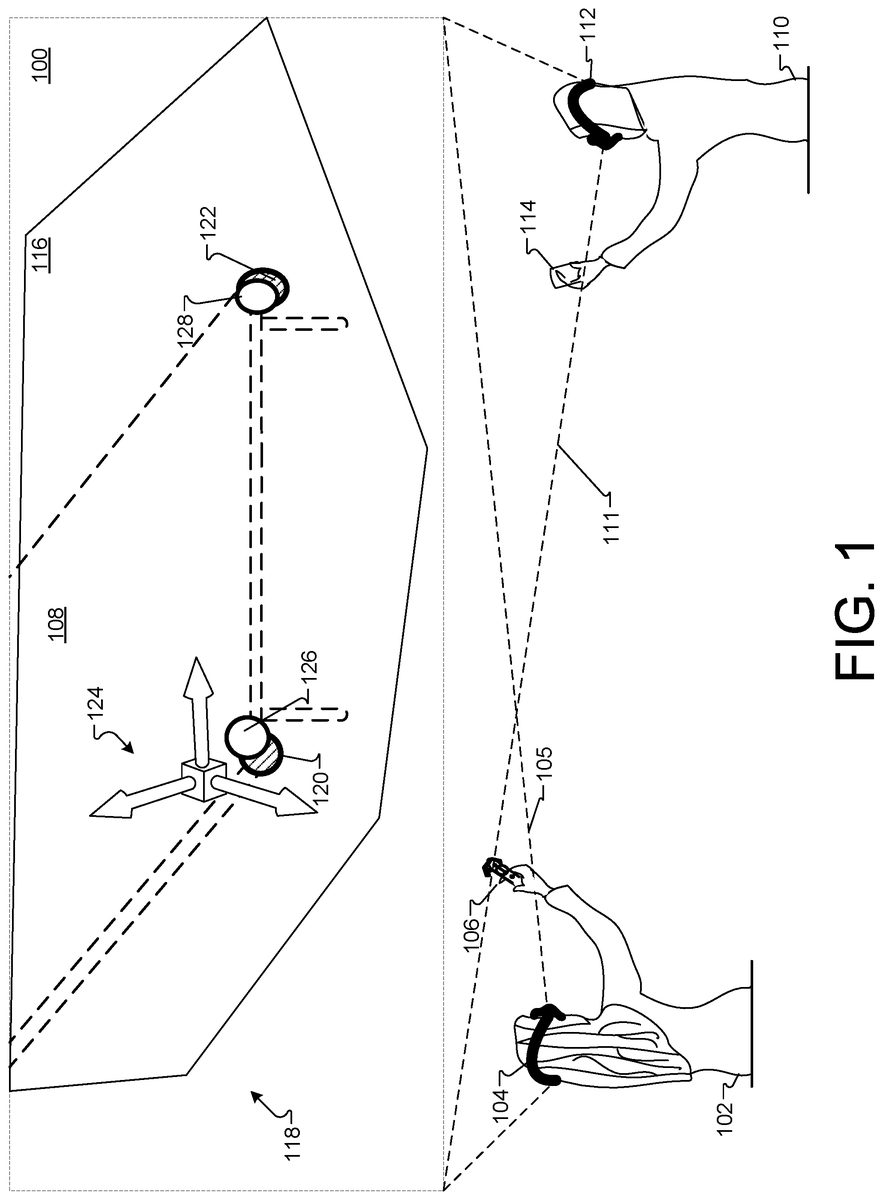
FIG. 1is a diagram depicting an example of users exploring shared content while in a multiplayer augmented reality (AR) environment100. A first user102is wearing a head-mounted display (HMD) device104and holding a computing device106. The user102is viewing environment100, as indicated by lines105.
The computing device106may be, for example, a computing device such as a controller, or a mobile device (e.g., a smartphone, a tablet, a joystick, or other portable controller(s)) that may be paired with, or communicate with, the HMD device104for interaction in the AR environment100. The AR environment100is a representation of an environment that may be generated by the HMD device104(and/or other virtual and/or augmented reality hardware and software). In this example, the user102is viewing AR environment100in HMD device104.
The computing device106may be operably (e.g., communicably) coupled with, or paired with the HMD device104via, for example, a wired connection, or a wireless connection such as, for example, a Wi-Fi or Bluetooth connection. This pairing, or operable coupling, of the computing device106and the HMD device104may provide for communication and the exchange of data between the computing device106and the HMD device104as well as communications with other devices associated with users accessing AR environment100.
The computing device106may be manipulated by a user to capture content via a camera, to select, move, manipulate, or otherwise modify objects in the AR environment100. Computing device106and the manipulations executed by the user can be analyzed to determine whether the manipulations are configured to generate a shareable reference frame to be used in AR environment100. Such manipulations may be translated into a corresponding selection, or movement, or other type of interaction, in an immersive VR or AR environment generated by the HMD device104. This may include, for example, an interaction with, manipulation of, or adjustment of a virtual object, a change in scale or perspective with respect to the VR or AR environment, and other such interactions.
In some implementations, the environment100may include tracking systems that can use location data associated with computing devices (e.g., controllers, HMD devices, mobile devices, etc.) as a basis to correlate data such as display information, safety information, user data, or other obtainable data. This data can be shared amongst users accessing the same environment100.
As shown inFIG. 1, a second user110is wearing a head-mounted display (HMD) device112and holding a computing device114. Because the HMD device112and computing device114may be utilized as described above with respect to user102, HMD104, and computing device106. Accordingly, the above details will not be repeated herein. The user110is viewing environment100, as indicated by lines111.
The user102and user110are both accessing AR environment100. The users may wish to collectively engage with multiple objects or content in the environment100. For example, a table108is depicted. The users may wish to utilize table100together in the AR environment100. To do so, the systems and methods described herein can enable multiple users to experience co-presence in augmented environment100using a computing device associated with each user and two or more user interface selections performed by each user.
For example, the systems described herein can control a first computing device104and a second computing device114to display a plane116associated with a scene118of the augmented reality environment100generated for a physical space shared by two or more users (e.g., users102and110).
The user102may use computing device106to select a first location in the scene118. The selected first location may be represented at location120by a shaded reference marker. The device106may receive the selection of the first location120and generate the shaded reference marker to be placed at the first location120. Similarly, the user102may use computing device106to select a second location122in the scene118. The selected second location may be represented at location122by another reference marker. The device106may receive the selection of the second location122and generate the reference marker to be placed at the second location122.
In response to receiving both the first location120and the second location122, the systems described herein can generate a reference frame124centered at the first reference marker location120pointed in a direction of the second reference marker location122. The reference frame124may be generated based at least in part on the plane116, the first location120, and the second location122. In some implementations, the systems described herein can generate the reference frame124based on a defined direction indicating a plane, gravity, and/or other directional indicator. Any number of algorithms may be utilized to generate the reference frame124. Such algorithms are described in detail with reference toFIG. 5AtoFIG. 7.
In some implementations, a second computing device (e.g., associated with a second user) may wish to join the AR environment100and have access to content within the environment100. Accordingly, the second user110may utilize the second computing device114to select locations in the scene118similar to the first location120and the second location122. The locations may be similar because the second computing device may be in the same physical space as computing device106, but may be at a different angle. In other implementations, the locations may be similar, but not identical because the first user102and the second user110agreed upon two general locations within a physical environment associated with the AR environment100. The general locations may, for example have included a left and a right corner of the table108in the physical space. The first user102may select the first location120at the corner of the table108and the second location122at the right corner of the table. The second user110may select near the left corner at a first location126and near a right corner at location128. While the locations120and122may not correspond exactly to locations126and128, the locations are close enough to provide the same reference frame124used by the first user102with the second user110.
The reference frame124may be provided to the first computing device106and to the second computing device114to establish co-presence (e.g., or a multiplayer application/game) in the augmented reality environment100based on the synchronize-able locations120and126and122and128, respectively. Although reference point120is shown at a slightly different location126(for clarity), both reference points120and126may indicate an exact same location in the AR environment100. To generate the reference frame124, both reference points120and126may be the same locations. Thus, location120represents a first user selecting a point in space in environment100while location126represents a second user selecting the same point in space in the environment100. Similarly, both reference points122and128may indicate an exact same location in the AR environment100. To generate (or share) reference frame124, both reference points122and128may be the same locations. That is, the location122represents a first user selecting a point in space in environment100while location128represents a second user selecting the same point in space in the environment100.
The users102and110can access applications, content, virtual and/or augmented objects, game content, etc. using the reference frame124to correlate movements and input provided in environment100. Such a correlation is performed without receiving initial tracking data and without mapping data for the AR environment100. In effect, computing device102need not provide perceived environment data (e.g., area description files (ADF), physical environment measurements, etc.) to computing device114to ascertain positional information and reference information for other devices that select the two location points (e.g.,120/122).
In some implementations, a user may lose a connection to AR environment100. For example, users may drop a computing device that is tracking (or being tracked), stop accessing AR environment100or elements within AR environment100, or otherwise become disconnected from AR environment100, etc. The reference frame124may be used by a computing device to re-establish the co-presence (e.g., multiplayer interaction in the AR environment100) between computing devices accessing the AR environment100. The re-establishment may be provided if a computing device again selects the two locations120and122, for example. Selection of such locations120and122may trigger re-sharing of the reference frame124, for example.
In some implementations, the reference frame124may be used to re-establish the co-presence between the first computing device106and the second computing device114, in response to changing the location of the physical space associated with the AR environment100. For example, if users104and110decide to take a game that is being accessed in AR environment100to a different location at a later time, the users102and110can re-establish the same game content, game access, reference frame124, and/or other details associated with a prior session accessing AR environment100. The re-establishment can be performed by selecting the locations120and122in a new physical environment. The locations120and122may pertain to a different table in a different physical space. Similarly, if the locations pertained to a floor space, a different physical floor space may be utilized to continue the AR environment session at the new physical space without losing information associated with prior session(s) and without reconfiguring location data associated with both users. To re-establish the session in the AR environment100, the users may verbally agree upon two locations in the new physical environment. Each user can select upon the verbally agreed to locations in the new environment. Once the users complete the selections, a reference frame may be established to enable harmonious sharing of the physical space and content in the environment100.
In another example of providing a multiplayer (e.g., co-presence) AR environment100, the first user102may wish to decorate a room with the second user110. Both users102and110may open an application on respective computing devices106and114to launch the application. Both users may be prompted by the application to initialize a shared space. In some implementations, both users are co-present in the same physical space. In some implementations, both users access the application from separate physical spaces. For example, both users may wish to collaborate in decorating a living room space. The first user102need not be present in the living room of the second user in order to do so. In general, both users may establish a shared reference frame. For example, both users102and110(or any number of other users) may agree upon using a first and second corner of a room as locations in which to synchronize how each user views the space in the AR environment on respective computing devices106and114.
To establish the shared reference frame, the first user102may be provided a plane in the screen of computing device106and may move computing device106to point an on-screen cross-hair, for example, at the first corner of the room to view (e.g., capture) the room with the on-board camera device. The user may tap (e.g., select) a button (e.g., control) to confirm the first corner as a first location (e.g., location120). The first user102may repeat the movement to select a second location (e.g., location122) at the second corner.
Similarly, the second user110can be provided a plane in the screen of computing device114and may move computing device114to point an on-screen cross-hair, for example, at the first corner of the room to view (e.g., capture) the room with the on-board camera device. The user110may tap (e.g., select) a button (e.g., control) to confirm the first corner as a first location (e.g., location126—which may correspond to the same location120). The user110may repeat the movement to select a second location (e.g., location128—which may correspond to the same location128) at the second corner.
Upon both users selecting particular agreed upon locations, the shared frame124is now established. Both users102and110may begin decorating the room and collaboratively placing content that both players can view. The shared reference frame124may provide an advantage of configuring a room layout using reference frame124as a local frame of reference that each device106and114can share in order to coexist and interact in the environment100without overstepping another user or object placed in the environment100.
In some implementations, if the user102accidentally drops device106, device tracking may be temporarily lost and as such, the frame of reference may not be accurate. Because the reference frame is saved during sessions, the user102may retrieve the device106and the reference frame may re-configure according to the previously configured reference frame. If the application had closed or the device106had been rebooted, the user can again join the same session by repeating the two location selections to re-establish the same reference frame with user114, for example.
At any point after the shared reference frame is configured, additional users may join the session. For example, if a third user wishes to join the session in the AR environment100, the third user may use a third computing device to select the first location120and the second location122, for example to be provided the shared reference frame. Once the reference frame124is shared with the third user, the third user may instantly view content that the first user102and the second user110placed in environment100. The third user may begin to add content as well. In general, content added by each user may be color coded, labeled, or otherwise indicated as belonging to a user that placed the content.
Because the reference frame is stored with the device, any user that has been previously provided to the reference frame can open the application, initialize the shared reference frame by selecting the same two locations (e.g., location120and location122) to begin viewing the content from the last session.
Provision of the shared reference frame may establish co-presence in the AR environment100for the third user. In some implementations, provision of the co-presence may include generating, for the scene a registration of the third computing device relative to the first computing device and a registration of the third computing device relative to the second computing device. In some implementations, a co-presence may be established without using position data associated with the first computing device106or the second computing device114. That is, transferring of tracking location between device106and device114may not occur before the reference frame is configured because sharing such data is unnecessary with the techniques described herein. Instead, the reference frame can be generated and shared using the plane and each user selection of two locations within the plane (and within the AR environment).
In some implementations, the established co-presence is used to access an application in the AR environment100and an application state may be stored with the reference frame. Re-establishing the reference frame may include the first computing device106, the second computing device114, or another computing device selecting upon the first location120and the second location122to gain access to the application according to the stored application state. In some implementations, the first location120represents a first physical feature (e.g., an edge of a physical object) in the physical environment and the second location122represents a second physical feature in the physical environment.
In some implementations, the established co-presence is used to access a game in the AR environment100(e.g., the decorating application) and a game state is stored with the reference frame. Re-establishing the reference frame may include the first computing device106, the second computing device114, or another computing device selecting upon the first location120and the second location122to gain access to the game according to the stored game state. In some implementations, the first location120represents a first physical feature (e.g., an edge of a physical object) in the physical environment and the second location122represents a second physical feature in the physical environment. The second physical feature may be another portion of the same object. In some implementations, the first physical feature and the second physical feature may include any combination of wall locations, floor locations, object locations, device locations, etc. In general, the first physical feature and the second physical feature may be agreed upon between a user associated with the first computing device and a user associated with the second computing device. For example, if the table108is agreed upon as the physical feature in which to base the reference frame, the first physical feature may pertain to a first location on the table108while the second physical feature may pertain to a second location on the table.
FIG. 2is a block diagram of an example system200for generating and maintaining co-presence for multiple users (e.g., users102and110and/or additional users) accessing a VR environment or AR environment. In general, the system200can provide a shared reference frame amongst computing devices accessing the same AR environment. As shown a networking computing system200can include a virtual reality/augmented reality (VR/AR) server202, computing device106and computing device114.
In operation of system200, the user102operates computing device106and user110operates computing device114to participate in a multiuser (e.g., co-presence) AR environment (or VR environment)100, for example. In some implementations, computing device106and computing device114can communicate with AR/VR server202over network204. Although the implementation depicted inFIG. 2shows two users operating computing devices to communicate with AR/VR server202, in other implementations, more than two computing devices can communicate with server202allowing more than two users to participate in the multiuser AR environment.
In some implementations, server202is a computing device such as, for example, computer device800shown inFIG. 8described below. Server202can include software and/or firmware providing the operations and functionality for tracking devices (not shown) and one or more applications208.
In some implementations, applications208can include server-side logic and processing for providing a game, a service, or utility in an AR environment. For example, applications208can include server-side logic and processing for a card game, a dancing game, a virtual-reality business meeting application, a shopping application, a virtual sporting application, or any other application that may be provided in an AR environment. Applications208can include functions and operations that communicate with client-side applications executing on computing device106, computing device114, or other computing devices accessing AR environment100. For example, applications208can include functions and operations that communicate with co-presence client application210executing on computing device114, and/or co-presence client application212executing on computing device106. In some implementations, applications208are instead provided from other non-server devices (e.g., a local computing device).
According to some implementations, applications208executing on AR/VR server202can interface with one or more reference frame generator206. The reference frame generator206may be optionally located at the AR/VR server202to generate and provide shareable reference frames based on input received from one or more computing device. Alternatively, each device may include a reference frame generator (e.g., reference generator206A in device106or206B in device114to manage co-presence virtual environments by aligning reference frames amongst users in the AR environment100, for example. In some implementations, such interfacing can occur via an API exposed by individual applications executing on computing device106or computing device114, for example.
In some implementations, the computing device106may store one or more game/application states115A associated with any number of accessed applications208. Similarly, the computing device114may store one or more game/application states115B associated with any number of accessed applications208.
Referring again toFIG. 2, user110operates computing device114and HMD device112. In some implementations, a mobile device214can be placed into HMD housing112to create a VR/AR computing device114. In such implementations, mobile device214may provide the processing power for executing co-presence client application210and render the environment100for device114for use by user110.
According to some implementations, mobile device214can include sensing system216which can including image sensor218, audio sensor220, such as is included in, for example, a camera and microphone, inertial measurement unit222, touch sensor224such as is included in a touch sensitive surface/display226of a handheld electronic device, or smartphone, and other such sensors and/or different combination(s) of sensors. In some implementations, the application210may communicate with sensing system216to determine the location and orientation of device114.
In some implementations, mobile device214can include co-presence client application210. Co-presence client application210can include client logic and processing for providing a game, service, or utility in the co-presence virtual or augmented reality environment. In some implementations, co-presence client application210can include logic and processing for instructing device114to render a VR or AR environment. For example, co-presence client application210may provide instructions to a graphics processor (not shown) of mobile device214for rendering the environment100.
In some implementations, co-presence client application210can communicate with one or more applications208executing on server202to obtain information about the environment100. For example, co-presence client application210may receive data that can be used by mobile device214to render environment100. In some implementations, co-presence client application210can communicate with applications208to receive reference frame data which co-presence client application210can use to change how device114displays co-presence virtual environment or AR content in such an environment.
According to some implementations, the co-presence client application210can provide pose information to applications208and application210may then communicate that position and orientation information to applications208. In some implementations, co-presence client application210may communicate input data received by mobile device214, including image data captured by image sensor218, audio data captured by audio sensor220, and/or touchscreen events captured by touch sensor224. For example, HMD housing112can include a capacitive user input button that when pressed registers a touch event on touchscreen display226of mobile device214as if user110touched touchscreen display226with a finger. In such an example, co-presence client application210may communicate the touch events to applications208.
Reference frame generator206A (in computing device106) and reference frame generator206B (in computing device114) may be configured to perform functions and operations that manage information including, but not limited to, physical spaces, virtual objects, augmented virtual objects, and reference frames for users accessing environment100. According to some implementations, reference frame generator206,206A, and206B manages such information by maintaining data concerning a size and shape of the environment100, the objects within the environment100, and the computing devices accessing the environment100. Although reference frame generators206A, and206B is depicted inFIG. 2as a separate functional component from server202, in some implementations, one or more of applications208can perform the functions and operations of reference frame generator206,206A, and206B.
For example, reference frame generator206,206A, and206B can include a data structure storing points (e.g., locations) representing the space of the environment100. The locations stored in the data structure can include x, y, z, coordinates, for example. In some implementations, reference frame generator206,206A, and206B can also include a data structure storing information about the objects in the environment100.
In some implementations, reference frame generator206,206A, and206B can provide a location of a computing device accessing the AR environment100. Such a location can be shared in the form of a reference frame with other users accessing the AR environment100. The reference frame can be used as a basis for the other users to align content and location information with another user in the AR environment100.
In another example, image sensor218of mobile device214may capture body part motion of user110, such as motion coming from the hands, arms, legs or other body parts of user110. Co-presence client application210may render a representation of those body parts on touchscreen display226of mobile device214, and communicate data regarding those images to applications208. Applications208can then provide environment modification data to co-presence client application210so that co-presence client application210can render an avatar corresponding to user110using the captured body movements.
A user102is shown inFIG. 2operating computing device106. Computing device106can include HMD system230and user computer system228. In some implementations, device106may differ from device114in that HMD system230includes a dedicated image sensor232, audio sensor234, IMU236, and display238, while device114incorporates a general-purpose mobile device214(such as mobile device882shown inFIG. 8, for example) for its image sensor218, audio sensor220, IMU222, and display226. Device106may also differ from device114in that HMD system230can be connected as a peripheral device in communication with user computer system228, which can be a general purpose personal computing system (such as laptop computer822).
WhileFIG. 2shows computing devices of different hardware configurations, in other implementations, the devices communicating with AR/VR server202can have the same or similar hardware configurations.
In some implementations, the system200may provide a three-dimensional AR environment or VR environment, three-dimensional (volumetric) objects, and VR content using the methods, components, and techniques described herein. In particular, system200can provide a user with a number of options in which to enabling co-presence for a multiplayer experience in a VR environment.
The example system200includes a number of computing devices that can exchange data over a network204. The devices may represent clients or servers and can communicate via network204, or another network. In some implementations, the client devices may include one or more gaming devices or controllers, a mobile device, an electronic tablet, a laptop, a camera, VR glasses, or other such electronic device that may be used to access VR and AR content.
FIGS. 3A-3Fare diagrams depicting example images displayable on a head-mounted display (HMD) device that enable users to configure a multiuser AR environment. In general, the diagrams shown inFIGS. 3A-3Fmay be provided using device106or114as described throughout this disclosure. In general, a user may wish to configure a multiuser AR environment for any number of users. To do so, at least two users may agree to use particular locations in the physical space and may place content within the space. In addition, the at least two users may select a color to represent objects generated and/or modified by the user while in the AR environment.
As shown inFIG. 3A, a user may be prompted to join or begin a game in AR environment100, for example. The prompt may include a user interface, such as example interface302requesting a room code304and offering a chance to select a color306to be associated with the user. The user may then select join to be provided the user interface shown inFIG. 3B.
As shown inFIG. 3B, the prompt may include an indication308to define a shared space by tapping a point on the plane310. The plane310is provided as an overlay over at least a portion of the scene depicted in AR environment100, for example. In some implementations, the scene may represent a portion of the physical space being utilized for the AR environment100. The plane310may be a plane defining a floor in the scene. The plane may be detected, determined, or otherwise provided to a computing device (e.g., computing device106) prior to the user requesting access to the AR environment100, for example. The user may select a location in the user interface shown inFIG. 3B, which may trigger display of user interface shown inFIG. 3Cin device106, for example. In this example, the user selected location312. In response, the system200generated a reference marker for placement at location312. Upon selecting the location312, the user may be prompted314to select a second point at least a meter away from the first location312. In some implementations, the user may be prompted314to select a point any distance from the first location312. Upon selecting the second location, the user interface shown inFIG. 3Dis provided in device106, for example.
FIG. 3Ddepicts the first selected location312and populated a reference frame316. The reference frame316is generated as a coordinate frame centered at the first location312and pointing to the second location, now shown by an indicator at location318. In particular, the reference frame may be centered at the first reference marker and the first reference marker may indicate a direction toward the second reference marker. In some implementations, the reference frame316may be generated using a single location312and the plane310. For example, the reference frame316may utilize pose (e.g., position and orientation information205A or205B) captured by a camera associated with either device106or device114to generate the frame316.
The above process described inFIGS. 3A-3Dmay be performed by each additional user wishing to join the multi-user (e.g., co-presence) AR environment. It is noted that the users may carry out the same steps and details will not be repeated herein.
FIG. 3Edepicts a user interface depicting a shared reference frame in which at least two users are accessing an AR environment. The first user has placed objects320and322, as shown by the shading in the indicators. A second user has carried out the selection of locations312and318to begin sharing the same reference frame as the first user. The second user has placed objects324,326, and328.FIG. 3Fdepicts a third user having carried out the selection of locations312and318to begin sharing the same reference frame as the first user and the second user. The third user has begun interacting with content and placing objects in the AR environment, as shown by object330and332.
In some implementations, an application utilized by one or more users may assume the shared reference frame is aligned for all users based on the users selecting the two location points, as described throughout this disclosure. In some implementations, users may join or resume access to the AR environment at a later by designating the same physical features. With each device running local mapping in the background, a device can recover if it loses tracking temporarily.
In general, the systems and methods described herein may not be limited to a co-presence environment. For example, a shared experience may be obtained using the systems and methods described herein in which a plurality of users in several distinct physical locations (e.g., environments, rooms, cities, etc.) each designate their own area (e.g., table, floor space, court, room, etc.) as a play space, and the application208may present the game to all players on each user's local area representing a play space.
In some implementations, the first location represents120a first physical feature (e.g., a first table corner) in the physical environment and the second location122represents a second physical feature (e.g., a second table corner) in the physical environment. The first physical feature and the second physical feature may be agreed upon between a user associated with the first computing device and a user associated with the second computing device.
FIG. 4is a diagram depicting an example of users exploring shared content while in a multiplayer AR environment. As shown inFIG. 4, a number of users402,404,406, and408may wish to access AR environment100. Each user can understand that a game that takes place on a game court is to be played in the AR environment100. Each user may agree to rectangular rooms in which the reference points (e.g., locations) belong on one of the walls in the rectangular room that represents a short side of the rectangle. The users can also agree that the at least two locations should be centered between the ceiling and the floor and be two meters apart.
The example implementation shown inFIG. 4will be described with respect to one or more users wearing an HMD device that substantially blocks out the ambient environment, so that the HMD device generates a VR or AR environment, with the user's field of view confined to the environment generated by the HMD device. However, the concepts and features described herein may also be applied to other types of HMD devices, and other types of virtual reality environments and augmented reality environments. In addition, the examples shown inFIG. 4include a user illustrated as a third-person view of the user wearing an HMD device and holding controllers, computing devices, etc. The views in areas400A,400B,400C, and400D represent a first person view of what may be viewed by each respective user in the environment generated by each user's respective HMD device and the systems described herein. The AR/VR server202may provide application data, reference frame data, game data, etc.
As shown inFIG. 4, each user402,404,406, and408is accessing or associated with an HMD device (e.g., respective devices410for user402, device412for user404, device414for user406, and device416for user408. In addition, each user may be associated with one or more controllers and/or computing devices. As shown in this example, user402is associated with computing device418, user404is associated with computing device420, and user406is associated with tablet computing device422. User408is shown generating input using gestures424rather than inputting content on a computing device. Such gestures424may be detected and tracked via tracking devices within the VR space and/or tracking devices associated with a user (e.g., mobile device in the user's pocket, or near the user, etc.).
User402and user404are sharing a reference frame316and each device associated with users402and404may be sharing information and objects in the AR environment100. For example, users402and404may wish to play a table-top augmented reality game. Users402and404may mutually agree to using two corners of a kitchen table in both of the users' respective homes.
The game (e.g., application208) may prompt both users to initialize a shared space. A plane may be detected and displayed in the room (e.g., scene) for each user. The first user402selects a first corner at location312aof a first table and a second corner at location318aof the first table. The second user402selects a first location312bof the second table and a second location318bof the second table. To do so, each player may move a respective computing device to point at an on-screen cursor, for example, at the first location and the second location to the respective tables. Upon completion of the selections, the system200, for example, can use the pointing to the location to generate a three dimensional point in space. The system200may then intersect with the detected plane for example, to establish a shared reference frame for the users. The users may then begin to interact with one another using the shared reference frame.
At some point, the third user406may wish to play and can begin the process of selecting locations on a local table associated with a physical space in use by user406, as shown by an indicator at location312c. User408is being shown a plane426and has selected a first location312dand a second location318d. User408may soon join the AR environment session because both locations have been selected. The system200may shortly share the reference frame associated with users402and404, each of which are actively using AR environment100, for example.
At some point in time, any of the players402-408may wish to save the game and finish the game at a later time. For example, players402and404may wish to meet later at a coffee shop to complete the game in a co-present location. Both users can select respective locations (312aand318afor user402and312band318bfor user404). The game may resume upon receiving the input and providing the shared reference space amongst computing devices418and420.
There may be numerous ways to define a reference frame. In some implementations, a combination of geometric primitives (e.g., location points, six degrees of freedom poses, etc.). In general, an accuracy with which a geometric feature can be detected or specified through a user interface by each device may be considered. The ability to provide accurate feature recognition, detection, and/or capture may impact the relative alignment of a shared reference frame across devices. For example, accuracy can be considered in terms of pose (i.e., both position and orientation). If the pose can be captured accurately by the computing devices described herein, accurate features can be determined.
The systems described herein can provide a level of automation for assisting the user to specify a geometric feature using a computing device. For example, a medium amount of automation may include a user interface that snaps a cursor to the nearest edge (e.g., or corner) in two dimensional image space. The computing device can provide the snap to location and the user may confirm the location. This can remove inaccuracies caused by users capturing content in an unsteady manner with a mobile device, for example. High automation may include detection of an object or AR marker without input from the user.
A degree to which multiple players can specify the geometric features at the same time may be considered when analyzing shared reference frames. A method that includes having each device to go to a specific physical location (e.g., hold the computing device above each corner of a table) implies that multiple players may carry out such a capture of the corner in a serial fashion. A method that allows each device to specify a physical point at a distance (e.g., select upon a computing device screen to raycast a point on the ground) may indicate that multiple players can do such selections at the same time without occupying the target physical space.
In general, a reference frame may have 6 degrees of freedom. The reference frame can be defined by a set of geometric primitives that constrain these 6 degrees of freedom in a unique way. For example, this can take several forms including, but not limited to a single rigid body, two 3D points and an up vector, three 3D points that are not collinear, and one 3D point and two directions.
If two or more devices use one of the above constraint methods to specify the same geometric feature (e.g., a physical location) in space, then the defined reference frame may be considered consistent across all devices.FIGS. 5A-5Bare diagrams depicting an example of determining a shared reference frame based on a single rigid body.
An example constraint method of using a single rigid body may rely on all devices wishing to share a reference frame being able to determine a pose (e.g., position and orientation) of a single rigid body at a known time. This allows all devices to calculate a transformation between the world tracking frame of the computing device and the pose of the shared reference frame. In such an example, each device502and504may begin using an identical starting pose. At least one device (e.g., device504) may display an AR tag506on device504, while prompting other devices (e.g., device502) to scan the first device. Such a method may assume knowledge of the screen-to-camera extrinsic. This may generate a shared reference frame for device502and device504to correlate device world coordinates508from device502with device world coordinates510from device504.
FIG. 5Bdepicts an example in which all devices (e.g., device502and device504) prompt users associated with such devices to point at a physical object in a scene (e.g., room) using an onboard camera. The physical object may be detected and pose can be determined. For example, device502may point at physical object, represented in the screen as object512A in a scene. Device504may point at the same physical object, represented in the screen as object512B. A shared frame514can be established based on the selection of the same physical object512. Thus, world coordinates508from device502may be correlated with device world coordinates510from device504.
FIGS. 6A-6Bare diagram depicting an example of determining a shared reference frame. In one example, determining a shared reference may be based on using two points (e.g., locations) and an up vector. In such a method, the users wishing to share a reference frame in an AR environment, for example, may mutually agree upon two points in space that will be used to define the shared reference frame. This constrains the frame to 5 degrees of freedom. The remaining constraint may include an assumption that a Y-axis600of the shared frame is “up” relative to gravity, which each device may detect independently.
In one example of using two locations and a vector may include having users agree to use at least two points in space (e.g., features on the floor, corners of a table, locations on a wall). For example, if the agreed upon playing area is a table602, the users may agree upon location604and location606. Then, the systems described herein may use the device pose of each device to set the locations. For example, device106can capture a view of the table and the user may select upon location604, as shown in device106. Similarly, the user may select upon location606to define a second location.
Each user may move a respective computing device to the first location and confirm. Each user may then move the respective computing device to select a second location and confirm the selection. Upon selecting both locations604and606, a reference frame608may be provided to any user that performed the selections.
Such a method may avoid using depth sensing and plane detection providing an advantage of a rapid configuration of a shared reference plane without computationally heavy algorithms.
In another example, a depth and/or plane detection may be used to raycast the two locations from a distance. This may provide an advantage of allowing users to be much further away from selected locations while still enabling a way to configure a shareable reference plane.
For the methods described above, the orientation of the shared frame is well defined by the up vector600and the vector610between the two points, as shown inFIG. 6B. The accuracy of the orientation of the shared reference frame608may increase as the two locations are selected farther apart. If the users are accessing the AR environment100using a table as a physical object in which to base the shared reference frame, then two corners of the table may provide accurate orientation information for each device. However, if the users are utilizing an entire room for placing and interacting with objects, the orientation accuracy may be increased by selecting two locations that are located on a left and right side of the room, for example.
In another example, three points in space (non-collinear) may be used to generate and provide a shared reference frame amongst users accessing an AR environment. Such a method may be similar to the definition of the two locations described above, but includes the addition of selecting a third location in space. Utilizing a third location may provide an advantage that enables computing devices accessing AR environment100to define a shared frame that has any arbitrary orientation. For example, the Y-axis may be pointed other directions instead of upward.
In some implementations, a single location and two directions may be defined to utilize the raycast to define the first location and a second location may be automatically defined by a position associated with the computing device that defined the first location. The position may be captured at the same point in time as the first location is defined (e.g., selected). Such a method provides a second implied direction, by projecting the automatically defined second location into the horizontal plane containing the first location, for example.
In some implementations, the accuracy of the shared frame can be verified by each device. For example, users accessing the AR environment100may agree on one or more additional physical points and specify these verification points using any means described above. With perfect alignment, each of the verification points would have the same position in the shared reference frame. To estimate error, the computing devices can calculate a difference metric for the positions of the verification points.
In some implementations, the systems and methods described herein may provide user interface assistance for selecting objects and locations. For example, manual raycasting may be provided to allow a user to use a computing device to cast a ray that intersects with the desired location on a plane (or other detected geometry) in a scene. For example, an on-screen cursor may be used with a computing device. The on-screen cursor may designate one or more locations in the scene. A control may be provided for the user to confirm the designated location(s). In another example, a user may be prompted to select a point of interest in a camera image displayed on the computing device. Upon selecting the point of interest, one or more locations may be automatically determined or detected for use in generating a shareable reference frame.
In another example, assisted raycasting may be provided. In this example, the computing device may assist the user with the use of image processing to snap a cursor to an edge or corner in a two dimensional image. This may reduce error introduced by an unsteady hand or error introduced by a wrong selection on the screen.
In another example, AR marker detection may be used. For example, various types of AR markers may be used to remove the request to select or confirm a selected location. The systems described herein may detect the marker. Two markers separated by a baseline may be used to provide the benefits of the two locations and an up vector method described herein.
In some implementations, an identifier (ID) embedded in each AR marker can eliminate ambiguity in determining which location represents the first selected location. In such an example, users may scan each AR marker to be provided the shared reference frame allowing such users to join the AR environment with an accurate reference frame with respect to the other users accessing the AR environment.
FIG. 7is a flow chart diagramming one embodiment of a process700to provide and maintain co-presence for multiple users accessing an AR environment. For example, process700may provide a reference frame amongst users (e.g., using computing device106and computing device114in the AR environment100. The process700is described with reference toFIGS. 1 and 2. Users102and110may wish to share an AR environment100and may be prompted to begin the process700, which may be used to generate a shared reference frame124. One or both reference frame generators206A or206B may operate together to determine and generate a shareable reference frame for user106and user114.
At block702, the process700may represent a computer-implemented method that includes controlling a first computing device and a second computing device to display a plane associated with a scene of the augmented reality environment generated for a physical space. For example, the first user102may be accessing the computing device106and may be provided, in the screen of the computing device, a plane116defining a plane in a scene captured within device106, for example. In addition, the same plane116can be provided to the second user110accessing the second computing device114. The plane116may be provided in the screen of device114.
At block704, the process700may include receiving, from the first computing device, a first selection of a first location within the scene and a first selection of a second location within the scene. For example, the first computing device102may select a first location120and a second location122. In some implementations, a user utilizes device102to manually select first location120and second location122.
At block706, the process700may include generating a first reference marker corresponding to the first location and generating a second reference marker corresponding to the second location. For example, device106may populate indicators within a user interface to provide feedback to the user about the locations in which the user selected.
At block708, the process700may include receiving, from a second computing device, a second selection of the first location within the scene and a second selection of the second location within the scene. For example, computing device114may provide the scene in a user interface displayed on the screen. User110may select the first location (e.g., location120) and the second location (e.g., location122).
At block710, the process700may include generating a reference frame centered at the first reference marker pointed in a direction of the second reference marker. For example, the reference frame generator206A may generate a reference frame124, as shown inFIG. 1. In another example, a reference frame generator206in AR/VR server202may instead generate the reference frame. In some implementations, the reference frame may be generated using the plane (e.g., a ground plane), the first location, and the second location. For example, using the two locations and one direction described above may be used to generate the reference frame124. In some implementations, the reference frame may be generated centered at the second reference marker pointed in the direction of the first reference marker.
At block712, the process700may include providing the reference frame to the first computing device and to the second computing device to establish co-presence in the AR environment. For example, computing device106may share the reference frame124with computing device114. In some implementations, a co-presence synchronization provided by the reference frame124may include generating, for the scene, a registration of the first computing device106relative to the second computing device114. In some implementations, the reference frame124is generated based on a detected pose associated with the first computing device106that selected the first location120and the second location122.
In some implementations, the process700may include providing the reference frame124to a third computing device to establish co-presence in the augmented reality environment, in response to receiving a third selection of the first location120and a third selection of the second location122from a third computing device.
In some implementations, the co-presence may include generating, for the scene a registration of the third computing device relative to the first computing device and a registration of the third computing device relative to the second computing device. In some implementations, the method700may include receiving, at the second computing device114, a selection of the first location120within the scene and a selection of the second location122within the scene includes automatically detecting, by the second computing device114, the first reference marker and the second reference marker shown respectively at location120and122.
In some implementations, the process700may include receiving, at the first computing device, a selection of a first location within the scene and a selection of a second location within the scene is triggered by prompts received at a display device associated with the first computing device. Example prompts are depicted inFIGS. 5A-5B.
In some implementations, the established co-presence is used to access a game in the AR environment and a game/application state115A or115B is stored with the reference frame and re-establishing the reference frame includes the first computing device, the second computing device, or another computing device selecting upon the first location and the second location to gain access to the game according to the stored game/application state.
In some implementation, the method700includes receiving, from a third computing device, a selection upon the first location and the second location provides access to the game according to the stored state. For example, a third device422may provide a selected first location and second location after users402and404are engaged in the AR environment100. The third device422may be provided the state215A, for example, along with the reference frame316. The state215A and the reference frame316may allow the user to access content in the AR environment100to view and interact with a state of the game being played by users402and404.
The systems and methods described herein can enable co-presence (e.g., multiplayer) AR experiences. The methods described herein may be implemented on top of (or in addition to) one or more motion-tracking application programming interfaces. In some implementations, additional image processing (e.g., corner or marker detection) can be used. In some implementations, the users may be provided user interface guidance to manually designate physical features that uniquely define a particular shared space. That is, an application utilized by one or more users may assume the shared reference frame is aligned for all users based on the users selecting the two location points, as described throughout this disclosure.
FIG. 8shows an example of an example computer device800and an example mobile computer device850, which may be used with the techniques described here. Computing device800includes a processor802, memory804, a storage device806, a high-speed interface808connecting to memory804and high-speed expansion ports810, and a low speed interface812connecting to low speed bus814and storage device806. Each of the components802,804,806,808,810, and812, are interconnected using various busses, and may be mounted on a common motherboard or in other manners as appropriate. The processor802can process instructions for execution within the computing device800, including instructions stored in the memory804or on the storage device806to display graphical information for a GUI on an external input/output device, such as display816coupled to high speed interface808. In other implementations, multiple processors and/or multiple buses may be used, as appropriate, along with multiple memories and types of memory. In addition, multiple computing devices800may be connected, with each device providing portions of the necessary operations (e.g., as a server bank, a group of blade servers, or a multi-processor system).
The memory804stores information within the computing device800. In one implementation, the memory804is a volatile memory unit or units. In another implementation, the memory804is a non-volatile memory unit or units. The memory804may also be another form of computer-readable medium, such as a magnetic or optical disk.
The storage device806is capable of providing mass storage for the computing device800. In one implementation, the storage device806may be or contain a computer-readable medium, such as a floppy disk device, a hard disk device, an optical disk device, or a tape device, a flash memory or other similar solid state memory device, or an array of devices, including devices in a storage area network or other configurations. A computer program product can be tangibly embodied in an information carrier. The computer program product may also contain instructions that, when executed, perform one or more methods, such as those described above. The information carrier is a computer- or machine-readable medium, such as the memory804, the storage device806, or memory on processor802.
The high speed controller808manages bandwidth-intensive operations for the computing device800, while the low speed controller812manages lower bandwidth-intensive operations. Such allocation of functions is exemplary only. In one implementation, the high-speed controller808is coupled to memory804, display816(e.g., through a graphics processor or accelerator), and to high-speed expansion ports810, which may accept various expansion cards (not shown). In the implementation, low-speed controller812is coupled to storage device806and low-speed expansion port814. The low-speed expansion port, which may include various communication ports (e.g., USB, Bluetooth, Ethernet, wireless Ethernet) may be coupled to one or more input/output devices, such as a keyboard, a pointing device, a scanner, or a networking device such as a switch or router, e.g., through a network adapter.
The computing device800may be implemented in a number of different forms, as shown in the figure. For example, it may be implemented as a standard server820, or multiple times in a group of such servers. It may also be implemented as part of a rack server system824. In addition, it may be implemented in a personal computer such as a laptop computer822. Alternatively, components from computing device800may be combined with other components in a mobile device (not shown), such as device850. Each of such devices may contain one or more of computing device800,850, and an entire system may be made up of multiple computing devices800,850communicating with each other.
Computing device850includes a processor852, memory864, an input/output device such as a display854, a communication interface866, and a transceiver868, among other components. The device850may also be provided with a storage device, such as a microdrive or other device, to provide additional storage. Each of the components850,852,864,854,866, and868, are interconnected using various buses, and several of the components may be mounted on a common motherboard or in other manners as appropriate.
The processor852can execute instructions within the computing device850, including instructions stored in the memory864. The processor may be implemented as a chipset of chips that include separate and multiple analog and digital processors. The processor may provide, for example, for coordination of the other components of the device850, such as control of user interfaces, applications run by device850, and wireless communication by device850.
Processor852may communicate with a user through control interface858and display interface856coupled to a display854. The display854may be, for example, a TFT LCD (Thin-Film-Transistor Liquid Crystal Display) or an OLED (Organic Light Emitting Diode) display, or other appropriate display technology. The display interface856may comprise appropriate circuitry for driving the display854to present graphical and other information to a user. The control interface858may receive commands from a user and convert them for submission to the processor852. In addition, an external interface862may be provide in communication with processor852, so as to enable near area communication of device850with other devices. External interface862may provide, for example, for wired communication in some implementations, or for wireless communication in other implementations, and multiple interfaces may also be used.
The memory864stores information within the computing device850. The memory864can be implemented as one or more of a computer-readable medium or media, a volatile memory unit or units, or a non-volatile memory unit or units. Expansion memory874may also be provided and connected to device850through expansion interface872, which may include, for example, a SIMM (Single In Line Memory Module) card interface. Such expansion memory874may provide extra storage space for device850, or may also store applications or other information for device850. Specifically, expansion memory874may include instructions to carry out or supplement the processes described above, and may include secure information also. Thus, for example, expansion memory874may be provide as a security module for device850, and may be programmed with instructions that permit secure use of device850. In addition, secure applications may be provided via the SIMM cards, along with additional information, such as placing identifying information on the SIMM card in a non-hackable manner.
The memory may include, for example, flash memory and/or NVRAM memory, as discussed below. In one implementation, a computer program product is tangibly embodied in an information carrier. The computer program product contains instructions that, when executed, perform one or more methods, such as those described above. The information carrier is a computer- or machine-readable medium, such as the memory864, expansion memory874, or memory on processor852, that may be received, for example, over transceiver868or external interface862.
Device850may communicate wirelessly through communication interface866, which may include digital signal processing circuitry where necessary. Communication interface866may provide for communications under various modes or protocols, such as GSM voice calls, SMS, EMS, or MMS messaging, CDMA, TDMA, PDC, WCDMA, CDMA2000, or GPRS, among others. Such communication may occur, for example, through radio-frequency transceiver868. In addition, short-range communication may occur, such as using a Bluetooth, Wi-Fi, or other such transceiver (not shown). In addition, GPS (Global Positioning System) receiver module870may provide additional navigation- and location-related wireless data to device850, which may be used as appropriate by applications running on device850.
Device850may also communicate audibly using audio codec860, which may receive spoken information from a user and convert it to usable digital information. Audio codec860may likewise generate audible sound for a user, such as through a speaker, e.g., in a handset of device850. Such sound may include sound from voice telephone calls, may include recorded sound (e.g., voice messages, music files, etc.) and may also include sound generated by applications operating on device850.
The computing device850may be implemented in a number of different forms, as shown in the figure. For example, it may be implemented as a cellular telephone880. It may also be implemented as part of a smart phone882, personal digital assistant, or other similar mobile device.
Various implementations of the systems and techniques described here can be realized in digital electronic circuitry, integrated circuitry, specially designed ASICs (application specific integrated circuits), computer hardware, firmware, software, and/or combinations thereof. These various implementations can include implementation in one or more computer programs that are executable and/or interpretable on a programmable system including at least one programmable processor, which may be special or general purpose, coupled to receive data and instructions from, and to transmit data and instructions to, a storage system, at least one input device, and at least one output device. In addition, the term “module” may include software and/or hardware.
These computer programs (also known as programs, software, software applications or code) include machine instructions for a programmable processor, and can be implemented in a high-level procedural and/or object-oriented programming language, and/or in assembly/machine language. As used herein, the terms “machine-readable medium” “computer-readable medium” refers to any computer program product, apparatus and/or device (e.g., magnetic discs, optical disks, memory, Programmable Logic Devices (PLDs)) used to provide machine instructions and/or data to a programmable processor, including a machine-readable medium that receives machine instructions as a machine-readable signal. The term “machine-readable signal” refers to any signal used to provide machine instructions and/or data to a programmable processor.
To provide for interaction with a user, the systems and techniques described here can be implemented on a computer having a display device (e.g., a CRT (cathode ray tube) or LCD (liquid crystal display) monitor) for displaying information to the user and a keyboard and a pointing device (e.g., a mouse or a trackball) by which the user can provide input to the computer. Other kinds of devices can be used to provide for interaction with a user as well; for example, feedback provided to the user can be any form of sensory feedback (e.g., visual feedback, auditory feedback, or tactile feedback); and input from the user can be received in any form, including acoustic, speech, or tactile input.
The systems and techniques described here can be implemented in a computing system that includes a back end component (e.g., as a data server), or that includes a middleware component (e.g., an application server), or that includes a front end component (e.g., a client computer having a graphical user interface or a Web browser through which a user can interact with an implementation of the systems and techniques described here), or any combination of such back end, middleware, or front end components. The components of the system can be interconnected by any form or medium of digital data communication (e.g., a communication network). Examples of communication networks include a local area network (“LAN”), a wide area network (“WAN”), and the Internet.
The computing system can include clients and servers. A client and server are generally remote from each other and typically interact through a communication network. The relationship of client and server arises by virtue of computer programs running on the respective computers and having a client-server relationship to each other.
In some implementations, the computing devices depicted inFIG. 8can include sensors that interface with a virtual reality (VR headset890). For example, one or more sensors included on a computing device850or other computing device depicted inFIG. 8, can provide input to VR headset890or in general, provide input to a VR space. The sensors can include, but are not limited to, a touchscreen, accelerometers, gyroscopes, pressure sensors, biometric sensors, temperature sensors, humidity sensors, and ambient light sensors. The computing device850can use the sensors to determine an absolute position and/or a detected rotation of the computing device in the VR space that can then be used as input to the VR space. For example, the computing device850may be incorporated into the VR space as a virtual object, such as a controller, a laser pointer, a keyboard, a weapon, etc. Positioning of the computing device/virtual object by the user when incorporated into the VR space can allow the user to position the computing device to view the virtual object in certain manners in the VR space. For example, if the virtual object represents a laser pointer, the user can manipulate the computing device as if it were an actual laser pointer. The user can move the computing device left and right, up and down, in a circle, etc., and use the device in a similar fashion to using a laser pointer.
In some implementations, one or more input devices included on, or connect to, the computing device850can be used as input to the VR space. The input devices can include, but are not limited to, a touchscreen, a keyboard, one or more buttons, a trackpad, a touchpad, a pointing device, a mouse, a trackball, a joystick, a camera, a microphone, earphones or buds with input functionality, a gaming controller, or other connectable input device. A user interacting with an input device included on the computing device850when the computing device is incorporated into the VR space can cause a particular action to occur in the VR space.
In some implementations, a touchscreen of the computing device850can be rendered as a touchpad in VR space. A user can interact with the touchscreen of the computing device850. The interactions are rendered, in VR headset890for example, as movements on the rendered touchpad in the VR space. The rendered movements can control objects in the VR space.
In some implementations, one or more output devices included on the computing device850can provide output and/or feedback to a user of the VR headset890in the VR space. The output and feedback can be visual, tactical, or audio. The output and/or feedback can include, but is not limited to, vibrations, turning on and off or blinking and/or flashing of one or more lights or strobes, sounding an alarm, playing a chime, playing a song, and playing of an audio file. The output devices can include, but are not limited to, vibration motors, vibration coils, piezoelectric devices, electrostatic devices, light emitting diodes (LEDs), strobes, and speakers.
In some implementations, the computing device850may appear as another object in a computer-generated, 3D environment. Interactions by the user with the computing device850(e.g., rotating, shaking, touching a touchscreen, swiping a finger across a touch screen) can be interpreted as interactions with the object in the VR space. In the example of the laser pointer in a VR space, the computing device850appears as a virtual laser pointer in the computer-generated, 3D environment. As the user manipulates the computing device850, the user in the VR space sees movement of the laser pointer. The user receives feedback from interactions with the computing device850in the VR space on the computing device850or on the VR headset890.
In some implementations, one or more input devices in addition to the computing device (e.g., a mouse, a keyboard) can be rendered in a computer-generated, 3D environment. The rendered input devices (e.g., the rendered mouse, the rendered keyboard) can be used as rendered in the VR space to control objects in the VR space.
Computing device800is intended to represent various forms of digital computers, such as laptops, desktops, workstations, personal digital assistants, servers, blade servers, mainframes, and other appropriate computers. Computing device850is intended to represent various forms of mobile devices, such as personal digital assistants, cellular telephones, smart phones, and other similar computing devices. The components shown here, their connections and relationships, and their functions, are meant to be exemplary only, and are not meant to limit implementations of the inventions described and/or claimed in this document.
A number of embodiments have been described. Nevertheless, it will be understood that various modifications may be made without departing from the spirit and scope of the specification.
In addition, the logic flows depicted in the figures do not require the particular order shown, or sequential order, to achieve desirable results. In addition, other steps may be provided, or steps may be eliminated, from the described flows, and other components may be added to, or removed from, the described systems. Accordingly, other embodiments are within the scope of the following claims.
Claims
- A computer-implemented method for providing co-presence in an augmented reality environment, the method comprising: controlling a first computing device and a second computing device to detect at least one plane associated with a scene of the augmented reality environment generated for a physical space;receiving, from the first computing device, a first selection of a first location within the scene and a first selection of a second location within the scene;generating a first reference marker corresponding to the first location and generating a second reference marker corresponding to the second location;receiving, from a second computing device, a second selection of the first location within the scene and a second selection of the second location within the scene;generating a reference frame centered at the first reference marker that indicates a direction toward the second reference marker, the reference frame being generated using the at least one plane, the first location, and the second location;and providing the reference frame to the first computing device and to the second computing device to establish co-presence in the augmented reality environment, establishing the co-presence including generating, for the scene, a registration of the first computing device relative to the second computing device.
- The computer-implemented method of claim 1 , wherein the reference frame is generated based on a detected pose associated with the first computing device that selected the first location and the second location and a determined intersection between the second location and the detected plane.
- The computer-implemented method of claim 1 , further comprising: in response to receiving a third selection of the first location and a third selection of the second location from a third computing device, providing the reference frame to the third computing device to establish co-presence in the augmented reality environment, establishing the co-presence including generating, for the scene: a registration of the third computing device relative to the first computing device;and a registration of the third computing device relative to the second computing device.
- The computer-implemented method of claim 1 , wherein receiving, at a second computing device, a selection of the first location within the scene and a selection of the second location within the scene includes automatically detecting, at the second computing device, the first reference marker and the second reference marker.
- The computer-implemented method of claim 1 , further comprising: displaying in the first computing device the first reference marker corresponding to the first location and displaying in the first computing device, the second reference marker corresponding to the second location, and wherein receiving, at the first computing device, a selection of a first location within the scene and a selection of a second location within the scene is triggered by prompts received at a display device associated with the first computing device.
- The computer-implemented method of claim 1 , wherein the established co-presence is used to access an application in the augmented reality environment and an application state is stored with the reference frame;and re-establishing the reference frame includes the first computing device, the second computing device, or another computing device selecting upon the first location and the second location to gain access to the application according to the stored application state.
- The method of claim 1 , wherein the first reference marker and the second reference marker define at least a portion of the reference frame with five degrees of freedom and wherein an angle generated by the indicated direction and the at least one plane define a sixth degree of freedom for the reference frame.
- The computer-implemented method of claim 1 , wherein the first location represents a first physical feature in the physical environment and the second location represents a second physical feature in the physical environment, the first physical feature and the second physical feature being agreed upon between a user associated with the first computing device and a user associated with the second computing device.
- The computer-implemented method of claim 1 , wherein the co-presence is established without using position data associated with the first computing device or the second computing device.
- A computer program product tangibly embodied on a non-transitory computer-readable storage medium and comprising instructions that, when executed by at least one computing device, are configured to cause the at least one computing device to: control a first computing device and a second computing device to detect at least one plane associated with a scene of an augmented reality environment generated for a physical space;receive, at the first computing device, a selection of a first location within the scene and a selection of a second location within the scene;generate a first reference marker corresponding to the first location and generating a second reference marker corresponding to the second location;generate a reference frame centered at the first reference marker pointed in a direction of the second reference marker, the reference frame being generated based at least in part on the at least one plane, the first location, and the second location;and provide the reference frame to the first computing device and to the second computing device to establish co-presence in the augmented reality environment.
- The computer program product of claim 10 , wherein the computing device is further caused to receive, at a second computing device, a selection of the first location within the scene and a selection of the second location within the scene.
- The computer program product of claim 10 , wherein the reference frame is used to re-establish the co-presence between the first computing device and the second computing device, in response to losing a connection to augmented reality environment.
- The computer program product of claim 10 , wherein the reference frame is used to re-establish the co-presence between the first computing device and the second computing device, in response to changing the location of the physical space associated with the augmented reality environment.
- A system comprising: at least one processor;memory storing instructions that, when executed by the at least one processor, cause the system to perform operations including, controlling a first computing device and a second computing device to detect at least one plane associated with a scene of an augmented reality environment generated for a physical space;receiving, at the first computing device, a selection of a first location within the scene and a selection of a second location within the scene;generating a first reference marker corresponding to the first location and generating a second reference marker corresponding to the second location;receiving, at a second computing device, a selection of the first location within the scene and a selection of the second location within the scene;generating a reference frame centered at the first reference marker pointed in a direction of the second reference marker, the reference frame being generated using the at least one plane, the first location, and the second location;and providing the reference frame to the first computing device and to the second computing device to establish co-presence in the augmented reality environment, the co-presence including generating, for the scene, a registration of the first computing device relative to the second computing device.
- The system of claim 14 , wherein the reference frame is generated based on information associated with the first computing device that selected the first location and the second location and a determined intersection between the second location and the detected plane.
- The system of claim 14 , further comprising: in response to receiving a selection of the first location and a selection of the second location from a third computing device, providing the reference frame to the third computing device to establish co-presence in the augmented reality environment, the co-presence including generating, for the scene: a registration of the third computing device relative to the first computing device;and a registration of the third computing device relative to the second computing device.
- The system of claim 14 , wherein receiving, at the first computing device, a selection of a first location within the scene and a selection of a second location within the scene is triggered by prompts received at a display device associated with the first computing device.
- The system of claim 14 , wherein the established co-presence is used to access an application in the augmented reality environment and a state is stored with the reference frame;and re-establishing the reference frame includes the first computing device, the second computing device, or another computing device selecting upon the first location and the second location to gain access to the application according to the stored state.
- The system of claim 14 , wherein the first location represents a first physical feature in the physical environment and the second location represents a second physical feature in the physical environment, the first physical feature and the second physical feature being agreed upon between a user associated with the first computing device and a user associated with the second computing device.
- The system of claim 14 , wherein the co-presence is established without using position data associated with the first computing device or the second computing device.
Disclaimer: Data collected from the USPTO and may be malformed, incomplete, and/or otherwise inaccurate.