U.S. Pat. No. 10,682,572
Video Game Reticle
Issue DateJuly 25, 2018
Illustrative Figure
Abstract
Disclosed herein are methods for controlling a simulated object in a video game using a rotatable reticle, which allows a player to control the precise angle of an action and to select from a variety of actions, and then adjusts the effectiveness of the selected action based on the quality of the player's use of the reticle. The Video Game Reticle invention comprises a method of generating a symbol comprising a pivot point and a directional pointer, wherein the symbol acts as a dial with directional keys. A left rotational direction control key causes the dial to swing left, and a right rotational direction control key causes the dial to swing right. One or more action keys allow a player to activate an action, once the player decides on the angle of the action; wherein the relative effectiveness of the action is determined by the angle selected by the player.
Description
DETAILED DESCRIPTION OF THE PREFERRED EMBODIMENTS For the purpose of illustration, the present invention is shown in the preferred embodiments of a Video Game Reticle for controlling a simulated tool or weapon in a first-person or third-person video game, which comprises a symbol comprising a pivot point and a directional pointer that is rotatable around the pivot point, wherein the symbol acts as a dial with keys that control the direction of rotation and activate an action with the relative effectiveness of the action is determined by the orientation selected by the player; a Video Game Reticle for controlling a simulated tool or weapon in a first-person or third-person video game, which comprises the simulated tool or weapon, wherein the simulated tool or weapon uses keys that control the direction of rotation and activate an action with the relative effectiveness of the action is determined by the orientation selected by the player; a Video Game Reticle for controlling a simulated tool or weapon in a first-person or third-person video game, which comprises a symbol comprising a pivot point and a line with a directional indicator extending from the edge of the viewing window of the video game through the pivot point that is rotational around the pivot point, wherein the symbol uses keys that control the direction of rotation and activate an action with the relative effectiveness of the action is determined by the orientation selected by the player; a Video Game Reticle for controlling a simulated tool or weapon in a first-person or third-person video game, which comprises a symbol comprising a pivot point and a line extending from an edge of the viewing window of the video game through the pivot point to the opposite edge of the viewing window that is rotational around said pivot point, wherein ...
DETAILED DESCRIPTION OF THE PREFERRED EMBODIMENTS
For the purpose of illustration, the present invention is shown in the preferred embodiments of a Video Game Reticle for controlling a simulated tool or weapon in a first-person or third-person video game, which comprises a symbol comprising a pivot point and a directional pointer that is rotatable around the pivot point, wherein the symbol acts as a dial with keys that control the direction of rotation and activate an action with the relative effectiveness of the action is determined by the orientation selected by the player; a Video Game Reticle for controlling a simulated tool or weapon in a first-person or third-person video game, which comprises the simulated tool or weapon, wherein the simulated tool or weapon uses keys that control the direction of rotation and activate an action with the relative effectiveness of the action is determined by the orientation selected by the player; a Video Game Reticle for controlling a simulated tool or weapon in a first-person or third-person video game, which comprises a symbol comprising a pivot point and a line with a directional indicator extending from the edge of the viewing window of the video game through the pivot point that is rotational around the pivot point, wherein the symbol uses keys that control the direction of rotation and activate an action with the relative effectiveness of the action is determined by the orientation selected by the player; a Video Game Reticle for controlling a simulated tool or weapon in a first-person or third-person video game, which comprises a symbol comprising a pivot point and a line extending from an edge of the viewing window of the video game through the pivot point to the opposite edge of the viewing window that is rotational around said pivot point, wherein the symbol uses keys that control the direction of rotation and activate an action with the relative effectiveness of the action is determined by the orientation selected by the player; and a Video Game Reticle for controlling a simulated tool or weapon in a first-person or third-person video game, which comprises a symbol comprising a pivot point and a line with two selectable ends extending from an edge of the viewing window of the video game through the pivot point to the opposite edge of the viewing window that is rotational around said pivot point, wherein the symbol uses keys that control the direction of rotation, select an end for the direction of the action, and activate an action with the relative effectiveness of the action is determined by the orientation and direction end selected by the player. These embodiments are exemplary and not intended to limit the scope of the present invention.
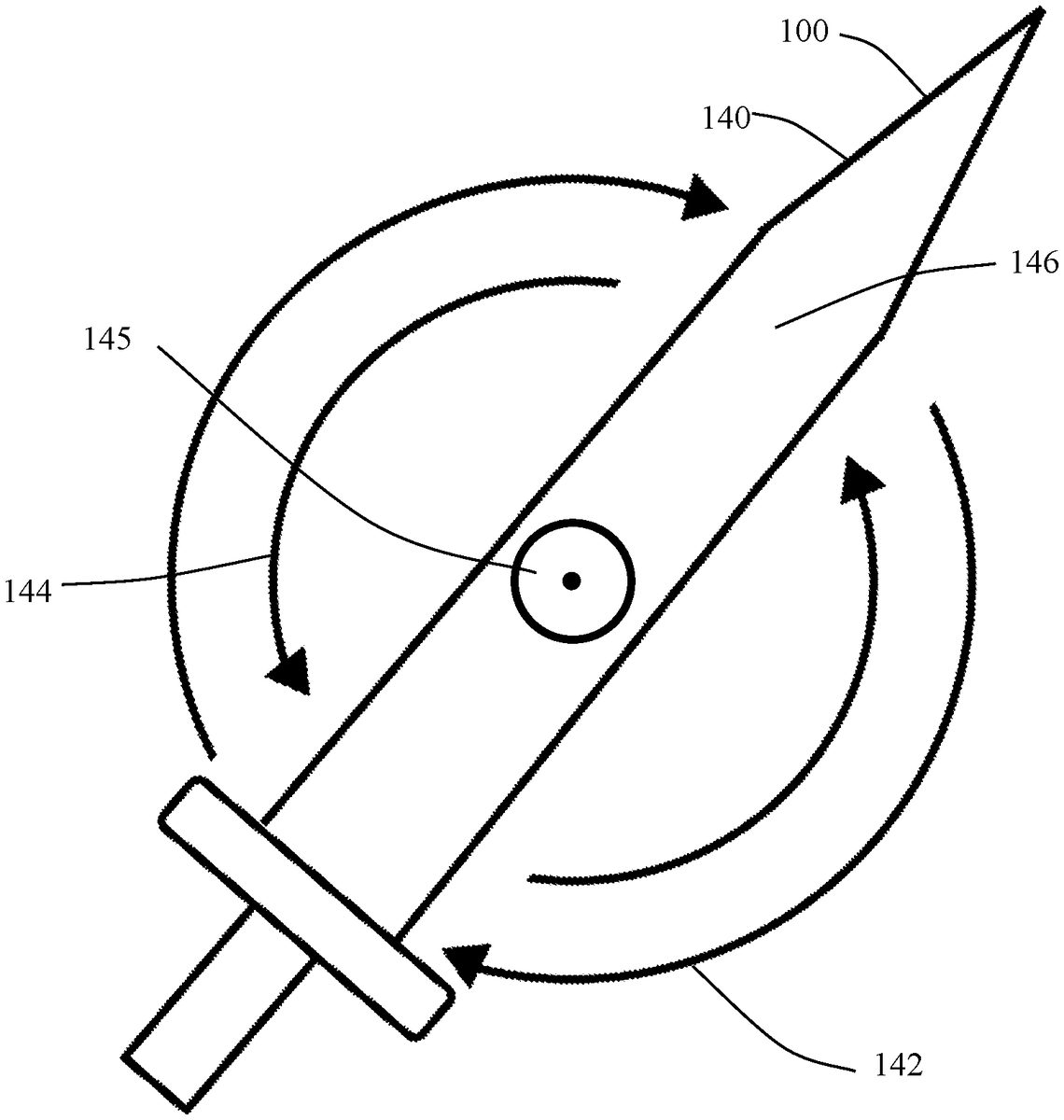
Referring now to the preferred embodiment of the present invention, inFIG. 1,FIG. 2,FIG. 3,FIG. 4,FIG. 5,FIG. 6,FIG. 7,FIG. 8,FIG. 9,FIG. 10,FIG. 11,FIG. 12,FIG. 13,FIG. 14,FIG. 15,FIG. 16,FIG. 17,FIG. 18,FIG. 19,FIG. 20,FIG. 21,FIG. 22,FIG. 23,FIG. 24,FIG. 25,FIG. 26,FIG. 27,FIG. 28,FIG. 29, andFIG. 30, a method for controlling a video game using a Video Game Reticle100is shown.FIG. 1illustrates a reticle-dial swing signaler110, which is a preferred embodiment of a Video Game Reticle100.FIG. 2depicts a line-arrow swing signaler120, which is another preferred embodiment of a Video Game Reticle100.FIG. 3shows a line swing signaler130, which is another preferred embodiment of a Video Game Reticle100.FIG. 4displays a modified line swing signaler190, which is another preferred embodiment of a Video Game Reticle100.FIG. 5shows a sword swing signaler140, which is the most preferred embodiment of a Video Game Reticle100.FIG. 6depicts a racket swing signaler150, which is another preferred embodiment of a Video Game Reticle100.FIG. 7illustrates a diagram showing first person video game combat using a sword swing signaler140as a Video Game Reticle100to attack.FIG. 8demonstrates a diagram showing first person video game combat using a sword swing signaler140as a Video Game Reticle100to defend.FIG. 9shows a diagram illustrating third person video combat using a Video Game Reticle100.FIG. 10displays a diagram, which describes the motion of a sword swing signaler140in response to entered commands.FIG. 11depicts a diagram, which describes the motion of a sword swing signaler140and of the corresponding sword object168that it controls, in response to entered commands.FIG. 12shows a diagram, which describes the motion of a sword swing signaler140and of the corresponding sword object168that it controls, in response to entered commands.FIG. 13illustrates a diagram, which describes the motion of a sword swing signaler140and of the corresponding sword object168that it controls, in response to entered commands.FIG. 14demonstrates a diagram that describes the motion of a sword object168, which acts as its own Video Game Reticle100, in response to entered commands.FIG. 15shows a diagram that describes the motion of a sword object168, which acts as its own Video Game Reticle100, in response to entered commands.FIG. 16depicts a diagram that describes the motion of a sword object168, which acts as its own Video Game Reticle100, in response to entered commands.FIG. 17displays a diagram, which describes the motion of a line-arrow swing signaler120in response to entered commands.FIG. 18illustrates a diagram, which describes the motion of a line-arrow swing signaler120and of the corresponding sword object168that it controls, in response to entered commands.FIG. 19shows a diagram, which describes the motion of a line-arrow swing signaler120and of the corresponding sword object168that it controls, in response to entered commands.FIG. 20displays a diagram, which describes the motion of a line-arrow swing signaler120and of the corresponding sword object168that it controls, in response to entered commands.FIG. 21demonstrates a diagram, which describes the motion of a line swing signaler130in response to entered commands.FIG. 22displays a diagram, which describes the motion of a line swing signaler130and of the corresponding sword object168that it controls, in response to entered commands.FIG. 23depicts a diagram, which describes the motion of a line swing signaler130and of the corresponding sword object168that it controls, in response to entered commands.FIG. 24shows a diagram, which describes the motion of a line swing signaler130and of the corresponding sword object168that it controls, in response to entered commands.FIG. 25demonstrates a diagram, which describes the motion of a modified line swing signaler190in response to entered commands.FIG. 26displays a diagram, which describes the motion of a modified line swing signaler190and of the corresponding sword object168that it controls, in response to entered commands.FIG. 27depicts a diagram, which describes the motion of a modified line swing signaler190and of the corresponding sword object168that it controls, in response to entered commands.FIG. 28shows a diagram, which describes the motion of a modified line swing signaler190and of the corresponding sword object168that it controls, in response to entered commands.FIG. 29illustrates a diagram that compares third person video game play to first person video game play.FIG. 30shows a flow chart describing the decisions and actions a video game player makes in order to control a Video Game Reticle100along with an associated video game object.
Referring still to preferred embodiments of the present invention, inFIG. 1,FIG. 2,FIG. 3,FIG. 4,FIG. 5, andFIG. 6, examples of Video Game Reticles100used in the method of the present invention are shown. InFIG. 1, a reticle-dial swing signaler110is an embodiment of a Video Game Reticle100, which comprises an animated graphical image comprising a reticle-dial pivot point118, a reticle-dial hub115surrounding the reticle-dial pivot point118, a reticle-dial pointer116that extends outward from the reticle-dial pivot point118and may rotate around the reticle-dial pivot point118, a reticle-dial clockwise rotation indicator112, and a reticle-dial counter-clockwise rotation indicator114. During video game play, a player uses keyed controls to rotate the reticle-dial pointer116in the desired rotational direction around the reticle-dial pivot point118until the reticle-dial pointer116is pointed in a desired direction to initiate an action, and the player executes the action using other keyed controls. When an action is executed, the position of the reticle-dial pointer116relative to an optimal position for the action determines the effectiveness of the action so that the player experiences more nuanced game play. The reticle-dial clockwise rotation indicator112and reticle-dial counter-clockwise rotation indicator114indicate the direction of rotational motion and may or may not be displayed as part of a Video Game Reticle100. One skilled in the art will understand that the reticle-dial pointer116may comprise any graphical image that is rotatable around a pivot point with a clear indication of a desired direction. InFIG. 2, a line-arrow swing signaler120is an embodiment of a Video Game Reticle100, which comprises an animated graphical image comprising a line-arrow pivot point125, a line-arrow pointer126that comprises a line segment127extending from one side of the player's viewing window through the line-arrow pivot point125and ending in an end point128and may rotate around the line-arrow pivot point125, a line-arrow clockwise rotation indicator122, and a line-arrow counter-clockwise rotation indicator124. During video game play, a player uses keyed controls to rotate the line-arrow pointer126in the desired rotational direction around the line-arrow pivot point125until the line-arrow pointer126is pointed in a desired direction to initiate an action, and the player executes the action using other keyed controls. When an action is executed, the position of the line-arrow pointer126relative to an optimal position for the action determines the effectiveness of the action so that the player experiences more nuanced game play. The line-arrow clockwise rotation indicator122and line-arrow counter-clockwise rotation indicator124indicate the direction of rotational motion and may or may not be displayed as part of a Video Game Reticle100. InFIG. 3, a line swing signaler130is an embodiment of a Video Game Reticle100, which comprises an animated graphical image comprising a line pivot point135, a line pointer136that comprises a line137extending from one side of the player's viewing window through the line pivot point135and to the opposite side of the player's viewing window and may rotate around the line pivot point135, a line clockwise rotation indicator132, and a line counter-clockwise rotation indicator134. During video game play, a player uses keyed controls to rotate the line pointer136in the desired rotational direction around the line pivot point135until the line pointer136is aligned in a desired direction to initiate an action, and the player executes the action using other keyed controls. When an action is executed, the position of the line pointer136relative to an optimal position for the action determines the effectiveness of the action so that the player experiences more nuanced game play. The line clockwise rotation indicator132and line counter-clockwise rotation indicator134indicate the direction of rotational motion and may or may not be displayed as part of a Video Game Reticle100. InFIG. 4, a modified line swing signaler190is an embodiment of a Video Game Reticle100, which comprises an animated graphical image comprising a modified line pivot point195, a modified line pointer196that comprises a modified line191extending from one side of the player's viewing window through the modified line pivot point195and to the opposite side of the player's viewing window with a first highlighted end197on one end of the modified line191and a second highlighted end198on the other end of the modified line191and may rotate around the modified line pivot point195, a modified line clockwise rotation indicator192, and a modified line counter-clockwise rotation indicator194. During video game play, a player uses keyed controls to rotate the modified line pointer196in the desired rotational direction around the modified line pivot point195until the modified line pointer196is aligned in a desired direction to initiate an action, and the player executes the action using other keyed controls. With the modified line swing signaler190a player may also select the direction of the action along the modified line pointer196by using other keyed controls to select either the first highlighted end197or the second highlighted end198, and the action is directed towards the selected highlighted end accordingly. When an action is executed, the position of the modified line pointer196relative to an optimal position for the action, as well as the direction of the action towards a first highlighted end197or second highlighted end198, determines the effectiveness of the action so that the player experiences more nuanced game play. The modified line clockwise rotation indicator192and modified line counter-clockwise rotation indicator194indicate the direction of rotational motion and may or may not be displayed as part of a Video Game Reticle100. InFIG. 5, a sword swing signaler140is the most preferred embodiment of a Video Game Reticle100, which comprises an animated graphical image comprising a sword object pivot point145, a sword object pointer146that substantially appears as a sword and may rotate around the sword object pivot point145, a sword object clockwise rotation indicator142, and a sword object counter-clockwise rotation indicator144. During video game play, a player uses keyed controls to rotate the sword object pointer146in the desired rotational direction around the sword object pivot point145until the sword object pointer146is pointed in a desired direction to initiate an action, and the player executes the action using other keyed controls. When an action is executed, the position of the sword object pointer146relative to an optimal position for the action determines the effectiveness of the action so that the player experiences more nuanced game play. The sword object clockwise rotation indicator142and sword object counter-clockwise rotation indicator144indicate the direction of rotational motion and may or may not be displayed as part of a Video Game Reticle100. One skilled in the art will understand that the sword object pointer146may comprise any graphical image of an object used in a video game that is rotatable around a pivot point with a clear indication of a desired direction and is not limited to the image of a sword. Similar Video Game Reticles100could be used for any video game object that is swung with varying effectiveness, including, but not limited to, a sword, axe, mace, knife, club, spear, whip, simulated handheld weapon, or the like. InFIG. 6, a racket swing signaler150is an embodiment of a Video Game Reticle100, which comprises an animated graphical image comprising a racket object pivot point155, a racket object pointer156that substantially appears as a racket and may rotate around the racket object pivot point155, a racket object clockwise rotation indicator152, and a racket object counter-clockwise rotation indicator154. During video game play, a player uses keyed controls to rotate the racket object pointer156in the desired rotational direction around the racket object pivot point155until the racket object pointer156is pointed in a desired direction to initiate an action, and the player executes the action using other keyed controls. When an action is executed, the position of the racket object pointer156relative to an optimal position for the action determines the effectiveness of the action so that the player experiences more nuanced game play. The racket object clockwise rotation indicator152and racket object counter-clockwise rotation indicator154indicate the direction of rotational motion and may or may not be displayed as part of a Video Game Reticle100. One skilled in the art will understand that the racket object pointer156may comprise any graphical image of an object used in a video game that is rotatable around a pivot point with a clear indication of a desired direction and is not limited to the image of a racket. Similar Video Game Reticles100could be used for any video game object that is swung with varying effectiveness, including, but not limited to, sports equipment, baseball bats, tennis rackets, golf clubs, or the like.
Referring still to preferred embodiments of the present invention, inFIG. 5,FIG. 7andFIG. 8, examples of using the method of the present invention for first person video game play with a Video Game Reticle100are shown. InFIG. 7, a diagram shows a series of panels illustrating the use of a sword swing signaler140during an attack action. In the first attack panel161, a first-person enemy165is holding an enemy sword166, a first-person avatar167that is controlled by the player is holding a sword object168, and a sword swing signaler140is displayed in the player's window pointing down. In the second attack panel162, the player has initiated an attack action and the video game animates the action of the first-person avatar167raising the sword object168in alignment with the direction of the sword swing signaler140. In the third attack panel163, the video game animates the action of the first-person avatar167swinging the sword object168in the direction the sword swing signaler140is pointing and the first-person enemy165blocks the attack action with the enemy sword166. The effectiveness of the attack action is determined by the position of the sword swing signaler140relative to an optimal position for the attack action for more nuanced game play. For example, if an attack action is executed with the sword swing signaler140positioned relatively far away from an optimal position for an attack, the attack will have diminished effectiveness and the video game simulates a glancing blow with little damage to the first-person enemy165. As a contrary example, if an attack action is executed with the sword swing signaler140positioned at or close to an optimal position for an attack, the attack will have increased effectiveness and the video game simulates an effective blow with large amounts of damage to the first-person enemy165. In the fourth attack panel164, the attack action is complete and the first-person avatar167and first-person enemy165return to their initial positions before the attack action. InFIG. 8, a diagram shows a series of panels illustrating the use of a sword swing signaler140during a defense action. In the first defense panel171, a first-person enemy165is holding an enemy sword166, a first-person avatar167that is controlled by the player is holding a sword object168, and a sword swing signaler140is displayed in the player's window. In the second defense panel172, the first-person enemy165has initiated an attack action by raising the enemy sword166, and the player rotates the sword swing signaler140to the desired direction, which is pointing to the right in this illustration. In the third defense panel173, the video game animates the action of the first-person enemy165swinging the enemy sword166towards the first-person avatar167, and the player executes a defense action whereby the video game animates the sword object168blocking the incoming enemy sword in alignment with the sword swing signaler140. The effectiveness of the defense action is determined by the position of the sword swing signaler140relative to an optimal position for the defense action for more nuanced game play. For example, if a defense action is executed with the sword swing signaler140positioned relatively far away from an optimal position for a defense, the defense will have diminished effectiveness and the video game simulates damage to the first-person avatar167. As a contrary example, if a defense action is executed with the sword swing signaler140positioned at or close to an optimal position for a defense, the defense will have increased effectiveness and the video game simulates a glancing blow with little or no damage to the first-person avatar167. In the fourth defense panel174, the defense action is complete and the first-person avatar167and first-person enemy165return to their initial positions before the defense action.
Referring still to preferred embodiments of the present invention, inFIG. 9, an example of using the method of the present invention for third person video game play with a Video Game Reticle100is shown. InFIG. 9, a diagram shows a series of panels illustrating the use of a Video Game Reticle100during attack actions. In the first third-person panel181, a third-person avatar187that is controlled by the player is holding a third-person sword object188, and a Video Game Reticle100is displayed in the player's window pointing to the upper right. In the second third-person panel182, the player has executed an attack action, and the video game animates a third-person enemy185being stuck by the third-person sword object188in alignment with the direction of the Video Game Reticle100from first third-person panel181with the slash damage189to the third-person enemy185in alignment with the direction of the Video Game Reticle100from first third-person panel181. In the third third-person panel183, a third-person avatar187that is controlled by the player is holding a third-person sword object188, and a Video Game Reticle100is displayed in the player's window pointing to the lower right. In the fourth third-person panel184, the player has executed an attack action, and the video game animates a third-person enemy185being stuck by the third-person sword object188in alignment with the direction of the Video Game Reticle100from third third-person panel183with the slash damage189to the third-person enemy185in alignment with the direction of the Video Game Reticle100from third third-person panel183. The effectiveness of the attack action is determined by the position of the Video Game Reticle100, and its corresponding slash damage189, relative to an optimal position for the attack action for more nuanced game play. For example, if an attack action is executed with the Video Game Reticle100positioned away from an optimal position for an attack, such that the slash damage189strikes an uncritical portion of a third-person enemy185, the attack will have diminished effectiveness and the video game simulates little damage to the third-person enemy185. As a contrary example, if an attack action is executed with the Video Game Reticle100positioned at or close to an optimal position for an attack, such that the slash damage189strikes a critical portion of a third-person enemy185, the attack will have increased effectiveness and the video game simulates large amounts of damage to the third-person enemy185.
Referring now to the most preferred embodiments of the present invention, inFIG. 5,FIG. 10,FIG. 11,FIG. 12, andFIG. 13, a series of panels are shown in diagrams that illustrate the reactions of a Video Game Reticle100in response to keyed commands by a player. In particular,FIG. 10,FIG. 11,FIG. 12, andFIG. 13, describe the behavior of a sword swing signaler140. In these figures, the first column of panels indicates the state of a sword swing signaler140, the second column of panels show examples of the corresponding key entries using a personal computer with a mouse213and keyboard, and the third column of panels show examples of the corresponding key entries using a video game controller214. InFIG. 10, the first sword swing signaler panel201illustrates a sword swing signaler140version of a Video Game Reticle100inactive and by itself with the second sword swing signaler panel202showing an inactive mouse213and with the third sword swing signaler panel203showing an inactive video game controller214. The fourth sword swing signaler panel204depicts a sword swing signaler140version of a Video Game Reticle100by itself and rotating counterclockwise (or to the left) in response to the player's actions with the fifth sword swing signaler panel205showing the mouse213being left-clicked215and with the sixth sword swing signaler panel206showing the video game controller214being L-1-clicked217. The seventh sword swing signaler panel207displays a sword swing signaler140version of a Video Game Reticle100by itself and rotating clockwise (or to the right) in response to the player's actions with the eighth sword swing signaler panel208showing the mouse213being right-clicked216and with the ninth sword swing signaler panel209showing the video game controller214being R-1-clicked218. The tenth sword swing signaler panel210illustrates a sword swing signaler140version of a Video Game Reticle100by itself and rotating counterclockwise (or to the left) in response to the player's actions with the eleventh sword swing signaler panel211showing the mouse213being left-clicked215and with the twelfth sword swing signaler panel212showing the video game controller214being L-1-clicked217. InFIG. 11, the first sword swing signaler with object panel221illustrates an inactive sword swing signaler140version of a Video Game Reticle100, along with the sword object168and first-person avatar167that it controls, with the second sword swing signaler with object panel222showing an inactive mouse213and with the third sword swing signaler with object panel223showing an inactive video game controller214. The fourth sword swing signaler with object panel224depicts a sword swing signaler140version of a Video Game Reticle100, along with the sword object168and first-person avatar167that it controls, rotating counterclockwise (or to the left) in response to the player's actions with the fifth sword swing signaler with object panel225showing the mouse213being left-clicked215and with the sixth sword swing signaler with object panel226showing the video game controller214being L-1-clicked217. The seventh sword swing signaler with object panel227displays a sword swing signaler140version of a Video Game Reticle100, along with the sword object168and first-person avatar167that it controls, rotating clockwise (or to the right) in response to the player's actions with the eighth sword swing signaler with object panel228showing the mouse213being right-clicked216and with the ninth sword swing signaler with object panel229showing the video game controller214being R-1-clicked218. The tenth sword swing signaler with object panel230illustrates a sword swing signaler140version of a Video Game Reticle100, along with the sword object168and first-person avatar167that it controls, rotating counterclockwise (or to the left) in response to the player's actions with the eleventh sword swing signaler with object panel231showing the mouse213being left-clicked215and with the twelfth sword swing signaler with object panel232showing the video game controller214being L-1-clicked217. InFIG. 12, the first sword swing signaler first action panel241illustrates a sword swing signaler140version of a Video Game Reticle100, along with the sword object168and first-person avatar167that it controls, with the second sword swing signaler first action panel242showing a mouse213and control key233of a personal computer keyboard and with the third sword swing signaler first action panel243showing a video game controller214being right-outer-clicked235to initiate an action. The fourth sword swing signaler first action panel244depicts a sword swing signaler140version of a Video Game Reticle100, along with the sword object168and first-person avatar167that it controls, with the fifth sword swing signaler first action panel245showing the mouse213and the control key233being control-clicked234and with the sixth sword swing signaler first action panel246showing the video game controller214being left-outer-clicked236. The seventh sword swing signaler first action panel247displays a sword swing signaler140version of a Video Game Reticle100, along with the sword object168and first-person avatar167that it controls, with the sword object168initiating a swing to the left in response to the player's keyed actions with the eighth sword swing signaler first action panel248showing the mouse213and control key233being inactive after being released and with the ninth sword swing signaler first action panel249showing the video game controller214being inactive after being released. The tenth sword swing signaler first action panel250illustrates a sword swing signaler140version of a Video Game Reticle100, along with the sword object168and first-person avatar167that it controls, with the sword object168swinging fully to the left in response to the player's keyed actions with the eleventh sword swing signaler first action panel251showing the mouse213being inactive after being released and with the twelfth sword swing signaler first action panel252showing the video game controller214being inactive after being released. InFIG. 13, the first sword swing signaler second action panel261illustrates a sword swing signaler140version of a Video Game Reticle100, along with the sword object168swinging back to its initial position after a first action, the first-person avatar167that it controls, and with a first touch pad action253for optionally controlling the Video Game Reticle100using a touch screen, with the second sword swing signaler second action panel262showing a mouse213, a control key233, and a caps lock key257of a personal computer keyboard and with the third sword swing signaler second action panel263showing a video game controller214. The fourth sword swing signaler second action panel264depicts a sword swing signaler140version of a Video Game Reticle100rotating clockwise (or to the right) in response to keyed commands from the player, along with the sword object168, the first-person avatar167that it controls, and with a second touch pad action254for optionally controlling the Video Game Reticle100using a touch screen, with the fifth sword swing signaler second action panel265showing the mouse213being right-clicked216and the control key233and the caps lock key257and with the sixth sword swing signaler second action panel266showing the video game controller214being R-1-clicked218and right-inner-clicked258. The seventh sword swing signaler second action panel267displays a sword swing signaler140version of a Video Game Reticle100, along with the sword object168and first-person avatar167that it controls, with the sword object168lining up with the Video Game Reticle100in response to the player's keyed actions, and with a third touch pad action255for optionally controlling the Video Game Reticle100using a touch screen, with the eighth sword swing signaler second action panel268showing the mouse213and control key233being inactive and the caps lock key257being caps-lock-clicked259and with the ninth sword swing signaler second action panel269showing the video game controller214being left-inner-clicked237. The tenth sword swing signaler second action panel270illustrates a sword swing signaler140version of a Video Game Reticle100, along with the sword object168and first-person avatar167that it controls, and with a fourth touch pad action256for optionally controlling the Video Game Reticle100using a touch screen, with the eleventh sword swing signaler second action panel271showing the mouse213, control key233, and caps lock key257being inactive after being released and with the twelfth sword swing signaler second action panel272showing the video game controller214being inactive after being released.
Referring now to other preferred embodiments of the present invention, inFIG. 14,FIG. 15, andFIG. 16, a series of panels are shown in diagrams that illustrate the reactions of a Video Game Reticle100in response to keyed commands by a player. In particular,FIG. 14,FIG. 15, andFIG. 16, describe the behavior of a swing signaler that is also the object that it controls. In these figures, the first column of panels indicates the state of a sword object168that is also the Video Game Reticle100, the second column of panels show examples of the corresponding key entries using a personal computer with a mouse213and keyboard, and the third column of panels show examples of the corresponding key entries using a video game controller214. InFIG. 14, the first object swing signaler panel301illustrates a sword object168version of a Video Game Reticle100inactive along with a first person avatar167with the second object swing signaler panel302showing an inactive mouse213and with the third object swing signaler panel303showing an inactive video game controller214. The fourth object swing signaler panel304depicts a sword object168version of a Video Game Reticle100rotating counterclockwise (or to the left) in response to the player's actions with the fifth object swing signaler panel305showing the mouse213being left-clicked215and with the sixth object swing signaler panel306showing the video game controller214being L-1-clicked217. The seventh object swing signaler panel307displays a sword object168version of a Video Game Reticle100rotating clockwise (or to the right) in response to the player's actions with the eighth object swing signaler panel308showing the mouse213being right-clicked216and with the ninth object swing signaler panel309showing the video game controller214being R-1-clicked218. The tenth object swing signaler panel310illustrates a sword object168version of a Video Game Reticle100rotating counterclockwise (or to the left) in response to the player's actions with the eleventh object swing signaler panel311showing the mouse213being left-clicked215and with the twelfth object swing signaler panel312showing the video game controller214being L-1-clicked217. InFIG. 15, the first object swing signaler first action panel321illustrates a sword object168version of a Video Game Reticle100, along with a first-person avatar167, with the second object swing signaler first action panel322showing a mouse213and control key233of a personal computer keyboard and with the third object swing signaler first action panel323showing a video game controller214being right-outer-clicked235to initiate an action. The fourth object swing signaler first action panel324depicts a sword object168version of a Video Game Reticle100, along with a first-person avatar, with the sword object swinging to the right with the fifth object swing signaler first action panel325showing the mouse213and the control key233being control-clicked234and with the sixth object swing signaler first action panel326showing the video game controller214being left-outer-clicked236. The seventh object swing signaler first action panel327displays a sword object168version of a Video Game Reticle100, along with a first-person avatar167, with the sword object168swinging to the left in response to the player's keyed actions with the eighth object swing signaler first action panel328showing the mouse213and control key233being inactive after being released and with the ninth object swing signaler first action panel329showing the video game controller214being inactive after being released. The tenth object swing signaler first action panel330illustrates a sword object168version of a Video Game Reticle100, along with a first-person avatar167, with the sword object168swinging fully to the left in response to the player's keyed actions with the eleventh object swing signaler first action panel331showing the mouse213and control key233being inactive after being released and with the twelfth object swing signaler first action panel332showing the video game controller214being inactive after being released. InFIG. 16, the first object swing signaler second action panel341illustrates a sword object168version of a Video Game Reticle100, along with a first-person avatar167, with the second object swing signaler second action panel342showing a mouse213, a control key233, and a caps lock key257of a personal computer keyboard and with the third object swing signaler second action panel343showing a video game controller214. The fourth object swing signaler second action panel344depicts a sword object168version of a Video Game Reticle100rotating clockwise (or to the right) in response to keyed commands from the player, along with a first-person avatar167, with the fifth object swing signaler second action panel345showing the mouse213being right-clicked216and the control key233and the caps lock key257and with the sixth object swing signaler second action panel346showing the video game controller214being R-1-clicked218and right-inner-clicked258. The seventh object swing signaler second action panel347displays a sword object168version of a Video Game Reticle100, along with a first-person avatar167that it controls, in response to the player's keyed actions, with the eighth object swing signaler second action panel348showing the mouse213and control key233being inactive and the caps lock key257being caps-lock-clicked259and with the ninth object swing signaler second action panel349showing the video game controller214being left-inner-clicked237. The tenth object swing signaler second action panel350illustrates a sword object168version of a Video Game Reticle100, along with a first-person avatar167, with the eleventh object swing signaler second action panel351showing the mouse213, control key233, and caps lock key257being inactive after being released and with the twelfth object swing signaler second action panel352showing the video game controller214being inactive after being released.
Referring now to other preferred embodiments of the present invention, inFIG. 2,FIG. 17,FIG. 18,FIG. 19, andFIG. 20, a series of panels are shown in diagrams that illustrate the reactions of a Video Game Reticle100in response to keyed commands by a player. In particular,FIG. 17,FIG. 18,FIG. 19, andFIG. 20, describe the behavior of a line-arrow swing signaler120. In these figures, the first column of panels indicates the state of a line-arrow swing signaler120, the second column of panels show examples of the corresponding key entries using a personal computer with a mouse213and keyboard, and the third column of panels show examples of the corresponding key entries using a video game controller214. InFIG. 17, the first line-arrow swing signaler panel401illustrates a line-arrow swing signaler120version of a Video Game Reticle100inactive and by itself with the second line-arrow swing signaler panel402showing an inactive mouse213and with the third line-arrow swing signaler panel403showing an inactive video game controller214. The fourth line-arrow swing signaler panel404depicts a line-arrow swing signaler120version of a Video Game Reticle100by itself and rotating counterclockwise (or to the left) in response to the player's actions with the fifth line-arrow swing signaler panel405showing the mouse213being left-clicked215and with the sixth line-arrow swing signaler panel406showing the video game controller214being L-1-clicked217. The seventh line-arrow swing signaler panel407displays a line-arrow swing signaler120version of a Video Game Reticle100by itself and rotating clockwise (or to the right) in response to the player's actions with the eighth line-arrow swing signaler panel408showing the mouse213being right-clicked216and with the ninth line-arrow swing signaler panel409showing the video game controller214being R-1-clicked218. The tenth line-arrow swing signaler panel410illustrates a line-arrow swing signaler120version of a Video Game Reticle100by itself and rotating counterclockwise (or to the left) in response to the player's actions with the eleventh line-arrow swing signaler panel411showing the mouse213being left-clicked215and with the twelfth line-arrow swing signaler panel412showing the video game controller214being L-1-clicked217. InFIG. 18, the first line-arrow swing signaler with object panel421illustrates an inactive line-arrow swing signaler120version of a Video Game Reticle100, along with the sword object168and first-person avatar167that it controls, with the second line-arrow swing signaler with object panel422showing an inactive mouse213and with the third line-arrow swing signaler with object panel423showing an inactive video game controller214. The fourth line-arrow swing signaler with object panel424depicts a line-arrow swing signaler120version of a Video Game Reticle100, along with the sword object168and first-person avatar167that it controls, rotating counterclockwise (or to the left) in response to the player's actions with the fifth line-arrow swing signaler with object panel425showing the mouse213being left-clicked215and with the sixth line-arrow swing signaler with object panel426showing the video game controller214being L-1-clicked217. The seventh line-arrow swing signaler with object panel427displays a line-arrow swing signaler120version of a Video Game Reticle100, along with the sword object168and first-person avatar167that it controls, rotating clockwise (or to the right) in response to the player's actions with the eighth line-arrow swing signaler with object panel428showing the mouse213being right-clicked216and with the ninth line-arrow swing signaler with object panel429showing the video game controller214being R-1-clicked218. The tenth line-arrow swing signaler with object panel230illustrates a line-arrow swing signaler120version of a Video Game Reticle100, along with the sword object168and first-person avatar167that it controls, rotating counterclockwise (or to the left) in response to the player's actions with the eleventh line-arrow swing signaler with object panel231showing the mouse213being left-clicked215and with the twelfth line-arrow swing signaler with object panel232showing the video game controller214being L-1-clicked217. InFIG. 19, the first line-arrow swing signaler first action panel441illustrates a line-arrow swing signaler120version of a Video Game Reticle100, along with the sword object168and first-person avatar167that it controls, with the second line-arrow swing signaler first action panel442showing a mouse213and control key233of a personal computer keyboard and with the third line-arrow swing signaler first action panel443showing a video game controller214being right-outer-clicked235to initiate an action. The fourth line-arrow swing signaler first action panel444depicts a line-arrow swing signaler120version of a Video Game Reticle100, along with the sword object168and first-person avatar167that it controls, with the fifth line-arrow swing signaler first action panel445showing the mouse213and the control key233being control-clicked234and with the sixth line-arrow swing signaler first action panel446showing the video game controller214being left-outer-clicked236. The seventh line-arrow swing signaler first action panel447displays a line-arrow swing signaler120version of a Video Game Reticle100, along with the sword object168and first-person avatar167that it controls, with the sword object168initiating a swing to the left in response to the player's keyed actions with the eighth line-arrow swing signaler first action panel448showing the mouse213and control key233being inactive after being released and with the ninth line-arrow swing signaler first action panel449showing the video game controller214being inactive after being released. The tenth line-arrow swing signaler first action panel450illustrates a line-arrow swing signaler120version of a Video Game Reticle100, along with the sword object168and first-person avatar167that it controls, with the sword object168swinging fully to the left in response to the player's keyed actions with the eleventh line-arrow swing signaler first action panel451showing the mouse213and control key233being inactive after being released and with the twelfth line-arrow swing signaler first action panel452showing the video game controller214being inactive after being released. InFIG. 20, the first line-arrow swing signaler second action panel461illustrates a line-arrow swing signaler120version of a Video Game Reticle100, along with the sword object168swinging back to its initial position after a first action, the first-person avatar167that it controls, with the second line-arrow swing signaler second action panel462showing a mouse213, a control key233, and a caps lock key257of a personal computer keyboard and with the third line-arrow swing signaler second action panel463showing a video game controller214. The fourth line-arrow swing signaler second action panel464depicts a line-arrow swing signaler120version of a Video Game Reticle100rotating clockwise (or to the right) in response to keyed commands from the player, along with the sword object168and the first-person avatar167that it controls, with the fifth line-arrow swing signaler second action panel465showing the mouse213being right-clicked216and the control key233and the caps lock key257and with the sixth line-arrow swing signaler second action panel466showing the video game controller214being R-1-clicked218and right-inner-clicked258. The seventh line-arrow swing signaler second action panel467displays a line-arrow swing signaler120version of a Video Game Reticle100, along with the sword object168and first-person avatar167that it controls, with the sword object168lining up with the line-arrow swing signaler120in response to the player's keyed actions, with the eighth line-arrow swing signaler second action panel468showing the mouse213and control key233being inactive and the caps lock key257being caps-lock-clicked259and with the ninth line-arrow swing signaler second action panel469showing the video game controller214being left-inner-clicked237. The tenth line-arrow swing signaler second action panel470illustrates a line-arrow swing signaler120version of a Video Game Reticle100, along with the sword object168and first-person avatar167that it controls, with the eleventh line-arrow swing signaler second action panel471showing the mouse213, control key233, and caps lock key257being inactive after being released and with the twelfth line-arrow swing signaler second action panel472showing the video game controller214being inactive after being released.
Referring now to other preferred embodiments of the present invention, inFIG. 3,FIG. 21,FIG. 22,FIG. 23, andFIG. 24, a series of panels are shown in diagrams that illustrate the reactions of a Video Game Reticle100in response to keyed commands by a player. In particular,FIG. 21,FIG. 22,FIG. 23, andFIG. 24, describe the behavior of a line swing signaler130. In these figures, the first column of panels indicates the state of a line swing signaler130, the second column of panels show examples of the corresponding key entries using a personal computer with a mouse213and keyboard, and the third column of panels show examples of the corresponding key entries using a video game controller214. InFIG. 21, the first line-arrow swing signaler panel501illustrates a line swing signaler130version of a Video Game Reticle100inactive and by itself with the second line-arrow swing signaler panel502showing an inactive mouse213and with the third line-arrow swing signaler panel503showing an inactive video game controller214. The fourth line-arrow swing signaler panel504depicts a line swing signaler130version of a Video Game Reticle100by itself and rotating counterclockwise (or to the left) in response to the player's actions with the fifth line-arrow swing signaler panel505showing the mouse213being left-clicked215and with the sixth line-arrow swing signaler panel506showing the video game controller214being L-1-clicked217. The seventh line-arrow swing signaler panel507displays a line swing signaler130version of a Video Game Reticle100by itself and rotating clockwise (or to the right) in response to the player's actions with the eighth line-arrow swing signaler panel508showing the mouse213being right-clicked216and with the ninth line-arrow swing signaler panel509showing the video game controller214being R-1-clicked218. The tenth line-arrow swing signaler panel510illustrates a line swing signaler130version of a Video Game Reticle100by itself and rotating counterclockwise (or to the left) in response to the player's actions with the eleventh line-arrow swing signaler panel511showing the mouse213being left-clicked215and with the twelfth line-arrow swing signaler panel512showing the video game controller214being L-1-clicked217. InFIG. 22, the first line-arrow swing signaler with object panel521illustrates an inactive line swing signaler130version of a Video Game Reticle100, along with the sword object168and first-person avatar167that it controls, with the second line-arrow swing signaler with object panel522showing an inactive mouse213and with the third line-arrow swing signaler with object panel523showing an inactive video game controller214. With the line swing signaler130version of the Video Game Reticle100, the object that the line swing signaler130controls, which is a sword object168inFIG. 22, visually lines up with the line swing signaler130and remains parallel to the line swing signaler130during rotation. The fourth line-arrow swing signaler with object panel524depicts a line swing signaler130version of a Video Game Reticle100, along with the sword object168and first-person avatar167that it controls, rotating counterclockwise (or to the left) in response to the player's actions with the fifth line-arrow swing signaler with object panel525showing the mouse213being left-clicked215and with the sixth line-arrow swing signaler with object panel526showing the video game controller214being L-1-clicked217. The seventh line-arrow swing signaler with object panel527displays a line swing signaler130version of a Video Game Reticle100, along with the sword object168and first-person avatar167that it controls, rotating clockwise (or to the right) in response to the player's actions with the eighth line-arrow swing signaler with object panel528showing the mouse213being right-clicked216and with the ninth line-arrow swing signaler with object panel529showing the video game controller214being R-1-clicked218. The tenth line-arrow swing signaler with object panel530illustrates a line swing signaler130version of a Video Game Reticle100, along with the sword object168and first-person avatar167that it controls, rotating counterclockwise (or to the left) in response to the player's actions with the eleventh line-arrow swing signaler with object panel531showing the mouse213being left-clicked215and with the twelfth line-arrow swing signaler with object panel532showing the video game controller214being L-1-clicked217. InFIG. 23, the first line-arrow swing signaler first action panel541illustrates a line swing signaler130version of a Video Game Reticle100, along with the sword object168and first-person avatar167that it controls, with the second line-arrow swing signaler first action panel542showing a mouse213and control key233of a personal computer keyboard and with the third line-arrow swing signaler first action panel543showing a video game controller214being right-outer-clicked235to initiate an action. The fourth line-arrow swing signaler first action panel544depicts a line swing signaler130version of a Video Game Reticle100, along with the sword object168and first-person avatar167that it controls, with the sword object168swinging to the right in response to the player's keyed actions at the beginning of the action with the fifth line-arrow swing signaler first action panel545showing the mouse213and the control key233being control-clicked234and with the sixth line-arrow swing signaler first action panel546showing the video game controller214being left-outer-clicked236. The seventh line-arrow swing signaler first action panel547displays a line swing signaler130version of a Video Game Reticle100, along with the sword object168and first-person avatar167that it controls, with the sword object168swinging to the left in the middle of the action with the eighth line-arrow swing signaler first action panel548showing the mouse213and control key233being inactive after being released and with the ninth line-arrow swing signaler first action panel549showing the video game controller214being inactive after being released. The tenth line-arrow swing signaler first action panel550illustrates a line swing signaler130version of a Video Game Reticle100, along with the sword object168and first-person avatar167that it controls, with the sword object168swinging fully to the left with the eleventh line-arrow swing signaler first action panel551showing the mouse213and control key233being inactive after being released and with the twelfth line-arrow swing signaler first action panel552showing the video game controller214being inactive after being released. InFIG. 24, the first line-arrow swing signaler second action panel561illustrates a line swing signaler130version of a Video Game Reticle100, along with the sword object168swinging back to its initial position after a first action, the first-person avatar167that it controls, with the second line-arrow swing signaler second action panel562showing a mouse213, a control key233, and a caps lock key257of a personal computer keyboard and with the third line-arrow swing signaler second action panel563showing a video game controller214. The fourth line-arrow swing signaler second action panel564depicts a line swing signaler130version of a Video Game Reticle100rotating clockwise (or to the right) in response to keyed commands from the player, along with the sword object168and the first-person avatar167that it controls, with the fifth line-arrow swing signaler second action panel565showing the mouse213being right-clicked216and the control key233and the caps lock key257and with the sixth line-arrow swing signaler second action panel566showing the video game controller214being R-1-clicked218and right-inner-clicked258. The seventh line-arrow swing signaler second action panel567displays a line swing signaler130version of a Video Game Reticle100, along with the sword object168and first-person avatar167that it controls, with the sword object168lining up with the line swing signaler130in response to the player's keyed actions, with the eighth line-arrow swing signaler second action panel568showing the mouse213and control key233being inactive and the caps lock key257being caps-lock-clicked259and with the ninth line-arrow swing signaler second action panel569showing the video game controller214being left-inner-clicked237. The tenth line-arrow swing signaler second action panel570illustrates a line swing signaler130version of a Video Game Reticle100, along with the sword object168and first-person avatar167that it controls, with the eleventh line-arrow swing signaler second action panel571showing the mouse213, control key233, and caps lock key257being inactive after being released and with the twelfth line-arrow swing signaler second action panel572showing the video game controller214being inactive after being released.
Referring now to other preferred embodiments of the present invention, inFIG. 4,FIG. 25,FIG. 26,FIG. 27, andFIG. 28, a series of panels are shown in diagrams that illustrate the reactions of a Video Game Reticle100in response to keyed commands by a player. In particular,FIG. 25,FIG. 26,FIG. 27, andFIG. 28, describe the behavior of a modified line swing signaler190. In these figures, the first column of panels indicates the state of a modified line swing signaler190, the second column of panels show examples of the corresponding key entries using a personal computer with a mouse213and keyboard, and the third column of panels show examples of the corresponding key entries using a video game controller214. InFIG. 25, the first line-arrow swing signaler panel601illustrates a modified line swing signaler190version of a Video Game Reticle100inactive, with the first highlighted end197and second highlighted end198both unselected, and by itself with the second line-arrow swing signaler panel602showing an inactive mouse213and with the third line-arrow swing signaler panel603showing an inactive video game controller214. The fourth line-arrow swing signaler panel604depicts a modified line swing signaler190version of a Video Game Reticle100by itself, with the first highlighted end197and second highlighted end198both unselected, and rotating counterclockwise (or to the left) in response to the player's actions with the fifth line-arrow swing signaler panel605showing the mouse213being left-clicked215and with the sixth line-arrow swing signaler panel606showing the video game controller214being L-1-clicked217. The seventh line-arrow swing signaler panel607displays a modified line swing signaler190version of a Video Game Reticle100by itself, with the first highlighted end197and second highlighted end198both unselected, and rotating clockwise (or to the right) in response to the player's actions with the eighth line-arrow swing signaler panel608showing the mouse213being right-clicked216and with the ninth line-arrow swing signaler panel609showing the video game controller214being R-1-clicked218. The tenth line-arrow swing signaler panel610illustrates a modified line swing signaler190version of a Video Game Reticle100by itself, with the first highlighted end197and second highlighted end198both unselected, and rotating counterclockwise (or to the left) in response to the player's actions with the eleventh line-arrow swing signaler panel611showing the mouse213being left-clicked215and with the twelfth line-arrow swing signaler panel612showing the video game controller214being L-1-clicked217. InFIG. 26, the first line-arrow swing signaler with object panel621illustrates an inactive modified line swing signaler190version of a Video Game Reticle100with the first highlighted end197and second highlighted end198both unselected, along with the sword object168and first-person avatar167that it controls, with the second line-arrow swing signaler with object panel622showing an inactive mouse213and with the third line-arrow swing signaler with object panel623showing an inactive video game controller214. The fourth line-arrow swing signaler with object panel624depicts a modified line swing signaler190version of a Video Game Reticle100with the first highlighted end197and second highlighted end198both unselected, along with the sword object168and first-person avatar167that it controls, rotating counterclockwise (or to the left) in response to the player's actions with the fifth line-arrow swing signaler with object panel625showing the mouse213being left-clicked215and with the sixth line-arrow swing signaler with object panel626showing the video game controller214being L-1-clicked217. The seventh line-arrow swing signaler with object panel627displays a modified line swing signaler190version of a Video Game Reticle100with the first highlighted end197and second highlighted end198both unselected, along with the sword object168and first-person avatar167that it controls, rotating clockwise (or to the right) in response to the player's actions with the eighth line-arrow swing signaler with object panel628showing the mouse213being right-clicked216and with the ninth line-arrow swing signaler with object panel629showing the video game controller214being R-1-clicked218. The tenth line-arrow swing signaler with object panel630illustrates a modified line swing signaler190version of a Video Game Reticle100with the first highlighted end197and second highlighted end198both unselected, along with the sword object168and first-person avatar167that it controls, rotating counterclockwise (or to the left) in response to the player's actions with the eleventh line-arrow swing signaler with object panel631showing the mouse213being left-clicked215and with the twelfth line-arrow swing signaler with object panel632showing the video game controller214being L-1-clicked217. InFIG. 27, the first line-arrow swing signaler first action panel641illustrates a modified line swing signaler190version of a Video Game Reticle100, along with the sword object168and first-person avatar167that it controls, with the first highlighted end197unselected and second highlighted end198highlight selected199in response to player input, with the second line-arrow swing signaler first action panel642showing a mouse213and a control key233, a Z key675, and an X key676being X-key-clicked677to select the second highlighted end198to be highlight selected199, of a personal computer keyboard and with the third line-arrow swing signaler first action panel643showing a video game controller214being right-outer-clicked235to initiate an action. The fourth line-arrow swing signaler first action panel644depicts a modified line swing signaler190version of a Video Game Reticle100, along with the sword object168and first-person avatar167that it controls, with the first highlighted end197unselected and second highlighted end198highlight selected199in response to player input, with the sword object168swinging to the right in response to the player's keyed actions at the beginning of the action with the fifth line-arrow swing signaler first action panel645showing the mouse213, the control key233being control-clicked234, the Z key675, and the X key676and with the sixth line-arrow swing signaler first action panel646showing the video game controller214being left-outer-clicked236. The seventh line-arrow swing signaler first action panel647displays a modified line swing signaler190version of a Video Game Reticle100, along with the sword object168and first-person avatar167that it controls, with the first highlighted end197unselected and second highlighted end198highlight selected199in response to player input, with the sword object168swinging to the right towards the highlight selected199end in the middle of the action with the eighth line-arrow swing signaler first action panel648showing the mouse213, control key233, the Z key675, and the X key676, being inactive after being released and with the ninth line-arrow swing signaler first action panel649showing the video game controller214being inactive after being released. The tenth line-arrow swing signaler first action panel650illustrates a modified line swing signaler190version of a Video Game Reticle100, along with the sword object168and first-person avatar167that it controls, with the first highlighted end197unselected and second highlighted end198highlight selected199in response to player input, with the sword object168swinging fully to the right towards the highlight selected199end with the eleventh line-arrow swing signaler first action panel651showing the mouse213, control key233, the Z key675, and the X key676, being inactive after being released and with the twelfth line-arrow swing signaler first action panel652showing the video game controller214being inactive after being released. InFIG. 28, the first line-arrow swing signaler second action panel661illustrates a modified line swing signaler190version of a Video Game Reticle100, along with the sword object168and first-person avatar167that it controls, with the first highlighted end197and second highlighted end198both unselected, with the second line-arrow swing signaler second action panel662showing a mouse213, a control key233, a Z key675, an X key676, and a caps lock key257of a personal computer keyboard all unselected and with the third line-arrow swing signaler second action panel663showing an inactive video game controller214. The fourth line-arrow swing signaler second action panel664depicts a modified line swing signaler190version of a Video Game Reticle100rotating clockwise (or to the right) in response to keyed commands from the player, along with the sword object168and the first-person avatar167that it controls, with the first highlighted end197highlight selected199and second highlighted end198unselected in response to player input, with the fifth line-arrow swing signaler second action panel665showing the mouse213being right-clicked216, the control key233, the Z key675being Z-key-clicked678to select the first highlighted end197to be highlight selected199, the X key676, and the caps lock key257and with the sixth line-arrow swing signaler second action panel666showing the video game controller214being R-1-clicked218and right-inner-clicked258. The seventh line-arrow swing signaler second action panel667displays a modified line swing signaler190version of a Video Game Reticle100, along with the sword object168and first-person avatar167that it controls, with the first highlighted end197highlight selected199and second highlighted end198unselected in response to player input, with the sword object168lining up with the modified line swing signaler190and pointed in the direction of the highlight selected199first highlighted end197, with the eighth line-arrow swing signaler second action panel668showing the mouse213, the control key233, the Z key675, and the X key676, being inactive and the caps lock key257being caps-lock-clicked259and with the ninth line-arrow swing signaler second action panel669showing the video game controller214being left-inner-clicked237. The tenth line-arrow swing signaler second action panel670illustrates a modified line swing signaler190version of a Video Game Reticle100, along with the sword object168swinging back to its initial position at the beginning of the action with the first-person avatar167, with the first highlighted end197and second highlighted end198both unselected, with the eleventh line-arrow swing signaler second action panel671showing the mouse213, control key233, the Z key675, the X key676, and caps lock key257being inactive after being released and with the twelfth line-arrow swing signaler second action panel672showing the video game controller214being inactive after being released.
Referring now to the preferred embodiments of the present invention shown inFIG. 1,FIG. 2,FIG. 3,FIG. 4,FIG. 5,FIG. 6,FIG. 7,FIG. 8,FIG. 9,FIG. 10,FIG. 11,FIG. 12,FIG. 13,FIG. 14,FIG. 15,FIG. 16,FIG. 17,FIG. 18,FIG. 19,FIG. 20,FIG. 21,FIG. 22,FIG. 23,FIG. 24,FIG. 25,FIG. 26,FIG. 27,FIG. 28,FIG. 29, andFIG. 30, inFIG. 29a diagram is depicted, which compares a first-person player experience to a third-person player experience. InFIG. 29, the third-person panel701shows a third-person avatar187holding a third-person sword object188with the Video Game Reticle100shown as a line before the third-person avatar187and with a virtual camera indicating the third-person source710of the point of view of third-person player experience showing the third-person field of view715. The first-person panel702shows a first-person avatar167holding a sword object168with the Video Game Reticle100shown as a line before the first-person avatar167, and the first-person avatar167is the first-person source720of the point of view of first-person player experience as shown with the first-person field of view725. One skilled in the art will understand that the Video Game Reticle of the present invention may be easily adapted to either first-person or third person play, and the keyed controls indicated in the figures can apply to either type of gameplay.
Referring still to the preferred embodiments of the present invention depicted inFIG. 1,FIG. 2,FIG. 3,FIG. 4,FIG. 5,FIG. 6,FIG. 7,FIG. 8,FIG. 9,FIG. 10,FIG. 11,FIG. 12,FIG. 13,FIG. 14,FIG. 15,FIG. 16,FIG. 17,FIG. 18,FIG. 19,FIG. 20,FIG. 21,FIG. 22,FIG. 23,FIG. 24,FIG. 25,FIG. 26,FIG. 27,FIG. 28,FIG. 29, andFIG. 30, inFIG. 30a Video Game Reticle flow chart800is shown, which describes the decision making and actions performed by a player using a Video Game Reticle100. The process begins with the player begins step805. First, the player decides whether to attack in the attack decision step810. If the player wants to attack, the player must decide whether to attack to the right in the right attack decision step815. If the player wants to attack to the right, the player clicks on the right mouse key in the click right mousepad key attack step840. Next, the player clicks the control key on the keyboard in the right attack control step845. If the player does not want to attack to the right, the player must decide whether to attack to the left in the left attack decision step820. If the player wants to attack to the left, the player clicks on the left mouse key in the click left mousepad key attack step860. Next, the player clicks the control key on the keyboard in the left attack control step865. If the player does not want to attack to the left, the player returns to the player begins step805. If the player does not want to attack, the player must decide whether to block in the block decision step825. If the player does not want to block, the player returns to the player begins step805. If the player does want to block, the player must decide whether to block to the left in the left block decision step830. If the player wants to block to the left, the player clicks on the left mouse key in the click left mousepad key block step850. Next, the player clicks the ALT key on the keyboard in the left block control step855. If the player does not want to block to the left, the player must decide whether to block to the right in the right block decision step835. If the player wants to block to the right, the player clicks on the right mouse key in the click right mousepad key block step870. Next, the player clicks the control key on the keyboard in the right block control step875. If the player does not want to block to the right, the player returns to the player begins step805.
The construction details of the invention as shown inFIG. 1,FIG. 2,FIG. 3,FIG. 4,FIG. 5,FIG. 6,FIG. 7,FIG. 8,FIG. 9,FIG. 10,FIG. 11,FIG. 12,FIG. 13,FIG. 14,FIG. 15,FIG. 16,FIG. 17,FIG. 18,FIG. 19,FIG. 20,FIG. 21,FIG. 22,FIG. 23,FIG. 24,FIG. 25,FIG. 26,FIG. 27,FIG. 28,FIG. 29, andFIG. 30, are as follows. The preferred embodiments of the Video Game Reticles100are animated, dynamic graphical symbols that comprise a series of instructions executable by a computer, which are stored in non-transitory computer-readable medium, such as software, algorithms, or the like. The Video Game Reticle100can be used in a video game dedicated to its use, or could be incorporated into an Application Programming Interface (API) to enable the Video Game Reticle100to be imported, adapted, or combined, with existing or third-party first-person or third person video game to enable them more nuanced control and effectiveness of virtual handheld objects. Although specific key input is associated with the preferred embodiments described in this application, one or ordinary skill in the art will understand that the Video Game Reticle100could use any combination of keyed input to control the reticle and that the Video Game Reticle can be adapted to various form of computer input in addition to the mouse, keyboard, touch pad, and controller used in the figures. The materials listed herein are examples only and not intended to limit the scope of the present invention.
The advantages of the present invention include, without limitation, that it provides methods that allow a player to enjoy improved nuanced control over simulated objects, as well as, nuanced effectiveness of a virtual action based on that nuanced control, in order to provide a more realistic experience in a video game. Additionally, the more nuanced control enabled by this invention allow a player to hone a more expansive set of skills and display their ability to enact complex and dynamic actions.
In broad embodiment, the present invention relates generally to a method for controlling a simulated tool or weapon in a first-person or third-person video game, such as a virtual sword, using a rotatable reticle, which allows a player to control the precise angle of an action and to select from a variety of actions, and then adjusts the effectiveness of the action based on the quality of the players use of the reticle.
While the foregoing written description of the invention enables one of ordinary skill to make and use what is considered presently to be the best mode thereof, those of ordinary skill will understand and appreciate the existence of variations, combinations, and equivalents of the specific embodiment, method, and examples herein. The invention should therefore not be limited by the above described embodiments, methods, and examples, but by all embodiments and methods that are within the scope and spirit of the invention as claimed.
Claims
- A method of nuanced control of an action in a video game, said method comprising: providing a processor, said processor being capable of controlling said video game;providing a display device, said display device being capable of being controlled by said processor;providing an input device, said input device being capable of providing player input information to said processor;providing a simulated video game object for manipulation in said video game, said simulated video game object being capable of being displayed on said display device in said video game using said processor and being capable of being manipulated by said input device using said processor;graphically illustrating a reticle in said video game on said display device using said processor, said reticle comprising a pivot point, and a directional indicator, said direction indicator being rotational around said pivot point based on said player input information from said input device using said processor and comprising a pointer;rotating said directional indicator around said pivot point displayed on said display device until said pointer is at a selected orientation in response to said player input information using said processor, said selected orientation comprising the orientation of said pointer selected by said player using said input device;initiating said action in response to said player input information using said processor;determining the effectiveness of said action by comparing said selected orientation to an optimal orientation using said processor, said optimal orientation comprising the orientation for optimizing said action, and reducing said effectiveness proportionately to the degree of variance of said selected orientation from said optimal orientation using said processor;configuring said action with said effectiveness using said processor;and simulating said action in said video game by displaying said action on said display device using said processor.
- The method of claim 1 , wherein said reticle changes colors based on said effectiveness of said action.
- The method of claim 1 , wherein said reticle resembles a handheld weapon.
- The method of claim 1 , wherein said reticle resembles hand-held sports equipment.
- A method of nuanced control of an action in a video game, said method comprising: providing a processor, said processor being capable of controlling said video game;providing a display device, said display device being capable of being controlled by said processor;providing an input device, said input device being capable of providing player input information to said processor;providing a simulated video game object for manipulation in said video game, said simulated video game object being capable of being displayed on said display device in said video game using said processor and being capable of being manipulated by said input device using said processor;graphically illustrating said simulated video game object in said video game on said display device using said processor, said simulated video game object comprising a pivot point, and a directional indicator, said direction indicator being rotational around said pivot point based on said player input information from said input device using said processor and comprising a pointer;rotating said directional indicator around said pivot point displayed on said display device until said pointer is at a selected orientation in response to said player input information using said processor, said selected orientation comprising the orientation of said pointer selected by said player using said input device;initiating said action in response to said player input information using said processor;determining the effectiveness of said action by comparing said selected orientation to an optimal orientation using said processor, said optimal orientation comprising the orientation for optimizing said action, and reducing said effectiveness proportionately to the degree of variance of said selected orientation from said optimal orientation using said processor;configuring said action with said effectiveness using said processor;and simulating said action in said video game by displaying said action on said display device using said processor.
- The method of claim 5 , wherein said simulated video game object changes colors based on said effectiveness of said action.
- The method of claim 5 , wherein said simulated video game object resembles a hand-held weapon.
- The method of claim 5 , wherein said simulated video game object resembles hand-held sports equipment.
- A method of nuanced control of an action in a video game, said video game comprising a viewing window, said method comprising: providing a processor, said processor being capable of controlling said video game;providing a display device, said display device being capable of being controlled by said processor;providing an input device, said input device being capable of providing player input information to said processor;providing a simulated video game object for manipulation in said video game, said simulated video game object being capable of being displayed on said display device in said video game using said processor and being capable of being manipulated by said input device using said processor;graphically illustrating a pointing line in said viewing window of said video game on said display device using said processor, said pointing line comprising a pivot point, a line extending from the edge of said viewing window of said video game through said pivot point, said line being rotational around said pivot point based on said player input information from said input device using said processor, and a directional indicator, said direction indicator comprising a pointer;rotating said line around said pivot point displayed on said display device until said pointer is at a selected orientation in response to said player input information using said processor, said selected orientation comprising the orientation of said pointer selected by said player using said input device;initiating said action in response to said player input information using said processor;determining the effectiveness of said action by comparing said selected orientation to an optimal orientation using said processor, said optimal orientation comprising the orientation for optimizing said action, and reducing said effectiveness proportionately to the degree of variance of said selected orientation from said optimal orientation using said processor;configuring said action with said effectiveness using said processor;and simulating said action in said video game by displaying said action on said display device using said processor.
- The method of claim 9 , wherein said pointing line changes colors based on said effectiveness of said action.
- A method of nuanced control of an action in a video game, said video game comprising a viewing window, said method comprising: providing a processor, said processor being capable of controlling said video game;providing a display device, said display device being capable of being controlled by said processor;providing an input device, said input device being capable of providing player input information to said processor;providing a simulated video game object for manipulation in said video game, said simulated video game object being capable of being displayed on said display device in said video game using said processor and being capable of being manipulated by said input device using said processor;graphically illustrating a control line in said viewing window of said video game on said display device using said processor, said control line comprising a pivot point, and a line extending from the edge of said viewing window of said video game through said pivot point to the opposite edge of said viewing window, said line being rotational around said pivot point based on said player input information from said input device using said processor;rotating said line around said pivot point displayed on said display device until said line is at a selected orientation in response to said player input information using said processor, said selected orientation comprising the orientation of said line selected by said player using said input device;initiating said action in response to said player input information using said processor;determining the effectiveness of said action by comparing said selected orientation to an optimal orientation using said processor, said optimal orientation comprising the orientation for optimizing said action, and reducing said effectiveness proportionately to the degree of variance of said selected orientation from said optimal orientation using said processor;configuring said action with said effectiveness using said processor;and simulating said action in said video game by displaying said action on said display device using said processor.
- The method of claim 11 , wherein said control line changes colors based on said effectiveness of said action.
- A method of nuanced control of an action in a video game, said video game comprising a viewing window, said method comprising: providing a processor, said processor being capable of controlling said video game;providing a display device, said display device being capable of being controlled by said processor;providing an input device, said input device being capable of providing player input information to said processor;providing a simulated video game object for manipulation in said video game, said simulated video game object being capable of being displayed on said display device in said video game using said processor and being capable of being manipulated by said input device using said processor;graphically illustrating a control line in said viewing window of said video game on said display device using said processor, said control line comprising a pivot point, a line extending from one edge of said viewing window of said video game through said pivot point to the opposite edge of said viewing window, said line being rotational around said pivot point based on said player input information from said input device using said processor, and two selectable ends on either end of said line, either said selectable end being able to be selected in response to said player input information from said input device using said processor;rotating said line around said pivot point displayed on said display device until said line is at a selected orientation in response to said player input information using said processor, said selected orientation comprising the orientation of said line selected by said player using said input device;selecting one said selectable end in response to said player input information using said processor, said selected selectable end determining the selected direction of said action;initiating said action in response to said player input information using said processor;determining the effectiveness of said action by comparing said selected orientation to an optimal orientation using said processor, said optimal orientation comprising the orientation for optimizing said action;comparing said selected direction to an optimal direction using said processor, said optimal direction comprising the direction for optimizing said action;and reducing said effectiveness proportionately to the degree of variance of said selected orientation from said optimal orientation and the variance of said selected direction from said optimal direction using said processor;configuring said action with said effectiveness using said processor;and simulating said action in said video game by displaying said action on said display device using said processor.
- The method of claim 13 , wherein said control line changes colors based on said effectiveness of said action.
- The method of claim 13 , wherein said control line changes colors based on said effectiveness of said action.
Disclaimer: Data collected from the USPTO and may be malformed, incomplete, and/or otherwise inaccurate.