U.S. Pat. No. 10,589,177
GLITCH FEATURE FOR USER EDITED VIDEO GAMES
AssigneeJOYLABZ, LLC
Issue DateApril 20, 2018
Illustrative Figure
Abstract
An in-game video game editing system and method is provided. An electronic processor executes a game software application to generate, on a display, a graphical gameplay interface including a plurality of sprites and a graphical editing panel listing predetermined modifications. The electronic processor receives a selection of one of the predetermined modifications ad determines a type of the predetermined modification. The type indicates whether the predetermined modification includes adding a new sprite or selecting an existing sprite. Based on the type, an existing sprite is selected from the graphical gameplay interface. The electronic processor then adds a block of code to the selected sprite based on the predetermined modification to generate a modified sprite, and executes the block of code to provide the modified sprite on the graphical gameplay interface.
Description
DETAILED DESCRIPTION One or more embodiments are described and illustrated in the following description and accompanying drawings. These embodiments are not limited to the specific details provided herein and may be modified in various ways. Furthermore, other embodiments may exist that are not described herein. Also, the functionality described herein as being performed by one component may be performed by multiple components in a distributed manner. Likewise, functionality performed by multiple components may be consolidated and performed by a single component. Similarly, a component described as performing particular functionality may also perform additional functionality not described herein. For example, a device or structure that is “configured” in a certain way is configured in at least that way, but may also be configured in ways that are not listed. Furthermore, some embodiments described herein may include one or more electronic processors configured to perform the described functionality by executing instructions stored in non-transitory, computer-readable medium. Similarly, embodiments described herein may be implemented as non-transitory, computer-readable medium storing instructions executable by one or more electronic processors to perform the described functionality. As used in the present application, “non-transitory computer-readable medium” comprises all computer-readable media but does not consist of a transitory, propagating signal. Accordingly, non-transitory computer-readable medium may include, for example, a hard disk, a CD-ROM, an optical storage device, a magnetic storage device, a ROM (Read Only Memory), a RAM (Random Access Memory), register memory, a processor cache, or any combination thereof. In addition, the phraseology and terminology used herein is for the purpose of description and should not be regarded as limiting. For example, the use of “including,” “containing,” “comprising,” “having,” and variations thereof herein is meant to encompass the items listed thereafter and equivalents thereof as well as additional items. The terms “connected” and “coupled” are used broadly and ...
DETAILED DESCRIPTION
One or more embodiments are described and illustrated in the following description and accompanying drawings. These embodiments are not limited to the specific details provided herein and may be modified in various ways. Furthermore, other embodiments may exist that are not described herein. Also, the functionality described herein as being performed by one component may be performed by multiple components in a distributed manner. Likewise, functionality performed by multiple components may be consolidated and performed by a single component. Similarly, a component described as performing particular functionality may also perform additional functionality not described herein. For example, a device or structure that is “configured” in a certain way is configured in at least that way, but may also be configured in ways that are not listed. Furthermore, some embodiments described herein may include one or more electronic processors configured to perform the described functionality by executing instructions stored in non-transitory, computer-readable medium. Similarly, embodiments described herein may be implemented as non-transitory, computer-readable medium storing instructions executable by one or more electronic processors to perform the described functionality. As used in the present application, “non-transitory computer-readable medium” comprises all computer-readable media but does not consist of a transitory, propagating signal. Accordingly, non-transitory computer-readable medium may include, for example, a hard disk, a CD-ROM, an optical storage device, a magnetic storage device, a ROM (Read Only Memory), a RAM (Random Access Memory), register memory, a processor cache, or any combination thereof.
In addition, the phraseology and terminology used herein is for the purpose of description and should not be regarded as limiting. For example, the use of “including,” “containing,” “comprising,” “having,” and variations thereof herein is meant to encompass the items listed thereafter and equivalents thereof as well as additional items. The terms “connected” and “coupled” are used broadly and encompass both direct and indirect connecting and coupling. Further, “connected” and “coupled” are not restricted to physical or mechanical connections or couplings and can include electrical connections or couplings, whether direct or indirect. In addition, electronic communications and notifications may be performed using wired connections, wireless connections, or a combination thereof and may be transmitted directly or through one or more intermediary devices over various types of networks, communication channels, and connections. Moreover, relational terms such as first and second, top and bottom, and the like may be used herein solely to distinguish one entity or action from another entity or action without necessarily requiring or implying any actual such relationship or order between such entities or actions.
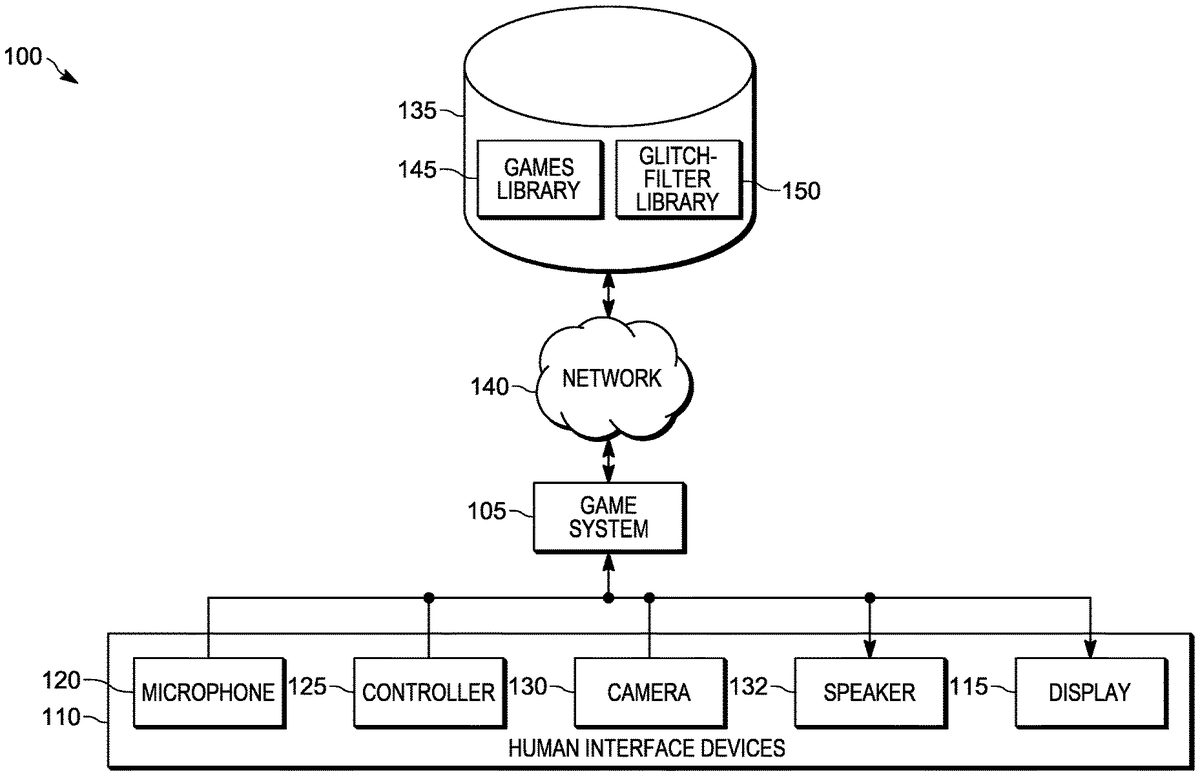
FIG. 1illustrates an in-game video game editing system100. In the example illustrated, the game editing system100includes several hardware components including a game system105and one or more human interface devices110. The human interface devices110include one or more of a display115, a microphone120, a controller125, a camera130, and a speaker132. The components of the game editing system100may be of various constructions and may use various communication types and protocols.
The game system105may be communicatively connected to the display115, microphone120, controller125, camera130, and speaker132via various wired or wireless connections. For example, in some embodiments, the game system105is directly coupled via a dedicated wire to each of the above-listed components of the game system105. In other embodiments, the game system105is communicatively coupled to one or more of the components via a wireless connection.
The game system105is configured to send information to and receive information from a remote server135via a network140, which may be wired, wireless, or a combination thereof. For example, the information that may be sent from the remote server135and received by the game system105includes a games library145and a glitch-filter library150. Although the remote server135is illustrated as one server, the remote server135may include a plurality of servers. Thus, the games library145and the glitch-filter library150, while illustrated as being stored on one server, may be distributed amongst a plurality of servers making up the remote server135.
FIG. 2is a block diagram of the game system105. The game system105includes, among other things, an electronic processor200, a memory205, a network input/output interface210, and a device input/output interface215. The electronic processor200is communicatively connected to the memory205, the network input/output interface210, and the device input/output interface215. The electronic processor200, in coordination with the memory205, the network input/output interface210, and the device input/output interface215, is configured to implement, among other things, the methods described herein.
The memory205includes an operating system220, a glitch-filter library225, and a games library230. The games library230contains a plurality of game software applications including a first game software application235, a second game software application240, and additional game software applications241. The first game software application235has a first plurality of sprites242including a first sprite245. The second game software application240has a second plurality of sprites247including a second sprite250. A sprite is an object that is displayed within a game play interface and that has a plurality of blocks of code. For example, a sprite may be a two dimensional bitmap (such as a JPEG) that is integrated into the graphical gameplay interface. A block of code of the plurality of blocks of code defines, for example, the appearance (physical attributes) of the sprite, behavior of the sprite, or both. For example, a block of code that defines the behavior of the sprite may cause the sprite to move upwards on the game play interface until the sprite touches another sprite on the game play interface. A block of code defining the sprite may also define a physical attribute of the sprite such as the color of the sprite. The glitch-filter library225includes glitches, filters, or both, which, as described in further detail below, are configured to provide a variety of modifications to sprites within a game software application.
The device input/output interface215is configured to enable the electronic processor200to communicate with the human interface devices110including the display115, the microphone120, the controller125, the camera130, and the speaker132. The network input/output interface210is configured to enable the electronic processor200to communicate with the remote server135via the network140. For example, the interfaces210and215may include one or more of driver circuitry, terminal connections, wireless transceivers, and signal processing circuits. The electronic processor200retrieves up-to-date versions of game software applications from the games library145on the remote server135, such as one or more of the applications shown inFIG. 2. The electronic processor200caches the game software applications in memory205and executes the applications. The electronic processor200also retrieves from the games library145modified versions of game software applications that have been saved by the user, such as one or more of the applications shown inFIG. 2. The electronic processor200caches the modified versions of game software applications in memory205in order to execute them. The electronic processor200retrieves from the remote server135an up-to-date glitch-filter library150and caches the up-to-date glitch-filter library150in memory205as the glitch-filter library225. The glitch-filter library225may also be referred to as a local glitch-filter library, and the game software applications in the games library230may be referred to as local game software applications. In some embodiments, the connection to the remote server135is not present and the game system105is an untethered, localized system. In some embodiments, the connect to the remote server135occurs periodically to update the system, such as by updating the glitch-filter library225and the games library230with new or modified glitches, filters, and games available at the remote server135.
FIG. 3illustrates a home screen300of the game system105. Each ribbon (for example, ribbon305) of a plurality of ribbons in the home screen300illustrates a group of games available for a user to select to play. Each game in a group of games is represented by a game icon. In the example illustrated, a dashed line around a game icon indicates that the game represented by the game icon is currently selected by the user (e.g., using one or more of the human interface devices110). For example, a dashed line around the game icon310inFIG. 3indicates that the game represented by the game icon310has been selected. In some embodiments, when the user selects a game, the electronic processor200displays on the display115the code the electronic processor200executes as the game is played.
FIG. 4illustrates an example of a graphical gameplay interface400. The game system105generates the graphical gameplay interface400in response to receiving a user's selection of a game, via the human interface devices110, on the home screen300. More particularly, the electronic processor200retrieves, from the memory205, and executes a game software application (e.g., the first game software application235) to generate the graphical gameplay interface400and to display the graphical gameplay interface400on the display115. The graphical gameplay interface400, in this example embodiment, is for a pinball game. The graphical gameplay interface400includes several sprites, such as a sprite405, illustrated as a ball. The graphical gameplay interface400further includes a sprite410, illustrated as a paddle, that the user is controlling via gameplay input received by the electronic processor200from the human interface devices110. The sprite405and the sprite410will be used in the following discussion to describe certain features of the invention. In some embodiments, code that the electronic processor200executes to display the graphical gameplay interface400is displayed within the graphical gameplay interface400.
FIG. 5illustrates the controller125of the game editing system100. The controller125, as illustrated, is a hand-held game controller125that includes gameplay input buttons500and editing buttons505. The controller125includes an electronic processor configured to execute instructions stored on a memory of the controller125to carry out the functionality of the controller125described herein. The gameplay input buttons500and editing buttons505may be one or more of electro-mechanical pushbuttons, analog joysticks, capacitive touch buttons, directional pads, trigger-style buttons, soft buttons (e.g., on a touch screen), and other forms of user input elements. The electronic processor of the controller125detects the user input via the various buttons of the controller125(for example, by sensing a current signal provided by the buttons). In response to actuation of the buttons by a user, the controller125provides input to the game system105to navigate the home screen300(see, e.g.,FIG. 3) and other screens, during gameplay (see, e.g.,FIG. 4), during a glitch or filter application mode (see, e.g.,FIG. 11), during a code editing mode (see, e.g.,FIG. 10), and for other uses. The gameplay input buttons500, when actuated by a user, cause the controller125to send gameplay input to the electronic processor200. The editing buttons505, when actuated by a user, cause the controller125to send editing input to the electronic processor200. For example, in some embodiments, the editing buttons505include a glitch button510, a filter button515, and a code button520. When the glitch button510is actuated, the controller125sends a command to the electronic processor200to display a graphical editing panel with the glitches the user can apply. When the filter button515is actuated, the controller125sends a command to the electronic processor200to display a graphical editing panel with the filters the user can apply. When the code button520is actuated, the controller125sends a command to the electronic processor200to display a code editing interface. In some embodiments, when the electronic processor200applies a glitch to a game the electronic processor200sends a signal to the electronic processor of the controller125, causing the controller125to output an indication (such as a flashing light, a vibration, or a sound) that a glitch has been applied. It should be understood that the controller125described herein is merely illustrative and may include more or fewer gameplay input buttons500and editing buttons505than those described herein. For example, the controller125may include a single button that when actuated provides a user access to a graphical editing panel with glitches, a graphical editing panel with filters, and a code editing interface.
In some embodiments, the electronic processor200may receive input that commands the electronic processor200to associate an action performed by a user or a sound made by the user with a gameplay input button or editing input button on the controller125. For example, the electronic processor200may receive input declaring that the electronic processor200should associate receiving an indication of a hand-waving motion from the camera130with receiving input from one of the gameplay input buttons500on the controller125. Thereafter, when the electronic processor200receives an indication of a hand-waving motion from the camera130, the electronic processor200behaves as it would if it received an actuation of a gameplay input button. In another example, the electronic processor200may receive input declaring that the electronic processor200should associate receiving an indication of a whistle from the microphone120with receiving input from one of the gameplay input buttons500on the controller125. Thereafter, when the electronic processor200receives an indication of a whistle from the microphone120, the electronic processor200behaves as if it received an actuation of a gameplay input button.
FIG. 6illustrates a flow chart for interacting with the game system105. The flow chart begins in block600when the game system105powers on, and the electronic processor200generates and displays the home screen300on the display115(seeFIG. 3). The home screen300includes a plurality of game icons illustrated in a plurality of ribbons, with each game icon being associated with a game software application. The electronic processor200populates each ribbon of the plurality of ribbons with game icons representing the game software applications stored in one or both of the games libraries145and230. User browsing input is received at one or more of the human interface devices110, such as the controller125. The human interface devices110provide the user browsing input to the electronic processor200, which cycles through the game icons displayed in the ribbon305. In block605, the electronic processor200receives browsing input from the human interface devices110indicative of a user selection of a game. In block610, the electronic processor200executes the game software application associated with the selected game icon. Execution of the game software application includes generating a graphical gameplay interface for the selected game, such as the graphical gameplay interface400. Execution of the game software application further includes receiving gameplay input via the human interface devices110and providing output to the human interface devices110as well as updating the graphical gameplay interface to enable gameplay (e.g., virtual pinball) in accordance with the particular selected game.
During execution of the game software application, modification input or quit game input may be received at one or more of the human interface devices110, such as the controller125, from a user. The human interface devices110provide the modification input or quit game input that was received to the electronic processor200. The modification input may be a request to add a glitch (upon actuation of the glitch button510), add a filter (upon actuation of the filter button515), or modify code (upon actuation of the code button520). The electronic processor200receives the modification input and proceeds to block620to add a glitch, to block625to add a filter, or to block630to modify code, in accordance with the request received. For example, in block620, the electronic processor200displays a graphical editing panel with the glitches the user can select, receives user input, via the human interface devices110specifying a glitch, and applies the glitch specified. Similarly, in block625, the electronic processor200displays the graphical editing panel with the filters the user can select, receives user input, via the human interface devices110specifying a filter, and applies the filter specified. Similarly, in block630, the electronic processor200displays a code editing interface, receives user code editing input, via the human interface devices110, as described below with respect toFIG. 11, and applies the code edits to the game software application. For example, the electronic processor200may receive code edits to perform one or more of: adding one or more sprites to a game or modifying one or more attributes of existing sprites (block635), adding or modifying other code blocks (block640), or modifying audio and visual features of the game (block645). In response to the code edits received in blocks635,640, and645, the electronic processor200saves the modified game software application locally in the games library230of the game system105. After the game software application has been modified, depending on the received modification input, the electronic processor200returns to block610to execute the game software application.
In response to quit game input, the electronic processor200proceeds from block610to block650. If the game software application has not been modified (e.g., via blocks615,620,625, or630), the electronic processor200returns to the home screen300in block600. If, however, the game software application has been modified, the electronic processor200prompts the user (e.g., on the display115) to indicate whether to save the modified game software application. In response to receipt of an indication not to save, the electronic processor200returns to the home screen300in block600. In response to receipt of a request to save the game, the electronic processor200uploads the modified game software application to the games library145on remote server135. In turn, the electronic processor200(and the electronic processors of other games systems105coupled to the remote server135) will be able to retrieve the modified game software application for display on and selection from the ribbon305in the home screen300.
FIG. 7is a flow chart of an in situ (i.e., in-game) video game editing method700. The electronic processor200executes the first game software application235to generate a first graphical gameplay interface (block705). The first graphical gameplay interface includes the first sprite245illustrated graphically by, for example, the sprite410(e.g., the paddle) shown inFIG. 4. The first game software application235defines the first sprite245. The electronic processor200receives a first gameplay input from the human interface devices110(block710). In response to receipt of the first gameplay input, the electronic processor200moves the first sprite245on the first graphical gameplay interface. For example, the electronic processor200receives gameplay input when the user presses a button on the controller125and, in response to the received gameplay input, (e.g., the user pressing the button on the controller125) moves the sprite410(e.g., the paddle) to a new position on the graphical gameplay interface400.
Upon receiving input from the user indicating the user's desire to edit the game (such as pressing one of the editing buttons505of the controller125), and a selection of a predetermined modification (a glitch or a filter), the electronic processor200modifies the first sprite245based on the selected predetermined modification (block725). Various examples of predetermined modifications are described below in further detail. After the predetermined modification is applied, the electronic processor200updates the first graphical gameplay interface to include a modified first sprite245(block730).
In some embodiments, during the course of executing the first game software application, block725is repeated several times such that further selected predetermined modifications are applied to various sprites of the first game software application235in response to further input provided by the human interface devices110.
The steps described above may be applied to a plurality of game software applications and a plurality of sprites. For example, in some embodiments, the electronic processor200executes the second game software application240stored in the memory205of the game system105to generate a second graphical gameplay interface (block735). The second graphical gameplay interface includes the second sprite250. The second game software application240defines the second sprite250. The electronic processor200receives a second gameplay input from the human interface devices110(block740). The second gameplay input controls the gameplay on the second graphical gameplay interface. In response to receiving the second gameplay input, the electronic processor200moves the second sprite250on the second graphical gameplay interface. An example of gameplay input is pressing a button to move the second sprite250to jump or turn on the second graphical gameplay interface. Upon receiving input from the user indicating the user's desire to edit the game (such as pressing one of the editing buttons505of the controller125) and a selection of the predetermined modification (which may be the same predetermined modification as the predetermined modification selected for the first game software application), the electronic processor200modifies the second sprite250based the predetermined modification (block755) and updates the second graphical gameplay interface to include the modified second sprite250(block760).
The above described method may be applied to any of the sprites included in the first plurality of sprites242of the first game software application235or any of the sprites included in the second plurality of sprites247of the second game software application240. For example, a third sprite displayed on the first graphical gameplay interface may be modified based on editing input from a user and the first graphical gameplay interface is then updated to include the modified third sprite.
In some embodiments, depending on the modification that was made to, for example, the first sprite245, the behavior of the modified first sprite245will affect other sprites (for example, the third sprite) on the first graphical gameplay interface. For example, if the first sprite245is modified in a way that gives the first sprite245a virtual shooting ability (i.e., the ability to emit a virtual projectile) and the third sprite touches the virtual projectile (i.e., on the graphical gameplay interface, the projectile “hits” the third sprite) the third attribute of the third sprite may be modified in a manner that is dependent on the type of virtual projectile that the first sprite245emitted. Examples of types of virtual projectiles are given below in Table 1. In another example, an attribute of the third sprite is modified when the third sprite touches the modified first sprite245, and the third sprite displayed on the first graphical gameplay interface is then updated with the modified third attribute. Further, in some embodiments, the selected predetermined modification itself modifies one or more other sprites on the graphical gameplay interface. For example, the predetermined modification may specify how the other sprites are to interact with the first sprite245or projectiles emitted from the first sprite245.
FIG. 8describes a method800for selecting a predetermined modification (a glitch) and modifying a sprite based on the selected glitch. The method800may be used, for example, to implement block725, block755, or both. Upon receiving editing input or input from the user indicating the user's desire to edit the game (such as pressing one of the editing buttons505of the controller125), the electronic processor200creates a graphical editing panel (described in more detail below inFIG. 11) and places the graphical editing panel on a graphical gameplay interface (block805). Upon receiving a selection of a glitch (block810), the electronic processor200determines whether the glitch involves adding a new sprite to a game software application (for example, the first game software application) (block815). When the glitch involves adding a new sprite to the game software application, the electronic processor200adds the sprite to the game software application. In other words, the electronic processor200inserts the code associated with the new sprite defined by the glitch into the code associated with the game software application, and then displays the new sprite within the graphical gameplay interface in accordance with the inserted code (block820). When the glitch does not involve adding a sprite to a game software application, the electronic processor200prompts the user for a sprite selection and receives a selection of a sprite displayed on the graphical gameplay interface (block825). For example, the electronic processor200generates a cursor to prompt the user, and the user manipulates one of the human interface devices110to select a sprite (e.g., the sprite405) on the graphical gameplay interface400with the cursor, which causes the selection of the sprite to be received by the electronic processor200. In some embodiments, the electronic processor200adds more than one sprite to the graphical gameplay interface or receives a selection of more than one sprite via a human interface device110in blocks820and825, respectively. The electronic processor200modifies the code of at least one sprite included in the game software application based on the selected glitch (block830). In some embodiments, modifying the code of at least one sprite includes adding at least one block of code associated with the selected glitch to at least one sprite included in the game software application. In some embodiments, modifying the code of at least one sprite includes deleting already existing code from at least one sprite included in the game software application based on the selected glitch. In some embodiments, modifying the code of at least one sprite includes changing the existing code of at least one sprite included in the game software application. A change that may be made to the existing code of a sprite is, for example, changing an already existing size parameter value from a first value to a second value (e.g., to alter the size of the sprite on the display). In block830, the electronic processor200may perform any combination of adding code blocks to a sprite, changing the existing code of a sprite, and deleting code from a sprite. During execution of the game software application, a block of code injected at block830will one or more of add a physical attribute to a sprite, adjust the physical attribute of a sprite, add a new function or behavior to a sprite, or adjust an existing function or behavior of a sprite. The functions performed by the code blocks are described in more detail below with respect to the example glitches provided in Table 1. The sprite to which the block of code is added depends on the selected glitch and, in some instances, the selected sprite.
Referring momentarily toFIGS. 9A, 9B, 9C, and 9D, these figures illustrate different ways that blocks of code of a glitch may be distributed amongst the plurality of sprites included in a game software application. In other words,FIGS. 9A, 9B, 9C, and 9Dare examples of techniques used to inject code of a glitch902a,902b,902c, and902d(selected in block810), into in a game software application903(injected in block830). The game software application903may be the first game software application235, the second game software application240, or another game software application from the additional game software applications241(seeFIG. 2). InFIG. 9A, the selected glitch902ainvolves adding a new sprite905to the game software application903. The electronic processor200adds a first block of glitch code910that changes the behavior or appearance of the new sprite905. The electronic processor200adds to one or more sprites915included in the game software application903, other than the new sprite905, a second block of glitch code920. The second block of glitch code920, for example, determines the behavior of the other sprites915when the other sprites915interact with the new sprite905.
FIG. 9Billustrates the glitch902b, which does not involve adding a new sprite905to the game software application903. InFIG. 9B, the selected glitch902binvolves the electronic processor200receiving a selection of a sprite930and adding a first block of glitch code925to the selected sprite930of a game software application903. The electronic processor200also adds a second block of glitch code935to sprites915, which are one or more sprites of the game software application903other than the selected sprite930. For example, if the selected glitch902bgives the selected sprite930the ability to emit virtual projectiles, then the second block of glitch code935defines the manner in which the sprites915behave when the sprites915interact with a projectile emitted by the selected sprite930.
InFIG. 9Cthe selected type of glitch902calso involves the electronic processor200receiving a selection of a sprite945and adds a first block of glitch code945to the selected sprite945. However, inFIG. 9Cthe electronic processor200does not add a block of glitch code to the sprites915, which are one or more sprites of the game software application903other than the selected sprite945. For example, the first block of glitch code945may cause the selected sprite945to alternate colors, but the behavior and appearance of the sprites915are unchanged by the selected glitch902c.
FIG. 9Dillustrates the glitch902d, which involves the electronic processor200receiving a selection of a first sprite960and a second sprite965. The glitch902dfurther includes retrieving a first block of glitch code970from the selected first sprite960of a game software application903, and retrieving a second block of glitch code975from the selected second sprite965of a game software application903. The glitch902dfurther includes replacing the first block of glitch code970in the selected first sprite960with the second block of glitch code975, and replacing the second block of glitch code975in the selected second sprite965with the first block of glitch code970. InFIG. 9D, the electronic processor200does not add a block of glitch code to sprites (not shown) other than the selected first sprite960and second sprite965. Accordingly,FIG. 9Dillustrates a glitch that enables the swapping of sprite code between sprites. Such swapped code may, in effect, swap physical characteristics (e.g., size or color), swap appearances entirely, swap behavioral characteristics (e.g., mobility), or swap behaviors entirely between sprites. In some embodiments, the glitch902dinvolves copying code from one sprite to another sprite, without swapping. For example, the glitch902dmay involve the retrieval of first block of glitch code970from the first sprite960to replace the second block of glitch code970of the second sprite965, or to add to the glitch code of the second sprite965.
By injecting a block of glitch code into a sprite, as described with respect toFIGS. 9A, 9B, 9C, and 9D, the electronic processor200, for example, adds the glitch code to a memory including code defining the to-be-modified sprite(s) (e.g., the memory205), and associates the added glitch code with the relevant sprite(s) within the memory. It should be understood that the sprites905,930,945,960, and965inFIGS. 9A, 9B, 9C, and 9D, while illustrated as single sprites, may be any number of sprites, and that the first block of code and the second block of code, while illustrated as single blocks of code, may be any number of blocks of code used to implement a selected glitch. It should also be understood that the game software application may include any number of sprites and that the two other sprites915shown inFIGS. 9A, 9B, and 9Care merely illustrative.
Returning now toFIG. 8, the electronic processor200executes a block of temporary glitch code to preview the glitch (block835). For example, regardless of the selected glitch, the electronic processor200injects and executes a block of temporary glitch code to the game software application. When the block of temporary glitch code is executed, the electronic processor200generates a preview on the display115of the selected glitch by executing the modification to the sprite code illustrated by block830. Further, when the block of temporary glitch code is executed, the electronic processor200determines whether an adjustment to the glitch code is received from a user via the human interface devices110(block837). In response to receipt of an adjustment selection from the human interface devices110, the electronic processor200adjusts the modification made to the sprite code (in block830) of the one or more sprites (block840). For example, if the selected glitch changes the size of a selected sprite, the user may be able to select, from a plurality of size options displayed on the display115, a desired size of the sprite. When the electronic processor200receives a user selection of a desired size, the electronic processor200adjusts the size of the selected sprite to reflect the selected desired size. Returning to block837, when no further adjustment input is received (or an exit command is received), the electronic processor200ceases execution of the temporary glitch code, stops displaying the graphical editing panel, and exits the glitch mode (block845). In some embodiments, blocks835,837, and840are bypassed and the glitch mode is exited after sprite code is modified in block830.
FIG. 10illustrates a code editing interface1000that allows the user to edit glitches and filters in the glitch-filter library225. The code editing interface1000may be generated and displayed on the display115by the game system105when the electronic processor200executes editing software stored on the memory205. The code editing interface1000may be displayed in response to the game system105receiving user input via the human interface devices110requesting that the game system105enter into a code editing mode (see block630ofFIG. 6).
The code editing interface1000displays the software code of one or more glitches and filters of a game software application in the code panel1005. For example, the code panel1005may display glitch code and filter code of the first game software application235. In some embodiments, (such as the embodiment illustrated inFIG. 10) the code panel1005illustrates one or more code blocks associated with a single glitch or filter.
The code editing interface1000also includes an editing panel1025including editing function icons, which may be graphical, textual, or both. The editing function icons are each associated with an editing function, such as choosing a glitch to edit and selecting blocks of code to add to the code of a glitch or filter. For example, in response to selection of a first editing function icon, a list of selectable glitches may be displayed. In response to a user selection of a glitch, the glitch code associated with the selected glitch is displayed in the code panel1005. The glitch code of each glitch is made up of a plurality of blocks of code that define a portion of the physical attributes and the behaviors of a sprite that a glitch is applied to. For example, the glitch code is displayed in the code panel1005and includes blocks of code1035,1040that define a portion of the physical attributes and behaviors of a sprite that the glitch is applied to. The code editing interface1000is configured to receive modifications to the code blocks1035,1040based on user input via the human interface devices110. The user may directly modify the code, for example, by typing to delete, add, or replace code, using other graphical inputs (e.g., using graphical arrows or scroll bars), or dragging and dropping graphical code segments that may be combined to form code blocks to and from the editing panel1025and the glitch code in the code panel1005. A menu1041(located above the code panel1005in the illustrated embodiment) highlights an icon which signifies to the user which sprite the code will be added to when the glitch is applied to the game software application. For example, when an icon1042is highlighted, or in some way distinguished, the code displayed in the code panel1005is code that will be added to a selected sprite (the protagonist) upon applying the glitch. When the icon1043is highlighted, or in some way distinguished, the code displayed in the code panel1005is code that will be added to sprites included in a game software application other than a selected sprite upon applying the glitch. When the icon1044is highlighted, or in some way distinguished, the code displayed in the code panel1005is code that will be added to a new sprite that is added upon applying the glitch.
In the embodiment illustrated inFIG. 10, the editing panel1025contains a plurality of categories1045of graphical code segments1050. The graphical code segments1050are placed in the categories1045based on what the graphical code segments define in a sprite. For example, graphical code segments1050included in a looks category determine the appearance of a sprite on a graphical gameplay interface, graphical code segments included in a controls category determine how a sprite reacts to input from a human interface device110, and graphical code segments included in a motion category determine how a sprite moves on a graphical gameplay interface. When a user selects a category of graphical code segments, each of the graphical code segments included in the category are displayed in the editing panel1025. In the example illustrated, the motion category is selected and, in response, the electronic processor200displays graphical code segments that define, for example, how much a sprite moves and in what direction.
In some embodiments, some of the functionality of the system100described herein employs the Scratch™ programming language developed at the Massachusetts Institute of Technology (“MIT”) and some of the functionality of the system100described herein employs JavaScript™. In some embodiments, other programming languages are used.
FIG. 11illustrates the graphical gameplay interface400overlaid with a graphical editing panel1100while simultaneously displaying the sprite405. As described above, the graphical editing panel1100may be displayed by the electronic processor200on the display115when the electronic processor200receives editing input from the user and enters a glitch mode. The graphical editing panel1100includes a plurality of selectable predetermined modifications. On the left side of the graphical editing panel1100is a glitch menu1105displaying icons (or virtual buttons) for one or more types of glitches. The glitch types displayed in the glitch menu1105include edit glitches, magic glitches, block glitches, superpower glitches, cannon glitches, favorite glitches, and trending glitches. Edit glitches modify a physical attribute or a behavior of a sprite, such as the size of the sprite or the color of the sprite. Edit glitches are generally one-time changes that are static. In contract, magic glitches cause a physical attribute or behavior of a sprite to change continuously. For example, the size of the sprite may repeatedly increase and decrease. Block glitches cause a new sprite to be added to a game software application. Super power glitches modify a physical attribute or behavior of a sprite in response to input from a human interface device110. In one example, a super power glitch results in two sprites, selected via a human interface device110, to swap positions in response to a button press on the game controller125. Cannon glitches involve modifying a sprite's behavior to give the sprite an ability to shoot virtual projectiles. Trending glitches are a list of glitches that are most often applied to game software applications, or the particular game software application currently being executed, during a most recent predetermined period of time. In some embodiments, favorite glitches may be glitches that are most often applied to game software applications by the electronic processor200based on selections received from a human interface device110. In other embodiments, favorite glitches may also be glitches that the electronic processor200receives a selection of via a human interface device110indicting that the glitch is a favorite. When the electronic processor200receives a selection of an icon representing a type of glitch, a menu1110of glitch icons is displayed as an extension of the graphical editing panel1100. Each glitch icon in the menu1110represents a glitch that is associated with the selected type of glitch. Each glitch icon in the displayed menu of glitch icons is available for user selection via the human interface devices110.
When the electronic processor200receives a selection of a glitch icon, the glitch associated with the glitch icon is applied by the electronic processor200to one or more sprites on the graphical gameplay interface400. Applying a glitch to one or more sprites includes modifying the code of the one or more sprites. In one example, upon receiving a selection of a glitch icon on the glitch menu1105and the sprite405, the electronic processor200retrieves one or more blocks of code associated with the selected glitch and modifies the sprite405by adding the block of code to the sprite (see, e.g., blocks815,825, and830ofFIG. 8). In another example, upon receiving a selection of a glitch icon on the glitch menu1105, the electronic processor200adds a new sprite to the graphical gameplay interface400by adding a plurality of code blocks defining the sprite to the first game software application235(see, e.g., blocks815,820, and830ofFIG. 8).
The electronic processor200of the game system105is also configured to apply a glitch to sprites in a graphical gameplay interface that are not selected by a user or newly added to a graphical gameplay interface. For example, in the graphical gameplay interface400, the glitch may be applied to other sprites including a base and bumpers. As described above in FIG.9, the blocks of code that are added and the sprites that receive the blocks of code depend on the selection of the glitch that the electronic processor200receives. In some embodiments, glitches may modify the behavior of a sprite previously added to the graphical gameplay interface400by the electronic processor200in response to receiving a selection of a previous glitch.
When the electronic processor200is executing the associated game software application having the glitch, sprites in a graphical gameplay interface are displayed and controlled according to the applied glitch. For example, glitches can provide the sprite405with the a virtual flying ability, provide the sprite405a virtual gravitational pull, prevent the virtual movement of the previously mobile sprite405, enable the virtual movement of the previously immobile sprite405, provide the sprite405with a virtual shooting ability, provide a virtual attractive force between the sprite405and a virtual graphical object displayed by the graphical gameplay interface400, and change the visual representation of the sprite405. See Table 1 for a list of example glitches and further description.
In the illustrated embodiment, a menu1115displays the filters that are available for user selection via the human interface devices110. A filter is similar to a glitch in that it also, when executed by the game system105, modifies one or more attributes or code blocks of a sprite included in a game software application (for example, the first game software application235) of the games library230. However, a filter modifies the code of a plurality of sprites, or all sprites, in the game software application, adds a plurality of new sprites to the game software application each having the same block of code, or both. Accordingly, while a glitch is generally a sprite-centric modification, a filter is a game-wide modification. In some embodiments, a list of sprites is displayed before application of the filter to enable user selection of one or more particular sprites of the game software application that should not be modified when the filter is applied.
In some embodiments, rather than providing a glitch menu that is spatially or temporally separated from a filter menu, a combined glitch-filter menu with both selectable glitch icons and selectable filter icons is provided on the graphical gameplay interface400.
In response to selection of a glitch or filter (see, e.g., block810ofFIG. 8), the code1120associated with the selected glitch or filter is displayed in the lower right hand corner of the graphical editing panel1100. In some embodiments, when the electronic processor200receives a selection of a sprite to receive the selected glitch, a visual representation of the code1120being inserted into the sprite is displayed on the graphical gameplay interface400(see, e.g.,FIG. 13C). For example, and with reference to the modification of code in block830ofFIG. 8, a graphic1307is displayed moving along a path from the code1120to the sprite receiving the glitch as shown, for example, inFIG. 13C.
On the right side of the graphical editing panel1100is a parameter glitch menu1125. The parameter glitch menu1125lists a plurality of physical attributes of a sprite that may be adjusted according to user input for a selected glitch. With reference to the flow chart ofFIG. 8, in response to receiving a selection of a glitch referred to as “scale” (block810), and selection of a first sprite (block825), the electronic processor200may further receive an adjustment input at the parameter glitch menu1125(block840). The adjustment input may include an adjustment of the x-position parameter of the selected sprite, in which case the electronic processor200adjusts the x-position of the sprite so that the position of the sprite on the graphical gameplay interface400matches the adjustment input received by the electronic processor200. An example of adjusting a parameter included in the parameter glitch menu1125is shown inFIG. 12AandFIG. 12B.FIG. 12Aillustrates the graphical gameplay interface400overlaid with the graphical editing panel1100before the electronic processor200receives adjustment input for the parameter representing the x-position of the sprite, andFIG. 12Billustrates the graphical gameplay interface400overlaid with the graphical editing panel1100after the electronic processor200receives adjustment input for the parameter representing the x-position of the first sprite.
A sprite is selected to receive a glitch in a variety ways. For example, a cursor1130may be provided on the graphical gameplay interface400in the glitch mode (see, e.g., block825ofFIG. 8), and the cursor1130may be controlled by the user via the human interface devices110to provide a selection of the sprite405. The cursor1130, which may be a variety of shapes and sizes, is a virtual graphical object overlaid on the graphical gameplay interface400. For example, in some embodiments, the cursor1130is a small pointer that allows the user to select a single sprite to receive a glitch, or a large square (or other shape) that allows the user to select multiple sprites to receive the glitch. In some embodiments, the user may be able to adjust the size of the cursor1130to cover a majority of the graphical representation of the sprite that the user has decided to select.
Table 1 (below) describes examples of the ways that glitches modify sprites in a game software application.
TABLE 1Example GlitchesType ofIllustrative FigureGlitchModification byfor Code BlockNameCode BlockAdditionGlitch DescriptionUnicornAdd newFIG. 9CA code block is added to a selectedfunctionality to asprite. The code block is a forever loopselected spritethat continuously adjusts a colorparameter of a sprite during gameplay tocycle through colors.ZombifyModifyFIG. 9CA code block is added to a selectedfunctionality of asprite. The code block overrides theselected spriteeffect of the selected sprite's speed anddirection of movement code so that asprite moves in a random directionwithout (or regardless of) receivinginstruction from the user.Build aAdd physicalFIG., 9AA new sprite is added to the graphicalBoulderattributes to agameplay interface. A code blocknew sprite.defining the new sprite as a boulderModifysprite is added to the new sprite. A codefunctionality ofblock is added to every sprite in theother sprites.game software application other than theboulder sprite. The code block causesthe sprite to return to their previousposition on the graphical gameplayinterface when they overlap the bouldersprite on the graphical gameplayinterface. It appears to the user thatsprites cannot move through the bouldersprite on the graphical gameplayinterface.Warp PortalAdd physicalFIG. 9ATwo new sprites are added to theattributes to agraphical gameplay interface. A codenew sprites.block is added to both new sprites toModifydefine the sprites as warp sprites. Afunctionality ofcode block is added to every sprite in theother sprites.game software application other than thewarp sprite. The code block added tothe other sprites causes the sprites tomove to the position of a warp sprite onthe graphical gameplay interface if thesprite touches the other warp spriteregardless of the movement codedefined in the sprite that touched a warpsprite.Freeze GunAdd newFIG. 9BA code block is added to a selectedfunctionality tosprite giving the sprite a virtual shootingthe selectedability (i.e., the ability to emit virtualsprite. Modifyprojectiles). A code block is added tofunctionality ofeach sprite in the game softwareother sprites.application other than the sprite with thevirtual shooting ability. The code blockcauses sprites to become immobile,overriding the movement code includedin the sprite, when they touch a virtualprojectile emitted by the first sprite.Clone GunAdd newFIG. 9BA code block is added to a selectedfunctionality tosprite giving the sprite a virtual shootingthe selectedability. A code block is added to eachsprite and thesprite in the game software applicationother sprites.other than the sprite with the virtualshooting ability. The code block addedto each of the other sprites causes theelectronic processor 200 to clone a spritewhen the sprite is touched by a virtualprojectiles. To clone, the electronicprocessor 200 creates a new clone spritewith duplicate code of the parent spritebeing cloned. A code block is alsoadded to each sprite in the gamesoftware application, other than thesprite with the virtual shooting ability,that defines further sprite behavior whenthe sprite is a clone. For example, whena sprite is cloned, the added code blockcopied from the parent sprite causes theclone to move away from the parentsprite. This way the clone sprite isvisible to the user on the graphicalgameplay interface.MusicalizeAdd newFIG. 9CA code block is added to a selectedfunctionality tosprite. The code block causes thethe selectedspeaker 132 to emit a sound when thesprite.selected sprite touches another sprite onthe graphical gameplay interface.ShrinkModify theFIG. 9CA code block is added to a selectedattribute of thesprite. The code block sets the selectedselected sprite.sprite's size attribute to half of thesprite's original size.GrowModify theFIG. 9CA code block is added to a selectedattribute of thesprite. The code block sets the selectedselected sprite.sprite's size attribute to double thesprite's original sizeDizzyAdd newFIG. 9CA code block is added to a selectedfunctionality tosprite. The code block includes athe selectedforever loop in which the spritesprite.periodically turns a set number ofdegrees.GhostAdd a newFIG. 9CA code block that gives a selected spritephysical attributea transparent appearance is added to theto the selectedselected sprite. Code blocks that allow asprite.user to adjust the transparency of thesprite (e.g., via the parameter glitchmenu 1125) are also added to the sprite.LavaAdd physicalFIG. 9AA new sprite is added to the graphicalattributes to agameplay interface. A code blocknew sprite.defining the new sprite as a lava sprite isModifyadded to the new sprite. Each spritefunctionality ofother than the lava sprite receives a codeother sprites.block that cause the sprites to disappearwhen they touch the lava sprite bycommanding the electronic processor200 to cease execution of all codeassociated with the sprite that touchedthe lava sprite.BombAdd physicalFIG. 9AA new sprite is added to the graphicalattributes to agameplay interface. A code blocknew sprite.defining the new sprite as a bomb spriteModifyis added to the new sprite. Each spritefunctionality ofother than the bomb sprite receives aother sprites.code block that cause the sprites todisappear when they touch the bombsprite by commanding the electronicprocessor 200 to cease execution of allcode associated with the sprite thattouched the bomb sprite.RotateAdd newFIG. 9CA code block is added to a selectedfunctionality tosprite. The code block causes thethe selectedselected sprite to rotate on the graphicalsprite.gameplay interface to face a directionindicated by a cursor.PixelateAdd a newFIG. CA code block that gives a selected spritephysical attributea pixelated appearance is added to theto the selectedselected sprite. Code blocks that allow asprite.user to adjust the pixilation of the sprite(e.g., via the parameter glitch menu1125) are also added to the sprite.MosaicAdd a newFIG. 9CA code block that gives a selected spritephysical attributethe appearance of a mosaic is added toto the selectedthe selected sprite. Code blocks thatsprite.allow a user to adjust the intensity of themosaic effect of the sprite (e.g., via theparameter glitch menu 1125) are alsoadded to the sprite.FisheyeAdd a newFIG. 9CA code block that gives a selected spritephysical attributethe appearance that the selected sprite isto the selectedbeing viewed through a fisheye lens issprite.added to the selected sprite. Codeblocks that allow a user to adjust theintensity of the fisheye effect of thesprite are also added to the sprite.BrightnessAdd a newFIG. 9CA code block is added to a selectedfunction to thesprite. The code block is a forever loopselected sprite.that causes the sprite to repeatedly growlighter and then darker by continuouslychanging a brightness attribute of thesprite. Code blocks that allow a user toadjust the intensity of the brightnesschange of the sprite (e.g., via theparameter glitch menu 1125) are alsoadded to the sprite.MagnetismModify theFIG. 9BA code block is added to each of twofunctionality ofselected sprites. The code blocks causetwo selectedthe two selected sprites to move towardssprites.each other as if they were magneticallyattracted to one another.VideoModify theFIG. 9CA code block is added to a selectedCostumephysicalsprite. The code block includes imageappearance ofdata obtained via the camera 130 orthe selectedanother source, and cropped to the shapesprite.of the selected sprite.SpriteModify theFIG. 9DA first and second sprite's appearanceAppearancephysicalattributes are modified in a manner thatSwapattributes of twocauses a graphic that represents a firstselected sprites.sprite on the graphical gameplayinterface to change to a graphic thatrepresents a second sprite on thegraphical gameplay interface and thegraphic that represents the second spriteon the graphical gameplay interface tochange to the graphic that represents thefirst sprite on the graphical gameplayinterface.SpriteModify theFIG. 9DA first and second sprite's behavioralBehaviorbehavioralattributes are modified in a manner thatSwapattributes of twocauses the behavior of a first sprite onselected sprites.the graphical gameplay interface tochange to the behavior of a second spriteon the graphical gameplay interface, andthe behavior of the second sprite on thegraphical gameplay interface to changeto the behavior of the first sprite on thegraphical gameplay interface.
FIGS. 13A through 19Cillustrate the application of glitches or filters to sprites of the graphical gameplay interface400. The glitches and filters may be added via one or both of the flowcharts700and800. More specifically,FIGS. 13A through 13Dillustrate applying a glitch that involves adding a new sprite to the graphical gameplay interface400via addition to the first game software application235. InFIG. 13Athe electronic processor200receives a selection of a glitch1300called lava from the menu1305of block type glitches.FIG. 13Billustrates the electronic processor200adding a new sprite (a lava sprite)1310associated with the lava glitch1300to the graphical gameplay interface400.FIG. 13Cillustrates the electronic processor200applying glitch code associated with the glitch to the new sprite1310by having the graphic1307move along a path from the code1120of the glitch to the sprite1310. This visualization of a code block addition assists a user in recognizing the application of the glitch.FIG. 13Dillustrates the graphical gameplay interface400updated to include the lava glitch1300once the glitch mode is exited.
FIGS. 14A through 14Eillustrate applying a glitch that changes the appearance of a selected sprite. InFIG. 14A, the electronic processor200receives a selection of a glitch1400called scale from a menu1405of edit type glitches and, inFIG. 14B, the electronic processor200receives a selection of a sprite1410with the cursor1130.FIG. 14Cillustrates the electronic processor200applying glitch code associated with the scale glitch1400to the new sprite1410.FIG. 14Dillustrates the electronic processor200receiving adjustment input at a graphic adjuster1415and updating the size of the sprite on the graphical gameplay interface400based on the size indicated by the received adjustment input.FIG. 14Eillustrates the graphical gameplay interface400updated to include the scale glitch1400once the glitch mode is exited.
FIGS. 15A through 15Dillustrate applying a glitch that switches the physical appearance of two selected sprites. InFIG. 15A, the electronic processor200receives a selection of a glitch1500called sprite appearance swap from a menu1505of superpower type glitches.FIG. 15Billustrates the electronic processor200receiving a selection of the sprite1510, with the cursor1130, andFIG. 15Cillustrates the electronic processor200receiving a selection of a sprite1515, with the cursor1130.FIG. 15Dillustrates the electronic processor200applying the glitch to the first game software application235. Applying the glitch1500to the first game software application235causes the sprite1510and the sprite1515to swap physical appearances (or costumes), as shown inFIG. 15D. Therefore, what appears to be the sprite1515will behave as though it is the sprite1510and what appears to be the sprite1515will behave as though it is the sprite1510. In an alternative embodiment, the location and the code of the sprite1510is swapped with the location and the code of the sprite1515. Further, the actual appearance or location swap may occur in response to user input received at the controller125during gameplay.
In another example of a superpower-type glitch, a sound-control or visual-control glitch modifies the code of a sprite to redefine the inputs used to control the sprite. For example, initially, a sprite may be configured through code to virtually jump in response to a first button press on the controller125. However, the sound-control glitch may modify the code of the sprite such that the sprite virtually jumps on the interface400in response to a particular sound captured via the microphone120or particular motion captured via the camera130. For example, the electronic processor200is configured to receive audio data via the microphone120, compare the audio data to a volume threshold and, when the volume threshold is exceeded, consider the captured audio data as a user gameplay input that causes the sprite to virtually jump. Thus, a user may shout, whistle, or clap, above a certain threshold, to cause the sprite to jump, or perform another action. In some embodiments, other audio analysis techniques are used (e.g., common speed recognition techniques) to detect particular words (e.g., “jump” or “shoot”) from captured audio data that are associated with a control action by an implemented glitch. In response to detection of the particular words, the electronic processor200controls the sprite according to the control action defined in the code of the sprite, as modified by the glitch. Similarly, the electronic processor200is configured to receive image data via the camera130, analyze the data using common image processing techniques to detect certain motions (e.g., a hand wave), and, when the certain motions are detected, consider the detected motion as a user gameplay input that causes the sprite to virtually jump or take another action defined in the code of the sprite, as modified by the glitch.
FIGS. 16A through 16Dillustrate applying a glitch that gives a selected sprite an ability to emit virtual projectiles. InFIG. 16A, the electronic processor200receives a selection of a glitch1605called freeze ray from a menu1600of cannons type glitches.FIG. 16Billustrates the electronic processor200receiving a selection of the sprite410, with the cursor1130. When the electronic processor200receives the selection of the sprite410, the electronic processor200modifies the code of the sprite410to give the sprite410the ability to emit virtual projectiles (for example, the virtual projectile1610shown inFIG. 16C) and modifies the code of all other sprites in the game software application in a way that causes sprites to become (or remain) immobile when they touch the projectile (overlap the projectile on the graphical gameplay interface400). For example, inFIG. 16D, the virtual projectile1610touches the sprite405and a sprite1615causing the sprite405and the sprite1615to become immobile and remain immobile, respectively.
FIGS. 17A through 17Dillustrate applying a glitch that replaces the graphical representation of a selected sprite with an image captured from the camera130. InFIG. 17A, the electronic processor200receives a selection of a glitch1700called video costume from a menu1705of magic type glitches.FIG. 17Billustrates the electronic processor200receiving a selection of a sprite1710, with the cursor1130. As illustrated inFIG. 17C, once the electronic processor200receives a selection of the sprite1710, the electronic processor200displays a window1715on the graphical gameplay interface400. The electronic processor200displays, in the window1715, an image (or image feed)1720from the camera130that matches the shape and size of the selected sprite1710. In the example shown, an area1725in the window1715that does not display the image1720from the camera130is a solid color. In other words, the image is pre-cropped in the window1715to have the shape of the sprite1710being modified by the glitch. To do so, in one embodiment, the electronic processor200provides the image (or image feed)1720in the window1715as a first layer, and then generates a mask layer positioned on top of the first layer. The mask layer includes a non-masking portion (i.e., a transparent portion) in the shape of the selected sprite1710. To generate the mask layer, the electronic processor200may retrieve the shape of the selected sprite1710from the code block defining the shape of the sprite1710and then define the non-masking portion of the mask layer with the retrieved shape of the sprite1710. In other examples, the area1725in the window1715may display other graphics. When the electronic processor200receives an indication that the image1720in the window1715is selected from the human interface devices110, the electronic processor200replaces the graphic representing the sprite1710with the image1720in the window1715that is the shape and size of the original graphical representation of the sprite1710, as shown inFIG. 17D.
In some embodiments, the glitch-filter library225includes a sound swap glitch that associates a sound that the electronic processor200receives from a human interface device110(for example, the microphone120) with an event on a graphical gameplay interface. As one example, in the first game software application235, a sound is emitted from a human interface device110(for example, the speaker132) when the first sprite245(the ball) touches another sprite in the graphical gameplay interface400. Then, when the sound swap glitch is selected and a sound is received via the microphone120, the electronic processor200replaces the sound currently emitted when the first sprite245touches another sprite on the graphical gameplay interface400with the sound received from the microphone120. In some embodiments, the electronic processor200manipulates (e.g., crops, compresses, extends, or loops) the sound it receives from the microphone120to match a duration of the captured sound to that of the sound it is replacing.
One or more of the above glitches may also be implemented as a filter and applied to one or more sprites within a graphical gameplay interface.
An example of an application of a filter is illustrated inFIG. 18AthroughFIG. 18C.FIG. 18Cillustrates the electronic processor200receiving a selection of a filter1800called zombify from the filter menu1805. As shown inFIG. 18B, once the electronic processor200receives the selection of the zombify filter1800, the electronic processor200applies the zombify filter1800to the first game software application235by modifying the code of every sprite in the first game software application235. The modified code causes the sprites to move around the graphical gameplay interface400in a random direction at a consistent speed. The results of applying the zombify filter1800moments after applying the filter are shown inFIG. 18C.
Some filters are designed to add elements of a first game software application to a second game software application currently on the graphical gameplay interface400. For example, the electronic processor200may receive a selection of a filter (such as the pinballize filter1905selected inFIG. 19A) that modifies the behavior of a plurality of or all sprites included in a first game software application, and adds several new sprites to the game software application from a second game software application. The new sprites and the modifications to the behavior of the other sprites in the game software application impart functionality from the second game software application to the first game software application, may give the impression to the user that the games have been combined. For example, for the pinballize filter, as shown inFIG. 19B, two paddles and a pinball are added to the graphical gameplay interface. A modification is also made to the code of the other sprites in the graphical gameplay interface other than the paddles and pinball, which causes the other sprites to act as bumpers game for the added pinball.
Further, multiple filters may be applied to the game software application. For example, inFIG. 19C, the electronic processor200applies the zombify filter1800to a game software application to which the electronic processor200previously applied a pinballize filter.
In some embodiments, the application of a glitch to a game software application provides the ability to transfer code from one sprite to another sprite. These glitches may be referred to as code swap glitches and may further be categorized into one of the aforementioned types of glitches (e.g., edit, magic, block, superpower, or cannon). Depending on the particular code swap glitch, the sprites selected for the code swap varies, the technique used to select to sprites to swap code varies, the portion of code swapped varies, and whether the code swap is unidirectional or bidirectional varies. Below are examples of code swap glitches. The code transfers described for the various code swap glitches are implemented by the electronic processor200.
In one example, a code swap glitch selected from the object-type glitches of the menu1305creates a new sprite on the screen that, when encountered by a first sprite (e.g., the sprites “touch” on the interface400), receives code from the encountered sprite or is marked as a donor sprite. Then, when a second sprite encounters the new sprite, the code from the donor sprite is transferred to the second (recipient) sprite to modify the second sprite. The particular code transferred may modify various aspects of a sprite, for example, appearance (e.g., size or color) or behavior (e.g., speed, flying ability, jumping ability). In some embodiments, the code swap is bidirectional and code from the second sprite is also provided to the first sprite that replaces the code provided by the first sprite to the second sprite.
In another example, a code swap glitch selected from the edit-type glitches of the menu1405transfers code from a first selected sprite to a second selected sprite. The first and second selected sprites are, for example, selected via a cursor controlled by the controller125in response to user input. Again, the particular code transferred may modify various aspects of a sprite and the code swap may be bidirectional.
In another example, a code swap glitch selected from the cannon-type glitches of the menu1605modifies the code of a first (donor) sprite to provide a virtual shooting ability (see, e.g.,FIGS. 16A-D). A second (recipient) sprite, when hit by a projectile, receives code from the first (donor) sprite. Again, the particular code transferred may modify various aspects of a sprite and the code swap may be bidirectional. In another example of a cannon-type, code swap glitch, a first (selector) sprite is modified to have a virtual shooting ability. Then, a first sprite that is hit by a projectile is marked as a donor sprite, a second sprite hit by a projectile is marked as a recipient sprite, and code is transferred from the first donor sprite to the second recipient sprite. Again, the particular code transferred may modify various aspects of a sprite and the code swap may be bidirectional.
In another example, a code swap glitch selected from the magic-type glitches of the menu1705may cause a sprite periodically transfers code from itself to another sprite on the graphical gameplay interface, such as the nearest sprite or a sprite previously selected as a recipient sprite. Again, the particular code transferred may modify various aspects of a sprite and the code swap may be bidirectional. Further, in another example, the transfer of code may be periodically reversed such that the sprites revert to their pre-modified versions, and then back to their modified versions.
In another example, a code swap glitch selected from the superpower-type glitches of the menu1505may cause a sprite to have the capability to transfer code from itself to another sprite on the graphical gameplay interface, such as the nearest sprite or a sprite previously selected as a recipient sprite, in response to an input at the controller125. Again, the particular code transferred may modify various aspects of a sprite and the code swap may be bidirectional. Further, in another example, the transfer of code may be repeated upon each repeated input at the controller125(e.g., each press of a particular button) such that the code may be transferred from the sprite to a different recipient sprite upon each button press.
The glitches and filters listed in the above tables and described herein are merely examples of glitches and filters. In some embodiments, additional or fewer glitches and filters are provided by the game system105.
It should be noted that while the above functionality is described as being performed in relation to video games, glitches and filters may be applied to other forms of media such as images, video, and animations (e.g., cartoons, animated comics, and the like).
Various features, advantages, and embodiments are set forth in the following claims.
Claims
- An in situ video game editing method comprising: executing, by an electronic processor, a first game software application to generate a first graphical gameplay interface including a first sprite on a display, the first game software application defining the first sprite;receiving, by the electronic processor, first gameplay input from a human interface device that controls gameplay of the first game software application on the first graphical gameplay interface, while the first sprite is included in the first graphical gameplay interface;modifying the first sprite by adding a block of code to the first sprite, the block of code based on a selection, received from the human interface device, of a predetermined modification from a plurality of selectable predetermined modifications;updating the first graphical gameplay interface to include the modified first sprite;executing, by the electronic processor, a second game software application to generate a second graphical gameplay interface including a second sprite on the display, the second game software application defining the second sprite;receiving, by the electronic processor, second gameplay input from the human interface device that controls gameplay of the second game software application on the second graphical gameplay interface, while the second sprite is included in the second graphical gameplay interface;modifying the second sprite by adding the block of code to the second sprite, the block of code based on a further selection, received from the human interface device at a point after the second gameplay input is received by the electronic processor, of the predetermined modification from the plurality of selectable predetermined modifications;and updating the second graphical gameplay interface to include the modified second sprite.
- The method of claim 1 , the method further comprising: generating, by the electronic processor, a graphical editing panel overlaid on the first graphical gameplay interface such that the graphical editing panel and the first sprite are visible simultaneously on the display.
- The method according to claim 2 , further comprising: receiving, while the graphical editing panel is on the first graphical gameplay interface, a selection of a sprite via the human interface device that identifies the first sprite on the graphical gameplay interface as a selected sprite to receive the predetermined modification.
- The method of claim 1 , wherein, in response to receiving the first gameplay input, the electronic processor controls the first sprite to move within the first graphical gameplay interface.
- The method of claim 1 , wherein the first game software application defines the first sprite by defining a plurality of physical attributes of the first sprite and behaviors of the first sprite.
- The method of claim 1 , wherein modifying the first sprite by adding a block of code to the first sprite includes retrieving the block of code from a third sprite on the first graphical gameplay interface.
- The method according to claim 1 , further comprising modifying a third sprite in the first game software application in response to the selection of the predetermined modification.
- The method according to claim 1 , further comprising: identifying, by the electronic processor, a third sprite on the first graphical gameplay interface in response to at least one selected from the group of: the third sprite being touched by a virtual projectile emitted from the first sprite with a virtual shooting ability, and the third sprite being touched by the first sprite;and in response to identifying the third sprite, modifying the third sprite based on the predetermined modification;and updating the first graphical gameplay interface to include the modified third sprite.
- An in-game video game editing system comprising: a human interface device;a display;a memory storing a first game software application defining a first sprite and a second game software application defining a second sprite;and an electronic processor communicatively coupled to the human interface device, the display, and the memory, the electronic processor configured to, execute the first game software application to generate a first graphical gameplay interface including the first sprite on the display;receive, while the first sprite is included in the first graphical gameplay interface, first gameplay input from the human interface device that controls gameplay of the first game software application on the first graphical gameplay interface;modify the first sprite by adding a block of code to the first sprite, the block of code based on a selection, received from the human interface device, of a predetermined modification from a plurality of selectable predetermined modifications;update the first graphical gameplay interface to include the modified first sprite;execute the second game software application to generate a second graphical gameplay interface including the second sprite on the display;receive, while the second sprite is included in the second graphical gameplay interface, second gameplay input from the human interface device that controls gameplay of the second game software application on the second graphical gameplay interface;modify the second sprite by adding the block of code to the second sprite, the block of code based on a further selection, received from the human interface device at a point after the second gameplay input is received, of the predetermined modification from the plurality of selectable predetermined modifications;and update the second graphical gameplay interface to include the modified second sprite.
- The system of claim 9 , wherein the system is further configured to: generate, by the electronic processor, the graphical editing panel overlaid on the first graphical gameplay interface such that the graphical editing panel and the first sprite are visible simultaneously on the display.
- The system of claim 10 , wherein the electronic processor is further configured to: receive, while the graphical editing panel is overlaid on the first graphical gameplay interface, a selection of a sprite via the human interface device that identifies the first sprite on the graphical gameplay interface as a selected sprite to receive the predetermined modification.
- The system of claim 9 , wherein the first game software application defines the first sprite by having code blocks that define a plurality of physical attributes of the first sprite and behaviors of the first sprite.
- The system of claim 9 , wherein, to modify the first sprite by adding a block of code to the first sprite, the electronic processor is further configured to: retrieve a block of code from a third sprite on the first graphical gameplay interface.
- The system according to claim 9 , wherein the electronic processor is configured to modify a third sprite in the first game software application in response to the selection of the predetermined modification.
- The system of claim 9 , wherein the electronic processor is further configured to: identify a third sprite on the first graphical gameplay interface that is at least one selected from the group of: touched by a virtual projectile emitted from the first sprite with a virtual shooting ability, and touched by the first sprite;and in response to identifying the third sprite, modify the third sprite based on the predetermined modification;and update the first graphical gameplay interface to include the modified third sprite.
- An in situ video game editing method comprising: executing, by an electronic processor, a game software application to generate, on a display, a graphical gameplay interface including a plurality of sprites;receiving, by the electronic processor, a gameplay input from a human interface device for controlling gameplay of the game software application on the graphical gameplay interface;generating, by the electronic processor, a graphical editing panel on the graphical gameplay interface;receiving, from the human interface device, a selection of a predetermined modification included in the graphical editing panel;determining, by the electronic processor, a type of the predetermined modification, wherein the type indicates whether the predetermined modification includes adding a new sprite and whether the predetermined modification includes selecting a sprite of the plurality of sprites on the graphical gameplay interface;in response to the type of the predetermined modification, receiving from the human interface device, a selection of a sprite of the plurality of sprites on the graphical gameplay interface;adding, by the electronic processor, a block of code to the selected sprite based on the predetermined modification to generate a modified sprite;and executing, by the electronic processor, the block of code to provide the modified sprite on the graphical gameplay interface.
- The method of claim 16 , further comprising: adding, by the electronic processor, further blocks of code to other sprites of the plurality of sprites based on the predetermined modification, the further blocks defining the manner in which the other sprites interact with the modified sprite.
- The method of claim 16 , further comprising: executing temporary code, by the electronic processor, to preview the modified sprite while the graphical editing panel is on the graphical gameplay interface;receiving a glitch adjustment from the human interface device;adjusting the block of code added to the selected sprite based on the glitch adjustment;removing the graphical editing panel from the graphical gameplay interface.
Disclaimer: Data collected from the USPTO and may be malformed, incomplete, and/or otherwise inaccurate.