U.S. Pat. No. 10,471,357
SYSTEMS AND METHODS FOR SIMULATING A PARTICULAR USER IN AN INTERACTIVE COMPUTER SYSTEM
AssigneeTAKE-TWO INTERACTIVE SOFTWARE, INC.
Issue DateMarch 24, 2014
U.S. Patent No. 10,471,357: Systems and methods for simulating a particular user in an interactive computer system
U.S. Patent No. 10,471,357: Systems and methods for simulating a particular user in an interactive computer system
Issued: November 12, 2019, to Take Two Interactive Software Inc.
Priority Date: April 13, 2005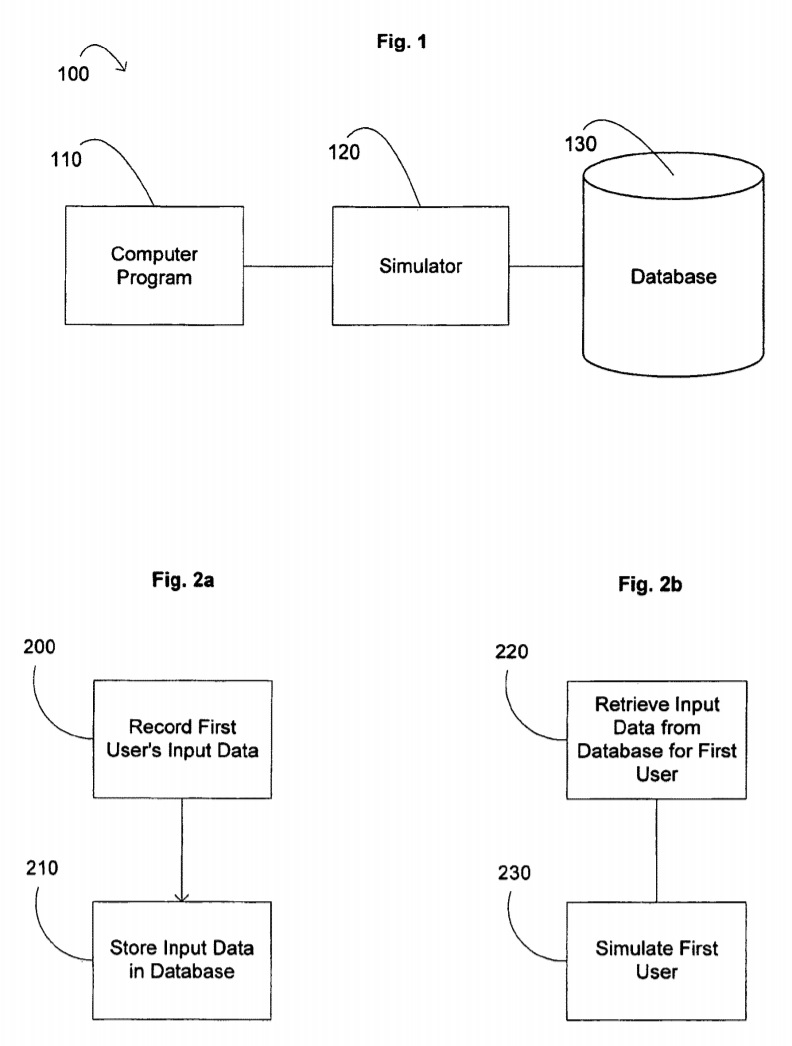
Summary:
U.S. Patent No. 10,471,357 (the ’357 Patent) relates to interactive computer systems that learn how users play a video game in order to simulate a particular user’s behavior in a video game. The ’357 Patent details an interactive computer program that simulates a particular user’s behavior by learning and recording the user’s behavior, and then simulating or playing back that behavior. The collected data is stored in a database attributed to the specific user’s profile. A second user can choose to interact with users’ profiles in-game, and compete against a simulated player using data recorded from a specific user’s behavior and strategy. In one embodiment, this may be used to compete against a superior player to learn how to beat them without actually having to play against that user in real-time.
Abstract:
The field of the invention relates to interactive computer systems and more particularly to systems and methods for simulating a particular user’s behavior in an interactive computer system. In one embodiment, a computer program product includes a simulator configured to simulate a user interacting with a computer program. The simulator includes a learning mode of operation and a simulation mode of operation. During the learning mode, the simulator is configured to monitor the user’s interaction with the computer program for one or more events and analyze one or more current circumstances during the occurrence of the one or more events. The simulator is further configured to record one or more user inputs in response to the occurrence of the one or more events, store the one or more user inputs in one or more data fields, and associate the one or more data fields with the one or more events and the one or more current circumstances. During the simulation mode of operation, the simulator is configured to monitor the computer program for the one or more particular events, retrieve the one or more data fields associated with the one or more particular events, analyze one or more current circumstances upon the occurrence of the one or more particular events, and invoke one or more simulated inputs based on the value of the one or more data fields in response to the occurrence of the one or more events and the one or more current circumstances.
Illustrative Claim:
1. An interactive computer system for simulating a particular user’s behavior in a multi-user computer game comprising: an interactive computer program product; one or more local client computers generating network communication requests through said interactive computer program product, each local client computer coupled to a display for presenting a user interface of the multi-user computer game, the user interface being generated by said interactive computer program product; a server operatively coupled with the one or more local client computers through said interactive computer program product that is configured to simulate the particular user’s decisions and behavior for display on the user interface of each local client computer; and a relational database coupled with the server for maintaining one or more data fields, wherein said server monitors the interactive computer program product for at least one event, analyzes at least one current circumstance of the interactive computer program product upon the occurrence of the at least one event, retrieves at least one data field associated with the at least one event and the at least one current circumstance from the relational database, and invokes a response to a selected local client computer based on the value of the at least one data field subsequent to the occurrence of the at least one event and the at least one current circumstance, the value of the at least one data field representing a statistical occurrence of possible responses to determine a representation of the particular user’s response to the occurrence of the at least one event given the at least one current circumstance, said server invokes the response based on randomly generated number that corresponds to the value of a selected data field, said invoked response for stimulating the particular user’s decisions and behavior for display on the user interface of each local client computer.
Illustrative Figure
Abstract
The field of the invention relates to interactive computer systems and more particularly to systems and methods for simulating a particular user's behavior in an interactive computer system. In one embodiment, a computer program product includes a simulator configured to simulate a user interacting with a computer program. The simulator includes a learning mode of operation and a simulation mode of operation. During the learning mode, the simulator is configured to monitor the user's interaction with the computer program for one or more events and analyze one or more current circumstances during the occurrence of the one or more events. The simulator is further configured to record one or more user inputs in response to the occurrence of the one or more events, store the one or more user inputs in one or more data fields, and associate the one or more data fields with the one or more events and the one or more current circumstances. During the simulation mode of operation, the simulator is configured to monitor the computer program for the one or more particular events, retrieve the one or more data fields associated with the one or more particular events, analyze one or more current circumstances upon the occurrence of the one or more particular events, and invoke one or more simulated inputs based on the value of the one or more data fields in response to the occurrence of the one or more events and the one or more current circumstances.
Description
DETAILED DESCRIPTION OF THE PREFERRED EMBODIMENTS As described above, a user of an interactive computer system configured to have a plurality of users interact with each other, such as a video game system, may desire to compete against another user. However, the ability to compete against another user, especially a particular user, depends upon the availability of that particular user. Further, if the particular user is a superior player, it may be desirable to learn how to defeat such a user without having to play against that particular user in real-time. One approach is to compete against a computer system that simulates the particular user, e.g., a computer system that simulates the particular user's decisions and tendencies. An exemplary embodiment of such a system is shown inFIG. 1.FIG. 1shows a diagram of an interactive computer system100that includes an interactive computer program110configured to have a plurality of users interact with each other, such as a video game, a simulator120operatively coupled with the program110that is configured to simulate a particular user's decisions and behavior, and a database130coupled with the simulator120, which stores data used by the simulator120to calculate and generate the decisions and behavior. The simulator120generally operates in two modes: (1) learn, or record, mode and (2) simulation, or playback, mode. Turning toFIG. 2a, a flowchart of the learn mode is shown. During the learn mode, if a first user is using the computer program110, the simulator120collects and evaluates data about the first user's input when interacting with the computer program110(action block200). The collected data is then stored in the database130(action block210). The data is stored in a data structure, generally referred to as a user's profile, corresponding to the first user. Generally, the data is logically linked to an event, or situation, that initiated the user's input. Turning toFIG. 2b, a ...
DETAILED DESCRIPTION OF THE PREFERRED EMBODIMENTS
As described above, a user of an interactive computer system configured to have a plurality of users interact with each other, such as a video game system, may desire to compete against another user. However, the ability to compete against another user, especially a particular user, depends upon the availability of that particular user. Further, if the particular user is a superior player, it may be desirable to learn how to defeat such a user without having to play against that particular user in real-time. One approach is to compete against a computer system that simulates the particular user, e.g., a computer system that simulates the particular user's decisions and tendencies.
An exemplary embodiment of such a system is shown inFIG. 1.FIG. 1shows a diagram of an interactive computer system100that includes an interactive computer program110configured to have a plurality of users interact with each other, such as a video game, a simulator120operatively coupled with the program110that is configured to simulate a particular user's decisions and behavior, and a database130coupled with the simulator120, which stores data used by the simulator120to calculate and generate the decisions and behavior. The simulator120generally operates in two modes: (1) learn, or record, mode and (2) simulation, or playback, mode.
Turning toFIG. 2a, a flowchart of the learn mode is shown. During the learn mode, if a first user is using the computer program110, the simulator120collects and evaluates data about the first user's input when interacting with the computer program110(action block200). The collected data is then stored in the database130(action block210). The data is stored in a data structure, generally referred to as a user's profile, corresponding to the first user. Generally, the data is logically linked to an event, or situation, that initiated the user's input.
Turning toFIG. 2b, a flowchart of the simulation mode is shown. During simulation mode, if a second user is using the computer program110and the second user desires to interact with the first user, but the first user is not available, the simulator120will then retrieve input data from the first user, i.e., the first user's profile, from the database130(action block220) and simulate the first user's behavior based on the retrieved data (action block230).
Turning toFIGS. 3aand 3b, flowcharts of the general operation of a simulator120when in learn mode550and when in simulation mode600are respectively shown. During learning mode550, as shown inFIG. 3a, the simulator120records a user's input as the user is interacting with the game. Preferably, the inputs for a user are stored in data structures herein referred to as user profiles, which may be individual data structures in a database130. Each user profile has fields or sub-profiles logically associated, or linked, to one or more events and/or situations.
An example structure of a user profile650is shown inFIG. 4. A user profile can contain a sub-profile related to one or more events685and/or situations655that occur within the computer program110during operation. An event685is a particular action occurring, whereas a situation655is the surrounding circumstances during which an event685may take place. For example, in a football game, a situation655may be how much time is left in a game or the position of players on the football field, whereas an event may be the quarterback throwing a long bomb or the running back breaking a tackle. Each event685and situation655are defined by a set of one or more parameters. In the instance where the computer program110is a multi-user interactive computer game, wherein each user controls one or more avatars, such as a sports game or a first person shooter game, events685and situations655may be defined by a number of parameters. One common parameter that defines a situation may be time660, e.g., time left in a particular session or game, and/or time played in a particular session or game. Another may include spatial position of avatars controlled by the user665on the interface screen. For example, in football, the spatial position may be position on a football field, as will be explained in more detail below. In the case of a first person shooter game, spatial position may be location of controlled avatar within the virtual reality of the game. Another parameter may be the spatial position(s) of the avatars controlled by one or more user opponents675of the game. Another parameter may be the score if applicable to the computer program110. For example, the score of a game, e.g., a board game such as chess or a sports game, may trigger a particular type of response by the user. Scores may be based on points or other objective analysis such as opponent players captured, attacking moves made, etc. Another type of parameter, in the case of a computer game involving one or more avatars, is the archetype of the avatar. For example, an archetype can be defined by relative size, strength, and speed. In the case of a basketball game, wherein avatars represent players of the game, archetypes can include true point guard, slasher, shooter, pure shooter, low post scorer, midrange scorer, and role player. One of ordinary skill in the art would also appreciate that other circumstances680may be included as parameters, such as virtual weather in games such as golf, or road conditions of racing games. An event685, as mentioned above, can be defined by a particular action taken place either by a user or by the computer program110itself. An action can be movement by an avatar687, special moves invoked689, stoppage of time691, such as a timeout, etc.
During operation, the simulator120retrieves, creates, or establishes, a user profile for a particular user interacting with the computer program110(action block552). Next, the simulator120monitors and analyzes the user's interaction with the program110(action block555). If the simulator120identifies a particular situation and/or event occurring, defined by parameters such as those above (decision block560), then the simulator120will record the user's decision/input, such as a pressed button, combination of buttons, or joystick move of a controller, in response to the particular situation and/or event (action block565) and store the user's input in the field or sub-profile associated with the particular situation and/or event (action block570). A user's response to the occurrence of an event can differ depending upon the surrounding circumstances or situation. Thus, the data recorded can be associated with both an event and a situation. In other words, when a user responds to an event, the user's response, when recorded, is not only associated with the occurrence of that event, but also with the situation during the occurrence of that event, which is defined by one or more current circumstances. For example, in the game of basketball, if a user is controlling a basketball player near the three-point line and sees two defenders, one on each side, the user may choose to shoot a jump shot or split the defenders-responses that may be recorded in the profile650and linked with opponent's avatar's position. However, the learn mode recognizes that the responses can depend on the situation during which the two defenders are approaching. If the user is losing by a lot of points, then the user may choose to shoot the three pointer instead of split the defenders.
During operation, the simulator120will continue this process. The stored data enables the analysis of a user's behavior, tendencies, and inclinations for a given event. Thus, as will be described in more detail below, when the simulator120is in simulation mode, and a particular event and/or situation occurs, the simulator120can invoke a corresponding reaction based on the stored data, thereby simulating the user.
During simulation, or playback, mode, as shown inFIG. 3b, when a first user desires to interact with a particular second user via the computer program110, the simulator120retrieves the second user's profile (action block600), if it has been created. Then, the simulator120monitors and analyzes the operation of the computer program in search of particular events and/or situations (action block610). If the simulator120identifies the occurrence of a particular event that is linked to a field or sub-profile of the user's profile (decision block615), then the simulator120will check the value of the field or sub-profile (decision block620). The value represents the stored user input recorded during the learn mode550for the simulated user. If the response can differ given different situations during the occurrence of the event (decision block617), then the simulator120also analyzes the current situation to determine the proper response (action block619). For example, in the case of a football game, if the simulated user is on its own twenty yard line and just failed to reach the first down mark after a third down play, e.g., it is fourth down and one, the simulator120can analyze the time left on the play clock and the score. If the time left on the play clock is less than two minutes, and simulated user is losing by 5 points, then the simulator120will analyze such a situation to determine whether the user would kick a field goal or try to reach the end zone for a touchdown. If there is no value, i.e., stored user input, recorded for the given the event and/or situation, then, the simulator120will generate a random or default response representing the second user's simulated input, or response. If there is a stored user input value, (decision block630) then the simulator120will generate a response corresponding to that value, which would represent the second user's response to the occurring situation or event (action block640), and then continue monitoring (action block610). If there is more than one value (decision block630), then the actual second user may have invoked more than one type of response to the particular situation or event while being recorded. In such a case, the simulator120can randomly select from one of the values, or the simulator120can select its response based on statistics or mathematical formula, e.g., based on the number of times the actual user invoked one response over another (action block635). Such statistics may indicate tendencies demonstrated by the simulated user.
Approaches to account for such tendencies are illustrated inFIGS. 11(a-c). During learning mode, at step570, if the user has invoked more than one type of response, the simulator120can record each type of response and apply a statistical, or weighted, value to a response based on its statistical occurrence compared to other types of responses. Turning toFIG. 11a, at step570, the simulator120will check if one or more user inputs have already been recorded for the current situation and/or event (decision block575). If so, then the simulator120will associate one or more values with each different type of user input based on the statistical occurrence of each input compared to other inputs (action block577). For example, in the case of a football game, a player's avatar is running down the sideline and encounters an opposing player's avatar (an event). In one hundred (100) occurrences of the event, if the user spun left twenty (20) times, right thirty (30) times, and juked fifty (50) times, the simulator120will assign values of twenty (20), thirty (30), and fifty (50) to the respective responses. Alternatively, each response can be assigned a range of values, such as 1-20, 21-50, and 51-100, respectively, or 1-2, 3-5, and 6-10, It should be noted that the weighted values can be calculated based on any number of responses and any number of types of responses.
During simulation mode, the simulator120can randomly invoke a response to a situation and/or event based on weighted statistical values of the stored inputs. One approach is shown inFIG. 11b, at step635, the simulator120will randomly select a value within the range of available statistical values associated with the different stored responses (action block636). The stored input associated with the selected value will then be invoked. In the example above, when the simulated opponent's avatar is running down the sideline and encounters an opposing player's avatar and each of the above responses are given the respective range of values, the simulator120will randomly select a number from 1 to 100, If the number 53 is selected, then the avatar will juke (51-100 are associated with juke). Similarly, the simulator120could randomly select a number from 1-10, If the number is 1, then the avatar will spin left (1-2 are associated with spin left).
An alternative approach is shown inFIG. 11c, in addition to having the simulator120randomly select a value within the range of available statistical values associated with the different stored responses (action block636), the selected value will then be made unavailable until all the other possible values have been selected (action block637). Like the approach above, the stored input associated with the selected value will then be invoked. In the example above, when the simulated opponent's avatar is running down the sideline and encounters an opposing player's avatar and each of the above responses are given the respective range of values, the simulator120will randomly select a number from 1 to 100, The selected number will then be made unavailable to the simulator120until all other possible numbers have been selected. Thus, if the number 53 is selected, then the avatar will juke (51-100 are associated with juke). Subsequently, the value 53 will be made unavailable to the simulator120until all other possible values have been selected. Likewise, if the range of numbers is from 1-10 and if two (2) is selected, then the number two (2) will subsequently be unavailable for selection until 1 and 3-10 have been selected.
One of ordinary skill in the art will appreciate that such a system can be applied to any computer system involving multiple users interacting with one another, such as a computer video game. For example, the computer program110can be a team sports video game, such as football, basketball, hockey, baseball, etc. In the case of a baseball game, a user profile can contain a field that indicates whether a user will bunt, wherein the field is linked to a situation where there is a player on second base with one out, for example. Other computer programs110can include individual sports video games, such as golf, boxing, racing, etc. In the case of a golf game, a user profile can contain a field that indicates the type of golf club used, wherein the field is linked to a situation such as a sand trap. Yet other computer programs110can include non sports video games, such as first person shooters, fighting games, board games, etc. In the case of a chess match, a user profile can include a field that indicates when to move the queen, wherein the field is linked to a particular situation. In each of these cases, a user profile can be established with data that enables the analysis and simulation of a particular user. A simulator120can be configured to populate a user profile with data, analyze the data, and simulate the user based on the data in accordance with the processes described above.
For example, in the case of a basketball game, an event may be an inbound event, an offensive rebound event, a pass out of shot event, a catch and shoot event, a pump fake event, defensive steal event, and/or a shot event. During learning mode550, for an inbound event, wherein a team is taking a ball inbound to begin play, the simulator120records a user's response to the event. If the user is controlling the team taking the ball inbound, then the simulator120records who the inbound was passed; whether the user hurried the inbound, which can be in the form of a quick tap of a control button; whether the user ran an avatar around and then passed, which would indicate a normal inbound; and where the user ended up on the court to start play. During each of these decisions made by the user, the simulator120will record the current circumstances, for example, whether the defense is playing a full court press or how much time is left in the game, which may indicate whether a user will hurry the inbound pass. During playback mode600, when an inbound event occurs, the simulator120will retrieve the recorded data associated with the inbound event and also analyze the current situation, such as time, score, and spatial positions of defensive avatars, to determine which action to invoke that represents the simulated user.
For an offensive rebound event, the simulator120, during learning mode550, will record which avatar grabbed the rebound and whether the user immediately passed the ball, which indicates a “reset” type rebound, or whether the user shoots the ball, which indicates a “shoot” type rebound. Again, current circumstances are recorded for the event. During playback600, the simulator120will analyze the current circumstances during the occurrence of an offensive rebound event and invoke the proper response accordingly, e.g., whether to invoke a “shoot” rebound or a “reset” rebound.
For a pass out of shot event, the simulator120, during learn mode550, records a shot type, which avatar passed, and which avatar was passed to. For current circumstances, the simulator120records how open the receiving avatar was and how covered the passing avatar was. During playback600, for a pass out of shot event, the simulator120will analyze how well the passing avatar and the receiving avatar are covered. The simulator120will invoke a pass if the current circumstances meet the criteria, e.g., how much the passing and receiving avatars are covered.
For a catch and shoot event, during the learning mode550, the simulator120records how often a user catches and shoots right after the catch and records, as a current circumstance, the location of the user's avatar that catches and shoots. During playback mode600, the simulator120will monitor when the simulated user catches the ball and analyze the simulated user's location on the basketball court. If the simulated user is located in the typical spot for catch and shoot, then the simulator120will have the simulated user immediately shoot the ball after the catch.
For a pump fake event, during the learning mode550, the simulator120records how often a user pump fakes. For current circumstances, the simulator120records how covered the user was and user's location. During playback mode600, the simulator120will monitor for a shoot event and analyze the location of the simulated user and the defensive coverage. If criteria is met, then simulator120will invoke a pump fake.
For a defensive steal event, the simulator120, during learning mode550, records how often a user attempts to steal and the average time between attempts. As current circumstances, the simulator120records the user's distance to the ball, number of fouls to give in a quarter, and the skill level of the avatar with the ball. During playback mode600, whenever an opponent has the ball and is at or below a typical skill level that the simulated user is willing to attempt a steal on, the simulated user's avatar is close enough to the ball handler, the last time a steal attempt was made is greater than the average recorded time between attempts, and there are enough fouls for the simulated user to give, then a steal is attempted.
For shot timing, during the learning mode550, the simulator120records how well the shot was timed for each shot type, e.g., jump shot, bank shot, etc. During playback mode600, the simulated user's release shot is timed based on recorded data.
In addition to the current circumstances above, another circumstance that can define a situation and effect the simulated user's response is the archetype of the avatar(s), e.g., whether the avatar is a true point guard, a slasher, a shooter, a pure shooter, a low post shooter, a midrange shooter, and role player. For each event, during learning mode550, the simulator120records the archetype of the avatar that initiated a monitored event. Other circumstances include the spatial location of the event, time on the shot clock, duration of the event, and how many teammates were available to participate.
The simulator120provides a means for players to engage in any possible configuration of multi-player game play at any time, regardless of the availability of another human opponent. It further enables a user to be able to practice against and develop skills against one or more specific human opponents at any time, regardless of whether the actual human opponent is physically present or connected, or not. It also enables a user to be able to simulate the unique, individual behaviors, weaknesses, strategies and tendencies of actual human opponents within a videogame, thereby blurring the line that differentiates human opponents and computer AI, and the resulting interactive experience of the two.
Another example embodiment of a computer system100is a video game system that simulates an American football game and enables a first user to play the game against a computer opponent or a second user, and which is embodied in Visual Concepts' ESPN NFL 2K5™ (“NFL 2K5”) video game, a product currently available in the market. NFL 2K5 includes a computer program110in the form of an video game to be executed on a video game console, such as Microsoft's Xbox® or Sony's Playstation 2®, which includes a user input device, typically referred to as a game controller (not shown).
Turning toFIG. 5, a diagram representing a video game interface300is shown. The interface300generally includes a graphical representation of a football field310, and two sets of avatars320, each representing a football team set to oppose each other. One of the sets of avatars320represent a defensive team, or team on defense330, wherein each avatar320represents a defensive player, i.e., defensive linemen, linebackers, and defensive backs. The other set of avatars320represents an offensive team, or team on offense340, wherein each avatar320represents an offensive player, i.e., offensive linemen, backs, receivers, and a quarterback.
At a state before any action begins, which is commonly referred to as the “pre-snap” state, the user's input generally includes the choice of a formation from among a set of pre-defined choices, i.e., the position of the respective avatars320on the representative football field310, and the user's input further includes the choice of a play from among a set of pre-defined choices, which defines a route for each avatar320, i.e., how each avatar320will move when action begins and when the user is not controlling that avatar320, in accordance with the general rules of American football. These choices are commonly referred to as play calling;
When action begins, which is commonly referred to as the “post-snap” state, the avatars320move in accordance to the choices made by the user during the “pre-snap” state, and the user's input generally includes controlling the movements and actions of one or more of the avatars320. Thus, skill in this game generally depends upon the user's ability to make the appropriate choices during the pre-snap state and the ability to control one or more avatars320during the post-snap state.
A first user controls one of the teams330/340. The other of the teams330/340may be controlled by the computer program110or by a second user. In addition, the other of the teams330/340may be controlled by a simulator120, which includes a learning mode and a simulation mode.
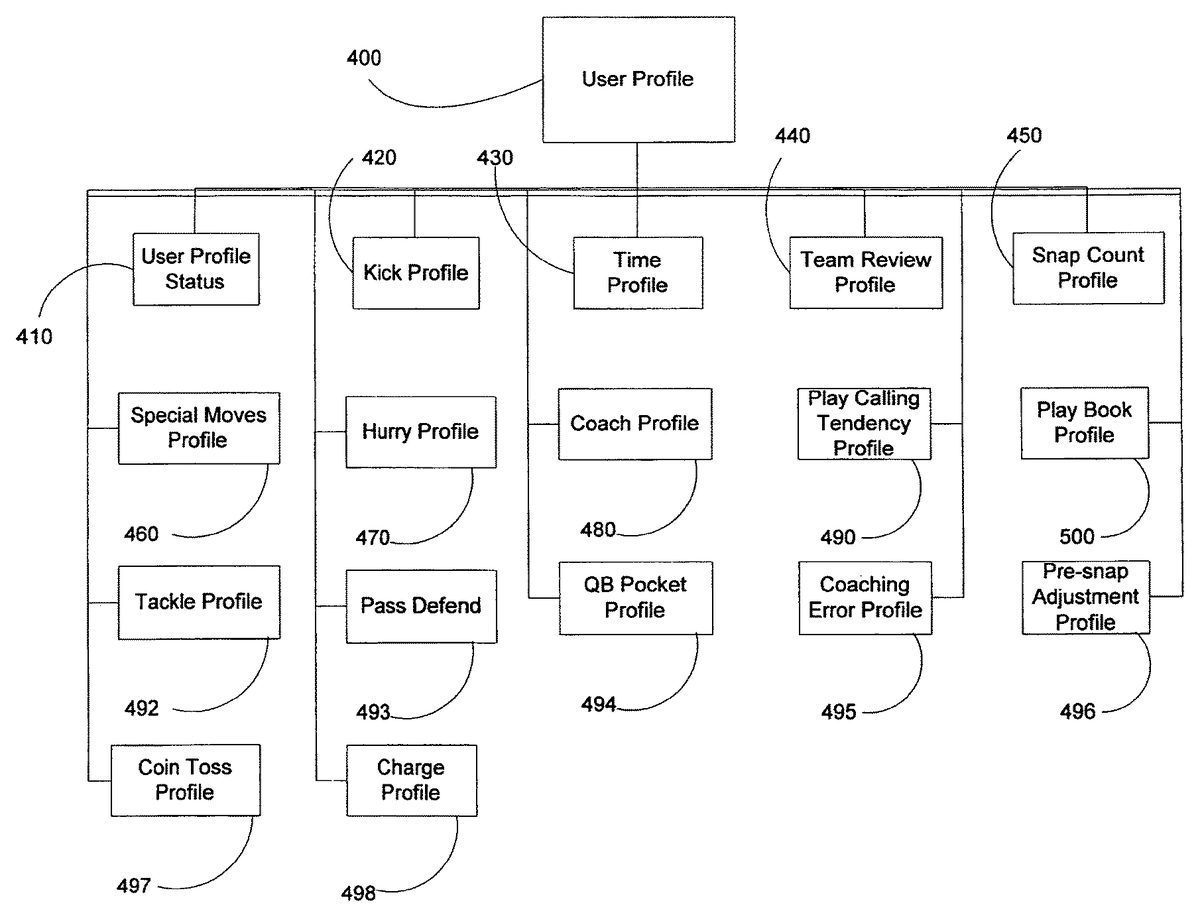
During learning mode, the simulator120records a user's input as the user is interacting with the game. Turning toFIG. 6, the inputs for a user are stored in user profiles400, which, as described above, may be individual data structures in a database130. The general structure of a user profile400for this particular video game is shown inFIG. 6. A user profile includes sub-profiles, e.g.,410, each containing fields or additional sub profiles that store the user's inputs in an organized and logical manner. Generally, as mentioned above, the user's input is logically linked to an event and/or situation that initiated the user's input. For example, in the case of NFL 2K5, a pre-snap state can define a situation established by current circumstances, such as the score and spatial location on the football field, e.g., the user's team being down 21 points against an opponent, and the user's offense is on the football field on its own 25 yard line in the middle of the fourth quarter. Current circumstances can also include the spatial location of individual avatars, such as the linebacker or defensive back. A post-snap event can be a user controlling the quarterback, and the opponent is blitzing. As mentioned above, the response to a post-snap event may depend upon the situation, e.g., the pre-snap state. Therefore, not only is the occurrence of the event identified, but one or more current circumstances during the occurrence of the event are analyzed and stored also. Generally, a user profile400for each user is created and stored in the database130and managed and controlled by the simulator120.
The stored data enables the analysis of a user's behavior, tendencies, and inclinations for a given event and situation. Thus, as will be described in more detail below and as mentioned above, when the simulator120is in simulation mode, and a particular event occurs, the simulator120may invoke a corresponding reaction based on the stored data.
A number of the sub-profiles, e.g.,410, will now be described. Turning toFIG. 7, the data structure for a play book profile500is shown. As shown inFIG. 6, a play book profile500is a sub-profile of a user profile-400that generally includes a history of a user's play calling choices in response to particular events and situations. A user's profile can include one or more play book profiles500. A play book profile500includes a plurality of offensive and defensive situation profiles510that include a plurality of play calling profiles530. Preferably, a situation is generally defined by the down, distance, position on the field, the score, the time in the game, and the plays called by the opposing team. A play calling profile530stores information about the user's choice of play and the choices made within the play. Preferably, the key pieces of information stored in a play calling profile is the formation and play.
The operation of the learning mode of the simulator120for the American football computer system100is shown inFIGS. 8a-c. During learning mode, the simulator120retrieves the user profile400of the user to be simulated (action block800). The computer system initializes the game system features, e.g., controllers, animations, collisions, behaviors, etc. (action block810). Next, the simulator120determines the play book profile500to be recorded corresponding to the user (action block820). The simulator120next organizes the play calling profiles530within the playbook profile500(action block830). If there is existing data in the playbook profile500, then the simulator120will evaluate whether the data is up to date (action block840). Preferably, data should evolve as the user's interaction evolves. In other words, data recorded thirty games ago may have a lesser impact on the total data available.
After the game starts, and the game system components are updated, e.g., clocks, teams, cameras, etc. (action block850), the simulator120monitors to determine whether a situation for special moves has occurred (action block860). If the user is playing offense and an offensive play has started (decision block870), then the simulator120will record the location of the user controlled avatars, such as the quarterback or running back (action block875). Otherwise, the simulator120will record data into relevant profiles (action block880). Next, the simulator120will control the user's input via the game controller (action block890).
After the game system components are updated, e.g., behaviors, moves, animation, etc. (action block910), the simulator120next determines if any of the game system events, such as animations, trigger actual game events (decision block920). If so, if a profile handles such a game system event (decision block925), then the simulator120will record the game system event (action block950). If not, then the game system continues, and the components are updated, e.g., roster data, sound effects, crowd, statistics (action block930). Upon completion of the game (decision block940), the game is deinitialized (action block955), and the user profile will be saved (action block960).
The operation of the play back mode is illustrated inFIGS. 9a-d, A user first selects the opponent to be simulated, and thus, selects the corresponding user profile to play back (action block1000). After the system initializes, e.g., controllers, animations, behaviors, etc. (action block1010), the simulator120then determines the appropriate playbook profile500to use (action block1020) and then organizes the play calling profiles520within the playbook profile (action block1030). The simulator120then initializes the playback data (action block1040) and initializes selected play call profiles520(action block1050). The game system is then updated, e.g., clocks, teams, coaching decisions, cameras, etc. (action block1060). While the computer program110is running, the simulator120monitors the program to identify events or situations that may warrant a special move (action block1070). The simulator120then monitors to determine if a team is approaching the line of scrimmage (decision block1080). If so, then the simulator120updates the team review profile440(action block1085) and updates defense pre-snap496in user profile (action block1095). If not, then the simulator updates the defender that the user profile400is controlling (action block1090).
The simulator120then evaluates whether behavior input is used for special moves (decision block1100). If so, then the simulator120clears the behavior initiated input (action block1115). The simulator120then determines whether current situation requires a user profile400special move (decision block1110). If so, then the simulator120generates a player control command for the computer program110(action block1120). The simulator120then charges up appropriate avatars based on information in the user profile400(action block1130) and updates dive tackles in the user profile400(action block1140). The simulator120will then generate controller data representing the user (action block1150).
The simulator120then determines whether the input data will illicit some behavior or response (decision block1160). If so, then the program will start the behaviors/moves associated with the input (action block1165). If not, game system components, such as reference data, is updated (action block1170) and then the behaviors are updated (action block1180). Next, whether input is required for a player's behavior in the current situation (decision block1190). If so, then the simulator120determines whether there is data that corresponds to the behavior or current situation (decision block1200). If so, then the behavior is invoke. If there is more than one behavior recorded, the selection is based on statistical data (action block1210). The selection returns input command to be used by the behaviors. If not, then default behavior or response is chosen (action block1220).
After the game system components are updated, e.g., moves, animations, physics/collisions (action block1230), the simulator120then determines whether any current game system events, such as animations or collisions, trigger game events (decision block1240). If so, then the simulator120searches for a profile playback system that handles this event (decision block1245). If so, then the simulator120updates the management of the playback system based on the event in the game (action block1255). If not, then game system components are updated, e.g., roster data, sound effects, crowd, and statistics (action block1250). When the game ends (decision block1260), the game is deinitialized (action block1270).
To illustrate the operation, if the user is playing offense and is on its own goal line, 2nd and goal, up by 21 points in the middle of the fourth quarter, then the simulator120will retrieve the corresponding offensive situation profile510. If the user in that situation selects the “I” formation and then selects a run play with the half-back assigned to run between the right guard and tackle, those choices are stored in a play calling profile530for the corresponding offensive situation profile510. Likewise, if the user is playing defense in that same situation, the simulator120will retrieve the corresponding defensive situation profile520. If the user selects a goal line formation with all the avatars320blitzing, such information is stored in a play calling profile530for the corresponding defensive situation profile520. Further, the simulator120may compare the defensive situation with the actual formation the offense uses, which may not be an expected formation. The defensive situation profile520may include information as to whether a user may react to an unexpected formation. For example, an offensive situation may be 3rd down and 10 yards to go. In such a situation, the defense would expect to see an offensive formation with more than two wide receivers. However, the actual offensive formation may be one wide receiver, a full back, and a tight end (large formation). In such a case, the defensive situation profile520may include recorded responses by the user, such as calling a run defense, calling the base personal in a 4-3, or maintaining a pass defense, such as a nickel or dime.
Other information to be stored may include how the formation and play are used by the user. For example, for an offensive play calling profile530, information may include whether the user motions avatars320for a play and which avatar is motioned. For a pass play, which receiver is passed to, what hot routes are called, and whether the QB pump fakes. Other information includes where the QB or the running back initially moves to after the ball is snapped, how hard the QB throws the ball, when the QB does throw the ball, and what circumstances cause the user to flip a play.
For a defensive play calling profile530, the simulator120may store whether and how a user adjusts defensive players for a particular play, which avatar320the user typically controls, and where the user typically lines up the avatars320. Other information may include when the user blitzes, what defensive adjustments are made (linemen shift, linebacker shift, and defensive back adjustments), and whether the user makes adjustments to double team the best receiver on the opposing team.
A user may call more than one formation and/or play for a given situation. Thus, a situation profile510/520may include more than one play calling profile, each with different selections made by the user. If a user varies in selection but does make a particular selection more frequently than others, such statistical data may be stored in the play calling profiles530as well. As will be described in more detail below, when the simulator120is in simulation mode, when the simulator120retrieves the corresponding situation profile510/520, if a situation profile510/520includes more than one play calling profile530, a play calling profile530may be selected randomly or based on available statistical data.
Turning toFIG. 6, a kick profile420stores information as to how well a user kicks the ball during play. This includes how many times a user has kicked the ball, the minimum and maximum distances that a user has kicked the ball, and the total power used. There is a kick profile for when a user kicks off, punts, and kicks field goals. When recording data for a kick profile420, the simulator120may check to see if the user's power has exceeded the minimum or maximum, increment the kick count, and add the power to the total power accumulated. When the simulator120is in simulation mode, based on the user's profile400, and the simulated user is in a kick situation, the simulator120may determine the power for kick based on the corresponding kick profile420, e.g., whether the power should be above the average or below the average and/or whether the power should be a random value between the maximum and minimum powers recorded. If this value is above the average, then the simulator120may randomly select a value between the minimum power and the average. If this value is below the average, then the simulator120can randomly select a value between the average and the maximum power.
Another sub-profile that can be included is the special moves profile460. A user can invoke special moves if the user's avatars320are in possession of the ball. In such a situation, the simulator120may examine where the closest two defending avatars320are in relation to the ball carrying avatar320(“the ball carrier”) on the football field310. In one approach, the simulator120defines a logical grid of two rows and three columns on the football field310in front of the ball carrier. If one of the two closest defending avatars320is within one of the defined locations, then the simulator120records such information by setting a bit in an index within the special moves profile460to indicate this. The simulator120further defines a logical half circle behind the ball carrier on the football field310. If one of the two closest defending avatars320is in this area, the simulator120sets a bit in an index in the special moves profile460to indicate this as well. A table can be created within the special moves profile460of how much time a user has spent in this situation, how often a user selected an available turbo button in this situation, and how many times the user has invoked any of the available number of different special moves in this situation. As with the play book profile500, this information may be categorized based on different situations.
When a ball carrier is in a known situation, the simulator120can increment the time spent in this situation. When the appropriate situation profile is retrieved, the simulator120may store whether a special move was invoked, what special move was invoked, and whether the user selected an available turbo button. During simulation mode, the simulator120retrieves the special moves profile460, determines when the last time the user invoked a special move or hit a turbo button, evaluates special moves recorded in the profile460, and determines whether a special move should be invoked, what the special move should be, and whether to initiate the turbo button option. The type of special move can be selected randomly and/or based on the frequency of the recorded selections of certain types of special moves.
Other sub-profiles include tackle profile492, which stores the types of tackles the user prefers; pass defend profile493, which stores the user's preference in defending passes thrown to the receiver the user is covering; QB pocket profile494, which stores the tendencies the user has when controlling the quarterback in the pocket, e.g., whether the user likes to scramble, pump fake, evade, etc.; coaching error profile495, which stores the types of mistakes the user makes for “head coach” decisions, such as inappropriately going for two points; pre-snap adjustment profile496, which stores the types of adjustments the user prefers to make at the line of scrimmage; coin toss profile497, which stores the decisions the user prefers to make during the coin toss; charge profile498, which stores when and how often a users prefers to “charge up” the controlled avatar; and play calling tendency profile490, which stores a group of information indicating how often a user uses coaches pick and audibles and whether the user calls a defensive play without knowing what offensive package will be used on the field.
If a first user desires to play the video game against a simulation of a particular second user, the simulator120may operate in simulation mode and retrieve the second user's profile400from the database130of profiles in accordance with process shown inFIG. 3and described above.
The following is a detailed list of profiles stored in a user profile400and the type of information that may be stored within the respective profiles:
USER PROFILE 400doDiveTackleWhether to dive tackle at next tackle opportunitycheckDefenseSwapDetermine which defender the user is controllingchargeUpWhether turbo meter is charging upchargeUpThisPlayWhether to test for charging up turbo meter on current playusePlaybookWhether to record and play back play call datatrainerlntroDoneWhether VIP trainer has been explained to useruserNameName of the user who created this profileplaybookProfilescurrentPlaybookProfileThe current PLAYBOOK_PROFILE in use by the usercurrentOffensiveSituationWhat is the current situation being profiled?currentDefensiveSituationWhat is the current situation being profiled?currentOffensivePlaycallProfileWhich play call profiles are being used on the currentoffense play? (See OFFENSIVE_PLAYCALL_PROFILE)currentDefensivePlaycallProfileWhich play call profiles are being used on the currentdefense play? (See DEFENSIVE_PLAYCALL_PROFILE)passPlaysStartedHow many times did the user hike the ball with a pass playcalled?numberOffensePlaysStartedHow many times was user on offense?numberDefensePlaysStartedHow many times was user on defense?numberOffensivePlaysCalledNumber of opportunities to call coaches pick on offensenumberOffensiveCoachesPickNumber of times coaches pick actually usednumberDefensivePlaysCalledNumber of opportunities to call coaches pick or audibles ondefensenumberDefensiveCoachesPickNumber of times coaches pick actually usednumberDefensiveNonWaitCallsNumber of times play on defense was called before packageoffense was noticednumberDefensiveAudiblesHow many times was a defensive audible being called?numberOffensiveAudiblesHow many times was an offensive audible called?pumpFakeHow often does user use pump fake to get players open?passThrownAwayOf the number of pass plays, number of balls thrownaway?scrambleCountOf the number of pass plays, number of scrambles?escapeMovesHow often does user use various defensive escape moves?wrapTackleHow many times did user do non dive tackle?diveTackleHow many times did user do dive tackle?numberDefenseSwapPlaysHow many plays did user change which defender they wereare play started?numberDefenseChargePlaysNumber of plays charged up on defensenumberOffenseChargePlaysNumber of plays charged up on defensepassDefendOpportunitiesHow many chances has user had to pass defend?blockPassHow many times has user tried to block a pass? HowinterceptPassmany times has user tried to intercept a pass?controlledPlayerCurrent player to put player indicator underlastTurboTimeLast time the turbo button was hit during playbackchargeTimeHow long to turbo charge up for during playback?hotRouteOpportunitiesHow many plays could a hot route have been called on?hotRouteCalledHow often did was any of the various hot routes used?motionCalledHow often was an avatar sent in motion?playFlipOpportunitiesHow many plays could the play have been flipped on?playFlipsHow many times was a play flipped?defenseShiftOpportunitiesHow many opportunities was there to make defensiveadjustment?shiftLinemenHow often were any of the various line shifts used?shiftLinebackersHow often were any of the various linebacker shifts used?shiftSecondaryHow often was any of the various secondary adjustmentsused?onePointOpportunitiesHow many times did user have opportunity where theyshould go for one?twoPointAttemptsHow many times did user go for two instead?fourthDownOpportunitiesHow many times did user have opportunity where theyshould punt?fourthDownAttemptsHow many times did the user attempt a fourth downconversion instead?onsideOpportunitiesHow many times did user have opportunity where theyshould do normal kickoff?onsideAttemptsHow many times did user have opportunity where theyshould do normal kickoff but instead did onside kick?choseToReceiveKickHow many times did user choose to receive during coin toss?choseToKickKickHow many times did user choose to kick during coin toss?qbEvadesHow many times did user use a qb evade command?qbEvadeOpportunitiesHow many times could user use a qb evade command?kickoffProfileHow much power the user usually achieves during kickoffsfieldGoalProfileHow much power the user usually achieves during fieldgoalspuntProfileHow much power the user usually achieves during puntstimeProfilesHow much time is spent in huddle and going to the line inany one of 4 possible situations?currentTimeProfileHow much time is spent in huddle and going to the line inany one of 4 possible situations?reviewTeamHow much time is spent reviewing the field and the play inany one of 3 possible situations?checkPlayReviewDuring playback, what is the current state?currentTeamReviewProfileCurrent team reviews for this playThis is the current set of field/play review profiles thatshould be used to record or playback to. There is a reviewset for offense passing, offense running, and defense. Eachset is just a list of field/play review samples from when theuser last played. Each sample says how often they like topull the camera back and review the field prior to the ballbeing snapped. Each sample also says whether the user willreview the play in front of their opponents.Current team reviews for this playcurrentT eamPlayReviewHow to use the hard count?snapCountWhen to hit the hurry to line button in any of 2 possiblehurryToLinesituations?currentHurryProfileWhen to hit the hurry to line button in any of 2 possiblesituations?This is the current set of hurry to line profiles to use torecord or playback to. There is a set for when simulator 120is in a critical situation and a set for when simulator 120 isnot in a critical situation. Each set contains a set of samples/times when the user presses the hurry to line button.specialMovesProfileThe SPECIAL_MOVES_PROFILE for special movesexecuted by the usercoachProfileThe coaching profile of this user
SPECIAL_MOVES_RESPONSE_PROFILEturboTimeTime spent in threat grid where to considerturboingmoveTimeTime spent in threat grid where to considerusing a special moveturboCountHow many times did user hit turbo button?moveCount[n]How often did user use each one of the specialmoves?
SPECIAL_MOVES_PROFILE(460)threatGrid[n]A SPECIAL_MOVES_RESPONSE_PROFILE for eachcombination of situations within the threat grid.This is the array of situations a runner can get in to. Thereare seven locations around a runner. If a defender is in anyofthose locations we set a bit on our grid index. Whensimulator 120 is done looking to see where all the closedefenders are, simulator 120 has a 7-bit value, hencethreatGird[128]. So for each possibility, simulator keepstrack of how the user reacts to being in that situation - howoften they use the turbo button and how often they use anyof the various special moves.
OFFENSIVE_PLAYCALL_PROFILE(530)formationFlipDid user flip formation?playFlipDid user audible to play flip?onStrongSideWas simulator 120 on the strong side of field?isPassThrownDid simulator 120 attempt to throw a pass this play?motionCalledHow many players did simulator 120 send in motion(0, 1, 2)?hotRouteCalledDid simulator 120 assign a hot route this play?motionState1Where did simulator 120 motion the first motionplayer to?motionState2Where did simulator 120 motion the second motionplayer to?beenCalledHas simulator 120 called this play during playback?pumpFakeDid QB do a pump fake on this play?movelDid user move ball handler during phase1?move2Did user move ball handler during phase2?runChargeDid user charge up immediately on running play?thrownToThe receiver the ball is passed topassMagnitudeThe magnitude the ball is thrown atpassTimeWhen does QB start passing motion?motionPlayer1The formation index of first player simulator 120sends in motionmotionPlayer2The formation index of second player simulator 120sends in motionmotionTime1Did simulator 120 hike ball during motion- if so,when?motionTime2Did simulator 120 hike ball during second motion - ifso, when?hotRoutePlayerWho simulator 120 assigned a hot route tohotRouteWhat hot route did simulator 120 assign to them?formationWhat formation (index) did simulator 120 call?PlayWhat play (index) did simulator 120 call?move1XWhere user moved ball handler relative to ball spot,phase 1move1ZWhere user moved ball handler relative to ball spot,phase 1move2XWhere user moved ball handler relative to ball spot,phase 2move2ZWhere user moved ball handler relative to ball spot,phase 2
DEFENSIVE_PLAYCALL_PROFILE(530)userPlacementDoes the user move user-controlled defenderbefore snap of ball?userBlitzDid user bring defensive controlled player acrossline of scrimmage during play?beenCalledHas simulator 120 called this play duringplayback?formationFlipDid user flip formation?shiftLinemenWhat type oflinemen shift did simulator 120 do?shiftLinebackersWhat type oflinebacker shift did simulator 120do?shiftSecondaryWhat type of secondary shift did simulator 120do?scramblingQBWas qb on this play a good scrambler (e.g. Vick)?userPlayerWhich player does user control prior to the snap?adjustPlayerWhich player did simulator 120 make individualadjustments for?individualAdjustmentWhat adjustment does simulator 120 make forindividual player?coverBestReceiverDid simulator 120 make adjustment to cover bestreceiver?formationWhat formation (index) did simulator 120 call?PlayWhat front (index) did simulator 120 call?coverageWhat coverage (index) did simulator 120 call?placementXWhere user places user-controlled defenderrelative to ball spot in feet?placementZWhere user places user-controlled defenderrelative to ball spot in feet?
OFFENSIVE_SITUATION_PROFILE(510)recordsFilledHas simulator 120 filled up all play call records?beenCalledHas any play been called from this situation?nextRecordNext record to record to?maxRecordsHow many records are in this profile?RecordsThe OFFENSIVE_PLAYCALL_PROFILE recordsstored for this situation
DEFENSIVE_SITUATION_PROFILE(520)recordsFilledHas simulator 120 filled up all play call records?beenCalledHas any play been called from this situation?nextRecordNext record to record to?maxRecordsHow many records are in this profile?RecordsThe DEFENSIVE_PLAYCALL_PROFILE recordsstored for this situation
KICK_PROFILE (420)numberKicksNumber of kicks simulator 120 has recordedminPowerWorst kickmaxPowerBest kicktotalPowerTotal power on all kicks
PLAYBOOK_PROFILE (400)numberPlaysNumber of plays recorded using given “playbook” indexplaybookPlaybook index used to record for playcalling dataoffensivePlaycallProfilesThe playcall profiles for various situations on offenseoffensiveSituationThe offensive situation structure points to the variousoffensivePlaycallProfiles in simulator 120 playbookprofile. Both can be considered simulator 120 play callprofiles for various situations on offense. The situationprofile groups play call profiles in to groups for varioussituations.defensiveSituationThe playcall profiles for various situations on defensefirstDownSituationThe playcall profiles for generic first down situation onoffenseoffensiveBackToGoallineSituationThe playcall profiles for goalline situations on offenseoffensiveOnGoallineSituationThe playcall profiles for goalline situations on offense
TIME_PROFILE (430)numberTimesNumber of times simulator 120 has recorded going tothe line and being in the huddletotalHuddleTimeTotal time spent in the huddletotalAtLineTimeTotal time spent at the line
TEAM_PLAY_REVIEW_PROFILEnumberReviewsHow many times did simulator 120 review field forgiven play?StartTimes at which simulator 120 started field reviewsStopTimes at which simulator 120 stopped field reviewsstartPlayReviewStart time of when simulator 120 reviewed playstopPlayReviewStop time of when simulator 120 reviewed play
TEAM_REVIEW_PROFILE(440)nextRecordThe next team play review profile recordrecordsFilledAre all records filled?RecordsThe TEAM_PLAY_REVIEW_PROFILE records
PLAY_SNAP_COUNT_PROFILE(450)numberSnapCountsHow many times does simulator 120 do a hardcount?snapCountTimes for each of the hard counts
HURRY_PROFILE (470)nextRecordThe next hurry recordrecordsFilledAre all records filled?startTimesThe start time each time to hit the hurry to line button
COACH_PROFILE (480)numberPassPlaysNumber of pass plays recordednumberRunPlaysNumber of run plays recordedscoreRunRatioBased on the score in the game, how often the simulated userruns to how often the simulated user passesredzoneRunRatioWhen in the red zone, how often the simulated user runs tohow often the simulated user passesdownDistanceRunRatioBased on the down and distance, how often the simulateduser runs to how often the simulated user passesnumberPassesThrownNumber of passes thrownpassDirectionHow many times have user has passed in any of fivesdirections (e.g. how many times was the ball thrown to theright)?passDistanceHow many times did the simulated user pass to a particulardistance down field?passPositionHow many times did a simulator user pass to a particularplayer position (e.g. tight end)?runDirectionHow many times ran in any of five directions?runFormationHow many times did the simulated user run the ball fromany of five generic formation types?passFormationHow many times did the simulated user pass the ball fromany of five generic formation types?runPackageHow many times have was the ball ran using a particularpersonal package?passPackageHow many times have was the ball passed using a particularpersonal package?numberPassMotionHow many times was a player motioned on a passing play?numberRunMotionHow many times was a player motioned on a running play?numberNoHuddleOpportunitesHow many times has there been a situation where no huddleoffense was inappropriate?numberNoHuddlesHow many times has there been a situation where thesimulated user inappropriate ran a no huddle offense?numberDefensivePlaysHow many times has a defensive play been called?numberZoneDefensesOf the times that called a defensive play, how many timeswas a zone coverage called?numberBlitzesOf the times that a defensive play was called, how manytimes was a blitz called?
Turning toFIG. 10, the computer program110, simulator120, and database130, as shown inFIG. 1, can reside on a single client console, such as the workstation750or a video game console760, such as an Xbox or Playstation. Alternatively, or in addition, the computer program110, the simulator120, and database130can reside on a server710accessible by one or more client consoles750/740via a network, local area or wide area, such as the Internet770. In yet another alternative, a copy of the computer program110may reside on each client console740/750, and the simulator120and database130can reside on the server710. Further, the computer program110and the simulator120can reside on each client console and the database130can reside on the server. Multiple users can compete against each other either on a single console750/740or from multiple consoles750/740. For example, a first user can compete on a first video game console760against a second user competing on a second video game console760. Whether the simulator120is on one of the client consoles740/750or a server710, the simulator120can operate in learning and/or simulation mode as long as the simulator120is communicatively coupled with a copy of the interactive computer program110. In the case where the simulator120and database130resides on a server710, any participating user can upload its own user profile for access by any other participating user, and further any participating users can download or access any user profile available in the database130.
The interactive computer system100may further include a security system that requires an authentication by each user. For example, the simulator120resides on a server710accessible by participating video game consoles760. For Xbox video game consoles760, an Xbox Live authentication server is used. For Playstation 2 game consoles760, a corresponding authentication server is used as well. Both servers verify whether a participating user has a valid user profile and whether the user is entitled to participate in the interactive computer system100.
In the foregoing specification, the invention has been described with reference to specific embodiments thereof. It will, however, be evident that various modifications and changes may be made thereto without departing from the broader spirit and scope of the invention. For example, this invention is particularly suited for applications involving video games, but can be applicable for other interactive computer programs. As a further example, each feature of one embodiment can be mixed and matched with other features shown in other embodiments. Additionally and obviously, features may be added or subtracted as desired. Accordingly, the invention is not to be restricted except in light of the attached claims and their equivalents.
Claims
- An interactive computer system for simulating a particular user's behavior in a multi-user computer game comprising: an interactive computer program product;one or more local client computers generating network communication requests through said interactive computer program product, each local client computer coupled to a display for presenting a user interface of the multi-user computer game, the user interface being generated by said interactive computer program product;a server operatively coupled with the one or more local client computers through said interactive computer program product that is configured to simulate the particular user's decisions and behavior for display on the user interface of each local client computer;and a relational database coupled with the server for maintaining one or more data fields, wherein said server monitors the interactive computer program product for at least one event, analyzes at least one current circumstance of the interactive computer program product upon the occurrence of the at least one event, retrieves at least one data field associated with the at least one event and the at least one current circumstance from the relational database, and invokes a response to a selected local client computer based on the value of the at least one data field subsequent to the occurrence of the at least one event and the at least one current circumstance, the value of the at least one data field representing a statistical occurrence of possible responses to determine a representation of the particular user's response to the occurrence of the at least one event given the at least one current circumstance, said server invokes the response based on randomly generated number that corresponds to the value of a selected data field, said invoked response for stimulating the particular user's decisions and behavior for display on the user interface of each local client computer.
- The interactive computer system of claim 1 , wherein said server invokes the response in a subsequent iteration based a newly randomly generated number unique from the randomly generated number.
- The interactive computer system of claim 1 , wherein said servers invokes the response by providing a default response if there is no value in the at least one field.
- The interactive computer system of claim 1 , wherein said server further monitors the user input of the particular user from a selected local client computer with the interactive computer program product for the occurrence of at least one event, records at least one first user input in response to the occurrence of the at least one event in the relational database, analyzes at least one current circumstance during the at least one first user input upon the occurrence of the at least one event, stores the at least one first user input in at least one data field of the relational database, an occurrence of the respective first user input being a value in the relational database;and logically associating the at least one data field with the at least one event and the at least one current circumstance.
- The interactive computer system of claim 4 , wherein said server logically associates the at least one data field with the at least one event and the at least one current circumstance by storing a data structure in the relational database including sub data structures, each sub data structure concerning one of a respective circumstance and a respective event and including a set of parameters associated with the one of the respective circumstance and the respective event.
- A computer program product comprising a processor-readable medium having a sequence of instructions stored thereon, which, when executed by a processor, causes the processor to execute a process for simulating a first user interacting with a multi-user computer game to enable a second user to interact with a substantial simulation of the first user via the computer program and comprises: monitoring the computer game for at least one event;analyzing at least one current circumstance upon the occurrence of the at least one event;retrieving at least one data field associated with the at least one event and the at least one current circumstance;and invoking a response based on the value of the at least one data field subsequent to the occurrence of the at least one event and the at least one current circumstance, wherein the value of the at least one data field represents a statistical occurrence of possible responses to determine a representation of the first user's response to the occurrence of the at least one event given the at least one current circumstance, for the respective event and the associated at least one current circumstance, a randomly generated number that corresponds to the value of a selected data field provides the invoked response so that the processor simulates the first user of the multi-user computer game for display on a display coupled to at least one console, the at least one console presenting a user interface of the multi-user computer game on the display.
- The computer program product of claim 6 , wherein said invoking the response comprises invoking a default response if there is no value in the at least one field.
- The computer program product of claim 6 , wherein said invoking the response in a subsequent iteration is based a newly randomly generated number unique from the randomly generated number.
- The computer program product of claim 6 , wherein the at least one current circumstance includes at least one of: a spatial position of at least one opposing avatar, a time, a score, and a spatial position of at least one avatar controlled by the user.
- The computer program product of claim 6 , wherein the at least one current circumstance includes an archetype of at least one avatar.
- The computer program product of claim 6 , wherein the at least one event includes movement of an avatar.
- The computer program product of claim 6 , wherein the multi-user computer game is a first-person shooting game having an avatar controlled by the user and an opposing avatar, the at least one event including a direction of movement of the avatar controlled by the user, and the at least one current circumstance including a score and a position of the opposing avatar.
Disclaimer: Data collected from the USPTO and may be malformed, incomplete, and/or otherwise inaccurate.