U.S. Pat. No. 10,456,672
Methods and Systems for Facilitating Participation in a Game Session
AssigneeGoogle LLC
Issue DateMay 18, 2017
Illustrative Figure
Abstract
A method performed at an electronic device includes: executing an application; establishing a session between the executing application, a remote server associated with the application, and a media device that transmits output from the session to an output device, wherein the output from the session includes output from the executing application; and presenting to users of one or more second electronic devices on which the application is not executing and/or installed a session identifier associated with the session, wherein the session identifier facilitates joining of the session by the second electronic devices and identifies a controller configuration implementable on each of the one or more second electronic devices for enabling the users of the one or more second electronic devices to interact with the session.
Description
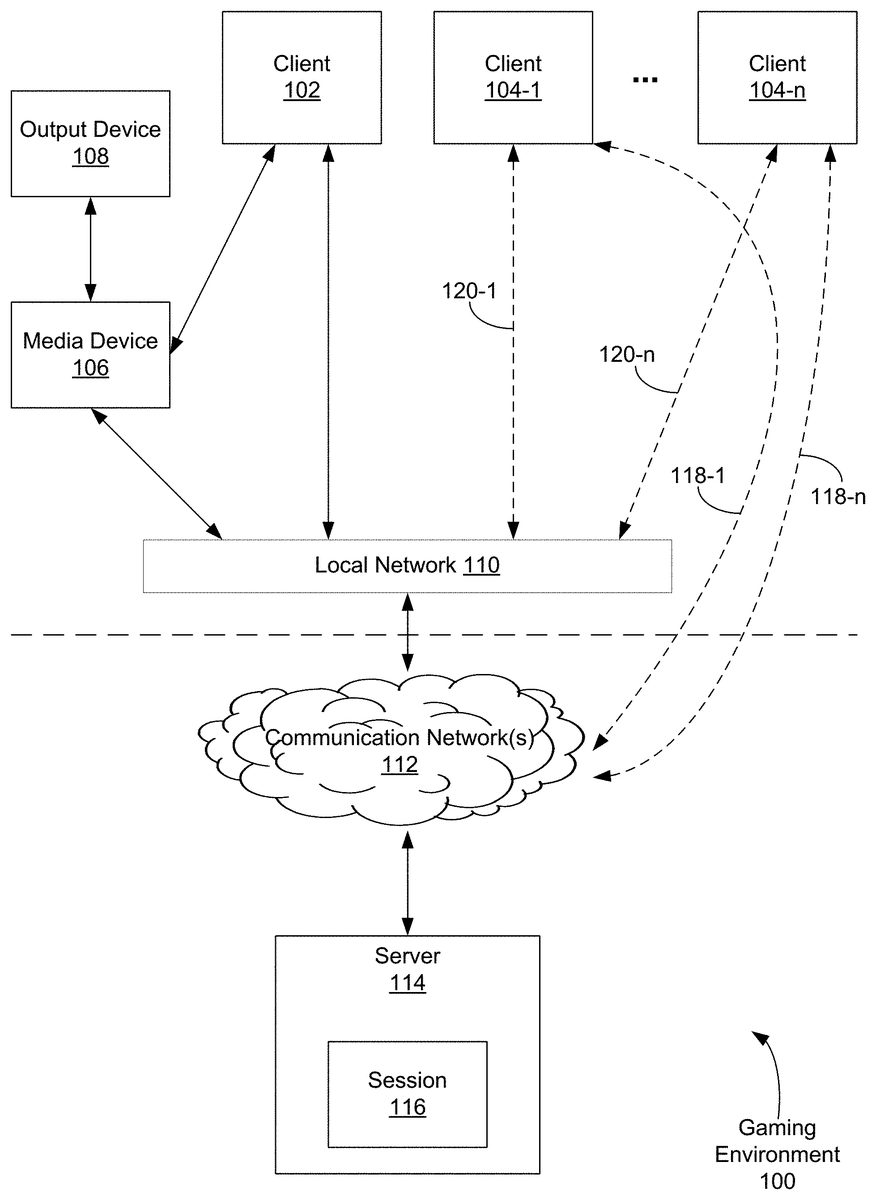
Like reference numerals refer to corresponding parts throughout the drawings. DESCRIPTION OF IMPLEMENTATIONS In various implementations described in this application, a gaming environment includes a media device (e.g., a casting device) coupled to an output device, and a first client device communicatively coupled to the media device. An application (e.g., a game application) is executed on the first client device. A session is established between the executing application and a remote server, as well as the media device. An identifier of the session (e.g., a link) may be presented to users of one or more second client devices, where the users may use the session identifier to join the session. The session and the session identifier are also associated with a controller configuration that facilitates interaction with the session at the second client devices. In this manner, a session associated with an interactive application may be initiated at a host client, and additional clients, including clients that do not have the application installed, may be invited to and onboarded onto the session in a more efficient manner. Additionally, in this manner, a common input interface for the session may be provided to the host client and additional clients in the session. FIG. 1Ais an example gaming environment100in accordance with some implementations. The gaming environment100includes a client device102and a media device106on a local network110. In some implementations, the local network110networks one or more devices using wired (e.g., Ethernet) and/or wireless (e.g., Wi-Fi) communications. For example, the local network110includes a router device that networks one or more devices into the local network110. The local network110is communicatively coupled to communication networks112(e.g., wide-area networks, the Internet). The client device102and the media device106are communicatively coupled. The client device102and the media device106may communicate with each other through the local network110and/or directly (e.g., via Bluetooth or other ...
Like reference numerals refer to corresponding parts throughout the drawings.
DESCRIPTION OF IMPLEMENTATIONS
In various implementations described in this application, a gaming environment includes a media device (e.g., a casting device) coupled to an output device, and a first client device communicatively coupled to the media device. An application (e.g., a game application) is executed on the first client device. A session is established between the executing application and a remote server, as well as the media device. An identifier of the session (e.g., a link) may be presented to users of one or more second client devices, where the users may use the session identifier to join the session. The session and the session identifier are also associated with a controller configuration that facilitates interaction with the session at the second client devices. In this manner, a session associated with an interactive application may be initiated at a host client, and additional clients, including clients that do not have the application installed, may be invited to and onboarded onto the session in a more efficient manner. Additionally, in this manner, a common input interface for the session may be provided to the host client and additional clients in the session.
FIG. 1Ais an example gaming environment100in accordance with some implementations. The gaming environment100includes a client device102and a media device106on a local network110. In some implementations, the local network110networks one or more devices using wired (e.g., Ethernet) and/or wireless (e.g., Wi-Fi) communications. For example, the local network110includes a router device that networks one or more devices into the local network110. The local network110is communicatively coupled to communication networks112(e.g., wide-area networks, the Internet).
The client device102and the media device106are communicatively coupled. The client device102and the media device106may communicate with each other through the local network110and/or directly (e.g., via Bluetooth or other wireless communications). In some implementations, the client device102and the media device106are local to each other (e.g., in the same room, in the same house, etc.). The media device106is coupled to one or more output devices108that can output visual and/or audio content (e.g., a television, a display monitor, a sound system, speakers, etc.). The media device106is configured to output content to the output device(s)108. In some implementations, the media device106is a casting device (e.g., CHROMECAST by Google Inc.) or a device that otherwise includes casting functionality.
The client device102is a device that includes, and can run, one or more applications. In some implementations, the client device102is a smartphone, tablet device, a laptop or notebook computer, a desktop computer, or a multimedia device.
In some implementations, the client device102includes one or more applications that are configured to operate in conjunction with the media device106. In some implementations, the applications include a media device application for pairing the client device102with the media device106and configuring the media device106. The applications also include one or more applications that can cast associated content to the media device106. In some implementations, an application casts data and/or content to the media device106by sending the data/content directly to the media device106(e.g., via the local network110) and/or by directing the media device106to a remote location (e.g., a Universal Resource Locator (“URL”) or other link to a location at a server system) from which the media device106can stream or otherwise receive data/content. The media device106receives data/content from the application and/or the remote location and outputs visual and/or audio content corresponding to the received data/content to the output device108.
In the gaming environment100, a user (hereinafter the “host user”) of the client device102(hereinafter the “host client”) can start a game by launching a game application (e.g., game application228,FIG. 2A) for execution at the host client102. The executing game application communicates with a server114to establish a game session116at the server114. In some implementations, the user can also instruct the game application to communicate with the media device106to direct the media device106to receive data associated with the game session for outputting. Thus, a session116is established between the game application, the remote server114, and the media device106.
The host user can invite additional players to join the game. An identifier of the session116may be presented to users (hereinafter “player user(s)”) of one or more client devices104(hereinafter “player client(s)”). In some implementations, the session identifier is or otherwise includes an Internet link (e.g., a short URL). In some implementations, the session identifier is outputted on the output device108through the media device106. For example, the session identifier is displayed on a display coupled to the media device106; the session identifier is received by the media device106from the host client102or the server114. In some other implementations, the session identifier is sent to player clients104in messages (e.g., in a text message). In some further implementations, the session identifier is presented on player clients104in a notification message (e.g., a smartphone notification). For example, when one or more player clients104are determined to be in the local area (e.g., in the same room) of the host client102, the session identifier may be transmitted to these player clients104. The player clients104display a notification that informs the player users of an invitation to join the session. If the player user opens the notification, the player user may access the session identifier directly from the notification or activate an affordance to display the session identifier (e.g., in another application).
The session identifier may be used at a player client104to join the session116. In some implementations, the session identifier is a link (e.g., a Universal Resource Locator (“URL”)) of the session116. The link or an encoding of the link (e.g., a QR code) may be displayed by the output device108or sent to player devices104in messages.
When the session identifier is used at a player client104(e.g., the session identifier link is activated), the player client104communicates with the server114in order to join the session116. After the player client104joins the session116, player users can play the game along with the host user, i.e., make inputs that affect the output of the session116.
In some implementations, if the player client104is already on the local network110(e.g., connected to the local network through connection120) of the host client102, communications between the server114and the player client104go through the local network110. If the player client104is not on the local network110of the host client102, communications between the server114and the player client104go through a different connection (e.g., connection118through cellular data networks).
In some implementations, as part of the process of the player client104joining the session116, the server114accesses the capabilities of the player client104and/or a quality of the communicative connection between the server114and the player client104. In some implementations, the server114measures network latency between the client104and the server114. If the measured latency is above a threshold and a lower-latency connection is available, the server114can suggest that the player client104change to the lower latency connection, or invite the player user of the player client104to change the player client104to the lower latentcy connection. For example, if the player client104is on a cellular wireless connection118, and the host user's local network110is available, the server114can suggest that the player client104should connect through the local network110.
In some implementations, the latency threshold requirements differ between games. For example, some games (e.g., action games) are best experienced on lower latency connections, and some other games (e.g., online board games or card games) are not as demanding with respect to latency, and the server114may make connection recommendations in view of these different requirements.
In some implementations, the server114invites the player client104to a lower latency connection (e.g., the local network110) or otherwise facilitates connection of the player client104to the lower latency connection. For example, the server114can present, or instruct the host client102or the media device106to present, access credentials to the local network110(e.g., Wi-fi username and password for the router of the local network110). In some implementations, the access credentials are time-limited (e.g., for just the duration of the session116, for just the current day, etc.) and/or session-limited.
As part of the player client104joining the session116, the server114communicates with the player client104to set up a controller on the player client104. In some implementations, this includes the server114assessing whether the player client104has the needed resources for the controller, including whether the player client104has an application needed to implement the virtual controller and/or whether the communicative connection between the player client104and the server114has a latency that is appropriate for the game session (e.g., as part of the capabilities and connection quality assessment described above). Depending on the available resources at the player client104, the connection quality, and the requirements for the game, the controller may be implemented differently at the player client104.
In some implementations, a standardized controller is implemented in a predefined application not specific to the game or directly associated with the game (e.g., a casting device application, such as CHROMECAST or GOOGLE CAST by Google Inc., or other media device application), or in the operating system of the player client104. For example, the device operating system or a predefined application on the player client104may have a controller sub-module. The controller sub-module includes one or more standardized controller configurations, templates, or the like. Each of the standardized controller configurations configures the controller sub-module to utilize input devices and/or sensors on the player client104in some way to implement a virtual controller. Which standardized controller configuration is used may vary by the game and/or by the type of player client104. For example, if the player client104is a mobile device with a touch screen, a standardized controller configuration that implements a virtual controller pad displayed on, and utilizing the touch screen, is used. The virtual controller pad may include virtual buttons, a virtual directional pad, and/or a virtual joystick. As another example, if the player client104is a laptop or desktop computer with a physical keyboard, a standardized controller configuration that maps keys of the physical keyboard to controller functions may be used. As a further example, on a player client104that includes sensors (e.g., an accelerometer) and for games that use motion of the player client104as an input, a standardized controller configuration that turns the player client104into a motion controller with optionally one or more virtual buttons displayed on the touch screen is used.
A standardized controller configuration may be used by multiple games, and is the same across the different games that use that standardized controller configuration. The player client104is instructed on which standardized controller configuration to use as part of the process of joining the session116. Further, the standardized controller configurations may also be used on the host client102.
In some implementations, a game has a specific controller configuration that may be implemented on the controller sub-module. Such a configuration may be stored at the server114and transmitted to the host client102and player client104, respectively, as part of the process of the host client102starting the session106and the player client104joining the session116, respectively. The specific configuration may be stored or cached at the host client102and/or player client104for future use. The specific controller configuration may be applied to the controller sub-module; the controller sub-module acts as a blank canvas for the specific controller configuration. In some implementations, a specific controller configuration can be an entirely custom controller or a mix of standard controller and a custom controller or region.
In some implementations, a game requires a specific application associated with the game. For example, a game may require a controller application associated specifically with the game.
In some implementations, the player client104may be directed to download the specific application or the predefined application as part of joining the session116. For example, if the player client104does not already have the predefined application (with the controller sub-module) or the specific application associated with game, and such an application is required for play, the server114instructs the player client104to prompt the player user that a download is needed and to ask the player user for permission to proceed.
In some implementations, a game can be played with a webpage-based controller interface. For example, a controller interface for the game may be embedded in a webpage, and the webpage is rendered in a web browser on the player client104(and/or the host client102as well). The player user then can interact with the controller interface in the webpage. If the webpage-based control interface is the controller of choice for the session116, the server114transmits the control interface webpage to the player client104when the player client104joins the session.
In some implementations, which controller is used for a game session116is based on the game's specifications and/or the resources available at the client102/104. For example, if the game requires a game-specific application to be downloaded, the player client104is checked for the presence of the application and a prompt to download sent if the application is not present. If the game does not require a game-specific application but instead utilizes a standardized controller configuration or a controller template for a controller sub-module, the player client104is checked for the presence of the controller sub-module and a prompt to download sent if the controller sub-module (e.g., in an application or an operating system update) is not present. If the controller sub-module is present, the controller configuration or template (e.g., the game-specific custom template, an indication of which standardized configuration to use) is transmitted to the player client104. As a further example, if the game can use either a standardized controller configuration or a webpage-based interface, and the game does not require low-latency control, then a webpage-based interface may be used if the controller sub-module is not present, to avoid additional downloading.
In some implementations, the quality of the communicative connection between the player client104and the server114is checked, as noted above. For example, if the game has requirements with respect to latency and a connection through the cellular data networks does not meet that requirement, a prompt to switch to a higher-quality connection (e.g., a local area network connection) may be transmitted. For example, if the player client104is connecting118through the cellular data networks, and that connection118has too high latency for the game, the player user may be prompted to switch the player client104to a connection through a local network. If the player client104is in the same area as the host client102(e.g., in the same room), then the player client104can connect120to the same local network110as the host client102. In some implementations, the media device106or the host client102, or even the router for the local network110, is instructed by the server114to provide the player client104with credentials to join the local network110(e.g., Wi-Fi credentials for the router of the local network11). These credentials may be, for example, displayed on the output device108(and the player user enters the credentials manually or scans a code that encodes the credentials) or sent to the player client104. These credentials may be temporary, e.g., per-session, for the day, or otherwise session-limited and/or time-limited.
After the player client104has joined the session116and has received the appropriate controller configuration, the player user can play the game on the player client104and influence the output from the game session116.
FIG. 1Billustrates another example gaming environment130in accordance with some implementations. In many respects, gaming environment130is similar to gaming environment100. Client132is a host client of a host user, similar to client102. Media device136, which in gaming environment130is optional, is similar to media device106. Output device138is similar to output device108. Client(s)134are player client(s) of player user(s), similar to client(s)104. Server144is similar to server114, and communicates with client devices and other devices through one or more communication networks148, which are similar to networks112. Session146is similar to session116; host client132first establish the session146with server144and player clients134join the session146.
In gaming environment130, host client132(and media device136and output device138) are remote from player clients134; the player users are remote from the host user. In other words, the player clients134are not located in the same area (e.g., in the same room or even structure) as the host client134. As inFIG. 1A, a game may be started by launching a game application (e.g., game application228,FIG. 2A) for execution at the host client132. The executing game application establishes the session146with server146. Player clients134are invited to join the session146by message; messages with the link to join the session are sent to the player clients134. An appropriate controller configuration is provided to the player client134that joins the session146. Also, in some implementations, the server144determines that the player client(s)134are not local to the host client132and omits prompting or facilitating provision of credentials to the player client(s)134to connect to the local network of the host client132, instead optionally prompting the player client(s)134to connect to a local network that is available.
FIG. 2Ais a block diagram illustrating an example host client102of gaming environment100in accordance with some implementations. Examples of the client device102include, but are not limited to, a mobile phone, a tablet computer, a laptop computer, a desktop computer, a and a wearable personal device. The client device102, typically, includes one or more processing units (CPUs)202, one or more network interfaces204, memory206, and one or more communication buses208for interconnecting these components (sometimes called a chipset). The client device102includes one or more input devices210that facilitate user input, such as a keyboard, a mouse, a voice-command input unit or microphone, a touch screen display, a touch-sensitive input pad, a gesture capturing camera, or other input buttons or controls. Furthermore, some the client devices102use a microphone and voice recognition or a camera and gesture recognition to supplement or replace the keyboard. In some implementations, the client device102includes one or more cameras, scanners, or photo sensor units for capturing images, for example, of graphic series codes printed on the electronic devices. The client device102also includes one or more output devices212that enable presentation of user interfaces and display content, including one or more speakers and/or one or more visual displays. Optionally, the client device102includes a location detection device214, such as a GPS (global positioning satellite) or other geo-location receiver, for determining the location of the client device102. The client device102may also include a proximity detection device215, e.g., an IR sensor, for determining a proximity of a media device106and/or of player clients104. The client device102may also include one or more sensors213(e.g., accelerometer, gyroscope, etc.) for sensing motion, orientation, and other parameters of the client device102, which may be used as input.
Memory206includes high-speed random access memory, such as DRAM, SRAM, DDR RAM, or other random access solid state memory devices; and, optionally, includes non-volatile memory, such as one or more magnetic disk storage devices, one or more optical disk storage devices, one or more flash memory devices, or one or more other non-volatile solid state storage devices. Memory206, optionally, includes one or more storage devices remotely located from one or more processing units202. Memory206, or alternatively the non-volatile memory within memory206, includes a non-transitory computer readable storage medium. In some implementations, memory206, or the non-transitory computer readable storage medium of memory206, stores the following programs, modules, and data structures, or a subset or superset thereof:Operating system216including procedures for handling various basic system services and for performing hardware dependent tasks;Network communication module218for connecting the client device102to other devices (e.g., the server system114, the media device106, and the player clients104) via one or more network interfaces204(wired or wireless) and the local network110and one or more networks112, such as the Internet, other wide area networks, local area networks, metropolitan area networks, and so on;User interface module220for enabling presentation of information (e.g., a graphical user interface for presenting applications, widgets, websites and web pages thereof, and/or games, audio and/or video content, text, etc.) at the client device102via one or more output devices212(e.g., displays, speakers, etc.);Input processing module222for detecting one or more user inputs or interactions from one of the one or more input devices210and interpreting the detected input or interaction;Web browser module224for navigating, requesting (e.g., via HTTP), and displaying websites and web pages thereof, including a web interface for joining the session116;Media device application226for interacting with a media device106, including logging into a user account associated with the media device106, controlling the media device106if associated with the user account, and editing and reviewing settings and data associated with the media device106;Game application(s)228for providing game(s) on the client device102, including facilitating corresponding gameplay and facilitating invitation of additional players;Game controller module230for providing a gameplay input interface to the game application(s)228;Data download module231for downloading data (e.g., game controller configurations438(FIG. 4), game applications228and other applications, updates to modules and applications and data in memory206) from server114and other content hosts and providers; andclient data232storing at least data associated with the game application228and other applications/modules, including:Client device settings234for storing information associated with the client device102itself, including common device settings (e.g., service tier, device model, storage capacity, processing capabilities, communication capabilities, etc.);Media device settings236for storing information associated with user accounts of the media device application226, including one or more of account access information, and information for device settings (e.g., service tier, device model, storage capacity, processing capabilities, communication capabilities, etc.);Game application(s) settings238for storing information associated with user accounts of the game application(s)228, including one or more of account access information, in-game user preferences, gameplay history data, and information on other players;Game controller configuration(s)240for storing information associated with configurations (e.g., received configurations from game controller configurations438,FIG. 4) of game controller module230for game application(s)228; andLocation/proximity data242including information associated with the presence, proximity or location of any of the client device102, the media device106, and player client(s)104.
In some implementations, the game controller module230is a part (e.g., a sub-module) of the media device application226or another application in memory206. In some other implementations, the game controller module230is a part of the operating system216. In some further implementations, the game controller module230is a distinct module or application.
Each of the above identified elements may be stored in one or more of the previously mentioned memory devices, and corresponds to a set of instructions for performing a function described above. The above identified modules or programs (i.e., sets of instructions) need not be implemented as separate software programs, procedures, modules or data structures, and thus various subsets of these modules may be combined or otherwise re-arranged in various implementations. In some implementations, memory206, optionally, stores a subset of the modules and data structures identified above. Furthermore, memory206, optionally, stores additional modules and data structures not described above.
FIG. 2Bis a block diagram illustrating an example player client104of gaming environment100in accordance with some implementations. The player client104is similar to host client102; the player client104has similar components, modules, and data as host client102. In player client104, however, the media device application226(and correspondingly media device settings236) and game application228(and correspondingly game application settings238) are optional. Depending on the particular game to which the player client104is invited to join, the media device application226and the game application228are not required to play. If any of these applications are needed for playing the game (e.g., the game uses a game controller module230within the media device application226), and the application is not in memory206, the player client104may be prompted to download the application.
FIG. 3is a block diagram illustrating an example media device106of gaming environment100in accordance with some implementations. The media device106, typically, includes one or more processing units (CPUs)302, one or more network interfaces304, memory306, and one or more communication buses308for interconnecting these components (sometimes called a chipset). Optionally, the media device106includes a proximity/location detection unit310, such as an IR sensor, for determining the proximity of a client device102or104.
Memory306includes high-speed random access memory, such as DRAM, SRAM, DDR RAM, or other random access solid state memory devices; and, optionally, includes non-volatile memory, such as one or more magnetic disk storage devices, one or more optical disk storage devices, one or more flash memory devices, or one or more other non-volatile solid state storage devices. Memory306, optionally, includes one or more storage devices remotely located from one or more processing units302. Memory306, or alternatively the non-volatile memory within memory306, includes a non-transitory computer readable storage medium. In some implementations, memory306, or the non-transitory computer readable storage medium of memory306, stores the following programs, modules, and data structures, or a subset or superset thereof:Operating system316including procedures for handling various basic system services and for performing hardware dependent tasks;Network communication module318for connecting the media device106to other computers or systems (e.g., the server system114, and the client device102) via one or more network interfaces304(wired or wireless) and one or more networks112, such as the Internet, other wide area networks, local area networks, metropolitan area networks, cable television systems, satellite television systems, IPTV systems, and so on;Content Decoding Module320for decoding content signals received from one or more content sources (e.g., server114for output from the game session116) and outputting the content in the decoded signals to an output device108coupled to the media device106;Proximity/location determination module322for determining the proximity of the client device102and/or104based on proximity related information that is detected by the proximity detection unit310or provided by the server system114;Media display module324for controlling media display; andMedia device data326storing at least data including:Media device settings328for storing information associated with user accounts of a media device application, including one or more of account access information and information for device settings (e.g., service tier, device model, storage capacity, processing capabilities, communication capabilities, etc.); andLocation/proximity data330including information associated with the presence, proximity or location of any of the client device102and/or104, and the media device106.
Each of the above identified elements may be stored in one or more of the previously mentioned memory devices, and corresponds to a set of instructions for performing a function described above. The above identified modules or programs (i.e., sets of instructions) need not be implemented as separate software programs, procedures, modules or data structures, and thus various subsets of these modules may be combined or otherwise re-arranged in various implementations. In some implementations, memory306, optionally, stores a subset of the modules and data structures identified above. Furthermore, memory306, optionally, stores additional modules and data structures not described above.
FIG. 4is a block diagram illustrating an example server in the server system114of gaming environment100in accordance with some implementations. The server114, typically, includes one or more processing units (CPUs)402, one or more network interfaces404, memory406, and one or more communication buses408for interconnecting these components (sometimes called a chipset). The server114may optionally include one or more input devices410that facilitate user input, such as a keyboard, a mouse, a voice-command input unit or microphone, a touch screen display, a touch-sensitive input pad, a gesture capturing camera, or other input buttons or controls. Furthermore, the server114may use a microphone and voice recognition or a camera and gesture recognition to supplement or replace the keyboard. In some implementations, the server114optionally includes one or more cameras, scanners, or photo sensor units for capturing images, for example, of graphic series codes printed on the electronic devices. The server114may also include one or more output devices412that enable presentation of user interfaces and display content, including one or more speakers and/or one or more visual displays.
Memory406includes high-speed random access memory, such as DRAM, SRAM, DDR RAM, or other random access solid state memory devices; and, optionally, includes non-volatile memory, such as one or more magnetic disk storage devices, one or more optical disk storage devices, one or more flash memory devices, or one or more other non-volatile solid state storage devices. Memory406, optionally, includes one or more storage devices remotely located from one or more processing units402. Memory406, or alternatively the non-volatile memory within memory406, includes a non-transitory computer readable storage medium. In some implementations, memory406, or the non-transitory computer readable storage medium of memory406, stores the following programs, modules, and data structures, or a subset or superset thereof:Operating system416including procedures for handling various basic system services and for performing hardware dependent tasks;Network communication module418for connecting the server system114to other devices (e.g., various servers in the server system114, the client device102and/or104, and the media device108) via one or more network interfaces404(wired or wireless) and one or more networks112, such as the Internet, other wide area networks, local area networks, metropolitan area networks, and so on;User interface module420for enabling presentation of information (e.g., a graphical user interface for presenting application(s), widgets, websites and web pages thereof, and/or games, audio and/or video content, text, etc.) at the client device102and/or104;Media device module422(optional) that is executed to provide server-side functionalities for device provisioning, device control, and user account management associated with media device(s)106;Proximity/location determination module428for determining the proximity of the client device102and/or104to the media device106based on location information of any of the client device102and/or104and the media device106;Game server module426for providing server-side functionalities associated with games (e.g., game application(s)228), including but not limited to setting up game sessions440, storing game state data and other game-related data, processing gameplay inputs from client device102and104, and rendering gameplay outputs,Device/network assessment module428for assessing device and network capabilities of client device102and/or104, including but not limited to assessing network bandwidth of the connection to the client device102/104and assessing whether the client device102/104has the needed module or application to play a game;Data transmission module429for providing data (e.g., game controller configurations438), software updates, etc.) to client devices102/104; andServer system data430including:Client device settings432for storing information associated with the client devices102and104, including common device settings (e.g., service tier, device model, storage capacity, processing capabilities, communication capabilities, etc.);Media device settings434(optional) for storing information associated with user accounts of the media device application422, including one or more of account access information and information for device settings (e.g., service tier, device model, storage capacity, processing capabilities, communication capabilities, etc.);Location/proximity data436including information associated with the presence, proximity or location of any of the client device102and/or104and the media device106;Game controller configurations438for storing controller configurations for various games; andGame session data440for storing data associated with game sessions (e.g., game state data, other game-related data), including for example data440-1for a first game session and data440-2for a second game session.
Each of the above identified elements may be stored in one or more of the previously mentioned memory devices, and corresponds to a set of instructions for performing a function described above. The above identified modules or programs (i.e., sets of instructions) need not be implemented as separate software programs, procedures, modules or data structures, and thus various subsets of these modules may be combined or otherwise re-arranged in various implementations. In some implementations, memory406, optionally, stores a subset of the modules and data structures identified above. Furthermore, memory406, optionally, stores additional modules and data structures not described above.
FIGS. 5A-5Billustrate example user interfaces for inviting players to a game session in accordance with some implementations.FIG. 5Aillustrates a user interface500displayed on a host client (e.g., client device102). In some implementations, the user interface500is a user interface of the game application228. The user interface500facilitates invitation of one or more player users to a game session by the host user. The user interface500includes an affordance502to have a link associated with the game session (e.g., a shortlink512,FIG. 5B; a QR code encoding of the shortlink) sent to a media device (e.g., media device106), which then outputs the link to an output device (e.g., output device108) for display. The user interface500also includes an affordance504to send the link associated with the game session in a message (e.g., a text message) to player clients104of player users the host user wishes to invite to the game session. The host user may select either affordance502or504to invite player users, depending on the circumstances. For example, if the player users are in the same room as the host user, the host user may select the affordance502to have the game session link displayed for the player users to enter (e.g., type with a virtual keyboard) into their player clients104. If the player users are remote from the host user, or if entering a link is inconvenient, then the link may be sent in messages to the player client(s)104.
FIG. 5Billustrates a user interface510displayed on an output device108(e.g., television, computer monitor) coupled to media device106. The user interface510includes a shortlink512that is displayed. User interface510(and shortlink512) is displayed in accordance with the activation of affordance502; the shortlink512is transmitted to the media device106, which generates user interface510and inserts the shortlink512into the user interface510, and outputs the user interface510including the shortlink512to the output device108for display. The shortlink512may be displayed as a textual link (which the player user(s) would input into a web browser module at the player client(s)), or as a barcode that the player client(s) may scan at the player user's direction.
FIGS. 5C-5Fillustrate example game controller configurations in accordance with some implementations.FIG. 5Cillustrates a controller interface520displayed on a client device (e.g., host client102, player client104). The controller interface520includes a standardized controller region522, which includes virtual directional pad524and virtual buttons526. For controller interface520, the user holds the client device as if holding a physical game controller and interacts with the virtual directional pad524and virtual buttons526as if operating a directional pad and buttons on a physical game controller. In some implementations, the controller interface520is associated with a respective game controller configuration438applicable to the game controller module230, and is a standardized controller interface usable by multiple games.
FIG. 5Dillustrates a controller interface530displayed on a client device (e.g., host client102, player client104). Controller interface530includes a virtual button532. A user holds in one hand the client device displaying the controller interface530such that the user can activate virtual button532with a thumb from the hand, and user can impart motion and optionally orientation change to the client device (e.g., swing like tennis racket, etc.). The motion and orientation change, which is detected by sensor(s)213, may be used as input in a game. In some implementations, the controller interface530is associated with another respective game controller configuration438applicable to the game controller module230, and is a standardized controller interface usable by multiple games that utilize device motion and/or orientation change as an input.
FIG. 5Eillustrates a controller interface540displayed on a client device (e.g., host client102, player client104). The controller interface540includes a controller region542that may include standardized and/or customized elements. The controller region542may include standardized elements such as virtual directional pad524and virtual buttons526. The controller interface540also includes a custom region548that is customizable, and is reserved for elements specified for a respective game. In some implementations, the entirety of controller interface540, including regions542and548, is customizable to the specific game. In some implementations, the controller interface540is associated with yet another respective game controller configuration438applicable to the game controller module230, and is a custom controller interface specific to a particular game; server114may store within configurations438multiple configurations, where each of the multiple configurations corresponds to a customized configuration specific to a respective game.
FIG. 5Fillustrates a controller interface560displayed on a client device (e.g., host client102, player client104). The controller interface560includes a game view562that is displayed in a web browser (e.g., web browser module224). The game view562includes game controls566(e.g., virtual buttons) and optionally rendered output564or other content (e.g., secondary information) from the game. In some implementations, the controller interface560may be used for games where latency poses less of an impact on gameplay.
FIG. 6is a flow diagram of a method600for establishing an application session, in accordance with some implementations. The method600may be performed at an electronic device (e.g., host client102/132) having one or more processors and memory storing one or more programs for execution by the one or more processors. In some implementations, an electronic device includes one or more programs and memory storing one or more programs for execution by the one or more processors, and the one or more programs include instructions for performing the method600. In some implementations, a non-transitory computer readable storage medium stores one or more programs, the one or more programs including instructions, which, when executed by an electronic device with one or more processors, causes the electronic device to perform the method600.
The device executes (602) an application. The host client102/132executes an application (e.g., game application228). The host user directs the host client to execute the application to initiate a session for the application in which player clients may be invited to join the session. The application may be an application (e.g., an application for an online or cloud-based, multi-player game) that facilitates interaction (e.g., gameplay), within an interactive session (e.g., a game session), by multiple users (e.g., multiple players) at multiple client devices in disparate locations. The devices participating in the application (or more particularly, in a respective session of the application) may include the host client102/132and one or more player clients104/134. The player clients104/134may be invited into the session as described below.
The device establishes (604) a session between the executing application, a remote server associated with the application, and a media device that transmits output from the session to an output device, where the output from the session includes output from the executing application. The host client102/132establishes a session (e.g., session116/146) between the executing application (e.g., game application228), a server (e.g., server114/144), and a media device (e.g., media device106/136). The media device106/136transmits output from the application within the session to an output device108/138. The server114/144is associated with the application (e.g., the server114/144is a game server associated with the game application228). For example, when the game application228is executed at the host client102/132, the game application228communicates with the server114/144to establish a game session. The game application228also communicates with the media device106/136to onboard the media device106/136into the session, with the media device106/136being a device to which the server114/144transmits output and other content from the gaming session for output (e.g., at the output device108/138).
The device presents (606) to users of one or more second electronic devices on which the application is not executing and/or installed a session identifier associated with the session, wherein the session identifier facilitates joining of the session by the second electronic devices and identifies a controller configuration implementable on each of the one or more second electronic devices for enabling the users of the one or more second electronic devices to interact with the session. For example, the host client102/132transmits, or causes to be transmitted, to one or more player clients104/134on which the application is not installed at all or is installed but not executing a session identifier of the session. The session identifier facilitates joining of the session by the player clients104/134, including facilitating installation of the application on a player client if not already installed. The session identifier also includes or references a controller configuration for the player clients104/134to implement in order to facilitate interaction by player users with the session. For example, the host client102/132obtains a session identifier of a game session from the server114/144, and causes the session identifier to be transmitted to player clients104/134and/or to be output at output device108/138(e.g., in user interface510,FIG. 5B) via media device106/136. The host user may direct (e.g., via user interface500,FIG. 5A), the host client102/132to transmit or cause to be transmitted the session identifier. The session identifier may be opened on-device at a player client104/134, or input into an application at the player client104/134in accordance with the outputted session identifier (e.g., the user types the session identifier into the application or scans the session identifier barcode with the player client104/134). In this manner, the player client104/134may join the game session. Furthermore, in accordance with a controller configuration specified by the session identifier and/or the game session, the player client(s)104/134implement a controller interface for the game session. With the player client(s)104/134joined in the game session and a controller interface implemented at the player clients, player users at the player clients may play the game along with a host user at the host client.
In some implementations, the application is a game application. The application running on the host client102/132may be, for example, a game application228. The session116/146is a gaming session, and output from the session includes graphical output resulting from the playing of the game at the host client and player client(s). The output from the session may be output at output device108/138via media device106/136.
In some implementations, the session identifier includes a Universal Resource Locator (URL) for the session. The session identifier may be a URL that the player clients104/134may activate in a web browser module (e.g., web browser224) to initiate a process for joining the session.
In some implementations, the session identifier includes a barcode encoding the URL associated with the session. The URL for the session may be encoded in a barcode (e.g., a linear barcode, a matrix barcode). A player client104/134may scan the barcode while the barcode is displayed to obtain the session identifier URL.
In some implementations, the session identifier is displayed at the second electronic devices in a prompt or a notification. The session identifier (e.g., the URL for the session or a barcode encoding the URL) may be displayed in a prompt or app notification. For example, the host client102/132transmits or causes to be transmitted the session identifier to a player client104/134, where a prompt or notification with the session identifier is displayed.
In some implementations, presenting to users of one or more second electronic devices on which the application is not executing and/or installed a session identifier associated with the session includes transmitting the session identifier to the media device, wherein the media device is configured to transmit the session identifier to the output device. The host client102/132transmits or causes to be transmitted the session identifier to a media device106/136that is also a part of the session116/146, which transmits the session identifier to the output device108/138for output. For example, the output device108/138displays the session identifier as a barcode that a player client104/134can read or as a URL link that may be opened in a web browser module224at the player client104/134to join the session.
In some implementations, presenting to users of one or more second electronic devices on which the application is not executing and/or installed a session identifier associated with the session includes transmitting the session identifier to the second electronic devices in a message. The host client102/132transmits or causes to be transmitted the session identifier to a player device104/134in a message (e.g., text message, instant message, email). For example, the player client104/134receives a message with the session identifier URL link, and the session identifier URL link may be opened in a web browser224at the player client104/134to join the session.
FIG. 7is a flow diagram of a method700for presenting a session identifier in accordance with some implementations. The method700may be performed at an electronic device (e.g., media device106/136) having one or more processors and memory storing one or more programs for execution by the one or more processors. In some implementations, an electronic device includes one or more programs and memory storing one or more programs for execution by the one or more processors, and the one or more programs include instructions for performing the method700. In some implementations, a non-transitory computer readable storage medium stores one or more programs, the one or more programs including instructions, which, when executed by an electronic device with one or more processors, causes the electronic device to perform the method700.
The device receives (702) instructions to establish a session with an application executing on a second electronic device and a remote server associated with the application. A media device106/136receives instructions to establish a session116/146with an application (e.g., game application228) on a host client102/132and with a server114/144. The instructions may be received from the host client102/132or the server114/144. In some implementations, in a game session for a game application228, the output from the game session is displayed at one output location (e.g., output device108/138via media device106/136) rather than at the host clients and player clients (e.g., so that the displays at the host client and player clients may be dedicated to displaying a controller interface (e.g., controller interfaces as shown inFIGS. 5C-5F) with which the host user and player users play the game). Thus, the media device106/136is invited to join the game session as an outlet for output from the game session.
The device establishes (704) the session in accordance with the received instructions. The media device106/136establishes or joins the session116/146with the application (e.g., game application228) on the host client102/132and with the server114/144.
The device receives (706) a session identifier associated with the session, wherein the session identifier facilitates joining of the session by one or more third electronic devices and identifies a controller configuration implementable on each of the one or more third electronic devices for enabling one or more users of the third electronic devices to interact with the session. The media device106/136receives, from the host client102/132or the server114/144, a session identifier for the session. The session identifier facilitates joining of the session by one or more player clients104/134. The session identifier may also identify or reference a controller configuration to be implemented at the player clients104/134within the session to enable player users of the player clients104/134to interact with the session. For example, the host user may direct (e.g., via user interface500,FIG. 5A) the host client102/132to cause the session identifier to be transmitted to (e.g., casted to) the media device106/136. In accordance the host user's direction, the host client102/132causes the session identifier to be transmitted to the media device106/136.
The device transmits (708) the session identifier to an output device for display. The media device106/136transmits the session identifier to an output device108/138, and the output device108/138displays the session identifier for input into or recognition (e.g., scanning) by player clients104/134. The player user(s) may manually input the session identifier into the player client(s)104/134, or input by scanning (e.g., barcode scanning or text recognition) with the player client(s)104/134the session identifier.
In some implementations, the device receives data corresponding to output from the session, the output including output resulting from interaction with the session by the one or more users of the third electronic devices, and transmits the data to the output device for display. The media device106/136receives output from the session resulting from the interaction with the session by the player clients104/134. The media device106/136transmits the session output to the output device108/138, and the output device108/138displays the session output.
In some implementations, the session identifier includes a URL associated with the session. The session identifier may be a URL that may be input into a web browser module at a player client104/134to join the session. In some implementations, the displayed session identifier URL may be input by text recognition (e.g., an image of the URL text is captured by the player client104/134and the URL text is recognized).
In some implementations, the session identifier includes a barcode encoding the URL associated with the session. The session identifier URL may be encoded into a barcode (e.g., linear barcode, matrix barcode). The barcode is transmitted to, and displayed by, the output device108/138. A player client104/134may scan the barcode while the barcode is displayed to obtain the session identifier URL.
In some implementations, the electronic device is a casting device. The media device106/136may be a casting device (e.g., CHROMECAST by Google Inc.).
In some implementations, the application is a game application. The application may be a game application (e.g., game application228). The session116/146is a gaming session, and output from the session includes graphical output resulting from the playing of the game at the host client and player client(s).
Reference have been made in detail to various implementations, examples of which are illustrated in the accompanying drawings. In the above detailed description, numerous specific details are set forth in order to provide a thorough understanding of the invention and the described implementations. However, the invention may be practiced without these specific details. In other instances, well-known methods, procedures, components, and circuits have not been described in detail so as not to unnecessarily obscure aspects of the implementations.
It will be understood that, although the terms “first,” “second,” etc. may be used herein to describe various elements, these elements should not be limited by these terms. These terms are only used to distinguish one element from another. For example, a first device could be termed a second device, and, similarly, a second device could be termed a first device, without changing the meaning of the description, so long as all occurrences of the first device are renamed consistently and all occurrences of the second device are renamed consistently. The first device and the second device are both device, but they are not the same device.
The terminology used herein is for the purpose of describing particular implementations only and is not intended to be limiting of the claims. As used in the description of the implementations and the appended claims, the singular forms “a”, “an” and “the” are intended to include the plural forms as well, unless the context clearly indicates otherwise. It will also be understood that the term “and/or” as used herein refers to and encompasses any and all possible combinations of one or more of the associated listed items. It will be further understood that the terms “comprises” and/or “comprising,” when used in this specification, specify the presence of stated features, integers, steps, operations, elements, and/or components, but do not preclude the presence or addition of one or more other features, integers, steps, operations, elements, components, and/or groups thereof.
As used herein, the term “if” may be construed to mean “when” or “upon” or “in response to determining” or “in accordance with a determination” or “in response to detecting,” that a stated condition precedent is true, depending on the context. Similarly, the phrase “if it is determined [that a stated condition precedent is true]” or “if [a stated condition precedent is true]” or “when [a stated condition precedent is true]” may be construed to mean “upon determining” or “in response to determining” or “in accordance with a determination” or “upon detecting” or “in response to detecting” that the stated condition precedent is true, depending on the context.
The foregoing description, for purpose of explanation, has been described with reference to specific implementations. However, the illustrative discussions above are not intended to be exhaustive or to limit the invention to the precise forms disclosed. Many modifications and variations are possible in view of the above teachings. The implementations were chosen and described in order to best explain the principles of the invention and its practical applications, to thereby enable others skilled in the art to best utilize the invention and various implementations with various modifications as are suited to the particular use contemplated.
Claims
- A method, comprising: at a first electronic client device having one or more processors and memory storing one or more programs for execution by the one or more processors: executing a game application;establishing a network session between the game application, a remote server associated with the game application, and a media device, wherein the media device is configured to transmit output from the network session to an output device, wherein the output from the network session includes gameplay content rendered by the remote server;and causing to be presented to users of one or more second electronic client devices on which the game application is not executing and/or installed a session identifier, wherein: the session identifier is associated with the network session and identifies (i) the network session and (ii) a game controller configuration to facilitate joining of the network session by the one or more second electronic client devices;and the game controller configuration is implementable on each of the one or more second electronic client devices for enabling the users of the one or more second electronic client devices to interact with the network session.
- The method of claim 1 , wherein the game application is a multi-player game application that facilitates interaction between the first electronic client device and the one or more second electronic client devices by implementing, on each client device, a game controller interface associated with the game controller configuration.
- The method of claim 1 , wherein the session identifier includes a Universal Resource Locator (URL) associated with the network session.
- The method of claim 3 , wherein the session identifier includes a barcode encoding the URL associated with the network session.
- The method of claim 1 , wherein the session identifier is configured to be displayed at the one or more second electronic client devices in a prompt or a notification.
- The method of claim 1 , wherein presenting to users of one or more second electronic client devices on which the game application is not executing and/or installed a session identifier associated with the network session comprises: transmitting the session identifier to the media device, wherein the media device is configured to transmit the session identifier to the output device.
- The method of claim 1 , wherein presenting to users of one or more second electronic client devices on which the game application is not executing and/or installed a session identifier associated with the network session comprises: transmitting the session identifier to the one or more second electronic client devices in a message.
- An electronic device, the electronic device including a first electronic client device, comprising: one or more processors;memory storing one or more programs to be executed by the one or more processors, the one or more programs comprising instructions for: executing a game application;establishing a network session between the game application, a remote server associated with the game application, and a media device, wherein the media device is configured to transmit output from the network session to an output device, wherein the output from the network session includes gameplay content rendered by the remote server;and causing to be presented to users of one or more second electronic client devices on which the game application is not executing and/or installed a session identifier, wherein: the session identifier is associated with the network session and identifies (i) the network session and (ii) a game controller configuration to facilitate joining of the network session by the one or more second electronic client devices;and the game controller configuration is implementable on each of the one or more second electronic client devices for enabling the users of the one or more second electronic client devices to interact with the network session.
- The electronic device of claim 8 , wherein the game application is a multi-player game application that facilitates interaction between the first electronic client device and the one or more second electronic client devices by implementing, on each client device, a game controller interface associated with the game controller configuration.
- The electronic device of claim 8 , wherein the session identifier includes a Universal Resource Locator (URL) associated with the network session.
- The electronic device of claim 10 , wherein the session identifier includes a barcode encoding the URL associated with the network session.
- The electronic device of claim 8 , wherein the session identifier is configured to be displayed at the one or more second electronic client devices in a prompt or a notification.
- The electronic device of claim 8 , comprising instructions for: transmitting the session identifier to the media device, wherein the media device is configured to transmit the session identifier to the output device.
- The electronic device of claim 8 , comprising instructions for: transmitting the session identifier to the one or more second electronic client devices in a message.
- A method, comprising: at a second electronic client device having one or more processors and memory storing one or more programs for execution by the one or more processors: receiving instructions to establish a network session with a game application executing on a first electronic client device and a remote server associated with the game application;establishing the network session in accordance with the received instructions;receiving a session identifier associated with the network session, wherein: the session identifier identifies (i) the network session and (ii) a game controller configuration to facilitate joining of the network session by one or more third electronic client devices including the second electronic client device;and the game controller configuration is implementable on each of the one or more third electronic client devices for enabling one or more users of the one or more third electronic client devices to interact with the network session;and transmitting the session identifier to an output device for display.
- The method of claim 15 , further comprising: receiving data corresponding to output from the network session, the output including output resulting from interaction with the network session by the one or more users of the one or more third electronic client devices;and transmitting the data to the output device for display.
- The method of claim 15 , wherein the session identifier includes a Universal Resource Locator (URL) associated with the network session.
- The method of claim 17 , wherein the session identifier includes a barcode encoding the URL associated with the network session.
- The method of claim 15 , wherein the second electronic client device is a casting device.
- The method of claim 15 , wherein the game application is a multi-player game application that facilitates interaction between the first electronic client device and the one or more third electronic client devices by implementing, on each client device, a game controller interface associated with the game controller configuration.
Disclaimer: Data collected from the USPTO and may be malformed, incomplete, and/or otherwise inaccurate.